

Page 1
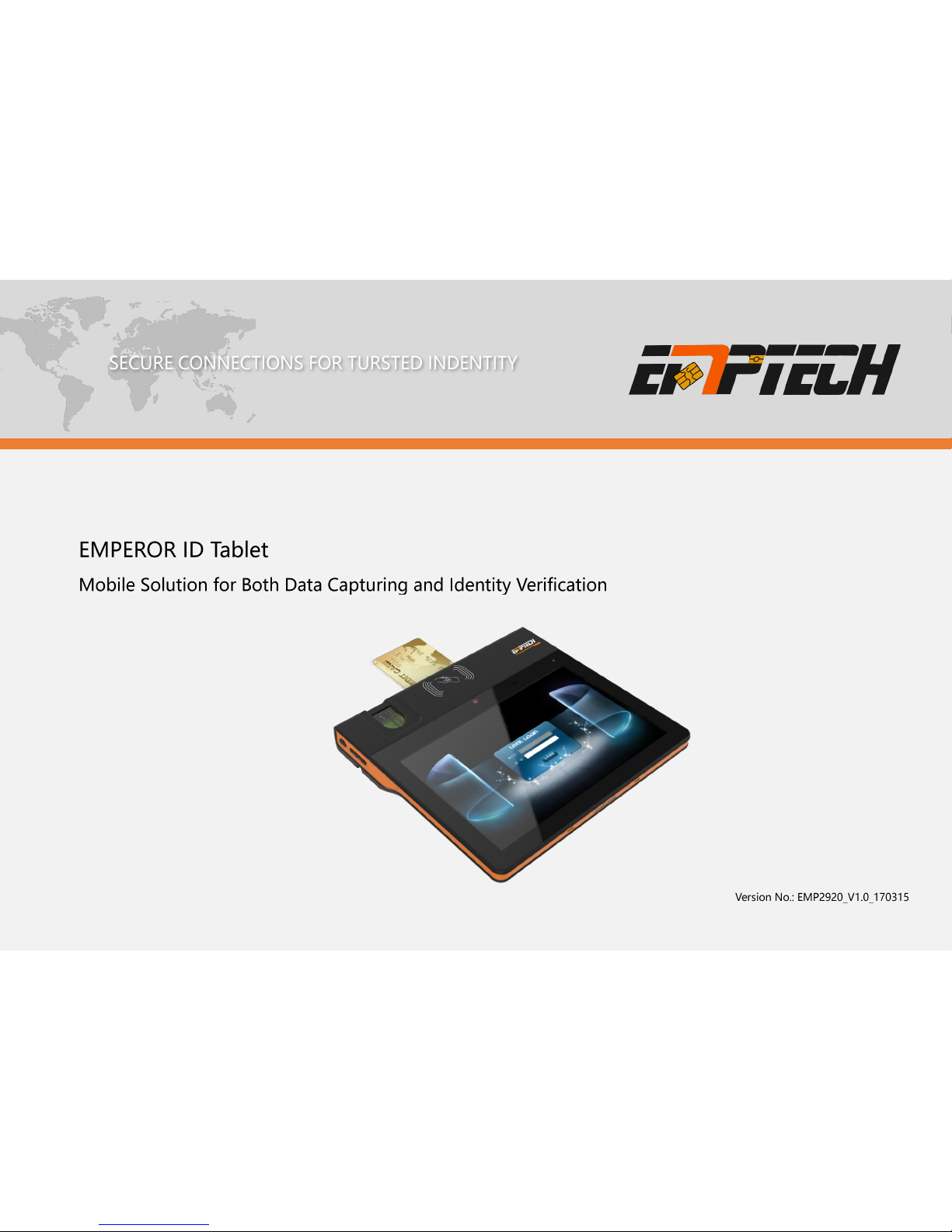
User Manual
Page 2

EMP2920 User Manual
2
Copyright © Shenzhen Emperor Technology Co., Ltd. 2017. All rights
reserved.
No part of this document may be reproduced or transmitted in any form or by
any means without prior written consent of Shenzhen Emperor Technology
Co., Ltd.
Trademarks and Permissions
Shenzhen Emperor Technology Co., Ltd.
and other Emperor trademarks are trademarks of Shenzhen
Emperor Technology Co., Ltd. All other trademarks and trade names
mentioned in this document are the property of their respective holders.
Notice
The purchased products, services and features are stipulated by the contract
made between Shenzhen Emperor Technology Co., Ltd and the customer.
All or part of the products, services and features described in this document
may not be within the purchase scope or the usage scope. Unless otherwise
specified in the contract, all statements, information, and recommendations
in this document are provided "AS IS" without warranties, guarantees or
representations of any kind, either express or implied.
The information in this document is subject to change without notice. Every
effort has been made in the preparation of this document to ensure accuracy
of the contents, but all statements, information, and recommendations in this
document do not constitute a warranty of any kind, express or implied.
Version No.
Items
Author
Date
EMP2920_V1.0_170215
Original Version
Ethan Chen
2017/3/15
Page 3

EMP2920 User Manual
3
CONTENTS
Introduction ............................................................................................................... 4
About this manual ............................................................................................ 4
Intended Audience ........................................................................................... 4
Equipment Care and Maintenance ................................................................ 4
Spare part and accessories ............................................................................ 4
Support .............................................................................................................. 4
General Overview .......................................................................................... 5
Product Diagram ...................................................................................................... 6
General Description ................................................................................................. 7
Features Specification ............................................................................................. 7
Optional Expansion .................................................................................................. 7
Technical Information .............................................................................................. 8
Accessories ............................................................................................................... 9
Quick Operation Guide ............................................................................ 10
Before Use .............................................................................................................. 11
Battery Charging .................................................................................................... 11
Power On/Off .......................................................................................................... 12
Sleep / Wake Up .................................................................................................... 12
Volume Control ....................................................................................................... 12
Page 4

EMP2920 User Manual
4
Introduction
About this manual
Thanks for choosing Emperor ID Tablet, This user's manual provides users with
performance descriptions and operation methods of this device. In order to make
you understand, master and use this device better, please read this manual carefully.
Before using this product, please read this manual carefully and pay
fully attention to the correct operation on the condition of safety.
The operation and maintenance of this machine should be conducted by personnel
with relevant training. Any person violating this principle should bear sole
responsibility of harm.
Intended Audience
This manual designed to use by qualified Operator, Maintenance Engineer,
Service Engineer, Technical Support team, Software engineer and all the people
who intended to support this equipment.
Equipment Care and Maintenance
To strengthen maintenance of the equipment, ensure that the equipment is used
correctly and always in good working condition, realizing long life-cycle, safe and
stable operation, please strictly comply with the requirements for the proper use and
maintenance of equipment.
Spare part and accessories
In order to guarantee the safe and steady operation of the device, please replace
spare parts and accessories with original EMPEROR components, or authorized by
EMPEROR of spare parts and accessories.
Support
Company Name - Shenzhen Emperor Technology Co. Ltd.
Address - F9, Push C, Building 1, Software Industry Base, Nanshan District, 518055
Shenzhen, China
Statement
Page 5
EMP2920 User Manual
5
General Overview
Page 6
General Overview
EMP2920 User Manual
6
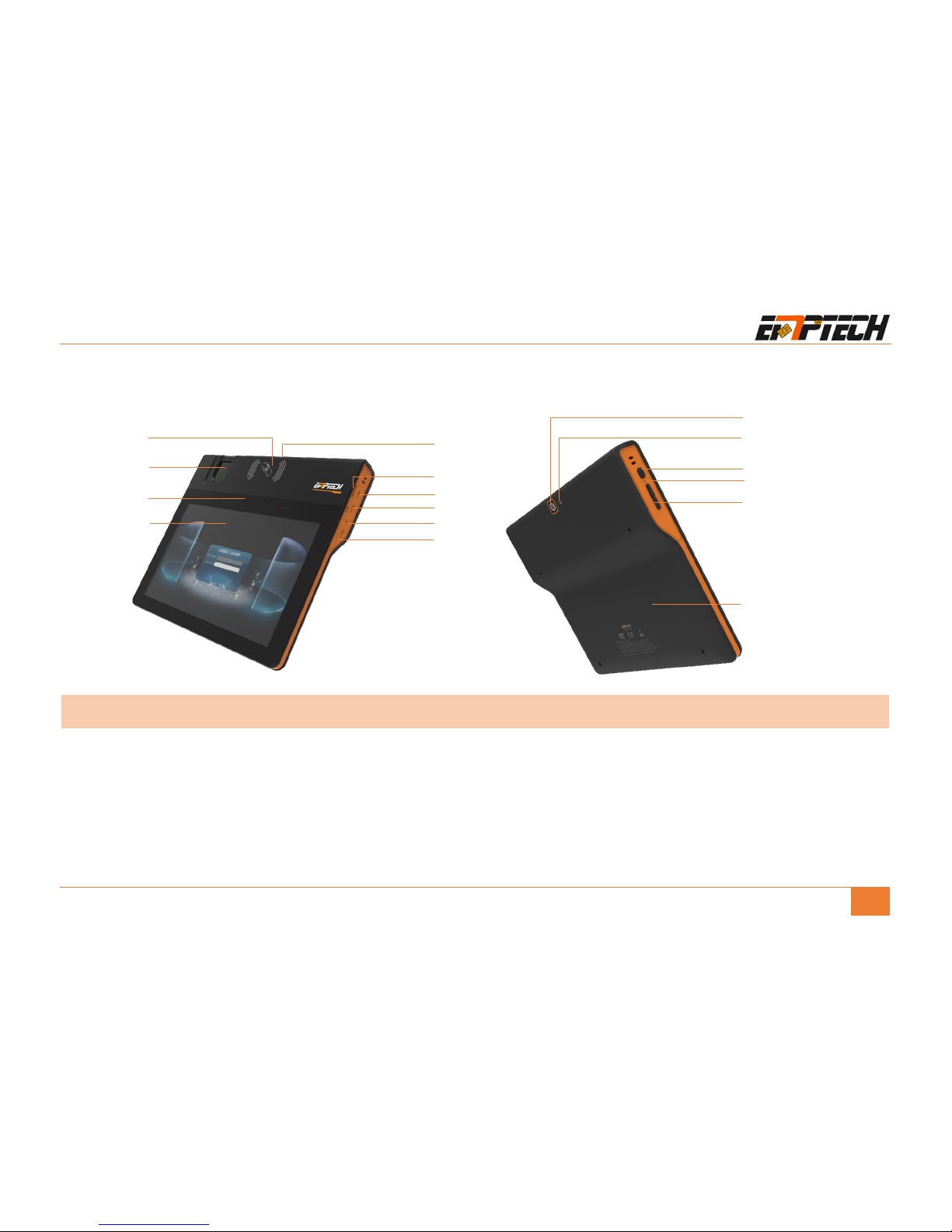
Product Diagram
❶ Contactless Reader
❷ Fingerprint Scanner
❸ Front Camera
❹ Touch Screen
❺ Contact Reader
❻ MicroSD/TF Card
❼ USB Port
❽ Main Power Port
❾ Headphone Jack
❿ Micro USB 2.0 OTG
❶
❷
❼
❹ ❺ ❽❾❿
❸
⓬⓫ ⓭
⓯
⓮
Product Function Module
❻
⓯
⓫ Back Camera
⓬ LED Flash
⓭ Power Button
⓮ Speaker & Microphone
⓯ Battery & SIM/PSAM Card Slot
Page 7

General Overview
EMP2920 User Manual
7
General Description
With the huge demand and rapid development of mobile service in government,
bank and other business segments, threat from fraud has also been heightened.
Thanks to the integral smart ID and biometric technology from Emperor, we present
our ID Tablet to bring security, efficiency and convenience to highly improve the
service experience in both data capturing and identity verification scenarios.
The EMP2920 ID Tablet highly integrates the contact/contactless smartcard reading,
fingerprint scanning, photo taking and MRZ reading into a small device with rich
communication interface. It also adopts a scalable system that supports external
functional modules, thus to provide a faster, safer and more efficient Identity
Control in government, bank, healthcare, education, enterprise, etc.
Features Specification
Fingerprint Scanner:
Resolution up to 500dpi, 320 480 pixel photo;
Accord with standard of FIS 201 / PIV, ISO 19794-2 or ANSI 378 template formats,
FBI Certification.
Photo Capturing:
High resolution webcam on both sides, adaptive light;
2 MP front camera; 8 MP auto-focus with LED flash for rear camera.
Smart Card Reading:
Support both contact and contactless;
Comply with ISO7816 and 14443 A/B.
Signature Collection:
Up to 640 × 480 dip resolution, up to 512 pressure level
Optional Expansion
Swipe MRZ Reader (Embedded):
Standard OCR fonts: OCR-B
Machine Readable Passports (MRP): 2 lines of 44 characters
Machine Readable Visas (MRV): 2 lines of 44 characters, 2 lines of 36 (size II)
Machine Readable Travel Cards: 2 lines of 36 (size II) & 3 lines of 30 (size I)
MRZ swipe speed: up to 100cm/sec
OCR decoding: up to 0.3 second
Page 8
General Overview
EMP2920 User Manual
8
Technical Information
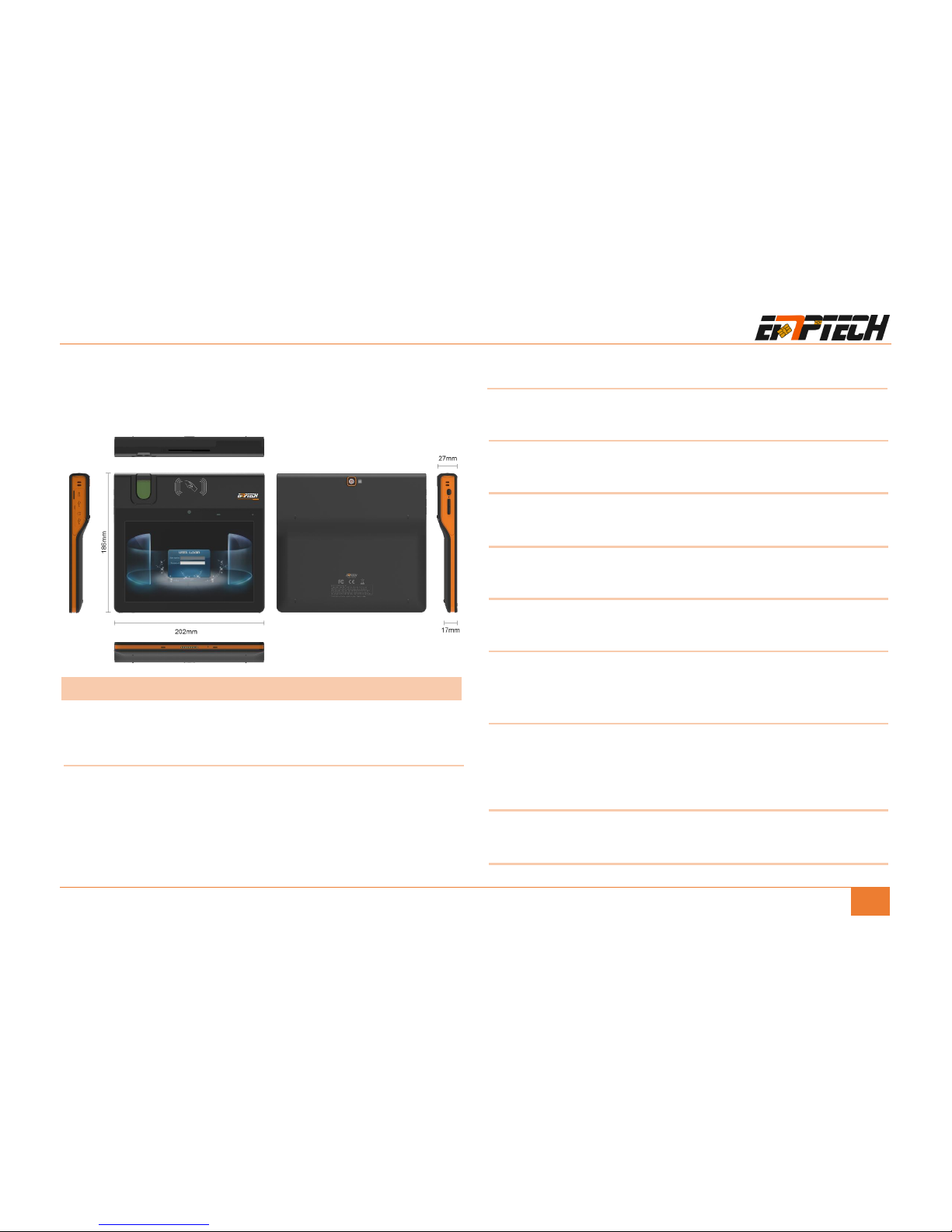
Dimensions (WxLxH) & Weight:
202mm x 186mm x 17mm, H = 27 mm at the top
Entire machine: 800G
Control PC:
CPU: Cortex-A53,1.5GHz
GPU: ARM Mali-T720 MP1 600MHz
RAM: 1G Bytes
ROM: 8G Bytes
TF/SD: 2~32G Bytes
Operating System
Android5.1
Display and
8-inch LED-backlit Multi-Touch Display, 1280 x 800 resolution
Contact Card Reader
ISO/IEC 14443 Type A/B
Contactless Smartcard Reader
ISO/IEC 14443 Type A/B, 13.56MHZ
Fingerprint Scanner
ANSI 378, ISO 19794, FIS 201 / PIV Standards
Cellular Communication:
4G/LTE (operator/country dependent), 3G, 2G
SIM Card (1 slot), PSAM Card (4 slot)
Wi-Fi, Bluetooth and GPS:
Wi-Fi: 802.11b/g/n20/n40
Bluetooth: BT4.0 with EDR
GPS: A-GPS
Camera:
2 MP front camera; 8 MP auto-focus with LED flash for rear camera.
Page 9

General Overview
EMP2920 User Manual
9
Speaker and MIC
Built-in
Certifications:
CE, ROHS, REACH, FCC
External Interface
USB x 2, Main power port, Headset jack
Power Supply
220V input, 8000mAh rechargeable Li-Polymer battery
Working time ≥12h
Operating conditions
Ambient temperature -10° to 55°C, Humidity up to 90%
Accessories
NO.
Item
Qty.
Picture
Remark
1
Battery
1 PCS Standard
2
Power Adapter /
Charger
1 PCS Standard
3
Protective Casing
1 PCS Optional
4
Protective Casing
for MRZ Reading
1 PCS Optional
5
Power Bank
1 PCS Optional
Page 10

EMP2920 User Manual
10
Quick Operation Guide
Page 11
Quick Operation Guide
EMP2920 User Manual
11
Before Use
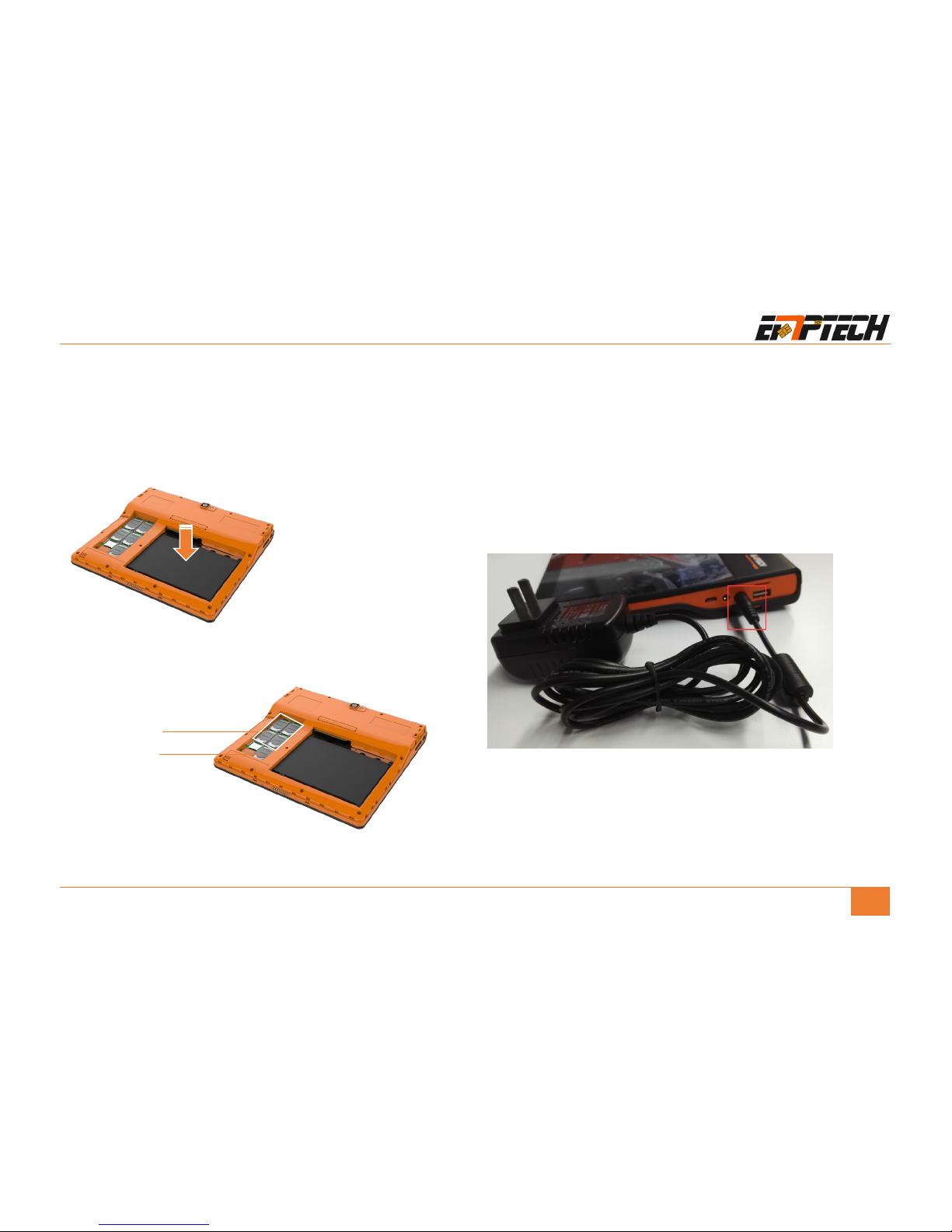
Properly insert the attached battery into the battery holder and ensure good
contact between the battery and the device;
Insert the SIM card and PSAM card in to the card holders, and ensure good
contact between the pin and the probe.
Battery Charging
Use the power adapter to charge the battery, the red indicator on the device will
flash slowly during charging, and when charging completes, the green indicator will
remain on.
Note:
1. Please use the specified power adapter.
2. According to specified charge voltage.
PSAM Card
SIM Card
Page 12
Quick Operation Guide
EMP2920 User Manual
12
Power On/Off
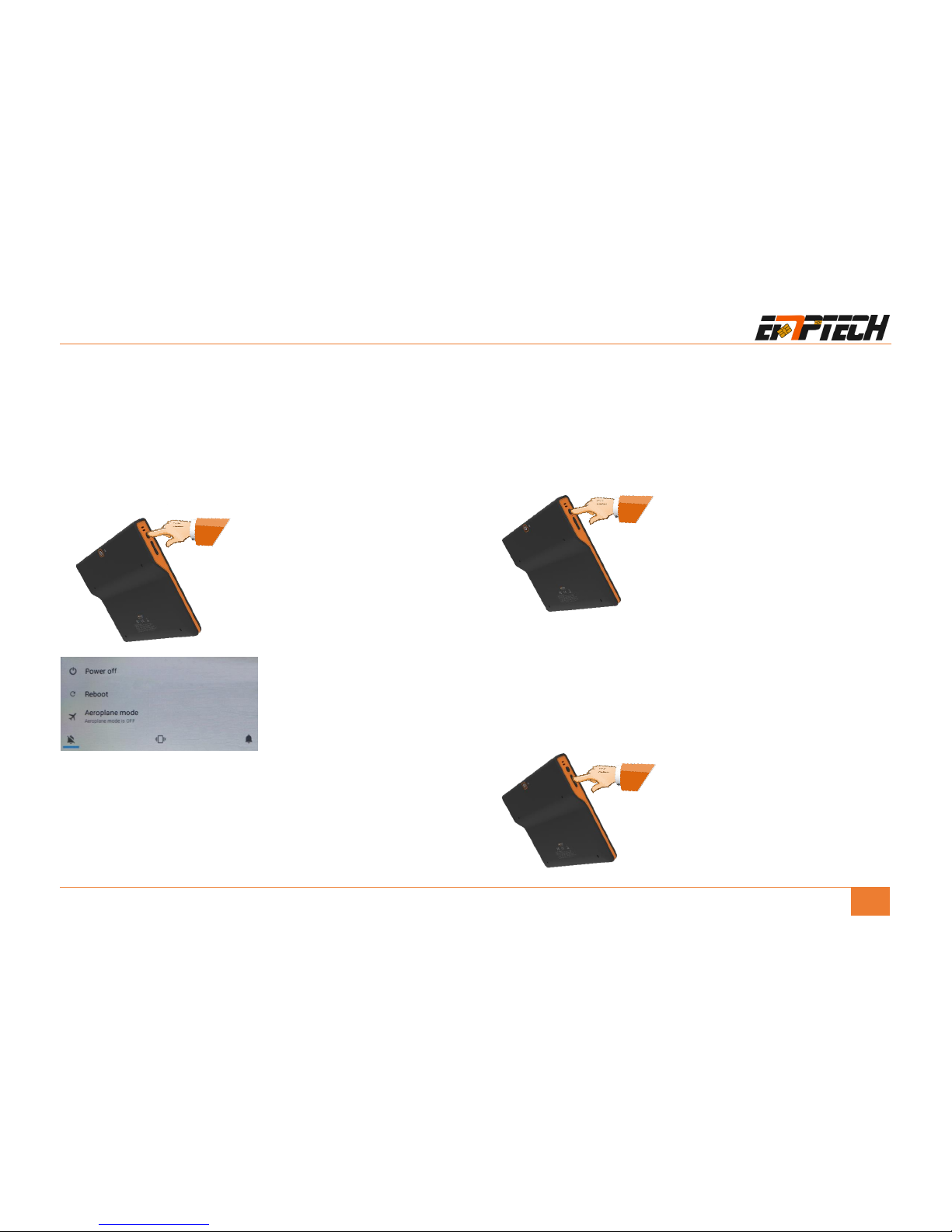
Press power button and hold for 3 seconds to turn on the device. Before turning on,
make sure the battery is charged and is properly installed in the battery holder.
When the device is on, press power button for 3 seconds, and select Power off in the
popup menu to turn off the device;
Sleep / Wake Up
When you do not use the device temporarily, you can press the power button to
set to sleep mode.
If the device is in slept state, you can press the power button to wake up the device.
Volume Control
No matter when device is in work state or sleep state, you can press the volume
button to adjust volume.
3S
V+
V-
Page 13
FCC Warnings:
Changes or modifications not expressly approved by the party responsible for compliance could void the user’s authority to operate the equipment.
This device complies with Part 15 of the FCC Rules. Operation is subject to the following two conditions: (1) this device may not cause harmful interference, and (2) this device
must accept any interference received, including interference that may cause undesired operation.
This equipment has been tested and found to comply with the limits for a Class B digital device, pursuant to Part 15 of the FCC Rules. These limits are designed to provide
reasonable protection against harmful interference in a residential installation. This equipment generates, uses and can radiate radio frequency energy and, if not installed and
used in accordance with the instructions, may cause harmful interference to radio communications. However, there is no guarantee that interference will not occur in a particular
installation.
If this equipment does cause harmful interference to radio or television reception, which can be determined by turning the equipment off and on, the user is encouraged to try to
correct the interference by one or more of the following measures:
-- Reorient or relocate the receiving antenna.
-- Increase the separation between the equipment and receiver.
-- Connect the equipment into an outlet on a circuit different from that to which the receiver is connected.
-- Consult the dealer or an experienced radio/TV technician for help.
This equipment complies with FCC radiation exposure limits set forth for an uncontrolled environment. End user must follow the specific operating instructions for satisfying RF
exposure compliance. This transmitter must not be co-located or operating in conjunction with any other antenna or transmitter.
The portable device is designed to meet the requirements for
exposure to radio waves established by the Federal Communications
Commission (USA). These requirements set a SAR limit of 1.6 W/kg
averaged over one gram of tissue. The highest SAR value reported under
this standard during product certification for use when properly worn on the body
 Loading...