

Page 1
Page 2

Page 3

Important Safety Precautions and Explanation of Symbols
The exclamation point within an equilateral triangle is intended to alert the user to the presence of important
installation, operation, and service instructions in this manual.
!
The lightning ash with arrowhead symbol within an equilateral triangle is intended to alert the user to the
presence of uninsulated dangerous voltages within the enclosure that may be of sucient magnitude to
constitute a risk of electrical shock to the user.
Please read this manual thoroughly before attempting to install, congure, or operate the Emotiva ERC-4.
After successful installation and conguration of the ERC-4, be sure to retain this manual in a safe place for
future reference.
Safety is a key component to a long lasting and trouble free installation. Please read and follow all
instructions and heed all warnings on the ERC-4 and in this manual. The vast majority of the subsequent
safety precautions are common sense. If you are not comfortable with the installation of audio/video
entertainment equipment, you should seek the services of a qualied installation professional or call us for
help.
WARNING: TO REDUCE THE RISK OF FIRE OR ELECTRIC SHOCK, DO NOT USE THE ERC4 NEAR WATER
OR IN WET LOCATIONS, DO NOT EXPOSE IT TO RAIN OR MOISTURE, DO NOT EXPOSE IT TO DRIPPING
!
OR SPLASHING FROM OTHER SOURCES, AND ENSURE THAT NO OBJECTS FILLED WITH LIQUIDS SUCH
AS VASES ARE PLACED ON IT. DOING SO MAY RESULT IN DAMAGE TO THE ERC4 AND THE RISK OF
ELECTRIC SHOCK, WHICH MAY RESULT IN BODILY INJURY OR DEATH.
WARNING: TO REDUCE THE RISK OF ELECTRIC SHOCK, DO NOT REMOVE THE COVER FROM THE
ERC4. THERE ARE NO USERSERVICEABLE PARTS INSIDE THE ERC4. REFER ALL SERVICE TO QUALIFIED
SERVICE PERSONNEL.
Do not install the ERC-4 near or above any heat sources such as radiators, heating vents, or other apparatus
that produces heat. Do not block any ventilation openings or heat sinks. Avoid installing the ERC-4 directly
above other heat-producing equipment unless sucient ventilation or forced-air cooling is provided.
Do not install the ERC-4 in locations without proper ventilation. The ERC-4 should not be operated on a bed,
sofa, rug, or similar surface that may block vents. The ERC-4 should not be installed in an enclosed location
such as a bookcase, cabinet, or closed equipment rack unless sucient ventilation is provided.
Always install your ERC-4 according to the manufacturer’s instructions and only use attachments or
accessories specied by the manufacturer.
Do not install the ERC-4 on any stand, shelf, or other piece of furniture that is unable to support its weight.
If a cart is used to move the ERC-4, use caution to avoid injury from tip-over.
Connect the ERC-4 only to power sources of the correct voltage (as shown in this manual and on the ERC-4).
Protect power supply cables from being pinched, walked on, or otherwise damaged. Be especially careful
where the power cable enters the power outlet and the ERC-4 unit.
Only connect the ERC-4 to an electrical outlet or extension cord of appropriate type and rating.
DO NOT defeat the safety purpose of a grounding or polarized plug by removing ground pins or using unsafe
adapters. A polarized plug has two blades - one wider than the other. A grounding plug has a third ground
prong in addition to the two main conductors. The wide blade or third groundling prong is provided for your
safety. If the provided plug does not t your outlet, consult an electrician to replace your obsolete outlet. If
you replace the ERC-4 power cord, only use one of similar type and equal or greater current rating.
Page 4
The power cable for the ERC-4 should be unplugged from the outlet during severe electrical storms, or when
unused for a long period of time.
Only replace the fuse(s) in the ERC-4 with a fuse(s) of proper value and voltage rating.
The ERC-4 should only be cleaned as directed in the manual. Avoid spraying liquids directly onto the ERC-4
and NEVER spray liquids into the vents or CD Loader mechanism. Care should be taken so that small objects
do not fall into the inside of the ERC-4.
You should seek service for your ERC-4 by qualied service personnel if any of the following occur:
!
1. The power-supply cord or the plug has been damaged.
2. Objects or liquid have fallen or spilled into the vents or CD Loader mechanism.
3. The ERC-4 has been exposed to rain.
4. The ERC-4 exhibits a marked change in performance.
5. The ERC-4 has been dropped, or its enclosure or chassis is damaged.
NOTE: TO COMPLETELY DISCONNECT THE ERC-4 FROM THE AC POWER MAINS, DISCONNECT THE
AC POWER CORD FROM THE AC RECEPTACLE.
NOTE: THE ERC-4 AC POWER CORD MUST REMAIN READILY ACCESSIBLE AT ALL TIMES.
WARNING: THE ERC-4 IS A CLASS 1 LASER PRODUCT. REMOVAL OF PROTECTIVE COVERS, UNATHORIZED
REPAIRS OR MODIFICATIONS, OR OPERATION NOT IN ACCORDANCE WITH THE PROCEDURES SET FORTH
!
IN THIS MANUAL, MAY EXPOSE THE USER TO HAZARDOUS LEVELS OF LASER RADIATION. DO NOT REMOVE
COVERS UNLESS INSTRUCTED TO DO SO BY AUTHORIZED PERSONNEL. DO NOT OPERATE THE UNIT WITH
COVERS REMOVED. REFER ALL REPAIRS TO QUALIFIED SERVICE PERSONNEL.
WARNING: NEVER FORCE FOREIGN OBJECTS INTO THE CD LOADER MECHANISM. NEVER INSERT CRACKED,
BROKEN, OR OTHERWISE DAMAGED DISCS INTO THE CD LOADER MECHANISM. DO NO INSERT DISCS
!
CONTAMINATED WITH EXCESSIVE DIRT OR STICKY MATERIALS INTO THE CD LOADER MECHANISM. DOING
SO MAY RESULT IN MALFUNCTION OR PERMANENT DAMAGE (WHICH MAY NOT BE COVERED BY YOUR
WARRANTY).
CAUTION
CAUTION: TO REDUCE THE RISK
OF ELECTRICAL SHOCK, DO
NOT REMOVE COVER. NO USER
SERVICEABLE PARTS INSIDE.
REFER SERVICING TO QUALIFIED
SERVICE PERSONNEL.
Page 5

Emotiva ERC-4
Dierential Reference™ CD Player and Digital Transport
With High-Resolution Two-Channel Digital Audio Inputs
Contents
Important Safety Precautions and Explanation of Symbols
Introduction .......................................................................................................................2
About This Manual ........................................................................................................... 3
Features ...............................................................................................................................4
Unpacking ...........................................................................................................................5
Supported Formats ..........................................................................................................6
Connections .......................................................................................................................6
ERC-4 Front Panel ............................................................................................................. 8
ERC-4 Rear Panel ............................................................................................................ 10
ERC-4 Remote Control ................................................................................................. 12
Basic Operation .............................................................................................................. 15
Changing Remote Control Batteries....................................................................... 16
Specications .................................................................................................................. 17
Care and Maintenance ................................................................................................ 18
Troubleshooting ............................................................................................................ 19
Emotiva Audio Corporation Five-Year Limited Warranty ................................ 20
FCC Compliance ............................................................................................................. 22
Important User Information ...................................................................................... 22
Notes .................................................................................................................................. 23
Page 6

Emotiva ERC-4
Introduction
Thank you for choosing the Emotiva ERC-4 Dierential Reference™ CD Player and Digital
Transport. The ERC-4 combines a high-quality digital CD transport and a superb balanced DAC
(digital-to-analog converter) in one convenient and attractive package. In addition to serving
as an audiophile CD player and transport, the ERC-4 also oers both Coaxial and Optical S/PDIF
(Toslink) digital audio inputs, so you can use it as a DAC in conjunction with any other digital
audio gear that includes a S/PDIF output.
On the outside, a solid-aluminum face plate and faceted black trim contribute to the modern
aesthetic of the ERC-4. On the inside, a heavy reinforced steel chassis delivers rugged reliability
and prevents external inuences from interfering with your listening experience, and the
precision tray-loading disc mechanism handles your discs gently and carefully. Our cutting edge
switch mode power supply provides clean electrical power, with vanishingly low levels of audible
noise, and powers the presicion digital-to-analog conversion section, and high-performance
ultra-low-distortion analog circuitry. And, to top it all o, front panel buttons allow direct control
of all of the ERC-4’s commonly accessed features, while our all-metal infrared remote control puts
command of the ERC-4 at your ngertips from across the room.
Whether you use the ERC-4 as a precision bit-perfect digital CD transport, as an audiophile CD
player, or use its superb DAC to upgrade the output of your whole home digital audio system, the
ERC-4 will elevate your digital audio listening experience to the next level.
The Emotiva Team.
Page 2
Page 7

Emotiva ERC-4
About This Manual
This manual will provide you with all the information you need to get great sound, and many
years of reliable service, from your ERC-4. The manual also includes a brief summary of the
features oered by the ERC-4, and describes how the controls work and how to perform common
operations.
You may wish to record serial numbers or other purchase information on the Notes page at the
back of this manual.
Page 3
Page 8

Emotiva ERC-4
Features
The Emotiva ERC-4 Dierential Reference™ CD Player and Digital Transport is a two-channel audio
CD player that combines rugged reliability, bit-perfect digital performance with both CD discs
and external digital audio sources, and superb sound quality, in a single attractive and convenient
source component. Here are just some of the exciting features oered by the ERC-4:
• Excellent technical performance and true audiophile sound quality.
• A dedicated CD player that plays all standard Red Book stereo audio CDs.
(The ERC-4 can also play MP3 les from both CD-R and DVD-R discs and the
Red Book audio CD layer of Hybrid SACDs).
• Toslink optical S/PDIF and coax S/PDIF digital inputs accept two-channel digital audio
signals at up to 24/192k from other digital audio sources.
• Analog Devices AD1955 High-Performance Multi-bit Delta-Sigma DAC.
• Low noise ultra-low distortion LM4562 op-amps used in the I/V converter section.
• Switch mode power supply ensures a silent noise oor and eliminates all audible hum.
• Full assortment of digital outputs (Toslink optical S/PDIF, coax S/PDIF, and AES/EBU).
• Both balanced and unbalanced analog audio outputs.
• Machined, gold plated audiophile quality RCA unbalanced output connectors.
• Reinforced steel chassis for rugged reliability and isolation from vibration.
• Additional internal shielding and mass loading to minimize interference and vibration.
• High-reliability tray loading mechanism handles discs consistently and reliably.
• Solid machined aluminum face plate and faceted black aluminum trim.
• High visibility blue graphical OLED display.
• Front panel transport controls with blue halo illumination.
• Full function solid machined aluminum remote control.
• Motorized CD loading tray.
• Automatic universal line voltage operation (100 - 240 VAC).
• Standard IEC power receptacle (accepts all standard IEC power cables).
Page 4
Page 9

Emotiva ERC-4
Unpacking
Your ERC-4 was carefully inspected and packed and should reach you in perfect condition. If
you notice any shipping damage or other issues when you unpack it, please contact Emotiva
immediately.
Gently remove your ERC-4 and its remote control from the packing carton, and remove all
wrappings and shipping material.
It is important to save the box and all packing materials in case your ERC-4 ever needs to be
moved or shipped back to the factory for service.
We truly value customer feedback and would like to hear from you.
Box Contents
• ERC-4 unit
• Remote control
• Power cable
Page 5
Page 10

Emotiva ERC-4
Supported Formats
The CD transport on the ERC-4 supports all standard CDs that comply with the Red Book standard,
as well as MP3 les recorded on both CD and DVD recordable media, including:
• Pre-recorded commercial audio CDs (Red Book standard).
• Audio CDs recorded on a computer or CD recorder (CD-Rs).
• The Red Book CD layer on Hybrid SACDs
(a Hybrid SACD has both a DSD/SACD layer and a standard Red Book audio CD layer).
• MP3 les recorded on both CD-R and DVD-R media.
The CD transport on the ERC-4 does NOT play:
• DVD-A audio discs.
• DVD audio or movie discs.
• Blu-Ray or 4k UHD audio or movie discs.
• Surround sound content recorded on any type of disc.
• Audio les on pre-recorded or computer recorded discs OTHER THAN the ones listed above.
• Non-hybrid SACDs (SACDs with only a DSD/SACD layer).
The digital optical S/PDIF and coaxial S/PDIF digital audio inputs on the ERC-4 accept:
• Two channel PCM digital audio les from 16/44k to 24/192k.
Page 6
Page 11

Emotiva ERC-4
Connections
The ERC-4 may be connected as a stand-alone audiophile CD player, as a digital audio CD
transport, and as a DAC which accepts digital audio from other sources. All outputs on the ERC4,
including both balanced and unbalanced analog audio outputs, and digital audio outputs, remain
active at all times.
Using the ERC-4 as an audiophile CD player
To use the ERC-4 as an audiophile CD player, simply connect either the balanced (XLR) or
unbalanced (RCA) stereo analog audio outputs to a line level analog input on your stereo
preamp or a pre/pro. If your preamp has both types of inputs available, balanced connections are
generally preferred. Both the balanced (XLR) and unbalanced (RCA) analog audio outputs on the
ERC-4 remain active at all times.
Note: The analog outputs of the ERC-4 are designed to be connected to the inputs of a preamp
or pre/pro that includes a volume control. DO NOT connect the outputs of the ERC-4 directly to
the inputs of a power amplier without a volume control; damage to your amplier or speakers
may result.
Note: On most preamps and pre/pros, all of the line level analog inputs are similar; you can use
an input labelled Aux or Line In if your preamp doesn’t have an available CD input.
Using the ERC-4 as a digital audio CD transport
To use the ERC-4 as a digital audio CD transport, simply connect one of the digital audio outputs
to an appropriate digital audio input on your favorite DAC or pre/pro. All of the digital outputs are
active at all times, and all carry the same signal.
Note: Even though the coaxial output uses a standard RCA type audio connector, it carries a
digital signal, so we recommend that you use a cable intended for DIGITAL audio to connect
it to an external DAC or other decoder (pre/pro). A regular analog audio cable may work over
short distances, but performance and sound quality may be compromised.
Using the ERC-4 as a digital to analog converter (DAC)
To use the ERC-4 as a DAC, simply connect your digital audio source to one of the digital inputs
on the ERC-4. The coax S/PDIF and optical S/PDIF inputs are separate, may be individually
selected, and may be connected to dierent sources at the same time. Both digital audio inputs
support two channel PCM stereo digital audio from 16/44k up to 24/192k. Digital audio from
the selected input will be decoded by the audiophile quality DAC in the ERC-4, and the resulting
analog audio will be delivered via the analog outputs. In addition, the digital input signal will also
be passed through the ERC-4, and delivered unchanged via the digital outputs.
Page 7
Page 12
Emotiva ERC-4
ERC-4 Front Panel
3
1
STANDBY
54
2
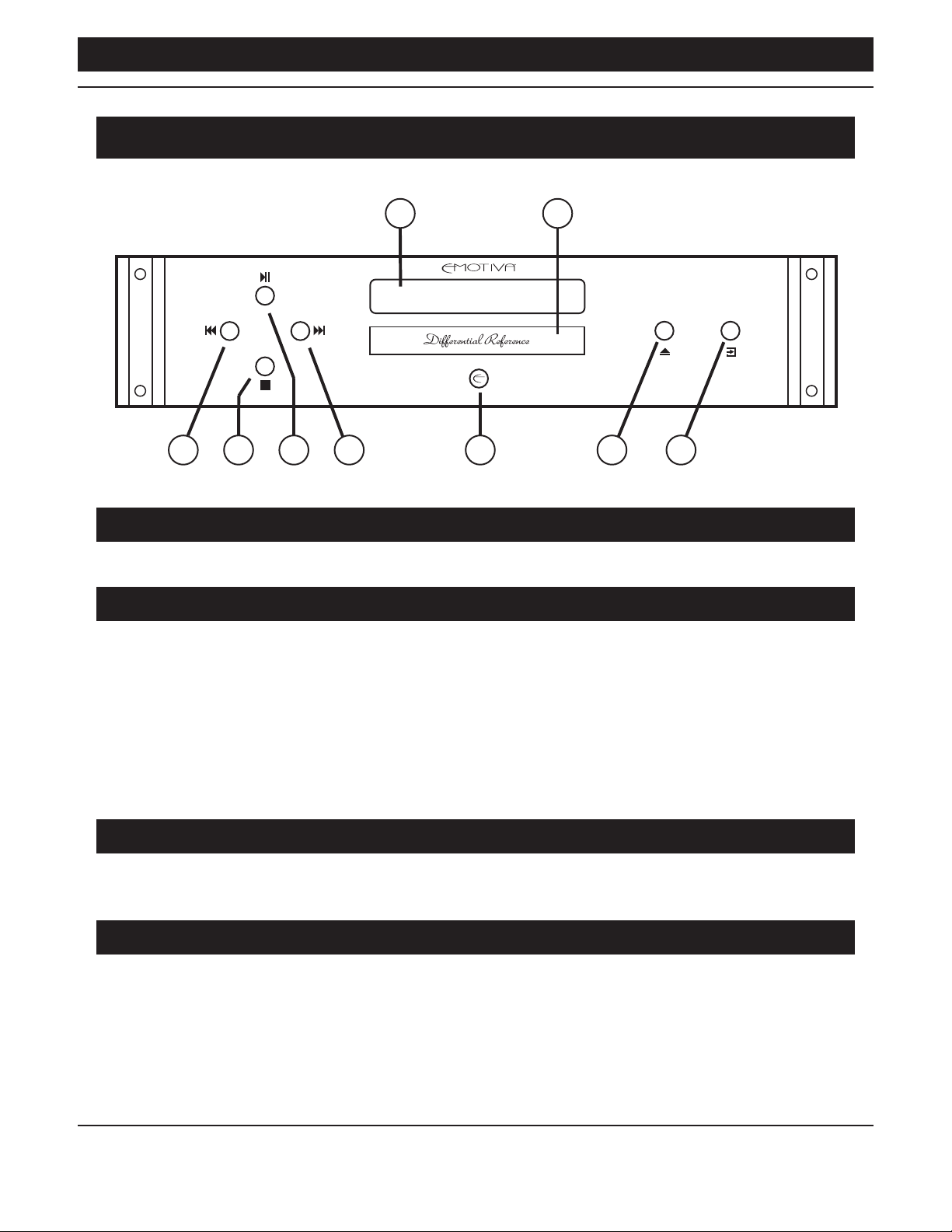
1. Front Panel Display
Bright, clear, easy to read blue OLED status display.
2. Motorized CD Loading Tray
Precision, motorized CD loading tray handles discs gently yet rmly.
ERC-4
9876
Note: The CD Loading Tray opens and closes when you press the Open button on the front panel
or the remote control. Pressing the Loading Tray part-way in by hand when it is open will cause
it to close automatically.
Note: If you press the Open button while the CD Loading Tray is blocked, it will try to open for
several seconds; if the tray remains blocked, it will close again after several seconds. While not
recommended, this will NOT cause permanent damage.
3. Previous Transport Control Button
Press the Previous button once to return to the beginning of the previous song. Pressing this
button repeatedly will move back one song each time you press it.
4. Stop Transport Control Button
Press the Stop button to stop the CD from playing. When you use the Stop button, the CD index
will return to the beginning of the rst track (when you press Play, it will start playing from the
beginning of the rst track).
Page 8
Page 13

Emotiva ERC-4
5. Play / Pause Transport Control Button
When a CD is playing, press this button to temporarily stop playback. When a
CD is paused, press Play / Pause again to resume playback from the current location.
6. Next Transport Control Button
Press the Next button once to move to to the beginning of the next track. Pressing this button
repeatedly will move forward one song each time you press it.
7. Standby (Power) Button
Press the Standby button to toggle the ERC-4 between Standby and On. The halo ring around the
Standby Button will illuminate amber in Standby mode and blue when the ERC-4 is On.
(The rear panel Power switch must be On to operate the ERC-4.)
8. Open (Open / Close) Transport Control Button
Press the Open button once to open the CD Loading Tray when it is closed; press the Open button
once to close the CD Loading Tray when it is open.
9. Input Select Button
Press the Input Select button to cycle between playing an audio CD, and accepting an input from
one of the two S/PDIF digital audio inputs. (OPT will display when the Optical S/PDIF input is
selected; COAX will display when the Coax S/PDIF input is selected.)
Note: The control processor in the ERC-4 remembers the current location on every disc you play.
If you insert a disc which you have previously played, or turn on the ERC-4 with a disc already
inserted, it will resume playing at the location where playback of that disc was stopped the last
time it was played on the ERC-4. To start playing the disc again from the beginning press the
Play Button.
Note: The ERC-4 defaults to the CD Input. Therefore, if you turn on the ERC-4 , it will select the
CD Input as its audio source. If there is already a CD in the drive, it will start playing from the
location where it was previously stopped.
Page 9
Page 14
Emotiva ERC-4
ERC-4 Rear Panel
1 5432
ANALOG OUTPUTS DIGITAL INPUTS DIGITAL OUTPUTS
BALANCED RIGHT R L BALANCED LEFT COAXIALOPTICAL OPTICALCOAXIAL AES/EBU
When playing standard Red Book audio CDs, all digital outputs on the ERC-4 are bit-perfect,
and will operate at the sample rate and bit depth of the CD being played (Red Book CDs are all
recorded at 44.1 kHz / 16 bits). When playing MP3 audio les, the digital audio will be output as
stereo PCM at 44.1 kHz / 16 bits (but the audio quality will depend on the bit rate at which the
MP3 les themselves are recorded).
POWER
OFF ON
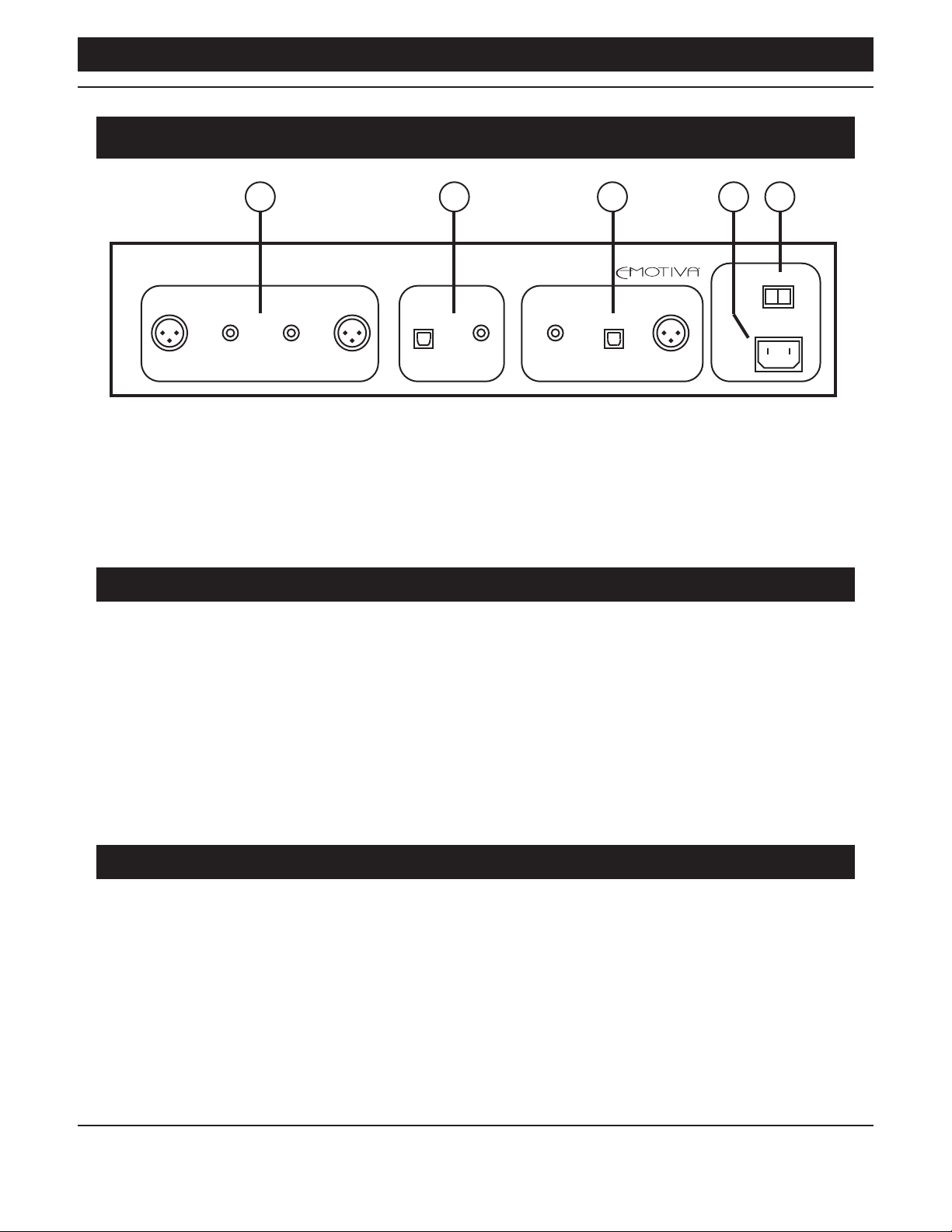
1. Balanced (XLR) And Unbalanced (RCA) Analog Outputs
Connect these outputs to any balanced or unbalanced line level analog audio inputs on your
preamp or pre/pro.
Note: The analog outputs of the ERC-4 are xed level, and are designed to be connected to the
inputs of a preamp or pre/pro that includes a volume control. DO NOT connect the outputs of
the ERC-4 directly to the inputs of a power amplier that does not include a volume control;
damage to your amplier or speakers may result.
Note: On most preamps and pre/pros, all of the line level analog inputs are similar; so you can
use an input labelled Aux or Line In if your preamp doesn’t have an input labelled “CD”, or if
that input is already in use.
2. Digital Audio Inputs
Connect these to a digital audio output from your computer, whole home audio system, or other
digital audio source. The ERC-4 has both coax S/PDIF and optical (Toslink) S/PDIF digital audio
inputs. These inputs accept TWO CHANNEL PCM DIGITAL AUDIO from 16/44k to 24/192k.
Page 10
Page 15

Emotiva ERC-4
3. Digital Audio Outputs
If you wish to use the ERC-4 as a CD transport, connect one or more of the digital audio outputs
on the ERC-4 to your favorite DAC, pre/pro, or other device that has a digital audio input.
The ERC-4 has three dierent digital audio outputs; AES/EBU, coaxial S/PDIF, and optical (Toslink)
S/PDIF. All three digital audio outputs are active at all times. When one of the digital audio inputs
on the ERC-4 is selected, as well as being converted into analog audio by the high quality DAC in
the ERC-4, the digital audio signal from the input is also routed to the digital audio outputs.
4. IEC Power Cord Receptacle
Accepts a standard removable IEC AC power cable (a high-quality commercial power cable is
included).
5. AC Power Switch
Switches the AC main power to the ERC-4 On and O. When this switch is O, the
ERC-4 will not respond to the remote control.
Page 11
Page 16
Emotiva ERC-4
ERC-4 Remote Control
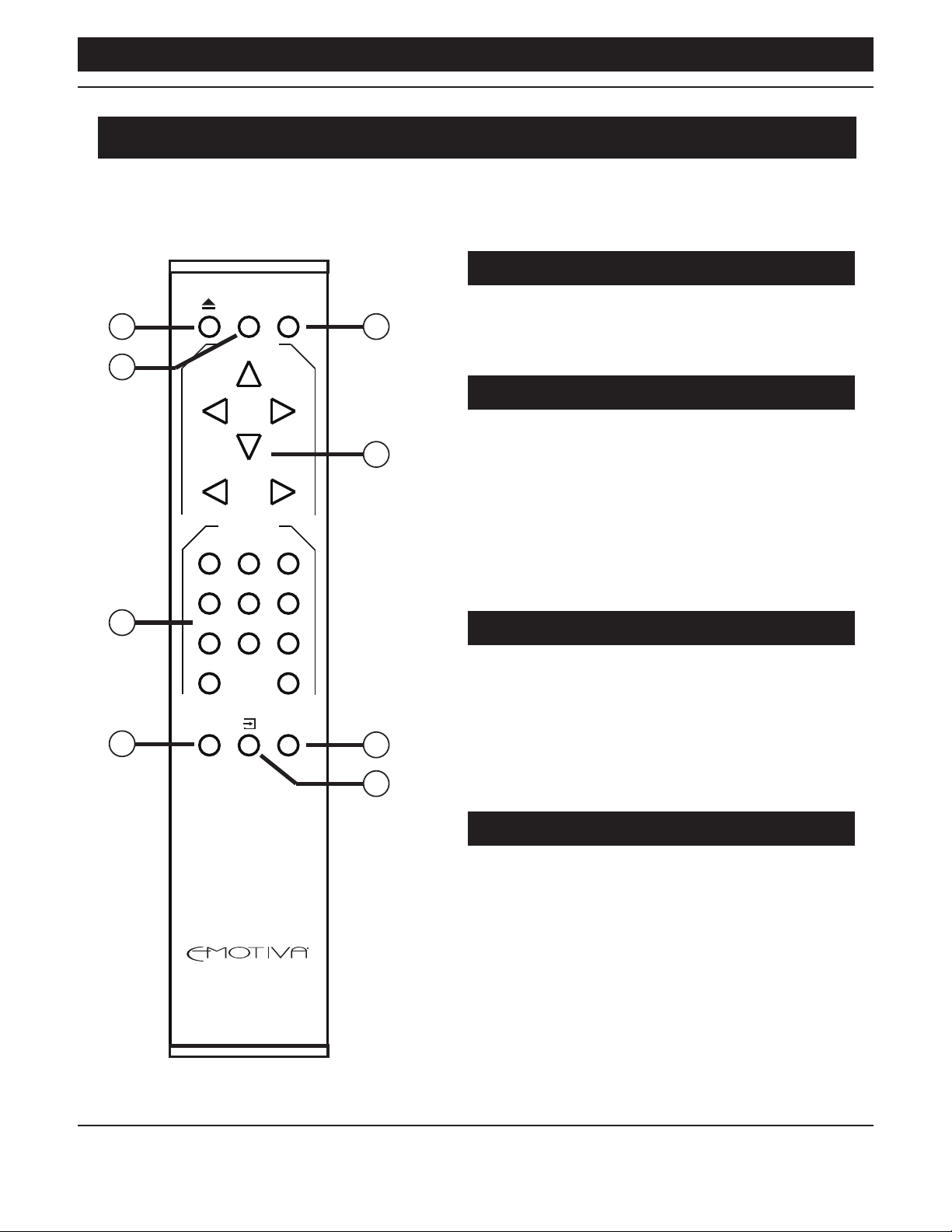
The full function remote control provides complete detailed control over the ERC-4.
1. Open Button
DIM STANDBY
1
PLAY/PAUSE
5
Press the Open button to open the CD Loading
Tray when it is closed; press the Open button to
close the CD Loading Tray when it is open.
2
2. Dim Button
PREV NEXT
STOP
REV FWD
TRACK SELECT
1 2 3
4 5 6
3
7 8 9
0 10+
REPEAT DISPLAY
4
6
7
8
Press the Dim button to change the brightness
of the OLED display and the front panel lighting.
There are four brightness levels; the lowest level
is O; each time you press the Dim button the
display brightness will increase by one step; after
reaching maximum brightness, pressing the Dim
button again will return the display to minimum
brightness (o).
3. Number Buttons (1 to 10+)
Press a number to start playing the current CD
from that track (the CD will then continue to play
to the end). For track numbers above 10, press
10+ plus the second digit.
(For example, to play track 13, press the 10+
button followed by the 3 button.)
ERC-R
4. Repeat Button
Pressing the Repeat button while a CD is playing
instructs the ERC-4 to repeat play one or all
tracks. Press the Repeat button once to repeat the
current track (the display will momentarily show
REP ONE); press the Repeat button a second time
to repeat all tracks (the display will momentarily
show REP ALL); press the Repeat button again
to return to normal operation (the display will
momentarily show REP OFF).
Page 12
Page 17

Emotiva ERC-4
5. Standby (Power) Button
Press the Standby button to toggle the ERC-4 between Standby and On. The halo ring around the
Standby Button will illuminate amber in Standby mode and blue when the ERC-4 is On. (The rear
panel Power switch must be On to operate the ERC-4.)
Note: The control processor in the ERC-4 remembers the current location on every disc you play.
If you insert a disc which you have previously played, or turn on the ERC-4 with a disc already
inserted, it will resume playing at the location where playback of that disc was stopped the last
time it was played on the ERC-4. To start playing the disc again from the beginning press the
Play Button.
Note: The ERC-4 defaults to the CD Input. Therefore, if you turn on the ERC-4 , it will select the
CD Input as its audio source. If there is already a CD in the drive, it will start playing from the
location where it was previously stopped.
6. Transport Buttons
These buttons instruct the ERC-4 to start and stop playing a CD, and to move forward or back one
full track.
Play/Pause Button - When a CD is playing, press this button to temporarily stop playback. When a
CD is paused, press Play / Pause again to resume playback from the current location.
Stop Button - Press the Stop button to stop the CD from playing. When you use the Stop button,
the CD index will return to the beginning of the rst track (when you press Play, it will start playing
from the beginning of the rst track).
Previous Button - Press the Previous button once to return to the beginning of the previous
song. Pressing this button repeatedly will move back one song each time you press it.
Next Button - Press the Next button once to move to to the beginning of the next track. Pressing
this button repeatedly will move forward one song each time you press it.
The Forward and Reverse Buttons instruct the ERC-4 to skip quickly forward or backward on the
CD. The rst time you press either button, the CD will start moving in the indicated direction at
2x normal speed, and you will hear the audio intermittently to allow you to note your current
position. Pressing the button again will instruct the ERC-4 to move in the same direction at 4x
speed; pressing it again will move to 8x speed; and pressing it again will move to 20x speed. Press
the button a nal time, or press the Play Button, to return to normal CD play.
Rev (Reverse) Button - Advances the track position toward the beginning of the CD.
Fwd (Forward) Button - Advances the track position toward the end of the CD.
Note: Audio will be muted at all speeds above 2x.
Note: If you press the Rev or Fwd Button while moving rapidly in the opposite direction, your
movement will switch to 2x in the direction of the button you have just pressed.
Page 13
Page 18

Emotiva ERC-4
7. Display Button
The Display button controls how the ERC-4 displays elapsed time.
By default, the display shows the time elapsed on the current track.
Press the Display button once to change the display to the time remaining on the current track.
Press the Display button again to change the display to the total time remaining on disc.
Press the Display button again to return to the default display (the time elapsed on the
current track).
8. Input Select Button
Press the Input Select button to cycle between playing an audio CD, and accepting an input from
one of the two S/PDIF digital audio inputs. (OPT will display when the Optical S/PDIF input is
selected; COAX will display when the Coax S/PDIF input is selected.)
Note: The control processor in the ERC-4 remembers the current location on every disc you play.
If you insert a disc which you have previously played, or turn on the ERC-4 with a disc already
inserted, it will resume playing at the location where playback of that disc was stopped the last
time it was played on the ERC-4. To start playing the disc again from the beginning press the
Play Button.
Note: The ERC-4 defaults to the CD Input. Therefore, if you turn on the ERC-4 , it will select the
CD Input as its audio source. If there is already a CD in the drive, it will start playing from the
location where it was previously stopped.
Page 14
Page 19

Emotiva ERC-4
Basic Operation
Playing a CD
• The ERC-4 must be On in order to play a disc (the Standby button will be halo lit blue and the
display and buttons will be illuminated).
• If the ERC-4 is in Standby mode (the Standby button halo lit amber), press the front panel
Standby button or the Standby button on the remote control to turn the ERC-4 On.
• If the ERC-4 is powered o (nothing is lit), turn the ERC-4 On (into Standby mode) using the
rear panel Power switch, then press the Standby button on the front panel or the remote
control to turn the ERC-4 fully On.
• Press the Open button on the front panel or the remote control to open the CD Loading Tray.
• Place the CD carefully into the Loading Tray. The CD should be inserted with the playing
surface down (label on top), centered in the shallow round depression in the tray.
• Press Open button again to close the tray and load the disc.
• The CD will load and start playing automatically when the Loading Tray is closed.
Note: The control processor in the ERC-4 remembers the current location on every disc you play.
If you insert a disc which you have previously played, or turn on the ERC-4 with a disc already
inserted, it will resume playing at the location where playback of that disc was stopped the last
time it was played on the ERC-4. To start playing the disc again from the beginning press the
Play Button.
Note: The ERC-4 defaults to the CD Input. Therefore, if you turn on the ERC-4 , it will select the
CD Input as its audio source. If there is already a CD in the drive, it will start playing from the
location where it was previously stopped.
Ejecting a CD
• The ERC-4 must be On in order to eject a disc (the Standby button will be halo lit blue and the
display and buttons will be illuminated).
• If the ERC-4 is in Standby mode (the Standby button halo lit amber), press the front panel
Standby button or the Standby button on the remote control to turn the ERC-4 On.
• If the ERC-4 is powered o (nothing is lit), turn the ERC-4 On (into Standby mode) using the
rear panel Power switch, then press the Standby button on the front panel or the remote
control to turn the ERC-4 fully On.
• Press the Open button to open the CD Loading Tray (to eject the disc).
• Gently remove the disc.
Note: It is acceptable to press the Open button while a disc is playing; the ERC-4 will
automatically stop playing, then open the CD Loading Tray.
Page 15
Page 20

Emotiva ERC-4
Changing Remote Control Batteries
Emotiva recommends using high quality Alkaline or 1.5V Lithium AAA batteries in the ERC-4
remote control.
Installing the Remote Control Batteries
The back plate of the ERC-4 remote control is attached by magnets. To remove it, simply insert a
small screwdriver into the slot on the back plate - toward the bottom - and pry gently.
To install batteries:
• Remove the back plate of the remote control.
• Locate the battery holder.
• Carefully insert the two batteries into the battery holder. The negative end of each battery
should face the pressure spring in each section of the battery clip.
• Replace the back plate (the slot should be toward the bottom end of the remote control and
the small metal loop next to the slot should be on the inside when the back is in place.)
Your remote control is now ready to use.
Note: Your ERC-4 may arrive with the batteries packaged separately, or the remote control may
arrive with batteries already installed, but with a small insulator installed between one battery
and the battery contact to prevent the batteries from discharging in shipping. If so, then simply
follow the instructions for opening the remote control, and pull out the small insulator strip
that is inserted between the end of the battery and the battery contact, before using your
remote control.
Replacing the Remote Control Batteries
• Remove the back plate of the remote control.
• Locate the battery holder.
• Note the direction in which the batteries are installed in the holder.
• Remove the depleted batteries and dispose of them in accordance with the manufacturer’s
recommendations.
• Insert new batteries, taking care to insert them in the same orientation (facing the same way)
as the original batteries.
• Replace the back plate (the slot should be toward the bottom end of the remote control and
the small metal loop next to the slot should be on the inside when the back is in place.)
Your remote control is now ready to use.
Page 16
Page 21

Emotiva ERC-4
Specications
Connectivity:
Stereo balanced analog audio outputs: 1 set.
Stereo unbalanced analog audio outputs: 1 set.
Digital audio outputs: 1 Coax S/PDIF; 1 Toslink optical S/PDIF; 1 AES/EBU electrical.
Digital audio inputs: 1 Coax S/PDIF; 1 Toslink optical S/PDIF (stereo; up to 24/192k).
Output Level:
Balanced outputs: +12 dBV (4V RMS).
Unbalanced outputs: +6 dBV (2V RMS).
Frequency Response:
Red Book CD: 10 Hz - 20 kHz +0 /- 0.15 dB.
THD:
< 0.0015% @ 1 kHz.
< 0.01% (20 Hz - 20 kHz).
IMD (SMPTE 4:1):
< 0.005%
THD+N:
Red Book CD: < 95 dB (A weighted).
Crosstalk:
< 93 dB
Phase Deviation:
< 0.8 degrees (20 Hz - 20 kHz).
Power Requirements:
100 - 240 VAC (automatically detected).
Weight:
21 pounds (unboxed).
26 pounds (boxed).
Dimensions:
17 “W x 14”D x 4” H (unboxed).
23” W x 18”D x 7” H (boxed).
Page 17
Page 22

Emotiva ERC-4
Care and Maintenance
Periodic Maintenance
Your ERC-4 requires no periodic maintenance or calibration.
Cleaning your ERC-4
• If necessary, the ERC-4 should be cleaned gently with a soft rag.
• If something sticky gets on the front panel or case of the ERC-4, it should be cleaned with a
mild cleaning solution applied to a soft rag, followed by wiping with a clean rag dampened
with plain water and drying with a soft dry rag or cloth.
Note: DO NOT spray water or cleaning solution directly onto the ERC-4 or into
the vents.
• If something sticky gets on the remote control, it should be cleaned with a mild cleaning
solution applied to a soft rag, followed by wiping with a clean rag dampened with plain water
and drying with a soft dry rag or cloth.
Note: DO NOT submerge the remote control in liquid or spray water or cleaning solution
directly onto it.
• If something sticky or gritty gets on the CD Loader Tray, you may clean the tray gently with a
dampened rag. Be careful to avoid allowing any liquid to enter the mechanism, and be sure to
dry the tray carefully before closing it or inserting a disc.
WARNING: If something sticky or gritty contaminates the inside of the ERC-4, please contact
Emotiva Technical Support for instructions. DO NOT OPEN THE ERC-4 UNLESS INSTRUCTED TO
DO SO. THERE ARE NO USER SERVICEABLE PARTS INSIDE.
Page 18
Page 23

Emotiva ERC-4
Emotiva Audio Corporation Five-Year Limited Warranty
What does this warranty cover?
Emotiva Audio Corporation (Emotiva) warrants its products against defects in materials and
workmanship. This warranty, and all rights provided hereunder, is granted to the original owner,
and may be transferred by the current owner to a new owner if the unit is gifted or sold. In
the event the original owner transfers ownership of the Product prior to the expiration of the
applicable term described below, this Warranty shall terminate at the end of the original term.
This Warranty only applies to Products purchased directly from Emotiva or any of its Authorized
Dealers or International Distributors.
Emotiva warrants any replacement product or part furnished hereunder against defects in
materials and workmanship for the longer of the following: (i) the amount of time remaining
under the original warranty, or (ii) 120 days from your receipt of the repaired or replaced product.
The duration described in this paragraph is hereinafter referred to as the “Term”.
TO THE FULLEST EXTENT PERMITTED BY LAW, ALL IMPLIED WARRANTIES RELATED TO THE
ORIGINAL PRODUCT AND ANY REPLACEMENT PRODUCT OR PARTS (INCLUDING IMPLIED
WARRANTIES OF MERCHANTABILITY AND FITNESS FOR A PARTICULAR PURPOSE) ARE EXPRESSLY
LIMITED TO THE TERM OF THIS LIMITED WARRANTY. SOME STATES DO NOT ALLOW LIMITATIONS
ON HOW LONG AN IMPLIED WARRANTY LASTS, SO THE ABOVE LIMITATION MAY NOT APPLY TO
YOU.
The original owner must make a claim within the Term of the Warranty. A claim shall not be valid
(and Emotiva has no obligation related to the claim) if it is not made within the Term and if it is not
made in strict compliance with the requirements of the “How do you get service?” section.
How long does this coverage last?
The warranty on the ERC-4 commences on the date of retail purchase by the original retail
purchaser. The ERC-4 is warranted for a period of ve (5) years, with the exception of the transport
mechanism. The transport mechanism, including its internal LASER mechanism, is warranted for
a period of two (2) years. This warranty may be transferred by the current owner to a new owner
at any time during the original term. Emotiva warrants any replacement product or part furnished
hereunder against defects in materials and workmanship for the longer of the following: (i) the
amount of time remaining under the original warranty, or (ii) 120 days from your receipt of the
repaired or replaced product. The duration described in this paragraph is hereinafter referred to as
the “Term”.
What will Emotiva do?
Emotiva will, at its option, either: (i) repair the product, or (ii) replace the product with a new
consumer product which is identical or reasonably equivalent (in Warrantor’s sole discretion) to
the product. In the event Warrantor, in its sole discretion, is unable to replace or repair the Product
or it is not commercially practicable to do so, then: (i) if the claim was submitted during the rst
365 days of the Term, Warrantor shall refund to you the purchase price that you paid for the
Page 19
Page 24

Emotiva ERC-4
Product; and (ii) if the claim was submitted after the rst 365 days of the Term, Emotiva shall issue
you a credit equal to the purchase price that you paid for the product. The credit may only be
used for the purchase of merchandise from Emotiva, and cannot be used for freight charges.
When a Product or part is repaired or replaced, any replacement item becomes your property
and the replaced item becomes Emotiva’s property. When a refund or credit is given, the Product
for which the refund or credit is provided must be returned to Emotiva and becomes Emotiva’s
property.
What is not covered by this warranty?
This warranty does not apply: (i) to damage caused by use with products not manufactured
by Emotiva, where the non-Emotiva product is the cause of the damage; (ii) to damage caused
by service or maintenance performed by anyone who is not a representative of Emotiva; (iii) to
damage caused by accident, abuse, misuse, ood, re, earthquake or other external causes; (iv) to
a product or part that has been modied after its retail purchase, where the modication caused
or contributed to the damage; (v) to consumable parts, such as batteries or failure of or damage
to the Product caused by batteries; (vi) if any Emotiva serial number has been removed or defaced
on the product; (vii) glass or plastic panels, cabinetry, trim or other appearance items; (viii)
cosmetic wear or damage to remote controls by user.
EMOTIVA SHALL NOT BE LIABLE FOR ANY INCIDENTAL OR CONSEQUENTIAL DAMAGES ARISING
FROM OR RELATED TO ANY DEFECTS IN OR DAMAGES TO ITS PRODUCTS. SOME STATES DO NOT
ALLOW THE EXCLUSION OR LIMITATION OF INCIDENTAL OR CONSEQUENTIAL DAMAGES, SO THE
ABOVE LIMITATION OR EXCLUSION MAY NOT APPLY TO YOU.
How do you get service?
In order to make a claim under the Warranty, you must:
1. Call or e-mail a customer service representative at 1-877-EMO-TECH (1-877-366-8324) or
[email protected]. You must provide a description of your problem, the serial number of the
Product for which the warranty claim is being made, and the original purchase date.
2. Then, you will be provided with a warranty service authorization number (“WS”).
3. Next, you must ship the Product to the following address, with the WS written in large, bold
numbers on the outside of the box, and with the letters “WS” written before the number, for
example: WS1234. Parcels arriving without a WS number on the outside of the box will be refused.
The customer pays for the shipping to Warrantor. Warrantor pays for the shipping back to the
customer within the continental United States only. Customer is responsible for shipping charges
on all other warranty claims.
Page 20
Page 25

Emotiva ERC-4
Emotiva Audio Corporation
Attn: Repair Department
139 Southeast Parkway Court
Franklin, TN 37064
Units will be refused by Emotiva for the following:
Product was sent without the WS#
Product was sent with inadequate packaging.
Product was damaged in transit.
Product was shipped collect for shipping charges.
How does state law apply?
This warranty gives you specic legal rights, and you may also have other rights which vary from
state to state.
What if my product is damaged on the way to you?
Emotiva is not liable for damages that may incur while an item is in transport to us. Please
purchase insurance when you ship your item. If your Product was not adequately packaged, we
will refuse receipt and the damaged package will be returned to you at your cost. If you do not
have the original Emotiva Audio packaging, please check with our sales department to purchase
replacement-shipping cartons.
How does the Warranty and service apply to international orders?
The Product Warranty is only valid in the country where the Emotiva product was originally
shipped via an authorized dealer, distributor, or direct from the Emotiva factory. The Warranty
is subject to change at any time depending on the laws and regulations within your specic
country. Please check with your distributor for a complete understanding of the warranty in your
county.
If you purchased your Emotiva Product outside of the USA and wish to have it serviced at the
factory, all freight charges are your responsibility. If you do not have an authorized distributor
or repair center in your country, your Product must come back to the Emotiva USA factory for
warranty service.
Page 21
Page 26

Emotiva ERC-4
FCC Compliance
This device complies with part 15 of FCC Rules. Operation is subject to the following two
conditions: (1) this device may not cause harmful interference, and (2) this device must accept any
interference received, including interference that may cause undesired operation.
Important User Information
CAUTION - The use of controls or adjustments or performance of procedures other than those
specied herein may result in hazardous radiation exposure.
CAUTION - No user serviceable parts inside unit. The unit is not to be opened or modied by
the customer. Exposure to harmful laser radiation may result. No service is allowed by the
customer. The unit must be returned to the factory for any service or repair.
Emotiva Audio Corporation
135 Southeast Parkway Court
Franklin, Tennessee
37064
This product complies with FDA Class 1 Laser certication during all modes of operation.
There is no scheduled maintenance necessary on this product.
Internal Laser Radiation Emission Parameters:
Wavelength 790nm (+/- 15nm)
CW power for clasication <290 uW
Wavelength 650 nm (+/- 10nm)
CW power for classication <311 uW
No laser radiation above Class 1 levels is accessible to the user.
Label Data:
“Class 1 Laser product” (explanatory label)
location: Rear Panel
Manufacturer’s ID & Certication Statement
EMOTIVA AUDIO CORPORATION
135 Southeast Parkway Court
Franklin, Tennessee
37064
1-877-366-8324
CLASS 1 LASER PRODUCT
Complies with FDA performance standards for laser products except
for deviations pursuant to Laser Notice No. 50, dated June 24, 2007
EN/IEC 60825-1:2007
Page 22
Page 27

Notes
Emotiva ERC-4
All information contained in this manual is accurate to the best of our knowledge at the
time of publication. In keeping with our policy of ongoing product improvement, we reserve the
right to make changes to the design and features of our products without prior notice.
User Manual Revision 1.0 January 2019
Page 23
Page 28

 Loading...