

Embertec Emberplug EPUSAV-ET-01, Emberplug AV, Emberplug AV EPUSAV-ET-01 Instruction Booklet
Page 1
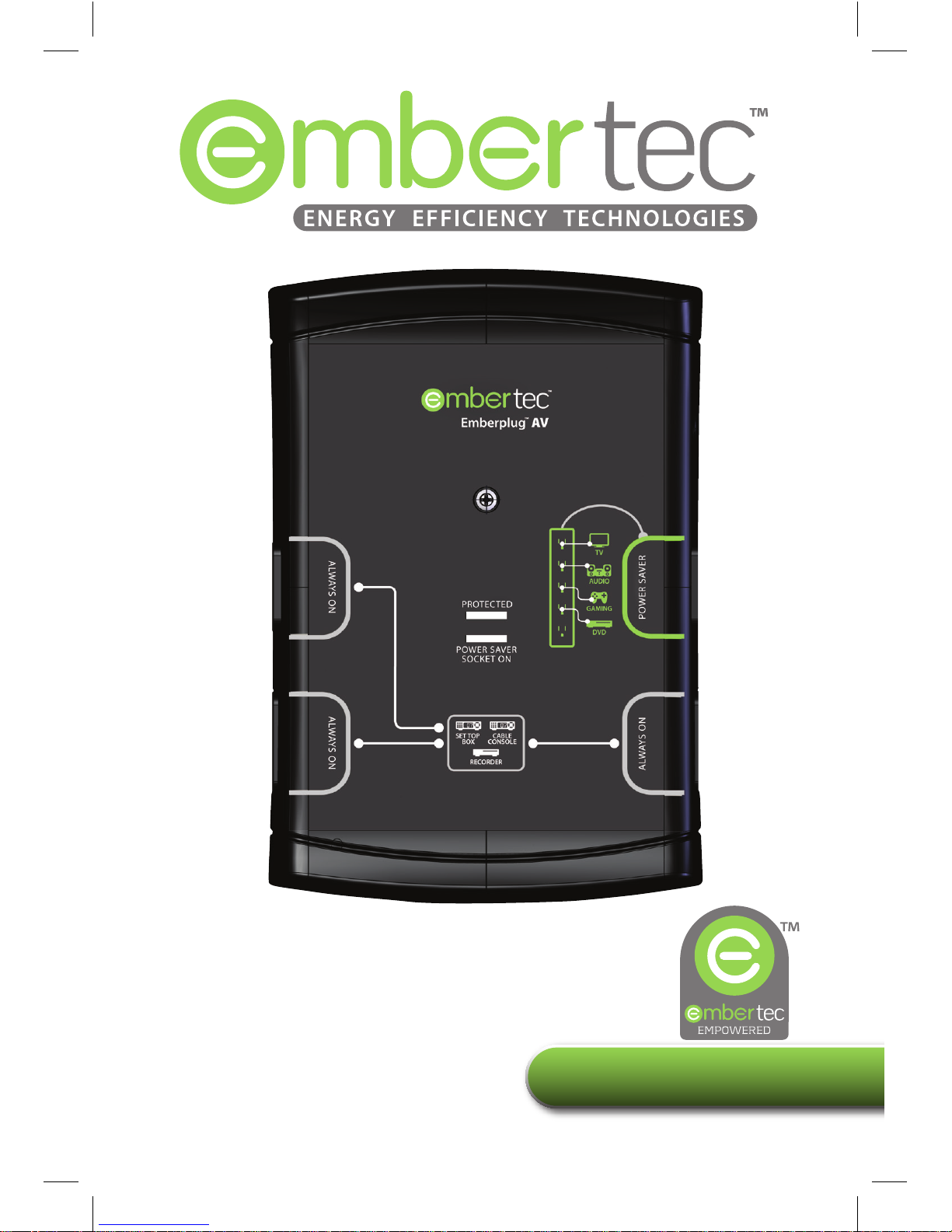
Instruction Booklet
Embertec Emberplug™ AV
with Active Powerdown™
EPUSAV-ET-01
PATENTS GRANTED AND PATENTS PENDING
Page 2
2
Please read this Instruction Booklet before installing
your Embertec Emberplug™ AV.
Your Embertec Emberplug™ can simply be plugged into the wall outlet, or it
can be plugged in and attached with a screw.
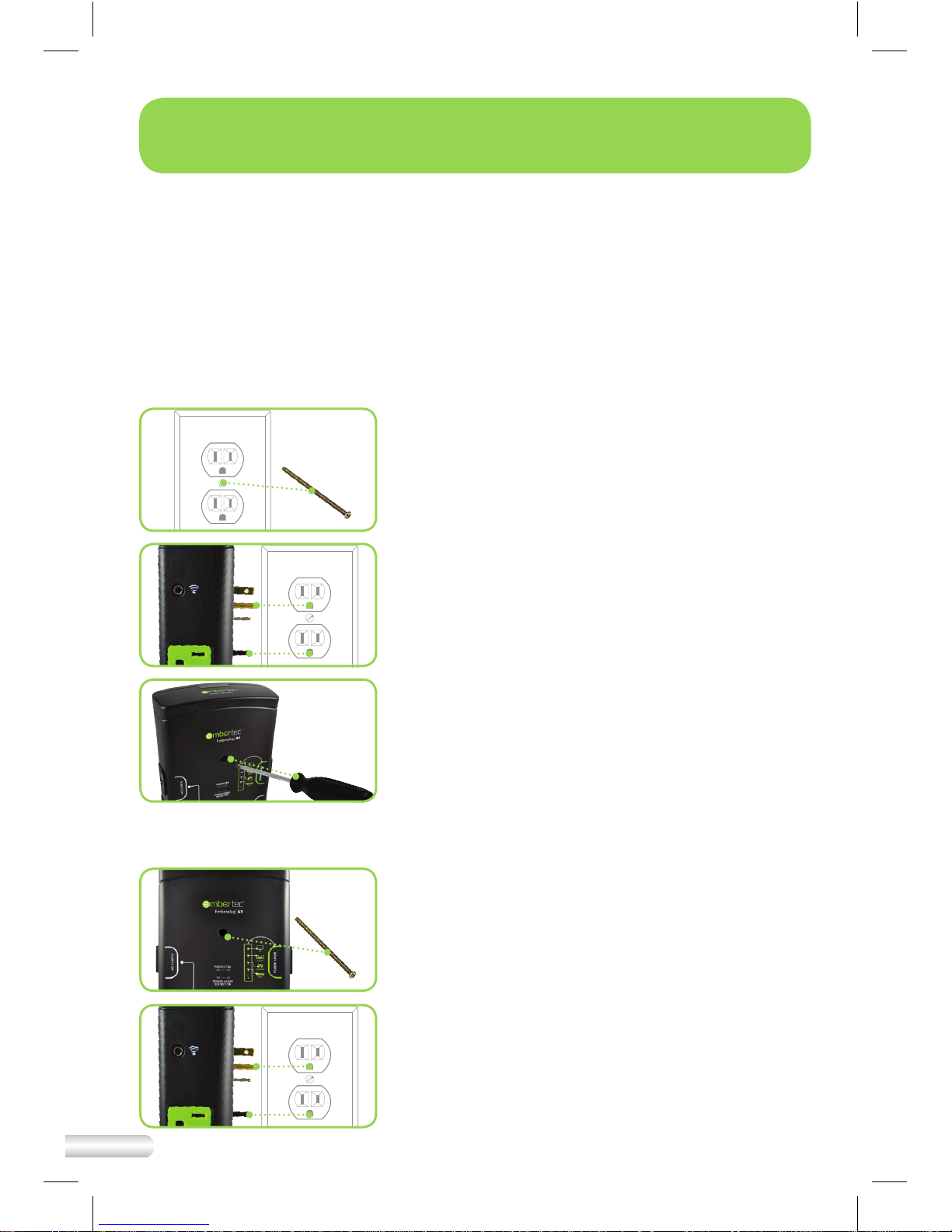
Step by step Instructions on how to install the unit with the screw
The Embertec Emberplug does not require fastening to the wall with the
supplied screw, but for the best secure t read the following instructions.
Step 1 – Remove the screw from the outlet face
plate. Retain original screw in case you
remove the Embertec Emberplug.
Step 2 – Plug the Embertec Emberplug
into the wall outlet.
Step 3 – The new screw is already inserted in the
Embertec Emberplug, use a screwdriver
to tighten the screw which will secure the
Embertec Emberplug to the wall outlet.
Step by step Instructions on how to install the unit without the screw
Step 1 – Remove the center screw from
the Embertec Emberplug. Retain
the screw in case you need it for
another installation.
Step 2 – Plug the Embertec Emberplug
into the wall outlet.
Quick Installation Guide
Page 3

3
Setting Up the Embertec Emberplug™ AV
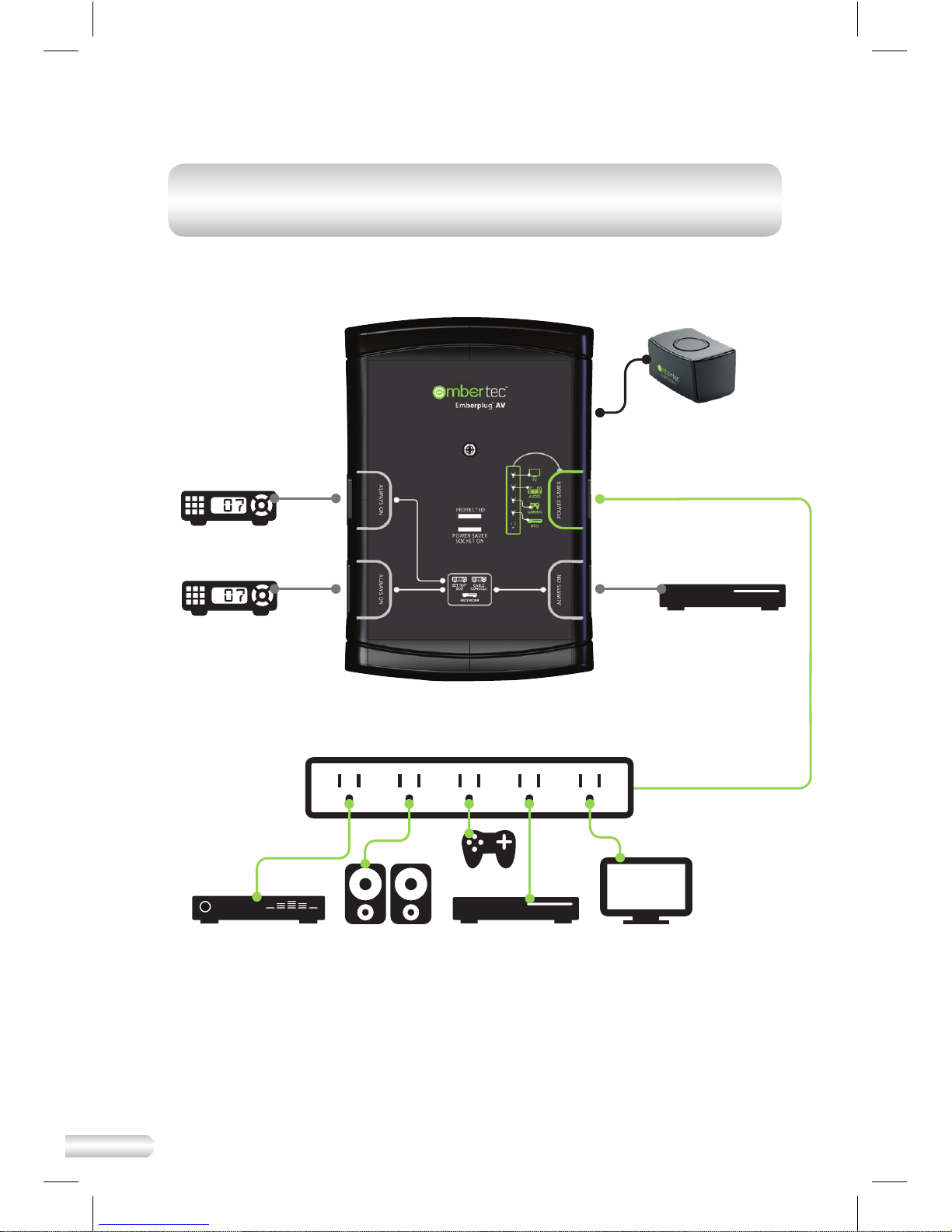
1. Unplug your existing powerstrip and then plug it into the ‘Power
Saver' socket.
2. Plug AV equipment that can automatically be switched o into
the powerstrip.
3. Identify equipment that requires constant power for cool down
period, timers, program guides and recording features, and plug
into the sockets marked ‘Always On’, or into another wall socket. A
powerstrip may also be plugged into one of the 'Always On' socket.
4. Connect the supplied SmartSensor cable to the side of the Embertec
Emberplug™ AV. Ensure this is plugged in rmly.
5. Place the SmartSensor in a convenient location that is in line of
sight. Close to your television is the best position, and within normal
operation of your existing remote control(s).
6. Plug the Embertec Emberplug™ AV into a 110V or 120V power point.
7. Power is now applied to the 'Power Saver' socket. The LED monitoring
light on the Embertec Emberplug™ AV
will light up for 3 seconds. This
also indicates that the Embertec Emberplug™ AV
has performed a
load check.
Important
Please retain your instruction book for future use.
In the event that you need assistance with your Embertec Emberplug™, please
contact us on 831-708-2621 or email us at [email protected]
Alternatively, visit us on our website at www.embertec.com
Quick Connection Guide
Page 4
4
Speakers
Blu-ray or
DVD Player
TV
Console
Amplier
POWER SAVER
SmartSensor
ALWAYS ON
Recorder
Cable Console
Set Top Box
NOTE: Other appliances such as lamps, chargers etc, may be plugged into
the 'Always On' sockets if needed, or with the 'Power Saver' if only needed
when your AV system is being used.
Page 5

5
Contents
Quick Installation Guide p2
Quick Connection Guide
p3
What you need to know p8
What is MusicMode™ p13
Fast Facts p14
Embertec Emberplug™
p15
Specications
Troubleshooting Guide p16
Warranty p17
Page 6
6
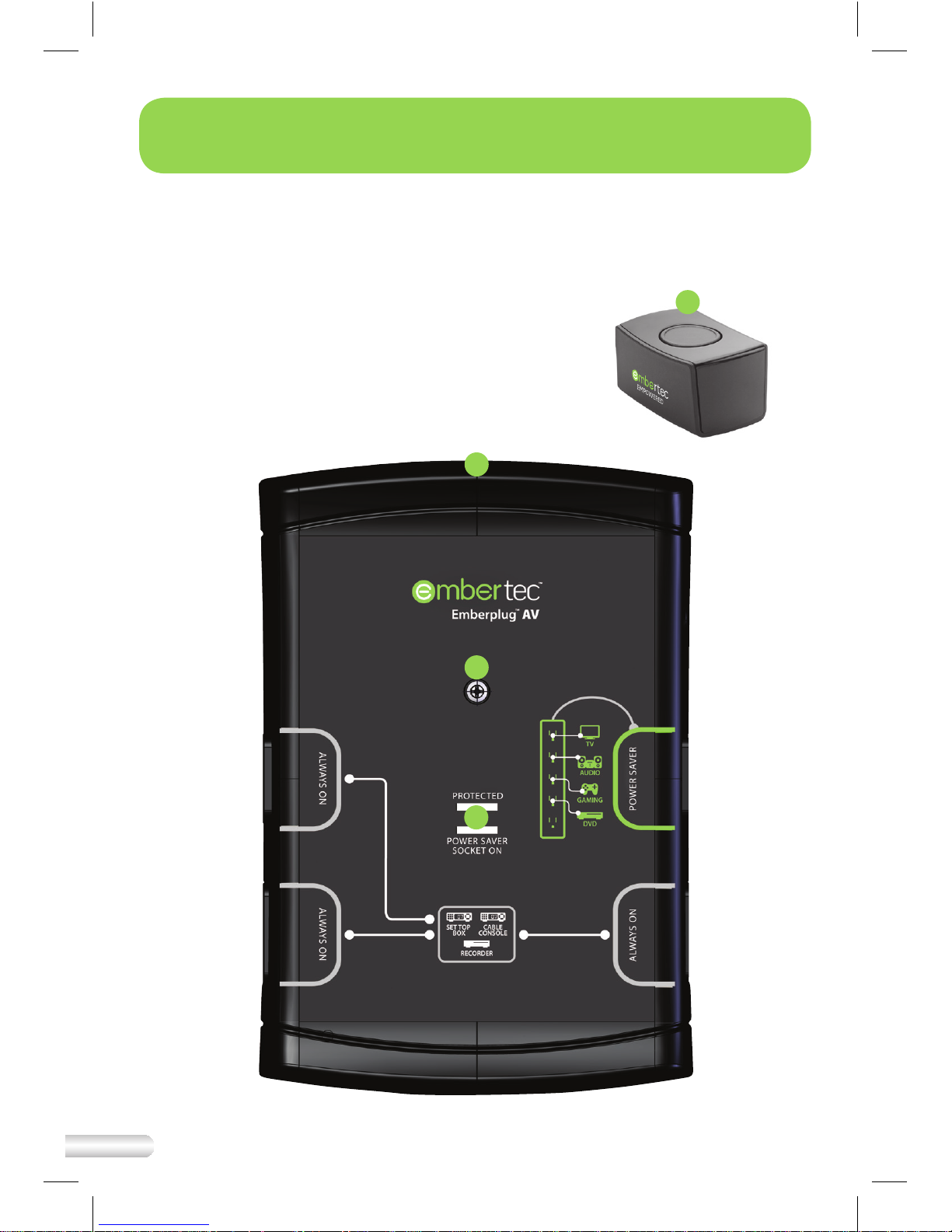
1. Embertec Emberplug™ AV
2. SmartSensor
3. On/O ‘Power Saver’
socket indicator light
4. Wall Screw – in socket
Your Embertec Emberplug™ AV
2
1
4
3
Page 7

7
• The ‘Always On’ sockets (black) are recommended for use with Audio
Visual (AV) equipment that requires constant power for timers, program
guide and recording features (e.g. DVR, PVR, VCR, Cable, Digital TV
Receivers, hard drives or bedside alarms). This will ensure constant power
is not interrupted to these devices.
• The ‘Power Saver’ socket (green) is recommended for Audio Visual (AV)
equipment that can be automatically switched o (e.g. Televisions,
ampliers, stereos, speakers, game consoles, DVDs, CDs, Blu-ray players,
lamps). Connect these with your existing powerstrip.
• The LED monitoring light indicates that power is available at the 'Power
Saver' socket of the Embertec Emberplug™ AV.
• Overload protection circuit breaker re-set button (on bottom of device,
not shown).
• 3 pins for use with standard North American wall sockets.
• Infrared SmartSensor activates the ‘Power Saver’ socket, monitors activity
and is also used to set the Active Powerdown™. Comes with a 3 meter/9ft
cable, LED light and integrated push button control.
• The 'Protected' light should be on. If this light turns o or is dim, you may
have a ground-wiring problem in your home and you should contact an
electrician to properly ground the outlet.
• The 'Power Saver Socket On' light shows the state of the 'Power Saver'
socket. When the light is on, the 'Power Saver' socket is powered; if the
light is o, the 'Power Saver' socket is not powered.
Page 8

8
Please read this Instruction Booklet before installing
your Embertec Emberplug™ AV.
• The Embertec Emberplug™ AV is an electrical device. Normal safety
precautions for use of an electrical device must be observed.
• Do not immerse the Embertec Emberplug™ AV
in water.
• Needles, knives or any other metal or conductive item must not be
inserted into any Embertec Emberplug™ AV
outlet.
• This device does not convert voltage. It must only be used with
appliances tted with North American conguration electrical plug (2pin, or 3-pin) and rated 110–120V AC.
• Ensure the Embertec Emberplug™ AV
is securely plugged into the wall
socket to avoid it slipping out. Ensure cords plugged into the Embertec
Emberplug™ AV remain tangle free.
• It is recommended to regularly inspect the Embertec Emberplug™ AV
for
damage. The Embertec Emberplug™ AV must not be used if it shows any
signs of damage.
• This Embertec Emberplug™ AV
is for indoor household use. Do not use
outdoors. Do not use this Embertec Emberplug™ AV for anything other
than its intended use. Misuse may cause injury.
• Except as required by law, Embertec is not responsible for special,
incidental, or consequential damages, or loss of data; or any loss or
damage arising from intentional misuse of the product. Such damages
and loss include, but are not limited to: lost business; business downtime;
component/equipment replacement and reconguration; and the costs
of retrieval of lost data.
• In normal use, this device intermittently emits a green ashing light.
People who experience photosensitive epilepsy or other forms of
photosensitivity should exercise caution when using the device.
What you need to know!
Page 9
9
We recommend connecting any home theater media center computers,
or appliances containing a hard drive into the ‘Always On’ socket. We
recommend connecting home theater projection equipment which require
a cool down period to the 'Always On' socket. This will prevent damage to,
and extend the life of your home theater projection lamps.
The Embertec Emberplug™ AV has 2 power
saving functions
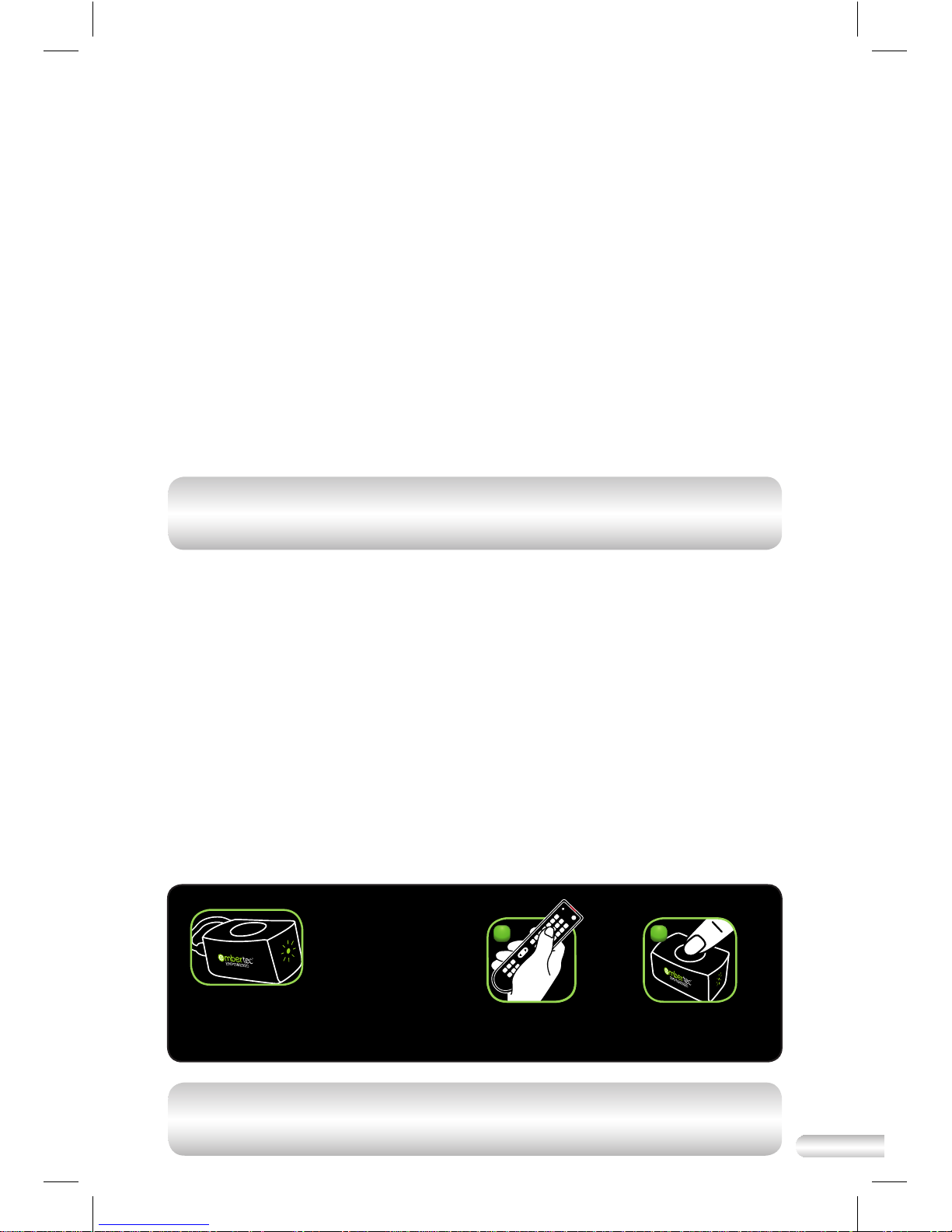
1. Standby Powerdown automatically detects and saves power wasted
when equipment is left in standby mode, by switching the power o to
the equipment.
2. Active Powerdown™ automatically switches the power o to Audio Visual
(AV) equipment connected to the 'Power Saver' socket after 1 hour, if it
has not detected any remote control use.
NOTE: The Embertec Emberplug™ AV is programmable and has an Active
Powerdown™ default setting of 1 hour, which can be permanently set to
2 hours, or temporarily 8 hours (MusicMode™).
When will Active Powerdown™ Switch the Audio
Visual (AV) Equipment o?
• If your Embertec Emberplug™ AV detects that your Audio Visual (AV)
equipment is on but has not been used for a period of 1, 2 or 8 hours
(depending on your settings), the LED light on the SmartSensor will ash
for approximately 10 minutes to warn you that power down is imminent.
To continue using your equipment.
• Simply press ANY button on ANY of your existing remote controls or press
the button on the SmartSensor once. This will cancel the Active Powerdown™
and reset the timer to 1, 2 or 8 hours (according to your setting).
NOTE: A ashing LED always means that your system will shut down
completely in a while. Press any remote control button to stop the light
ashing and continue using your system.
Press button on
the SmartSensor.
2
A ashing light means
the system is getting
ready to shut down.
TO CONTINUE
USING YOUR
EQUIPMENT
Press any remote
control button
Vol
1
OR
Page 10

10
What Audio Visual Equipment Can Be Used With The
Embertec Emberplug™ AV?
Embertec Emberplug™ AV is a power saving device that is suitable for all
Audio Visual (AV) applications and setups, including:
Always On socket
• Audio Visual (AV) equipment that requires constant power for timers,
program guides and recording features, such as DVD recorders, pay TV
and PVR units, set-top boxes, hard drives or digital receivers
• Certain home theater projectors that require a cool down period, including
rear projection televisions
Power Saver socket – will be automatically switched o
• Televisions without in-built hard drives
• Home theater speaker systems
• Game consoles without hard drives
• CD, DVD, and Blu-ray players
• Ampliers
• Lamps
Page 11

11
Turning ON your AV Equipment
• To operate your Audio Visual (AV) components, press any button on any
existing remote control(s), or press the button on the SmartSensor. This
will apply power to all components and place them in standby mode,
ready for use. You can continue using your existing remote(s) to operate
your television or other Audio Visual (AV) components in the normal way.
NOTE: To reactivate your TV components, you may be required to press
the power button again on the relevant remote control after power has
been restored.
Turning OFF your AV Equipment
• Simply turn your equipment o in the normal way. Once the Audio Visual
(AV) components have been switched o, the Embertec Emberplug™
AV will remove power from the Power Saver socket after a delay of
approximately 1 minute.
NOTE: The LED light on the SmartSensor will ash for about 60 seconds
to warn you that power is about to be removed from the AV 'Power
Saver' socket.
SmartSensor
The SmartSensor receives signals from any of your remote controls
and recognises when you are interacting with your Audio Visual (AV)
components. The SmartSensor is also used to get the time period for
the Active Powerdown™ feature. SmartSensor default setting for Active
Powerdown™ is 60 minutes.
Page 12
12
Music Mode
(8 hours)
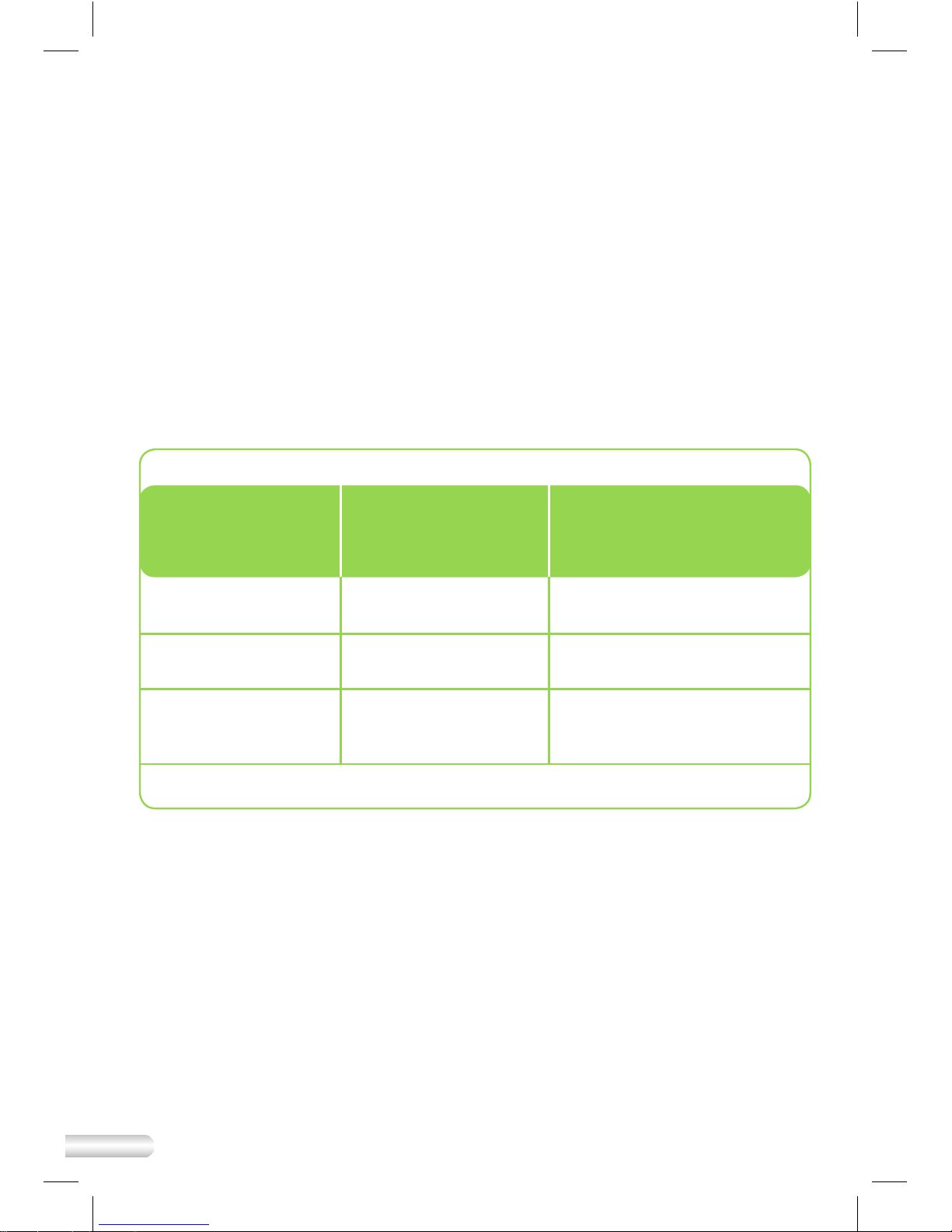
Changing settings for Active Powerdown™ using
the SmartSensor
Your Embertec Emberplug™ is equipped with a number of settings to suit
your lifestyle. You can set your timer to either 1 or 2 hours, depending on
usage habits. This means the SmartSensor will ash after the set period,
warning of imminent power down. In every case you can continue using
your equipment by pressing any button on any remote control.
The default setting is 1 hour, which is aimed to maximise your energy
savings.
Follow these instructions to change Active Powerdown™ to 2 hours, (this
may be preferred for longer movies or programs where remote control
activity is less frequent).
Once (one second)
then release
1 hour
(default setting)
1 time
Please make sure the sensor has ashed back 1, 2 or 3 times
To set the Active
Powerdown™
timer to:
Press the button
on the
SmartSensor:
To conrm the setting,
the LED light on the
SmartSensor will ash:
1. Ensure your Audio Visual (AV) equipment is switched on.
Twice (one second
each) then release
2 hours 2 times
Three Times
(one second each)
then release
3 times
Page 13

13
Your Embertec Emberplug™ AV is equipped with a unique MusicMode™
feature. This feature enables you to override the Active Powerdown™ for a
period of 8 hours. This feature is great for playing music, parties, video
nights or any time you want to keep your appliances on for an extended
period of time.
The Embertec Emberplug™ AV
will revert to its previous setting of 1 or 2
hours after the 8 hour period or after a power down has occurred.
Remember
1. In this mode your system will stay on for 8 hours, unless you switch your
appliances o.
2. Your permanent Active Powerdown™ timer setting will revert to 1 or
2 hours once you have switched your appliances o, or after 8 hours,
whichever comes rst.
NOTE: Make sure your AV System is on before you start!
What is MusicMode™?
Page 14

14
Specications
• Surge protection is provided to all outlets.
• Conforms with UL1449-3
What Power is Wasted?
Many of today’s appliances for the home and oce continue to use
power, even when the appliance is turned o. Appliances that are left on
unintentionally waste even more power.
Overload Protection
The Embertec Emberplug™ AV is tted with a safety device that removes
power in the event of overloading. Should this occur, turn o and unplug
all units, and press the reset button. Then plug into the wall socket again.
Once reset, use any remote control to activate power to the Power Saver
socket. Connect one device at a time. If any of the devices cause the safety
device to trip again then get the oending device serviced. If the Embertec
Emberplug™ AV fails to operate, please contact Embertec on 831-708-2621.
Care and Maintenance
To clean the outside of the Embertec Emberplug™ AV device, rst remove the
device from the power point. Then wipe the exterior with a soft cloth. Never
use an abrasive cleaner, or water.
Disposal/Recycling
To protect the environment, the Embertec Emberplug™ AV should be
recycled, or disposed of safely at the end of its life. Please return to a
recycling centre for safe recycling or disposal.
Fast Facts
Page 15
15
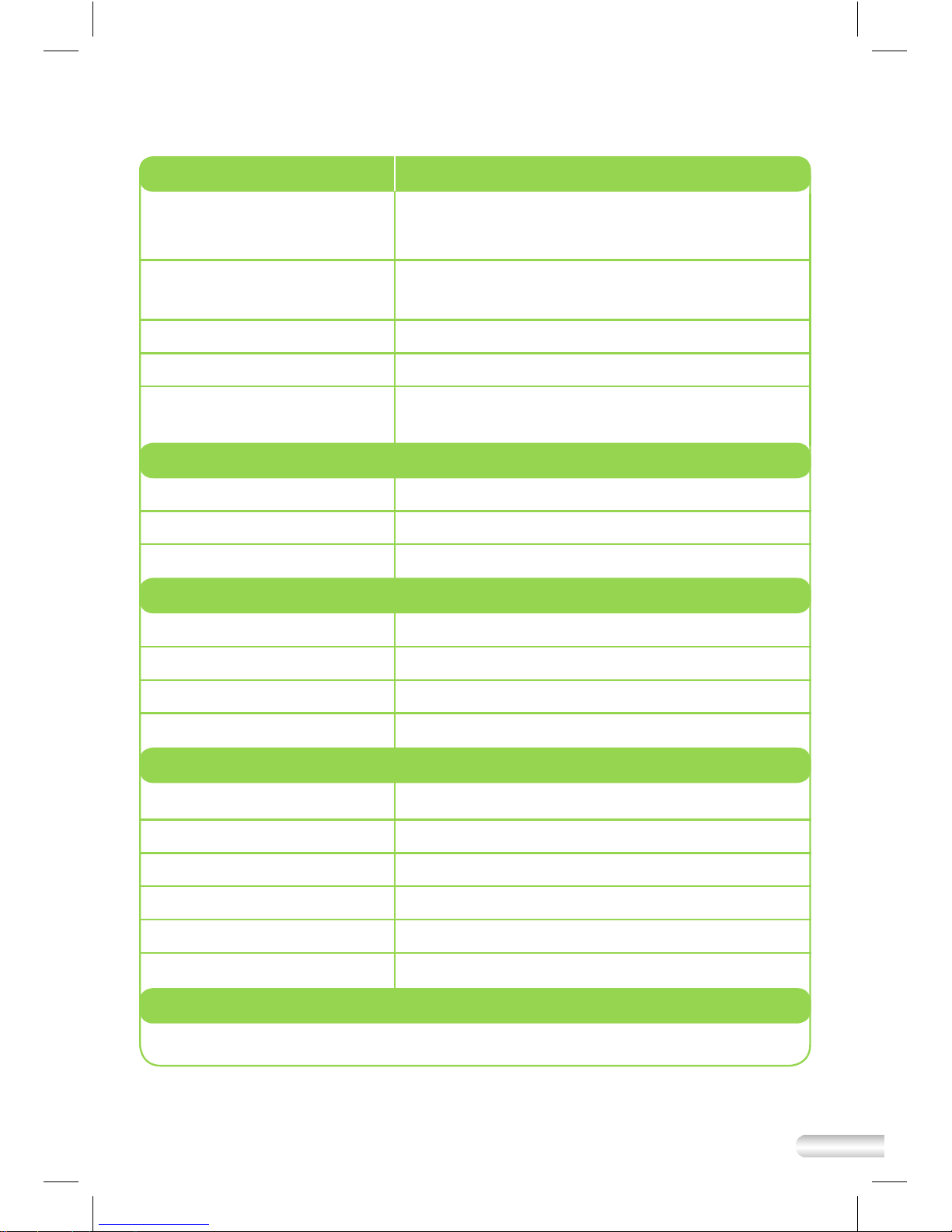
Physical
AV = Audio Visual (Product Code: EPUSAV-ET-01)
Dimensions: 130.85mm W x 191.70mm H x 53.28mm D
(5.15in W x 7.55in H x 2.10in D)
Weight: 530g (1.17 lbs)
60g (0.13 lbs) SmartSensor
Colour: Black body, black and green inserts
SmartSensor Cable Length: 3 meters (9.84 ft)
Number of Outlets: 4 Always On: 3
Power Saver: 1
Embertec Emberplug™ Specications
At October 2012
Environmental
Temperature (operating): 0 0C to +70 0C (32 0F to + 158 0F)
Temperature (storage): -20
0
C to +85 0C (-4 0F to +185 0F)
Humidity (operating): 95% RH at +50
0
C (1220F)
Protection
Surge Compliance: In accordance with UL1449-3
Total Surge: 1,008 Joules / 30,000 Amps
Input Current: 15A RMS via circuit breaker
Over-Current Threshold: 15A RMS
Control
SmartSensor Push Button and Infrared Interface (AV Series Only)
Electrical Durability
Relay endurance: Over 100,000 switching cycles
Operating Voltage: 120V AC +-5%
Output Current: 15Amps RMS
Max total load: 1800 W
Life Span: > 20 years
Maximum Power consumption < 1 W @ 120V 50Hz/60Hz
Page 16

16
Problem To Check
The Embertec Emberplug™
AV
is not receiving power.
The Embertec Emberplug™ AV
is not powering down my
equipment in standby mode.
The SmartSensor ashes
frequently during normal
operation.
• The protected light is on.
• Ensure the equipment is plugged into the 'Power
Saver' socket, not into the ‘Always On’ socket.
• The Embertec Emberplug™ AV
has not
detected the equipment is in standby. Please
repeat this process by switching on the
Audio Visual (AV) component again, waiting
10 seconds, and switching o again making
sure all appliances are in standby mode.
• This may be an indication of unwanted
infrared activity in the area. Please check
the immediate area for infrared devices
that maybe interfering with the Embertec
Emberplug™ AV, such as compact uorescent
lights, computers, mobile phones, and other
portable consumer electronic devices and:
• Move the SmartSensor to another location that is
within line of sight and normal operation range of
your Audio Visual (AV) equipment remote controls.
The LED on the main body of
the Embertec Emberplug™ AV
is
ashing, but my SmartSensor
LED does not work (when
plugged in and powered on).
• Please check your SmartSensor connection to
the Embertec Emberplug™ AV
by:
• Ensuring the SmartSensor cable is safely
and securely connected to the side of the
Embertec Emberplug™ AV, and;
• Press the button on the top of the SmartSensor
when plugged into the Embertec Emberplug™
AV
with the Embertec Emberplug™ AV switched
on. If the LED does not ash whenever you
press the button, it may be evidence of a faulty
SmartSensor or connection.
The Embertec Emberplug™ AV
has stopped working.
• Unplug all the appliances connected into the
Embertec Emberplug™ AV
adaptor and then
unplug from the wall socket. Then reconnect
everything again.
The TV keeps turning o
after 1 hour.
• The SmartSensor default setting for Active
Powerdown™ is 60 minutes.
• Please see “Changing SmartSensor setting
for Active Powerdown™” to change Active
Powerdown™ to 1 or 2 hours.
Troubleshooting Guide
Page 17

17
Limited Warranties
Our Embertec Emberplug™ is designed and manufactured with precision and care, which is why
we oer a Limited Product Warranty and a Limited $20,000 Connected Equipment Warranty for
each Embertec Emberplug.
LIMITED PRODUCT WARRANTY
What is covered? Except as limited here, this product warranty covers any defect in material or
workmanship with the Embertec Emberplug. If the initial purchase is by a utility or other entity
that will not itself be using the device, this warranty is transferable to any customer of such entity
who subsequently owns the device. Otherwise, this warranty is not transferable.
For how long? This warranty runs for one year from the date of purchase of the Embertec Emberplug.
What will we do if the device fails during the limited product warranty period and this
warranty applies? Subject to the limitations set forth in this warranty, we will elect (at our option)
to either repair or replace the defective device. If we elect to replace the device and it has been
discontinued, we will replace it with another device of equal or greater value. We will ship the
repaired or replacement device to you, and pay for those shipping costs.
What does this limited product warranty not cover? This warranty does not cover any damage
to the Embertec Emberplug caused by improper use, accidents, acts of God (such as lightning
strikes, oods or earthquakes), or normal wear and tear. For purposes of this warranty, “improper
use” means not installing or operating the device in accordance with the manual. Any incidental,
consequential, special or other indirect damages are not recoverable under this warranty. Some
states do not allow the exclusion of incidental or consequential damages, so the foregoing
limitation may not apply to you. You will be responsible for any shipping or other transportation
costs incurred in connection with returning the defective product to us.
How do you request service under this limited product warranty? To request service under
this warranty for your Embertec Emberplug, (i) visit www.embertec.us for our warranty service
address or a list of authorized service providers near you, and (ii) either pack the product carefully
to prevent damage in transit and ship it, along with a brief description of the defect, to our
warranty service address, or bring it into one of our authorized service providers.
This warranty gives you specic legal rights. You may also have other rights which vary from state
to state.
LIMITED $20,000 CONNECTED EQUIPMENT WARRANTY
What is covered? Except as limited here, this connected equipment warranty covers any equipment
that is damaged by a transient voltage surge or spike (an “Occurrence”) while properly connected to
an Embertec Emberplug that is properly connected to an AC power line with a protective ground.
If the initial purchase of the Embertec Emberplug is by a utility or other entity that will not itself be
using the device, this warranty is transferable to any customer of such entity who subsequently owns
the device. Otherwise, this warranty is not transferable.
For how long? This warranty runs for one year from the date of purchase of the Embertec Emberplug.
What will we do if connected equipment is damaged during the limited connected equipment
warranty period and this warranty applies? Subject to the limitations set forth in this warranty,
we will elect (at our option) to repair or replace any equipment damaged by an Occurrence, or to
pay you an amount equal to the replacement value for such equipment, not to exceed the overall
maximum set forth below. In connection with the foregoing, we reserve the right to examine the
damaged equipment at the site where the damage occurred. If we elect to replace the equipment
Page 18

18
and it has been discontinued, we will replace it with similar equipment of equal or greater value,
subject to the overall maximum set forth below. We will pay for all shipping costs incurred in
connection with the delivery of any repaired or replacement equipment to you, subject to the overall
maximum set forth below.
What does this limited connected equipment warranty not cover?
This limited connected equipment warranty does not cover:
• Any damage to connected equipment caused by improper use of the Embertec Emberplug
or the connected equipment, accidents, acts of God (such as lightning strikes, oods or
earthquakes), or normal wear and tear of the Embertec Emberplug or the connected equipment.
For purposes of this warranty, “improper use” means not installing or operating the Embertec
Emberplug in accordance with the manual, or not installing or operating the connected
equipment in accordance with its manual.
• Any damage to equipment that is not properly connected to an Embertec Emberplug, or
damage to equipment connected to an Embertec Emberplug that is not properly connected to
an AC power line with a protective ground.
• Any damage to equipment connected to an Embertec Emberplug that had previously experienced
another Occurrence. After each Occurrence, the Embertec Emberplug must be replaced.
• Any damaged equipment that has been disposed before we have examined the equipment at
the site where the damage occurred (or notied you that we would not be visiting the site), and
elected whether to repair or replace it or pay for its replacement value, all in accordance with the
terms set forth above.
• Any damage to satellite dishes.
THE MAXIMUM CUMULATIVE AMOUNT WE WILL PAY FOR ALL REPAIRS,
REPLACEMENT AND SHIPPING COSTS FOR ANY AND ALL DAMAGED
EQUIPMENT QUALIFYING UNDER THIS WARRANTY SHALL NOT EXCEED
TWENTY THOUSAND DOLLARS ($20,000).
Any incidental, consequential, special or other indirect damages are not recoverable under this
warranty. Some states do not allow the exclusion of incidental or consequential damages, so the
foregoing limitation may not apply to you.
If the connected equipment is covered an applicable homeowner’s or renter’s insurance policy, we
reserve the right to be subrogated under such policy. In addition, this warranty shall not apply to
any damaged equipment covered under the manufacturer’s warranty.
How do you le a claim under this limited connected equipment warranty? To le a claim for
connected equipment qualifying under this warranty, visit www.embertec.us or call (831)708-2621
and provide a full description of the damage.
This warranty gives you specic legal rights. You may also have other rights which vary from state
to state.
Please register your Embertec Emberplug with us at www.embertec.us. Product registration is
not a condition to coverage under either our limited product warranty or our limited connected
equipment warranty.
Page 19
Embertec USA LLC
7960 B Soquel Drive #389
Aptos, CA 95003
Telephone: 831-708-2621
Website: www.embertec.com
E-mail: [email protected]
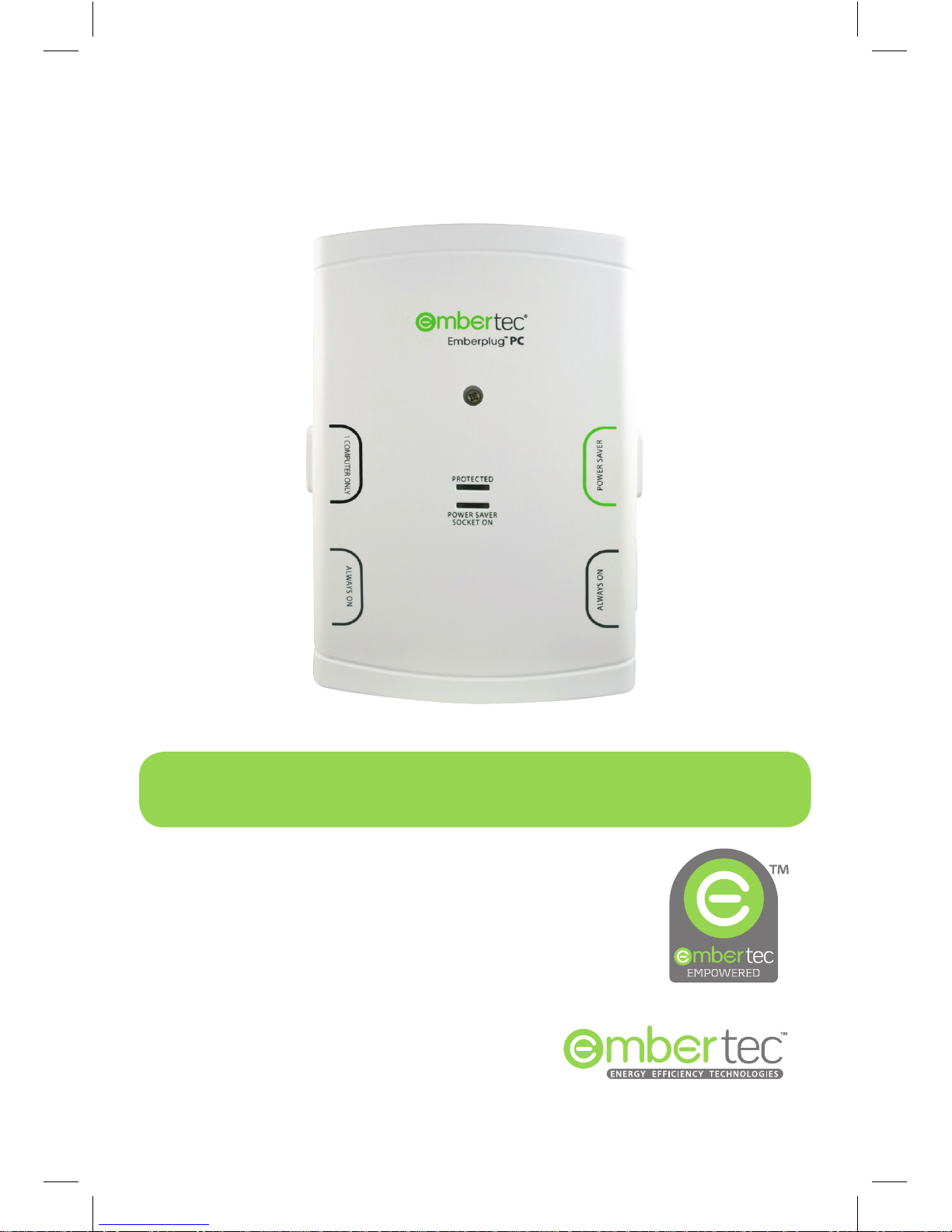
Due to continual improvement in design or otherwise, the product you purchase
may dier slightly from the illustration in this book. Issue V3
For further assistance please contact us on
Also in our range:
Automatic maximum power savings, zero eort for computers and IT
peripheral devices. Check with your utility company or visit us on the web
for more information.
Page 20

20
PATENTS GRANTED AND PATENTS PENDING
 Loading...