

Page 1
User Manual
Smart Fertility Monitor
Version: 1.1
Page 2

Welcome and thank you for choosing
Emay Smart Fertility Monitor, please read
our user manual carefully before using it.
Below is the guide to read this manual:
Precuation for use P1-P2
Intended use P3
FCC Statement P4-P5
Appearance P6
How to install App? P7
How to put in the battery? P8
How to use it? P9-P11
Principle of BBT P12-P16
Knowlege about BBT curve P17-P19
Maintance and clearing P20
Accessory & Specification P21
Troubleshooting P22
Symbols P23
Guidance P24
Page 3

Precautions for use
Any form of modification to this device is
forbidden;
Don’t use the device together with MRI or
CT equipment;
Explosion danger: don’t use the device in
flammable anesthetic gas;
Don’t squeeze the device. If the housing is
broken, please stop using the device.
Press the probe with tongue and hold the
device with your hand to prevent it sliding in
the mouth during use; otherwise the data
may be inaccurate.
The device is for indoor use only;
Please pay attention to the operation
temperature and humidity. Using the device
in a condition that does not satisfy the
requirement may lead to measurement
error;
The effective wireless transmission
distance is 5m in a barrier-free environment. If the distance exceeds the limits, the
product might not work. Please use this
product within effective wireless transmission distance;
#
#
#
#
#
#
#
#
1
Page 4

Precautions for use
Magnetic and electrical fields are capable of
interfering with the proper performance of
the device. For this reason make sure that
all external equipments operated in the
vicinity of the device comply with the
relevant EMC requirements. Mobile phone,
X-ray equipment or MRI devices are a
possible source of interference as they may
emit higher levels of electromagnetic
radiation.
The device is not sterile;
Doctor should make diagnosis on clinical
manifestation and symptoms, only with
using the device as subsidiary;
This product has been calibrated. No other
routine maintenance and calibration is
needed in addition to the replacement
battery;
If the system upgraded, please update the
app at Google Play or Apple Store
It is impossible that the application is
incompatible with other application on your
receiver. Please contact us if you meet this
kind of matters;
The battery is changeable. About the battery
installation steps, please refer to related
content of this manual.
2
#
#
#
#
#
#
#
Page 5

Intended use
The device is intended for measuring and
monitoring human body temperature orally for
adult, pediatric and infant. It can store and
manage the temperature data. It can be used in
healthcare facility and home.
3
Page 6

FCC statement
This device complies with Part 15 of the FCC
Rules. Operation is subject to the following two
conditions:
(1)This device may not cause harmful
interference;
(2)This device must accept any interference
received, including interference that may cause
undesired operation.
The user is cautioned that changes or
modifications not expressly approved by the
party responsible for compliance could void the
user's authority to operate the equipment.
This equipment has been tested and found to
comply with the limits for a Class B digital
device, pursuant to Part 15 of the FCC Rules.
These limits are designed to provide reasonable protection against harmful interference in a
residential installation. This equipment
generates, uses and can radiate radio
frequency energy and, if not installed and used
in accordance with the instructions, may cause
harmful interference to radio communications.
However, there is no guarantee that interference will not occur in a particular installation.
4
Page 7

FCC statement
If this equipment does cause harmful
interference to radio or television reception,
which can be determined by turning the
equipment off and on, the user is encouraged
to try to correct the interference by one or
more of the following measures:
--Reorient or relocate the receiving antenna.
--Increase the separation between the
equipment and receiver.
-- Connect the equipment into an outlet on a
circuit different from that to which the receiver
is connected.
-- Consult the dealer or an experienced
radio/TV technician for help.
5
Page 8
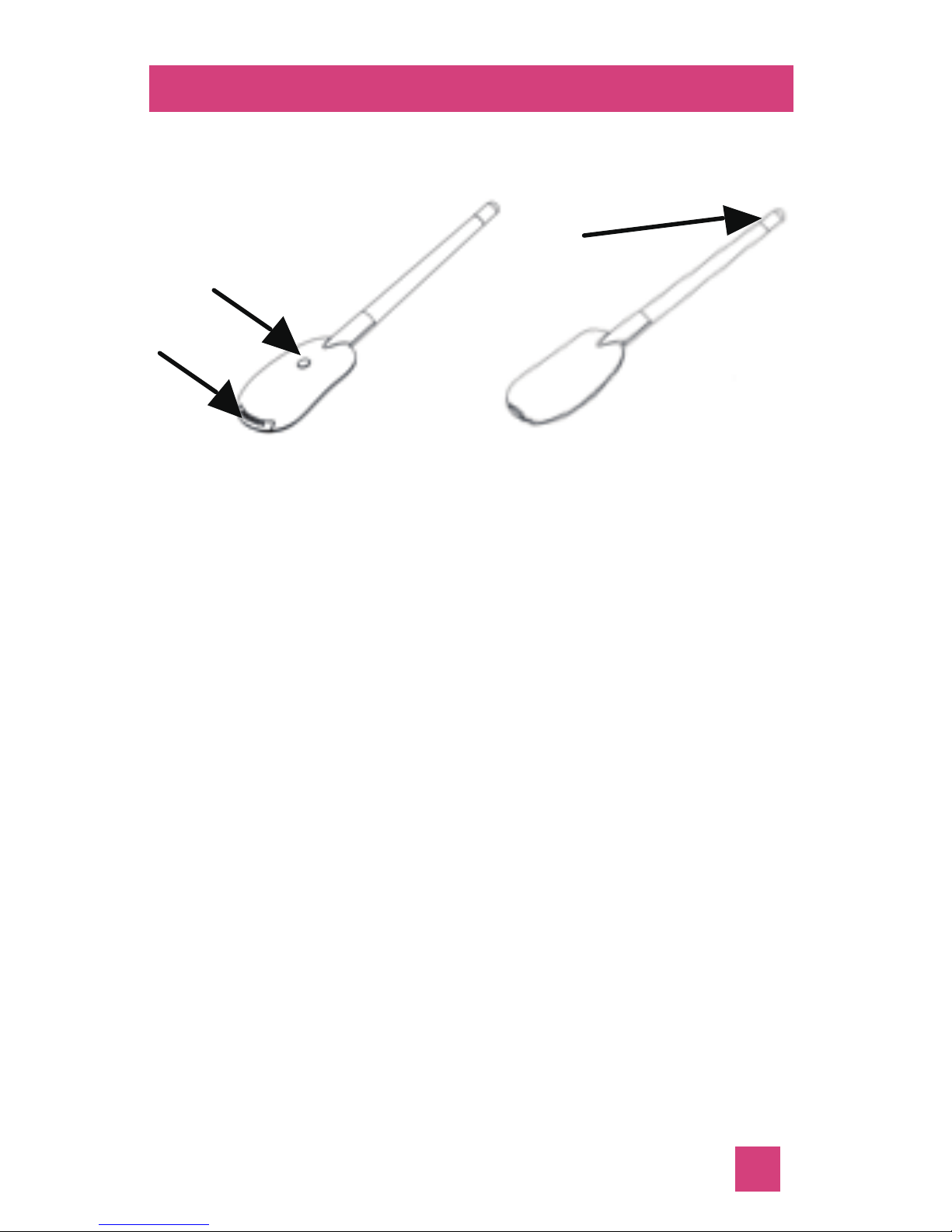
Appearance
3
2
1
1. Battery compartment
2. Power button
3. Temperature measuring probe
6
Page 9
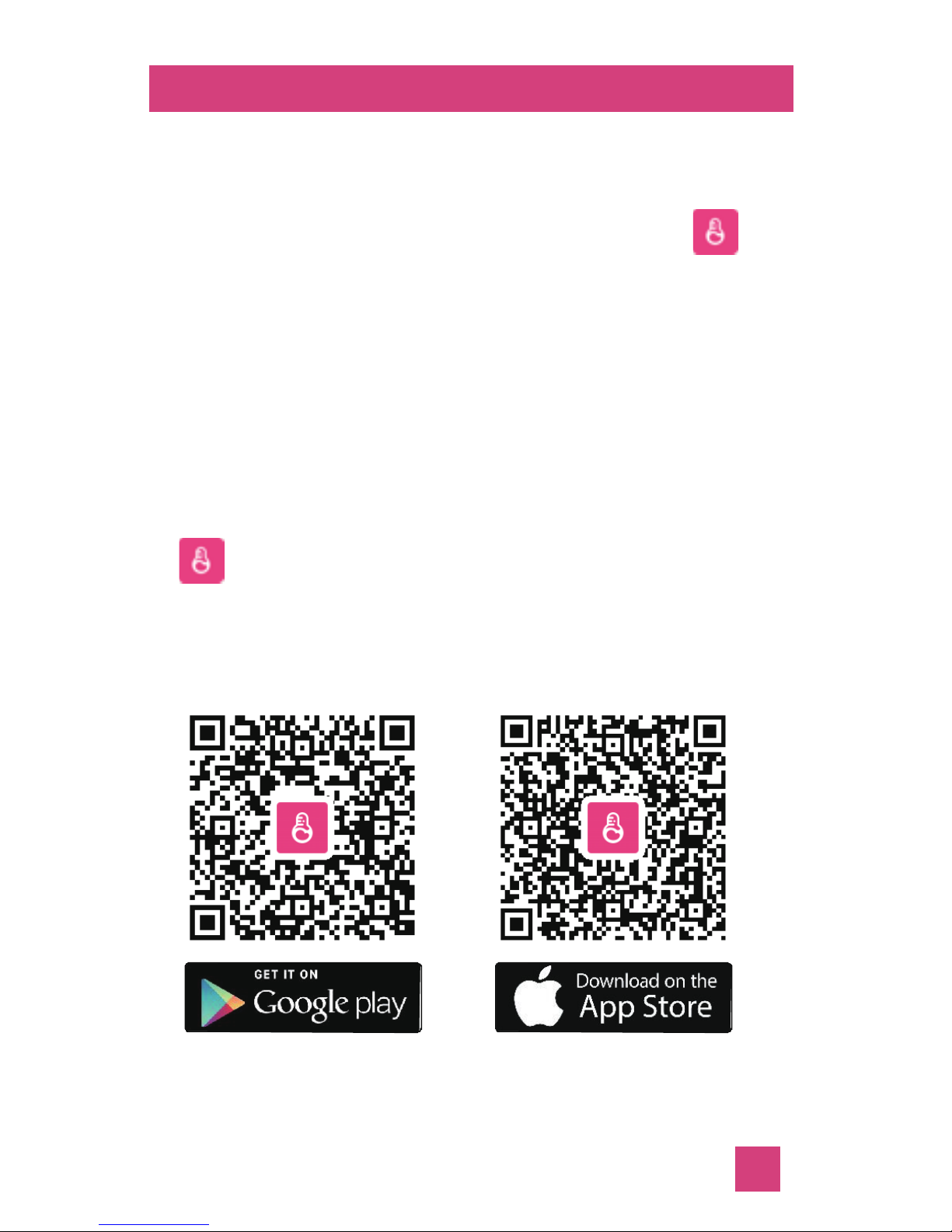
Download and install the App
Users who use the iOS system device can go
to App Store, enter “Emay Smart Fertility
Monitor” in the search bar and choose “
Emay Smart Fertility Monitor” in the searching
results to download and install the App. Or
scan the QR code on the back of the Giftbox
or hereunder to find the App.
Users who use the Android system device can
go to Google play store, enter “Emay Smart
Fertility Monitor” in the search bar and choose
“ Emay Smart Fertility Monitor ” in the
searching results to download and install the
App. Or scan the QR code on the back of the
Giftbox or hereunder to find the App;
7
Page 10
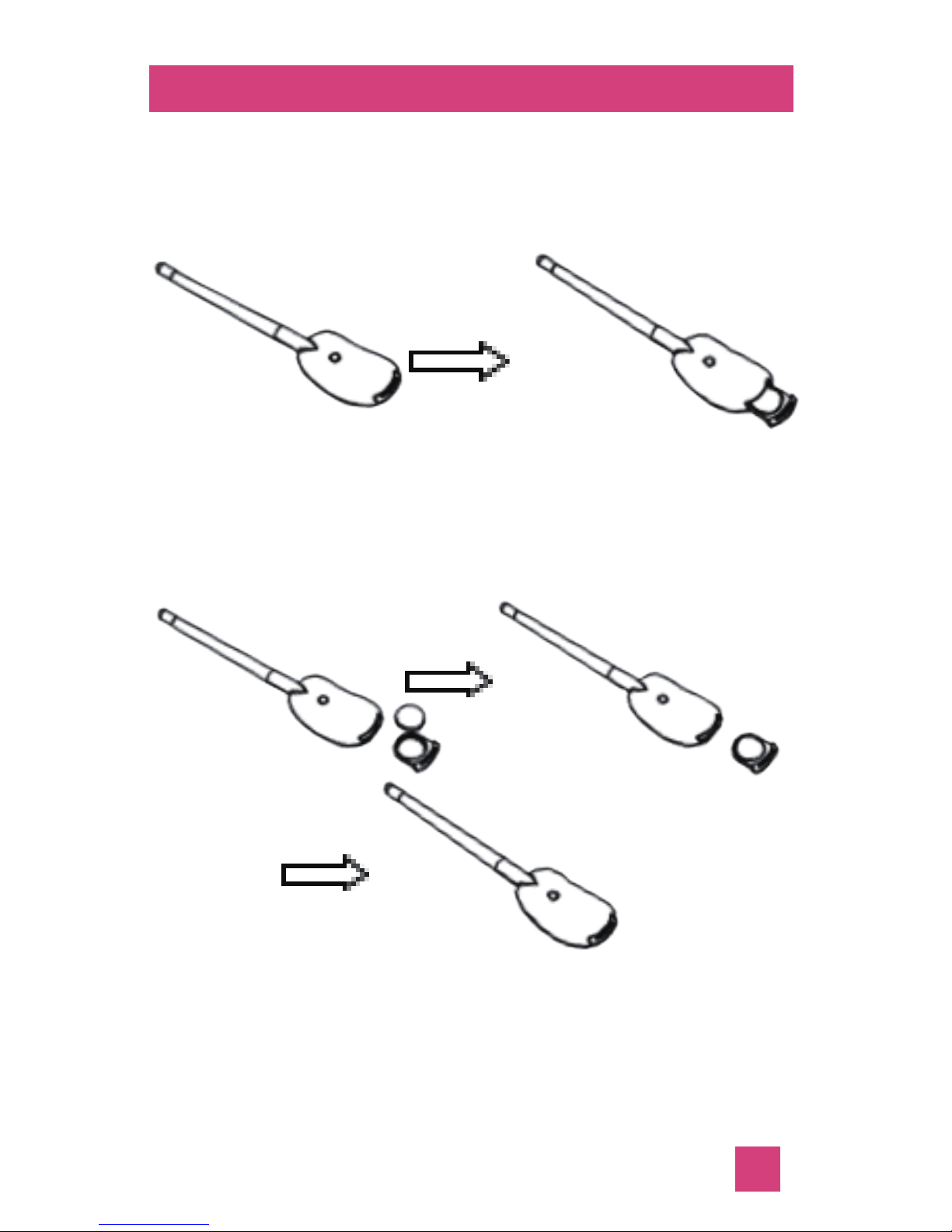
Install battery
1. Hold the thermometer, and pinch the battery
compartment cover to pull out the compartment with another hand;
2. Put the battery into the battery compartment, and push it into the thermometer.
* Please make sure that the battery positive
side should be put upwards.
8
Page 11

How to use it?
*Refer to illustration in the next pages if you do
not want to read text.*
1.Turn on smart phone and enable Bluetooth;
2.Take out the thermometer and press the
power button to turn it on, the blue LED will
flash;
3.Open the App and the device will be paired
automatically. When it connects successfully, it
will start measuring immediately;
4.It’s better to use with attached probe covers
for sanitory purpose. Following 3-step
instruction written on the probe cover.
5.Put the metal probe into your mouth under
your tongue;
6.Hold the thermometer with your hands to
prevent it from sliding out your mouth;
7.Remain still and silent for 2-3 minutes until
the measurement is completed;
8.Take out the device after measurement.
9.Press the power button for 3 seconds to turn
off the thermometer (the blue indicator light will
go off).
9
Page 12
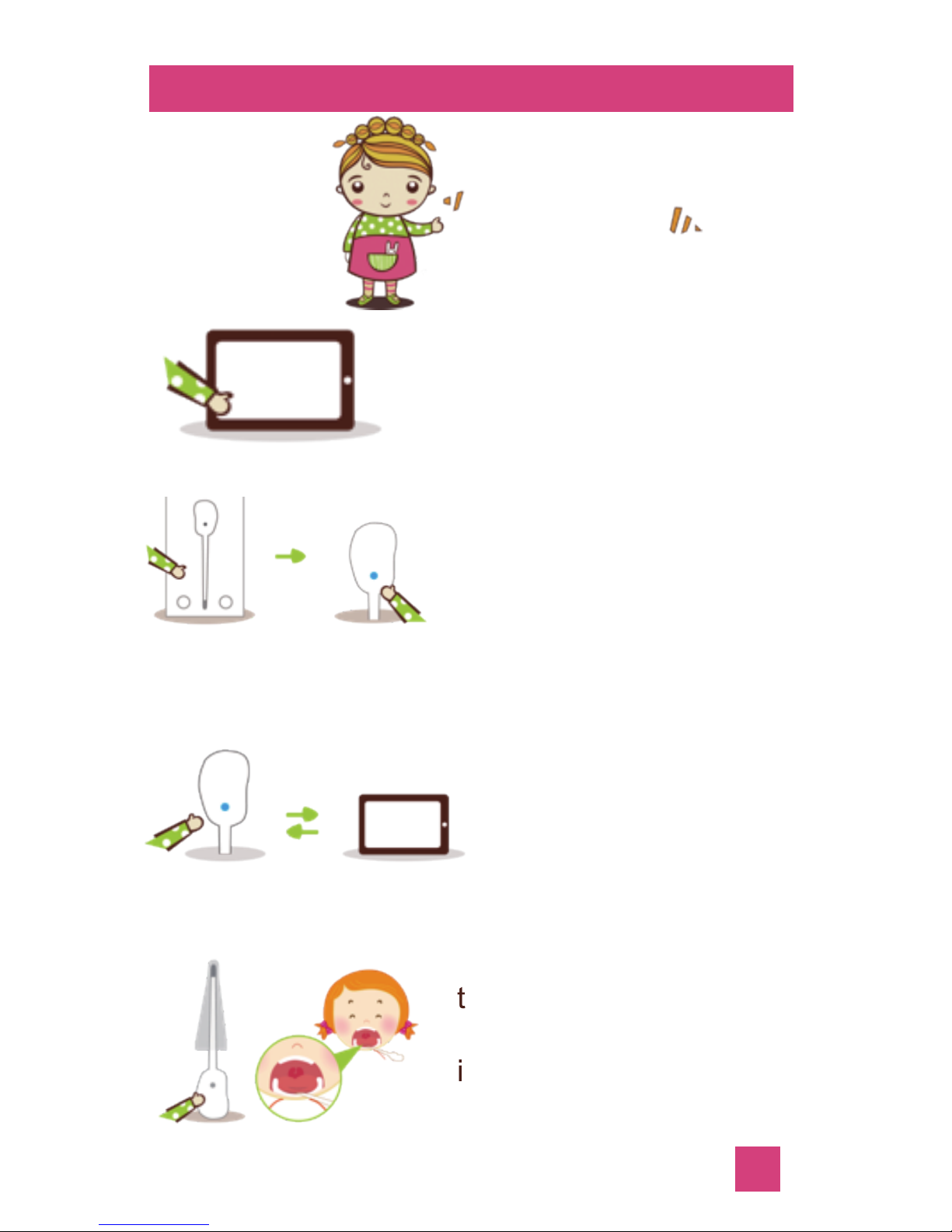
Illustration
Step 1
Step 2
Step 3
Step 4
Follow me
Turn on the
Bluetooth
.
Paired
Turn on the smart device
(phone /pad) and open
the Bluetooth
Take out the thermometer
from the packing box, put
in the battery and press
the power button, the
indicator light will flash.
Open the App. The device
will connect automatically
through bluetooth. When
it connects successfully,
it will display the message
“Connects successfully”
Put the probe under your
tongue and hold the device
with your hand to prevent
it sliding out your mouth
to be continued...
1
10
Page 13
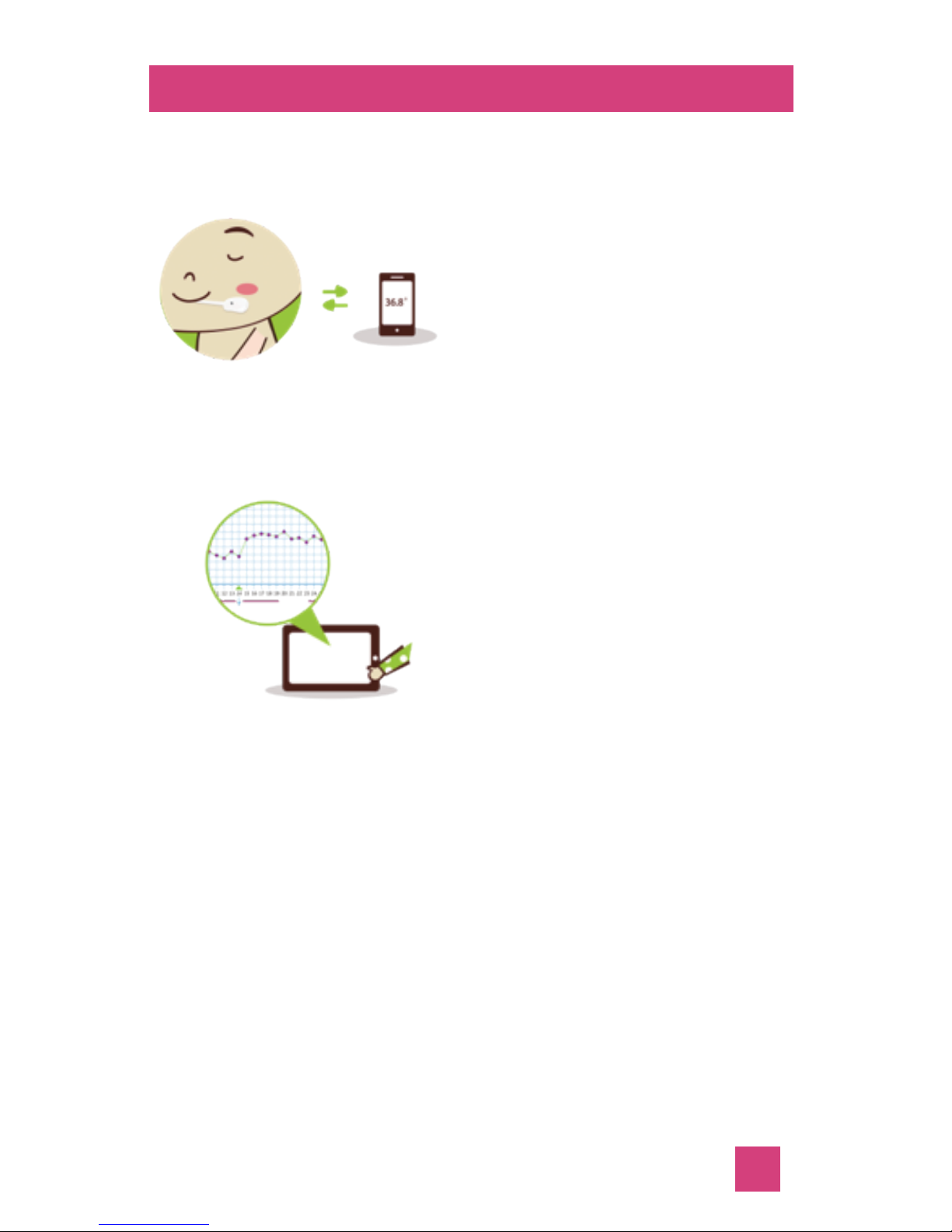
Illustration
Step 5
Step 6
Keep silent during
measuring for 2-3 minutes
without saying and moving.
When there’s “beep” and
reading pops out on the
app, you can get the
accurate temperature.
For adult female, BBT
would rise by 0.5-0.9
℉
after ovulation, and keep
this status for 12 to 16 days
(average 14 days) until
the next menstrual period.
1
11
* To get accurate and reliable BBT, we need to
wait till the temperature comes stable. It will
result in compartively longer measuring time.
Warm up the probe before putting it to your
mouth will shorten the measuring time.
* If the temperature is always less than 95
℉
after startup, the device would shut down
automatically in 5 minutes;
* The probe cover is disposable.
Do not reuse it please.
Page 14

Principle of BBT
What’s the principle of BBT?
BBT and blood circulation speed (heart rate) is
directly proportional related. When the blood
circulation speed is fast, body temperature is
high. When the blood circulation speed is slow,
body temperature is low. When people are
asleep, the blood circulation is the slowest,
and the body temperature is the lowest. The
body temperature at the moment is called
Basal Body Temperature (BBT). Usually,
sublingual temperature took immediately after
waking up in the morning is BBT.
Temperature of head, ear, armpit can’t be used
as BBT, since they are easy to be affected by
environment temperature. Only sublingual
temperature is accurate BBT.
12
Page 15

Principle of BBT
How BBT changes for a childbearing age
women?
BBT of normal childbearing age women is
periodic, which is related to ovulation.
The beginning of a menstrual cycle is the day
when the first blood of a period is seen. The
period varies from person to person and is
between 21 and 35days.The average is
28days, which is separated by the ovulation
day. Days before the ovulation day is called
follicular phase, days after the day are called
luteal phase. The length of follicular phase is
not the same, but the luteal phase is about 14
days (differ within 2 days). The day after
ovulation day, ovary would generate
progesterone, which will make BBT rise by 1.1
℉. This is how BBT changes for a childbearing
age women. The altithermal period lasts 12 to
16 days.
If the user is not pregnant, the luteum will
atrophy and stop excreting progesterone, and
the BBT will drop back to the former status,
then the next period will come.
13
Page 16

Principle of BBT
How BBT changes for a childbearing age
woman?
If the user is pregnant, luteum will keep
excreting progesterone under the sport of
hormone excreted by embryo, and BBT will
keep rising.
If the ovary dysfunctions, no ovulation and no
progesterone, the BBT will keep rising.
14
Page 17

Principle of BBT
Why take BBT right after waking up?
Body temperature took in a few minutes after
waking up (without getting up, putting on cloth,
talking, going to bathroom) is real BBT. After
getting up, body temperature will be affected
by the speed of blood circulation and no
regular pattern to learn. E.g. Body temperature
will rise after dirking hot water or exercising,
and decline after having ice cream.
Therefore, only body temperature took
immediately after waking up is real BBT.
15
Page 18

Principle of BBT
Why will BBT rise after ovulation?
After ovulation, progesterone excreted by
ovary will release progestin, one of the most
important functions is rising BBT, so as to
make sure the egg could be inseminated and
implanted successfully. So, BBT will rise by
above 0.5-0.9℉ until the next period comes,
and drop back to former status.
16
Page 19
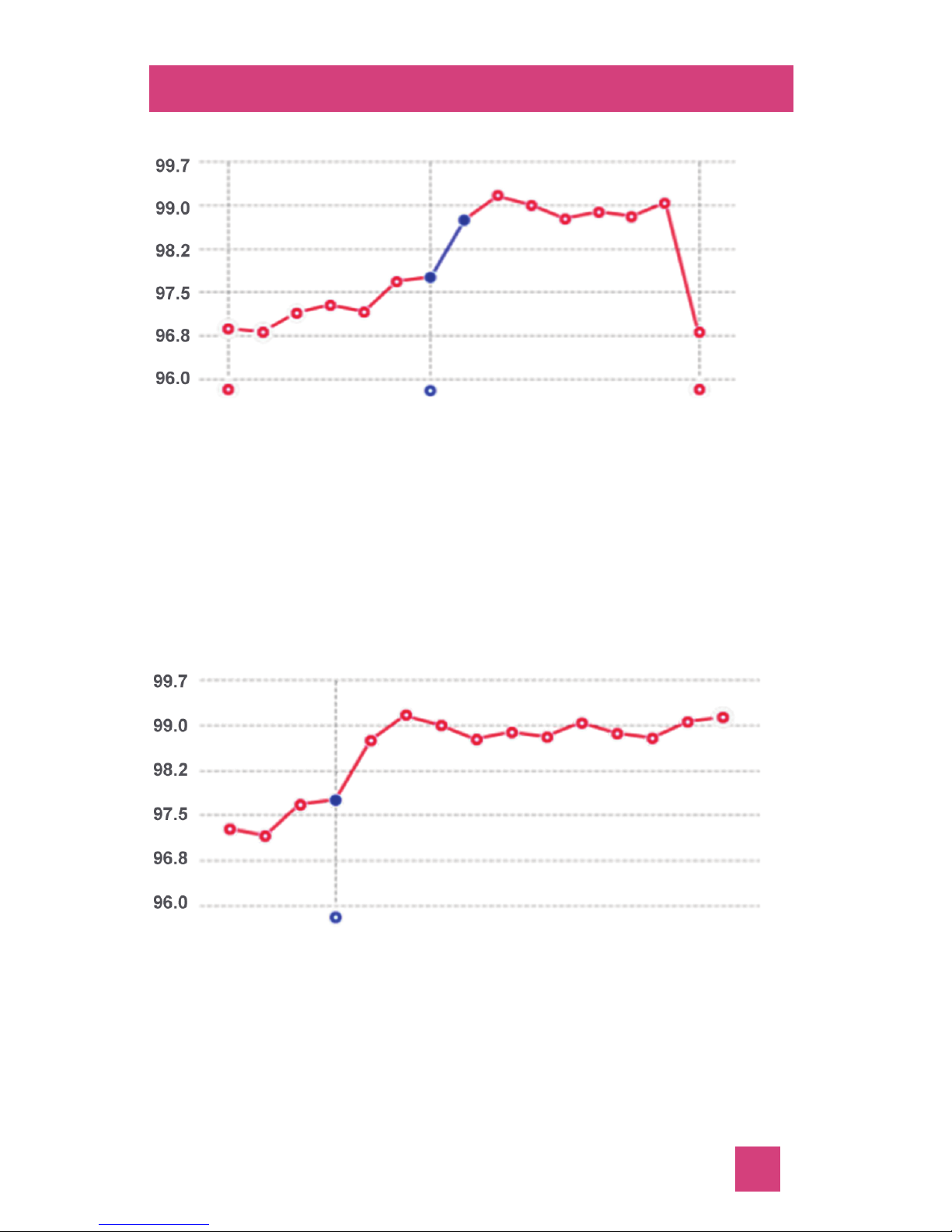
What does different curve mean?
BBT curve of normal ovulation
Days before ovulation day are low period. BBT
will rise by about 0.9
℉ after ovulation, and
lasts for 12 to 14 days until the next period.
Days before and after ovulation days are most
probably to get pregnant.
BBT curve of a pregnant woman
BBT keep on a high level for over 16 days
indicates maybe you are in pregnant. Better go
to check out.
17
Period starts Ovulation Next period
Ovulation
Page 20
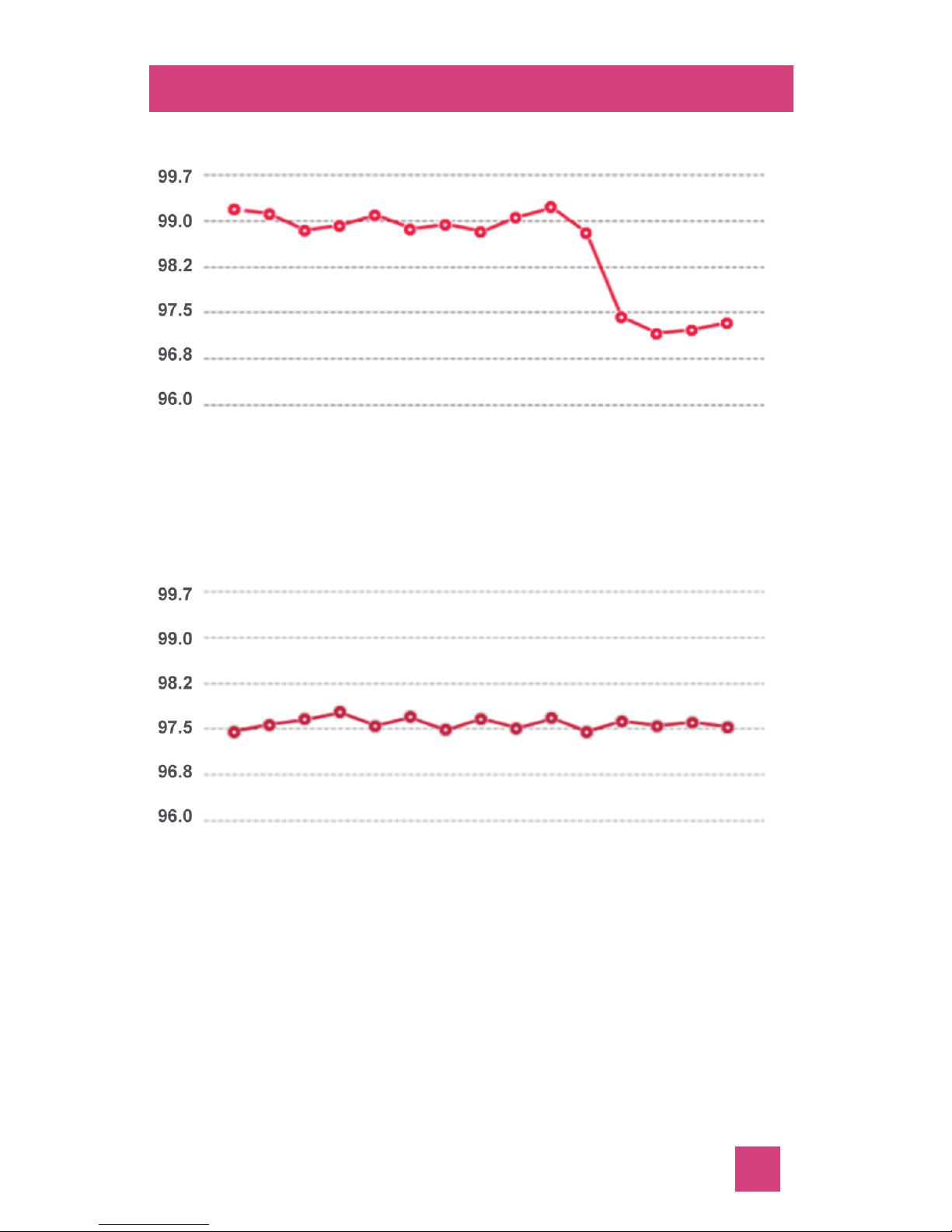
What does different curve mean?
BBT curve of early miscarriage
BBT keep rising for over 20 days, and
suddenly drop is a sign of early miscarriage.
BBT curve of no ovulation
BBT is always within the range of 97.5-97.9℉
during a menstrual period indicates there’s no
ovulation, better go for medical treatment.
18
Page 21
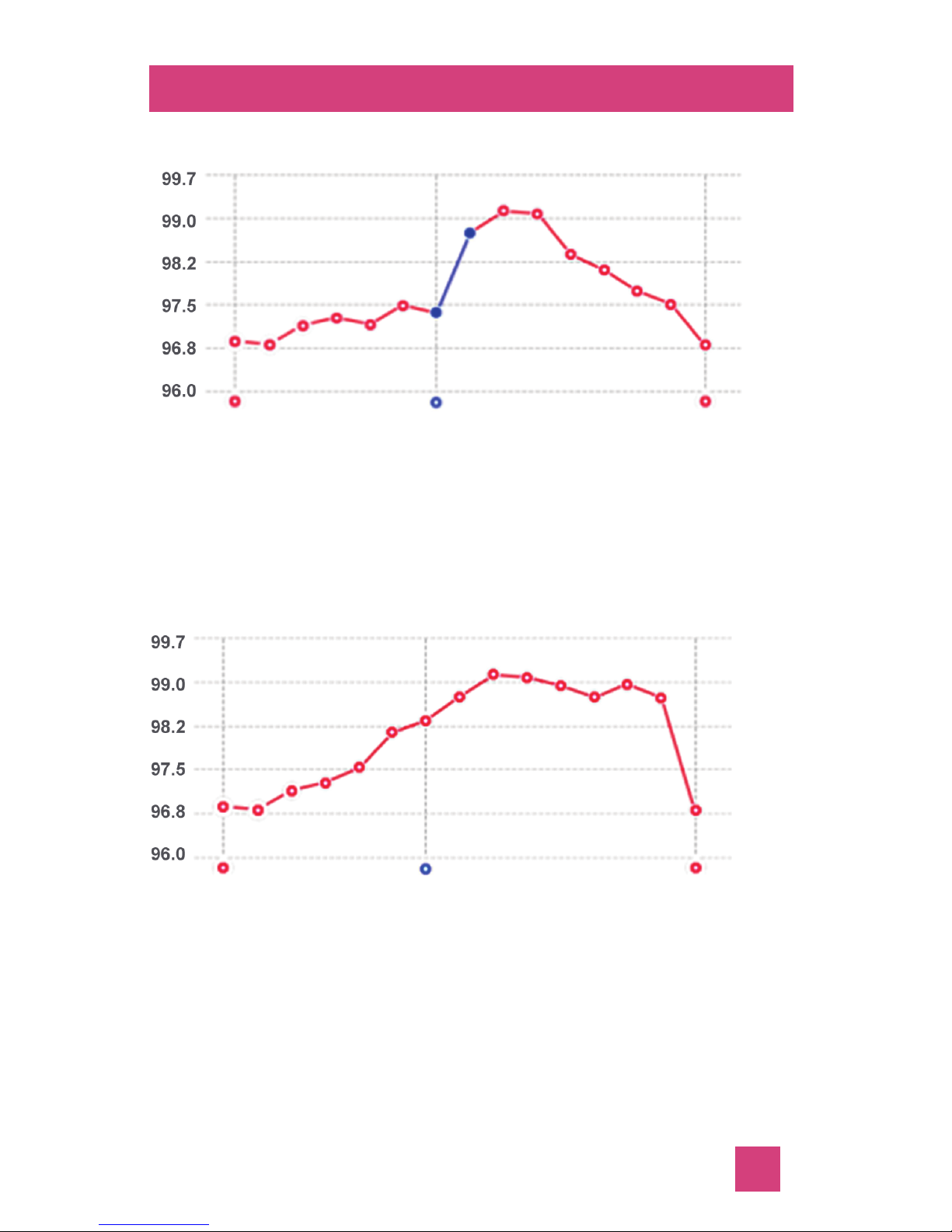
What does different curve mean?
BBT curve of
corpus luteum dysfunction
The dropping speed of BBT is slow, during the
days before the next menstrual period indicates
corpus luteum dysfunction. It’s better to consult
a doctor
BBT curve of low progesterone
BBT is rising slowly several days before and
after ovulation day, and there’s no sharp rise
among the menstrual periods. This indicates a
low level of progesterone. It’s better to consult
a doctor.
19
Period starts Ovulation Next period
Period starts Ovulation Next period
Page 22

Maintenance and cleaning
1.Please replace the battery when the low
battery indication appears, otherwise the
device will not work correctly;
2.The product lifetime is 5 years. The
treatment of the device and battery at the end
of their life should be compliance with local
laws and regulations;
3.The probe should be cleaned and
disinfected, but never sterilized. If you have no
probe cover, clean the surface of the device
with 75% concentrated medical alcohol before
and after using it;
5.Wept the surface with wet alcohol cotton ball
before and after using the thermometer.
* Do not sterilize or autoclaved;
* If you notice any deterioration or damage to
probe, stop using the device immediately;
* Other use of cleaning agents and disinfectants beside alcohol may damage the device
and shorten product lifetime or cause safety
hazards.
20
Page 23

Accessories and specification
1.Accessory
a) Probe cover*25
b) CR1220 button cell*2
c) User's manual*1
d) Quick start*1
2.Technical Specifications
Product Name WT2
Size 115.6mm×27.1mm×8.3mm
Weight 6.25g(with battery)
Measure specifications
Range 77.00
℉ - 113.0℉
95.00℉ -101.00℉ : ±0.09℉
Accuracy 77.0℉ -94.99℉ : ±0.18℉
95.0℉ -113.00℉ : ±0.18℉
Unit “℃”or“℉”
Compatibility
iOS iOS 8+
Android 4.3 +
Battery
Type CR1220,3V/38mAH button cell
Life ≥3 months(once per day)
Environment Specification
Operating:+41
℉ ~+104℉
Temperature Transportation and storage:
-4
℉ ~+131℉
Working/Transporation/Storage:
Humidity 25%~95%
(non condensing)
Atmospheric Operating:700hPa~1060hPa;
pressure Transportation and storage:
500hPa~1060hPa.
21
Page 24
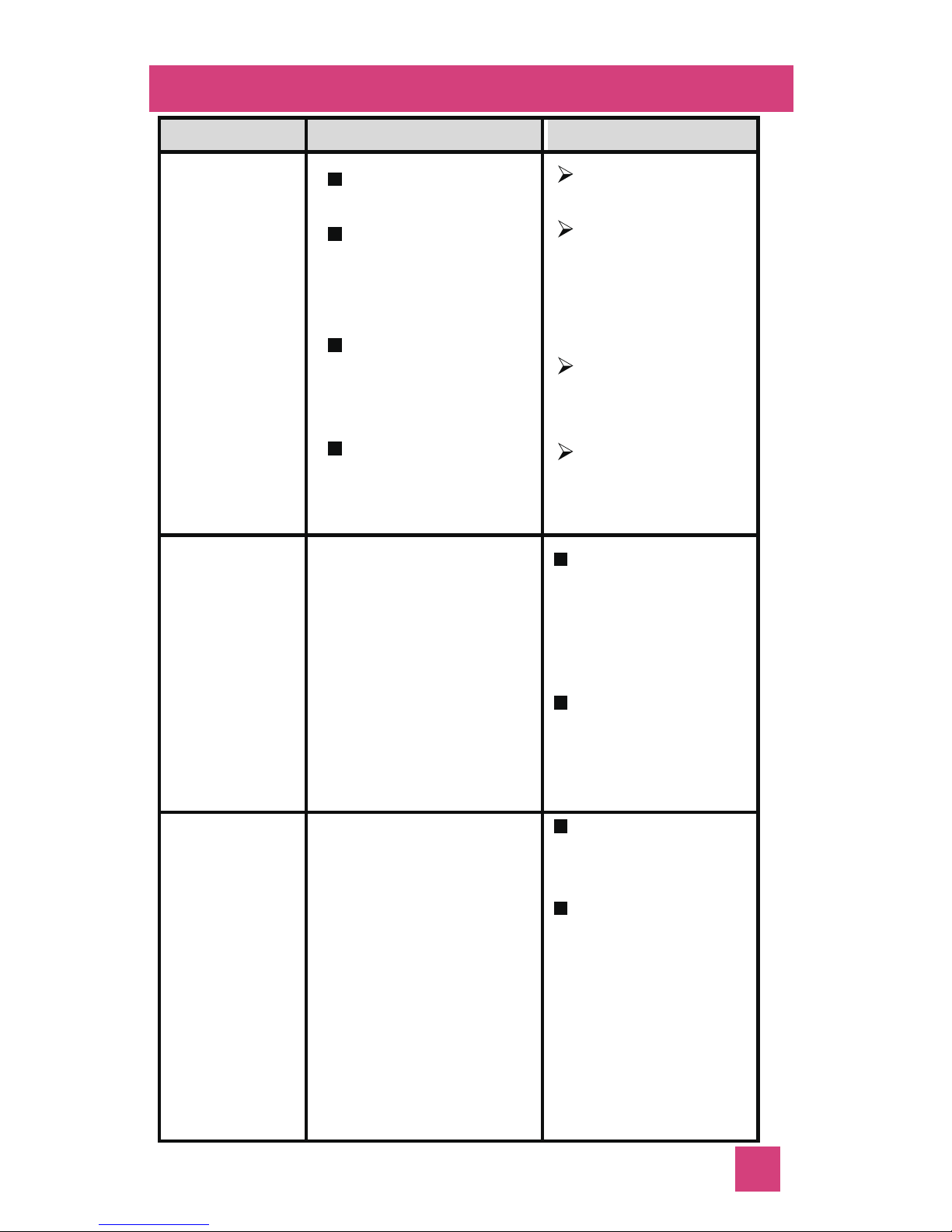
Contact
customer
service
Adjust the
position of
the probe.
Put it into
your mouth
and near to
left or right
side of the
tongue.
Troubleshooting
Sym ptom
Possible Reason
Solution
Cannot
connect
device
with smart
phone
BT is turned off
on smart phone
The Android
Version of the
smart phone
is lower than 4.3
The Bluetooth
version of smart
phone is not 4.0
Out of Bluetooth
Connection range
Turn on the
Bluetooth;
Upgrade the
Android
system to
version 4.3
or 4.3+
Use a smart
phone with
BT 4.0
Keep your
smart phone
close
Cannot
turn on
device
1. The battery
power might
be at very low
or out of
electricity
2.
The device
itself might
be damaged
Replace the
battery then
restart the
device
Contact
customer
service for
replacement
The
temperat
ure data
cannot
be
displayed
properly
1. The device
itself might be
damaged
2. Wrong putting
position
22
Page 25
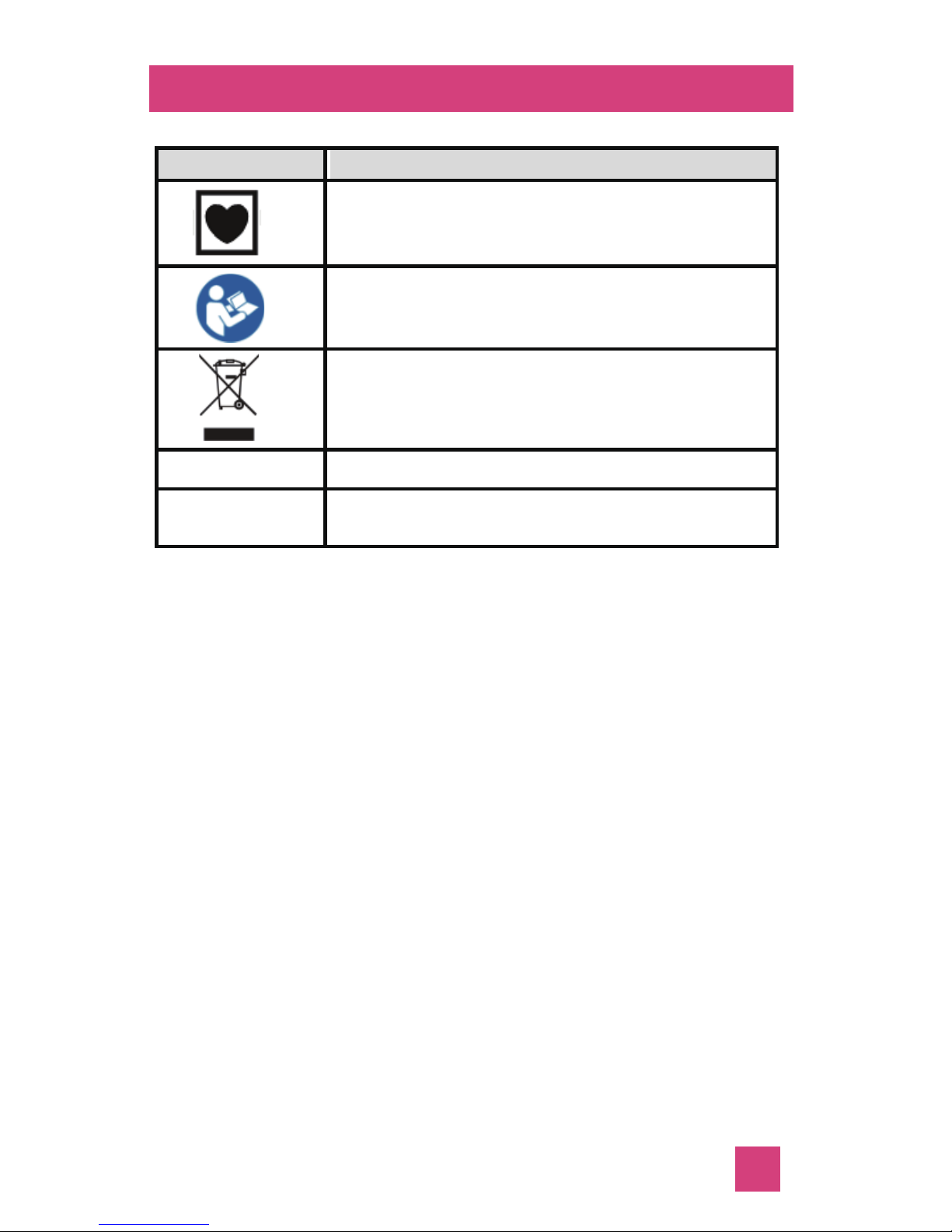
Symbols
!
!
Symbols Meaning
Type CF applied part, without
defibrillation protected.
Refer to this user’s manual.
Symbol for the marking of electrical
and electronics devices according to
Directive 2002/96/EC.
SN Seriel Number
IP22 Enclosure degree of ingress protection
23
Page 26

Guidance and EMC declaration
Guidance and manufacture’s declaraon
– electromagnec emission
The device is intended for use in the electromagnec
environment specified below. The customer of the user
of the device should assure that it is used in such an
environment.
Emission test Compliance Electromagnetic en vironment guidance
The device use RF
energy only for its
RF emission Group 1 internal function.
CISPR 11 Therefore, its RF
emissions are very
low and are not likely
to cause any inter ference in nearby
electronic equipment
.
RF emission Class B
CISPR 11
Harmonic Not applicable
emissions (Battery operIEC 61000-3-2 ated device)
Voltage fluctua- Not applicable
tions/flicker (Battery operemissions ated device)
IEC 61000-3-3
The deivice is suitable for use in all
establishments, including domestic
and those directly
connected to the
public low-voltage
power supply network that supppies
buildings used for
domestic purposes.
24
Page 27
Designed by: Emay (HK) Limited
Rm.1902, Easey Comm. Bldg., 253-261
Hennessy Road, Wanchai, Hong Kong
[email protected]
www.emayltd.com
Made by: Guangdong Biolight Meditech Co.,Ltd
Shanghai International
Holding Corp. GmbH (Europe)
Eiffestrasse 80, 20537
Hamburg Germany
PN: 22-051-0010
Smart Fertility Monitor
App Download: Scan above barcode or search
“Emay Smart Ferlity Monitor ”to download Emay App
in App Store or Google Play store
 Loading...