

Page 1
Page 2

Page 3

Version 1.1
Table of contents
Table of contents_______________________________________________ 1
1. Introduction ________________________________________________ 3
2. Specifications of the Prima2 scale _______________________________ 3
2.1. Scale presentation ________________________________________ 3
2.2. Technical Specifications ____________________________________ 4
2.3. Dimensions ______________________________________________ 4
2.4. Display, keyboard _________________________________________ 5
2.5. Description of connectors ___________________________________ 6
3. Technical conditions of installation and operation of the scale __________ 6
3.1. Installation of the scale_____________________________________ 6
3.2. Environment _____________________________________________ 6
3.3. Other operating remarks____________________________________ 7
4. Operation __________________________________________________ 7
4.1. Turning on_______________________________________________ 7
4.2. Weighing ________________________________________________ 8
4.3. Zero setting______________________________________________ 8
4.4. Tarring__________________________________________________ 9
4.5. Transmission ____________________________________________ 10
5. Configuration of the scale _____________________________________ 11
5.1. Main menu _____________________________________________ 11
5.2. User menu______________________________________________ 12
6. Communication with the scale _________________________________ 20
6.1. Configuration of the communication parameters of the scale ______ 21
6.2. Description of the ELZAB protocol____________________________ 21
6.2.1. Reading the weight ____________________________________ 21
6.2.2. Checking the host connection of the scale __________________ 23
6.2.3. Sending the name of weighted commodity __________________ 23
6.2.4. Reading of the program version __________________________ 24
7. Error messages _____________________________________________ 24
7.1. Messages and errors displayed on the scale display______________ 24
7.2. Errors signalised acoustically _______________________________ 25
8. Conformity assessment (legalization)____________________________ 25
Page 4

2
User Manual PRIMA 2 scale ELZAB S.A.
Page 5
ELZAB S.A. User Manual PRIMA 2 scale
3
1. Introduction
The ELZAB PRIMA2 is a modern electronic scale with the strain pressure transducer and digital
readout of results. It is dedicated to work with cash registers (in particular with cash registers
produced by ELZAB) and other devices equipped with RS232 serial interfaces and USB.
The scale is available in three versions with different measurement specifications: as the single
interval or double range scale. For comfortable reading of indicated weight the scale is equipped
with two built-in LCD displays located on the front and the back of the case. There is also
available an optional free-standing display as accessories.
Scale features:
x weighing the goods,
x weighing and subtracting the tare,
x automatic switching off the tare after having weighted the goods,
x automatic zero tracking (maintaining zero while unloaded),
x 3-button keyboard,
x two built-in displays showing the weight, messages and the ZERO, STABILITY, NET and
FIXED TARA indicators,
x ability to connect an additional graphic display,
x single interval (d = e = 5 g) or double range (I range: d
1
= e1 = 2g, II range: d2 = e2 = 5g)
scale,
x communication with external devices (cash register, computer, terminal) through the RS232
communication interfaces or USB (CDC class),
x transfer of the weighing results: after pressing the button on the scale, after receiving the
command from the communication interface or automatically,
x ability to work in the ELZAB SCALES SYSTEM,
x energy saving mode.
2. Specifications of the Prima2 scale
2.1. Scale presentation
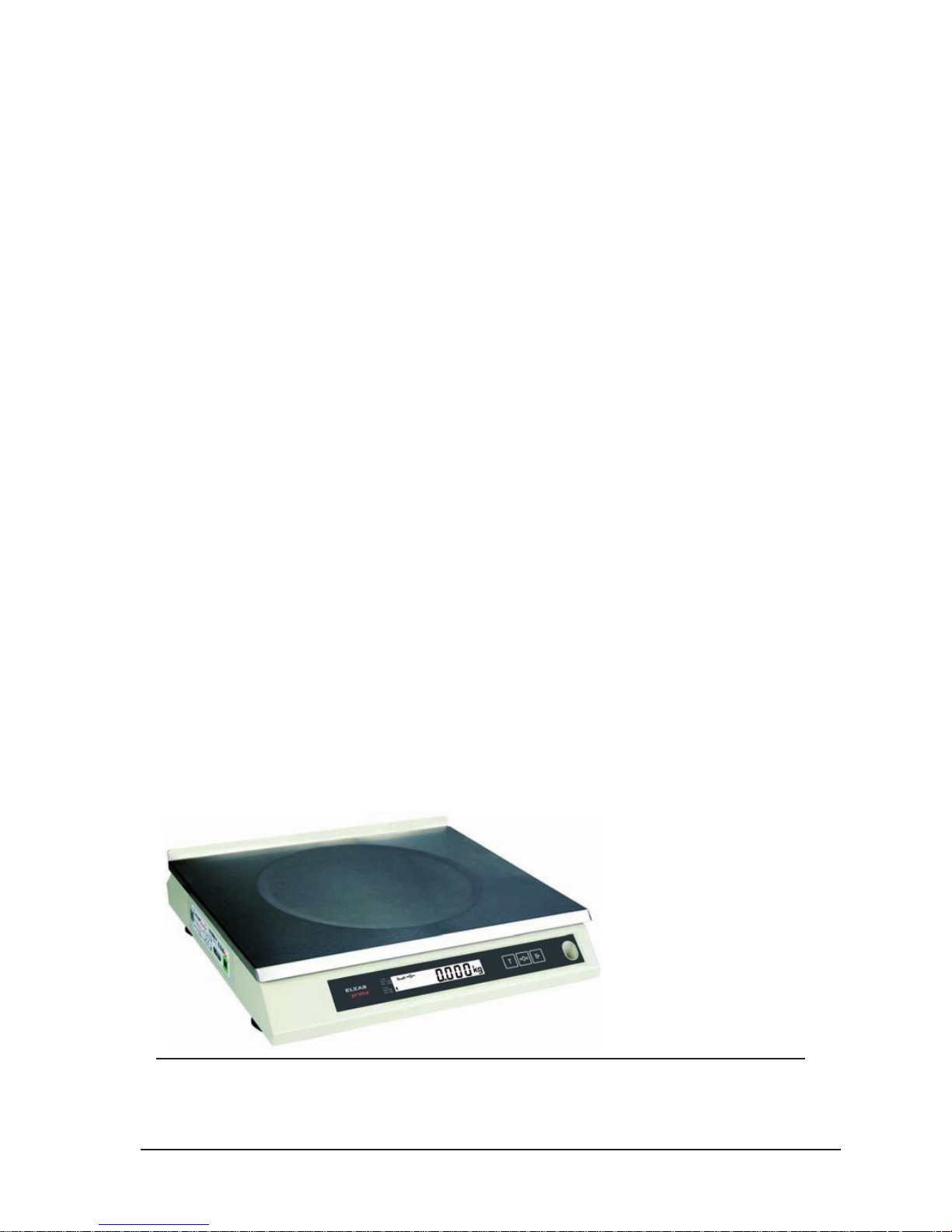
PRIMA 2 scale
Page 6
4
User Manual PRIMA 2 scale ELZAB S.A.
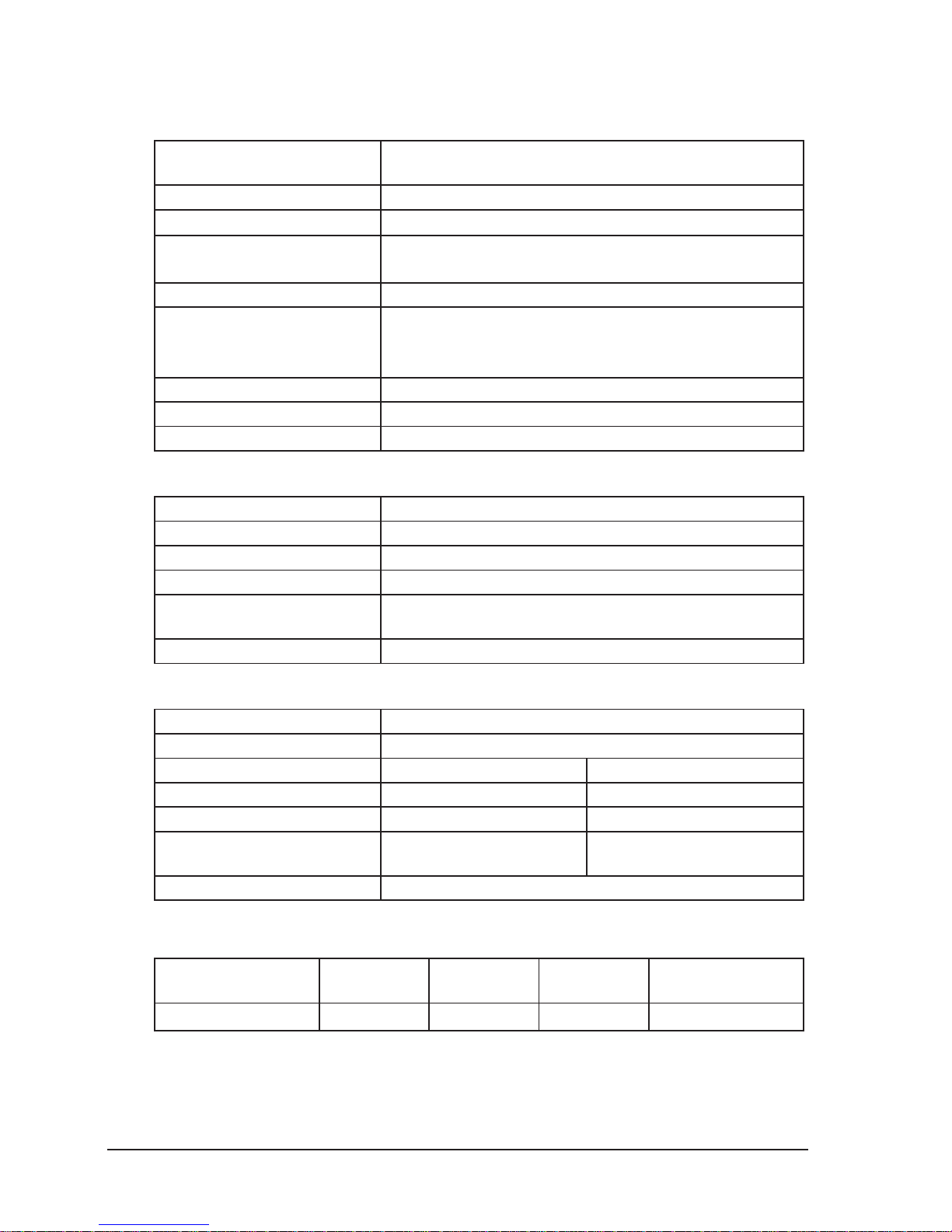
2.2. Technical Specifications
x Specifications common for all types of scales:
Scale type
non-automatic, electronic scale with the load strain
pressure transducer and digital readout of the weight
Display 5 digits, character height of 12,7 mm
Operating temperature range
-10 qC y 40 qC
Power Supply 5±0.5V / 0,25A
(through RS232 interface or USB)
Power consumption average 1W
Interfaces
1. RS232 (computer, cash register)
2. USB (computer, terminal)
3. RS232 (additional external display)
Number of scale intervals 3000
Initial zeroing range ±10% * Max = ±1.500g
Semi-automatic zeroing range ±2% * Max = ±0.300g
x Specifications of the single interval:
Class of accuracy III
Scale type Single interval
Minimum load Min = 100g
Maximum load Max = 15kg
Elementary and legalization
scale intervals
d = e = 5g
Tare range (subtracting tare) T = -Max
x Specifications of the double range scale:
Class of accuracy III
Scale type double range
Weighing range I II
Minimum load Min = Min1 = 40g Min2 = 100g
Maximum load Max1 = 6kg Max = Max2 = 15kg
Elementary and legalization
scale intervals
d
1
= e1 = 2g d2 = e2 = 5g
Tare range (subtracting tare) T = -Max
2.3. Dimensions
Scale type
width
[mm]
depth
[mm]
height
[mm]
total weight
[kg]
PRIMA 2 319 307 78 3,9
Page 7
ELZAB S.A. User Manual PRIMA 2 scale
5
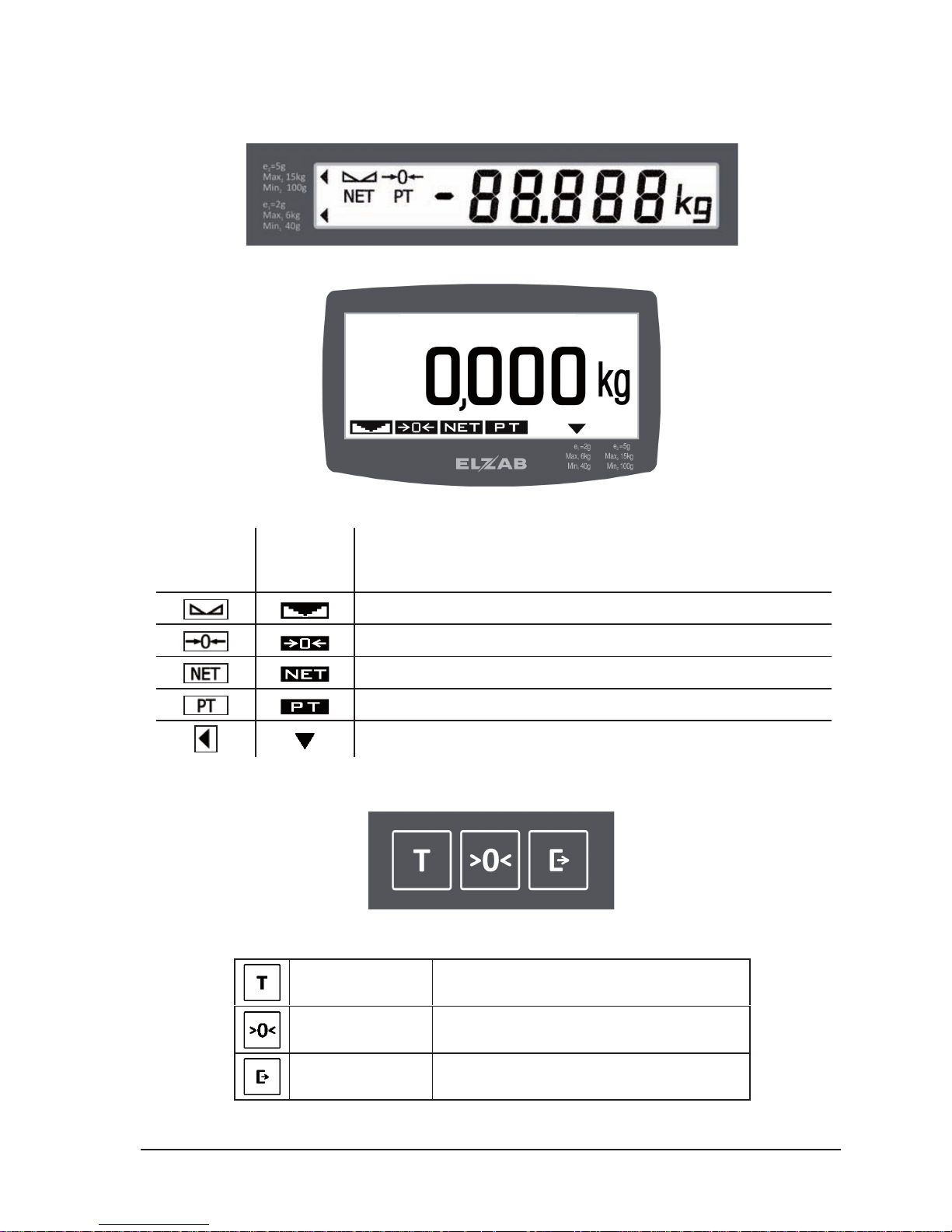
2.4. Display, keyboard
x Built-in display
x Additional external display
There may be displayed the following indicators:
Built-in
display
Additional
external
display
Meaning
Stable loading indicator
Exact zero indicator (weight less than ¼ of the e1or e interval)
Indicator of the tare stored for a single weighing
Indicator of the tare stored for several weighing
Scale range indicator (only it the double range scale)
The controls of the scale consists of the three keys.
The functions of the keys in the weighing mode are as follows:
TARING Turning on and off the tare
ZEROING Zeroing the scale, access to the scale menu
TRANSMITTING Transmitting the result to the cash register
••••••• ••• •
Page 8

6
User Manual PRIMA 2 scale ELZAB S.A.
2.5. Description of connectors
CASH REGISTER/PC (RS232) connector – is used to connect cash register or PC
Contact No. Signal name
1, 2 +5V–cash register power supply input
3 TxD-serial output
4 RxD-serial input
5, 6 GND
PC PC/TERMINAL (USB) connector– is used to connect a PC
Contact No. Signal name
1 +5V–cash register power supply input
2D 3D +
4 GND
ADDITIONAL DISPLAY connector– is used to connect an additional external display
Contact No. Signal name
1, 2 +5V – display power supply output
3 TxD – serial output
4 --------
5, 6 GND
3. Technical conditions of installation and operation of the scale
3.1. Installation of the scale
x the scale should be placed on a stable and level surface,
x the scale should be leveled so that the air bubble level indicator was in the center of the
circle drawn on the indicator. Level the scale with adjustable bolts. After having leveled the
scale check for stability (all bolts touch the ground) and whether the platter is correctly
placed on the feet,
x if the scale is working with an external display mount the display on the countertop of the
cash box. Connect the display to the scale,
x connect the USB or RS232 scale interface cable with the communicating device. Do not
connect or disconnect the interface while using the scale as this may damage the interface.
3.2. Environment
x The scale can be operated at temperatures from -10 to +40 ° C and humidity up to 85% in
an atmosphere free from corrosive substances. After a sudden change in temperature by
more than 5 ° C the scale should acclimate for 2 hours before connecting the power supply
(e.g. putting the scale into warm room after having transported it in the cold). Do not allow
the formation of condensation. When working in areas with higher humidity, but within the
limits stated above, it is advisable to turn off the power for 24 hours.
x The scale may not be subject to shocks and vibrations, can’t work near sources of strong
electromagnetic fields, can’t be exposed to strong sunlight for long periods and can’t work
in the direct stream of air or in dusty areas.
Page 9
ELZAB S.A. User Manual PRIMA 2 scale
7
3.3. Other operating remarks
x During turning on the power the platform should be empty. After turning the power on the
scale automatically runs its test and resets by taking as a zero the actual scale load. During
the test, the display shows the version of the program, all indicators light up and the digits
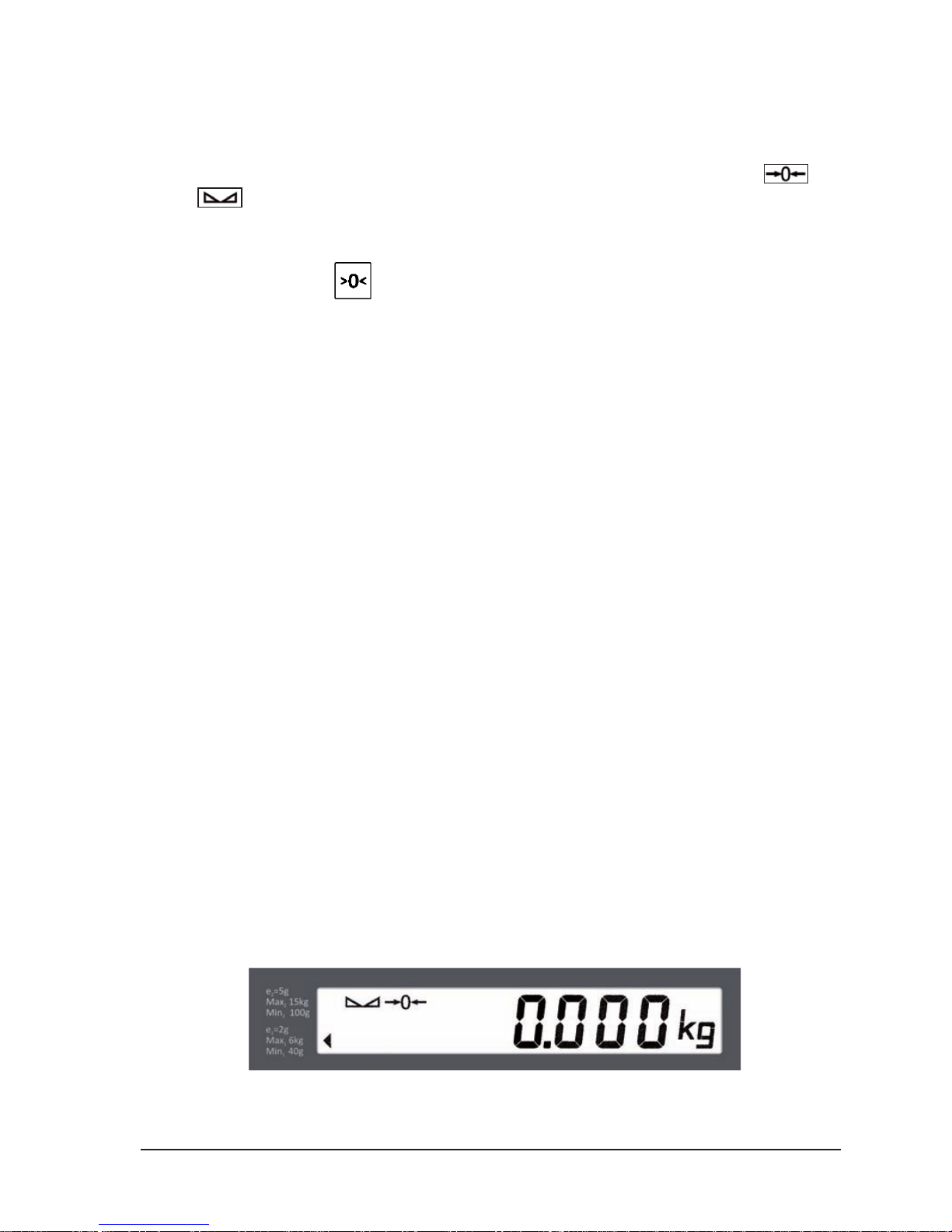
change from 0 to 9. After completing the test displayed data shows zero and the
and
indicators light.
x If during subsequent operations of the scale the weight indicator will be different from zero
it is needed to reset the scale with empty platter
by pressing the
key (for small deviations) or
by turning off and on the power supply of the scale or
perform the scale reset from the main menu.
x Avoid overloading or sudden load shocks of the platter. They can cause damage to the
mass transducer.
x It is recommended to check the correctness of weight readings of the scale using a standard
weight of at least 1/3 of the scale’s range. If you notice that the errors are larger than the
limits are the scale should be immediately withdrawn from use and it is needed to contact
the service.
x It is especially important to review the readings of weight after having transported and
installed the scale, before starting using it. Foreign objects should not touch the platter.
x The whole scale must be kept clean, not only for hygienic and aesthetic reasons but also for
measuring. Take care mainly of cleaning the platter and the space under the platter because
the gathered crumbs of weighted goods may impede the free movement of platter, as well
as affect the functionality of the transmitter. The housing can be wiped with a damp cloth.
Too much water should not be used during the cleaning, which could pour into the interior
of housing.
Note: Failure to comply with technical installation and operation conditions specified in this
user’s manual releases the manufacturer from any liability of an inappropriate
functioning of the scale.
4. Operation
4.1. Turning on
After turning on the scale the internal test procedure runs for about 15 seconds checking the
individual scale components and thermal stabilization of the measuring circuit. During the test all
boxes of the display show consecutive digits and all indicators are lit. In order to precisely zero the
scale any objects should not be put on the platter during the test and the platter shouldn’t be
touched. If the stability of the scale will be disrupted the scale will wait to stabilize the load. After
successful completion of the test the display should show:
Page 10

8
User Manual PRIMA 2 scale ELZAB S.A.
4.2. Weighing
The commodity should be placed as gently as possible near to the central point of the platter.
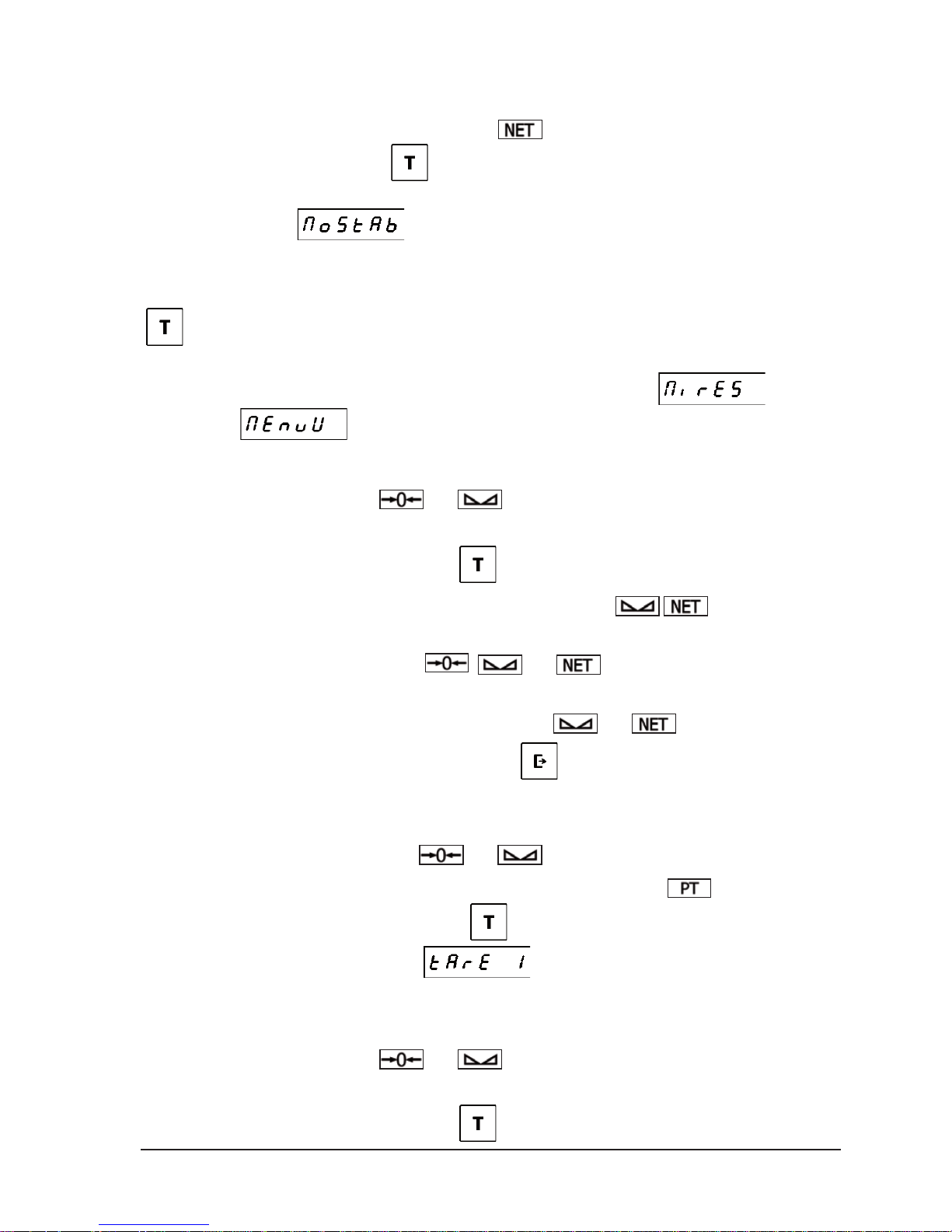
Proceed to load the scale evenly and without shocks or jolts. Negative readings below 20 units are
signalized by displaying
. When the maximum load is exceeded by 9 units
a message is indicated by displaying the
. Maximum load is automatically reduced
by the tare value if it turned on earlier.
Note: Do not overload the scale above the maximum capacity. Overloading can cause
damage to the scale and void the warranty.
After loading the scale the display shows the weight value (e.g. 3,200kg):
4.3. Zero setting
The scale features the indicator signalizing that the scale was reset to zero. The indicator is
lit if the current platter load is less than ¼ of e
1
unit.
Initial zero setting when turning on the scale
After turning on the scale and running the display test the scale will be set to zero. The display will
show only zero values and the
. indicator will be lit. Zeroing is possible if the weighing
result during zeroing is stable and is in the range ± 10% of the weighing range of the zero stored
during the calibration of the scale.
In case of exceeding the zero range the
message will be displayed and the scale
does not reset. The scale is locked until removing the load exceeding the acceptable range.
Zero setting with the use of the key
Zeroing is possible in the range no greater than ± 2% of the maximum scale readings in relation to
the zero stored during turning on the scale (so-called "initial zero"). To reset the scale press
the
key. The scale will be reset if the two conditions are met:
- current indication is within the range no greater than ± 2% in relation to the load stored just
after turning on the scale,
- indication of the scale will achieve stability within 5 seconds after pressing the key.
In case of exceeding the zeroing range the
error is displayed and the scale does not
reset. In case of instability the zeroing is not effected and the
error is displayed.
Automatic zero setting for negative readings
This reset type is done automatically if during several seconds the scale readings are negative or
the scale in under loaded. Other terms and conditions of zeroing are the same as for the reset with
the use of the key.
Zero maintaining i.e. „zero tracking”
This feature prevents from "sliding" of the scale’s zero resulting from various external factors that
may affect the zero indication. It consists of an automatic reset when the platter is unloaded. Other
terms and conditions of zeroing are the same as for the reset with the use of the key.
Page 11
ELZAB S.A. User Manual PRIMA 2 scale
9
4.4. Tarring
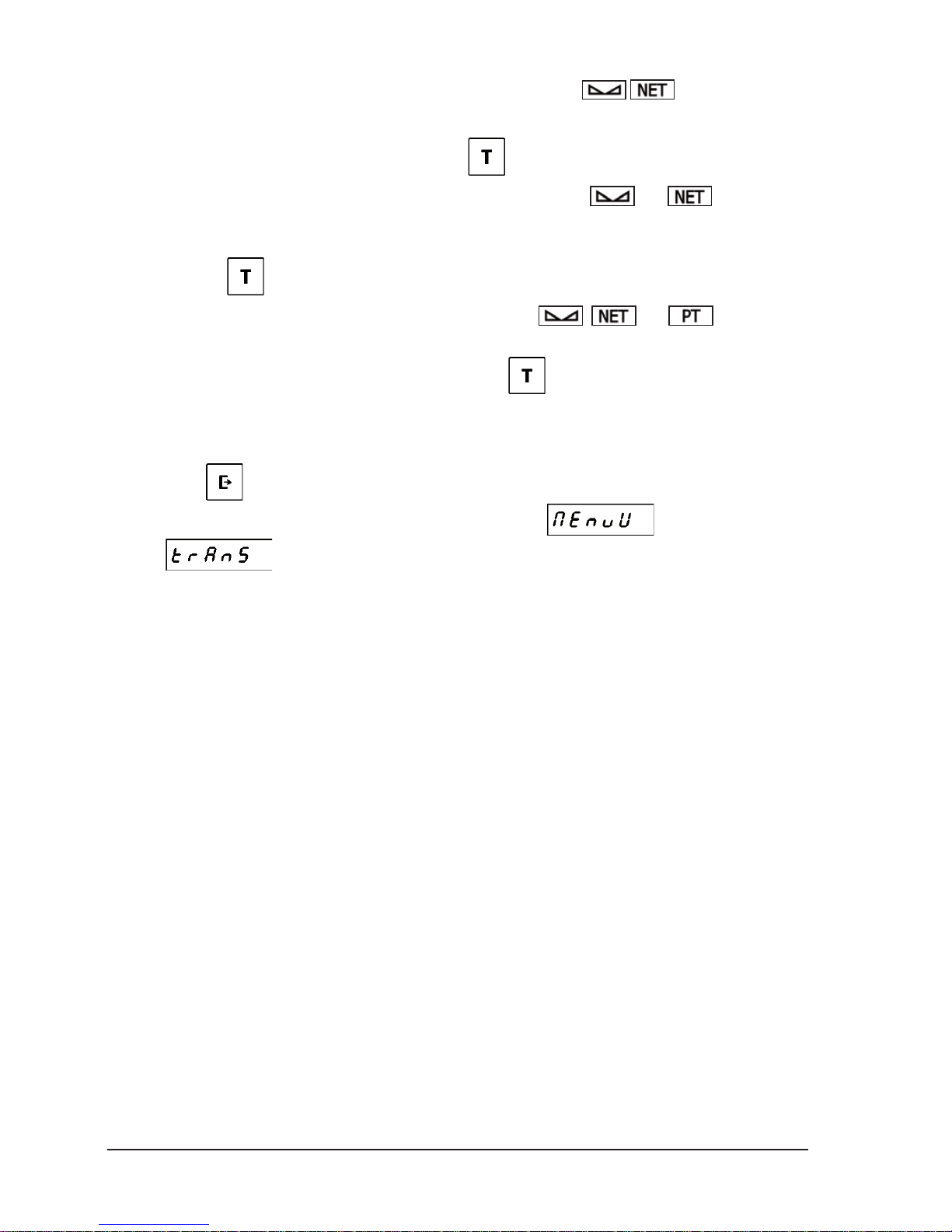
The scale features the tare subtracting function (subtracting the tare reduces the weighing range by the
tare value). Activity of this function is signalized by
indicator.
To activate the function press the
key. If the scale is stable or will achieve stability within
1 second the current platter load will be considered as the platter value. In case of instability the tarring
is not effected and the
error is displayed.
The maximum tare value depends on the type of scale and is indicated in the Section
2.2
Specifications
of this manual.
Turning off the tare is effected after removing the load from the platter and pressing another time the
key or automatically after removing weighted commodity. In order the tare turns off
automatically there should be effected the process of weighing the commodity what takes place when
the load of the platter is stable and greater then the “Minimum Result”
set in the
“User Menu”
.
Example of weighing with tarring:
–
the scale is set to zero, the
and indicators are lit,
– load the scale (e.g. with a basket),
– the scale indicates 0.788 kg, press the
key,
–
the tare value is imputed, the scale indicates 0.000 kg and the
indicators are lit,
– remove the load (a basket),
–
the scale indicates -0.788 kg, the
, and indicators are lit,
– put again the load on the platter (basket + its content),
–
the scale indicates 0.506 kg, the result is stable, the
and indicators are lit,
–
read or transit the result of weighing, press the
key,
– remove the load,
– tare will be switched off automatically,
–
the scale indicates 0.000 kg, the
and indicators are lit.
The scale enables setting the fixed tare value which is signalized by the lit
indicator.
Turn on the tare by pressing another time the
key while inputting the tare value or by single
pressing if the FIXED TARE setting =
. It is possible to input several tare values if
the consecutive tare values are growing.
Example of multiple inputting of the tare value:
– the scale is set to zero, the and indicators are lit,
–
load the scale,
–
the scale indicates 0.788 kg, press the
key,
Page 12
10
User Manual PRIMA 2 scale ELZAB S.A.
–
the tare value is imputed, the scale indicates 0.000 kg and the
indicators are lit,
–
put additional load on the platter,
–
the scale indicates 1.230 kg, press again the
key,
–
the new tare value is imputed, the scale indicates 0.000 kg, the
and indicators
are lit,
– to lock the tare as it would not be automatically turned off after removing the load press
again the
key,
–
the tare is locked, the scale indicates 0.000 kg and the
,
and indicators
are lit,
– To turn off the tare remove the load and press the
key.
4.5. Transmission
Transmission of the weighing result by the RS232 or USB interface can be effected manually after
pressing the
key, automatically in the continuously way or once after the result has been
stabilized. Transmission mode can be set in the “User Menu”
in the “Transmission
Mode”
.
The weighing result can also be requested by the computer through the interface.
Page 13
ELZAB S.A. User Manual PRIMA 2 scale
11
5. Configuration of the scale
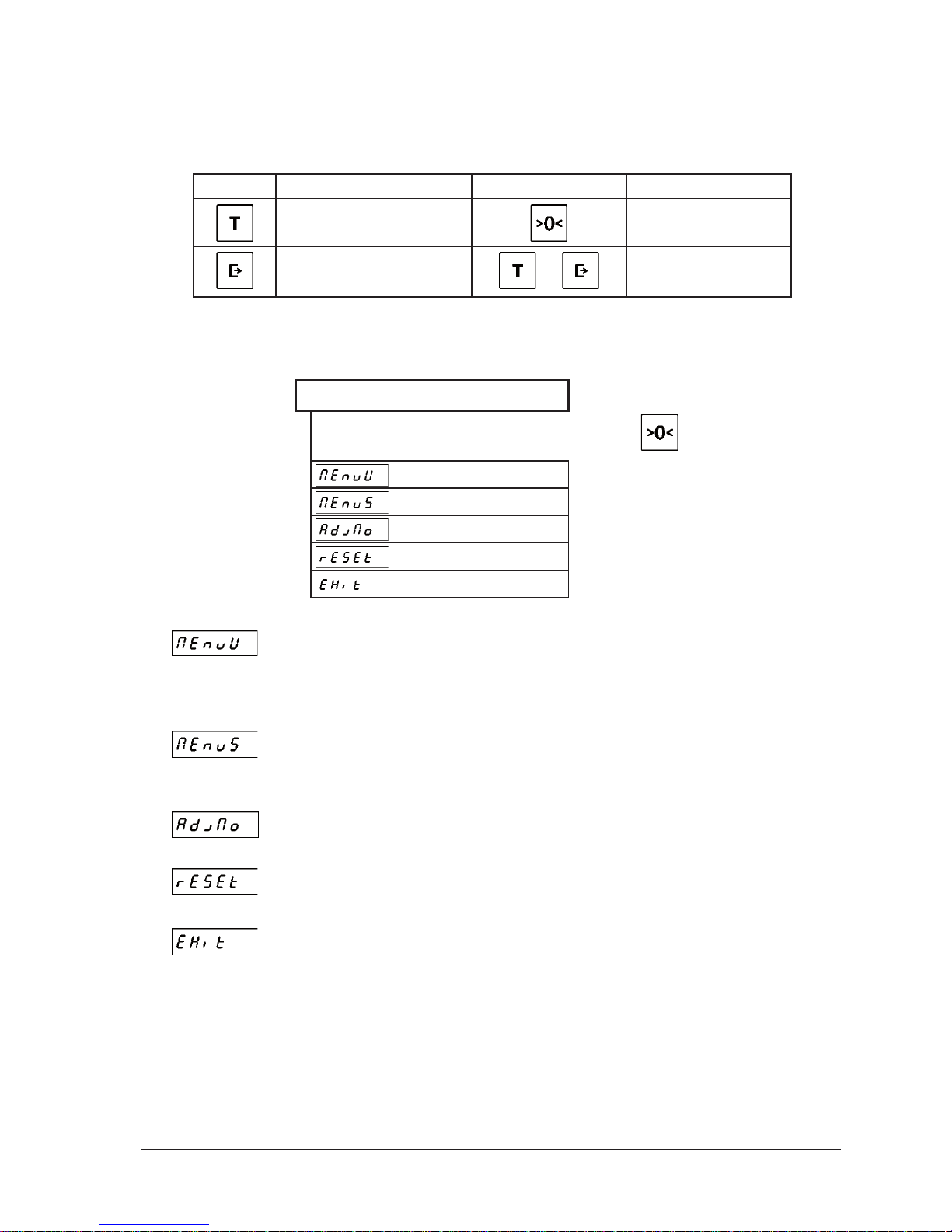
To operate the menu of the scale there are used all three keys of the scale. Their functions are as
follows:
Key Meaning Key Meaning
previous menu item
selection of the menu
item
next menu item
+
exit from menu
5.1. Main menu
Structure of the scale’s main menu:
MAIN MENU
Entrance to the menu: press and hold for 2 seconds the key
.
USER MENU
SERVICE MENU
CALIBRATION NUMBER
RESET OF THE SCALE
EXIT FROM MENU
– USER MENU
The menu contains functions useful during the
installation and operation of the scale concerning
among others the transmission parameters,
configuration of the measurer and display.
– SERVICE MENU
The menu is designed for qualified scale
repairers. The service menu is described in detail
in the Service Manual for the PRIMA 2 scale.
– CALIBRATION
NUMBER
Displaying the scale calibration number.
– RESET OF THE
SCALE
This function enables to reset the scale without
turning off the power.
– EXIT FROM MENU
Exit from the menu to the weighing mode.
Page 14
12
User Manual PRIMA 2 scale ELZAB S.A.
5.2. User menu
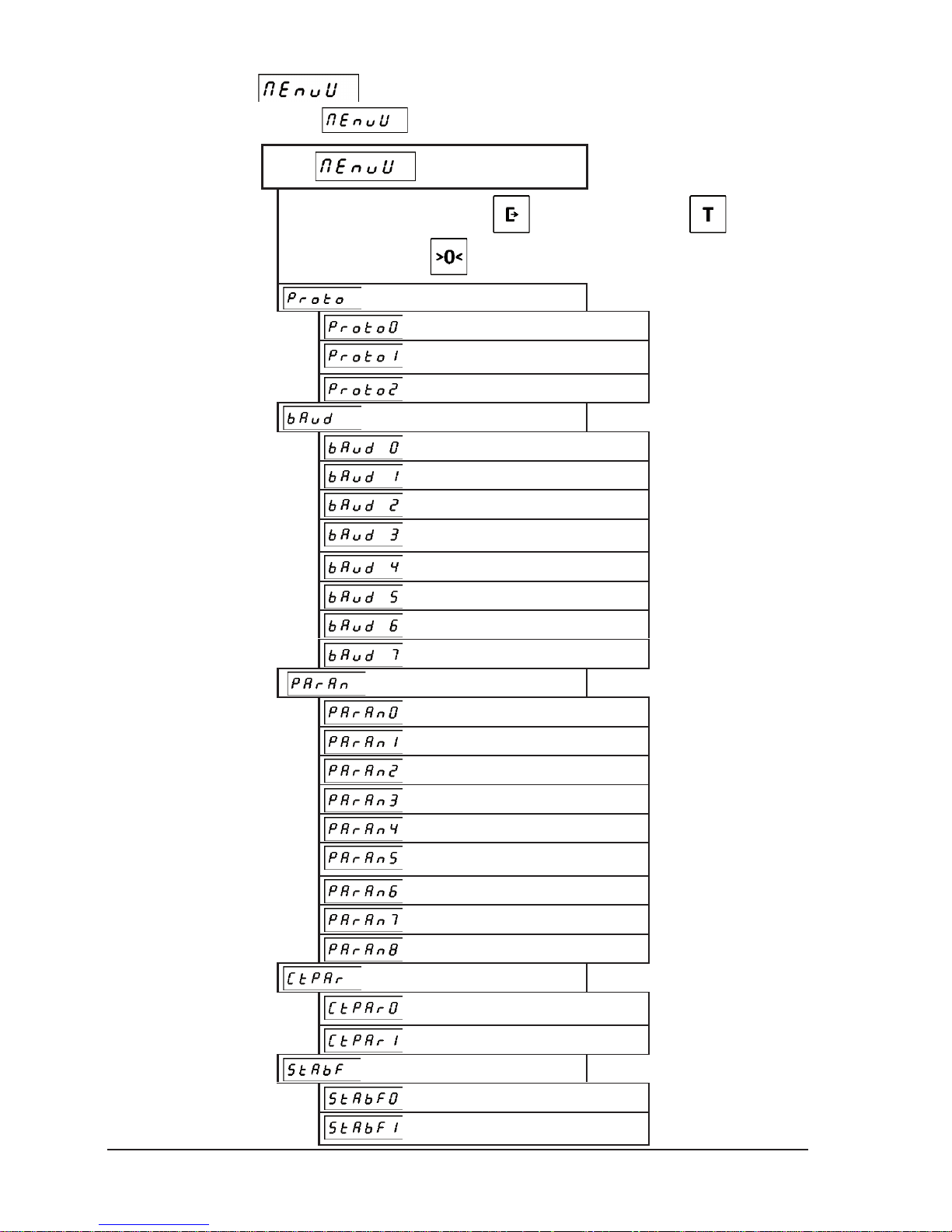
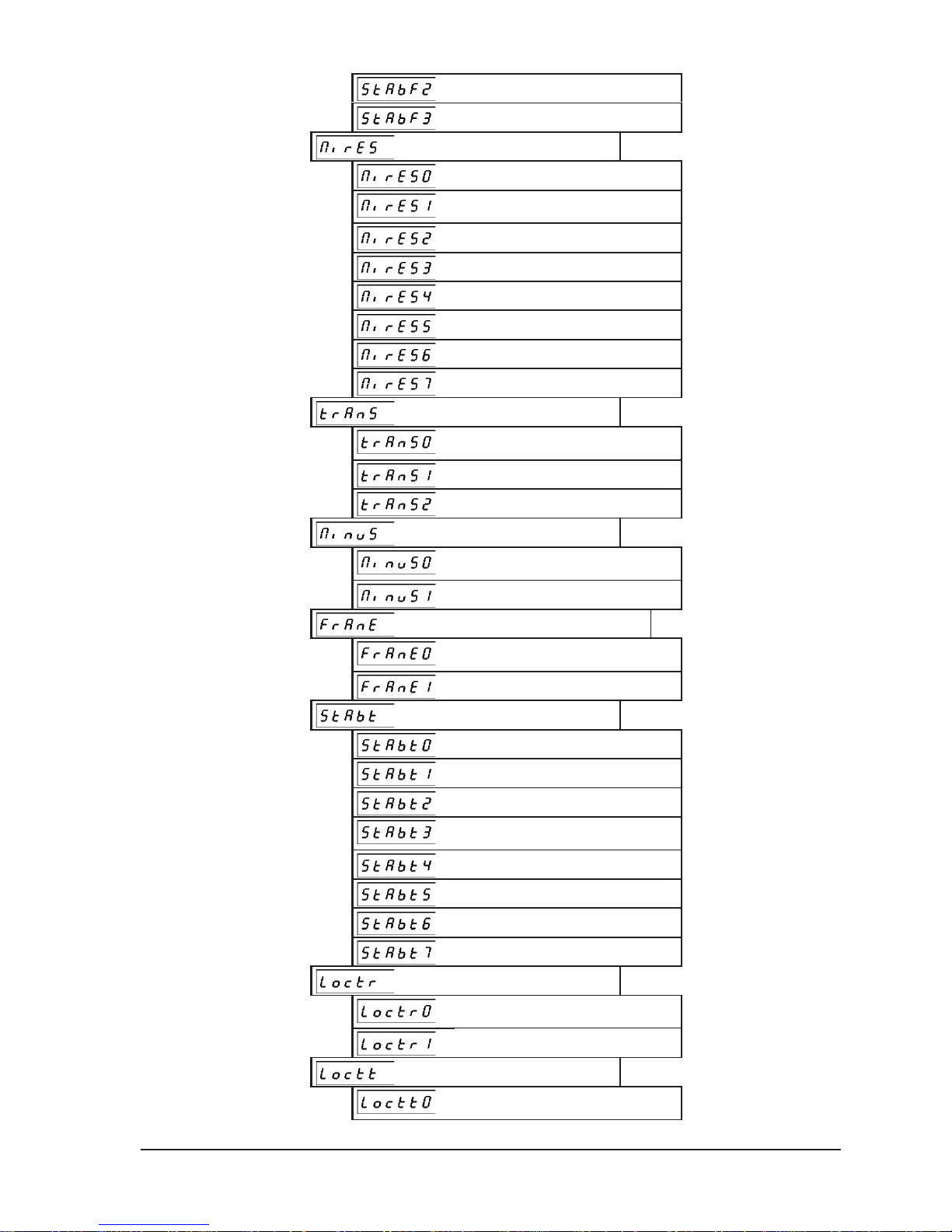
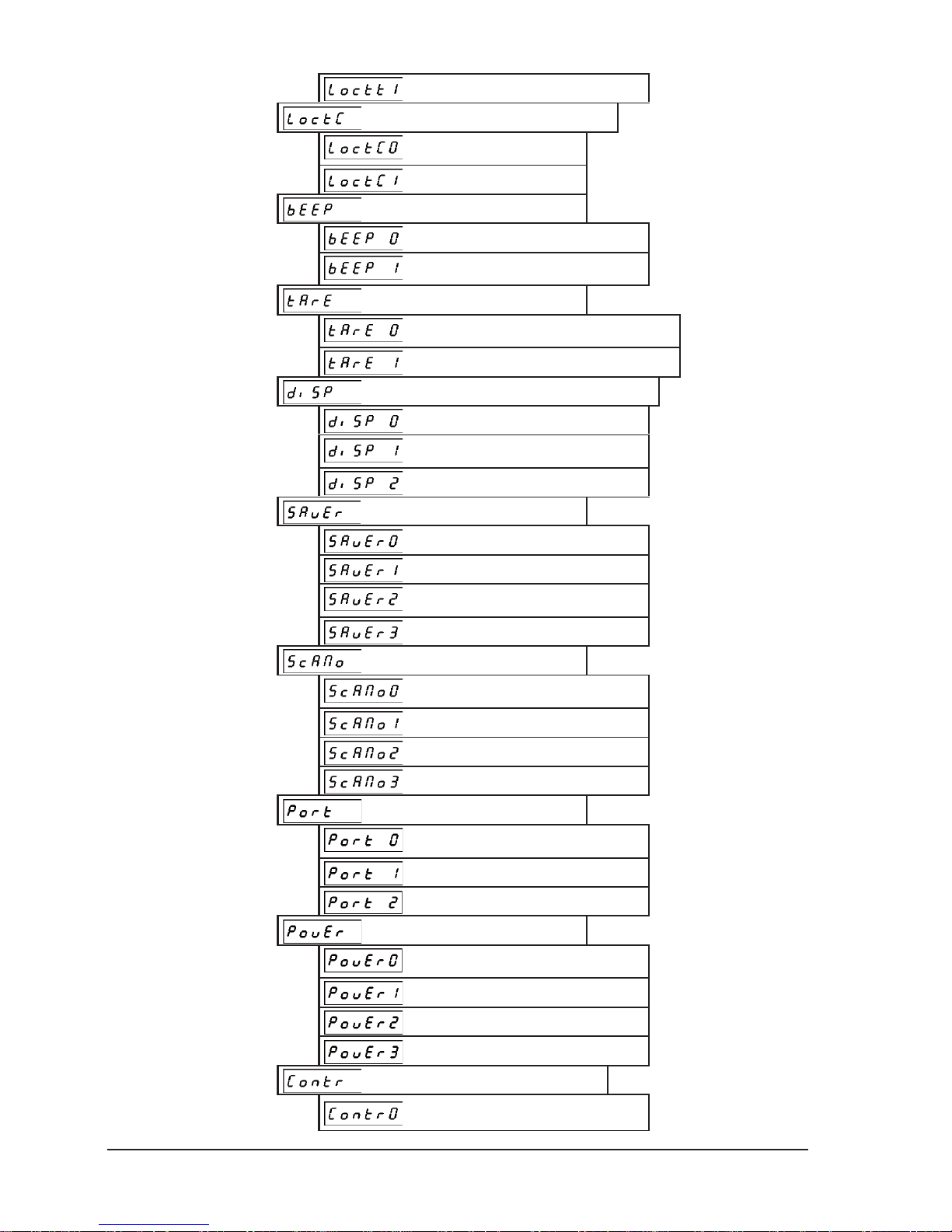
Structure of the “User Menu”
is shown below. Default values are marked with “^”.
USER MENU
Entrance to the menu: press 2 x the key and after press 2 x the
key and confirm with the key).
PROTOCOL TYPE
ELZAB BASIC
^
ELZAB EXTENDED
CAS
TRANSMISSION SPEED
1200 bits/sec
2400 bits/sec
4800 bits/sec
^
9600 bits/sec
19200 bits/sec
28800 bits/sec
38400 bits/sec
57600 bits/sec
TRANSMISSION PARAMETERS
7-EVEN-1
7-ODD-1
7-SPACE-1
7-MARK-1
8-NONE-1
^
8-EVEN-1
8-ODD-1
8-SPACE-1
8-MARK-1
PARITY CHECKING
^
NO CHECKING
CHECKING ENABLED
STABILITY CONDITION
THE HIGHEST STABILITY
^
HIGH STABILITY
Page 15
ELZAB S.A. User Manual PRIMA 2 scale
13
LOW STABILITY
THE LOWEST STABILITY
MINIMUM RESULT
00 x e
^
01 x e
02 x e
04 x e
05 x e
10 x e
20 x e
50 x e
TRANSMISSION MODE
^
AFTER PRESSING THE KEY
AUTOMATIC. STABLE
AUTOMATIC. COUNTINOUS
SENDING THE MINUS
^
ONLY POSITIVE
POSITIVE AND NEGATIVE
TRANSMITTING THE RESULT FRAME
^
ONLY STABLE
STABLE AND UNSTABLE
STABILITY WAITING TIME
0 SECOND
1 SECONDS
2 SECONDS
^
4 SECONDS
6 SECONDS
8 SECONDS
10 SECONDS
12 SECONDS
DATA RECEIVING LOCK
^
LOCK OFF
LOCK ON
TRANSMISSION KEY LOCK
^
LOCK OFF
Page 16
14
User Manual PRIMA 2 scale ELZAB S.A.
LOCK ON
CONFIGURATION RECEIVING LOCK
^
LOCK OFF
LOCK ON
BEEP
NO BEEP
^
WITH BEEP
FIXED TARE
^
AUTOMATIC TURNING OFF THE TARE
ONLY FIXED TARE
TURNING OFF THE DISPLAY BACKLIGHT
NO TURNING OFF
^
TURN OFF AFTER 15 SEC.
TURN OFF AFTER 30 SEC.
POWER SAVING MODE
SWITCHED OFF
TURN ON AFTER 10 MIN.
^
TURN ON AFTER 30 MIN.
TURN ON AFTER 60 MIN.
SCALES SYSTEM
^
SCALE NO. 0
SCALE NO. 1
SCALE NO. 2
SCALE NO. 3
ACTIVE COMMUNICATION PORT
^
AUTOMATIC DETECTION
RS232
USB
USB POWER SOURCE
^
AUTOMATIC DETECTION
COMPUTER
EXTERNAL POWER SUPPLY
USB POWER OFF
DISPLAY CONTROL ADJUSTMENT
ADJUSTMENT OF THE CASHIER
DISPLAY
Page 17
ELZAB S.A. User Manual PRIMA 2 scale
15
ADJUSTMENT OF THE CLIENT
ADJUSTMENT OF THE
ADDITIONAL DISPLAY
RESTORE TO FACTORY SETTINGS
PROGRAM VERSION
SETTINGS READING
EXIT FROM MENU
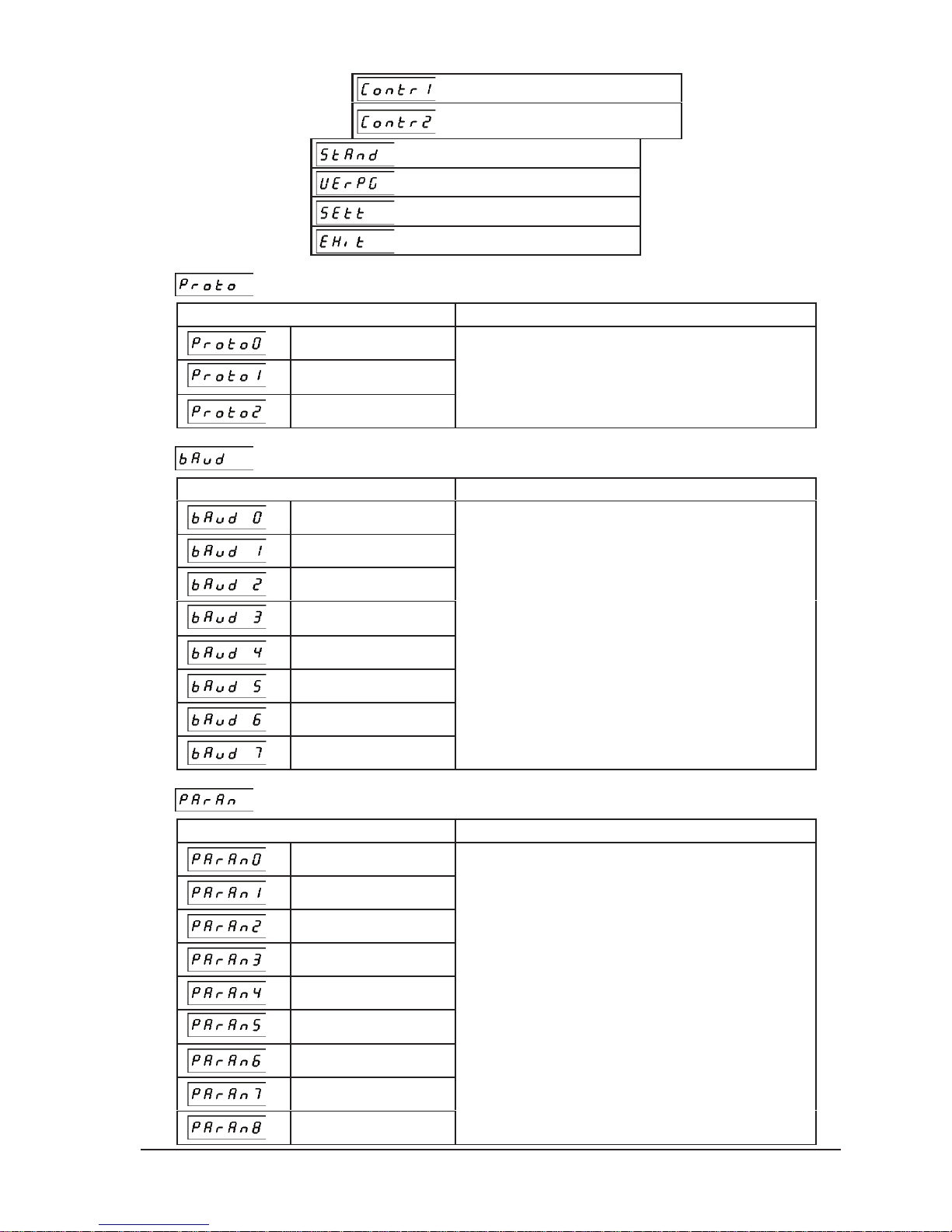
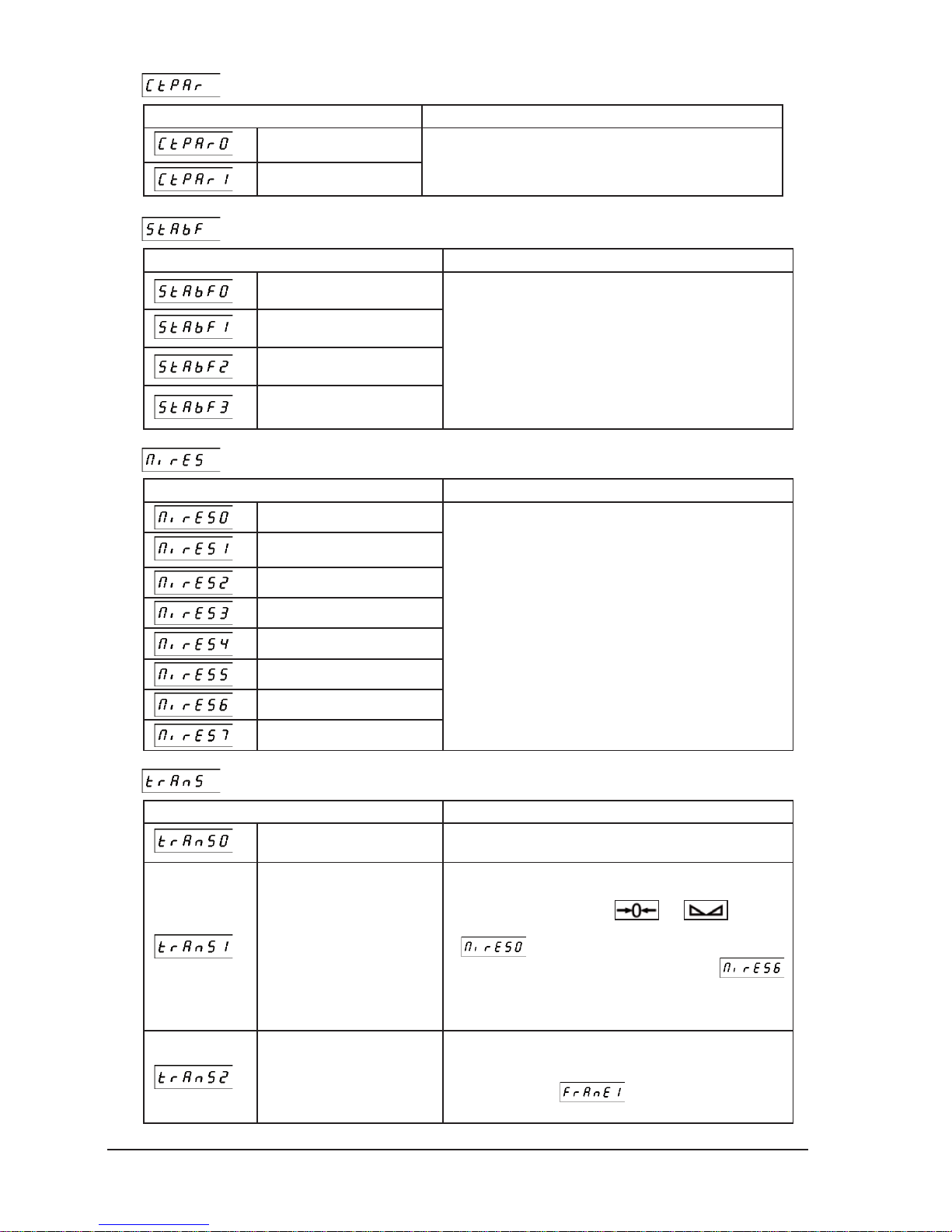
– PROTOCOL TYPE
Setting value Meaning
ELZAB BASIC
^
ELZAB EXTENDED
CAS
Sets the type of communication protocol of the
CASH REGISTER/PC CONNECTOR.
– TRANSMISSION SPEED
Setting value Meaning
1200 bits/sec.
2400 bits/sec.
4800 bits/sec.
^
9600 bits/sec.
19200 bits/sec.
28800 bits/sec.
38400 bits/sec.
57600 bits/sec.
Setting the serial transmission speed of the CASH
REGISTER/PC CONNECTOR.
– TRANSMISSION PARAMETERS
Setting value Meaning
7-EVEN-1
7-ODD-1
7-SPACE-1
7-MARK-1
8-NONE-1
^
8-EVEN-1
8-ODD-1
8-SPACE-1
8-MARK-1
Setting the serial transmission speed of the CASH
REGISTER/PC CONNECTOR.
Page 18
16
User Manual PRIMA 2 scale ELZAB S.A.
– PARITY CHECKING
Setting value Meaning
^
NO CHECKING
CHECKING ENABLED
The parity checking means that bytes with the wrong parity bit
are discarded, and the scale signalizes it by a beep.
– STABILITY CONDITION
Setting value Meaning
THE HIGHEST STABILITY
^
HIGH STABILITY
LOW STABILITY
THE LOWEST STABILITY
This parameter determines the criterion of the result stability.
If the criterion is not met, the result of weighing is considered
as unstable. The smaller the number of this setting the
stringent the stability criterion. A stable result is an obligatory
condition for activation of main scale functions: zeroing,
tarring, weighing and sending the measurement result. If after
loading the scale doesn’t send the result or send it with a few
seconds delay, the stability criterion should be broadened,
that is the number of setting should be increased.
– MINIMUM RESULT
Setting value Meaning
00 x e
^
01 x e
02 x e
04 x e
05 x e
10 x e
20 x e
50 x e
Specifies the minimum result sent by the scale
and the minimum automatically disabled tare value.
– TRANSMISSION MODE
Setting value Meaning
^
AFTER PRESSING THE KEY
The result is sent by scale only at the request of the operator e.g.
after pressing the key or by the request through the interface.
AUTOMATIC. STABLE
The result is automatically sent by scale, just once, after loading
and stabilizing the indication. Before putting the commodity on the
platter the display should show
and . The result
is sent only when the MINIMUM RESULT setting is deferent from
.
Example: the “MINIMUM RESULT” value was set at
that is 20 x e = 040 g the load put on scale was 036 g -> the scale
doesn’t send the result, the load was increased to 042 g -> the
scale sends the result
.
AUTOMATIC.CONTINUOUS
The scale sends the results continuously at 0,12 sec. time intervals.
The unstable results are not sent but the result frame (containing
the signs 0x20 in place of the digits) can be sent if the “SENDING
FRAME” was set at
that is for “STABLE AND
UNSTABLE” value.
Page 19
ELZAB S.A. User Manual PRIMA 2 scale
17
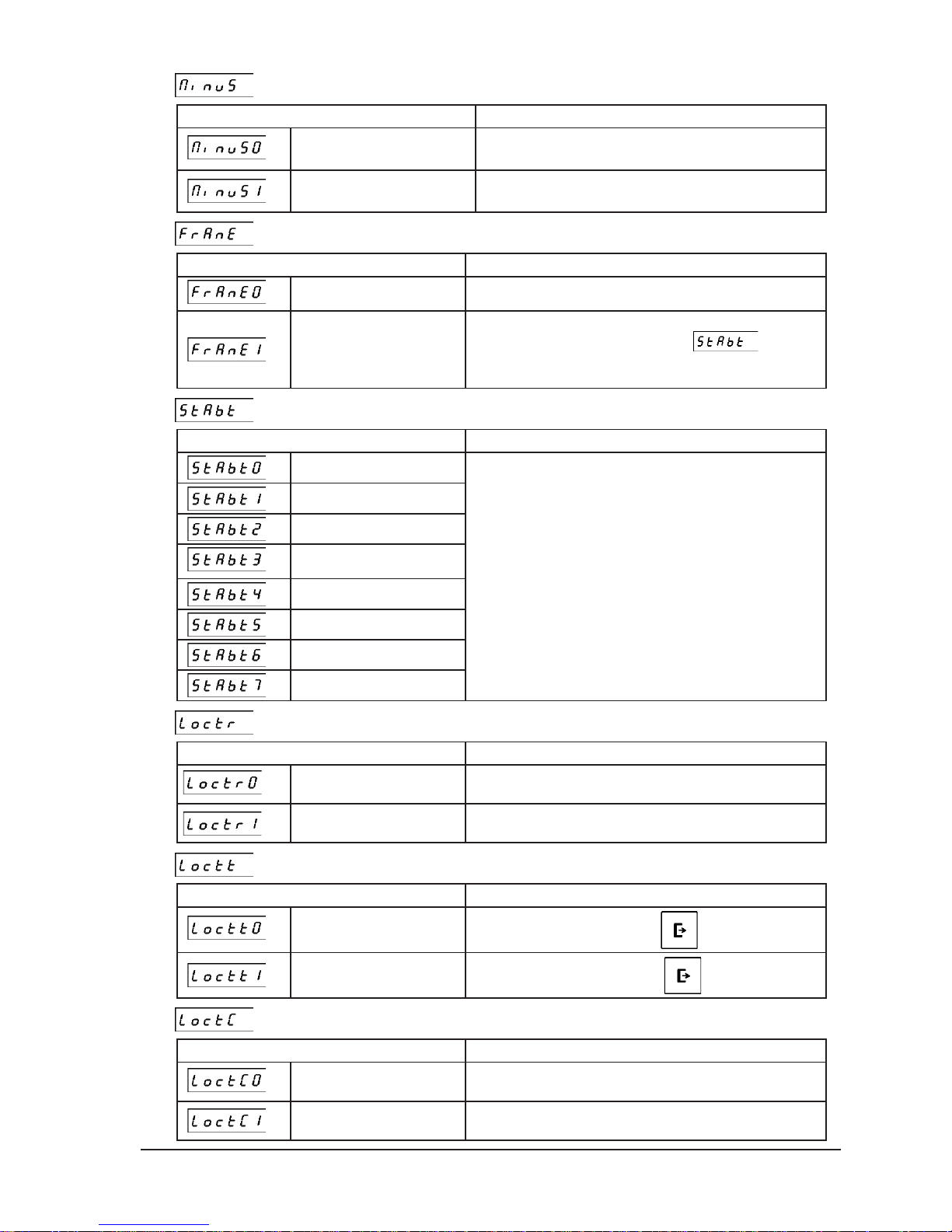
– TRANSMITTING THE MINUS
Setting value Meaning
^
ONLY POSITIVE
The negative result is considered as unstable and is not sent.
POSITIVE AND NEGATIVE
The negative result can be sent if it is stable.
– TRANSMITTING THE RESULT FRAME
Setting value Meaning
^
ONLY STABLE
The result frame is sent only when the result is stable.
STABLE AND UNSTABLE
The result frame is sent after stabilizing the result or after the time witch
is set in “STABILITY WAITING TIME” menu
. If the result
hasn’t stabilized during that time the frame that is sent contains the
signs 0x20 in place of the result digits.
– STABILITY WAITING TIME
Setting value Meaning
0 SECOND
1 SECONDS
2 SECONDS
^
4 SECONDS
6 SECONDS
8 SECONDS
10 SECONDS
12 SECONDS
Specifies the waiting time for stabilizing the result. Time runs from the
moment of requesting the result by key pressing or serial interface. If
the time was set at 0 seconds the result must be stable at the
moment of requesting the result.
– DATA RECEIVING LOCK
Setting value Meaning
^
LOCK OFF
The scale receives the commands via the CASH REGISTER/PC
CONNECTOR.
LOCK ON
Receiving the data via the CASH REGISTER/PC CONNECTOR is
locked.
– TRANSMISSION KEY LOCK
Setting value Meaning
^
LOCK OFF
Data can be transmitted by using the key.
LOCK ON
Transmission of the data by using the key is locked.
– CONFIGURATION RECEIVING LOCK
Setting value Meaning
^
LOCK OFF
Receiving the data from ELZAB cash registers
for automatic configuration of the scale is unlocked.
LOCK ON
Receiving the data from ELZAB cash registers
for automatic configuration of the scale is locked.
Page 20
18
User Manual PRIMA 2 scale ELZAB S.A.
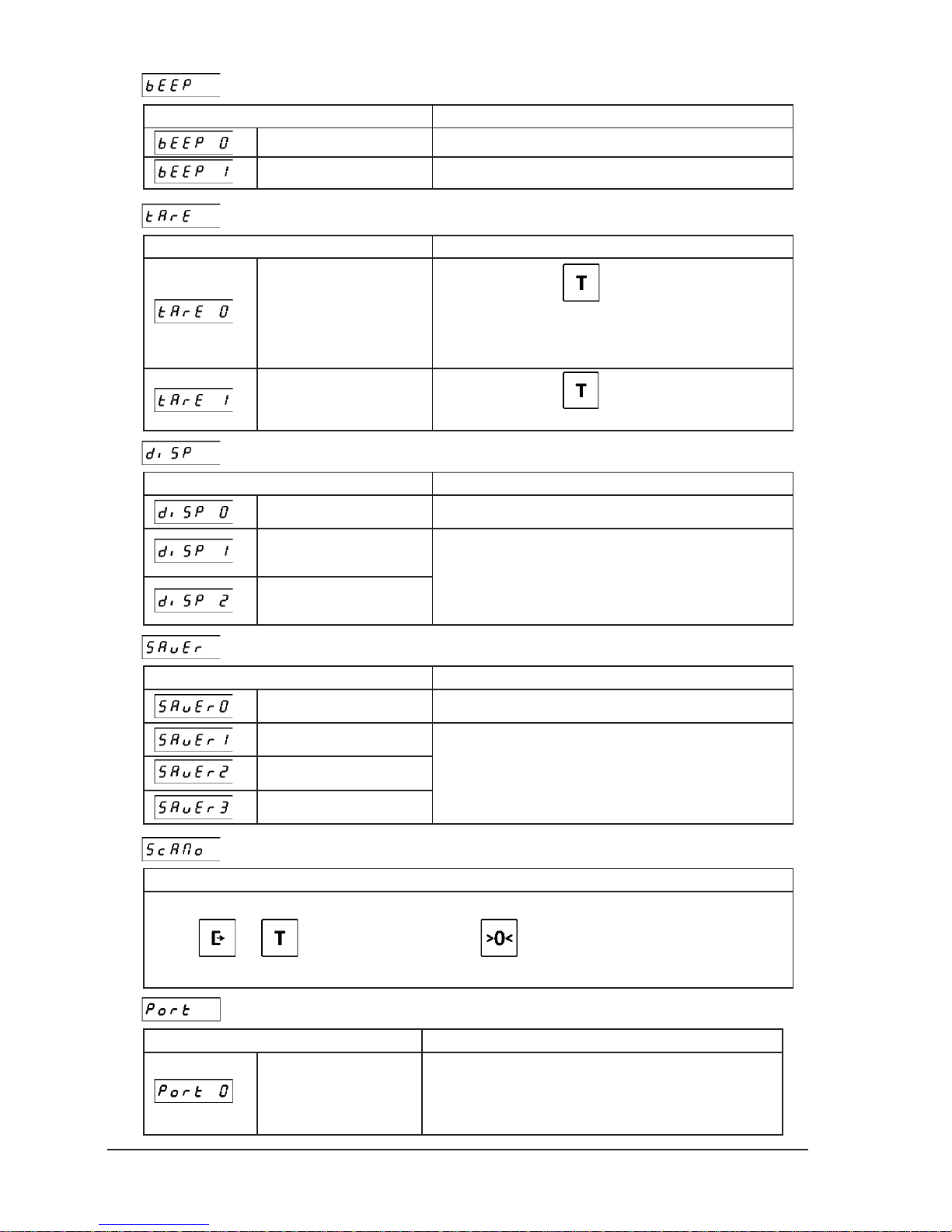
– BEEP
Setting value Meaning
NO BEEP
The acoustic error signaling switched off.
^
WITH BEEP
The acoustic error signaling switched on.
– FIXED TARE
Setting value Meaning
^
AUTOMATIC SWITCHING
OFF THE TARE
Single pressing of the key switches on the tare but doesn’t
switch on the fixed tare. The fixed tare is switched on only after
pressing the key for another time. If the “fixed tare” function is
switched off the tare will be automatically turned off after weighing
the goods and removing them from the platter.
ONLY FIXED TARE
Single pressing of the key switches on the “fixed tare”.
After removing the loading the tare isn’t automatically switched off.
– TURNING OFF THE DISPLAY BACKLIGHT
Setting value Meaning
NO SWITCHING OFF
The display backlight remains switched on.
^
SWITCH OFF AFTER 15
SEC.
SWITCH OFF AFTER 30
SEC.
The display backlight is switched off after 15 or 30 sec. of
the scale inactivity.
– POWER SAVING MODE
Setting value Meaning
SWITCHED OFF
Power saving mode is inactive.
TURN ON AFTER 10 MIN.
^
TURN ON AFTER 30 MIN.
TURN ON AFTER 60 MIN.
Power saving mode will be activated after 10, 30 or 60 minutes of
the scale inactivity.
– SCALES SYSTEM
Meaning
This setting allows you to specify the number of the scale while it is working in the scale system. The number can be entered by
using the
and keys and confirmed by pressing the key. There is possible to enter the values in the range
from 1 to 4. The default value is 1. Each of scales working in the system should have different scale number entered.
– ACTIVE COMMUNICATION PORT
Setting value Meaning
^
AUTOMATIC
DETECTION
Scale receives data from CASH REGISTER/PC (RS232) and
PC/TERMINAL (USB) connectors. The answer from the scale is
sent via the PC/TERMINAL (USB) connector when the scale is
connected to the device via this connector. Otherwise the response is
sent via the CASH REGISTER/PC (RS232) connector.
Page 21
ELZAB S.A. User Manual PRIMA 2 scale
19
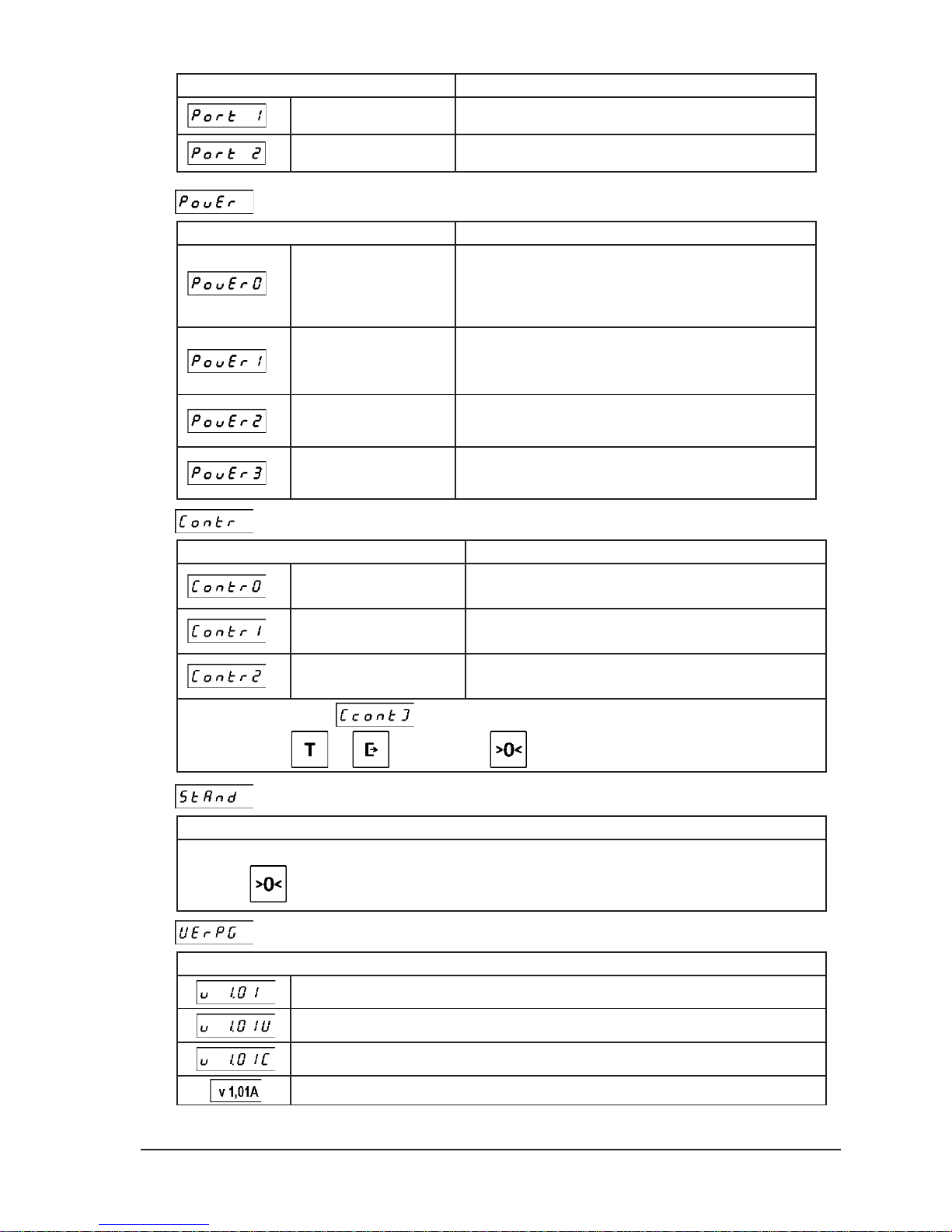
Setting value Meaning
RS232
Communication with the scale is effected via the CASH
REGISTER/PC (RS232) connector.
USB
Communication with the scale is effected via the PC/TERMINAL
(USB) connector.
– USB POWER SOURCE
Setting value Meaning
^
AUTOMATIC
DETECTION
Scale automatically detect from which device it is powered via the
PC/TERMINAL (USB) connector. If it is powered from the power
supply with USB connector the scale starts automatically after switching on
the power. If it is powered from the computer or the terminal the scale starts
only after setting the proper communication with this device.
COMPUTER
Select this option when to the PC/TERMINAL (USB) connector of
the scale is connected the computer which also supplies the scale via
this connector. The scale starts after switching on the power but only
after setting the communication with the computer.
EXTERNAL POWER
SUPPLY
Select this option when to the PC/TERMINAL (USB) connector of
the scale is connected the power supply with the USB connector. The
scale starts immediately after switching on the power.
USB POWER OFF
Powering the scale from the PC/TERMINAL (USB) connector is disabled. To enable working of the scale the external power supply should be connected to the CASH REGISTER/PC (RS232) connector of the scale.
– DISPLAY CONTRAST ADJUSTMENT
Setting value Meaning
CASHIER DISPLAY
ADJUSTMENT
The function enables to adjust the contrast of the cashier display.
CLIENT DISPLAY
ADJUSTMENT
The function enables to adjust the contrast of the client display.
ADDITIONAL DISPLAY
ADJUSTMENT
The function enables to adjust the contrast of the additional display.
After choosing the display the message will be displayed and from that moment there will be possible to adjust
the contrast using the
and
keys. Pressing the
key saves the value in the memory.
– RESTORE TO FACTORY SETTINGS
Meaning
This setting allows to restore to factory settings marked with „^” sign. The selected settings should be confirmed by
pressing the
key.
– PROGRAM VERSION
Meaning
The version number of the main program.
The version number of the cashier display program.
The version number of the client display program.
The version number of the additional display program.
Page 22
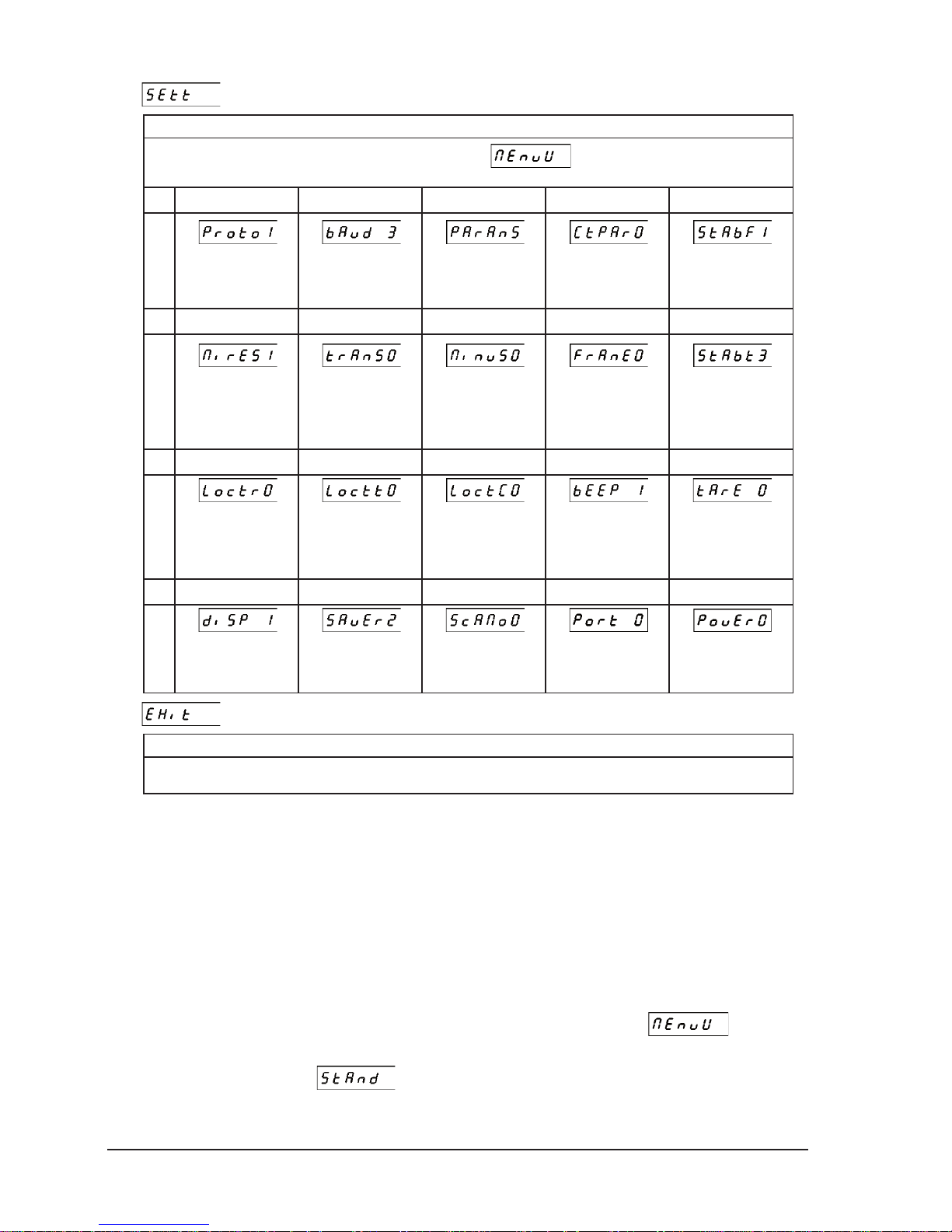
20
User Manual PRIMA 2 scale ELZAB S.A.
– READING OF SETTINGS
Meaning
This function shows all currently chosen settings in the User Menu . For example for the factory settings there
will be chosen the following data:
1.13501
‘ ‘ ‘ ‘ ‘
Protocol Type:
ELZAB EXTENDED
Transmission Speed:
9600 BITS/SEC.
Transmission
Parameters:
8-EVEN-1
Parity Checking:
NO CHECKING
Stability Condition:
HIGH STABILITY
2.10003
‘ ‘ ‘ ‘ ‘
Minimum Result:
01xe
Transmission Mode:
AFTER PRESSING
THE KEY
Transmitting the
minus:
ONLY POSITIVE
Transmitting the result
frame:
TRANSMITTING THE
RESULT FRAME
Stability waiting time:
4 SECONDS
3.00010
‘ ‘ ‘ ‘ ‘
Data receiving lock:
LOCK OFF
Transmission key lock:
LOCK OFF
Configuration
receiving lock:
LOCK OFF
Beep:
WITH BEEP
Fixed tare:
AUTOMATIC SWIT-
CHING OFF THE
TARE
4. 1 2 0 - -
‘ ‘ ‘
‘
‘
Turning off the display
backlight: SWITCH
OFF AFTER 15 SEC.
Power saving mode:
TURN ON AFTER 30
MIN.
Scales system:
SCALE NO. 0
Active communication
port
AUTOMATIC DETECTION
USB power source:
AUTOMATIC DETECTION
– EXIT FROM MENU
Meaning
Exit from the User Menu to the weighing mode.
6. Communication with the scale
The communication of the scale with external devices (e.g. cash register, computer) is effected via
the CASH REGISTER/PC connector (RS-232 interface). To communicate via the USB connector the
virtual serial port driver should be installed on the device cooperating with the scale. The driver
can be downloaded from www.elzab.pl.
The communication with external devices can be affected by functioning of the scale in the
situations like: unstable result, overloading and under loading of the scale, transmission mode
settings or the minimum result settings. The scale can react for those states in different ways
depending on its settings.
All the communication parameters can be changed in the “User Menu”
. They are
permanently stored in the non volatile scale memory. The factory settings can be reset by using the
“Restore to factory settings”
function. The factory settings allow the scale to cooperate
with every cash register produced by ELZAB SA factory which was approved by the Ministry of
Finance since 2001.
Page 23
ELZAB S.A. User Manual PRIMA 2 scale
21
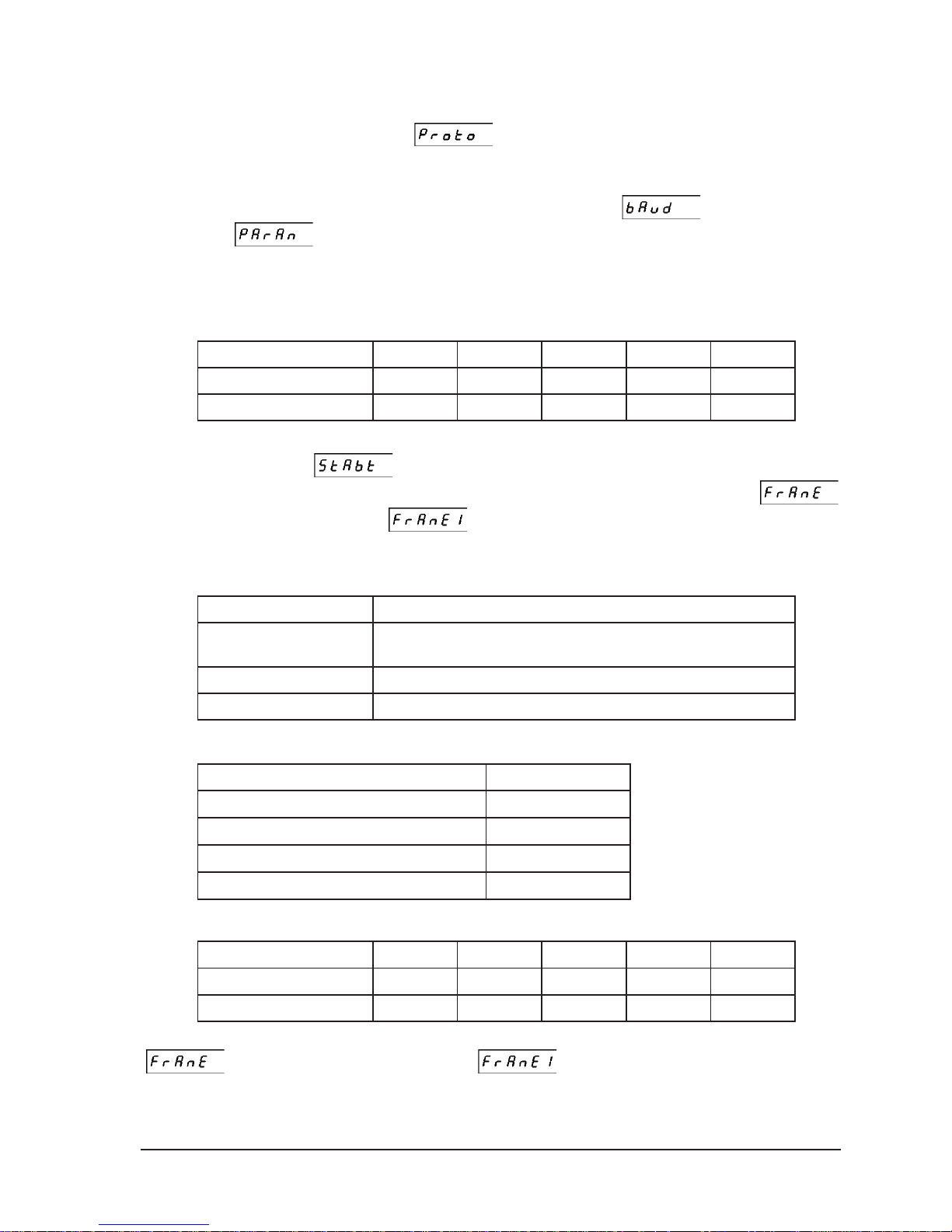
6.1. Configuration of the communication parameters of the scale
Configuration of the communication parameters of the consists of choosing an appropriate
protocol by using the “Protocol type”
function. Selection of the protocol automatically
sets default transmission parameters of the RS-232 interface for the given protocol. If the scale is
working with the customized communication settings the transmission parameters of the RS-232
can be changed manually by the use of the “Transmission Speed”
and “Transmission
parameters” functions.
6.2. Description of the ELZAB protocol
6.2.1. Reading the weight
6.2.1.1. Request of the stable result
Byte No. 12345
Symbol
ESC M ETX - LF
ASCII (hex) code
0x1B 0x4D 0x03 0x61 0x0A
The scale is waiting for the stabilization of the result. If within the specified time (set in the
“Stability waiting time”
) the result will stabilize it will be transmitted. If within that time
the result will not stabilize the request will be canceled and if in the “Frame sending”
function the “Stabile and unstable”
parameter was set there will be sent the answer frame
containing blank spaces in place of the result digits.
x The bit No. 4 decides in what format will be sent the weighing result:
Byte No. 4 Format of the result
0x61
Basic or extended format depending on settings chosen in the menu of
the scale
0x71
basic format
0x81
extended format
x When the scale is operating in the scales system the bit No. 5 takes the form of:
The scale No. in the scales system Byte No. 5
Scale No. 0
0x0A
Scale No. 1
0x1A
Scale No. 2
0x2A
Scale No. 3
0x3A
6.2.1.2. Request for immediate result
The Byte No.12345
Symbol
ESC
METX - LF
ASCII (hex) code
0x1B 0x4D 0x03 0x62 0x0A
If the result is stable it will be transmitted. If the result is unstable and in the “Frame Sending”
function the “Stabile and unstable” parameter was set there will be sent the
response frame containing blank spaces in place of result digits. Otherwise nothing will be sent.
x The bit No. 4 decides in what format will be sent the weighing result:
Page 24
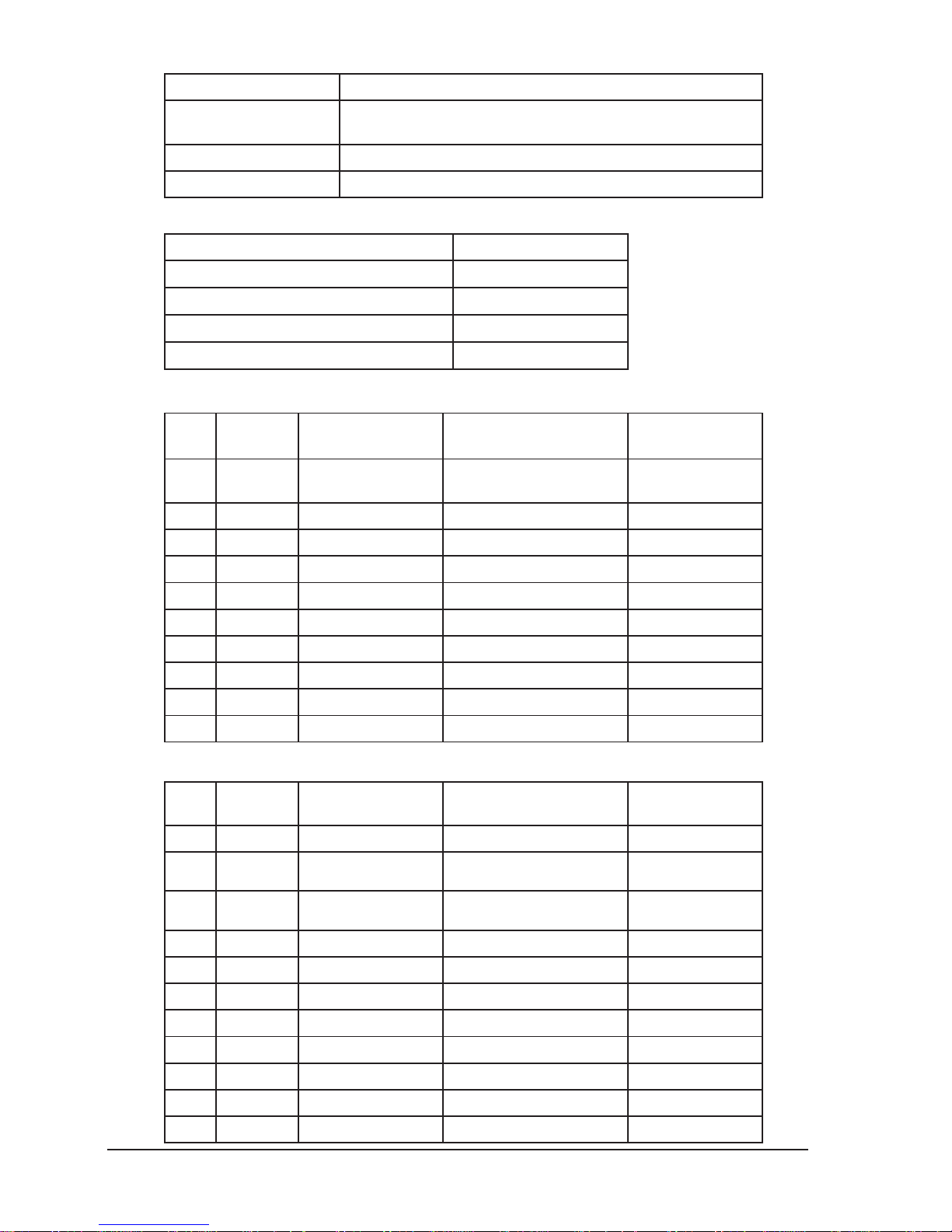
22
User Manual PRIMA 2 scale ELZAB S.A.
Byte No. 4 Format of the result
0x62
Basic or extended format depending on settings chosen in the menu of
the scale
0x72
basic format
0x82
extended format
x When the scale is operating in the scales system the bit No. 5 takes the form of:
The scale No. in the scales system Byte No. 5
Scale No. 0
0x0A
Scale No. 2
0x1A
Scale No. 3
0x2A
Scale No. 4
0x3A
6.2.1.3. Response in the basic format
No. Symbol
ASCII (hex)
code
Description
Example:
weight: 13.045kg
1
SYMBOL 0x20 lub 0x2D
0x20 (space) - positive result
0x2D (minus) - negative result
0x20
2
Space 0x20 Space 0x20
3
D5 0x30 .. 0x39 or 0x20 Digit 0 .. 9 (MSD) or space 0x31
4
D4 0x30 .. 0x39 Digit 0 .. 9 0x33
5
PD 0x2E Decimal 0x2E
6
D3 0x30 .. 0x39 Digit 0 .. 9 0x30
7
D2 0x30 .. 0x39 Digit 0 .. 9 0x34
8
D1 0x30 .. 0x39 Digit 0 .. 9 (LSD) 0x35
9
CR 0x0D CR 0x0D
10
LF 0x0A LF 0x0A
6.2.1.4. Response in the extended format
No. Symbol
ASCII (hex)
code
Description
Example:
weight: 13.045kg
1
ESC 0x1B ESC 0x1B
2
STAB 0x53 or 0x55
0x53 („S”) – stable result
0x55 („U”) – unstable result
0x53
3
SUMBOL 0x20 or 0x2D
0x20 (space) - positive result
0x2D (minus) - negative result
0x20
4
M5 0x30 .. 0x39 or 0x20 Mass 0 .. 9 (MSD) or space 0x31
5
M4 0x30 .. 0x39 Mass 0 .. 9 0x33
6
PD 0x2E Decimal 0x2E
7
M3 0x30 .. 0x39 Mass 0 .. 9 0x30
8
M2 0x30 .. 0x39 Mass 0 .. 9 0x34
9
M1 0x30 .. 0x39 Mass 0 .. 9 (LSD) 0x35
10
CR 0x0D CR 0x0D
11
LF 0x0A LF 0x0A
Page 25
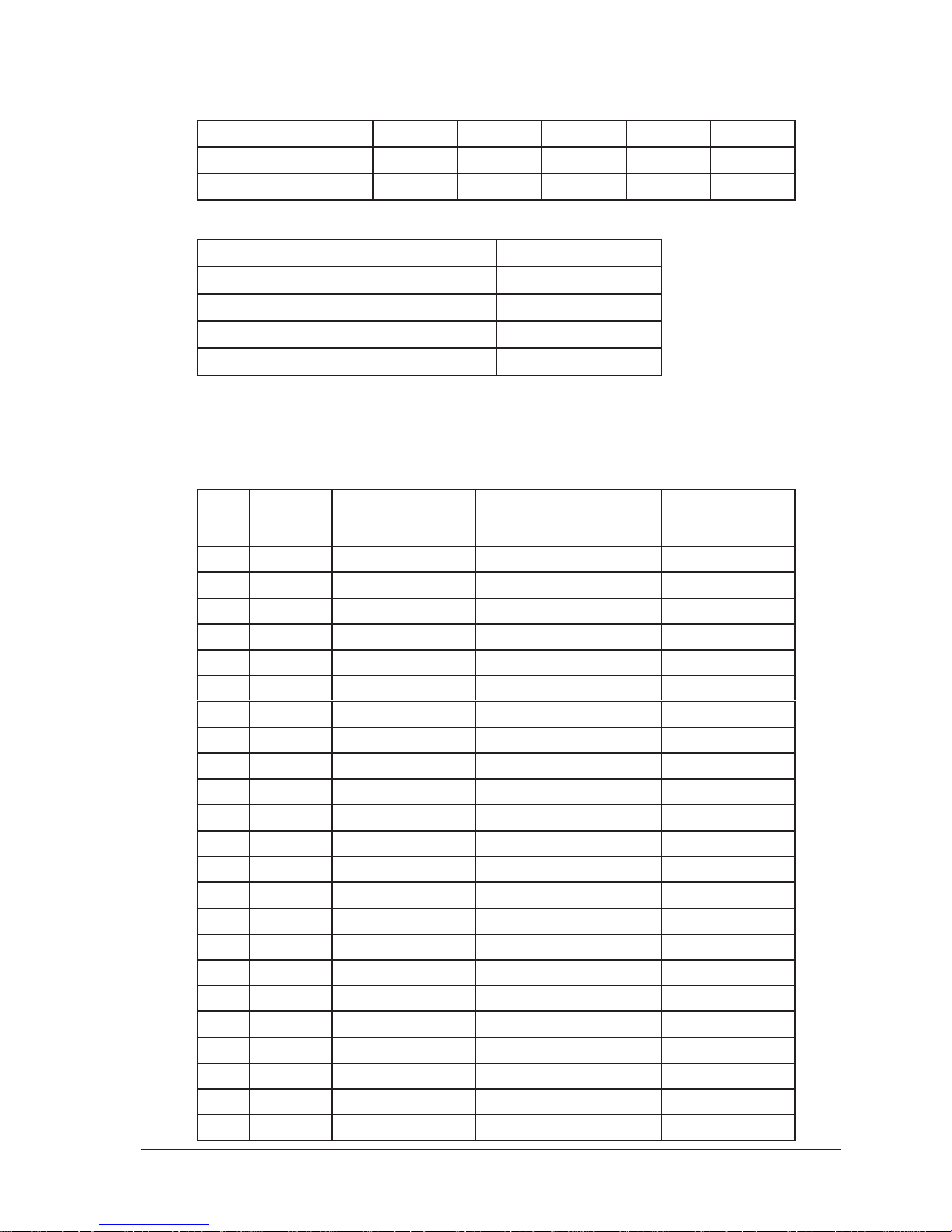
ELZAB S.A. User Manual PRIMA 2 scale
23
6.2.2. Checking the host connection of the scale
6.2.2.1. Request
Byte No. 12345
Symbol
ESC
METX - LF
ASCII (hex) code
0x1B 0x4D 0x03 0x66 0x0A
x When the scale is operating in the scales system the bit No. 5 takes the form of:
The scale No. in the scales system Byte No. 5
Scale No. 0
0x0A
Scale No. 1
0x1A
Scale No. 2
0x2A
Scale No. 3
0x3A
6.2.2.2. Response
As the response the scale will send 1 bit with code: 0x1D
6.2.3. Sending the name of weighted commodity
Displaying the name of weighted commodity is only possible on the additional external display.
No. Symbol
ASCII (hex)
code
Description
Example:
YELLOW
GRAPEFRUIT
1
ESC 0x1B ESC 0x1B
2
M0x4D M 0x4D
3
ACK 0x06 ACK 0x06
4
Z18 0x20 .. 0x7F 1 Name symbol 0x47 (‘G’)
5
Z17 0x20 .. 0x7F 2 Name symbol 0x52 (‘R’)
6
Z16 0x20 .. 0x7F 3 Name symbol 0x45 (‘E’)
7
Z15 0x20 .. 0x7F 4 Name symbol 0x4A (‘J’)
8
Z14 0x20 .. 0x7F 5 Name symbol 0x50 (‘P’)
9
Z13 0x20 .. 0x7F 6 Name symbol 0x46 (‘F’)
10
Z12 0x20 .. 0x7F 7 Name symbol 0x52 (‘R’)
11
Z11 0x20 .. 0x7F 8 Name symbol 0x55 (‘U’)
12
Z10 0x20 .. 0x7F 9 Name symbol 0x54 (‘T’)
13
Z9 0x20 .. 0x7F 10 Name symbol 0x59 (‘Y’)
14
Z8 0x20 .. 0x7F 11 Name symbol 0x20 (‘ ’)
15
Z7 0x20 .. 0x7F 12 Name symbol 0xBD (‘’)
16
Z6 0x20 .. 0x7F 13 Name symbol 0xE0 (‘Ó’)
17
Z5 0x20 .. 0x7F 14 Name symbol 0x9D (‘’)
18
Z4 0x20 .. 0x7F 15 Name symbol 0x54 (‘T’)
19
Z3 0x20 .. 0x7F 16 Name symbol 0x45 (‘E’)
20
Z2 0x20 .. 0x7F 17 Name symbol 0x20 (‘ ’)
21
Z1 0x20 .. 0x7F 18 Name symbol 0x20 (‘ ’)
22
NW 0x0A .. 0x3A Scale No. 0x0A
23
LF 0x0A LF 0x0A
Page 26
24
User Manual PRIMA 2 scale ELZAB S.A.
x When the scale is working in the scales system the scale No. byte takes the following forms:
Scale No. in the scales system Byte No. 22
Scale No. 1
0x0A
Scale No. 2
0x1A
Scale No. 3
0x2A
Scale No. 4
0x3A
6.2.4. Reading of the program version
6.2.4.1. Request
Byte No. 12345
Symbol
ESC M ETX - LF
ASCII (hex) code
0x1B 0x4D 0x03 0x6A 0x0A
x When the scale is operating in the scales system the bit No. 5 takes the form of:
The scale No. in the scales system Byte No. 5
Scale No. 0
0x0A
Scale No. 1
0x1A
Scale No. 2
0x2A
Scale No. 3
0x3A
6.2.4.2. Response
No. Symbol
ASCII (hex)
code
Description
Example:
version: 1.00
1
TYPE 0x21 The unique device id 0x22
2
VERSION 0x00 .. 0x09 Digit 0 .. 9 0x01
3
NUMBER_H 0x00 .. 0x09 Digit 0 .. 9 0x00
4
NUMBER_L 0x00 .. 0x09 Digit 0 .. 9 0x00
7. Error messages
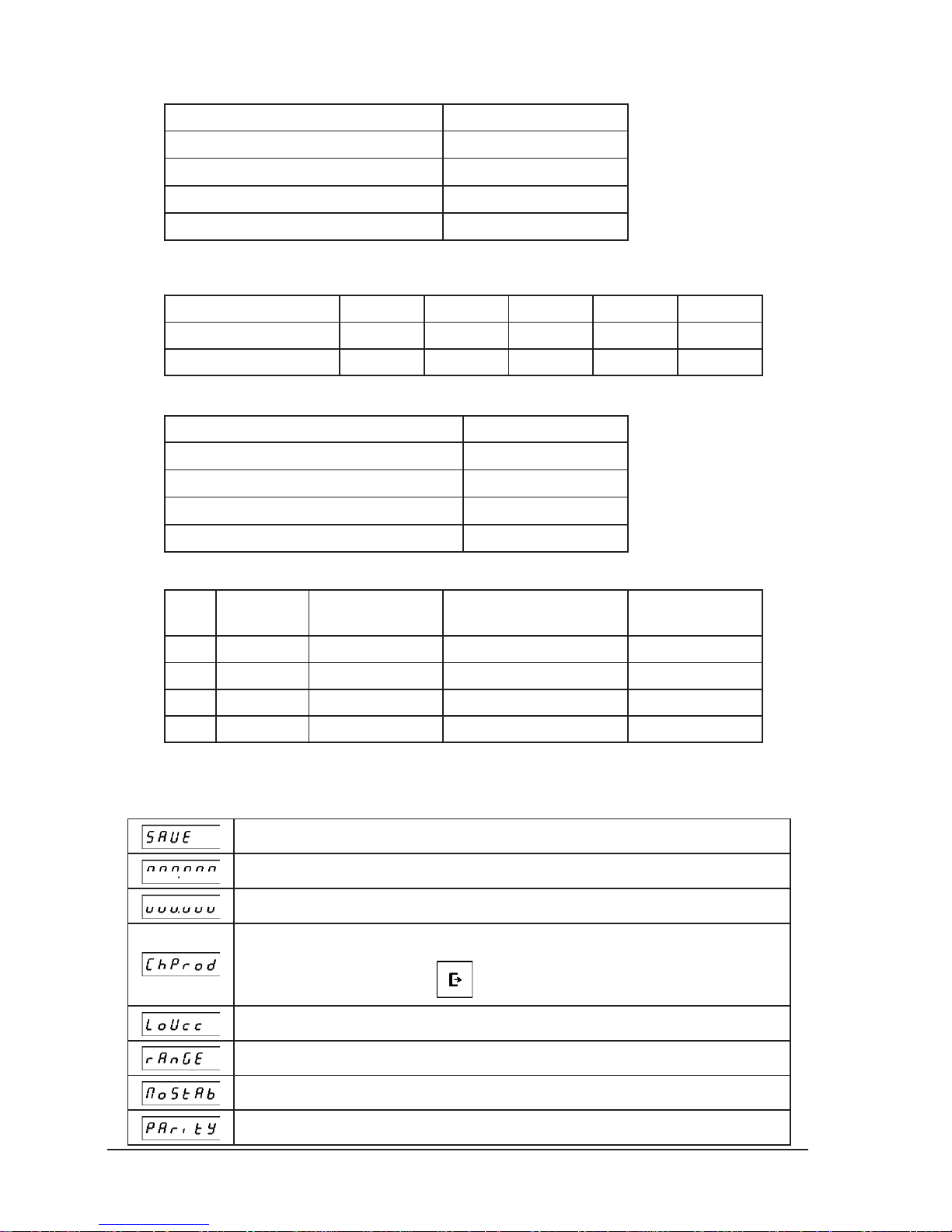
7.1. Messages and errors displayed on the scale display
Saving the settings after changing the scale configuration.
The scale load exceeds the maximum scale range. Decrease the load.
The scale load is less than -20*e1. Reset the scale or power it off and on.
The new article should be placed on the scale because the weighting result of the product
presently placed on the scale has been already sent to the cash register or PC. This message is
displayed only when pressing the
key.
Low power voltage of the scale. Error displayed while functioning with voltage less than 4,3 V.
Zeroing or tarring range exceeded. Decrease the load and restart zeroing or tarring.
Zeroing and tarring can’t be effected because of unstable load.
Wrong transmission parameters of the RS232 interface.
Page 27
ELZAB S.A. User Manual PRIMA 2 scale
25
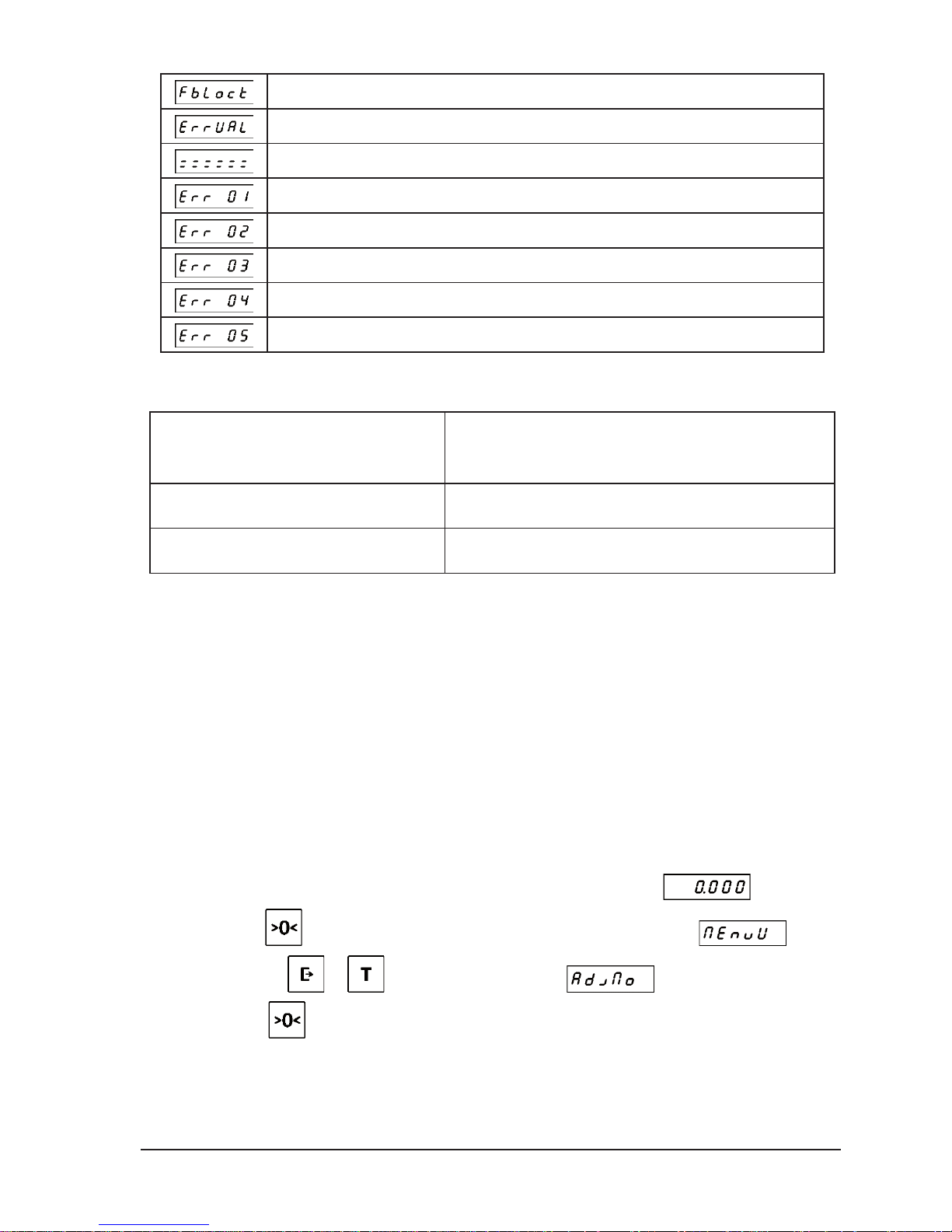
Function non accessible at the moment.
Bdna warto wprowadzonej danej.
Scale blocked. Report the fault to the service.
A/C converter error. You should remove the cause of interferences.
EEPROM memory error. Report the fault to the service.
FLASH memory error. The scale returns to factory settings.
Communication error on the SPI bus. Report the fault to the service.
Initiation of the FLASH memory after it was cleared up. Report the fault to the service.
7.2. Errors signalised acoustically
If the acoustic signal occurs when the display is switched off it means that:
Three consecutive single signals
(*---------,*---------,*---------)
USB interface communication error. The most common reason
of the error is lack of the virtual serial port driver installed on the
computer. This error is signalised after turning on the scale.
Three consecutive double signals
(-*-*------,-*-*------,-*-*------)
To low power voltage (< 4,5V). Error signalized during
switching on or rest of the scale.
Three consecutive quadruple signals
(-*-*-*-*--,-*-*-*-*--,-*-*-*-*--)
To high power voltage (> 5,5V). Error signalized during
switching on or rest of the scale.
8. Conformity assessment (legalization)
Scales provided by ELZAB have undergone the conformity assessment procedure (legalization)
and are ready for use in the trade settlements in accordance with applicable law. Confirmations of
compliance with the above requirements are as follows:
1. large letter M on a green background placed on the scale nameplate,
2. set of metrological control characteristics, placed in accordance with the drawings set out
below,
3. compliance of the markup number placed on the nameplate with the markup number stored
in the non-volatile memory of the scale.
The markup number stored in the non-volatile memory of the scale can be checked any time, as
follows:
1. The scale should be in the weighing mode and indicate the weight
kg.
2. Press the
key and hold it until the displays shows the scale menu: .
3. Pressing the
or key go to the menu item: .
4. Press the
key. The display will show the markup number stored in the non-volatile
memory of the scale, e.g.:
Page 28
26
User Manual PRIMA 2 scale ELZAB S.A.
Damage to the scale nameplate, to the metrological control characteristics or non-compliance of
the markup number placed on the scale nameplate with the markup number from the non-volatile
memory of the scale means the loss of validity of legalization. That scale may not be used for trade
settlements and must be re-legalized. Also reparation of the scale may require its re-legalization.
The confirmation of the conformity assessment is the Declaration of Conformity, a copy can be
downloaded from www.elzab.pl. A copy of the declaration may be required during the relegalization of the scale.
Periodical re-legalization is required to meet national laws. Please consult this requirement in
organization that has competence in this area of activity.
The obligation to undergo the periodic re-legalization and maintain the security features intact lies
with the user of the scale.
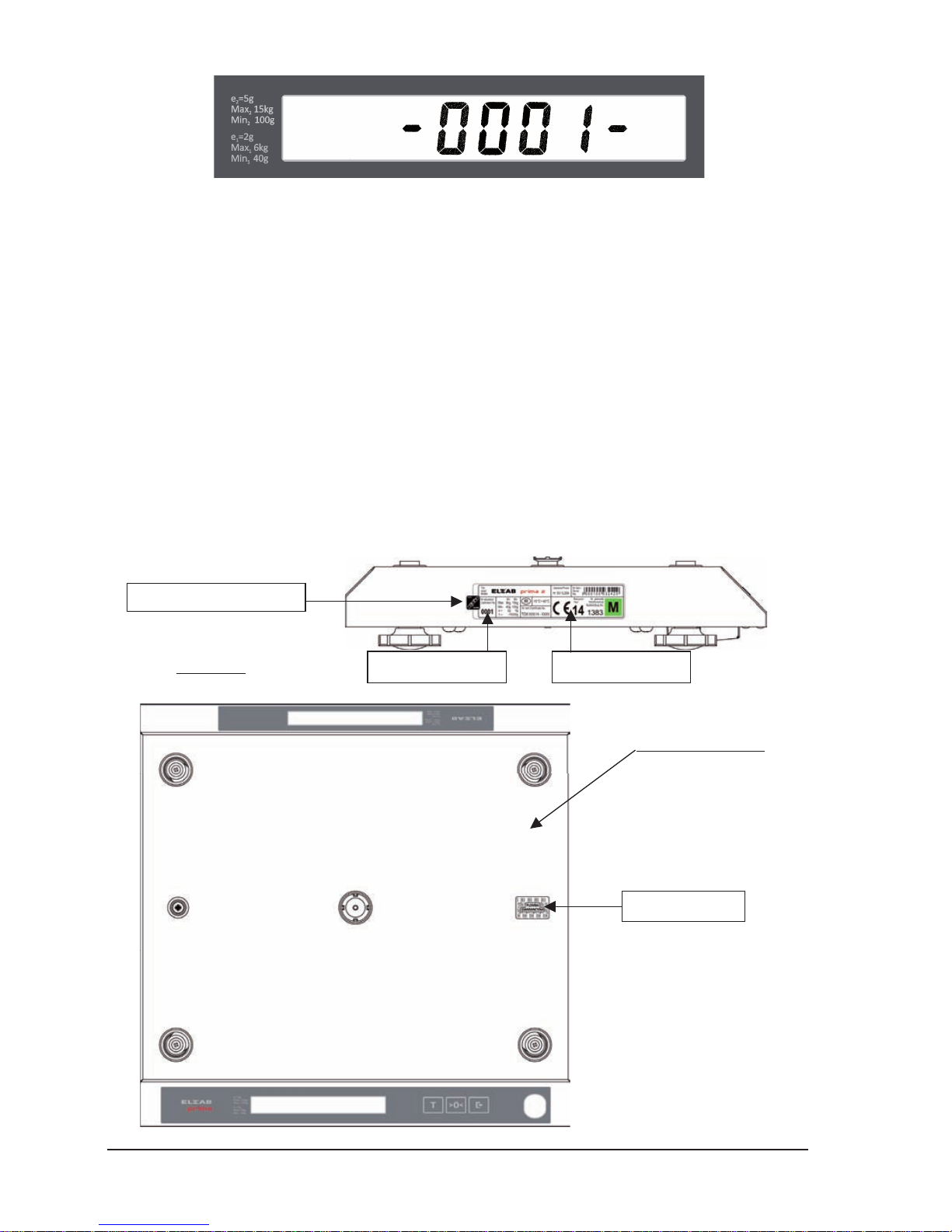
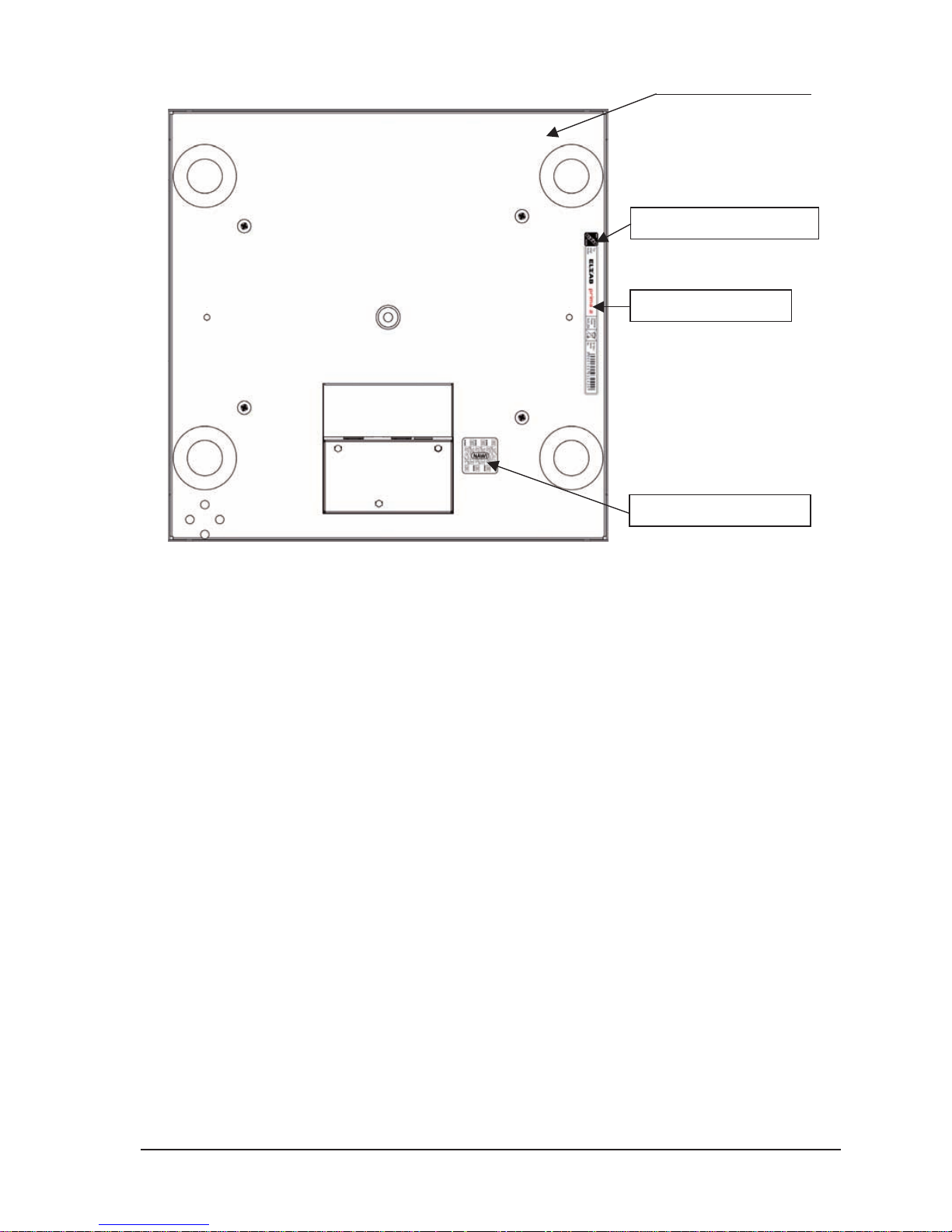
The pictures below show the location of the legalization features, nameplates and warranty seal of
the PRIMA2 scale.
ELZAB Prima 2 scale (without a platform)
Side view
View from the top
Warranty seal
Main labelCalibration No.
Verification mark – NAWI-1
Page 29
ELZAB S.A. User Manual PRIMA 2 scale
27
View from the bottom
Verification mark – NAWI-1
Additional label
Verification mark – NAWI-2
Page 30
28
User Manual PRIMA 2 scale ELZAB S.A.
DO NOT PLACE THIS PRODUCT INTO THE WASTE CONTAINER !
This device is marked with a cross-lined waste container symbol according to 2002/96/EU
Directive on Waste Electric and Electronic Equipment. Such marking informs that after usage
equipment can not be trashed together with other household waste.
An user obligation is to return wasted equipment to a party collecting wasted electric and electronic equipment.
Parties collecting such equipment organise a system, including local collection points, shops and other units,
allowing to return such equipment. This Directive assures an user free of charge utilisation of such delivered
equipment. This device is made of materials which can be recycled or utilised after becoming out of use. Proper
handling of wasted electric and electronic equipment reduce demand for row materials and contribute in avoiding
harmful consequences for environment and health of people caused by dangerous components and not proper
storing and utilising of such equipment.
This manual is dedicated to the following scale models:
ELZAB PRIMA 2 scale
(different versions) – code: WG2
Date of entering on the market:
05.2014
Manual drawing No.: WG2IOA0011
Last edition date: 13-01-2015
Page 31

Page 32
 Loading...