

Page 1

OptiView 100
OV-100
LCD VIEWFINDER
USER
MANUAL
Page 2

Thank you for choosing Elvid.
The Elvid OptiView 100 is a viewfinder that blocks out bright
light so you can see the image on your LCD screen in greater
detail. It fits screens up to 3.2 inches and features multi-coated
optical glass for sharp images from edge to edge. A ±3 diopter
is easy to adjust and makes it possible to use the viewfinder
without glasses. Adhere the magnetic mounting frame to your
screen and quickly snap on the viewfinder. This provides
optimal viewing conditions when shooting video or photos, so
you see only your image.
Page 3
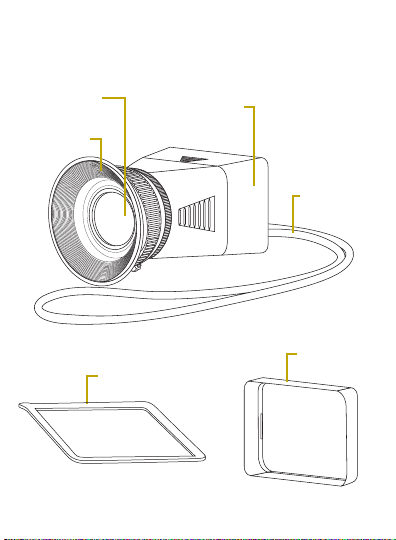
OVERVIEW
Eyepiece
with diopter
Eyecup
Lower half of
the viewfinder
Mounting frame
Lanyard
Rubber
bumper
Page 4

PRECAUTIONS
• Please read the following instructions.
• Keep this manual in a safe place.
• Remove the viewfinder when not in use for long
periods of time. The OptiView’s lens could act as a
magnifying glass which intensifies the direct light
from the sun. This can cause damage to the LCD
screen of your camera.
• Do not use the lanyard to support the weight of
the OptiView while attached to the camera. The
lanyard is meant to support only the weight of
the OptiView.
• Handle this product with care.
• Clean this product with a soft, dry cloth.
• Make sure that this product is intact and that
there are no missing parts before use.
• Images are for illustrative purposes only.
Page 5

KEY FEATURES
• Supports 3.0- and 3.2-inch LCD screens
• Facilitates fine-image focusing
• Blocks out ambient light for clear image viewing
• Lower half of the viewfinder acts as an LCD shade
• Soft eyecup can be used with left or right eye
• Lanyard included for convenient hands-free
carrying of the viewfinder
SPECIFICATIONS
Diopter range
Max. screen size
Dimensions
(H × W × D)
Weight 3.4 oz. (96.4 g)
±3
3.2 in.
2.1 × 2.8 × 4.0 in.
(5.4 × 7.1 × 10.2 cm)
Page 6
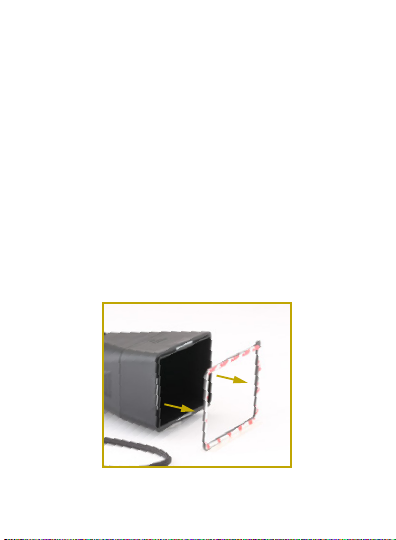
MOUNTING THE OPTIVIEW 100
Note: Once the OptiView 100’s mounting frame is
attached to the camera with adhesive, the
adhesive cannot be reused.
1. Clean the camera’s LCD screen with a soft,
dry cloth.
2. Remove the mounting frame from
the viewfinder.
Page 7
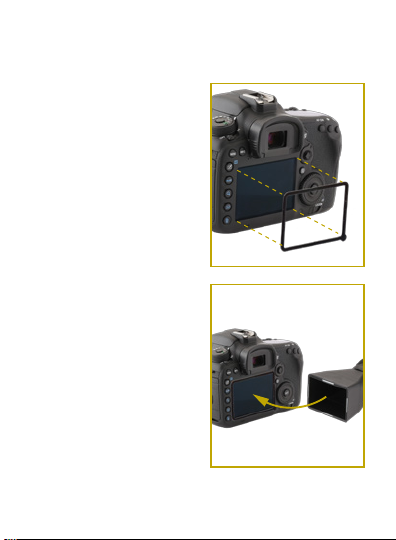
3. Remove the protective
strip on the adhesive side
of the mounting frame.
Make sure to carefully
center the mounting
frame before securing it
on your camera’s LCD
screen. Apply the
adhesive at room
temperature.
4. Once mounted on the
camera, attach the
viewfinder to the
mounting frame. The
magnets on the
viewfinder allow it to
snap into place.
Page 8
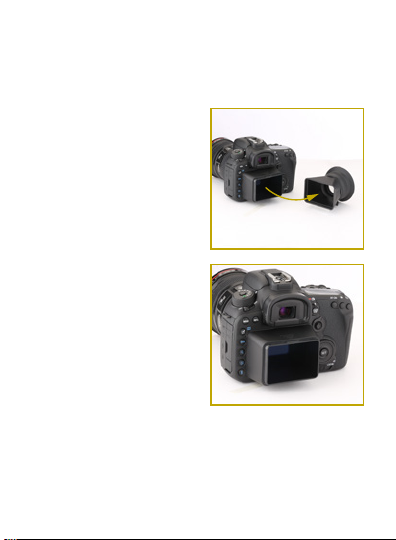
USING THE OPTIVIEW 100
AS AN LCD SHADE
1. Detach the viewfinder
from the magnetic
mounting frame on
the LCD.
2. Firmly hold the
viewfinder, apply
pressure to the grooves,
and separate the two
pieces.
3. Reattach the lower
half of the viewfinder
onto the mounting frame
until it snaps into place.
Page 9

USING THE RUBBER BUMPER
The rubber bumper covers the end of the
viewfinder. This is ideal to eliminate scratches
when used over your camera’s LCD screen while
quickly viewing your image.
REMOVING THE OPTIVIEW 100
Note: Once the OptiView’s mounting frame has been
detached from the camera, it cannot be reattached.
1. Remove the viewfinder from the mounting frame.
2. Heat the mounting frame with a blow-dryer
approximately 2 inches away for 30 to 45 seconds.
3. When the frame's adhesive loosens, use your
fingernail to lift the frame off of the camera. Do not
pry the frame with a hard object that can damage
the LCD screen. Apply more heat with the
blow-dryer if the frame does not release easily.
Page 10

ONE-YEAR LIMITED WARRANTY
This ELVID product is warranted to the original purchaser to be free from
defects in materials and workmanship under normal consumer use for a
period of one (1) year from the original purchase date or thirty (30) days
after replacement, whichever occurs later. The warranty provider’s
responsibility with respect to this limited warranty shall be limited solely
to repair or replacement, at the provider’s discretion, of any product that
fails during normal use of this product in its intended manner and in its
intended environment. Inoperability of the product or part(s) shall be
determined by the warranty provider. If the product has been
discontinued, the warranty provider reserves the right to replace it with a
model of equivalent quality and function.
This warranty does not cover damage or defect caused by misuse,
neglect, accident, alteration, abuse, improper installation or maintenance.
EXCEPT AS PROVIDED HEREIN, THE WARRANTY PROVIDER MAKES
NEITHER ANY EXPRESS WARRANTIES NOR ANY IMPLIED WARRANTIES, INCLUDING BUT NOT LIMITED TO ANY IMPLIED WARRANTY OF
MERCHANTABILITY OR FITNESS FOR A PARTICULAR PURPOSE. This
warranty provides you with specific legal rights, and you may also have
additional rights that vary from state to state.
To obtain warranty coverage, contact the Elvid Customer Service
Department to obtain a return merchandise authorization (“RMA”)
number, and return the defective product to Elvid along with the RMA
number and proof of purchase. Shipment of the defective product is at
the purchaser’s own risk and expense.
For more information or to arrange service, visit www.elvidcinema.com or
call Customer Service at 212-594-2353.
www.elvidcinema.com
Product warranty is provided by the Gradus Group. www.gradusgroup.com
Elvid is a registered trademark of the Gradus Group.
© 2017 Gradus Group LLC.All Rights Reserved.
ELVID
A Gradus Group Brand
GG1
 Loading...