

Page 1

MONITOR BATTERY PLATE
For Sony L-Series, Canon LP-E6,
and Panasonic D28 batteries
USER
MANUAL
FOR: FBP-F970 / FBP-LPE6 / FBP-PD28
Page 2

INSTRUCTIONS
Installing the Battery Plate
Before proceeding, remove the battery from your Elvid
monitor, and make sure that the monitor is unplugged and
turned off.
1. Use a Phillips-head screwdriver (not included) to
unscrew and remove your Elvid monitor’s existing
battery plate, including the wires connecting it to the
back of the monitor.
2. Place the Elvid FBP battery plate’s red wire on the
positive terminal, and the black wire on the negative
terminal. Insert the two included big screws into the
terminals, and use a Phillips-head screwdriver to
fasten them until fully tightened. Be careful not to
overtighten.
3. Position the FBP battery plate with the open side
facing the top of the monitor. Align the battery plate’s
screw holes with the monitor’s screw holes. Make
sure the battery plate covers the red and black wires
completely and that no part of the wires is exposed.
2
Page 3
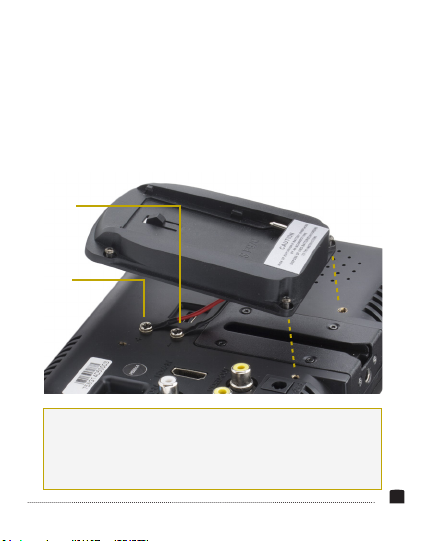
4. Insert the four included small screws into the
screw holes and use a Phillips-head screwdriver to
fasten them until fully tightened. Be careful not to
overtighten.
Black wire to
negative
Red wire to
positive
Specications
Compatibility
FBP-F970: Sony L-Series batteries
FBP-LPE6: Canon LP-E6 batteries
FBP-PD28: Panasonic D28 batteries
Elvid WCM-758G, WCM-758DVR,
and OCM-7B-D monitors
Dimensions (W × H × D): 2.4" × 3.8" × 0.6"
(6.1 × 9.7 × 1.5 cm)
Weight: 0.7 oz. (21 g)
3
Page 4

ONE-YEAR LIMITED WARRANTY
This Elvid product is warranted to the original purchaser to be free from defects
in materials and workmanship under normal consumer use for a period of one
(1) year from the original purchase date or thirty (30) days after replacement,
whichever occurs later. The warranty provider’s responsibility with respect to this
limited warranty shall be limited solely to repair or replacement, at the provider’s
discretion, of any product that fails during normal use of this product in its
intended manner and in its intended environment. Inoperability of the product
or part(s) shall be determined by the warranty provider. If the product has been
discontinued, the warranty provider reserves the right to replace it with a model
of equivalent quality and function.
This warranty does not cover damage or defect caused by misuse, neglect,
accident, alteration, abuse, improper installation or maintenance. EXCEPT
AS PROVIDED HEREIN, THE WARRANTY PROVIDER MAKES NEITHER ANY
EXPRESS WARRANTIES NOR ANY IMPLIED WARRANTIES, INCLUDING BUT
NOT LIMITED TO ANY IMPLIED WARRANTY OF MERCHANTABILITY OR FITNESS
FOR A PARTICULAR PURPOSE. This warranty provides you with specic legal
rights, and you may also have additional rights that vary from state to state.
To obtain warranty coverage, contact the Elvid Customer Service Department
to obtain a return merchandise authorization (“RMA”) number, and return the
defective product to Elvid along with the RMA number and proof of purchase.
Shipment of the defective product is at the purchaser’s own risk and expense.
For more information or to arrange service, visit www.elvidcinema.com or call
Customer Service at 212-594-2353.
Product warranty is provided by the Gradus Group.
www.gradusgroup.com
Elvid is a registered trademark of the Gradus Group.
© 2015 Gradus Group LLC. All Rights Reserved.
www.elvidcinema.com
GG1
 Loading...