

Page 1

CMe2100 Quick Manual English v4.0 Page | 1
CM e210 0 Qu i ck M an u al
CMe2100
English
Version 4.0
Get the com plete m anual online at www.elvaco.com
Page 2

Page | 2 Support: +46 300 434300 ? [email protected]
Cont ent s
1 DOCUM ENT NOTES............................................................................ 3
2 INTRODUCTION .................................................................................. 6
3 MOUNTING ....................................................................................... 10
4 CONFIGURE FOR E-MAIL REPORTS ................................................. 14
5 CONFIGURE FOR FTP REPORTS ....................................................... 17
6 CONFIGURE FOR HTTP REPORTS .................................................... 19
7 CONFIGURE FOR TRANSPARENT M -BUS ........................................ 21
8 RESET TO FACTORY DEFAULT......................................................... 23
9 CHANGING CONFIGURATION .......................................................... 24
10 LED INDICATIONS............................................................................. 33
11 TROUBLESHOOTING ........................................................................ 36
12 REPORT TEM PLATES ........................................................................ 43
13 COMMAND LISTING ......................................................................... 46
14 TECHNICAL SPECIFICATIONS .......................................................... 49
15 SAFETY AND ENVIRONM ENT .......................................................... 56
16 ACCESSORIES AND SIMILAR PRODUCTS ....................................... 59
Page 3

CMe2100 Quick Manual English v4.0 Page | 3
1 Do c um ent no t es
All information in this m anual, including product data, diagrams, charts,
etc. represents information on products at the time of publication, and is
subject to change by Elvaco AB w ithout notice. It is recommended that
customers contact Elvaco AB to find out the latest available documentation.
Elvaco AB assumes no responsibility for technical inaccuracies,
typographical errors or any damage, liability, or other losses by use of
this product.
© 2014, Elvaco AB. All rights reserved. No part of the con tents of this m anual m ay be
transmitted or reproduced in any form by any m eans w ithout the w ritten perm ission
of Elvaco AB. Printed in Sw eden.
Page 4

Page | 4 Support: +46 300 434300 ? [email protected]
This manual provides inform ation needed to get started with the
CMe2100 product.
CMe2100 version appliance: >= 1.2.0
For a complete description of the CMe2100 product, download the full
manual from Elvaco AB web site, w w w .elvac o .com .
Page 5

CMe2100 Quick Manual English v4.0 Page | 5
1.1 Con t act i n f orm at i o n
Elv ac o A B Head q uar t er
Teknikgatan 18
434 37 Kungsbacka
SWEDEN
Phone: +46 300 30250
Fax: +46 300 18440
E-Mail: [email protected]
Elv ac o A B Techni c al Su p port
Phone: +46 300 434300
E-Mail: [email protected]
Online: www.elvaco.com
Page 6
Page | 6 Support: +46 300 434300 ? [email protected]
2 In t r o du ct i o n
The CMe2100 is a stand-alone, DIN-mounted GSM/GPRS equipment
with M -Bus master, intended to read and store values from any meter
supporting the M-Bus protocol.
The CMe2100 is available in the following variants:
CMe2100 GPRS M-Bus terminal with M-Bus 2-wire interface and
E-Mail support
Page 7

CMe2100 Quick Manual English v4.0 Page | 7
2.1 Key f eat ures
Read and store meter data from ABB electricity m eters with
IR interface or any slaves supporting the M-Bus standard protocol
Connect up to 8 M-Bus slaves, extendable using CM eX Series
Send a variety of meter data reports using E-Mail, FTP, HTTP and SMS
Transparent M-Bus using TCP and GSM data
Configurable using SMS ,Telnet and HTTP
Remotely upgradable application and firmware
Manufacturer specific report templates
The CMe2100 fits into almost any kind of m eter collecting system, i.e.
remote reading for M -Bus com patible electricity meters, w ater meters,
gas meters, temperature meters, heat meters etc.
Page 8
Page | 8 Support: +46 300 434300 ? [email protected]
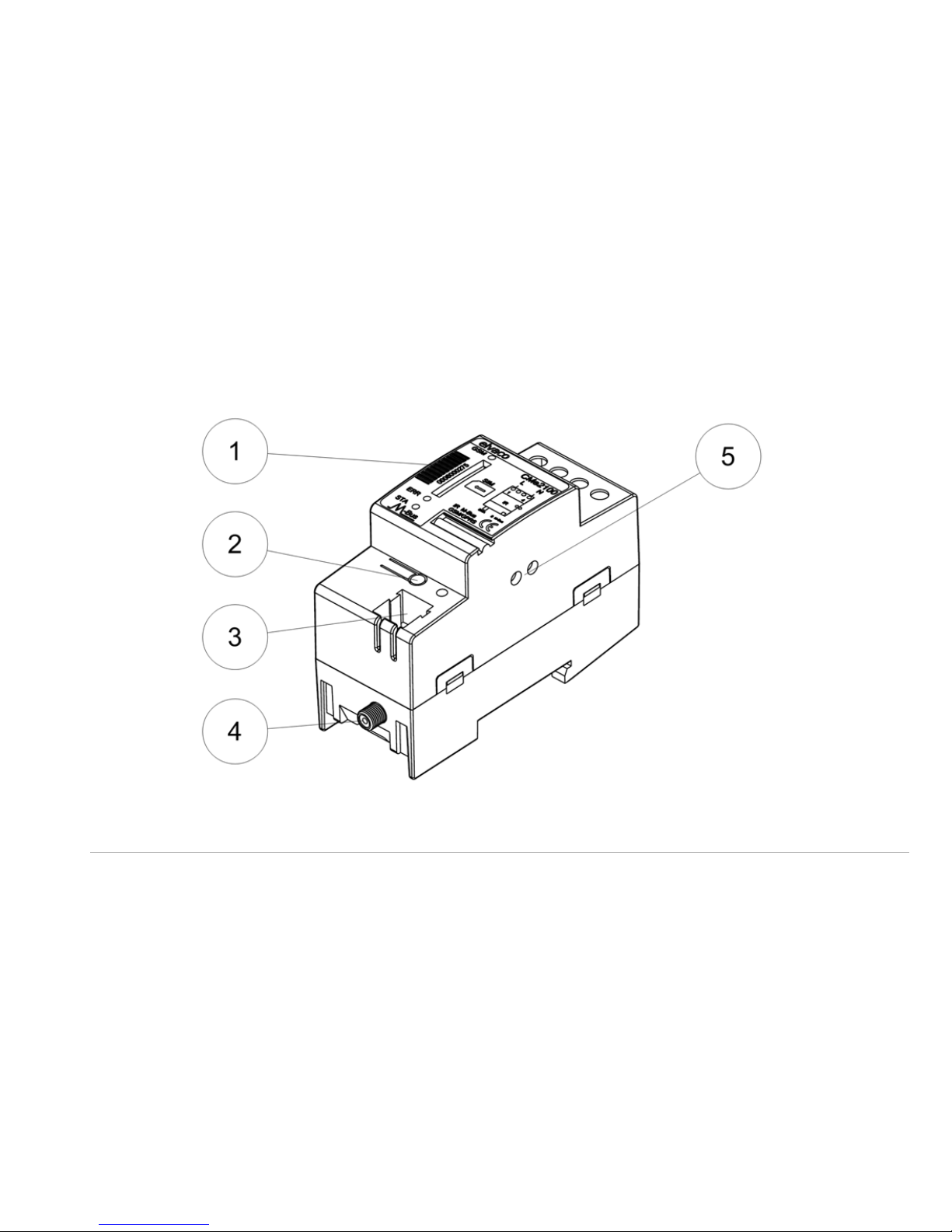
2.2 Overvi ew
1. Serial number
2. Button
3. M-Bus connector
4. Antenna SM A connector
5.M-
Bus IR interface
Page 9
CMe2100 Quick Manual English v4.0 Page | 9
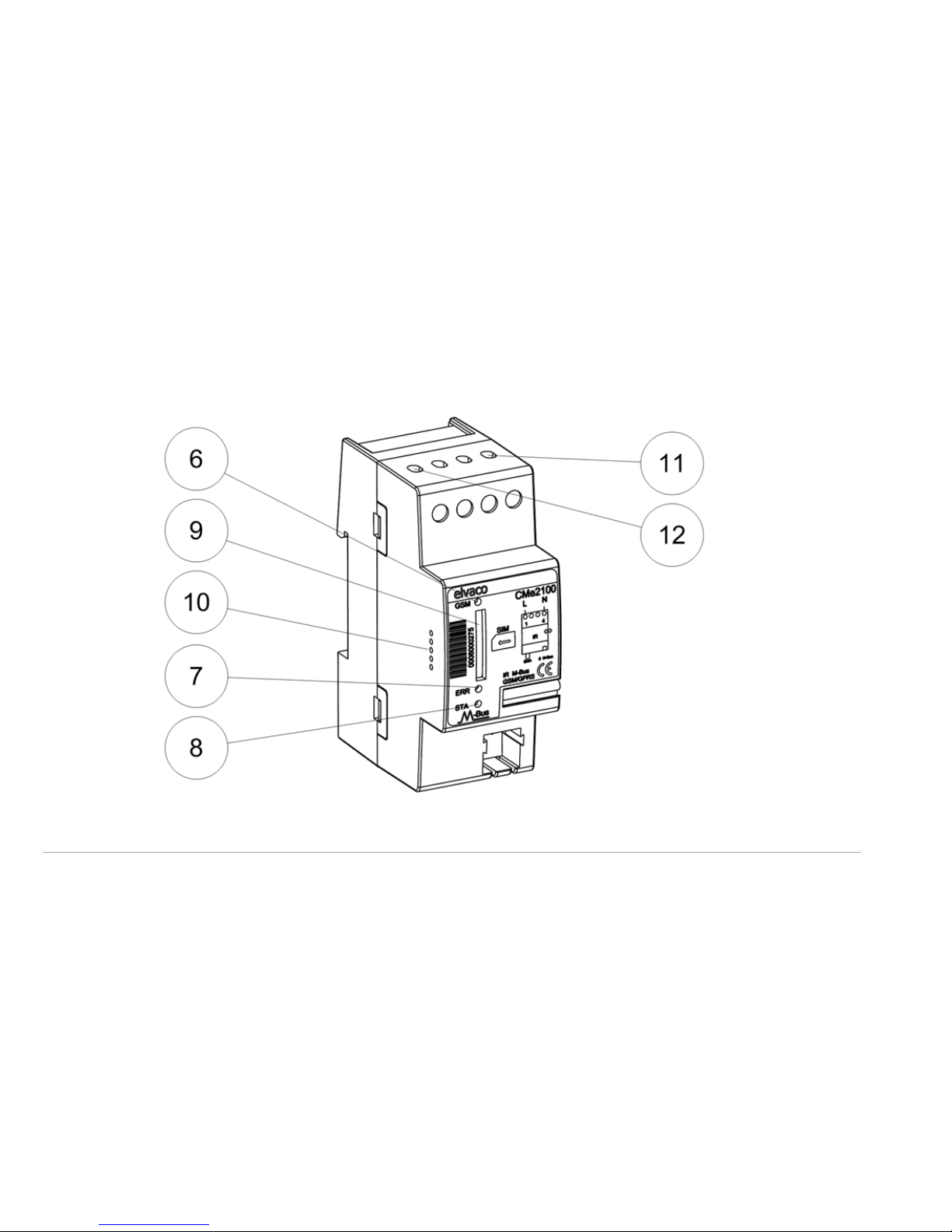
6. GSM LED (Yellow)
7. Error LED (Red)
8. Status LED (Green)
9. SIM card holder
10. Service interface
11. Power supply N
12. Power supply L
Page 10

Page | 10 Support: +46 300 434300 ? [email protected]
3 M o u nt ing
The CMe2100 should be mounted on a DIN-rail. The metallic clip on the
bottom is used to m ount and demount the unit from the DIN-rail. For
safety reasons, a DIN-rail enclosure m ust cover the term inals.
3.1 SIM card
Install the GSM SIM card into the SIM card holder (9). Remember the
phone num ber for later use.
IMPORTANT
The SIM card shall not have any PIN code activated
The SIM card must have GPRS internet access activated for full
functionality
If a prepaid SIM card is used, ensure that enough credits are available
Page 11

CMe2100 Quick Manual English v4.0 Page | 11
3.2 A n t en na
The antenna should be connected to the SMA connector (4). Depending
on signal strength and environment, a different antenna with extension
cable can be used. Torque should be finger tight.
IMPORTANT
Do not mount the antenna close to any metallic objects
Do not mount the antenna close to the M -Bus 2-wire bus
Do not mount the antenna inside a metallic cabinet
3.3 M -Bus 2-w i re b us
M-Bus is a multi-drop 2-wire bus with no polarity. A cable of either
shielded (typically 4 x 0.8 mm diam./0.5 m m2) telephone type or
standard mains type (1.5 mm2) should be used. Connect the w iring to
the connector (3). Do not exceed the maxim um cable length of 1000 m.
Page 12

Page | 12 Support: +46 300 434300 ? [email protected]
IMPORTANT
The internal M-Bus interface can handle up to 8 slaves. Overloading
the bus causes com munication problems with the connected slaves.
All connected slaves must have unique M-Bus secondary addresses.
3.4 IR i nt er f ac e w i t h A BB elect ri cit y m et er s or
CM eX Seri es m o du l es
When the IR interface will be used beside an ABB electricity meter or
CMeX module, the IR shield (5) should be removed. The CMe2100
should be mounted on the left side of the ABB electricity m eter or CMeX
module. There shall be no space between the CMe2100 and the ABB
electricity m eter or CMeX module. (Do not remove the shield if not used
beside an ABB electricity m eter or CM eX module.)
Page 13

CMe2100 Quick Manual English v4.0 Page | 13
3.5 Po w er supp l y
The main supply should be connected to the pow er supply screw
terminals (11) and (12). Main supply voltage should be in the range of
100-240 VAC, 50/60 Hz. The CM e2100 w ill be running factory default
settings w hen first powered up.
An emergency circuit breaker should be used in order to ensure safe
separation of the CMe2100 product from the main pow er supply.
The next chapters cover the configuration of the CMe2100 product. If any
problem occurs during configuration, please refer to the
Troubleshooting section on page 33.
Page 14

Page | 14 Support: +46 300 434300 ? [email protected]
4 Con f i g u r e f o r E-M ail r ep o rt s
This section describes how to enable the CMe2100 product to send
E-Mail reports of connected slaves to one or more E-Mail recipients. The
CMe2100 product will store hourly values of connected slaves, send
value reports every day at 00:00 and send an E-Mail installation report
on completion.
4.1 Set E-M ai l r eci pi ent s
SMS to CM e2100 product: qset email <recipients>
Example: qset email [email protected],[email protected]
The CMe2100 product will acknowledge with an SMS receipt.
Page 15

CMe2100 Quick Manual English v4.0 Page | 15
4.2 Search and in st all M -Bus sl aves
The CMe2100 product will search and install M-Bus slaves using primary
and secondary addressing on 2400 baud and synchronize time with an
internet tim e server.
SMS to CM e2100 product: install <slaves> <profile> <mode>
Par am et er d esc rip t io n :
<slaves> - Number of slaves to find. Not m andatory
<profile> - Configuration profile name. Not mandatory
<mode>- Use w ord keep to keep existing slaves and clean to
remove all slaves before searching for new.
Page 16

Page | 16 Support: +46 300 434300 ? [email protected]
Exam p l es:
Install and search for 2 meters and use profile m yprofile:
install 2 myprofile
Install and search for 2 meters:
install 2
Clean all existing m eters and install and search for 2 meters:
install 2 clean
Keep all existing meters and install and search for 2 n ew meters:
install 2 keep
Install and search for unknow n number of m eters:
install
The CMe2100 product is now configured and will by default send E-Mail
value reports of connected slaves every day at 00:00.
Page 17

CMe2100 Quick Manual English v4.0 Page | 17
5 Con f i g u r e f o r FTP rep o r t s
This section describes how to enable the CMe2100 product to send FTP
reports of connected slaves to an FTP server. The CMe2100 product will
store hourly values of connected slaves, send value reports every day at
00:00 and send an E-Mail installation report on completion (if E-Mail is
configured, see page 14).
5.1 Set FTP ser ver
SMS to CM e2100 product: qset ftp <server> <port> <user>
<password> <remotedir>
Example: qset ftp ftp.domain.com 21 user pass datafolder
The CMe2100 product will acknowledge with an SMS receipt.
Page 18

Page | 18 Support: +46 300 434300 ? [email protected]
5.2 Search and in st all M -Bus sl aves
First perform steps as described on page 15.
FTP reports must be manually activated.
Exam p l es:
Activate to send FTP reports every day using report template 2104:
sch report2 1day 2104
Activate to send FTP reports every hour using report template 2104:
sch report2 1hour 2104
Activate to send FTP reports every month using report template 2105:
sch report2 1month 2105
Page 19

CMe2100 Quick Manual English v4.0 Page | 19
6 Con f i g u r e f o r HTTP repo r t s
This section describes how to enable the CMe2100 product to send
HTTP POST reports of connected slaves to a web server. The CMe2100
product will store hourly values of connected slaves, send value reports
every day at 00:00 and send an E-Mail installation report on com pletion
(if E-Mail is configured, see page 14).
6.1 Set HTTP ser ver
SMS to CM e2100 product: qset http <url> <user> <password>
<authentication mode>
Example: qset http http://www.domain.com user pass basic
The CMe2100 product will acknowledge with an SMS receipt.
Page 20

Page | 20 Support: +46 300 434300 ? [email protected]
6.2 Search and in st all M -Bus sl av es
First perform steps as described on page 15.
HTTP reports must be manually activated.
Exam p l es:
Activate to send HTTP reports every day using report tem plate 3104:
sch report3 1day 3104
Activate to send HTTP reports every hour using report tem plate 3104:
sch report3 1hour 3104
Activate to send HTTP reports every month using report template 3105:
sch report3 1month 3105
Page 21

CMe2100 Quick Manual English v4.0 Page | 21
7 Con f i g u r e f o r t r an sp aren t M -Bu s
This section describes how to enable transparent M-Bus over TCP or
dial-up GSM data.
7.1 Con f i g ur e f or t r an sp ar ent M -Bu s ov er
GSM dat a
SMS to CM e2100 product: qset csd on tmbus <baud>
Example: qset csd on tmbus 300
The CMe2100 product will acknowledge with an SMS receipt.
Available baud rates are 300 and 2400. The calling party should use 8
data bits, even parity and 1 stop bit (8E1).
Page 22

Page | 22 Support: +46 300 434300 ? [email protected]
7.2 Con f i g ur e f or t r an sp ar ent M -Bu s ov er TCP
on b au d 30 0
SMS to CM e2100 product: qset tmbus1 on
Or to turn off transparent server:
SMS to CMe2100 product: qset tmbus1 off
The CMe2100 product will acknowledge with an SMS receipt. The product
will listen for incoming connections on TCP port 300.
7.3 Con f i g ur e f or t r an sp ar ent M -Bu s ov er TCP
on b au d 24 00
SMS to CM e2100 product: qset tmbus2 on
The CMe2100 product will acknowledge with an SMS receipt. The product
will listen for incoming connections on TCP port 2400.
Page 23

CMe2100 Quick Manual English v4.0 Page | 23
8 Reset t o f ac t o ry d ef au l t
In order to reset the CM e2100 product configuration to factory default,
press and hold the button on power-up until the green and red LED
lights flashes fast. Then release the button and the CMe2100 product will
reset to factory default configuration and restart.
The CMe2100 product can also be reset to factory default using SMS.
SMS to CM e2100 product: factoryreset
Example: factoryreset
The CMe2100 product will acknowledge with an SMS receipt.
Page 24

Page | 24 Support: +46 300 434300 ? [email protected]
9 Chang in g c on f i g u r at i on
9.1 M anuall y set net w or k par am et er s
How to manually set network configuration if the Auto APN is not
available or a specific netw ork setting is needed, i.e. static public IP APN:
SMS to CM e2100 product: qset net <apn> <user> <password>
Example: qset net online.telia.se guest guest
The CMe2100 product will acknowledge with an SMS receipt.
SMS to revert to Auto APN: qset net
Reverting to Auto APN also reverts to Auto SMTP.
Page 25

CMe2100 Quick Manual English v4.0 Page | 25
9.2 M anuall y set SM TP ser v er
How to manually set SMTP server if the Auto SM TP is not available or a
specific SMTP server setting is needed:
SMS to CM e2100 product: qset email <recipients> <smtp
server> <smtp port> <user> <password>
Example: qset email [email protected]
smtpserver.domain.com 25 user password
The CMe2100 product will acknowledge with an SMS receipt.
SMS to revert to Auto SMTP: qset email
Reverting to Auto SMTP also rev erts to Auto APN.
Page 26

Page | 26 Support: +46 300 434300 ? [email protected]
9.3 Chang e sl av e lo g i nt erv al
How to change the interval for the CMe2100 product to read and store
values of installed slaves:
SMS to CM e2100 product: sch storevalue <interval>
Example: sch storevalue 10min
The CMe2100 product will acknowledge with an SMS receipt.
Available intervals: 1m in, 5min, 10min, 15m in, 20min, 30min, 1hour,
12hour, 1day, 1week, 1month
Page 27

CMe2100 Quick Manual English v4.0 Page | 27
9.4 Chang e M -Bus sear ch m o de and b au d r at e
How to change the M-Bus search configuration:
SMS to CM e2100 product: qset mbus <searchmode>
<searchbaud>
Example: qset mbus primary,secondary 300,2400
The CMe2100 product will acknowledge with an SMS receipt.
Available searchmode: primary,secondary
Available searchbaud: 300, 600, 1200, 2400, 4800, 9600
Page 28

Page | 28 Support: +46 300 434300 ? [email protected]
9.5 Chang e repo rt sch ed ule or t em plat e
How to change the interval and template for a report configuration:
SMS to CMe2100 product: sch report1 <interval> [template]
Or to turn off report schedule:
SMS to CMe2100 product: sch report1 off
Example: sch report1 10min 1104
The CMe2100 product will acknowledge with an SMS receipt.
Available intervals: 1m in, 5min, 10min, 15m in, 20min, 30min, 1hour,
12hour, 1day, 1week, 1month
Available templates: See page 43. Leaving out the template parameter,
will keep current template setting.
Changing report interval doesn’t change slave log interval, see page 26.
Page 29

CMe2100 Quick Manual English v4.0 Page | 29
9.6 Get p r od uc t st at us i nf or m at i on
How to get a variety of information on the CMe2100 product:
SMS to CM e2100 product: status <request>
Example: status net
The CMe2100 product will respond with an SM S of common status
information.
Available requests: common, prepaid, net, module, ver
Page 30

Page | 30 Support: +46 300 434300 ? [email protected]
9.7 Chang e t im e U TC of f set
How to set the local tim e offset from UTC:
SMS to CMe2100 product: set common.time.utcoffset=<offset>
Example: set common.time.utcoffset=2
The CMe2100 product will acknowledge with an SMS receipt.
Offset range: -11 to 11
CMe2100 currently does not support daylight savings.
Page 31

CMe2100 Quick Manual English v4.0 Page | 31
9.8 Req uest a sp eci f ic r eport
How to manually request a report without scheduling the report:
SMS to CM e2100 product: report <interval> <template>
or
SMS to CM e2100 product: report <template>
Example: report 1004
The CM e2100 product will send report 1004 (System log) to configured
E-Mail recipients.
Available intervals: 1m in, 5min, 10min, 15m in, 20min, 30min, 1hour,
12hour, 1day, 1week, 1month
Available templates: See page 43.
Page 32

Page | 32 Support: +46 300 434300 ? [email protected]
9.9 Chang e passw ord
How to change passw ord for security level 1 to enable password
security for all communication with the CMe2100 product:
SMS to CM e2100 product:
set common.security.password1=<password>
Example: set common.security.password1=1234
The CMe2100 product will acknowledge with an SMS receipt.
Default passw ord is blank. Default password for security level 2 is 22 22
and for security level 3 is 3 333 . When password for security level 1 is
set, all SM S messages must start w ith <password> and new line.
Page 33
CMe2100 Quick Manual English v4.0 Page | 33
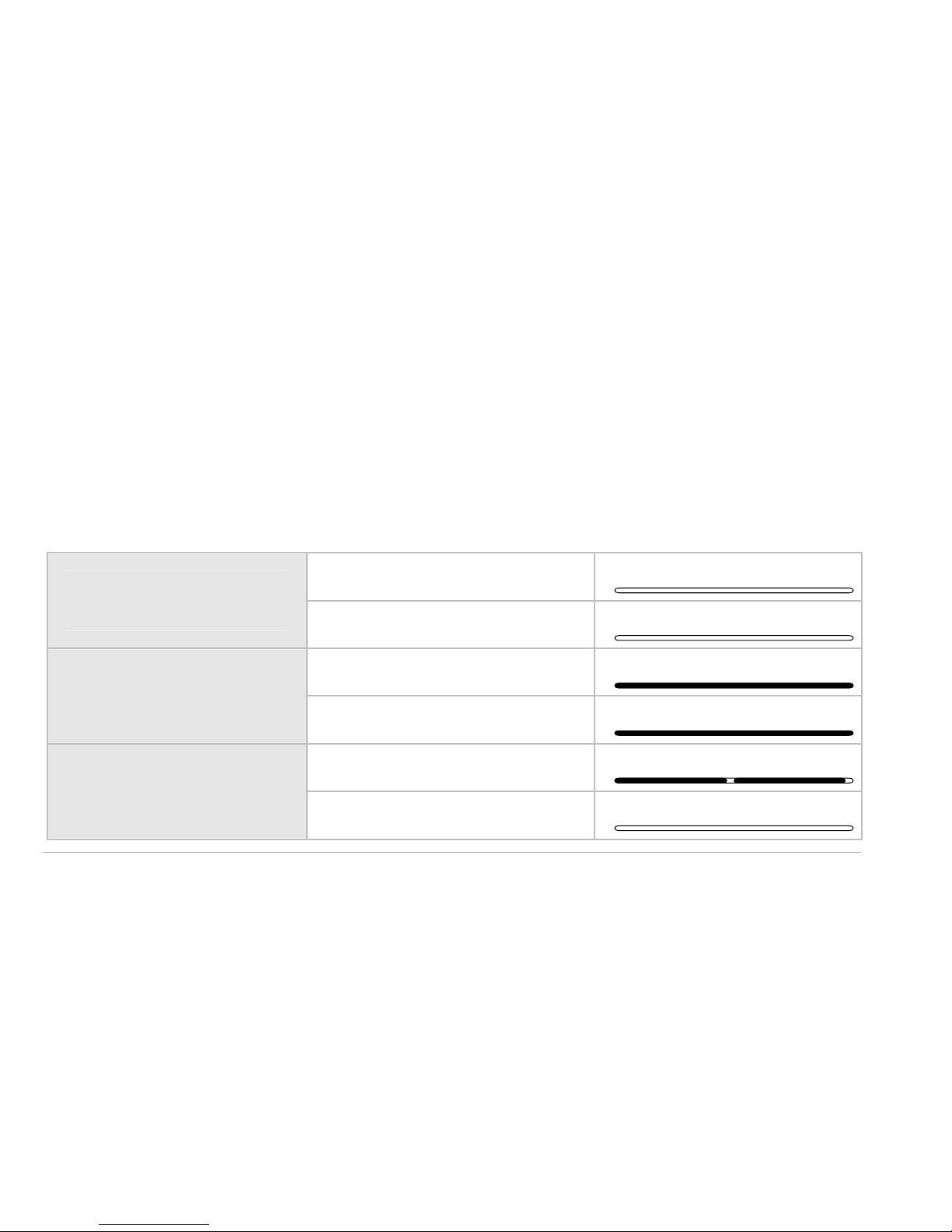
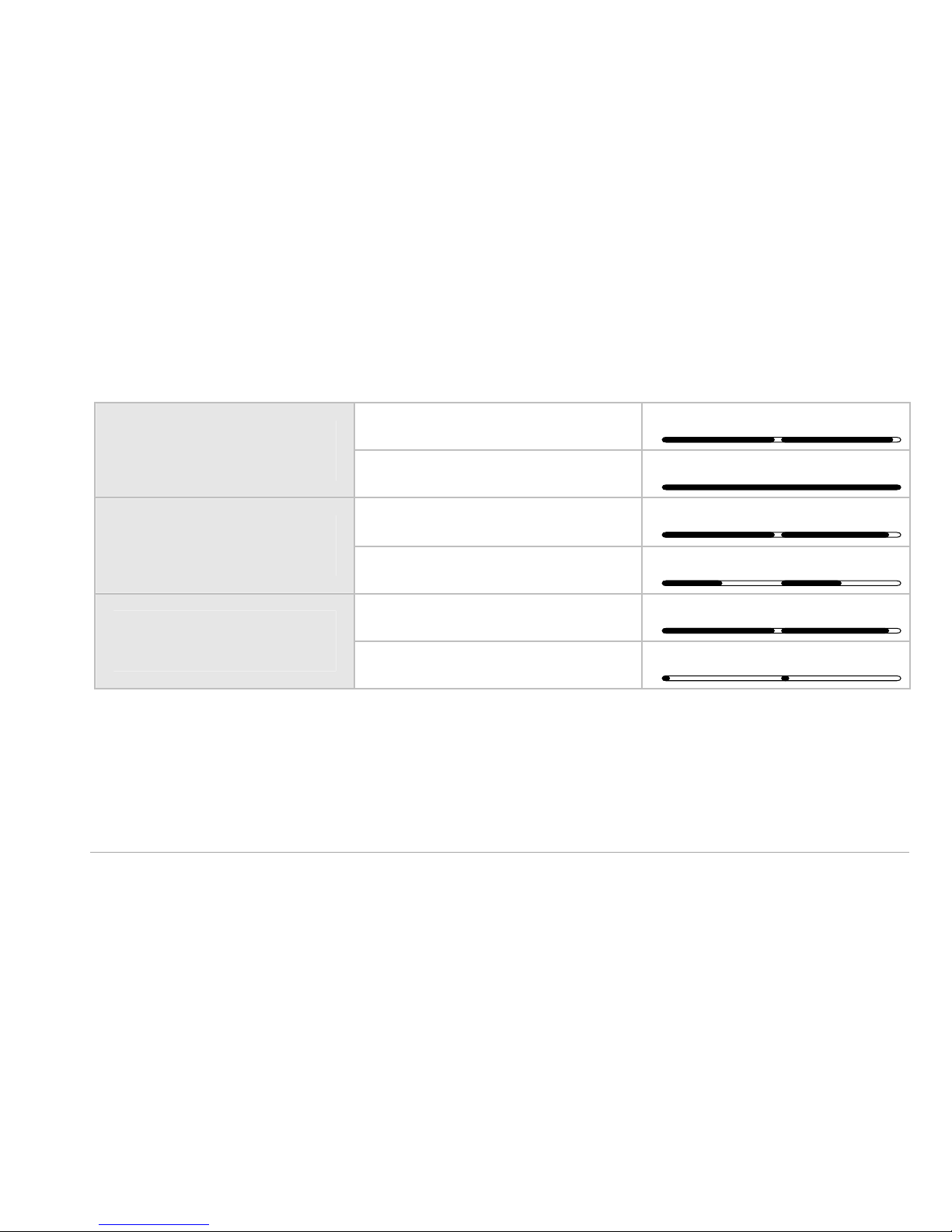
1 0 LED i n d i cat io ns
The CMe2100 product is equipped with three LEDs. The red LED
indicates error, the green LED show currents operation and the yellow
LED indicates GSM/GPRS modem activity. See follow ing pages for LED
indication explanations. Green and Red operation LEDs:
Off/Restart
Green LED (Off)
Red LED (Off)
Pow er On
Green LED (On)
Red LED (On)
Norm al operation
Green LED (Short dip)
Red LED (Off)
Page 34
Page | 34 Support: +46 300 434300 ? [email protected]
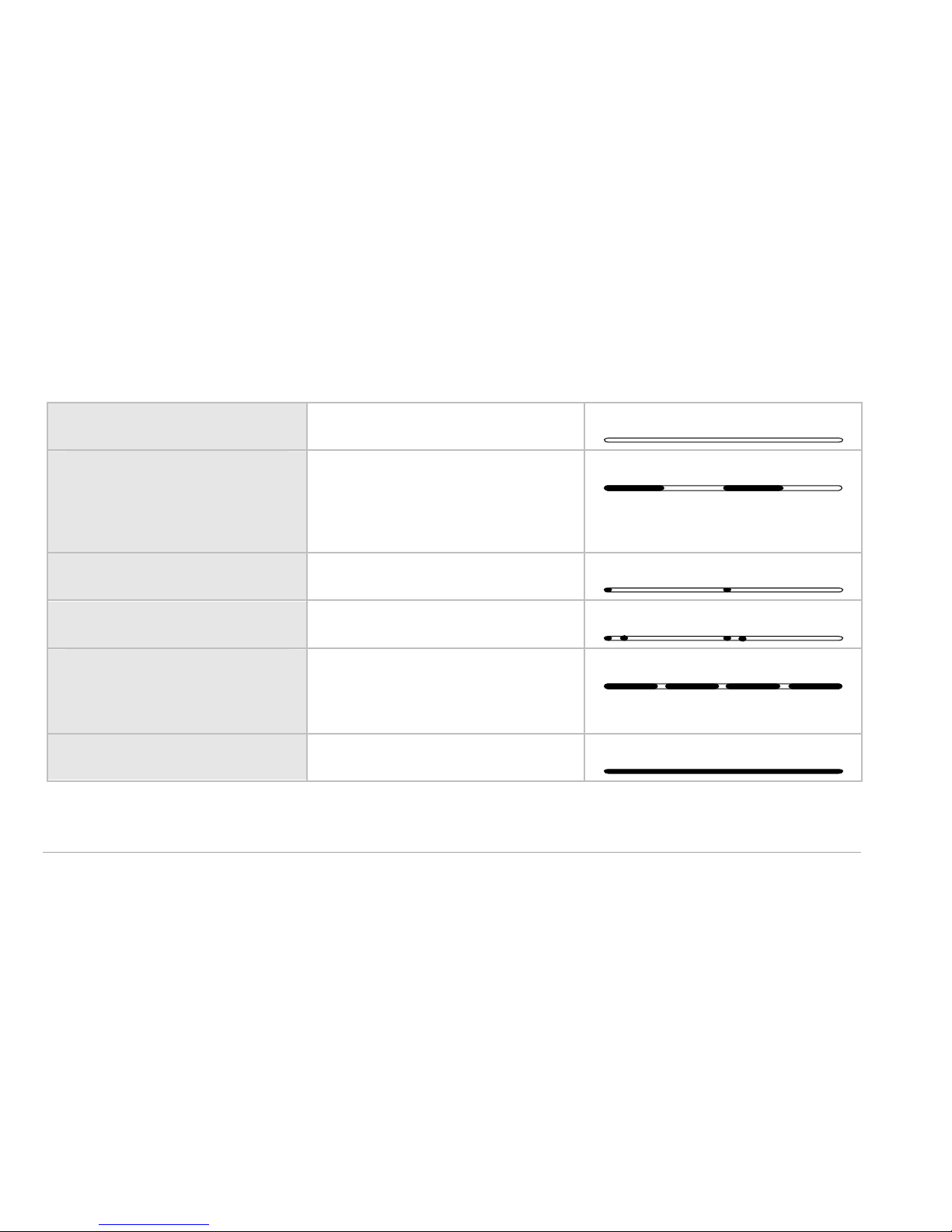
Green and Red operation LEDs continued:
M-Bus short-circuit
Green LED (Short dip)
Red LED (On)
No SIM installed
Green LED (Short dip)
Red LED (50/50)
No GSM network
Green LED (Short dip)
Red LED (Short flash)
Page 35
CMe2100 Quick Manual English v4.0 Page | 35
Yellow LED:
Off/Restart Off
Limited network
service
50/50
Idle mode Short flash
GPRS active Short flashes
Data transfer in
progress
500 ms on/50 ms off
GSM data active On
Page 36

Page | 36 Support: +46 300 434300 ? [email protected]
1 1 Tro u b l esh o o t in g
11 .1 A l l LED s ar e perm anen t l y of f
There is a problem w ith the supply voltage. Please verify 100-240 VAC. If
the problem persists, the product may be m alfunctioning. Please contact
Elvaco support.
11 .2 Red LED i s per m an ent l y o n
This indicates an error on the M-Bus 2-w ire bus.
Please verify no short-circuit of the M -Bus bus. The voltage of the bus
should be between 24 VDC and 30 VDC.
Page 37
CMe2100 Quick Manual English v4.0 Page | 37
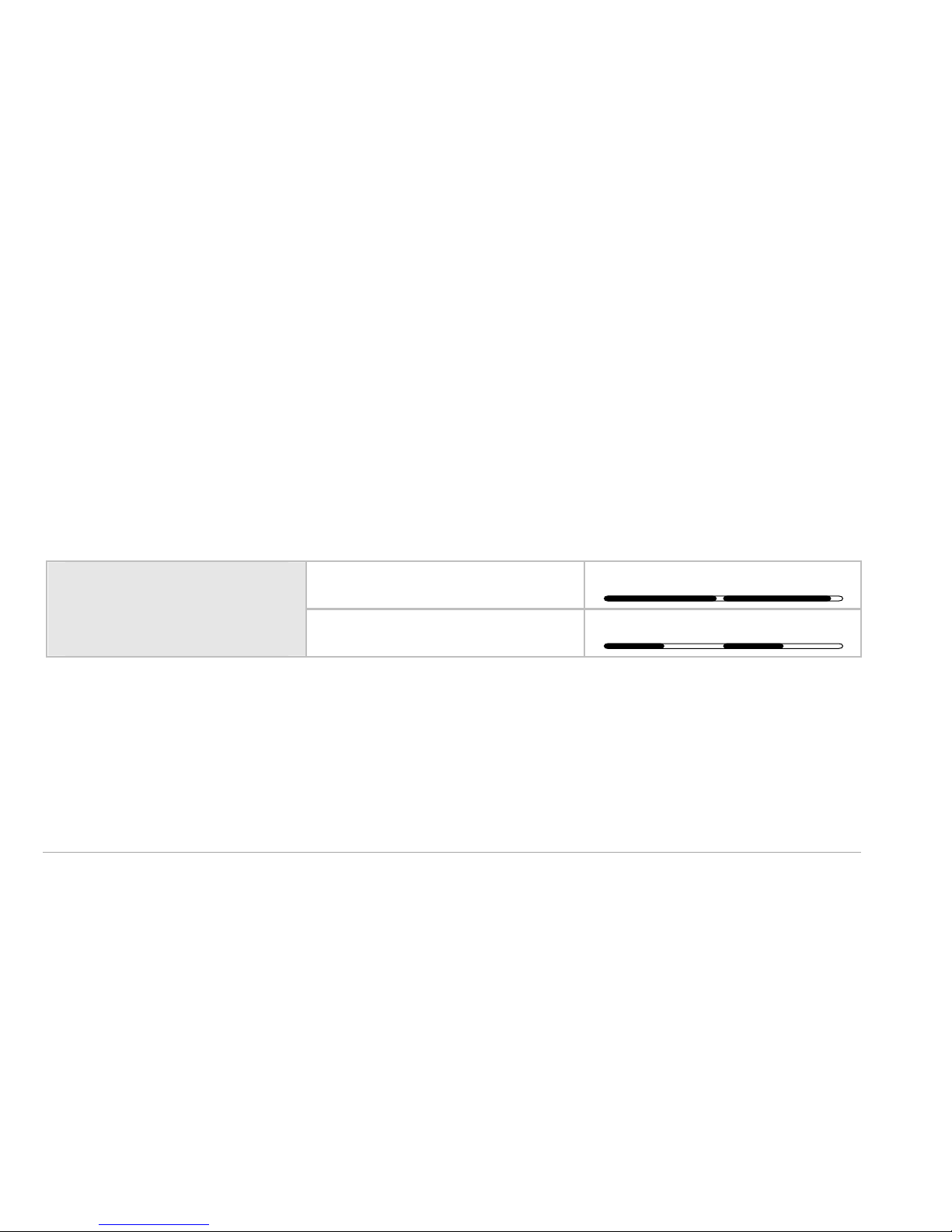
11 .3 Red LED i s f l ashi ng 5 0/50
This indicates a SIM card error. Please verify:
SIM card has no PIN code activated
SIM card is activated
SIM card contact areas are clean
LED Indication
No SIM installed
Green LED(Short dip)
Red LED(50/50)
Page 38
Page | 38 Support: +46 300 434300 ? [email protected]
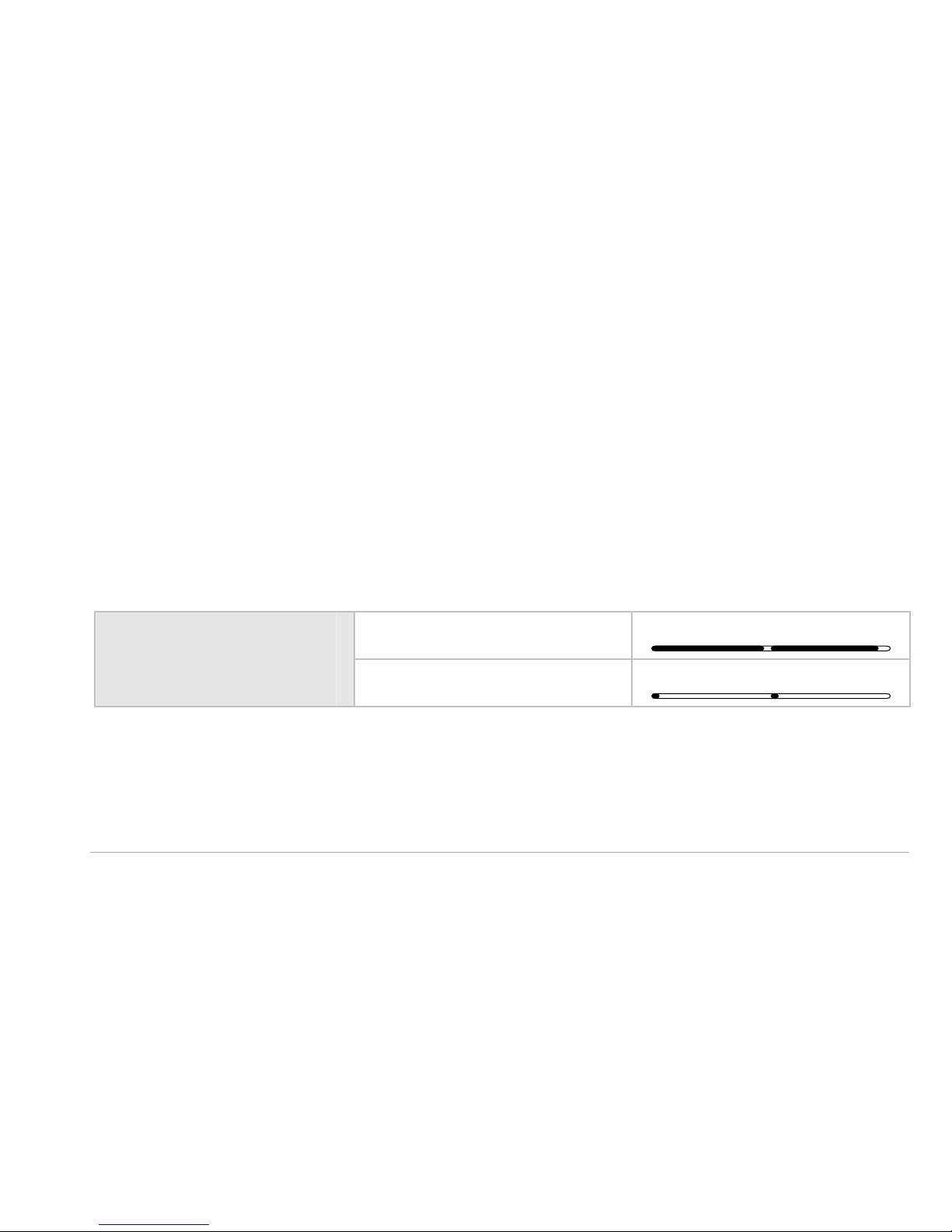
11 .4 Red LED i s f l ashi ng shor t
No GSM network coverage/unable to attach to GSM network. Please verify:
Antenna installation
o Installation with bad network coverage sometim es requires an
external antenna. Do not mount antenna inside metallic cabinets
SIM card activated
SIM card contact areas are clean
LED Indication
No GSM network
Green LED(Short dip)
Red LED(short flash)
Page 39

CMe2100 Quick Manual English v4.0 Page | 39
11.5 The product does not r espond t o SM S
request s
This error may depend on many things. Please verify:
Product is powered up
LEDs are showing normal operation and network coverage
Security access codes may be used; verify correct access code
If a prepaid SIM card is used, balance may be zero
If the problem persists, try resetting the product to factory defaults, see
page 23.
Page 40

Page | 40 Support: +46 300 434300 ? [email protected]
11 .6 Inst al l co m m and d oes n ot f i nd any m et ers
Please verify your M -Bus slave configuration:
Voltage over M-Bus slave should be between 24 VDC and 30 VDC
All M -Bus slaves m ust have unique secondary addresses
M-Bus slave baud rates
o Default search baud is 2400, please see com mand q set m b u s,
page 27, how to change the searched baud rates
Page 41

CMe2100 Quick Manual English v4.0 Page | 41
11 .7 St at us r ep or t i nd i cat es no A PN
This may be due to Auto APN detection has no information about your
netw ork provider. Please contact your netw ork provider for the follow ing
internet access information:
APN
Optional APN usernam e
Optional APN password
Set network parameters manually using command qset net , see page 24.
Page 42

Page | 42 Support: +46 300 434300 ? [email protected]
11 .8 E-M ai l repo rt i ng i s co nf i gu r ed but n o
E-M ai l s ar e sent
This may be due to the follow ing reasons:
No or wrong SMTP server is auto detected. Please verify comm and
st at u s, see page 29. If the SMTP server is not set, please set the
SMTP server manually using command qset em ai l , see page 25.
No valid recipients set. Set recipients with command qset em ai l ,
see page 25.
Report is not correctly activated, please configure E-Mail reports w ith
com mand sc h, see page 28.
If you still have problem s getting your CMe2100 running, please contact
Elvaco support, see page 5.
Page 43
CMe2100 Quick Manual English v4.0 Page | 43
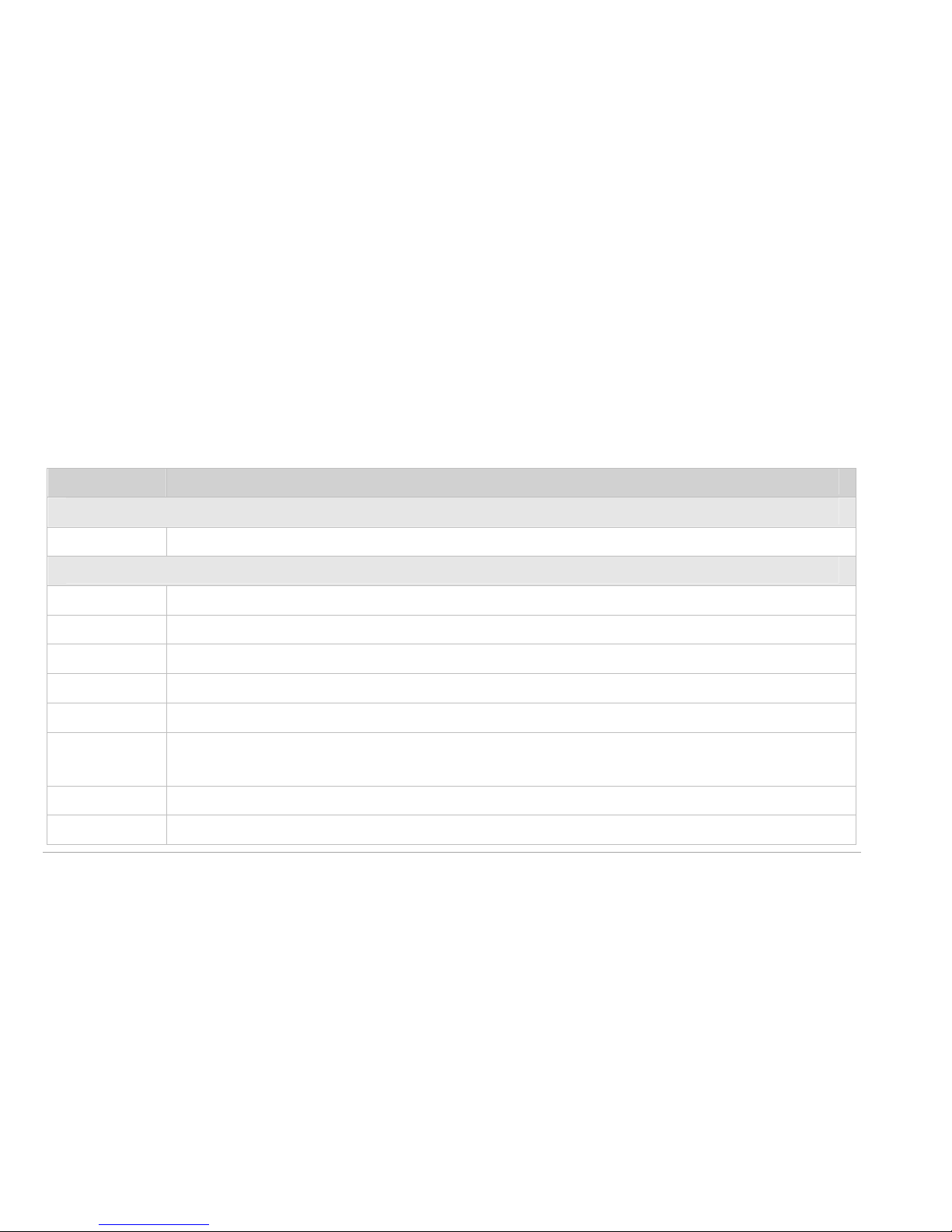
1 2 Repo rt t em pl at es
Get the complete report template documentation on Elvaco web site.
Report Id Description
SMS Reports
1 Installation report
E-Mail Reports
1001 Installation report (HTML)
1002 Installation report (PLAIN)
1003 System report (HTM L)
1004 System log report (HTM L)
1005 Event report (HTML)
1006 Log report (HTML, machine friendly in CSV attached file of E-
Mail)
1007 Monitor event report (HTML)
1101 Value report (HTML, human readable in body of E-M ail)
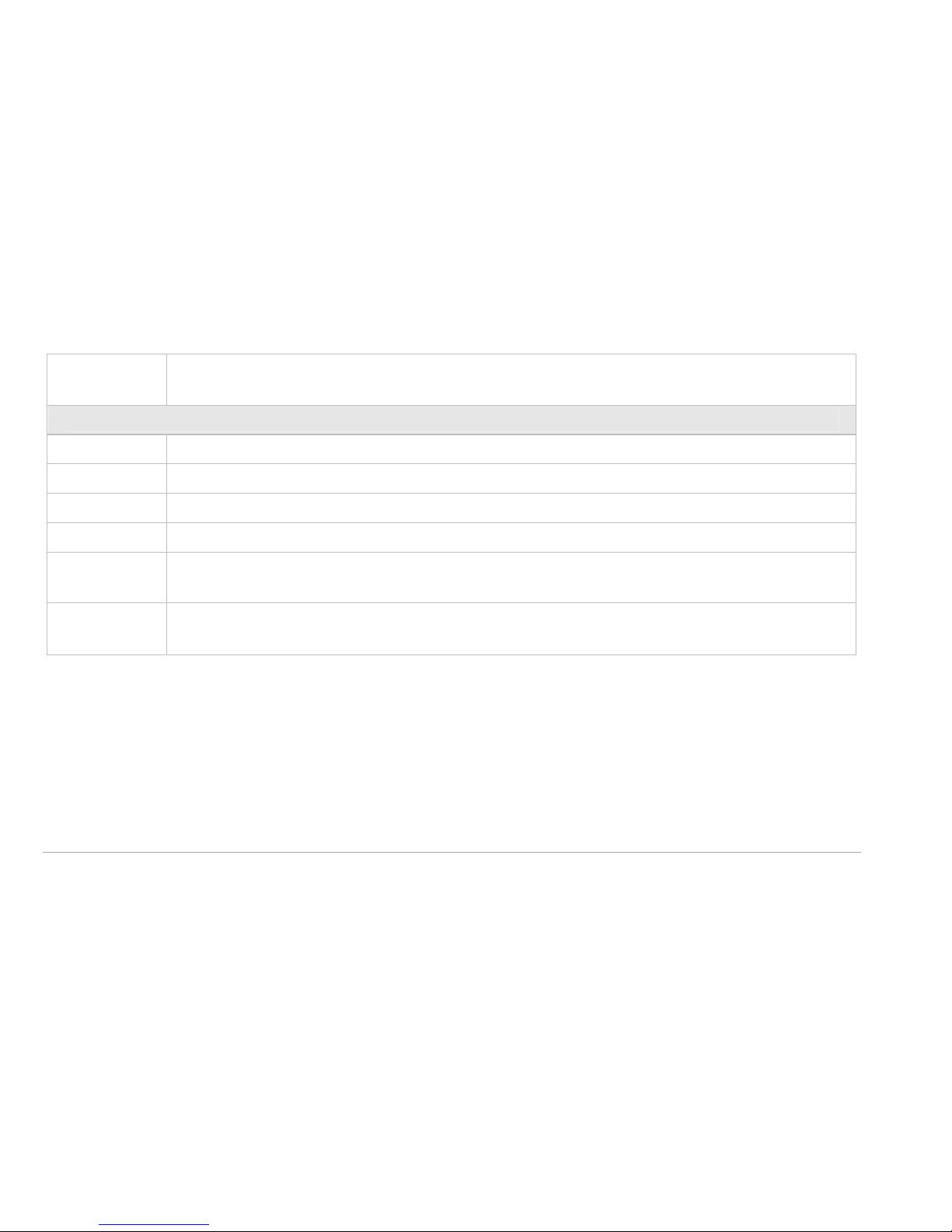
Page 44

Page | 44 Support: +46 300 434300 ? [email protected]
1102 Value report (HTML, machine friendly in body of E-M ail)
1103 Value report (HTML, machine friendly in CSV attached files of E-M ail)
1104 Value report (HTML, hum an readable in CSV attached files of E-Mail)
1105 Value report (HTML, machine friendly in CSV attached files of E-M ail
+ extra colum n header indicator)
1106 Value report (HTML, machine friendly with zip extension (not zipped)
attached files of E-Mail + extra colum n header indicator)
1107 Value report with energy consum ption (HTML, m achine friendly in
CSV attached files of E-M ail)
1108 Value report (HTML, machine friendly in CSV attached file of E-M ail +
extra colum n header indicator)
FTP Reports
2101 Value report (hum an readable in a single CSV files)
2102 Value report (machine friendly CSV files)
2103 Value report (machine friendly CSV files)
2104 Value report (hum an readable CSV files)
2105 Value report (hum an readable CSV files + extra colum n header
indicator)
Page 45
CMe2100 Quick Manual English v4.0 Page | 45
2108 Value report (machine friendly in CSV file + extra column header
indicator)
HTTP Reports
3101 Value report (hum an readable in a single CSV POST)
3102 Value report (machine friendly CSV POSTs)
3103 Value report (machine friendly CSV POSTs)
3104 Value report (hum an readable CSV POSTs)
3105 Value report (hum an readable CSV POSTs + extra colum n header
indicator)
3108 Value report (machine friendly CSV POST + extra colum n header
indicator)
Page 46

Page | 46 Support: +46 300 434300 ? [email protected]
1 3 Co m m an d list i n g
Get the complete command description docum entation from Elvaco web
site.
Command name Description
comm and1 User definable command 1.
comm and2 User definable command 2.
comm and3 User definable command 3.
comm and4 User definable command 4.
comm and5 User definable command 5.
device Send M-Bus comm and directly to slave
factoryreset Restore all settings to factory default
fwupdate Update product firmware
get Get a configuration key
install Search for installed slaves
login Login in console or SMS mode
Page 47

CMe2100 Quick Manual English v4.0 Page | 47
maintenance Maintenance task
monitor1 User definable monitor 1.
monitor2 User definable monitor 2.
monitor3 User definable monitor 3.
monitor4 User definable monitor 4.
monitor5 User definable monitor 5.
qset Quick set configuration
reboot Reboot product
report User definable report.
report1 User definable report 1
report2 User definable report 2
report3 User definable report 3
report4 User definable report 4
report5 User definable report 5
set Set a configuration key
sch Schedules a com mand
Page 48

Page | 48 Support: +46 300 434300 ? [email protected]
status Get status information from the product
storevalue Read and store value of installed slaves
sysreport Sends system report
logreport Sends system log report
sync Synchronize configuration with synchronize server
timesync Synchronize time w ith internet timeserver
Page 49
CMe2100 Quick Manual English v4.0 Page | 49
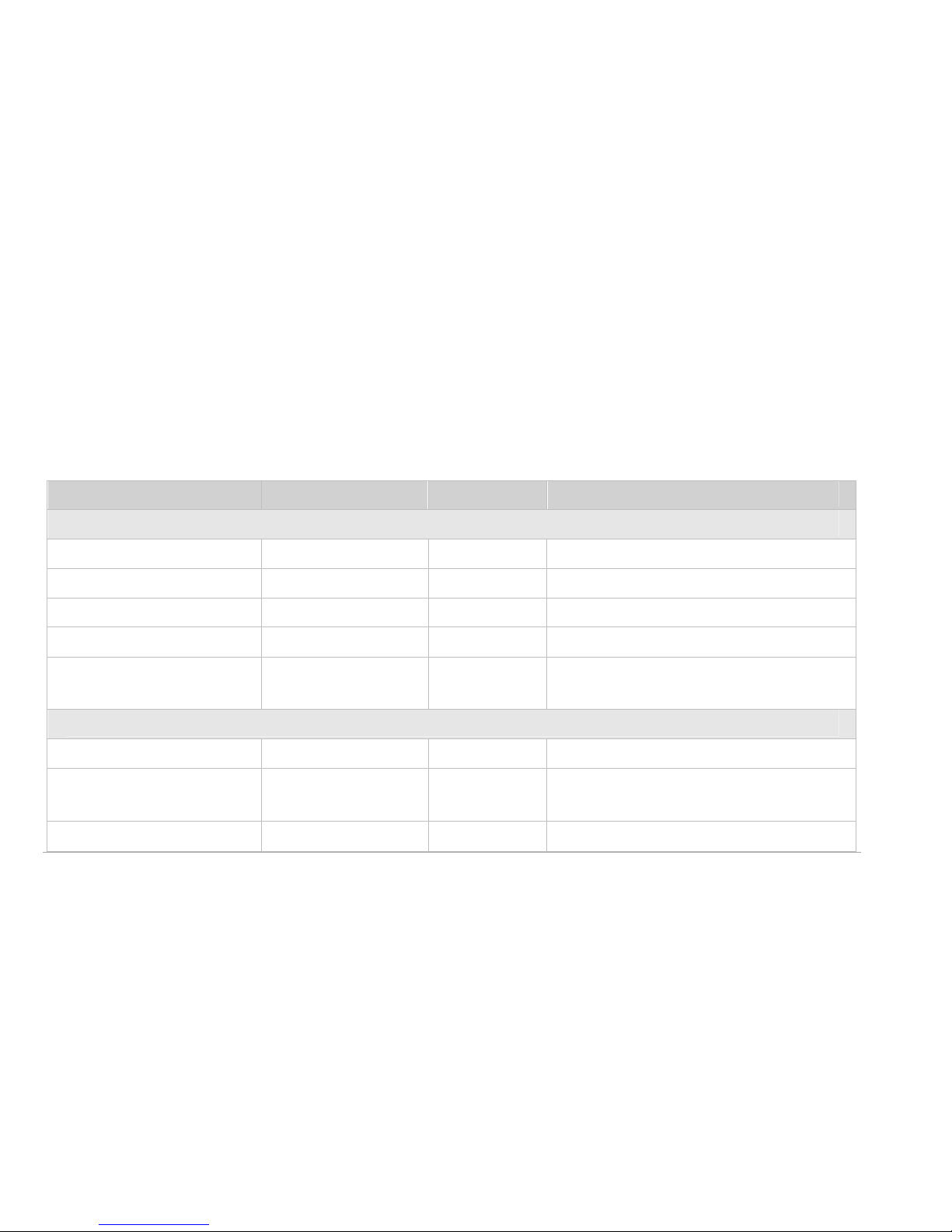
1 4 Tech n ical sp ec if i c at io n s
14 .1 Charact eri st i cs
Value
Unit
Com ments
Mechanics
Casing material Polyam ide -
Protection class IP20 -
Dimensions 100x65x36 mm
Weight 120 g
Connection M -
Bus
Pin terminal - Solid w ire 0.6-0.8 Ø mm
Electrical
Nom inal voltage 100-240 VAC
Power supply Screw
terminal
- Cable 0-2.5 mm2, 0.5 Nm
tightening torque
Voltage range -10 to +10 % Of nom inal voltage
Page 50

Page | 50 Support: +46 300 434300 ? [email protected]
Frequency 50/60 Hz
Power
consum ption
(Max)
<2.5 W
Power
consum ption
(Nom )
<1 W
Installation
category
CAT IV -
GSM/GPRS
GPRS Class Up to 12 -
Band 850/900/
1800/1900
MHz
Environment al
Operating
temperature
range
-20 to +55 °C
Storage -40 to +85 °C
Page 51

CMe2100 Quick Manual English v4.0 Page | 51
temperature
range
Operating
humidity max.
80 %RH Tem peratures up to 31°C,
decreasing linearly to
50%RH at 40°C
Pollution Degree 2 -
Operating
altitude
0-2000 Meters
Usage Indoor use
only
can be extended with IP67
enclosure for outdoor use
User interface
Green LED Power
Red LED Error
Yellow LED GSM status -
Push button Factory
reset
-
M-Bus
M-Bus standard EN 13757 - Full M-Bus decoder
Page 52

Page | 52 Support: +46 300 434300 ? [email protected]
implemented
M-Bus baud rate 300, 2400 Bit/s
Transparent
M-Bus
Listening
server on
TCP and
GSM data
-
Maximum
connected M Bus slaves
8 - Can be extended using
CMeX10 Series
Maximum cable
length
1000 m
IR Interface Yes -
Pass Through No -
Com patibility All standard
M-Bus
meters, all
ABB meters
with IR
Page 53

CMe2100 Quick Manual English v4.0 Page | 53
interface,
CMeX
Series
products
General
Data storage ~1.4 MByte Data storage for meter
data and custom report
configuration
Real tim e clock
Backup
12 h Num ber of hours real
time clock resumes
running without power
Real tim e clock
Accuracy
<2 s/day
Script Engine - - Intelligent script engine
for active content
generation
Firmw are update Using
GSM/GPRS/
-
Page 54

Page | 54 Support: +46 300 434300 ? [email protected]
HTTP
Softw are update Using
GSM/GPRS/
HTTP
-
Integration
Transparent M-
Bus static IP
TCP
Transparent MBus
GSM
CSD/raw M Bus data
E-mail SMTP
FTP Standard
FTP client
HTTP Standard
HTTP and
HTTPS
client, POST
Page 55
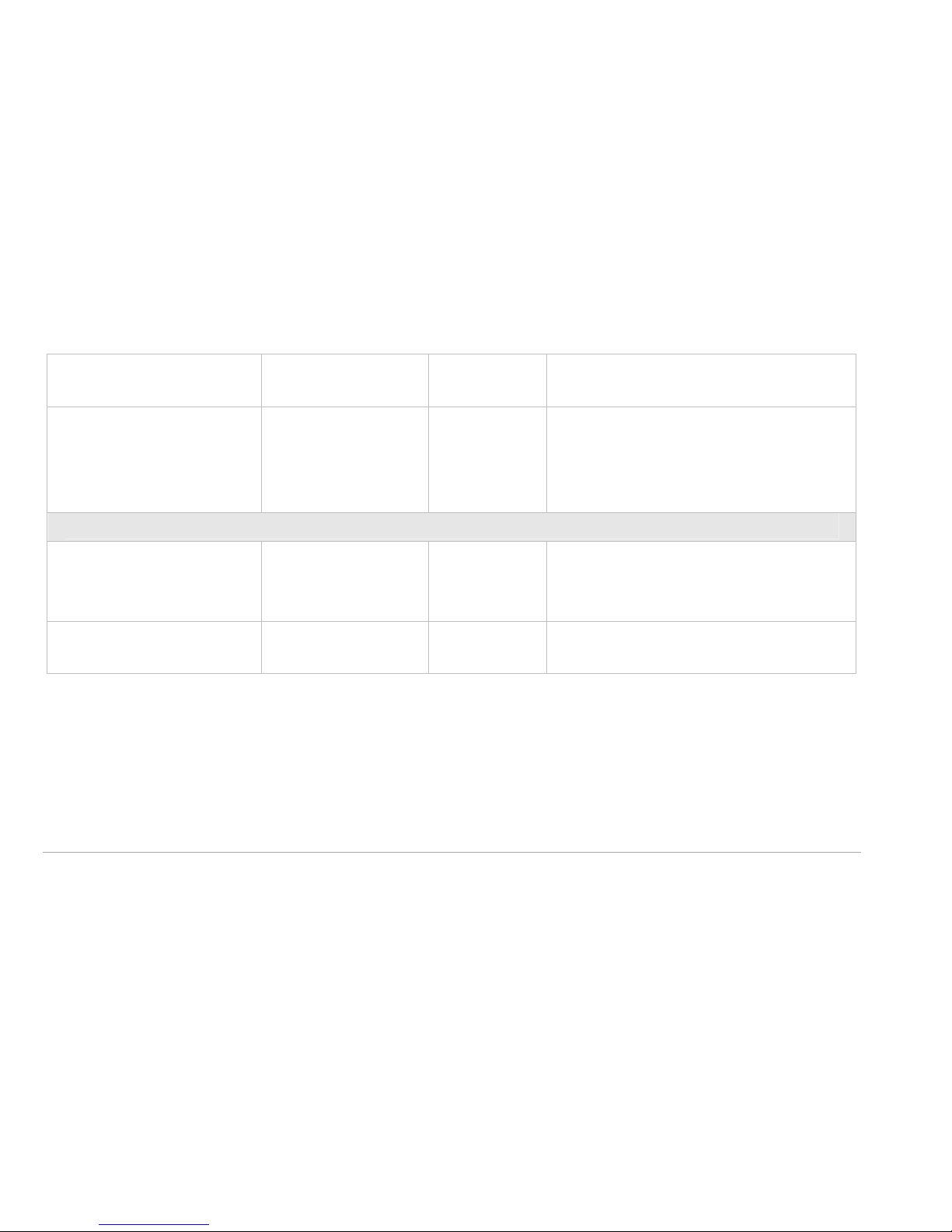
CMe2100 Quick Manual English v4.0 Page | 55
& GET
Configuration
SMS, HTTP,
FTP, GSM
CSD, Telnet
Approvals
EMC EN 61000-6-
2, EN 610006-3
Safety
EN 61010-1,
CAT IV
Page 56

Page | 56 Support: +46 300 434300 ? [email protected]
1 5 Saf et y an d en v iro n m en t
The follow ing safety precautions must be observed during all phases of
the operation, usage, service or repair of any CMe2100 product. Users of
the product are advised to convey the following safety information to
users and operating personnel and to incorporate these guidelines into
all manuals supplied w ith the product. Failure to com ply w ith these
precautions violates safety standards of design, manufacture and
intended use of the product. Elvaco AB assumes no liability for
custom er’s failure to com ply with these precautions.
When in a hospital or other health care facility, observe the restrictions
on the use of mobiles. Switch the product off, if instructed to do so by
the guidelines posted in sensitive areas. M edical equipment m ay be
sensitive to RF energy.
Page 57

CMe2100 Quick Manual English v4.0 Page | 57
The operation of cardiac pacemakers, other implanted medical
equipment and hearing aids can be affected by interference from cellular
terminals or mobiles placed close to the product. If in doubt about
potential danger, contact the physician or the m anufacturer of the
product to verify that the equipment is properly shielded. Pacemaker
patients are advised to keep the product away from the pacem aker,
while it is on.
Switch off the product before boarding an aircraft. Make sure it cannot
be sw itched on inadvertently. The operation of wireless appliances in an
aircraft is forbidden to prevent interference with communication
systems. Failure to observe these instructions may lead to the suspension
or denial of cellular services to the offender, legal action, or both.
Do not operate the product in the presence of flammable gases or
fum es. Switch off the product when you are near petrol stations, fuel
depots, chemical plants or w here blasting operations are in progress.
Page 58

Page | 58 Support: +46 300 434300 ? [email protected]
Operation of any electrical equipment in potentially explosive
atmospheres can constitute a safety hazard.
Your product receives and transmits radio frequency energy w hile
switched on. Remember that interference can occur if it is used close to
TV sets, radios, computers or inadequately shielded equipment. Follow
any special regulations and alw ays sw itch off the product w herever
forbidden, or when you suspect that it m ay cause interference or
danger.
IMPORTANT!
CMe2100 operates using radio signals and cellular networks. Because of
this, connection cannot be guaranteed at all times under all conditions.
Therefore, you should never rely solely upon any wireless product for
essential com m unications, for example emergency information.
Page 59

CMe2100 Quick Manual English v4.0 Page | 59
1 6 A ccesso ries and sim i lar p r o du ct s
Elvaco provides a complete product range to m eet various demands.
A c c esso r i es:
Product Description
External
Antenna
External antenna to increase GSM signal strength
CMeX10 M-Bus master – Connect up to 32 M-Bus slaves
CMeX20 M-Bus activator – Enable standard M -Bus
comm unication to ABB electricity m eters with IR
interface
CMeX30 M-Bus D/A m odule – Steer 0 to 10 V or 0 to 20 mA
output
CMeX40 M-Bus I/O module – Input/output to peripheral devices
CMa10 M-Bus temperature and humidity sensor for indoor use
with display
Page 60

Page | 60 Support: +46 300 434300 ? [email protected]
CMa11 M-Bus temperature and humidity sensor for indoor use
without display
CMa20 M-Bus temperature and humidity sensor for outdoor
use
M-Bus Splitter Share one to four M-Bus meter between two M-Bus
masters
Si m i lar pr odu c t s:
Product Description
CMi2110 GPRS M-Bus com munication module integrated in
Landis+Gyr UH50 meter and 8 M-Bus slaves
CMi2120 GPRS M-Bus com munication module integrated in
Landis+Gyr E350 meter and 8 M-Bus slaves
CMi2130 GPRS M-Bus com munication module integrated in Itron
ECHO II / CF meters and 8 M-Bus slaves
CMe3000 TCP/IP M-Bus com m unication module for ABB
electricity meters with IR interface and 8 M-Bus slaves
 Loading...