

Page 1

CMa10w, CMa11w User's
Manual
CMa10w , CMa11w
The CMa10w/CMa11w is a Wireless M-Bus temperature
and humidity sensor for indoor use.
CMa10w/CMa11w complies with the OMS standard and
operates in Wireless M-Bus mode T1. CMa10w/CMa11w
is the perfect choice when wiring is not an option.
CMa10w , CMa11w User's Manual– Version 1.3
Page 2

CMa10w , CMa11w User' s M anual
Cma10w ,Cma11w
T1 Users M anual
page |
2 (32) 2013-06-12 Public
/
Published
Docum ent i d:
1090054
Version
1.3
Contents
CON TENTS ............................................................................................................ 2
1 DOCUM ENT N OTES .................................................................................... 4
1.1 COPYRIGHT AND TRADEM ARK ......................................................................................... 4
1.2 CONTACTS ..................................................................................................................... 4
2 USING THIS M A NU A L ................................................................................. 5
2.1 PURPOSE AND AUDIENCE ................................................................................................ 5
2.2 MODELS ........................................................................................................................ 5
2.3 ADDITIONAL AND UPDATED INFORMA TION ....................................................................... 5
3 IN TROD U CTION ........................................................................................... 6
3.1 PRODUCT CONFIGURATION ............................................................................................. 6
3.2 CAPABILITIES ................................................................................................................. 6
3.3 APPLICATIONS................................................................................................................ 6
4 GETTIN G ST A RTED ..................................................................................... 7
4.1 OVERVIEW ..................................................................................................................... 7
4.2 MOUNTING .................................................................................................................... 9
4.3 WIRELESS M -BUS .......................................................................................................... 9
4.3.1 Installation procedure ............................................................................................... 9
4.3.1.1 Installati on procedure – Select U nencrypt ed mod e ...................................... 9
4.3.1.2 Installati on procedure – Select Encrypted m ode ........................................... 9
5 A PPLICA TION D ESCRIPTION .................................................................... 1 1
5.1 OPERATION .................................................................................................................. 11
5.1.1 Operation m odes ..................................................................................................... 11
5.1.1.1 Inactive mode ...............................................................................................11
5.1.1.2 Installati on procedure...................................................................................11
5.1.1.3 Norm al operati on – Unencrypted mode ......................................................11
5.1.1.4 Norm al operati on – Encrypted m ode ...........................................................11
5.2 DISPLAY (CMA10W) .................................................................................................... 12
5.2.1 Display sym bols ...................................................................................................... 12
5.2.1.1 Operation m ode indicator ............................................................................12
5.2.1.2 Battery level i ndicator ..................................................................................13
5.2.2 Display m enu ........................................................................................................... 14
5.2.2.1 Deactivate the prod uct .................................................................................15
5.2.2.2 Reset to factory default ................................................................................15
5.2.2.3 Change language..........................................................................................15
5.2.2.4 Change contrast ...........................................................................................15
5.2.2.5 Enable/disable encryption ............................................................................15
5.2.2.6 Change transm it interval ..............................................................................15
5.2.2.7 Lock the product ...........................................................................................15
5.3 LED INDICATIONS ........................................................................................................ 16
6 A D M INISTRA TION OF THE PROD UCT ...................................................... 1 7
6.1 M-BUS PRODUCT IDENTIFICATION ................................................................................. 17
6.2 WIRELESS M -BUS M ODE .............................................................................................. 17
English
Page 3

CMa10w , CMa11w User' s M anual
Cma10w ,Cma11w
T1 Users M anual
page |
3 (32) 2013-06-12 Public
/
Published
Docum ent i d:
1090054
Version
1.3
6.3 M-BUS ADDRESSING .................................................................................................... 17
6.4 OPERATION M ODE ........................................................................................................ 17
6.5 SPONTANEOUS TRANSMISSION .................................................................................... 17
6.6 M-BUS COMM ANDS ..................................................................................................... 17
6.6.1 Send spontaneous data (SND_NR) ........................................................................ 17
6.6.1.1 Slave to master – Telegram 1 (SND_NR)......................................................17
7 TROU BLESHOOTING ................................................................................. 23
7.1 COLLECTOR DOES NOT RECEIVE ANY TELEGRAM SENT FROM THE PRODUCT .................... 23
7.2 INFORMATION NOT VISIBLE ON THE DISPLAY .................................................................. 23
7.3 TEMPERATURE VALU E IS INACCURATE ........................................................................... 23
8 TECHN ICA L SPECIFICA TIONS .................................................................. 24
8.1 CHARACTERISTICS ........................................................................................................ 24
8.2 FACTORY DEFAULTS ..................................................................................................... 25
9 TYPE A PPROV A LS .................................................................................... 26
10 SA FETY A ND EN V IRONM ENT ................................................................... 27
10.1 SAFETY PRECAUTION S .................................................................................................. 27
11 DOCUM ENT HISTORY ............................................................................... 28
11.1 DOCUMENT SOFTWARE AN D HARDWARE APPLIANCE ...................................................... 28
12 REFEREN CES ............................................................................................. 29
12.1 REFERENCES ................................................................................................................ 29
12.2 TERM S AND ABBREVIATIONS ......................................................................................... 29
12.2.1 Num ber representation........................................................................................... 29
13 A PPEND IX A – EX A M PLE ......................................................................... 30
13.1 DENOMINATION OF VA LUES IN REPORTS........................................................................ 30
13.2 DENOMINATION OF VA LUES FOR USE IN FILTERS ............................................................ 32
English
Page 4

CMa10w , CMa11w User' s M anual
Cma10w ,Cma11w
T1 Users M anual
page |
4 (32) 2013-06-12 Public
/
Published
Docum ent i d:
1090054
Version
1.3
1 Docum ent notes
All in form ation in this manual, including product data, diagram s, charts, etc. represents
in form ation on products at the tim e of publi cation, and is subject to change without prior
no tice due to product im provements or other reasons. It is therefore recomm ended that
customers contact Elvaco AB for the latest product info rmation before purchasing a
CMa10w /CM a11w prod uct.
The docum entation and product are provided on an “as is” basis only and may contain
deficiencies or inadequacies. Elvaco AB takes no responsibility for dam ages, liabilities or
other losses by using this product.
1.1 Co p y ri g ht and t r ad em ar k
© 2012, Elvaco AB. All rights reserved. No part of the contents of this m anual m ay be
transmitted or reproduced in any form by any means w ithou t th e w ritten perm ission of
Elvaco AB. Printed in Sw eden.
CMa10w /CM a11w is a tradem ark of Elvaco AB, Sweden.
1.2 Co n t ac t s
Elvaco AB Headquarter
Teknikgatan 18
434 37 Kungsbacka
SWEDEN
Phone: +46 300 30250
Fax: +46 300 18440
E-Mail: [email protected]
Elvaco AB Technical Support
Phone: +46 300 434300
E-Mail: [email protected]
Online: http://w w w.elvaco.com
English
Page 5

CMa10w , CMa11w User' s M anual
Cma10w ,Cma11w
T1 Users M anual
page |
5 (32) 2013-06-12 Public
/
Published
Docum ent i d:
1090054
Version
1.3
2 Using this m anual
2.1 Pu r po se and au di en c e
This m anual covers inform ation needed to m ount, configure and use the CMa10w/CMa11w
Wireless M-Bus indoor temperature and humidity sensor. It is intended for field engineers
and developers.
2.2 M o del s
CMa10w , CMa11w
2.3 A d d it i on al and up d at ed i nf or m at io n
Latest documentation version is available on Elvaco w eb site at http://ww w.elvaco.com .
English
Page 6

CMa10w , CMa11w User' s M anual
Cma10w ,Cma11w
T1 Users M anual
page |
6 (32) 2013-06-12 Public
/
Published
Docum ent i d:
1090054
Version
1.3
3 Introduction
3.1 Pr o du c t c o n f i g u rat io n
Use the table below to find out the capabili ties of your product.
Pr o d uc t
nam e
CMa10w Indoor Wireless M-Bus temperature and hum idity sensor with
CMa11w Indoor Wireless M-Bus temperature and hum idity sensor w ithout
Table 1 Produ ct confi gur atio n
3.2 Cap ab i li t ies
The CM a10w /CMa11w is a 1-way Wireless M -Bus com municating tem perature and
hum idity sensor for indoor use. CMa10w/CMa11w is the ideal pro duct for comfo rt level
bi lling. The high accuracy sensor and user friendly handling m ake the CMa10w/CMa11w
the perfect choice for tenant owners.
3.3 A p p li c at io n s
The CM a10w /CMa11w should be used in the foll owing scenarios:
Indoor m easurement of tem p erature and/or hum idity
High accuracy indoor climate logging
Use instead of CMa10/CM a11 w hen wiring is no t an option
Co m m ent s
di splay
di splay
English
Page 7
CMa10w , CMa11w User' s M anual
Cma10w ,Cma11w
T1 Users M anual
page |
7 (32) 2013-06-12 Public
/
Published
Docum ent i d:
1090054
Version
1.3
(Identification)
4 Getting Started
This chapter covers the steps required for getting the CMa10w/CM a11w installed and
op erational. No pre-configuration is needed before using the CMa10w/CMa11w.
4.1 Over v i ew
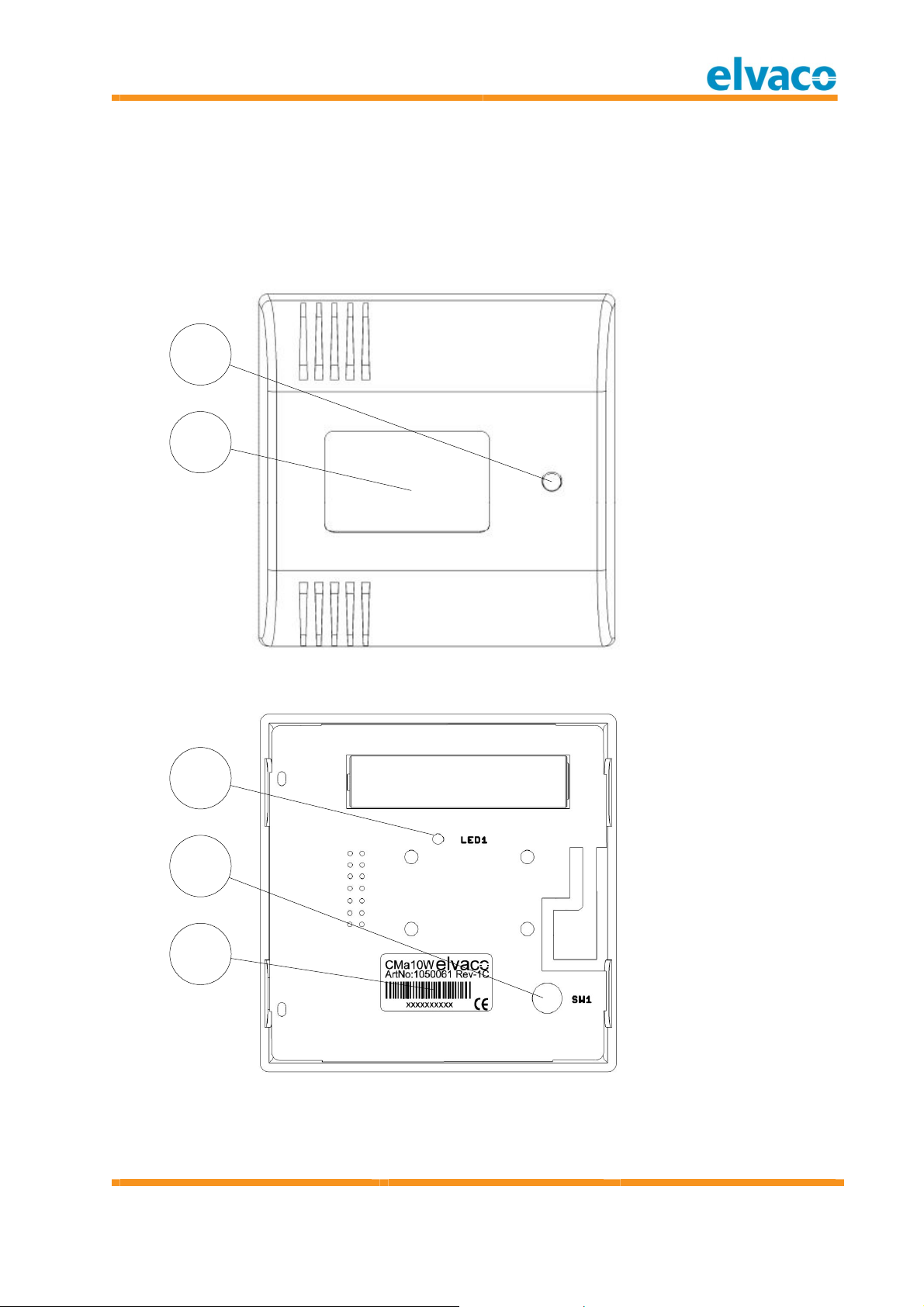
1
2
1. Push-button (SW2)
(CMa10w )
Figure 1 Front view
2. Display (CMa10w)
3. LED1
4. Push-button (SW1)
5. Serial Num ber
3
4
5
Figure 2 Botto m v iew (rear co ver rem o ved)
English
Page 8
CMa10w , CMa11w User' s M anual
Cma10w ,Cma11w
T1 Users M anual
page |
8 (32) 2013-06-12 Public
/
Published
Docum ent i d:
1090054
Version
1.3
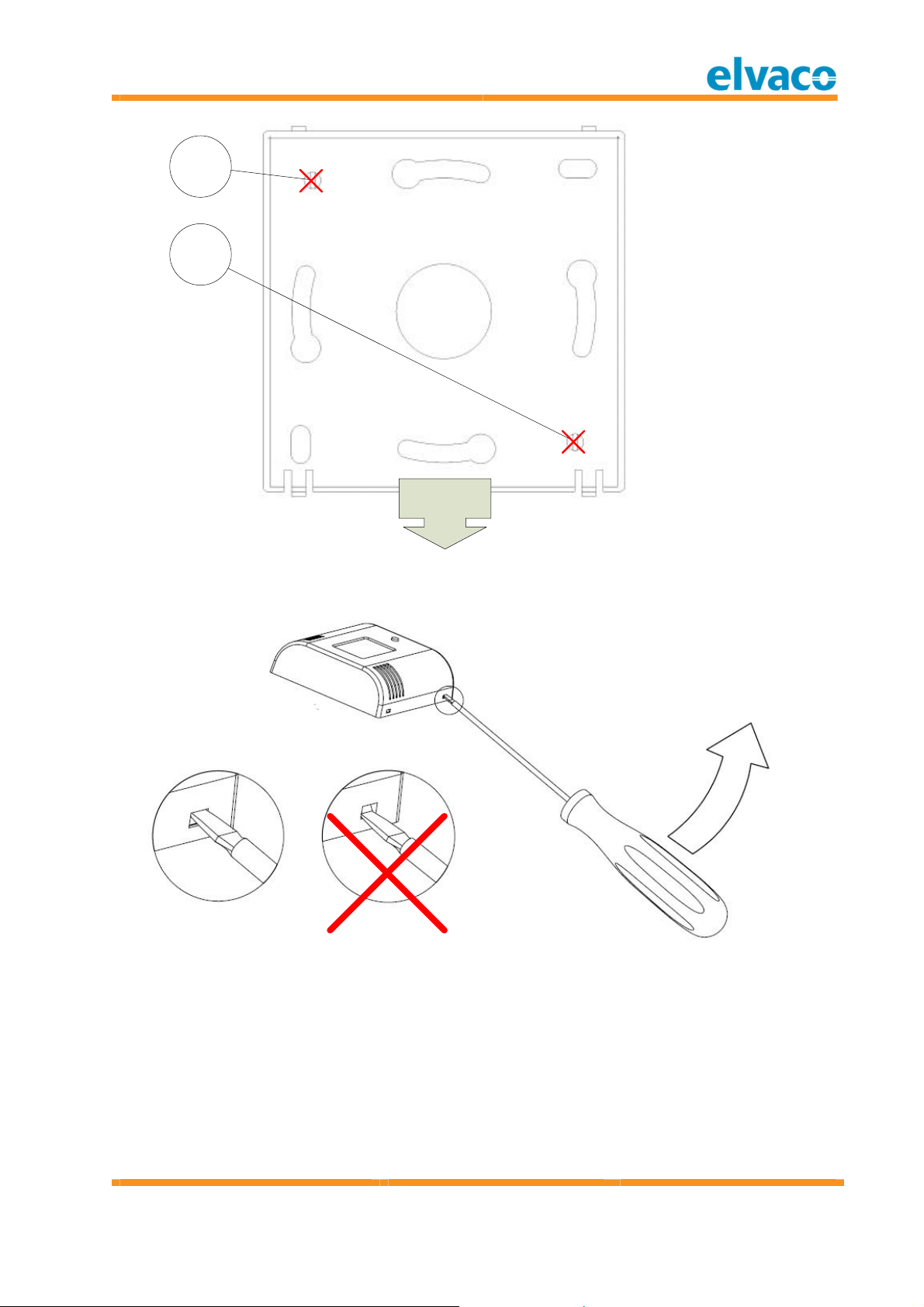
6
6
6. Do not use fo r
DOWN
Figure 3 Rear cover
mounting
Figure 4 Dem oun ti ng
English
Page 9

CMa10w , CMa11w User' s M anual
Cma10w ,Cma11w
T1 Users M anual
page |
9 (32) 2013-06-12 Public
/
Published
Docum ent i d:
1090054
Version
1.3
4.2 M o un t in g
When mounti ng the CMa10w/CM a11w, avoid rooms w ith a lot of supplementary heat,
such as kitchens or south facing rooms. Position the sensor aw ay from direct sunlight.
Avoid placing on an external w all or near an external door. Make sure that the sensor is
no t positioned clo ser than 1 m from the nearest radiator and at least 1.5 m above the floor.
The CM a10w /CMa11w can be m ounted directly on the w all, or over a mounting box. If the
CMa10w /CM a11w is placed over a conduit pipe, it is recomm ended to fill the pipe to
prevent air flo w which cou ld affect accuracy of the values.
Remove the rear cover to be abl e to press the installati on button SW1 (4).
IM PORTA N T
Please take the followin g in consideration:
Do not use mounting holes (6) as in Figure 3.
Turn the rear cover as show n in Figure 3.
Do not m ount the product inside a steel cabinet, which wil l dram atically low er the
po ssibilities to connect to a collector.
4.3 Wi r el ess M -Bu s
The product is delivered with the radio turned off. The radio m ust be m anually switched on
du ring the install ation procedure.
Th e p r o d uc t w il l n o t be ac t iv at ed u nt i l t he in st al l at io n pr o ced u re is st art ed .
4.3 .1 In s t al lat i on p r o ced ur e
The product can be installed and enabled in two modes:
Un en c r y pt ed m o de: Data is sent unencrypted and the encryption key is not
needed to decrypt the data.
Enc ry p t ed m od e : Data is sent in encrypted m ode and the encrypti on key is
needed to decrypt the data.
Please advise your project m anager w hich operation m ode is used in your pro ject.
4.3 .1 .1 In st al l at i o n p ro c edu r e – Select Unenc r yp t ed m od e
By performing the following steps, the product w ill start to send spontaneous
un e n c r y p t ed data:
1. Press and hold button SW1 (4) for 5 seconds, until LED1 (3) flashes fast. See Table 2 for
com plete inform atio n about LED indication.
2. Release SW1 (4)
The product w i ll now start to send spontaneous unencrypted SND_NR telegram s every 6th
minute (default).
4.3 .1 .2 In st al l at i o n p r o c edur e – Select En c r y p t ed m ode
By performing the following steps, the product w ill start to send spontaneous en cr y pt ed
data:
1. Press and hold button SW1 (4) for 10 seconds, until LED1 (1) flashes slow . See Table 2
for com pl ete inform ation about LED indication.
2. Release SW1 (4)
English
Page 10

CMa10w , CMa11w User' s M anual
Cma10w ,Cma11w
T1 Users M anual
page |
10 (32) 2013-06-12 Public
/
Published
Docum ent i d:
1090054
Version
1.3
3. The product w ill now start to send spontaneous encrypted SND_NR telegram s every 6
IM PORTA N T
Please take the followin g in consideration:
minute (default).
After the prod uct is activated, configu ration can still be changed on the CMa10w
using the Setup menu, see section 5.2.
The device can be locked for future configuration, see section 5.2.2.7.
th
English
Page 11

CMa10w , CMa11w User' s M anual
Cma10w ,Cma11w
T1 Users M anual
page |
11 (32) 2013-06-12 Public
/
Published
Docum ent i d:
1090054
Version
1.3
5 Application description
This chapter covers general application description and configuration of the product.
5.1 Oper at i o n
The product w i ll autom atically, after the installation procedure, send T1 m essages every 6th
minute containing sensor data, such as instantaneous temperature and hum idity. The
product will also send product status inform ation, containing battery status and other
relevant inform ation.
Product configuration can be changed using the Setup menu (CMa10w) as long as the
product has not been locked for future configuration, see section 5.2.2.7.
5.1 .1 Op er at io n m o d es
The product has the fo llow ing operation m odes:
1. Inactive (on delivery)
2. Installation procedure (during installation)
3. Normal operation - encrypted m ode
4. Normal operation - unencrypted m ode
5.1 .1 .1 In act i v e m o de
The product is delivered inactive, which m eans th at the product does not perform any
tasks befo re an installation procedure is started. This saves the battery lifetime and
ensures that there is no radio activity until the product is manually activated.
5.1 .1 .2 In st al l at i o n p r o c edur e
The installation procedure is used to activate the product, see 4.3.1.
5.1 .1 .3 No rm al op er at io n – U nen c r y p t ed m od e
In norm al operation unencrypted m ode, the product w ill by default send spon taneous
un e n c r y p t ed m essages every 6th minute. This can be changed as long as the prod uct has
no t been lo cked. This mode is norm ally used when the collector or AM R/AMM system
do es no t handle AES encryption or if th e AES key is un known to the host system .
5.1 .1 .4 No rm al op er at io n – En c ry pt ed m o d e
In norm al operation encrypted mode, the product w ill by default send spontaneous
en cr yp t ed m essages every 6th min ute. This can be changed as long as the product has not
been locked. This m ode is used to secure data sent from the product to the collector or
AM R/AMM system. To be able to decrypt the data, the private 128 bi t AES key m ust be
know n by the collector or by the host system. The private 128 bit AES key is on dem and
provided to the customer by Elvaco AB.
English
Page 12
CMa10w , CMa11w User' s M anual
Cma10w ,Cma11w
T1 Users M anual
page |
12 (32) 2013-06-12 Public
/
Published
Docum ent i d:
1090054
Version
1.3
5.2 Di sp l ay (CM a1 0 w )
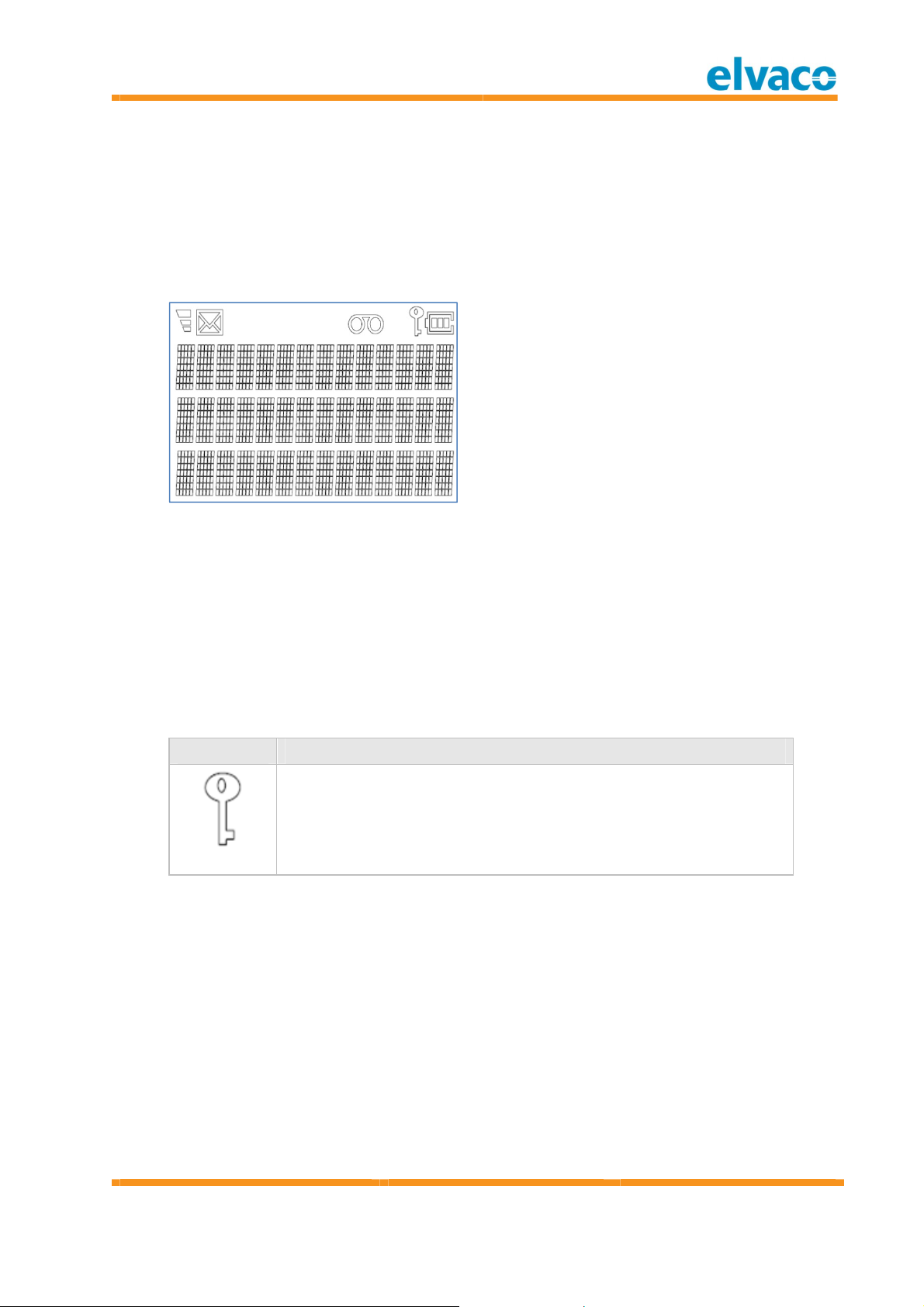
The display show s current sensor inform ation and is also used to change and vi ew the
CMa10w confi guration.
The display is in norm al operation turned off to save battery. The display is turned on as
soon as SW2 (1) is pushed and w ill be turned off if no button is pressed w ithin 5 seconds.
When the display is tu rned off, the m enu page will be reset to the first page.
Please see Figure 5 for display design.
Figure 5 CMa10w displ ay
5.2 .1 D isp lay sy m b o l s
To easily show current operati on and function ality of the product, the display is equipped
with display sym bols, w h ich indicate Wireless M -Bus mode, encryption and battery level.
5.2 .1 .1 Op er at ion m o d e i nd i cat or
This indicator shows if the product runs in encrypted or unencrypted mode. If th e indicator
is visible, all com munication is encrypted, otherwise all com munication is sent
un encrypted.
Sy m b o l D e scr ip t io n
Product is encrypting all m essages w ith AES 128 bit encrypti on.
If the product is running in unencrypted m ode, the operation m ode
indicator is hidden.
Steady
English
Page 13
CMa10w , CMa11w User' s M anual
Cma10w ,Cma11w
T1 Users M anual
page |
13 (32) 2013-06-12 Public
/
Published
Docum ent i d:
1090054
Version
1.3
5.2 .1 .2 Bat t er y level in d i c at o r
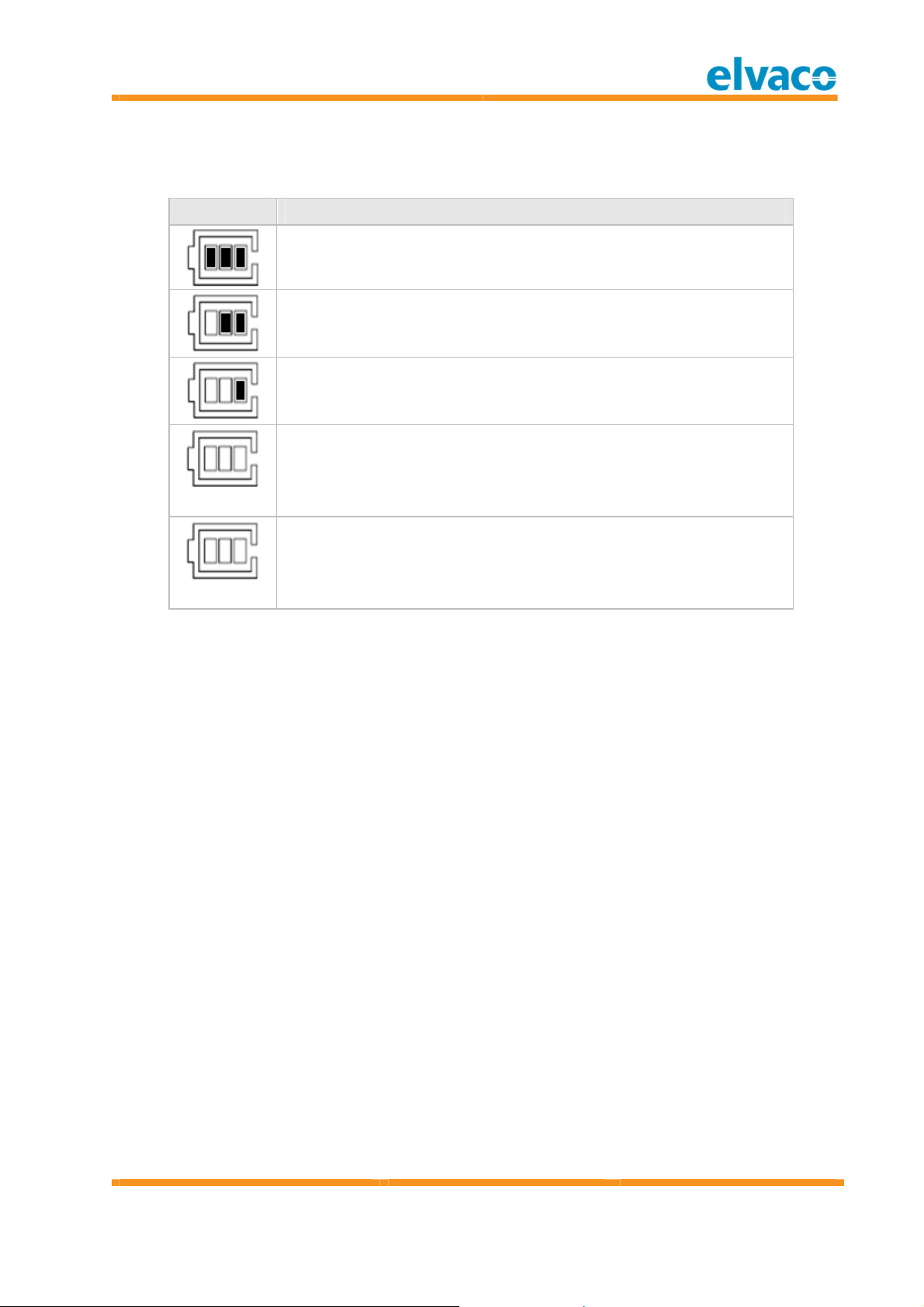
The battery level indicator show s current battery level. The product should be exchanged
when the battery level indicator is flashing.
Sy m b o l D e scr ip t io n
Battery has full capacity.
Battery level is medium .
Battery level is lo w .
Battery is alm ost em pty.
Steady
Battery is empty and the product w ill stop working w ithin 12
months.
Flashing
English
Page 14
CMa10w , CMa11w User' s M anual
Cma10w ,Cma11w
T1 Users M anual
page |
14 (32) 2013-06-12 Public
/
Published
Docum ent i d:
1090054
Version
1.3
5.2 .2 D isp lay m en u
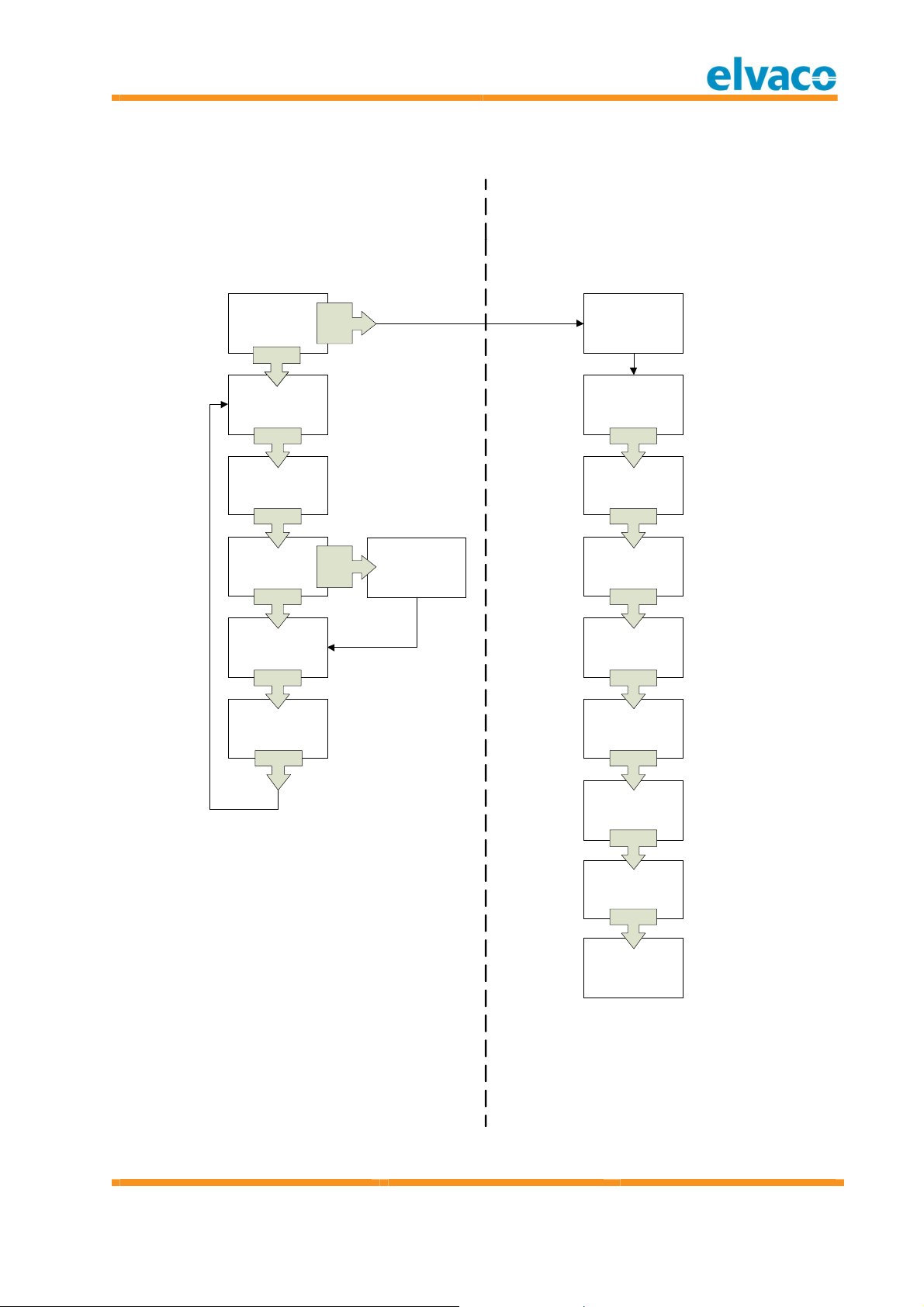
Please see Figure 6 for m enu op tions.
Standard menu
Enter next page by pressing SW2
DISPLAY OFF
SW2
SW2
Temp: 25.5°C
Humi: 40% RH
SW2
MIN MAX
25.5°C 25.5°C
40% RH 40% RH
SW2
Press 5 sec. To
reset MIN/MAX
value
SW2
1 h AVERAGE
25.5°C
SW2
SW1
2s
SW2
5s
MIN/MAX values
are now reset
Setup menu
Confirm/enter next page by pressing SW1 for 1s.
Change values using SW2
*SETUP STARTS*
SETUP:
Deactivate=n/Y
SW1
SETUP:
Total Reset=n/Y
SW1
SETUP:
Language=Eng/
Deu/Sve
SW1
SETUP:
Contrast= -10..+10
SW1
24h AVERAGE
25.5°C
SW2
SETUP:
Encryption=n/Y
SW1
SETUP:
TxIntvl= 1..15 min
SW1
SETUP:
Setup Lock=n/Y
SW1
*END OF SETUP*
Restarting...
Figure 6 CMa10w Displ ay m enu
English
Page 15

CMa10w , CMa11w User' s M anual
Cma10w ,Cma11w
T1 Users M anual
page |
15 (32) 2013-06-12 Public
/
Published
Docum ent i d:
1090054
Version
1.3
5.2 .2 .1 Deac t i v at e t h e pr od u ct
Navigate to Setup m enu and select “y” i n “Deactivate” m enu page. This will deactivate the
product and the product must be activated w ith a new installation procedure.
5.2 .2 .2 Reset t o f ac t o ry d e f au l t
In order to reset the product configuration to factory default, navigate to “Total Reset” in
the setu p m enu and select “y”.
5.2 .2 .3 Ch an g e lang u ag e
Navigate to Setup m enu and select language (English, Deutsch or Svenska) in the
“Language” m enu page.
5.2 .2 .4 Ch an g e co nt r ast
Navigate to Setup m enu and select contrast from -10 to +10 in “Contrast” m enu page. A
higher value indicates a hi gher contrast.
5.2 .2 .5 Enab l e /d i sab le en c r y p t i on
Navigate to Setup m enu and select “y” to enable encryption and “n” to disable encryption
in the “Encryption ” m enu page. This has the same functionality as activating the product
in encrypted or unencrypted m ode.
5.2 .2 .6 Ch an g e t ran sm i t in t er v al
Navigate to Setup m enu and change interval from 1 minute to 15 minutes in the “TxIntvl”
menu page.
5.2 .2 .7 Lo ck t h e pr od uc t
The product can be locked for future changes. Navigate to Setup m enu and select “y” in
“Setup Lock” m enu page. This w ill disable the possibility to enter the Setup m enu again.
IM PORTA N T
Lo ck i n g t he p ro du c t c ann o t be u nd one an d a ny c onf ig u rat i o n m ade c an n o t be
c h an ged. If y o u need t o u n lo ck t he pr o d u c t , it n eeds t o b e sen t t o El vaco .
English
Page 16
CMa10w , CMa11w User' s M anual
Cma10w ,Cma11w
T1 Users M anual
page |
16 (32) 2013-06-12 Public
/
Published
Docum ent i d:
1090054
Version
1.3
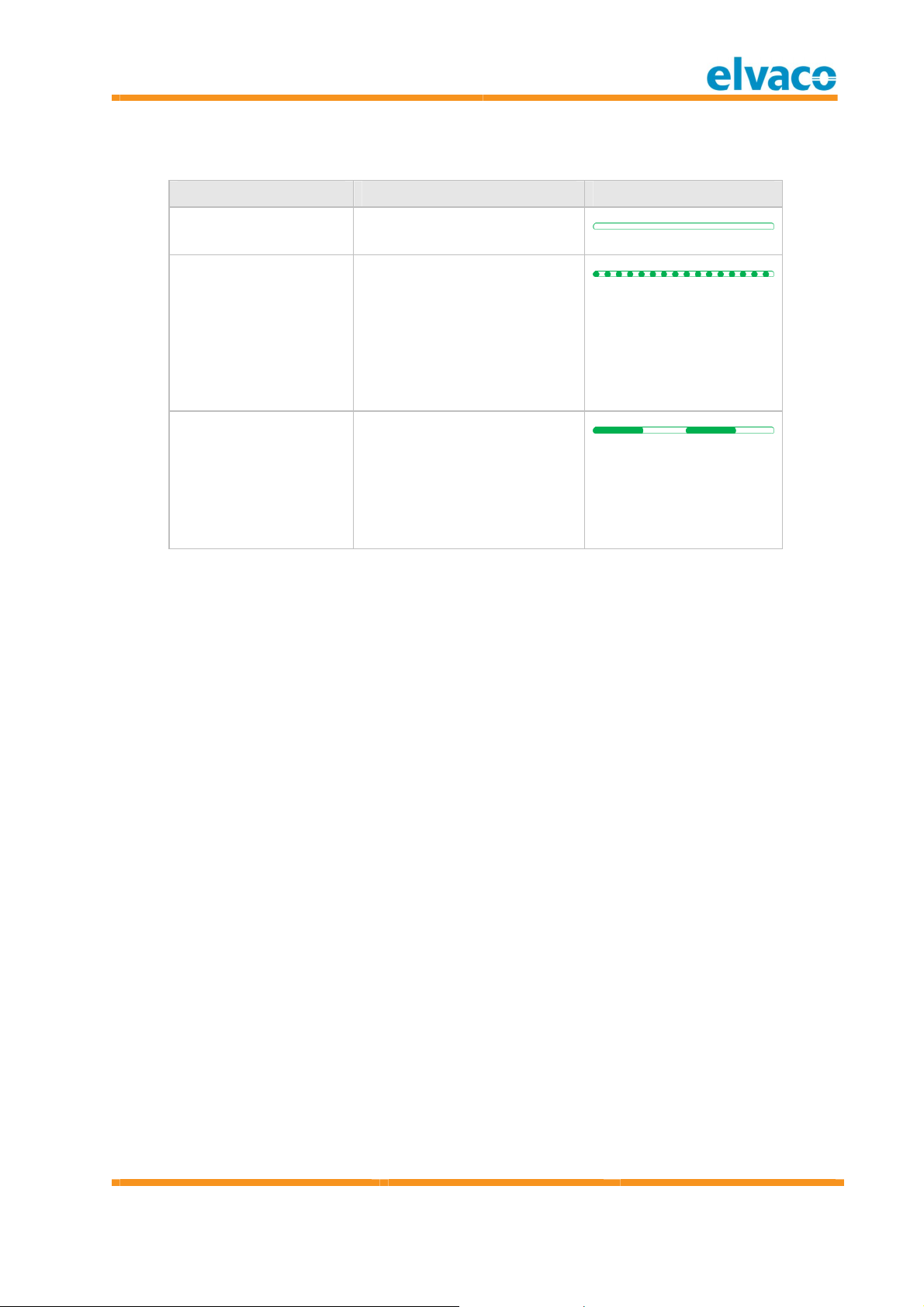
5.3 LED i n di c at i o n s
LED 1 St at e/Desc r ip t i o n Vi su al
Permanently off Off
Fast flash
50 ms on / 50 m s off
Slo w flash
250 ms on / 250 m s off
Table 2 LED 1 in di catio ns
Triggered when button is
pressed more than 5
seconds to select
un encrypted operation
mode. Releasing the button
in this state will select
un encrypted operation
mode.
Triggered when button is
pressed more than 10
seconds to select encrypted
op eration m ode. Releasing
the button in this state will
select encrypted operation
mode.
English
Page 17

CMa10w , CMa11w User' s M anual
Cma10w ,Cma11w
T1 Users M anual
page |
17 (32) 2013-06-12 Public
/
Published
Docum ent i d:
1090054
Version
1.3
6 Administration of the product
This chapter covers the configuration and Wireless M-Bus im plementation of the product.
The Wireless M-Bus slave im plem entation is according to the new M -Bus standard
EN13757-2, EN13757-3, EN13757-4 and the OM S specification.
6.1 M -Bu s pr o du c t i d ent i f i c a t i on
The product can be identified by the follow ing inform ation:
Manufacturer string = ELV
Medium = 0x1B (Room sensor)
Generation = 01-09 (CMa10w), 10-19 (CM a11w )
The generation field between product releases will on ly change (increase by 1) if the MBus protocol inform ation changes betw een versions. Use the softw are version field in the
M-Bus telegram to identify current softw are versi on.
6.2 Wi r el ess M -Bu s m ode
The product is using Wireless M -Bus mode T1, w hich m eans that the product sends
spontaneous data in one direction, from product to collector.
6.3 M -Bu s add r essi n g
The address used is a globally unique address, wh ich is set during production.
6.4 Oper at i o n m od e
The product can operate in encrypted or unencrypted mode. In encrypted m ode, OM S
encryption m ode 5 is used w ith AES 128 bit key for all telegrams. Wh en running in
un encrypted mode, all telegram s will be sent unencrypted
6.5 Sp o nt aneo us t ran sm i ssi o n
The product w i ll autom atically start sending spontaneous telegram s w ith m easurem ent
data after the installation procedure is completed. The product sends by default an
SND_NR telegram every 6th minute. The transmission interval is configurable in the Setup
menu of the CMa10w.
6.6 M -Bu s c om m an ds
All data in the tables are described unencrypted.
6.6 .1 Send spo nt an eo us d at a (SN D _NR)
During norm al operation, the Wireless M-Bus comm and SND_NR is sent by default every
6th minute.
6.6 .1 .1 Sl ave t o m a st er – Telegr am 1 (SN D_NR)
By t e i n d e x D at a Descr i pt i on
0 0xnn L-Field
1 0x44 C-Field: SND_NR
English
Page 18

CMa10w , CMa11w User' s M anual
Cma10w ,Cma11w
T1 Users M anual
page |
18 (32) 2013-06-12 Public
/
Published
Docum ent i d:
1090054
Version
1.3
2..3 0x9615 Manufacturer
“ELV”
4..7 0xnnnnnnnn Identification number
8 0xnn Version field
9 0x1B Device type (Medium) = Room sensor
10..11 0xnnnn CRC-field
12 0x7A CI-Field (Short header)
13 0xnn Access num ber
14 0xnn Status
15..16 0xnnnn Configuration w ord
17..18 0x2f2f AES check (id le fi ller)
19 0x02 Instantaneou s temperature DIF
20 0x65 Instantaneous temperature VIF, external
tem perature
21..22 0xnnnn Instantaneou s temperature x 100
In case of error the temperature will be set
to 0.
23 0x42 | 0x72 1-hour temperature rolling average DIF,
storage number 1
0x42 = The value is available
0x72 = The value is not yet calculated
24 0x65 1-hour temperature rolling average VIF,
external temperature
25..26 0xnnnn 1-hour temperature rolling average x 100
This value is unavailable (0) until 1 ho ur has
passed since pow er-on. During this first
hour the value will be flagged as “value
du ring error state”, DIF bits 5 and 4 = 1.
This value is updated every 6 minute.
The temperature d ata will be 0 in case of
sensor error. See slave status byte in data
header.
27 0x82 | 0xb2 24-hour temperature rolling average DIF,
storage number 2
0x82 = The value is available
0xb2 = The value is not yet calculated
28 0x01 24-hour temperature rolling average DIFE
29 0x65 24-hour temperature rolling average VIF,
external temperature
30..31 0xnnnn 24-hour temperature rolling average x 100
English
Page 19

CMa10w , CMa11w User' s M anual
Cma10w ,Cma11w
T1 Users M anual
page |
19 (32) 2013-06-12 Public
/
Published
Docum ent i d:
1090054
Version
1.3
This value is unavailable (0) until 24 hour
has passed since pow er-on. During this
period the value w ill be flagged as “value
du ring error state”, DIF bits 5 and 4 = 1.
This value is updated every hour.
The temperature d ata will be 0 in case of
sensor error. See slave status byte in data
header.
32 0x22 1-hour m inimum temperature DIF
33 0x65 1-hour m inimum temperature VIF, external
tem perature
34..35 0xnnnn 1-hour m inimum temperature x 100
In case of error the temperature will be set
to 0.
This is the lo w est instantaneous
tem perature since last 1-hour period.
36 0x12 1-hour m aximum temperature DIF
37 0x65 1-hour m aximum temperature VIF, extern al
tem perature
38..39 0xnnnn 1-hour m aximum temperature x 100
In case of error the temperature will be set
to 0.
This is the highest instantaneous
tem perature since last 1-hour period.
40 0x62 24-hour m inimum temperature DIF
41 0x65 24-hour m inimum temperature VIF, external
tem perature
42..43 0xnnnn 24-hour m inimum temperature x 100
In case of error the tem perature will be set
to 0.
This is the lo w est instantaneous
tem perature since last 24-hour period.
44 0x52 24-hour m aximum temperature DIF
45 0x65 24-hour m aximum temperature VIF,
external temperature
46..47 0xnnnn 24-hour m aximum temperature x 100
In case of error the temperature will be set
to 0.
English
Page 20

CMa10w , CMa11w User' s M anual
Cma10w ,Cma11w
T1 Users M anual
page |
20 (32) 2013-06-12 Public
/
Published
Docum ent i d:
1090054
Version
1.3
This is the highest instantaneous
tem perature since last 24-hour period.
48 0x02 Instantaneou s relative hum idity DIF
49 0xfb Instantaneou s relative hum idity VIF,
extension table FB
50 0x1a Instantaneou s relative hum idity VIFE
51..52 0xnnnn Instantaneou s relative hum idity x 10
In case of error the relative humidity will be
set to 0.
53 0x42 | 0x72 1-hour hum id ity rolling average DIF,
storage number 1
0x42 = The value is available
0x72 = The value is not yet calculated
54 0xfb 1-hour relative humidity VIF, extension
table FB
55 0x1a 1-hour relative humidity VIFE
56..57 0xnnnn 1-hour relative humidity x 10
In case of error the relative humidity will be
set to 0.
58 0x82 | 0xb2 24-hour humidity rolling average DIF,
storage number 2
0x82 = The value is available
0xb2 = The value is not yet calculated
59 0x01 24-hour humidity rolling average DIFE
60 0xfb 24-hour relative humidity VIF, extension
table FB
61 0x1a 24-hour relative hum idity VIFE
62..63 0xnnnn 24-hour relative humidity x 10
In case of error the relative humidity will be
set to 0.
64 0x22 1-hour m inimum relative humidity DIF
65 0xfb 1-hour m inimum relative humidity VIF,
extension table FB
66 0x1a 1-hour m inimum relative humidity VIFE
67..68 0xnnnn 1-hour m inimum relative humidity x 10
In case of error the relative humidity will be
set to 0.
This is the lo w est instantaneous relative
hum idity since last 1-hour period.
English
Page 21

CMa10w , CMa11w User' s M anual
Cma10w ,Cma11w
T1 Users M anual
page |
21 (32) 2013-06-12 Public
/
Published
Docum ent i d:
1090054
Version
1.3
69 0x12 1-hour m aximum relative humidity DIF
70 0xfb 1-hour m aximum relative humidity VIF,
extension table FB
71 0x1a 1-hour m aximum relative humidity VIFE
72..73 0xnnnn 1-hour m aximum relative humidity x 10
In case of error the relative humidity will be
set to 0.
This is the highest instantaneous relative
hum idity since last 1-hour period.
74 0x62 24-hour m inimum relative hum idity DIF
75 0xfb 24-hour m inimum relative hum idity VIF,
extension table FB
76 0x1a 24-hour m inimum relative hum idity VIFE
77..78 0xnnnn 24-hour m inimum relative hum idity x 10
In case of error the relative humidity will be
set to 0.
This is the lo w est instantaneous relative
hum idity since last 24-hour period.
79 0x52 24-hour m aximum relative humidity DIF
80 0xfb 24-hour m aximum relative humidity VIF,
extension table FB
81 0x1a 24-hour m aximum relative humidity VIFE
82..83 0xnnnn 24-hour m aximum relative humidity x 10
In case of error the relative humidity will be
set to 0.
This is the highest instantaneous relative
hum idity since last 24-hour period.
84 0x02 Product status DIF
85 0xfd Product status VIF, extension table FD
86 0x1b Product status VIFE, digital inpu t
87..88 0xnnnn 16-bit integer value with follow ing bit-mask:
Bit15: 24-hour toggle bit
Bit14: 10 m inute toggle bit
Bit13..10: Not used
Bit 8..9: Battery level
00b = Empty
01b..11b (1d-3d) = Level 1 to 3 (fu ll)
Bit 4..7: Tx interval
0d..15d minutes
Bit 3..1: Not used
English
Page 22

CMa10w , CMa11w User' s M anual
Cma10w ,Cma11w
T1 Users M anual
page |
22 (32) 2013-06-12 Public
/
Published
Docum ent i d:
1090054
Version
1.3
Bit 0: Sensor failure
- 1 = Sensor failure (sam e as 0x0a in
header status byte)
- 0 = No sensor failure
89 0x0d Firm w are version DIF
90 0xfd Firm w are version VIF
91 0x0f Firm w are version VIFE = “Other softw are
version”
92 0x05 Length of firmw are string
92..96 0xnnnnnnnnnn Firm w are version string in form at:
Major.M inor.PatchLevel
97 0x0F End of telegram, no more data.
English
Page 23

CMa10w , CMa11w User' s M anual
Cma10w ,Cma11w
T1 Users M anual
page |
23 (32) 2013-06-12 Public
/
Published
Docum ent i d:
1090054
Version
1.3
7 Troubleshooting
7.1 Co l l ec t o r do es no t r ecei v e any t el egr am sen t f ro m t he p r od uc t
This can be a due the following reasons:
The product has not been turned on usin g the installation procedure, see 4.3.1.
The master is not powered up or no t correctl y configured.
The distance to the master is not w ithin rang e.
The master antenna is not properly mounted for best perform ance.
The position of the product is in side a metallic cabinet or is distu rbed by other
radio equipm ent.
7.2 Inf or m at io n no t v i si bl e o n t he d i spl ay
This can be a due the following reasons:
The product has not been turned on usin g the installation procedure, see 4.3.1.
The LCD contrast is set to a low value.
The battery is em pty. Check the serial num ber label of the product w hen the
product is pro duced. The lifetim e is 12 years.
7.3 Tem per at ur e val u e i s i n ac c ur at e
The temperature sensor is very accurate, but incorrect positioning of the product m ay
result in unintend ed temperature variation. Please take the follow ing in consideration
when m ounting the product:
Do not m ount the product close to heat sou rces (front and rear)
Do not m ount the product in di rect sunlight
Do not m ount the product in the area of a spotlight beam
If the problem persists, please contact Elvaco AB.
English
Page 24
CMa10w , CMa11w User' s M anual
Cma10w ,Cma11w
T1 Users M anual
page |
24 (32) 2013-06-12 Public
/
Published
Docum ent i d:
1090054
Version
1.3
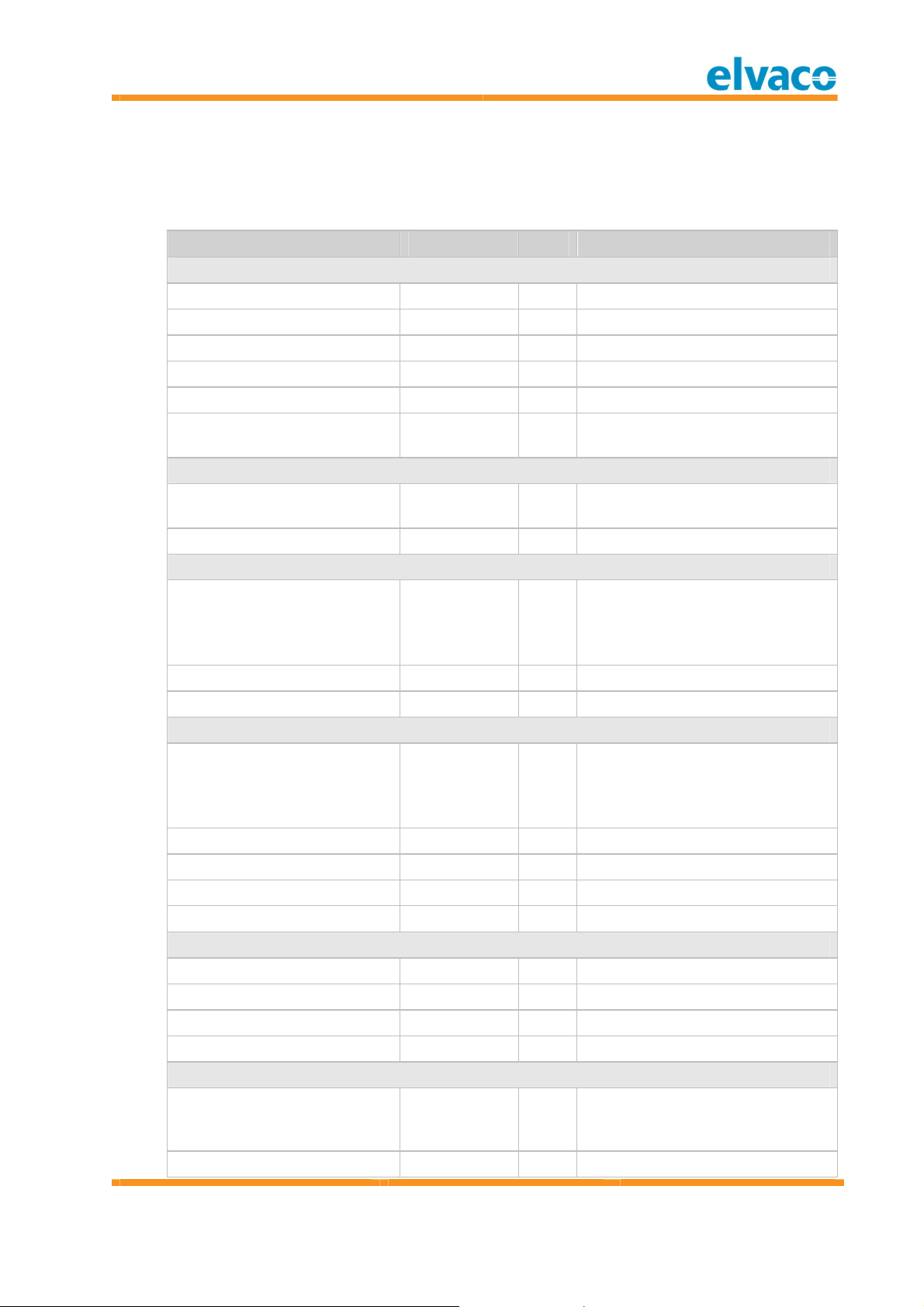
8 Technical specifications
8.1 Ch ar ac t er ist ic s
Ty pe Val u e Un it Co m ment s
Mechanics
Casing m aterial ABS UL94-V0 - Whi te
Protecti on class IP20 -
Dim ensions 80 x 80 x 28 m m
Weight 75 g
Antenna Wireless M-Bus Internal -
Mounting Wall
mounted
Electrical
Pow er supply Internal
battery
Lifetim e 12 Years
Envi ronm ental
Operating tem perature range 0 to +50
(CMa10w )
-20 to +55
(CMa11w )
Storage temperature range -40 to +85 °C
Operating humidi ty 0 to 95 %RH No condensation
Temperature sensor
Temperature range 0 to +50
(CMa10w )
-20 to +55
(CMa11w )
Accuracy +10 to +30 °C +/- 0.2 °C
Accuracy 0 to +10 °C +/- 0.4 °C
Accuracy -10 to +0 °C +/- 0.5 °C
Accuracy -20 to +55 °C +/- 1.5 °C
Hum idity sensor
Hum idity range 0-100 %RH
Repeatability RH +/- 0.1 %RH
Accuracy 10 to 90 %RH +/- 2 %RH
Accuracy 0 to 100 %RH +/- 4 %RH
User interface
LCD display Yes
(CMa10w )
Button w ith LED Yes - Menu navigati on
°C
°C
- Display current temperature,
hum idity, min/m ax values and
con figuration.
English
Page 25
CMa10w , CMa11w User' s M anual
Cma10w ,Cma11w
T1 Users M anual
page |
25 (32) 2013-06-12 Public
/
Published
Docum ent i d:
1090054
Version
1.3
(CMa10w )
Green LED Yes - Configuration/Activation
Button Yes - Configuration/Activation
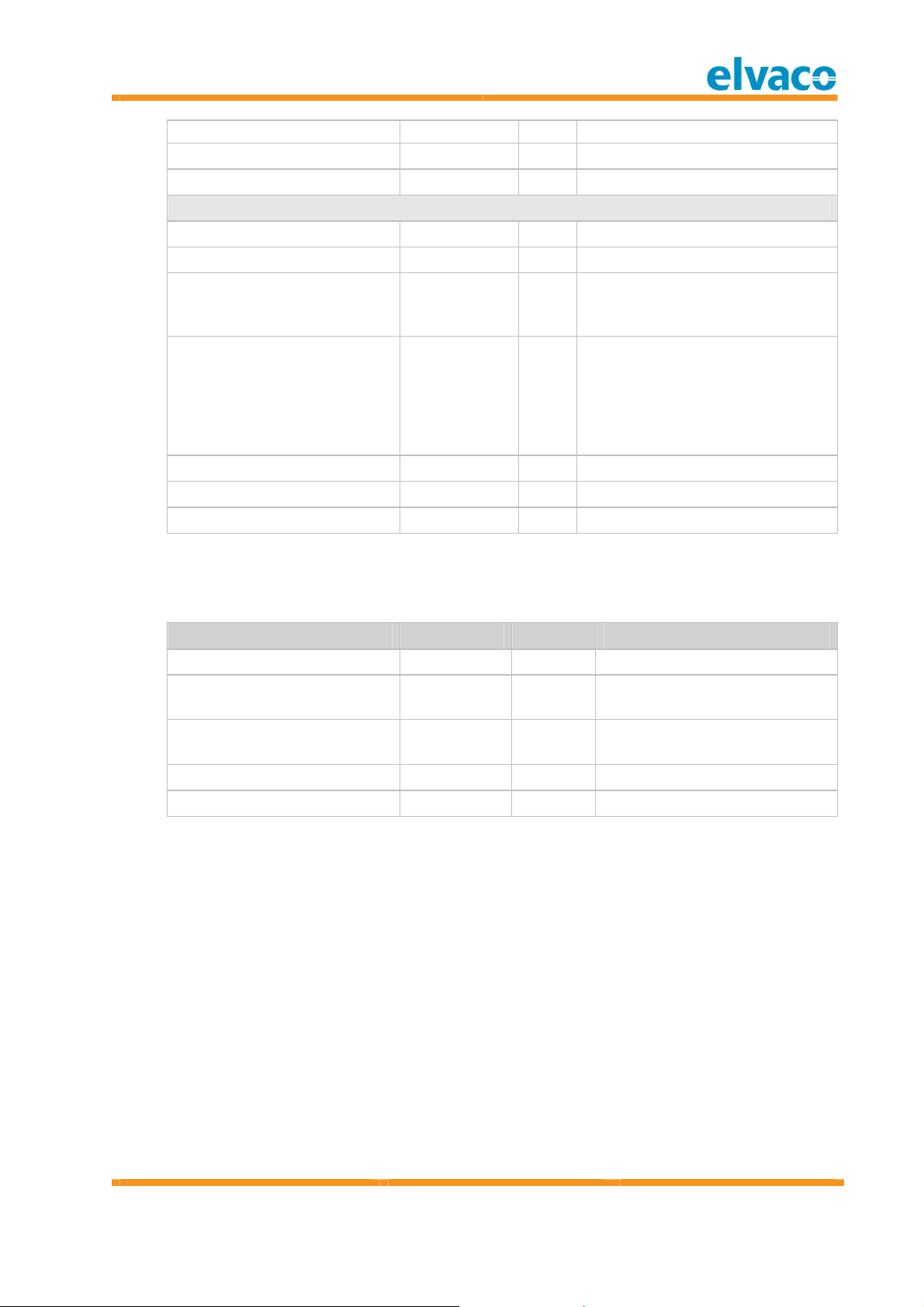
Wireless M-Bus
M-Bus standard EN 13757-4 - OMS com pliant, M ode T1
M-Bus com mands SND_NR -
Momentary values Temperature,
-
hum idity,
status
Historic values Average
-
values for
last hour and
last day for
tem perature
and hum idity
Transm it pow er 10 mW
Sensitivity -104 dBm
Frequency 868 MHz Band
Table 3 Techni cal speci ficat io ns
8.2 Fac t o ry d ef au l t s
Nam e Val u e Un it Co m m ent s
Language ENG English
Transm it interval 6 minutes Tim e betw een SND_NR
Encryption m o de Off Can be changed during
LCD contrast 0
Locked No
Table 4 Factory default s
telegram s in norm al operation
in stallation mod e
English
Page 26

CMa10w , CMa11w User' s M anual
Cma10w ,Cma11w
T1 Users M anual
page |
26 (32) 2013-06-12 Public
/
Published
Docum ent i d:
1090054
Version
1.3
9 Type approvals
CMa10w /CM a11w is designed to com ply with the directives and standards listed below .
A p p r o v al D escr ipt i o n
EMC EN 61000-6-2, EN 61000-6-3
Table 5 Type ap pro vals
English
Page 27

CMa10w , CMa11w User' s M anual
Cma10w ,Cma11w
T1 Users M anual
page |
27 (32) 2013-06-12 Public
/
Published
Docum ent i d:
1090054
Version
1.3
10 Safety and environment
10 .1 Saf et y p r ec au t i o ns
The following safety precautions m ust be observed during all phases of the operation,
usage, service or repair of any CMa10w/CMa11w product. Users of the product are advised
to convey the follow ing safety information to users and operating personnel and to
in corporate these guidelines into all manuals supplied with the product. Failure to comply
with these precautions violates safety standards of design, manufactu re and intended use
of the product. Elvaco AB assum es no liabil ity for custom er’s failure to com ply with these
precautions.
All in structions must be carefully read before CM a10w /CMa11w is in stalled and used. They
con tain im portant in form ation abou t how the product is used properly.
The installation of CM a10w/CMa11w should not be started before the technical
specifications are fully understood. The w ork m ust be performed in the order listed in this
manual, and only by qualified personnel. The w ork must also be done in accordance with
national electrical specifications and applicable local regulations.
In order to avoid the product being dam aged by static electricity, an ESD wristband should
be w orn when handlin g the product.
The labelling of the product m ay not be changed, removed or m ade unrecognizable.
English
Page 28

CMa10w , CMa11w User' s M anual
Cma10w ,Cma11w
T1 Users M anual
page |
28 (32) 2013-06-12 Public
/
Published
Docum ent i d:
1090054
Version
1.3
11 Docum ent history
Ver si o n Da t e Descr i p t io n A u t ho r
1.0 2012-04-19 First release Davi d Vonasek
1.1 2012-09-26 Changes to conform only
with T1 product.
1.2 2013-01-25 Fixed m issing 1-hour,24hour m in/m ax temperature
description in M -Bus
telegram
1.3 2013-06-12 Added Appendix A Peter King/Ericha Bloom
11 .1 D oc u m en t so f t w are an d har d w are ap pl i an ce
Ty pe V ersio n Dat e Co m ment s
Hardw are R1A 2012-09-26
Softw are 1.0.0 2012-09-26
David Vonasek
David Vonasek
English
Page 29
CMa10w , CMa11w User' s M anual
Cma10w ,Cma11w
T1 Users M anual
page |
29 (32) 2013-06-12 Public
/
Published
Docum ent i d:
1090054
Version
1.3
12 References
12 .1 Ref er en c es
[1] EN-13757-1, EN-13757-2, EN-13757-3, EN-13757-4 (PR 2011)
Comm unicati on System for meters and remote reading of meter s, Part1, Part2, Part3, Part 4
[2] Open M etering System Specification – Volum e 2 – Primary Com munication, Issue
3.0.1/2011-01-29
12 .2 Term s an d abb r ev iat io ns
A b b rev i a t i on D esc r i p t io n
Product, Device,
M-Bus slave
DIF Data Inform ation Field (M-Bus data clock inform ation)
VIF Value Inform ation Field (M -Bus value block inform ation )
12 .2 .1 Nu m b er rep resen t at i o n
In this docum ent, CMa10w /CM a11w
Decim al numbers are represented as norm al num ber, i.e. 10 (ten).
Hexadecim al numbers are represented with prefix 0x, i.e. 0x0A (ten)
Bin ary numbers are represented w ith prefix 0b, i.e. 0b00001010 (ten)
English
Page 30

CMa10w , CMa11w User' s M anual
Cma10w ,Cma11w
T1 Users M anual
page |
30 (32) 2013-06-12 Public
/
Published
Docum ent i d:
1090054
Version
1.3
13 Appendix A – Example
13 .1 D eno m in at i o n o f v al ues i n r ep or t s
Den o m in at ion Descr i pt i on
serial-num ber M-Bus master id
device-identification M -Bus slave id
Created Tim e stamp
value-data-count Index at m ultiple telegram .
Usu ally 0.
manufacturer Manufacturer
version Hardw are version
device-type M-Bus slave device type
access-number Num ber of tim es the meter h as been read
status Status
signature Reserved for future use
fabrication-no,,inst-value,0,0,0 Id for the wireless M -Bus m aster CM eX50
act-duration,m inute(s),inst-value,0,0,0 The values age in minutes
rf-level,dbm ,inst-value,0,0,0 Signal strength in dBm
ext-temp,°c,inst-value,0,0,0 Tem perature, momentary value
ext-temp,°c,inst-value,0,0,1 Tem perature, 1-hour rolling average
ext-temp,°c,inst-value,0,0,2 Tem perature, 24-hour rolling average
ext-temp,°c,min-value,0,0,0 Temperature, low est value during last 1-
hour period
ext-temp,°c,max-value,0,0,0 Tem perature, highest valu e du ring last 1-
hour period
ext-temp,°c,min-value,0,0,1 Temperature, low est value during last 24-
hour period
ext-temp,°c,max-value,0,0,1 Tem perature, highest valu e du rin g last 24-
hour period
relative-hum idity,%,inst-value,0,0,0 Hum idity, mom entary value
relative-hum idity,%,inst-value,0,0,1 Hum idity, 1-hour rolling average
relative-hum idity,%,inst-value,0,0,2 Hum idity, 24-hour rolling average
relative-hum idity,%,m in-value,0,0,0 Hum idity, low est value during last 24-hour
period
relative-hum idity,%,m ax-value,0,0,0 Humidity, highest value during last 24-hour
period
relative-hum idity,%,m in-value,0,0,1 Hum idity, low est value during last 24-hour
period
relative-hum idity,%,m ax-value,0,0,1 Humidity, highest value during last 24-hour
period
digital-input,,inst-value,0,0,0 Product status
English
Page 31

CMa10w , CMa11w User' s M anual
Cma10w ,Cma11w
T1 Users M anual
page |
31 (32) 2013-06-12 Public
/
Published
Docum ent i d:
1090054
Version
1.3
Den o m in at ion Descr i pt i on
other-sw-version,,inst-value,0,0,0 Softw are version
manufacturer-specific,,inst-value,0,0,0
English
Page 32

CMa10w , CMa11w User' s M anual
Cma10w ,Cma11w
T1 Users M anual
page |
32 (32) 2013-06-12 Public
/
Published
Docum ent i d:
1090054
Version
1.3
13 .2 D eno m in at i o n o f v al ues f or use i n f il t er s
Den o m in at ion Descr i pt i on
mbus.dib.fabrication-no.0.0.0.0 Id for the wireless M-Bus master CMeX50
mbus.dib.act-duration,minute(s).0.0.0.0 The values age in m inutes
mbus.dib.rf-level.0.0.0.0 Si gnal strength in dBm
mbus.dib.ext-temp.0.0.0.0 Temperature, m om entary value
mbus.dib.ext-temp.0.1.0.0 Temperature, 1-hour rolling average
mbus.dib.ext-temp.0.2.0.0 Temperature, 24-hour rolling average
mbus.dib.ext-temp.0.0.0.2 Temperature, lowest value during last 1-
hour period
mbus.dib.ext-temp.0.0.0.1 Temperature, highest value during last 1-
hour period
mbus.dib.ext-temp.0.1.0.2 Temperature, lowest value during last 24-
hour period
mbus.dib.ext-temp.0.1.0.1 Temperature, highest value during last 24-
hour period
mbus.dib.relative-humidi ty.0.0.0.0 Hum idity, m om entary value
mbus.dib.relative-humidi ty.0.1.0.0 Hum idity, 1-hour rolling average
mbus.dib.relative-humidi ty.0.2.0.0 Hum idity, 24-hour rolling average
mbus.dib.relative-humidi ty.0.0.0.2 Hum idity, low est value during last 24-hour
period
mbus.dib.relative-humidi ty.0.0.0.1 Hum idity, highest value during last 24-hour
period
mbus.dib.relative-humidi ty.0.1.0.2 Hum idity, low est value during last 24-hour
period
mbus.dib.relative-humidi ty.0.1.0.1 Hum idity, highest value during last 24-hour
period
mbus.dib.digital-input.0.0.0.0 Product status
English
 Loading...