

Page 1
!
!
!
!
!
!
!
!
!
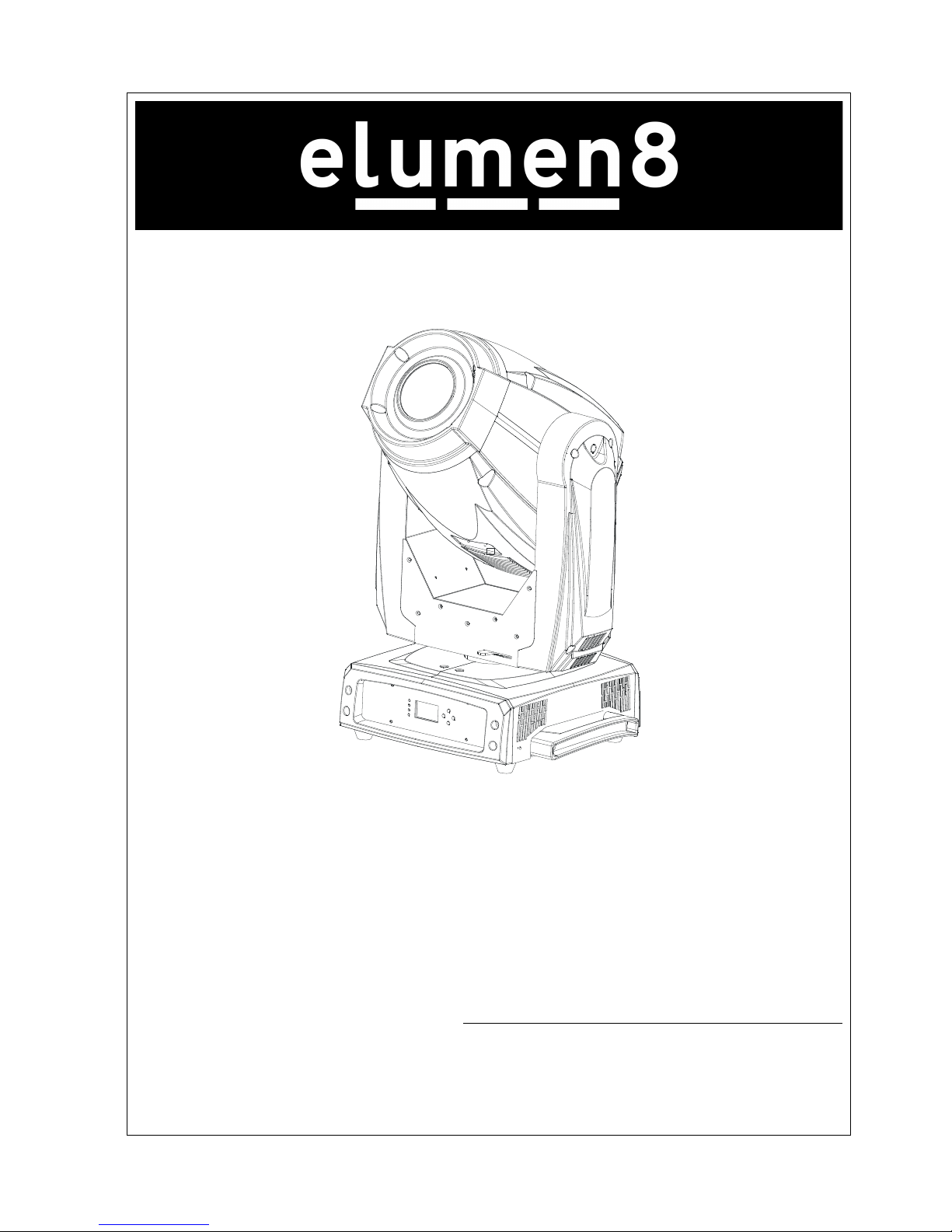
16R Zoom Profile
Order code: ELUM021
!
!
!
!
!
!!!!!!!!!!!!!!!!!!!!!!!! User!Manual!
!!!!!!!!!!!!!!!!!!!!!!!!!! !!!!Please!read!the!instruction!carefully!before!use!
Page 2

C
1C
!
CONTENTS!
!
!
1.!Safety!Instructions!....................................................................................................!2!
2.!Technical!Specifications!............................................................................................!3!
3.!Description!...............................................................................................................!6!
3.1!Description!of!the!fixture!.................................................................................!6!
3.2!Control!Panel!....................................................................................................!6!
4.!Gobos!and!Lamp!.......................................................................................................!7!
4.1!Gobos!...............................................................................................................!7!
4.2!Light!Source!......................................................................................................!8!
4.3!Changing!the!Lamp!...........................................................................................!8!
5.!How!To!Set!The!Unit!...............................................................................................!10!
5.1!Main!Functions!...............................................................................................!10!
5.2!Home!Position!Adjustment!............................................................................!19!
5.3!Error!Information!...........................................................................................!22!
6.!Control!By!Universal!DMX!Controller!.....................................................................!24!
6.1!Connection!.....................................................................................................!24!
6.2!Address!Setting!...............................................................................................!25!
6.3!DMX!512!Configuration!..................................................................................!25!
7.!Troubleshooting!.....................................................................................................!29!
8.!Maintenance!and!Cleaning!.....................................................................................!31!
!
!
!
!
!
!
Page 3
C
2C
! 1.!Safety!Instructions! !
!
WARNING! !
Please!keep!this!User!Guide!for!future! consu ltati on. ! If!you!sell!the!unit!to! another! user,!be!sure!that!
they!also!receive!this!instruction!manual.!
Important:*
Damages*caused*by* the*disregard*of* this*user*manual* are*not*subject* to*warranty.*The* dealer*
will*not*accept*liability*for*any*resulting*defects*or*problems.!
! Unpack!and!check!carefully!that!there!is!no!transportation!damage!before!using!the!unit.!
! The!unit!is!for!indoor!use!only.!Use!only!in!a!dry!location.!
! Only!to!be!installed!and!operated!by!qualified!operators.!
! DO!NOT!allow!children!to!operate!the!fixture.!
! Use!safety!cables!when!hanging!the!unit.!Handle!the!unit!by!its!base!only!and!not!its!head.!
! The!unit! must! be!installed! in! a! location! with! adequate! ventilation,! at! least! 50cm! from! adjacent!
surfaces.! !
! Be!sure!that!no!ventilation!slots!are!blocked,!otherwise!the!unit!will!overheat.!
! Before! operating,! ensure! that! the! voltage! and! frequency! of! power! supply! match! the! power!
requirements!of!the!unit.!
! It’s!important!to!ground!the!yellow/green!conductor!to!earth!in!order!to!avoid!electric!shock.!
! Maximum!ambient!temperature!TA:!40.!DO!NOT!operate!when!the!temperature!is!higher.!
! DO!NOT!connect!the!unit!to!a!dimmer!pack.!
! Make! sure! th ere! are! no! flammable! materials! close! to! the! unit! while! operating! to! avoid! a! fire!
hazard.!
! The!unit’s!surface!temperature!may!reach!up!to!85.!DO!NOT!touch!the!housing!with!bare-hands!
during!its!operation,!and!allow!15!minutes!for!cooling!before!replacing!the!lamp!or!maintenance.! !
! Avoid!any!inflammable!liquids,!water!or!metal!objects!entering!the!unit.!If!thi s!occurs!turn!off!the!
mains!power!immediately.!
! DO!NOT!operate!in!dirty!or!dusty!environment,!clean!the!unit!regularly.!
! DO!NOT!touch!any!cables!during!operation!as!there!might!be!a!hazard!of!electric!shock.!
Please!read!the!instructions!carefully!which!includes!important!information!
about! ! installation,!usage!and!maintenance.!
Page 4

C
3C
! The!minimum!distance!between!the! light!output!lens!and!the! illu min ated! surface!must!be!more!
than!12!meters.!
! Disconnect!mains!power!before!fuse/lamp!replacement!or!servicing.!
! Replace!fuse/lamp!only!with!the!same!type.!
! In!the!event!of!a!serious!operating!problem,!stop!using!the!unit!immediately.! !
! Never!turn!the!unit!on!and!off!in!short!intervals.!
! The!housing,!lenses,!or!the!ultraviolet!filter!must!be!replaced!if!they!are!visibly!damaged.!
! DO!NOT!open!the!unit!as!there!are!no!user!serviceable!parts!inside.!
! Never! try! to! repair! the! unit! by! yourself.! Repairs! carried! out! by! unskilled! people! can! lead! to!
damage! or! malfunction.! Please! contact! the! nearest! authorized! technical! assistance! center! if!
needed.! !
! Disconnect!the!mains!power!if!the!fixture!is!not!being!used!for!a!long!period!of!time.!
! Use!the!original!packing!materials!for!transportation.!
Cautions:!
! To!prevent!or!reduce!the!risk!of!electrical!shock!or!fire,!do!not!expose!the!unit!to!rain!or!moisture.!
! Hot!lamp!explosion!hazard.!DO!NOT!open!the!unit!within!15!minutes!after!switching!off.!
! Replace!the!lamp!once!it!is!damaged,!deformed!or!past!its!expiry!hours.!
! DO!NOT!look!directly!at!the!unit!while!the!lamp!is!on.!
! Never!touch!the!lamp!with!bare!fingers.!
! DO!NOT!start!the!unit!without!the!lamp!enclosure!or!when!housing!is!damaged.!
!
! 2.!Technical!Specifications! !
! ! Power!supply!
-!AC!100~240V!50/60Hz!
Power!Consumption!
-!510W! !
Fuse!
-!T!10A! !
Light!Source!
-!PHILIPS!MSD!Platinum!16R!330W! !
Battery!backup!display! !
Page 5

C
4C
-!Setting!of!DMX!address!and!other!functions!without!connection!to!mains!power.! !
-! Battery! for! the! LCD! display! charges! automatically! when! the! fixtures! is! connected! to! the! mains!
power.!
-!No!need!to!change!battery.!
Optical!system!
-!High!efficiency!optical!system,!delivering!an!extremely!powerful!output!
-!High!quality!dichroic!lenses!
Movement
!
-!Pan:!540°! !
-!Tilt:!270°! ! !
-!Pan/Tilt!speed!adjustable.!
-!Automatic!Pan/Tilt!correction.!
-!Easy!calibration!and!maintenance!with!magnetic!home!positioning.!
-!Pan/Tilt!position!lock!for!transporting!protection.!
Dimmer/Shutter!
-!Blackout,!0~100%!smooth!dimming,!independent!shutter!and!various!strobe!effects.!
! ! Colour!wheel!
-!Colour!wheel:!7!dichroic!colours!+!open.!
-!Rainbow!effect!in!both!directions.!
-!Easy!calibration!and!maintenance!with!magnetic!home!positioning.!
CMY!
-!CMY!speed!adjustable.!
-!Optional!multiple!preset!colours!and!macros!available.!
Gobo!wheel!
-!Gobo!Wheel!1:!8!rotating,!indexable,!easily!replaceable!gobos!+!open.!
-!Gobo!Wheel!2:!14!metallic!gobos!+!open.!
-!Easy!calibration!and!maintenance!with!magnetic!home!positioning.!
-!Modular!design!for!easy!assembly!and!service.!
Prism!
-!3!facets!prism!with!rotating!effect.!
Frost!
-!Variable,!separate!effect.!
Page 6
C
5C
!
Focus!
-!Focus!effect.!
Iris!
-!Motorized!
Zoom!
- Motorized!linear!zoom!for!smooth!adjustment!of!the!beam!size!and!beam!sharpness.!
Cool!
-!Fan!cooled!
Protocols!
-!DMX!512!
-!Data!input/output:!3/5!Pin!XLR!socket!
Weight!
-!23Kg!
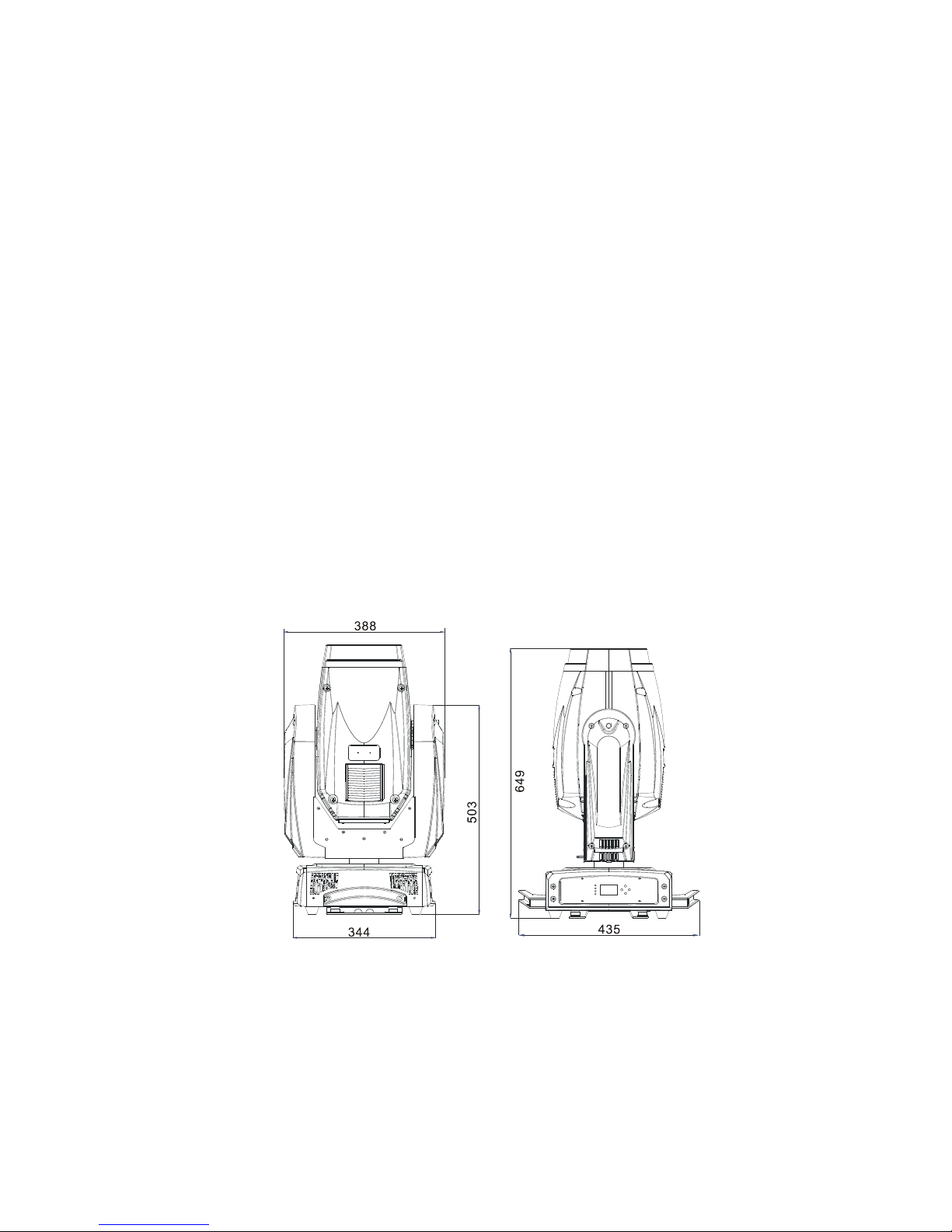
Dimension!
-!435×!344×649mm!
!
!
!
!
!
Page 7
C
6C
! 3.!Description! !
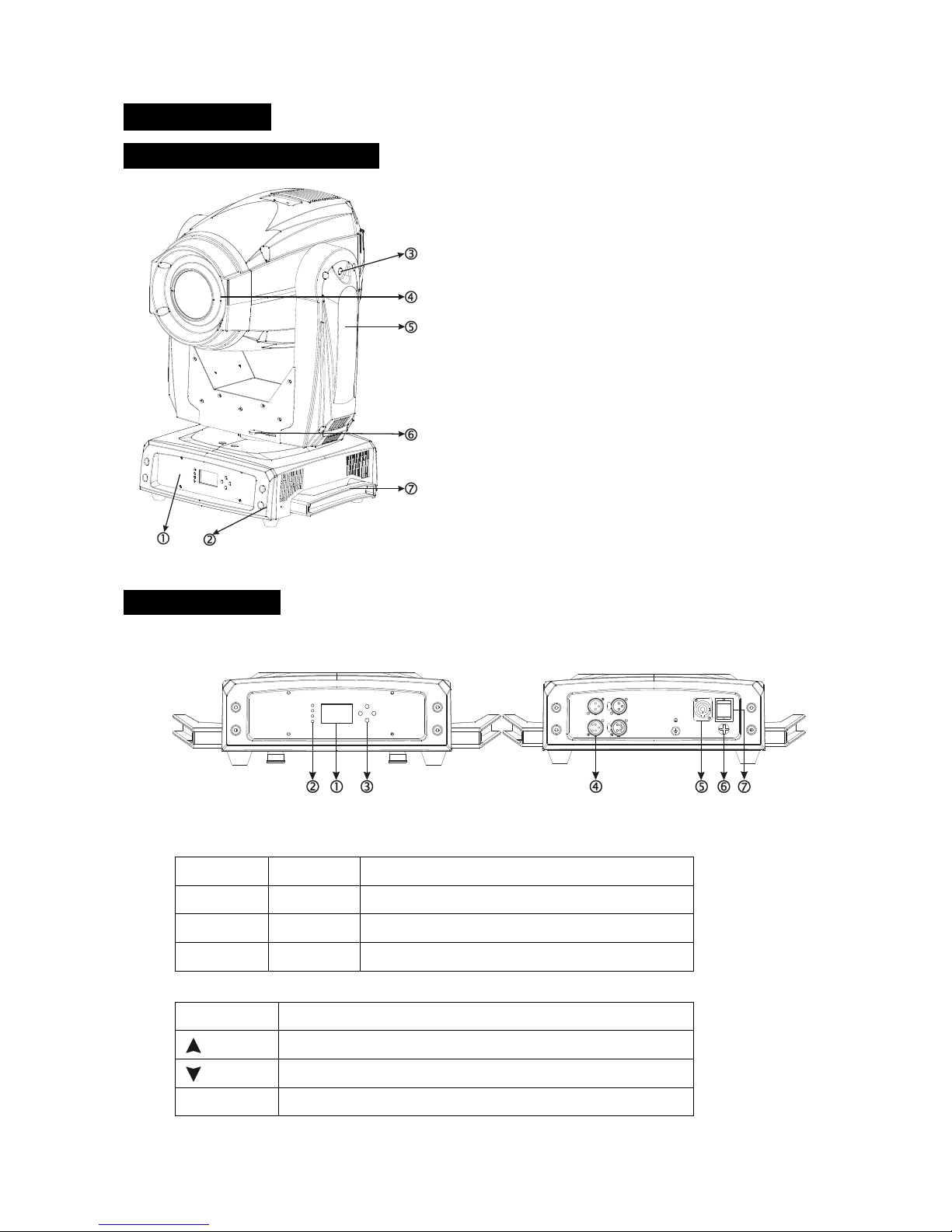
3.1!Description!of!the!fixture! !
!
!
!
!
!
!
!
!
!
!
!
!
!
!
!
!
!
!
!
!
3.2!Control!Panel! !
Front!view!!!!!!!!!!!!!!!!!!!!! !!! ! ! Rear!view!
!
1.!Monitor!(Batter!Back-up!display):! !
2.!LED:!
POWER!
! On!
Power!on!
BATTERY!
! On!
! Battery!Status!
WIRELESS!
! On!
! Receive!the!wireless!signal!
DMX!
! On!
! DMX!input!present!
3.!Button:!
MENU!
! To!select!the!programming!functions!
! UP!
! To!go!forward!in!the!selected!functions!
! DOWN!
! To!go!backward!in!the!selected!functions!
ENTER!
! To!confirm!the!selected!functions!
1. Front!panel!
2. Base!
3. Tilt!lock!
4. head!
5. Arm!
6. Pan!lock!
7. Handle!
Page 8
C
7C
4.!DMX!input/output:! !
For!DMX!512!operation,!use!3/5-pin!XLR!cables!to!link!the!units!together!
5.!Power!Cable:! !
Connection!to!the!incoming!power!supply.!
6.!Fuse!(T!10A):! !
Protects!the!unit!from!over!voltage!or!short!circuit!
7.!Power!Switch:! ! Turns!the!power!On/Off!
!
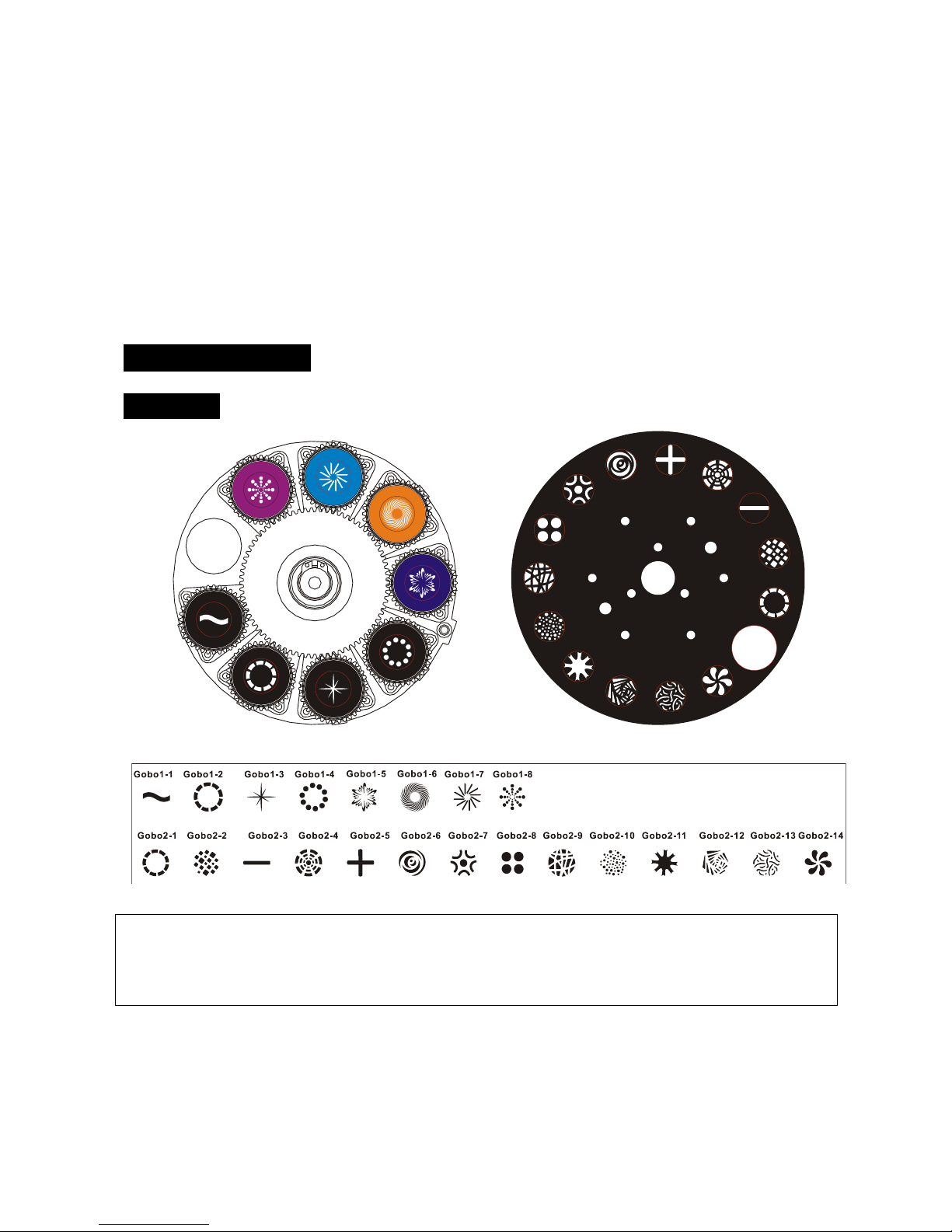
! 4.!Gobo!and!Lamp! !
4.1!Gobos! !
!!!!!!! !!!!!!!!!!!!!!!!!!!!!
GOBO!WHEEL!1! ! ! ! ! ! ! !!!!!!!!!!!!!!!!!!!! GOBO!WHEEL!2!
!
CAUTION:*Never*unscrew*the*screws*of*the*rotating*gobo*as*the*ball*bearing*will*come*to*pieces.*
!
!
!
!
DANGER!*
Install*the*gobos*with*the*unit*switched*off.*
Unplug*from*the*mains*before*changing*the*gobos!!
Page 9

C
8C
4.2!Light!Source! !
PHILIPS!MSD!Platinum!16R!330W! !
! Because!of! its! high! internal! pressure,!there! is! a! risk! that! the!Discharge! lamp! can! explode!
during! operation.! The! lamp! emits! intense! UV! radiation! which! is! harmful! to! the! eyes! and!
skin.! The! high! luminance! of! the! arc! can! cause! severe! damage! to! the! retina! if! you! take! a!
close!look!at!the!lamp!when!turned!on.!
! To!protect!the!lamp,!always!turn!off!the!lamp!first!(via!control!panel!or!DMX!controller)!
and!let!the!unit!run!for!at!least!five!minutes!to!cool!down!before!switching!off!the!mains!
supply.!Never!handle!the!lamp!or!luminary!when!it!is!hot.!
! Do!not!touch!the!lamp!with!bare!fingers.!If!this!happens,!clean!the!lamp!with!denatured!
alcohol!and!wipe!it!with!a!lint!free!cloth!before!installation.!
! The!lamp!generates!UV!radiation.!Never!operate!the!lamp!without!appropriate!shielding.!
! When!igniting,!the!lamp!operates!at!a!high!pressure!and!there!is!a!slight!risk!of!arc!tube!
rupture.!The!risk!increases!with!age,!temperature!and!improper!handling!of!the!lamp.!Do!not!
use!the!lamp!longer!than!its!recommended!lifespan.!
! Make!sure!the!lamp!is!located!in!the!center!of!the!reflector!for!the!best!projection.!
4.3!Changing!the!Lamp! !
Do! not! use! this! lamp! for! more! than! 1500! hours,! Using! the! lamp! any! longer! than! its! set! life! could!
seriously! damage! your! unit.! Periodically! check! the! lamp! running! time,! when! the! lamp! reaches! the!
1500!hour!mark,!or!close!to!it,!we!strongly!suggest!you!exchange!the!lamp.!Clear!the!RESET!TIME!after!
you!have!replaced!the!lamp.!
!
To!replace!the!lamp:!
1. Ensure!that!the!fixture!is!detached!from!power!and!has!cooled!down!completely.!It!is!a!good!idea!
to!allow!the!fixture!to!run!for!15!minutes!after!the!lamp!has!been!turned!off,!so! that! the! coolin g!
fans!have!time!to!work.!
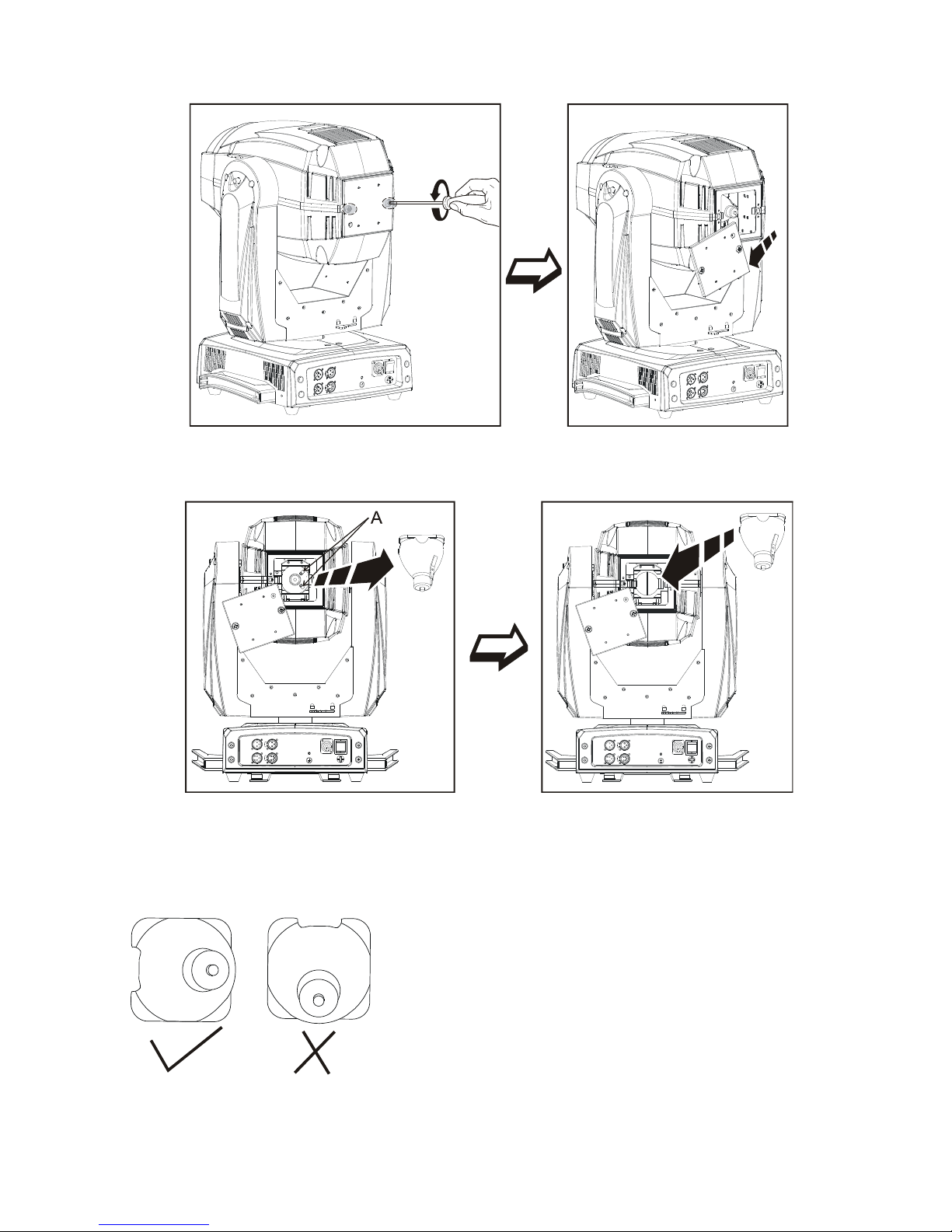
2. Loosen!the!two!screws!and!open!the!fixture!head!covers.! !
Page 10
C
9C
!
3. Lift!the!lamp!out!of!its!recess,!disconnect!the!lamp!and!connect!a!new!lamp!that!must!be!the!same!
type!as!the!old!one!and!then!place!the!new!lamp!into!the!lamp!recess.!
!
Finally!reinstall!the!head!cover,!fastening!it!securely!before!re-applying!power.!
Warning:!
The!installing!direction!of!lamp:!
!
!
Page 11

C
10C
! 5.!How!To!Set!The!Unit! !
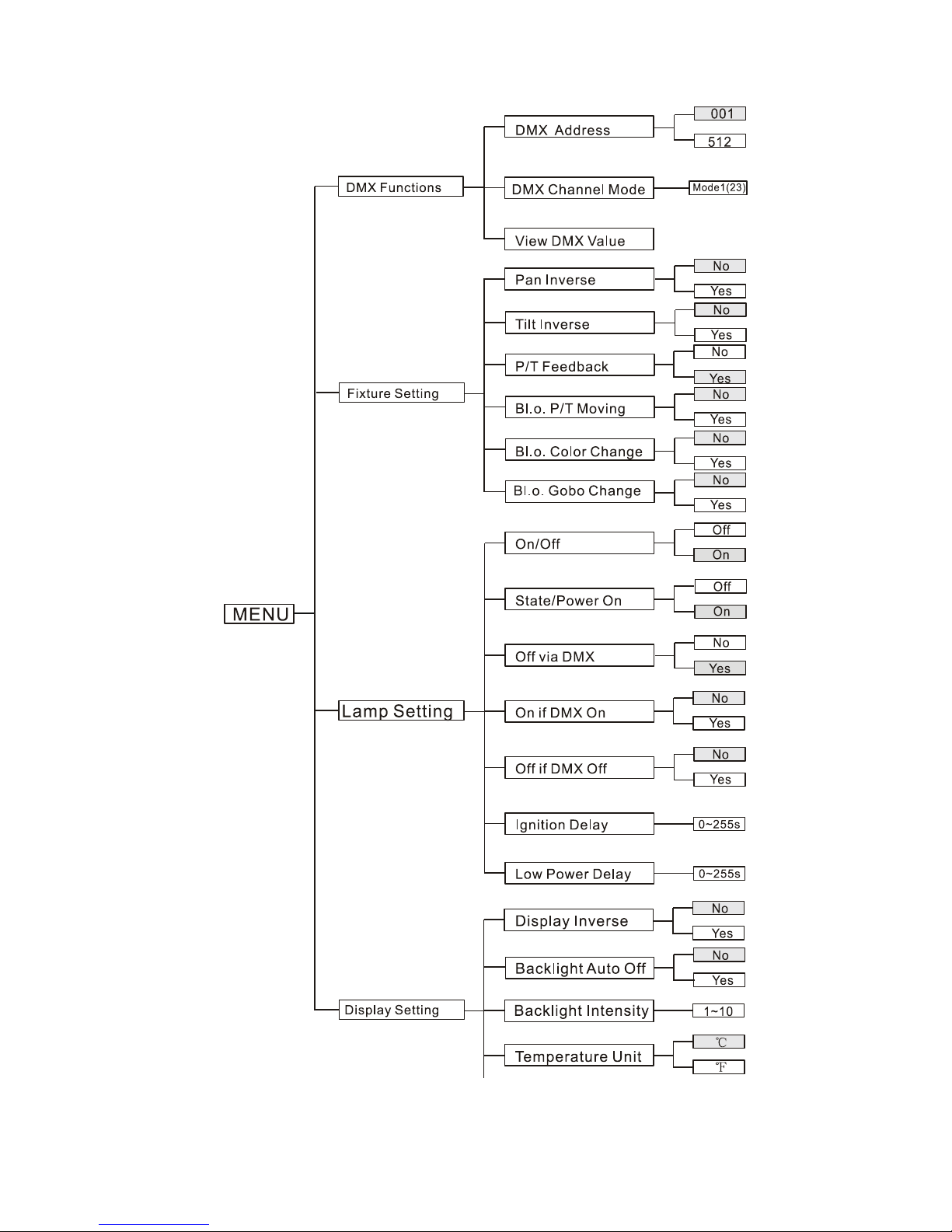
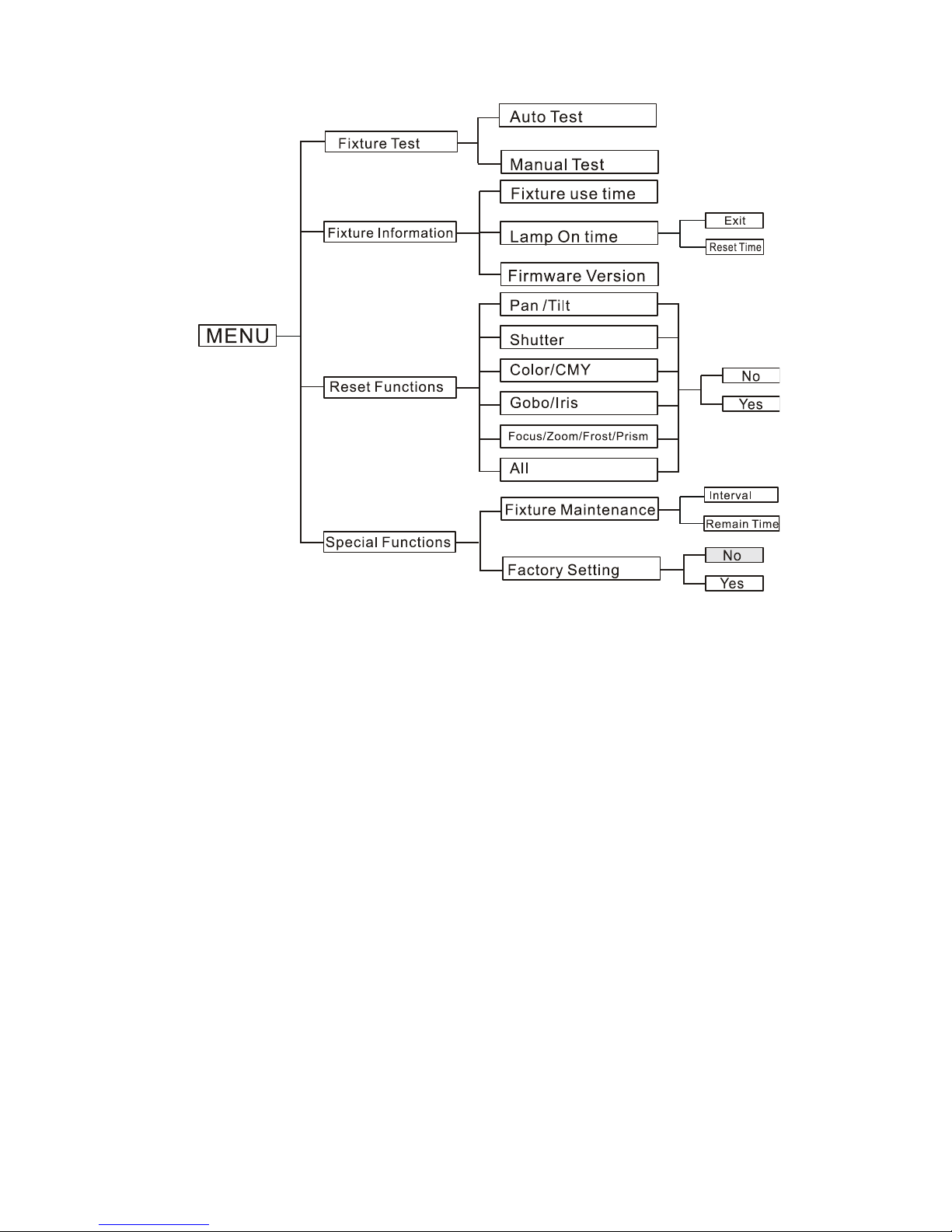
5.1!Main!Function! !
To!select!any!of!the!given!functions,!press!the!MENU!button!up!to!where!the!required!one!is!showing!
on!the!display.!Select!the!function!by!pressing!the!ENTER!button!and!the!display!will!blink.!Use!the! UP !
and!DOWN!buttons!to!change!the!mode.!Once!the!required!mode!has!been!selected,!press!the!ENTER!
button!to!setup. !To!go!back!to!the!functions!without!any!changes!press!the!MENU!button!again.!Hold!
the!MENU!button!for!one!second!or!wait!for!one!minute!to!exit!the!menu!mode.!
The!main!functions!are!shown!overleaf:!
Page 12
C
11C
!
Page 13
C
12C
!
DMX*Functions*
To!select!the!DMX*Functions,!press!the!ENTER!button!to! confirm,! use!th e! UP/DOWN!buttons!to!
select!DMX*Address,!DMX*Channel*Mode*or!View*DMX*Value.*
!
DMX!Address!—DMX!512!address!setting!
To!select! the!DMX! Address,! press!the! ENTER!button! to! confirm.!Use! the!UP/DOWN! buttons! to!
adjust! the! address! from! 001! to! 512,! press! the! ENTER! button! to! store.! Press! the! MENU! button!
back!to!the!last!menu!or!leave!the!unit!idle!for!one!minute!to!exit!menu!mode.!
!
DMX!Channel!Mode!—!channel!mode!
To! select! the! DMX! Channel! Mode,! press! the! ENTER! button! to! confirm.! Use! the! UP/DOWN!
buttons!to! select! Mode1!(23)! channel!mode,! press!the!ENTER! button!to! store.!Press! the! MENU!
button!back!to!the!last!menu!or!leave!the!unit!idle!for!one!minute!to!exit!menu!mode.!
View!DMX!Value!
To!select!the!View!DMX!Value,!pres s!the!ENTER!button!to!confirm.!Use!the!UP/DOWN!buttons!to!
view!the!DMX!channel!value.!Press!the! MENU!button!back!to!the!last!menu!or!leave!the!unit!idle!
Page 14

C
13C
for!one!minute!to!exit!menu!mode.!
!
!!Fixture*Setting*
To!select!the! Fixture* Setting,!press!the! ENTER ! button!to!confirm,! use!the!UP/DOWN!buttons! to!
select!Pan*Inverse,*Tile*Inverse,* P/T* Feedback,!BL.O.*P/T*Moving,*BL.O.* Colo ur* Change!or!BL.O.*
Gobo*Change.!
!
Pan!Inverse!
To!select!Pan!Inverse,!press!the!ENTER!button!to!confirm.!Use!the!UP/DOWN!button!to!select!No!
(normal)!or!Yes! (pan! inverse),!press!the! ENTER! button!to!store.! Press! the!MENU!button! back! to!
the!last!menu!or!let!the!unit!idle!one!minute!to!exit!menu!mode.!
!
Tilt!Inverse!
To! select! the! Tilt! Inverse,! press! the! ENTER! button! to! confirm.! Use! the! UP/DOWN! buttons! to!
select!No!(normal)!or!Yes!(tilt!inverse),!press!the!ENTER!button!to!store.!Press!the!MENU!button!
back!to!the!last!menu!or!leave!the!unit!idle!for!one!minute!to!exit!menu!mode.!
P/T!Feedback! !
To!select! the! P/T! Feedback,! press!the! ENTER! button! to! confirm.!Use! the!UP/DOWN! buttons! to!
select!No!(Pan!or!tilt’s!position!will!not!feedback!while!out!of!step)!or!Yes!(Feedback!while!pan/tilt!
out!of!step),!press! the!ENTER!button!to! store.!Press!the!MENU! button!back!to!the! last!menu!or!
leave!the!unit!idle!for!one!minute!to!exit!menu!mode.!
!
BL.O.!P/T!Moving!—Blackout!while!pan/tilt!moving!
To!select!the!BL.O.!P/T!Moving,!press!the!ENTER!button!to!confirm.!Use!the!UP/DOWN!buttons!
to! select! No! (normal! while! pan/tilt! moving)! or! Yes! (blackout! while! pan/tilt! moving),! press! the!
ENTER!button! to!store.! Press! the!MENU! button!back! to!the! last!menu! or! leave!the! unit!idle! for!
one!minute!to!exit!menu!mode.!
BL.O.!Color!Change!—*Blackout!while!changing!colour!
To!select!the!BL.O.!Colour!Change,!press!the!ENTER!button!to!confirm.!Use!UP/DOWN!buttons!to!
select! No! (normal! while! changing! colour)! or! Yes! (blackout! while! changing! colour),! press! the!
ENTER!button! to!store.! Press! the!MENU! button!back! to!the! last!menu! or! leave!the! unit!idle! for!
one!minute!to!exit!menu!mode.!
Page 15

C
14C
BL.O.!Gobo!Change!—*Blackout!while!change!gobo!
To!select!the!BL.O.!Gobo!Change,!press! th e!ENTER!button!to!confirm.!Use!the!UP/DOWN!buttons!
to! select! No! (normal! while! changing! gobo)! or! Yes! (blackout! while! changing! gobo),! press! the!
ENTER!button! to!store.! Press! the!MENU! button!back! to!the! last!menu! or! leave!the! unit!idle! for!
one!minute!to!exit!menu!mode.!
Lamp*Setting*
To!select!the! Fixture* Setting,!press!the! ENTER! button!to!confirm,! use!the!UP/DOWN!buttons! to!
select!On/Off,*State/Power*on,*Off*via*DMX,*On*if*DMX*on,*Off*if*DMX*off,*Ignition*Delay*or!Low*
Power*Delay..!
!
On/Off!—Turn!on/off!the!lamp!
To!select!the!On/Off,!press!the!ENTER!button!to!confirm.!Use!the!UP/DOWN!buttons!to!select!On!
(lamp!on)!or!Off!(lamp!off),!press!the!ENTER!button!to!store.!Press!the!MENU!button!back!to!the!
last!menu!or!leave!the!unit!idle!for!one!minute!to!exit!menu!mode.!
State/Power!On!—*Lamp!state!while!power!on!
To!select!the!State/Power!On,!press!the!ENTER!button!to!confirm.!Use!the! UP /DOWN!buttons!to!
select!On!(Lamp!on!while!power!on)!or!Off!(Lamp!off!while!power!on),!press!the!ENTER!button!to!
store.!Press!the!MENU!button! b ack!to!the!last!menu!or!leave!the!unit!idle!for!one!minute!to!exit!
menu!mode.!
!
Off!via!DMX!—*Turn!off!the!unit!via!DMX!controller!
To!select!the!Off!Via!DMX,!press!the!ENTER!button!to!confirm,!the!present!mode!will!blink!on!the!
display,! use! the! UP/! DOWN! buttons! to! select! Yes! (turn! off! the!unit! via! DMX! controller)! or! No!
(Don’t! turn! off! the! unit! via!DMX! controller),! press! the! ENTER! button! to! store.! Press!the! MENU!
button!back!to!the!last!menu!or! leave!the!unit!idle!for!one!minute!to!exit!menu!mode.!(When!you!
operate!the!unit!via! a!DMX!controller,!set!the!value!of!the!“special!function”!channel!to!“lamp!off”.!
wait!for!5!seconds,!then!the!lamp!will!turn!off!if!you!have!chosen!“yes”!mode).!
On!if!DMX!is!Detected!—*Lamp!turns!on!when!DMX!signal!is!detected!
Select!On!for!the!lamp!to!come!on!when!DMX!is!detected,!press!the!ENTER!button!to!confirm,!the!
present!mode!will!blink! on! the!display,!use!the! UP/DOWN!buttons!to!select!Yes! (Lamp!turns!on!
when!DMX! signal!is! detected)!or! No!(keep! the!present! state),!press! the!ENTER! button!to! store.!
Press!the!MENU!button!back!to!the!last!menu!or!leave!the!unit!idle!for!one!minute!to!exit!menu! !
Page 16

C
15C
!
mode.!(If!the!lamp!is!off!via!DMX!signal,!you!can!re-connect!the!DMX!controller!to!make!the!lamp!
switch!on).!
!
Off!if!DMX!Signal!is!Lost*—!Lamp!turns!off!when!DMX!signal!is!cut!off.!
Select!Off!if!DMX!Signal!is! Lost ,!press!the!ENTER!button!to! conf irm,!the!present!mode!will!blink!
on!the!display,!use!the! UP/DOWN!buttons!to!select!Yes! (Lamp! turns!off!when!DMX! signal! is!cut!
off),!press!the!ENTER!button!to!store.!Press!the!MENU!button!back!to!the!last!menu!or!leave!the!
unit!idle!for!one!minute!to!exit!menu!mode.!
!
Ignition!Delay!—*Delay!time!between!power!on!and!lamp!on!
Select!the!Ignition!Delay,!press!the!ENTER!button!to!confirm,!the!present!mode!will!blink!on!the!
display,! use! the! UP/DOWN! buttons! to!adjust! the! delay! time! from! 0S! to! 255S,! press!the! ENTER!
button! to! store.! Press! the! MENU! button! back! to! the! last! menu! or! leave! the! unit! idle! for! one!
minute!to!exit!menu!mode.!
!
Low!Power!Delay!—!Delay!time!between!reduced!lamp!power!and!shutter!off!of!the!unit!
Select!Low!Power!Delay,!press!the!ENTER!button!to! confirm,! the! present! mode!will!blink!on! the!
display,! use! the! UP/DOWN! buttons! to!adjust! the! delay! time! from! 0S! to! 255S,! press!the! ENTER!
button! to! store.! Press! the! MENU! button! back! to! the! last! menu! or! leave! the! unit! idle! for! one!
minute!to!exit!menu!mode.!
!
Display*Setting*
Enter! the! menu! mode,! select! Display* Setting,! press! the! ENTER! button! to! confirm,! use! the!
UP/DOWN! buttons! to! select! Display* Inverse,* Backlight* Auto* Off,* Backlight* Intensity* or!
Temperature.!
!
Display!Inverse!
Select!the!Display!Inverse,!press!the!ENTER!button!to!confirm,!the!present!mode!will!blink!on!the!
display,!use! the!UP/DOWN! buttons! to!select! No!(normal! display)! or!Yes! (inverse!display),! press!
the!ENTER!button!to!store.!Press!the!MENU!button!back!to!the!last!menu!or!leave!the!unit!idle!for!
one!minute!to!exit!menu!mode.!
Page 17

C
16C
Backlight!Auto!Off!
Select!the!Backlight!Auto!Off,!press!the!ENTER!button!to!confirm,!the!present!mode!will!blink!on!
the!display,!use! the!UP/DOWN!buttons! to!select!No! (display!always!on)! or!Yes! (display! goes!off!
one!minute!after!exiting!menu!mode),!press!the!ENTER!button!to!store.!Press!the!MENU!button!
back!to!the!last!menu!or!leave!the!unit!idle!for!one!minute!to!exit!menu!mode.!
!
Backlight!Intensity!
Select!the!Backlight!Intensity,!press!the!ENTER!button!to!confirm,!the!present!mode!will!blink!on!
the!display,!use!the!UP/DOWN!buttons! to! adjust!backlight!intensity!from!1! (dark)! to!10!(bright),!
press!the!ENTER!button!to!store.!Press!the!MENU!button!back!to!the!last!menu!or!leave!the!unit!
idle!for!one!minute!to!exit!menu!mode.!
!
Unit!Temperature! !
Select!the!Temperature!Unit,!press!the!ENTER!button!to!confirm,! th e!present!mode!will!blink!on!
the!display,!use! th e! UP/DOWN! buttons! to! select! ! or! ,! press! the! ENTER! button! to! store.! Press!
the!MENU!button!back!to!the!last!menu!or!leave!the!unit!idle!for!one!minute!to!exit!menu!mode.!
!
Fixture!Test!
Enter!the!menu!mode,!select!Fixture* Test,!press!the!ENTER!button!to!confirm,!use!the!UP/DOWN!
buttons!to!select!Auto*Test*or*Manual*Test*
!
Auto!Test!
Select! Auto! Test,! press! the! ENTER! button! to! confirm,! the! unit! will! run! built-in! programs! to!
automatically!test!pan,!tilt,!shutter,!colour,!CMY,!gobo,!gobo!rotation,!prism,!prism!rotation,!iris,!
frost,!zoom,!focus,!dimmer!and!lamp!on/off.!Press!the!MENU!button!back!to!the!last!menu!or!exit!
the!menu!mode!after!auto!test.!
!
Manual!Test!
Select!Manual!Test,!press! the!ENTER!button!to! confirm,!the!current!channel! selectio n! will!show!
on!the!display,!use!the!UP/DOWN!buttons!to!select!the!channel!options,!press!the!ENTER!button!
to!confirm,! then! use!the! UP! and!DOWN! button! to! adjust! the! value,! press! the!ENTER! button! to!
store,!the!fixture!will!run!as!the!channel!value!indicates.!Press!the!MENU!button!back!to!the!last!
Page 18

C
17C
menu!or!leave!the!unit!idle!for!one!minute!to !exit!menu!mode.!(All!channel!values!will!become!0!
after!exiting!Manual!Test!menu)!
!
Fixture!Information!
Enter! menu! mode,! select! Fixture* Information,! press! the! ENTER! button! to! confirm,! use! the!
UP/DOWN!buttons!to!select!Fixture*use*time,*Lamp*On*time*or*Firmware*Version.*
!
Fixture!use!time!
Select! Fixture! use! time,! press! the! ENTER! button!to! confirm,! fixture! use!time! will! show! on!the!
display,!press!the!MENU!button!to!exit.!
*
Lamp!On!time!
Select! Lamp! On! time,! press! the! ENTER!button! to!confirm,! the!lamp! on!time! will!show! on!the!
display,! press! the! ENTER! button! to! confirm,! use! the! UP/DOWN! buttons! to! select! Exit! or! Reset!
Time,!press!the!ENTER!button!to!confirm.!Press!the!MENU!button!back!to!the!last!menu!or!leave!
the!unit!idle!for!one!minute!to!exit!menu!mode.!
!
Firmware!Version!
Select!Firmware!Version,!press!the!ENTER! button! to!confirm,!firmware!version!will!show! on! the!
display,!press!the!MENU!button!to!exit.!
!
Reset!Functions!
Enter! the! menu! mode,! select! Reset* Function,! press! the! ENTER! button! to! confirm,! use! the!
UP/DOWN! buttons! to! select! Pan/Tilt,* Shutter,* Colour/CMY,* Gobo/Iris,* Focus/* Zoom/Frost* /*
Prism!or*All.*
!
Pan/Tilt!—Reset!Pan/Tilt!
Select!Pan/Tilt,!press!the!ENTER!button!to!confirm,!use!the!UP/DOWN!buttons!to!select!Yes!(the!
unit! will! run! a! built-in! program! to! reset! pan!and! tilt! to! their! home!positions)! or! No,! press!the!
ENTER!button! to!store.! Press! the!MENU! button!back! to!the! last!menu! or! leave!the! unit!idle! for!
one!minute!to!exit!menu!mode.!
Page 19

C
18C
!
Shutter!—*Reset!Shutter!
Select!Shutter,!press!the!ENTER!button!to!confirm,!use!the!UP/DOWN!buttons!to!select!Yes!(the!
unit!will! run!a! built-in! program! to! reset! the! shutter!to! its!home! positions)!or! No,! and! press! the!
ENTER!button!to!store.!Press!the!MENU!button!to!exit.! !
!
Colour/CMY!—*Reset!Colour/CMY*
Select!Colour/CMY,!press!the!ENTER!button!to!confirm,!use!the!UP/DOWN!buttons!to!sel ect!Yes!
(the!unit!will!run!a!built-in!program!to! reset!colour!and!CMY!to!their!home!positions)! or!No,!and!
press!the!ENTER!button!to!store.!Press!the!MENU!button!to!exit.! !
!
Gobo/Iris!—*Reset!Gobo/Iris*
Select! Gobo/Iris,! press! the! ENTER! button! to! confirm,! use! the! UP/DOWN! buttons! to! select! Yes!
(the!unit!will!run!a!built-in!program!to!reset!the!Gobo!wheel!and!Iris!to!their!home!positions)!or!
No,!press!the!ENTER!button!to!store.!Press!the!MENU!button!to!exit.! !
!
Focus/Zoom!/Frost/Prism!—*Reset!Focus/Zoom!/Frost/Prism*
Select!Focus/Zoom/Frost/Prism,!press!the!ENTER!button!to!confirm,!use!the!UP/DOWN!buttons!
to!select! Yes! (the! unit! will!run! a! built-in! program! to!reset! focus,! zoom,! frost! and!prism! to! their!
home!positions)!or!No,!and!press!the!ENTER!button!to!store.!Press!the!MENU!button!to!exit.!
!
All!—*Reset!All!
Select!All,!press!the!ENTER!button!to!confirm,!use!the!UP/DOWN!buttons!to!select!Yes!( the! unit!
will!run!a!built-in!program!to!reset!all!motors!to!their!home!positions)!or!No,!press!ENTER!button!
to!store.!Press!the!MENU!button!to!exit.!
!
Special!Functions!
Enter! th e! menu! mode,! select! Special*Functions,!press! the! ENTER! button! to! confirm,!use!the!UP/!
DOWN!buttons!to!select!Fixture*Maintenance!or*Factory*Setting.*
*
!
!
Page 20

C
19C
Fixture!Maintenance!
Select!Fixture! Maintenance,! press!the! ENTER! button!to! confirm,! use!the! UP/DOWN! buttons!to!
select!Interval!or!Remain!Time.! !
!
Interval!
Select! Interval,! press! the! ENTER! button! to! confirm,! the! interval! time! will! show! on! the!
display.!Press!the!MENU!button!to!exit.! !
!
Remain!Time!
Select!Remain!Time,!press!the!ENTER!button!to!confirm,!the!remaining!time!will!show!on!
the!display,!press!the!ENTER!button!to!confirm,!use!the!UP/DOWN! buttons! to!select!Exit!
or!Reset!time,!press!the!MENU!button!to!exit.! !
!
Factory!Setting!
Select!Factory!Setting,!press!the!ENTER!button!to!confirm,!the!fixture!will!reset!to!factory!settings!
and!exit!the!menu!mode.!
!
!
5.2!Home!Position!Adjustment! !
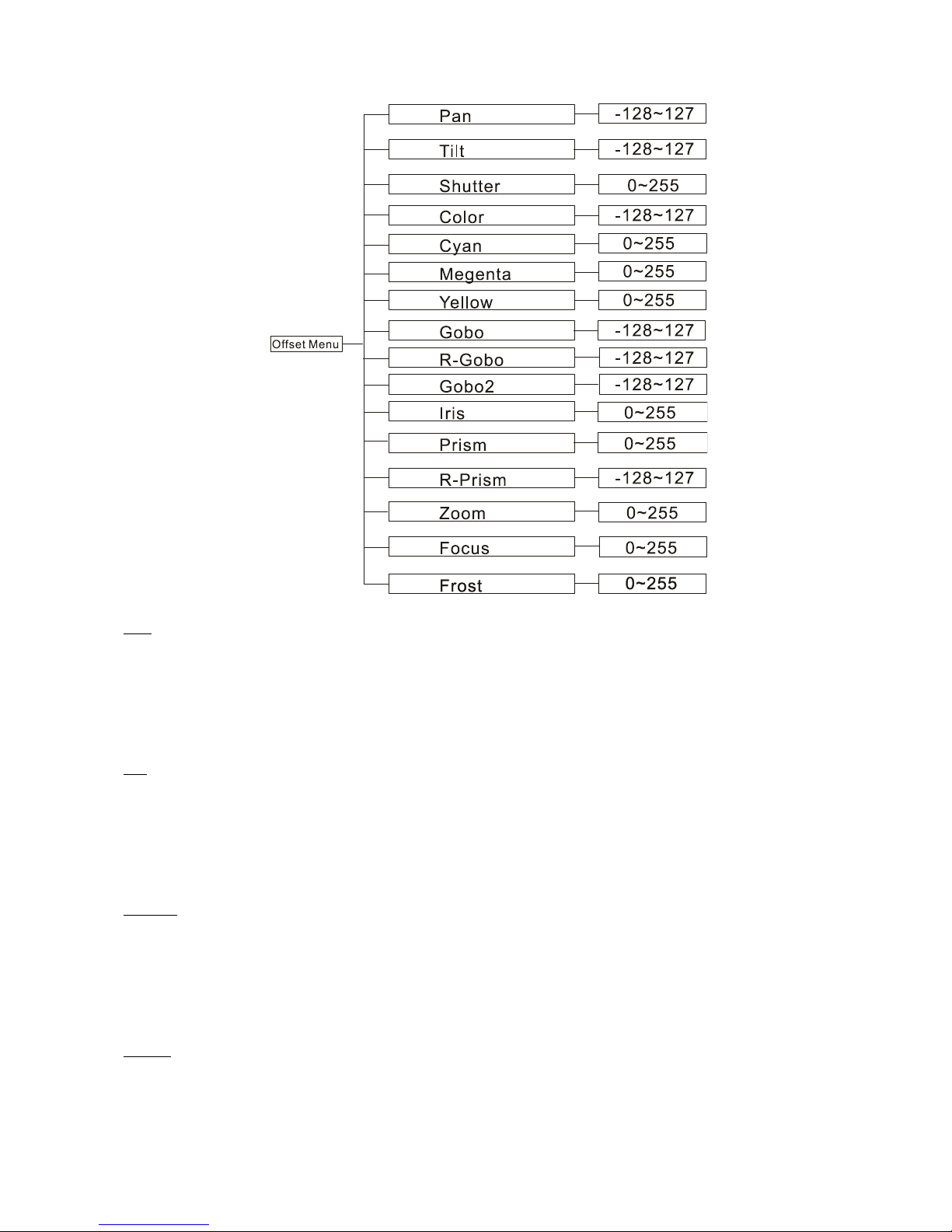
Press!the!MENU!button!into!the!menu!mode,!then! press! the! ENTER!button!for!3!seconds!into!offset!
mode! to! adjust! the! home! position.! Select! the! function! with! the! ENTER! bu tton. ! Use! the! UP/DOWN!
buttons!to!choose!the!submenu,!press!the!ENTER!button!to!store!and!automatically!return!to!the!last!
menu.!Press!MENU!button!to!exit.! !
Page 21
C
20C
!
!
Pan—pan!home!position!adjustment!
Enter!offset!mode,!Select! Pan,! press!the!ENTER!button! to! confirm,!the!present!position! will!blink!on!
the!display,!use!the!UP/DOWN!buttons!to!offset!the!value!from!-128!to!127,!press!the!ENTER!button!
to!store.!Press!the!MENU!button!to!exit.!
Tilt—Tilt!home!position!adjustment! !
Enter!offset! mode,! Select!Tilt,! press!the! ENTER!button! to! confirm,!the! present!position! will!blink!on!
the!display,!use!the!UP/DOWN!buttons!to!offset!the!value!from!-128!to!127,!p ress!the!ENTER!button!
to!store.!Press!the!MENU!button!to!exit.!
Shutter—Shutter!home!position!adjustment! !
Enter!offset!mode,!Select!Shutter,!press!the!ENTER!button!to!confirm,!the!present!position!will!blink!
on!the!display,!use!the!UP/DOWN!buttons!to!offset!the!value!from!0!to!255,!press!the!ENTER!b utton !
to!store.!Press!the!MENU!button!to!exit.!
Colour—Colour!home!position!adjustment! !
Enter!offset!mode,!Select!Color,!press!the!ENTER!button!to!confirm,!the!present!position!will!blink!on!
the!display,!use!the!UP/DOWN!buttons!to!offset!the!value!from!-128!to!127,!press!the!ENTER!button!
Page 22

C
21C
to!store.!Press!the!MENU!button!to!exit.!
Cyan—Cyan!home!position!adjustment! !
Enter!offset!mode,!Select!Cyan,!press!the!ENTER!button!to!confirm,!the!present!position!will!blink!on!
the!disp lay,! use! the!UP/DOWN!buttons!to!offset!the!value!from!0!to!255,!press!the!ENTER!button!to!
store.!Press!the!MENU!button!to!exit.!
Magenta—Magenta!home!position!adjustment! !
Enter!offset!mode,!Select!Magenta,!press!the!ENTER!button!to!confirm,!the!present!position!will!blink!
on!the!display,!use!the!UP/DOWN!buttons!to!offset!the!value!from!0!to!255,!press!the!ENTER! bu tton!
to!store.!Press!the!MENU!button!to!exit.!
Yellow—Yellow!home!position!adjustment! !
Enter!offset!mode,! Select!Yellow,!press! the!ENTER!button! to!confirm,!the! present!position!will! blink!
on!the!display,!use!the!UP/DOWN!buttons!to!offset!the!value!from!0!to!255,!press!the!ENTER! bu tton!
to!store.!Press!the!MENU!button!to!exit.!
Gobo—Gobo!home!position!adjustment! !
Enter!offset!mode,!Select!Gobo,!press!the!ENTER!button!to!confirm,!the!present!position!will!blink!on!
the!display,!use!the!UP/DOWN!buttons!to!offset!the!value!from!-128!to!127,!press!the!ENTER!button!
to!store.!Press!the!MENU!button!to!exit.!
R-Gobo—Gobo!rotation!home!position!adjustment!
Enter!offset!mode,!Select! R- Gobo,! press ! th e! ENTER! button ! to! con firm,! the! present! positio n! wil l! blink!
on! the! display,! use! the! UP/DOWN! buttons! to! offset! the!value! from! -128! to! 127,! press! the! ENTER!
button!to!store.!Press!the!MENU!button!to!exit.!
Gobo*2—Gobo!2!home!position!adjustment! !
Enter!offset!mode,!Select!Gobo!2,!press!the!ENTER!button!to! confirm,! the! present!position!will!blink!
on! the! display,! use! the! UP/DOWN! buttons! to! offset! the!value! from! -128! to! 127,! press! the! ENTER!
button!to!store.!Press!the!MENU!button!to!exit.!
Iris—Iris!home!position!adjustment! !
Enter!offset! mode,!Select! Iris,!press! the!ENTER! b utto n! to! confirm,! the! present! position! will! blink!on!
the!disp lay,! use! the!UP/DOWN!buttons!to!offset!the!value!from!0!to!255,!press!the!ENTER!button!to!
store.!Press!the!MENU!button!to!exit.!
Page 23

C
22C
Prism—Prism!home!position!adjustment! !
Enter!offset!mode,!Select!Prism,!press!the!ENTER!button!to!confirm,!the!present!position!will!blink!on!
the!disp lay,! use! the!UP/DOWN!buttons!to!offset!the!value!from!0!to!255,!press!the!ENTER!button!to!
store.!Press!the!MENU!button!to!exit.!
R-Prism—Prism!rotation!home!position!adjustment! !
Enter!offset!mode,!Select!R-Prism,!press!the!ENTER!button!to!confirm,!the!present!position!will!blink!
on! the! display,! use! the! UP/DOWN! buttons! to! offset! the!value! from! -128! to! 127,! press! the! ENTER!
button!to!store.!Press!the!MENU!button!to!exit.!
Zoom—Zoom!home!position!adjustment! !
Enter!offset!mode,!Select!Zoom,! press!the!ENTER!button!to!confirm,!the!present!position!will!blink!on!
the!disp lay,! use! the!UP/DOWN!buttons!to!offset!the!value!from!0!to!255,!press!the!ENTER!button!to!
store.!Press!the!MENU!button!to!exit.!
Focus—Focus!home!position!adjustment! !
Enter!offset!mode,!Select!Focus,!press!the!ENTER!button!to!confirm,!the!present!position!will!blink!on!
the!displ ay,! use! the!UP/DOWN!buttons!to!offset!the!value!from!0!to!255,!press!the!ENTER!button!to!
store.!Press!the!MENU!button!to!exit.!
Frost—Frost!home!position!adjustment! !
Enter!offset!mode,!Select!Frost,!press!the!ENTER!button!to!confirm,!the!present!position!will!blink!on!
the!disp lay,! use! the!UP/DOWN!buttons!to!offset!the!value!from!0!to!255,!press!the!ENTER!button!to!
store.!Press!the!MENU!button!to!exit.!
!
5.3!Error!Information! !
Lamp!Startup!Fail!
It!appears!when!there!is!no!lamp!or!a!faulty!lamp.!
Temperature!Sense!Error!
It!appears!when!temperature!check!board!is!faulty.!
Lamp!Too!Hot!Power!Off!
It!appears!when!temperature!is!detected!higher!than!110.!Check!if!the!unit!is!properly!ventilated,!or!
the!fans!or!temperature!check!board!is!damaged.!
Page 24

C
23C
Lamp!Too!Hot!Low!Power!
It!appears!when!detected!temperature!is!higher!than!105.!the!unit!will!run!on!a!low!power!level.!
Maintenance!Fixture!
It!appears!when!the!maintenance!remaining!time!becomes!0S,!please!enter!menu!mode!and!reset!the!
time.!
Lamp!On!Over!700!Hour!
It!appears!when!the!lamp!has!been!on!over!700!hours,!please!turn!off!the!lamp.!
Memory!Initial!Fail!
It!appears!when!the!memory!IC!is!damaged.!
CPU-B!Error,!CPU-C!Error,!CPU-D!Error!
Pan! Reset! Error,! Pan! Encode! Error,! Tilt! Reset! Error,! Tilt! Encode! Error,! Shutter! Reset! Fail,! Dimmer!
Reset!Fail,!Color!Reset!Fail,!Cyan!Reset!Fail,!Magenta!Reset!Fail,!Yellow!Reset!Fail,!Gobo1!Reset!Fail,!
R-Gobo1!Reset!Fail,!Gobo2!Reset!Fail,!Iris!Reset!Fail,!Effect!Reset!Fail,!R-Effect!Reset!Fail,!Frost!Reset!
Fail,!Flat!Reset!Fail,!Focus!Reset!Fail,!Zoom!Reset!Fail!
They!may!appear!when!turning!on!or!resetting!the!unit.! !
!
!
!
!
Page 25
C
24C
! 6.!Control!By!Universal!DMX!Controller! !
6.1!Connection! !
!
!
!
!
!
!
!
!
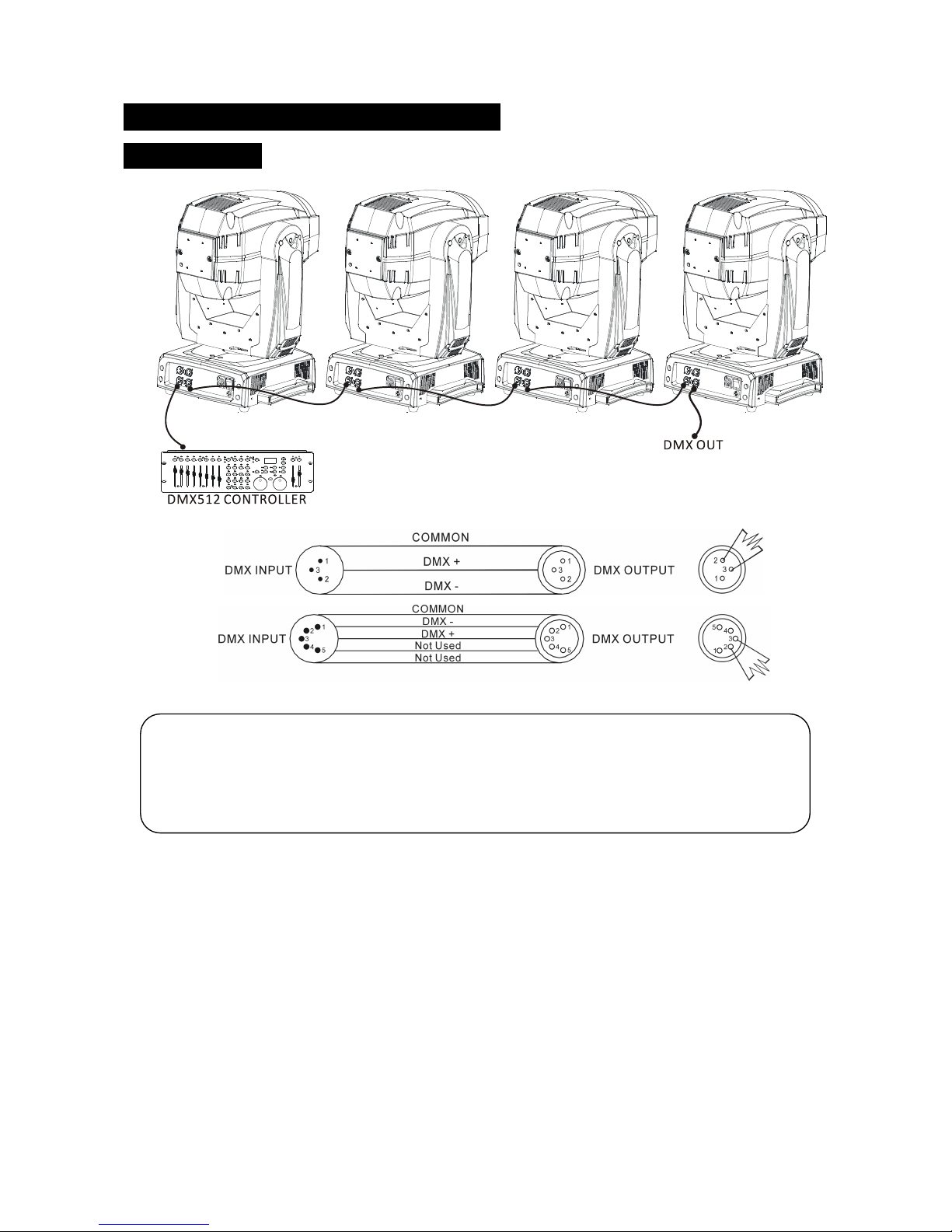
1. At!last!unit,!the!DMX!cable!has!to!be!terminated!with!a!terminator.!Solder!a!120-ohm!1/4W!resistor!
between!pin!2(DMX-)!and! pin!3(DMX+)!into!a! 3-pin!XLR-plug!and!plug! it! in!the!DMX-output! of! the!
last!unit.!
2. Connect! the!units! together!in! a! “daisy!chain”! with!a! XLR!cable! from!the!output! of!the! unit!to! the!
input! of! the! next! unit.! The! cable! cann ot! be! branched! or! split! to! a!“Y”! cable.! DMX! 512! is! a! very!
high-speed!signal.!Inadequate!or!damaged!cables!can!easily!corrupt!the!signal.!The!DMX!output!and!
input!connectors!are!a! pass-through!type!to!maintain! the!DMX!circuit!even! when! one!of!the! units!
power!is!disconnected.!
ATTENTION!
! Termination!reduces!signal!errors!and!to!avoid!signal!transmission!problems!and!
interference.!It!is!always!advisable!to!connect!a!DMX!terminal!(Resistance!120!ohm!1/4W!
between!pin2!(DMX-)!and!pin3!(DMX+)!of!the!last!fixture).!
Page 26
C
25C
3. Each!unit!n eeds!to!have!a!DMX!address!to!receive!the!data!by!the!controller.!The!address!number!is!
between!0-511!(usually!0!&!1!are!equal!to!1).!
4. The!end!of!the!DMX!512!system!should!be!terminated!to!reduce!signal!errors.!
5. 3! !
3!pin!XLR:!Pin!1:!GND,!Pin!2:!Negative!signal!(-),!Pin!3:!Positive!signal!(+)!
5!pin!XLR:!Pin!1:!GND,!Pin!2:!Negative!signal!(-),!Pin!3:!Positive!signal!(+),!Pin4,!Pin5!not!used.!
!
6.2!Address!Setting! !
If!you!use!a!universal!DMX!controller!to!control!the!units,!you!have!to!set!DMX!address!from!1!to!512!
so!that!the!units!can!receive!DMX!signal.!
Press!the!MENU!button! to!enter!the!menu! mode,!select!DMX*Functions,! press!the!ENTER!button! to!
confirm,!use!the!UP/DOWN!buttons!to!select! D MX* Address,!press!the!ENTER!button!to! confirm,! the!
present!address!will! blink!the!display,! use!the!UP/DOWN! buttons!to!adjust! the!address! from! 001!to!
512,!press! th e!ENTER!button!to!store.!Press!the!MENU!button!back!to!the!last!menu!or!leave!the!unit!
idle!for!one!minute!to!exit!menu!mode.!Please!refer!to!the!following!diagram!to!address!your!DMX512!
channel!for!the!first!4!units.! !
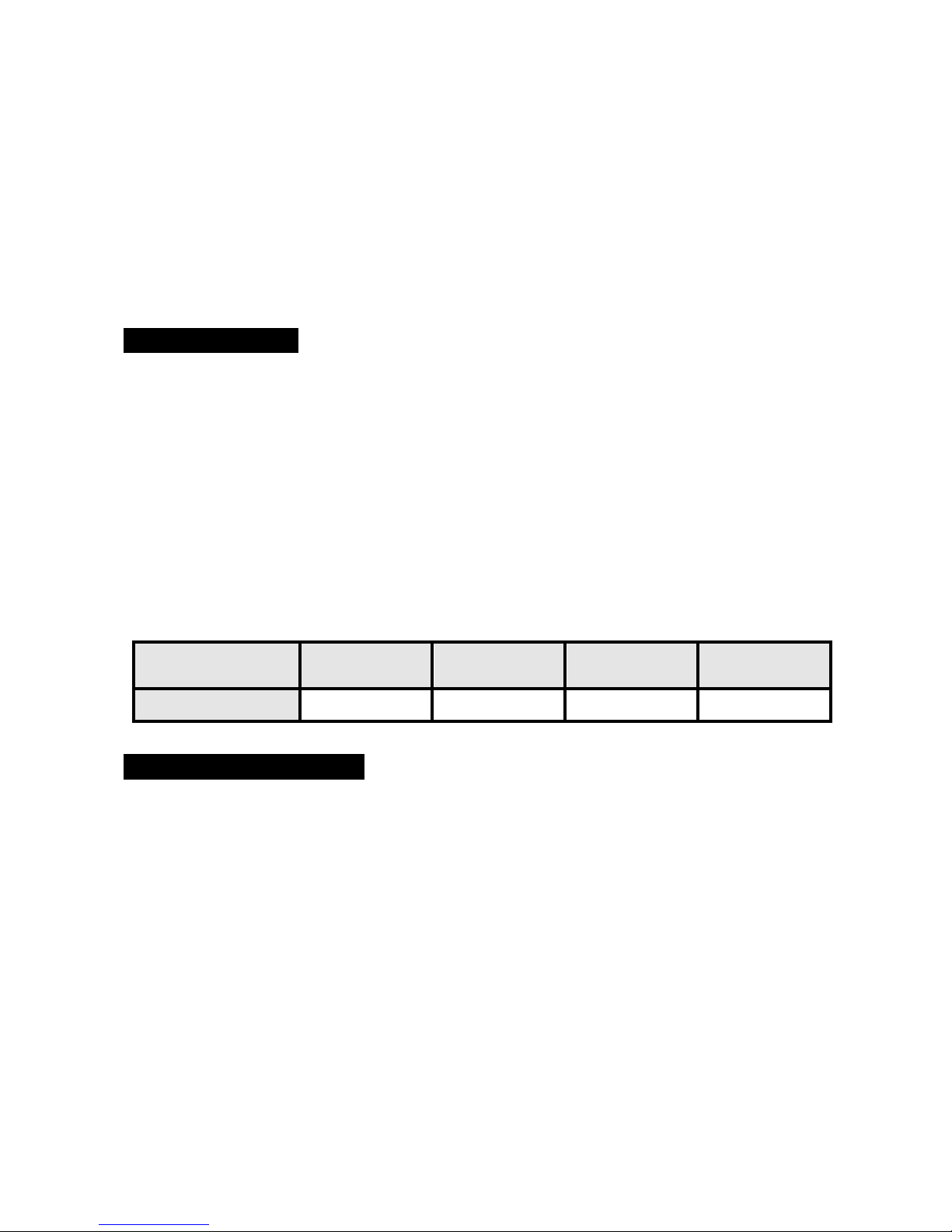
Channel!mode!
Unit!1!
Address!
Unit!2!
Address!
Unit!3!
Address!
Unit!4!
Address!
23!channels!
1!
24!
47!
70!
!
6.3!DMX!512!Configuration! !
Please!refer!to!the!configurations!overleaf!to!control!the!fixtures!
.!
!
!
!
!
!
!
!
!
Page 27
C
26C
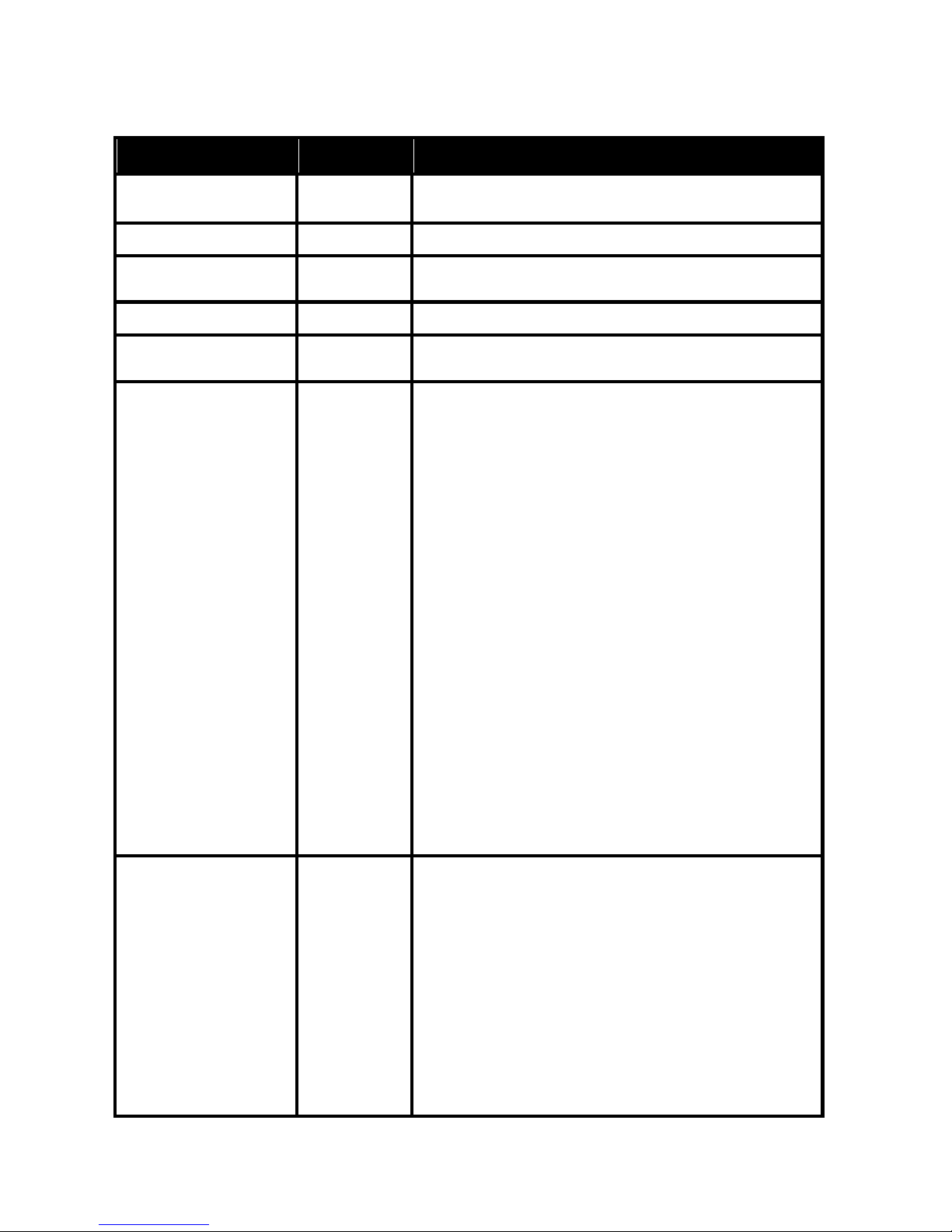
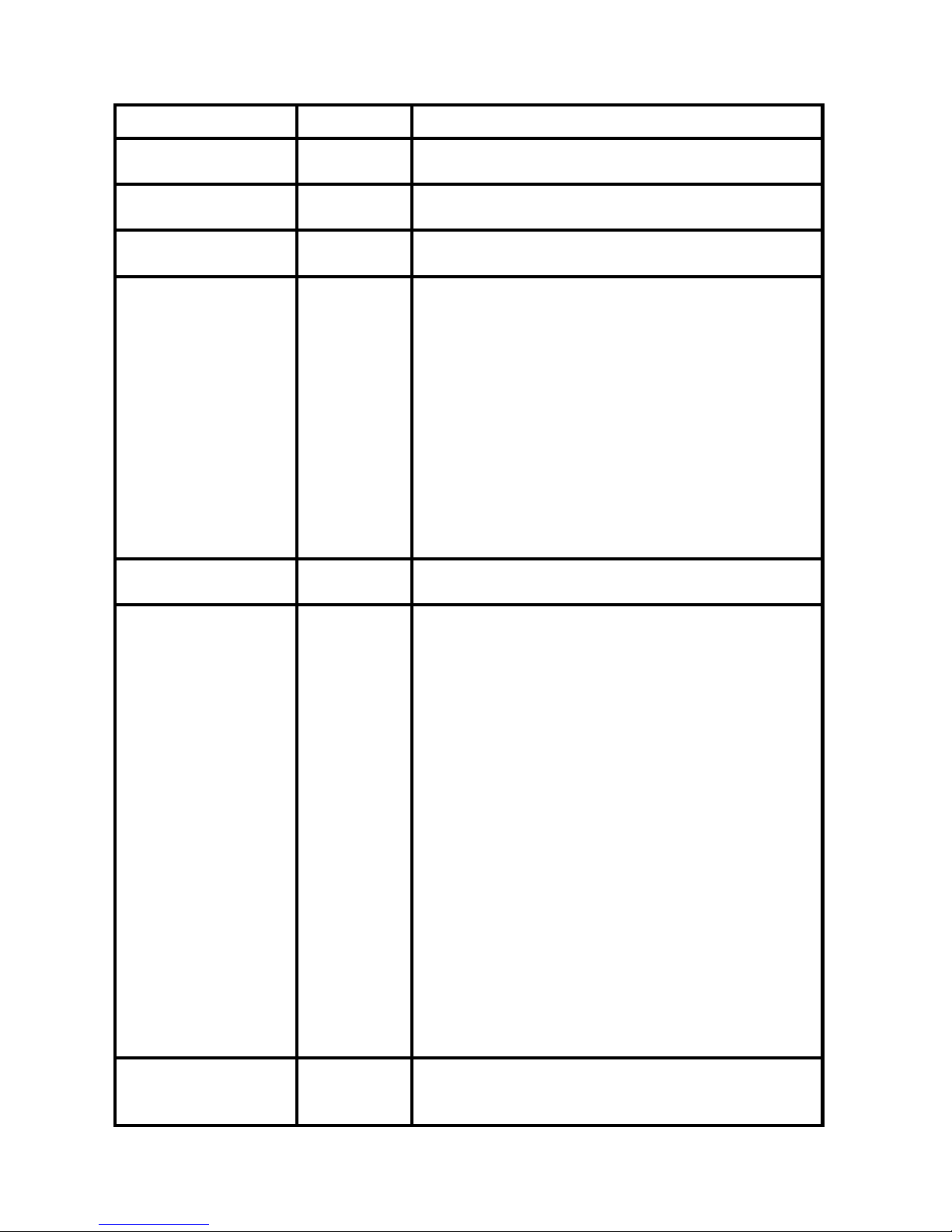
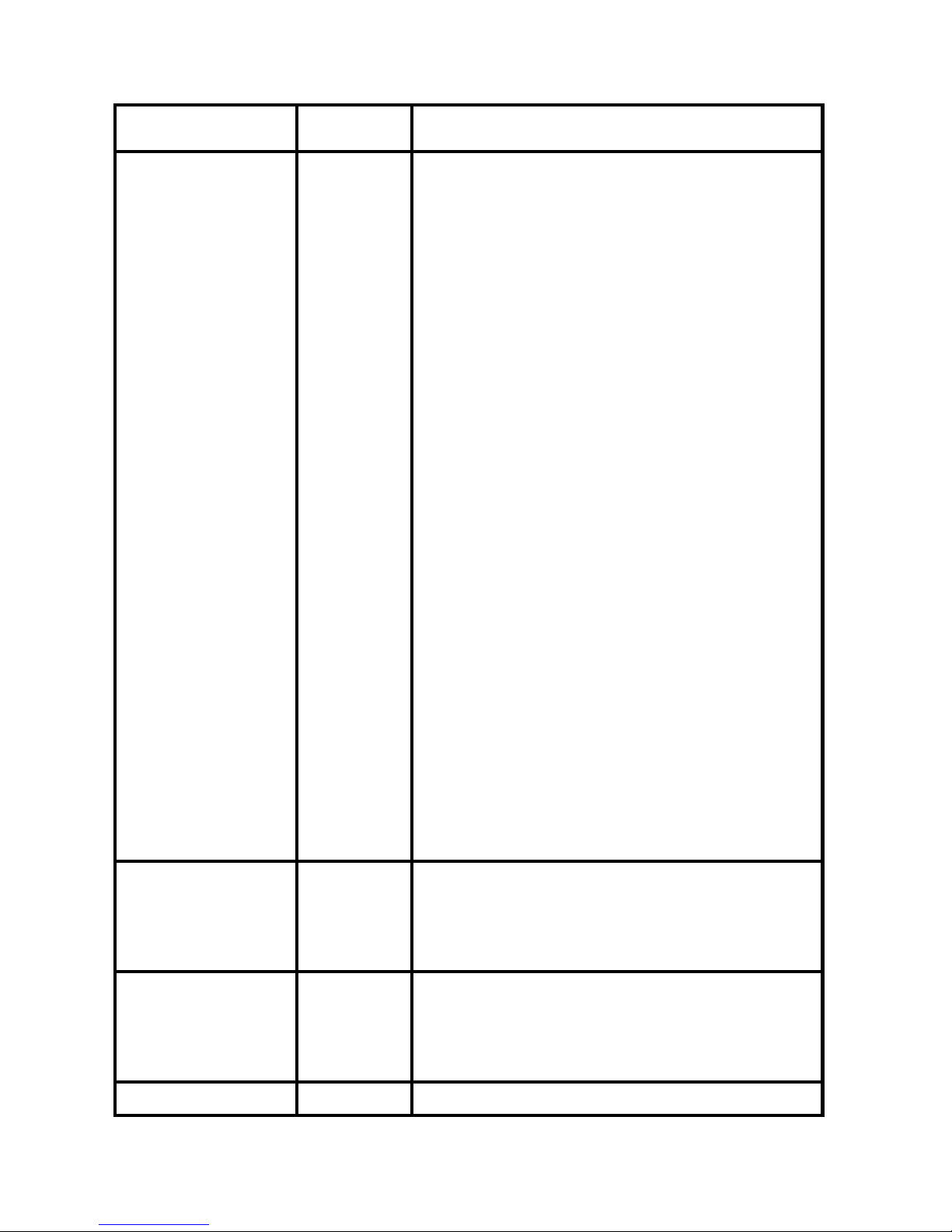
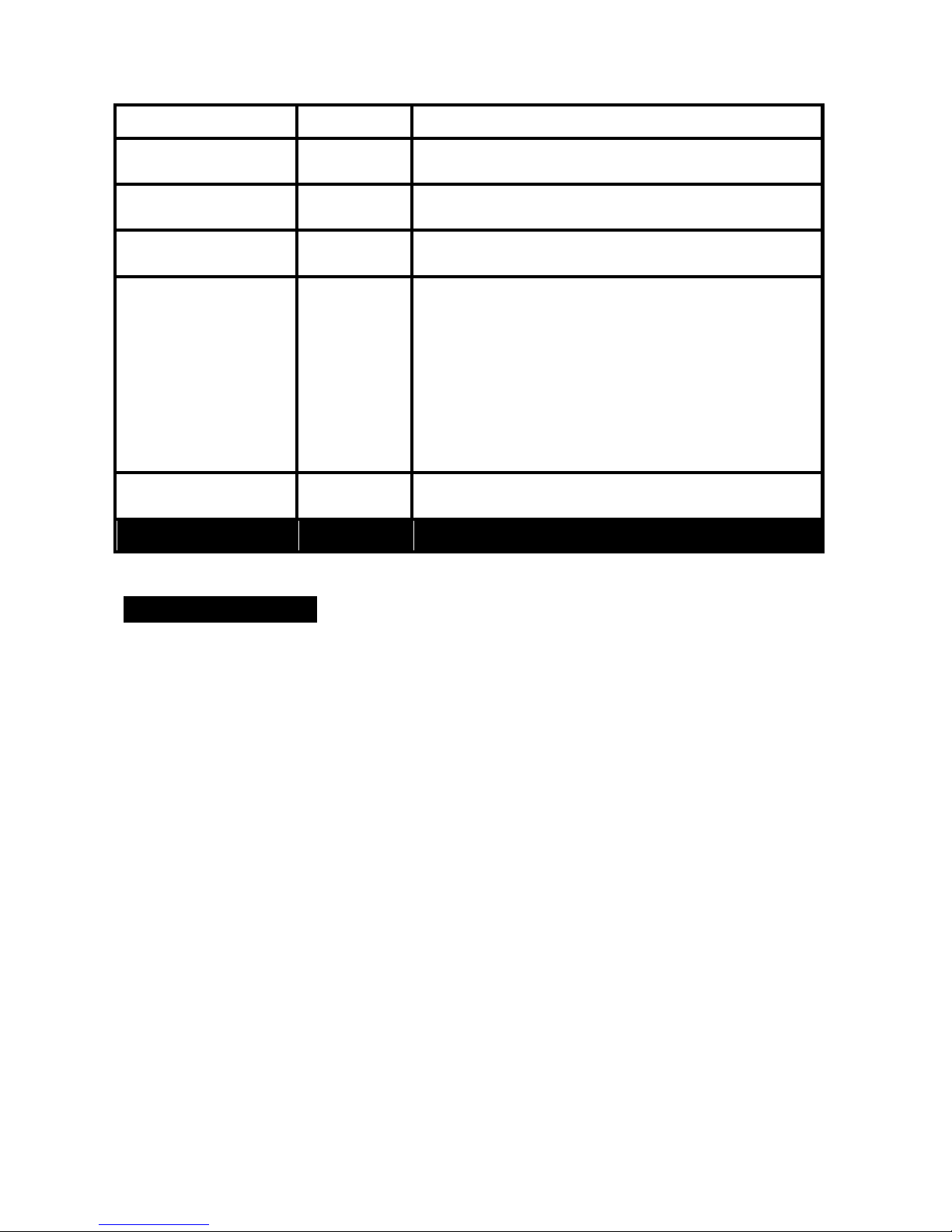
23!Channels!(Mode!1):! !
CHANNEL!
VALUE!
FUNCTION!
1!
!
000-255!
PAN!
0!°!"!540°!
2!
000-255!
PAN!FINE!
3!
!
000-255!
TILT!
0!°!"!270°!
4!
000-255!
TILT!FINE!
5!
!
000-255!
P/T!SPEED!
Fast!"!Slow!
6!
!
000-069!
070-079!
080-089!
090-099!
100-109!
110-119!
120-129!
130-139!
140-149!
150-159!
160-169!
170-179!
180-189!
190-199!
200-209!
210-219!
!
220-229!
!
230-239!
240-255!
SPECIAL!FUNCTION!
No!function!
Enable!blackout!while!pan/tilt!moving!
Disable!blackout!while!pan/tilt!moving!
Enable!blackout!while!color!changing!
Disable!blackout!while!color!changing!
Enable!blackout!while!gobo!changing!
Disable!blackout!while!gobo!changing!
Lamp!on!
Pan/Tilt!reset!
Colour/CMY!reset!
Gobo/Iris!reset!
Shutter/Prism!reset!
No!function!
Focus/Zoom/Frost!reset!
Reset!all!
Enable!blackout!while!pan/tilt!moving!or!colour!
changing!or!gobo!changing!
Disable!blackout!while!pan/tilt!moving!or!colour!
changing!or!gobo!changing!
Lamp!off!
No!function!
7!
!
000-007!
008-015!
016-023!
024-031!
032-039!
040-047!
048-055!
056-063!
064-127!
128-189!
190-193!
COLOR!
White!
Colour!1!
Colour!2!
Colour!3!
Colour!4!
Colour!5!
Colour!6!
Colour!7!
Colour!wheel!indexing!
Clockwise!rotation,!fast!"!slow!
Stop!
Page 28
C
27C
194-255!
Counter-Clockwise!rotation,!slow!"!fast!
8!
!
000-255!
CYAN!
0!"!100%!
9!
!
000-255!
MAGENTA!
0!"!100%!
10!
!
000-255!
YELLOW!
0!"!100%!
11!
!
000-021!
022-042!
043-063!
064-085!
086-106!
107-127!
128-148!
149-170!
171-191!
192-212!
213-233!
234-255!
PRESET!COLOR!
Open!
Colour!1!
Colour!2!
Colour!3!
Colour!4!
Colour!5!
Colour!6!
Colour!7!
Colour!8!
Colour!9!
Colour!10!
Colour!11!
12!
!
000-255!
CMY!SPEED!
Fast!"!Slow!
13!
!
000-007!
008-014!
015-021!
022-028!
029-035!
036-042!
043-049!
050-056!
057-063!
064-071!
072-079!
080-087!
088-095!
096-103!
104-111!
112-119!
120-127!
128-189!
190-193!
194-255!
GOBO!WHEEL!1!
Open!
Gobo!1-1!
Gobo!1-2!
Gobo!1-3!
Gobo!1-4!
Gobo!1-5!
Gobo!1-6!
Gobo!1-7!
Gobo!1-8!
Gobo!1-1!shaking!
Gobo!1-2!shaking!
Gobo!1-3!shaking!
Gobo!1-4!shaking!
Gobo!1-5!shaking!
Gobo!1-6!shaking!
Gobo!1-7!shaking!
Gobo!1-8!shaking!
Counter-Clockwise!rotation,!fast!"!slow!
Stop!
Clockwise!rotation,!slow!"!fast!
14!
!
000-127!
128-189!
GOBO!WHEEL!1!ROTATION!
Indexing!rotation!
Clockwise!rotation,!fast!"!slow!
Page 29
C
28C
190-193!
194-255!
Stop!
Counter-clockwise!rotation,!slow!"!fast!
15!
!
000-004!
005-009!
010-014!
015-018!
019-023!
024-028!
029-033!
034-037!
038-042!
043-047!
048-052!
053-056!
057-061!
062-066!
067-071!
072-075!
076-079!
080-083!
084-087!
088-091!
092-095!
096-099!
100-103!
104-107!
108-111!
112-115!
116-119!
120-123!
124-127!
128-189!
190-193!
194-255!
GOBO!WHEEL!2!
Open!
Gobo!2-1!
Gobo!2-2!
Gobo!2-3!
Gobo!2-4!
Gobo!2-5!
Gobo!2-6!
Gobo!2-7!
Gobo!2-8!
Gobo!2-9!
Gobo!2-10!
Gobo!2-11!
Gobo!2-12!
Gobo!2-13!
Gobo!2-14!
Gobo!2-1!shaking!
Gobo!2-2!shaking!
Gobo!2-3!shaking!
Gobo!2-4!shaking!
Gobo!2-5!shaking!
Gobo!2-6!shaking!
Gobo!2-7!shaking!
Gobo!2-8!shaking!
Gobo!2-9!shaking!
Gobo!2-10!shaking!
Gobo!2-11!shaking!
Gobo!2-12!shaking!
Gobo!2-13!shaking!
Gobo!2-14!shaking!
Clockwise!rotation,!fast!"!slow!
Stop!
Counter-clockwise!rotation,!slow!"!fast! !
16!
!
000-007!
008-127!
128-191!
192-255!
PRISM!
No!prism!effect!
Prism!effect!1!
Prism!effect!2!
Prism!effect!3!
17!
!
000-127!
128-190!
191-192!
193-255!
R-PRISM!
Index!rotation!
Clockwise!rotation,!fast!"!slow!
Stop!
Counter-clockwise!rotation,!slow!"!fast! !
18!
!
ZOOM!
Page 30
C
29C
000-255!
!!100%!"!0!
19!
!
000-255!
FOCUS!
! near"!far!
20!
!
000-255!
FROST!
0%!"!100%!
21!
!
000-255!
IRIS!
100%!"!0!
22!
!
000-007!
008-015!
016-131!
132-167!
168-203!
204-239!
240-247!
248-255!
SHUTTER!
Shutter!Off!
Open!
Strobe,!slow!"!fast!
Slow!open,!fast!close!
Fast!open,!slow!close!
Slow!open,!slow!close!
Random!strobe!
! Open!
23!
!
000-255!
DIMMER!
0%!"!100%!
!
!
!
!
!
! 7.!Troubleshooting! !
Following!are!a!few!common!problems!that!may!occur!during!operation.!Here!are!some!suggestions!
for!easy!troubleshooting:!
A.!The!unit!does!not!work,!no!light!and!the!fan!does!not!work!
1. Check!the!power!connection!and!main!fuse.!
!
B.!Not!responding!to!DMX!controller!
1. DMX!LED!should!be!on.!If!not,!check!DMX!cables!to!see!if!they!are!connected!correctly.!
2. If!the!DMX!LED!is!on!and!no!response!to!the!desk,!check!the!address!settings!and!DMX!polarity.!
3. If!you!have!intermittent!DMX!signal!problems,!check!the!cable!to!the!unit.!
4. Try!another!DMX!controller.! ! !
! !
C.!The!lamp!is!cutting!out!intermittently!
1. Internal!temperature!may!be!too!high.!Check!if!the!head!fan!is!working.!
!
!
Page 31
C
30C
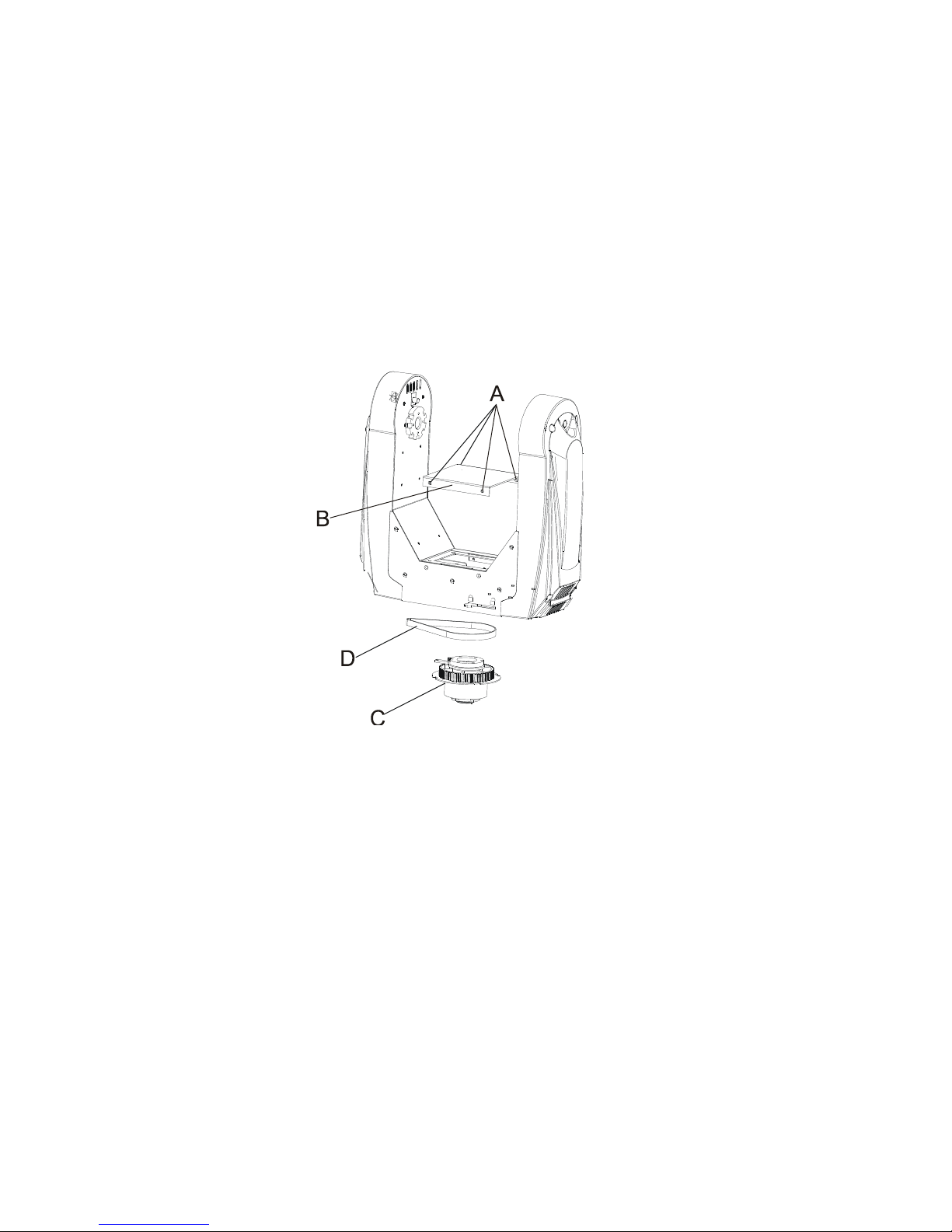
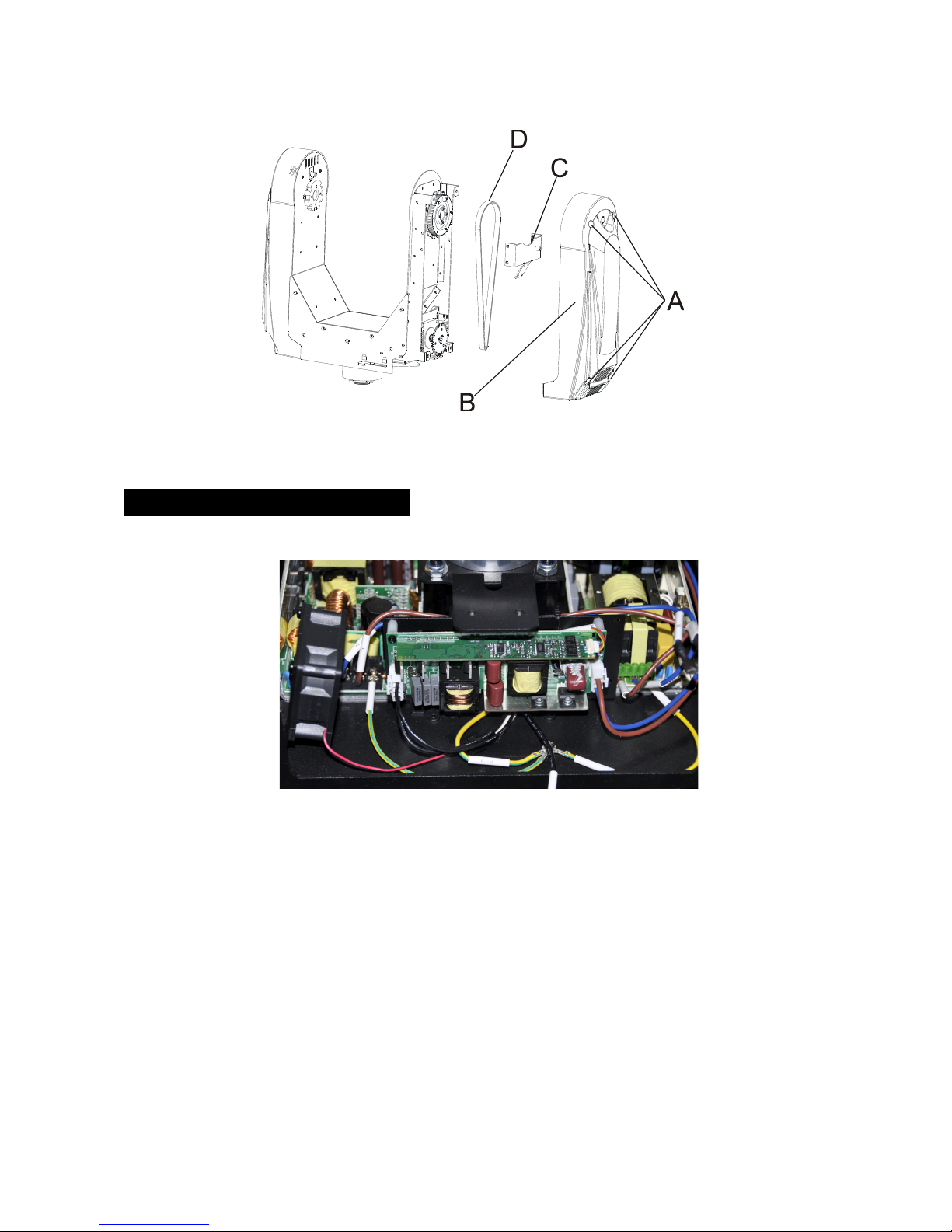
E.!If!The!pan!belt!is!broken!
1. Turn!off!the!mains!power.!
2. Loosen!the!screws!(A),open!the!cover!(B).!
3. Loosen!the!screws!(C).!
4. Unplug!all!the!connection!cables!over!the!belt.! !
5. Replace!the!belt!(D),!put!the!belt!around!the!axis!gear!and!motor!gear.!
6. Re!connect!the!cables!over!the!belt.!
7. Tighten!all!the!screws.! !
!
!
!
!
!
!
!
!
!
!
!
!
!
!
!
F.!If!The!tilt!belt!is!broken!
1. Turn!off!the!mains!power.!
2. Loosen!all!the!screws!(A)!and!open!the!right!arm!cover!(B).!
3. Loosen!the!screws!(C)!that!fix!the!bridge.!
4. Replace!the!belt!(D).!Please!adjust! the!tension!of!the!belt!properly.! Note:! do!not!attach!the!belt!
too!tightly!as!it!is!can!easily!snap.!
5. Reverse!the!procedures!from!step!3!to!2.!
Page 32
C
31C
!
!
!
!
!
!
!
!
!
!
!
!
! 8.!Maintenance!and!Cleaning! !
Maintenance:!
!
Ballast!
A.! As! the! pictures! shown! above,! please! replace! the! cable! or! cable! connectors! immediately! once!
they’ve!turned!yellow.!
! B.! Maintain! the!fixtures! every! two! months! and!make! sure! that! all ! the!screws! and! terminals! have!
been!locked!firmly.!Negligence!of!maintenance!will!cause!malfunction!of!the!fixture!and!void!the!
warranty.!
!
!
!
!
Page 33

C
32C
Cleaning:!
The!cleaning!of!internal! an d!external!optical!lenses!an d/o r!mirrors!must!be!carried!out!periodically!
to! optimize! light! output.! Cleaning! frequency! depends! on! the! environment! in! which! the! fixture!
operates:!damp,!smoky!or!particularly!dirty!surrounding!can!cause!greater!accumulation!of!dirt!on!the!
unit’s!optics.!
! Clean!with!soft!cloth!and!use!normal!glass!cleaning!fluid!to!clean.!
! Always!dry!the!parts!carefully.!
! Clean!the!external!optics!at!least!every!20!days.!Clean!the!internal!optics!at!least!every!30/60!days.!
!
!
!
!
!
!
!
!
!
!
!
!
!
!
!
!
!
!
!
!
!
!
!
Page 34

C
33C
!
!
!
!
!
!
!
!
!
!
!
!
!
!
!
!
!
!
!
!
!
!
!
!
!
!
!
!
!
!
!
!
Page 35

C
34C
!
Declaration!of!Conformity!
!
We!declare!that!our!products!(lighting!equipments)!comply!with!the!
following!specification!and!bears!CE!mark!in!accordance!with!the!
provision!of!the!Electromagnetic!Compatibility!(EMC)!Directive!
89/336/EEC.!
!
EN55103-1:!2009!;!EN55103-2:!2009;!EN62471:!2008;!
EN61000-3-2:!2006!+!A1:2009!+!A2:2009;!EN61000-3-3:!2008.!
!
&!
Harmonized!Standard!
!
EN!60598-1:2008!+!All:2009;!EN!60598-2-17:1989!+!A2:1991;! !
EN!62471:2008;!EN!62493:!2010!
Safety!of!household!and!similar!electrical!appliances!
Part!1:!General!requirements!
!
!
!
!
!
!
!
!
!
!
!
!
!
!
!
!
!
!
!
!
!
!
!
!
!
Page 36

C
35C
!
!
!
!
!
!
!
!
!
!
!
!
!
!
!
!
!
!
!
!
!
!
!
!
!
!
!
!
!
!
!
!
!
!
!
!
!
!
!
!
!
!
!
Innovation,!Quality,!Pe rf o rmance!
 Loading...