

Page 1

iNode Serial
Transceiver USB
Instruction manual
© 2015-2016 ELSAT
®
Page 2

iNode Serial Transceiver USB – instruction manual ELSAT s.c.
1. About iNode
We would like to introduce a family of iNode devices working in the Bluetooth Low Energy ®. We
will show you that it's not just tags to find lost keys, whether location tags, but still something more.
Our devices are capable of:
these are mainly battery device.
work without battery replacement for up to 12 months, depending on the type of application and
usage.
have memory for logging events, readings of measurements, etc.
contain precise temperature, humidity sensors, accelerometer or magnetometer which allow
home automation control, care of older persons or vehicle detection.
as a remote control device, although a small power consumption, have a large range and features
unavailable to other competitive facilities - password protection, AES encryption, control
directly from the smartphone with BT 4.0.
a unique encryption technology ensures the safety of the JPEG images recorded by our cameras.
BT4.0 - LAN or BT4.0 - GSM gateways connect iNode sensors with the Internet.
iNode can also help to control the movement of people or goods, saving the time of appearance and
disappearance (active RFID ® long range). New features related to the development of the product
is also not a problem – this allows to remote firmware update with PC or smartphone with
Bluetooth 4.0 ® and Low Energy Bluetooth enabled ® (Smart Bluetooth ®).
iNode Serial Transceiver USB is a Bluetooth Low Energy transceiver with USB 2.0
connector. It has been designed to be easy to use in each operating system: Windows, Android,
Linux, Raspberry Pi etc. Additional functionality of the iNode Serial Transceiver USB is a
special characteristic, which allows you a bidirectional data transfer BLE <-> RS232. How the
iNode Serial Transceiver USB is universal, is the fact that you can run the iNode Setup.exe
(connecting with Bluetooth Low Energy tags) on Linux Ubuntu with Wine.
Because it is seen as a PC's serial port, you can use it in your own programs, to communicate in
a simple way with the BLE type devices e.g. iNode. To control BLE devices it uses a basic set of
HCI commands HEX-encoded transmitted character strings. To turn the scan on is enough to
send to the 010C20020100 string. The same way of communication is used in the iNode LAN
over TCP/IP or WebSocket or iNode Serial Transceiver UART.
Trademarks or registered trademarks:
Bluetooth Low Energy ®, Bluetooth 4.0 ®, RFID®,CSR®,Windows®, Android, Google, Microsoft, ThingSpeak, Raspberry Pi,
Domoticz, BlueZ, Linux are used for informational purposes only.
All trademarks are property of their respective owners.
page 2
Page 3
iNode Serial Transceiver USB – instruction manual ELSAT s.c.
2. iNode Serial Transceiver USB
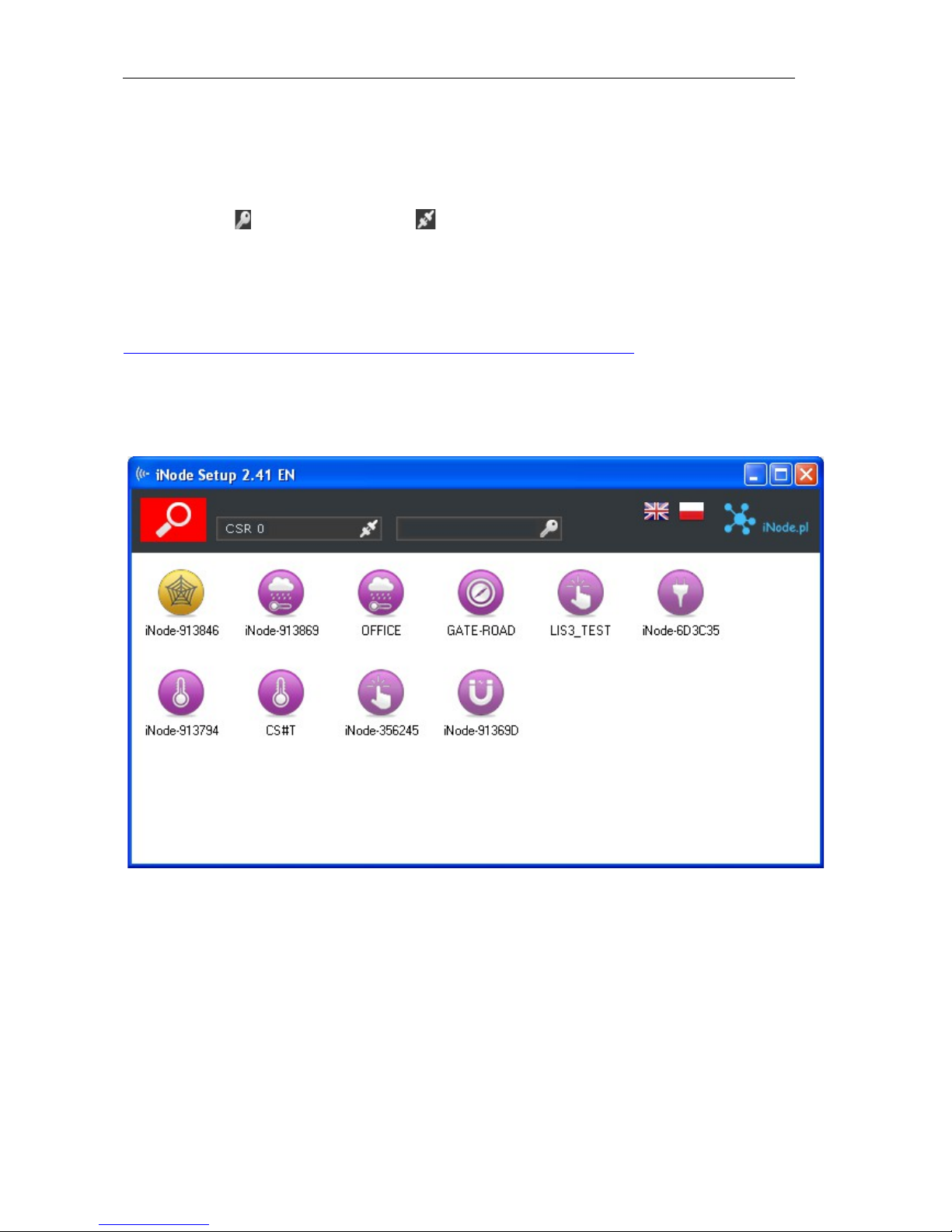
Install application iNode Setup and BT4.0 drivers on PC. Next run iNode Setup application (on
Windows 7 to 10 with administrative rights), and press the red button with magnifying glass picture.
If a BLE device you want connect to is password protected you should type the password in the text
box with a key If you press the button you can change the type of adapter which will be used
to communication – standard BT4.0 adapter (signed CSR …), iNode Serial Transceiver (signed
COM ...) or iNode LAN (signed the name of the device).
In case the application cannot start or system error you should try to install Microsoft Visual C++
2005 Service Pack 1 Redistributable Package MFC Security Update from that page:
http://www.microsoft.com/en-us/download/confirmation.aspx?id=26347.
iNode Setup will find all nearby iNode devices and sort them regarding receiving signal strength.
Each type of iNode device has a different icon. For iNode Serial Transceiver USB it is the first
picture in the first row in the window below.
To configure iNode Serial Transceiver USB device you should double click on its icon.
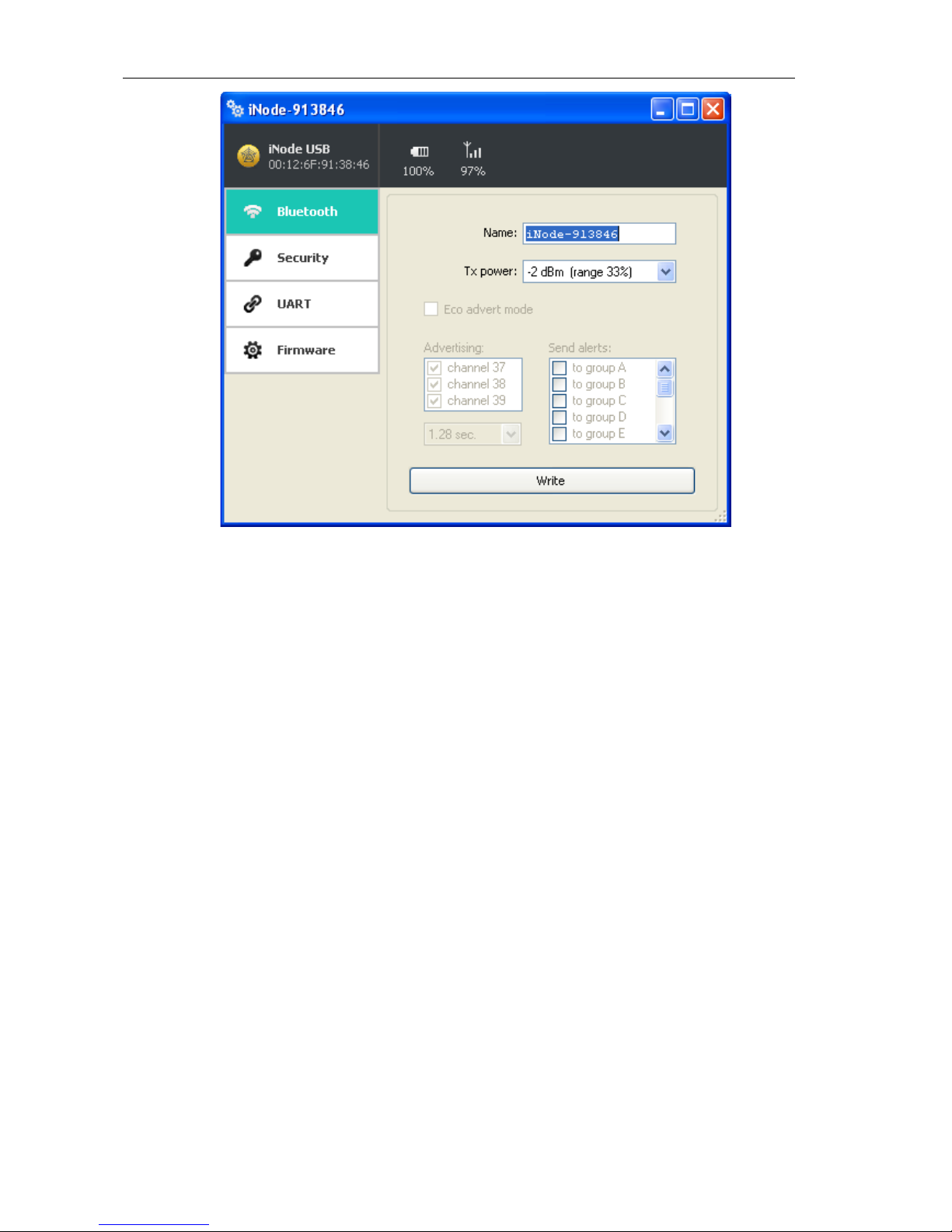
Application connects with this device and reads its settings:
page 3
Page 4
iNode Serial Transceiver USB – instruction manual ELSAT s.c.
At the top of the window there is displayed following information:
the name of the iNode family – in this case iNode Serial Transceiver USB;
the unique device identifier;
battery level: 100% means 3V or greater, while 0% it is 1,8V;
signal strength received by this device from the BT4.0 adapter or iNode LAN;
temperature;
At the Bluetooth tab there are following items:
Name: you can change default device name typing a new one in this text box. Its length is 16
characters maximum.
Tx power: determine the power the device broadcasts and simultaneously the range the device
can be scanned.
You can save modified settings by pressing the Write button.
page 4
Page 5
iNode Serial Transceiver USB – instruction manual ELSAT s.c.
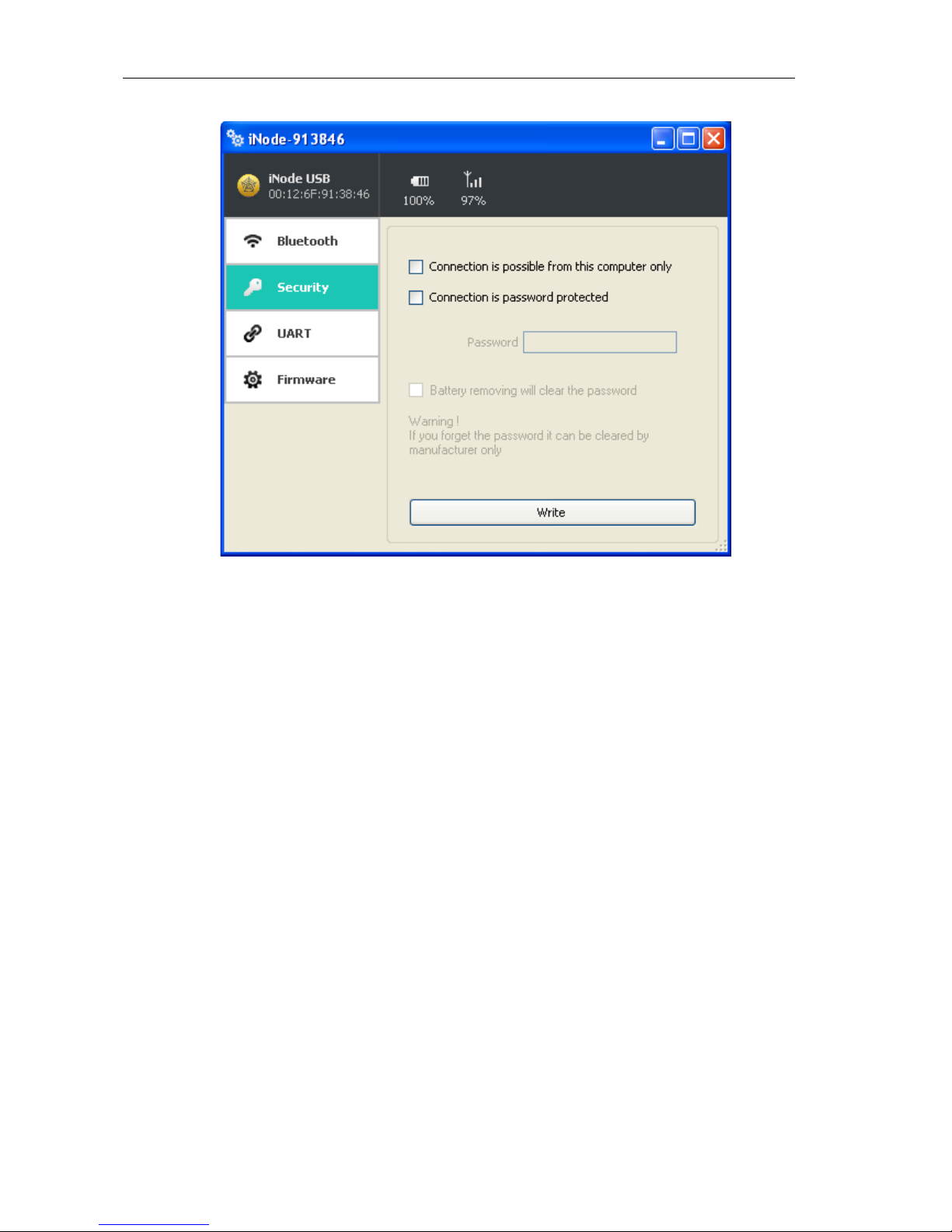
The picture below shows the Security tab:
The following items can be set:
Connection is possible from this computer only: this option enable you to protect the iNode
Serial Transceiver USB access from others PCs or phones.
Connection is password protected: access to the iNode Serial Transceiver USB is password
protected. Password length is 16 characters maximum.
Battery removing will clear the password: if you unchecked this option than please remember
that if you forget the password it can be cleared by manufacturer only.
You can save modified settings by pressing the Write button.
page 5
Page 6
iNode Serial Transceiver USB – instruction manual ELSAT s.c.
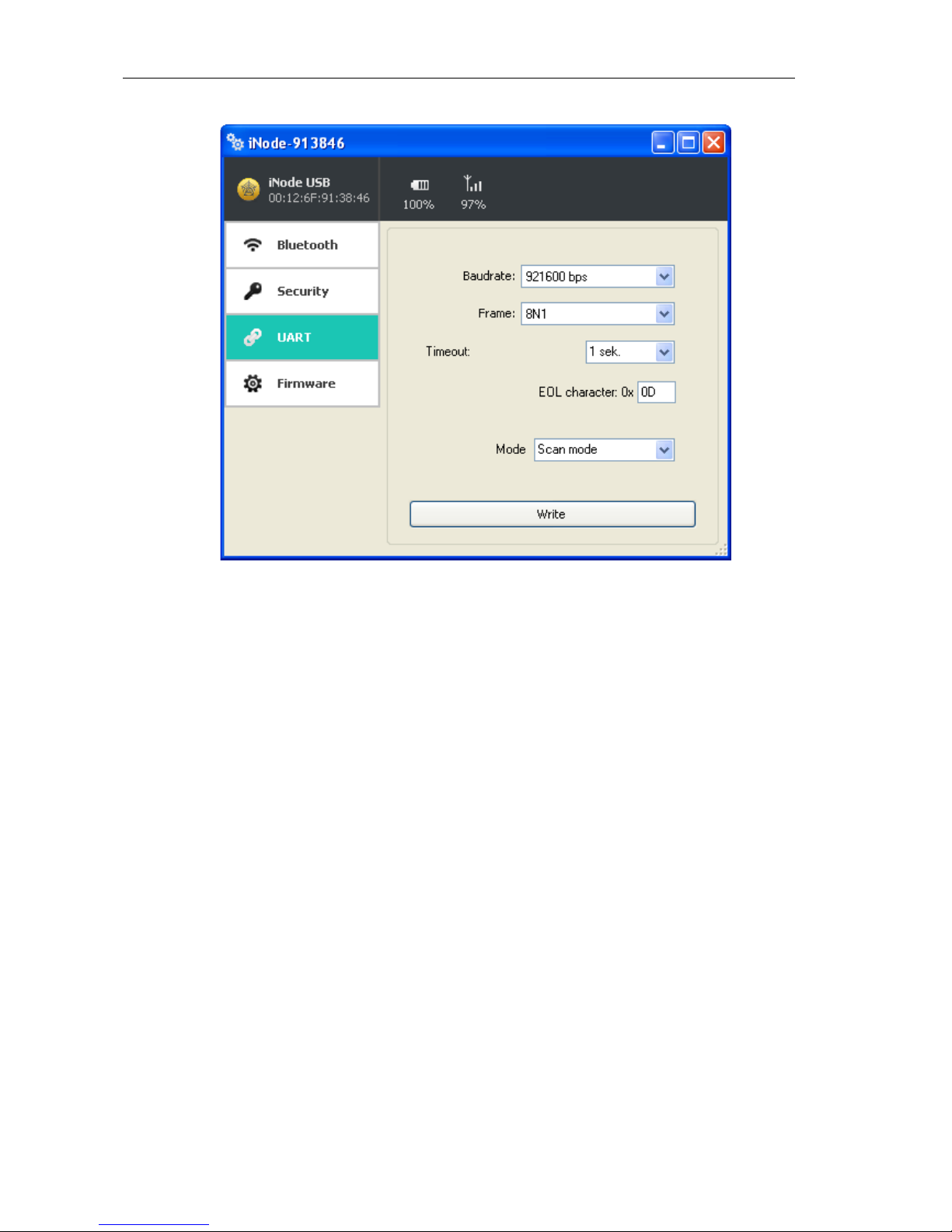
The picture below shows the UART tab:
The following items can be set:
Baud rate: select the speed of the physical UART connectors on the module. The default speed
for iNode Serial Transceiver USB is 921,600 bps. It can be set in the range from 2400 bps to
3,686,400 bps.
Frame: specifies the parameters of the frame data byte-the number of bits, parity and number of
stop bits. Possible values: 8N1, 8N2, 8E1, 8E2, 8O1, 8O2.
Timeout: if UART doesn't receive a new character in this time the BLE frame will be sent with
all characters received earlier.
EOL character: the character that causes the sending data: Specifies what character received by
the UART will send the data via BLE.
Mode: allows you to select the operating mode of the device:
Scan mode: in this mode, the device does not broadcast advertisement frames but is ready to
receive commands by UART.
Standby mode: in this mode, the device broadcasts advertisement BLE frames and wait for
the connection. You can connect to it and send the data over the UART.
Notwithstanding the above settings, the data are sent by BLE when the UART buffer is full, or in
packs of 20 bytes. This is the Bluetooth Low Energy standard.
You can save modified settings by pressing the Write button.
page 6
Page 7
iNode Serial Transceiver USB – instruction manual ELSAT s.c.
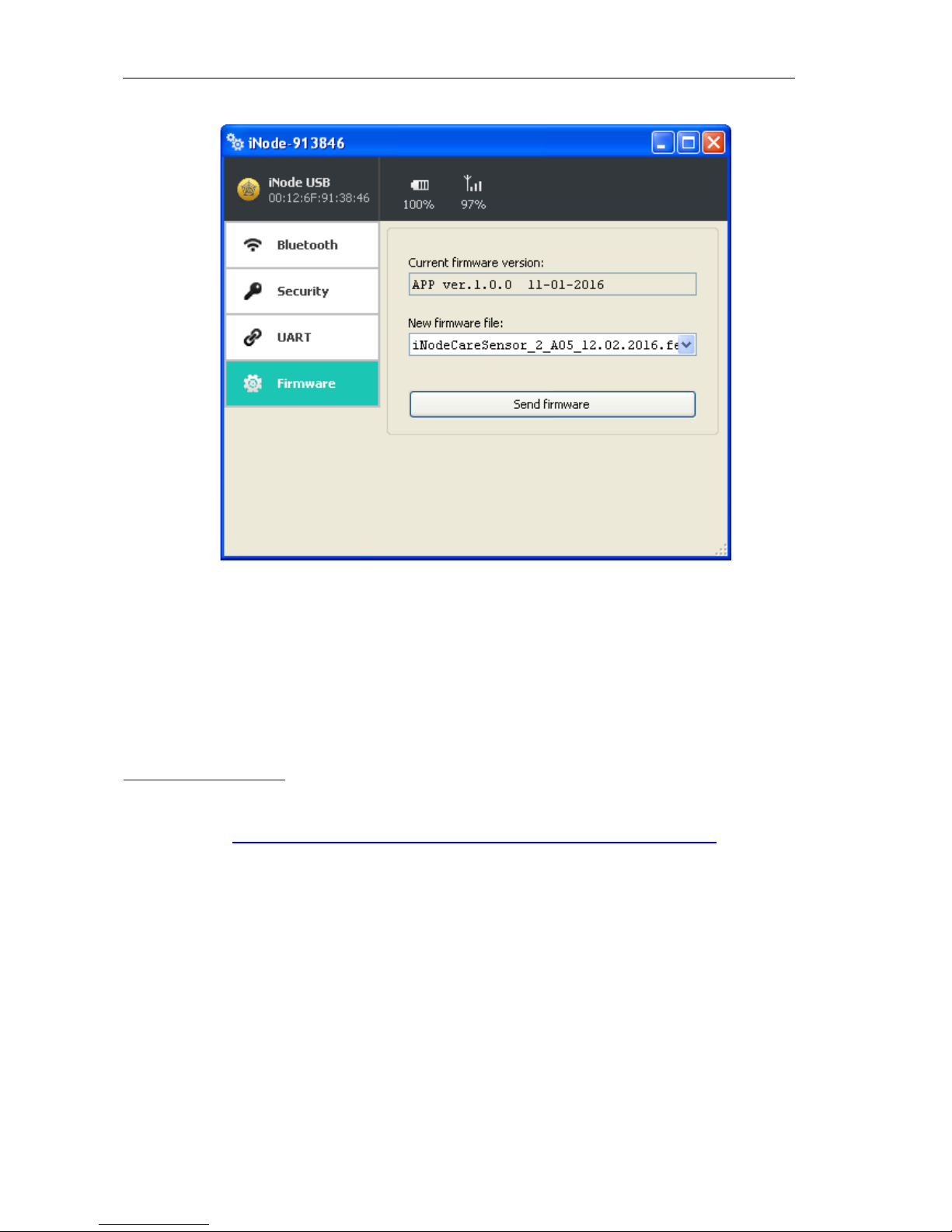
The picture below shows the Firmware tab:
Current firmware version field shows the version and creation date of the firmware in the device.
To change the firmware in the device first select New firmware file.
Firmware is uploaded to the device after clicking Send firmware button. Application checks if this
firmware is correct for this type of device to avoid situation that we want to upload the firmware
which needs the button to be pressed for broadcasting in the device but this device doesn't have it.
The fep files with the firmware, manuals or other information you can find at our technical support:
http://support.inode.pl/ user: inode no password.
All iNode devices use to communication the Bluetooth 4.0/4.1 standard. More information about it
you can find at https://www.bluetooth.org/en-us/specification/adopted-specifications
The data structure is described in Core_V4.0.pdf: Volume 2 Part E, Section 5.4.
When connection with remote BLE device is established, communication with them is performed
using the Attribute Protocol encapsulated in HCI ACL DATA packets. The followings PDUs
(Core_V4.0.pdf: Volume 3 Part F) can be used – see table below. Asterisk in Imp column means
that that attribute is implemented in iNode Serial Transceiver USB.
page 7
Page 8

iNode Serial Transceiver USB – instruction manual ELSAT s.c.
Attribute PDU Attribute Imp Parameters
Name Opcode
Exchange MTU Request 0x02 Client Rx MTU
Exchange MTU Response 0x03 Server Rx MTU
Find Information Request 0x04 Starting Handle,
Ending Handle,
UUID
Find Information 0x05 Format,
Response Information Data
Find By Type Value 0x06 Starting Handle,
Request Ending Handle,
Attribute Type,
Attribute Value
Find By Type Value 0x07 Handles Information List
Response
Read By Type Request 0x08 * Starting Handle,
Section 3.4.4.1 Ending Handle,
UUID
Read By Type Response 0x09 * Length,
Section 3.4.4.2 Attribute Data List
Read Request 0x0A * Attribute Handle
Section 3.4.4.3
Read Response 0x0B * Attribute Value
Section 3.4.4.4
Read Blob Request 0x0C * Attribute Handle,
Section 3.4.4.5 Value Offset
Read Blob Response 0x0D Part Attribute Value
Section 3.4.4.6
Read Multiple Request 0x0E Handle Set
Read Multiple Response 0x0F Value Set
Read by Group Type 0x10 Start Handle,
Request Ending Handle,
UUID
Read by Group Type 0x11 Length,
Response Attribute Data List
Write Request 0x12 * Attribute Handle,
Section 3.4.5.1 Attribute Value
Write Response 0x13 * Section 3.4.5.2
Write Command 0x52 * Attribute Handle,
Section 3.4.5.3 Attribute Value
Prepare Write Request 0x16 Attribute Handle,
Value Offset,
Part Attribute Value
Prepare Write Response 0x17 Attribute Handle,
Value Offset
Part Attribute Value
Execute Write Request 0x18 Flags
Execute Write Response 0x19 -
Handle Value Notification 0x1B * Attribute Handle,
Section 3.4.7.1 Attribute Value
Handle Value Indication 0x1D * Attribute Handle,
Section 3.4.7.2 Attribute Value
Handle Value 0x1E *
Confirmation
Section 3.4.7.3
Signed Write Command 0xD2 Attribute Handle,
Attribute Value,
Authentication Signature
page 8
Page 9

iNode Serial Transceiver USB – instruction manual ELSAT s.c.
Data sent over the UART is HCI frames HEX-encoded (for one byte there are two ASCII
characters). At the end of the data being transmitted is always 0x0d, 0x0a. In the case of loss of
synchronization on the HCI frame level, you can retrieve it by sending 0x0d, 0x0a. They can be
added to each frame sent to the HCI module.
Data coding scheme in advertisement frame and response for active scan.
Information about AD Type codes can be found in a Core_V4.0.pdf: Volume 3 Part C, Section 8.
and at the page https://www.bluetooth.org/en-us/specification/assigned-numbers/generic-access-
profile
HCI frame with BLE scan result (advertisement frame):
043E2802010000A35F356F12001C0201061107694E6F6465204E61760000000000000003FF00
80020AFEAD
043E28
04 - HCI packet indicator: 0x04 EVENT (Core_V4.0.pdf: Volume 2 Part E, Section 5.4)
3E - event_code = 0x3e -> LE EVENTS
28 - HCI parameter total length -> 0x28 = 40
02010000A35F356F12001C0201061107694E6F6465204E61760000000000000003FF0080020A
FEAD - event_parameters:
02 - Subevent_Code = 0x02 -> LE Advertising Report event
01 - Num_Reports = 0x01 -> number of responses in event (always 1)
00 - Event_Type[i] = 0x00 -> connectable undirected advertising (ADV_IND)
00 - Address_Type[i] = 0x00 -> public device address
A35F356F1200 - Address[i] = 0x00126F355FA3 (Public Device Address)
1C - Length_Data[i] = 0x1C = 28 (length of the Data[i] field)
0201061107694E6F6465204E61760000000000000003FF0080020AFE - Data[i] ->
Length_Data[i] octets of advertising or scan response data formatted as defined in
Core_V4.0.pdf: Volume 3 Part C, Section 8. https://www.bluetooth.org/en-
us/specification/assigned-numbers/generic-access-profile
02 - 0x02 -> Length = 0x02
0106 -> Data
01 - 0x01 -> EIR Data Type = 0x01 -> «Flags»
06 - 0x06 -> EIR Data = 0x06 -> LE General Discoverable Mode (bit 1),
BR/EDR Not Supported (bit 2)
11 - 0x11 -> Length = 0x11 = 17
07694E6F6465204E617600000000000000 -> Data
07 - 0x07 -> EIR Data Type = 0x07 -> «Complete List of 128-bit Service
Class UUIDs»
694E6F6465204E617600000000000000 -> EIR Data = "iNode Nav"
(UUID128 w postaci 16 znaków ASCII)
03 - 0x03 -> Length = 0x03 = 3
FF0080 -> Data
FF -> EIR Data Type = 0xff -> «Manufacturer Specific Data»
0080 -> 0x8000 iNodeNav identifier
02 - 0x02 -> Length = 0x02 = 2
0AFE -> Data
0A -> EIR Data Type = 0x0a -> «Tx Power Level»
FE -> 0xfe = -2 dBm
page 9
Page 10

iNode Serial Transceiver USB – instruction manual ELSAT s.c.
AD - RSSI[i] = 0xAD -> RSSI = -83dBm (signed integer); Range: -127 < N < +20
dBm; 127 RSSI is not available
HCI frame with BLE scan result (response for an active scan):
043E1A02010400A35F356F12000E0D09694E6F64652D333535464133AF
043E1A
04 - HCI packet indicator: 0x04 EVENT (Core_V4.0.pdf: Volume 2 Part E, Section 5.4)
3E - event_code = 0x3e -> LE EVENTS
1A - HCI parameter total length -> 0x1A = 26
02010400A35F356F12000E0D09694E6F64652D333535464133AF - event_parameters:
02 - Subevent_Code = 0x02 -> LE Advertising Report event
01 - Num_Reports = 0x01 -> number of responses in event (always 1)
04 - Event_Type[i] = 0x04 -> scan response (SCAN_RSP)
00 - Address_Type[i] = 0x00 -> public device address
A35F356F1200 - Address[i] = 0x00126F355FA3 (Public Device Address)
0E - Length_Data[i] = 0x0E = 14 (length of the Data[i] field)
0D09694E6F64652D333535464133 - Data[i] -> Length_Data[i] octets of advertising or
scan response data formatted as defined in Core_V4.0.pdf: Volume 3 Part C, Section 8.
https://www.bluetooth.org/en-us/specification/assigned-numbers/generic-access-profile
0D - 0x0D -> Length = 0x0D
09694E6F64652D333535464133 -> Data
09 - EIR Data Type = 0x09 -> «Complete Local Name»
694E6F64652D333535464133 – iNode-355FA3
AF - RSSI[i] = 0xAF -> RSSI = -81dBm (signed integer); Range: -127 < N < +20 dBm; 127
RSSI is not available
BLE advertisement frame:
02010619FF1293011000001700AB18951F485435BE5B809D6F571E40E8
020106
02 -> data length: 2 bytes
0106 -> data
01 -> 0x01 -> EIR Data Type = 0x01 -> «Flags»
06 -> 0x06 -> EIR Data = 0x06 -> LE General Discoverable Mode (bit 1), BR/EDR
Not Supported (bit 2)
19FF1293011000001700AB18951F485435BE5B809D6F571E40E8
19 -> data length: 25 bytes
FF1293011000001700AB18951F485435BE5B809D6F571E40E8 -> data (25 bytes)
FF -> 0xFF -> EIR Data Type = 0xFF «Manufacturer Specific Data»
1293011000001700AB18951F485435BE5B809D6F571E40E8->
1293 -> 0x9312 -> 0x93XX identifier of iNodeCareSensor #3; 0xXX1X
version 1; 0xXXX2 24 h elapsed from the last readout;
0110 -> 0x1001 type -> bit 15 to bit 12 -> reserved, bit 11 to bit 0 -> group
0000 -> 0x0000 flags ->
SENSOR_ALARM_MOVE_ACCELEROMETER=1,
SENSOR_ALARM_LEVEL_ACCELEROMETER=2,
SENSOR_ALARM_LEVEL_TEMPERATURE=4,
SENSOR_ALARM_LEVEL_HUMIDITY=8,
page 10
Page 11

iNode Serial Transceiver USB – instruction manual ELSAT s.c.
SENSOR_ALARM_CONTACT_CHANGE=16,
SENSOR_ALARM_MOVE_STOPPED=32,
SENSOR_ALARM_MOVE_GTIMER=64,
SENSOR_ALARM_LEVEL_ACCELEROMETER_CHANGED=128,
SENSOR_ALARM_LEVEL_MAGNET_CHANGE=256,
SENSOR_ALARM_LEVEL_MAGNET_TIMER=512
1700 -> 0x0017 value1
/* motion sensor */
0x8000 sensor in move (bit 15 =1)
bity 14 do 10:
X-axis (5 bits signed) -> 0x00= 0
bity 9 do 5:
Y-axis (5 bits signed) -> 0x00= 0
bity 4 do 0:
Z-axis (5 bits signed) -> 0x17= -9
AB18 -> 0x18AB value2
/* temperature sensor */
Temperature= ((175.72 * Temp_Code)/65536)-46.85 [°C]
Temp_Code = 0x18AB *4 = 0x62AC = 25260
Temperature = 20,879 °C
951F -> 0x1F95 value3
/* humidity sensor */
%RH= ((125*RH_Code)/65536)-6 [%]
RH_Code = 0x1f95 *4 = 0x7e54 = 32340
%RH= 55,68 %
485435BE -> 0x5448BE35 time (time-stamp; seconds elapsed since
01.01.1970)
5B80 9D6F 571E 40E8 -> AES128 digital signature for above data
BLE response for an active scan:
0D09694E6F64652D333536313441020A02
0D09694E6F64652D333536313441
0D -> data length: 13 bytes
09694E6F64652D333536313441 -> dane
09 -> 0x09 -> EIR Data Type = 0x09 -> «Complete Local Name»
694E6F64652D333536313441 -> iNode-35614A
020A02
02 -> data length: 2 bytes
0A02 -> data
0A-> 0x0A -> EIR Data Type = 0x0A -> «Tx Power Level»
02 -> 0x02 -> Tx Power Level = +2dBm
page 11
Page 12

iNode Serial Transceiver USB – instruction manual ELSAT s.c.
3. The UART GATT service and characteristics
UART_SERVICE (this service contains characteristics for UART control, configuration and data
transfer):
uuid: 0xc47f18cc8f71452ebce5893097437909
UART_DATA (characteristic intended to data transfer through the UART – only write function;
data received from UART is sent using notification or indications if enabled earlier in
UART_DATA_TRANSFER_CLIENT_CONFIG):
uuid: 0xc47f18cd8f71452ebce5893097437909
UART_DATA_TRANSFER_CLIENT_CONFIG (client config characteristic intended to enable
and disable notifications or indications; always 2 bytes are written or read-out):
uuid: 0x2902
This two bytes make 16 bit word, which has following mean:
gatt_client_config_none = 0x0000 -> no notification & indication
gatt_client_config_notification = 0x0001 - > only notifications
gatt_client_config_indication = 0x0002 -> only indications
UART_CONTROL (characteristic intended to UART configuration; always 9 bytes are written or
read-out):
uuid: 0xc47f18ce8f71452ebce5893097437909
uint16 uart_baudrate -> the UART baud rate; default value 921,600 bps
#define UART_RATE_2K4 (0x000a)
#define UART_RATE_9K6 (0x0028)
#define UART_RATE_19K2 (0x004e)
#define UART_RATE_38K4 (0x009e)
#define UART_RATE_57K6 (0x00eb)
#define UART_RATE_115K2 (0x01d9)
#define UART_RATE_230K4 (0x03af)
#define UART_RATE_460K8 (0x0760)
#define UART_RATE_921K6 (0x0ebf)
#define UART_RATE_1382K4 (0x161f)
#define UART_RATE_1843K2 (0x1d7e)
#define UART_RATE_2764K8 (0x2c3d)
#define UART_RATE_3686K4 (0x3afc)
uint16 uart_flags -> UART frame; default 0 – do not change;
uint8 uart_eol -> the character that causes the sending data: Specifies what character received by the
UART will send the data via BLE.; default value: 0x0d;
uint16 uart_tout -> if UART doesn't receive a new character in this time the BLE frame will be sent
with all characters received earlier.
uint16 uart_mode -> default mode:UART_SERVICE_MODE_IDLE the module waits for the HCI
frame on UART. It only broadcasts BLE advertisement frames for 60 seconds after pressing the
button twice. In UART_SERVICE_MODE_SLOW_ADVERTISING, which in iNode Setup.exe is
called as standby mode the module broadcasts BLE advertisement frames all the time. In this mode
may not be possible to send BLE scan HCI command.
#define UART_SERVICE_MODE_IDLE (0)
#define UART_SERVICE_MODE_SLOW_ADVERTISING (1)
page 12
Page 13

iNode Serial Transceiver USB – instruction manual ELSAT s.c.
4. Technical information
Bluetooth Low Energy:
configurable from your PC:
◦ the power with which the device operates in the range of-18 dBm + 8 dBm (maximum range up to 200 m
in open space);
◦ the name of the device;
◦ the password of the user;
◦ the password to access the device; independent of the user's password, the password for the authorization
application on the smartphone or PC (protects against its copying and use by another client);
◦ UART parameters;
Power supply:
5V DC, 25mA (receiving) or 5.5mA (transmitting);
Housing:
plastic;
dimensions: 55 mm x 20 mm x 15 mm;
Other:
ratio scan window/scan interval = 1 -> receiving from BLE all the time;
signaling by LED:
◦ broadcast mode
◦ connection
remote firmware update;
USB 2.0 connector;
one control button;
operating temperature: from -20 to 45 °C;
humidity: 20-80% RHG.
weight: 15 g;
Software:
Windows XP/Vista/7.0/8.0/8.1/10.0;
Linux;
Chipset:
CSR 101x
THE MANUFACTURER RESERVES THE RIGHT TO MAKE CHANGES AND/OR IMPROVEMENTS IN DESIGNS, FEATURES &
DIMENSIONS WITHOUT NOTICE AND WITHOUT INCURRING OBLIGATION
page 13
Page 14

iNode Serial Transceiver USB – instruction manual ELSAT s.c.
5. Disposal
All the packaging materials are recyclable and are labeled as such. Dispose of
the packaging in accordance with local regulations. Keep the materials out of
children reach, as the materials can pose a hazard.
Proper disposal:
According to WEEE Directive (2012/19/UE) the crossed-out wheelie bin symbol (shown on
the left) is used to label all electric and electronic devices requiring segregation.
Do not dispose of the spent product with domestic waste: hand it over to an electric and
electronic device collection and recycling point. The crossed-out wheelie bin symbol placed
on the product, instruction manual or package communicates this requirement.
Plastics contained in the device can be recycled in accordance with their specific marking.
By recycling materials and spent equipment you will help to protect the environment.
Information on electric and electronic devices collection locations is available from local
government agencies or from the dealer.
Spent or fully discharged single-use and rechargeable batteries must be discarded in
dedicated labeled bins, handed over to hazardous waste collectors or returned to electric
equipment dealers.
page 14
Page 15

iNode Serial Transceiver USB – instruction manual ELSAT s.c.
DECLARATION OF CONFORMITY 3/2/2015
(according to ISO/IEC Guide 22)
Producer: ELSAT s.c.
Address: Warszawska 32E/1, 05-500 Piaseczno k/Warszawy POLAND
Declares that the product:
Product: iNode Serial Transceiver USB
Model: iNode:0x0b11
Conforms to the following Product Specifications and Regulations:
PN-EN 60950-1:2007/AC:2012
PN-ETSI EN 301 489-1 V1.9.2:2012
PN-ETSI EN 301 489-3 V1.6.1:2014-03
PN-ETSI EN 301 489-17 V2.2.1:2013-05
PN-ETSI EN 300 328 V1.8.1:2013-03
PN-EN 62479:2011/Ap1:2013-07
The product herewith complies with the requirements of the Low Voltage Directive 73/023/EEC, the
EMC Directive 89/336/EEC, the RoHS Directive 2011/65/EU and carries the CE - marking
accordingly.
Place of issue: Signed on behalf of producer: Paweł Rzepecki
Piaseczno k/Warszawy Function: Co-owner
Date of issue: Signature:
17.02.2015
ELSAT s.c. ul.Warszawska 32E/1 05-500 Piaseczno k/Warszawy POLAND
phone: +48 22 716 43 06
http://iNode.pl/
page 15
 Loading...