

Page 1
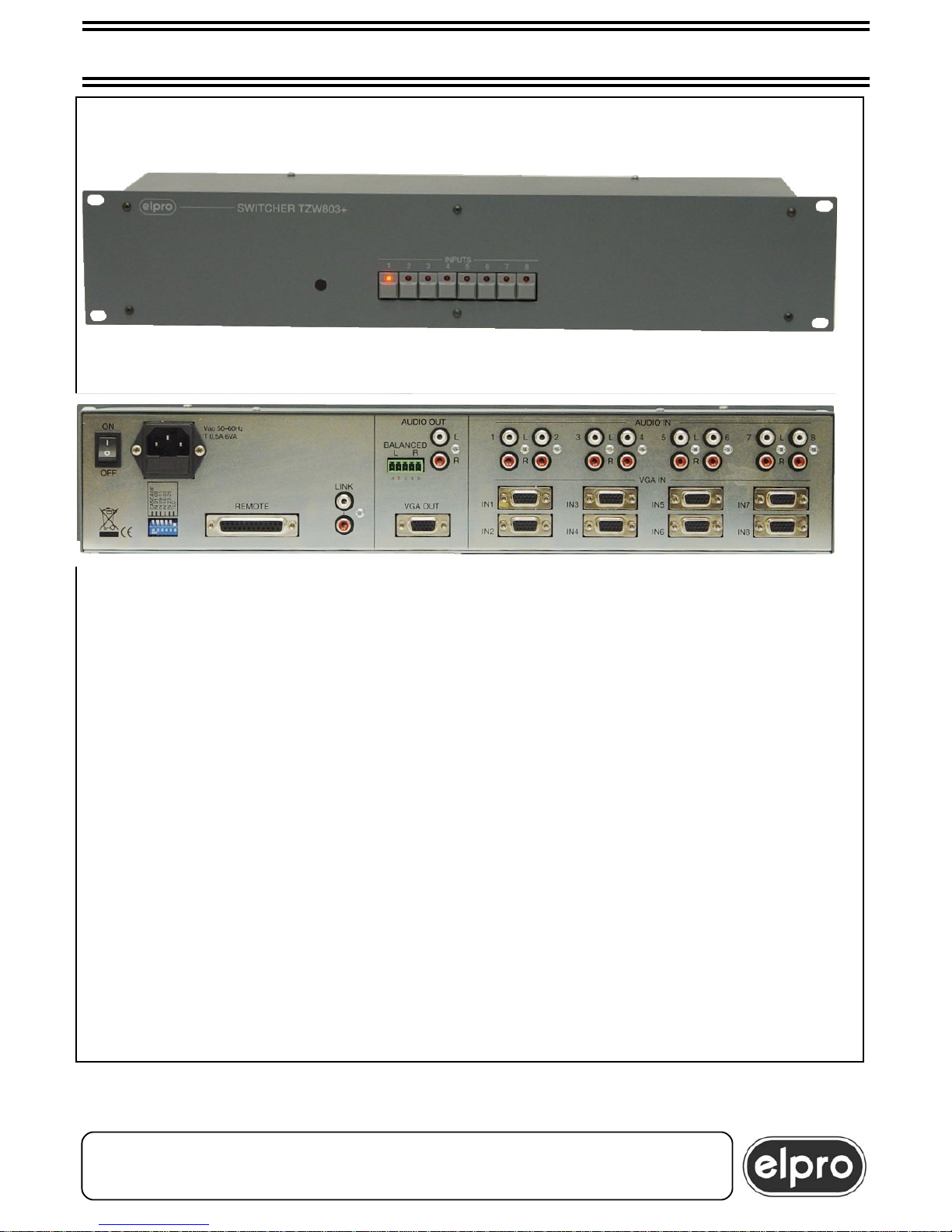
TZW803+ M 06/04/07
TZW803+ 8x1 VGA/XGA & AUDIO SWITCHER
ELPRO Video Labs s.r.l.
St.da della Pronda, 45/B 10142 Torino ITALY
Tel.+39 0117701583 – Fax +39 011703751
1
• Amplified output for SVGA 20mt cable
• Can be connected in cascade
• Autoswitching, autosequencing and mute
• 400 MHz bandwidth
• Remote control with dry contacts
• Tally
• RS232 by computer
• Internal power unit
Page 2

INSTALLATION AND USE OF THE TZW 803+ UNIT
INDEX
1.0Overview
2.0Power supply
3.0Settings
4.0Installation
5.0Local control
6.0Control by dry contacts and tally
7.0Ancillary functions
8.0Control from computer
9.0CASCADE option and settings
10.0Technical data
11.0Notes
Please read this manual carefully before installing the TZW 803+.
The manufacturers shall not be answerable for damage resulting from the use, proper or
otherwise, of their products.
Product data and specifications are subject to change without prior notice.
TZW803+ 8x1 VGA/XGA & AUDIO SWITCHER
ELPRO Video Labs s.r.l.
St.da della Pronda, 45/B 10142 Torino ITALY
Tel.+39 0117701583 – Fax +39 011703751
2
Page 3
1.0 OVERVIEW
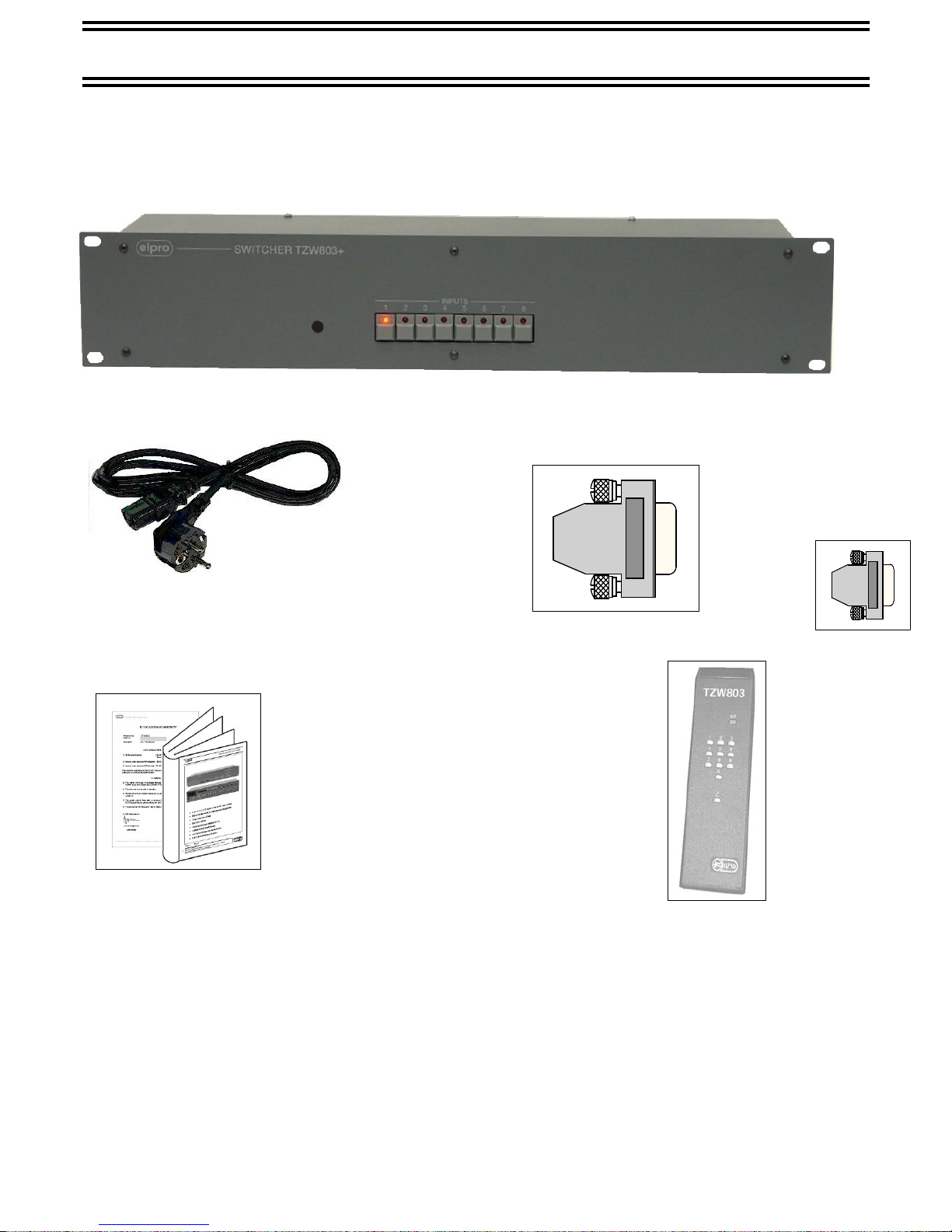
Thank you for choosing this product. Check that the following items are included in the
packaging:
TZW803+ 8x1 VGA/XGA & AUDIO SWITCHER
− The TZW803+ unit
The TZW803+ unit is an 8X1 Switcher for VGA/XGA signals with associated
stereo audio.
Excellent technical characteristics and generously scaled components make this
unit particularly suited for harsh, continuous use.
The main areas of application include showrooms, airports, museums, large
department stores and hotels.
− The mains cable
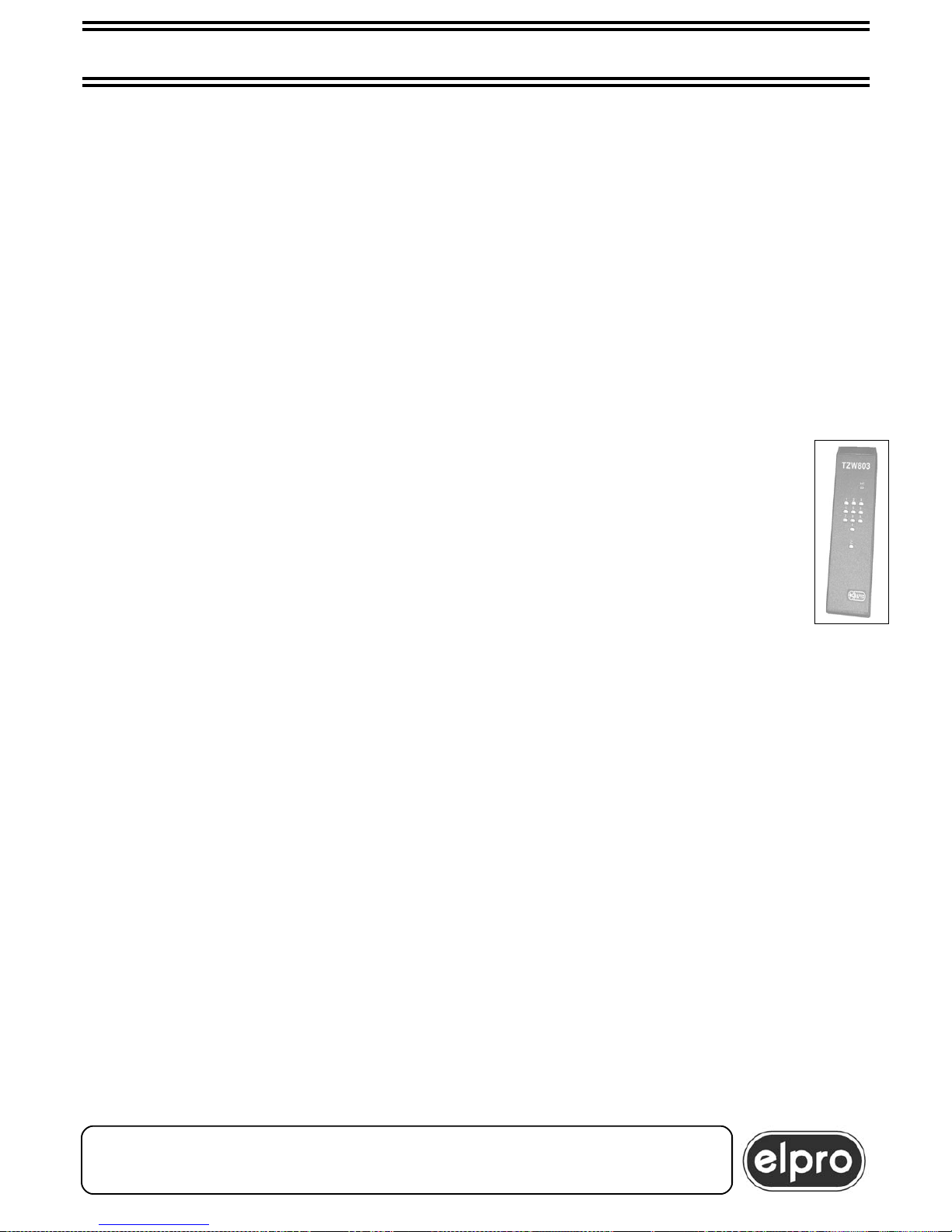
- IR control
- sub-D 15v.m. vol. conn.
with boot code ADP 010
- This handbook and the conformity
certificate
Page 4

TZW803+ 8x1 VGA/XGA & AUDIO SWITCHER
ELPRO Video Labs s.r.l.
St.da della Pronda, 45/B 10142 Torino ITALY
Tel.+39 0117701583 – Fax +39 011703751
4
TZW803+ CONNECTION – 6 SOURCES 1 DESTINATION
Page 5

2.0 POWER SUPPLY
The TZW803+ unit must be powered at 230 Vac 50Hz using the cable provided.
The cable must be fitted in the related panel plug on the left at the back of the unit.
The panel plug is equipped with a fuse-holder for 5X20 fuses. In the event of fuse
burnout, the replacement fuse must be of the same value, as specified on the back of the
unit (T 0.5A).
ATTENTION
All operations must be performed by specialized personnel
who must be made aware of electric shock hazards.
In some countries the current plug must be adapted to comply with local standard types.
Wires can be identified according to the following code:
-Brown PHASE (Marked with the letter L, may be red)
-Blue NEUTRAL (Marked with the letter N, may be black )
-Yellow/Green GROUND (Marked with the letter E, may be green)
ATTENTION
Grounding is compulsory
The TZW803+ can be ordered for powering at 115Vac 60Hz.
The setting is made in factory and cannot be modified by the customer.
TZW803+ 8x1 VGA/XGA & AUDIO SWITCHER
Page 6

3.0 SETTINGS
The TZW 803+ switcher has a set of 6 dip-switches, accessible from the back of the unit,
that can be used to set and customize the unit. Five dip-switches are used to set
CASCADE functioning while the sixth enables or not the external IR remote control.
In pos. ON, default factory-set, it enables the IR remote control.
Refer to chapter 9.0 for a description of the settings.
4.0 INSTALLATION
a) Make sure that the switch on the back of the TZW803+ is set to OFF (O). Power the
device as indicated in chapter 2.0.
b) Connect the 8 sources to the sub-D 15 p. f. HD connectors with good quality VGA m/m
cables.
c) Connect the destination to the sub-D 15 p. f. HD conn. with a VGA cable with a length
of not more than 20 meters.
ATTENTION
For more than 20mt cables, it is advisable to insert
an Elpro INBOX/4 type booster
Use of Elpro cables is recommended in order to exploit
the characteristics of the compensation circuit to the full.
d) Connect the stereo audio in output from the 8 sources to the 8 RCA sockets ( AUDIO IN).
e) Tap the stereo audio in output from the RCA socket (AUDIO OUT) and / or from the
balanced audio output (BALANCED) and connect it to a sound amplification and
broadcast system.
f) Set the switch on the back of the unit to ON (I). Check that the built-in led of key 1 on
the front of the unit switches on.
TZW803+ 8x1 VGA/XGA & AUDIO SWITCHER
ELPRO Video Labs s.r.l.
St.da della Pronda, 45/B 10142 Torino ITALY
Tel.+39 0117701583 – Fax +39 011703751
6
Page 7
5.0 LOCAL CONTROL
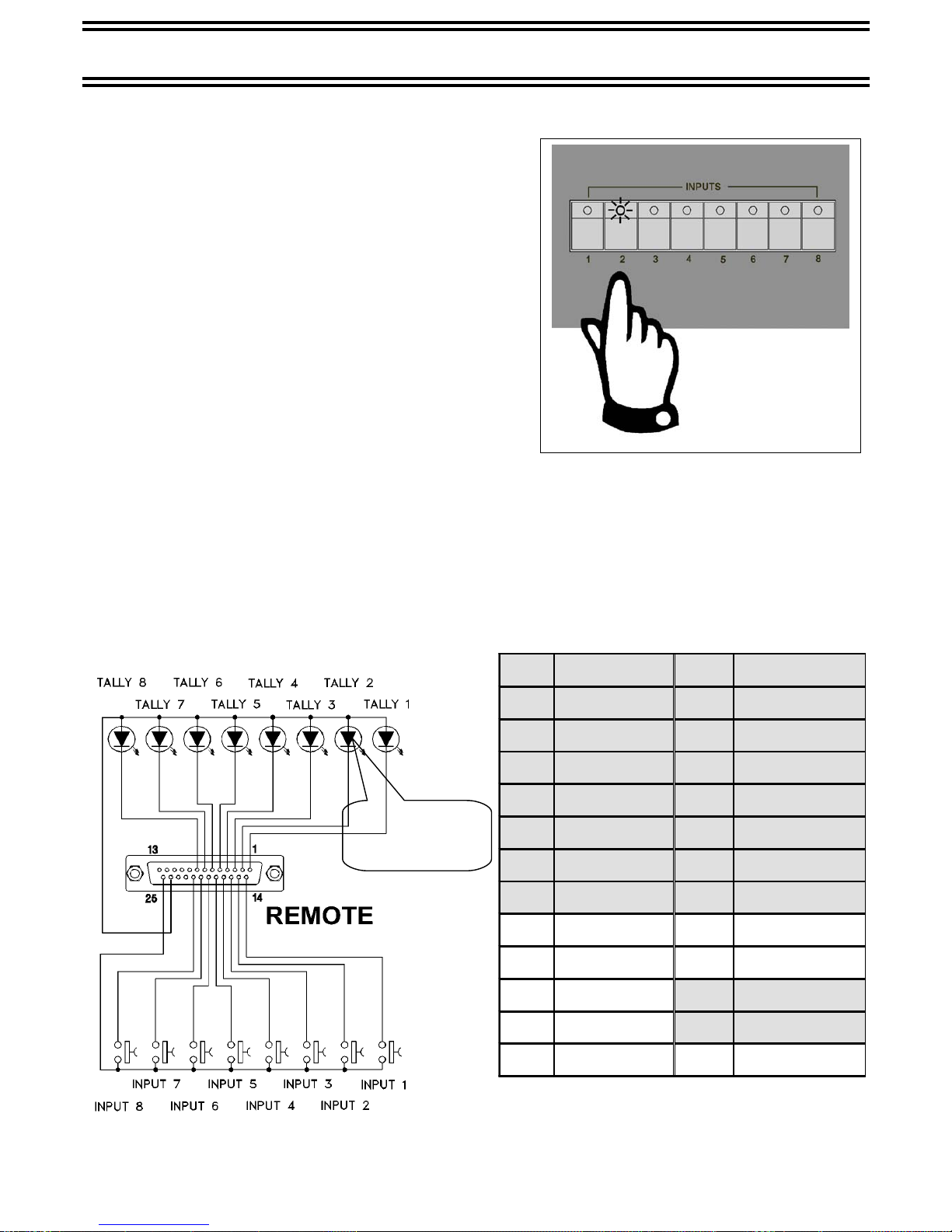
The TZW803+ switcher can be controlled using
the 8 keys on the front panel of the unit.
Switching on of the built-in led of the button
indicates which source is switched to the output.
At power-on, source 1 is switched automatically.
6.0 CONTROL BY DRY CONTACTS AND TALLY
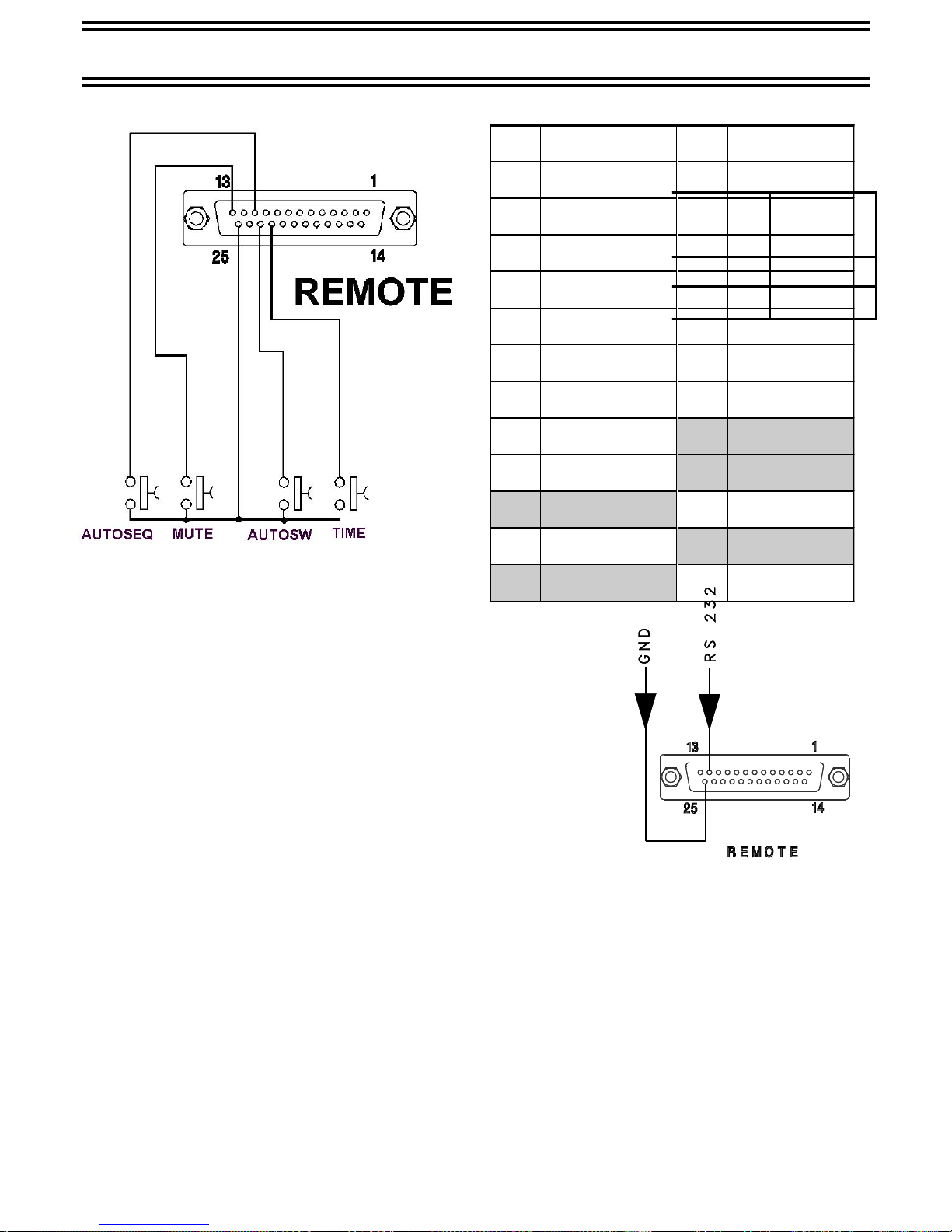
The TZW803+ is controlled using 8 dry contacts connected to the sub-D 25 v.f. REMOTE
connector on the back of the machine.
Eight external signals are provided to light on the 8 tally leds connected as indicated in
the figure below.
TZW803+ 8x1 VGA/XGA & AUDIO SWITCHER
1 TALLY 1 14 INPUT 1
2 TALLY 2 15 INPUT 2
3 TALLY 3 16 INPUT 3
4 TALLY 4 17 INPUT 4
5 TALLY 5 18 INPUT 5
6 TALLY 6 19 INPUT 6
7 TALLY 7 20 INPUT 7
8 TALLY 8 21 INPUT 8
9 22 TIME
10 23 AUTOSW
11 AUTOSEQ 24 +5 VDC
12 RS232RX 25 GND
13 MUTE - -
HIGH
EFFICIENCY
LEDS
Page 8
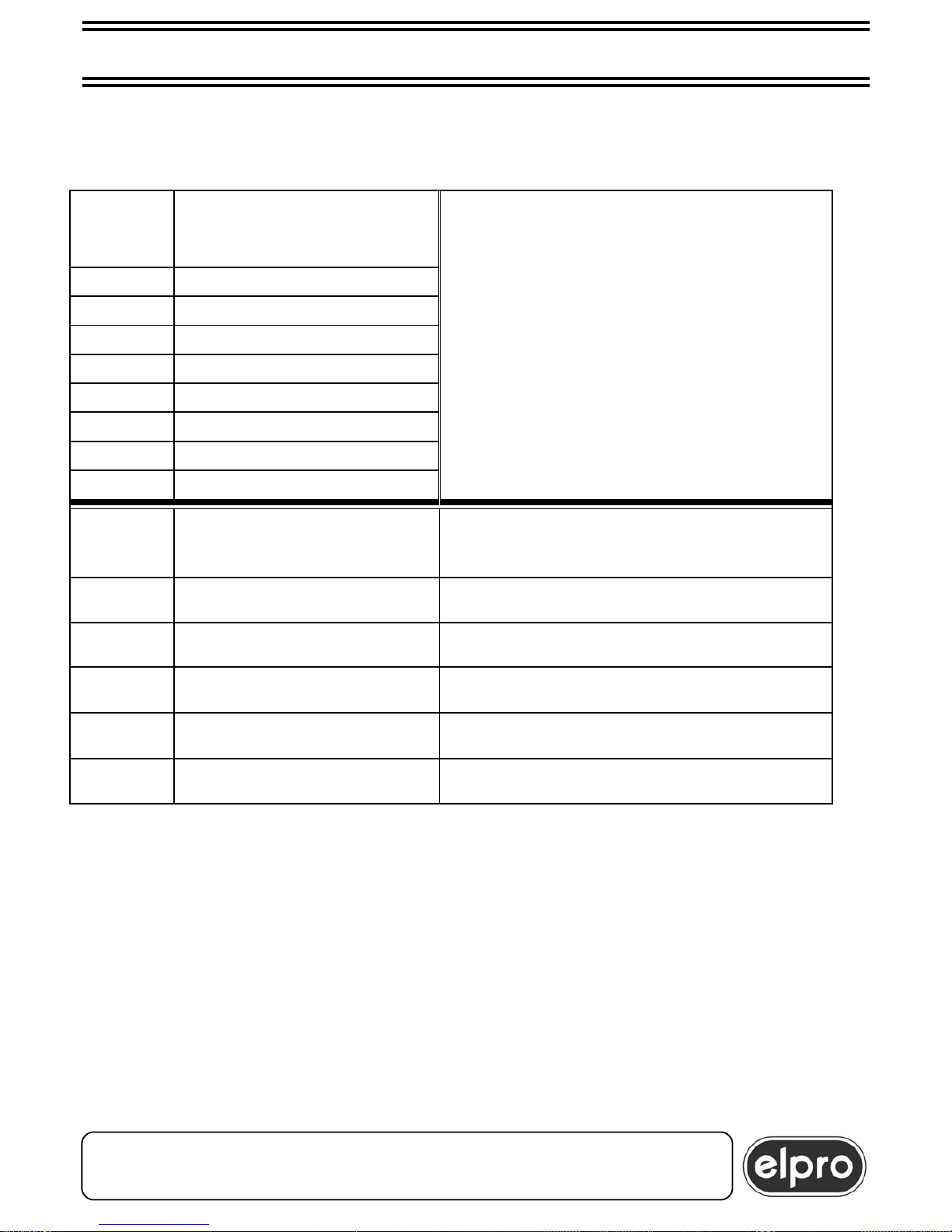
The correspondence between the code sent by the computer and the function activated
on the TZW803+ is given in the table below.
Pin #12
Sub-D
FUNCTION
31h INPUT 1
32h INPUT 2
33h INPUT 3
34h INPUT 4
35h INPUT 5
36h INPUT 6
37h INPUT 7
38h INPUT 8
Pin #12
Sub-D
FUNCTION NOTE
52h autosequence control active only for single unit
53h autoswitching control active for single unit and in cascade
54h mute video control active for single unit and in cascade
55h mute audio control active for single unit and in cascade
56h mute audio+video control active for single unit and in cascade
The AUTOSEQUENCING, AUTOSWITCHING and MUTE commands are de-activated
repeating the commands or sending the code of another command.
The AUTOSEQUENCING AUTOSWITCHING, and MUTE commands are de-activated
pressing a key on the built-in keyboard.
In this case, the input of the key pressed will be switched on the output.
TZW803+ 8x1 VGA/XGA & AUDIO SWITCHER
ELPRO Video Labs s.r.l.
St.da della Pronda, 45/B 10142 Torino ITALY
Tel.+39 0117701583 – Fax +39 011703751
10
Page 9

7.0 ANCILLARY FUNCTIONS
The TZW803+ switcher features three ancillary functions that are activated with 3 dry
contacts connected to the sub-D 25 v. f. REMOTE connector on the back of the machine.
The function remains active as long as the related pin is at ground (pin 25).
7.1 AUTOSEQUENCING
All 8 sources are switched on the output at a rate of 4 or 10 seconds each.
The time of 4 or 10 seconds is established by pin 22 (TIME) of the sub-D 25 v. f. REMOTE
conn. on the back of the machine.
Contact open is for 4 sec. time
If an input is selected during autosequencing (using the keyboard, remote control or PC),
the input selected is connected and the autosequencing function restarts from that input.
7.2 AUTOSWITCHING
The active source is routed on the VGA/XGA output.
If more than one source is active, source 1 has the highest priority followed by source 2
and so on.
If an input is selected during autoswitching (using the keyboard, remote control or PC),
the input selected is connected and the autoswitching function is interrupted.
7.3 RGB MUTE
No source is switched on the output.
This capability is particularly useful when the images to be displayed on the computer are
to be prepared between one switching and the next.
ATTENTION
AUTOSEQUENCING, AUTOSWITCHING and RGB MUTE
are mutually exclusive. Priority is as follows:
RGB MUTE
AUTOSWITCHING
AUTOSEQUENCING
With the CASCADE option active, the three ancillary functions
controlled by dry contacts are excluded.
However, Autoswitching and Mute can be controlled from the computer.
TZW803+ 8x1 VGA/XGA & AUDIO SWITCHER
ELPRO Video Labs s.r.l.
St.da della Pronda, 45/B 10142 Torino ITALY
Tel.+39 0117701583 – Fax +39 011703751
8
Page 10
8.0 COMPUTER CONTROL
The TZW803+ switcher can be computer
controlled as regards all the functions described, simply by
sending a hexadecimal character
Transmission is RS 232, 8 bits,
1 stop bit , no parity.
Baud rate is 9600.
The character must be sent to pin #12 of the sub-D 25 v. f.
REMOTE conn. connected on the back of the machine.
The ground is pin #25.
TZW803+ 8x1 VGA/XGA & AUDIO SWITCHER
1 TALLY 1 14 INPUT 1
2 TALLY 2 15 INPUT 2
3 TALLY 3 16 INPUT 3
4 TALLY 4 17 INPUT 4
5 TALLY 5 18 INPUT 5
6 TALLY 6 19 INPUT 6
7 TALLY 7 20 INPUT 7
8 TALLY 8 21 INPUT 8
9 22 TIME
10 23 AUTOSW
11 AUTOSEQ 24 +5 VDC
12 RS232RX 25 GND
13 MUTE - -
Pin # 22
Sub - D
TIME
1 (free) 4 sec.
0 (GND) 10 sec
Page 11
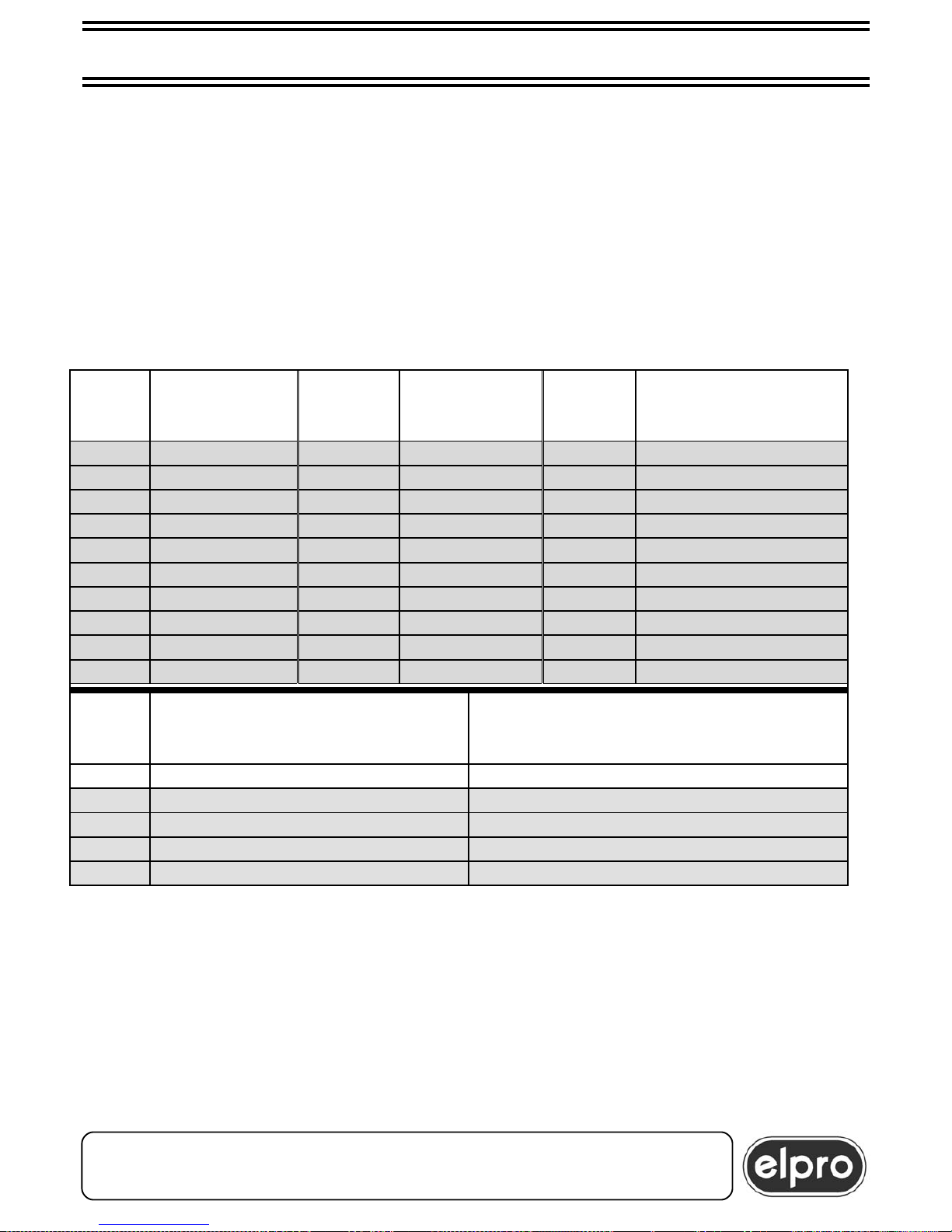
9.1 COMMANDS IN CASCADE
In CASCADE functioning, the source to be switched on the output can be selected using
the built-in keyboard of each unit or using the computer.
ATTENTION
In CASCADE functioning, pins 12 (RS232) and 25 (GND) of the
REMOTE connectors must be joined together and connected to the
transmitted signal of the host computer
Pin
#12
Sub-D
FUNCTION
Pin #12
Sub-D FUNCTION
Pin #12
Sub-D
FUNCTION
31h INPUT 1 3Bh INPUT 11 45h INPUT 21
32h INPUT 2 3Ch INPUT 12 46h INPUT 22
33h INPUT 3 3Dh INPUT 13 47h INPUT 23
34h INPUT 4 3Eh INPUT 14 48h INPUT 24
35h INPUT 5 3Fh INPUT 15 49h INPUT 25
36h INPUT 6 40h INPUT 16 4Ah INPUT 26
37h INPUT 7 41h INPUT 17 4Bh INPUT 27
38h INPUT 8 42h INPUT 18 4Ch INPUT 28
39h INPUT 9 43h INPUT 19 4Dh INPUT 29
3Ah INPUT 10 44h INPUT 20
Pin
#12
Sub-D
FUNCTION NOTE
52h autosequence control active only for single unit
53h autoswitching control active for single unit and in cascade
54h mute video control active for single unit and in cascade
55h mute audio control active for single unit and in cascade
56h mute audio+video control active for single unit and in cascade
TZW803+ 8x1 VGA/XGA & AUDIO SWITCHER
ELPRO Video Labs s.r.l.
St.da della Pronda, 45/B 10142 Torino ITALY
Tel.+39 0117701583 – Fax +39 011703751
12
Page 12
9.0 CASCADE OPTION AND SETTINGS
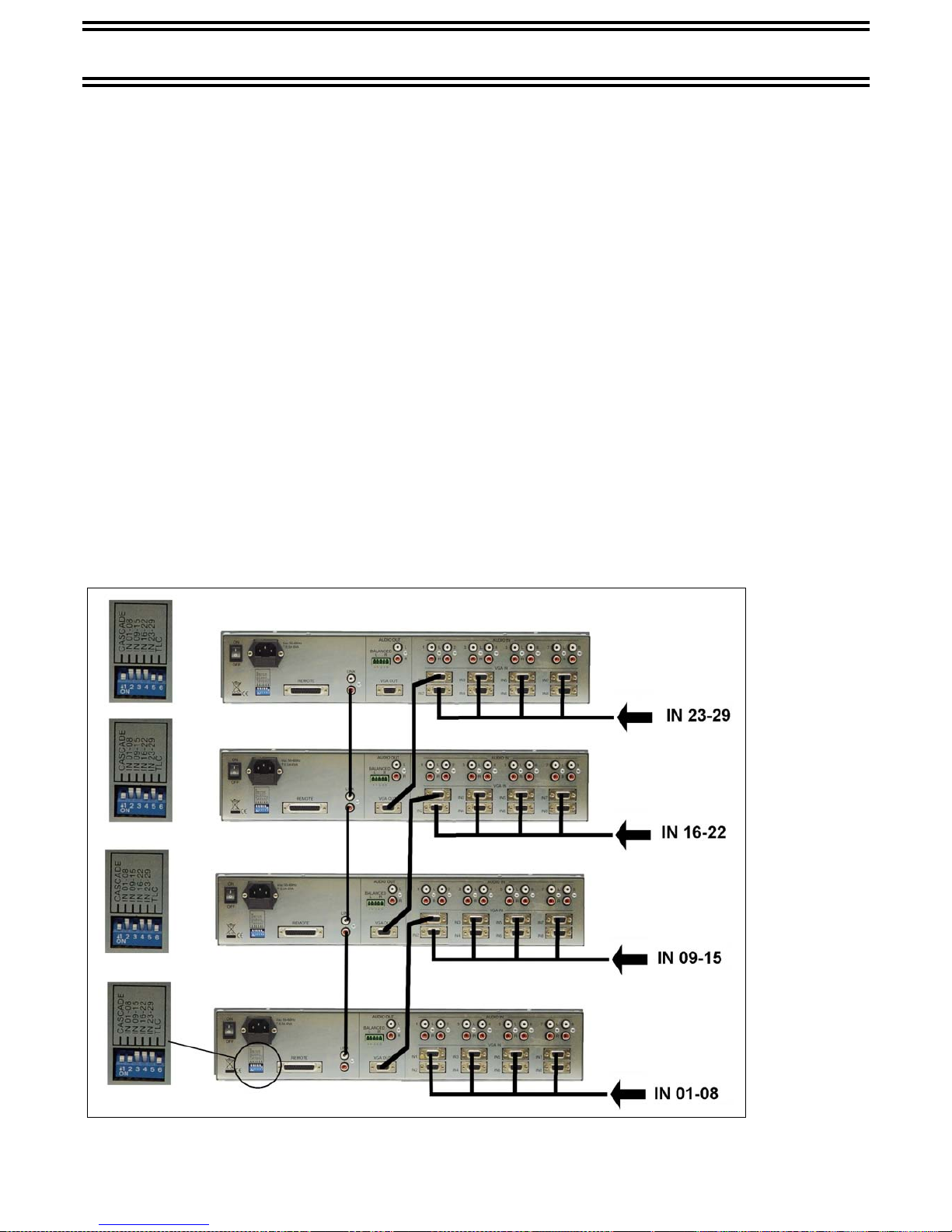
The TZW803+ switcher features a CASCADE option that permits connection in series of
4 units to establish a 29x1 selector.
ATTENTION
In the CASCADE connection, band and technical
characteristics are no longer guaranteed.
In the case of CASCADE connection, the output of the first TZW803+ must be connected
to input 1 of the second TZW803+ and so on.
Using cables terminated with RCA plugs, connect together the LINK connectors present
on the back of the unit.
CASCADE functioning is activated by setting a switch that is accessible from the back of
the unit as indicated in the figure below (ENABLE CASCADE).
Each unit must also be customized according to its position in the chain with the setting of
another switch as indicated in the figure below.
ATTENTION
With the CASCADE option active, the three ancillary functions are
excluded except for RGB MUTE and computer-controlled AUTOSWITCHING.
ATTENTION
The last dip-
switch (pos.
6), if set to
OFF, makes
it possible to
disable
reception of
the
commands
from the IR
remote
control.
TZW803+ 8x1 VGA/XGA & AUDIO SWITCHER
Page 13

10.0 TECHNICAL DATA
Video:
Inputs :analog 700 mVpp with HDD 15p.f.
Coupling :DC
Crosstalk(worst case) :50 dB at 40 MHz
Outputs :one, precompensated with HDD 15p.f.
Bandwidth :400 MHz
SYNCHRONISM :H+V separated, TTL level, high Z
OTHER SIGNALS :ST, TTL level, high Z
:SDA,SCL,TTL level, high Z, bidirectional
Audio:
Input Coupling :AC, unbalanced
Input Impedance :47 KΩ
Input level :+11 dBm Max.
Gain :-0.5 dB, +6 dB on the bal. outpou
Frequency response :-1 dB from 40Hz to 20 KHz
Crosstalk :60 dB at 5 KHz
Distortion :<0.03% at 0 dBm with 10K load
Output load :10K nominal, 600 Ohm minimum
Output impedance :100 Ohm
Audio inputs/outputs :stereo RCA sockets
Main input :230Vac 50Hz
Power consumption :6VA
Size (WXDXH) :483X210X88
Weight :2.5Kg
Operating temp. range:0÷45°
Safety :according to EN60065
EMC :according to EN55103-1 and EN55103-2
CE Mark
TZW803+ 8x1 VGA/XGA & AUDIO SWITCHER
ELPRO Video Labs s.r.l.
St.da della Pronda, 45/B 10142 Torino ITALY
Tel.+39 0117701583 – Fax +39 011703751
13
Page 14
11.0 NOTES
This product is guaranteed for 2 years from the date of purchase.
The guarantee does not cover damage to the product caused
by improper use or operations effected by third parties
For the duration of guarantee Elpro shall repair faulty units free of charge.
Faulty units must be sent with a standard waybill and CARRIAGE PAID to Elpro’s Turin
works.
Repaired units shall be returned CARRIAGE FORWARD to the consignee.
Faulty units that are no longer covered by guarantee shall be repaired by Elpro EX
WORKS Turin and the work shall be charged to the customer.
For any problems regarding installation of theTZW 803+
call the Elpro hot line .+39 0117701583
or send an E-mail to: [email protected]
TZW803+ 8x1 VGA/XGA & AUDIO SWITCHER
ELPRO Video Labs s.r.l.
St.da della Pronda, 45/B 10142 Torino ITALY
Tel.+39 0117701583 – Fax +39 011703751
14
 Loading...