

Page 1
ELPRO BROADCAST s.r.l.
Strada della Pronda 17 - TORINO (ITALY)
Tel. 0117071955 - FAX 011706210
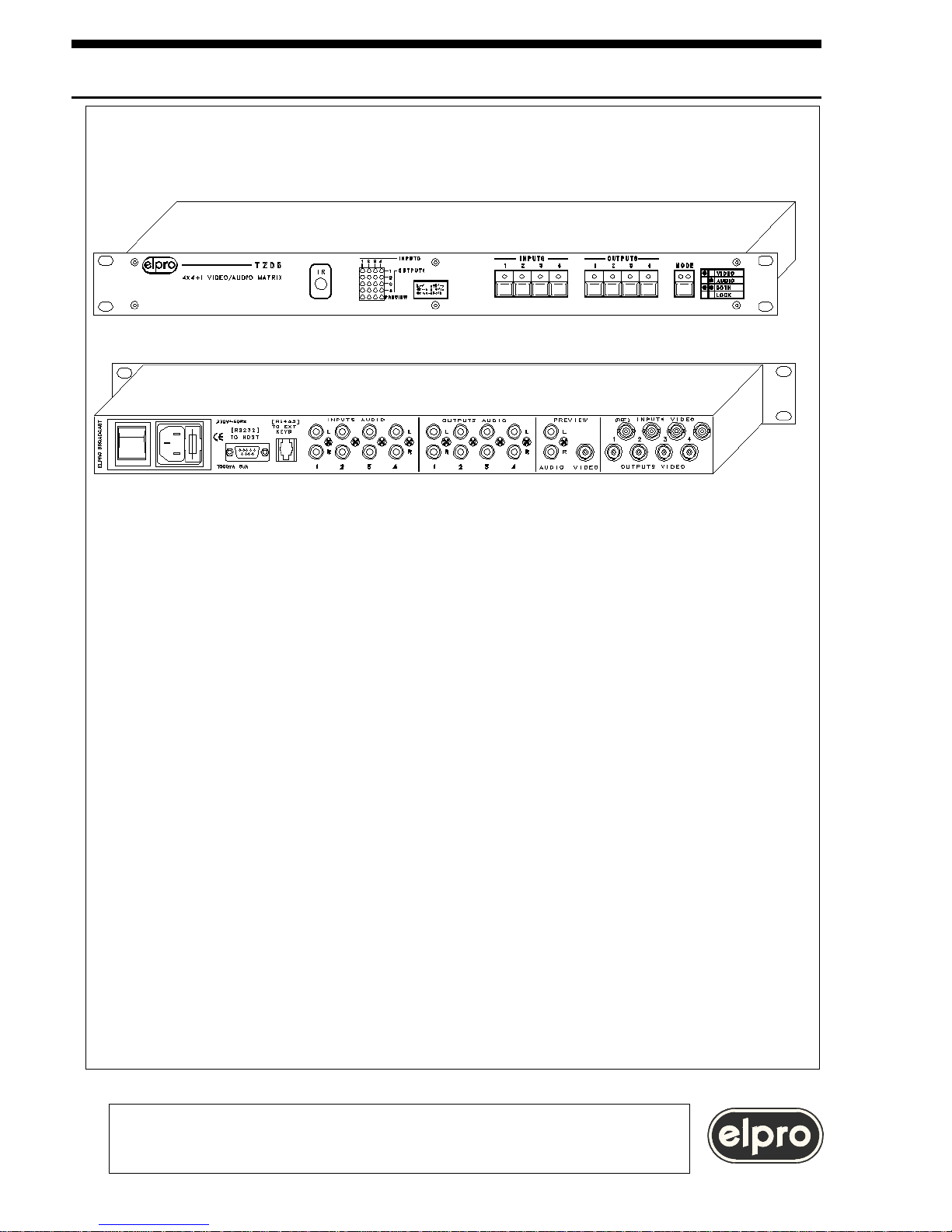
TZ05 4X4+1 VIDEO AND AUDIO MATRIX
1
• Switching in the frame interval
• Fixed preview output
• Only VIDEO, only AUDIO, AFV
• Customizable default configuration
• 4 presets that can be recalled via keypad, 8 from RS232
• IR remote control (optional)
Page 2

INDEX
1.0 Overview
2.0 Power supply
3.0 Settings
4.0 Installation
5.0 Local control
6.0 IR remote control
7.0 Computer control
8.0 Technical data
9.0 Notes
When installing the TZ05 unit, please read this handbook carefully.
The manufacturer shall not be held responsible for any damage or injury caused
by use, even correct, of its products.
The data and characteristics of the product may be modified without prior notice
i
i
L
Z
CR
0D
INSTALLATION AND USE OF THE TZ05
TZ05 4X4+1 VIDEO AND AUDIO MATRIX
ELPRO BROADCAST s.r.l.
Strada della Pronda 17 - TORINO (ITALY)
Tel. 0117071955 - FAX 011706210
2 15
Page 3

1.0 OVERVIEW
Thank you for buying this product. Check the contents of the packaging carefully.
It contains:
TZ05 4X4+1 VIDEO AND AUDIO MATRIX
ELPRO BROADCAST s.r.l.
Strada della Pronda 17 - TORINO (ITALY)
Tel. 0117071955 - FAX 011706210
The TZ05 is a 4X4 video and stereo audio matrix with a fifth fixed preview output.
Certain characteristics of the unit, such as the possibility of breakaway, computer
control and the possibility of saving and recalling 8 configurations, 4 of which
directly form the keypad, make the TZ05 very useful for small presentations in
teaching and medical systems.
- The mains cable
- This handbook
- The TZ05 unit
- The IR remote control
(optional)
Page 4
2.0 POWER SUPPLY
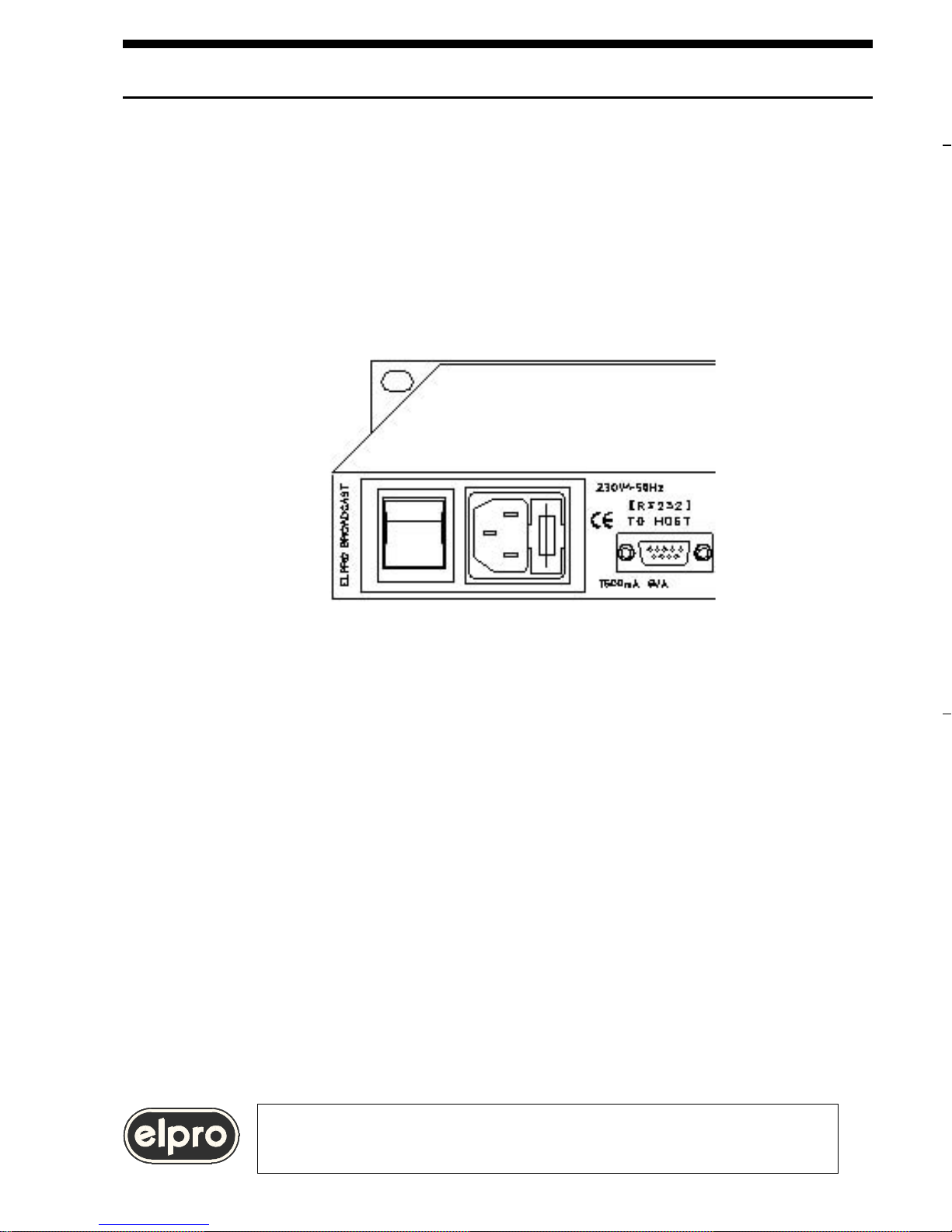
The TZ05 must be powered at 230 Vac 50Hz using the cable provided. The cable
must be terminated in the related panel plug on the left at the back of the unit.
The panel plug is complete with fuse-holder for 5X20 fuses.
If the fuse blows, replace with a fuse with the same rating as specified on the
back of the unit. (T 500mA).
WARNING
All operations must be carried out by qualified personnel only
who must be informed of the risks of electric shock
In some countries, the power plug must be adapted to local standards. The wires
are identified according to the following coding:
- Brown PHASE (Identified with the letter L, may be red)
- Blue NEUTRAL (Identified with the letter N, may be black)
- Yellow/Green GROUND (Identified with the letter E, may be green)
WARNING
A ground connection is mandatory.
RNN
ACK
NACK
vXX
ACK
NACK
TZ05 4X4+1 VIDEO AND AUDIO MATRIX
ELPRO BROADCAST s.r.l.
Strada della Pronda 17 - TORINO (ITALY)
Tel. 0117071955 - FAX 011706210
4 13
Page 5

NACK (Hex 15) if transmission errors have been detected
TZ05 4X4+1 VIDEO AND AUDIO MATRIX
ELPRO BROADCAST s.r.l.
Strada della Pronda 17 - TORINO (ITALY)
Tel. 0117071955 - FAX 011706210
Page 6

5.0 LOCAL CONTROL
5.1 Switching of the signals
The 4 video and audio outputs of the unit and also the video and audio preview
outputs can be controlled from the console on the front panel.
The "MODE" button is used to select operating mode:
-Audio only (green led on)
-Video only (red led on)
-AFV (both leds on)
-Lock (both leds off, keypad locked).
To perform switching, the INPUTS-OUTPUTS sequence must be complied with,
i.e. first of all select an input and then the output to which to switch the input
selected. As regards operations:
the 4 buttons with built-in led called "INPUTS" are used to select a source. When
a source is selected, it is immediately switched to the PREVIEW output.
the 4 "OUTPUTS" buttons are used to switch the previously selected input to the
output desired.
If AFV (Audio follows video) MODE has been set, the video and audio of the input
are switched to the preview output and then to the output desired; when working
in "video only" mode, only the video is switched. The same applies when working
in "audio only" mode.
Machine status is monitored on the led type matrix on the front panel of the unit.
The color of the led indicates the type of signal on the output:
-green indicates audio
-red indicates video
-orange indicates audio and video (AFV or Audio Follows
Video).
VXXYY
must
ACK
NACK
AXXYY
04)
ACK
NACK
6 11
TZ05 4X4+1 VIDEO AND AUDIO MATRIX
ELPRO BROADCAST s.r.l.
Strada della Pronda 17 - TORINO (ITALY)
Tel. 0117071955 - FAX 011706210
Page 7
5.2 Keypad commands
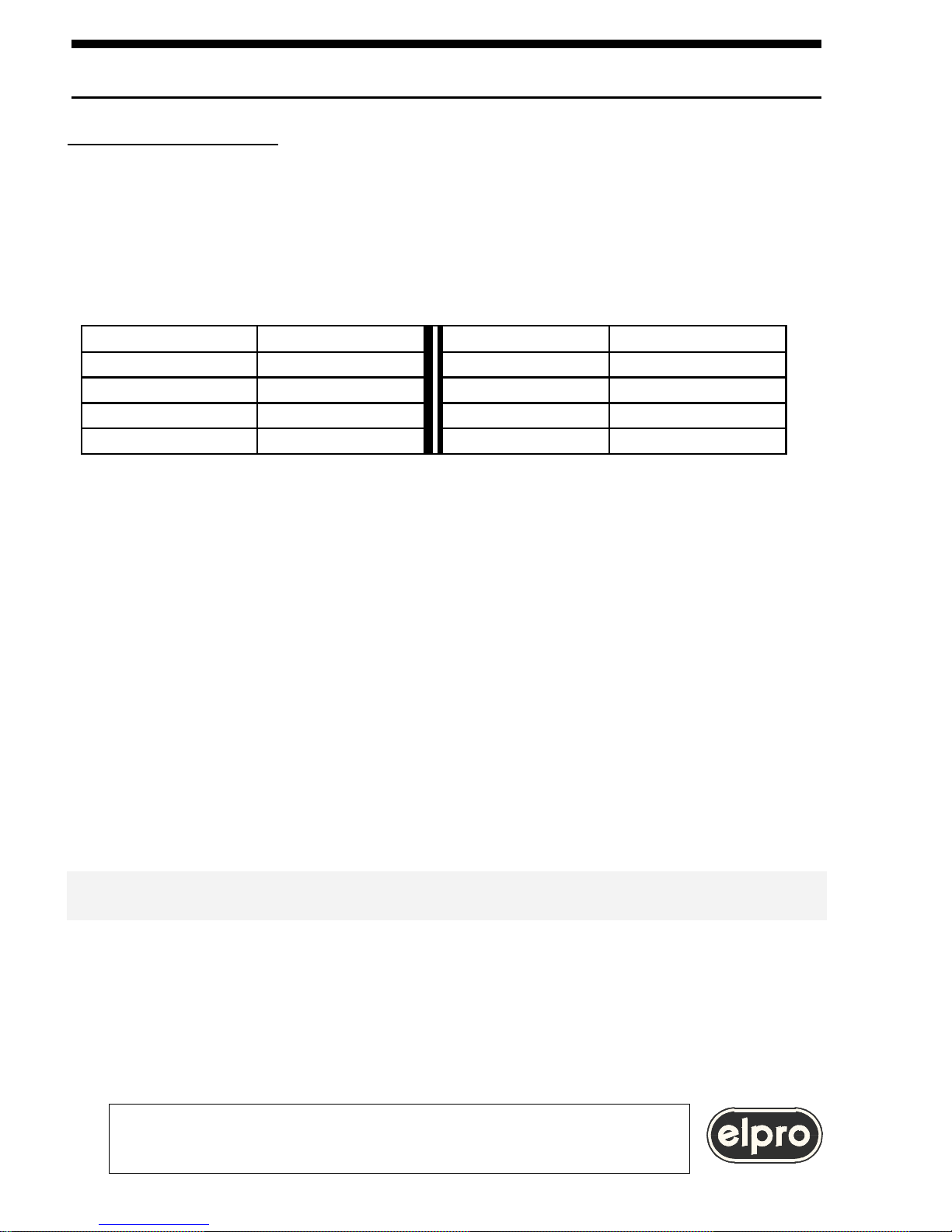
Some commands of the TZ05 unit can be performed by pressing a combination of
keys. Amongst others, 4 machine states can be saved and then recalled.
It is also possible to save a default configuration so that the machine is set to this
at power-on Subsequent recalls of presettings modify this setting.
Button Function Button Function
Mode+Input1 Save status 1 Mode+Output1 Recall status 1
Mode+Input2 Save status 2 Mode+Output2 Recall status 2
Mode+Input3 Save status 3 Mode+Output3 Recall status 3
Mode+Input4 Save status 4 Mode+Output4 Recall status 4
The above presets are four of the eight that can be recalled from PC.
As explained in paragraphs 7.6 and 7.7, 8 configurations numbered from 01 to 08
can be set and recalled from PC.
The first 4 can be accessed not only from the keypad according to the method
described above but also using the IR remote control.
WARNING
Recall of a preset from the keypad, from computer or using the IR remote
control also sets the same configuration as restart
Mode for 2 sec. Save machine status (A flash of the two leds integrated in the
MODE button indicates saving has been completed).The next
time it is switched on, the TZ05 will be set to this status until a
preset is recalled from the keypad or computer.
Subsequent recalls of presets from the keypad or computer modify the default
configuration which will correspond to the last preset recalled.
MODE at power-on Enabling of reception from IR remote control
MODE at power-on Disabling of reception from IR remote control
TZ05 4X4+1 VIDEO AND AUDIO MATRIX
ELPRO BROADCAST s.r.l.
Strada della Pronda 17 - TORINO (ITALY)
Tel. 0117071955 - FAX 011706210
Page 8

6.0 INFRARED REMOTE CONTROL
The unit is equipped with a receiver for the infra-red remote control. This must be
ordered separately.(Code IRTZ05).
WARNING
The remote control is of the self-learning type. After inserting the batteries
and each time these are changed, press the "Set" key for a few seconds
WARNING
IR remote control reception is enabled and disabled
holding down the MODE button of TZ05 at power-on
The TZ05 is factory set with the remote control enabled
The following functions can be carried out using the IR remote control:
Save + IN 1÷4 Save a configuration (together with the IN keys 1÷4)
Recall + OUT 1÷4 Recall a configuration (together with the OUT keys 1÷4)
WARNING
Recall of a preset from the keypad, from computer or using
the remote control also sets the same configuration as restart
IN keys 1÷4 Input selection (or selection N° Save )
OUT keys 1÷4 Output selection (or selection N° Recall)
A, V, A+V, Lock Setting of switching mode
MUTE ON OFF Sets Mute on the monitoring audio output
WARNING
The INPUTS-OUTPUTS sequence must be complied with also using the
remote control, i.e. select first of all the source and then the destination.
diagram:
TZ05 4X4+1 VIDEO AND AUDIO MATRIX
ELPRO BROADCAST s.r.l.
Strada della Pronda 17 - TORINO (ITALY)
Tel. 0117071955 - FAX 011706210
9
8
TO TZ05
TO COMPUTER
Page 9
7.0 COMPUTER CONTROL
All the functions of the TZ05 matrix can be controlled through transmission and
reception of strings of hexadecimal and ASCII characters by a computer.
Data exchange via RS232 is based on the following procedure:
8 data bits,
no parity,
1 stop bit
speed of 9600 baud.
7.1 Physical connection
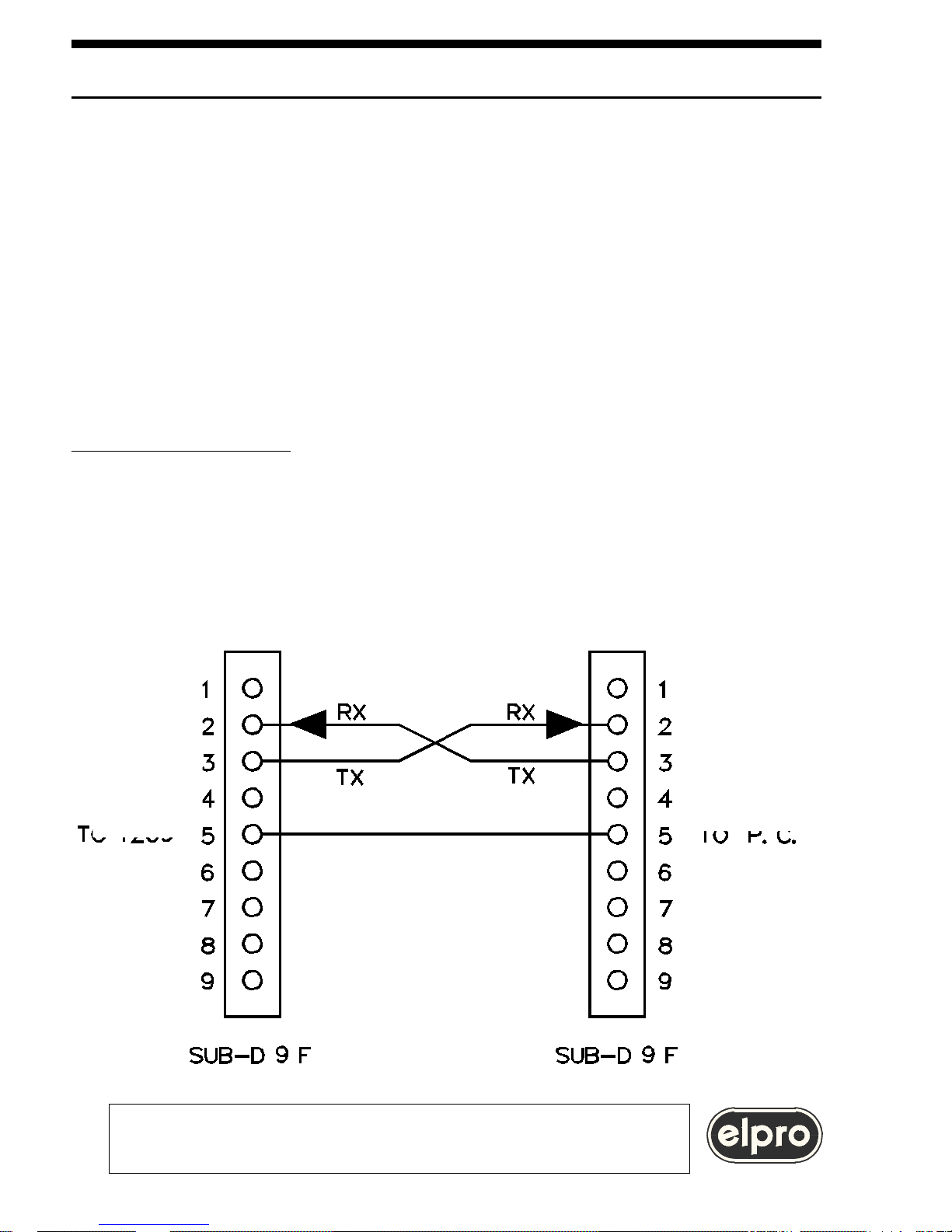
The physical connection must be made with a cable according to the attached
diagram:
TZ05 4X4+1 VIDEO AND AUDIO MATRIX
ELPRO BROADCAST s.r.l.
Strada della Pronda 17 - TORINO (ITALY)
Tel. 0117071955 - FAX 011706210
9
TO TZ05
TO COMPUTER
GND
Page 10

7.2 Video and audio switching command
The host must send the following sequence:
BXXYY followed by CR where: B is the character Hex 42
XX is the output (from 01 to
04)
YY is the video and audio input (from 01 to
04)
Warning: if YY is 00 the video output will be set to high impedance
the audio output will be set to 0 Volt
Example: to switch video and audio input 3 on output 4, the following characters
must be sent on line: 42 30 34 30 33 0D
A video input and an audio input coming from different sources can be rotated
towards a video and audio output. The sequence of the characters becomes:
BXXYYZZ followed by CR where: B is the character Hex 42
XX is the output (from 01 to 04)
YY is the video input (from 01 to 04)
ZZ is the audio input (from 01 to 04)
Warning: if YY is 00 the video output will be set to high
impedance
If ZZ is 00 the audio output will be set to 0 Volt
Example: To switch the video of input 1 and the audio of input 3 on output 4,
the following characters must be sent on line: 42 30 34 30 31 30 33
0D
The TZ05 matrix replies:
ACK (Hex 06) if the command has been performed correctly
NACK (Hex 15) if transmission errors have been detected
5.2 Keypad commands
Mode+Input1
Mode+Input2
Mode+Input3
Mode+Input4
Mode for 2 sec.
10 7
TZ05 4X4+1 VIDEO AND AUDIO MATRIX
ELPRO BROADCAST s.r.l.
Strada della Pronda 17 - TORINO (ITALY)
Tel. 0117071955 - FAX 011706210
Page 11

7.3 Video switching command
The host must send the following sequence:
VXXYY followed by CR where: V is the character Hex 56
XX is the output (from 01 to 04)
YY is the video input (from 01 to 04)
Warning: if YY is 00 the video output will be set to high impedance
Example: To bring video output 2 to high impedance, the following characters
must
be sent on line: 56 30 32 30 30 0D
The TZ05 matrix replies:
ACK (Hex 06) if the command has been performed correctly
NACK (Hex 15) if transmission errors have been detected
7.4 Audio switching command.
The host must send the following sequence:
AXXYY followed by CR where: A is the character Hex 41
XX is the output (from 01 to
04)
YY is the audio input (from 01 to 04)
Warning: if YY is 00 the audio output will be set to 0 Volt
Example: To bring audio output 2 to 0 Volt, the following characters must be sent
on line: 41 30 32 30 30 0D
The TZ05 matrix replies:
ACK (Hex 06) if the command has been performed correctly
NACK (Hex 15) if transmission errors have been detected
TZ05 4X4+1 VIDEO AND AUDIO MATRIX
ELPRO BROADCAST s.r.l.
Strada della Pronda 17 - TORINO (ITALY)
Tel. 0117071955 - FAX 011706210
Page 12

7.5 STATUS request
The host must send the following sequence:
D followed by CR where: D is the character Hex 44
The matrix replies: YY Video input present on bus 1 (from 01 to 04)
ZZ Audio input present on bus 1 (from 01 to 04)
YY Video input present on bus 2 (from 01 to 04)
ZZ Audio input present on bus 2 (from 01 to 04)
YY Video input present on bus 3 (from 01 to 04)
ZZ Audio input present on bus 3 (from 01 to 04)
YY Video input present on bus 4 (from 01 to 04)
ZZ Audio input present on bus 4 (from 01 to 04)
CR
WARNING
If the matrix replies 00 (or 30 30 on line), this means
that that output is at high impedance in the case of the video
and at 0 Volts in the case of the audio.
7.6 Creation of a Preset
The TZ05 can create and perform up to 8 internal presets. A preset is a
predefined configuration of 8 switching points, 4 video and 4 audio, saved in the
memory and which can be recalled at any time.
The presets are created from the current status
of the matrix and are maintained
in the case of a blackout.
The host must send the following sequence:
SNN followed by CR where: S is the character Hex 53
NN is the status number (from 01 to 08)
Example: If preset 5 is to be assigned to the current state of the matrix, the host
will send the following sequence on line: 53 30 35 0D
The TZ05 matrix replies:
ACK (Hex 06) if the command has been performed correctly
NACK
TZ05 4X4+1 VIDEO AND AUDIO MATRIX
ELPRO BROADCAST s.r.l.
Strada della Pronda 17 - TORINO (ITALY)
Tel. 0117071955 - FAX 011706210
12 5
Page 13

7.7 Recall of a preset
A previously stored preset can be activated.
The host must send the following sequence:
RNN followed by CR where: R is the character Hex 52
NN is the preset number (from 01 to 08)
Example: If the preset identified by the number 5 is to be recalled, the host will
send the following sequence on line: 52 30 35 0D
The TZ05 matrix replies:
ACK (Hex 06) if the command has been performed correctly
NACK (Hex 15) if transmission errors have been detected
WARNING
Remember that presets 01 to 04 can be saved and
recalled also using the keypad and remote control
If a preset has been recalled, at subsequent power-ons
the unit will be set to the same status.
7.8 Video preview command
The TZ05 connects a video input to the preview output.
The host must send the following sequence:
vXX followed by CR where: v is the character Hex 76
XX is the video input (from 01 to 04)
Example: To switch video input 4 to the preview output, the host will send the
following sequence on line: 76 30 34 0D
The TZ05 matrix replies:
ACK (Hex 06) if the command has been performed correctly
NACK (Hex 15) if transmission errors have been detected
TZ05 4X4+1 VIDEO AND AUDIO MATRIX
ELPRO BROADCAST s.r.l.
Strada della Pronda 17 - TORINO (ITALY)
Tel. 0117071955 - FAX 011706210
Page 14

7.9 Audio preview command
The TZ05 connects an audio input to the preview output.
The host must send the following sequence:
aXX followed by CR where: a is the character Hex 61
XX is the audio input (from 01 to 04)
Example: To switch audio input 2 to the preview output, the host will send the
following sequence on line: 61 30 32 0D
The TZ05 matrix replies:
ACK (Hex 06) if the command has been performed correctly
NACK (Hex 15) if transmission errors have been detected
7.10 Video and audio preview command
The TZ05 connects the video and audio inputs to the preview output.
The host must send the following sequence:
bXX followed by CR where: b is the character Hex 62
XX is the video input (from 01 to 04)
Example: To switch the video and audio signals of input 1 on to the preview
outputs, the host will send the following sequence on line: 62 30 31 0D
The TZ05 matrix replies:
ACK (Hex 06) if the command has been performed correctly
NACK (Hex 15) if transmission errors have been detected
1.0 OVERVIEW
It contains:
14 3
TZ05 4X4+1 VIDEO AND AUDIO MATRIX
ELPRO BROADCAST s.r.l.
Strada della Pronda 17 - TORINO (ITALY)
Tel. 0117071955 - FAX 011706210
- This handbook
- The TZ05 unit
Page 15

7.11 Firmware ID request
Firmware identification request command.
The host must send the following sequence:
i followed by CR where: i is the character Hex 69
The TZ05 matrix replies:
i (Hex 69)
L high byte identifying the firmware release (Hex 4C)
Z low byte identifying the firmware release (from Hex 30 to Hex 39)
CR
Example: if the firmware release of the TZ05 is 1.0, the matrix replies: 69 4C 30
0D
WARNING
When sending multiple command strings, wait 150msec
between one command and the next.
ELPRO BROADCAST s.r.l.
Strada della Pronda 17 - TORINO (ITALY)
Tel. 0117071955 - FAX 011706210
TZ05 4X4+1 VIDEO AND AUDIO MATRIX
Page 16
8.0 TECHNICAL DATA
Main input :230Vac 50Hz (115Vac 60Hz su richiesta)
Power consumption :8 VA
Size (WXDXH) :483X150X44
Weight :3.1 Kg
Operating temp. range :0÷45°
Safety :according to EN60065
EMC :according to EN55103-1 and EN55103-2
CE Mark
9.0 NOTES
This product is guaranteed for 2 years from the date of purchase.
If the fault in the product is due to improper use or operations
carried out by third parties, the warranty is forfeited.
During the warranty period, Elpro will repair the faulty units free of charge.
The faulty units must be sent CARRIAGE FREE to the Elpro offices in Turin with a
regular accompanying note.
The units repaired will be returned CARRIAGE FORWARD to the addressee.
Outside the warranty period, Elpro will repair the faulty units EX its Turin offices,
charging the cost of the repair to the customer.
For any problems during installation of the TZ05
use the Elpro hot-line +039 011 9348778
or E-mail: [email protected]
ELPRO BROADCAST s.r.l.
Strada della Pronda 17 - TORINO (ITALY)
Tel. 0117071955 - FAX 011706210
16
TZ05 4X4+1 VIDEO AND AUDIO MATRIX
1
•
•
•
•
•
•
VIDEO:
Input type :AC coupled
Input ret.loss :40 dB at 5MHz
Output ret.loss :40 dB at 5MHz
Frequency
response :-0.3 dB at 5 MHz;
-1 dB at 10MHz;
-3 dB at 20MHz
Differential gain :±0.3%
Differential phase :±0.2°
Crosstalk
(Worst case) :better than 50 dB at 5MHz
Hum & noise :-70 dB unweighted
AUDIO:
Input type :AC, unbalanced with RCA
socket
Input impedance :13KΩ
Input level :+12 dBm max (600Ω)
Output impedance :170Ω
Frequency
response :-1 dB from 3Hz to 600KHz
Distortion :<0.02% from 20Hz to
20KHz at +6dBm 10KΩ
Crosstalk
(Worst case) :60 dB at 20KHz
Hum & noise :-80 dBm unweighted
Page 17

3.0 SETTINGS
The unit does not have internal presettings.
WARNING
All maintenance operations must be carried out by qualified personnel who
must be informed of the risks of electric shock. Do not open the cover of the
unit without first of all removing the power cable.
4.0 INSTALLATION
a) Make sure that all the units to be installed are off.
b) Connect the video sources and destinations according to the screen-printed
instructions on the rear panel.
c) Connect a monitor to the fixed preview output identified as VIDEO PREVIEW
WARNING
The unit will perform the switching in the
frame interval of the signal on input 1
To assure switching without release,all the sources
must be synchronous with the signal on input 1.
d) Connect the audio sources and destinations according to the screen-printed
instructions on the rear panel.
If a system of active loudspeakers is available, this can be connected to the fixed
preview output designated AUDIO PREVIEW.
e) Power on the appliances. The unit will be set to the factory configuration which
connects inputs and outputs with the same number or in the customized
default
configuration or in the last preset recalled from keypad or from computer.
WARNING
To save a configuration and activate this at the next power-on,
press the MODE button for 2 seconds.
A flash of the two built-in leds indicates that the
configuration has been saved.
Subsequent recalls of presets from keypad or computer modify the default
configuration which will correspond to the last preset recalled.
 Loading...