

Page 1
User Guide
Page 2

INTRODUCTION
Thank you for purchasing the Elpis Genesis blood glucose monitoring device. Elpis Life
strives to deliver the finest health and wellness devices to improve the quality of life and
maintain a healthy and enjoyable lifestyle.
Every device and its mate are tested by our Quality Assurance team to ensure that it is
functioning properly and accurately before it is packed and sent to you.
The Elpis Genesis is a revolutionary, innovative, non-invasive blood glucose monitoring
device that does not require a blood sample to test for blood glucose levels.
The specially developed sensors can detect the following values that are constantly
changing in our body: environmental temperature and humidity, body surface
temperature and humidity. At the same time, vital body measurements such as oxygen
saturation, hemoglobin, blood flow velocity and pulse are taken. All the values are
collected by the sensors through a series of logarithm, quantitative analysis over our big
data and statistical analysis, showing the results of blood glucose sugar level at the
completion of the 60 second measurement.
This user guide provides you with the information needed to operate and maintain the
Elpis Genesis. It has been designed and written to be used as an instructional tool, as
well as a reference tool, for everyday health awareness and health status. To improve
understanding by all levels of users, step-by-step instructions are provided where
possible. It is important that anyone using the Genesis read and understand the
instructions before operating or using the device.
Please read it carefully before using. We hope you will enjoy using the Genesis to help
you manage your blood glucose with 100% pain-free testing and improve your disease
management.
If there are any questions about the operation or maintenance of the Genesis, please
contact your local distributor for assistance.
You may also contact us for more information at [email protected]
Page 3
Health indicators
The Elpis Genesis is a healthcare management tool that users can use to perform longterm monitoring of the health index like hemoglobin, oxygen saturation, blood flow
velocity, pulse, blood glucose, shell and ambient temperature and humidity. All records
are kept for tracking by a tendency chart or table list format. The most recent, general,
or history records can be shared via email to any person selected or designated.
• Non-invasive (does not break the skin barrier) finger clip design
• Eliminates or minimizes the cost of consumables
• Unlimited pain-free testing throughout the day
• Fast and reliable
• Records your health data for your physician to review
• Raises your awareness of your health status
• Portable, convenient, easy-to-use
gives you the power to improve your health in your hands
Page 4

Table of Contents
Forward
Product Overview
APP Instructions
Operating Instructions
Operating Principles
Helpful Guidelines
Warranty Policy
Addendum: Glucose Diary
Page 5

Forward
People with diabetes have longed for a glucose monitor that is non-invasive, nonintrusive, affordable and allows testing without pain. The pursuit and quest for a non-
invasive, pain-free but highly effective method of testing for blood glucose has been
ongoing for over three decades.
Traditional invasive techniques (lancet, draw blood, test strip, reading BG with a scanner)
achieves on average 85% against that of a biochemistry analyzer. But that accuracy
for invasive techniques varies and depends on many factors which can lower the
accuracy to an average of 80%:
• age of the paper test strip
• quality of the paper test strip
• cleanliness of the hands handling the paper
• time between blood sampling and insertion into the Glucose Meter
• time of day
• interval between activities
• length of time after eating
A Non-Invasive Option
The Elpis Genesis a non-invasive, 100% pain-free device that makes traditional blood
sampling a thing of the past.
Invasive techniques have been around for 36 years without too many improvements
with an accuracy of 85%. Achieving 88.4% accuracy with a non-invasive technique is a
leap forward in BGM and a viable replacement for the invasive BG testing method. The
comfort associated with non-invasive technique isn’t the only benefit. Elpis Genesis is
significantly cheaper over a multi-year basis with no cost required for consumables.
It has been verified that diabetes is a major cause of kidney failure, lower-limb
amputations, blindness, heart disease and stroke, and that it is the seventh leading
cause of death in the U.S.
To that end, the importance of being diligent about self-monitoring blood glucose
cannot be overemphasized, nor can anyone deny that the current state of selfmonitoring leaves something to be desired. The finger-prick, the blood and the coated
strips can be messy, complicated and painful – and these issues contribute to patient
non-compliance. Non-compliance increases the risk of all these health complications.
Page 6
Product Overview
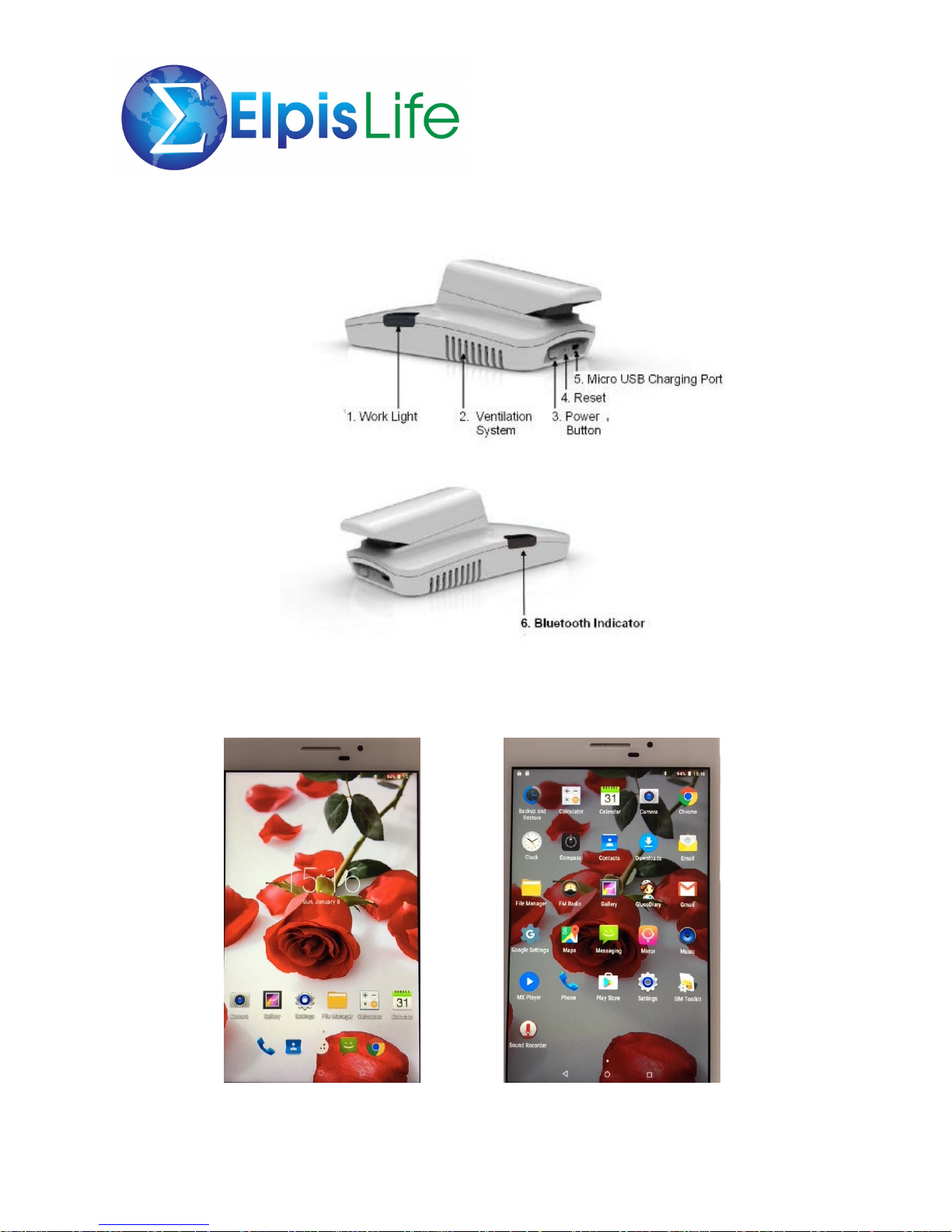
Your Genesis comes with a 7” tablet with the App pre-installed for your convenience. Follow the
instructions on how to activate the App on the tablet. Charge the Genesis and tablet upon
receiving for a few hours until fully charged.
Click on the “white button” Click on “Gluco diary”
Page 7
Unit operation
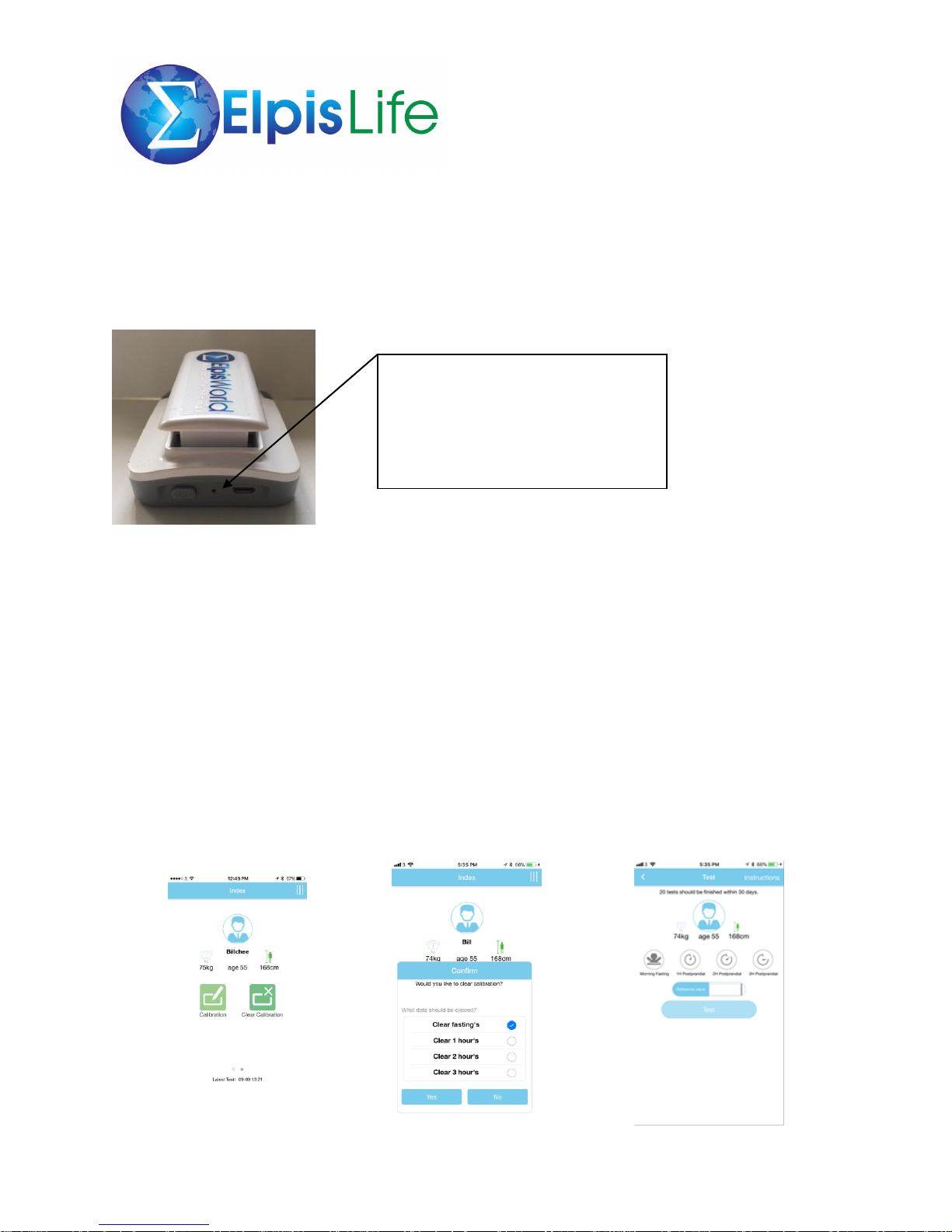
The unit will automatically power off after three (3) minutes to conserve energy. When
fully charged, the battery has a life of about one (1) month under normal usage.
Battery specifications: 1,000 mAh
Calibration Instructions
Due to the differences in an individual’s metabolism, there are a few people who have inaccurate
results when using our device and calibration procedures can help to improve the testing
process.
The first step is to select a diet status (fasting, 1hr, 2hr, or 3hr post prandial after eating).
Next step is to fix the status, checking blood values with a traditional glucose meter and
inputting the value into our device. Complete the process by performing the test function with
our device.
It is recommended to perform this at least 20 times in a month (30 days) to establish a baseline.
If the battery is unable to
power-off automatically the
reset button can be used as a
force option to shutdown.
Page 8
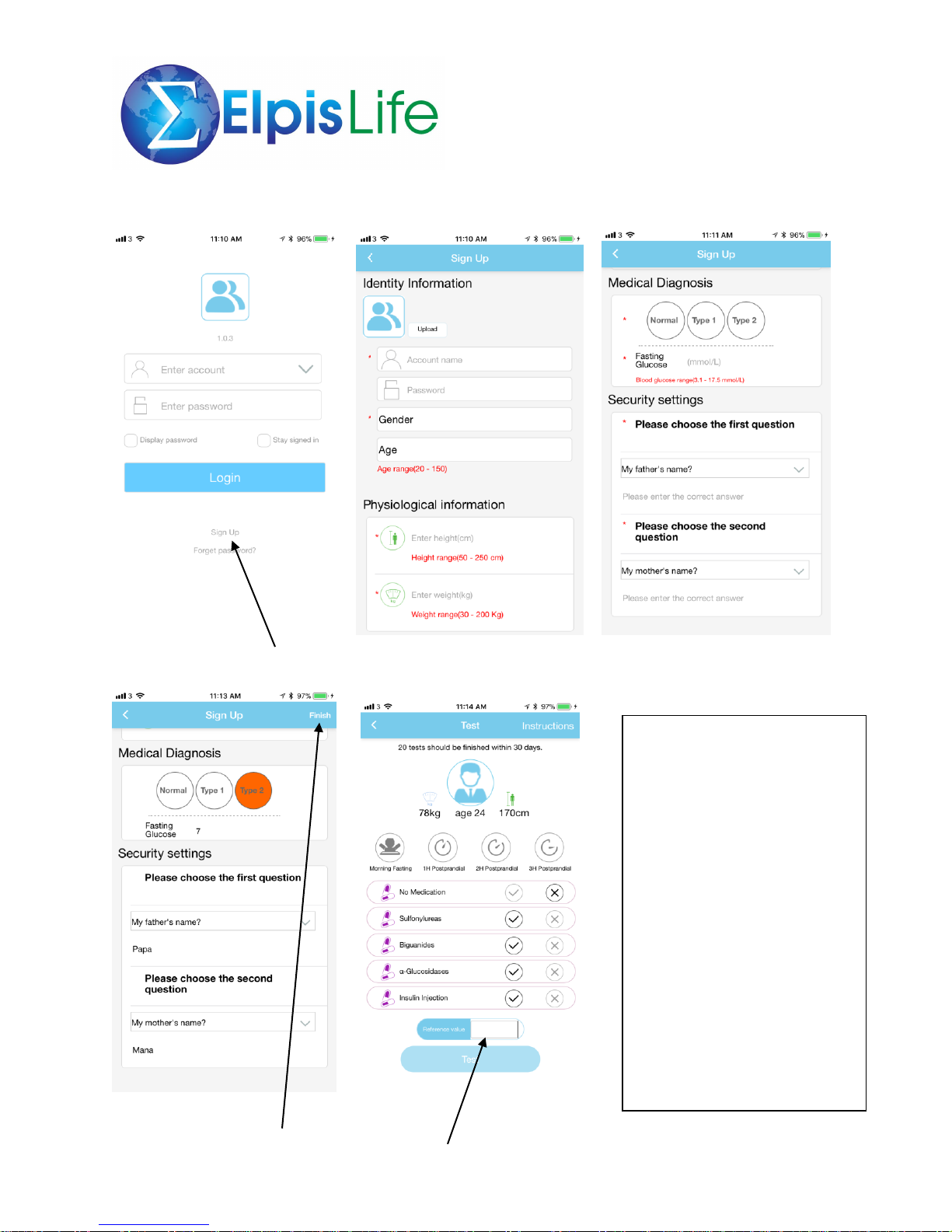
APP Instructions
First step is to Sign-Up Fill-in the information requested Select your diagnosis – Type 1 or 2
After completing inputting the If you selected Type 1 or 2, the menu
Information, click on “Finish” will ask for your medication information
and reference value.
Biguanides type: Increases the
sensitivity of liver and muscles
towards insulin thus less insulin is
needed. Decreases the amount of
sugar produced by the liver;
increases the amount of sugar
absorbed by the muscle cells
Sufonylurea type: Increases the
amount of insulin produced by the
pancreas.
Alpha Glucosidase inhibitor type:
Slows down the digestion of starch
in the intestine.
If you do not know exactly what
type of medication you use, please
consult with your doctor or
pharmacist.
Page 9
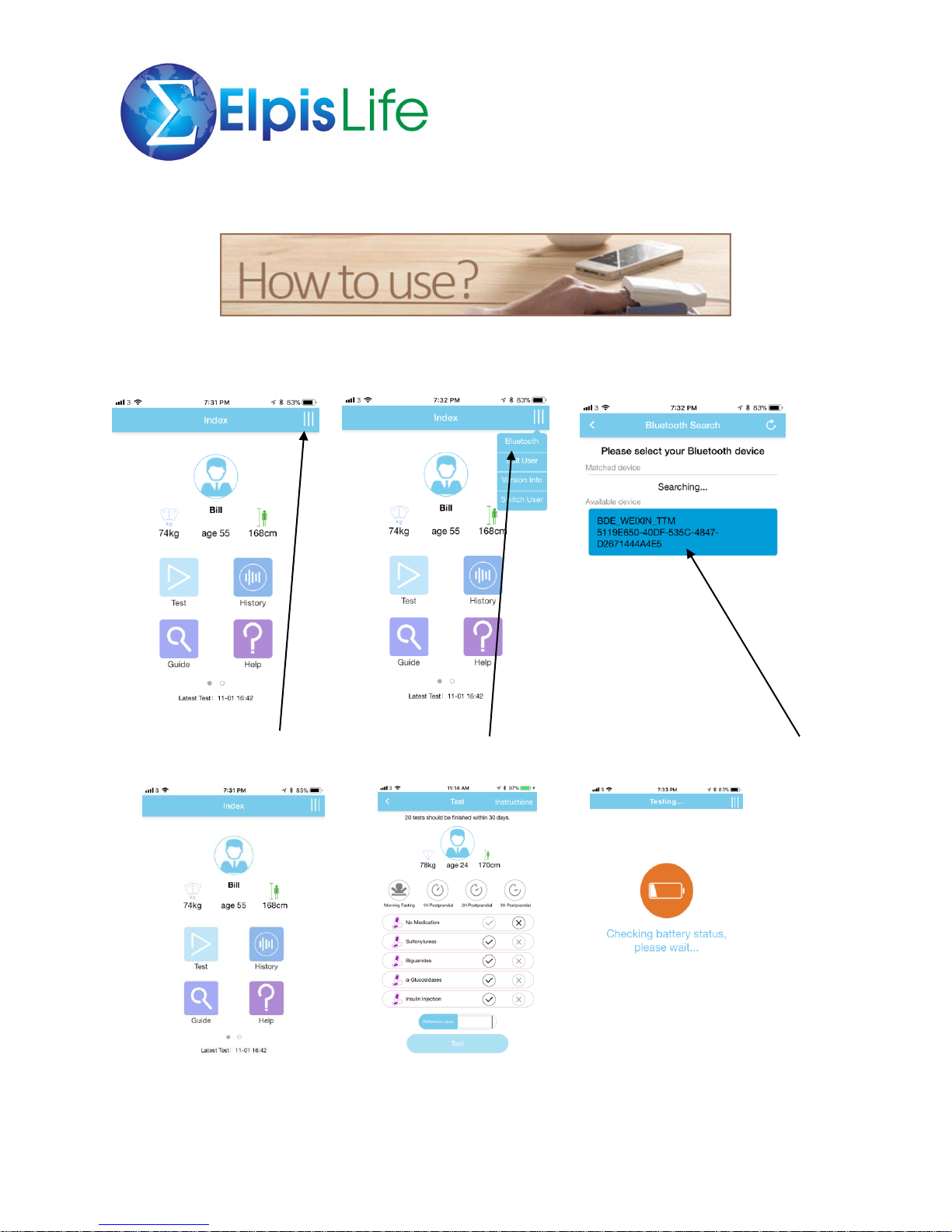
Testing Procedure
Ensure that the Genesis device is turned on by pressing the power button at the back of the
device. A blue indicator light will display on the right side of the device.
Click on the vertical bar at the top right Click on Bluetooth Tablet connecting with Genesis; click on this
corner of the screen.
After clicking on BDE, screen Select the test condition, meal This is the first screen of
reverts back to the menu, condition and medication – input the sequence after clicking on test
ready for testing a reference value and click on test
Page 10
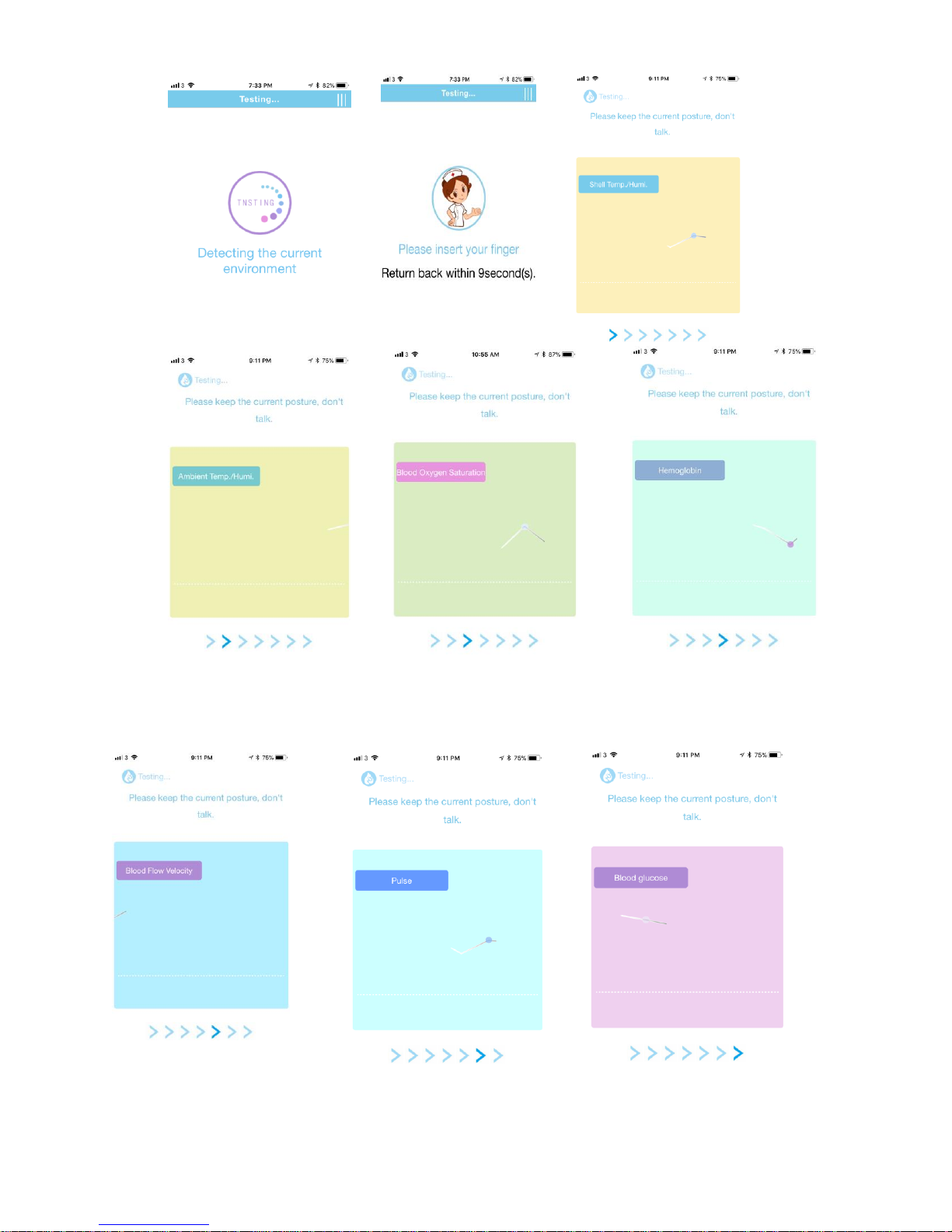
Page 11
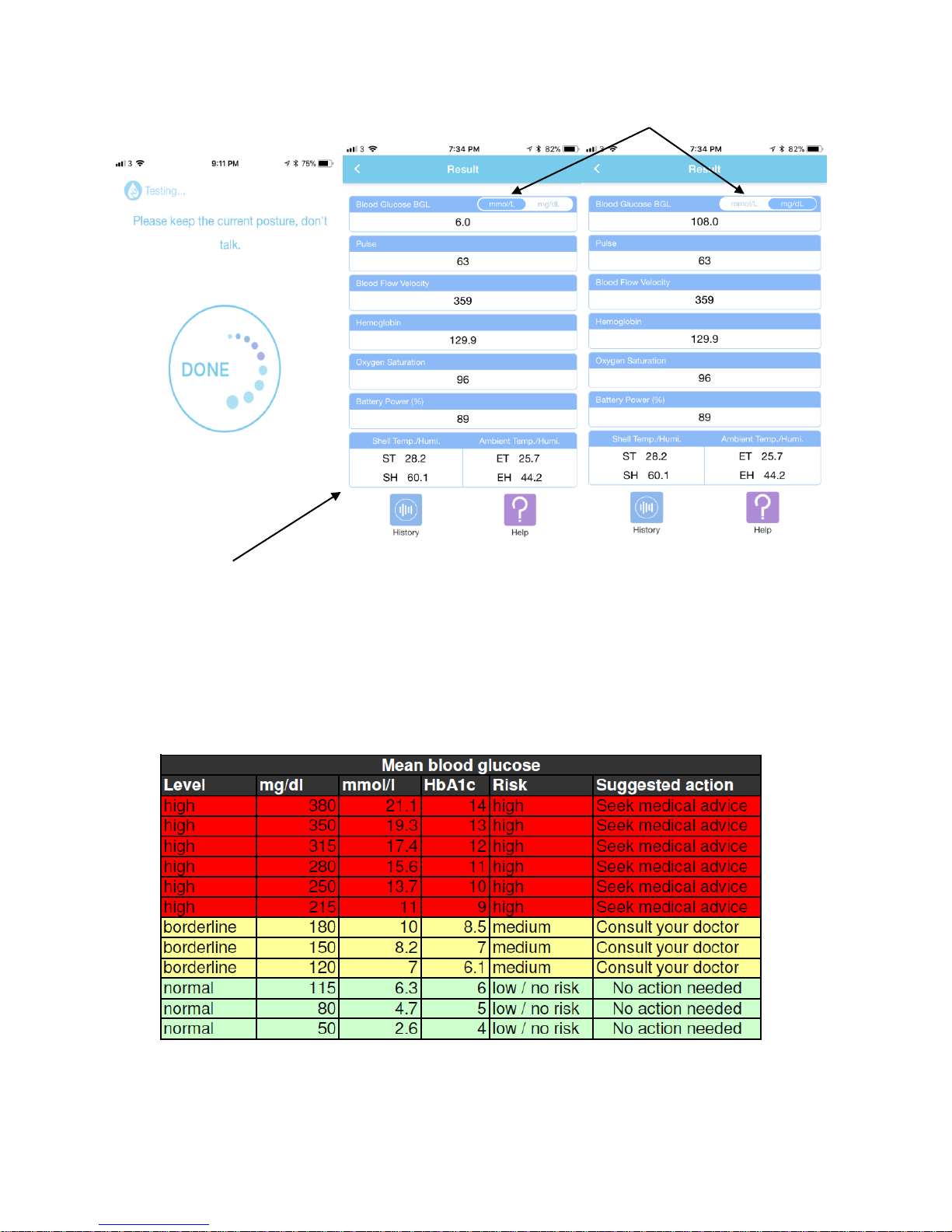
Blood Glucose Values can be changed
Testing done, results are displayed
Test Results:
1) Blood Glucose 6) Battery Level
2) Pulse 7) Shell temperature
3) Blood flow velocity 8) Shell humidity
4) Hemoglobin 9) Ambient temperature
5) Oxygen saturation 10) Ambient humidity
What is HbA1C? HbA1c refers to glycated hemoglobin. It develops when hemoglobin, a protein within red
blood cells that carries oxygen throughout your body, joins with glucose in the blood, becoming
'glycated'. By measuring glycated hemoglobin (HbA1c), clinicians can get an overall picture of what our
average blood sugar levels have been over a period of months. Normally it is a 3-month average.
Page 12
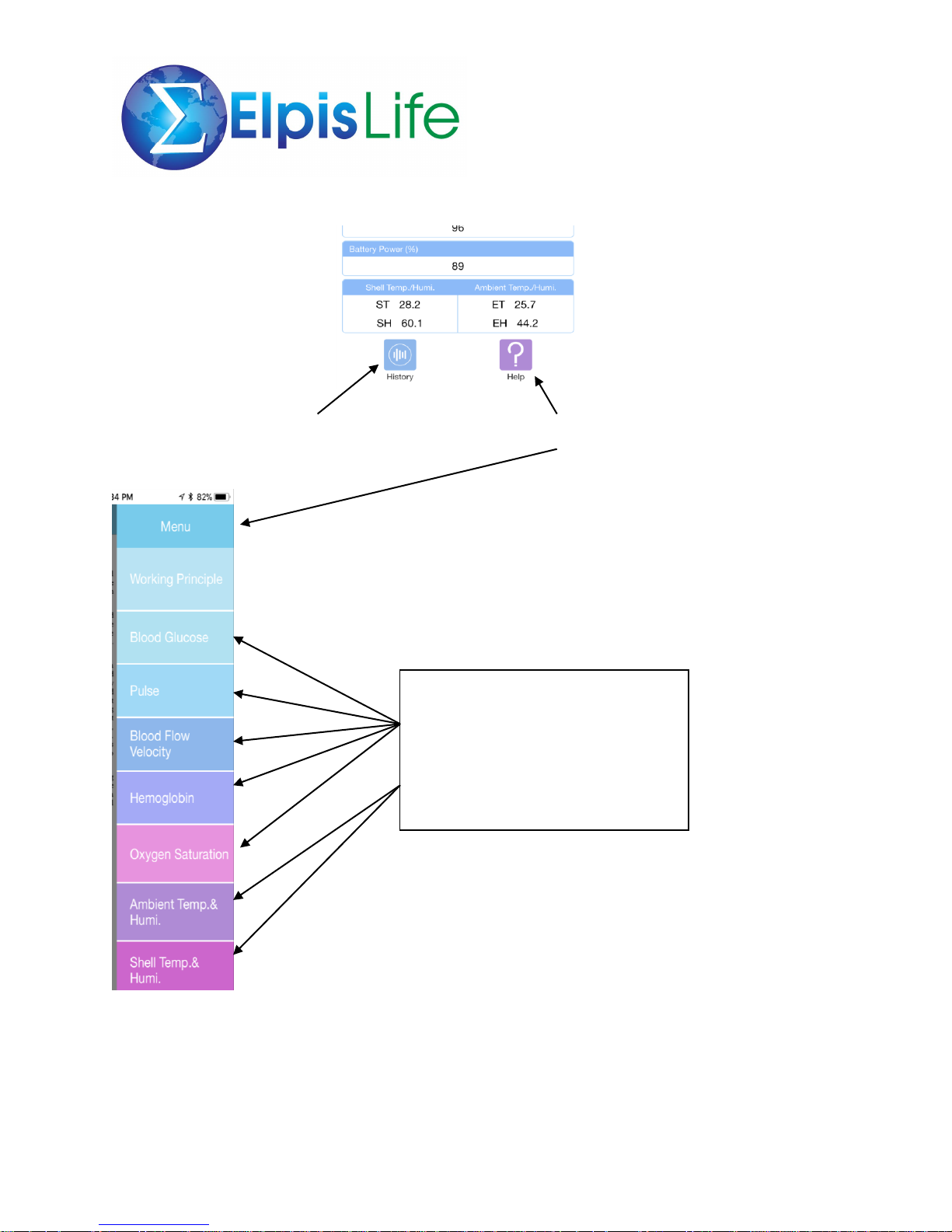
Clicking on the History button will Clicking on the Help button will
will display previous readings in list display a menu for each vital
or chart form measurement and an explantion
and significance of each value
Click on any value for detailed
information on Blood Glucose, Pulse,
Blood Flow Velocity, Hemoglobin,
Oxygen Saturation, ambient
temperature and humidity, and shell
temperature and humidity
Page 13
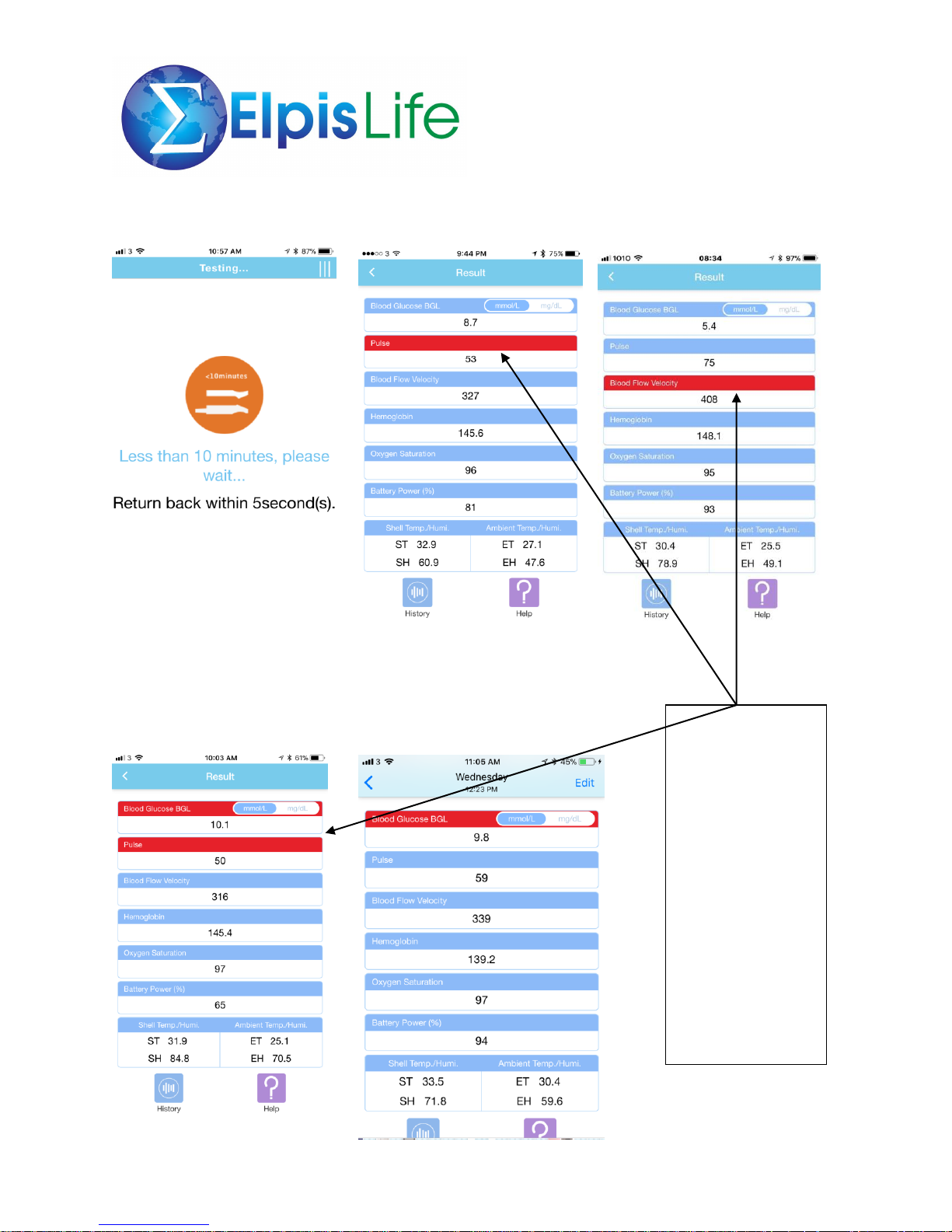
Troubleshooting – Error Messages
Indicates taking a test too soon.
Some abnormal
readings – when
values other than
blood glucose are
highlighted in red,
it indicates a
possible condition
that would warrant
monitoring after
several readings. If
red readings
persists after
several tests, please
contact your doctor
for consultation.
Page 14
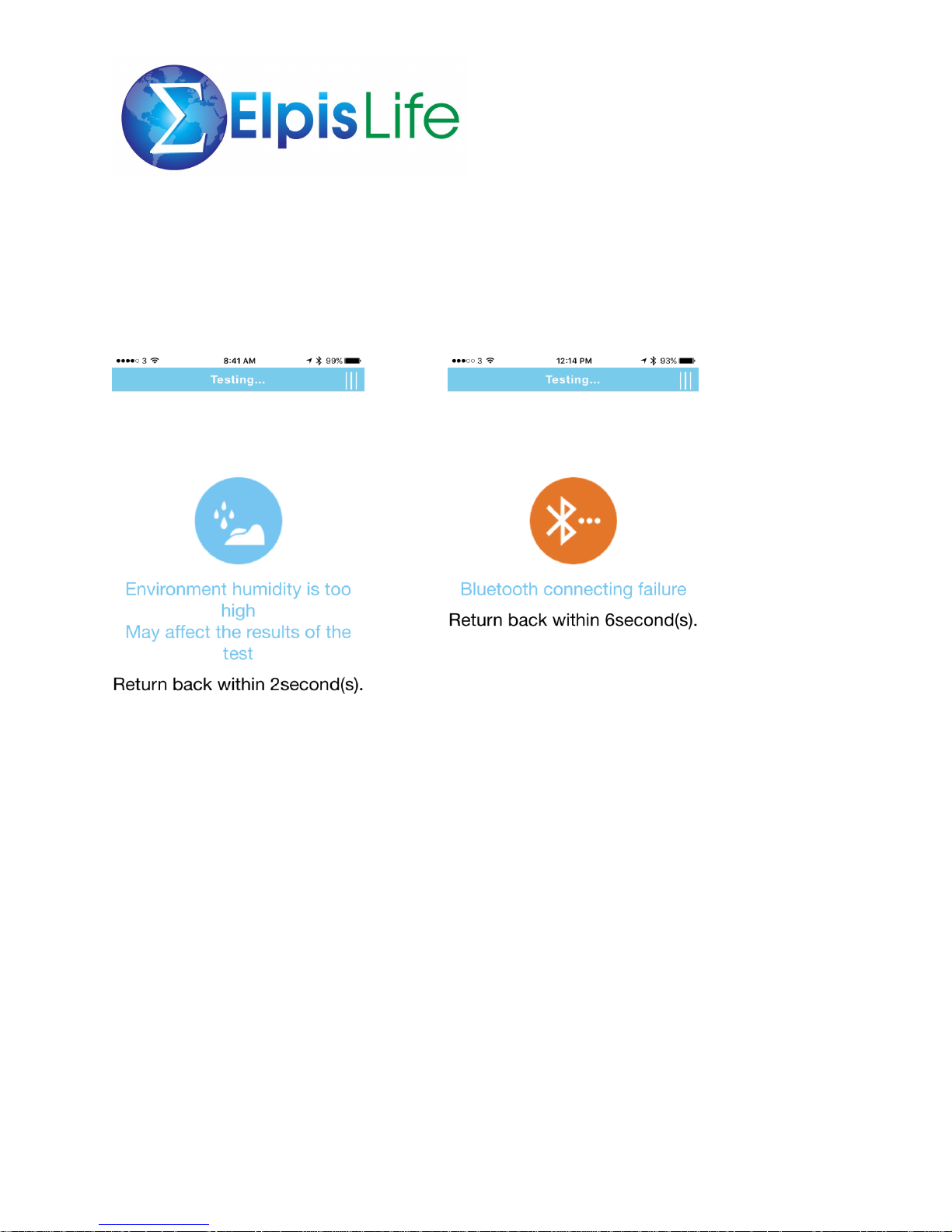
Other Error Messages
Indicates that the ambient There may be circumstances where the
room temperature may be too warm Bluetooth may disconnect – just try again.
although testing may still commence
Page 15

Please note the following conditions as it may affect the readings
✓ Use the Genesis on a flat surface
✓ When possible use under warm room temperature. Air conditioning during the summer may
affect the readings.
✓ Follow instructions accordingly when prompted. Do not deviate from the sequence.
✓ Please insert finger fully to the end of the sensor with palm facing down and other fingers
extended and relaxed
✓ Do not press down onto the sensors or move the finger during the testing process
✓ Suitable finger temperature: 29 - 35 degrees (warm finger if necessary)
✓ Testing should be done at intervals of 10 minutes to allow any heat to be fully dissipated from
the sensors
✓ Refrain from application of products such as nail polish, oily hand conditioners or sunblock
before testing
✓ Allow cooling down after any sports or exercise activity for at least 1 hour
✓ Allow cooling down after bathing or washing for at least 30 minutes
✓ Testing after consumption of alcohol is not advised
Safety Guidelines
1) Protect the device from water.
2) Keep device clean. Use soft damp cloth to clean. Do NOT use steam to sterilize.
3) Protect non-waterproof finger clip sensor from liquids.
4) Do NOT sterilize under hot temperatures or disinfect with radiation.
5) Do NOT store device near metal objects to avoid accidental short circuiting of built-in battery.
6) Do not use device immediately after bringing it from a cold place to a warmer or a more humid
place. Wait for 30 minutes for device to get used to the different environment.
7) Keep device from vibrating, corrosive and flammable materials. Protect from extreme
temperature and humidity.
8) Device must be maintained by authorized and qualified engineers. Do NOT disassemble.
9) Do not throw, hit or scratch surface of device.
10) Do NOT block device’s ventilation to ensure effective heat dissipation.
Page 16

Troubleshooting
1) When the APP shows that the environment temperature is too high or too low:
a. secure environment temperature is between 20 – 27 degrees Celsius
b. put device in testing environment at least 15 minutes, compliant to current
condition, especially when changing to a different environment
2) When the APP shows that the finger is too cold, warm the finger for about 30 seconds
before continuing the test after ten minutes
3) Glucose reference ALU-AC is morning fasting glucose.
4) If a test result is an abnormal value different from the user’s normal value, please
recalibrate.
5) If the APP shows an error message before a test result, please test again after waiting
10 minutes.
6) Please wait for the APP instruction to insert the finger. Use any finger except the baby
finger for best results. If there is heavy scarring, choose a finger with less scarring.
8) When inserting the finger, please insert fully to the end of the device, relax with all
other fingers extended, and do not press down on the sensors.
9) Do not move or fidget while testing is being done.
Optimal environmental conditions
Temperature range: 20 - 27 degrees
Humidity range: 20% - 70%
Atmospheric Pressure Range: 700-1060hPa
Avoid direct contact with sunlight
Avoid contact with toxic or flammable gas
Working Rated Voltage: 5V
Working Rated Current: 1A
Page 17

Principle in General
The Genesis development is a non-invasive technology that is the combination of a metabolic
heat conformation method and optical method. Detection probes comprising of a series of
sensors, such as an infrared radiation sensor, a thermistor, humidity sensors, light receivers,
thermal rods, directly collects the human body’s parameters.
1) The blood glucose value monitored by the metabolic heat integration method can be
calculated from local metabolic rate, blood flow volume, hemoglobin concentration, oxygen
saturation and corrected value of blood glucose.
2) The blood glucose value monitored by the infrared method can be calculated from
photoelectric signals and the hemoglobin concentration.
3) By combining these two blood glucose values, an accurate blood glucose value is obtained.
Principle in Details
The three main forms of heat dissipation of the human body are radiation, convection, and
evaporation. The overall heat radiation and convection can be calculated by the environmental
temperature and the radiation temperature, while heat evaporation can be calculated by the
environmental humidity and the finger surface humidity.
A revised heat transmission method is applied in this product to determine the blood flow
velocity. A heat transfer bar with thermistors on both ends contacts the skin of the finger with
one end, so the temperature change of the bar can be measured. Meanwhile, an infrared
radiation temperature sensor is used to take the temperature of the finger surface. These values
are combined to calculate the blood flow velocity.
The photoelectric method is adopted to determine the parameters of oxygen saturation and
hemoglobin concentration. The surface of the finger is exposed to infrared light of a specific
wave length in an assigned sequence and the light intensity penetrating the finger is detected.
Based on the change of light intensity, the required parameters are calculated. Considering that
the heat dissipating capacity cannot represent the local metabolic heat, the latter is then
corrected by core temperature, dressing impedance and blood flow volume. The blood glucose
value of the metabolic heat integration method can be calculated by local metabolic rate, blood
flow volume, hemoglobin concentration, oxygen saturation and corrected value of blood
glucose. The blood glucose value of the infrared method is calculated from photoelectric signals
and the hemoglobin concentration.
By combining the blood glucose values of the two methods, the blood glucose concentration in
the human body is obtained.
Page 18

Warranty
Your Genesis has a warranty against defects in materials and workmanship for a period
of one (1) year from the date of purchase. Product registration and proof of purchase
may be required.
This warranty does not cover supplies and/or any accessories, including but not limited
to the Genesis tablet mate. During the warranty period, Genesis will repair or replace, at
its sole discretion, any part that does not work properly because of a defect in materials
or workmanship. The purchaser’s sole and exclusive remedy with respect to the system
shall be to repair the device or replacement. This warranty applies only to new devices.
This warranty is valid only if the device is used in accordance with the user instructions.
This warranty will not apply:
• If damage results from any unauthorized changes or modifications made to the
device by the user or third party after purchase
• If damage results from service or repairs performed by any person or entity other
than Genesis
• If damage results from a force majeure or other event beyond the control of
Genesis
• If damage results from negligence or improper use, including but not limited to
improper storage or physical abuse from carelessness or mishandling
This warranty shall be only valid to the original purchaser. Any sale, rental, or other
transfer or use of the device or any of its components covered by this warranty to or by
a user other than the original purchaser shall cause this warranty to be immediately
voided.
This warranty is exclusive of all other warranties, express or implied including without
limitation the implied warranty of merchantability or fitness for purpose.
In no event shall Genesis be liable for any incidental, consequential, indirect, special or
punitive damages arising from or in any way connected with the purchase or use of the
device.
 Loading...