

Page 1
Smart Doorbell
ECSPDB
are compatible with the Clicksmart+ APP
Products bearing this mark
General
Our products are designed to comply with the
recommended codes of practice for lighting and to be
installed and serviced by competent persons in
accordance with the relevant regulations.
Contents
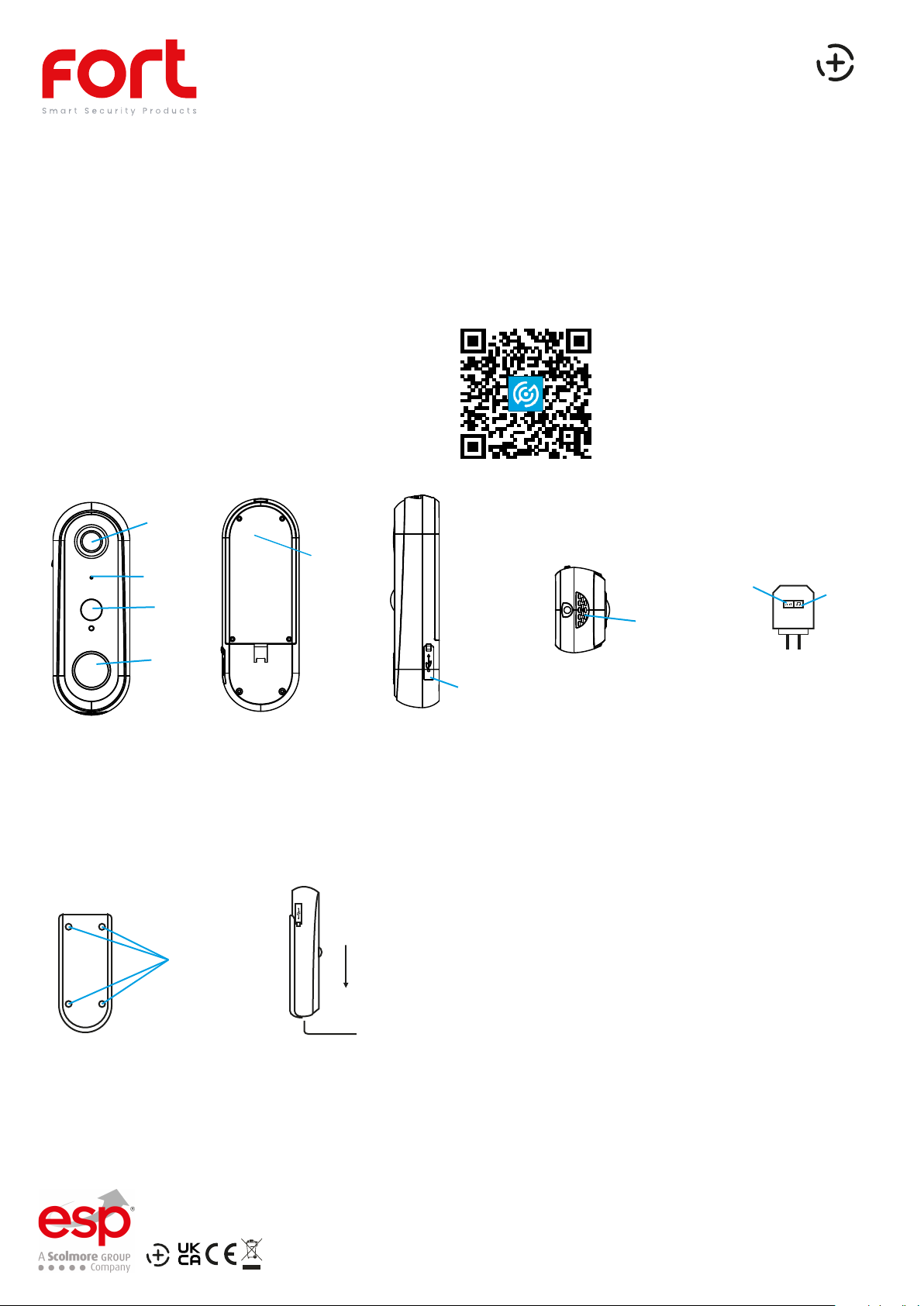
• Smart Doorbell
• 2 x Lithium 18650 Batteries
• Mounting Pack
• Micro USB Cable
• Micro SD Card
• RF Chime
Camera
Cover for
Microphone
PIR
Call button
batteries, and
micro SD
Preparation For Use
Ensure that the smart phone is connected to the same Wi-Fi
network that you would like to attach the device.
Ensure that you have a mobile device running iOS 8 or higher
or Android 4.1x or higher and a 2.4GHzWi-Fi connection.
Download the ClickSmart+ App on your
mobile device from the App Store or
Google Play.
Sign in or Register following the
instructions on the ClickSmart+ App.
Volume
Ring Tone
Speaker
Rubber cover contains:
Micro-USB for charging,
Charging LED,
& Reset button
Installation
• Open up the rear cover to insert batteries & Micro SD Card
• Mount the mounting backplate onto the wall, using the 4 holes to mount to the desired surface.
• Push the Doorbell down onto the backplate, and secure with fixing screw.
Indoor Chime unit
Screwholes
• The chime unit comes pre-paired with the video doorbell.
If it doesnt sound when it should refer to the below:
• Press the “ring” button, to choose your desired ringtone.
The indoor chime offers 36 different ringtones.
each press changes the current ringtone.
• Press the “volume” button button for 5 seconds, till the music changes.
• Press the doorbell button to match the indoor chime. You can now
press the call button of the doorbell and listen for the chime.
• To change the ringtone, please refer to the above pairing instructions.
• To change the volume, press the “volume” button once, to trigger it.
There are 4 different volume levels to choose, from Low to High.
Elite Security Products
Redditch B98 8YN
Page 2
APP Pairing
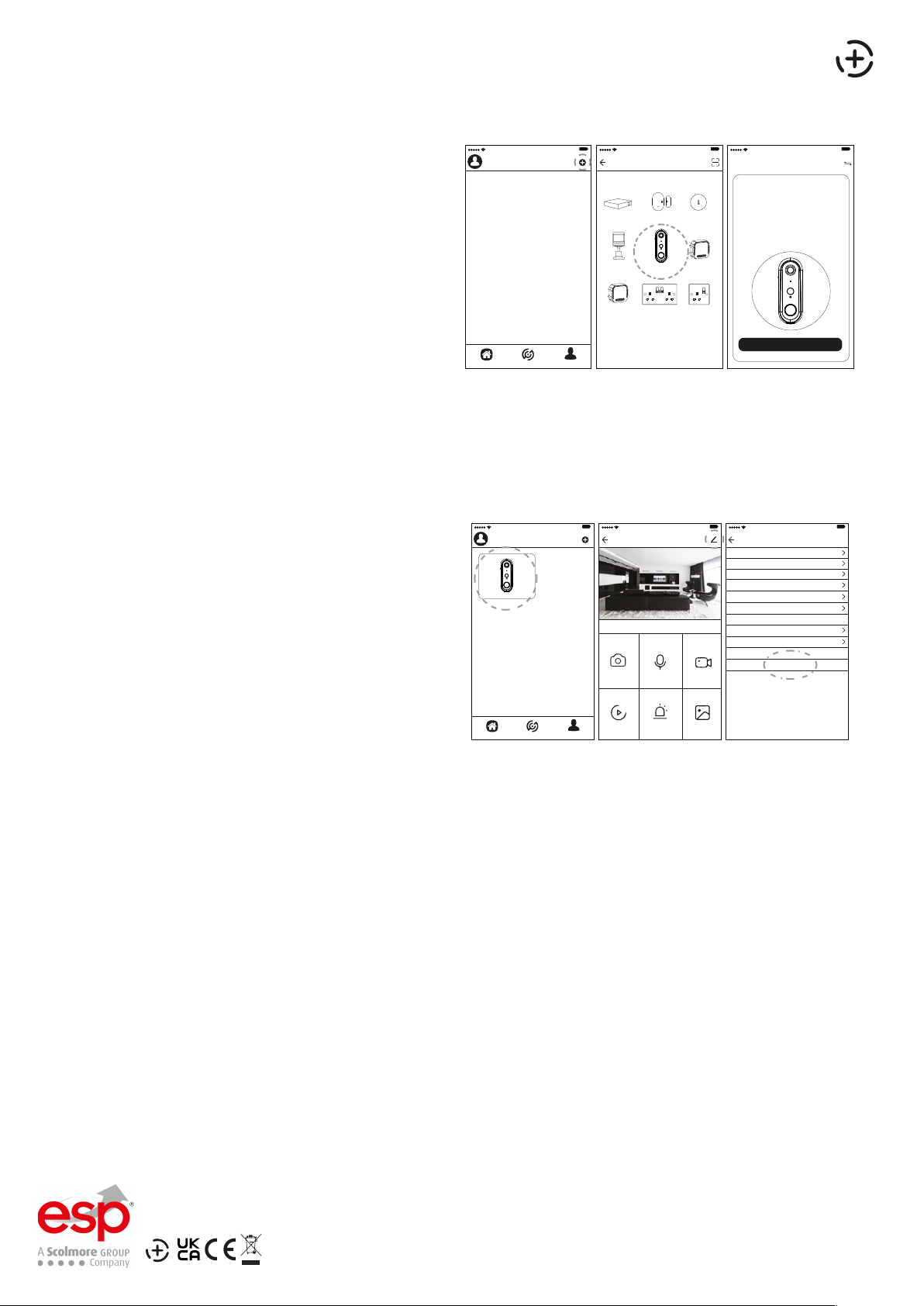
1. Power up the device VIA the 5V Micro USB Cable, and
fully charge
2. Once powered up. The LED on the front should be
flashing blue, and it should say “the camera is now ready
to being pairing”.
9:41 AM
100%
ClickSmart+
9:41 AM
Add Manually Auto Scan Cancel Net Pairing Mode
Window &
Hub
Door Sensor
PIR Smart Doorbell 2G Switch
100%
Humidity &
Temperature...
Module
9:41 AM
Reset the device first.
①Set up the device as per the
installation instructions
②Once powered up. The LED on the front
should be flashing blue, and it should say
“the camera is now ready to begin pairing”
The device is now in pairing mode.
③
The ClickSmart+ app will guide you through:
Entering the Wi-Fi Network and Password.
Using the Camera to scan a QR code.
Connecting the Device.
Home Smart Me
2G Dimming
Module
Smart Double
Socket
Smart Single
Socket
Confirm Blue Indicator is blinking
Resetting the Device
If the camera needs to be reset, connected to a new Wi-Fi network, or if it needs to be paired with a new master
account, remove the device from the app, prior to resetting the device.
1. Using the reset key, long press the reset button until
“system reset” is heard.
2. The device should now be reset, after 30 seconds,
the unit should start to flash blue, and say “the system
is now ready to begin pairing”.
Internal Camera
9:41 AM
100%
Screenshot Speak Record
9:41 AM
Smart Camera Settings
100%
Device Name Smart Camera
Share Device
Device Infromation
Use Echo
Basic Function Settings
Motion Detection
FAQ & Feedback
Firmware Infromation
9:41 AM
Remove Device
100%
100%
Low
Guidance
>8-12hrs charge time required for full battery capacity
>Unit requires a minimum of 2 Mbps (upload/download)
>This unit only operates on 2.4GHz
>If the signal strength of your Wi-Fi router is weak: Change
router/camera relative position to receive better signal, Use Wi-Fi
repeater/extender to maximize the range of your Wi-Fi router.
>If the device is installed on a new network the unit will require
resetting
>If the camera needs to be added to a new account, unbind the
device from the first account prior to resetting the device.
For more product information please visit the ESP website
Home Smart Me
Playback Alarm Photo album
Elite Security Products
Redditch B98 8YN
Telephone : 01527 51 51 50
Fax: 01527 51 51 43
Email : [email protected]
Web : www.espuk.com
E&OE - Errors and omissions excepted.G21
 Loading...