

Page 1

Tripod-Portable Screen
Elite Tripod Series
USER’S GUIDE
Rev 1.1
Page 2
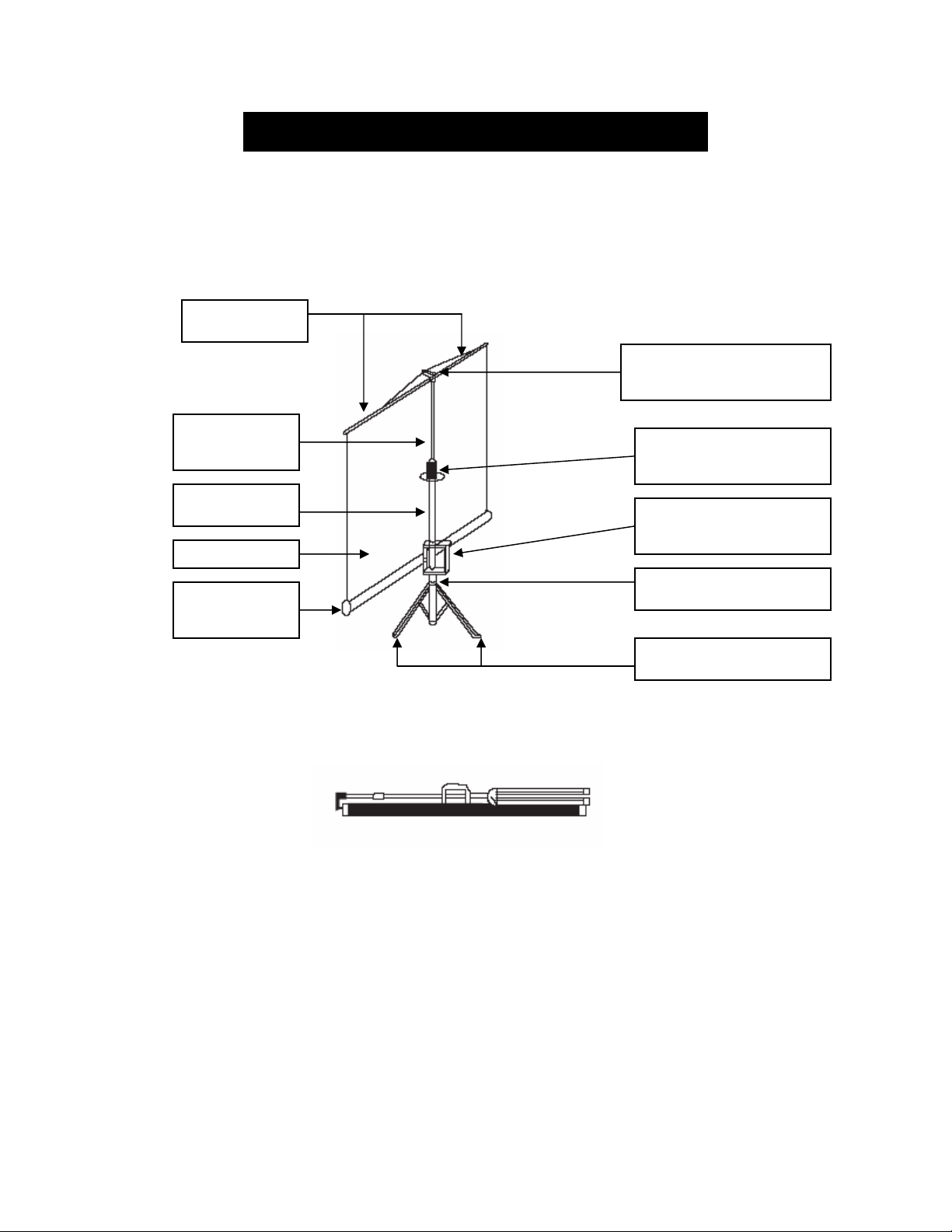
Tripod Screen Parts Identification
Support beam
Top Hook, Keystone
Eliminator & Screen Handle
Vertical
Extension Bar
Support Mast
Screen
Screen Casing
Tripod Screen packed up for transport or storage
Tripod Screen deployed
Vertical Adjuster
Carrying/Adjustment
handle & release
Tripod junction
Tripod Support Legs
Rev 1.1
Page 3
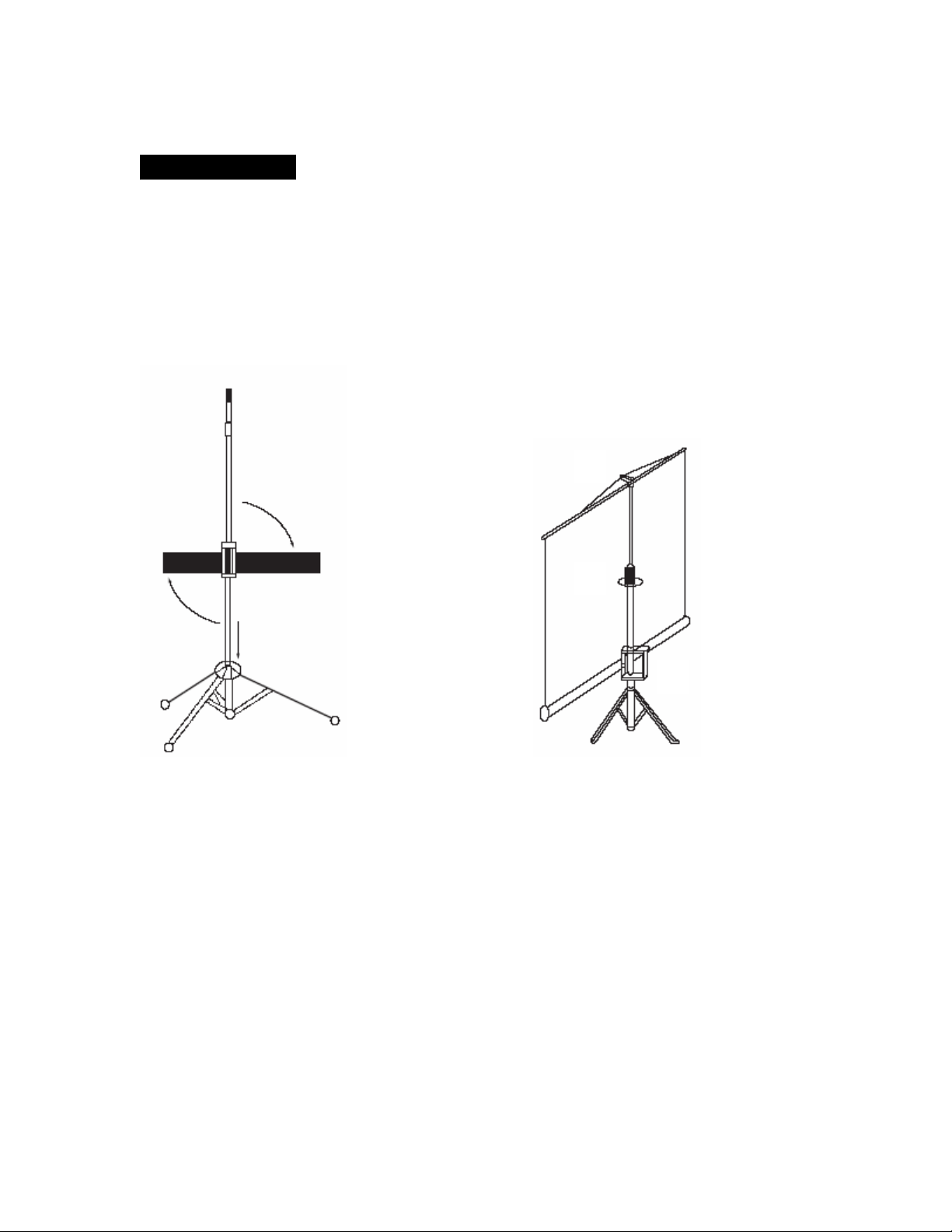
Using the Screen
Follow the steps illustrated on (Fig. 1)
1. Place the screen in an upright position with the legs toward the ground.
2. Deploy the Tripod Support legs by pushing down on the Tripod Junction.
3. Turn the screen casing in a 90-degree horizontal position so that the screen
casing is now parallel to the ground with the screen handle facing the
bottom of the top hook.
1
Fig. 1 Fig. 2
Follow the steps illustrated on (Fig. 2)
1. Pull the screen handle up vertically and hook the screen handle onto the
Top Hook. *Note Use the Keystone Eliminator to prevent “Keystone
Effect” from occurring. Keystone Effect is caused when a projector
presents its image at an upward angle causing a trapezoid-shaped image
to appear on the screen. The Keystone Eliminator is designed to stop that
by sloping the screen forward and evening out the light image from the
projector.
2
3
Rev 1.1
Page 4
2. Use the Vertical Adjuster to position the appropriate height of the Vertical
Extension Bar *Note: Different tripod models have different vertical
Adjusters. It could be a release button that loosens when depressed or it
will be circular knob that will loosen or tighten by twisting it in a
clockwise & counter-clockwise rotation.
3. After using the Vertical Adjuster to (raise/lower) the Vertical Extension
Bar and set the screen height at the top, Use the adjuster switch on the
Carrying Handle to establish the level of the screen’s bottom elevation.
You can repeat steps 2-3-4 to adjust various top levels of screen height.
Repeat 3&4 to adjust the bottom level screen height.
When Packing Up the Tripod Screen:
1. Reverse the steps above to pack up the screen and put
away.
2. Hold the extension bar and use another hand to release the
Vertical Adjuster. *Note:It is very important to remember
to hold the extension and then unlock, or it will cause
damage to the screen.
3. Turn the screen in a vertical position as reversed to that
shown in Fig. 1.
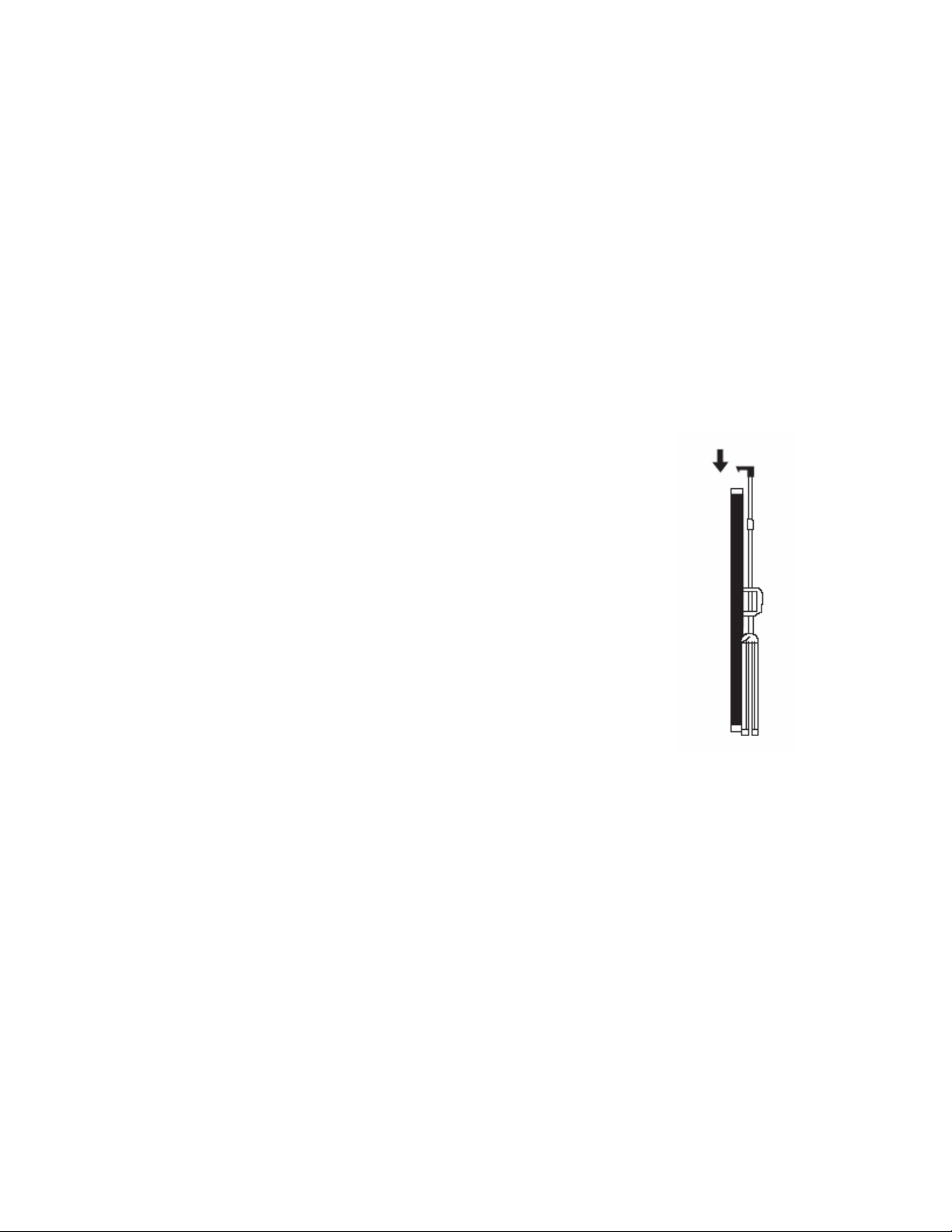
4. (See Fig. 3) Bring down and tighten the vertical extension
bar making sure that the spur on the bottom of the top
hook connects with the hole in the end cap.
5. Lastly tighten the vertical adjuster.
Notes:
1. To ensure the screen is stable, extend the tripod’s legs as
much as possible.
2. Do not fold the screen or allow any sharp objects to touch the
screen’s surface.
3. Clean the screen surface often when needed.
4. Careful use will extend the lifetime of this product.
Fig. 3
Rev 1.1
Page 5

Warranty Policy - Manual, Tripod, Pull-up Floor, and Fixed Frame Screens
*Warranty policy applies to claims made in the United States of America. Warranty issue s outside
of the US must go through their international distributor.
• Two (2) year warranty parts and labor from purchase date as follows (except for
refurbished units as specified below):
Refurbished units carry a 90-day parts and labor warranty.
•
Demo units or open box items are AS IS items and do not carry a warranty.
•
Elite Screens will cover ground shipping charges on warranty claims made within 7 days of
•
receiving per our DOA (Defective On Arrival) policy
• Each party will be responsible for one way shipping during the regular warranty period if
the claim is made after the 7 day DOA period.
• An RMA (Return Merchandise Authorization) number must be issued in order to process a
replacement. Elite Screens will either replace or repair the defective unit with a brand new
replacement *(see exceptions below) after the defective unit is received and/or confirmed
defective. Once the product is received, Elite Screens will send out a new *unit to the
customer by ground service (subject to inventory availability).
Missing Parts must be reported within the 7-days of receipt. If reported after 7 days,
•
customer will only be responsible for shipping and handling fees. If reported after 30 days of
receipt, the customer is responsible for cost of the parts and shipping & handling fees
.
Please visit the link below for full warranty information
http://www.elitescreens.com/services.html
or call us at 877-511-1211
*A new or refurbished replacement will be sent out to the customer depending on the type of purchase (new
or refurbished) and is based on stock availability.
Rev 1.1
Page 6

TWO WAY TO REGISTER YOUR WARRANTY WITH ELITE SCREENS INC.
A. On Line (Faster and Easier) www.elitescreens.com/register.html
B. Fill out & Fax to (562) 483-8498, Attn: Customer Service Dept.
*Your Name: _______________________________________________________
Address: ____________________________________________________________
City/State/Zip ________________________________________________________
*Email Address: ______________________________________________________
*Phone: _____________________________________________________________
*Screen Model: _______________________________________________________
*Serial Number: _______________________________________________________
*Date of Purchase: _____________________________________________________
*Dealer / Reseller Purchased from (name of the reseller): _____________________
What is your Projector Model :____________________________________________
Application: ___ Home ___ Education ____ Corporation _____ Government
___ Others
How would you rate this screen? ___ Excellent ___ Good ___ Ok ___ Improvement
needed
Comments:
If you have pictures of your screen you’d like to share with us, please email your
pictures to
or call us at 877-511-1211
www.elitescreens.com
For any technical inquiries,
Rev 1.1
 Loading...