

Page 1
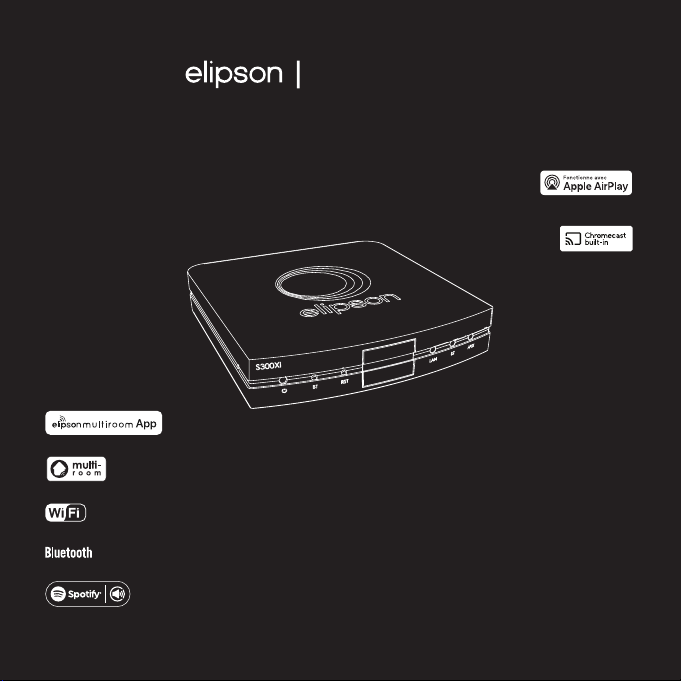
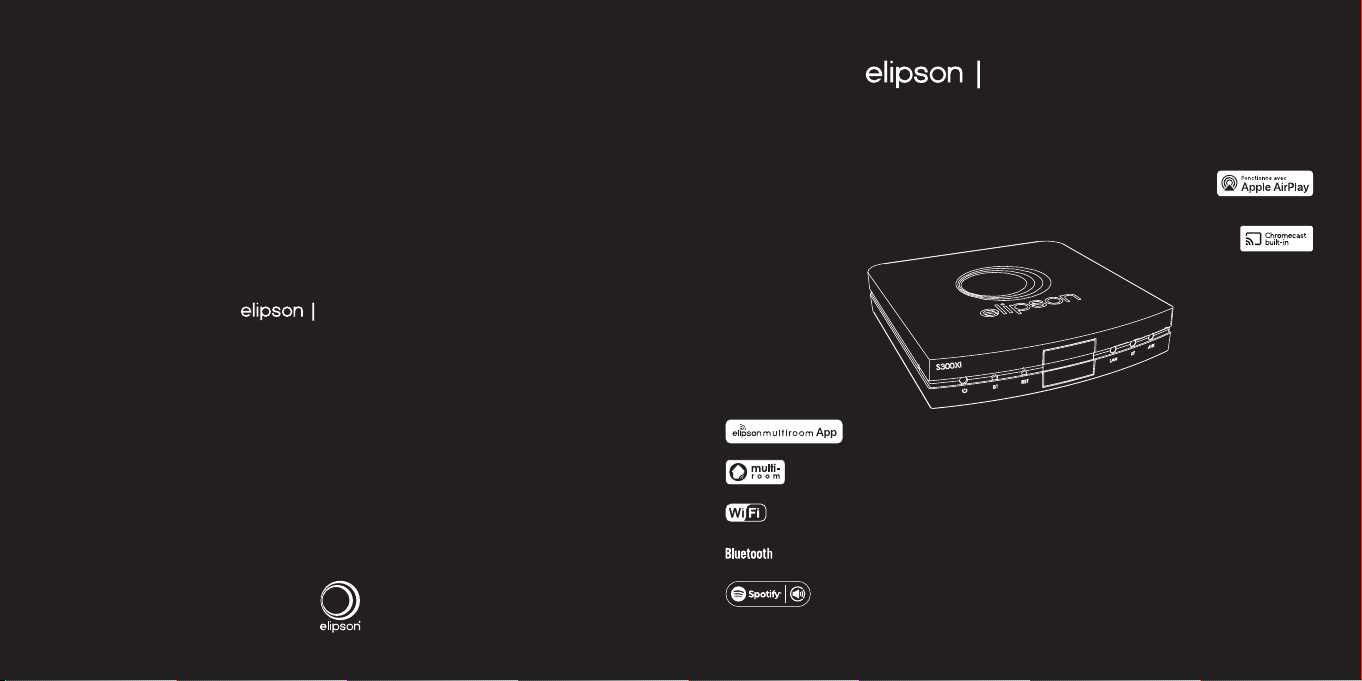
Stream S300 Xi
LECTEUR RÉSEAU AUDIO - STREAMER HI-RES
MANUEL D’UTILISATION
www.elipson.com
1
Page 2

FR
Merci d’avoir choisi notre lecteur réseau streamer Elipson S300 Xi.
Prenez le temps de lire attentivement ce manuel avant d’installer votre appareil.
Il contient toutes les instructions de sécurité et d’utilisation à suivre. Nous vous recommandons
vivement de conserver son emballage et ce manuel d’utilisateur pour une installation future.
I. Description 3
II. Caractéristiques 4
III. Informations générales 5
Dans le carton 5
Face avant 6
Face arrière 7
Application 8
IV. Utilisation du S300 Xi 10
Connexion Wi-Fi 10
Réinitialisation des paramètres 10
V. En cas de panne 11
VI. Garantie 12
Cher client,
SOMMAIRE
I. DESCRIPTION
Ce lecteur réseau streamer Elipson S300 Xi est une solution parfaite pour
connecter votre installation audio basique à votre réseau domestique. Il
fonctionne sur n’importe quel amplificateur intégré, préamplificateur ou
enceinte amplifiée en venant se brancher directement sur une entrée ligne
ou une entrée optique Toslink bénéficiant ainsi de la conversion numérique
analogique de votre appareil actuel.
Ses modes de connexion sans fil (Wi-Fi et Bluetooth) et filaire (Ethernet)
fournissent un accès instantané à des millions de titres musicaux en haute
définition.
Faisant partie de notre gamme de produits Elipson Connect, le Stream S300
Xi intègre Chromecast built-in™ et est compatible avec AirPlay 2, ce qui vous
permet de diffuser votre musique préférée d’une pièce à l’autre.
À vous désormais de profiter de l’expérience Elipson.
ATTENTION
ASSUREZ-VOUS DE LIRE CE MANUEL D’INSTRUCTIONS
AVANT DE METTRE SOUS TENSION VOTRE APPAREIL ELIPSON.
2
3
Page 3
FR
II. CARACTÉRISTIQUES
III. INFORMATIONS GÉNÉRALES
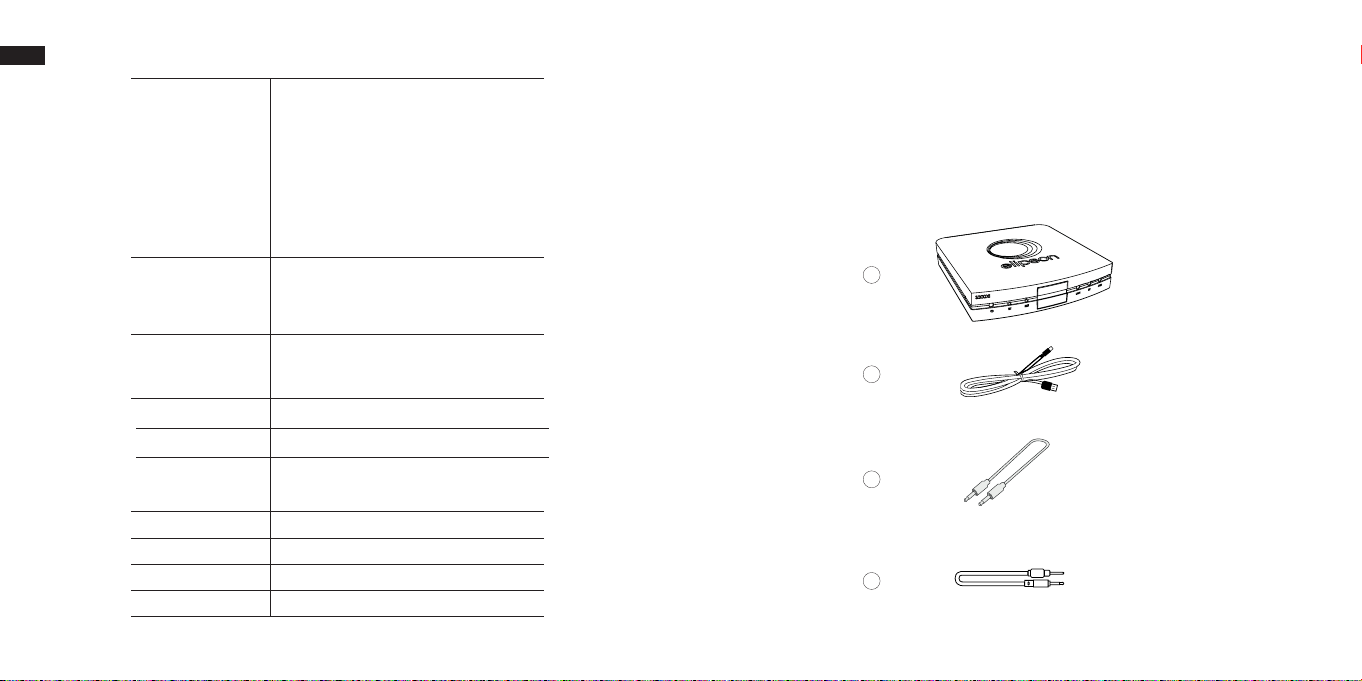
DANS LE CARTON :
Service streaming
& protocoles réseaux
AirPlay 2
Amazon Music
Chromecast built-in
Deezer
Qobuz
Spotify
Spotify Connect
Tidal
Web radios
1- L’appareil Stream S300 Xi
2- Un câble d’alimentation USB C 5V (1m)
3- Un câble mini-jack 3.5 stéréo (1,5 m)
4- Un câble optical (mini jack 3.5) vers toslink (1m)
Entrées
Sorties
DAC
Rapport signal bruit
Réseau Wi-Fi
Port Ethernet
Puissance d’alimentation
Dimensions
Poids Net
Bluetooth 5.0
Aux (mini jack 3.5)
RJ45
Wi-Fi
Optical (mini jack 3.5)
Aux (mini jack 3.5)
ESS SABRE ES9023
110 dB
EEE 802.11 a/b/g/n/ac 2.4GHz
EEE 8702.11 a/n/ac 5GHz
Oui (face avant et face arrière) commutable
5V 1A - USB C
L78,5 x P83,2 x H15,3 mm
80 g
4
1
2
3
4
5
Page 4
FR
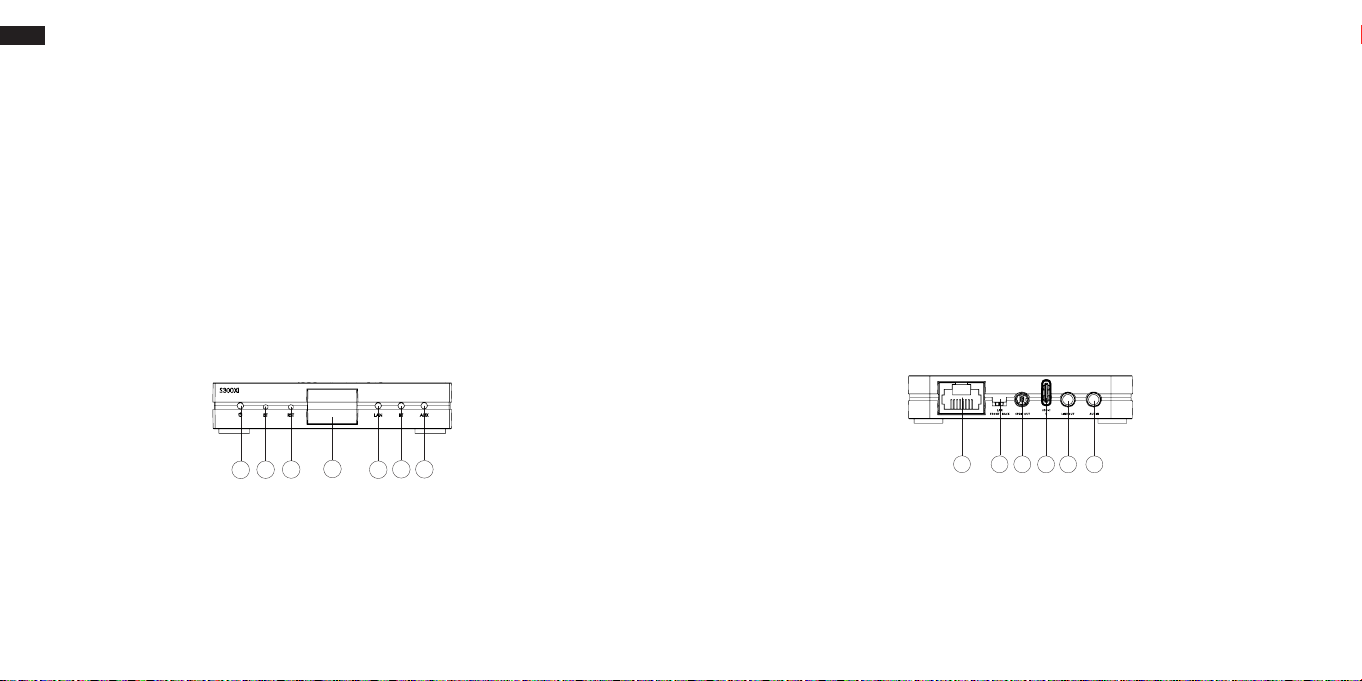
FACE AVANT :
1- Led d’état de l’appareil (Blanc : produit allumé/Rouge produit en veille
basse consommation)
2- Bouton d’appairage Bluetooth
3- Bouton de Reset
4- Port ethernet (Commutable en face arrière)
5- Led correspondant à l’activation du mode réseau (lumière clignotante,
FACE ARRIÈRE :
1- Port Ethernet
2- Switch de sélection du port ethernet : avant ou arrière
3- Sortie numérique optique mini-jack 3.5
4- Prise d’alimentation USB C 5V 1A
5- Sortie analogique mini-jack 3.5
6- Entrée analogique mini-jack 3.5
l’appareil est prêt à être connecté au réseau/Lumière fixe, l’appareil est
connecté au réseau)
6- Led correspondant à l’activation du mode Bluetooth (lumière clignotante,
l’appareil est en attente de connexion/Lumière fixe, l’appareil est connecté)
7- Led correspondant à l’activation de l’entrée analogique
1
4
3
2
1
6
7
5
263
54
6
7
Page 5
FR
APPLICATION
L’application Elipson Multiroom vous permet de connecter votre produit au réseau
au travers votre smartphone ou tablette puis de pouvoir gérer le fonctionnement
simultané de plusieurs appareils de notre marque. L’application est compatible
avec les appareils Apple et Android™, disponible à télécharger sur l’App Store
et sur Google Play.
IOS Android
L’application vous permettra de :
- Vous connecter à plus de 15000 Radios numériques
- Lire la musique à partir d’un streamer (DEEZER, SPOTIFY, QOBUZ, TIDAL…)
- Sélectionner une source sur votre produit
- Gérer le mode multi-room
- Savoir quelle musique vous jouez
- Gérer le volume sonore
- Ajouter et contrôler simultanément d’autres produits Elipson
8
Pour l’utilisation de AirPlay avec votre Stream S300 Xi, la dernière
version de l’ iOS, iPadOS, ou macOS est recommandé.
Pour Spotify, utilisez votre téléphone, votre tablette ou votre ordinateur
comme une télécommande. Allez sur spotify.com/connect
pour apprendre comment faire.
Le Logiciel Spotify est soumis à des licences de tiers qui se trouvent ici :
https://www.spotify.com/connect/third-party-licenses
9
Page 6

FR
IV. UTILISATION DU LECTEUR STREAMER S300 Xi
V. EN CAS DE PANNE
Après avoir branché le streamer sur votre amplificateur, branchez
l’alimentation.
En fonction de votre système, vous pouvez soit utiliser la sortie optique sur un
DAC externe , soit relier la sortie analogique à un amplificateur.
CONNEXION WIFI :
Afin de mener à bien la connexion de votre Elipson Stream S300 Xi sur votre
réseau domestique suivez les instructions détaillées dans notre application
Elipson Multiroom.
N’hésitez pas à vous référer aux tutoriels présents sur notre site internet si vous
rencontrez des difficultés durant la procédure.
RÉINITIALISATION DES PARAMÈTRES :
Maintenez enfoncé le bouton “RESET” à l’avant de l’appareil jusqu’à ce que
les Leds « Power », « LAN », « BT », « AUX » , clignotent simultanément. Une fois
la restauration terminée, l’appareil lancera automatiquement la procédure
de connexion au réseau Wi-Fi.
10
N’UTILISEZ PAS DE SOLUTION OU DE NETTOYANT SUR CES UNITÉS.
SI, POUR UNE RAISON QUELCONQUE, L’APPAREIL DOIT ÊTRE RÉPARÉ, VEUILLEZ
NOUS CONTACTER IMMÉDIATEMENT. NOUS VOUS DÉLIVRERONS UN NUMÉRO
D’AUTORISATION DE RETOUR. CET APPAREIL NE DOIT PAS ÊTRE RENVOYÉ À ELIPSON
SANS LE NUMÉRO D’AUTORISATION DE RETOUR.
N’ESSAYEZ PAS D’OUVRIR OU DE DÉMONTER CET APPAREIL.
CELA ANNULERA LA GARANTIE !
PANNES :
Le produit se connecte puis se déconnecte du réseau Wi-Fi :
• Vérifiez que le débit de votre réseau Wi-Fi soit suffisant
• Vérifiez que l’appareil ne soit pas trop éloigné du routeur
• Privilégiez la connexion ethernet via un câble RJ45
Pas de son sur un canal :
• Vérifiez la connexion à l’amplificateur
11
Page 7

FR
PRÉCAUTION
Le symbole DEEE indique que ce produit ELIPSON est conforme à la
directive 2012/19/ UE du Parlement et Conseil Européen relatif aux déchets
d’équipements électriques et électroniques (DEEE). Ce produit doit être
recyclé ou traité de manière appropriée, conformément à ces directives. Consultez
votre autorité locale de traitement des déchets pour obtenir des conseils.
GARANTIE
Cet appareil a une garantie limitée de 2 ans. Cette garantie comprend 2 ans de pièces
et de main d’œuvre pour la réparation de tous les composants.
La garantie s’étend uniquement à l’acheteur initial du produit et non à tout propriétaire
ultérieur.
L’obligation d’Elipson au titre de ces garanties se limite à la réparation ou au
remplacement de tout composant jugé défectueux dans les matériaux ou la fabrication
dans des conditions normales d’utilisation avec un produit égal et/ou courant.
Ces garanties ne s’appliquent pas aux produits qui ont été maltraités, modifiés ou
désassemblés.
Les produits devant être réparés ou renvoyés dans le cadre de cette garantie doivent
être renvoyés à l’usine par un revendeur Elipson avec tous les frais de transport et
d’assurance payés d’avance.
POUR DEMANDER UNE RÉPARATION SOUS GARANTIE
Pour faire une demande de réparation ou de service sous garantie, il vous suffit de
contacter votre revendeur Elipson local, auprès duquel votre équipement a été acheté.
Pour vous assurer que vous pourrez expédier votre produit endommagé de manière
correcte, conservez toujours l’emballage d’origine de votre équipement Elipson. Si
vous ne pouvez pas contacter votre revendeur d’origine, ou si vous utilisez votre produit
Elipson en dehors du pays d’achat, vous devez contacter le distributeur national Elipson
dans le pays de résidence, qui vous indiquera où l’équipement peut être réparé.
Vous pouvez également visiter notre site web pour vérifier nos coordonnées :
www.elipson.com
Pour valider votre garantie, vous devez produire, comme preuve d’achat, votre facture
d’achat originale précisant la date d’achat et estampillée par votre revendeur.
LA POLITIQUE D’ELIPSON EST D’INCORPORER CONTINUELLEMENT DES
TOUTES LES SPÉCIFICATIONS SONT SUSCEPTIBLES D’ÊTRE MODIFIÉES
POUR EN SAVOIR PLUS SUR LES OPTIONS AVANCÉES DE CE PRODUIT
OU SI VOUS AVEZ DES QUESTIONS, VEUILLEZ VISITER NOTRE SITE WEB :
[email protected] OU SUR FACEBOOK ET INSTAGRAM
AMÉLIORATIONS DANS SES PRODUITS.
SANS PRÉAVIS.
WWW.ELIPSON.COM
NOUS CONTACTER :
©Elipson 2023 - Elipson est une marque déposée de AV Industry.
12
13
Page 8
EN
Stream S300 Xi
LECTEUR RÉSEAU AUDIO - STREAMER HI-RES
Stream S300 Xi
LECTEUR RÉSEAU AUDIO - STREAMER HI-RES
USER MANUAL
www.elipson.com
14
27/07/2023
www.elipson.com
Page 9
EN
Please take the time to read this manual carefully before installing your device.
We strongly recommend that you keep both packaging and this user manual for future use.
Thank you for choosing our Elipson Stream S300 Xi.
It contains all the safety and operating instructions that should be followed.
I. Description 17
II. Specication 18
III. General informations 19
In the box 19
Front panel 20
Rear panel 21
Application 22
IV. Using the Stream S300 Xi 24
Wi-Fi connection 24
Resetting parameters 24
V. In case of breakdown 25
VI. FCC, CE, UKCA & Apple Airplay statements 26
VII. Warranty 30
Dear customer,
SUMMARY
WARNING
MAKE SURE TO READ THIS INSTRUCTION MANUAL
BEFORE TURNING THE POWER ON
OR HOOKING UP THIS DEVICE.
I. DESCRIPTION
Elipson S300 Xi network streamer is a perfect solution for connecting your basic
audio setup to your home network. It works with any integrated amplifier,
preamplifier or powered speaker by connecting directly to a line or optical
Toslink input, taking advantage of the digital-to-analogue conversion of your
current device.
Its wireless (Wi-Fi and Bluetooth) and wired (Ethernet) connection options
provide instant access to millions of music tracks in high definition.
As part of our Elipson Connect product range, the Stream S300 Xi has
Chromecast built-in™ and is compatible with AirPlay 2, so you can stream your
favorite music room to room.
Browse and play your audio files from streaming services or your own music
library using your WiFi network and your Elipson Multiroom smartphone app. If
you don’t have WiFi, you can connect via Bluetooth or wired
Now it’s your turn to enjoy the Elipson experience.
16
17
Page 10
EN
II. SPECIFICATIONS
Streaming Service
& network protocols
AirPlay 2
Amazon Music
Chromecast built-in
Deezer
Qobuz
Spotify
Spotify Connect
Tidal
Web radios
III. GENERAL INFORMATION
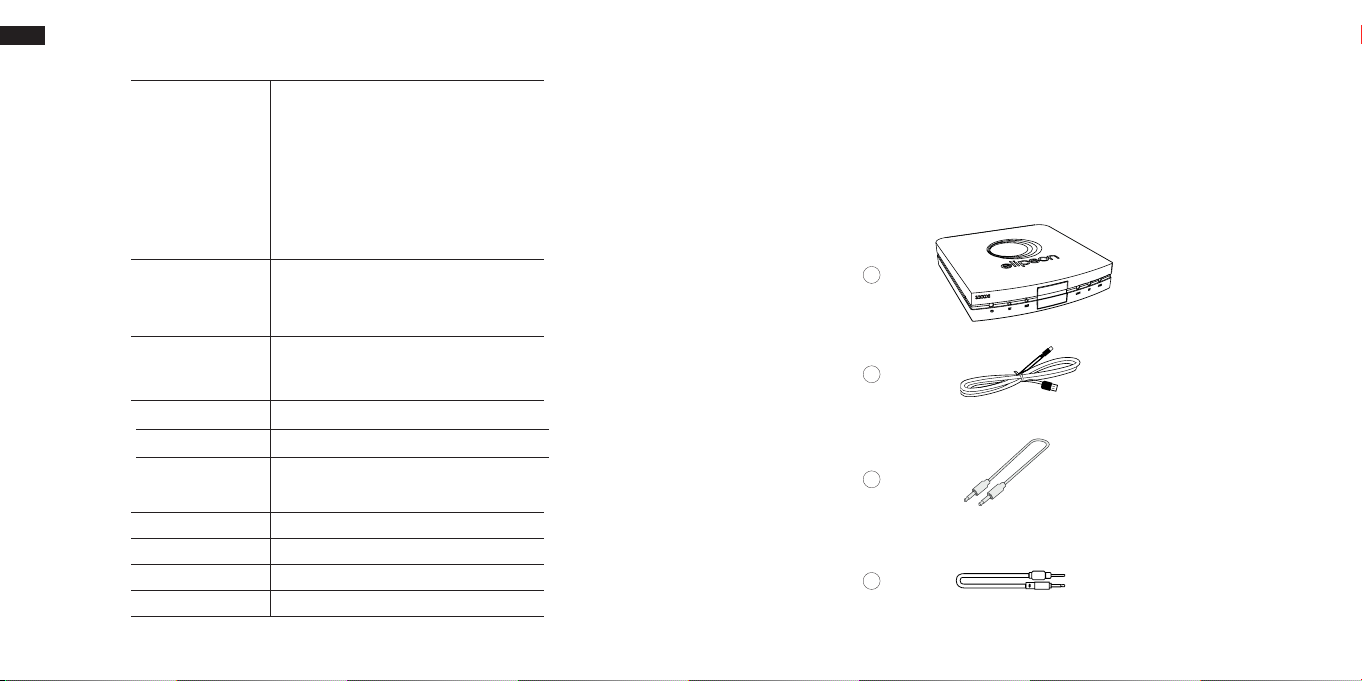
INSIDE THE BOX :
1- Stream S300 Xi device
2- Power cable USB C 5V (1 m)
3- 3.5 mini-jack stereo cable (1.5m)
4- Optical cable (mini jack 3.5) to toslink (1m)
Inputs
Outputs
DAC
Signal-to-noise ratio
Wi-Fi network
Ethernet port
Power supply
Dimensions
Net weight
Bluetooth 5.0
Aux (mini jack 3.5)
RJ45
Wi-Fi
Optical (mini jack 3.5)
Aux (mini jack 3.5)
ESS SABRE ES9023
110 dB
EEE 802.11 a/b/g/n/ac 2.4GHz
EEE 8702.11 a/n/ac 5GHz
Yes (front and rear panel) switchable
5V 1A - USB C
L78,5 x W83,2 x H15,3 mm
80 g
18
1
2
3
4
19
Page 11
EN
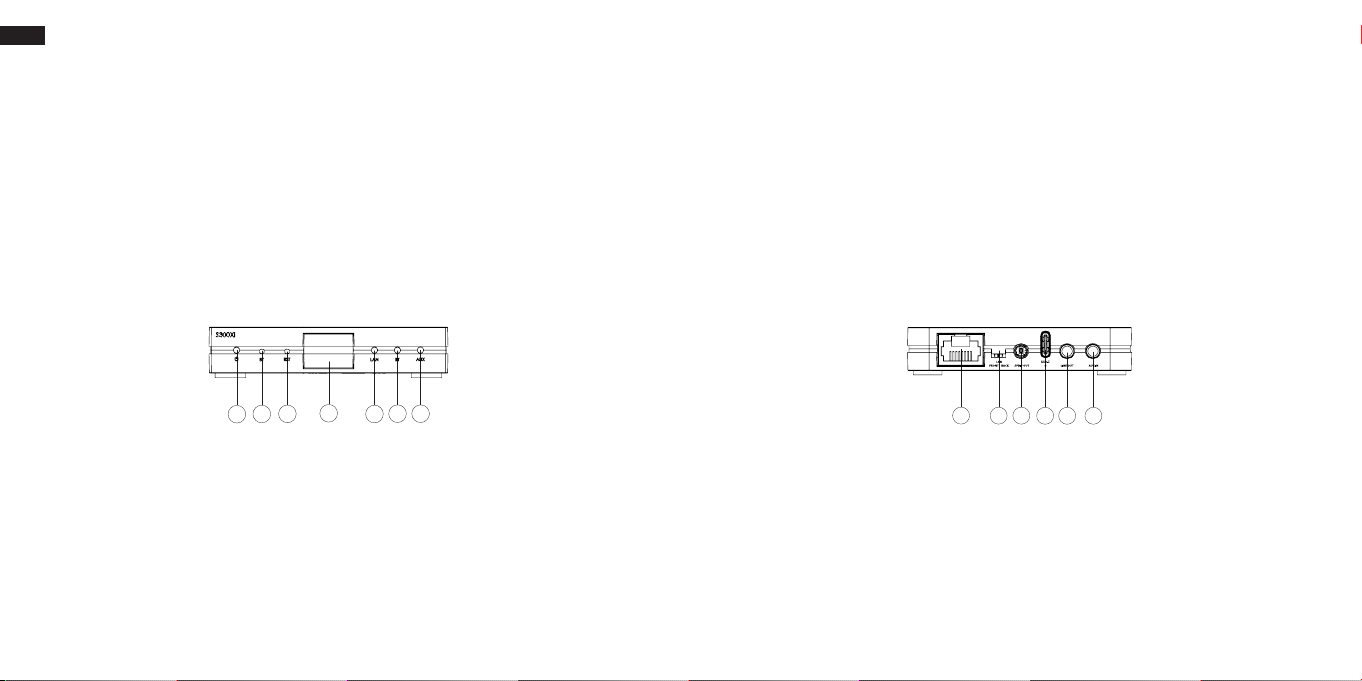
FRONT PANEL :
1- Led power (ON : white / Stand by : red - low consumption)
2- Bluetooth pairing button
3- Reset button
4- Ethernet port (switchable from the back)
5- Led for network mode (flashing white : in process / solid white : connected)
6- Led for Bluetooth mode (flashing white : in process / solid white : connected)
7- Led for AUX input
REAR PANEL :
1- Ethernet port (switchable from the back)
2- Switch to select front or back ethernet port
3- Toslink optical mini-jack 3.5 output (digital)
4- USB-C main plug 5V 1A
5- Analog mini-jack 3.5 output
6- Analog mini-jack 3.5 input
4
3
2
1
20
6
7
5
1
263
54
21
Page 12
EN
APPLICATION
The Elipson App allows you to connect your product to the network thanks to your
smartphone or tablet and to use several devices of our brand simultaneously.
The app is compatible with Apple and Android™ devices, available to download
from the App Store and on Google Play.
IOS Android
The application will allow you to :
- Connect to over 15,000 digital radios
- Play music from a streamer (DEEZER, SPOTIFY, TIDAL...)
- Select a source on your product
- Manage multi-room mode
- Knowing what music you’re playing
- Manage the sound volume
- Simultaneously add and control other Elipson products
22
To use AirPlay with Stream S300 Xi, the latest version of iOS, iPadOS,
or macOS is recommended.
Use your phone, tablet or computer as a remote control for Spotify.
Go to spotify.com/connect to learn how.
The Spotify Software is subject to third party licenses found here:
https://www.spotify.com/connect/third-party-licenses.
23
Page 13

EN
IV. USING THE STREAM S300 Xi
V. IN CASE OF BREAKDOWN
After connecting the streamer to your amplifier, plug in the power supply.
Depending on your system, you can either use the optical output on an
external DAC or connect the analogue output to an amplifier (line or AUX
input).
WI-FI CONNECTION :
In order to successfully connect your Elipson Stream S300 Xi to your home
network follow the detailed instructions in our Elipson Multiroom application.
Do not hesitate to refer to the tutorials on our website if you encounter any
difficulties during the process.
RESETTING PARAMETERS :
Press and hold the “RESET” button on the front of the unit until the “Power”,
“LAN”, “BT”, “AUX”, LEDs flash simultaneously. Once the restoration is complete,
the unit will automatically start the Wi-Fi network connection procedure.
24
DO NOT USE ANY KIND OF CLEANING SOLUTION OR CLEANER ON THESE UNITS.
IF FOR SOME REASON THE DEVICE NEEDS TO BE REPAIRED, PLEASE CONTACT
US IMMEDIATELY. WE WILL ISSUE A RETURN AUTHORIZATION NUMBER. THIS UNIT
SHOULD NOT BE SHIPPED BACK TO ELIPSON WITHOUT THE RA#.
DO NOT ATTEMPT TO OPEN OR DISMANTLE THIS DEVICE.
THIS WILL VOID THE WARRANTY !
POSSIBLE BREAKDOWN :
The product connects and disconnects from the Wi-Fi network.
• Check that the broadband of your Wi-Fi network is sufficient.
• Check that the device is not too far from the router
• Prefer the ethernet connection via an RJ45 cable
No sound on a channel:
• Check the connection to the amplifier
25
Page 14

EN
VI. 2.4G & 5G DÉCLARATION / STATEMENTS
RF Exposure Information: To maintain compliance with FCC RF exposure requirements, use the
product that maintain a 20cm separation distance between the user’s body and the host. MPE
(Maximum Permissible Exposure) limit for RF exposure at prediction frequency and satisfy RF
exposure compliance.
Informations sur l’exposition aux RF : Pour rester conforme aux exigences de la FCC en matière
d’exposition aux RF, utilisez le produit en maintenant une distance de séparation de 20 cm entre
le corps de l’utilisateur et l’hôte. La limite MPE (Exposition maximale admissible) pour l’exposition
RF à la fréquence de prédiction et satisfaire la conformité d’exposition RF.
FCC STATEMENT:
1. This device complies with Part 15 of the FCC Rules. Operation is subject to the following two
conditions:
(1) This device may not cause harmful interference,and
(2) This device must accept any interference received, including interference that may cause
undesired operation.
2. Changes or modifications not expressly approved by the party responsible for compliance
could void the user’s authority to operate the equipment.
NOTE: This equipment has been tested and found to comply with the limits for a Class B digital
device, pursuant to Part 15 of the FCC Rules. These limits are designed to provide reasonable
protection against harmful interference in a residential installation.
This equipment generates uses and can radiate radio frequency energy and, if not installed
and used in accordance with the instructions, may cause harmful interference to radio
communications. However, there is no guarantee that interference will not occur in a particular
installation. If this equipment does cause harmful interference to radio or television reception,
which can be determined by turning the equipment off and on, the user is encouraged to try to
correct the interference by one or more of the following measures:
Reorient or relocate the receiving antenna.
Increase the separation between the equipment and receiver.
Connect the equipment into an outlet on a circuit different from that to which the receiver is
connected.
Consult the dealer or an experienced radio/TV technician for help.
DÉCLARATION DE LA FCC :
Cet appareil est conforme à la partie 15 des règles de la FCC. Son fonctionnement est soumis aux
deux conditions suivantes :
(1) ce dispositif ne doit pas causer d’interférences nuisibles, et
(2) cet appareil doit accepter toute interférence reçue, y compris les interférences susceptibles
de provoquer un fonctionnement indésirable.
REMARQUE : Le fabricant n’est pas responsable des interférences radio ou TV causées par
des modifications ou des changements non autorisés apportés à cet équipement. De telles
modifications ou changements pourraient annuler le droit de l’utilisateur à faire fonctionner
l’équipement.
REMARQUE : Cet équipement a été testé et déclaré conforme aux limites d’un appareil numérique
de classe B, conformément à la partie 15 des règles de la FCC. Ces limites sont conçues pour
26
fournir une protection raisonnable contre les interférences nuisibles dans une installation
résidentielle. Cet équipement génère, utilise et peut émettre de l’énergie de fréquence radio
et, s’il n’est pas installé et utilisé conformément aux instructions, peut causer des interférences
nuisibles aux communications radio. Cependant, il n’y a aucune garantie que des interférences
ne se produiront pas dans une installation particulière.
Si cet équipement cause des interférences nuisibles à la réception de la radio ou de la
télévision, ce qui peut être déterminé en éteignant et en allumant l’équipement, l’utilisateur est
encouragé à essayer de corriger les interférences par l’une ou plusieurs des mesures suivantes :
- Réorienter ou déplacer l’antenne de réception.
- Augmentez la distance entre l’équipement et le récepteur.
- Brancher l’appareil sur une prise de courant située sur un circuit différent de celui sur lequel le
récepteur est branché.
- Consulter le revendeur ou un technicien radio/TV expérimenté pour obtenir de l’aide.
IC WARNING :
This device contains licence-exempt transmitter(s)/receiver(s) that comply with Innovation, Science
and Economic Development Canada’s licence-exempt RSS(s). Operation is subject to the following
two conditions:
(1) This device may not cause interference; and
(2) This device must accept any interference, including interference that may cause undesired
operation of the device.
FCC/ IC Radiation Exposure Statement
This equipment complies with FCC and IC radiation exposure limits set forth for an uncontrolled
environment. This equipment should be installed and operated with minimum distance 20cm
between the radiator & your body.
Cet appareil contient des émetteurs / récepteurs exemptés de licence conformes aux RSS (RSS)
d’Innovation, Sciences et Développement économique Canada. L’exploitation est autorisée aux
deux conditions suivantes :
(1) l’appareil ne doit pas produire de brouillage, et (2) l’utilisateur de l’appareil doit accepter
tout brouillage radio électrique subi, même si le brouillage est susceptible d’en compromettre le
fonctionnement.»
FCC/ IC Déclaration d ‘exposition aux rayonnements
Cet appareil est conforme à FCC et IC l’exposition aux rayonnements limites xées pour un
environnement non contrôlé. Cet appareil doit être installé et utilisé avec une distance minimale
de 20 cm entre le radiateur et votre corps. Cet transmetteur ne doit pas être co-situé ou opérant en
liaison avec toute autre antenne ou transmetteur.
27
Page 15

EN
CE & UKCA STATEMENT:
RF exposure information: The Maximum Permissible Exposure (MPE) level has been calculated based
on a distance of d=20 cm between the device and the human body. To maintain compliance with
RF exposure requirement, use product that maintain a 20cm distance between the device and
human body.
Do not use the device in the environment at too high or too low temperature, never expose the
device under strong sunshine or too wet environment. The suitable temperature for the product and
accessories is 0°C-40°C.
Operating frequency range and maximum transmit power
• Bluetooth: 2402MHz ~ 2480MHz, <9.11 dBm EIRP
• WLAN 2.4GHz: 2412MHz ~ 2472MHz, <20 dBm EIRP
• WLAN 5GHz: 5150MHz ~ 5825MHz, <20 dBm EIRP
The device for operation in the band 5150~5350 MHz is only for indoor use to reduce the potential for
harmful interference to co-channel mobile satellite systems.
This product can be used across EU member states & UK.
Hereby, Elipson using Linkplay Technology Inc. Corporation, declares that this device is in compliance
with the essential requirements and other relevant provisions of Directive 2014/53/EU.
DÉCLARATION CE & UKCA :
Informations sur l’exposition aux radiofréquences : Le niveau d’exposition maximale admissible (MPE)
a été calculé sur la base d’une distance de d=20 cm entre l’appareil et le corps humain. Pour rester
conforme à l’exigence d’exposition RF, utilisez un produit qui maintient une distance de 20 cm entre
l’appareil et le corps humain.
N’utilisez pas l’appareil dans un environnement à température trop élevée ou trop basse, ne l’exposez
jamais à un fort ensoleillement ou à un environnement trop humide. La température appropriée pour
le produit et les accessoires est de 0°C-40°C.
Plage de fréquences de fonctionnement et puissance d’émission maximale
• Bluetooth : 2402MHz ~ 2480MHz, <9.11 dBm EIRP
• WLAN 2.4GHz : 2412MHz ~ 2472MHz, <20 dBm EIRP
• WLAN 5GHz : 5150MHz ~ 5825MHz, <20 dBm EIRP
L’appareil destiné à fonctionner dans la bande 5150~5350 MHz est uniquement destiné à un usage
intérieur afin de réduire le potentiel d’interférences nuisibles aux systèmes mobiles par satellite cocanaux.
Ce produit peut être utilisé dans tous les États membres de l’UE & en Grande Bretagne.
Par la présente, Elipson, utilisant la technologie Linkplay Technology Inc. Corporation, déclare que cet
appareil est conforme aux exigences essentielles et aux autres dispositions pertinentes de la directive
2014/53/UE.
28
APPLE AIRPLAY LEGAL NOTICE:
Use of the Works with Apple AirPlay badge means that an accessory has been designed to
work specifically with the technology identified in the badge and has been certified by the
developer to meet Apple performance standards.
CREDIT LINES AND TRADEMARK SYMBOLS
Apple, AirPlay, Apple Home, Apple TV, Apple
Watch, HomeKit, HomePod, HomePod mini,
iPad, iPad Air, iPhone, and tvOS are trademarks
of Apple Inc., registered in the U.S. and other
countries and regions.
CREDIT LINES AND TRADEMARK SYMBOLS (JAPAN)
Apple, AirPlay, Apple Home, Apple TV, Apple
Watch, HomeKit, HomePod, HomePod mini,
iPad, iPad Air, iPhone, and tvOS are trademarks
of Apple Inc., registered in the U.S. and other
countries and regions. The trademark “iPhone”
is used in Japan with a license from Aiphone K.K.
CREDIT LINES AND TRADEMARK SYMBOLS (UNITED STATES)
®
AirPlay
®
Apple
™
Apple Home
®
Apple TV
Apple Watch
HomeKit
HomePod
HomePod mini
iPad
iPad Air
iPad mini
iPad Pro
iPhone
Lightning
Mac
Siri
GOOGLE LEGAL NOTICE:
Android, Google Play, YouTube and Chromecast built-in are trademarks of Google LLC.
®
®
®
®
®
®
®
®
®
®
®
®
29
Page 16

EN
CAUTION
The WEEE symbol indicates this ELIPSON product complies with the European
Parliament and Council Directive 2012/19/EU concerning Waste Electrical and
Electronic Equipment (WEEE). This product must be appropriately recycled or
processed in accordance with these directives. Consult your local waste disposal
authority for guidance.
WARRANTY
These device has a limited 2 year warranty. This warranty includes 2 year parts and repair labor
on all components.
The warranty extends only to the original purchaser of the product and not to any subsequent
owner.
Elipson’s obligation under these warranties is limited to repairing or replacing any component
found defective in material or workmanship under normal conditions of use with an equal
and/or current product.
These warranties shall not apply to products which have been abused, modied, or
disassembled.
Products to be repaired or returned under this warranty must be returned to the factory
through an authorized Elipson dealer with all transportation and insurance charges prepaid.
TO CLAIM REPAIR UNDER WARRANTY
To claim repair or service under warranty you simply have to contact your local Elipson dealer,
from whom your equipment has been purchased. To ensure that you will be able to ship your
damaged product in correct manner, always retain the original packaging of your Elipson
equipment. If you cannot contact your original dealer, or if you are using your Elipson product
outside the purchase country, you should contact Elipson national distributor in the residence
country, who will advise where the equipment can be serviced.
You can also visit our web site to check our contact information : www.elipson.com
To validate your warranty, you need to produce, as a proof of purchase, your original purchase
invoice specifying the date of purchase and stamped by your dealer.
ELIPSON’S POLICY IS TO CONTINUOUSLY INCORPORATE IMPROVEMENTS
ALL SPECIFICATIONS ARE SUBJECT TO CHANGE WITHOUT NOTICE.
IF YOU HAVE ANY QUESTIONS, PLEASE VISIT OUR WEBSITE :
[email protected] OR ON FACEBOOK AND INSTAGRAM
INTO OUR PRODUCTS.
WWW.ELIPSON.COM
CONTACT US :
©Elipson 2023 - Elipson is a trademark of AV Industry.
30
31
Page 17

EN
Stream S300 Xi
HI-RES AUDIO STREAMER
www.elipson.com
32
27/07/2023
 Loading...