

Page 1

Ring Range Extender
User Manual
Page 2

Range Extender Advanced User Manual
Page 2
Preface
Preface
As this is the full User Manual, a working knowledge of Z-Wave auto-
mation terminology and concepts will be assumed. If you are a beginner
user, please visit www.Ring.com for instructions. This manual will provide
in-depth technical information about the Range Extender, especially in regards to its compliance to the Z-Wave standard (such as compatible Command Classes, Association Group capabilities, special features, and other
information) that will help you maximize the utility of this product in your
system.
Page 3

Range Extender Advanced User Manual
Page 3
Table of Contents
Table of Contents
Preface ................................................................................................... 2
Description and Features ........................................................................ 4
Specifications ........................................................................................... 5
Inclusion & Exclusion ................................................................................ 6
Physical Installation .................................................................................. 8
LED Behavior ........................................................................................... 9
Range Extender Behavior ....................................................................... 10
Compatible Command Classes ............................................................... 11
“Configuration” Command Class Parameters ........................................... 14
Troubleshooting ...................................................................................... 15
Warranty & Support .................................................................................. 16
Page 4

Range Extender Advanced User Manual
Page 4
Description and Features
Description and Features
The Ring Range Extender is a Z-Wave range extender with battery backup. It
is a Security Enabled Z-Wave Plus Product.
Page 5

Range Extender Advanced User Manual
Page 5
Specifications
Specifications
Technical Specifications
SKU
4AR1S70EN0
Radio protocol
Z-Wave(500 series)
Power supply
110/240 V AC
Working current
Max 120 mA
Operating temperature
0 - 40 °C
Radio frequency
908.4Mhz or 916Mhz
Range
Up to 250’ depending on environment
Dimensions (L x W x H)
Excluding Plug:
Table 1 - Technical Specifications
Package Contents:
Page 6

Range Extender Advanced User Manual
Page 6
Inclusion & Exclusion
Inclusion & Exclusion
Inclusion (Add to System)
1. For proper inclusion, bring the Range Extender to the final location where it will
be used*.
2. Follow the instructions for your Z-Wave controller to enter inclusion mode.
3. Remove the battery tab.
4. Supply power to the Range Extender to begin inclusion mode. If the
Range Extender is already powered on, press the button 3 times quickly.
5. The device will enter inclusion mode for 30 seconds and the LED Ring will blink
quickly (1 times/sec) until it’s included in a system.
Upon successful inclusion, the LED Ring will blink slowly three times and then stay on
permanently.
Exclusion (Remove from System)
Follow the instructions for your Z-Wave Certified Controller to enter exclusion
mode. When prompted by the controller:
1. Make sure the Range Extender is powered on.
2. Press the Button quickly 3 times in a row.
Upon successful inclusion, the LED Ring blink slowly three times and then blink once
every half second until it is included in a system.
*For non Z-Wave Plus networks, please consult the owner’s manual for your primary controller to determine the best method and location
for adding the Range Extender to your Z-Wave network.
Page 7

Range Extender Advanced User Manual
Page 7
Inclusion & Exclusion
Resetting the Range Extender
If needed, the Range Extender can be reset locally by following these steps.
Only do this if your Z-Wave controller is missing or otherwise unreachable.
Beware that resetting your device will disconnect it from the system:
1. Make sure that your Range Extender is powered on.
2. Press the button 6 times quickly, then immediately press and hold for 10 sec-
onds.
The Range Extender’s memory will be erased to factory settings and the
LED Ring will blink very quickly six times and then blink once every half second
until it is included in a system.
Page 8

Range Extender Advanced User Manual
Page 8
Physical Installation
Physical Installation
The Range Extender can be plugged directly into a standard power outlet.
Include the Range Extender into your Z-Wave network and make sure it can
communicate from the installation location before continuing further.
Installation On the Power Outlet (Secured with Screw)
1. Unscrew the wall plate screw adjacent to the outlet the Range Extender
will be plugged into.
2. Plug in the Range Extender, making sure the Screw Flange is directly over
the wall plate’s screw hole.
3. Secure the Range Extender in place by replacing the wall plate screw.
Installation On the Power Outlet (Unsecured)
1. Plug in the Range Extender.
Page 9
Range Extender Advanced User Manual
Page 9
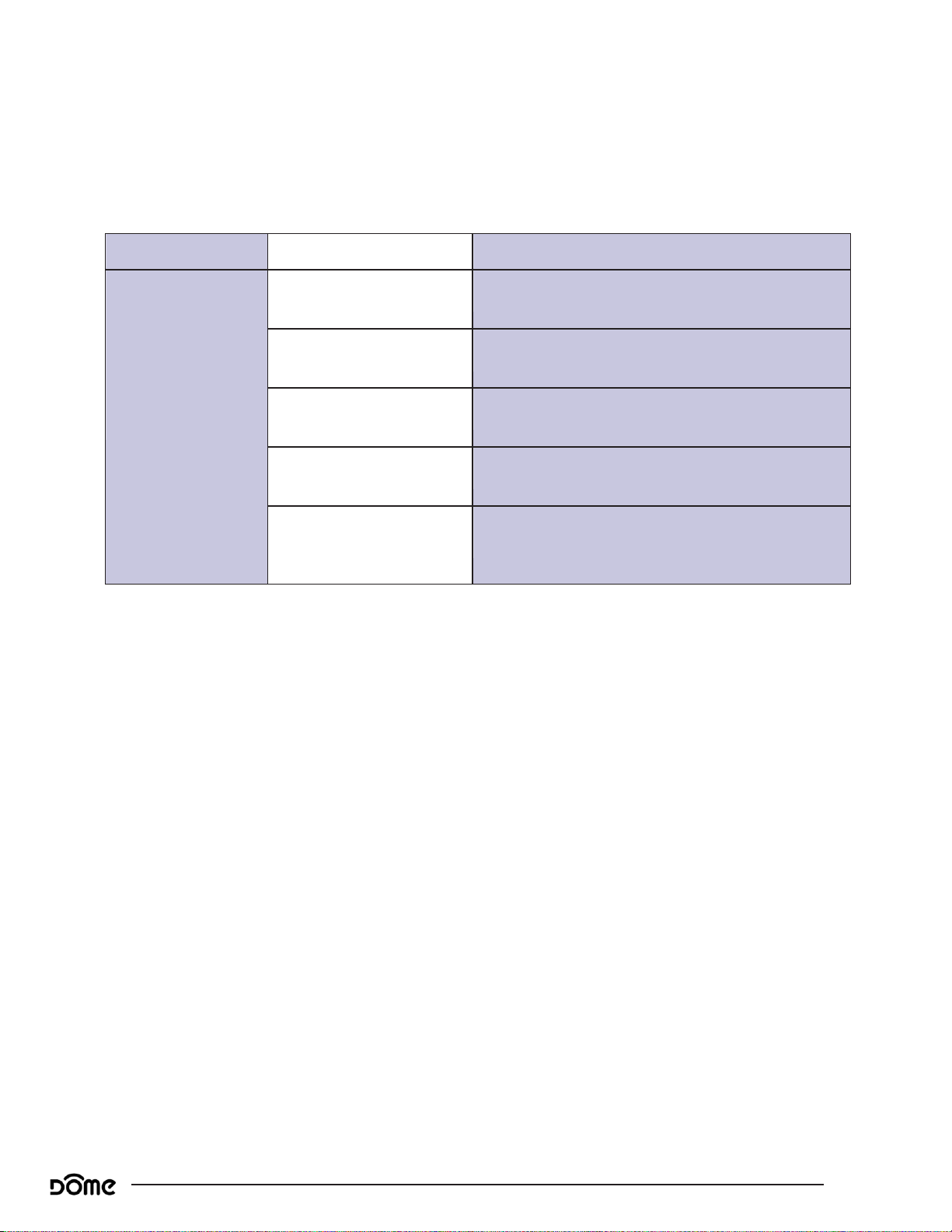
LED Behavior
LED Behavior
Color Event
Behavior
Blue
In Pairing Mode
Long Blink pattern repeated for 30 sec
Paired successfully
Steady for 5s
Device is not yet paired
5 short blinks - repeat every 1 min
Factory Reset
TBD - please specify
Enter Exclusion Mode/
Send Node Info
TBD - please specify
Short blink = 500ms on + 500ms off
Long blink = 1s on + 1s off
Page 10
Range Extender Advanced User Manual
Page 10
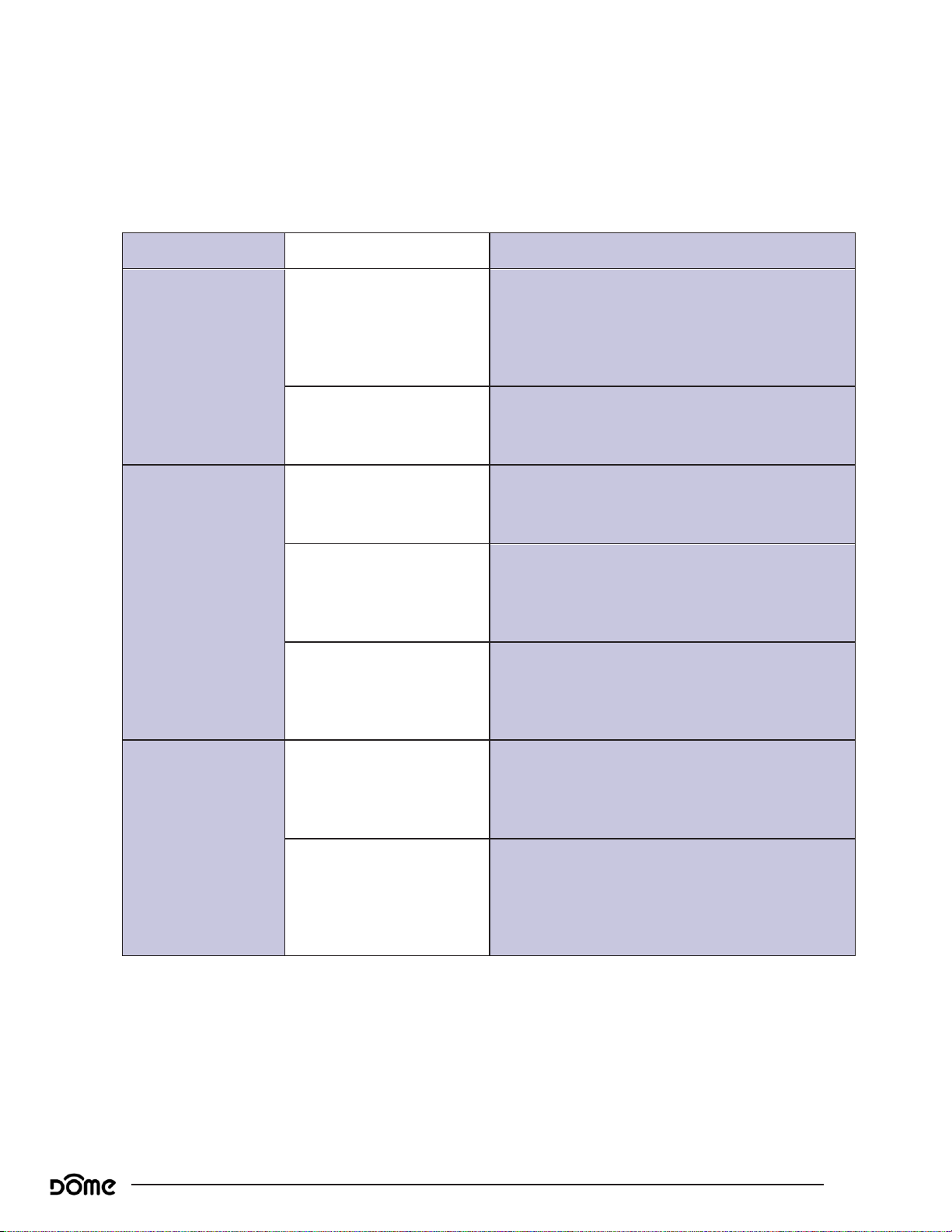
Range Extender Behavior
Range Extender Behavior
Action
Condition Result
Power On
Range Extender Not Yet
Included in System, and
Controller is in Inclusion
Mode
Device enters inclusion mode for up to two min
and includes into whichever network is also in
inclusion mode.
Range Extender Already
Included in System
Device powers on.
Push Button 3
Times
Range Extender Already
Included in System
Device sends node info to Group 1
Range Extender Already
Included, and Controller is
in Exclusion Mode
Device is excluded from the system and re-
moves the Home ID from its memory
Range Extender Not Yet
Included in System
Device enters inclusion mode for up to two min
and includes into whichever network is also in
inclusion mode.
Press and hold the
button for TEN
seconds
Range Extender Already
Included in System
Device will be reset to factory settings, and a
DEVICE_RESET_LOCALLY command will be sent
to Group 1
Any condition (as long as
the device has power)
The device’s memory will erase to factory default
settings and any associations, configuration
parameters, and other locally saved data will be
lost
This whole page is tentative!
Page 11
Range Extender Advanced User Manual
Page 11
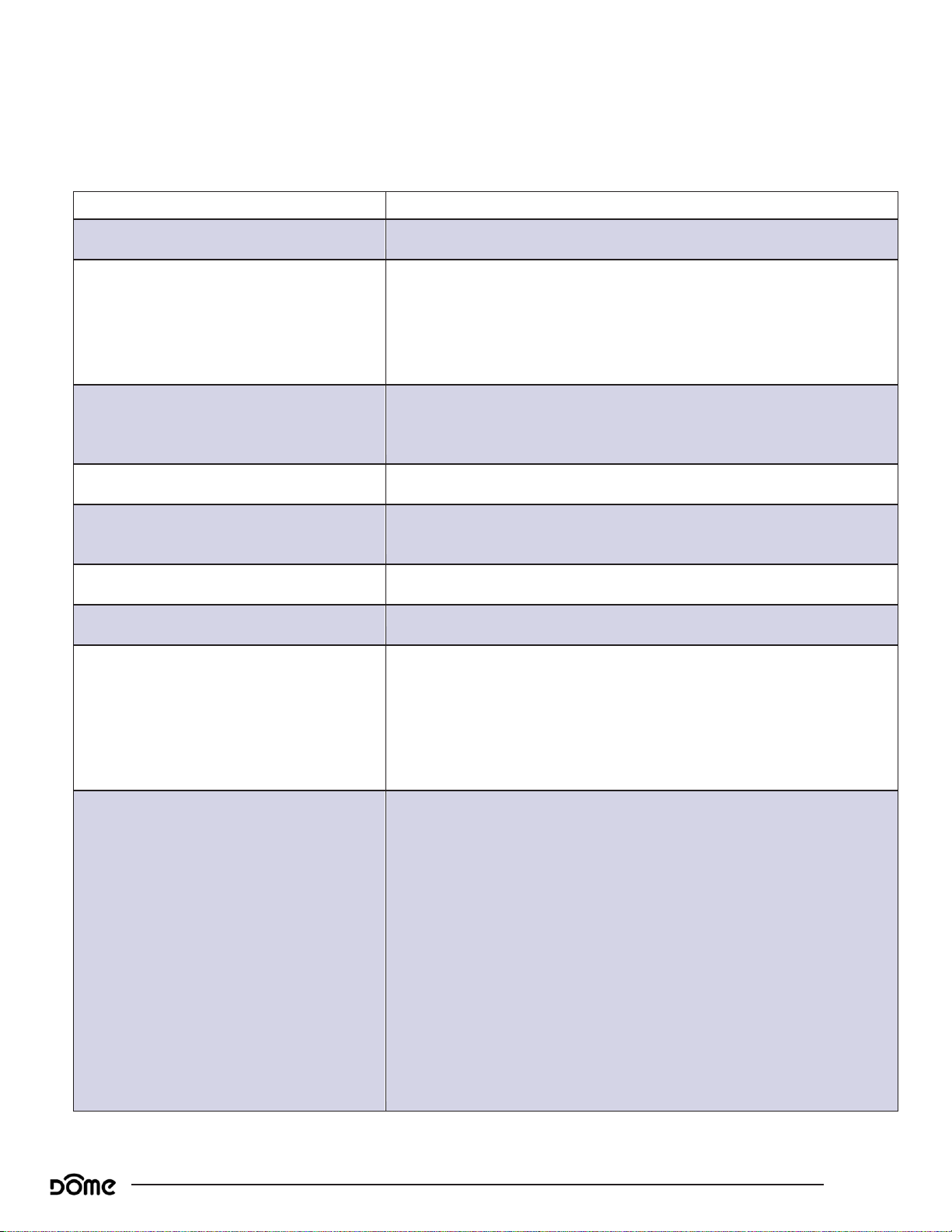
Compatible Command Classes
Compatible Command Classes
Command Class
Notes
Device Reset Locally V1 (5A)
-
Node Information Frame (NIF)
The node Information Frame (NIF) advertises the device’s Generic Device
Type, Specific Device Type, and Role Type.
Generic Device Type: GENERIC_TYPE_REPEATER_SLAVE
Specific Device Type: SPECIFIC_TYPE_REPEATER_SLAVE
Role Type: ROLE_TYPE_SLAVE_ALWAYS_ON
Security Class
WILL NOT request the S2 Access Control Security Class
WILL request the S2 Authenticated Security Class
WILL request the S2 Unauthenticated Security Class
Powerlevel V1 (73)
-
Battery V1(80)
The Battery Report interval will be 70 minutes by default and is configu-
rable using a configuration parameter.
Association Group Information V1 (59)
-
Firmware Update Meta Data (7A)
Version V2 (86)
Returned Value: 03 04 21 01 11 1E 00
Z-Wave Library Type: 03 (Enhanced Slave)
Protocol Version: 04 21
Protocol Sub-Version: 01 11
Application Version: 1E
Application Sub-Version: 00
Manufacturer Specific V2 (72)
Returned Value: 03 46 04 01 01 01
Manufacturer ID: 03 46
Product Type: 04 01
Product ID: 01 01
Device specific get has serial number, of the following format:
Serial Number Format: BHRP V YY WW DM XXXXXX
V: Ring hub Version (right now it’s 1, we will let you know if/when it
changes)
YY: Year of manufacture
WW: week number of manufacture
XXXXXX: incremented serial number
Example: 3,245th Ring first version extender built
in the 36th week of 2017 = BHRP11736DM003245
Page 12
Range Extender Advanced User Manual
Page 12
Range Extender Behavior
Command Class
Notes
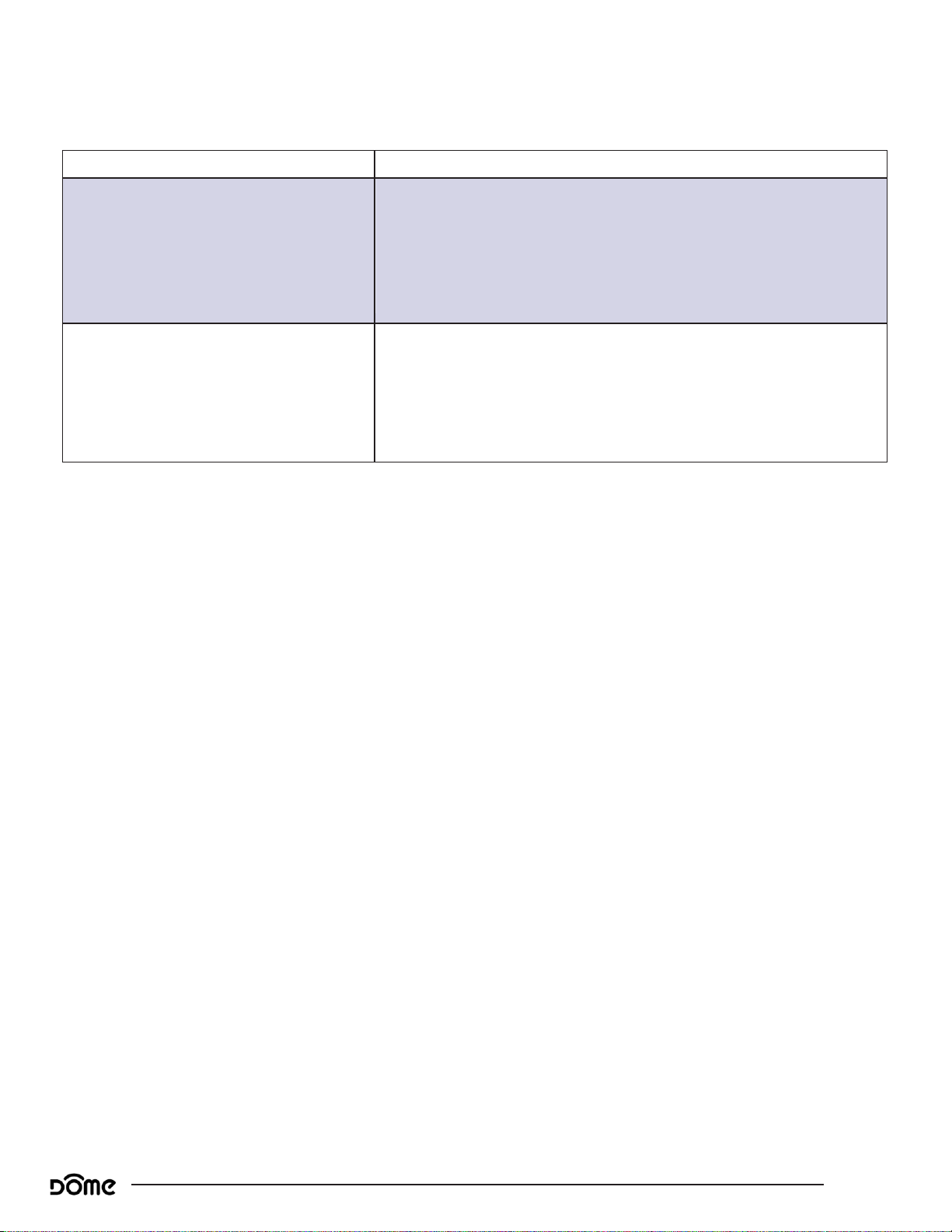
Z-Wave Plus Info V2 (5E)
Returned Value: 01 05 00 1B 00 1B 00
Z-Wave Plus Version: 01
Role Type: 05 (Always On Slave)
Node Type: 00 (Z-Wave Plus Node)
Installer Icon Type: 1B 00 (Repeater)
User Icon Type: 1B 00 (Repeater)
Association V2 (85)
Group 1
Group 1 is the “Lifeline” group, which can hold five devices. The
Range Extender repeats all signals it receives to this group. The
Range Extender also sends this group Battery Reports, Power Management notifications, and a Device Reset Locally notification to remove
itself from the Z-Wave network.
Page 13
Range Extender Advanced User Manual
Page 13
Range Extender Behavior
Command Class
Notes
Notification V4 (71)
The Range Extender sends Notification Reports to update the Primary
Controller of changes in power status (e.g. battery is charging, AC power
is disconnected, etc.)
Returned Value: 00 00 00 FF 07 XX YY ZZ
V1 Alarm Type: 00 (Unsupported)
V1 Alarm Level: 00 (Unsupported)
Reserved: 00 (Reserved)
Notification Status: FF (Unsolicited Reporting is Enabled)
Notification Type: 08 (Power Management)
Event:
AC Power Disconnected—02 (AC mains disconnected)
AC Power Connected—03 (AC mains re-connected)
Battery is Charging—0C (Battery is Charging)
Battery is not Charging—00 (Event Inactive)
Sequence/Reserved/Event Parameters Length: 00
Notification Event Parameters: 00 (No Event Parameters)
Configuration V1 (70)
See ““Configuration” Command Class Parameters” on page 16.
Table 2 - Command Classes Continued
Page 14
Range Extender Advanced User Manual
Page 14
“Configuration” Command Class Parameters
“Configuration” Command Class Parameters
Param #
Size
Value
02
(Param #2)
02
(2 Bytes)
00 0A
(10)
Param
#
Size
Name
Available Values
Default
Value
01
This parameter sets how often the device sends battery reports to the Main Controller. It can
be set to any value from 60 ~ 1,440 minutes (1 ~ 24 hours) in 1 minute increments.
02
Battery Report Interval
3C ~ 05 A0
(60 ~ 1,440 minutes [1 ~ 24 hours] in one min-
ute increments)
00 46
(70 Minutes)
02
If this parameter is enabled, the LED Ring will flash everytime there motion is detected. If this is
disabled, the LED Ring will not flash to indicate motion events.
01
Enable/Disable LED Ring
1 (LED Disabled)
2 (LED Enabled)
01
(LED En-
abled)
Configuration parameters are sent using a standard syntax to ensure interoperability between all manufacturers’ products. All values are represented using
the hexadecimal number system.
Typical syntax is as shown below. Note that the value sent must be the exact
size, in bytes, as accepted by the setting. The “extra” spaces should be filled
with zeros (see the “value” column below.)
Example Configuration Parameter: 02 02 00 0A
Page 15

Range Extender Advanced User Manual
Page 15
Troubleshooting
Troubleshooting
Q: Help! My Range Extender paired successfully, but my controller can’t
see it anymore after I installed it!
A:First, make sure your the Range Extender is still powered up. Otherwise,
the Z-Wave signal is probably weak in that area of your home. Remember
that the 120' - 150' range doesn’t take into account walls, furniture, and
other obstacles. To boost your Z-Wave network coverage, add a few nonbattery powered Z-Wave devices between the controller and the furthest
device, like the Ring On/Off Plug or Water Main Shut-Off, or of course,
the Ring Range Extender!
Q: There’s so many words in this manual I don’t understand. How
can I learn more about Z-Wave?
A:Remember you don’t have to understand everything in this manual to
start automating your home. Our Quick-Start Guides have all you need
to start using any device. For more thorough information about Z-Wave
home automation, visit www.Ring.com/support.
Q: I’ve tried multiple times, but I can’t include the Range Extender in my
system.
A:Make sure your device is getting power. Then, follow the instructions
under “Factory Reset & Misc. Functions” on page 8 and try going
through the inclusion process again. If you are still having issues, please
visit www.Ring.com/support
Q: All of a sudden, my Range Extender is offline.
A:Check your power supply and make sure your device is getting power. If
powered, make sure you still have Z-Wave network coverage. If you are
still having issues, visit www.Ring.com/support.
Page 16

Range Extender Advanced User Manual
Page 16
Warranty & Support
Warranty & Support
FCC Statement
This equipment has been tested and found to comply with the limits for a
Class B digital device, pursuant to Part 15 of the FCC Rules. These limits
are designed to provide reasonable protection against harmful interference
in a residential installation. This equipment generates uses and can radiate
radio frequency energy and, if not installed and used in accordance with
the instructions, may cause harmful interference to radio communications.
However, there is no guarantee that interference will not occur in a particular installation. If this equipment does cause harmful interference to radio
or television reception, which can be determined by turning the equipment
off and on, the user is encouraged to try to correct the interference by one
or more of the following measures:
-- Reorient or relocate the receiving antenna.
-- Increase the separation between the equipment and receiver.
-- Connect the equipment into an outlet on a circuit different from that to
which the receiver is connected.
-- Consult the dealer or an experienced radio/TV technician for help.
This device complies with part 15 of the FCC Rules. Operation is subject to
the following two conditions:
(1) This device may not cause harmful interference, and (2) this device must
accept any interference received, including interference that may cause undesired operation.
Changes or modifications not expressly approved by the party responsible
for compliance could void the user’s authority to operate the equipment.
Page 17

Range Extender Advanced User Manual
Page 17
Warranty & Support
IC STATEMENT
This device complies with Industry Canada’s licence-exempt RSSs. Operation is
subject to the following two conditions:
(1) This device may not cause interference; and
(2) This device must accept any interference, including interference that may
cause undesired operation of the device.
Le présent appareil est conforme aux CNR d'Industrie Canada applicables aux
appareils radio exempts de licence. L'exploitation est autorisée aux deux
conditions suivantes : (1) l'appareil ne doit pas produire de brouillage, et (2)
l'utilisateur de l'appareil doit accepter tout brouillage radioélectrique subi, même
si le brouillage est susceptible d'en compromettre le fonctionnement.
 Loading...