

Page 1

Hello!
Let’s get started
Page 2

elephantalarms.com
Thank you for purchasing
elephant door
TM
Page 3

1
What’s in the box.................................................
Quick start............................................................
When elephant door™ will not work
correctly..................................................................
Using the device.................................................
Battery and charging........................................
How your elephant door™ works......................
Fixing and refixing..............................................
Things you shouldn’t do with your
elephant door™......................................................
LED indicating lamps.........................................
Troubleshooting.................................................
How to use the device......................................
Contents
2
3
8
9
11
14
16
17
18
19
22
User’s Manual
1.
2.
3.
4.
5.
6.
7.
8.
9.
10.
11.
Page 4
2
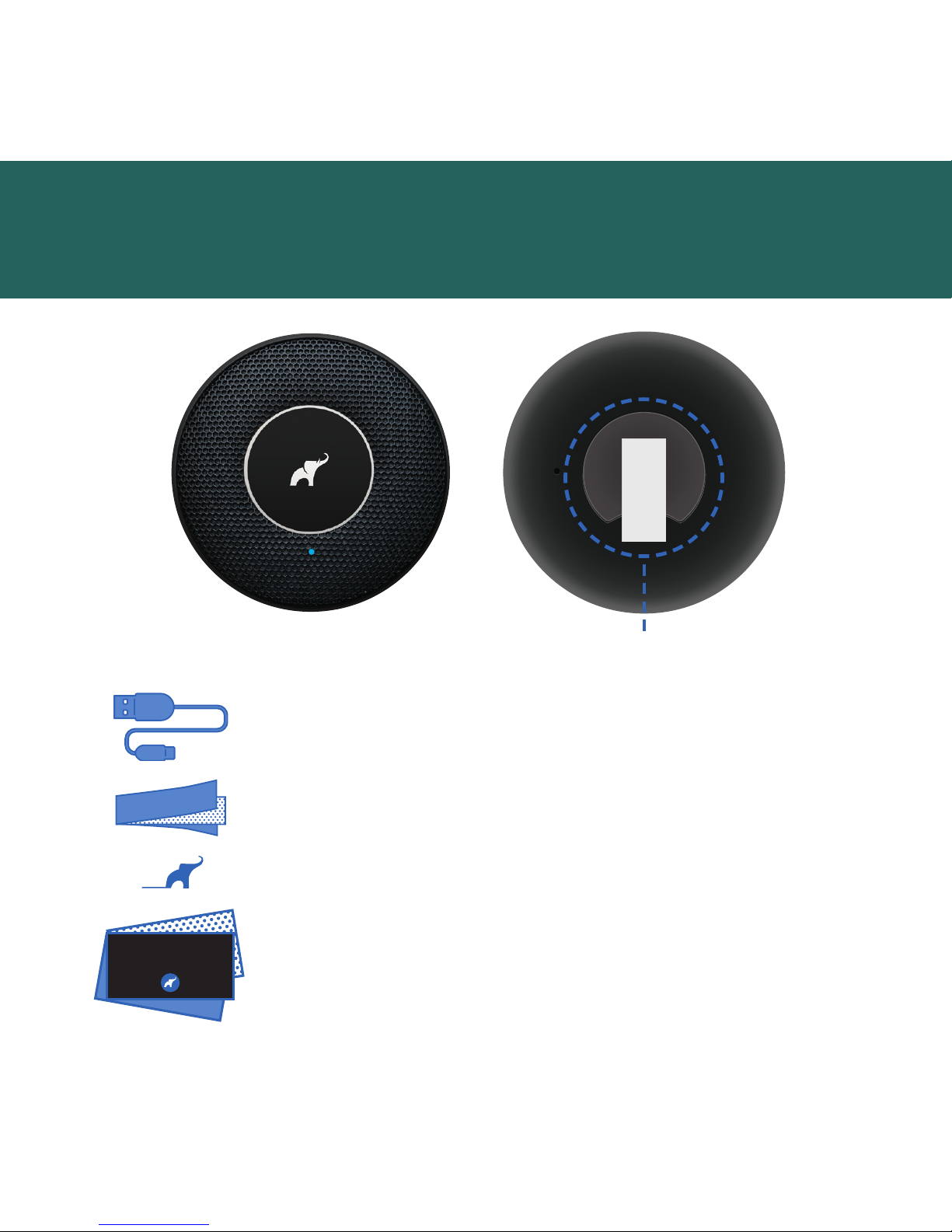
What’s in the box
1 micro USB cable
1 first launch key
2 spare tapes for refixing
Hello
5 invitations for neighbors and
the unique product code
elephant door™ fixing with tape
Page 5
3
Quick start
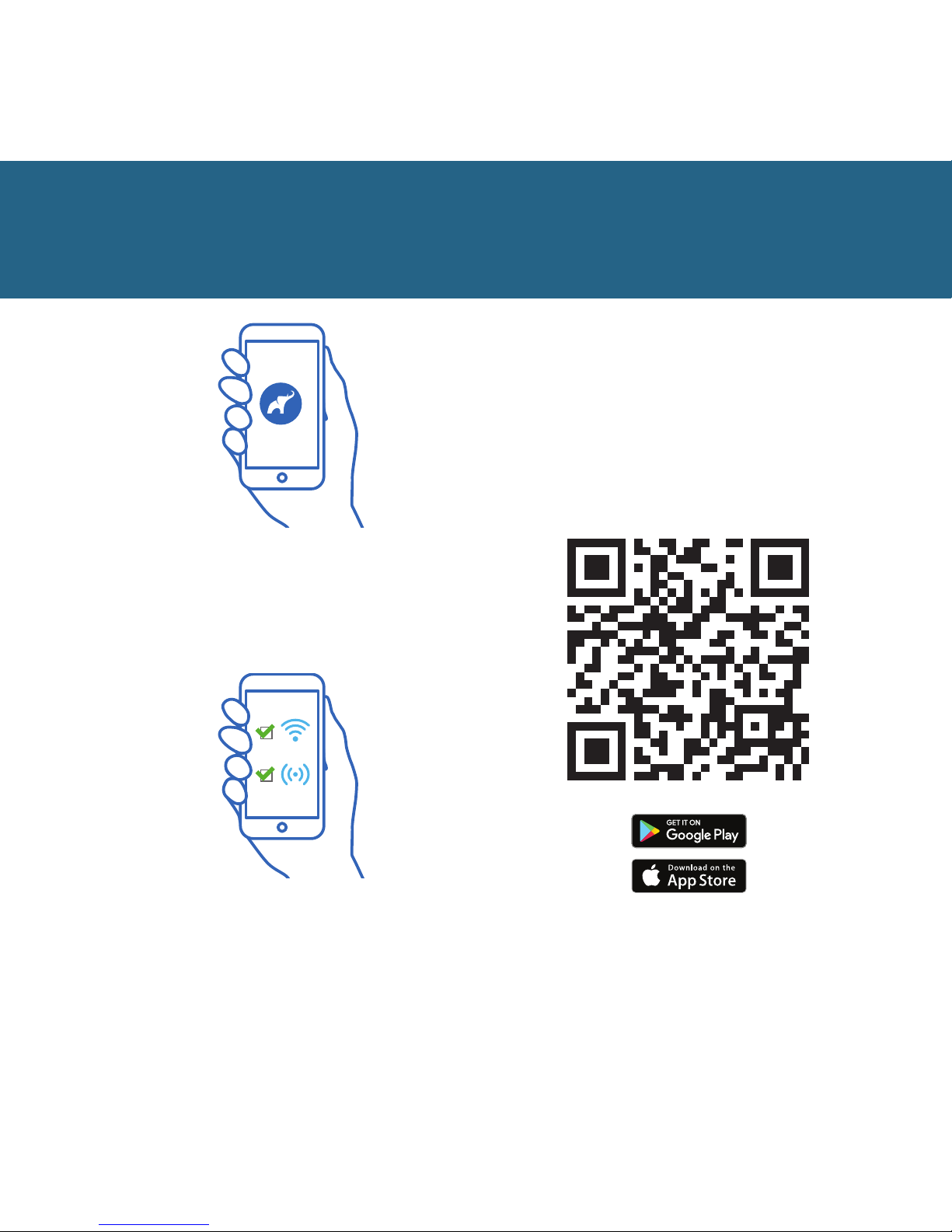
Download the elephant app.
You can do that by scanning
the QR code.
1
2
Make sure you have enabled Wi-Fi and
Bluetooth in your smartphone.
They are necessary for launching
and using the app and the device.
Page 6
4
Quick start
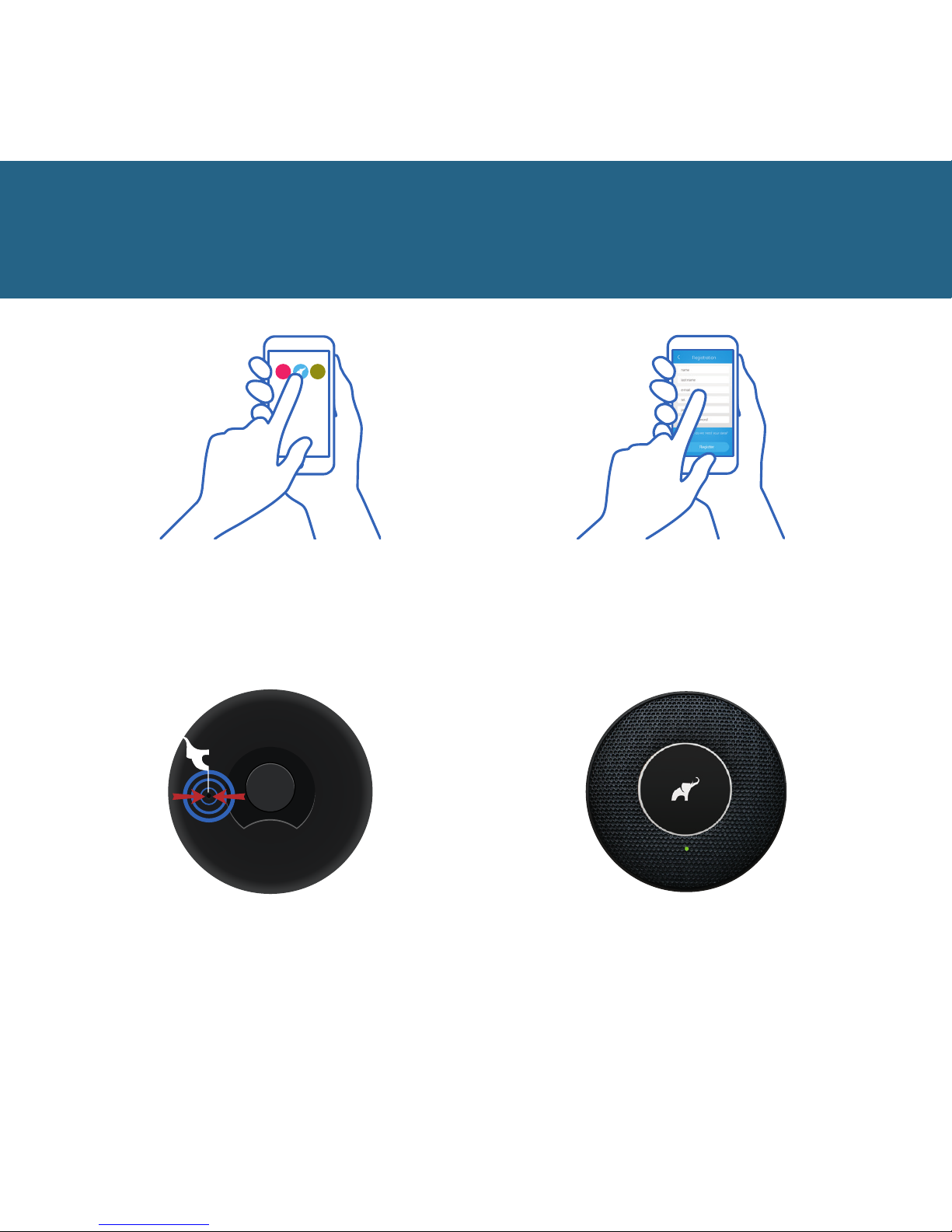
To launch the device you
need the first launch key. The
switch can be found in the hole
on the back of the device.
5
Press the button once. You will
hear a click sound and the LED
of the device will start to blink a
green light every 10 seconds.
6
Run the app and follow
the instructions.
3 4
Register in the app and confirm
the activation message sent to
your email box.
Page 7

5
To connect to the device scan the
QR code in the app. It can be found
inside the packaging. You can also
enter the password manually.
7
NOTE! If during
the first launch the device does
not launch, charge it.
Numer seryjny, Serial number,
Seriennummer, Pořadové číslo,
Poradové číslo
101016002007
Hasło, Password, Passwort,
Heslo, Heslo
vamrbEHjwKbKOQhHCauG
This is your unique elephant door™ code.
You need it to connect your elephant door™
to your smartphone.
ENGLISH
S/N: 101016002002
Elephant Sp. z o.o.
Made in EU
KOD PID KOD Pass
QR KODE
Model: ED1.0
Elephant Sp. z o.o.
Made in Poland
Quick start
Launch an automated device test.
NOTE! During the test you will
hear a single alarm sound.
9
To receive notifications
about events, connect the
elephant door™ device to
your Wi-Fi network.
8
Page 8
6
13
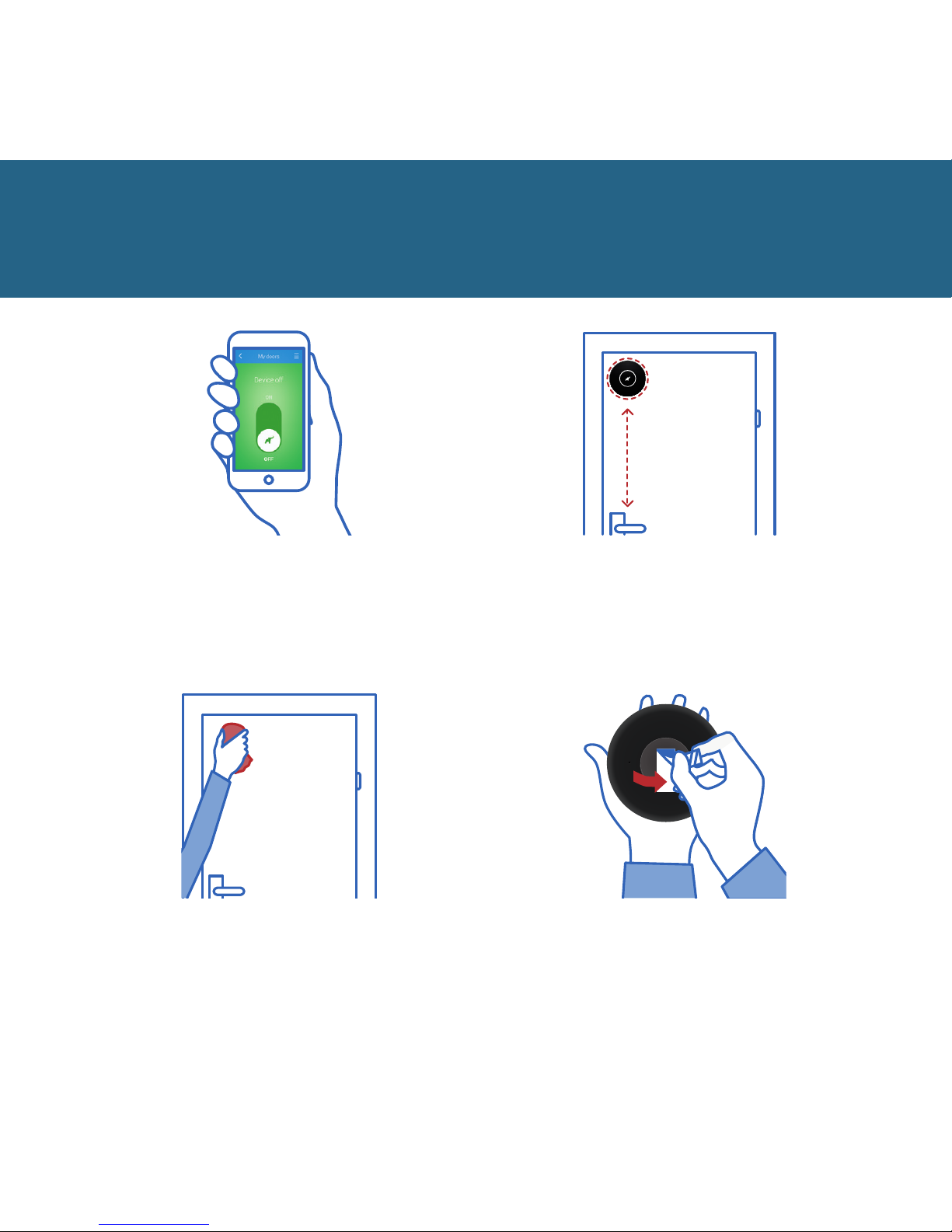
Remove the protective strip
from the fixing tape.
Quick start
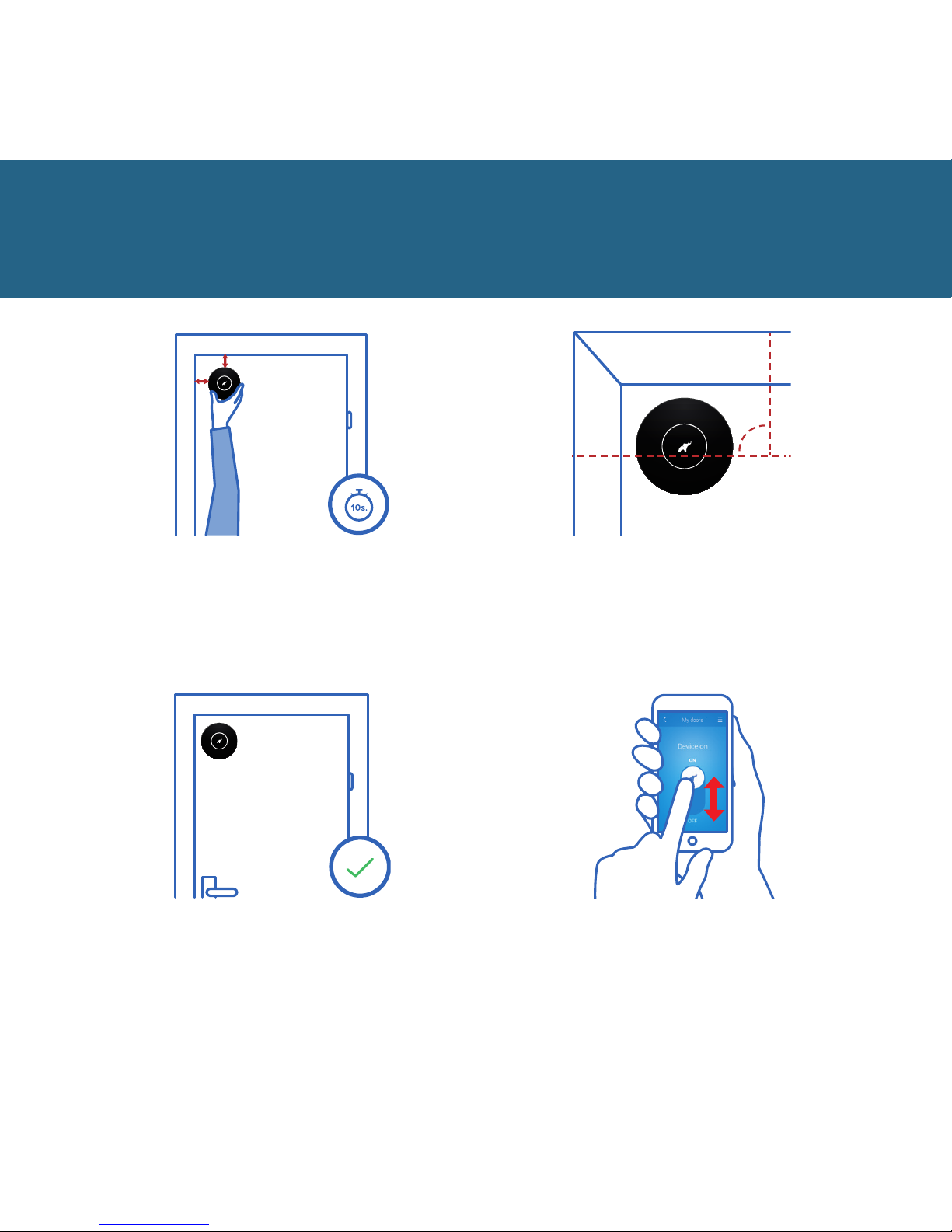
The fixing point is located
on the inside of the door,
above the handle.
Before fixing your device, clean
and degrease the door.
12
The device status
display means that it
is ready for fixing.
11
10
Page 9
7
3 cm
3 cm
Place your device about 3 cm away
from the side and top edges.
Press and hold it for 10 seconds.
14
That’s it! Your flat is now protected.
Remember to turn your device on.
In order for the device to
operate properly, the logo must
be in position as in the image.
90
o
Turn your device on and
o using the app.
Quick start
15
16 17
Page 10
8
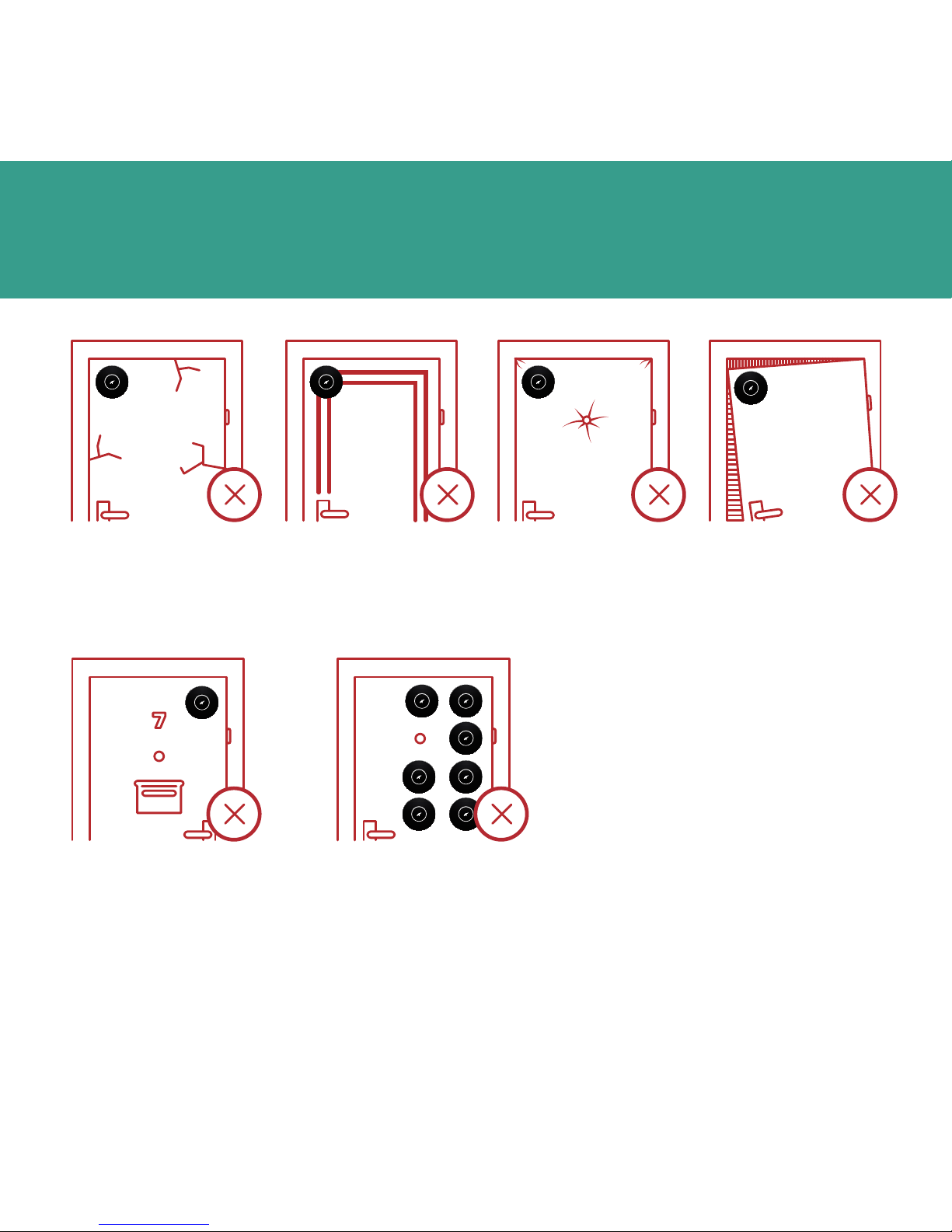
When the paint
peals o the door.
When you fix it on the
outside of your door.
When the elephant doorTM will not
work correctly
When the door’s
surface is uneven.
When the door
is unstable or
wobbling.
When the door
is upholstered.
When you fix it
in a wrong place.
Page 11
9
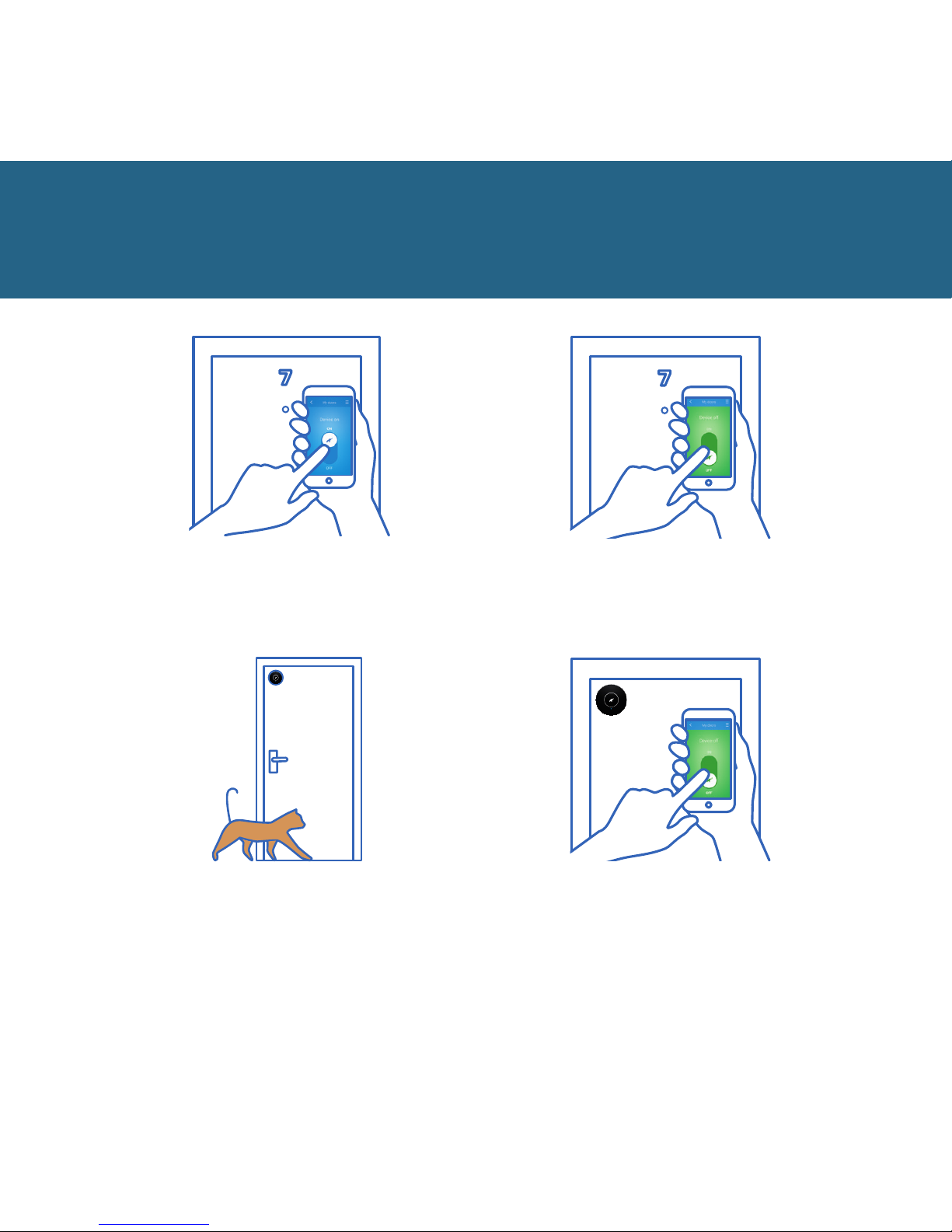
Turn o the device
before you enter your flat.
Turn on the device
after you leave your flat.
Using the device
Your family, friends and pets
can freely move around home
when elephant door™ is turned on.
If you are turning on the device
when at home, remember to
turn it o prior to leaving home.
Otherwise, you will activate the
alarm siren.
Page 12
10
Using the device
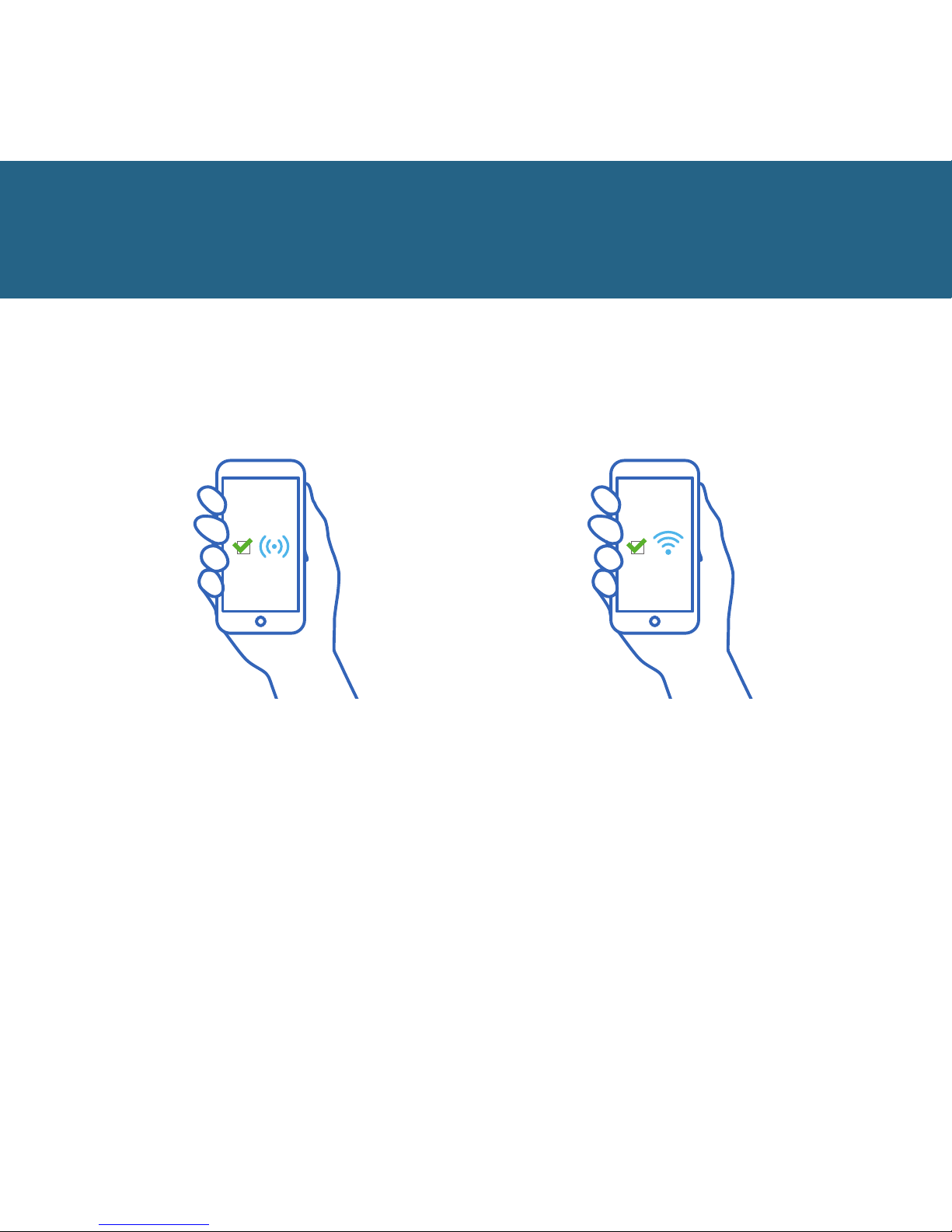
NOTE: To be able to control
the elephant door™, you must
enable Bluetooth on your
smartphone.
NOTE: To receive notifications on your
smartphone, your elephant door™
device must be connected to Wi-Fi,
and your smartphone needs to have
internet access.
Page 13
11
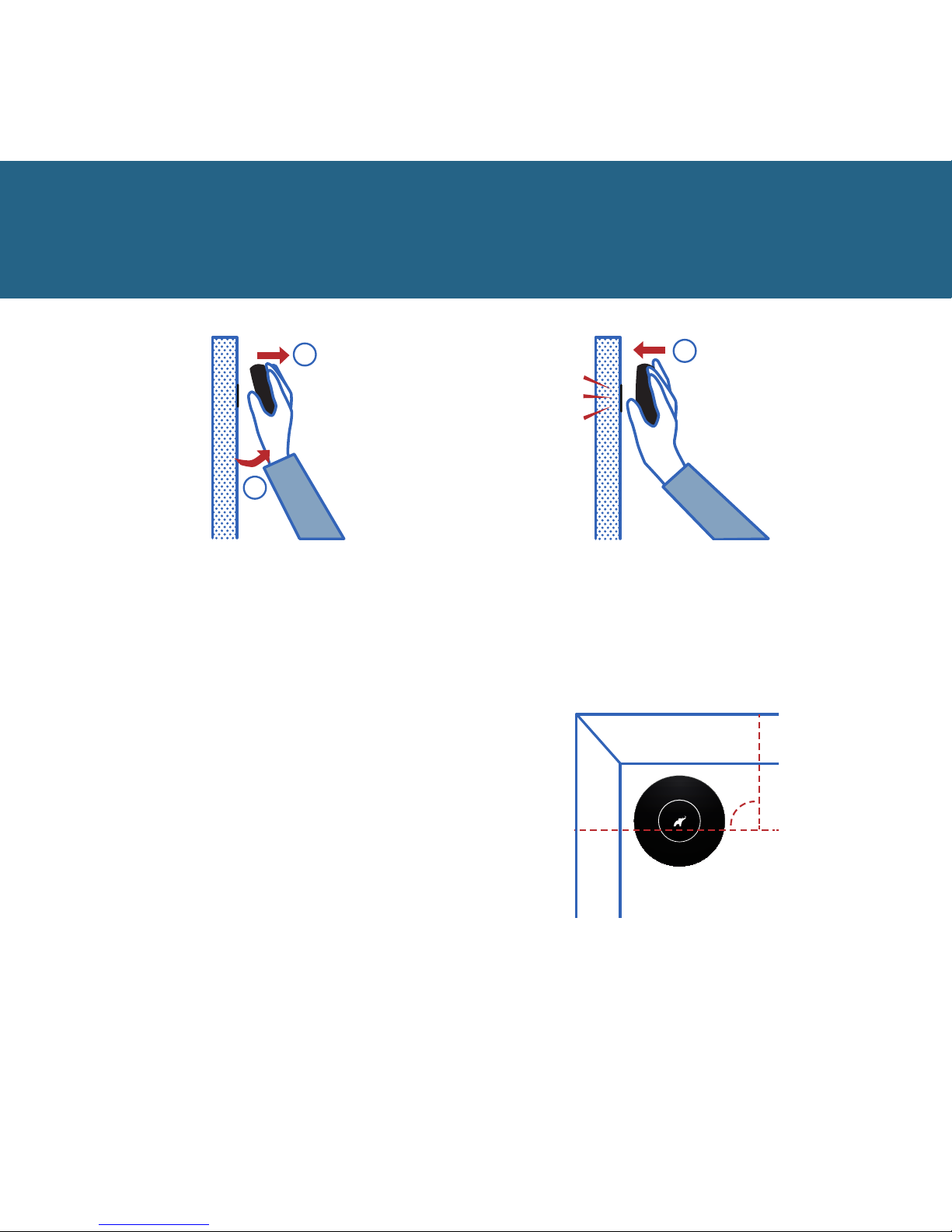
Battery and charging
To remove the device for charging,
make sure that it is turned o
(in standby mode), then tilt it (1)
and pull it (2)
1
2
1
To replace your device after
charging, put it against the
entire surface of the fixing.
90
o
The logo must be positioned
as shown above.
Page 14
12
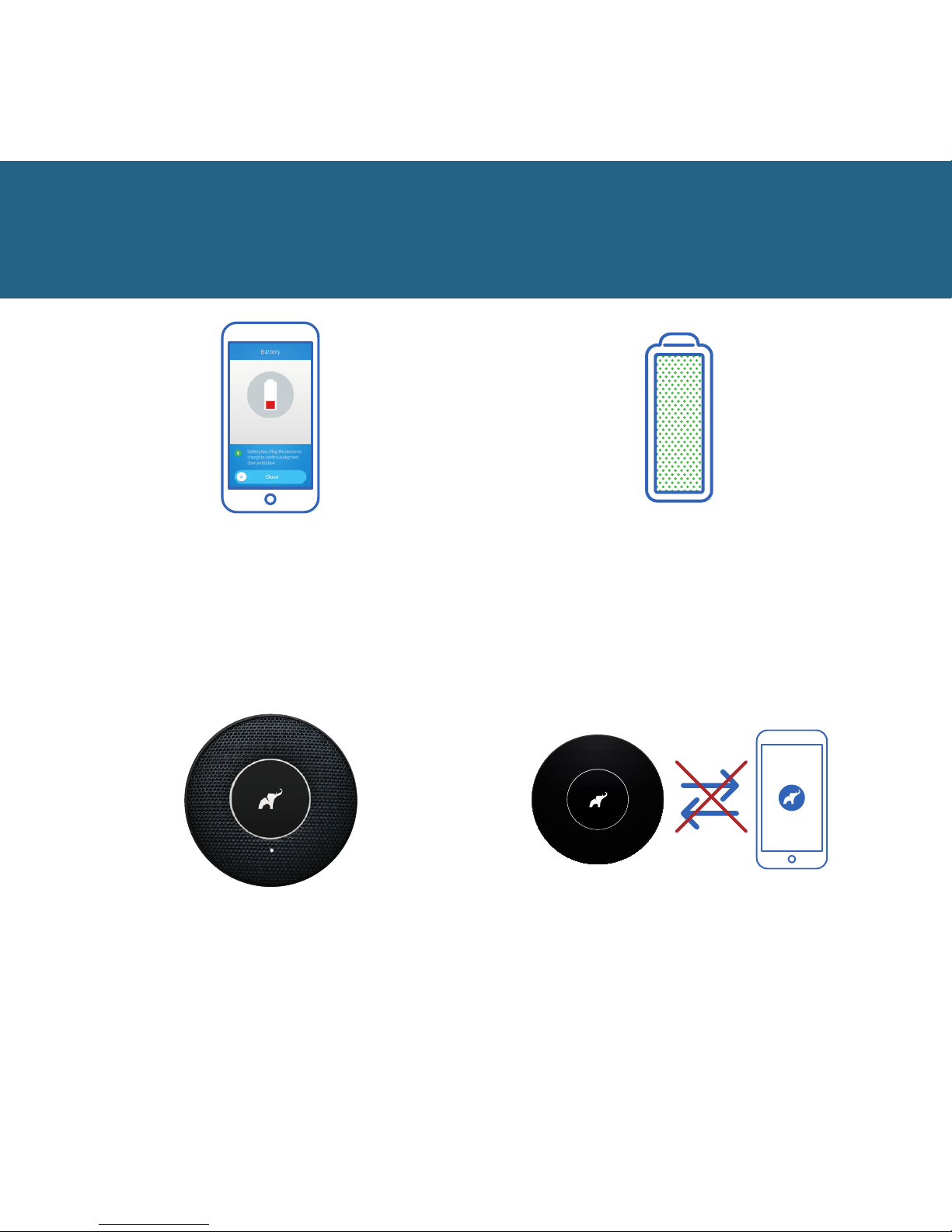
Battery and charging
When the battery in your device level
is low, the LED will begin blinking red,
and you will be notified by the app. At
that point, you need to connect the
device for charging immediately.
To charge your elephant door™ remove
it from the door and connect it to
the charger. When fully charged, the
battery will last for 40 days.
Charging a fully drained battery may
take up to 8 hours.
When the device is fully
charged, the LED is illuminated
with white light.
During charging you cannot
control the device.
Page 15
13
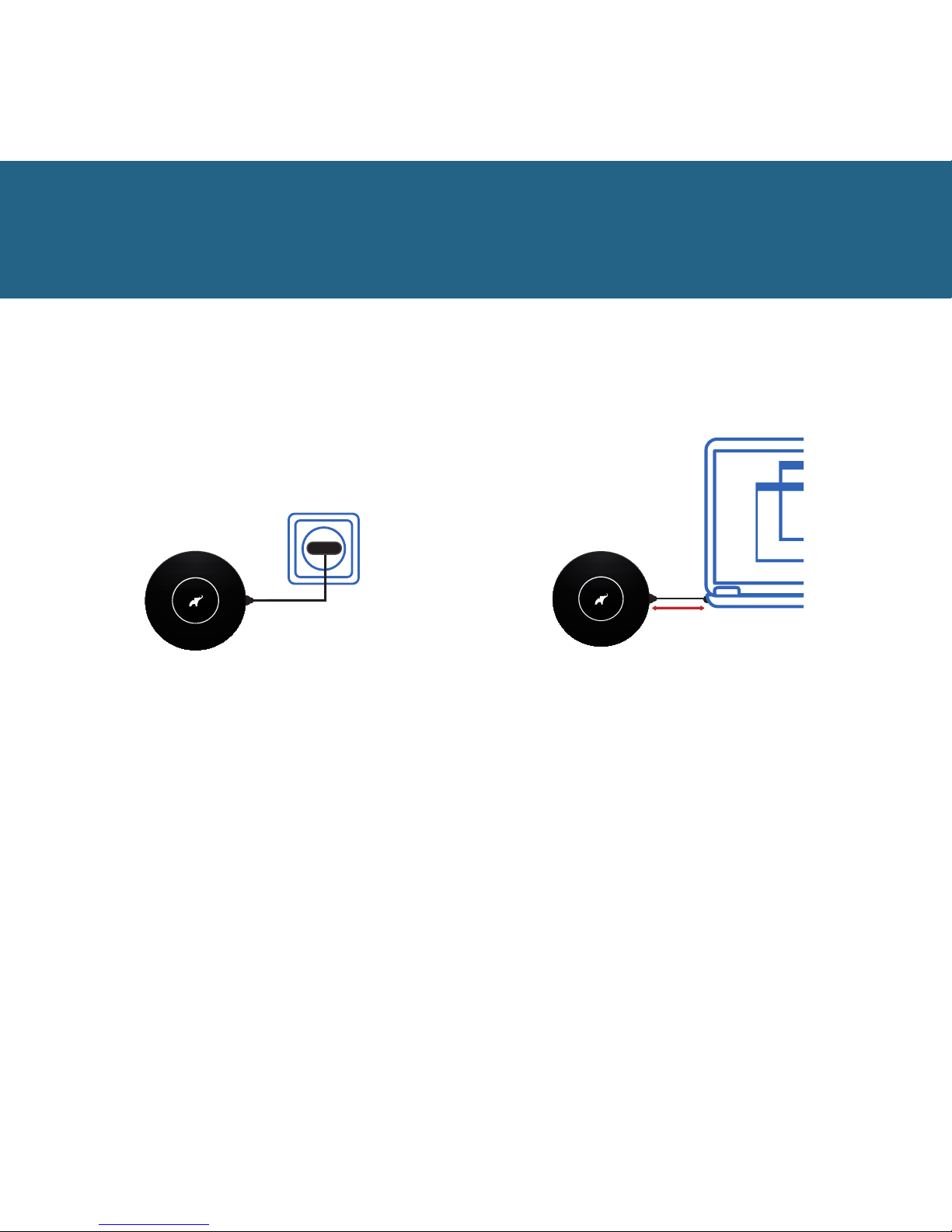
Battery and charging
We recommend charging the device
through a mains socket. To be able to
do it, you need a mains USB adapter.
You can buy it here:
www.elephantalarms.com/store
10 cm
WARNING!
When you are charging the
device via a USB port in a
computer remember to a keep
safe distance (min. 10 cm).
The device contains a strong
magnet that can damage the
hard drive of your computer.
Page 16
14
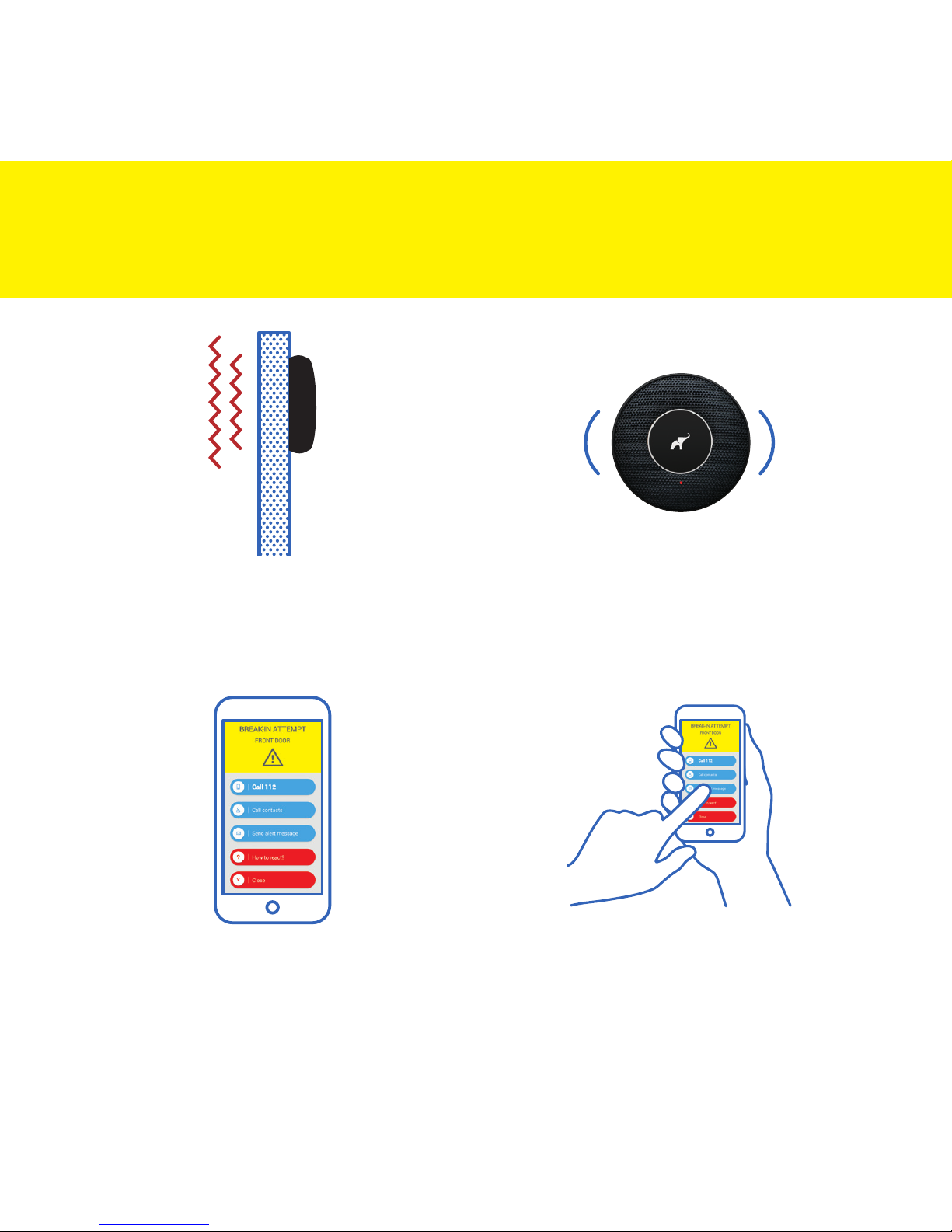
How your elephant door
TM
works
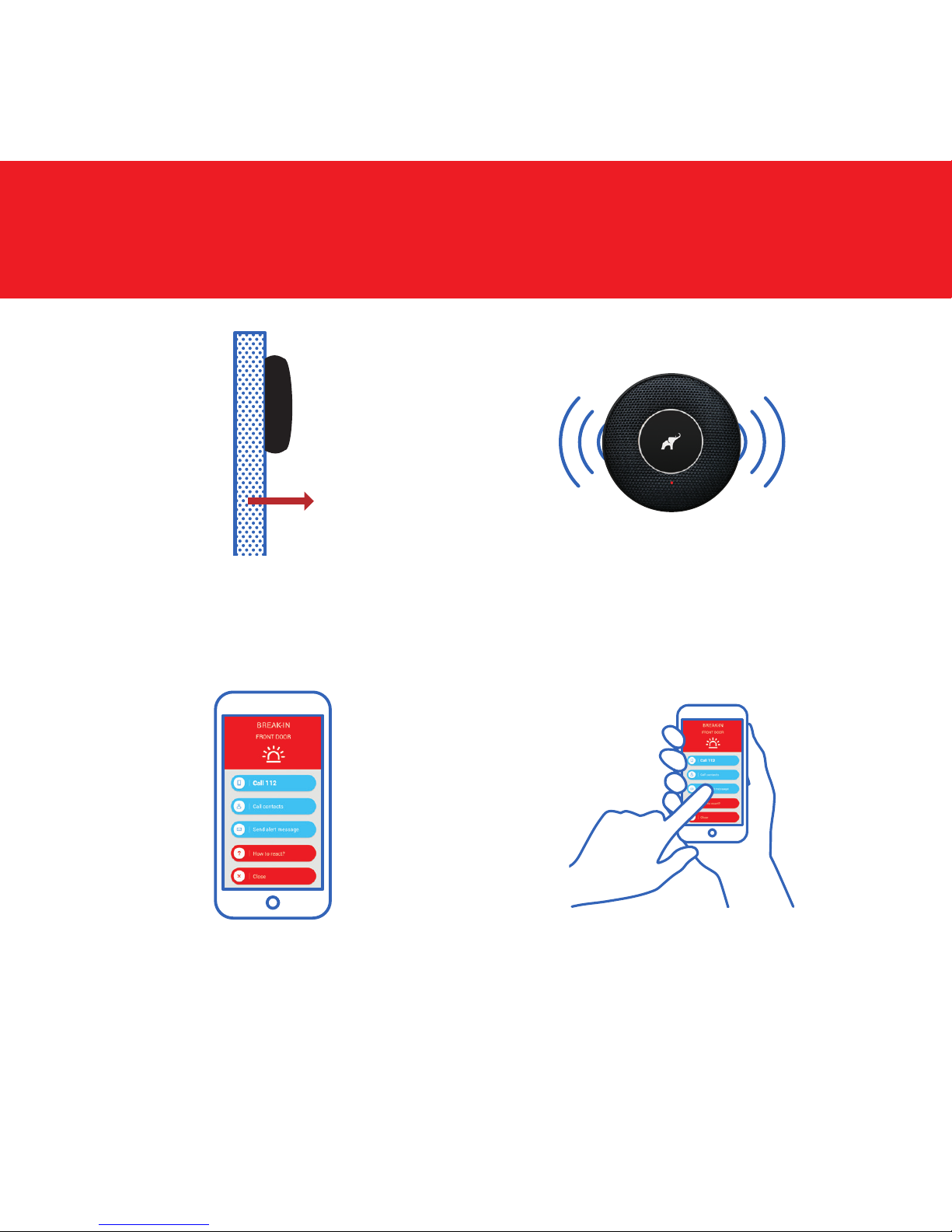
You will be notified when
a break-in attempt
is detected.
The device detects and
analyses door vibration.
A break-in attempt is
indicated with the single
sound of a siren.
You can use the app
to notify and call your
contacts or call 112.
Page 17
15
You will be notified when
a break-in is detected.
The device detects
a break-in.
When there is a break-in,
the device will activate the
siren for 3 minutes.
How your elephant door
TM
works
The app lets you call 112, call
and notify your contacts.
Page 18
16
Fixing and refixing
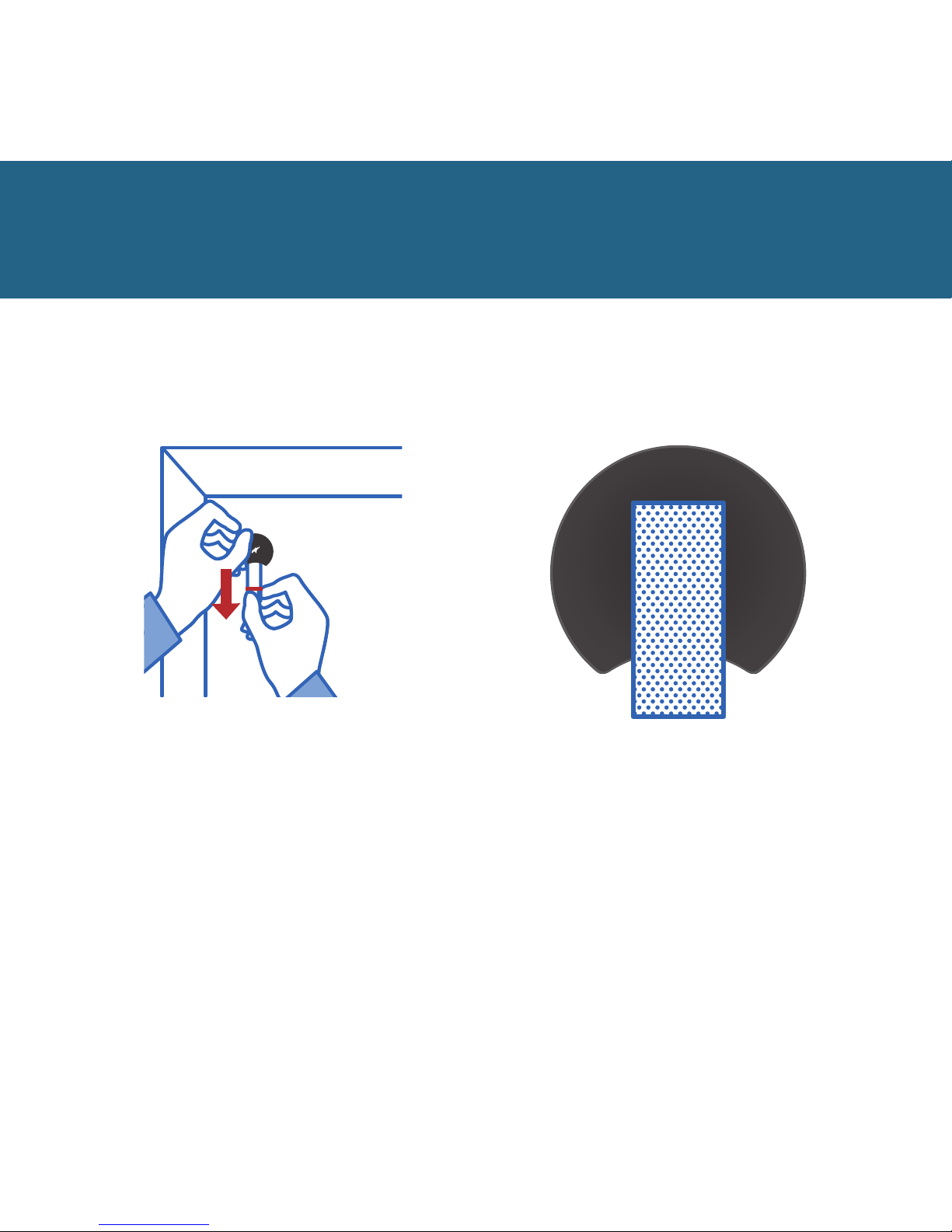
To remove the fixing from the
door, hold the fixing with one
hand, and pull the tape end with
your other hand.
To replace the device, clean
the fixing surface, stick the
tape (provided) to the cleaned
surface, and proceed as per the
instructions from page 4 on.
Page 19
17
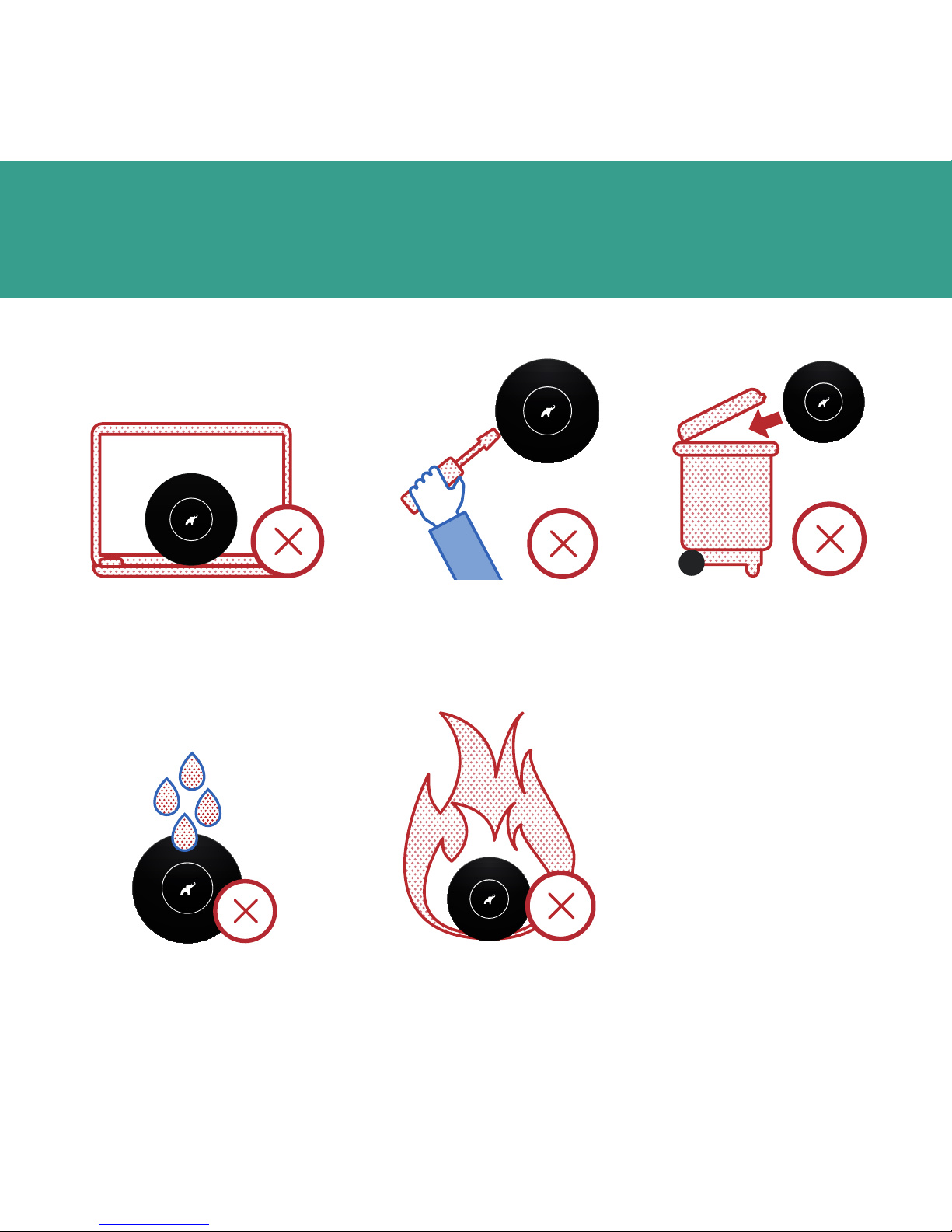
Do not put the device
closer to your PC than
10 cm as it contains a
strong magnet.
Things you shouldn’t do with
your elephant door
TM
error error error_
error error_
error_
Do not throw
it into fire.
Do not open it or
attempt to repair it.
Do not throw
it in a bin.
Do not expose
it to water.
Page 20
18
LED indicating lamps
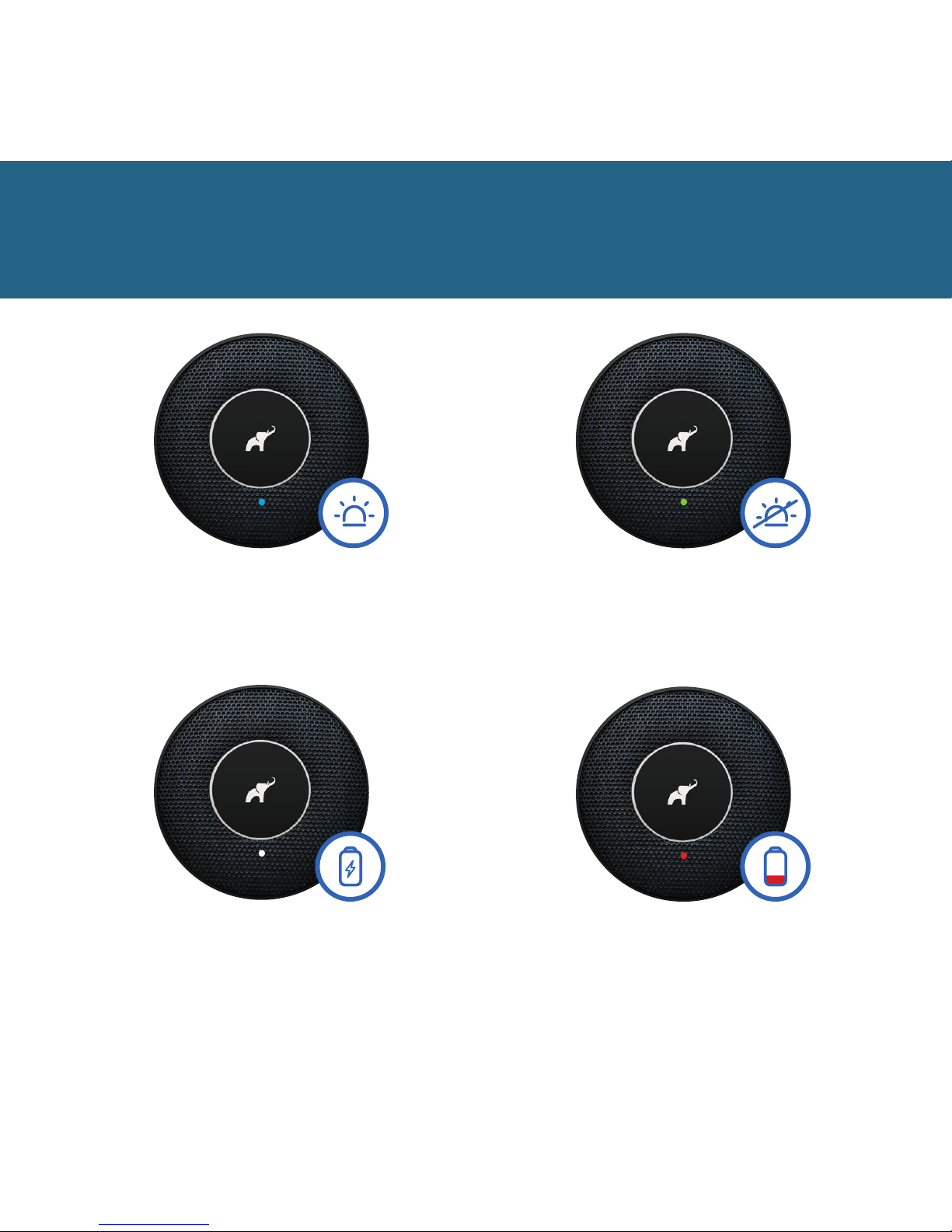
Device is in detection mode
(turned on) – sensors and
the siren are enabled.
Device is in standby mode
(turned o) – sensors and
the siren are disabled.
Charging in progress.
Continuous LED light
means that the battery has
been fully charged.
Battery low.
Connect the device
for charging.
Page 21

19
Troubleshooting
I lost the key for first
launch:
• you can use another thin,
rigid object for first launch.
It must fit the hole and be
longer than 1.5 cm (such
as a paper clip)
I don’t have a QR code /
password for pairing the
device:
• check if your code is
inside the packaging
• if you have not found it,
contact us at service@
elephantalarms.com and
specify your full name
and serial number of the
device (you can find it on
the sticker on the back of
the device)
My device is not working /
won’t switch on / the LED
on the front is not blinking):
• check if your device
is activated properly:
press the button on the
bottom of the device.
You should hear a click
sound and the LED on
the front of the device
should start to blink
every 10 seconds
• the device may need to
be recharged. Connect
it to a charger
I cannot pair (connect) my
device to the mobile app:
• check whether Bluetooth
and Wi-Fi connections
are enabled in your
smartphone
• check Bluetooth settings
in your smartphone – is
your device visible? Is the
possibility of pairing with
new devices blocked?
• check whether the device
is active (does the LED
blink every 10 seconds)
I cannot scan the QR code
in the app:
• try to rescan the QR code
in bright light
• enter the 20-digit
password of the device
manually (case sensitive)
The fixing of the device
does not stay on my door:
• make sure that the place
of fixing was degreased
and the door meets
the requirements of
installation
• remove the installation
tape from the fixing
and stick one of the
two spare tape strips.
Remember to stick the
tape on the same side of
the fixing
My phone stopped working
/ I lost my phone and cannot
turn on the device to enter
my home. What should I do?
• use another smartphone.
Download the app and log
into your account. When
you are near the device,
you can turn it o and
access your home without
activating the alarm
Page 22

20
My elephant door™ is not
visible in the app / I cannot
control the device:
• make sure Bluetooth
and Wi-Fi connections
are enabled in your
smartphone
• make sure your elephant
door™ is active
• refresh the device list and
wait a few seconds for the
device to be visible again
• shut down the app (from
the background) and
relaunch it
The app does not work on
my smartphone:
• uninstall the app and
reinstall it
• if the problem persists,
contact us at service@
elephantalarms.com and
specify your full name
and serial number of the
device, smartphone model
and operating system
My device does not detect
that the door is open /
device in detection mode is
not responsive:
• make sure the device
is active
• make sure the device is
in the detection mode
(turned on)
• retest the device in the app
• if the problem persists,
contact us at service@
elephantalarms.com and
specify your full name
and serial number of the
device (you can find it on
the sticker on the back of
the device)
My device activates the
alarm by itself / false
alarms occurs:
• check whether your
door is stable and the
hinges are not loose
– if the looseness is
too large, it may be
interpreted as door
opening
• when switching the
device on, make sure
that it is placed in the
desired position on the
door instead of being in
motion or vibrating
• if the problem persists,
contact us at service@
elephantalarms.com
and specify your full
name and serial number
of the device (you can
find it on the sticker on
the back of the device)
I cannot create an
additional user account
in the device:
• check whether the SIM
card in your smartphone
is active
• check whether the
additional user has
downloaded and running
the elephant app during
activation
• deactivate the user using
the slide and click “save”.
Then, create the user
account again and click
“save”. Note: the user
must have the elephant
app running
Why am I not receiving
notifications in the
application?
• check whether your device
is connected to Wi-Fi
• check whether there is
an internet connection on
your smartphone
• check whether the phone
settings have elephant
notifications permitted
Page 23

21
I forgot my password.
How to reset password?
• launch the elephant app
and select login option.
Click “reset password” and
enter your email address.
Then, check your email
box and click the link to
set a new password
What should I do if I want to
go away for longer (3 weeks)
and I want elephant door™ to
protect my home?
• due to safety reasons, we
recommend that someone
looks after your home
when you are away. That
person can charge the
device during their visit to
ensure further protection
of your home. Remember
to add the above person
as an “additional user”
when you are away so
that they can activate and
deactivate the detection
mode in the device. In
order for your home to
be safe when you are
away, go over the tips of
Elephant Safety Academy
www.elephantalarms.
com/safetyacademy
The battery does not last
long (below 2 weeks of
operation):
• make sure you have
charged it completely
– recharging a strongly
discharged battery may
last up to 8 hours
• check on another device
whether your charging
cable charges the battery
properly
The battery in the device is
not charging:
• check on another device
whether your charging
cable charges the battery
properly
• use another micro USB
cable and check if the
device is charging. When
charging, LED blinks with
white light
Page 24

22
How to use the device
Before you begin using
the elephant door™, please read carefully the
information contained in
this manual and follow
all the guidelines. Keep
this manual for future
reference.
Battery notice
The device comes with
an integrated lithium polymer battery. The battery may be hazardous and
cause serious property
and bodily damage, or
even death. The User accepts the responsibility
for operating the battery.
In addition, the User is
responsible for any improper use of the battery
(while charging, discharging, storing, etc.), and
for any damage caused
by such improper use
of the battery. If there
is electrolyte leakage,
avoid contact with the
skin and eyes. In case
of contact with the skin,
wash hands immediately
with plenty of soap and
water. In case of contact
with eyes, rinse them with
plenty of cold water and
consult a doctor immediately. If you notice unusual
smell or see smoke while
charging, disconnect the
device from the charger
without delay. To prevent
electrolyte leakage: do
not expose the battery to
major shocks or vibration,
and do not immerse it
in liquids. Do not open,
do not deform and do
not attempt to repair the
battery. Do not expose
the battery to high temperatures or fire. Do not
touch the contacts of
the battery, and do not
put them in touch with
electrical conductors,
e.g. metal objects. Do not
saw and do not damage
the battery. Never disassemble the battery. If the
battery gets damaged or
ruptured, use rubber gloves to collect the parts.
Avoid inhaling the odours
that may appear. Do not
throw the battery in a bin.
Follow the applicable
rules and regulations to
dispose of the battery. For
more information, please
contact your local household waste recycling
centre. A dead, unused
or damaged battery must
be stored in places that
are specially designated
for this purpose. Protect
the product from water
and moisture. To reduce
the risk of fire or electric
shock, protect the product from exposure to rain
and/or any other types of
moisture.
Page 25

23
Charging the battery
Do not connect the Product to other electrical
devices. The Micro USB
output is designed only
for charging the device
battery and for updating
the device software in
case the Manufacturer
oers an updated software version. Charging
the device with other
cable than the one provided by the Manufacturer
is not recommended. If
the Product is damaged
as a result of charging
the battery with a Micro
USB cable other than
that provided by the Manufacturer, the User will
be fully liable for such damage. Do not touch the
device with wet hands
during charging. When
the cable is overheating
or gets damaged, and
when the device is exposed to rain or other liquid,
disconnect the device
from charging.
NOTE: When being charged, the device does not
detect vibrations or door
opening, and it does not
connect with the Wi-Fi
and your smartphone.
The device connected
for charging does not
provide protection and
must not be used for this
purpose.
Using the device
This device is intended
for use indoors in households and oces. It is
not fit for use outdoors
and in industrial environments. The Product is
intended for operation in
the temperature ranging
from +5°C to +35°C and
in the humidity range
of 20% to 60%. The
Product is intended for
use on exterior single or
double doors only. The
Manufacturer does not
guarantee that the device will operate properly
on other types of doors,
including in particular
on sliding, revolving and
up-and-over doors. The
device must be cleaned
with a dry anti-static
cloth. Do not clean the
device with water and/or
chemicals. Do not open
the device and do not
interfere in the inside of
the device in any way.
There are no components inside the device
that could be repaired
by the User. Opening the
device may create a health hazard. The device
may only be opened by
the Manufacturer’s dedicated support team. Do
not throw, kick, hit, clasp,
crush, break, smash, bite
or swallow the Product
and any of its parts.
Do not throw the device
in a bin. The Product
houses a lithium polymer
battery and other electronic components that
need to be stored in places designated for this
purpose.
Information about
radio waves
The operating frequency
range of the device is:
Page 26
24
2.4 GHz - 2.5 GHz.
The maximum power of
the radio frequency in
the device operating frequency range is:
58 mW.
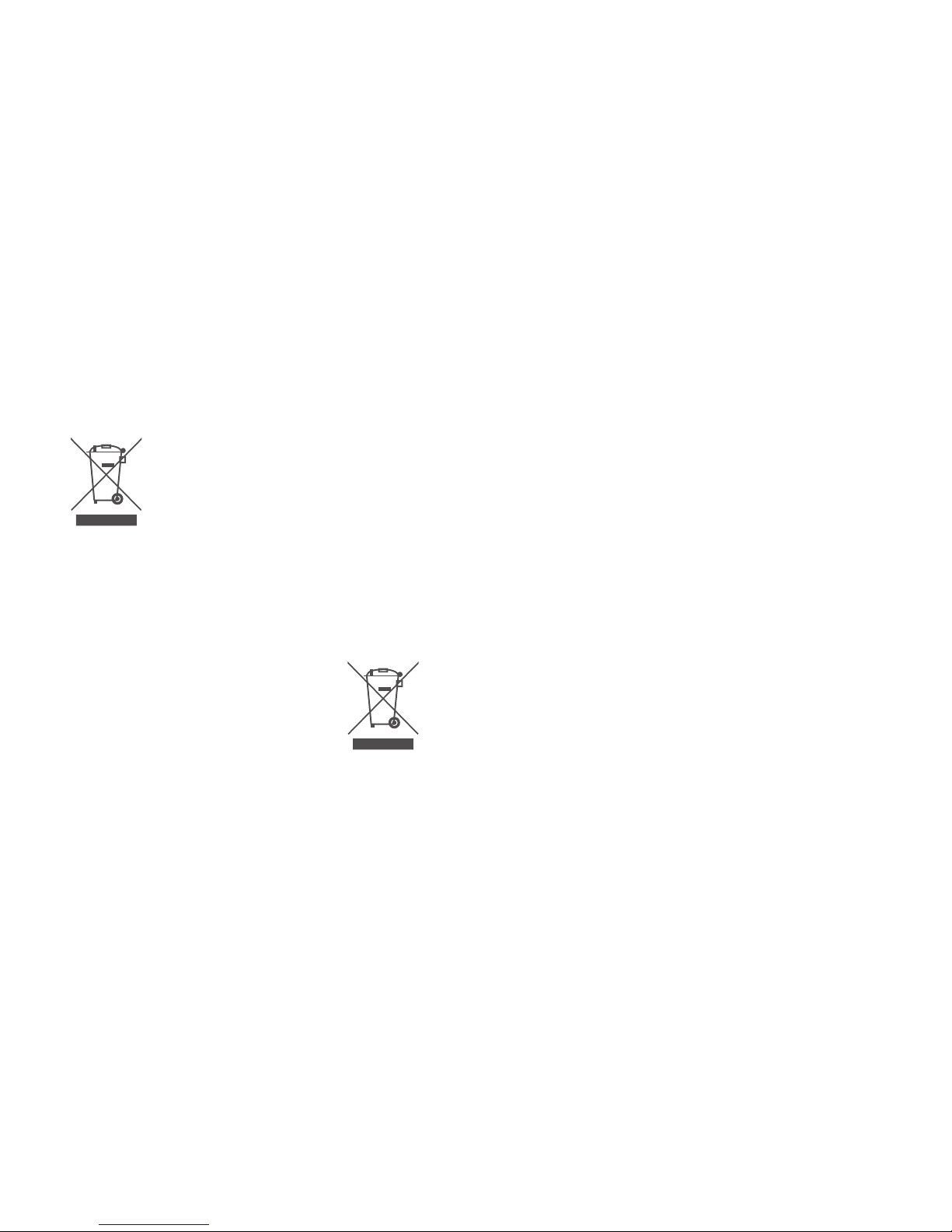
Proper disposal of the device (waste electrical and
electronic equipment)
This sign featured
on the device, on
the packaging and
in the attached
documentation indicates
that the device, including
its accessories (e.g. the
charger and USB cable),
must not be disposed
of with other household
waste at the end of its
working life. The device
and its accessories must
then be separated from
other wastes and transferred to an approved
electric and electronic
waste equipment disposal and recycling unit. For
more information concerning the disposal and
recycling of the device,
please consult your city/
town hall or municipality,
specialist household waste collection points, or
the shop where you purchased the device. Failure to comply with these
instructions may have a
negative impact on the
natural environment and
human health. For this
reason, controlled waste
disposal, aware and responsible recycling, and
future reuse of the materials are required.
Proper disposal of the battery housed in the device.
The Product comes with a lithium
polymer battery.
This sign featured
on the battery, in this
User’s Manual or on the
packaging indicates that
the battery that comes
with the device must not
be disposed of with other
household waste at the
end of its working life.
The battery must then
be separated from other
wastes and transferred to
an appropriate waste battery collection point running an organised waste
battery collection system
and operating locally free
of charge. Otherwise the
battery could harm human health or the natural
environment we must
protect.
Other risks
Do not put the device
close to electronic equipment, especially PCs,
hard drives and smartphones. The device houses a strong magnet that
may cause serious damage. The device may be
hazardous for pacemaker
recipients. Extreme caution is recommended. The
device has an integrated
alarm siren of high sound
intensity. Please exercise
caution when testing and
using the device. Prolonged close-range exposure of the auditory system
to the device may lead
Page 27

Elephant Sp. zo. o.
ul. Heweliusza 18,
60-281 Poznan, Poland
e-mail: [email protected]
www: elephantalarms.com
Tax ID: PL 7831740648
to discomfort or even to
permanent hearing impairment. The device comes
with an in-built RGB LED.
The LED lights up and
blinks in various colours,
depending on the status
of the device. Individuals
sensitive to light and/or
suering from epilepsy
must exercise caution
when testing and using
the device.
Declaration of conformity with European Union
directives
Elephant Sp. z o.o. declares
that the elephant door™
and all its components
comply with the following
directives:
a) 2014/53/EU (RED),
b) 2014/35/EU,
c) 2014/30/EU (EMC),
d) 2012/19/EU (WEEE),
e) 2011/65/EU (RoHS),
f) 2009/125/EC (ErP);
g) 2006/66/EC.
The full wording of the EU
Declaration of Conformity
is available on the follo-
wing website:
www.elephantalarms.com
The technical documentation required for conformity
assessment is available at
the following address:
The device has been manufactured for use within
the European Union. The
Manufacturer does not
guarantee compliance
with any standards and
regulations in force outside the European Union.
elephant door™
Smart security system
Producer
Elephant Sp. z o.o.
Made in EU
Product Code: ED1.0
©2015 Elephant Sp. z o.o.
All rights reserved.
App Store and iOS are tra-
demarks of Apple Inc. registered in the U.S. and other
countries. Android
TM
a tra-
demark of Google Inc.
Page 28

Have a safe day!
Any questions?
Go to elephantalarms.com
 Loading...