

Page 1
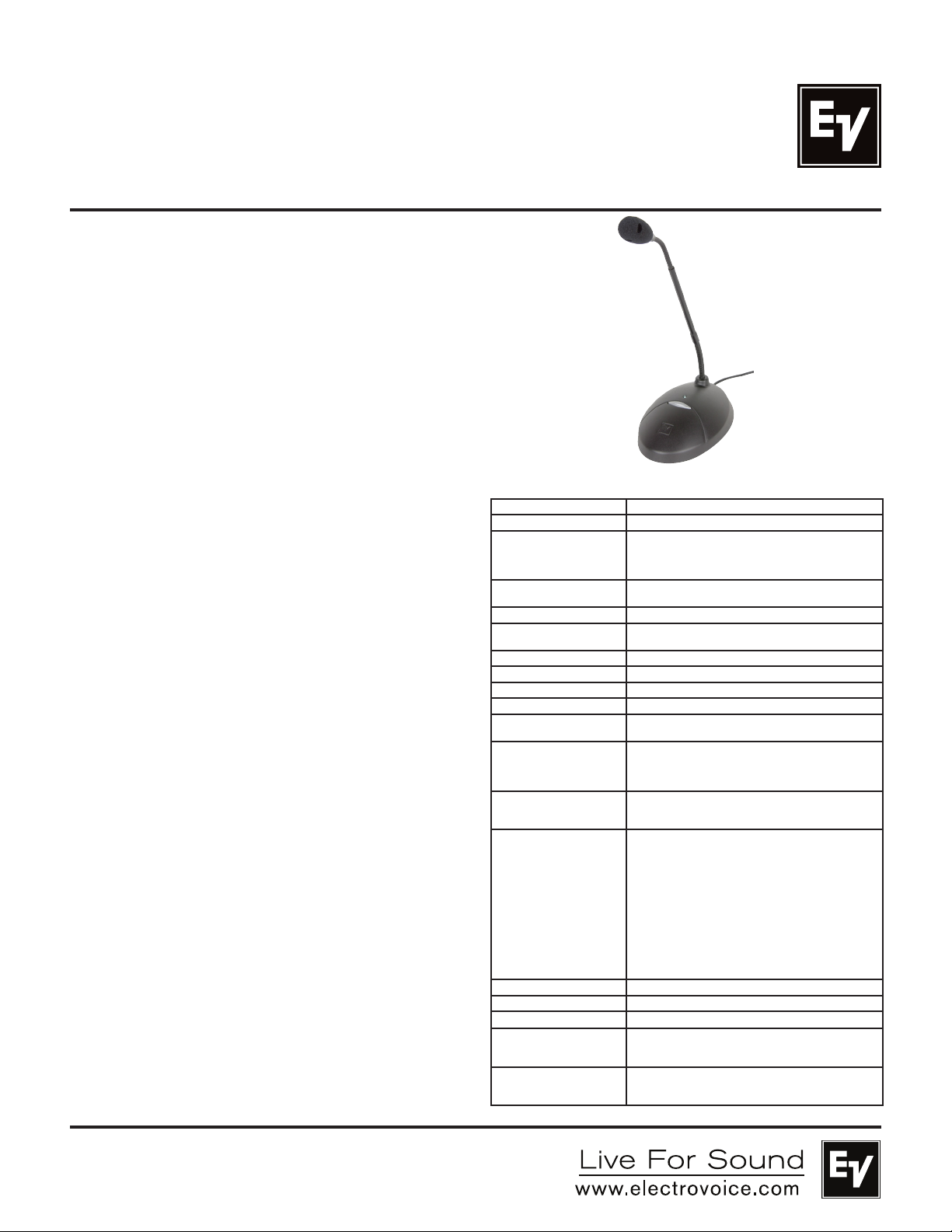
Key Features:
• RF Shield provides superior RFI/GS M shielding.
• Multi-pattern versatility. Choose between omni, cardioid,
supercardioid or hypercardioid to easily adapt to any situation.
• Consistent microphone voicing across all four patterns.
• Switch can be programmed to operate as either latching on/off
or momentary push-to-mute/push-to-talk.
• Disassembly of the mic isn’t required to change switch
functions.
• Compatible with echo cancellation for conference applications.
• High visibility blue LED clearly displays mic status to the user.
• Exceptional sound quality with EV’s proven PolarChoice design.
• Available in three gooseneck lengths: 18”, 12” or 5”.
General Description:
The PolarChoice Desktop is a high quality tabletop microphone
that can be used with both standard and automatic mixers, and is
highly-shielded from RFI/GSM thanks to EV’s exclusive RF Shield
technology.
The PC Desktop features the exclusive EV PolarChoice miniature
multi-pattern gooseneck microphone. The multi-pattern versatility
of the PolarChoice microphone makes it a true “problem solver”.
With one non-directional and 3 directional polar patterns available,
the PolarChoice microphone is ideal for virtually any installation. The
PC Desktop also includes a switchable high pass filter that helps
reduce any vibration induced noise pickup.
The PC Desktop features a large push button mute switch that has
a much better “feel” than membrane switches. The mute button can
be configured for push-on/push-off, push-to-talk, or push-to-mute
function. Switch programming is easily accomplished without
disassembling the microphone. A switch on the bottom quickly
converts the PC Desktop to automatic mixer mode. In this mode,
audio is always on.
Applications:
The PolarChoice Desktop is acoustically designed for high-quality
sound reinforcement and broadcast applications. The frequency
response is tailored for wide-range sound reproduction with
very natural sound pickup for either distant or close-up use. The
PC Desktop can be used on lecterns, podiums, desks, table-tops,
or other applications. To maximize gain-before-feedback, the
PolarChoice’s three directional polar patterns allow the user to
pick the directional polar pattern for optimum effect. For those
applications where gain-before feedback is not a problem, an
omnidirectional pattern is included. Applications requiring speaking
close to the microphone at podiums, lecterns, or pulpits normally
require a windscreen (included) to control breath noise and
P-popping or, in some cases, wind noise from circulating air.
PolarChoice Desktop
PC Desktop-5/PC Desktop-12/
PC Desktop-18
Mulit-Pattern Desk Microphone
with Automatic Mixer Logic
Technical Specifications:
Generation Element: Dual condenser, back electret
Frequency Response: 50 Hz to 20,000 Hz (see chart)
Polar Patterns:
(see chart)
Sensitivity: Open Circuit Voltage, 1 kHz:
Clipping Level (1% THD): >127 dB SPL
Equivalent Noise: <26 dB SPL “A” weighted
Dynamic Range: >101 dB
Output Impedance, 1 kHz: 200 ohms
Power Requirements: Phantom, 12 – 52 VDC
Current Consumption: < 5 mA with P48 supply
Logic Levels: Standard TTL levels for switch out and LED Control
Dimensions: Base (all mics):
Accessories Furnished: Windscreen
Optional Accessories: WS-PC1 large windscreen
Net Weight: PC Desktop-5: 703 grams (24.8 oz)
Shipping Weight: PC Desktop-5: 1080 grams (38.1 oz)
Omnidirectional
Cardioid
Supercardioid
Hypercardioid
5.6mV/Pascal
(0 dB=20 micropascals)
Polarity: Pin 2 positive, referenced to pin 3,
with positive pressure on the diaphragm
Cable: 10-foot, 5-conductor
(2-conductor shielded) black cable,
terminated with a professional 3-pin male XLR style
connector with gold plated pins.
5 Volts = Logic High
0 Volts = Logic Low
Length: 175 mm (6.9 in.)
Width: 117 mm (4.6 in.)
Height: 56 mm (2.2 in.)
Gooseneck Length:
PC Desktop-5: 175 mm (6.9 in.)
PC Desktop-12: 318 mm (12.5 in.)
PC Desktop-18: 470 mm (18.5 in.)
Maximum Head Diameter:
14.6 mm (0.58 in.)
Gooseneck Diameter:
6.4 mm (0.25 in.)
Lower section: 7.9 mm (0.31 in.)
Color: Nonreflecting black
PC Desktop-12: 712 grams (25.1 oz)
PC Desktop-18: 730 grams (25.8 oz)
PC Desktop-12: 1102 grams (38.9 oz)
PC Desktop-18: 1111 grams (39.2 oz)
Page 2
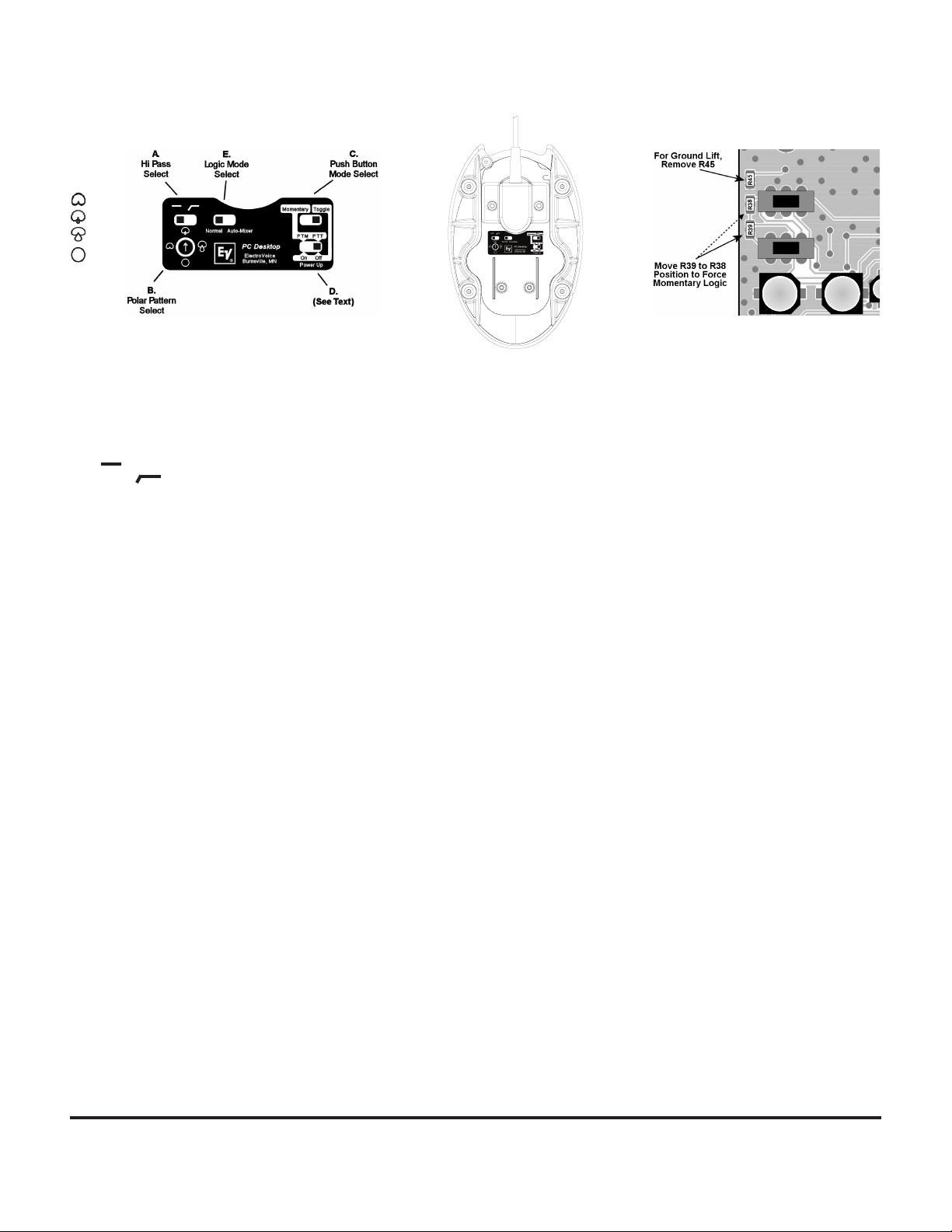
Microphone Setup:
Cardioid
Supercardioid
Hypercardioid
Ominidirectional
Figure 1:
PC Desktop Controls
Figure 2:
Bottom View
Refer to Figure 1 for the following switch function descriptions-
Switch “A”:
Select High-Pass switch position. Start with this switch set to the left
(flat response). If the mic is in a location where low frequency rumble
or wind noise is a encountered, moving this switch to the right will
help by reducing low frequency sensitivity.
Flat ( ): Normal response.
High Pass ( ): minimum 5 dB reduction in sensitivity at 100 Hz.
Switch “B”:
Select preferred polar pattern. The cardioid polar pattern works
well for most installations. If feedback from a sound system occurs,
switching to the supercardioid or hypercardioid pattern will usually
allow increased mic gain before feedback. The omnidirectional
pattern is best suited for situations where there is no sound
reinforcement system present, such as for recording.
Switch “C” and “D”:
Controls action of push-button switch on the top of the PC Desktop
microphone.
Momentary Modes:
When switch “C” is set to the left, the push-button (mute) switch
action is momentary.
In addition, If switch “D” is in the left hand position, the mic will
be in push-to-mute mode.
Alternately, If switch “D” is in the right hand position, the mic
will be in push-to-talk mode.
Toggle Modes:
When switch “C” is in the right hand position, the push-button
(mute) switch will be in toggle (push-on/push-off) mode.
With switch “C” in the right hand position, the setting of switch
“D” determines if the mic audio should be muted when power is
first applied.
If switch “D” is in the left hand position, the mic audio will be on
when power is first applied.
If switch “D” is in the right hand position, mic audio will be
muted when power is first applied.
Figure 3:
PC Board Detail
Switch “E” (Logic Mode Select):
When switch “E” is set in the left hand position, the PC Desktop
operates as a normal desk microphone. Mic muting and operation of
the LED is controlled by the push-button on the top of the mic. With
switch “E” in the right hand position, the mic will be in automatic
mixer mode, and the following will apply:
1.) Mic audio is always on.
2.) The automatic mixer controls LED operation and mic
muting.
Wiring:
For non-automatic mixer applications, the PC Desktop comes
equipped with a standard XLR style 3-pin male connector. For
automatic mixer applications, remove the XLR connector and service
the cable as needed.
Cable Connections:
Red – Balanced Audio High
Black – Balanced Audio Low
Shield – Audio Ground
Green – Logic Ground (Common to shield unless R45 is removed.
See Figure 3.)
White – Switch Logic
Orange – LED Control
Logic Signals:
If the PC desktop mic is in momentary mode (see above section on
the mute switch), the logic level on the white wire will normally be
“high”, and go “low” when the push-button is pressed. If the mute
switch is set for toggle mode, the logic will toggle from high to low,
or from low to high, each time the button is pressed. (If desired, a
pc board change can be done to force the logic to always be
momentary, regardless of switch settings. See Figure 3).
LED Control:
When the mic is in automatic mixer mode, a low logic signal on the
orange LED control wire will cause the LED to light.
Logic Ground Lift:
If necessary, the logic and audio grounds can be separated. This
requires removing a resistor from the pc board. See Figure 3.
Page 3
EV Multi-Port Windscreen:
All PolarChoice microphones come with the exclusive EV Multi-Port
Windscreen. This unique one-piece ported design offers greatly
improved resistance to “P”-popping noise by creating a two-stage
filter that has an air space between the stages. This makes the
multi-port windscreen as effective as much larger traditional designs.
Architects’ and Engineers’ Specifications:
PolarChoice Desktop: PC Desktop-5, PC Desktop-12, PC Desktop-18.
The microphone shall be a freestanding, tabletop microphone with
a high degree of output signal quality despite possibly near-field
presence of RF (radio frequency) devices such as cell phones. The
base will have a 10-foot integral 5-conductor (2-conductor shielded)
cable terminated in a 3-pin XLRM connector. The microphone
shall have four selectable polar patterns: omnidirectional, cardioid,
supercardioid, and hypercardioid. The mic will use a pair of
back-electret condenser elements with a frequency response of 50
Hz to 20 kHz. The microphone shall have a nominal, balanced output
impedance of 200 ohms. The microphone will have a switchable
high-pass filter to roll off low frequencies. The microphone shall
have an output level of 5.6 mV/Pascal and outputs shall not be
appreciably affected by the following temperature and humidity
extremes: -29° to 74° C (-20° to 165°F) when the relative humidity
is 0-50%; -29° to 57°C (-20° to 135°F) when the relative humidity is
0-95%. Dimensions shall be 231 mm (9.1 in.) long (PC Desktop-5),
373 mm (14.7 in.) long (PC Desktop-12), and 526 mm (20.7 in.) long
(PC Desktop-18) with a maximum head diameter of 14.6 mm (0.58
in). The PC Desktop-5 microphone shall include a 175 mm (6.9 in.)
gooseneck. The PC Desktop-12 microphone shall include a 318 mm
(12.5 in.) gooseneck. The PC Desktop-18 microphone shall include
a 470 mm (18.5 in.) gooseneck. The gooseneck will be attached to
a base that has a top mounted push-button and a status LED that
lights when audio is active. The push-button will be configurable to
operate in either momentary or toggle mode. When the microphone
is set in momentary mode, the push-button can be programmed
to operate in either push-to-mute or push-to-talk mode. When the
microphone is set in toggle mode and power is initially applied, the
status of the microphone can be programmed to be either on or
muted. The microphone will be capable of operation with automatic
mixers by means of a configuration switch located on the bottom of
the microphone. When the microphone is in automatic mixer mode,
normal LED and top push button functions are disabled. In automatic
mixer mode, audio will always be on, the top push button will only
change the logic level on the microphone’s white wire, and a logic
low level on the microphone’s orange wire will cause the LED to
illuminate. All controls except for the push button shall be accessible
from the bottom of the microphone base. The microphone base shall
be of metal construction. The microphone will include an external
windscreen. The microphone shall have a nonreflecting black finish.
The Electro-Voice PolarChoice PC Desktop-5, PC Desktop-12, or
PC Desktop-18 is specified.
Electro-Voice
12000 Portland Avenue South, Burnsville, MN 55337
Phone: 952/884-4051, Fax: 952/884-0043
www.electrovoice.com
© Bosch Communications Systems 09/2011
Part Number F.01U.177.760 Rev 05
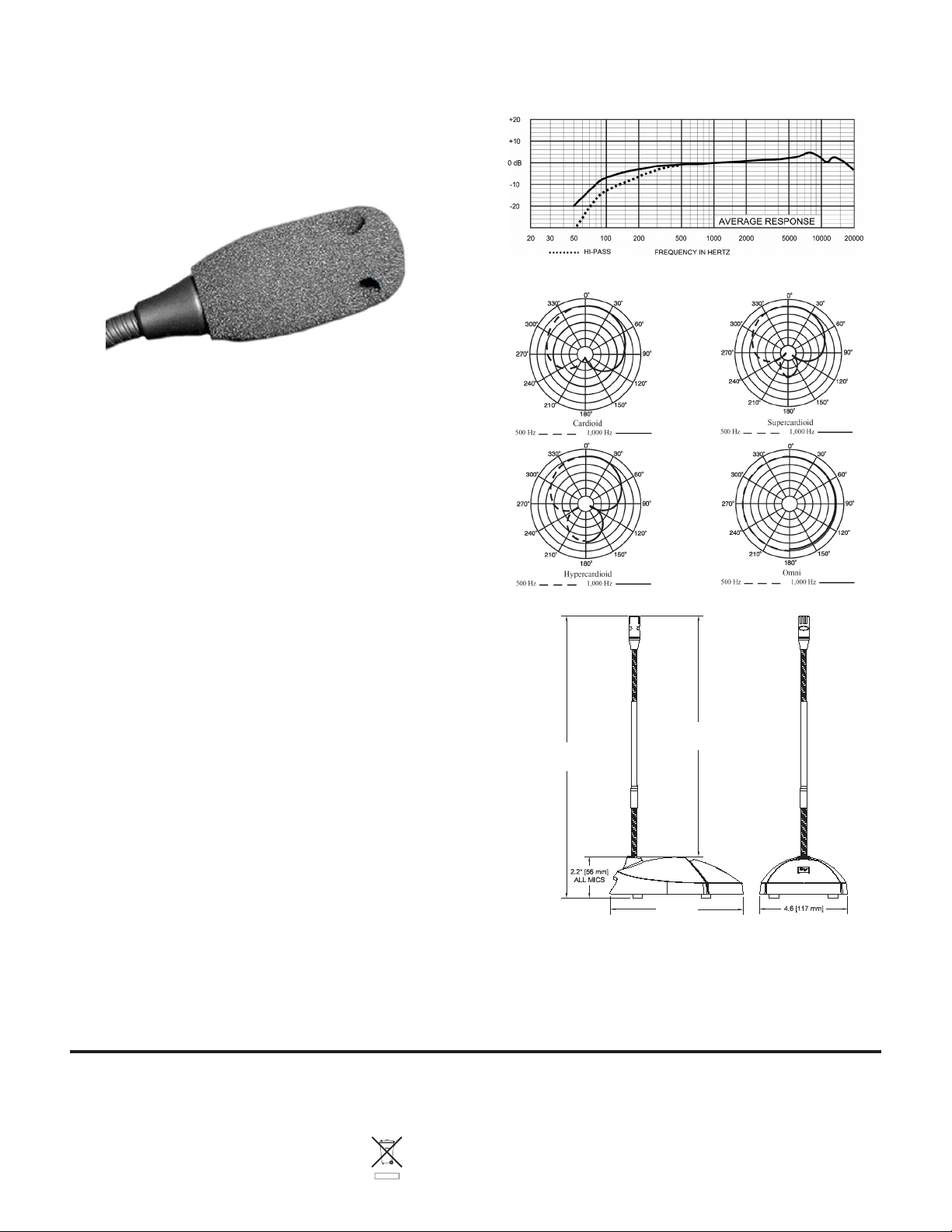
Frequency Response:
Polar Response:
Dimension Drawing:
6.9" [175mm], PC DESKTOP-5
12.5" [318mm], PC DESKTOP-12
9.1" [231mm], PC DESKTOP-5
14.7" [373mm], PC DESKTOP-12
20.7" [525mm], PC DESKTOP-18
18.5" [470mm], PC DESKTOP-18
6.9" [175mm]
Polar Choice Part Numbers:
PCDesktop-5•5”GooseneckLength
PCDesktop-12•12”GooseneckLength
PCDesktop-18•18”GooseneckLength
Warranty:
Please refer to the Limited Warranty information found at:
www.electrovoice.com
U.S.A. and Canada only. For customer orders, contact Customer Service at:
Europe, Africa, and Middle East only. For customer orders, contact Customer Service at:
Other Internatonal locations. For customer orders, Contact Customer Service at:
For warranty repair or service information, contact the Service Repair department at:
For technical assistance, contact Technical Support at: 866/78AUDIO
Specifications subject to change without notice.
800/392-3497 Fax: 800/955-6831
+ 49 9421-706 0 Fax: + 49 9421-706 265
+ 1 952 884-4051 Fax: + 1 952 887-9212
800/685-2606
 Loading...