

Page 1

P
enta
INSTALLATION MANUAL
Electronics Line
Page 2

Table of Contents
f
A
Introduction ............................................................................................................. 2
Chapter One: Overview .......................................................................................... 3
1.1: Specifications ....................................................................................................3
1.2: Zones ................................................................................................................3
1.3: Telephone Communication ...............................................................................4
1.4: Remote Programming .......................................................................................5
Chapter Two: Installation ........................................................................................ 6
2.1: Parts and Options..............................................................................................6
2.2: Wiring Diagram..................................................................................................7
2.3: Terminal Connections .......................................................................................8
2.4: Mounting the Keypad ........................................................................................9
2.5: Turning on the System ....................................................................................10
Chapter Three: System Operation........................................................................ 11
3.1: General............................................................................................................11
3.2: Keypad Layout ................................................................................................11
3.3: Command Codes ............................................................................................12
3.4: Arming/Disarming............................................................................................ 12
3.5: Distress Keys ..................................................................................................13
3.6: User Codes .....................................................................................................14
3.7: Zone Bypassing/Unbypassing......................................................................... 15
3.8: Event Logs ......................................................................................................15
3.9: Additional Operations ......................................................................................16
Chapter Four: Programming ................................................................................. 17
4.1: General............................................................................................................17
4.2: Guide to Programming ....................................................................................17
4.3: Programming Parameters ...............................................................................18
4.4: Periodic Test Timer Reset............................................................................... 24
Appendix A: Hexadecimal Conversion Chart ....................................................... 25
Appendix B: Glossary of Terms ............................................................................ 26
Index ..................................................................................................................... 29
Introduction
This manual is designed to help you with the installation process for the Penta XL series of
control panels. We strongly urge you to read this manual, in its entirety, before beginning
the installation process so that you can best understand all that these security systems
have to offer your customers. This manual is not intended for end user use. End users are
encouraged to read the user manual provided with the system. If you have any questions
concerning any of the procedures described in this manual please contact Electronics Line
3000 at (+972-3) 918-1333.
Hereby, Electronics Line 3000 Ltd.
Catalog Number: ZI0291B (6/04) – Version 2.00
-2-
declares that this control panel is
in compliance with the essential
requirements and other relevant provisions o
Directive 1999/5/EC.
ll data is subject to change without prior
notice.
Page 3

Chapter One: Overview
1.1: Specifications
Power Input Secondary: 15VAC, 22-30VA transformer
Battery backup: 12VDC/3.2Ah
Power Output Auxiliary power: 13.5 - 14.0V (AC operated)
12.0V Nominal (Battery operated)
Bell/siren output: 13.5 - 14.0V (AC operated)
12.0V Nominal (Battery operated)
Zones 4 (Penta XL) or 8 (Penta Plus XL)
Security zones supervised by 2.2K ¼W end of line resistors
1 tamper/ ON/OFF keyswitch zone
Communications Accounts: 1
Tel. Numbers: 4 (Primary, Duplicate, Backup, RP Callback)
Keypads Up to 3, individually addressed.
3 user initiated distress keys
Current draw: 100mA max. for each keypad,
200mA max. if three keypads are installed
User Codes 6 (1 master code, 3 standard user codes, 1 duress code
and 1 installer code)
Number of digits per user code: 4
Operating
Temperature
0° to 50°C
1.2: Zones
The Penta XL series of control panels includes security zones plus one tamper zone which
can be defined for use with an ON/OFF keyswitch. The security zones are fully programmable and supervised by end of line resistors. The Penta XL series offers a number of
zone response types, including a dedicated fire zone, to suit a wide range of installations.
You can program each burglary zone to activate the siren/bell when tripped or to generate
a silent alarm in which only a message is sent to the central station. The following is a
summary of the functional characteristics of each zone response type:
Perimeter Zone
Perimeter zones instantly generate an alarm when opened.
Suggested Use: Magnetic contacts or detectors protecting the doors and windows which
are never used to enter the premises.
Perimeter Zone With Delay
This zone type starts the entry delay when opened, allowing the user time to disarm the
system.
Suggested Use: Magnetic contacts or detectors protecting the doors commonly used to
enter or leave the premises.
-3-
Page 4

Conditional Zone
If a perimeter zone with delay is opened first, conditional zones do not generate an alarm
when opened during the entry delay. If a conditional zone is opened first, an alarm is
generated instantly.
Suggested Use: Detectors protecting the area in which a keypad has been installed or the
area crossed in order to reach the keypad.
Interior Zone
Interior zones are automatically bypassed when the system is armed using the ‘Stay’
command 4, 9.
Suggested Use: Detectors protecting the interior areas in which the user requires
unrestricted movement when ‘Stay’ arming. For example bedrooms, bathrooms and interior
offices.
24hr Zone
24hr zones always generate an alarm when opened whether the system is armed or
disarmed.
Suggested Use: Panic buttons, glassbreak detectors and areas which require 24 hour
protection.
Fast Loop Perimeter Zone
This zone is a perimeter zone with a 50ms loop response time (compared to 150ms for all
other zone types).
Suggested Use: Shock sensors used to detect attempts to breach the exterior of a
protected area.
Fire Zone
You can define Zone 1 as a dedicated fire zone. This zone is active 24 hours a day,
regardless of whether the system is armed or disarmed. The control panel verifies any
alarm received from this zone in the event of a fire. When the zone is tripped, the panel
opens a one-minute time window. During this time, the zone must be tripped again to
generate a fire alarm. If this one-minute period expires without a further detection, the
control panel disregards the first detection. The Fire zone generates an audible alarm with
a pulsing bell pattern.
Suggested Use: Four-wire smoke detectors used to alert in the event of a fire.
1.3: Telephone Communication
The Penta XL series of control panels allow for up to three telephone numbers (Primary,
Duplicate and Backup) to be programmed into the system. These telephone numbers are
dedicated for use in central station communications or with the ‘Follow-me’ feature. An
additional number is available for use in conjunction with the RP callback feature. Up to 16
digits can be programmed for each telephone number. The Penta XL series offers a
number of communication options and supports either pulse or DTMF dialing.
Central Station Communication
The control panel’s on-board dialer uses the following protocols for central station
communication:
• Contact ID
• 10 BPS 4/2 no parity
-4-
Page 5

Follow-me
The ‘Follow-me’ feature informs the user that events have occurred within their system.
When an event occurs, the control panel dials the user’s telephone number and sounds
two tones. After hearing the two tones, pressing 3, 6, 9 or # on the telephone sounds
additional tones to indicate exactly which type of alarm has occurred. The style of tones
indicates the type of alarm generated.
1 tone
2 tones
3 tones
4 tones
1 long tone
2 long tones
= Alarm from zone 1
= Alarm from zone 2
= Alarm from zone 3
= Alarm from zone 4
5 tones
6 tones
7 tones
8 tones
= Alarm from zone 5
= Alarm from zone 6
= Alarm from zone 7
= Alarm from zone 8
= F key alarm or alarm from Fire zone
= E or P key alarms, zone or keypad tamper
*
*
*
*
After the alarm tones have sounded, pressing 3, 6, 9 or # on the telephone either causes the
control panel to hang up or sound another set of alarm tones if additional alarms have occurred.
Note: Electronics Line 3000 recommends using a telephone unit with Continuous DTMF mode. If
only Burst mode is available it may be necessary to press more than once. If using the Follow-me
feature, program the relevant event codes with any value greater than 00.
Voice Message (3601)
The 3601 is an add-on module that enables you to record a short message. In the event of an
alarm, the control panel dials the user’s telephone number and this message is played back.
Pressing 3, 6, 9 or # on the telephone acknowledges that the message has been received.
1.4: Remote Programming
The remote programming software enables programming and operation from a PC. The
software provides a comprehensive interface to the Penta XL series of control panels,
facilitating and cutting down the time taken in programming the system. RP access is
gained using a four digit code programmed at address 81. Without this code all remote
programming and operation is restricted.
Answering Machine Override
Answering machine override enables the control panel to distinguish between regular
incoming calls and a communication attempt by the RP (remote programmer) software. An
RP call is identified by the control panel as a sequence of two calls within a 30-second time
window.
1. The control panel does not answer the first incoming call.
2. The control panel opens a 30-second time window from the moment the
telephone stops ringing.
3. The control panel answers after 1 ring and RP communication is established.
This method enables the panel to share the same telephone line with answering machines
and fax machines.
RP Callback
RP call back is a toll-saver feature that makes remote programming more cost-effective.
When the remote programmer contacts the control panel, the panel hangs up and calls the
telephone number programmed at address 80.
*
These zones are only relevant to Penta Plus XL.
-5-
Page 6

Chapter Two: Installation
2.1: Parts and Options
Standard Parts
Penta XL or Penta Plus XL household burglary alarm control panel 1
3104 or 3104 Plus LED keypad 1
2.2KΩ ¼W resistors
6 x ¼ screws 4
Mounting studs 4
PCB support 1
Installation manual 1
User manual 1
Optional Parts
3104 LED keypad (Penta XL)
3104 Plus LED keypad (Penta Plus XL)
3601 voice message module
Remote Programmer up/downloading software
3911 remote programming device
230 - 15VAC transformer
Cabinet tamper protection switch
5 or 9
-6-
Page 7
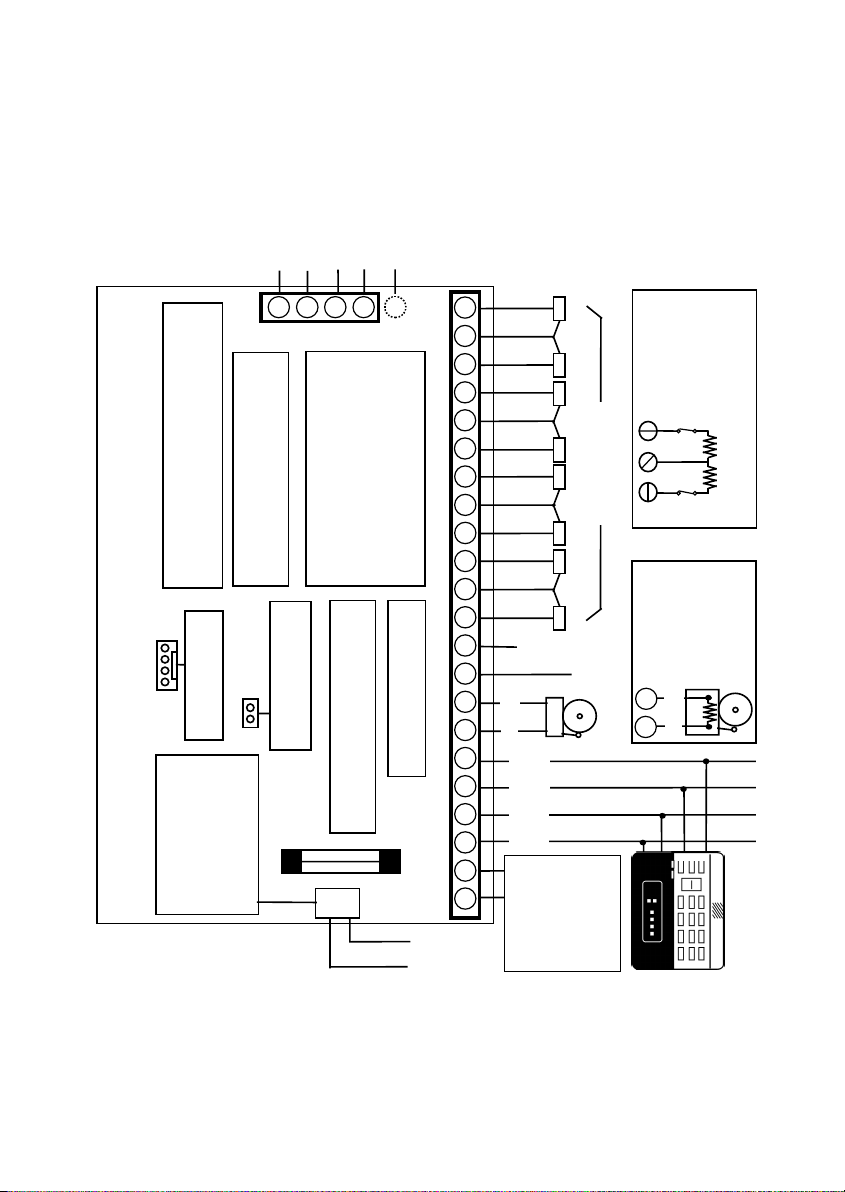
2.2: Wiring Diagram
Line
Telephone
3
4
5
J4
C Operated: 13.5 - 14.0V
AUX OUTPUT CURRENT DRAW:
Electronics Line 3000 recommends testing
AUXILIARY POW ER OU TP UT:
the system at least once a week. Refer to the
testing procedure found in the user manual.
The auxiliary output current allowed
Battery Operated: 12V Nominal
2
for peripheral units must not exceed
300mA when one keypad is installed.
Optional
1
For each additional keypad (up to 3
max.) the permitted current draw is
Earth
Connection
Connections
ML0109A (6/03)
(EOLR)
W
4
/
1
2.2K
W
4
/
1
2.2K
*
Z8
*
Z7
* Penta Plus XL only
*
Z6
17 18 20 2119 22
reduced by 50mA.
*
Z5
Z4Z3Z2Z1
ZONE
CONNECTIONS
Zone
of Line
Resistor
Typical End
N.C.
N.C.
8
7
Supervised
Bell
only)
(USA
hardware
Connections
-
2.2K
+
10 11 12 14 1513 16
Household Burglary Alarm Panel
Electronics Line 3000 Ltd. – Penta XL & Penta Plus XL
Voice Module
Connector for 3601
default restore
JPD Jumper for factory
BELL/SIREN OUTPUT:
BATTERY PROTECTION FUSE:
Replace with a 1.0A/250V fuse
8 9
7
600mA max.
Zone
Tamper
-
+
KPD
AUX
PGM
K2 K1
-
+
12V/3.2Ah BATTERY:
Replace the battery
every 3 - 5 years.
The maximum charging
current is 350mA.
+
-
1 2 3 4 5 6
J1
BLACK
RED
15VAC
50/60Hz
22-30VA
AC Transformer
Do not connect to
a switch controlled
receptacle.
LED Keypad
-7-
Page 8
X
g
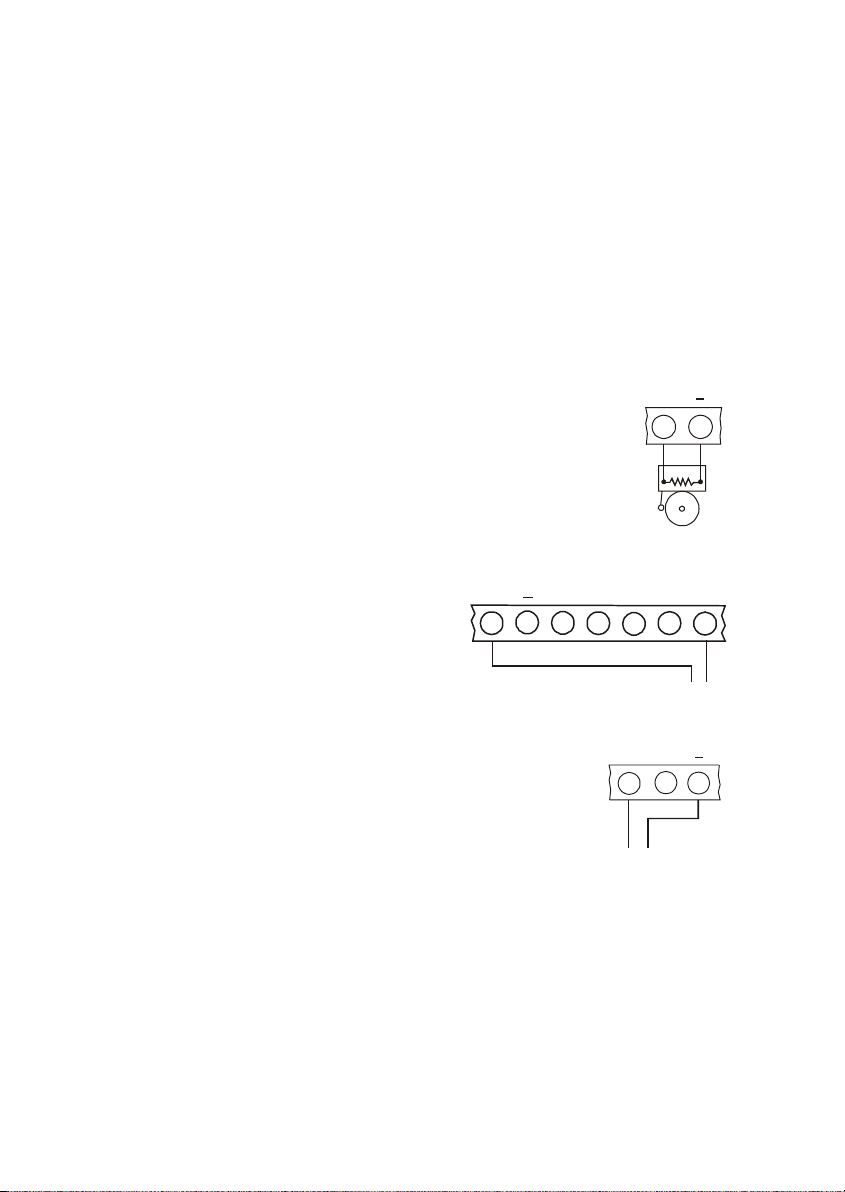
2.3: Terminal Connections
15-16.5VAC Input
(J1) Terminals 1 & 2: Connect a 15VAC transformer rated at 22-30VA, using 18 AWG wire.
Auxiliary Power Output
(J1) Terminals 3(+), 4(-): The auxiliary power output connections supply power to
keypads and peripheral units such as detectors and other powered sensors.
Keypad Data Bus Connections
(J1) Terminals 5 & 6: Connect up to three LED keypads to terminals 5 (K2), and 6 (K1).
Make sure that the wires are connected to the corresponding terminals on the keypad –
see 2.4: Mounting the Keypad.
Bell Power Output
(J1) Terminals 7(+), 8(-): Connect these terminals to supply
+
7 8
power to the bell. The bell power output supplies AUX power,
rated at 600mA max.
Bell Supervision (USA hardware only)
The bell connections must be terminated by a 2.2K ¼W resistor
as shown in Figure 2.1.
PGM Programmable Output
(J1) Terminal 9: The PGM output switches
AU
+
37485
Supervision Connections
6
2.2K
Figure 2.1: Bell
PGM
to ground when activated, enabling the
connection of additional system status
indicators. Connect the PGM output as
shown in the Figure 2.2.
ure 2.2: PGM Output Connections
Fi
Tamper Zone/Keyswitch Connections
(J1) Terminal 10: Connect a tamper switch or ON/OFF
LOAD
(100mA max.)
+
10 11 12
keyswitch to terminals 10(+) and 12(-).
Note: If neither the tamper zone nor keyswitch are used, short
terminal 10 to 12 and define this zone as Tamper Zone at
Address 01.
Tam pe r Swi tc h o r
ON/OFF Keyswitch
Figure 2.3: Tamper Zone/
Keyswitch Connections
Zone Connections
(J1) Terminals 11, 12, 13, 14, 15, 16, 17, 18, 19, 20, 21 & 22:
ZONE 1: Terminals 11(+) & 12(-) ZONE 5: Terminals 17(+) & 18(-)
ZONE 2: Terminals 13(+) & 12(-) ZONE 6: Terminals 19(+) & 18(-)
ZONE 3: Terminals 14(+) & 15(-) ZONE 7: Terminals 20(+) & 21(-)
ZONE 4: Terminals 16(+) & 15(-) ZONE 8: Terminals 22(+) & 21(-)
9
-8-
Page 9
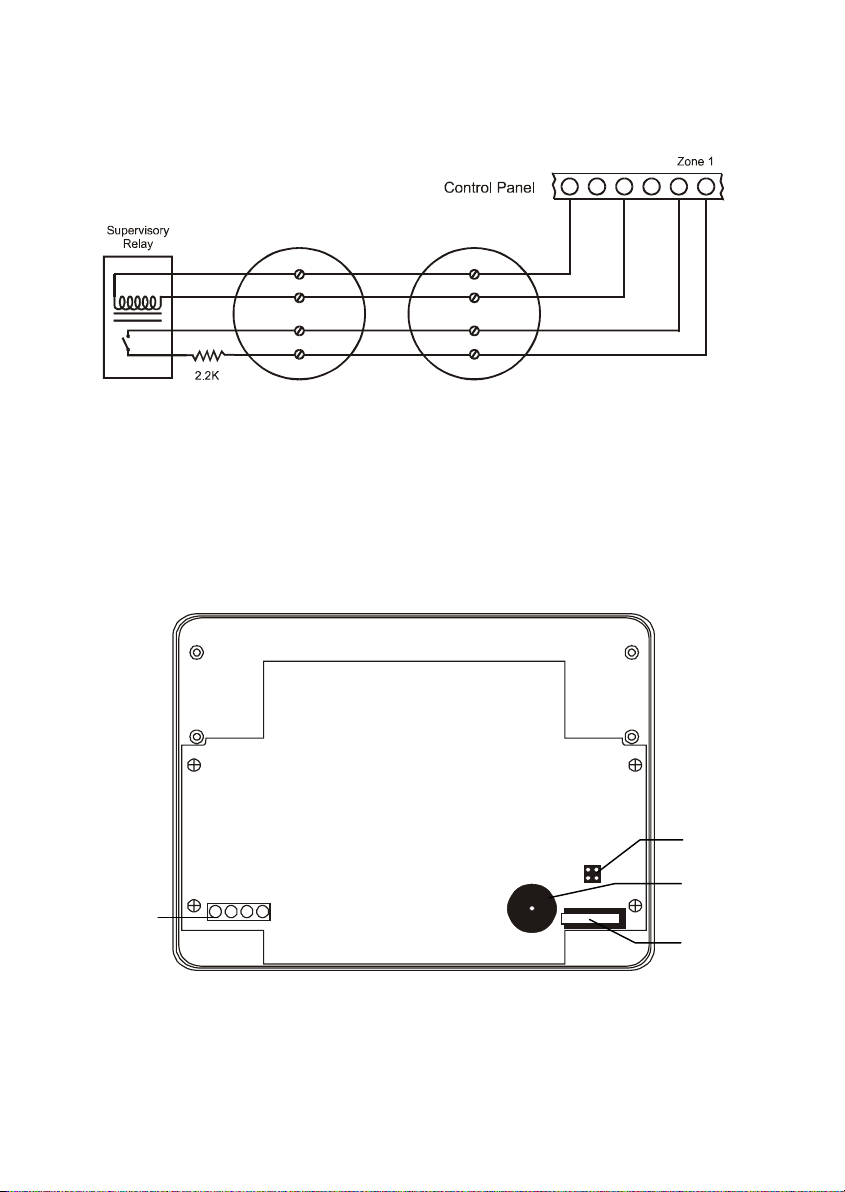
Fire Zone Connections
When Zone 1 is defined as Fire, connect four-wire smoke detectors as shown below in
Figure 2.4.
+12V
789101112
Figure 2.4: Four-wire Smoke Detector Connections (Zone 1)
Telephone Line
(J4) Terminals 1, 2, 3, 4 & 5: Connect the telephone line using standard Telco wires
(minimum 26 AWG) as follows:
1 - Optional Earth, 2 - Home Tip, 3 - Home Ring, 4 - Telco Tip and 5 - Telco Ring
2.4: Mounting the Keypad
Configuration
Jumpers
Buzzer
Tamper
Switch
Terminal
Block
AB
1234
Figure 2.5: 3104 Plus LED Keypad (cover removed)
-9-
Page 10

You can connect up to 3 individually addressed LED keypads to the control panel.
To mount the keypad:
1. Separate the front and back cover of the keypad by pressing the locking tabs,
situated at the bottom of the keypad, with a small flathead screwdriver.
2. Pull the keypad wires through the opening in the back cover nearest the
terminal block and mount the back cover to the wall.
3. Define the keypad address by configuring jumpers A & B according to the
following diagram.
BABAB A
Jumper
Installed
Keypad 3Keypad 2Keypad 1
Figure 2.6: Keypad Jumper Configuration
Jumper
Removed
4. Connect the keypad to the control panel according to the following diagram.
K1
+
3
K2
4
5
6
CONTROL PANEL
KEYPAD
K2
K1
Figure 2.7: Keypad Connections
+
5. Reassemble the front and back cover of the keypad.
2.5: Turning on the System
Once all of the systems components are properly connected to their destination terminals,
you are ready to turn the system on. To avoid the risk of electrical shock or damage to the
control panel, make sure that both the AC supply and the battery are connected properly
before plugging in the system. If you experience any difficulties in applying power to the unit,
please contact Electronics Line 3000’s Technical Support Department. The panel is
supplied with a default program that includes typical programming data which means that
minimum programming is required for typical installations.
To turn on the system:
1. Install the JPD jumper located on the control panel board.
2. Reapply power and wait for 10 seconds; the keypad beeps to indicate the end of
the 10 second period.
3. Disconnect both the AC and battery power supply.
4. Remove the JPD jumper.
5. Reapply power and wait for 10 seconds; the keypad beeps to indicate that the
default program has been restored.
The default settings can be reset at any time by disconnnecting the power supply and
repeating the above procedure.
-10-
Page 11

Chapter Three: System Operation
3.1: General
Using any one of the three LED keypads that can be installed with the system, you can
perform all operation and programming functions. This section offers a complete
explanation of the keypad functions and of the LED display, incorporating a summary of
command codes used in system operation.
3.2: Keypad Layout
The following diagram shows the keypad layout for the 3104 Plus keypad for use with the
Penta Plus XL control panel. The layout of the 3104 keypad, supported by Penta XL
control panels, is identical except for the number of zone indicators on the LED display.
Zone
Indicators
6 7 8 SYSTEM
5
READY1 234
Status
Indicators
Status
Indicators
F
Numeric
Keypad
E
Distress Keys
P
Buzzer
Figure 3.1: 3104 Plus Keypad Layout
The numeric keypad enables you to operate and program the system. Additionally, three
distress keys enable the user to send one of three individual distress signals to the
central station - see 3.5: Distress Keys for further information.
LED Display
Zone Indicators: The zone indicator LEDs display zone status. The corresponding LED
lights up if a zone is open. If a zone is bypassed the corresponding LED flashes. If an
alarm occurs when the system is armed, the corresponding LED flashes until the system
is disarmed.
READY: The Ready LED lights up to indicate that there are no open zones or tamper
conditions and the system is ready to be armed.
SYSTEM: The System LED flashes to indicate that new events have been recorded in
one of the logs and when displaying additional system information such as programming
mode or bypass mode.
-11-
Page 12

ARMED: The Armed LED lights to indicate the system is armed or in programming
mode and flashes during the exit delay.
POWER: The Power LED lights up when both AC & battery power are OK, flashes
when the battery is low & AC power is OK, and goes out in the event of AC failure.
3.3: Command Codes
To execute a command, press the ‘4‘ button followed by the corresponding command
number. In certain cases, you are required to enter a valid user code.
The following is a summary of the command codes used in system operation.
40
41 + (User Code)
42
Quick Arm
Bypass Mode
Emergency/
45 + (User Code 1)
46
47 + (Installer Code)
Program User Codes
Zone Chime
Programming Mode
Trouble Event Log
43
Zone Alarm
48 + (User Code)
Forced Arming
Event Log
441
442 + (User Code 1)
Bell/LED Test
Walk Test
49 + (User Code)
ENTER 1 + (User Code 1)
* Available only if enabled in programming (Address 02).
Stay Arming
Stop Communications*
3.4: Arming/Disarming
The following section explains the various arming and disarming methods.
Arming
When all zones are secured, you can arm the system normally. Arming the system sends a
message to the central station identifying which user performed the operation.
To arm the system:
1. Check that all zones are closed; the Ready LED lights up to indicate that the
system is ready to be armed.
2. Enter a valid user code; the keypad beeps until the end of the exit delay.
Forced Arming
Forced arming enables you to arm the system with open zones. Electronics Line 3000
recommends waiting until all of the zones are secured and the system can be armed
normally.
Note: If zones are still not secured after the exit delay has ended, an alarm will be generated.
To force arm the system:
1. Press 4, 8.
2. Enter a valid user code; the keypad beeps until the end of the exit delay.
Quick Arming
This feature enables you to arm the system without a valid user code. Quick arming the
system transmits an “Armed by User 1” message to the central station.
To “Quick” arm the system:
1. Check that all zones are closed; the Ready LED lights up to indicate that the
system is ready to be armed.
2. Press 4, 0; the keypad beeps until the end of the exit delay.
-12-
Page 13

Stay Arming
This feature only arms perimeter zones – i.e. Perimeter, Perimeter with Delay and Fast
Loop Perimeter zones. This allows the user to stay within the protected area while the
system is armed.
To “Stay” arm the system:
1. Check that all perimeter zones are closed; the Ready LED lights up to indicate
that the system is ready to be armed.
2. Press 4, 9.
3. Enter a valid user code; the keypad beeps until the end of the exit delay.
Immediate Arming
Immediate arming allows system arming without an entry/exit delay. Pressing 4 during
the exit delay or when the system is armed cancels both the exit and entry delay times.
Disarming
You can disarm the system by entering a valid user code during the entry delay. If an
error is made when entering the code, press ‘#’ and enter the code again. When the code
is accepted, the Armed LED and the pulsed delay tone are turned off. If the correct code
is not entered by the end of the delay time, an alarm will be generated.
Keyswitch Arming/Disarming
The system can be armed and disarmed using an ON/OFF keyswitch. The keyswitch has
two operation modes.
• Latching – closing the keyswitch arms the system, opening disarms the system.
• Momentary – opening and closing the keyswitch either arms or disarms the system.
3.5: Distress Keys
In the case of an emergency, 3 types of alarms can be generated by pressing and
holding down the desired distress key for more than 2 seconds. These alarms will send
the relevant distress codes to the central station. The distress keys are as follows:
F
FIRE: Sounds the fire bell, sends the ‘Fire’ event code to the central station
(address 25) and registers in the Emergency/Trouble event log.
E
P
EMERGENCY: Sends the ‘Emergency’ event code to the central station
(address 26), sounds the siren (if programmed at address 01) and registers
in the Emergency/Trouble event log.
POLICE: Sends the ‘Police’ event code to the central station (address 24),
sounds the siren (if programmed at address 01) and registers in
the Emergency/Trouble event log.
-13-
Page 14

3.6: User Codes
The control panel supports four user codes, a duress code and an installer code. Each of
these codes are four digits long. Of the four user codes, only User Code 1 (default 1111)
has authorization to modify other user codes and the duress code. The installer’s code
(default 1234) is the only user code which grants access to the programming parameters
and is programmable at address 83.
To program user codes 1-4:
1. Press 4, 5.
2. Enter User Code 1; the Armed and System LEDs flash and the zone LEDs
indicate the programming status of each user code as follows:
Not Programmed
Off:
Programmed
On:
Flashing:
3. Enter the number of the code to be changed (1-4); the requested zone LED
flashes.
4. Enter the new user code; the LED stops flashing.
5. Enter the next code to be changed or press # to exit.
Note: If the new code is identical to an existing user code, an error tone will be
sounded and the new code will not be accepted.
To erase a user code:
1. Press 4, 5.
2. Enter User Code 1.
3. Enter the number of the code to be erased (1-4); the requested zone LED
flashes.
4. Enter 4, 4, 4, 4; the LED stops flashing and the code is erased.
5. Enter the next code to be erased or press # to exit.
Note: Do not erase User Code 1! Erasing this code denies the user the ability to
program user codes. If User Code 1 is accidentally erased, reset the default
program as described in 2.5: Turning on the System.
Duress Code
In the event that the user is forced to disarm the system and/or cancel the bell, entering
the duress code will send a silent alarm to the central station.
To program the duress code:
1. Press 4, 5.
2. Enter User Code 1.
3. Press 5; the Ready LED flashes.
4. Enter a new duress code or 4, 4, 4, 4 to erase the existing code.
5. Press # to exit.
Currently Being Programmed
-14-
Page 15

3.7: Zone Bypassing/Unbypassing
A bypassed zone is ignored by the system and will not generate an alarm when tripped.
To bypass a zone:
1. Press 4, 1.
2. Enter a valid user code; the System LED flashes and the LEDs of any currently
bypassed zones light up.
3. Enter the number of the zone to be bypassed; the corresponding zone LED is lit.
4. Press # to exit bypass mode; the bypassed zones flash.
To unbypass a zone:
1. Press 4, 1.
2. Enter a valid user code; the System LED flashes and the LEDs of any currently
bypassed zones light up.
3. Enter the number of the zone to be unbypassed; the corresponding zone LED
turns off.
4. Press # to exit bypass mode.
Note: Disarming the system automatically unbypasses all bypassed zones.
3.8: Event Logs
The event logs record events that the system has undergone since the last arming. If any
events have been recorded in either event log, the System LED flashes until the relevant
event log has been viewed. In the event that a trouble condition still exists, the System
LED continues to flash until the condition has been remedied.
Emergency/Trouble Event Log
Zone tamper, keypad tamper, keypad trouble or any of the three distress key alarms are
registered in the Emergency/Trouble event log.
To view the Emergency/Trouble event log:
1. Press 4, 2; the various trouble conditions are indicated by the zone LEDs. The
following is a summary of the trouble condition that each LED indicates when lit:
1 - Tamper or Keypad Trouble 2 - Alarm from P key
3 - Alarm from F key 4 - Alarm from E key
2. Press # to exit the event log.
Note: The event logs can only be viewed when the system is disarmed.
Zone Alarm Event Log
The Zone Alarm event log displays the zones from which an alarm was generated since
the system was last armed.
To view the Zone Alarm event log:
1. Press 4, 3; an alarm from a specific zone is indicated by the corresponding
zone LED.
2. Press # to exit the event log.
Both logs are automatically reset when the system is next armed (at the end of the exit
delay).
-15-
Page 16

3.9: Additional Operations
Bell Cancel
To cancel the bell:
• Enter a valid user code or turn the keyswitch as if disarming the system.
Bell/LED Test
To perform a bell/LED test:
• Press 4, 4, 1; the siren is sounded and all LEDs on the keypad are lit for a
period of two seconds.
Walk Test
Walk test mode enables you to test peripheral detection devices, such as PIR detectors
and magnetic door contacts. In this mode, when a zone is opened or closed, the keypad
chimes.
To perform a walk test:
1. Press 4, 4, 2.
2. Enter User Code 1; the Ready, System, Power and Armed LEDs flash to
indicate that the system is in Walk Test mode. To end Walk Test mode, press #.
This mode is automatically terminated after 4 minutes.
Note: The Tamper Zone always generates an alarm if opened, even if the system is
in Walk Test mode.
Stop Communications
To cancel the transmission of all unsent messages:
1. Press ENTER, 1.
2. Enter User Code 1; all pending messages are cleared and all communications
stop immediately.
Note: The Stop Communications function is available only if enabled in programming
(Address 02).
Zone Chime On/Off
The keypad can be set to chime when Perimeter With Delay or Perimeter zones are
opened or closed. This feature only functions when the system is disarmed.
To toggle the zone chime On or Off:
• Press 4, 6 while the system is disarmed.
The keypad will sound a continuous tone to indicate “Zone Chime ON” or two short
beeps to indicate “Zone Chime OFF”.
Keypad Backlight On/Off
To toggle the backlight of any keypad On or Off:
• Press and hold down # for more than 2 seconds.
-16-
Page 17

Chapter Four: Programming
4.1: General
The Penta XL series of control panels may be programmed using either the LED keypad
or from a PC using the Remote Programmer (RP) software. If using the Remote
Programmer, refer to the instructions provided with the software.
4.2: Guide to Programming
The control panel has 84 parameter addresses allowing precise custom configuration of
the system to the needs of each installation. The options for each address are listed in
section 4.3: Programming Parameters. All of the programming parameters are stored in
the panel’s non-volatile EEPROM memory which stores the data in the event that power
is disconnected. Before programming directly after installing the system, restore the
default parameters as explained in 2.5: Turning on the System.
To program the system:
1. Make certain that the system is disarmed.
2. Press 4, 7.
3. Enter the Installer Code (the default installer code is 1234); the Armed LED
lights up and the System LED flashes.
4. Enter the two-digit parameter number to be programmed; the Ready LED lights
up and the Armed LED turns off.
5. Enter a new value or press # to cancel; if the value has been successfully
changed, the keypad sounds an acknowledge tone to confirm and the Ready
LED turns off.
6. Press # to exit programming mode.
Note: The default Installer Code should be changed immediately after installing the
system.
Hexadecimal Data
Some of the programming parameters require a hexadecimal value to be entered. To
enter hexadecimal data, use the following combination of digits for hexadecimal numbers
greater than 9.
4, 0 = A 4, 1 = B 4, 2 = C 4, 3 = D 4, 4 = E 4, 5 = F
Keypad Tones
The keypad sounds a series of tones to aid programming. These tones offer the installer
status indication during programming. The following is a summary of the keypad
programming tones.
Short Beep:
Long Beep:
Low Beeps:
Continuous Beeps:
Confirmation of each keystroke
Acknowledgment of a successful entry
Error, illegal entry
Entry/Exit delay
-17-
Page 18

4.3: Programming Parameters
The following section lists the programming parameters which are used to configure the
system. For a listing of the default parameters please contact your local dealer.
Address 00: Communication Attempts
The control panel’s attempts to communicate with the central station are organized in
rounds. A communication round is a set of dialing attempts. If the panel does not
succeed in sending the event message to the primary number within this number of
attempts, the backup number is dialed the same number of times. A new round will begin
30 minutes after the last dialing attempt. The number of communication rounds is defined
in the first digit of this address. The number of dialing attempts in each round is defined
in the second digit.
Note: To Disable Communications, enter 00 at this address.
First Digit:
Enter a value between 1 – F
(F = 15 communication rounds)
Communication Rounds
Second Digit:
Enter a value between 1 – F
Dialing Attempts
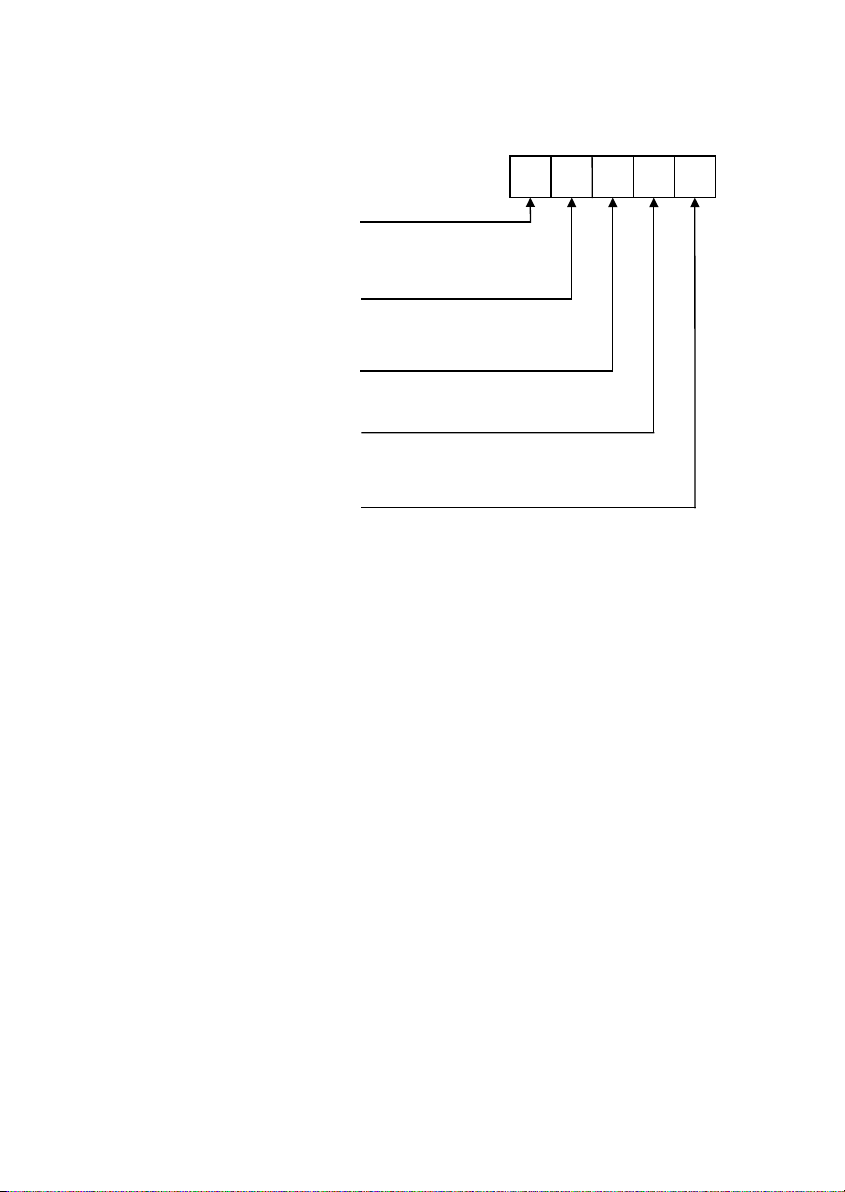
Address 01: Miscellaneous
This address offers a number of options for the system’s setup. Enter 5 digits at this
address according to the following:
First Digit:
0 - No Keypads
1 - One Keypad
2 - Two Keypads
3 - Three Keypads
Second Digit:
0 - Latching
1 - Momentary
Third Digit:
0 - Arm/Disarm Keyswitch
1 - Tamper Zone
Fourth Digit:
0 - Audible
1 - Silent
Fifth Digit:
0 - Audible
1 - Silent
Keypads
Keyswitch Function
Tamper Zone Definition
E Key Alarm
P Key Alarm
-18-
Page 19
Address 02: Communication Options
This address consists of the various options used in communication and/or remote
programming. Enter five digits according to the following.
First Digit:
0 - Disabled
1 - Enabled
Second Digit:
0 - Passcode
1 - Callback
Third Digit:
0 - Disable RP Access
1 - Enable RP Access
Fourth Digit:
0 - 1400Hz Handshake
1 - 2300Hz Handshake
Fifth Digit:
0 - Pulse
1 - DTMF
Stop Communications
RP Access Type
RP Access
Handshake
Dialing
Zone Definitions
You can define one of seven response types for each zone. Each zone type can be
programmed as silent or audible, except for Fire which is always audible. A silent zone
will not activate a siren or bell when the zone is tripped.
00 - Perimeter zone with delay (Silent)
10 - Perimeter zone with delay (Audible)
01 - Perimeter zone (Silent)
11 - Perimeter zone (Audible)
02 - Conditional zone (Silent)
12 - Conditional zone(Audible)
03 - Interior zone (Silent)
13 - Interior zone (Audible)
04 - 24hr zone (Silent)
14 - 24hr zone (Audible)
05 - Fast Loop Perimeter Zone (Silent)
15 - Fast Loop Perimeter Zone (Audible)
16 - Fire zone (Audible –
can only be assigned to Zone 1)
Address 03: Zone 1 Definition
Address 04: Zone 2 Definition
Address 05: Zone 3 Definition
Address 06: Zone 4 Definition
-19-
Page 20

Address 07: Zone 5 Definition*
Address 08: Zone 6 Definition*
Address 09: Zone 7 Definition*
Address 10: Zone 8 Definition*
Address 11: Entry Delay Time
The entry delay timer determines the amount of time the user has to disarm the system
before an alarm is activated. The entry delay is only initiated if the premises are entered
through a zone defined as ‘perimeter with delay’. Enter a hexadecimal value between 1 and
255 seconds at this address using the hexadecimal conversion chart in Appendix A.
Address 12: Exit Delay Time
The amount of time the user has to leave the premises after arming is determined by the
exit delay timer. An open zone will not activate an alarm during this period. Enter a
hexadecimal value between 1 and 255 seconds at this address using the hexadecimal
conversion chart in Appendix A.
Address 13: Bell Cut-Off Time
The bell cut-off is the period of time that the bell or siren will be activated after an alarm
has occurred. Enter a value between 1 and 5 minutes at this address.
Address 14: PGM Options
The PGM (Programmable Output) can be used for indication of certain status or trouble
conditions. When the PGM output is activated terminal 9 switches to ground. Choose the
PGM output setting from the following table.
Value Name Activated By Deactivated By
00 PGM Disabled -----------------------01 Arm/Disarm System Armed System Disarmed
02 Entry/Exit Entry/Exit Tone Follower Entry/Exit Tone Follower
04 Communication System in Communication End of Communication
08 AC Loss AC Loss AC Restore
10 Bell Follower Bell Follower Bell Follower
20 Duress Duress Code (deactivated after 2 seconds)
40 Alarm System in alarm Arm/Disarm/ Bell Cancel/
View log
80 Arm/Disarm
Momentary Activation (Arm – 1 Tone; Disarm – 2 Tones)
†
Tone
Note: If using Zone 1 as a dedicated fire zone, the PGM output is used to reset smoke
detector power and cannot be used in any of the modes listed above.
*
This address is only relevant to Penta Plus XL.
†
To deactivate the PGM output, the relevant log must be viewed.
-20-
Page 21

Event Codes
All events can be programmed to transmit a two digit event code message to the central
station. These codes are usually assigned by the central station - consult the central
station operator/owner for a listing of the different event codes. To disable an event code
program the code as 00.
Address 15: Alarm from Zone 1‡
Address 16: Alarm from Zone 2‡
Address 17: Alarm from Zone 3‡
Address 18: Alarm from Zone 4‡
Address 19: Alarm from Zone 5*‡
Address 20: Alarm from Zone 6*‡
Address 21: Alarm from Zone 7*‡
Address 22: Alarm from Zone 8*‡
Address 23: Alarm from Tamper Zone‡
Address 24: [P] Key Alarm‡
Address 25: [F] Key Alarm‡
Address 26: [E] Key Alarm‡
Address 27: Zone 1 Restore
Address 28: Zone 2 Restore
Address 29: Zone 3 Restore
Address 30: Zone 4 Restore
Address 31: Zone 5 Restore*
Address 32: Zone 6 Restore*
Address 33: Zone 7 Restore*
Address 34: Zone 8 Restore*
Address 35: Tamper Zone Restore
Address 36: [P] Key Alarm restore
Address 37: [F] Key Alarm restore
Address 38: [E] Key Alarm restore
Address 39: System Armed (User Code 1)
Address 40: System Armed (User Code 2)
Address 41: System Armed (User Code 3)
Address 42: System Armed (User Code 4)
Address 43: System Disarmed (User Code 1)
‡
When using the Follow-me feature, program these addresses with a value greater than 00.
*
This address is relevant only to Penta Plus XL.
-21-
Page 22

Address 44: System Disarmed (User Code 2)
Address 45: System Disarmed (User Code 3)
Address 46: System Disarmed (User Code 4)
Address 47: System Disarmed (Duress Code)
Address 48: Low Battery
Address 49: AC Loss
Address 50: Bell Trouble**
Address 51: Keypad Trouble
Address 52: Low Battery Restore
Address 53: AC Loss Restore
**
Address 54: Bell Trouble Restore
Address 55: Keypad Trouble Restore
Address 56: Bell Cancel
Address 57: Periodic Test
Address 58: Bypass Zone 1
Address 59: Bypass Zone 2
Address 60: Bypass Zone 3
Address 61: Bypass Zone 4
Address 62: Bypass Zone 5
Address 63: Bypass Zone 6
Address 64: Bypass Zone 7
*
*
*
Address 65: Bypass Zone 8*
Address 66: Unbypass Zone 1
Address 67: Unbypass Zone 2
Address 68: Unbypass Zone 3
Address 69: Unbypass Zone 4
Address 70: Unbypass Zone 5*
Address 71: Unbypass Zone 6*
Address 72: Unbypass Zone 7*
Address 73: Unbypass Zone 8*
*
This address is relevant only to Penta Plus XL.
**
USA hardware versions only.
-22-
Page 23

Communication Protocols
You can program an individual communication protocol for each of the three telephone
numbers used for central station communications.
00 - 10 BPS 4/2 no parity
01 - Follow Me
02 - Contact ID
03 - Voice Follow Me (3601)
Note: If a 3601 Voice Message Module is connected to the control panel, do not program the
communication protocol as “01 – Follow Me” .
Address 74: Primary Communication Protocol
Address 75: Duplicate Communication Protocol
Address 76: Backup Communication Protocol
Telephone numbers
Address 77: Primary Telephone Number
The Primary 1 telephone number is the first number that is dialed when an event occurs.
You can enter a maximum of 16 digits at this address. To add a two-second pause, enter
4, 1). To switch from pulse to DTMF dialing enter E (4, 4). To add a “4", enter (4, 4).
B (
To add a “#”, enter (
4, #). These additional digits are included in the 16 digit total. Press
ENTER after you program the last digit of the telephone number.
Address 78: Duplicate Telephone Number
The Duplicate telephone number enables the control panel to report events to more than
one central station. The Duplicate telephone number is programmed in the same way as
the Primary telephone number (address 77).
Address 79: Backup Telephone Number
If the panel fails to communicate with either the Primary or Duplicate numbers within a
communication round, the Backup telephone number is dialed. The Backup telephone
number is programmed in the same way as the Primary telephone number (address 77).
Address 80: RP Callback Telephone Number
Remote programming communication can be established using two methods, passcode
and callback (see address 02, second digit). If RP callback is selected the panel receives
a call from the remote programmer, hangs up and calls back using the telephone number
programmed at this address. The RP callback telephone number is programmed in the
same way as the Primary telephone number (address 77).
Note: To disable a telephone number, enter the appropriate address and press ENTER. It is
not possible to program a backup number unless a primary number has been programmed.
Address 81: RP Access Code
This 4-digit code grants access to the remote programmer.
Note: Do not enter Hex digits at this address.
-23-
Page 24

Address 82: Account Number
When an event code is sent, the central station receives an account number to identify
the customer. Enter a 4-digit account number at this address.
Address 83: Installer Code
The installer code is a 4-digit code which grants access to programming mode. The
default for this code (1234) should be changed immediately after installing the system.
Note: Do not enter Hex digits at this address.
Address 84: Periodic Test Interval
The periodic test is an event message the control panel sends to notify the central station
that its reporting capability is fully functional –
see address 57. You can program the
system to send a periodic test message according to a chosen time interval. Enter a
value between 01-99 hours or 00 for a periodic test interval of 30 minutes. To disable the
periodic test, enter 00 at address 57.
Note: Do not enter Hex digits at this address.
4.4: Periodic Test Timer Reset
After power is applied to the control panel, the panel waits for the periodic test interval to
expire before sending the first transmission of the periodic test message. For example, if
the periodic test interval (address 84) is programmed as 8 hours, the first test will be sent
8 hours after power up.
If the periodic test interval is programmed as 24 hours, the first periodic test will be sent
12 hours after powering up the system (enabling these tests to be sent during the night).
Periodic test timer reset is an option that enables you to reset the periodic test timer
without the need to power up the system. When the periodic test timer is reset, the first
test message is sent immediately to the central station.
To reset the periodic test timer:
1. Press
2. Enter the Installer Code; the Armed LED lights up and the System LED flashes.
3. Enter
4. Press
4, 7 to enter programming mode.
99; the periodic test timer is reset and the periodic test code is sent to the
central station.
# to exit programming mode.
-24-
Page 25

Appendix A: Hexadecimal Conversion Chart
The following is a decimal to hexadecimal conversion chart to be used as an aid in
programming:
Dec Hex Dec Hex Dec Hex Dec Hex Dec Hex Dec Hex Dec Hex Dec Hex
00 00 32 20 64 40 96 60 128 80 160 A0 192 C0 224 E0
01 01 33 21 65 41 97 61 129 81 161 A1 193 C1 225 E1
02 02 34 22 66 42 98 62 130 82 162 A2 194 C2 226 E2
03 03 35 23 67 43 99 63 131 83 163 A3 195 C3 227 E3
04 04 36 24 68 44 100 64 132 84 164 A4 196 C4 228 E4
05 05 37 25 69 45 101 65 133 85 165 A5 197 C5 229 E5
06 06 38 26 70 46 102 66 134 86 166 A6 198 C6 230 E6
07 07 39 27 71 47 103 67 135 87 167 A7 199 C7 231 E7
08 08 40 28 72 48 104 68 136 88 168 A8 200 C8 232 E8
09 09 41 29 73 49 105 69 137 89 169 A9 201 C9 233 E9
10 0A 42 2A 74 4A 106 6A 138 8A 170 AA 202 CA 234 EA
11 0B 43 2B 75 4B 107 6B 139 8B 171 AB 203 CB 235 EB
12 0C 44 2C 76 4C 108 6C 140 8C 172 AC 204 CC 236 EC
13 0D 45 2D 77 4D 109 6D 141 8D 173 AD 205 CD 237 ED
14 0E 46 2E 78 4E 110 6E 142 8E 174 AE 206 CE 238 EE
15 0F 47 2F 79 4F 111 6F 143 8F 175 AF 207 CF 239 EF
16 10 48 30 80 50 112 70 144 90 176 B0 208 D0 240 F0
17 11 49 31 81 51 113 71 145 91 177 B1 209 D1 241 F1
18 12 50 32 82 52 114 72 146 92 178 B2 210 D2 242 F2
19 13 51 33 83 53 115 73 147 93 179 B3 211 D3 243 F3
20 14 52 34 84 54 116 74 148 94 180 B4 212 D4 244 F4
21 15 53 35 85 55 117 75 149 95 181 B5 213 D5 245 F5
22 16 54 36 86 56 118 76 150 96 182 B6 214 D6 246 F6
23 17 55 37 87 57 119 77 151 97 183 B7 215 D7 247 F7
24 18 56 38 88 58 120 78 152 98 184 B8 216 D8 248 F8
25 19 57 39 89 59 121 79 153 99 185 B9 217 D9 249 F9
26 1A 58 3A 90 5A 122 7A 154 9A 186 BA 218 DA 250 FA
27 1B 59 3B 91 5B 123 7B 155 9B 187 BB 219 DB 251 FB
28 1C 60 3C 92 5C 124 7C 156 9C 188 BC 220 DC 252 FC
29 1D 61 3D 93 5D 125 7D 157 9D 189 BD 221 DD 253 FD
30 1E 62 3E 94 5E 126 7E 158 9E 190 BE 222 DE 254 FE
31 1F 63 3F 95 5F 127 7F 159 9F 191 BF 223 DF 255 FF
-25-
Page 26

Appendix B: Glossary of Terms
24hr Zone
AC Loss
Answering
Machine Override
Armed
Audible Alarm
Auxiliary
Power Output
Backup
Telephone Number
Beep
Bell Cut-Off
Bell/LED Test
Bypassed Zone
Callback
Central Station
Chime
Conditional Zone
Default Settings
Delay
Disarmed
Distress Keys
Duplicate
Telephone Number
Duress Code
A zone which is always active regardless of whether the system is
armed or disarmed. Opening a 24hr zone always generates an alarm.
A
The disruption of AC power. In the event of AC loss, the panel waits
five minutes before sending an event message.
The method used in RP communication allowing the control panel to
share a telephone line with answering machines, fax machines etc.
The state during which the control panel is fully activated. In most
cases, when the system is armed, opening a zone generates an alarm.
An alarm that sounds the bell/siren.
The Auxiliary Power Output supplies power to all peripheral units
(keypads, detectors etc.)
B
The telephone number dialed if the panel fails to communicate with
either the Primary or Duplicate telephone numbers.
A tone sounded by the keypad. Four different kinds of beep are
sounded for keystroke confirmation, successful entry acknowledgement, illegal entry and exit/entry delay.
The programmable amount of time the bell is sounded when an
audible zone generates an alarm.
An operation that checks if the bell/siren and keypad LEDs are
functional. The bell test sounds the bell and lights all the LEDs on the
keypad for a period of two seconds.
A zone which is ignored by the system. No alarm is generated from a
bypassed zone even when the system is armed.
C
A toll saver feature which cuts the cost of remote programming. When
a call is received from the remote programmer the panel hangs up and
calls the RP Callback telephone number.
The monitoring service the panel alerts when an alarm is generated.
see Zone Chime
A conditional zone does not generate an alarm if opened during the
entry delay.
D
The factory programmed parameters designed to facilitate programming.
The exit/entry delay times are programmed to allow the user time to
arm or disarm the system without generating an alarm.
When the system is disarmed, only 24hr zones, the Fire zone and
distress keys are capable of generating an alarm.
The three distress keys (F, E and P) generate different types of alarm
when pressed and held down for two seconds.
The telephone number that is dialed after the Primary telephone
number in order to send a duplicate report.
Entering the duress code generates a silent alarm to indicate that the
user is being forced to disarm the system or cancel the bell.
-26-
Page 27

Entry Delay
Event Code
Event Log
Exit Delay
Fire Zone
Follow-Me
Forced Arming
Immediate Arming
Installer Code
Interior Zone
Keypad Trouble
Keyswitch
Latching
Low Battery
Magnetic Contacts
Master Code
Momentary
Perimeter Zone
Periodic Test
PGM Output
E
See Delay
The two-digit code transmitted to the central station to indicate that an
event has occurred.
The two event logs record and display events the system has
undergone since the last arming.
See Delay
F
A dedicated zone type for verified fire applications. Tripping this zone
generates an audible alarm with a distinctive bell pattern.
A method of monitoring the system without connecting to a central
station based monitoring service. In the event of an alarm, the panel
dials the follow-me number and sounds a number of tones via the
telephone.
Arming before the system is ready. If zones are still open when the exit
delay has expired an alarm will be generated.
I
Arming the system without an exit/entry delay.
The code which grants access to programming mode.
A zone that is not armed during Stay arming
K
Condition brought about by improper definition of keypads or if a
keypad has been disconnected.
Peripheral device connected to the tamper zone for arming and
disarming the system by the turn of a key.
L
One of the two keyswitch function modes. A latching keyswitch toggles
the system to arm or disarm by one turn of the key
(On or Off=Arm/Disarm).
See Event Log
Log
Condition brought about if the voltage supplied to the backup battery
deteriorates to approximately 10.5V or less.
M
Peripheral device mounted on doors incorporating a magnet that
closes a circuit. Opening the door breaks the circuit and opens the
zone to generate an alarm.
The only user code with the ability to program other user codes.
One of the two keyswitch function modes. A momentary keyswitch
toggles the system to arm or disarm by turning the key on and off.
(On & Off=Arm or Disarm).
P
Perimeter zones are armed during both regular and Stay arming and
can be defined with or without an exit delay.
The periodic test event code is sent to the central station every 24
hours to indicate that the system is functional.
Programmable output for connecting additional system status indicators.
-27-
Page 28

Telephone Number
RP Access Code
Communications
Primary
Quick Arming
Ready
Remote
Programmer
Restore
Silent Alarm
Stay Arming
Stop
Tamper Zone
Tone
Unbypass
User Code
Voice Message
Walk Test
Zone
Zone Chime
The first telephone number dialed when an event occurs.
Q
Arming the system without the need for a valid user code.
R
The state in which all zones are closed and the system is ready to be
armed.
The software used for programming the system using a PC from a
remote location or on-site.
The restoral of a trouble condition to its normal state. For example, if
AC power is reconnected, an AC Loss Restore event code is sent to
the central station.
Abbreviation of Remote Programmer
RP
The code that grants access to the remote programmer. The RP
Access Code prevents the system being sabotaged using
unauthorized remote programming.
S
An alarm that does not activate the bell/siren when generated.
Arming the perimeter of the system while allowing free movement in
the interior zones.
An operation that clears all communication buffers and stops all
communications immediately.
T
The ninth zone which can be connected to a tamper switch protecting
the control panel by generating an alarm when the metal housing is
opened. Alternately, the tamper zone can be defined for use with an
On/Off keyswitch.
See Beep
U
The restoral of a bypassed zone to its original state.
A code that grants access to certain operational capabilities such as
arming and disarming the system.
V
A short message played by the 3601 module to announce an alarm
over the telephone line.
W
A mode that enables detection devices to be tested without generating
an alarm.
Z
The physical and logical connection of detection devices to the control
panel.
The tone sounded by a keypad on opening a perimeter zone when the
system is disarmed.
-28-
Page 29

Index
24hr Zone .................................... 4, 19
Account Number.............................. 23
Additional Operations ...................... 16
Answering Machine Override.............5
Arming............................................. 12
Forced ................................................. 12
Immediate............................................ 13
Keyswitch............................................. 13
Quick ................................................... 12
Stay...................................................... 13
Audible Zone ................................... 19
Backlight.......................................... 16
Backup Telephone Number............. 23
Bell Cut-Off...................................... 20
Bell Test ..........................................16
Bypassing zones ............................. 15
Bypassing Zones ............................. 15
Callback....................................... 5, 19
Central Station Communication......... 4
Account Number.................................. 23
Event Code ............................................4
Protocol.................................................. 4
Codes
Duress .................................................14
Installer ................................................ 14
Command Codes............................. 12
Communication Protocols............ 4, 22
Conditional Zone .........................4, 19
Connections ...................................... 8
Contents............................................ 2
Default Program ............................... 10
Delay
Entry ....................................................20
Exit....................................................... 20
Dialing Options................................ 19
Disarming ........................................ 12
Keyswitch............................................. 13
Distress Keys ..................................13
Duplicate Telephone Number .......... 23
Duress Code ...................................14
E Key......................................... 13, 18
EEPROM......................................... 17
Emergency Key ............................... 13
Entry Delay...................................... 20
Entry/Exit Delay
Cancelling............................................ 13
Erasing User Codes ........................ 14
Event Codes.................................... 21
Event Logs ...................................... 15
Exit Delay ........................................ 20
F Key................................................13
Fast Loop Perimeter Zone ...........4, 19
Fire Key............................................13
Fire Zone..................................4, 9, 19
Follow-me ......................................... 4
General Description ............................... 5
Forced Arming .................................12
Handshake.......................................19
Hexadecimal Data............................17
Conversion Chart................................. 25
Immediate Arming............................13
Installation......................................... 6
Installer Code.......................14, 17, 23
Interior Zone...........................4, 13, 19
Introduction ....................................... 2
JPD Jumper .....................................10
Keypad
Address Definition................................ 10
Backlight On/Off................................... 16
Command Codes................................. 12
Configuration .......................................18
Connections......................................... 10
Display................................................. 11
Functions ............................................. 11
LED Indicators ..................................... 11
Mounting ................................................ 9
Programming Tones ............................ 17
Keyswitch.........................................18
Keyswitch Arming/Disarming............13
LED Display .....................................11
Miscellaneous Parameters...............18
Mounting the Keypad .....................8, 9
ON/OFF Keyswitch ..........................13
Operating Temperature..................... 3
Optional Parts ................................... 6
Options.............................................. 6
Overview........................................... 3
P Key .........................................13, 18
Parameter Addresses ......................17
Parameters
programming
..................................... 18
Parts
.................................................... 6
List of
Optional .................................................6
Perimeter Zone ......................3, 16, 19
Perimeter Zone With Delay ..........3, 19
Periodic Test Timer Reset................24
PGM.................................................20
Police Key ........................................13
Power Input....................................... 3
-29-
Page 30

Power LED ...................................... 12
Power Output.....................................3
Primary Telephone Number............. 23
Programmable Output..................... 20
Programming................................... 17
Duress Code........................................ 14
Guide.................................................. 17
Parameters........................................ 18
User Codes.......................................... 14
Protocols .....................................4, 22
Quick Arming................................... 12
Ready LED ...................................... 11
Remote Programming ................. 5, 19
Access Code ....................................... 23
Callback Number ................................. 23
Reset
Default Settings ...................................10
Event Logs........................................... 15
Periodic Test Timer ............................. 24
RP Access Code ............................. 23
RP Callback............................. 4, 5, 19
Telephone Number.............................. 23
Silent Zone ...................................... 19
Status Indication.............................. 20
Stay Arming..................................... 13
Stop Communications ..................... 16
System LED ....................................11
Tamper Zone................................... 18
Telephone Communication................ 4
Follow-me .............................................. 5
RP Communication............................ 5
Telephone Line
Connections........................................... 9
Telephone Numbers.....................4, 23
Telephone Options...........................19
Terminal Connections ....................... 8
Test
Bell....................................................... 16
Walk..................................................... 16
Trouble Indication ............................20
Turning on the System.....................10
Unbypassing zones..........................15
Unbypassing Zones .........................15
User Codes ..................................3, 14
Erasing................................................. 14
Programming ....................................... 14
Walk Test.........................................16
Wiring Diagram ................................. 7
Zone Chime .....................................16
Zones................................................ 3
24hr.................................................. 4, 19
Audible................................................. 19
Bypassing .......................................... 15
Conditional....................................... 4, 19
Connections........................................... 8
Definition.............................................. 19
Fast Loop Perimeter .............................. 4
General Description ............................... 3
Interior........................................ 4, 13, 19
Perimeter ................................... 3, 16, 19
Perimeter With Delay....................... 3, 19
Silent.................................................... 19
Tamper ............................................8, 18
Unbypassing .....................................15
-30-
 Loading...