

Page 1

user manual
Dishwasher
ESF 66830
Page 2

Electrolux. Thinking of you.
Share more of our thinking at www.electrolux.com
Contents
Safety information 2
Product description 3
Control panel 4
First use 5
Setting the water softener 5
Use of dishwasher salt 6
Use of rinse aid 7
Daily use 8
Loading cutlery and dishes 9
Use of detergent 12
Multitab function 13
Select and start a washing programme
14
Unloading the dishwasher 15
Washing programmes 16
Care and cleaning 17
What to do if… 18
Technical data 19
Hints for test institutes 20
Installation 21
Water connection 22
Electrical connection 23
Environment concerns 23
Subject to change without notice
Safety information
In the interest of your safety and to ensure the correct use, before installing
and first using the appliance, read this
user manual carefully, including its hints
and warnings. To avoid unnecessary
mistakes and accidents, it is important
to ensure that all people using the appliance are thoroughly familiar with its operation and safety features. Save these
instructions and make sure that they remain with the appliance if it is moved or
sold, so that everyone using it through
its life will be properly informed on appliance use and safety.
Correct use
• This dishwasher is only intended for washing household utensils suitable for machine washing.
• Do not put any solvents in the dishwasher.
This could cause an explosion.
• Knives and other items with sharp points
must be loaded in the cutlery basket with
their points down or placed in a horizontal
position in the upper basket.
• Only use products (detergent, salt and
rinse aid) suitable for dishwashers.
• Avoid opening the door whilst the appliance is in operation, hot steam may escape.
• Do not take any dishes out of the dishwasher before the end of the washing cycle.
• After use, isolate the appliance from the
power supply and turn off the water supply.
• This product should be serviced only by an
authorized service engineer, and only genuine spare parts should be used.
• Under no circumstances should you attempt to repair the machine yourself. Repairs carried out by inexperienced persons
could cause injury or serious malfunctioning. Contact your local Service Force Centre. Always insist on genuine spare parts.
General safety
• Persons (including children) with reduced
physical sensory, mental capabilities or
lack of experience and knowledge must
not use the appliance. They must have supervision or instruction for the operation of
the appliance by a person responsible for
their safety.
• Dishwasher detergents can cause chemical burns to eyes, mouth and throat. Could
endanger life! Comply with the safety instructions of the dishwasher detergent
manufacturer.
2 electrolux
Page 3
• Water in the dishwasher is not for drinking
purposes. Detergent residue may still be
present in your machine.
• Ensure that the door of the dishwasher is
always closed when it is not being loaded
or unloaded. In this way you will avoid anybody tripping over the open door and hurting themselves.
• Do not sit or stand on the open door.
Child safety
• This appliance is designed to be operated
by adults. Children must be supervised to
ensure that they do not play with the appliance.
• Keep all packaging well away from children. There is a risk of suffocation.
• Keep all detergents in a safe place out of
children’s reach.
• Keep children well away from the dishwasher when the door is open.
Installation
• Check your dishwasher for any transport
damage. Never connect a damaged ma-
chine. If your dishwasher is damaged contact your supplier.
• All packaging must be removed before
use.
• Any electrical and plumbing work required
to install this appliance must be carried out
by a qualified and competent person.
• For safety reasons it is dangerous to alter
the specifications or attempt to modify this
product in any way.
• Never use the dishwasher if the electrical
supply cable and water hoses are damaged; or if the control panel, work top or
plinth area are damaged such that the inside of the appliance is freely accessible.
Contact your local Service Force centre, in
order to avoid hazard.
• All sides of the dishwasher must never be
drilled to prevent damage to hydraulic and
electric components.
Warning! For electrical and water
connection carefully follow the
instructions given in the specific
paragraphs.
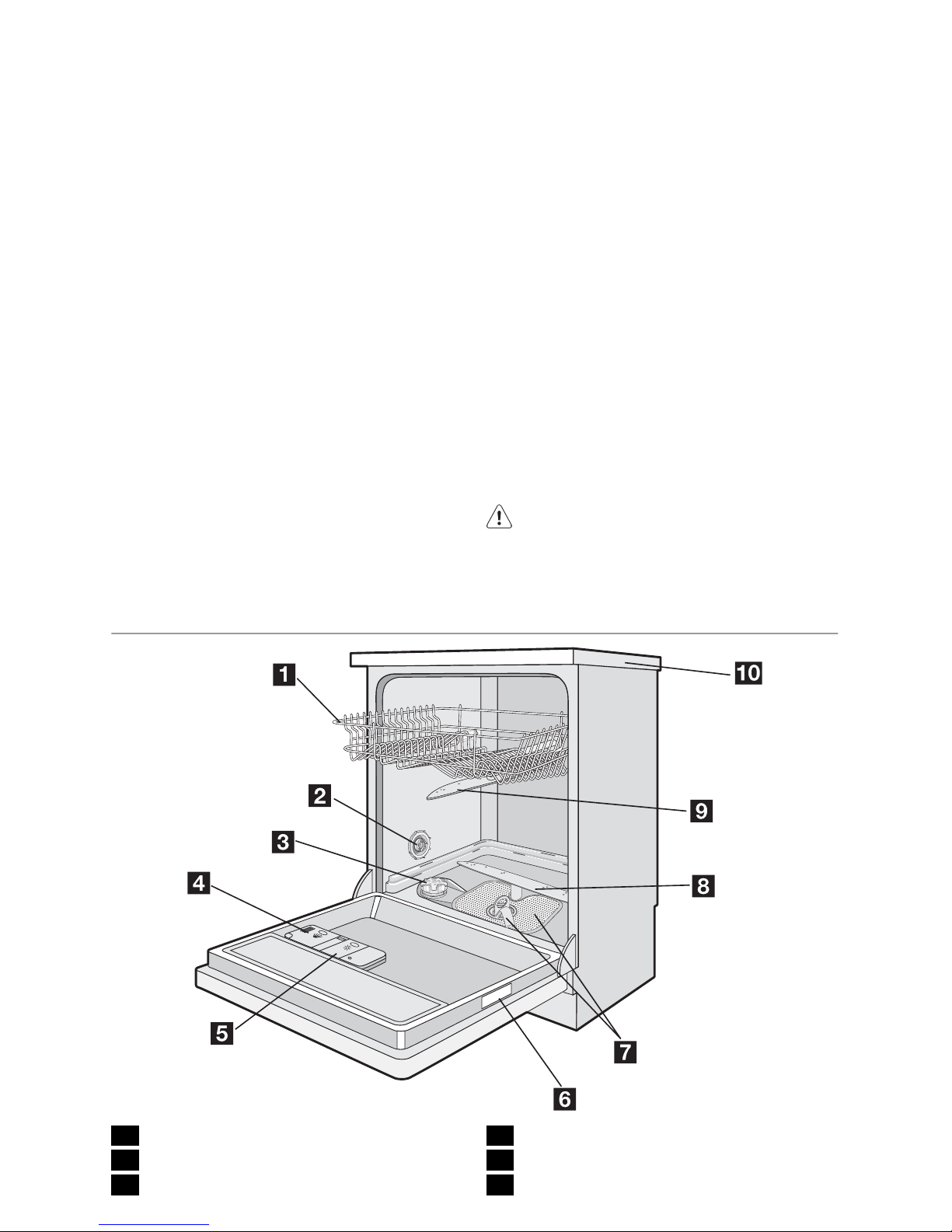
Product description
1 Upper basket
2 Water hardness dial
3 Salt container
4 Detergent dispenser
5 Rinse aid dispenser
6 Rating plate
electrolux 3
Page 4
7 Filters
8 Lower spray arm
9 Upper spray arm
10 Worktop
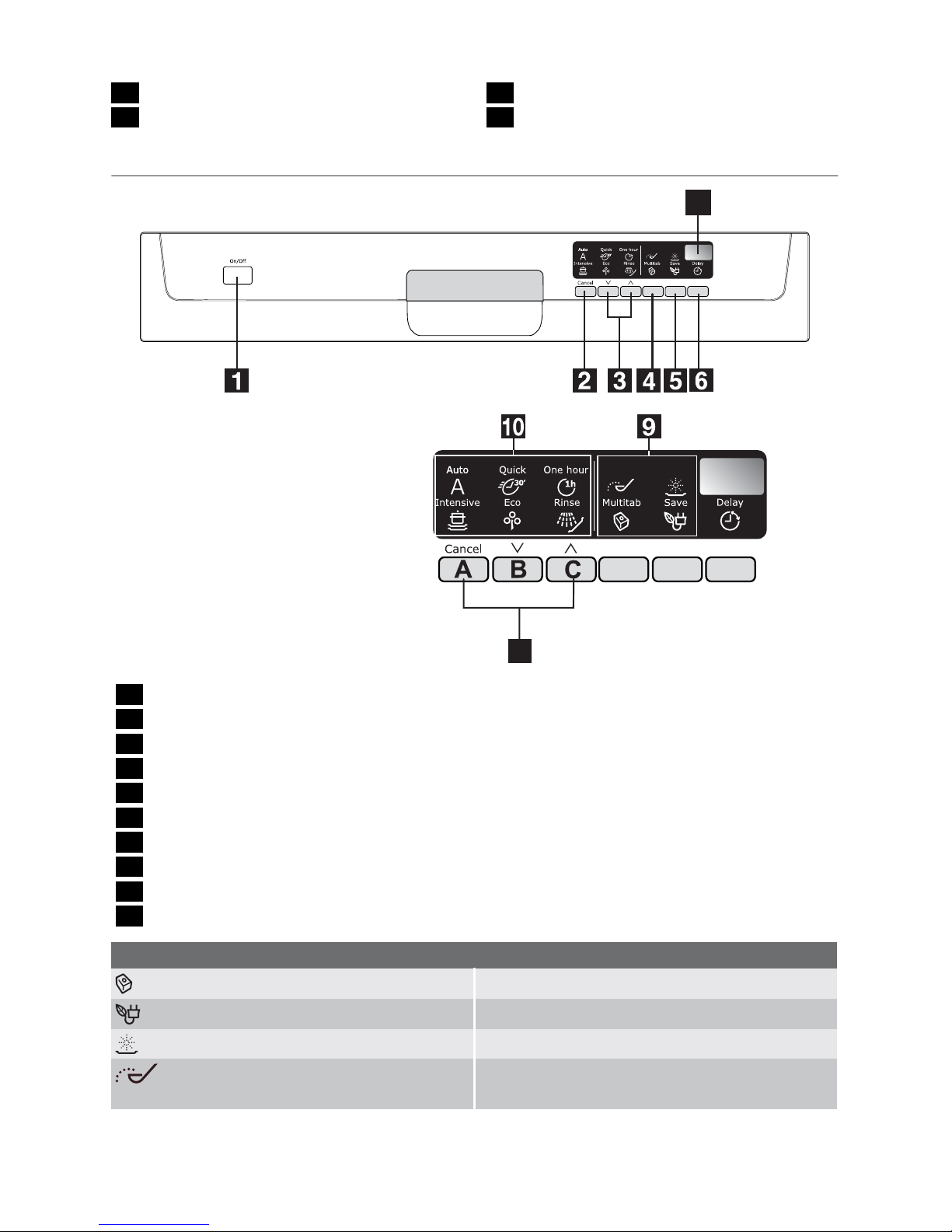
Control panel
7
8
1 On/off button
2 Cancel button Cancel
3 Programme selection buttons
4 Multitab button
5 Save energy button
6 Delay start button
7 Digital display
8 Function buttons
9 Indicator lights
10 Programme indicator lights
Indicator lights
Multitab
Comes on when the multitab function is set.
Save
Comes on when the save energy function is set.
Rinse aid
1)
Comes on when the rinse aid has run out.
Salt
1)
Comes on when the special salt has run out.
1) The salt and rinse aid indicator lights never come on while a washing programme is running even if
filling with salt and/or rinse aid is necessary.
4 electrolux
Page 5
Cancel button
With this button you can cancel a washing
programme or a delay start in progress.
Programme selection buttons
Press one of these buttons until the programme indicator light of the desired programme comes on.
Save energy button
This function decreases the temperature in
the drying phase. Energy saving is between
10% and 25%.
Dishes can be wet at the end of the programme. In this condition we recommend, to open the dishwasher door and
keep it ajar and let dishes dry naturally.
This function can be set with all washing programmes. The related indicator light comes
on when you press the button.
The save energy function has no effect on
some programmes. Refer to 'Washing programmes' for the list of programmes where
save energy has or not effect.
Delay start button
You can delay the start of the programme for
between 1 and 19 hours.
Refer to 'Select and start a washing programme' chapter for the set of this function.
The digital display
The digital display indicates:
• the level of hardness to which the water
softener is set,
• the approximate remaining time of the run-
ning programme,
• activation/deactivation of the rinse aid dis-
penser ( ONLY with multitab function active),
• the end of a washing programme (a zero
will appear in the digital display),
• the countdown for the delay start,
• fault codes concerning malfunction of the
dishwasher.
Function buttons (A, B and C)
The following functions can be set using
these buttons:
• adjustment of the water softener level,
• activation/deactivation of the rinse aid dispenser when multitab function is active.
Setting mode
The appliance must be in setting mode
when you:
– select a washing programme,
– adjust the water softener level,
– activate/deactivate the rinse aid dis-
penser.
Switch on the appliance.
– All programme indicator lights come on,
the appliance is in setting mode.
Switch on the appliance.
– Only one programme indicator light comes
on, the last selected programme is still set.
In this case, to go back to the setting
mode, you must cancel the programme.
– Simultaneously press and hold the cancel
button until all the programme indicator
lights come on. The programme has been
cancelled and the appliance is now in setting mode.
First use
Before using your dishwasher for the first
time:
• Ensure that the electrical and water connections comply with the installation instructions
• Remove all packaging from inside the appliance
• Set the water softener level
• Pour 1 litre of water into the salt container
and then fill with dishwasher salt
• Fill the rinse aid dispenser
If you want to use combi detergent
tablets such as: '3 in 1', '4 in 1', '5 in
1' etc. set the multitab function. (Refer to 'Multitab function').
Setting the water softener
The dishwasher is equipped with a water
softener designed to remove minerals and
salts from the water supply, which would
have a detrimental or adverse effect on the
operation of the appliance.
The higher the content of these minerals and
salts, the harder your water is. Water hard-
electrolux 5
Page 6
ness is measured in equivalent scales, German degrees (dH°), French degrees (°TH)
and mmol/l (millimol per litre - international
unit for the hardness of water).
The softener should be adjusted according
to the hardness of the water in your area.
Your local Water Authority can advise you on
the hardness of the water in your area.
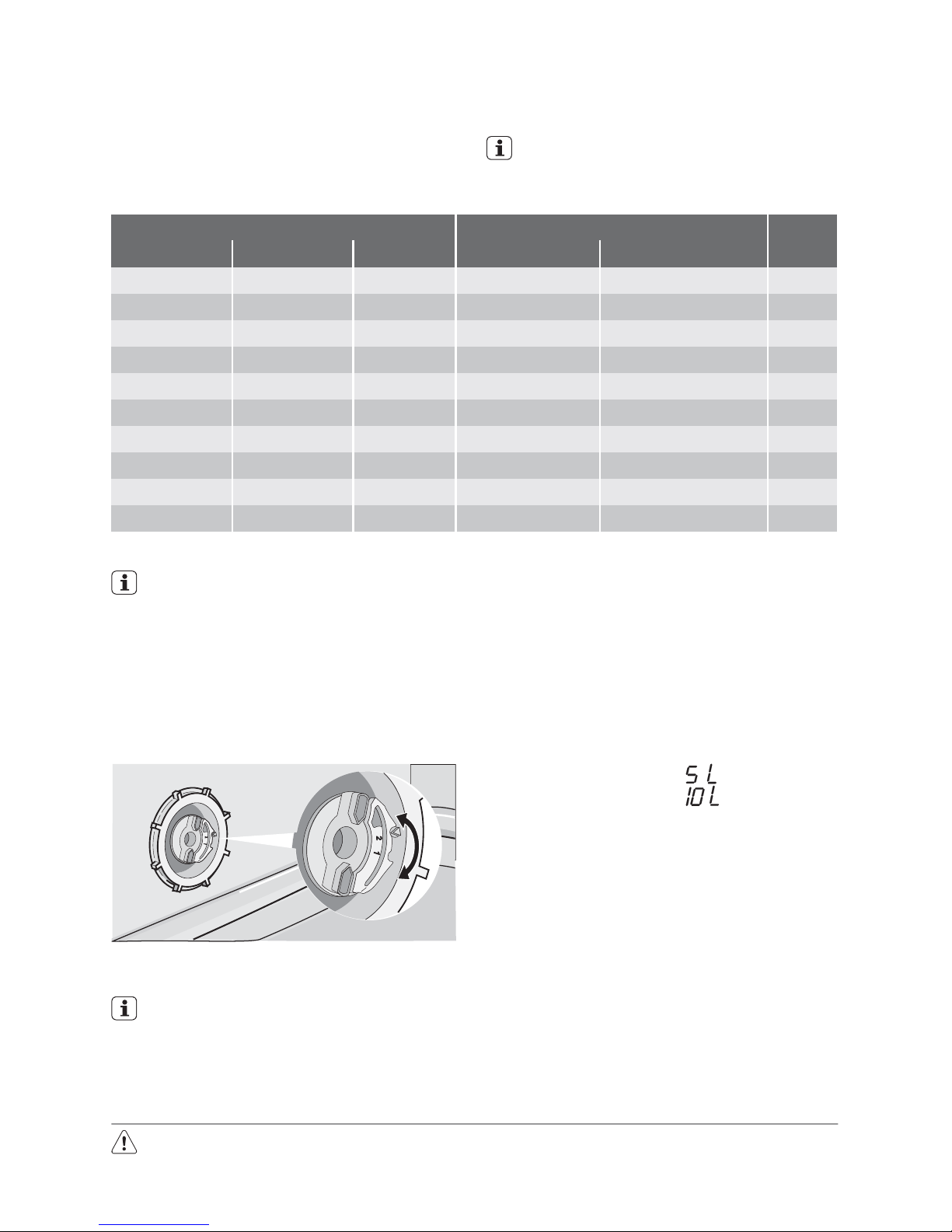
The water softener must be set in two
ways: manually, using the water hardness dial and electronically.
Water hardness Adjusting the water hardness setting Use of
salt
°dH °TH mmol/l manually electronically
51 - 70 91 - 125 9,1 - 12,5 2 level 10 yes
43 - 50 76 - 90 7,6 - 9,0 2 level 9 yes
37 - 42 65 - 75 6,5 - 7,5 2 level 8 yes
29 - 36 51 - 64 5,1 - 6,4 2 level 7 yes
23 - 28 40 - 50 4,0 - 5,0 2 level 6 yes
19 - 22 33 - 39 3,3 - 3,9 2 level 5 yes
15 - 18 26 - 32 2,6 - 3,2 1 level 4 yes
11 - 14 19 - 25 1,9 - 2,5 1 level 3 yes
4 - 10 7 - 18 0,7 - 1,8 1 level 2 yes
< 4 < 7 < 0,7 1 level 1 no
Setting manually
The dishwasher is factory set at position
2.
1. Open the dishwasher door.
2. Remove the lower basket from the dishwasher.
3. Turn the water hardness dial to position
1 or 2 (see chart).
4. Replace the lower basket.
Setting electronically
The appliance is factory set at level 5.
1. Switch on the appliance. It must be in
setting mode.
2. Press and hold, at the same time, the
function buttons B and C. The programme indicator lights above function
buttons A, B and C start flashing.
3. Press function button A, the programme
indicator lights above the function buttons B and C go off. The programme indicator light above function button A continues to flash. The digital display shows
the current level.
Examples:
Digital display shows
= level 5
Digital display shows
= level 10
4. To change the level, press function button A. Each time the button is pressed the
level changes. (For the selection of the
new level refer to the chart).
Examples:
If the current level is 5, press function button A once and level 6 is selected.
if the current level is 10, press function
button A once and level 1 is selected.
5. To memorize the operation, switch off the
appliance.
Use of dishwasher salt
Warning!
Only use salt specifically designed for use in
dishwashers. All other types of salt not specifically designed for use in a dishwasher, es-
6 electrolux
Page 7

pecially table salt, will damage the water softener. Only fill with salt just b efore starting one
of the complete washing programmes. This
will prevent any grains of salt or salty water,
which may have been spilt, remaining on the
bottom of the machine for any period of time,
which may cause corrosion.
To fill:
1. Open the door, remove the lower basket
and unscrew the cap of the salt container
by turning it anticlockwise.
2. Pour 1 litre of water into the container
(this is necessary only before filling
with salt for the first time) .
3. Using the funnel provided, pour in the salt
until the container is full.
4. Replace the cap making sure that there
is no trace of salt on the screw thread or
on the gasket.
5. Replace the cap tightly turning it clockwise until it stops with a click.
Do not worry if water overflows from the
unit when filling with salt, this is quite
normal.
The salt indicator light can remain
on for a few hours after the salt has
been replenished. If you are using
salt that takes longer to dissolve
then this can take longer. The operation of the appliance is not affected.
Use of rinse aid
Warning! Only use branded rinse aid for
dishwashers.
Never fill the rinse aid dispenser with any
other substances (e.g. dishwasher
cleaning agent, liquid detergent). This
would damage the appliance.
Rinse aid ensures thorough rinsing, and
spot and streak free drying.
Rinse aid is automatically added during
the last rinse.
1. Open the container by pressing the release button (A).
2. Add the rinse aid in the container. The
maximum level for filling is indicated by
"max".
electrolux 7
Page 8

The dispenser holds about 110 ml of rinse
aid, which is sufficient for between 16 and
40 washing cycles, depending upon the
dosage setting.
3. Ensure that the lid is closed after every
refill.
Clean up any rinse aid spilt during filling
with an absorbent cloth to avoid excess
foaming during the next wash.
According to the finish and drying results obtained, adjust the dose of rinse aid by means
of the 6 position selector (position 1 minimum
dosage, position 6 maximum dosage).
The dose is factory set in position 4.
Increase the dose if there are drops of water
or lime spots on the dishes after washing.
Reduce it if there are sticky whitish streaks
on the dishes or a bluish film on glassware or
knife blades.
Daily use
• Check if it’s necessary to refill with dish-
washer salt or rinse aid.
• Load cutlery and dishes into the dishwash-
er.
• Fill with dishwasher detergent.
• Select a wash programme suitable for the
cutlery and dishes.
• Start the wash programme.
Helpful hints and tips
Sponges, household cloths and any object
that can absorb water may not be washed in
the dishwasher.
• Before loading the dishes, you should:
– Remove all left over food and debris.
– Soften remnants of burnt food in pans
• When loading the dishes and cutlery,
please note:
– Dishes and cutlery must not impede the
rotation of the spray arms.
– Load hollow items such as cups,
glasses, pans, etc. with the opening
downwards so that water cannot collect
in the container or a deep base.
– Dishes and items of cutlery must not lie
inside one another, or cover each other.
– To avoid damage to glasses, they must
not touch.
– Lay small objects in the cutlery basket.
• Plastic items and pans with non stick coatings have a tendency to retain water
drops; these items will not dry as well as
porcelain and steel items.
• Light items (plastic bowls etc.) must be
loaded in the upper basket and arranged
so they do not move.
8 electrolux
Page 9

For washing in the dishwasher the following cutlery and dishes
are not suitable: are of limited suitability:
• Cutlery with wooden, horn, china or mother-ofpearls handles.
• Plastic items that are not heat resistant.
• Older cutlery with glued parts that are not temperature resistant.
• Bonded cutlery items or dishes.
• Pewter or copper items.
• Lead crystal glass.
• Steel items prone to rusting.
• Wooden platters.
• Items made from synthetics fibres.
• Only wash stoneware in the dishwasher if it is
specially marked as being dishwasher-safe by
the manufacturer.
• Glazed patterns may fade if machine washed
frequently.
• Silver and aluminium parts have a tendency to
discolour during washing: Residues, e.g. egg
white, egg yolk and mustard often cause discolouring and staining on silver. Therefore always clean left-overs from silver immediately, if
it is not to be washed straight after use.
Loading cutlery and dishes
The lower basket
The lower basket is designed to take saucepan, lids, plates, salad bowls, cutlery etc.
Service dishes and large lids should be arranged around the edge of the basket, ensuring that the spray arms can turn freely.
The rows of prongs in the lower basket can
lie flat to allow you to load pots, pans and
bowls.
The cutlery basket
Long bladed knives stored in an upright
position are a potential hazard. Long
and/or sharp items of cutlery such as
carving knives must be positioned
horizontally in the upper basket. Take
care when loading or unloading sharp
items such as knives.
Forks and spoons should be placed in the
removable cutlery basket with the handles
facing downwards and the knives with their
handles facing upwards.
electrolux 9
Page 10

If the handles protrude from the bottom of the
basket, obstructing the lower spray arm, load
the cutlery with the handles facing upwards.
Mix spoons with other cutlery to prevent
them from sticking together.
To make loading of the cutlery basket easier,
lower the cutlery basket handle.
For best results we recommend that you use
the cutlery grids.
If the size and dimensions of the cutlery do
not allow the use of the grids, they can be
easily hidden.
The cutlery basket is in two parts which can
be separated to give greater loading flexibility. To separate the two parts, slide them horizontally in opposite directions and pull them
apart.
To reassemble, reverse the procedure.
The upper basket
The upper basket is designed for saucers,
salad bowls, cups, glasses, pots and lids.
Arrange items on and underneath the cup
racks so that water can reach all surfaces.
10 electrolux
Page 11

Glasses with long stems can be placed upside down in the cup racks.
For taller items the cup racks can be folded
upwards.
Mini cutlery basket
The upper basket is supplied with a mini cutlery basket.
Caution! NEVER PUT KNIVES IN THE
MINI CUTLERY BASKET. THIS WILL
PREVENT DAMAGE TO THE
APPLIANCE.
The mini cutlery basket must only be placed
in the front part of the upper basket, on the
left or on the right side.
The dimensions of the cutlery depend on the
position of the upper basket. Refer to the following table.
Cutlery dimensions for mini cutlery basket
Upper basket in higher
position
maximum 15 cm
Upper basket in lower
position
maximum 20 cm
Soft spikes
Soft spikes impede glassware to move during the washing cycle or when the upper
basket is moved.
Refer to the figures for a correct positioning
of the soft spikes. For more loading flexibility,
they can be positioned on the left or righthand side of the basket.
Once positioned correctly, press them down
firmly and make sure they do not move.
electrolux 11
Page 12
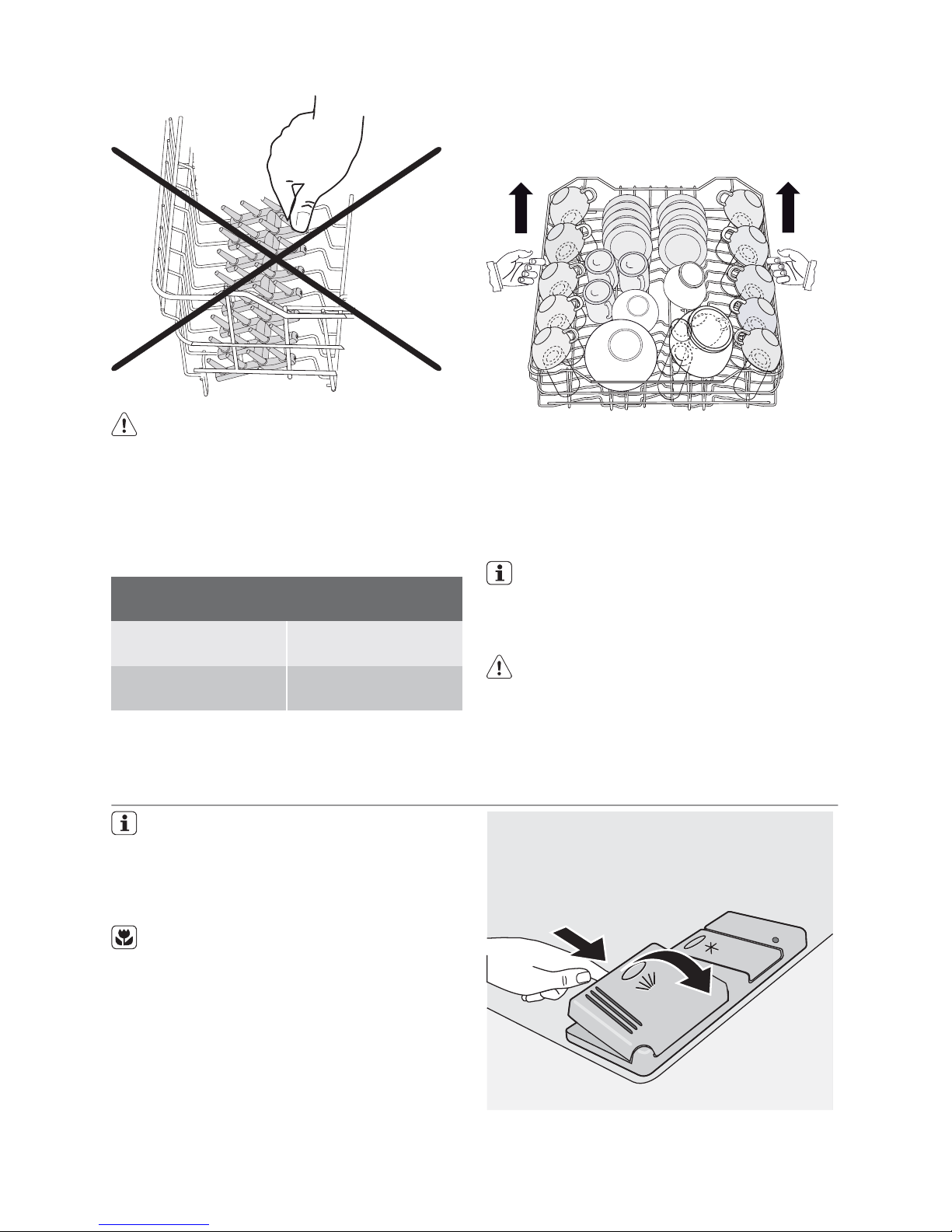
Caution! BEFORE CLOSING THE
DOOR, MAKE SURE THAT THE SPRAY
ARMS CAN ROTATE FREELY.
Adjusting the height of the upper basket
If washing very large plates you can load
them in the lower basket after moving the
upper basket to the higher position.
Maximum height of the dishes in the lower
basket
With upper basket
raised
31 cm
With upper basket
lowered
27 cm
To move to the higher position proceed
as follows:
1. Pull out the basket until it stops.
2. Carefully lift both sides upwards until the
mechanism is engaged and the basket is
stable.
To lower the basket to the original position proceed as follows:
1. Pull out the basket until it stops.
2. Carefully lift both sides upwards and then
allow the mechanism to drop back down
slowly, keeping hold of it.
Never lift or lower the basket on one side
only
When the basket is in the higher position
cups cannot be placed on the cup racks.
After loading your machine always
close the door, as an open door can
be a hazard.
Use of detergent
Only use detergents specifically designed for use in dishwashers.
Please observe the manufacturer’s dosing and storage recommendations as
stated on the detergent packaging.
Using no more than the correct amount
of detergent contributes to reducing pollution.
Fill with detergent
1. Open the lid.
2. Fill the detergent dispenser (1) with detergent. The marking indicates the dosing
levels:
20 = approximately 20 g of detergent
12 electrolux
Page 13

30 = approximately 30 g of detergent.
1
2
3. All programmes with prewash need an
additional detergent dose (5/10 g) that
must be placed in the prewash detergent
chamber (2).
This detergent will be used during the
prewash phase.
When using detergent tablets; place the
tablet in compartment (1)
4. Close the lid and press until it locks in
place.
Detergent tablets from different manufacturers dissolve at different rates. For
this reason, some detergent tablets do
not attain their full cleaning power during
short washing programmes. Therefore,
please use long washing programmes
when using detergent tablets, to ensure
the complete removal of detergent residuals.
Multitab function
This appliance is equipped with the multitab
function, that allows the use of the multitab
combi detergent tablets.
These products are detergents with a combined cleaning, rinsing and salt functions.
They can also contain other different agents
depending on which kind of tablets you
choose ('3 in 1', '4 in 1', '5 in 1' etc.).
Check whether these detergents are suitable
for your water hardness. See the manufacturers instructions.
Once this function is selected it will remain
active for all following wash programmes.
With the selection of this function the inflow
of rinse aid and salt from each respective
supply container is automatically deactivated
and also the indicator lights for salt and rinse
aid are deactivated.
When using the multitab function, the cycle
duration may change.
electrolux 13
Page 14
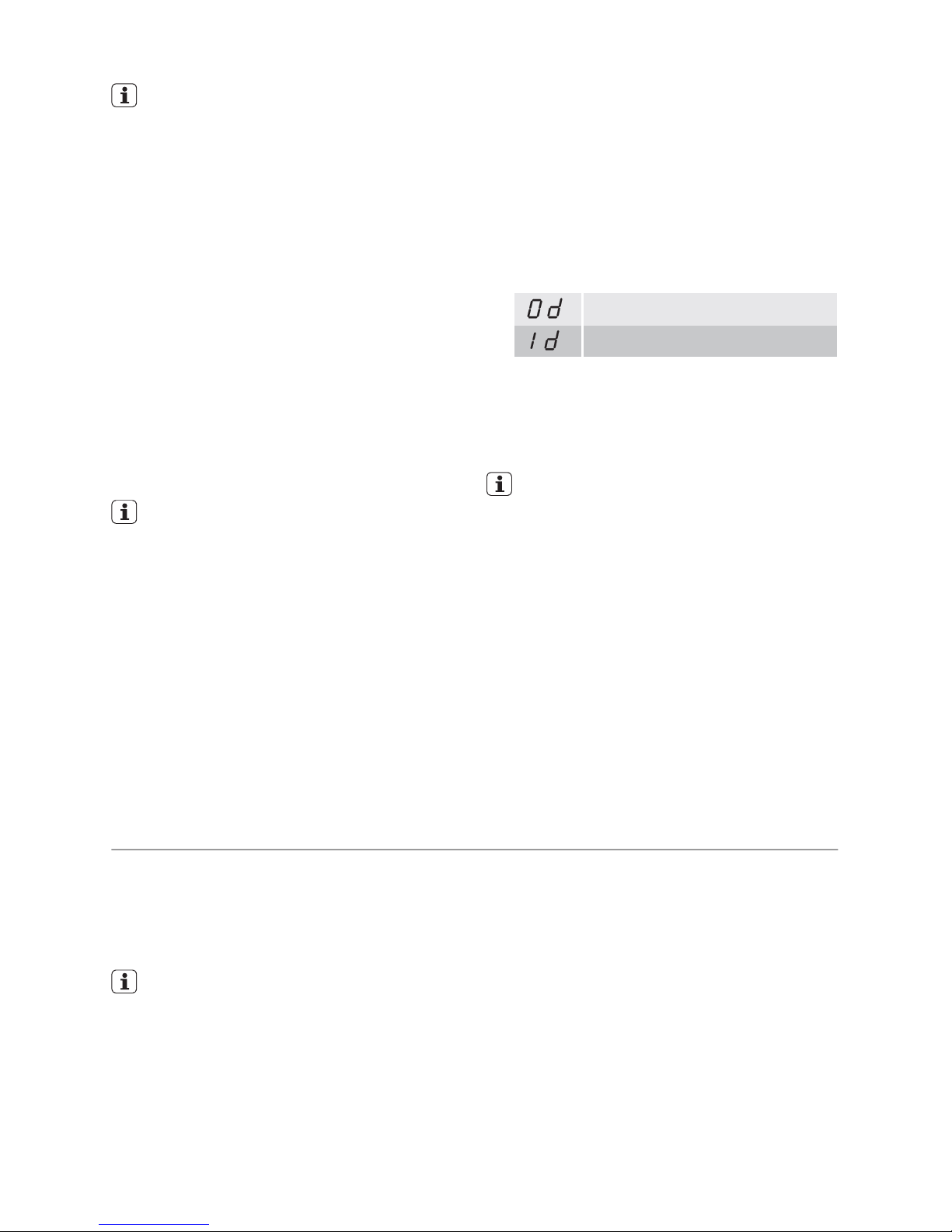
Activate/deactivate the multitab function
before the start of a washing programme.
Once the programme is running, the
multitab function can NO longer be
changed. If you want to cancel the multitab function you have to cancel the programme setting and then deactivate the
multitab function. In this case you have
to set a washing programme (and desired options) again.
Activation/deactivation of the Multitab
function
To activate the Multitab function, press the
Multitab button. Corresponding indicator
light comes on.
To deactivate the function press the Multitab
button again. Corresponding indicator light
goes off.
If the drying results are not satisfactory we suggest that you:
1. Fill up the rinse aid dispenser with
rinse aid.
2. Activate the rinse aid dispenser.
3. Set the rinse aid dosage to position
2.
• The activation/deactivation of the
rinse aid is only possible with the Multitab function active.
Activation/deactivation of the rinse aid
dispenser
1. Switch on the appliance. It must be in
setting mode.
2. Press and hold, at the same time, the
function buttons B and C. The programme indicator lights above function
buttons A, B and C start flashing
3. Press function button B, the programme
indicator lights above function buttons A
and C go off. The programme indicator
light above function button B continues
to flash. The digital display shows the current setting.
Rinse aid dispenser deactivated
Rinse aid dispenser activated
4. To change the setting, press button B
again. The digital display shows the new
setting.
5. To memorize the operation, switch off the
appliance.
If you decide to revert back to the
use of individual detergents we advise that you:
1. Deactivate the Multitab function.
2. Fill up the salt container and the rinse
aid dispenser again.
3. Adjust the water hardness setting to
the highest setting and perform 1
normal washing programme without
loading any dishes.
4. Adjust the water hardness setting
according to the hardness of the water in your area.
5. Adjust the rinse aid dosage.
Select and start a washing programme
Important! Set the options before the start
of a washing programme. When a washing
programme operates, no options can be set.
If it is necessary to set an option, cancel the
washing programme.
Select the washing programme and
delay start with the door slightly
opened. The start of the programme
or the countdown of the delay start
will occur only after the closure of
the door. Until then it is possible to
modify the settings
1. Check that the baskets have been loaded
correctly and that the spray arms are free
to rotate.
2. Check that the water tap is opened.
3. Press the on/off button. The appliance
must be in setting mode.
4. Select a washing programme (see
'Washing programmes' chart).
When a programme has been selected
the corresponding light comes on.
Close the appliance door, the programme starts automatically.
Setting and starting the programme with
delay start
1. After having selected the washing programme, press the delay start button until
the flashing number of hours for the delay
start appear in the digital display.
14 electrolux
Page 15

2. Close the appliance door, the countdown
starts automatically. The number in the
display is no longer flashing but fixed with
static light.
3. The countdown will decrease with steps
of 1 hour.
4. The opening of the door will interrupt the
countdown. Close the door; the countdown will continue from the point at
which it was interrupted.
5. Once the delay start has elapsed the programme will start automatically.
The selection of the washing programme and delay start can occur also
with the door closed.
When you press a programme button
you have ONLY 3 seconds to select a
different programme or a delay start.
After these 3 seconds, the selected programme starts automatically.
Warning! Interrupt or cancel a
washing programme in progress
ONLY if it's absolutely necessary.
Attention! Hot steam may escape
when the door is opened. Open the
door carefully.
Interrupt a washing programme in
progress
• Open the dishwasher door; the pro-
gramme will stop. Close the door; the programme will start from the point at which
it was interrupted.
• Press the On/Off, all indicator lights will go
off. Press the On/Off button again; the programme will start from the point at which
it was interrupted.
Cancel a delay start or a washing
programme in progress
• Press and hold the cancel button, until all
the programme indicator lights come on.
• If you cancel a delay start also the washing
programme and options (except Multitab)
will be cancelled. Select the washing programme again.
• If a new washing programme is to be selected, check that there is detergent in the
detergent dispenser.
End of the washing programme
• The appliance stops automatically.
• The light of the programme just ended remains on.
• Zero appears in the digital display.
1. Switch off the appliance.
2. Open the appliance door, leave it ajar and
wait a few minutes before removing the
dishes. This way they will be cooler and
the drying will be improved.
If the save energy function is set, dishes
can be wet once the programme finished. We recommend to leave the appliance door ajar so that dishes can dry
naturally.
Standby mode
If you do not switch off the appliance at the
end of the washing programme, the appliance automatically goes into standby mode.
The standby mode decreases energy consumption.
Three minutes after the end of the programme, all indicator lights go off and the
digital display shows one horizontal bar.
Press one of the buttons (not the on/off button), to go back to end-of-programme mode.
Unloading the dishwasher
• Hot dishes are sensitive to knocks. The
dishes should therefore be allowed to cool
down before removing from the appliance.
•Empty the lower basket first and then the
upper one; this will avoid water dripping
from the upper basket onto the dishes in
the lower one.
• Water may appear on the sides and the
door of the dishwasher as the stainless
steel will eventually become cooler than
the dishes.
When the washing programme has
finished, it is recommended that the
dishwasher is unplugged and the
water tap turned off.
electrolux 15
Page 16
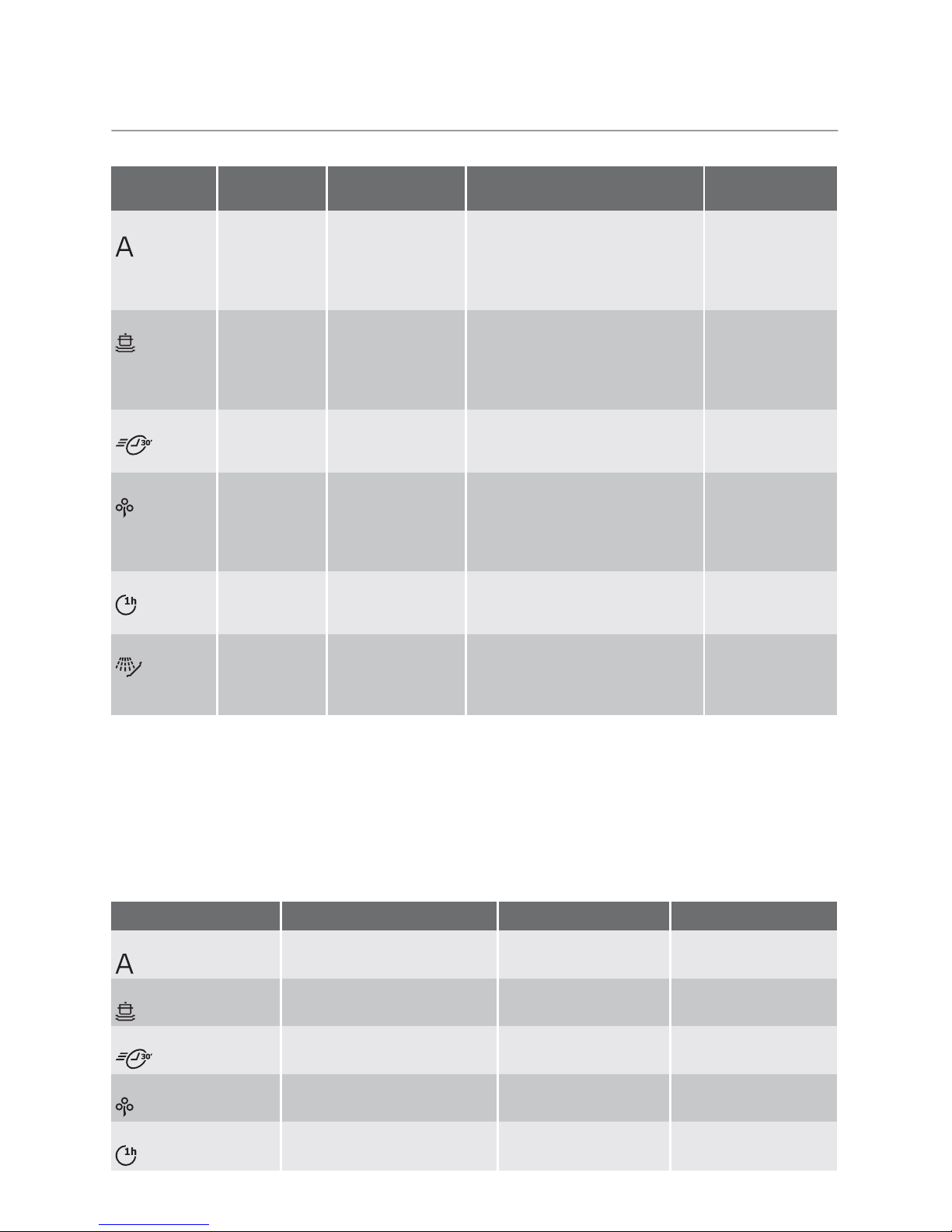
Washing programmes
Washing programmes
Pro-
gramme
Degree of
soil
Type of load Programme description
Energy save
1)
Auto
2)
Any Crockery, cut-
lery, pots and
pans
Prewash
Main wash up to 45°C or 70°C
1 or 2 intermediate rinses
Final rinse
Drying
Selectable, impact on washing
programme.
Intensive Heavy soil Crockery, cut-
lery, pots and
pans
Prewash
Main wash up to 70°C
2 intermediate rinses
Final rinse
Drying
Selectable, impact on washing
programme.
Quick
3)
Normal or
light soil
Crockery and
cutlery
Main wash up to 60°C
Final rinse
Selectable, no
impact on washing programme.
Eco
4)
Normal soil Crockery and
cutlery
Prewash
Main wash up to 50°C
1 intermediate rinse
Final rinse
Drying
Selectable, impact on washing
programme.
One hour Light soil Crockery and
cutlery
Main wash up to 55°C
1 intermediate rinse
Final rinse
Selectable, no
impact on washing programme.
Rinse Any Partial load (to be
completed later
in the day).
1 cold rinse (to avoid food
scraps from sticking).
This programme does not require the use of detergent.
Selectable, no
impact on washing programme.
1) For programmes where option has an impact, the energy save is between 10% and 25%.
2) During the Auto washing programme the level of soiling on the dishes is determined by how cloudy
the water is. The programme duration, water and energy consumption levels can vary; this depends
upon whether the appliance is fully or partially loaded and if the dishes are lightly or heavily soiled. The
temperature of the water is automatically adjusted between 45°C and 70°C.
3) Ideal for washing a partially loaded dishwasher. This is the perfect daily programme, made to meet
the needs of a family of 4 persons who only wish to load breakfast and dinner crockery and cutlery.
4) Test programme for test institutes.
Consumption values
Programme
Duration (in minutes)
1)
Energy (in kWh) Water (in litres)
Auto - 1,1 - 1,7 12 - 23
Intensive - 1,8 - 2,0 23 - 25
Quick - 0,9 9
Eco - 1,0 - 1,1 12 - 13
One hour - 1,0 - 1,2 11 - 12
16 electrolux
Page 17
Programme
Duration (in minutes)
1)
Energy (in kWh) Water (in litres)
Rinse - 0,1 4
1) The digital display shows the programme duration.
The consumption values are intended as
a guide and depend on the pressure and
the temperature of the water and also by
the variations of the power supply and
the amount of dishes.
Care and cleaning
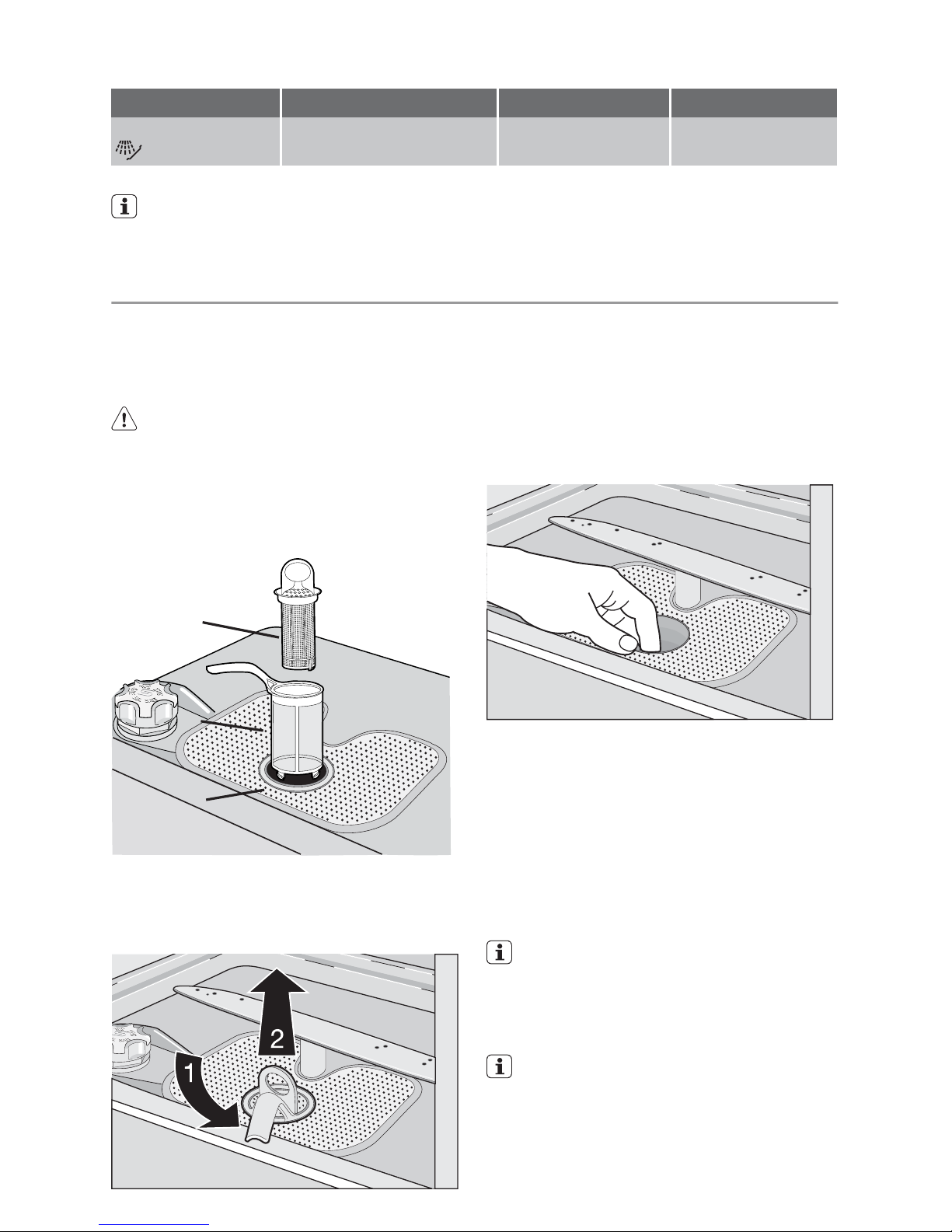
Cleaning the filters
The filters must be checked and cleaned
from time to time. Dirty filters will degrade the
washing result.
Warning! Before cleaning the filters
ensure that the machine is switched off.
1. Open the door, remove the lower basket.
2. The dishwasher filter system comprises a
coarse filter (A), a microfilter (B) and a flat
filter (C).
A
B
C
3. Unlock the filter system using the handle
on the microfilter. Turn the handle about
1/4 a turn anticlockwise and remove the
filter system
4. Take hold of the coarse filter (A) by the
handle with the hole and remove from the
microfilter (B).
5. Clean all filters thoroughly under running
water.
6. Remove the flat filter (C) from the base of
the washing compartment and clean
both faces thoroughly.
7. Put the flat filter (C) back in the base of
the washing compartment and ensure
that it fits perfectly.
8. Place the coarse filter (A) in the microfilter
(B) and press together.
9. Put the filter combination in place and
lock by turning the handle clockwise to
the stop. During this process ensure that
the flat filter (C) does not protrude above
the base of the washing compartment.
NEVER use the appliance without filters. Incorrect repositioning and fitting of the filters will produce poor
washing results and will result in
damage to the appliance.
NEVER try to remove the spray
arms.
If residues of soil have clogged the holes
in the spray arms, remove the debris
with a cocktail stick.
electrolux 17
Page 18
External cleaning
Clean the external surfaces of the machine
and control panel with a damp soft cloth. If
necessary use only neutral detergents. Never
use abrasive products, scouring pads or solvent (acetone, trichloroethylene etc...).
Internal cleaning
Ensure that the seals around the door, the
detergent and rinse aid dispensers are
cleaned regularly with a damp cloth.
We recommend every 3 months you run the
wash programme for heavy soiled dishes using detergent but without dishes.
Prolonged periods of non-operation
If you are not using the machine for a prolonged period of time you are advised to:
1. Unplug the appliance and then turn off
the water.
2. Leave the door ajar to prevent the formation of any unpleasant smells.
3. Leave the inside of the machine clean.
Frost precautions
Avoid placing the machine in a location
where the temperature is below 0°C. If this is
unavoidable, empty the machine, close the
appliance door, disconnect the water inlet
pipe and empty it.
Moving the machine
If you have to move the machine (moving
house etc...):
1. Unplug it.
2. Turn the water tap off.
3. Remove the water inlet and discharge
hoses.
4. Pull the machine out together with the
hoses.
Avoid over tilting the machine during transportation.
What to do if…
The appliance will not start or stops during
operation.
Certain problems can be due to the lack of
simple maintenance or oversights, which can
be solved with the help of the hints described
in the chart, without calling out an engineer.
Switch off the appliance and carry out the
following suggested corrective actions.
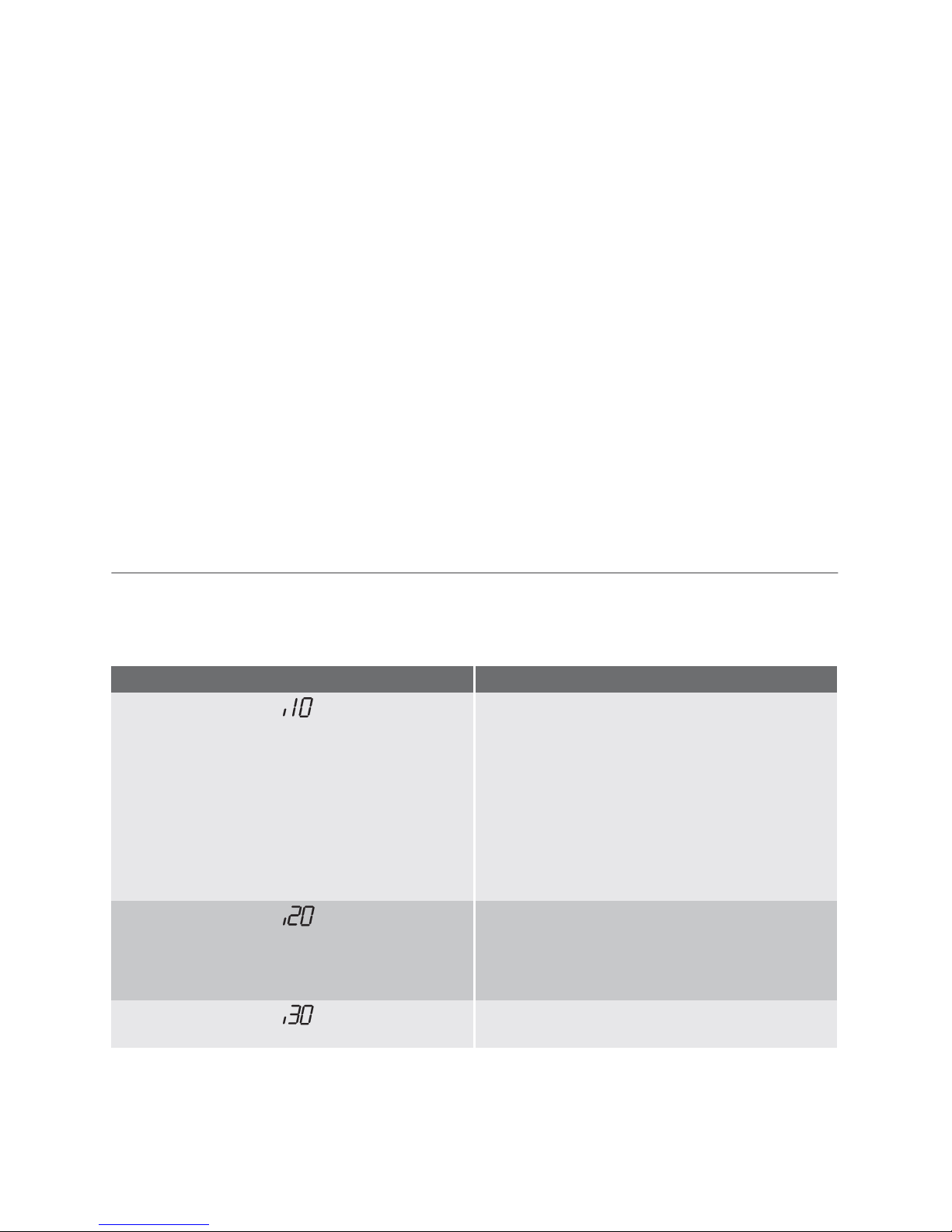
Fault codes and malfunction Possible cause and solution
•
digital display shows
The appliance does not fill with water
• The water tap is blocked or furred with limescale.
Clean the water tap.
• The water tap is turned off.
Turn the water tap on.
• The filter (where present) in the water inlet hose
is blocked.
Clean the filter in the water inlet hose.
• The water inlet hose has not been correctly laid
or it is kinked or squashed.
Check the water inlet hose connection.
•
digital display shows
The appliance does not drain
• The sink spigot is blocked.
Clean out the sink spigot.
• The water drain hose has not been correctly laid
or it is kinked or squashed.
Check the water drain hose connection.
•
digital display shows
Anti-flood device is activated
• Close the water tap and contact your local
Service Force Centre.
18 electrolux
Page 19

Malfunction Possible cause and solution
The programme does not start
• The dishwasher door has not been properly
closed.
Close the door.
• The main plug is not plugged in.
Insert the main plug
• The fuse has blown out in the household fuse
box.
Replace the fuse.
• Delay start has been set.
If dishes are to be washed immediately, cancel
the delay start.
Once these checks have been carried out
switch on the appliance.
The programme will continue from the point
at which it was interrupted.
If the malfunction or fault code reappears
contact your local Service Force Centre.
For other fault codes not described in the
above chart, please contact your local Service Force Centre.
Contact your local Service Force Centre,
quoting the model (Mod.), product number
(PNC) and serial number (S.N.).
This information can be found on the rating
plate located on the side of the dishwasher
door.
So that you always have these numbers at
hand, we recommend you to make a note of
them here:
Mod. : . . . . . . . . . . . . . . . . . . . . . . . . . . . . . .
PNC : . . . . . . . . . . . . . . . . . . . . . . . . . . . . . .
S.N. : . . . . . . . . . . . . . . . . . . . . . . . . . . . . . .
The wash results are not satisfactory
The dishes are not
clean
• The wrong programme has been selected.
• The dishes are arranged in such a way as to stop water reaching all parts
of a surface. The baskets must not be overloaded.
• The spray arms do not rotate freely due to incorrect arrangement of the
load.
• The filters in the base of the washing compartment are dirty or incorrectly
positioned.
• Too little or no detergent has been used.
• Where there are limescales deposits on the dishes; the salt container is
empty or incorrect level of the water softener has been set.
• The drain hose connection is not correct.
• The salt container cap is not properly closed.
The dishes are wet
and dull
• Rinse aid was not used.
• The rinse aid dispenser is empty.
There are streaks,
milky spots or a bluish coating on
glasses and dishes
• Decrease rinse aid dosage.
Water drops have
dried onto glasses
and dishes
• Increase rinse aid dosage.
• The detergent may be the cause. Contact the detergent manufacturer consumer care line.
If after all these checks, the problem persists,
contact your local Service Force Centre.
Technical data
Dimensions Width cm 59,6
Height cm 85
electrolux 19
Page 20
Depth cm 62
Electrical connection - Voltage Overall power - Fuse
Information on the electrical connection is given on the rating plate
on the inner edge of the dishwasher door.
Water supply pressure Minimum 0,05 MPa (0,5 bar)
Maximum 0,8 MPa (8 bar)
Capacity Place settings 12
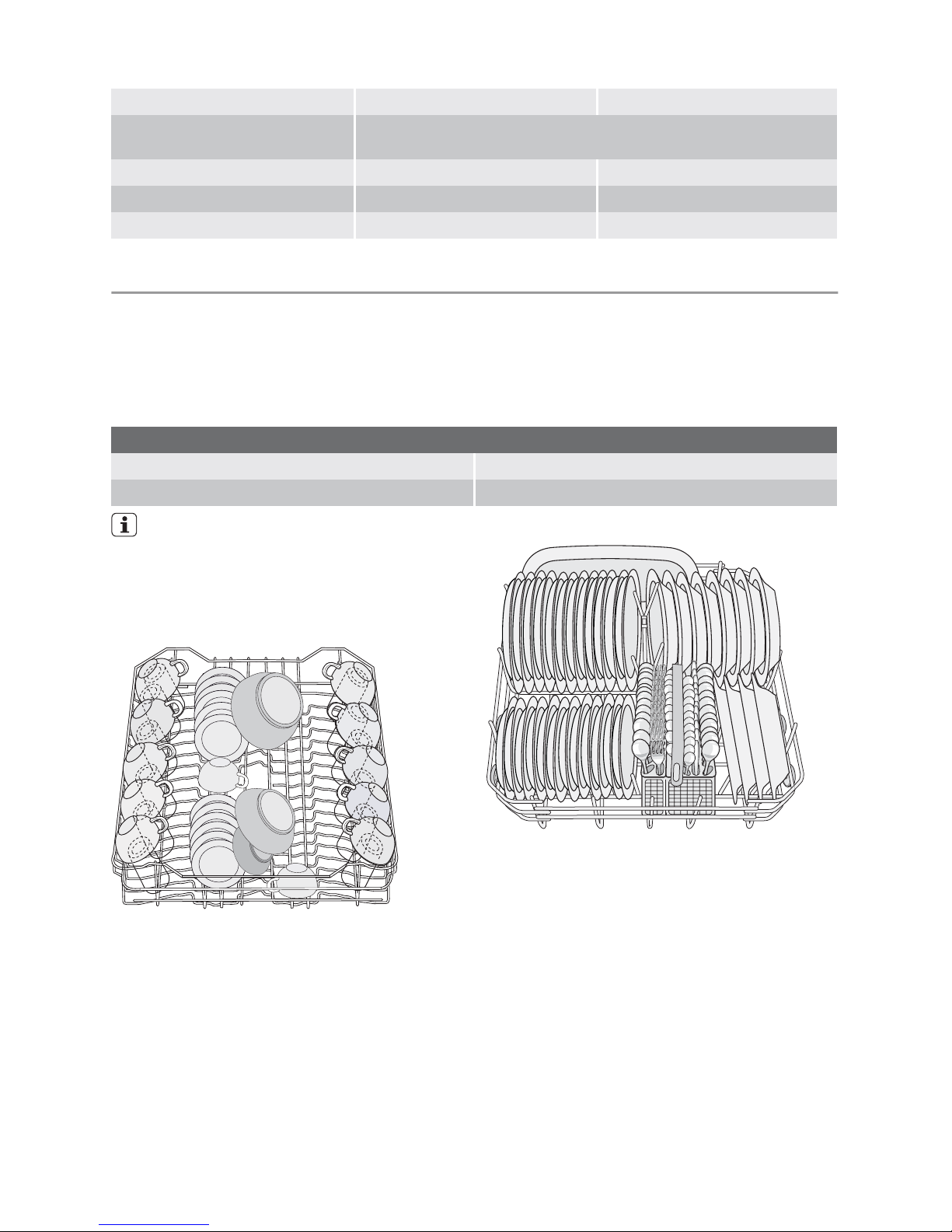
Hints for test institutes
Testing in accordance with EN 60704 must
be carried out with appliance fully loaded and
using the test programme (refer to 'Washing
programmes').
Test in accordance with EN 50242 must be
carried out when the salt container and rinse
aid dispenser have been filled with salt and
rinse aid respectively and using the test programme (refer to 'Washing programmes').
Full load: 12 standard place settings
Amount of detergent required: 5 g + 25 g (Type B)
Rinse aid setting position 4 (Type III)
Testing MUST be carried out with:
• NO soft spikes
• NO mini cutlery basket.
REMOVE these items from the upper
basket.
Arrangement upper basket
Arrangement lower basket
20 electrolux
Page 21

Arrangement cutlery basket
Installation
Warning! Any electrical and/or
plumbing work required to install
this appliance should be carried out
by a qualified electrician and/or
plumber or competent person.
Fitting under a counter (kitchen worktop
or sink)
Remove all packaging before positioning the
machine.
If possible, position the machine next to a
water tap and a drain.
By removing the machine's worktop, you can
install it under a close fitting sink unit or a preexisting top, providing the dimensions of the
recess correspond to those shown in the
picture.
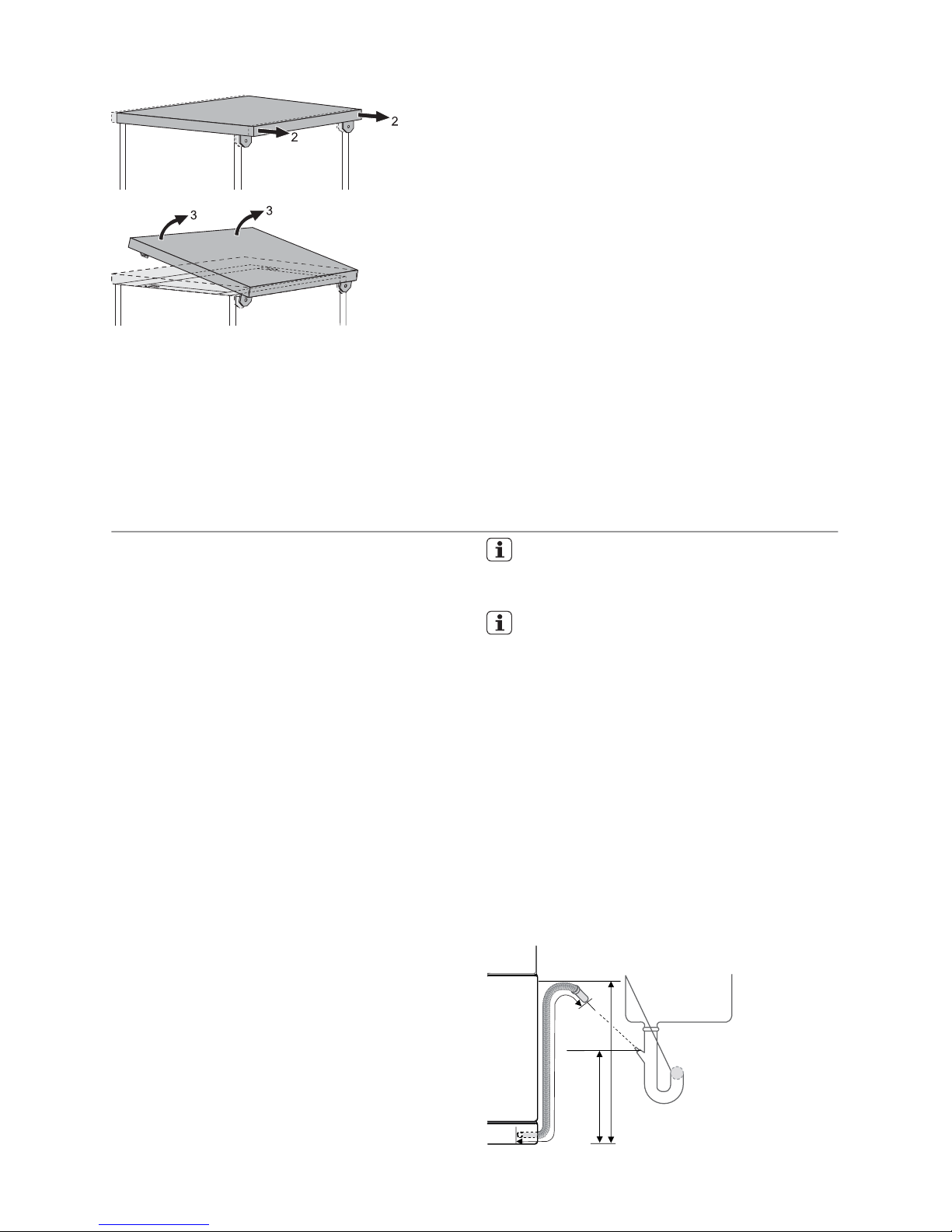
Proceed as follows:
• Remove the machine’s worktop by unscrewing the two rear retaining screws (1),
pull the worktop from the back of the machine (2) and slide out the front slots, lifting
the worktop (3).
electrolux 21
Page 22
Insert the machine after adjusting the levelling with the adjustable feet. When inserting
the machine, ensure that the water inlet and
drain hoses are not kinked or squashed.
During all operations that involve accessibility
to internal components the dishwasher has
to be unplugged.
Be sure that once the appliance has been installed, it is easily accessible for the service
engineer in the event that a repair is required.
If the dishwasher is later used as a freestanding appliance, the original worktop
must be re-mounted.
The plinth on free-standing appliances is not
adjustable.
Levelling
Good levelling is essential for correct closure
and sealing of the door.
When the appliance is correctly levelled, the
door will not catch on either side of the cabinet .
If the door does not close correctly, loosen
or tighten the adjustable feet until the machine is perfectly level.
Water connection
Water inlet connection
This appliance can be connected to either a
hot (max. 60°) or cold water supply.
With a hot water supply you can have a significant reduction of energy consumption.
This however, depends on how the hot water
is produced. (We suggest alternative sources
of energy that are more environmentally
friendly as e.g. solar or photovoltaic panels
and aeolian).
For making the connection itself, the coupling nut fitted to the appliance water inlet
hose is designed to screw onto a 3/4" thread
spout or to a purpose made quick-coupling
tap such as the Press-block.
The water pressure must be within the limits
given in the 'Technical data'. Your local Water Authority will advise you on the average
mains pressure in your area.
The water inlet hose must not be kinked,
crushed, or entangled when it is being connected.
The appliance features inlet and drain hoses
which can be turned either to the left or the
right to suit the installation by means of the
locknut. The locknut must be correctly
fitted to avoid water leaks.
If the appliance is connected to new pipes or
pipes which have not been used for a long
time, you should run the water for a few minutes before connecting the inlet hose.
DO NOT use connection hoses which
have previously been used on an old appliance.
This appliance has been fitted with safety features which will prevent the water
used in the appliance from returning
back into the drinking water system. This
appliance complies with the applicable
plumbing regulations.
Water drain connection
The end of the drain hose can be connected
in the following ways:
1. To the sink outlet spigot, securing it to the
underside of the work surface. This will
prevent waste water from the sink running into the machine.
2. To a stand pipe provided with venthole,
minimum internal diameter 4 cm.
max 85 cm
min 40 cm
max 400 cm
22 electrolux
Page 23
The drain hose can face either to the right or
left of the dishwasher
Ensure the drain hose is not bent or squashed as this could prevent or slow down the
discharge of water.
The sink plug must not be in place when the
machine is draining as this could cause the
water to syphon back into the machine.
If you use a drain hose extension, its internal
diameter must be no smaller than the diameter of the hose provided.
Likewise the internal diameter of the couplings used for connections to the waste outlet must be no smaller than the diameter of
the hose provided.
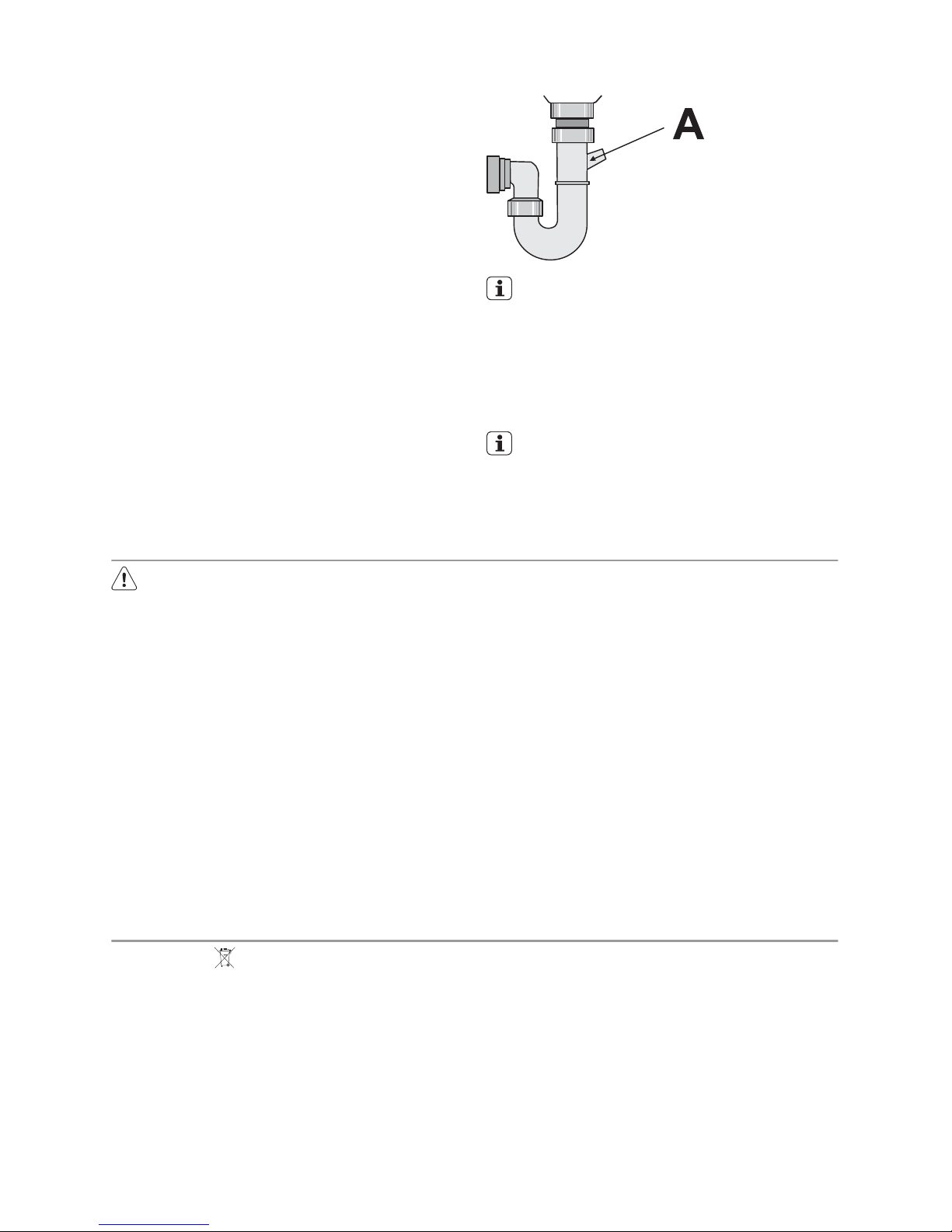
When connecting the drain hose to an under
sink trap spigot, the entire plastic mem-
brane (A) must be removed. Failure to remove all the membrane will result in food
particles building up over time eventually
blocking the dishwasher drain hose spigot
Our appliances are supplied with a security device to protect against the return of dirty water back into the machine.
If the spigot of your sink has a "no return
valve" incorporated this can prevent the
correct draining of your dishwasher. We
therefore advise you to remove it.
To avoid water leakage after installation
make sure that the water couplings are
tight.
Electrical connection
Warning! Safety standards require
the appliance to be earthed.
Prior to using the appliance for the
first time, ensure that the rated voltage and type of supply on the rating
plate match that of the supply where
the appliance is to be installed. The
fuse rating is also to be found on the
rating plate.
Always plug the mains plug into a
correctly installed shockproof socket.
Multi-way plugs, connectors and extension cables must not be used.
This could constitute a fire hazard
through overheating.
If necessary, have the domestic wiring system socket replaced. In case
that the electrical cable has to be
replaced, contact your local Service
Force centre.
The plug must be accessible after
the appliance has been installed.
Never unplug the appliance by pulling on the cable. Always pull the
plug.
The manufacturer accepts no liability for failure to observe the above
safety precautions.
Environment concerns
The symbol on the product or on its
packaging indicates that this product may
not be treated as household waste. Instead
it should be taken to the appropriate
collection point for the recycling of electrical
and electronic equipment. By ensuring this
product is disposed of correctly, you will help
prevent potential negative consequences for
the environment and human health, which
could otherwise be caused by inappropriate
waste handling of this product. For more
detailed information about recycling of this
product, please contact your local council,
your household waste disposal service or the
shop where you purchased the product.
Packaging material
The packaging materials are environmentally
friendly and can be recycled. The plastic
components are identified by markings, e.g.
>PE<, >PS<, etc. Please dispose of the
packaging materials in the appropriate con-
electrolux 23
Page 24

tainer at the community waste disposal facilities.
Warning! When a unit is no longer being
used:
• Pull the plug out of the socket.
• Cut off the cable and plug and dispose
of them.
• Dispose of the door catch. This prevents children from trapping themselves inside and endangering their
lives.
24 electrolux
Page 25

electrolux 25
Page 26

26 electrolux
Page 27

electrolux 27
Page 28

117956320 - 00 - 122008
www.electrolux.com
 Loading...