

Page 1

B5742-5
User manual Built-In Electric Oven
Page 2

Contents2
Contents
Operating Instructions 3
Safety instructions 3
Disposal 4
Description of the Appliance 5
General Overview 5
Control Panel 5
Oven Features 6
Oven accessories 6
Before Using for the first time 7
Setting and changing the time 7
Initial cleaning 8
Using the Oven 9
Switching the Oven On and Off 9
Rapid heat up 11
Oven Functions 12
Inserting the Oven Shelf, Baking Tray
and Roasting Pan 13
Inserting/Removing the Fat Filter 14
Rotary Spit 14
Clock Functions 15
Other Functions 20
Uses, Tables and Tips 21
Baking 21
Roasting 27
Grill Sizes 29
Grilling with the rotary spit 30
Defrosting 30
Drying 31
Making preserves 31
Cleaning and Care 32
Outside of the appliance 32
Oven interior 33
Accessories 33
Fat Filter 33
Pyrolytic cleaning 33
Shelf Support Rails 34
Oven lighting 35
Oven door 36
Oven door glass 38
What to do if … 41
Technical Data 42
Oven Interior Dimensions 42
Installation Instructions 43
Safety information for the installer 43
Guarantee/Customer Service 45
Service 47
Thank you for choosing one of our high-quality products.
To ensure optimal and regular performance of your appliance please read this instruc-
tion manual carefully. It will enable you to navigate all processes perfectly and most ef-
ficiently.
To refer to this manual any time you need to, we recommend you to keep it in a safe
place. And please pass it to any future owner of the appliance.
We wish you much joy with your new appliance.
The following symbols are used in this user manual:
1
Important information concerning your personal safety and information on how to
avoid damaging the appliance.
3 General information and tips
2 Environmental information
Page 3

3Operating Instructions
Operating Instructions
1 Safety instructions
Electrical safety
• This appliance must be only connected by a registered electrician.
• In the event of a fault or damage to the appliance: Take the fuses out or switch off.
• Repairs to the appliance must only be carried out by qualified service engineers.
Considerable danger may result from improper repairs. If repairs become necessary,
please contact our Customer Services or your dealer.
Child Safety
• Never leave children unsupervised when the appliance is in use.
Safety whilst using
• People (including children) who, because of their physical, sensory or mental capabilities or their inexperience or ignorance are not able to use the device safely, should not
use this device without supervision or instruction by a responsible person.
• This appliance is intended to be used for cooking, roasting and baking food in the
home.
• Take care when connecting electric appliances to sockets nearby. Do not allow con-
necting leads to come into contact with or to catch beneath the hot oven door.
• Warning: Risk of burns! The interior of the oven becomes hot during use.
• Using ingredients containing alcohol in the oven may create an alcohol-air mixture
that is easily ignited. In this case, open the door carefully. Do not have embers, sparks
or naked flames in the vicinity when opening the door.
3 Information on acrylamides
According to the latest scientific knowledge, intensive browning of food, especially in
products containing starch, can constitute a health risk due to acrylamides. Therefore we
recommend cooking at the lowest possible temperatures and not browning foods too
much.
How to avoid damage to the appliance
• Do not line the oven with aluminium foil and do not place baking trays, pots, etc. on
the oven floor, as the heat that builds up will damage the oven enamel.
• Fruit juices dripping from the baking tray will leave stains, which you will not be able
to remove. For very moist cakes, use a deep tray.
• Do not put any strain on the oven door when open.
• Never pour water directly into the oven when it is hot. This could cause damage to or
discolouration of the enamel.
• Rough handling, especially around the edges of the front panel, can cause the glass to
break.
• Do not store any flammable materials inside the oven. These could ignite when the
oven is switched on.
• Do not store any moist foods inside the oven. This could damage the oven enamel.
Page 4

Disposal4
3 Note on enamel coating
Changes in the colour of the oven’s enamel coating as a result of use do not affect the
appliance’s suitability for normal and correct use. They therefore do not constitute a defect in the sense of the warranty law.
Disposal
2 Packaging material
The packaging materials are environmentally friendly and can be recycled. The plastic
components are identified by markings, e.g. >PE<, >PS<, etc. Please dispose of the packaging materials in the appropriate container at the community waste disposal facilities.
2 Old appliance
The symbol
W on the product or on its packaging indicates that this product may not
be treated as household waste. Instead it shall be handed over to the applicable collection point for the recycling of electrical and electronic equipment. By ensuring this
product is disposed of correctly, you will help prevent potential negative consequences
for the environment and human health, which could otherwise be caused by inappropriate waste handling of this product. For more detailed information about recycling of this
product, please contact your local city office, your household waste disposal service or
the shop where you purchased the product.
1 Warning: So that the old appliance can no longer cause any danger, make it unusable
before disposing of it.
To do this, disconnect the appliance from the mains supply and remove the mains
cable from the appliance.
Page 5
5Description of the Appliance
Description of the Appliance
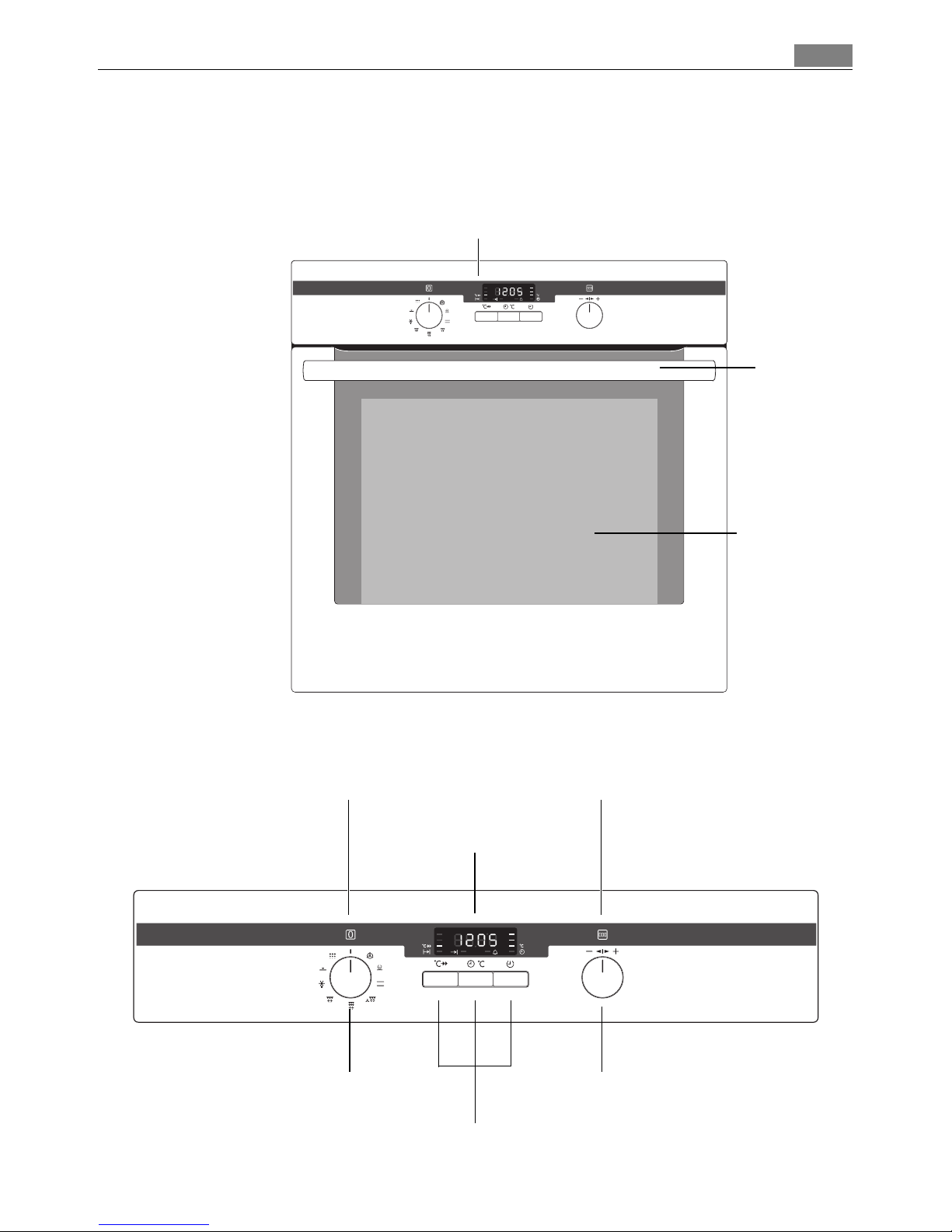
General Overview
Control Panel
Full glass door
Control panel
Door
handle
Function buttons
Oven Functions
Temperature / Time Selection
Temperature / Time Display
Oven Power Indicator Oven Power Indicator
Page 6
Description of the Appliance6
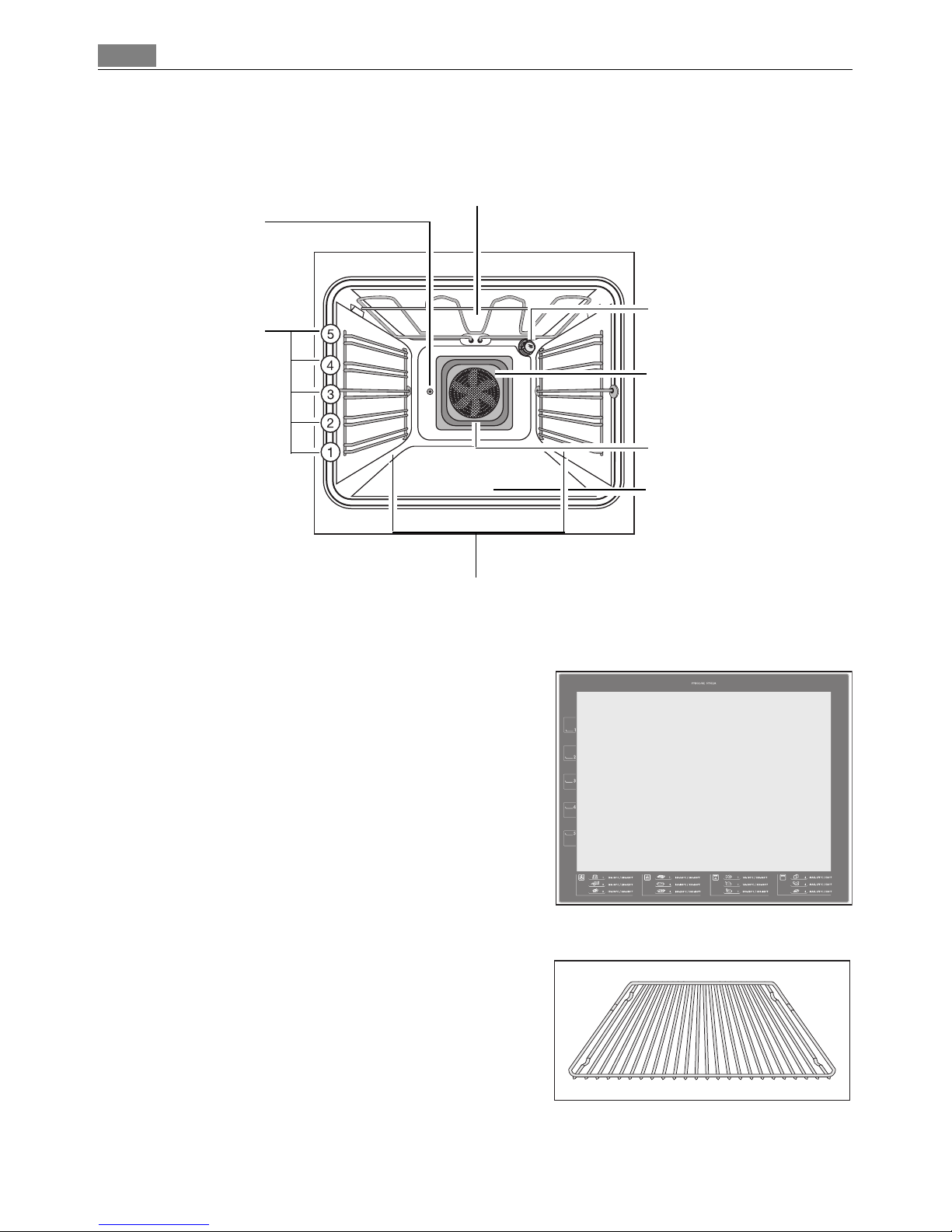
Oven Features
Inside of door
On the inside of the oven door you will find the
numbers of the different oven shelves.
You will also find some brief information about
the oven's functions, recommended shelves and
temperatures for cooking the most popular
dishes.
Oven accessories
Oven shelf
For cookware, cake tins, roasts and grilled foods.
Top heat and heating elements
Oven lighting
Bottom Heat
Shelf positions
Fan heating element
Fan
Oven shelf runners,
removable
Fat Filter
Spit drive
Page 7
7Before Using for the first time
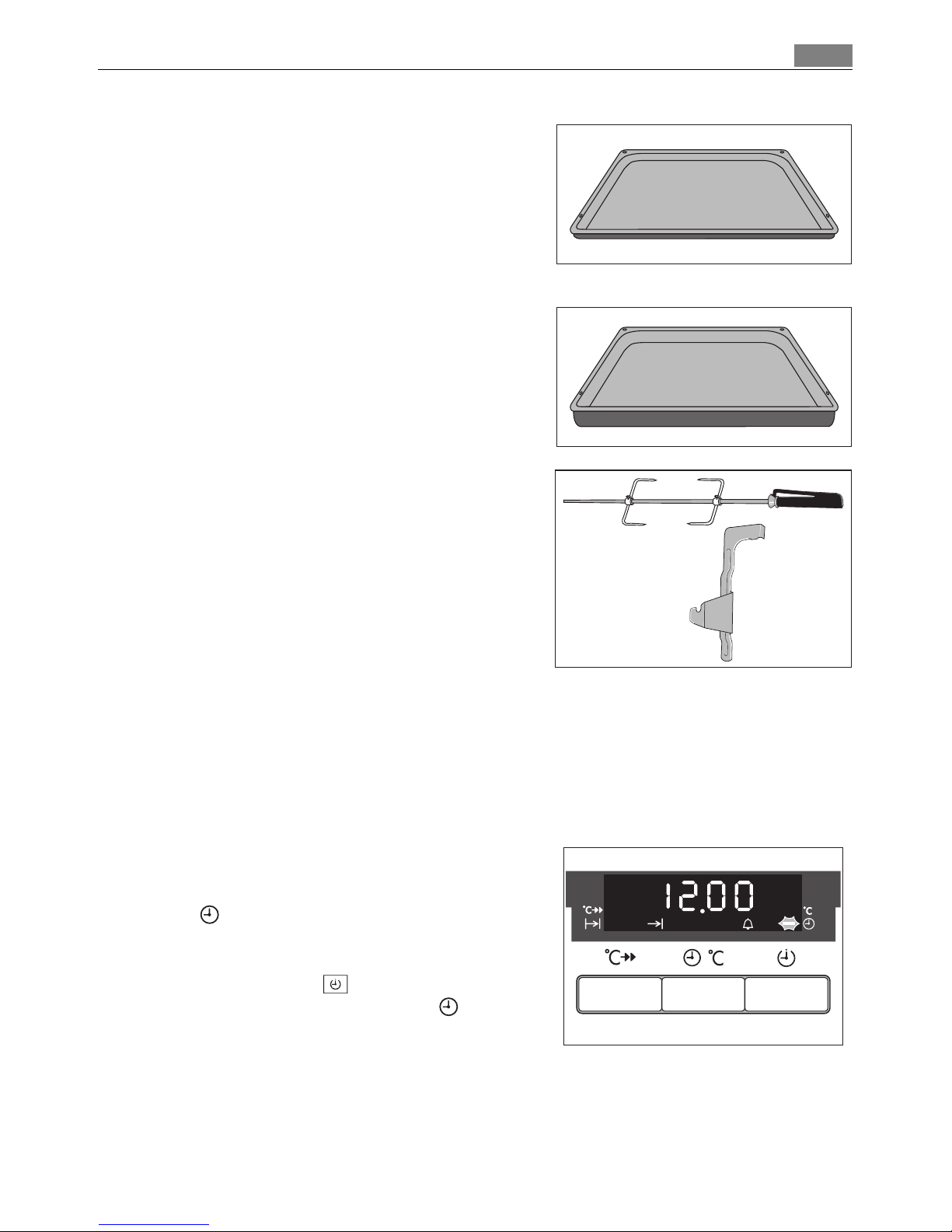
Baking tray
For cakes and biscuits.
Roasting Pan
For baking and roasting or as a pan for collecting fat.
Turnspit with support
For roasting larger joints of meat and poultry.
Before Using for the first time
Setting and changing the time
3 The oven only operates when the time has been set.
When the appliance has been connected to the
electrical supply or when there has been a power cut, the function indicator Time of
day flashes automatically.
1. To change a time that has already been set,
press the Selection button repeatedly until
the function indicator Time of day flashes.
Page 8
Before Using for the first time8
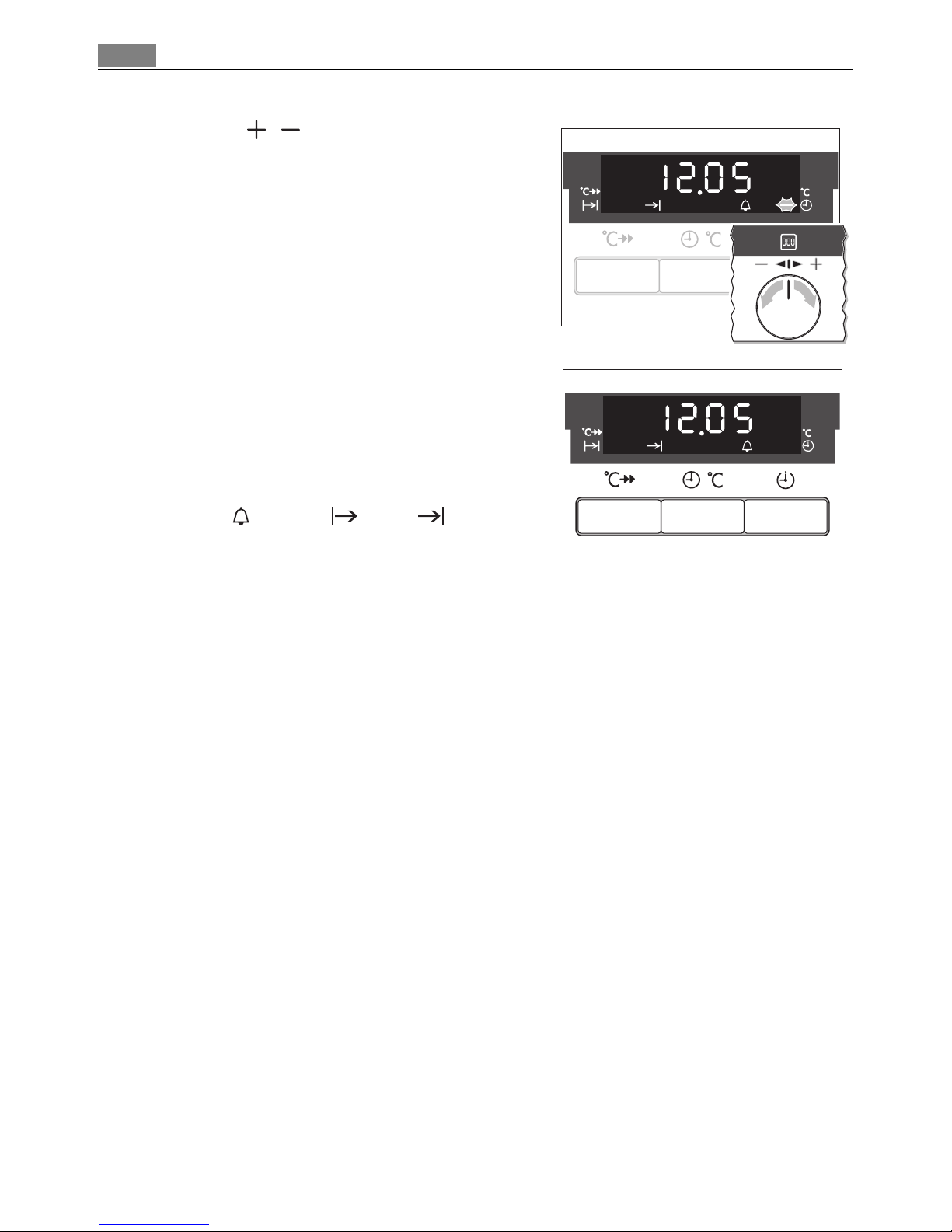
2. Using the / control knob, set the current
time.
After approx. 5 seconds, the flashing stops and
the clock displays the time of day set.
The appliance is now ready to use.
3 The time can only be modified, if the child safe-
ty device is deactivated, none of the Minute
Minder , Duration or End clock functions and no oven function is set.
Initial cleaning
Clean the oven before using it for the first time.
1 Important: Do not use caustic or abrasive cleaning agents! These can damage the oven
surfaces.
3 For the metal surfaces, use commercially available cleaning agents.
1. Open the oven door.
The oven light is illuminated.
2. Remove all oven accessories, and clean them with warm water and washing up liquid.
3. Wash the oven in the same way, and wipe dry.
4. Wipe the front of the appliance with a damp cloth.
Page 9

9Using the Oven
Using the Oven
3 The oven is equipped with retractable buttons for “Oven functions” and “Temperature
selection”. To use, press the relevant button. The button then sticks out.
Switching the Oven On and Off
Switching the oven on
Turn the oven functions selector to the desired
function. The power indicator light lights up.
The temperature display shows the suggested
temperature for the oven function selected.
The oven starts to heat up.
When the temperature set is reached, an audi-
ble signal sounds.
Oven Functions
Temperature / Time Selection
Temperature / Time
Display
Change display
Heat indicator
Speedcook
Oven Power Indicator
Button Speedcook
Oven Power Indicator
Selector Button
Page 10
Using the Oven10
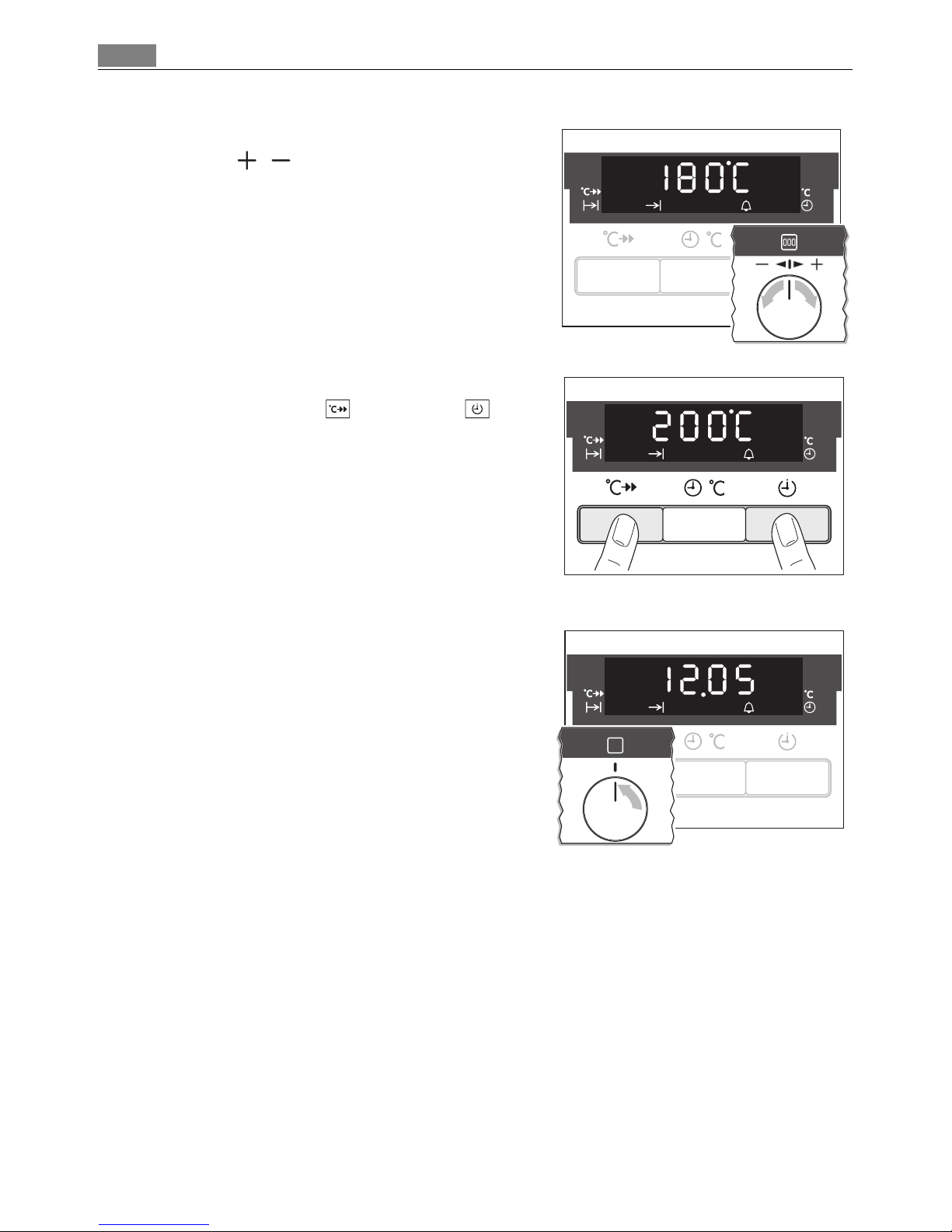
Changing the oven temperature
Turn the / knob to raise or lower the temperature.
The setting changes in 5 °C steps.
Checking the temperature
Press Rapid heat up and Selection buttons at the same time.
The current oven temperature appears in the
temperature display.
Switching the oven off
To turn the oven off, turn the oven functions
selector to the OFF position.
3 Cooling fan
The fan switches on automatically in order to keep the appliance’s surfaces cool. When
the oven is switched off, the fan continues to run to cool the appliance down, then
switches itself off automatically.
Page 11
11Using the Oven
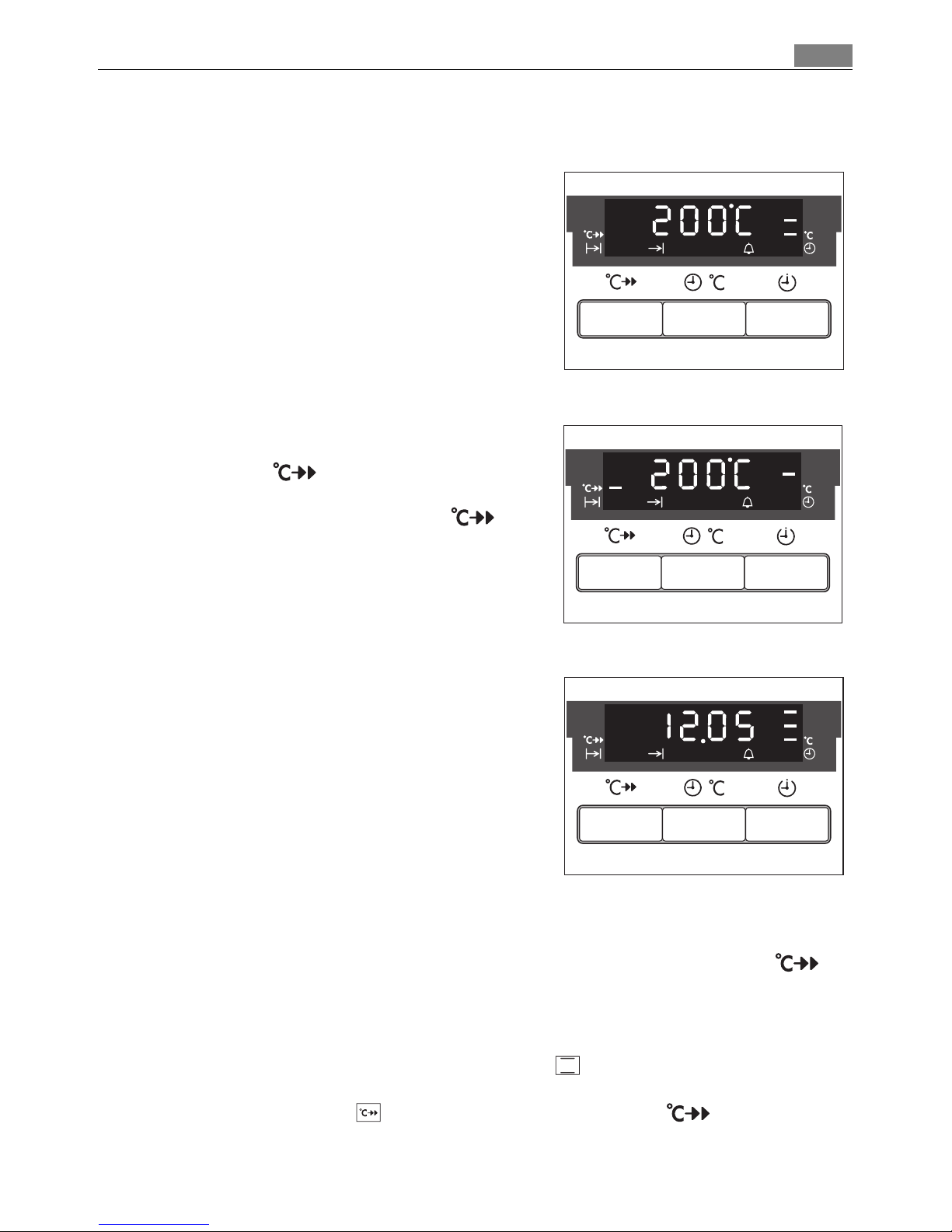
3 Heat indicator
Indicates warming up
When the oven function has been switched on
the bars that slowly light up one after the other
indicate how far the oven has heated up.
Fast heat indicator
When the fast heat function has been
switched on the bars that flash one after
the other indicate that fast heat is operating. In
addition the bars next to the symbol light
up.
Residual heat indicator
When the oven has been switched off, the bars
that are still lit indicate the remaining residual
heat in the oven.
Rapid heat up
After an oven function is selected, using the additional function Rapid heat up the
empty oven can be pre-heated in a relatively short time.
1 Important: Do not put the food to be cooked into the oven, until Rapid heat up is
completed and the oven is operating using the desired function.
1. Set the desired oven function (e. g., Conventional ). If necessary, change the suggest-
ed temperature.
2. Press the Rapid heat up button. The bars next to the symbol light up.
When the bars flash one after another it shows that Rapid heat up is operating.
Page 12
Using the Oven12
When the temperature set is reached, the bars of the heat indicator light up and the bars
next to the symbol go out. An audible signal sounds.
The oven now continues heating according to the pre-set oven function and temperature. You can now place the food in the oven.
3 The Rapid heat up function can be switched on with the oven functions True fan ,
Fan baking , Conventional and Rotitherm + turnspit .
Oven Functions
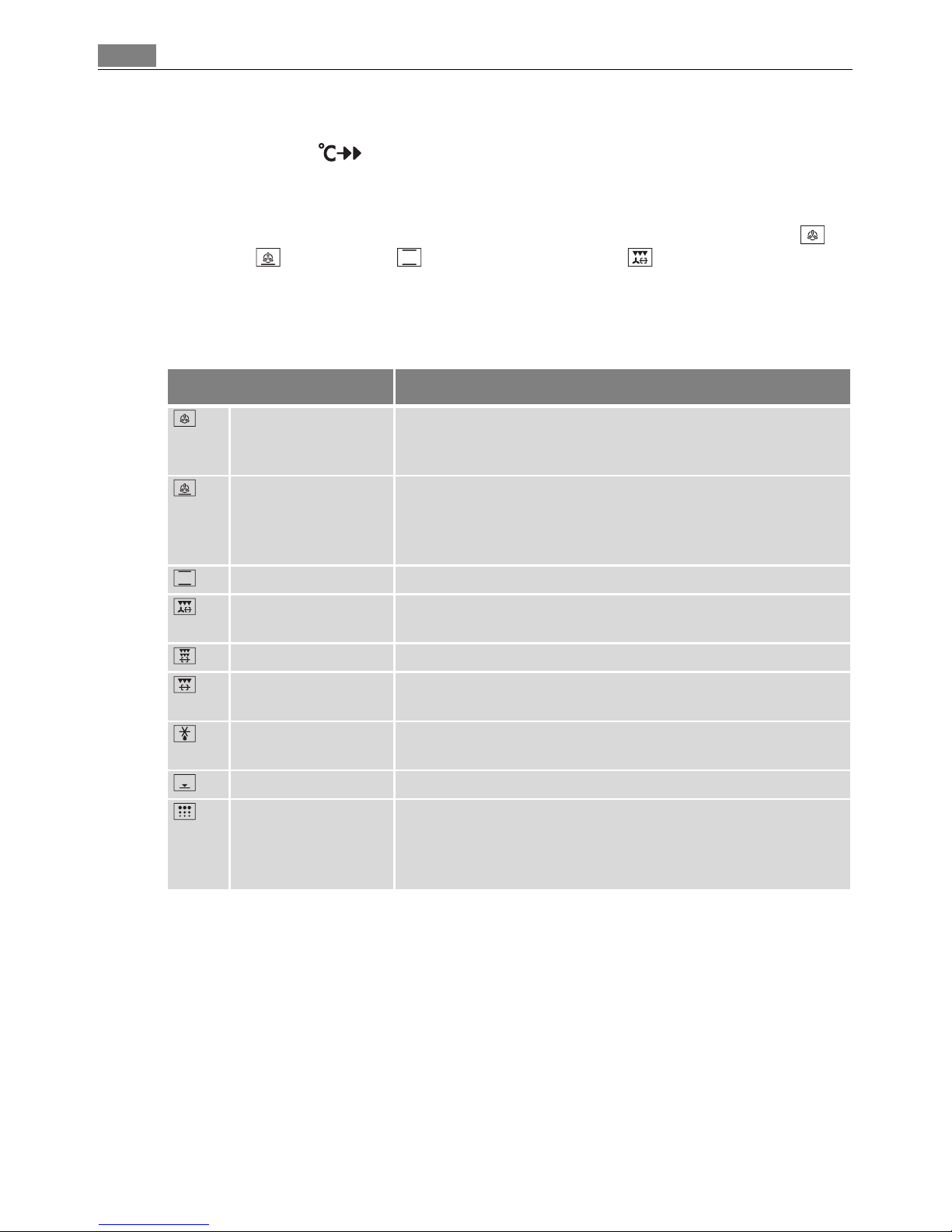
The oven has the following functions:
Oven function Application
True fan To bake on three oven levels maximum at the same time.
Decrease the oven temperatures (20-40 °C) compared with
Conventional.
Fan baking For baking on one oven level dishes that require more inten-
sive browning and a crispy base.
Set the oven temperatures 20-40 °C lower than when using
Conventional.
Conventional For baking and roasting on one oven level.
Rotitherm + turnspit
For roasting larger joints of meat or poultry on one level.
The function is also suitable for gratinating and browning.
Dual grill + turnspit For grilling large poultry and roasts.
Grill + turnspit For grilling flat foodstuffs placed in the middle of the grill
and for toasting.
Defrost For defrosting e. g. flans and gateaux, butter, bread, fruit or
other frozen foods.
Base heat For baking cakes with crispy or crusty bases.
Pyroluxe For automatic pyrolytic cleaning of the oven. It burns off resi-
dues in the oven, which can then be removed with a cloth
when the oven has cooled down. The oven is heated to approximately 500° C.
Page 13
13Using the Oven
Inserting the Oven Shelf, Baking Tray and Roasting Pan
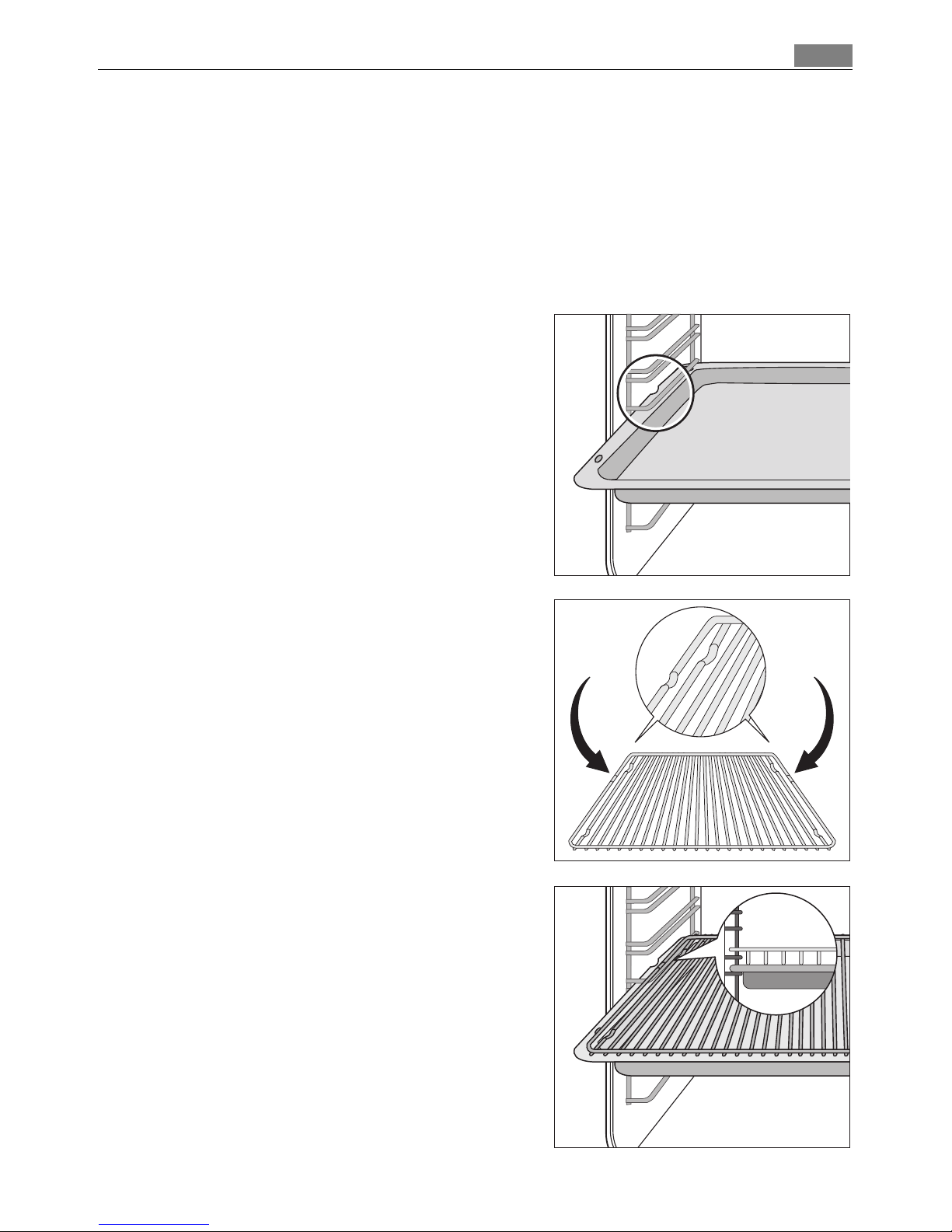
3 Shelf runner safety and anti-tip device
As a shelf runner safety device, all insertable components have a small curved indentation at the bottom on the right and left-hand edge.
Always insert insertable components so that this indentation is at the back of the oven
interior. This indentation is also important for preventing the insertable components
from tipping.
Inserting the baking tray or roasting pan
Push the baking tray or roasting pan between
the guide bars of the selected oven level.
Inserting the oven shelf:
Insert the oven shelf so that the feet point
downwards.
Push the oven shelf between the guide bars of
the selected oven level.
3 The high rim around the oven shelf is an addi-
tional device to prevent cookware from slipping.
Inserting the oven shelf and roasting pan
together
Lay the oven shelf on the roasting pan.
Push the roasting pan between the guide bars
of the selected oven level.
Page 14
Using the Oven14
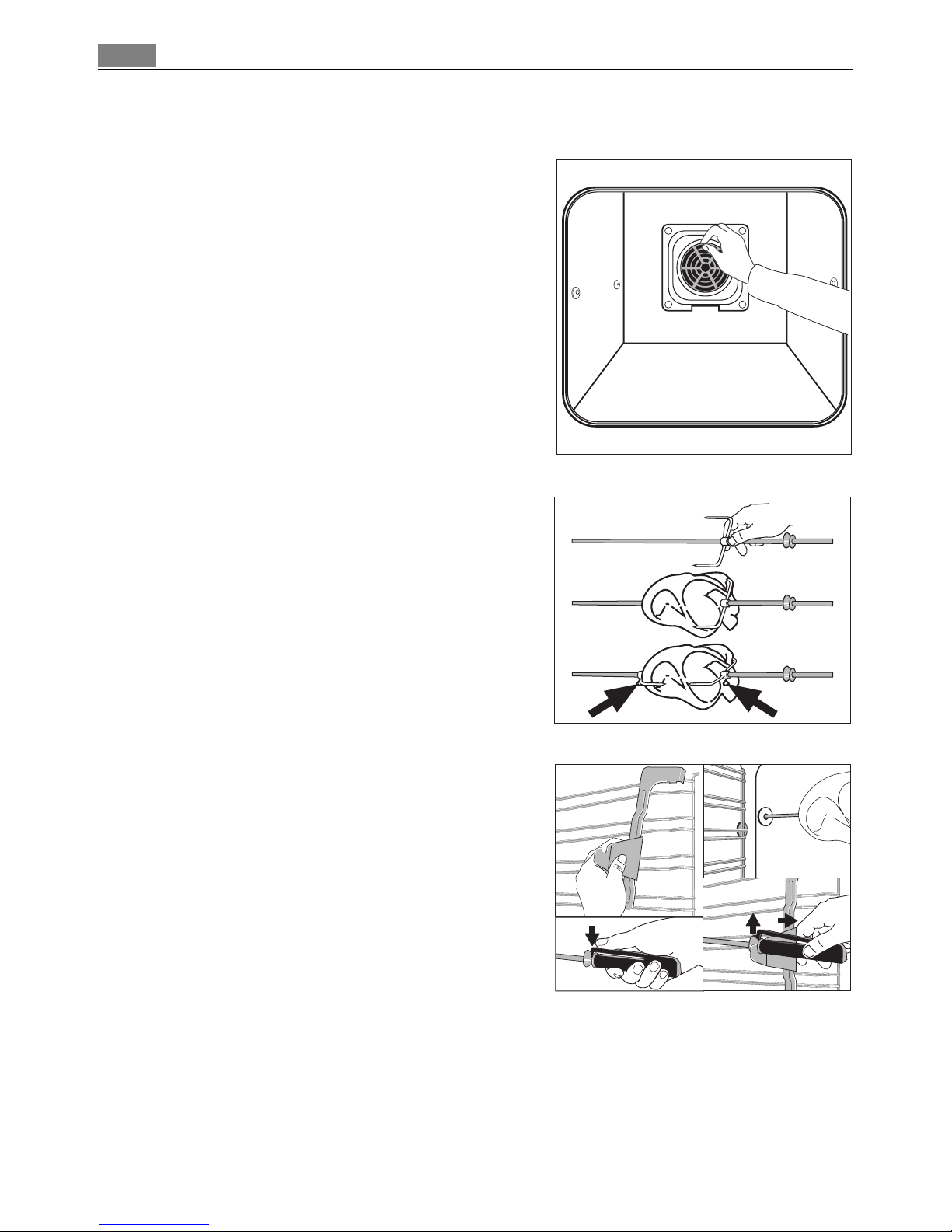
Inserting/Removing the Fat Filter
Only use the fat filter when roasting to protect the rear heating elements from fat splashes.
Rotary Spit
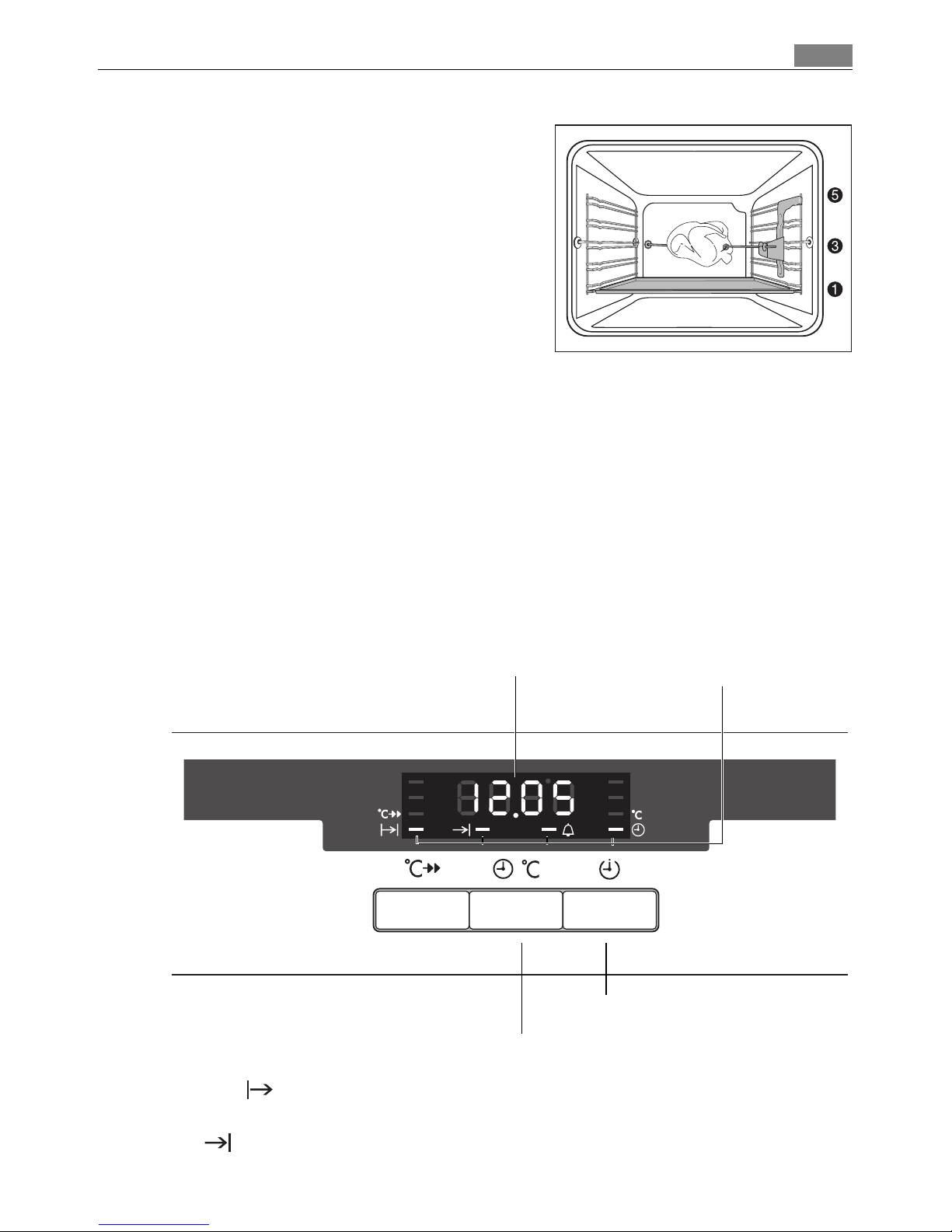
Attaching the food to be grilled
1. Place a fork on the rotary spit.
2. Then position the food to be grilled and a sec-
ond fork.
3 Make sure the food is in the middle of the spit.
3. Tighten the forks using the screws.
Inserting the rotary spit
1. Place the drip tray in the first shelf position
from the bottom.
2. Insert the rotary spit support at the front on
the right-hand side in shelf position five from
the bottom.
3. Place the handle on the spit and press the clip
down.
3 The clip must be kept pressed down to keep the
handle secure on the rotary spit.
4. Push the tip of the spit into the power unit on the left-hand side of the back wall of the
oven until it locks into place.
5. Place the groove in front of the handle on the notch provided on the rotary spit support.
Inserting the fat filter
Hold the fat filter by the grip and insert
the two mounts downwards into the
opening on the rear wall of the oven
(fan opening).
Taking out the fat filter
Hold the fat filter by the grip and unhook it.
Page 15
15Using the Oven
6. Remove the handle.
7. Set the oven function and temperature as
shown in the rotary spit table.
3 Make sure that the rotary spit turns.
Removing the rotary spit
1 Warning: The rotary spit is very hot when the cooking process has ended. When taking
it out, there is the risk of burns!
1. Switch off the oven.
2. Place the handle on the rotary spit.
3. Press the clip down.
3 The clip must be kept pressed down to keep the handle secure on the rotary spit.
4. Remove the rotary spit with the food.
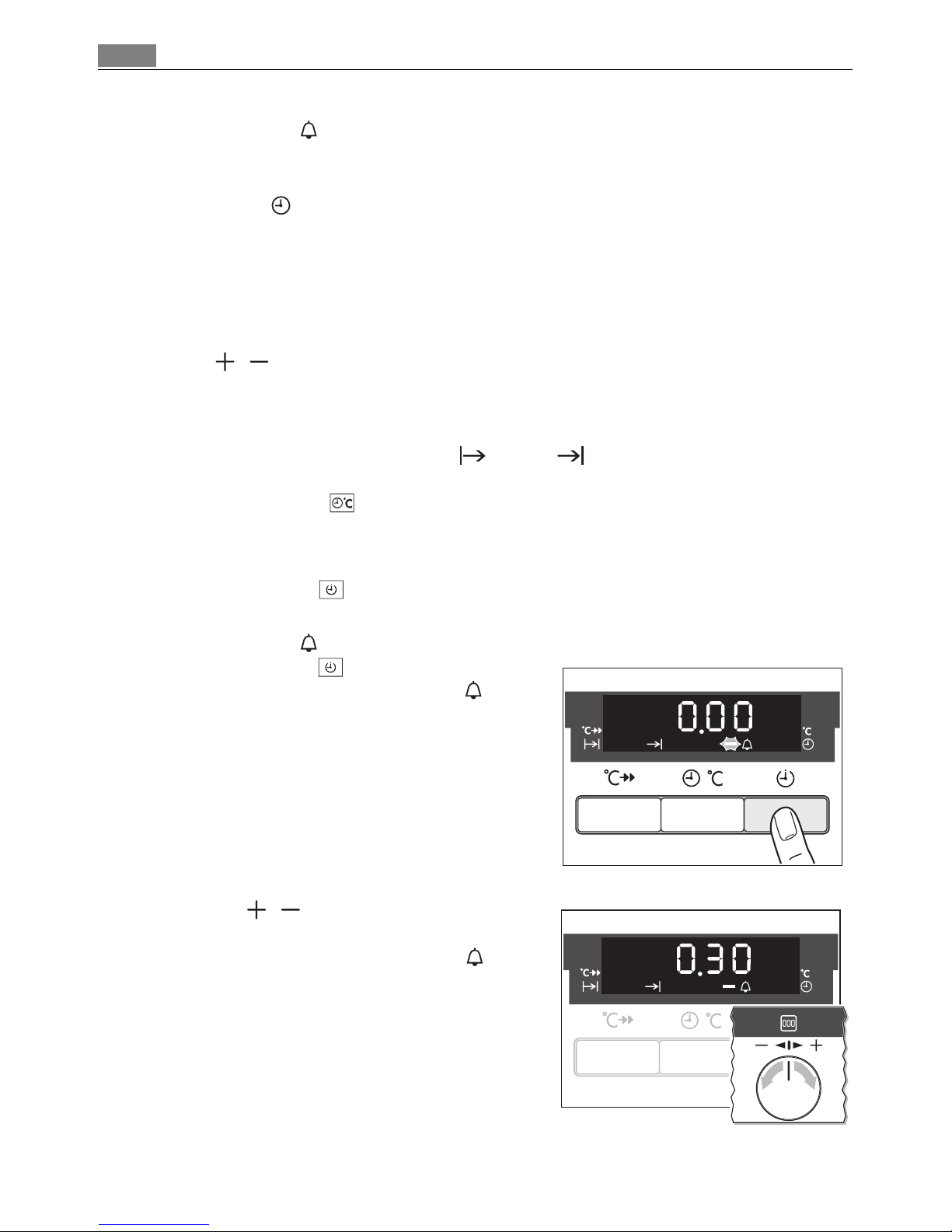
Clock Functions
Duration
To set how long the oven is to be in use.
End
To set the switch-off time for an oven function.
Temperature / Time Display
Change display
Clock function indicators
Selector Button
Page 16
Using the Oven16
Minute Minder
To set a countdown. A signal sounds after the time has elapsed.
This function does not affect the functioning of the oven.
Time of day
To set, change or check the time
(See also section “Before Using for the First Time”).
3 How to use the clock functions
• After a clock function has been selected, the corresponding function indicator flashes
for about 5 seconds. During this period, the desired times can be set or modified using
the / dial.
• When the desired time has been set, the function indicator continues to flash for
approx. 5 seconds. After that the function indicator is then lit. The set time begins to
run in the background.
• When the clock functions Duration and End have been completed, the oven
functions dial must be turned back to ”0“.
• Using the Display button, you can switch between the oven temperature and the
time.
3 Checking the time set or remaining.
Press the Selection button repeatedly, until the appropriate clock function flashes
and the time set or remaining is displayed.
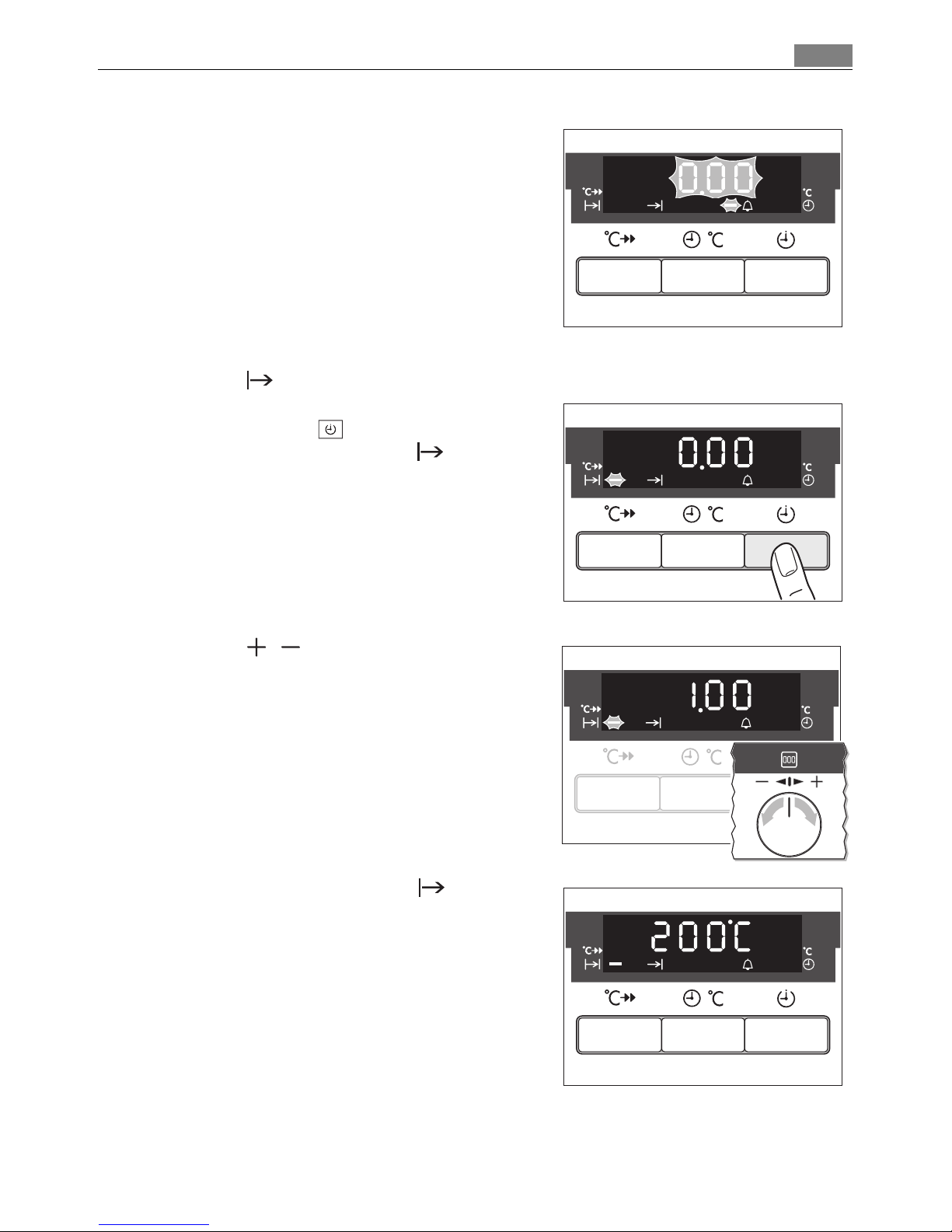
Minute Minder
1. Press the Selection button repeatedly until
the function indicator Minute Minder flashes.
2. Using the / control knob set the desired
countdown (max. 99.00minutes).
The function indicator Minute Minder lights
up.
When 90% of the time set has elapsed, an audible signal sounds.
Page 17
17Using the Oven
When the time has elapsed, ”0.00“ and the
function indicator flash.
An audible signal sounds.
To stop the flashing and the audible signal:
Press any button.
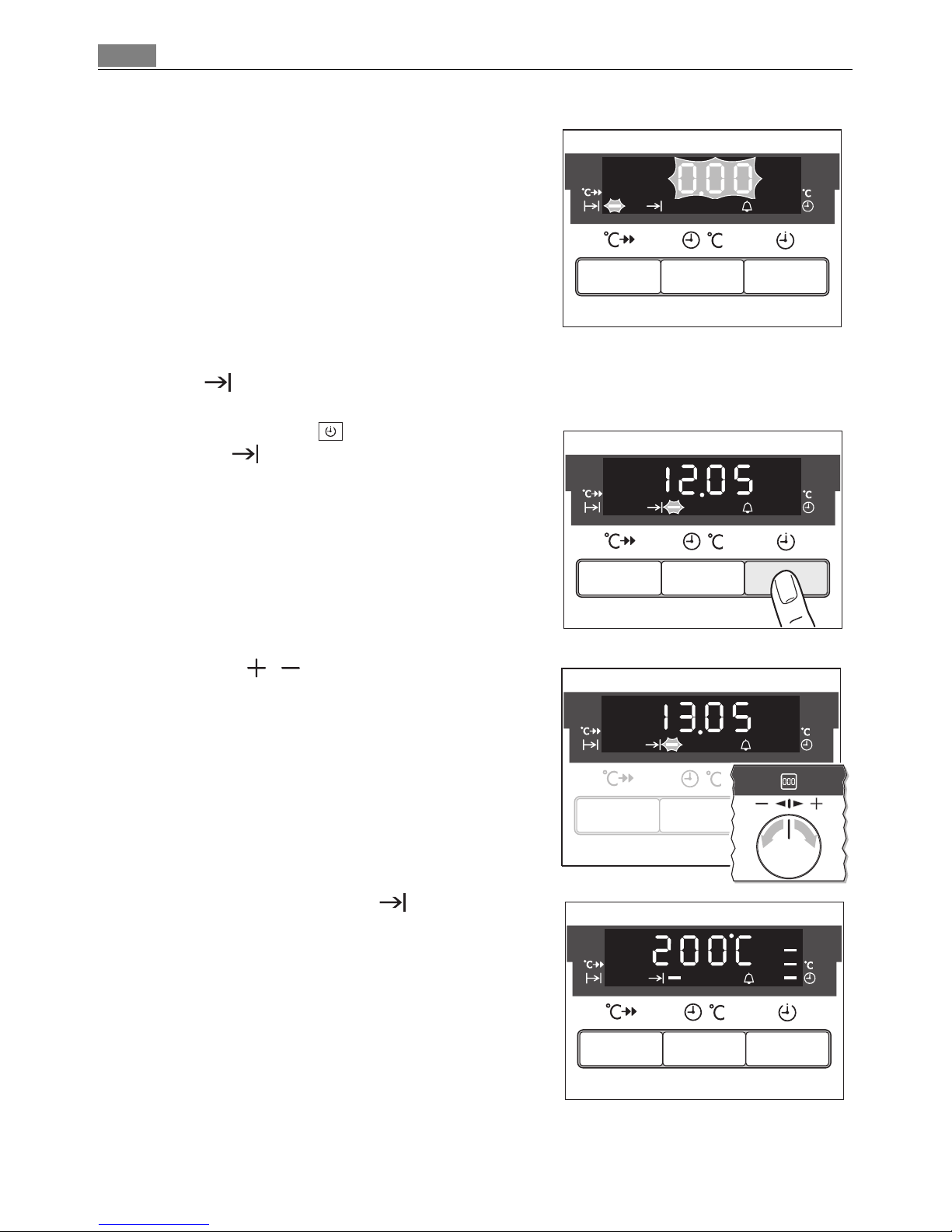
Duration
1. Select the oven function and temperature.
2. Press the Selection button repeatedly until
the function indicator Duration flashes.
3. Using the / control knob set the desired
cooking time.
The function indicator Duration lights up
and the oven comes on immediately.
Page 18
Using the Oven18
When the time has elapsed, ”0.00“ and the
function indicator flash.
An audible signal sounds for 2 minutes. The
oven switches itself off.
To stop the flashing and the audible signal:
Turn the oven functions dial to ”0”.
End
1. Select the oven function and temperature.
2. Press the Selection button repeatedly until
the End function indicator flashes.
3. Using the / control knob set the desired
switch-off time.
The function indicator End lights up and
the oven comes on immediately.
Page 19
19Using the Oven
When the time has elapsed, ”0.00“ and the
function indicator flash.
An audible signal sounds for 2 minutes. The ovenswitches itself off.
To stop the flashing and the audible signal:
Turn the oven functions dial to ”0”.
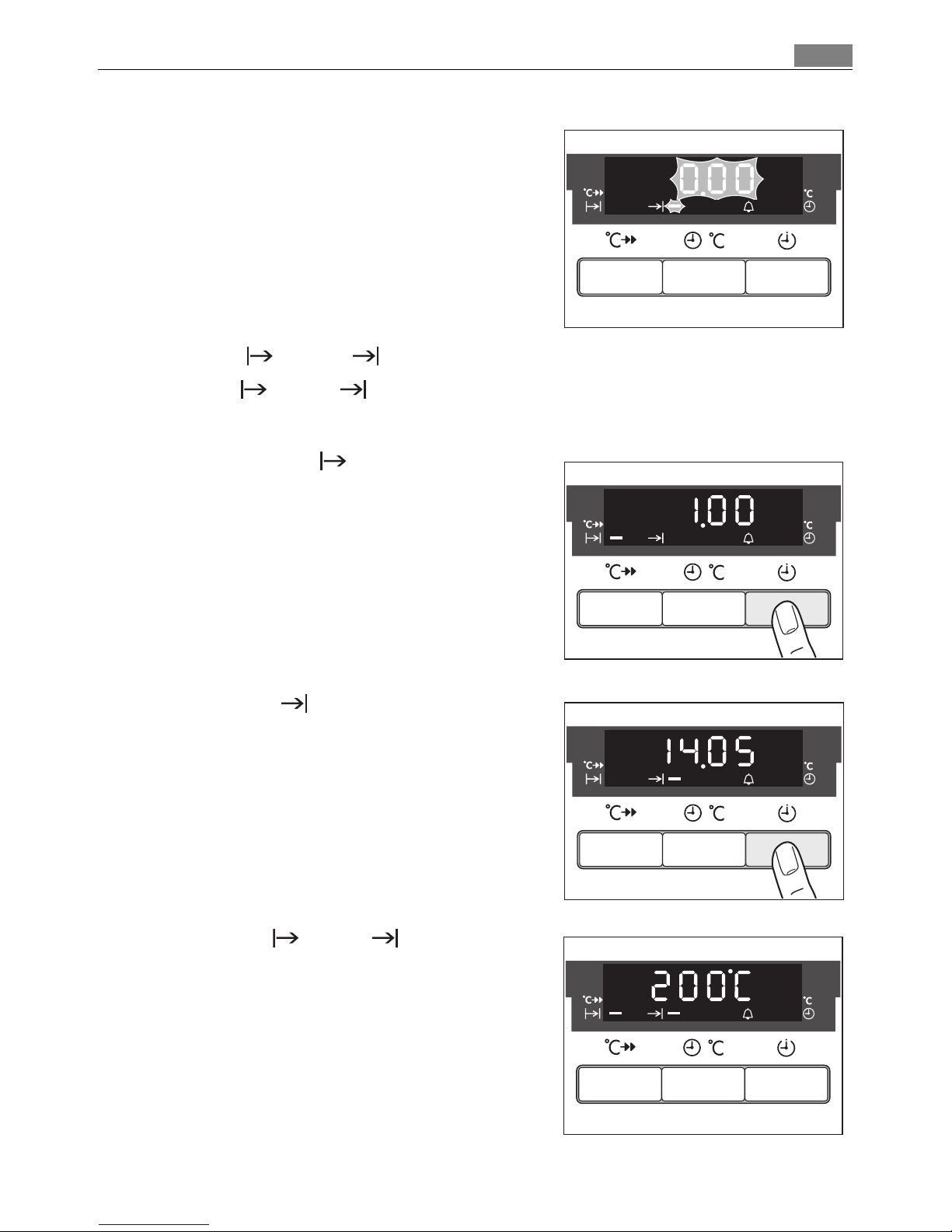
Duration and End combined
3 Duration and End can be used simultaneously, if the oven is to be switched on
and off automatically at a later time.
1. Select the oven function and temperature.
2. Using the Duration function, set the time
that the dish needs to cook.
In this example, 1 hour.
3. Using the End function, set the time at
which the dish should be ready.
In this case, 14:05.
The Duration and End function indicators light up and the temperature is shown in
the display.
In this example, 200°C.
The oven switches on automatically at the time
calculated.
In this case, at 13:05.
And switches itself off again when the cook
time entered has elapsed.
In this case, at 14:05.
Page 20
Using the Oven20
Other Functions
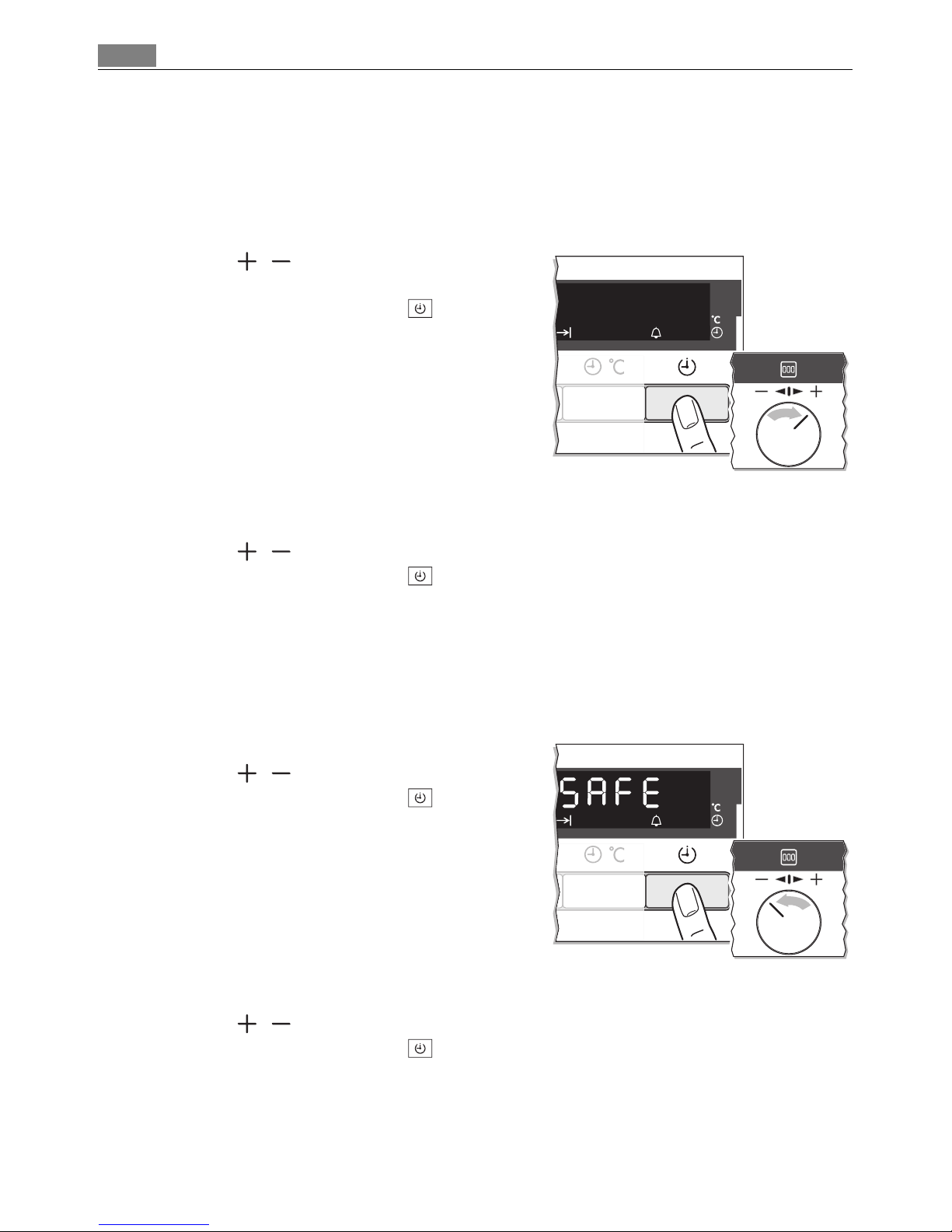
Switching off the display
2 You can save energy by switching off the clock display.
Switching off the clock display
1. Turn the / control knob to the right and
hold it.
2. In addition press the Selection button until
the display goes out.
3 As soon as the appliance is switched on again,
the display comes on automatically.
When the appliance is next switched off, the
clock display goes out again.
To have the clock display on permanently again,
you must set the clock again.
Switching on the clock display
1. Turn the / control knob to the right and hold it.
2. In addition press the Selection button, until the display appears again.
Oven’s child safety device
The oven is fitted with a child safety device. As soon as the child safety device is activated, the oven cannot be switched on.
3 For the child safety device to be activated, none of the oven functions must be currently
selected.
Activating the child safety device
1. Turn the / dial to the left and hold it.
2. In addition press the Selection button until
“SAFE” appears ”in the“ display.
The child safety device is now activated.
Deactivating the child safety device
1. Turn the / dial to the left and hold it.
2. In addition press the Selection button until “SAFE” disappears ”from“ the display.
The child safety device is now deactivated and the oven is again ready for use.
Page 21
21Uses, Tables and Tips
Oven automatic cut-out
3 If not switched off after a certain time, or if the temperature is not modified, the oven
switches off automatically.
The last temperature set flashes in the temperature display.
The oven switches off when the oven temperature is:
Switching on after an automatic cut-out
Switch the oven off completely.
It can then be switched on again.
3 The automatic cut-out is cancelled if the clock function Duration or End is set.
Uses, Tables and Tips
Baking
Oven function: True fan or Conventional
Baking tins
• For Conventional dark metal and non-stick tins are suitable.
• For True fan bright metal tins are also suitable.
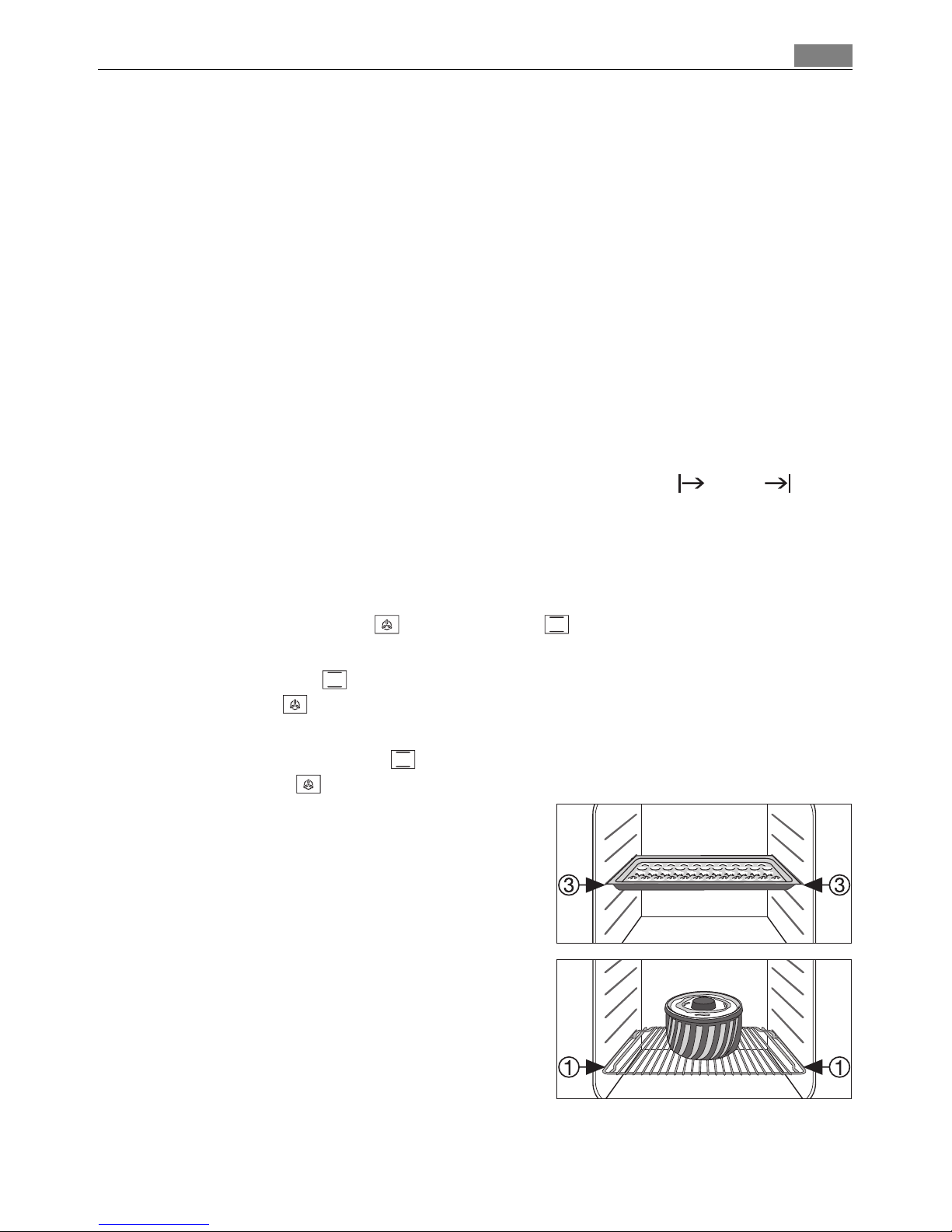
Oven levels
• Baking with Conventional is possible on one oven level.
• With True fan you can bake on up to 3 baking trays at the same time:
1 baking tray:
e.g. oven level 3
1 cake tin:
e.g. oven level 1
30 - 120°C (80 - 250°F) after 12.5 hours
120 - 200°C (250 - 390°F) after 8.5 hours
200 - 250°C (390 - 480°F) after 5.5 hours
250 - max°C (480 - max.°F) after 3.0 hours
Page 22
Uses, Tables and Tips22
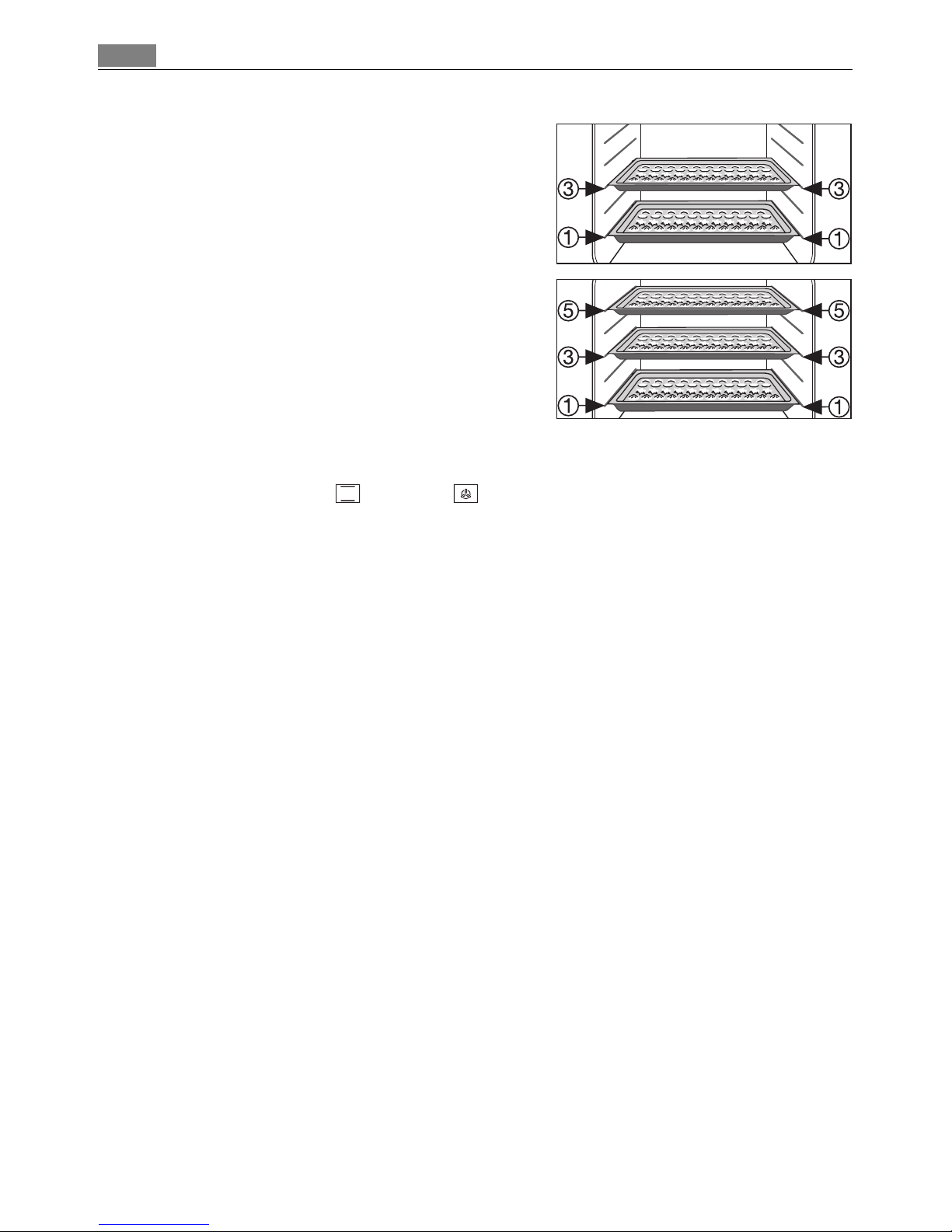
2 baking trays:
z. g., oven levels 1 and 3
3 baking trays:
oven levels 1, 3 and 5
General instructions
• Insert the tray with the bevel at the front.
• With Conventional or True fan you can also bake with two tins next to one an-
other on the oven shelf at the same time. This does not significantly increase baking
time.
3 When frozen foods are used the trays inserted may distort during cooking. This is due to
the large difference in temperature between the freezing temperature and the temperature in the oven. Once the trays have cooled the distortion will disappear again.
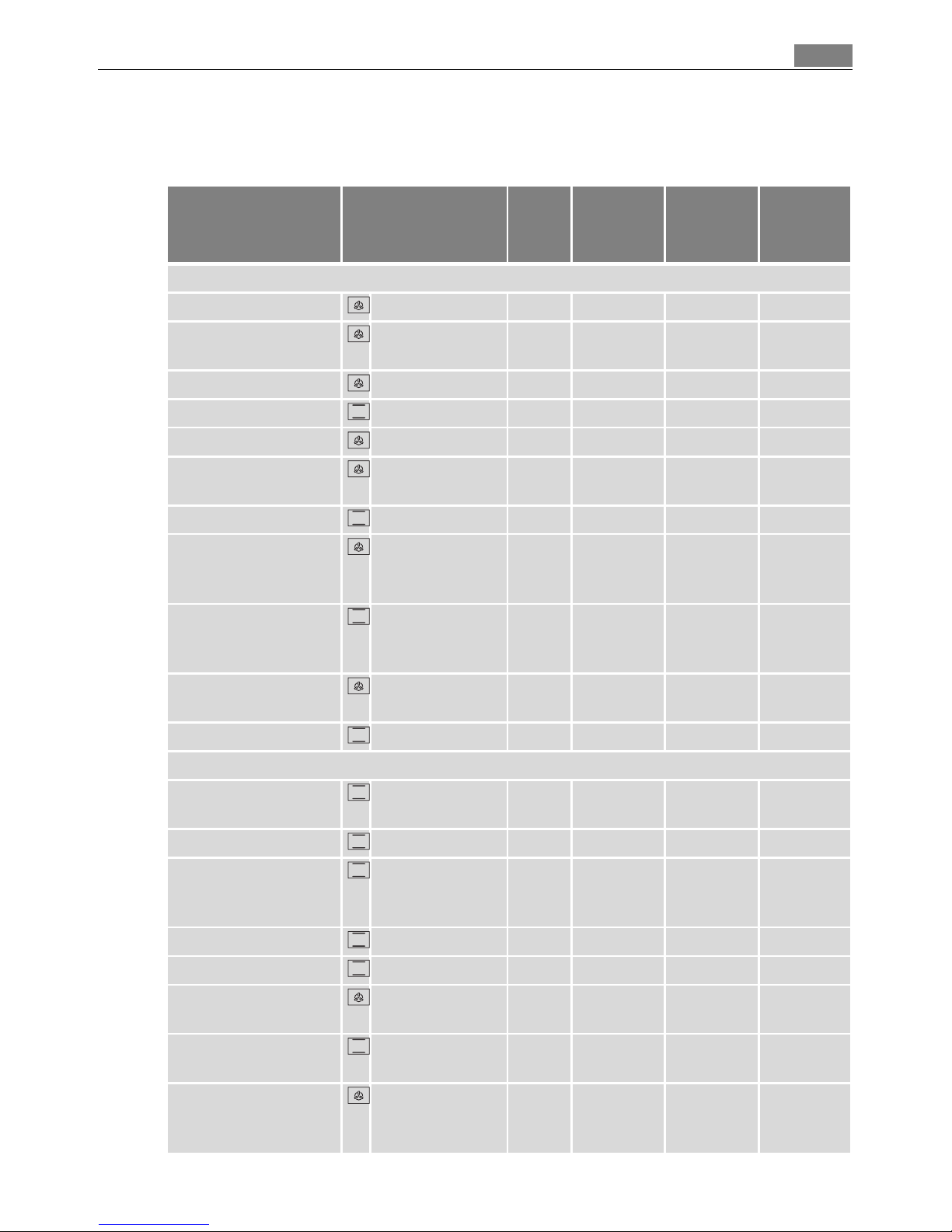
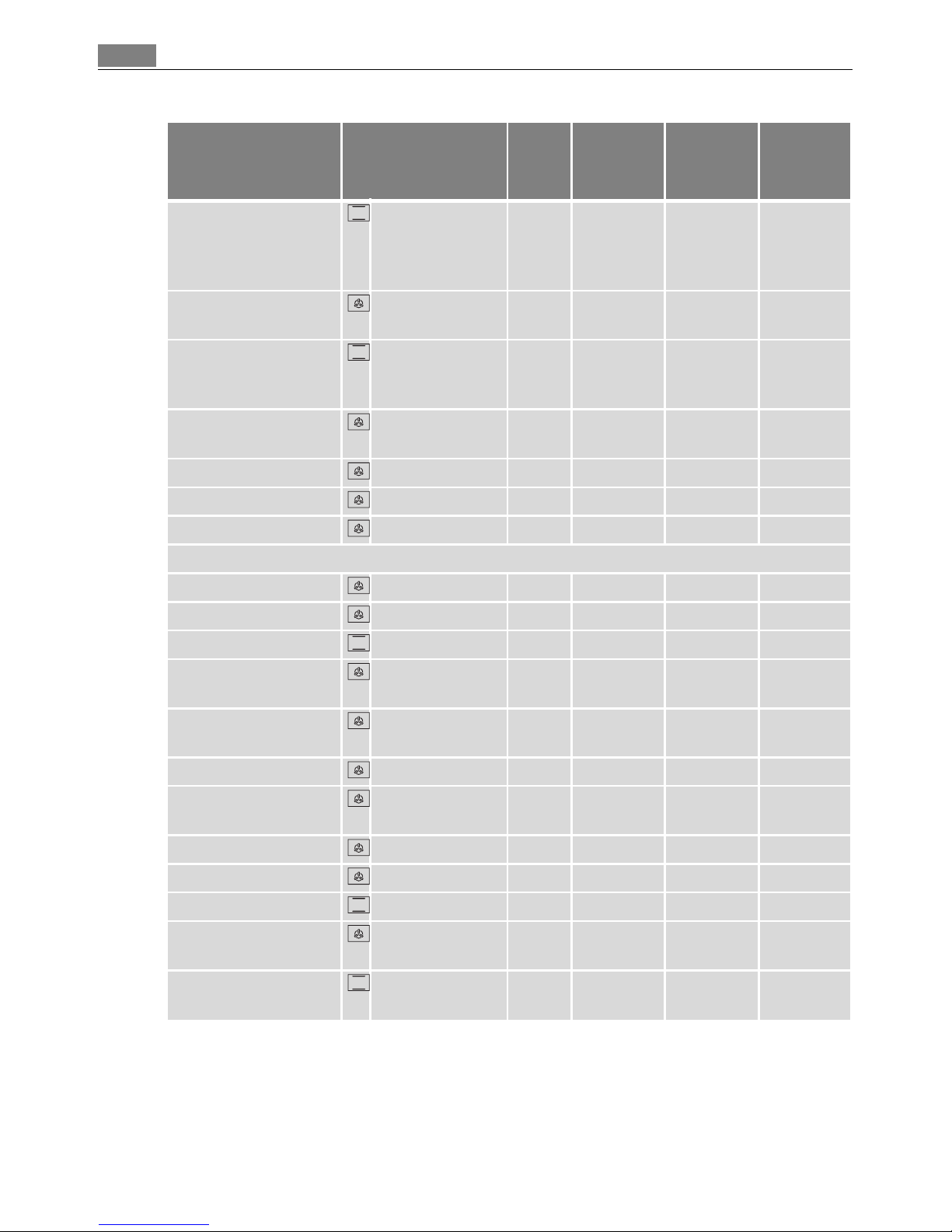
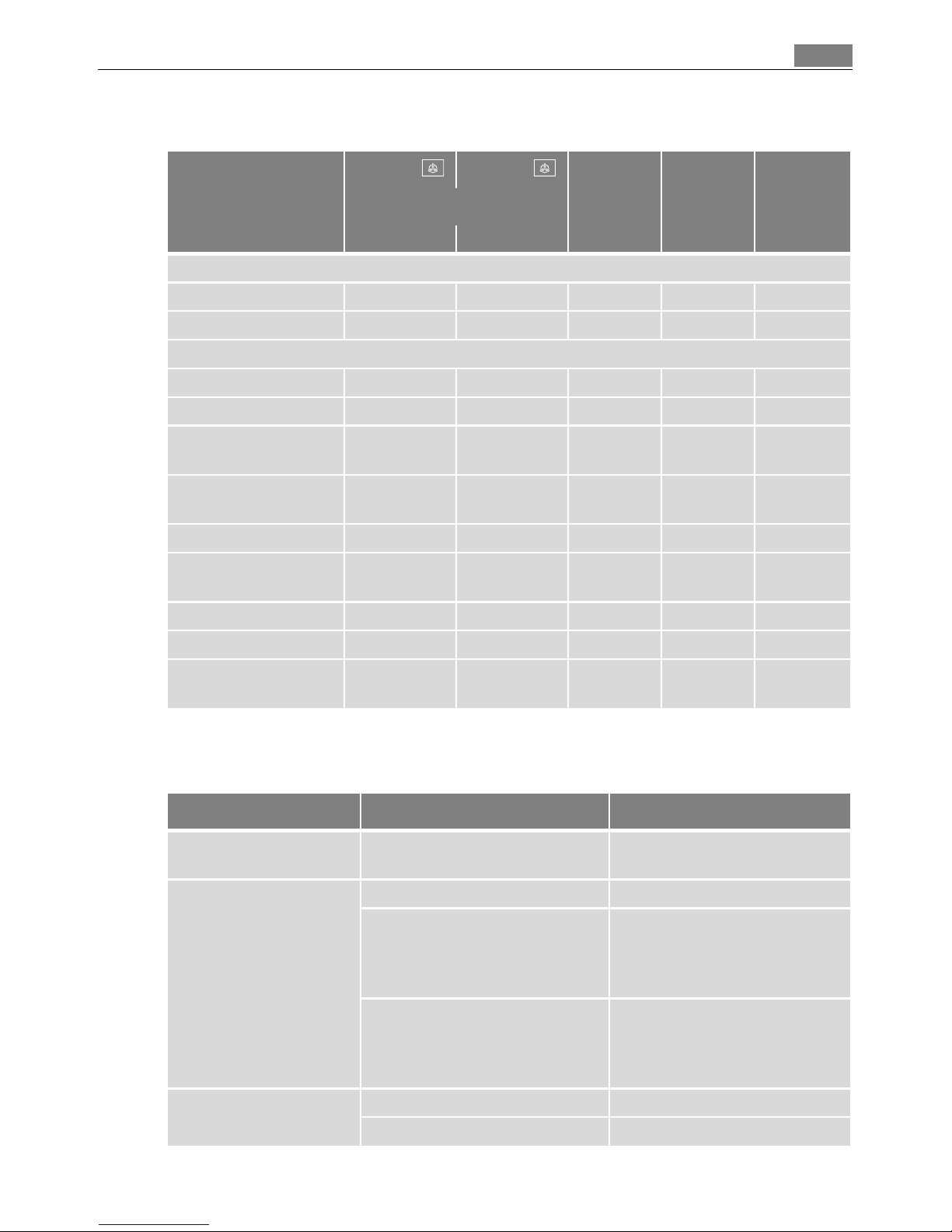
How to use the baking tables
The tables give the required temperature settings, baking times and oven shelf levels for
a selection of typical dishes.
• Temperatures and baking times are for guidance only, as these will depend on the
consistency of pastry, dough or mixture, the amount and the type of baking tin.
• We recommend using the lower temperature the first time and then if necessary, for
example, if a deeper browning is required, or baking time is too long, selecting a higher temperature.
• If you cannot find the settings for a particular recipe, look for the one that is most
similar.
• If baking cakes on baking trays or in tins on more than one level, baking time may be
extended by 10-15 minutes.
• Moist recipes (for example, pizzas, fruit flans, etc.) are baked on one level.
• Cakes and pastries at different heights may brown at an uneven rate at first. If this oc-
curs, please do not change the temperature setting. Different rates of browning
even out as baking progresses.
• Your new oven may bake or roast differently to your previous appliance. So adapt
your normal settings (temperature, cooking times) and oven shelf levels to the recommendations in the following tables.
2 With longer baking times, the oven can be switched off about 10 minutes before the end
of baking time, to make use of the residual heat.
Unless otherwise stated, the values given in the tables assume that cooking is started
with the oven cold.
Page 23
23Uses, Tables and Tips
Baking table
Baking on one oven level
Type of
baking
Oven function
Oven
level
Tempera-
ture
°C
Tempera-
ture
°F
Time
Hr: Mins.
Baking in tins
Ring cake or brioche True fan 1 150-160 300-320 0:50-1:10
Madeira cake/fruit
cakes
True fan 1 140-160 280-320 1:10-1:30
Sponge cake True fan 1 140 280 0:25-0:40
Sponge cake Conventional 1 160 320 0:25-0:40
Flan base - short pastry True fan 3 170-180
1)
340-360
1)
0:10-0:25
Flan base - sponge
mixture
True fan 3 150-170 300-340 0:20-0:25
Apple pie Conventional 1 170-190 340-380 0:50-1:00
Apple pie (2tins
Ø20cm, diagonally off
set)
True fan 1 160 320 1:10-1:30
Apple pie (2tins
Ø20cm, diagonally off
set)
Conventional 1 180 360 1:10-1:30
Savoury flan (e. g,
quiche lorraine)
True fan 1 160-180 320-360 0:30-1:10
Cheesecake Conventional 1 170-190 340-380 1:00-1:30
Cakes/pastries/breads on baking trays
Plaited bread/bread
crown
Conventional 3 170-190 340-380 0:30-0:40
Christmas stollen Conventional 3 160-180
1)
320-360
1)
0:40-1:00
Bread (rye bread)
-first of all
-then
Conventional 1
230
1)
160-180
480
1)
320-360
0:25
0:30-1:00
Cream puffs/eclairs Conventional 3 160-170
1)
320-340
1)
0:15-0:30
Swiss roll Conventional 3 180-200
1)
360-400
1)
0:10-0:20
Cake with crumble
topping (dry)
True fan 3 150-160 300-320 0:20-0:40
Buttered almond cake/
sugar cakes
Conventional 3 190-210
1)
380-420
1)
0:15-0:30
Fruit flans
(made with yeast
dough/sponge mixture)
2)
True fan 3 150 300 0:35-0:50
Page 24
Uses, Tables and Tips24
Fruit flans
(made with yeast
dough/sponge mixture)
2)
Conventional 3 170 340 0:35-0:50
Fruit flans made with
short pastry
True fan 3 160-170 320-340 0:40-1:20
Yeast cakes with delicate toppings (e. g,
quark, cream, custard)
Conventional 3 160-180
1)
320-360
1)
0:40-1:20
Pizza (with a lot of
topping)
2)
True fan 1 180-200
1)
360-400
1)
0:30-1:00
Pizza (thin crust) True fan 1 200-220
1)
400-420
1)
0:10-0:25
Unleavened bread True fan 1 200-220 400-420 0:08-0:15
Tarts (CH) True fan 1 180-200 360-400 0:35-0:50
Biscuits
Short pastry biscuits True fan 3 150-160 300-320 0:06-0:20
Viennese whirls True fan 3 140 280 0:20-0:30
Viennese whirls Conventional 3 160
1)
320
1)
0:20-0:30
Biscuits made with
sponge mixture
True fan 3 150-160 300-320 0:15-0:20
Pastries made with egg
white, meringues
True fan 3 80-100 180-220 2:00-2:30
Macaroons True fan 3 100-120 220-220 0:30-0:60
Biscuits made with
yeast dough
True fan 3 150-160 300-320 0:20-0:40
Puff pastries True fan 3 170-180
1)
340-360
1)
0:20-0:30
Rolls True fan 3 160
1)
320
1)
0:20-0:35
Rolls Conventional 3 180
1)
360
1)
0:20-0:35
Small cakes (20per
tray)
True fan 3 140
1)
280
1)
0:20-0:30
Small cakes (20per
tray)
Conventional 3 170
1)
340
1)
0:20-0:30
1) Pre-heat the oven
2) Use the drip tray or roasting tray
Type of
baking
Oven function
Oven
level
Tempera-
ture
°C
Tempera-
ture
°F
Time
Hr: Mins.
Page 25
25Uses, Tables and Tips
Baking on more than one oven level
Tips on Baking
Type of baking
True fan True fan
Temperature in °C
Temperature in °F
Time
Hours:
Mins.
Shelf positions from bottom
2 levels 3 levels
Cakes/pastries/breads on baking trays
Cream puffs/Eclairs 1/4 --- 160-180
1)
1) Pre-heat the oven
320-360
1)
0:35-0:60
Dry streusel cake 1/3 --- 140-160 280-320 0:30-0:60
Biscuits/small cakes/pastries/rolls
Short pastry biscuits 1/3 1/3/5 150-160 300-320 0:15-0:35
Viennese whirls 1/3 1/3/5 140 280 0:20-0:60
Biscuits made with
sponge mixture
1/3 --- 160-170 320-340 0:25-0:40
Biscuits made with egg
white, meringues
1/3 --- 80-100 180-220 2:10-2:50
Macaroons 1/3 --- 100-120 200-240 0:40-1:20
Biscuits made with
yeast dough
1/3 --- 160-170 320-340 0:30-0:60
Puff pastries 1/3 --- 170-180
1)
340-360
1)
0:30-0:50
Rolls 1/4 --- 160 320 0:30-0:55
Small cakes (20per
tray)
1/4 --- 140
1)
280
1)
0:25-0:40
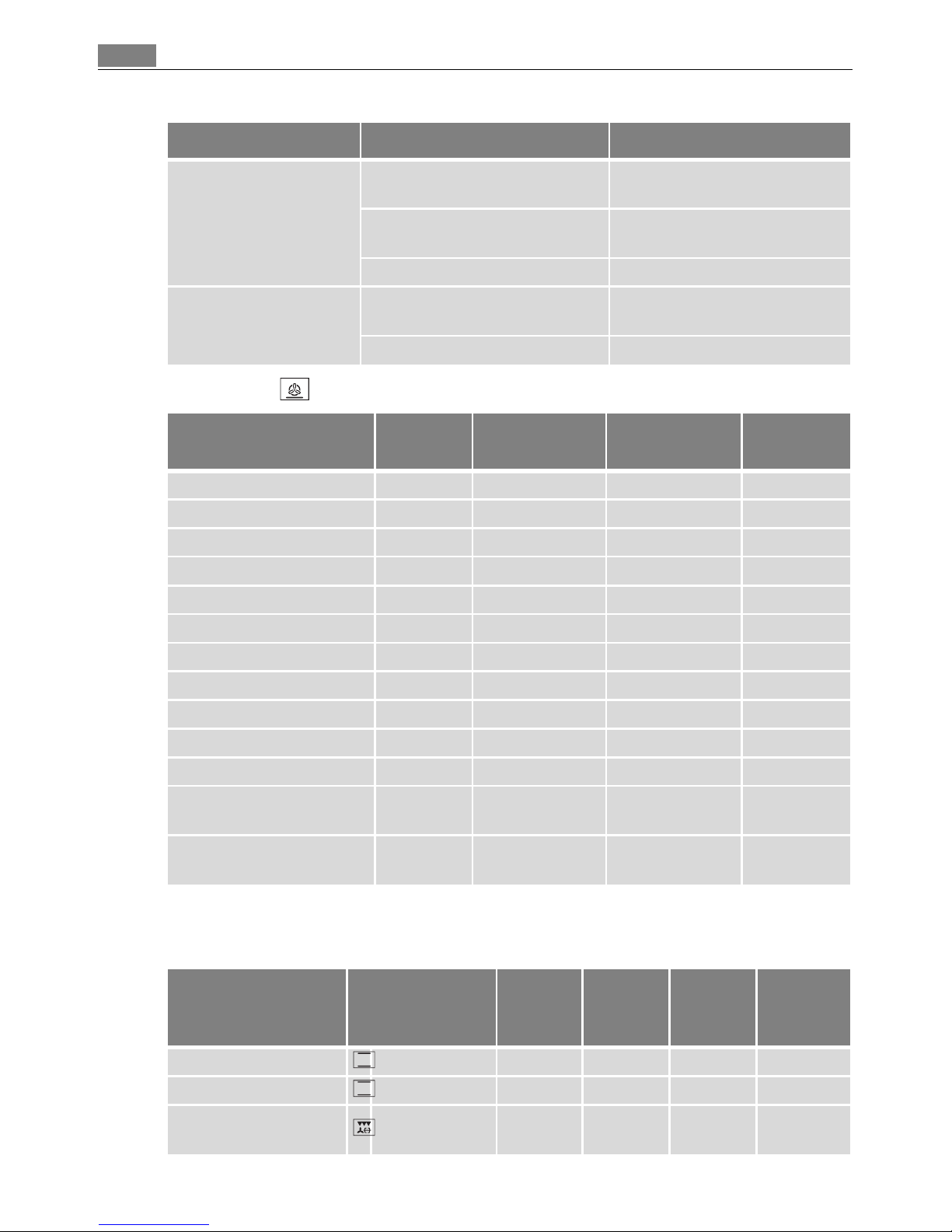
Baking results Possible cause Remedy
The cake is not browned
enough underneath
Wrong oven level Place cake lower
The cake sinks (becomes
soggy, lumpy, streaky)
Oven temperature too high Use a slightly lower setting
Baking time too short Set a longer baking time
Baking times cannot be reduced by setting higher temperatures
Too much liquid in the mixture Use less liquid.
Pay attention to mixing times,
especially if using mixing machines
Cake is too dry Oven temperature too low Set oven temperature higher.
Baking time too long Set a shorter baking time
Page 26
Uses, Tables and Tips26
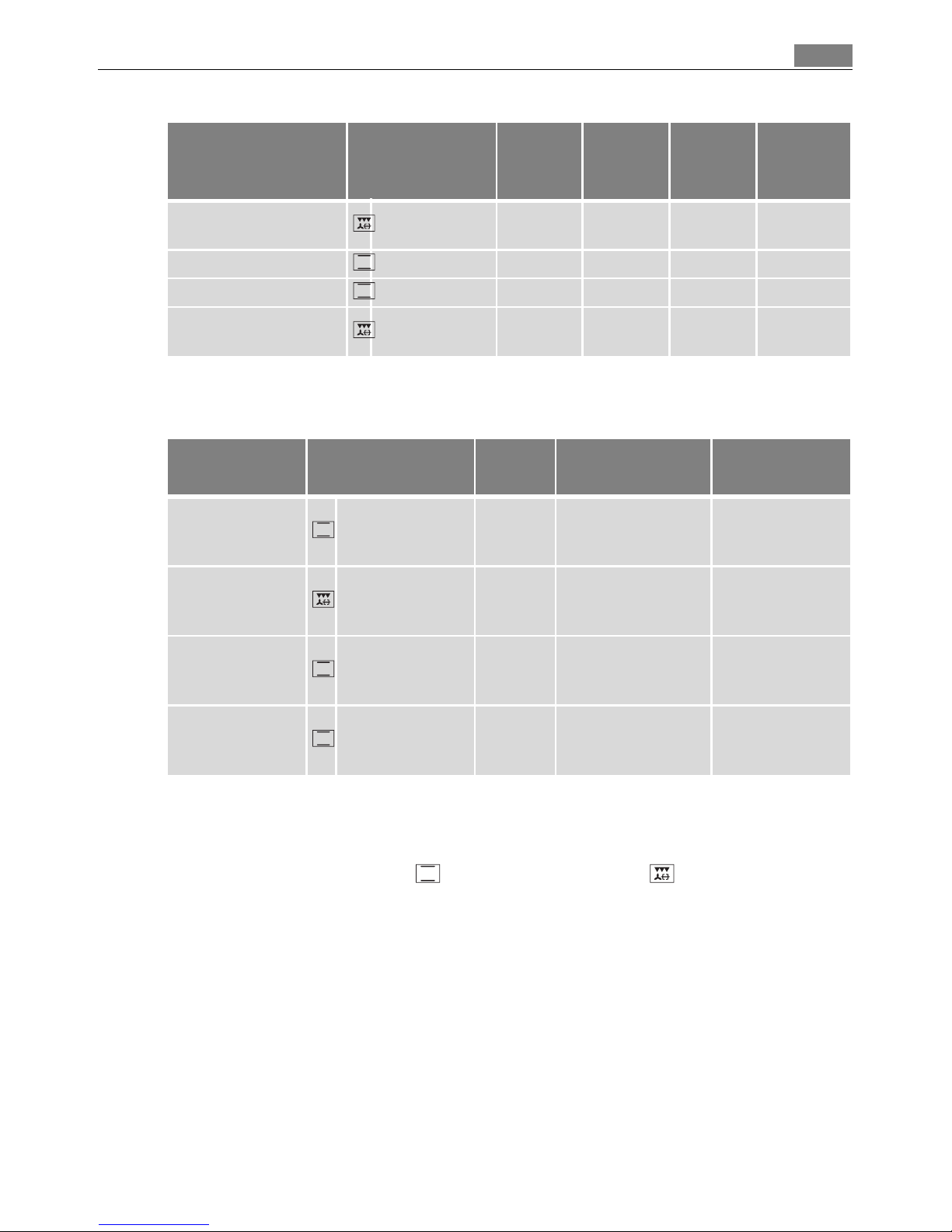
Fan baking table
Bakes and gratins table
Cake browns unevenly Oven temperature too high and
baking time too short
Set a lower oven temperature
and a longer baking time
Mixture is unevenly distributed Spread the mixture evenly on
the baking tray
Grease filter is inserted Take out the grease filter
Cake does not cook in the
baking time given
Temperature too low Use a slightly higher oven set-
ting
Grease filter is inserted Take out the grease filter
Type of baking
Shelf
position
Temperature
°C
Temperature
°F
Time
Hr: Mins.
Pizza (thin crust) 1 180 - 200
1)
1) Pre-heat the oven
360- 400
1)
20 - 30
Pizza (with a lot of topping) 1 180 - 200 360 - 400 20 - 30
Tarts 1 180 - 200 360 - 400 45 - 60
Spinach flan 1 160 -180 320 - 360 45 - 60
Quiche Lorraine 1 170 - 190 340 - 380 40 - 50
Quark flan, round 1 140 - 160 280 - 320 60 - 90
Quark flan on tray 1 140 - 160 280 - 320 50 - 60
Apple cake, covered 1 150 - 170 300 - 340 50 - 70
Vegetable pie 1 160 - 180 320 - 360 50 - 60
Unleavened bread 1 250 - 270
1)
480 - 520
1)
10 - 20
Puff pastry flan 1 160 - 180
1)
320 - 360
1)
40 - 50
Flammekuchen (Pizza-like
dish from Alsace)
1 250 - 270
1)
480 - 520
1)
12 - 20
Piroggen (Russian version
of calzone)
1 180 - 200
1)
360 - 400
1)
15 - 25
Dish Oven function
Shelf
position
Tempera-
ture
°C
Tempera-
ture
°F
Time
Hours
mins.
Pasta bake Conventional 1 180-200 360-400 0:45-1:00
Lasagne Conventional 1 180-200 360-400 0:25-0:40
Vegetables au gratin
1)
Rotitherm +
turnspit
1 160-170 320-340 0:15-0:30
Baking results Possible cause Remedy
Page 27
27Uses, Tables and Tips
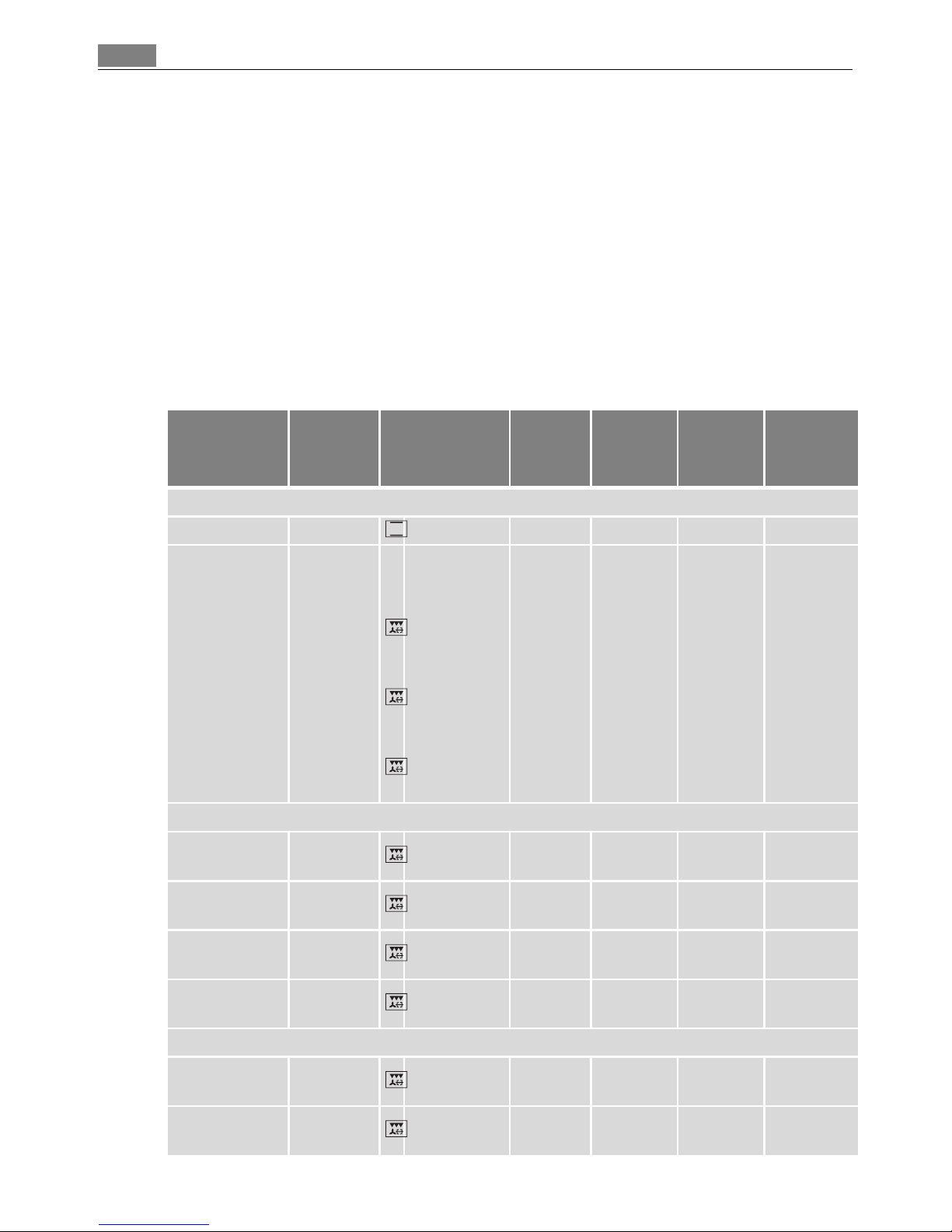
Frozen ready meals table
Roasting
Oven function: Conventional or Rotitherm + turnspit
Roasting dishes
• Any heat-resistant ovenware is suitable to use for roasting (please read the manufacturer's instructions).
• Large roasting joints can be roasted directly in the roasting tray or on the oven
shelf with the roasting tray placed below it.
• For all lean meats, we recommend roasting these in a roasting tin with a lid. This
will keep the meat more succulent.
• All types of meat, that can be browned or have crackling, can be roasted in the roast-
ing tin without the lid.
Baguettes topped with
melted cheese
1)
Rotitherm +
turnspit
1 160-170 320-340 0:15-0:30
Sweet bakes Conventional 1 180-200 360-400 0:40-0:60
Fish bakes Conventional 1 180-200 360-400 0:30-1:00
Stuffed vegetables
Rotitherm +
turnspit
1 160-170 320-340 0:30-1:00
1) Pre-heat the oven
Food to be
cooked
Oven function
Shelf
position
Temperature
°C/°F
Time
Frozen pizza Conventional 3
as per manufactur-
er’s instructions
as per manufac-
turer’s instruc-
tions
Chips
1)
(300-600 g)
1) Comments: Turn chips 2 or 3 times during cooking
Rotitherm +
turnspit
3 200-220/400-430
as per manufac-
turer’s instruc-
tions
Baguettes Conventional 3
as per manufactur-
er’s instructions
as per manufac-
turer’s instruc-
tions
Fruit flans Conventional 3
as per manufactur-
er’s instructions
as per manufac-
turer’s instruc-
tions
Dish Oven function
Shelf
position
Tempera-
ture
°C
Tempera-
ture
°F
Time
Hours
mins.
Page 28
Uses, Tables and Tips28
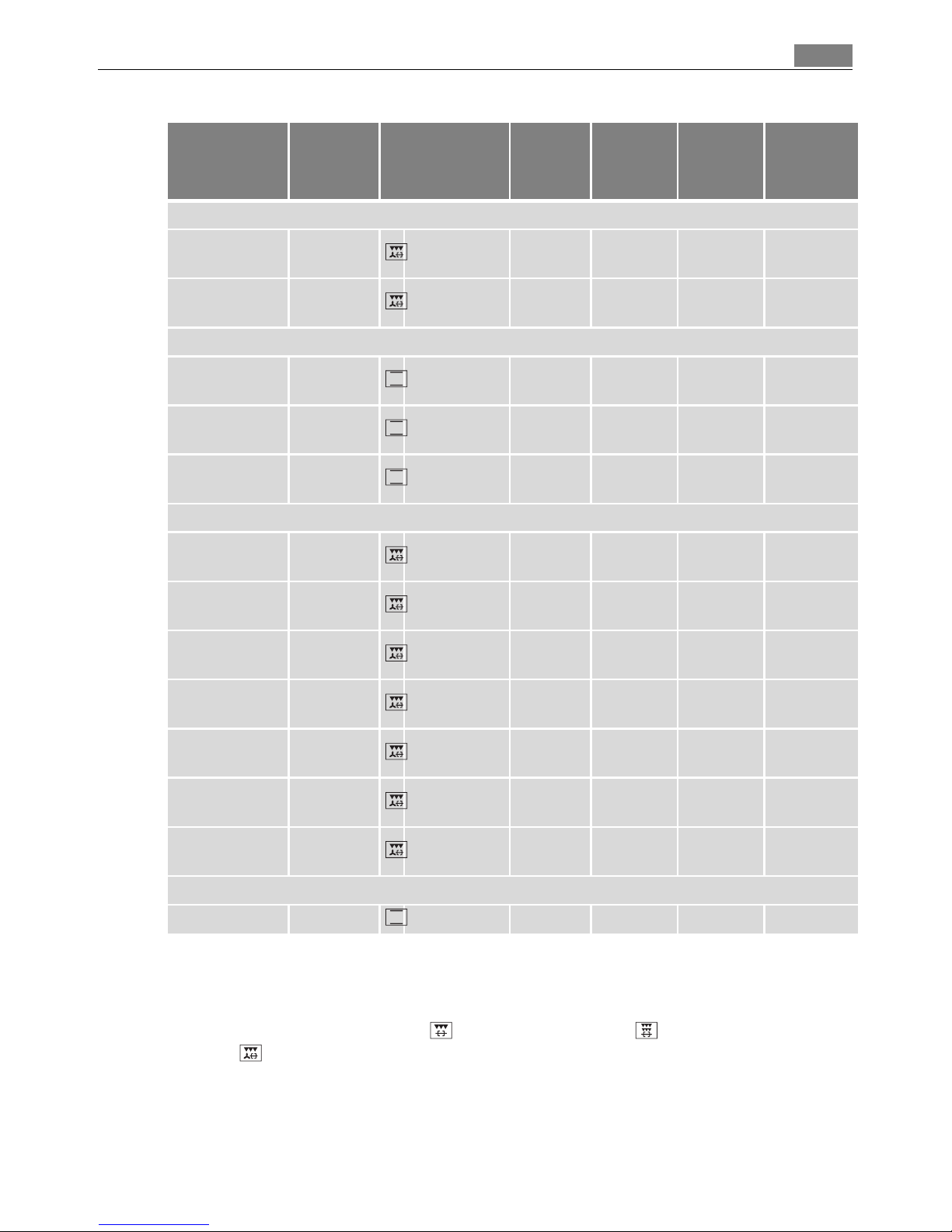
3 Tips on using the roasting chart
The information given in the following table is for guidance only.
• We recommend cooking meat and fish weighing 1 kg and above in the oven.
• To prevent escaping meat juices or fat from burning on to the pan, we recommend
placing some liquid in the roasting pan.
• If required, turn the roast (after 1/2 - 2/3 of the cooking time).
• Baste large roasts and poultry with their juices several times during roasting. This will
give better roasting results.
• You can switch the oven off about 10 minutes before the end of the roasting time, in
order to utilise the residual heat.
Roasting table
Type of meat Quantity Ovenfunction
Shelf
position
Tempe-
rature
°C
Tempe-
rature
°F
Time
Hours
mins.
Beef
Pot roast 1-1.5 kg Conventional 1 200-250 400-480 2:00-2:30
Roast beef or
fillet
per cm. of
thickness
- rare
per cm.
of thick-
ness
Rotitherm +
turnspit
1 190-2001)380-4001)0:05-0:06
- medium
per cm.
of thick-
ness
Rotitherm +
turnspit
1 180-190 360-380 0:06-0:08
- well done
per cm.
of thick-
ness
Rotitherm +
turnspit
1 170-180 340-360 0:08-0:10
Pork
Shoulder, neck,
ham joint
1-1.5 kg
Rotitherm +
turnspit
1 160-180 320-360 1:30-2:00
Chop, spare rib 1-1.5 kg
Rotitherm +
turnspit
1 170-180 340-360 1:00-1:30
Meat loaf 750 g-1 kg
Rotitherm +
turnspit
1 160-170 320-340 0:45-1:00
Porkknuckle
(pre-cooked)
750 g-1 kg
Rotitherm +
turnspit
1 150-170 300-340 1:30-2:00
Veal
Roast veal 1 kg
Rotitherm +
turnspit
1 160-180 320-360 1:30-2:00
Knuckle of veal 1.5-2 kg
Rotitherm +
turnspit
1 160-180 320-360 2:00-2:30
Page 29
29Uses, Tables and Tips
Grill Sizes
Oven function: Grill + turnspit , Dual grill + turnspit , Rotitherm +
turnspit
with maximum temperature setting
1 Important: Always grill with the oven door closed.
3 The empty oven should always be pre-heated with the grill functions for 5 minutes.
Lamb
Leg of lamb,
roast lamb
1-1.5 kg
Rotitherm +
turnspit
1 150-170 300-340 1:15-2:00
Saddle of lamb 1-1.5 kg
Rotitherm +
turnspit
1 160-180 320-360 1:00-1:30
Game
Saddle of hare,
leg of hare
up to 1 kg Conventional 3 220-2501)420-4801)0:25-0:40
Saddle of venison
1.5-2 kg Conventional 1 210-220 400-440 1:15-1:45
Haunch of
venison
1.5-2 kg Conventional 1 200-210 400-420 1:30-2:15
Poultry
Poultry portions
200-250g
each
Rotitherm +
turnspit
1 200-220 400-440 0:35-0:50
Half chicken
400-500g
each
Rotitherm +
turnspit
1 190-210 380-420 0:35-0:50
Chicken,
poulard
1-1.5 kg
Rotitherm +
turnspit
1 190-210 380-420 0:45-1:15
Duck 1.5-2 kg
Rotitherm +
turnspit
1 180-200 360-400 1:15-1:45
Goose 3.5-5 kg
Rotitherm +
turnspit
1 160-180 320-360 2:30-3:30
Turkey 2.5-3.5 kg
Rotitherm +
turnspit
1 160-180 320-360 1:45-2:30
Turkey 4-6 kg
Rotitherm +
turnspit
1 140-160 280-320 2:30-4:00
Fish (steamed)
Whole fish 1-1.5 kg Conventional 1 210-220 400-440 0:45-1:15
1) Pre-heat the oven
Type of meat Quantity Ovenfunction
Shelf
position
Tempe-
rature
°C
Tempe-
rature
°F
Time
Hours
mins.
Page 30
Uses, Tables and Tips30
• For grilling, place the shelf in the recommended shelf position.
• Always insert the tray for collecting the fat into the first shelf position from the
bottom.
• The grilling times are guidelines.
• Grilling is particularly suitable for flat pieces of meat or fish.
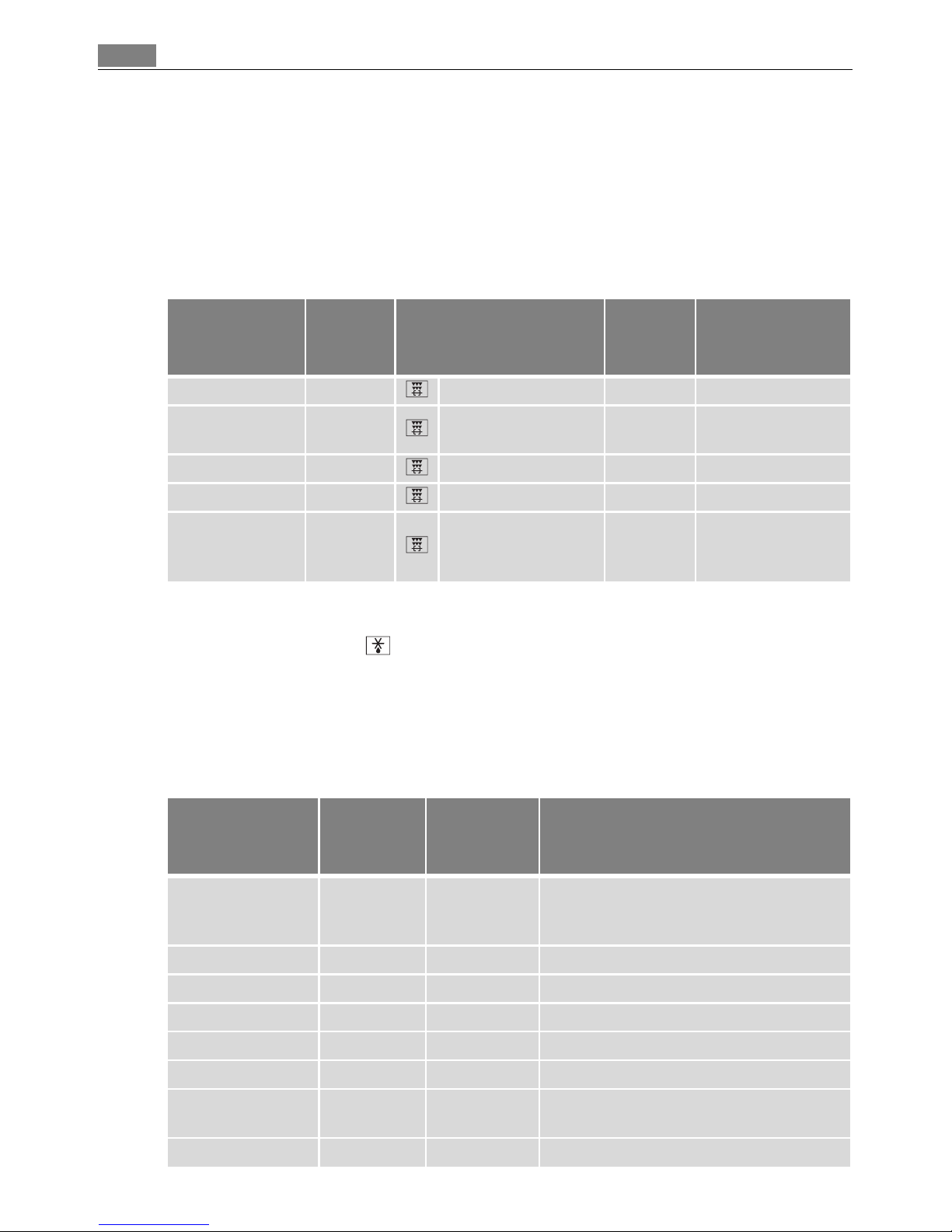
Grilling with the rotary spit
Defrosting
Oven function: Defrost (no temperature setting)
• Unwrap the food and place it on a plate on the oven shelf.
• Do not cover with a plate or bowl, as these can substantially lengthen the defrosting
time.
• For defrosting, place the shelf in the 1st oven level from the bottom.
Defrosting table
Dish
Quantity
kg
Function
Temperature °C/°F
Grilling time in
hours:mins.
(guideline)
1 chicken approx. 1 Dual grill + turnspit 240/460 1:00-1:10
2 chickens
approx. 1
each
Dual grill + turnspit 240/460 1:15-1:20
1 duck 1,5-2 Dual grill + turnspit 240/460 1:20-1:40
1 rolled pork joint 1 Dual grill + turnspit 240/460 1:45-2:15
Pork joint
(pre-cooked for
½ hr.)
1-1,3 Dual grill + turnspit 240/460 2:00-2:30
Dish
Defrosting
time
mins.
Further
defrosting
time (mins.)
Comments
Chicken, 1000 g 100-140 20-30
Place the chicken on an upturned saucer
placed on a large plate
Turn halfway through
Meat, 1000 g 100-140 20-30 Turn halfway through
Meat, 500 g 90-120 20-30 Turn halfway through
Trout, 150g 25-35 10-15 ---
Strawberries, 300g 30-40 10-20 ---
Butter, 250 g 30-40 10-15 ---
Cream, 2 x 200 g 80-100 10-15
Cream can also be whipped when still
slightly frozen in places
Gateau, 1400g 60 60 ---
Page 31
31Uses, Tables and Tips
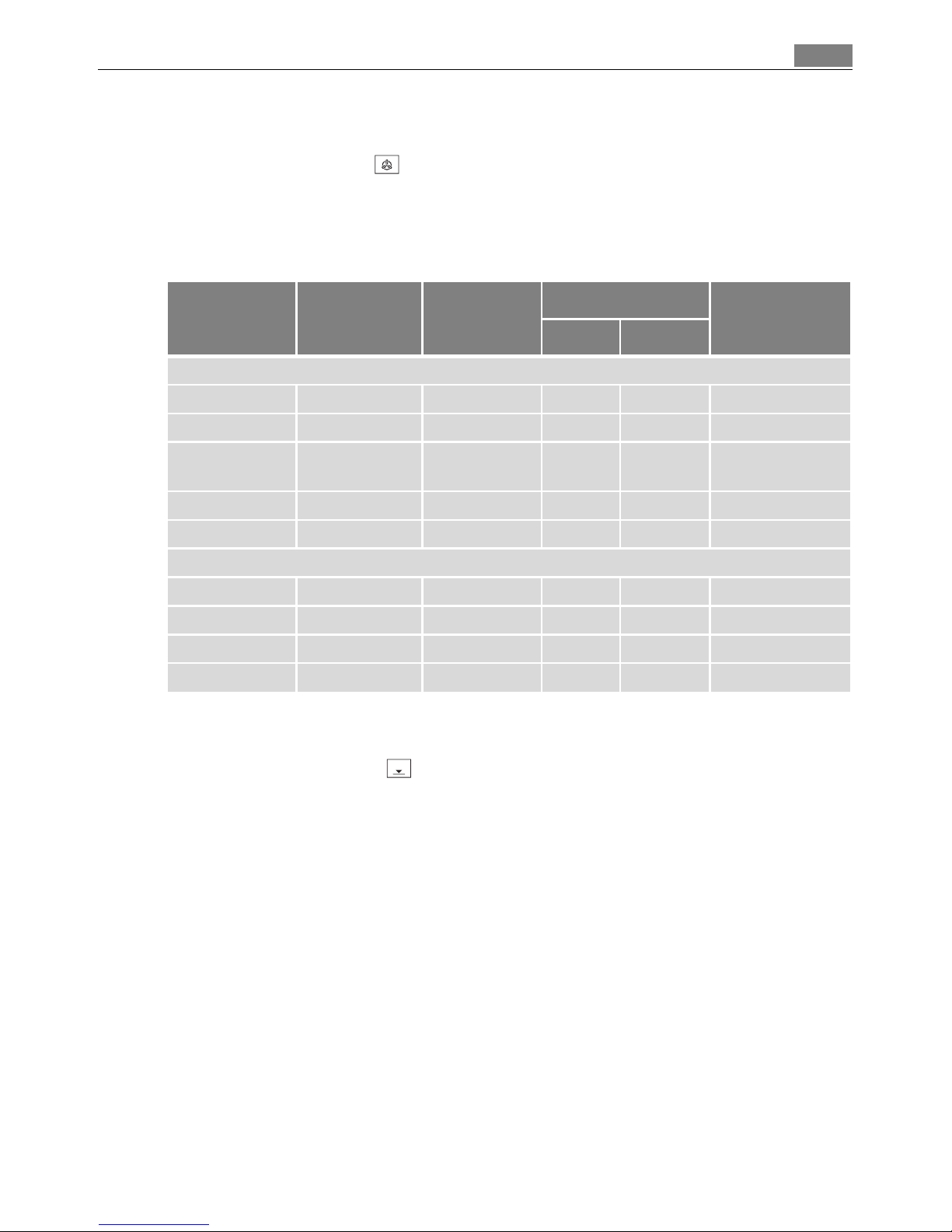
Drying
Oven function: True fan
• Use oven shelves covered with greaseproof paper or baking parchment.
• You get a better result if you switch the oven off halfway through the drying time,
open the door and leave the oven to cool down overnight.
• After this, finish drying the food to be dried.
Making preserves
Oven function: Base heat
• For preserving, use only commercially available preserve jars of the same size.
• Jars with twist-off or bayonet type lids and metal tins are not suitable.
• When making preserves, the first shelf position from the bottom is the one most
used.
• Use the shelf for making preserves. There is enough room on this for up to six 1-litre
preserving jars.
• The jars should all be filled to the same level and clamped shut.
• Place the jars on the baking tray in such a way that they are not touching each other.
• Pour approx. 1/2 litre of water into the baking tray so that sufficient moisture is pro-
duced in the oven.
• As soon as the liquid starts to pearl in the first jars (after about 35-60 minutes with
1 litre jars), switch the oven off or reduce the temperature to 100°C (see table).
Food to be
dried
Temperature in °CTemperature
in °F
Oven level
Time in hours
(Guideline)
1 level 2 levels
Vegetables
Beans 60-70 140-160 3 1 / 4 6-8
Peppers (strips) 60-70 140-160 3 1 / 4 5-6
Vegetables for
soup
60-70 140-160 3 1 / 4 5-6
Mushrooms 50-60 140-160 3 1 / 4 6-8
Herbs 40-50 140-160 3 1 / 4 2-3
Fruit
Plums 60-70 140-160 3 1 / 4 8-10
Apricots 60-70 140-160 3 1 / 4 8-10
Apple slices 60-70 140-160 3 1 / 4 6-8
Pears 60-70 140-160 3 1 / 4 6-9
Page 32
Cleaning and Care32
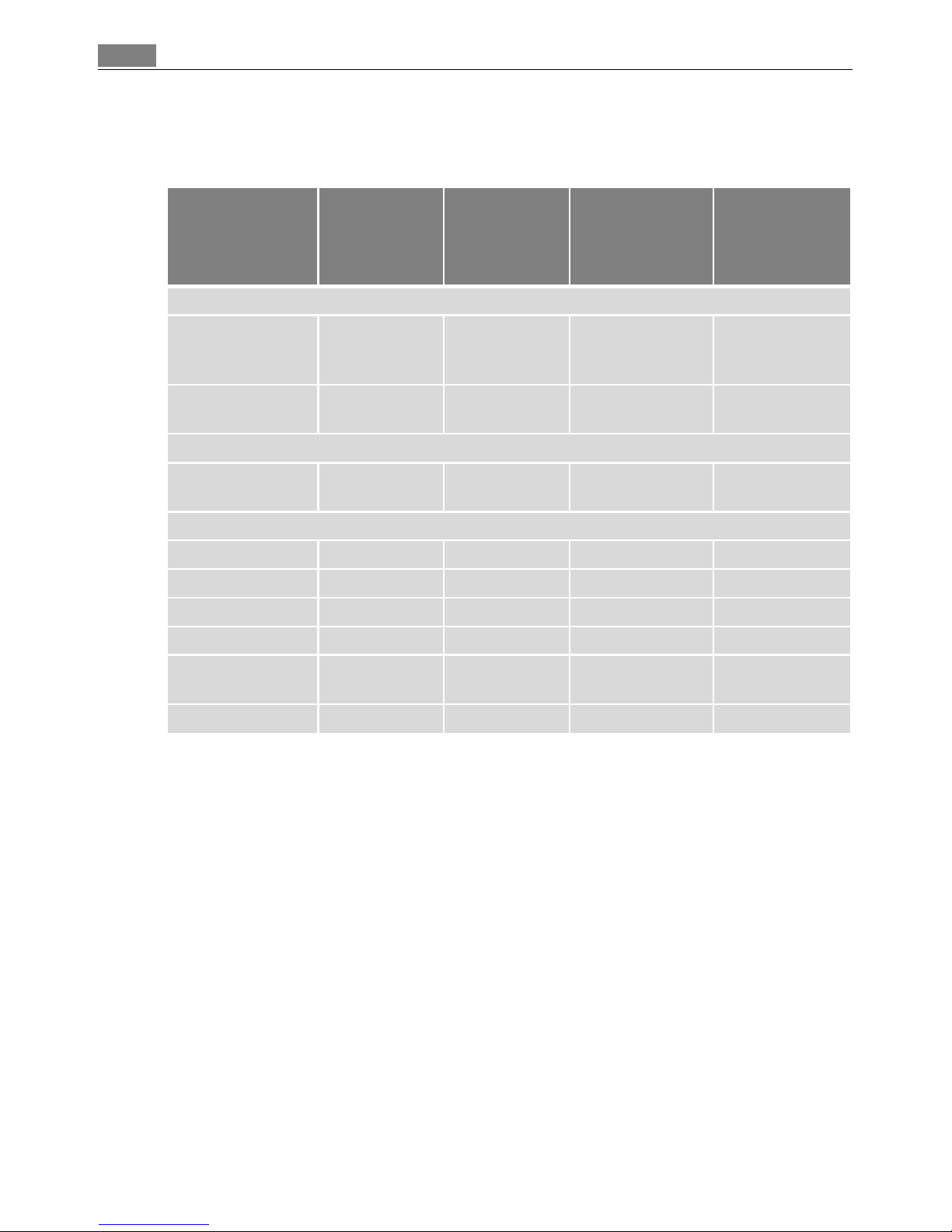
Preserves table
The times and temperatures for making preserves are for guidance only.
Cleaning and Care
1 Warning: First switch off the appliance and let it cool down before carrying out any
cleaning.
Warning: For safety reasons, do not clean the appliance with steam blasters or high-
pressure cleaners.
Attention: Do not use any corrosive cleaning fluids, sharp objects or stain removers.
Do not clean the glass oven door with abrasive fluids or metal scrapers, which could
scratch the surface. The glass could crack and shatter.
Outside of the appliance
• Wipe the front of the appliance with a soft cloth and a solution of hot water and
washing up liquid.
• For metal fronts, use normal commercially available cleaning agents.
• Please do not use scouring agents and abrasive sponges.
Preserve
Temperature
in°C
Temperature
in°F
Cooking time
until simmering
in mins.
Continue to
cook at 100°C /
220 °F
in mins.
Soft fruit
Strawberries, blueberries, raspberries,
ripe gooseberries
160-170 320-340 35-45 ---
Unripe gooseberries
160-170 320-340 35-45 10-15
Stone fruit
Pears, quinces,
plums
160-170 320-340 35-45 10-15
Vegetables
Carrots
1)
1) Leave standing in oven when switched off
160-170 320-340 50-60 5-10
Mushrooms
1)
160-170 320-340 40-60 10-15
Cucumbers 160-170 320-340 50-60 ---
Mixed pickles 160-170 320-340 50-60 15
Kohlrabi, peas,
asparagus
160-170 320-340 50-60 15-20
Beans 160-170 320-340 50-60 ---
Page 33

33Cleaning and Care
Oven interior
1 Warning: For the purpose of cleaning the oven must be switched off and have cooled
down.
3 Clean the appliance after each use. In this way, residue is easier to clean off and does
not have the chance to burn on. Residue that is not removed may cause changes to the
surface colour when Pyroluxe is used.
1. The oven light switches on automatically when the oven door is opened.
2. After every use, wipe the oven with a solution of washing-up liquid and allow to dry.
3 In the event of stubborn dirt, clean using Pyroluxe.
1 Important: If you are using an oven spray, be sure to follow the manufacturer´s instruc-
tions.
Accessories
Wash all slide-in units (shelf unit, baking tray, shelf support rails etc.) after each use and
dry well. Soak briefly to make them easier to clean.
Fat Filter
1. Clean the fat filter in hot water and washing up liquid or in the dishwasher.
2. Badly burned on soiling can be removed by boiling the filter in a little water to which 2-
3 tablespoonsful of dishwasher cleaner has been added.
Pyrolytic cleaning
1 Warning: The oven gets extremely hot during this process. Young children must be kept
away.
1 Important! Before carrying out pyrolytic cleaning, all removable parts including the side
rails, must be removed from the oven.
3 If you use the oven shelf runners that are available as special accessories, these must
be removed before pyrolytic cleaning.
If the side rails or oven shelf runners are still in place, ‘C1’ appears in the clock display.
The pyrolytic cleaning process then cannot be started due to a safety cut-out that protects the side rails/oven shelf runners.
Pyrolytic cleaning
1. First remove the worst of the residue manually.
2. Select oven function Pyroluxe .
– “3:15” appears in the display,
– Cook time flashes for approx. 5 seconds.
Pyrolytic cleaning then starts.
3 The Light does not work.
When a pre-set temperature is reached, the door is locked.
The bars of the heat indicator light up, until the door is unlocked again.
Page 34
Cleaning and Care34
Changing the length of time for the pyrolytic cleaning
1. Proceed as described in the section “Pyrolytic cleaning”.
2. As long as Duration is flashing, select the desired length for the process using or
:
“ / 2:15” or “3:15”
Duration flashes for approx. 5 seconds.
Pyrolytic cleaning then starts.
3 If Duration is no longer flashing, press the Selection button again and then per-
form the setting procedure.
Changing the switch-off time for the pyrolytic cleaning
The switch-off timecan be delayed using the clock function End (within 2 minutes
of the pyrolytic cleaning starting).
When the different processes for pyrolytic cleaning are set:
P2 - 2:15 = Pyroluxe easy: For a light degree of soiling,
P1 - 3:15 = Pyroluxe intensive: For a high degree of soiling.
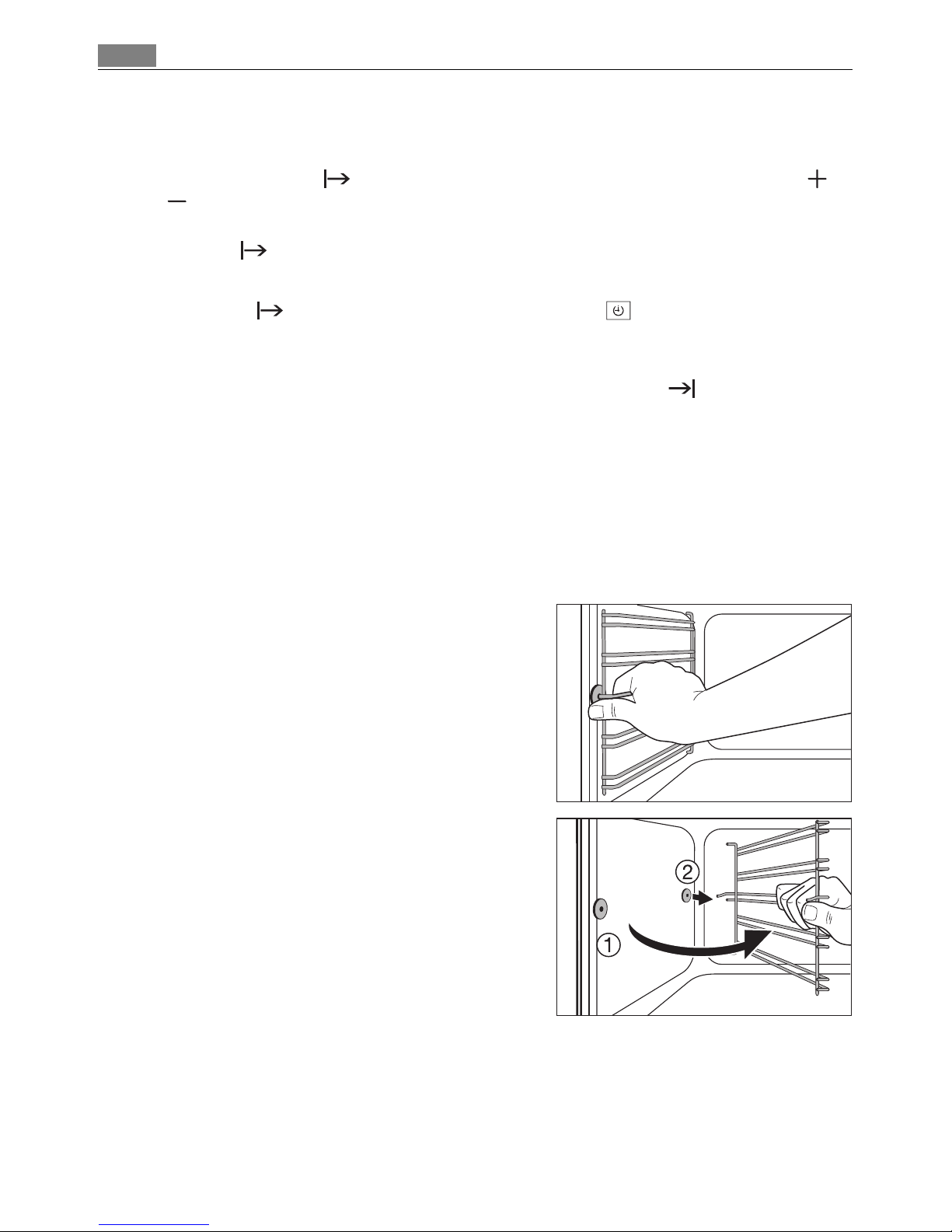
Shelf Support Rails
The shelf support rails on the left and right hand sides of the oven can be removed for
cleaning the side walls.
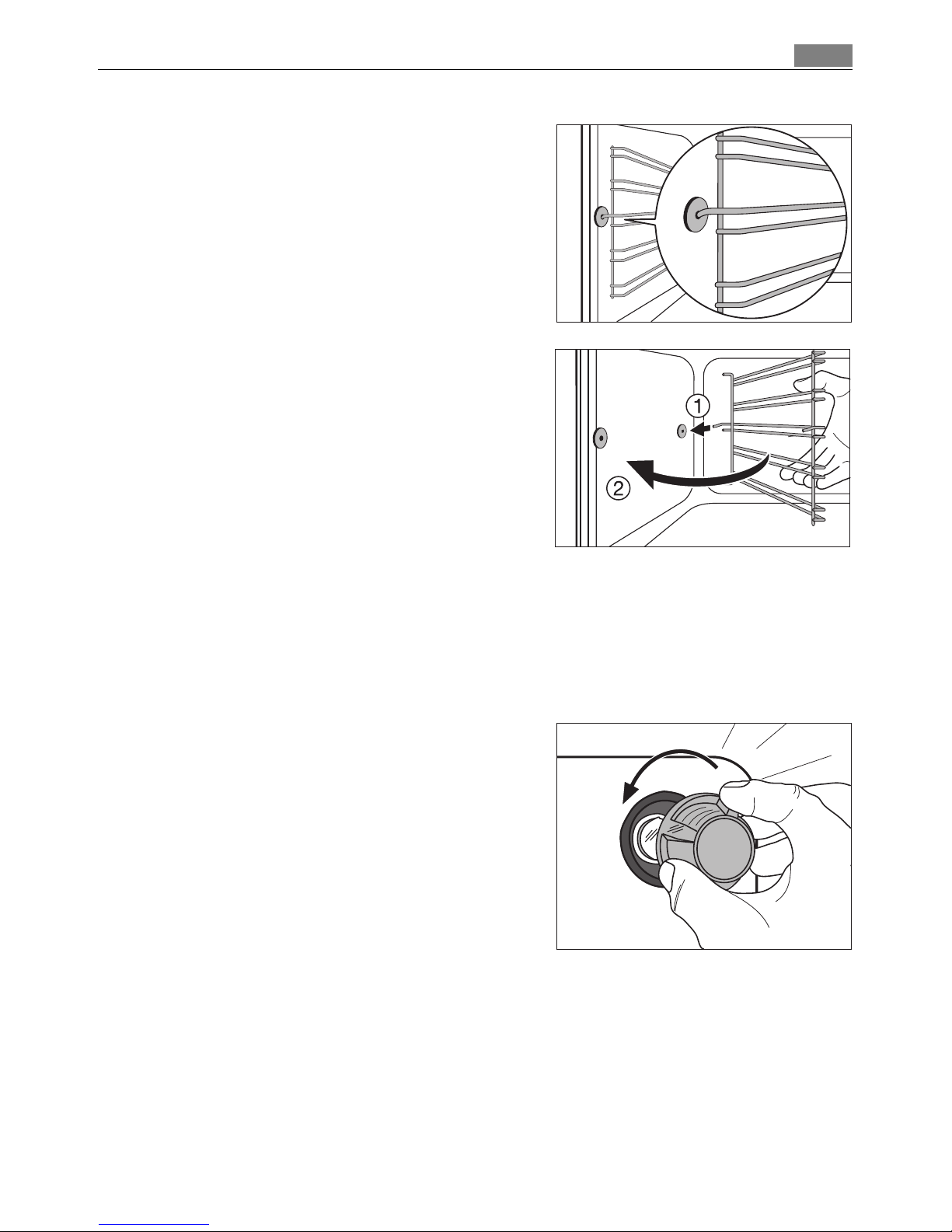
Removing the shelf support rails
First pull the front of the rail away from the
oven wall (1) and then unhitch at the back (2).
Page 35
35Cleaning and Care
Fitting the shelf support rails
3 Important! The rounded ends of the guide rails
must be pointing forwards!
To re-insert, first hook the rail into place at the
back (1) and then insert the front and press into
place (2).
Oven lighting
1 Warning: There is a danger of electric shock! Prior to changing the oven light bulb:
– Switch off the oven!
– Remove the fuses in the fuse box or switch off the circuit breaker.
3 Place a cloth on the oven floor to protect the oven light and glass cover.
Replacing the oven light bulb/cleaning the
glass cover
1. Remove the glass cover by turning it anti-
clockwise and then clean it.
2. If necessary:
Replace bulb with a 40 watt, 230 V, 300 °C
heat-resistant oven light bulb.
3. Refit the glass cover.
Page 36
Cleaning and Care36
Oven door
For easier cleaning of the oven interior the oven door of your appliance can be taken off
its hinges.
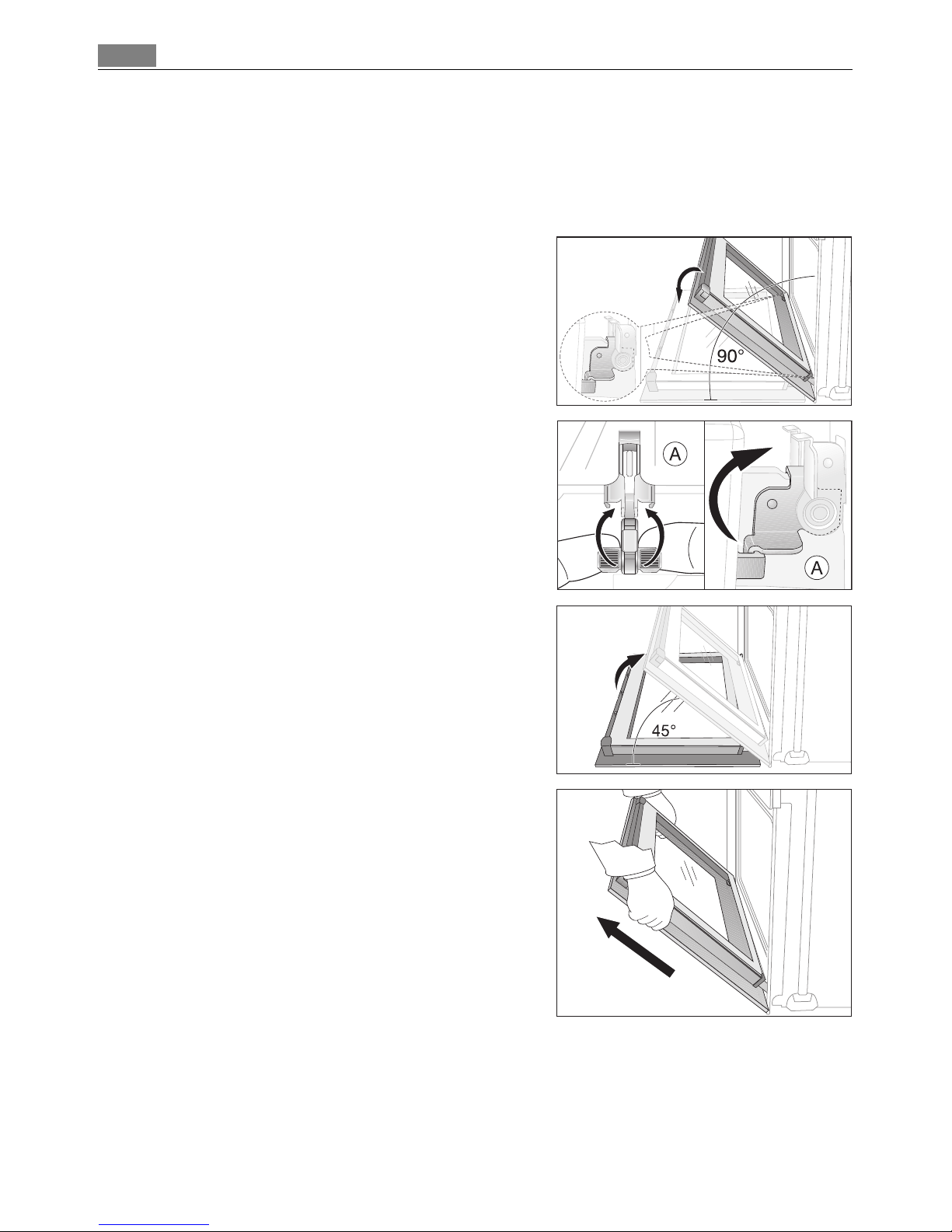
Removing the oven door from its hinges
1. Open the oven door as far as it will go.
2. Undo the clamping levers (A) on both door
hinges fully.
3. Close the oven door as far as the first position
(approx. 45°).
4. Take hold of the oven door with a hand on each
side and pull it away from the oven at an upwards angle (Take care: It is heavy).
3 Lay the oven door with the outer side facing
downwards on something soft and level, for example, a blanket in order to prevent scratches.
Page 37
37Cleaning and Care
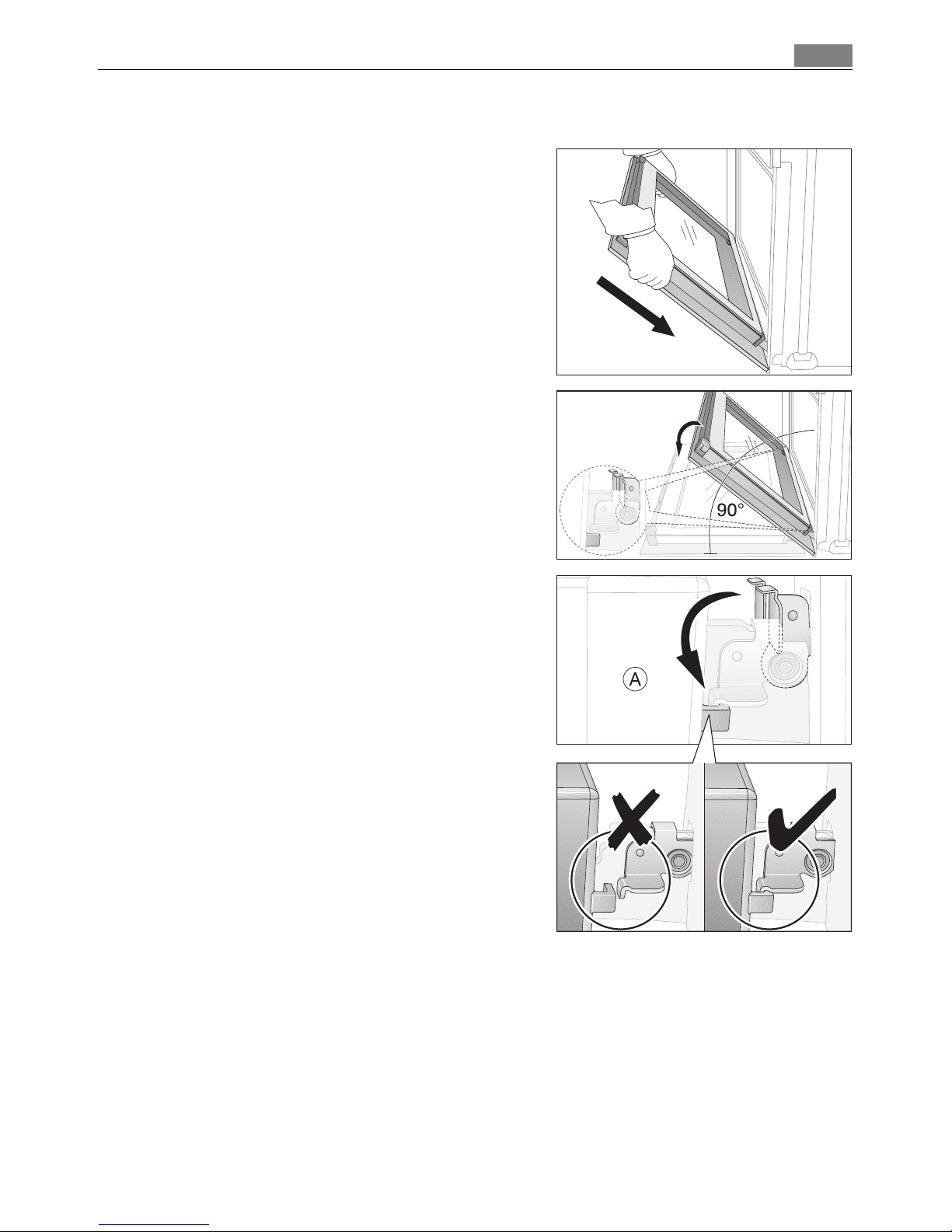
Hanging the oven door back on its hinges
1. From the handle side take hold of the oven
door with a hand on each side and hold at an
angle of approx. 45°.
Position the recesses on the bottom of the oven
door on the hinges on the oven.
Let the door slide down as far as it will go.
2. Open the oven door as far as it will go.
3. Fold up the clamping levers (A) on both door
hinges back into their original positions.
4. Close the oven door.
Page 38
Cleaning and Care38
Oven door glass
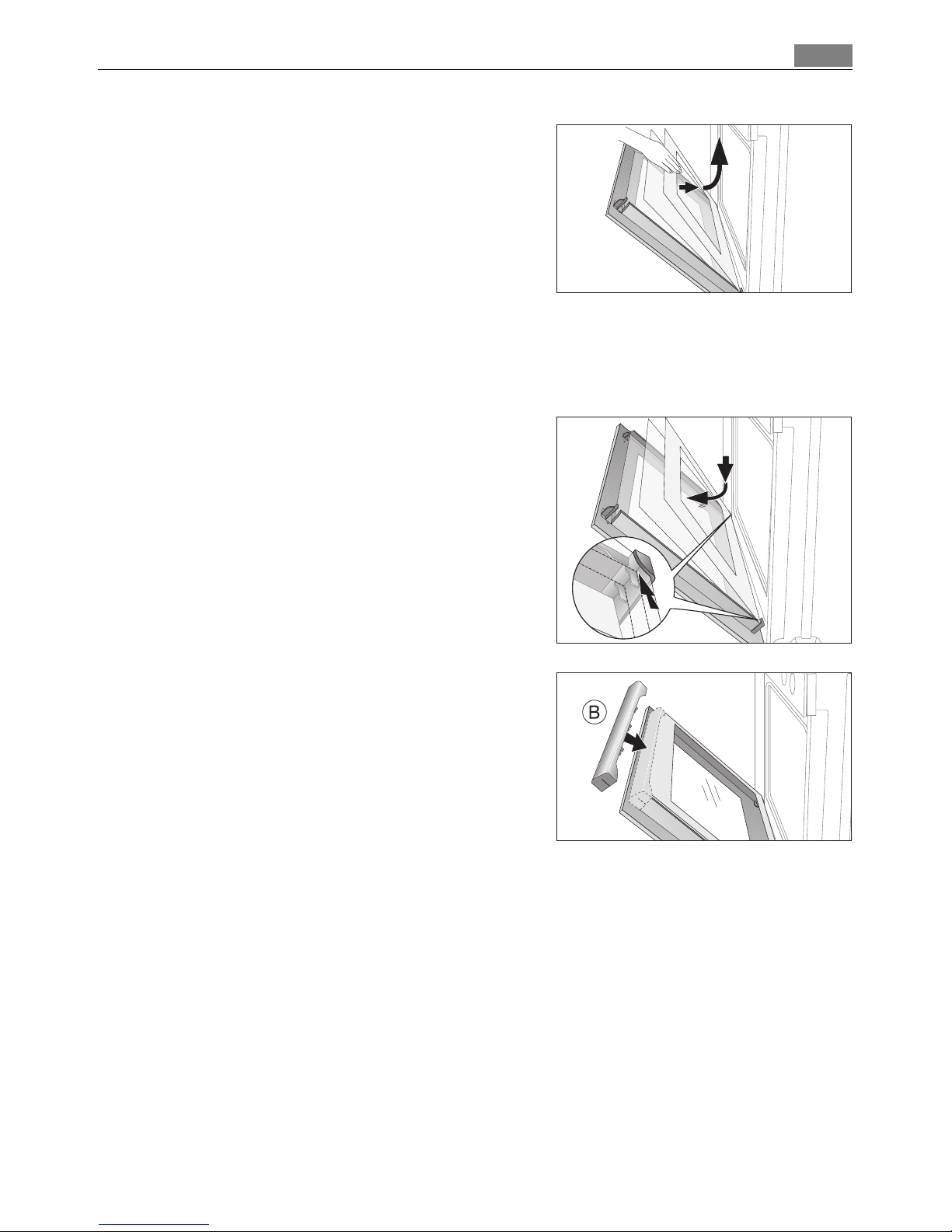
The oven door is fitted with four panels of glass mounted one behind the other. The inner panels can be removed for cleaning.
1 Important Rough handling, especially around the edges of the front panel, can cause
the glass to break.
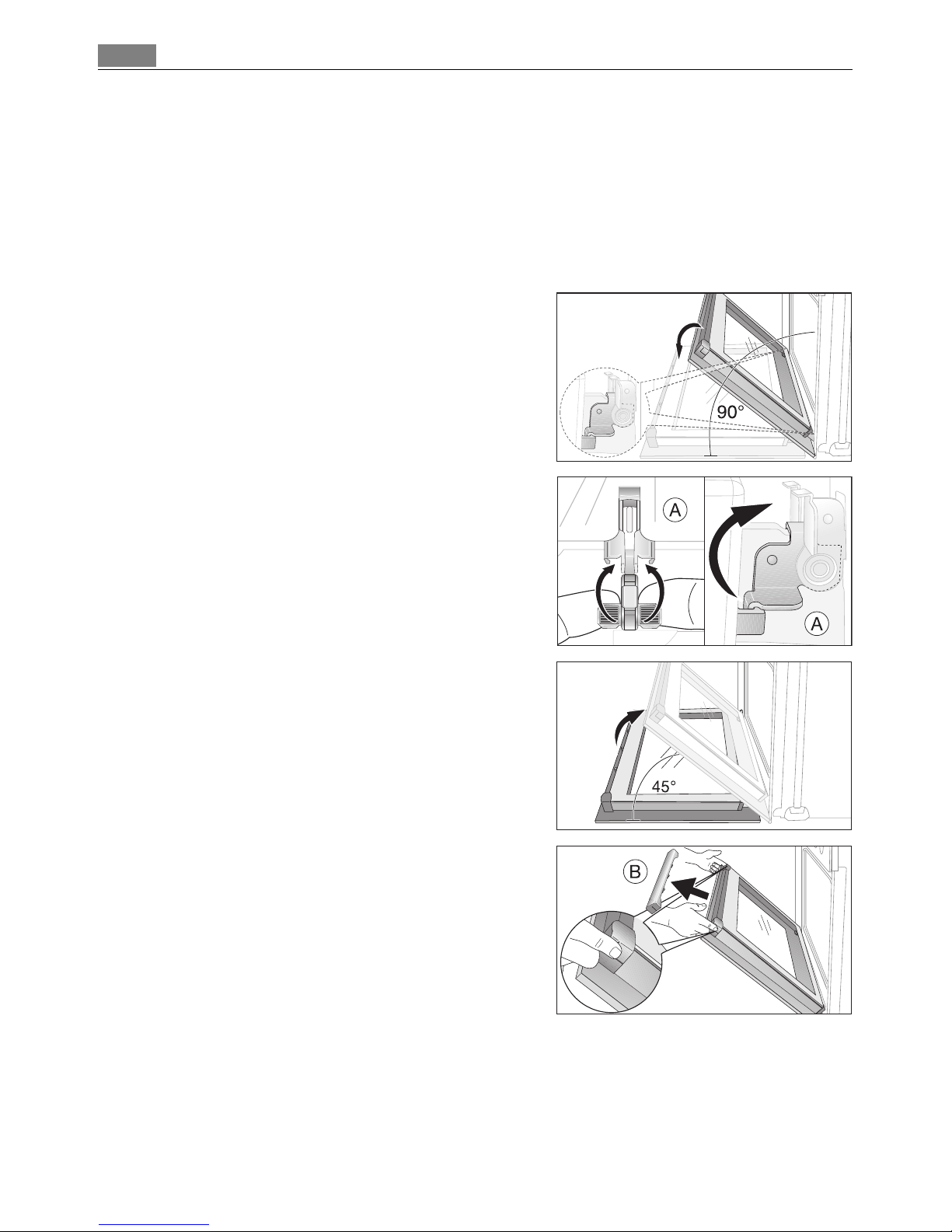
Removing door glass panels
1. Open the oven door as far as it will go.
2. Undo the clamping levers (A) on both door
hinges fully.
3. Close the oven door as far as the first position
(approx. 45°).
4. Take hold of the door trim (B) on the upper
edge of the door at both sides and press inwards to release the clip seal. Then remove the
door trim by pulling it upwards.
Page 39
39Cleaning and Care
5. Take hold of the door glass panels on their upper edge one after the other and take them out
of the guide by pulling them upwards.
Cleaning the door glass panels
Clean the door glass panels thoroughly with a solution of water and washing up liquid.
Then dry them carefully.
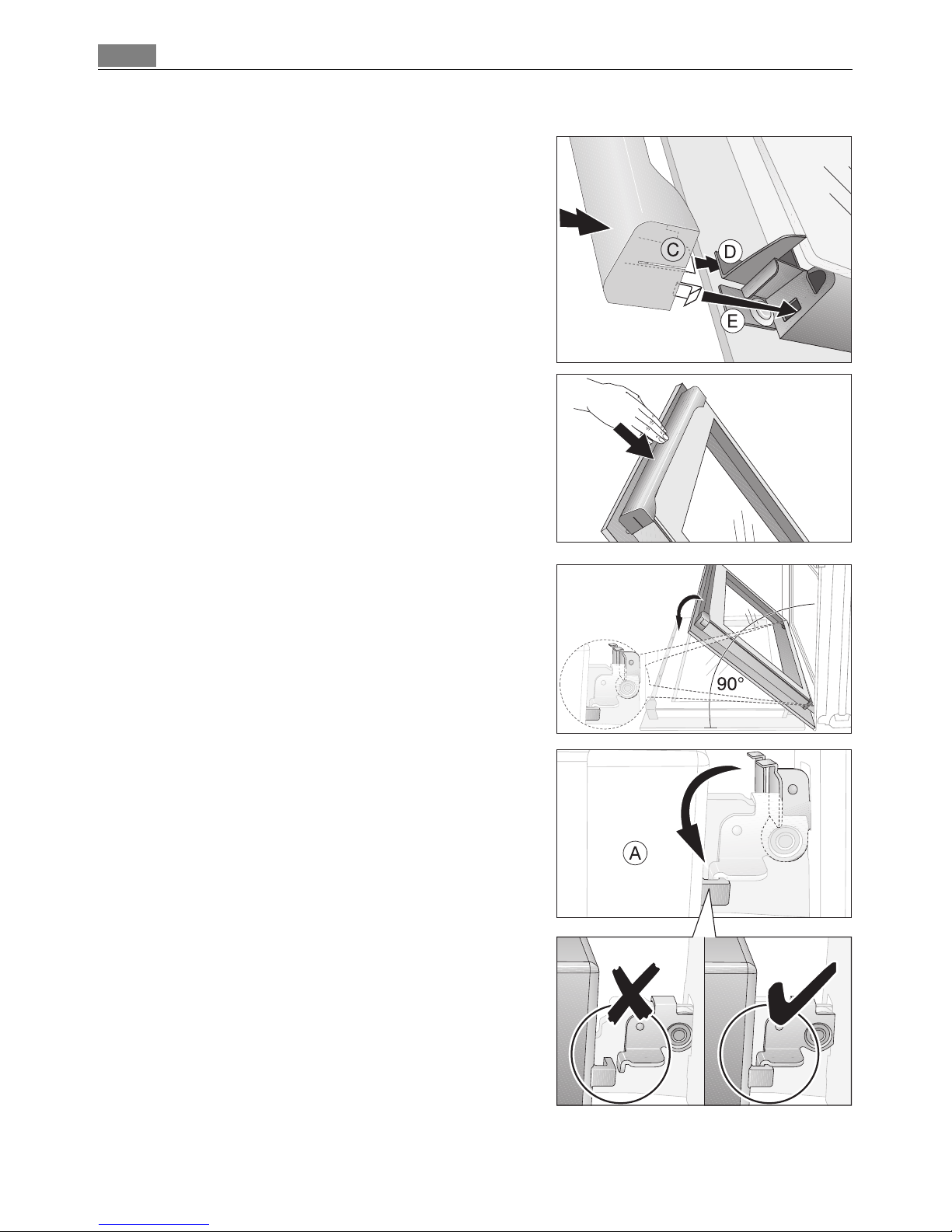
Putting the door glass panels back.
1. From above insert the door glass panels one af-
ter the other into the door profile at the bottom edge of the door at an angle and lower
them.
3 The two smaller panels first, then the larger
panel.
2. Take hold of the door trim (B) at each side, position it on the inside edge of the door and plug
the door trim (B) into the upper edge of the
door.
Page 40
Cleaning and Care40
3 On the open side of the door trim (B) there is a
guide bar (C). This must be pushed between the
outer door panel and the guide corner (D).
The clip seal (E) must be snapped in.
3. Open the oven door as far as it will go.
4. Fold up the clamping levers (A) on both door
hinges back into their original positions.
5. Close the oven door.
Page 41

41What to do if …
What to do if …
If you are unable to remedy the problem by following the above suggestions,
please contact your local Service Force Centre.
1 Warning! Repairs to the appliance are only to be carried out by qualified service engi-
neers. Considerable danger to the user may result from improper repairs.
3 If the appliance has been operated incorrectly, the engineer's visit will be chargeable,
even during the warranty period.
3 Advice on cookers with metal fronts:
Because of the cold surface at the front of the cooker, opening the oven door during (or
just after) baking or roasting may cause the glass to steam up.
Problem Possible cause Remedy
The oven is not heating up The oven has not been
switched on
Switch the oven on.
The clock has not been set Set the clock.
The required settings have not
been set.
Check the settings.
The oven’s automatic cut-out
has been triggered.
See Automatic cut-out
The fuse in the house’s electrical wiring (fuse box) has been
tripped.
Check the fuse. If the fuses trip
repeatedly, please call a qualified
electrician.
The oven lighting is not operating
The oven light is broken. Change the oven light bulb.
Pyroluxe is not working
(“C1” appears in the clock
display)
Side rails/oven shelf runners
have not been removed
Remove side rails/oven shelf
runners
F2 appears in the clock display
Door not properly closed or
door lock defective
Close door properly;
Turn the appliance off and on
again via the house fuse or the
safety switch in the fuse box;
If displayed again, please contact
the Customer Care Department
A fault code that is not listed above appears in the
clock display
Electronic fault Switch the appliance off and on
again via the house fuse or the
safety switch in the fuse box.
If it is displayed again, please
contact the Customer Care Department
The rotary spit does not
turn.
The wrong oven function has
been set.
Select the oven function with
rotary spin.
The rotary spit is not inserted
correctly.
Push the rotary spit in as far as
the stop.
Page 42

Technical Data42
Technical Data
Oven Interior Dimensions
Regulations, Standards, Directives
This appliance meets the following standards:
• IEC 60 335-1 and IEC 60 335-2-6
relating to the safety of electric appliances for household use and similar
purposes and
• IEC 60350
relating to the operating features of household electric cookers.
Height x Width x Depth 31,0 cm x 40,5 cm x 41,0 cm
Capacity (usable capacity) 51 l
Voltage of mains supply 208V 240V
Oven mode:
Hot Air
Rated Power
Measured Power
Temperature rise
2380 Watt
155 K
3160 Watt
155 K
Oven mode:
Top Bottom
Rated Power
Measured Power
Temperature rise
1670 Watt
180 K
2200 Watt
180 K
Page 43
43Installation Instructions
Installation Instructions
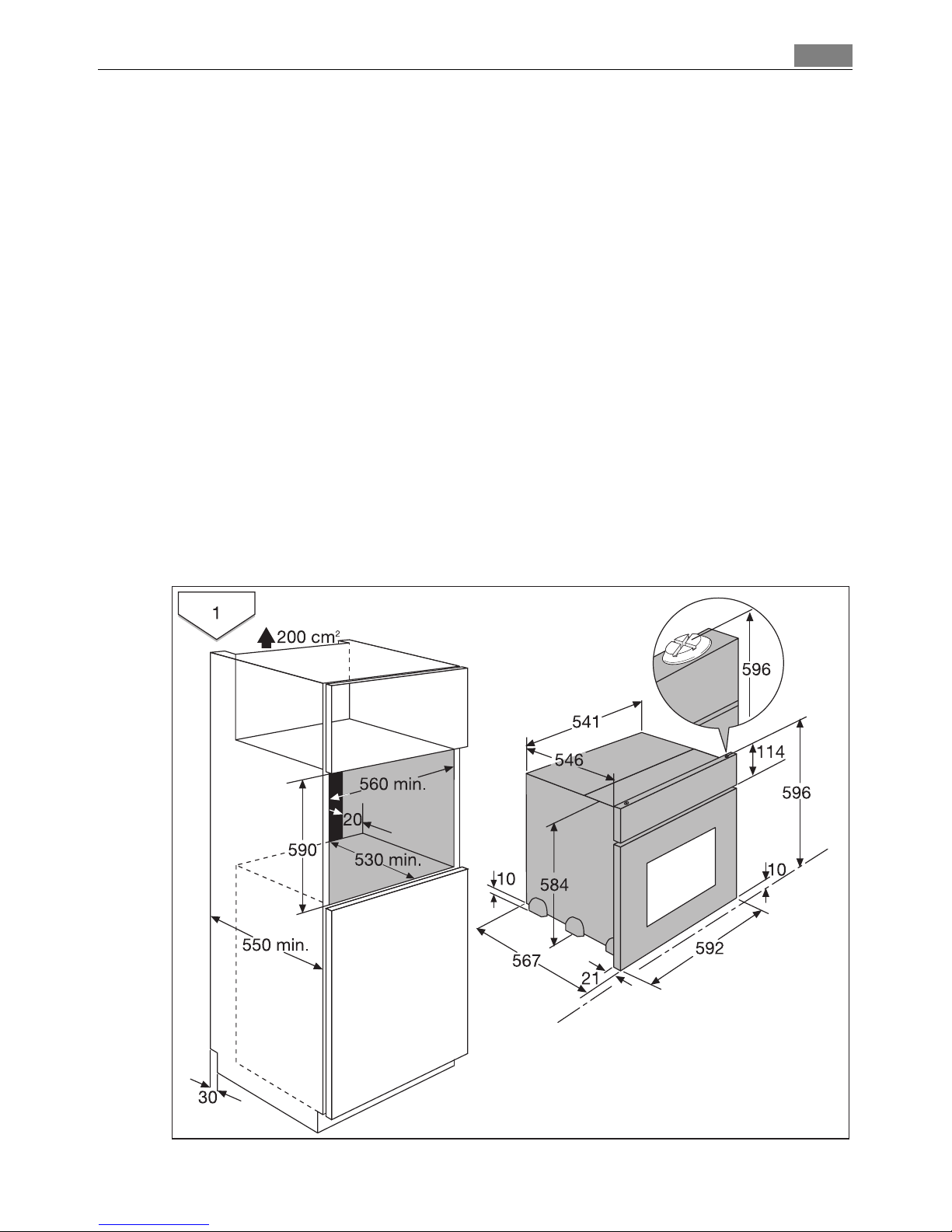
1 Attention: The new appliance may only be installed and connected by a registered ex-
pert.
Please comply with this. If you do not, any damage resulting is not covered by the warranty.
1 Safety information for the installer
• The electrical installation is to be set up so that the appliance can be isolated from the
mains with a minimum 3mm all-pole contact separation.
Suitable separation devices include e.g. cut-outs, fuses (screw fuses are to be taken
out of the holder), RCD’s and contactors.
• Anti-shock protection must be provided by the installation.
• The built-in unit must meet the stability requirements of DIN 68930.
The use of thermal insulation bars is not permitted in cookers with Pyroluxe, if the recess
has a back wall and a solid shelf.
However with a shelf shortened by at least 20 mm and ventilation in the plinth of the
same diameter, it becomes possible to build-in.
Page 44
Installation Instructions44
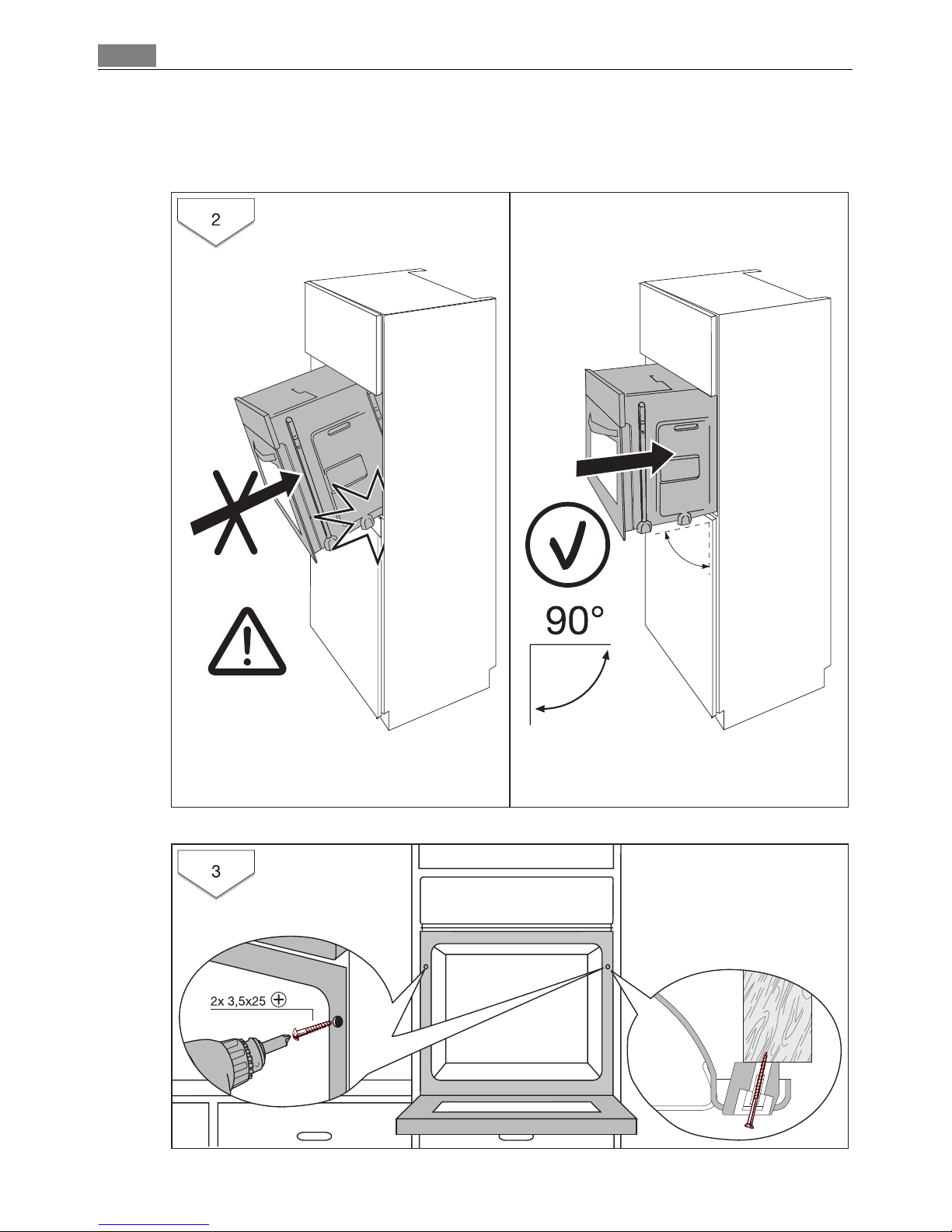
Connect the Armour Cable into the junction box, and connect the wires according to
National and Local electrical codes.
Page 45

45Guarantee/Customer Service
Guarantee/Customer Service
EURO-LINE APPLIANCES
LENGTH OF WARRANTY: EURO-LINE WILL PAY FOR:
TWO YEAR FULL WARRANTY
from original date of purchase, including parts
and labour, to the first purchaser of this appliance
Replacement parts and/or labour to repair defects in materials or workmanship. Service
must be provided by an authorized Euro-Line
company (unless advised otherwise).
THIS GUARANTEE DOES NOT COVER COMMERCIAL USE.
The name Euro-Line Appliances, for service matters, incorporates work performed by authorized
service agents or service companies.
EXCEPTIONS:
EURO-LINE APPLIANCES WILL NOT PAY FOR THE FOLLOWING SERVICE CALLS:
1. To install or correct the installation of an appliance
2. To instruct the use of an appliance.
3. To replace house fuses, re-set circuit breakers or correct house wiring.
4. To correct house plumbing.
5. To clean drains, filters or garbage disposers.
6. To repair an appliance if it fails due to misuse or abuse.
EURO-LINE APPLIANCES WILL NOT PAY WHEN THE FOLLOWING OCCURS:
1. Damage resulting from fires, acts of God, alteration, improper installation, or installation not
in accordance with local building codes.
2. Pickup or delivery of major appliances requiring service. The appliances are designed to be repaired in the home. However, Euro-Line will not be responsible for travelling and labour costs
if the customer lives in excess of 50 km/30 miles, or if the travel time is in excess of 30 minutes from the nearest service center. Any excess to this will not be covered by the warranty.
In no event, will Euro-Line be responsible for incidental or consequential damages.
For warranty service and parts, contact EURO-PARTS. Service will be provided during normal
business hours. Should you have a service problem that is not resolved locally, contact:
For Service and Parts Contact:
EURO-PARTS, USA EURO-PARTS, CANADA EURO-LINE APPLIANCES
Tel: 1-800-561-4614 Tel: 1-800-678-8352 1-800-421-6332
Fax: 1-519-528-5001 Fax: 1-519-528 5001 Tel. Direct: 1-905-829-3980
Fax: 1-905-829-3985
Page 46

Guarantee/Customer Service46
User Instructions & Installation Manual
Service & Repair
To save you time and money please have the following information ready in case you
have to call for service:
• Name of the dealer from whom you purchased the appliance.
_______________________________________________
• Model number (shown on the rating plate)
_______________________________________________
• Serial number (shown on the rating plate)
_______________________________________________
• Date of purchase.
_______________________________________________
You should also retain the original purchase receipt to support any claim made under
the warranty. (We suggest you staple the receipt to this page).
If service is required, contact the Service Center:
DISTRIBUTED BY:
EURO-PARTS, CANADA EURO-PARTS, USA
Tel: 1 800 678 8352
Tel: 1-800-561-4614
Fax: 1-519-528-500 Fax: 1-519-528-5001
EURO-LINE APPLIANCES
2150 WINSTON PARK DRIVE, UNIT #20
OAKVILLE, ONTARIO
CANADA L6H 5V1
1-800-421-6332
Tel: 905-829-3980
Fax: 905-829-3985
www.euro-line-appliances.com
Page 47
47Service
Service
In the event of technical faults, please first check whether you can remedy the problem
yourself with the help of the operating instructions (section “What to do if…”).
If you were not able to remedy the problem yourself, please contact the Customer Care
Department or one of our service partners.
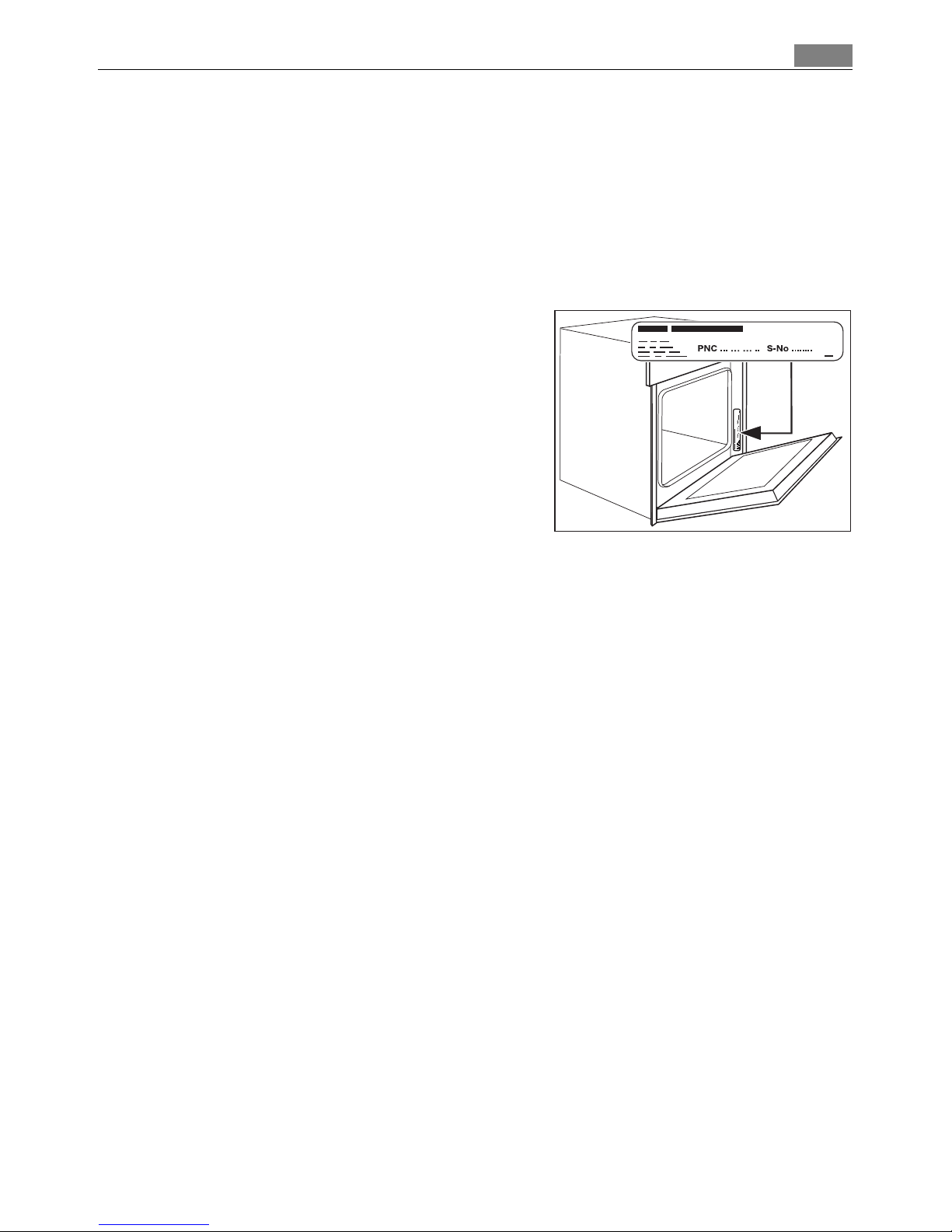
In order to be able to assist you quickly, we require the following information:
– Model description
– Product number (PNC)
– Serial number (S No.)
(for numbers see rating plate)
– Type of fault
– Any error messages displayed by the appliance
So that you have the necessary reference numbers from your appliance at hand, we recommend that you write them in here:
Model description: .....................................
PNC: .....................................
S No: .....................................
Page 48

www.electrolux.com
822 720 053-P-111108-04 Subject to change without notice
 Loading...