

Page 1
electrohome.com
QUICK START GUIDE / GUIDE DE DÉMARRAGE RAPIDE
1
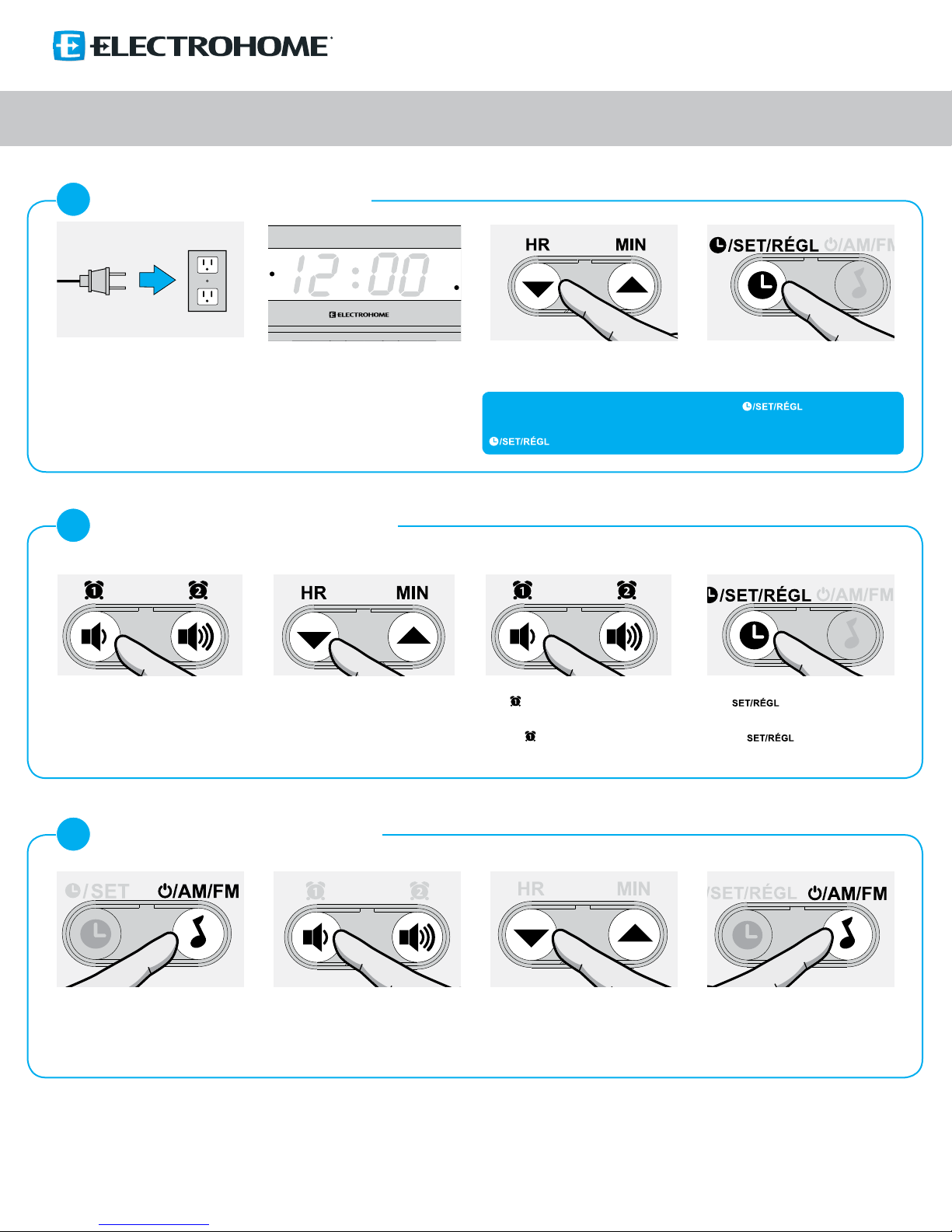
SETTING THE TIME / RÉGLER L’HEURE
Time will ash
Temps clignotera
2
SETTING THE ALARM / RÉGLER L’ALARME
*Ensure radio is OFF / Assurez-vous que la radio est ÉTEINTE
EAAC200/ EAAC201
Set hour (HR) and minutes (MIN)
Réglez l’heure (HR) et les minutes (MIN)
Note: Time must be ashing to make changes. Press & hold if not ashing.
Remarque: Temps doit clignoter pour faire des changements. Appuyez et maintenir
s’il ne clignote pas.
Press to SET
Appuyez pour RÉGLER
Press and hold - 2 seconds.
Alarm time will ash
Appuyez et maintenir - 2 secondes.
L’heure d’alarme clignotera
3
PLAYING THE RADIO / JOUER LA RADIO
Press once to power ON. Press and hold to
toggle between AM or FM
Appuyez une fois pour ALLUMER. Appuyez et
maintenez enfoncé pour basculer entre AM ou FM
Increase hour (HR) and minutes (MIN)
Augmente l’heure (HR) et les minutes (MIN)
Volume increase/decrease
Baisse/augmente le volume
For additional product information, please consult the manual at / Pour plus de renseignements sur le produit, consultez le manuel à
to cycle through wake options:
Press
Buzzer > Radio > OFF
Appuyez pour faire déler les options de
réveil: Buzzer > Radio > OFF
Select radio stations (hold to scan)
Sélectionnez stations de radio (tenir à
numériser)
electrohome.com/support
Press or wait 10 seconds to save
settings.
Appuyez ou attendez 10
secondes pour sauvegarder votre réglage.
Press once to power OFF
Appuyez une fois pour ÉTEINDRE
Page 2
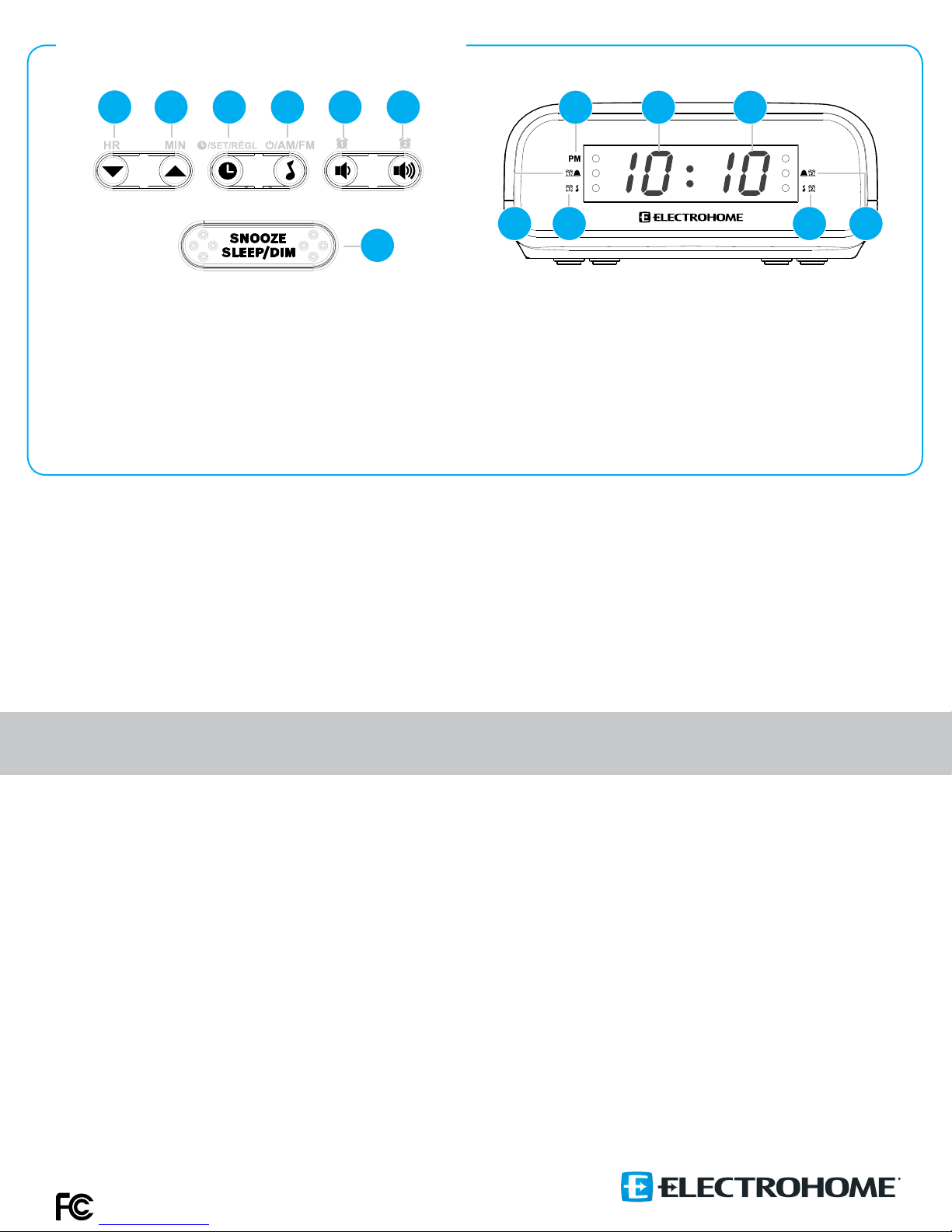
PRODUCT INFORMATION / INFORMATIONS DU PRODUIT
1 2 3 4 5 6
7
1. Set the Hour; Decreases radio frequency / Règle l’heure; diminue la radiofréquence
2. Set the Minutes; Increases radio frequency / Règle les minutes; augmente la radiofréquence
3. Change the time or Preset radio stations / Change le temps ou prérègle les stations de radio
4. Turn music on/o or select AM/FM radio / allume/éteint la musique ou choix de radio AM/FM
5. Set alarm 1 ; Decrease volume / Règle alarme 1 ; baisse le volume
6. Set alarm 2 ; Increase volume / Règle alarme 2 ; augmente le volume
7. Pauses the alarm; Sets SLEEP timer; Increases or decreases the brightness of the LED display/
Interrompt l’alarme; règle la minuterie; augmente ou diminue la luminosité de l’écran DEL
Do not return this product to the store!
Contact Customer Support anytime for assistance.
1 2 3
4 5 76
1. PM
2. HOUR - Displays the hours / HEURE - Ache l’heure
3. MINUTE - Displays the minutes / MINUTE - Ache les minutes
4. Buzzer Alarm 1 / Sonnerie Alarme 1
5. Radio Alarm 1 / Radio Alarme 1
6. Radio Alarm 2 / Radio Alarme 2
7. Buzzer Alarm 2 / Sonnerie Alarme 2
For additional product information, please consult the manual at / Pour plus de renseignements sur le produit,
consultez le manuel à www.electrohome.com/support
Ne retournez pas ce produit au magasin!
Contactez le soutien à la clientèle n’importe quand pour de l’aide.
Product warranty information
We take quality very seriously. This is why all of our ELECTROHOME®
products come with a one-year warranty from the original purchase date
against defects in workmanship and materials. If you have warranty or
support issues please contact us using the following method:
Support & Online live web chat / Soutien & Clavardage en ligne - electrohome.com/support
This device complies with part 15 of the FCC Rules. Operation is subject to the following
two conditions:
(1) This device may not cause harmful interference.
(2) This device must accept any interference received, including interference that may cause
undesired operation.
FCC WARNING
This equipment has been tested and found to comply with the limits for a Class B digital device,
pursuant to Part 15 of the FCC Rules. These limits are designed to provide reasonable protection
against harmful interference in a residential installation.
This equipment generates, uses and can radiate radio frequency energy and, if not installed
and used in accordance with the instructions, may cause harmful interference to radio
communications. However, there is no guarantee that interference will not occur in a particular
installation. If this equipment does cause harmful interference to radio or television reception,
which can be determined by turning the equipment o and on, the user is encouraged to try to
correct the interference by one or more of the following measures:
• Reorient or relocate the receiving antenna.
• Increase the separation between the equipment and the receiver.
• Connect the equipment into an outlet dierent from that to which the receiver is connected.
• Consult the dealer or an experienced radio/TV technician for help.
Informations de la garantie du produit
Nous prenons la qualité très sérieusement. C’est pourquoi tous nos produits
ELECTROHOME® ont une garantie d’un an à partir de la date originale
d’achat contre les défauts de fabrication et de matériaux. Si vous avez des
questions concernant la garantie ou le soutien, veuillez nous contacter en
utilisant la méthode suivante:
IC STATEMENT / DÉCLA RATION IC:
This Class B digital apparatus complies with ICES-003.
Cet appareil numérique de la classe B est conforme à la norme NMB-003 du Canada.
This device complies with Industry Canada licence-exempt RSS 210 standard(s). Operation
is subject to the following two conditions:
(1) this device may not cause interference, and
(2) this device must accept any interference, including interference that may cause
undesired operation of the device.
Le présent appareil est conforme aux CNR 210 d’Industrie Canada applicables aux appareils
radio exempts de licence. L’exploitation est autorisée aux deux conditions suivantes :
(1) l’appareil ne doit pas produire de brouillage, et
(2) l’utilisateur de l’appareil doit accepter tout brouillage radioélectrique subi, même si le
brouillage est susceptible d’en compromettre le fonctionnement.
Changes or modications not expressly approved by the party responsible for compliance
could void the user’s authority to operate the equipment.
Les changements ou modications non expressément approuvés par la partie responsable
de la conformité pourraient annuler l’autorité de l’utilisateur à utiliser l’équipement.
electrohome.com
 Loading...