

Page 1

Pocket ReceiverPocket Receiver
&
USB Line-in2in1
Transmitter
USB Line-in 2 in 1
Transmitter
2.4GHz Wireless Digital Audio
Before operating the units, please read this manual thoroughly.
Page 2
CAUTION
RISK OF ELECTRONIC
SHOCK DO NOT OPEN
CAUTION:
DO NOT REMOVE THE COVER FOR REDUCING
THE RISK OF ELECTRIC SHOCK.
NO USER-SERVICEABLE PARTS INSIDE REFER
SERVICING TO QUALIFIED SERVICE PERSONNEL.
GENERAL SAFETY SUMMARY
WARNING
To prevent fire or shock hazard ,do not expose the unit to rain
or moisture.
IMPORTANT SAFETY INSTRUCTIONS
All the safety and operating instructions shouldbe read
before the product is operated.
The safety and operating instructions should beretained for
future reference.
1.
2.
Do not use liquid cleaners or aerosolcleaners. Use a damp
cloth for the cleaning.
5.
All warnings on the product and inthe operating instructions
should be adhered to.
3.
All operating and use instructions should befollowed.
4.
Do not use attachments not recommended bythe products
manufacturer if they may cause hazards.
6.
Do not use this product near water- for example, near a bath
tub, wash bowl, kitchen sink, or laundrytub, in a wet basement,
or near a swimming pool; and thelike.
7.
8.
Never push objects of any kind intothis product through
openings as they may touch dangerous voltagepoints or
short-out parts that could result in afire or electronic shock.
Never spill liquid of any kind onthe product.
Page 3

9.
Unplug the USB transmitter from the computer and refer
servicing to qualified service personnel under thefollowing
conditions.
When the computer or USB transmitter isdamaged.
If liquid have been spilled, or objectshave fallen into the
computer.
If the product does not operate normallyby following the
operating instructions, adjust only those controls thatare
covered by the operating instructions as animproper
adjustment of other control, may result indamage and will
often require extensive work by a qualifiedtechnician to
restore this product to its normal operation.
If the products has been dropped ordamaged in any way.
When the product exhibits a distinct changein
performance - this indicates a need forservice.
When replacement parts are required, be surethe service
technician has used replacement parts specified bythe
manufacturer or that have the same characteristicsas the
original part. Unauthorized substitutions may result infire,
electric shock, or other hazards.
10.
11.
Upon completion of any service or repairto this product ask
the service technician to perform safety checksto determine
that the product is in proper operatingcondition.
The product should be situated away fromheat sources such
as radiators, heat registers, stoves, or otherproducts including
amplifiers that produce heat.
12.
Page 4

Overview
Features
Package Contents
Names of parts
Getting Start
Table of Contents
1
1
2
2
3
..........................................................
.......................................................
....................................
..........................................
...................................................
Specification
5
........................................
Trouble Shooting
4
.......................................................
Operations
........................................
...............................................
6
Page 5

Overview
1
Features
Transmitter supporting both of USB Audio in and
Line-in connecting
Transmit wirelessly music from any audio source
such as PC (Notebook), DVD and CD player
Non-compression for high sound quailty with delay
time 0.5 ms
Audio Frequency response: 20Hz ~20KHz (-3dB)
Operating at 2.4 GHz ISM band with digital signal
With 8 selectable channels / Auto-scan channel
selected on RX side
Stylish Pocket size RX with two AAA battery;
3.5mm
Transmitter power from DC adaptor or USB
Antenna for TX and RX embedded
Easily install plug-in need only
Low power consumption
Digital transmission at CD quality
φ Earphone jack for Stereo Line Out
Transmit range 30m (Open field)
Signals penetrate through walls
The 2.4GHz Wireless Digital Audio uses thelatest wireless
technology to transmit crystal-clear audio in adigital format.
The pocket size receiver is easy tocarry and the transmitter
has two way to decide Audio source.It makes you enjoy the
true CD quality by eliminating the hassleof wire, and allows
you to experience your favorite music whereit belongs - on
your stereo.
Page 6
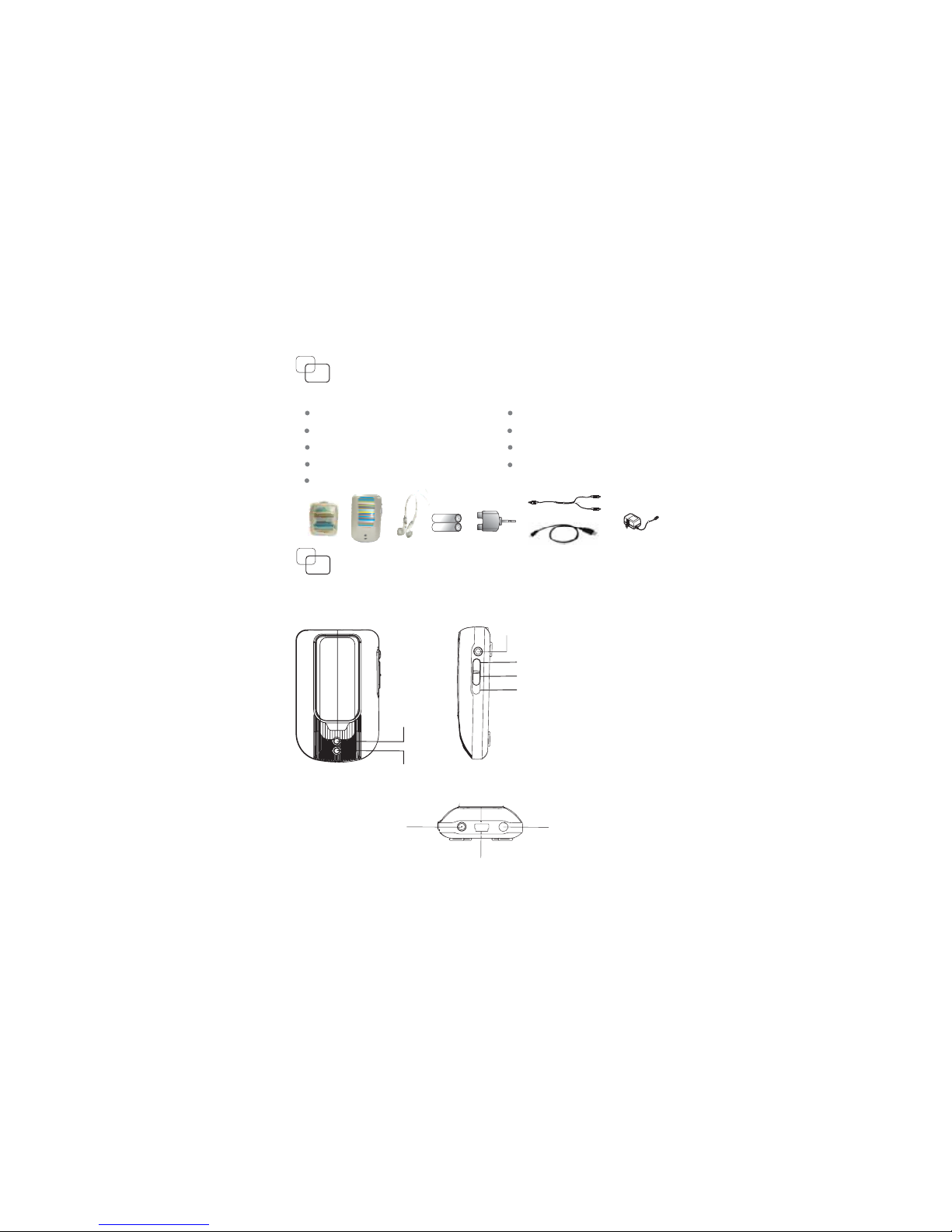
Package Contents
Check the package before you enjoy theproduct.
Pocket receiver
(X1)
USB / Line in Transmitter
(X1)
Users Manual
(X1)
1.5V AAA battery
(X2)
9V DC adaptor
Earphone
(X1)
(X1)
+
_
+
_
Names of parts
Transmitter
USB cable
RCA cable
RCA plug jack
(X1)
(X1)
(X1)
LED: USB
LED: Line in
Power switch: USB
Power switch: Off
Power Switch: Line in
DC jack
Phone jack
USB jack
2
Channel selector
Page 7
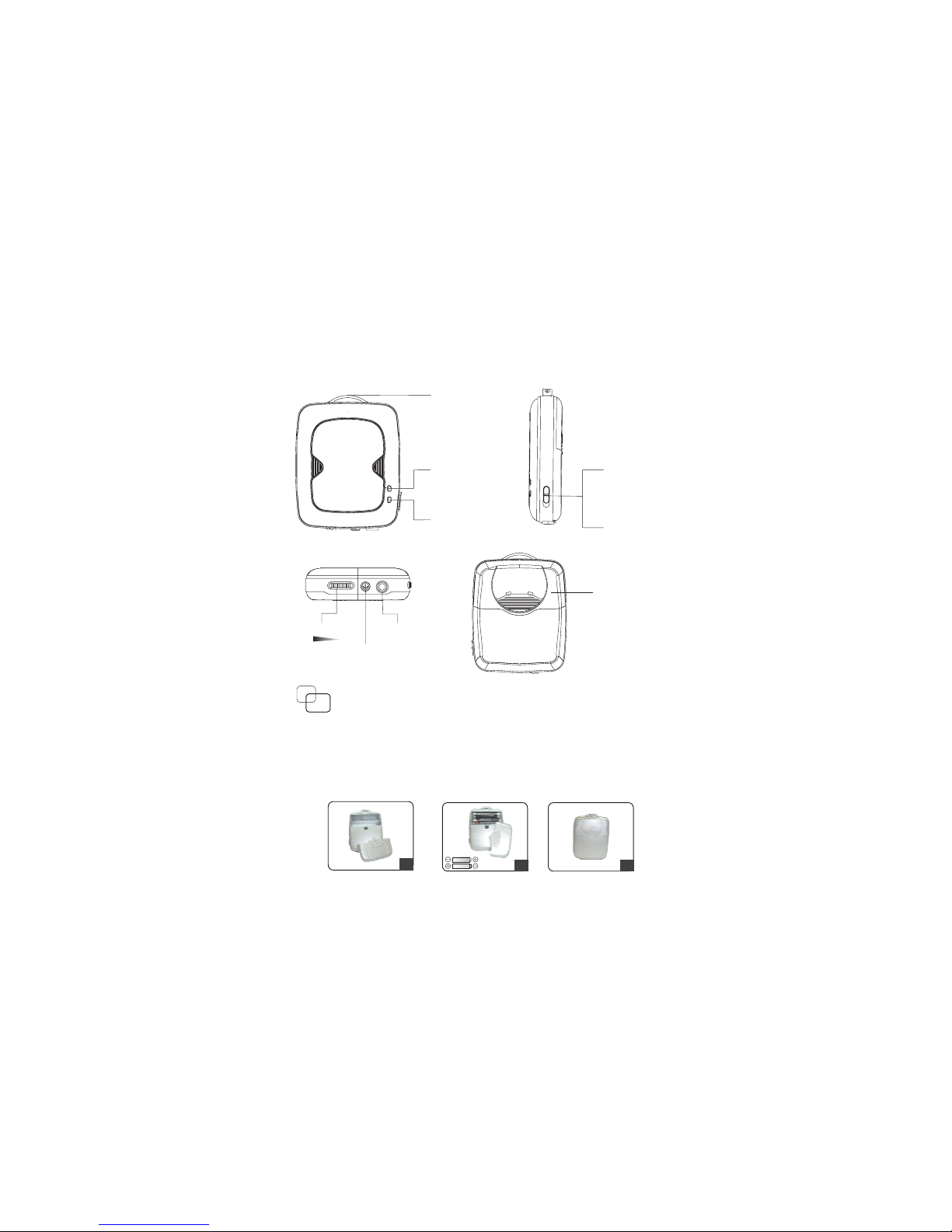
Getting Start
Receiver
Open the battery compartment cover of receiver.
Insert 2X AAA batteries into battery compartment.
Make sure the plus and minus polesof battery was
correctly touched their contains.
Close the battery compartment cover.
1.
2.
3.
1
2
3
LED(blue)
Power
LED(orange)
Link
Phone jack
Channel selector
Volume control
Power off
Power on
()Tact switch
()
Battery
compartment
cover
Strap eyelet
3
Page 8
5.
6.
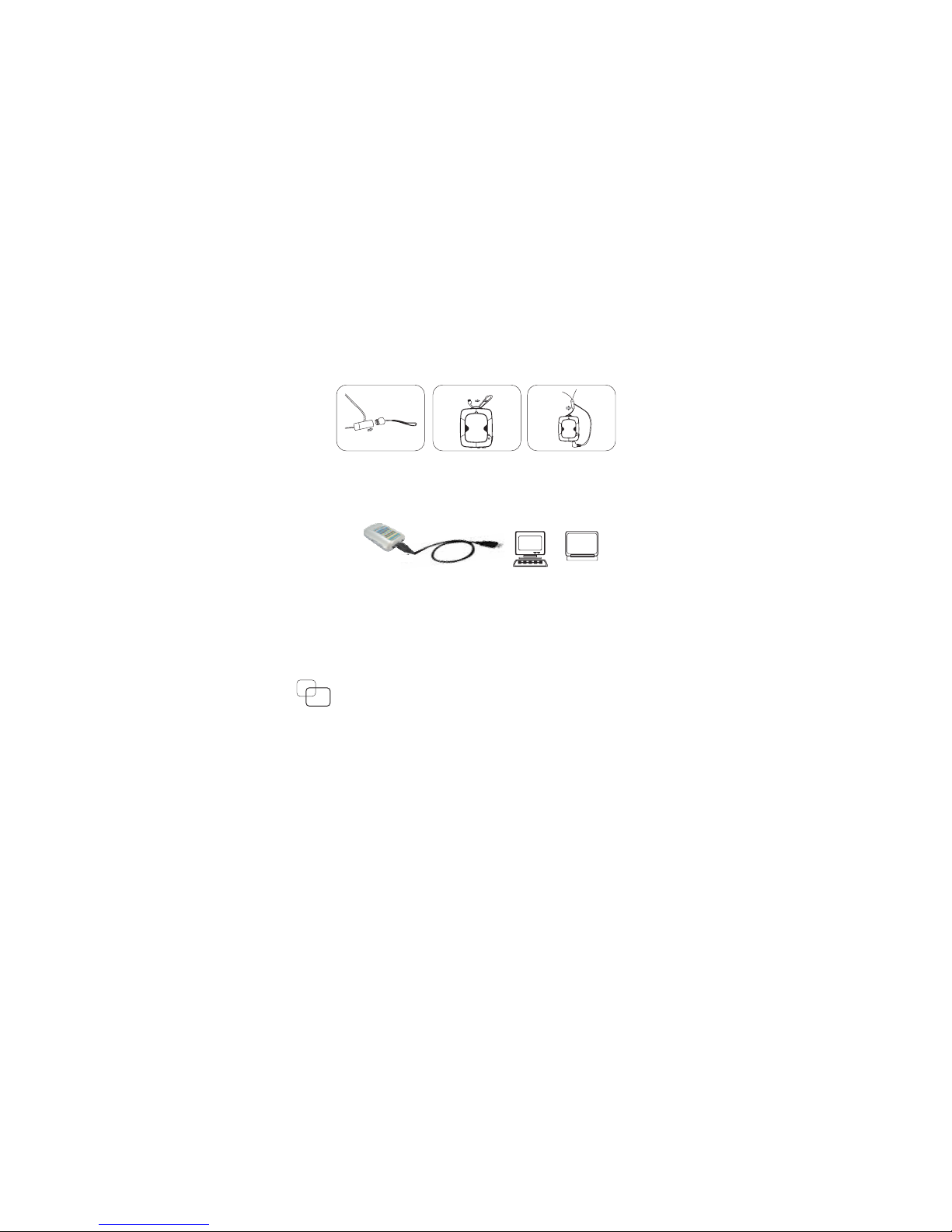
5.1 Audio source(PC or Notebook):Connect the
transmitter to audio source with USB cable.
PC
Notebook
Audio source to transmitter
5.2 Audio source( DVD,VCD,CD,DAB Mp3):Connect
the transmitter to audio source with RCA cable.
With power adaptor plug the transmitter intostandard
electric outlet.(If Audio source is from PCor Notebook,
you don’t need to plug with poweradaptor.)
4
Operations
1. Turn on the Transmitter and Receiver.
2. Turn on the audio source.
3. Adjust the channel selector to the same channel
between Transmitter and Receiver.
4. Installation of earphone and Receiver
Screw off
Pierce through
Screw on
Page 9

5
Trouble Shooting
Please read this users manual carefully beforeusing the
Wireless Audio Product. If you still havedifficulties to
use the product, consult the following syndrome,which
will guide you to solve most commonproblems.
Having Interference
1.
2. Shorten the distance between Transmitter and Receiver.
3.
Check if there is any interference of2.4GHz radio
frequency sources or electrical appliances, such as
microwave oven, 2.4GHz cordless phone, WLAN or
Bluetooth headset, near the Receiver source.
4.
If there is any interference radio frequencysource near
Receiver, try to switch the channel toget a best
performance.
Move Transmitter and Receiver slowly to finda best
reception position for your audio system.
5.
Check Transmitter and Receiver at the samechannel.
Check the adaptor rightly connected.1.
2.
3.
Power On/Off switch is in right position.
Check all the cables well and rightlyconnected.
4.
Check Transmitter and Receiver at the samechannel.
No Sound
5.
Check the batteries are in full electricpower.
Please turn off the interference source orchange the
channel.
6.
Page 10
6
Specification
Item
Specification
Description
Supply voltage
Current consumption
Operating temperature
Frequency range
Modulation
Channel number
Channel spacing
Channel frequency
Frequency stability
TX Power
RX Sensitivity
Response
Dynamic range
Separation
SN ratio
THD
Transmitter
USB power or 9VDC
100 mA (Typical.)
2400 ~ 2483.5 MHz
FSK
8
9MHz
2410, 2419 ~ 2473 MHz
±100 KHz
EIRP +10 dBm
-10C~+60C
(Modulation Index 0.5)
20 ~ 20 KHz, -3dB
83dB (Typical)
75dB (Typical)
83dB (Typical)
-73dB (Typical)
-85 dBm (Typical)
Receiver
1.2 or 1.5V AAA
battery x2
120 mA @2.4VDC
(Typical)
Page 11

6060409015-11
 Loading...