

Page 1

DEBUT ConneX
Page 2
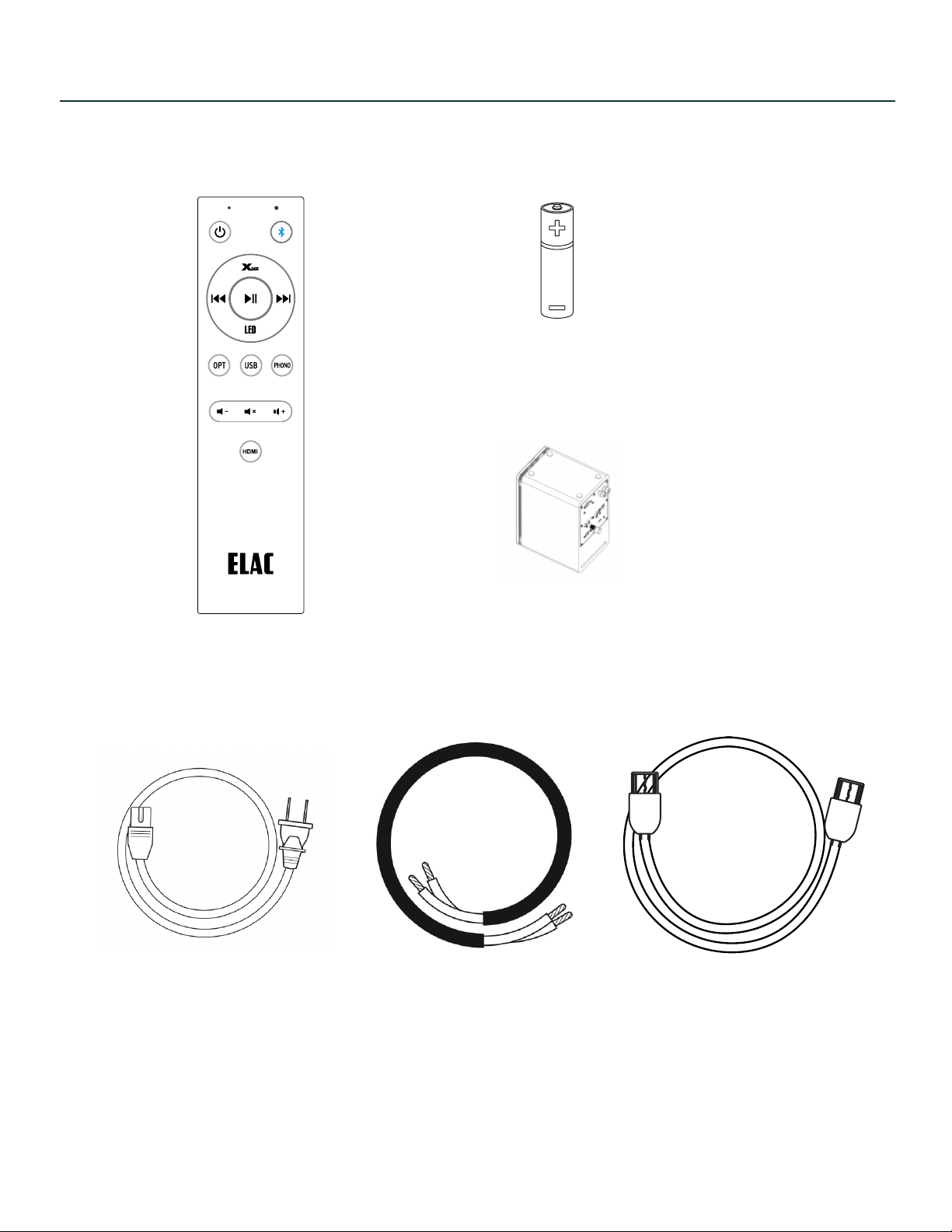
Contents
Batteries
Remote Control
Power Cord
Rubber Foot
Speaker Cable
HDMI Cable
ELAC DEBUT ConneX DCB41 | www.elac.com | Page 2
Page 3
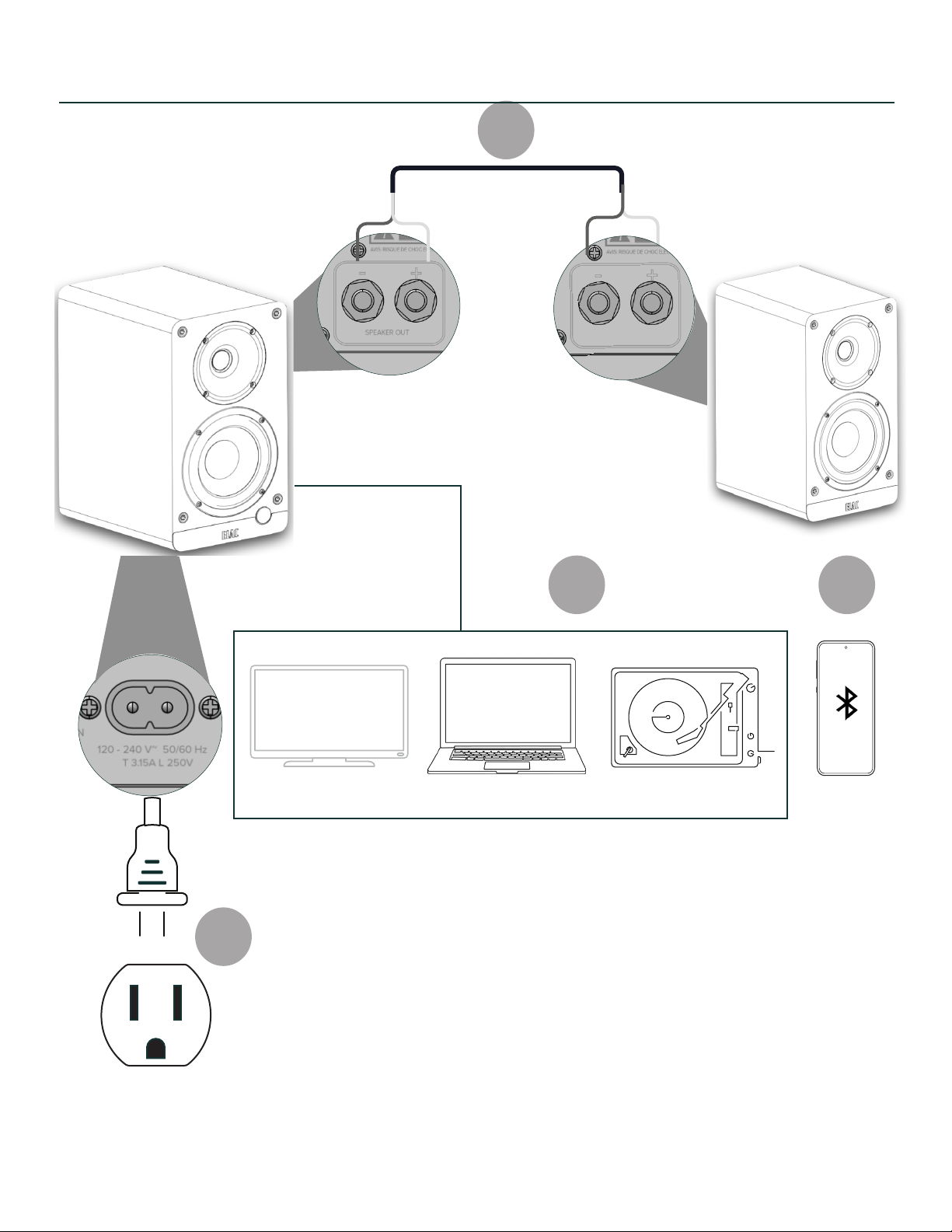
Connections
1
4
2
1. Connect speakers together with supplied wire
2. Connect source - TV, Computer, Phono
3. Connect source - Bluetooth
4. Connect AC mains
3
ELAC DEBUT ConneX DCB41 | www.elac.com | Page 3
Page 4
Model : DCB41
UPDATE ONLY
HDMI (ARC)
1938 N. Batavia St.
Suite K
Orange, CA, 92865
Fraunhofestrabe 16
24118 Kiel, Deutchland
SERIAL NUMBER
USB OPT SUB OUT
PHONO
ON/OFF
CAN ICES-0003(B)/NMB-003(B)
FCC ID: XXX-XXXXX
IC: XXXXX-XXXXX
Desinged by Elac
Made in China
SPEAKER OUT
120-240V~50/60Hz AC
80W
L/R
GND
OUT
SPEAKER
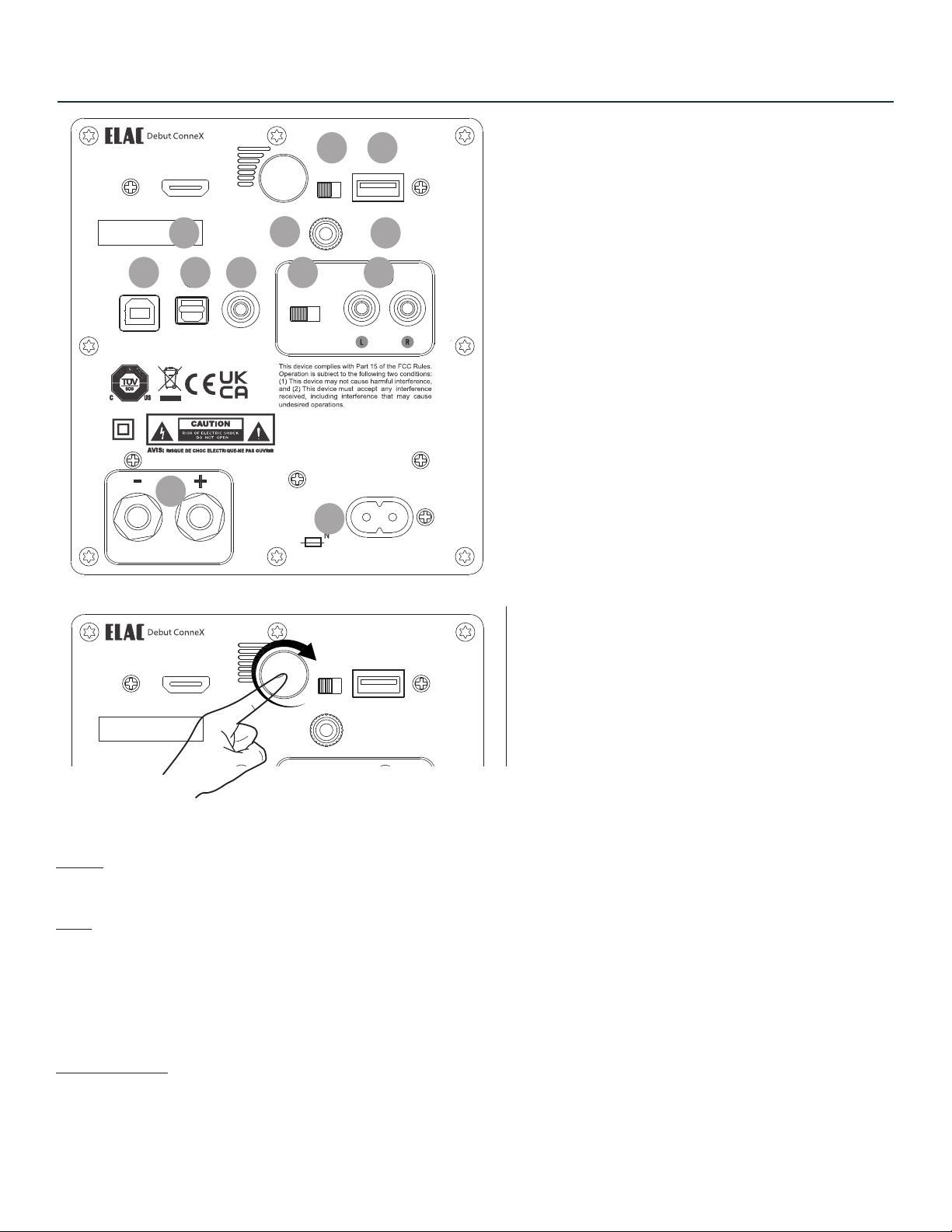
Controls and Inputs/Output
Model : DCB41
UPDATE ONLY
HDMI (ARC)
1938 N. Batavia St.
Suite K
Orange, CA, 92865
Fraunhofestrabe 16
24118 Kiel, Deutchland
SERIAL NUMBER
L/R
GND
OUT
SPEAKER
4 5
1. AC Mains Inlet
2
3
7 8 9 10 11
12
1
6
2. HDMI (ARC) Input
3. Volume/Power/Source
4. L/R switch
5. USB for Update
6. Ground Screw Terminal
7. USB Audio Input
8. Optical Input
9. Subwoofer Output
10. Phono/Line Switch
11. Phono/Line Input
12. Speaker Output
The Volume knob can be used to adjust volume, change input and power on.
Rotate:
Rotating the knob will increase or decrease volume.
Push:
Press to turn on unit.
Press and hold in BT input to initiate pairing.
Press when unit is on to change input.
Front LED colours are: [BT - Blue] [HDMI - Green] [USB - White] [Optical - Red] [Phono - Pink]
Power/Standby:
The unit will standby after 15 minutes of no use. Pressing or rotating the volume knob as well as pressing power
button on remote will wake up unit.
ELAC DEBUT ConneX DCB41 | www.elac.com | Page 4
Page 5
Model : DCB41
UPDATE ONLY
HDMI (ARC)
1938 N. Batavia St.
Suite K
Orange, CA, 92865
Fraunhofestrabe 16
24118 Kiel, Deutchland
SERIAL NUMBER
USB OPT SUB OUT
PHONO
ON/OFF
L/R
GND
OUT
SPEAKER
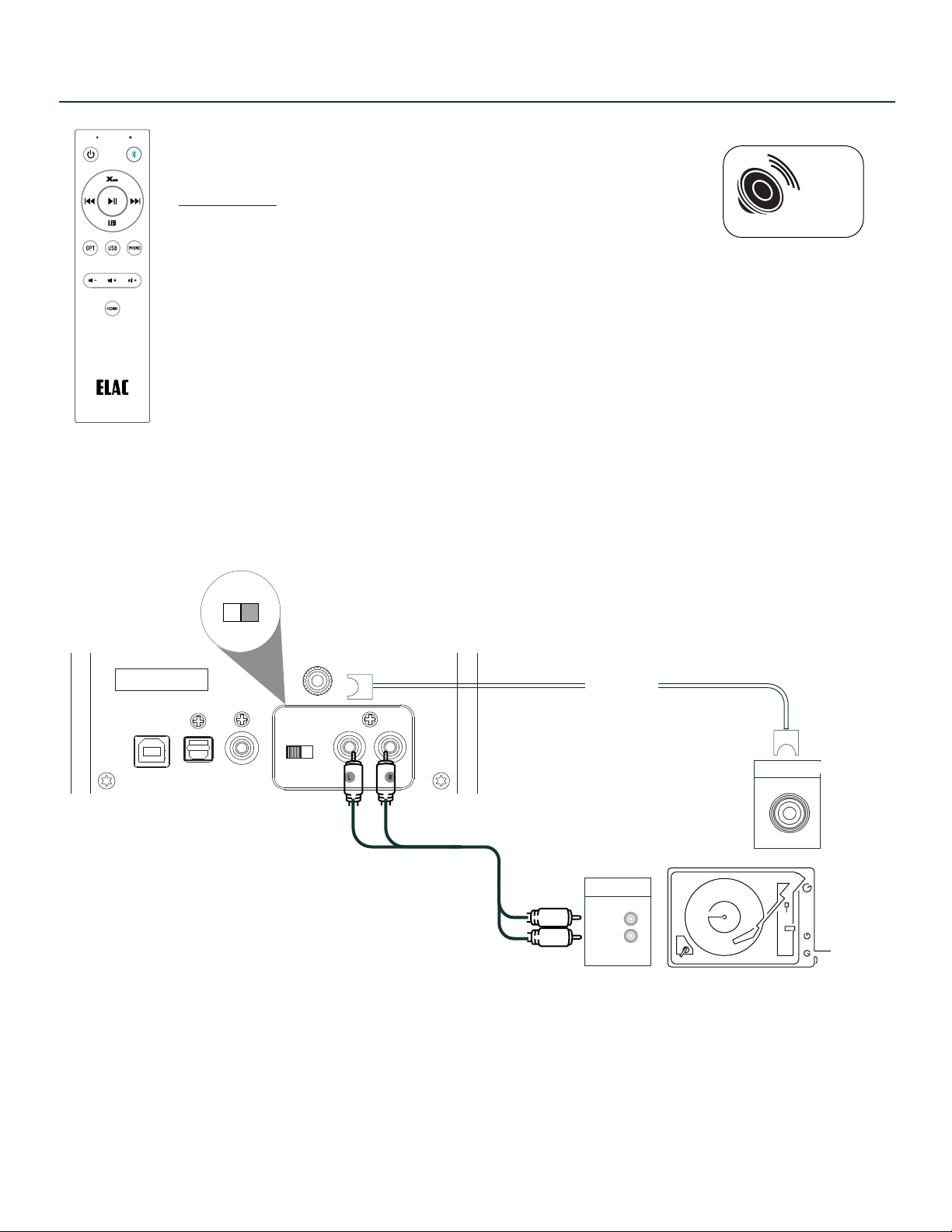
XBASS
XBass is a propietary circuit to boost low frequency performace.
Turn ON/OFF
Press and hold XBass button on remote for 2 seconds :
LED display will blink once for ON
LED display will blink twice of OFF
When ON - pressing XBass will cycle XBass setting.
If connecting a subwoofer, XBass can be turned OFF completely.
CONNECTIONS - TURNTABLE
ON/OFF
Set to ON if plugging into a turntable
XBass
Optional
Ground
Audio Out
R
L
Note: Some turntables have built in phono pre-amplifiers that can be disabled. Ensure the turntable pre-amplifier
is set to OFF and DCB41 is set to ON.
If you choose to use the turntable’s Phono pre-amplifier, then ensure its switch is set to ON postion and DCB41 is
set to OFF.
The Ground connection is optional. It is recommended to be used as it can lower residual noise.
ELAC DEBUT ConneX DCB41 | www.elac.com | Page 5
Page 6
Model : DCB41
UPDATE ONLY
HDMI (ARC)
1938 N. Batavia St.
Suite K
Orange, CA, 92865
Fraunhofestrabe 16
24118 Kiel, Deutchland
SERIAL NUMBER
USB OPT SUB OUT
PHONO
ON/OFF
L/R
GND
OUT
SPEAKER
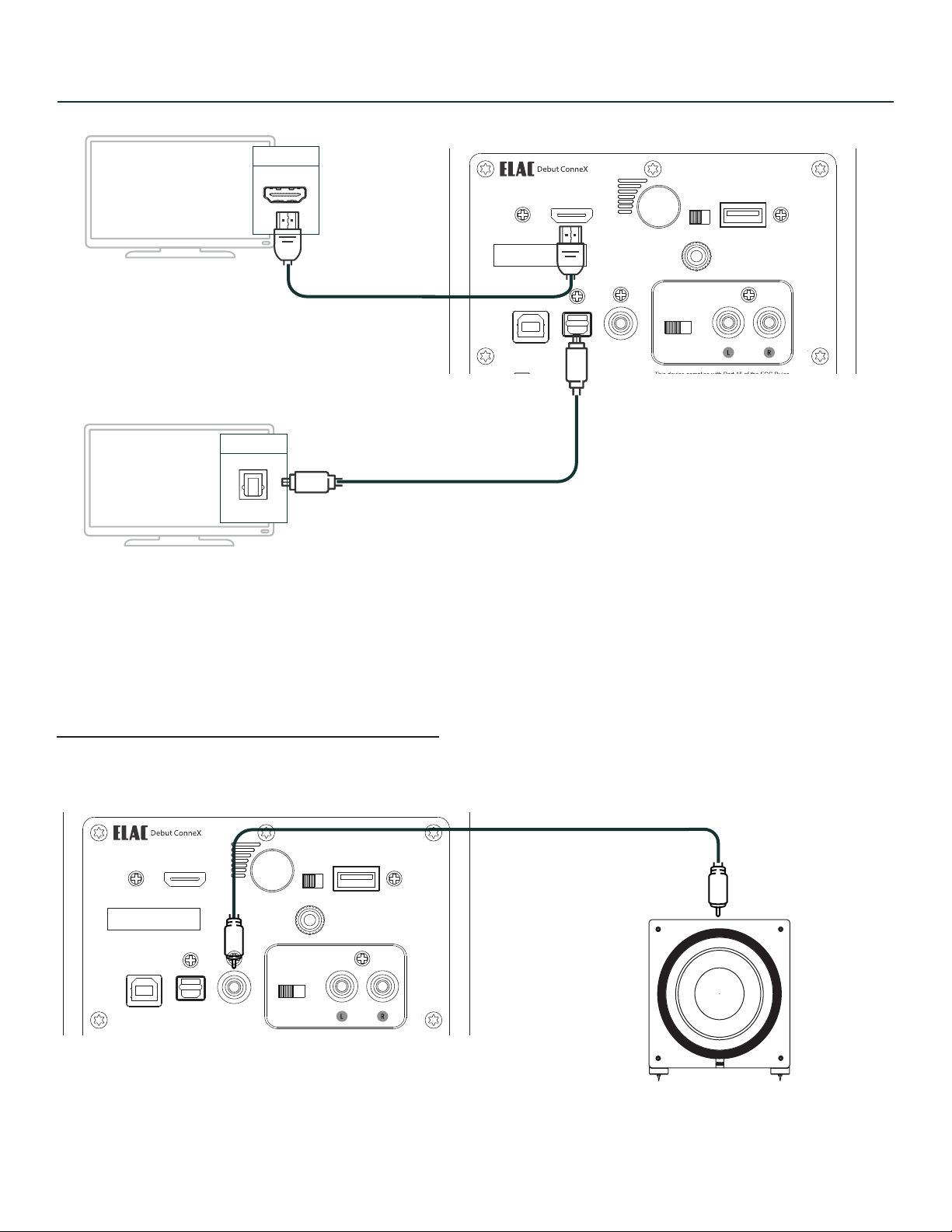
CONNECTIONS - TELEVISION
Model : DCB41
UPDATE ONLY
HDMI (ARC)
1938 N. Batavia St.
Suite K
Orange, CA, 92865
Fraunhofestrabe 16
24118 Kiel, Deutchland
SERIAL NUMBER
USB OPT SUB OUT
PHONO
ON/OFF
L/R
GND
OUT
SPEAKER
HDMI-ARC
Can be connected via HDMI or Optical cable.
Optical
Note: HDMI supports eARC and ARC inputs from most televisions.
Your television remote control can also control power, mute and volume of
your DEBUT ConneX.
CONNECTIONS - SUBWOOFER
ELAC DEBUT ConneX DCB41 | www.elac.com | Page 6
Page 7
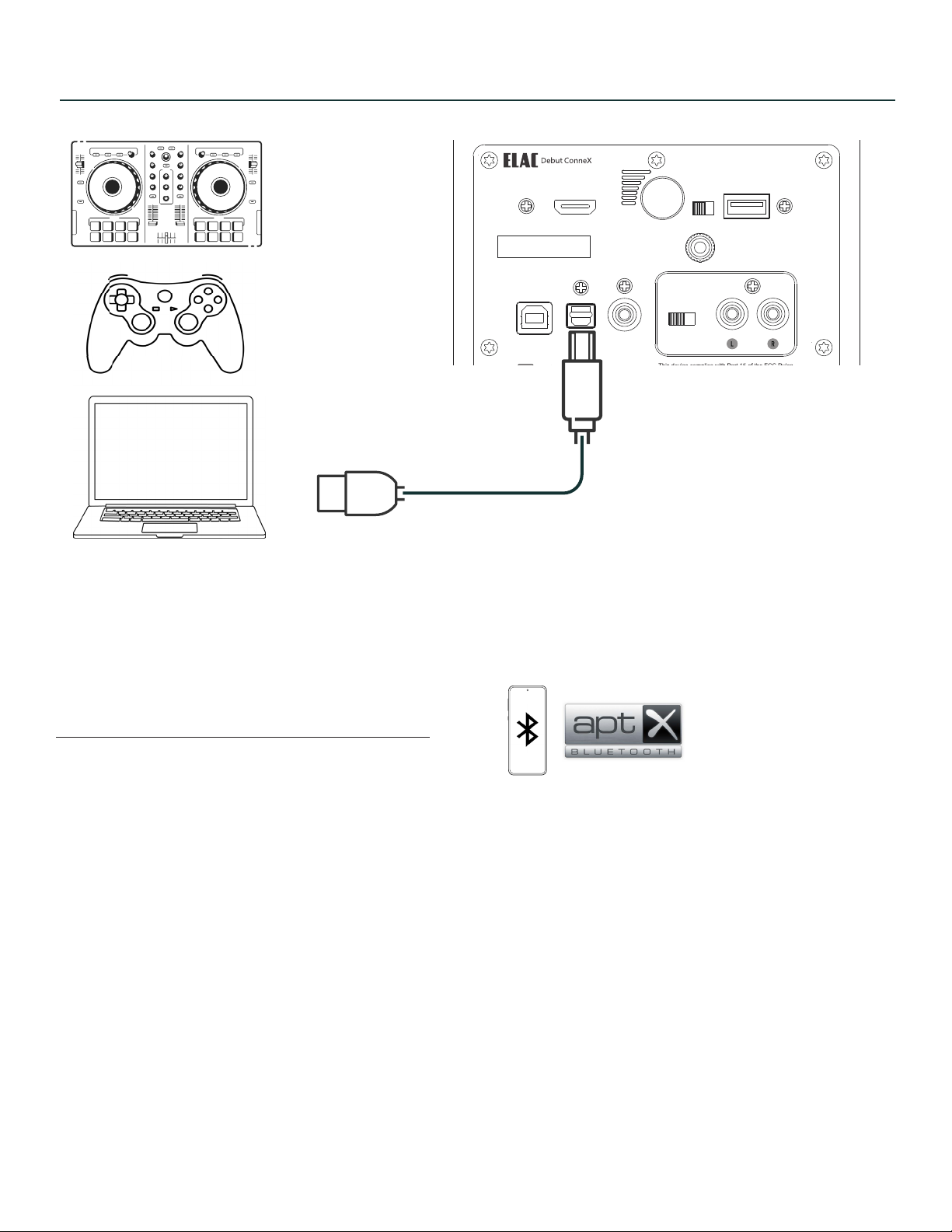
CONNECTIONS - COMPUTER
Model : DCB41
UPDATE ONLY
HDMI (ARC)
1938 N. Batavia St.
Suite K
Orange, CA, 92865
Fraunhofestrabe 16
24118 Kiel, Deutchland
SERIAL NUMBER
USB OPT SUB OUT
PHONO
ON/OFF
L/R
GND
OUT
SPEAKER
Connect to your USB devices with USB Type B cable (printer cable).
CONNECTIONS - BLUETOOTH
When initial power up - BT LED will flash if nothing is paired to it.
When LED is flashing, “ELAC DCB41” is visible on your device.
Pairing can also be initiated as follows:
Press and hold BT source on remote until LED flashes.
Press and hold rear volume button on speaker when in BT input until LED flashes.
ELAC DEBUT ConneX DCB41 | www.elac.com | Page 7
Page 8
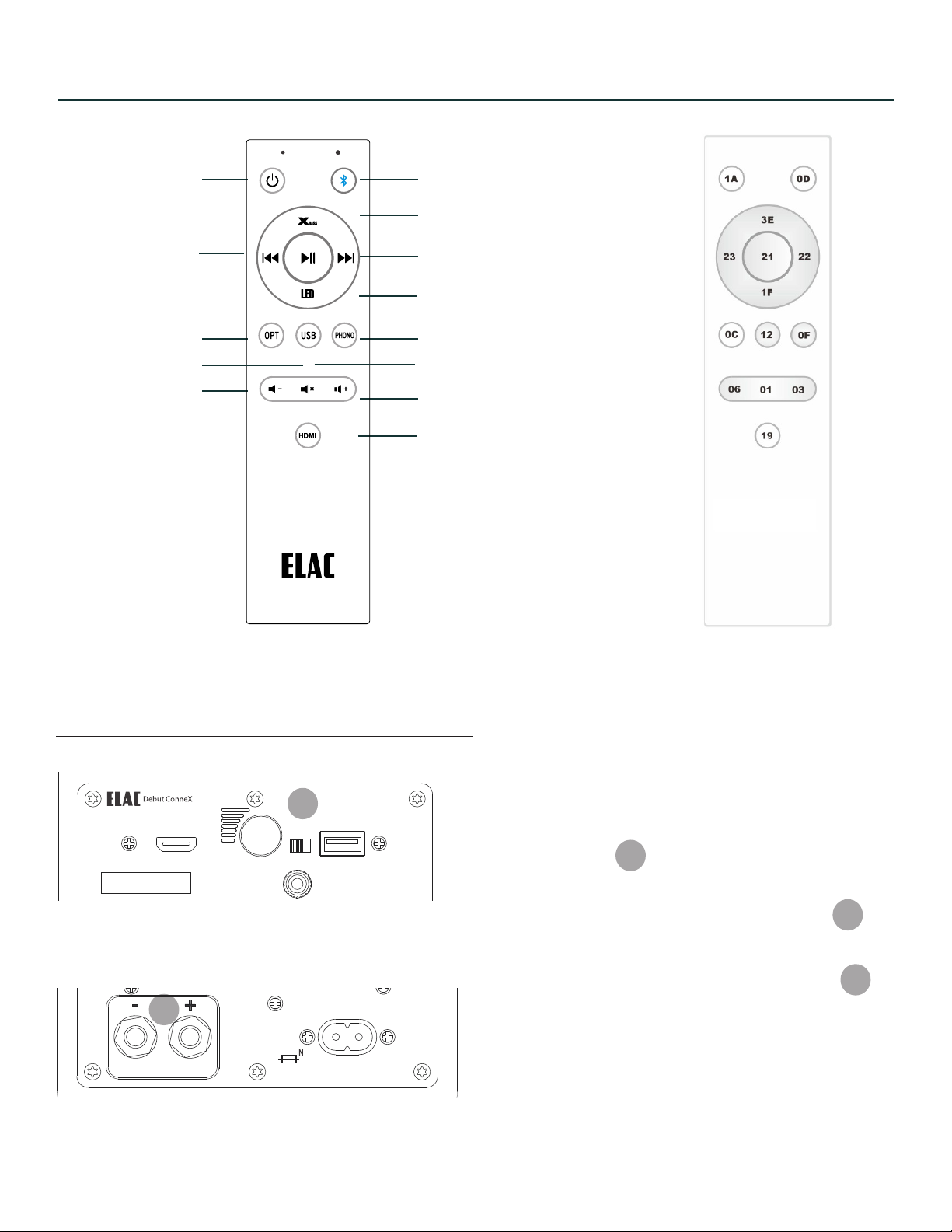
REMOTE CONTROL
Model : DCB41
UPDATE ONLY
HDMI (ARC)
1938 N. Batavia St.
Suite K
Orange, CA, 92865
Fraunhofestrabe 16
24118 Kiel, Deutchland
L/R
GND
OUT
SPEAKER
Model : DCB41
UPDATE ONLY
HDMI (ARC)
1938 N. Batavia St.
Suite K
Orange, CA, 92865
Fraunhofestrabe 16
24118 Kiel, Deutchland
SERIAL NUMBER
USB OPT SUB OUT
PHONO
ON/OFF
CAN ICES-0003(B)/NMB-003(B)
FCC ID: XXX-XXXXX
IC: XXXXX-XXXXX
Desinged by Elac
Made in China
SPEAKER OUT
120-240V~50/60Hz AC
80W
L/R
GND
OUT
SPEAKER
Power ON/OFF
Previous (BT)
Optical Source
USB Source
Volume Down
BT Source
Xbass
Next(BT)
Adjust LED Intensity
Phono Source
Mute
Volume Up
HDMI Source
SETTING LEFT or RIGHT SPEAKER
4
ELAC DEBUT ConneX DCB41 | www.elac.com | Page 8
12
Hex CodesRemote Control
The L/R switch is in reference to speaker
output terminals.
If L/R switch is set to “L” then speaker output
will be the LEFT speaker.
If L/R switch is set to “R” then speaker output
will be the RIGHT speaker.
4
12
12
Page 9

GENERAL INFORMATION
1. General information
• Please read and follow these safety instructions.
• Keep them safe for future reference.
• Observe all warnings on the speaker and in the manual. Please check the speaker for damage before use.
The speaker must be in perfect working condition. Damaged parts may lead to personal injury.
2. Use only as directed
• Connect the speaker(s) according to the instructions in the manual.
• Many ELAC speakers are equipped with spikes and/or anti-slip feet. They are explicitly provided for
leveling the speaker. For leveling on an uneven floor, unscrew the spikes or anti-slip feet by 2-3 turns of
thread. The speaker should always be in perfect vertical alignment: the stability of the speaker must not be
compromised by using spikes or anti-slip feet as the speaker may tip-over.
3. Location
• Install the speakers on a level surface only.
• When choosing the location of these speakers do not place them in locations that are:
• In direct sunlight
• Very humid
• Prone to vibrations
• Exceptionally hot or cold
• Near CRT Televisions (the speakers are not magnetically shielded and may cause color issues with
a CRT based TV).sa
• Close to magnetic cards (Since the speakers are not magnetically shielded placing magnetic cards
such as credit cards or commuter cards may cause them to fail).
4. WARNING!
Please ensure the product is perfectly stable to avoid injury from tip-over. Please note, that stability can be
increased by using spikes on carpeted surfaces. However, the mounting of spikes must be carried out carefully
due to their very sharp ends which may cause injuries. The stability on slippery floors can be increased by using
Velcro fastening tape or double-sided adhesive tape. Do not install the speaker near any heat sources such as
radiators, heating valves, stoves, or other apparatus (including amplifiers) that produce heat, or in areas where
there is a risk of explosion.
• Do not block any ventilation openings. Install in accordance with the manufacturer’s instructions.
• Do not install the speaker in a closed rack or in a closed cupboard.
• Do not put burning candles on or near the speaker.
• Do not install the speaker near transformers because electromagnetic stray fields can cause hum noise on
woofers.
• In combination with certain materials / lacquers / material surfaces, anti-slip feet or spike washers may
cause colored imprints on the surfaces.
ELAC DEBUT ConneX DCB41 | www.elac.com | Page 9
Page 10

ELAC AMERICAS INC.
1938 N. BATAVIA St. SUITE K
ORANGE, CA 92865
ELAC ELECTROACUSTIC GMBH
FRAUNHOFERSTRAßE 16
D-24118 KIEL, GERMANY
 Loading...