

Page 1
Page 2
)
CONTENTS
using the xbox
®
video game system 2
USING THE XBOX
®
CONTROLLER 3
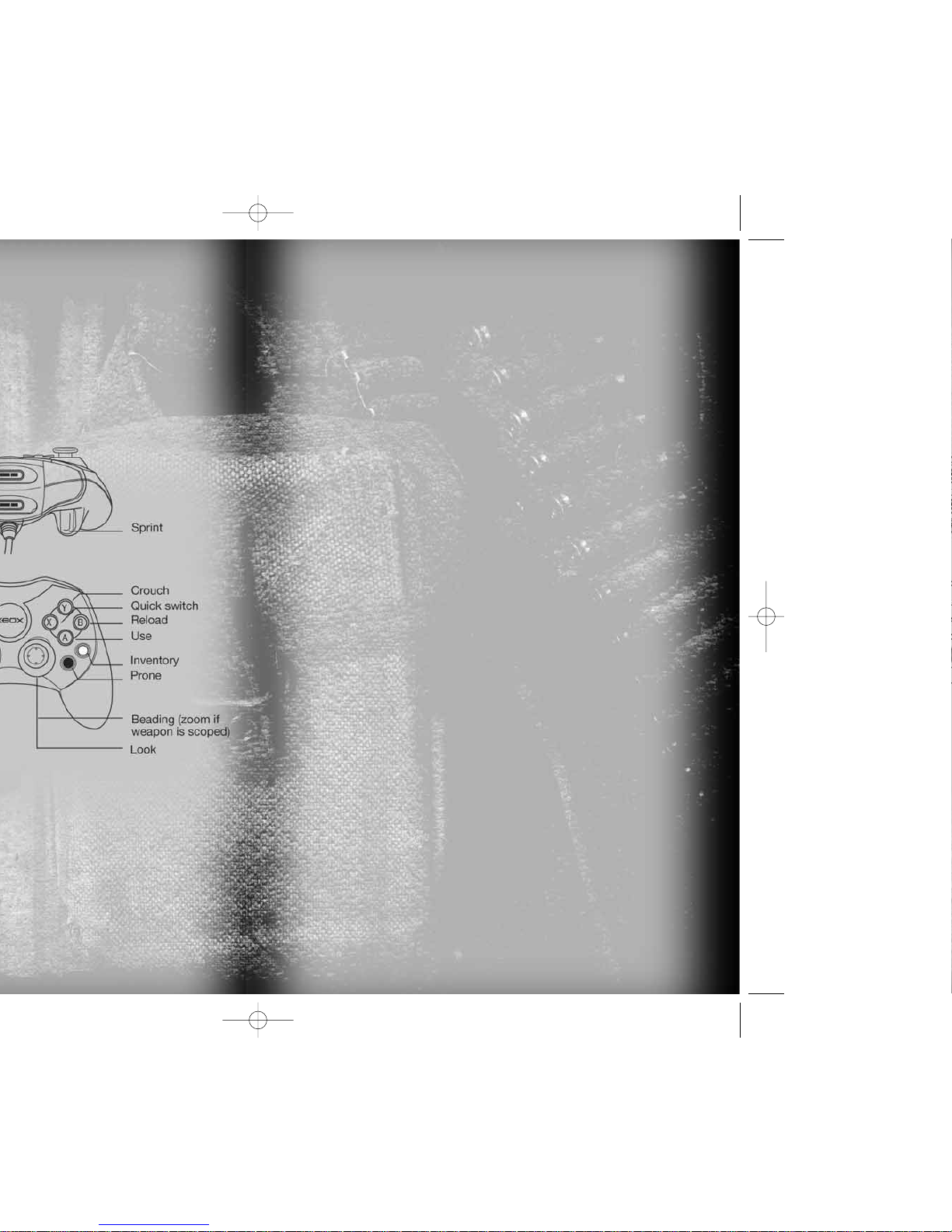
DEFAULT CONTROLS 4
THE WAR SO FAR 5
GETTING INTO NAM 5
Main Menu 5
Pause Menu 6
Saving Games 6
Preferences 6
Game Options 6
Audio Options 7
Controls 7
IN-GAME DISPLAY 7
CHARACTER ABILITIES 10
BASE CAMP 11
Page 3
)
®
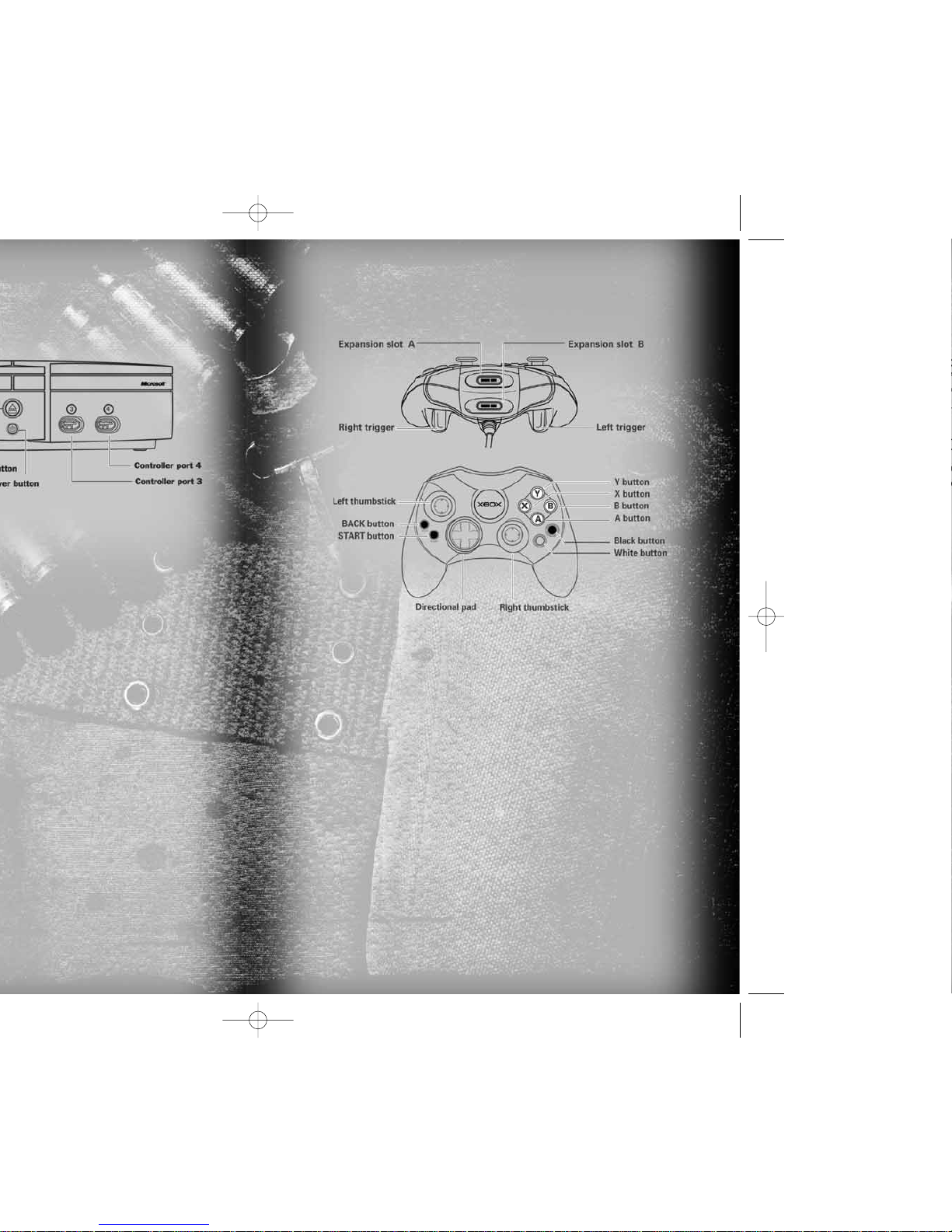
USING THE XBOX
®
CONTROLLER
disc on the disc tray
1. Insert the Xbox Controller into any controller port
of the Xbox console.
2. Insert peripherals into the controller expansion slots
as appropriate.
3. Follow the onscreen instructions and refer to this
manual for more information about using the Xbox
Controller to play this game.
Page 4
5
))
It would be the longest military conflict in United States history,
and when it was over, 58,000 Americans had given their lives
in this jungle war. Another 304,000 were wounded, and nobody
who returned home was left unscarred by their time in Vietnam.
In 1946, the Vietnamese fought the French for their freedom
in the first Indochina war.
At the end of that war in 1954, two Vietnams were created, South
and North. Trouble was…the communists in the North wanted one
country, one people, one Vietnam.
It began for the U.S. in 1959 when they sent advisors—
government men with money and weapons and advice to help
the South. Slowly, almost inevitably, it became a full-blown war
with the ever-growing U.S. forces joining the South Vietnamese
army to fight the North Vietnamese regulars and the National
Liberation Front.
By 1975 it was all over. But not before three-million Vietnamese
from both sides died to make it happen, and another two-million
Laotians and Cambodians also perished.
In Washington they built a Black Wall, a wall with all 58,000
American names. The ones who didn’t come back.
But in 1967, the war was still young. Hopes were high. Success
was, they say, a bright light at the end of the tunnel. Lessons
would have to be learned in Vietnam. And in 1967, class—and
hell—were definitely in session.
THE WAR SO FAR
MAIN MENU
Once you’ve powered up
SHELLSHOCK: NAM ‘67,
the Main Menu
appears. Your choices include
NEW PROFILE, LOAD PROFILE
,
DELETE PROFILE
and
CREDITS.
)
When creating a
NEW PROFILE,
you can select your style
of player character. Choosing a character takes you
to the virtual keyboard where you can input your profile save
name. Use the directional pad to highlight a letter and press
the
A
button to select it. Select OKto complete the name.
)
LOAD PROFILE
displays all saved profiles. Select a profile using
the directional pad and press the
A
button to load the profile
and start your game.
)
DELETE PROFILE
displays all currently saved profiles. Select
a profile using the directional pad and press the
A
button
to delete it.
)
Select
CREDITS
to roll the
SHELLSHOCK: NAM ‘67
credits.
GETTING INTO NAM
Page 5
))
from the Pause menu
. You resume play
1/2
to cycle
ON/OFF.
ON/OFF
.
ON/OFF.
ON/OFF.
ON/OFF.
AUDIO OPTIONS
Configure audio options.
)
MUSIC VOLUME
—Adjust the music volume.
)
SFX VOLUME
—Adjust the sound effects volume.
)
SPEECH VOLUME
—Adjust the volume of in-game speech.
CONTROLS
Reassign the controller buttons.
)
DEFAULT
—Select the default control set.
)
LEFT HANDED
—Select the default control set modified
for left-handed players.
)
CUSTOM
—Customize your own controller configuration.
IN-GAME DISPLAY
The following items appear
on screen during a mission:
)
PLAYER CHARACTER
—Check
the stance of your character
and some of the equipment
he is carrying.
)
ACTIVE WEAPON
—Displays
the weapon currently in your
hands. Press and hold
the
b
button to display the
Inventory, use the directional
pad to select a different item,
or press the
X
button to
switch quickly from your active weapon to grenades
and back again.
)
NO. OF CLIPS—
Displays the number of clips carried for your
weapon. It flashes when you are running low as a reminder
to collect more clips or swap weapons.
)
NO. OF ROUNDS
—Indicates how many rounds are in the loaded
clip. It flashes when ammo is low, signaling you to reload.
Page 6
9
))
BURST
and
FULLY
RED
= Enemy
BLUE
= Neutral
GREEN
= Ally
ON/OFF
in the Game Options menu.
)
SHOCK DEFENSE METER—
Shows your current Shock status.
An empty meter means your player character can take
several hits in quick succession. With each hit the meter
fills up. When the meter is full, you’ll start to lose health.
The shock meter recovers over time if no hits are taken.
)
STAMINA METER
—Displays your current Stamina level. When
the meter contains stamina you are able to sprint. Sprinting
drains the stamina meter; it then replenishes when you’re
either walking or standing still.
)
CROSSHAIRS
—The tighter the crosshairs on the central reticle,
the greater the weapon accuracy. Various actions in the game
have positive or negative effects on the weapon’s accuracy.
Positive Effects Negative Effects
• Movement • Crouching
• Sustained firing • Lying down
• Firing in short bursts
The crosshairs also respond to item-based mission objectives.
When the crosshairs acquire a relevant item (such as ENEMY
INTEL or ENEMY AA GUN), the appropriate information appears.
)
OVERHEAT BAR
—Heavy machine guns overheat under sustained
firing. When the weapon reaches maximum operational
temperature, it ceases to fire, displayed by the overheat bar.
You then have to wait for the weapon to cool down before
resuming fire.
)
INTERACT ICONS
—These icons appear as you near an interactive
object, such as a person, ladder or mounted gun. See
CHARACTER ABILITIES
on the next page for more information.
)
INCOMING FIRE ALERT
—These appear at the screen periphery
when incoming fire is dangerously close to you. They can help
you find the most dangerous targets in the perilous world
of
SHELLSHOCK: NAM ’67.
)
INCOMING GRENADE ALERT
—These icons flash at the screen
periphery in the direction of any grenade landing dangerously
close to you, warning you to take immediate evasive action
before detonation.
)
DAMAGE ALERT
—When you are being bombarded by incoming
fire, a momentary flash of red appears at the screen periphery
in the direction of the incoming fire.
)
FLASH!
—This blinding effect is triggered when you are close
to an explosion. It will fade in time, depending on how
close to the explosion you were and how big the explosion was.
Page 7
11
)
and makes you harder to hit. Use crouch whenever you
can, especially in low cover. Lying down amplifies
the effects of crouching. You will be even harder to hit
and even more accurate than when crouched.
)
SPRINTING
—Sprinting is a great way to get around the
battlefields of Vietnam quickly. You can only sprint in short
bursts as it is tiring and drains your stamina. When you run
out of stamina, you stop sprinting. Stamina recharges
while you are walking or resting.
)
INVENTORY
—The Inventory button displays your entire
Inventory so you can select any item quickly. When you
release the Inventory button, the Inventory is hidden.
)
QUICK SWITCH
—Pressing the Quick Switch button stows your
active weapon and equips a grenade. Press it again and you
stow your grenades and re-equip your active weapon. If you
use all your grenades, your original active weapon will be reequipped automatically. Being able to switch quickly between
grenades and guns will save your life.
)
PEERING
—Hold the directional pad 4/3to peer left/right.
Release to return to a normal stance. Peering around a cover
object such as a rock or house lets you benefit from
the protection of cover while targeting enemies.
)
THROAT SLIT
—You won’t be taught this move until your arrival
in Special Forces. Equip your knife. Sneak up quietly behind
an enemy until you are within grabbing distance...then use
your knife to silently slit the enemy’s throat.
)
BEADING
—Beading is the process of getting your leading eye
down the line of the gun sights. Beading mode gives you a
slight zoom—a better view of the distant battlefield. However,
Beading mode reduces peripheral side vision and prevents you
from moving anywhere quickly. With a scoped weapon,
activating Beading mode displays Scope View.
A
button
CONVERSATION
icon
A
button
4/3
A
button
A
button
Your home in Vietnam is the Base Camp. You can hang around
camp for as long as you like listening to the DJ spin some tunes—
shooting his mouth off about this or that. Maybe some shooting
practice is more your bag, or even chewing the fat with your Base
Camp friends. All this, and more is available at Base Camp!
)
EARNING CHITS
—Chits are the form of currency the U.S.
military paid its soldiers in Vietnam. They’re basically military
money vouchers and they can be earned in several ways.
–
Surviving your missions
—Simply surviving each mission
means the Army will pay you a modest wage.
–
Above and beyond
—Doing things above and beyond the call
of duty will often be rewarded with extra chits.
BASE CAMP
Page 8
FPO
Inside Back Cover
Remove this page before printing.
See the “Ss Xbox ins cov.eps” file
for the actual page.
 Loading...