

Page 1
1
-
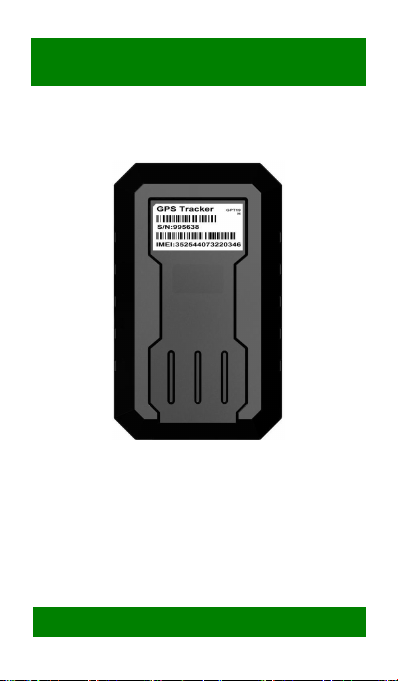
3G GPS TRACKER
For ASSET
MODEL: GPT19-H
User Manual
<GPS+WCDMA/GPRS/GSM+SMS+MEGNETIC>
- Professional Tracking System--
-
Page 2

2
CATLOG
Ⅰ. Product Features.............................4
Ⅱ. Appearance
.....................................6
Ⅲ. SIM Card Installation....................7
Ⅳ. Test & Installation.........................8
4.1 Power On.................................8
4.2 LED Indicators........................9
4.3 Install device......................... 10
4.4 Power off...............................11
Ⅴ. Setting & Inquiry.......................... 11
5.1 Web Platform & APP............ 11
5.2 SMS.......................................15
Ⅵ. Trouble shooting.........................15
6.1 Cannot connect platform.......15
6.2 Offline status......................... 15
6.3 No positioned........................16
6.4 Position drift..........................17
6.5 Commands receiving
abnormally.................................. 17
Ⅶ. Warranty Rules...........................17
7.1 Special statement.................. 17
7.2 Warranty period.....................18
7.3 After sales..............................18
Warranty Card
.................................19
Page 3

3
Welcome to use our device,please read this
manual carefully to install and operate device
exactly. This user manual is for reference only.
If some contents and operation steps are
inconsistent with those for the actual product,
the latter will prevail.
With GPT19-H GPS Tracker for Vehicle, we
can monitor your vehicle by GPS satellite
positioning system, WCDMA/GPRS
communication and Internet, a real-time
remote location and control of vehicles can be
achieved through a powerful service platform.
It plays a significant role in logistics and cold
chain, helping customers to achieve
transparent management, reduce costs,
ensure safety, and improve efficiency.
Page 4

4
Ⅰ. Product Features
■ Supports GSM/WCDMA, include 9 band,
universal in the world.
■ Built-in 4200mAh zero self-discharge
disposable battery, can stand up to three
years( Power on once per day)
■ GPS/LBS precise/aid positioning, Support
A-GPS
■ Strong magnetic force, can be adsorped on iron
■ Military grade three anti-performance,
waterproof to IP67
■ Built-in light sensor on the bottom, device will
power on once it’s removed, and trigger a remove
alarm, send SMS to administrator.
■ Start Emergency mode, device will start
real-time tracking and uploaded data through
WCDMA/GPRS regularly
■ Device Module passed PTCRB, GCF, FCC,IC,
R&TTE, RCM, CCC, Giteki, Anatel, AT&T etc
■ Track device through WEB/APP/SMS
■ EELINK protocol 2.0, Firmware OTA
Page 5
5
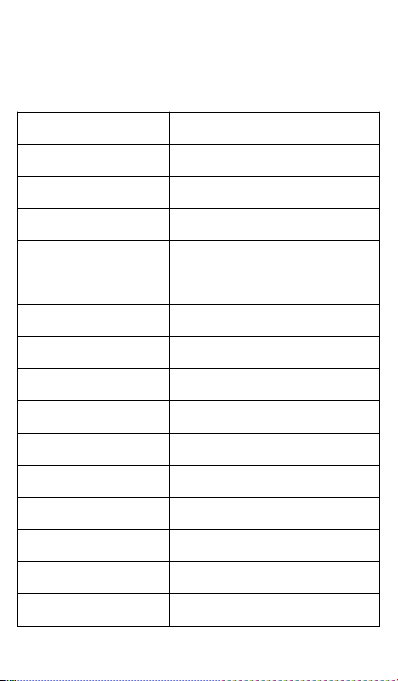
Basic Specifications
Voltage
3.6 V
Work Current
GPRS(140mA); HSPA(460mA)
Sleep Current
<30uA
GPS Accuracy
5-15m
LBS Accuracy
About 100m (depend base
station density)
GPS Band
1575MHz
GSM Band
850/900/1800/1900MHz
WCDMA Band
W800/W850/W900/W1900/W2100MHz
Waterproof Level
IP67
Working Temperature
-20℃~70℃
Hot/warm/cold Start
<3s,<15s,<60s
Battery Capacity
4200mAh
Dimensions (mm)
95(L)X 58(W) X 24.5(H)
Work Humidity
20%~80%RH
Net Weight
110 g
Page 6
6
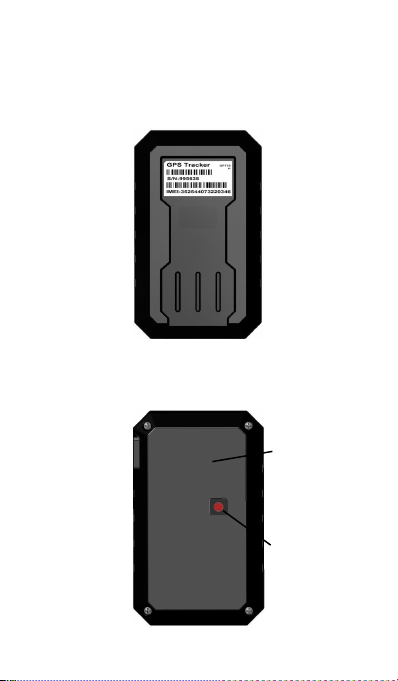
Ⅱ. Appearance
■ Components
-Top Front-
(Towards sky)
Megnet
Light sensor
-Bottom -
Page 7

7
Ⅲ. SIM Card Installation
Open the packing case, check if device is OK
and accessories are intact.
You need a suitable SIM card for using device,
contact your dealer if any question;
Open Back Cover
Lift SIM Slot and insert SIM Card
Note:
Page 8

8
●Please power off device before installing or
uninstalling SIM card.
●SIM card should have GPRS/WCDMA function,
open it’s network through operator.
●SIM card should open Caller Identification function
for telephone querying.
●Please make sure the PIN code of the SIM card is
disabled.
●Please make sure SIM card has sufficient
balance.
Ⅳ. Test & Installation
4.1 Power On
Page 9

9
Turn on the light sensor, it will start Light Alarm,
Turn off the light sensor to close this Alarm.
Power on device and move device to outdoors to
make sure GPS signal is good.
4.2 LED Indicators
The RED LED flickers fast (every second) when
device is searching for GSM network, it flickers
Slowly(every 5 seconds) means device has
registered the GSM network successfully.
The BLUE LED flickers fast (every second) when
device is searching for GPS satellite signal, it
flickers slowly (every 5 seconds) means device has
searched the satellites and can be positioned.
Page 10

10
1. RED LED (GSM / WCDMA Working State)
Fast blinking
Searching for GSM/WCDMA
Slow blinking
GSM/WCDMA works normally
Fast blinking
Searching GPS Satellites
Slow blinking
GPS works normally
BLUE & RED flickers slowly (every 5 seconds),
device works normally.
Screw the bottom cover, Make sure the bottom is
absorbed close to iron board and there is no light
leakage.
2. BLUE LED (GPS Working State)
4.3 Install device
Page 11

11
4.4 Power off
Turn off the power switch, device shut down.
5.1.1 Web Browser platform
5.1.2 Smart phone application
Ⅴ. Setting & Inquiry
5.1 Web Platform & APP
Login the service platform to set or track device,
ask your dealer for the WWW address
Use smart phone APP, ask your dealer to get
installation package.
Example, Remotely configuration by Keelin APP
Page 12

121314
Page 13

Page 14

此入插入 GPT19 的 APP 内部界面图
和讲解
Page 15

15
5.2 SMS
You can write a positioning SMS sending to device
to inquiry position, device will reply position SMS or
map link once it wake up. You also can set
administrator number to get remove alarm.
The SMS commands please refer to the Operation
Commands.
Ⅵ. Trouble shooting
6.1 Cannot connect platform
Device is never online on the position server when
installed at the first time. Please check device:
1)If power cables are wired correctly? Pay attention
to not connect them to controlling cables of vehicle.
2)If SIM card is installed correctly? Please refer to
the installation instructions.
3)Check the status of LED indicators. If device is
OK, red LED and blue LED will intermittently flick.
4)Inquiry parameters of device via commands and
check replied parameters.
6.2 Offline status
First check if LED indicators are OK, if cannot
Page 16

16
check them, you can check SIM card following next
steps:
1)call SIM card of device and check if you can hear
connecting ring.
2)Check if vehicle is in the area where there is no
GSM/WCDMA signal.
3)Check if one device or all devices are offline in
the area . If all devices are offline, you should ask
operator If network is OK.
4)Check if SIM card has enough balance.
5)If device becomes offline on the last day of one
month, please check data transferring is closed or
not.
6)Inquiry parameters of device via commands and
check replied parameters.
6.3 No positioned
If the GPS is active, but device cannot be
positioned for long time, please check device:
1)If the vehicle is in the place where there is no
GPS signal.
2)The upside of device should be installed with
face toward the sky.
3)The GSM/WCDMA and GPS signal may be
Page 17

17
weakened if device is installed in the place with
electromagnetic wave absorption material(such as
metal blocks), special attention should be paid if
there is metal thermal insulation layer or heating
layer on the front windshield, so that the position
accuracy will decline, and the severe ones will not
be positioned.
6.4 Position drift
Serious position drift will be found in places where
GPS signal is poor. Please drive the vehicle to the
open places.
6.5 Commands receiving abnormally
1)Check the commands format.
2)Check if the vehicle is in the places where there
is GSM signal.
3)Check if the SIM card is properly installed.
Ⅶ. Warranty Rules
7.1 Special statement
1)Technology change without notice.
2) If the color and appearance are inconsistent with
those for the actual product, the latter will prevail.
Page 18

18
3)Warranty card is only valid for devices with the
following IMEI.
4)Please take care of the warranty card and show
it with the original purchase receipts when enjoying
the warranty service.
7.2 Warranty period
Since the date of purchase, passive waste
host has one year warranty.
7.3 After sales
Any of the following circumstances not
covered by the warranty, but may be
appropriate to pay repair:
1)More than the warranty period.
2)Unauthorized removal or repair damaged.
3)Damage caused by improper installation, use,
maintenance, custody.
4)IMEI label is torn or Obscure.
5)Warranty certificate and product models do not
match or warranty certificate be altered.
6)Damage caused by force majeure.
Page 19

19
Warranty Card
NAME
TEL
Address
Model
IMEI Number
Selling Unit
Purchase Date
YY MM DD
Page 20

20
Maintenance Records
Engineer
Completion Date
Records
Description
Date
 Loading...