

Page 1
BT-8500
Guía de instalación rápida
07-2020 / v1.0
Page 2

Índice
I. Información del producto y de seguridad ................. 1
I-1. Contenido del paquete .......................................................................... 2
I-2. Requisitos del sistema ........................................................................... 2
I-3. Interfaz de hardware ............................................................................. 2
II. Instalación del dispositivo ........................................ 3
III. Instalación del controlador....................................... 4
IV. Añadir dispositivos .................................................. 6
V. Desinstalar un controlador ....................................... 9
Page 3
I. Información del producto y de seguridad
El Edimax BT-8500 con doble modo (BR/EDR + LE) real Bluetooth 5.0 es un
adaptador nano USB que admite una velocidad de datos máxima de 3 Mbps.
El BT-8500 es un adaptador USB portátil de diseño ultrapequeño con USB 2.0,
puede conectarse a cualquier puerto USB y le permite disfrutar de la increíble
alta velocidad del Bluetooth 5.0.
Instale la unidad con las restricciones de seguridad que se indican a
continuación:
- No coloque el adaptador USB en lugares calientes o húmedos, como por
ejemplo la cocina o el cuarto de baño, o cerca de ellos.
- El adaptador USB no tiene en su interior piezas que pueda reparar el
usuario. Si tiene problemas con el adaptador USB, póngase en contacto con
su distribuidor para solicitar asistencia.
- El adaptador USB es un dispositivo eléctrico y, por lo tanto, si se moja por
cualquier motivo, deje de utilizarlo inmediatamente.
Puede encontrar todos los documentos de apoyo en el siguiente enlace o
usando el código QR:
https://www.edimax.com/download
(Una vez que haya entrado en el sitio web oficial de Edimax, escriba el número
de modelo «BT-8500» en el recuadro de búsqueda para encontrar su
producto.)
1
Page 4
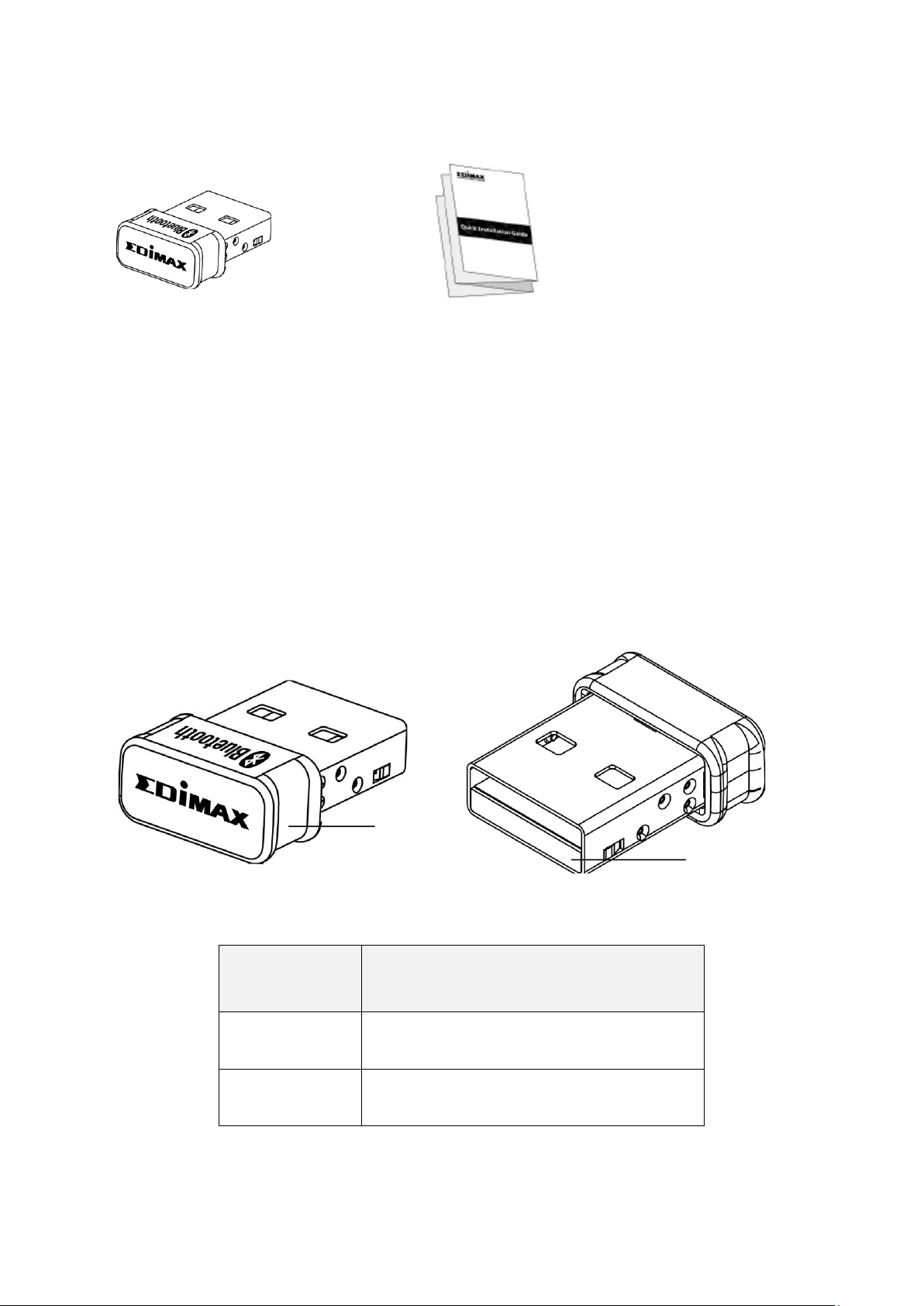
I-1. Contenido del paquete
N.º
Descripción
1
Caja
2
USB 2.0 de tipo A
Guía de instalación
Adaptador USB BT8500
2
1
I-2. Requisitos del sistema
- Windows 8.1/10 32 bit/64 bit o superior
- Linux: kernel 2.6.32~4.15, sugerido 4.4 (posterior)
- 1 USB 2.0 de tipo A
I-3. Interfaz de hardware
2
Page 5
II. Instalación del dispositivo
Siga los pasos indicados a continuación para instalar su adaptador USB
Bluetooth.
1. Encienda el PC.
Si su PC o portátil tiene conexión Bluetooth, deshabilite el Bluetooth
antes de usar el adaptador USB Bluetooth.
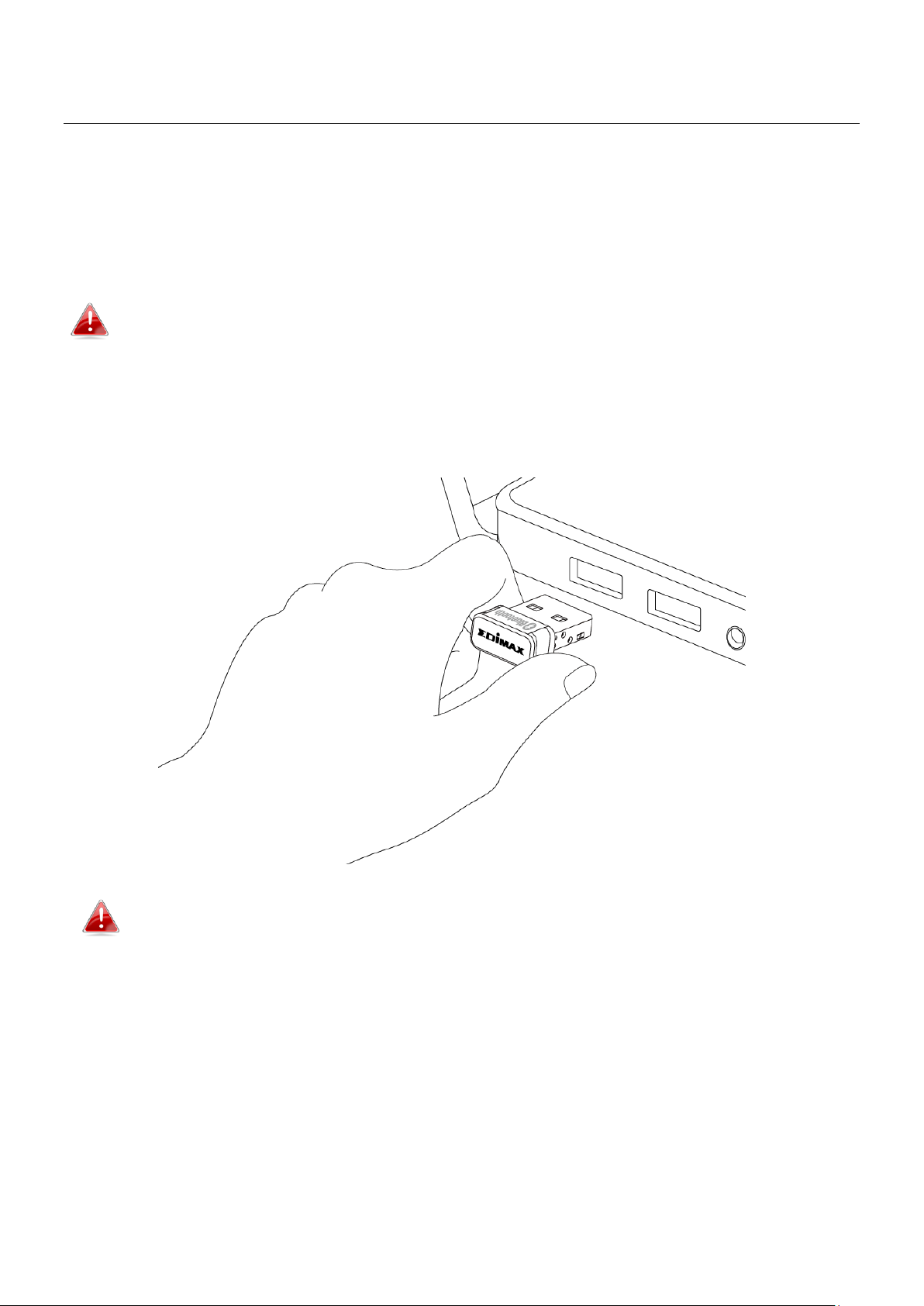
2. Introduzca el adaptador USB en un puerto USB disponible de su
ordenador.
No ejerza fuerza para insertar el adaptador USB.
3
Page 6
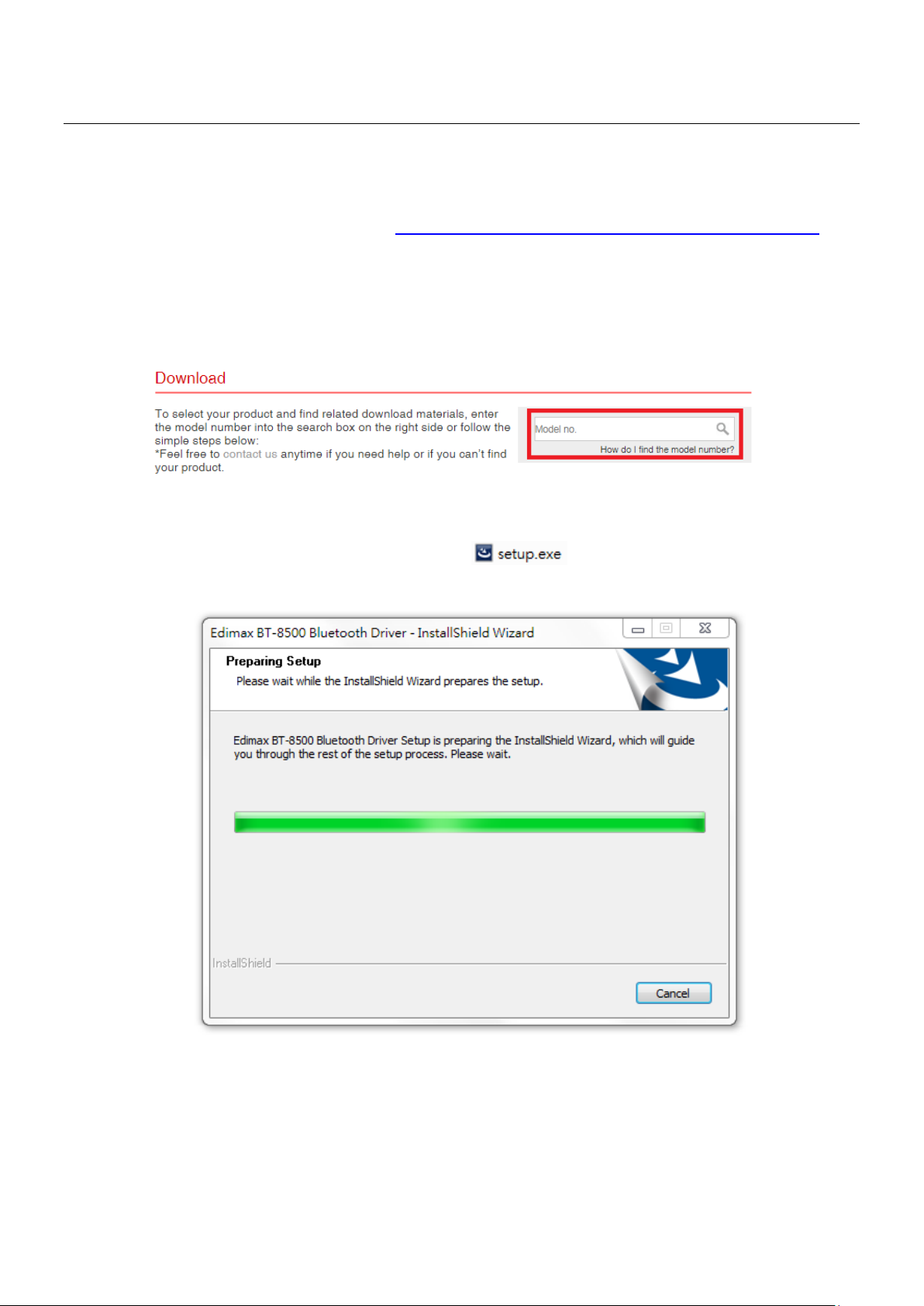
III. Instalación del controlador
Siga las siguientes instrucciones para instalar el controlador.
1. Vaya al sitio web de Edimax (https://www.edimax.com/edimax/global/).
2. Ingrese el número de modelo. "BT-8500" en el cuadro de búsqueda para
buscar su producto, vaya a Descargar y descargue el controlador.
3. Abra la carpeta y haga doble clic en para instalar el controlador.
4
Page 7
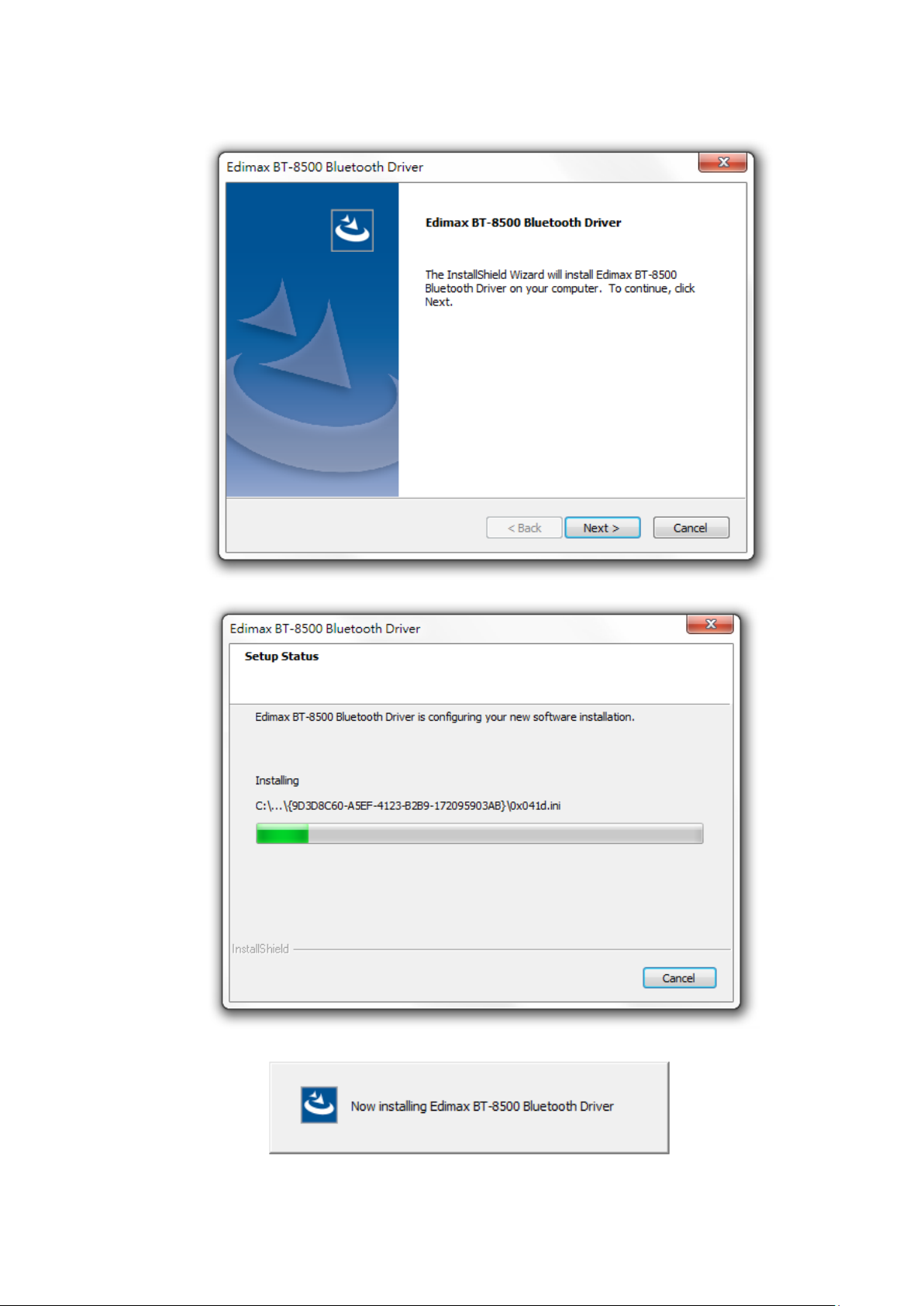
4. Haga clic en "Siguiente" para continuar y seguir las instrucciones en
pantalla hasta que la instalación se haya completado.
5
Page 8
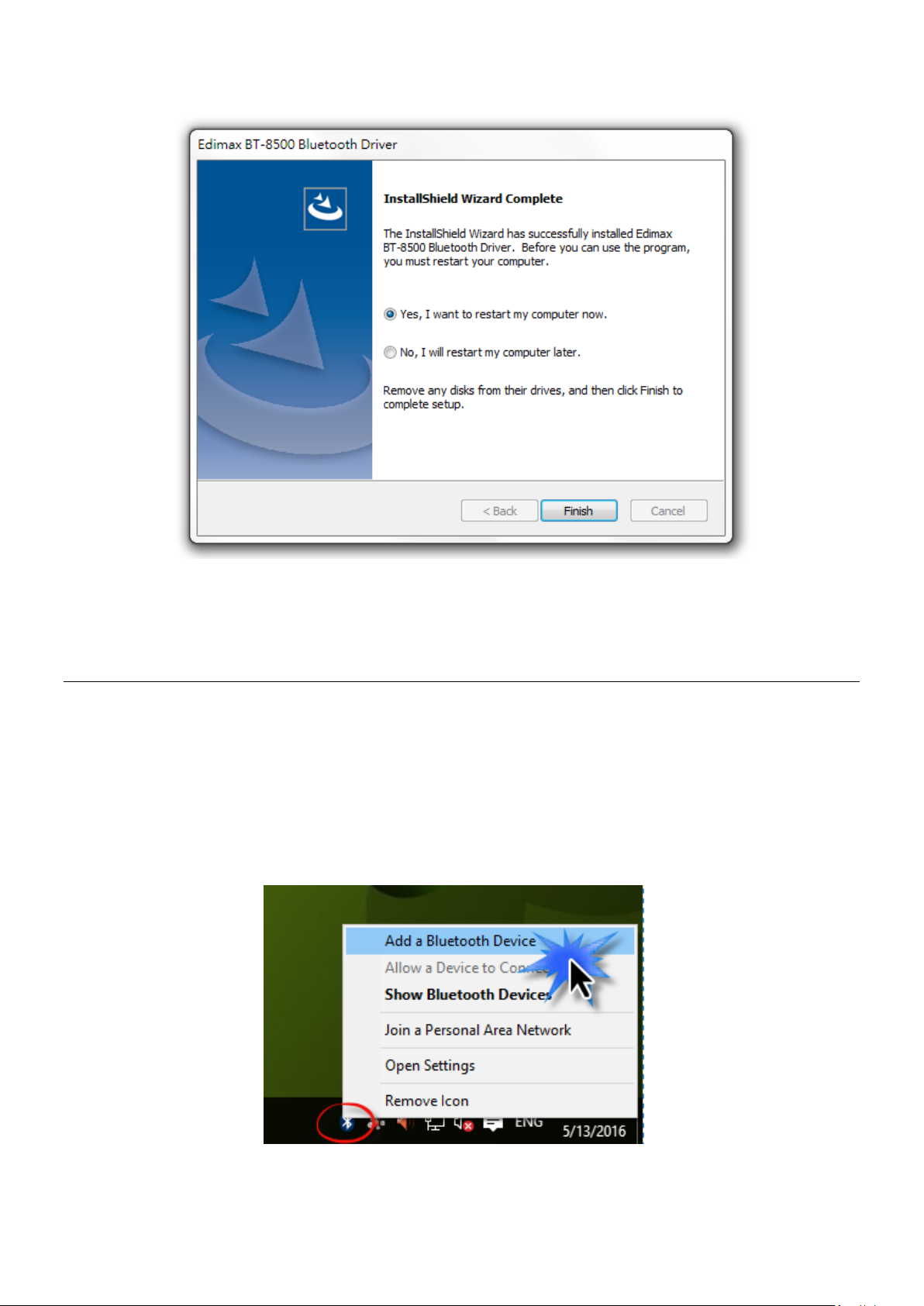
5. Elija si reiniciar el ordenador ahora o más tarde y haga clic en “Finalizar”.
IV. Añadir dispositivos
Siga las instrucciones siguientes para añadir los dispositivos Bluetooth.
1. Vaya a los ajustes de Windows de Bluetooth utilizando la barra de
búsqueda o haciendo clic con el botón derecho sobre el icono de Bluetooth
de la barra de tareas y elija Añadir dispositivo Bluetooth.
6
Page 9
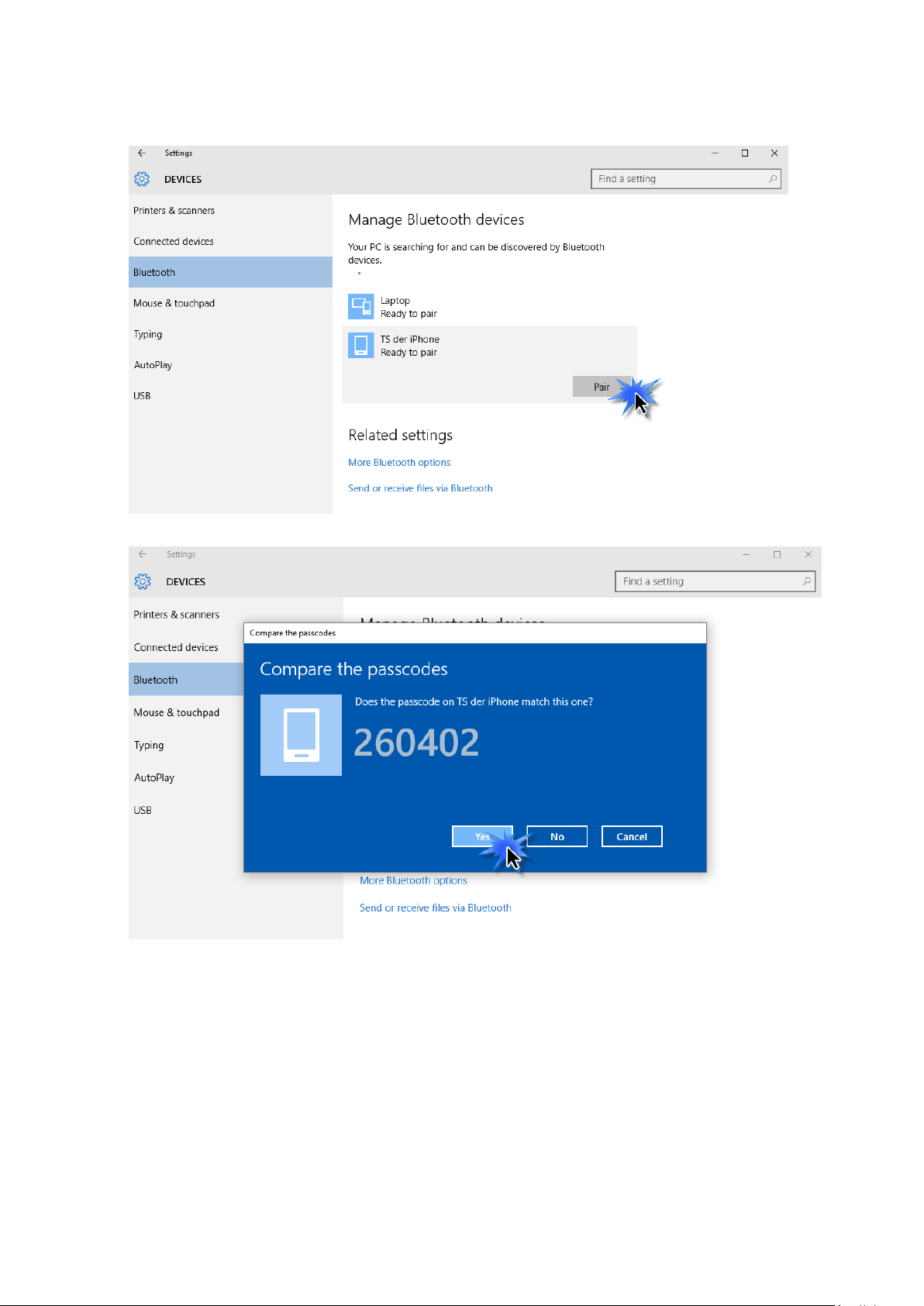
2. Seleccione el dispositivo Bluetooth, haga clic en Emparejar y confirme la
contraseña.
7
Page 10
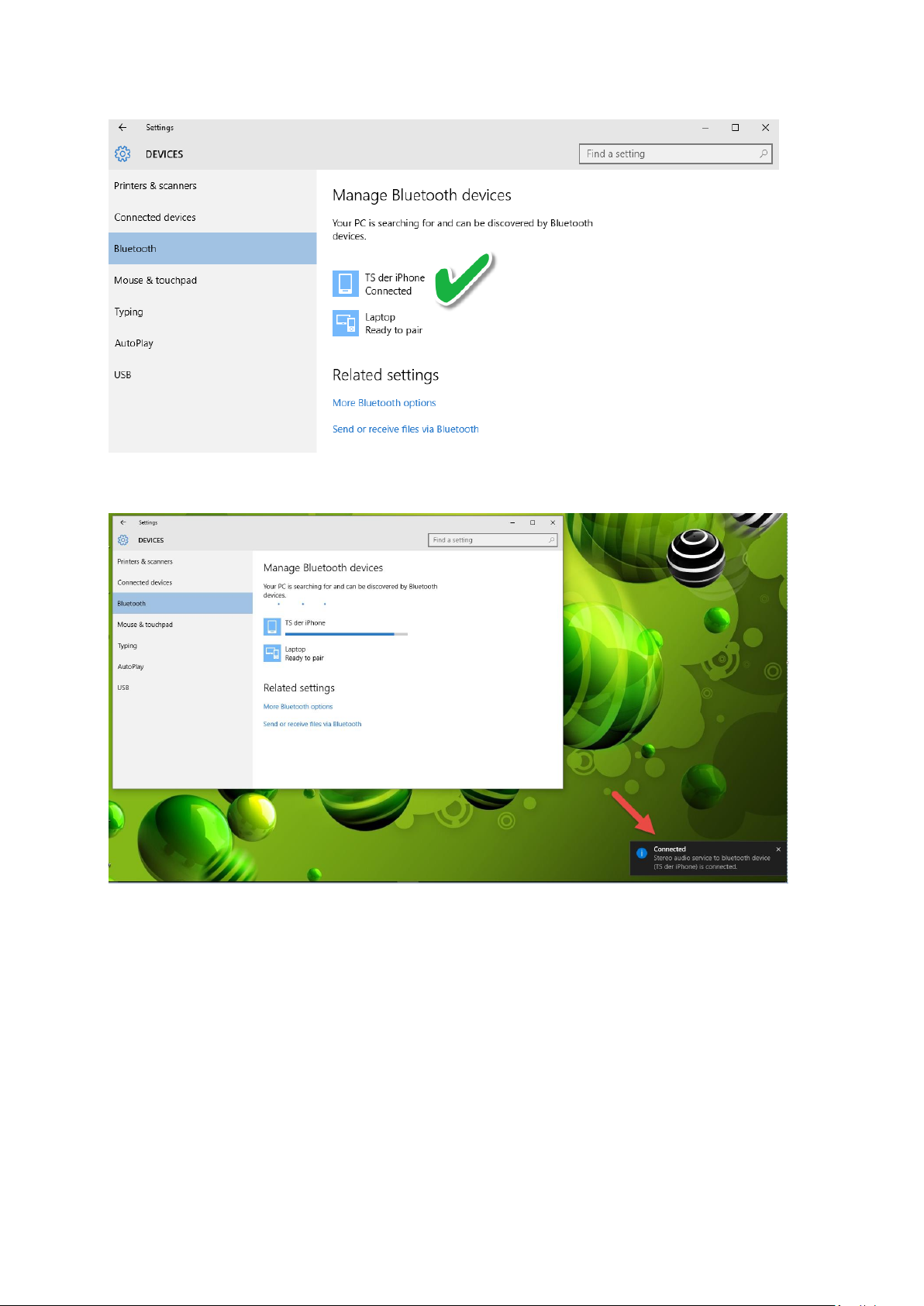
3. Ahora su dispositivo estará listo para usar cuando aparezca “Conectado”.
V.
8
Page 11
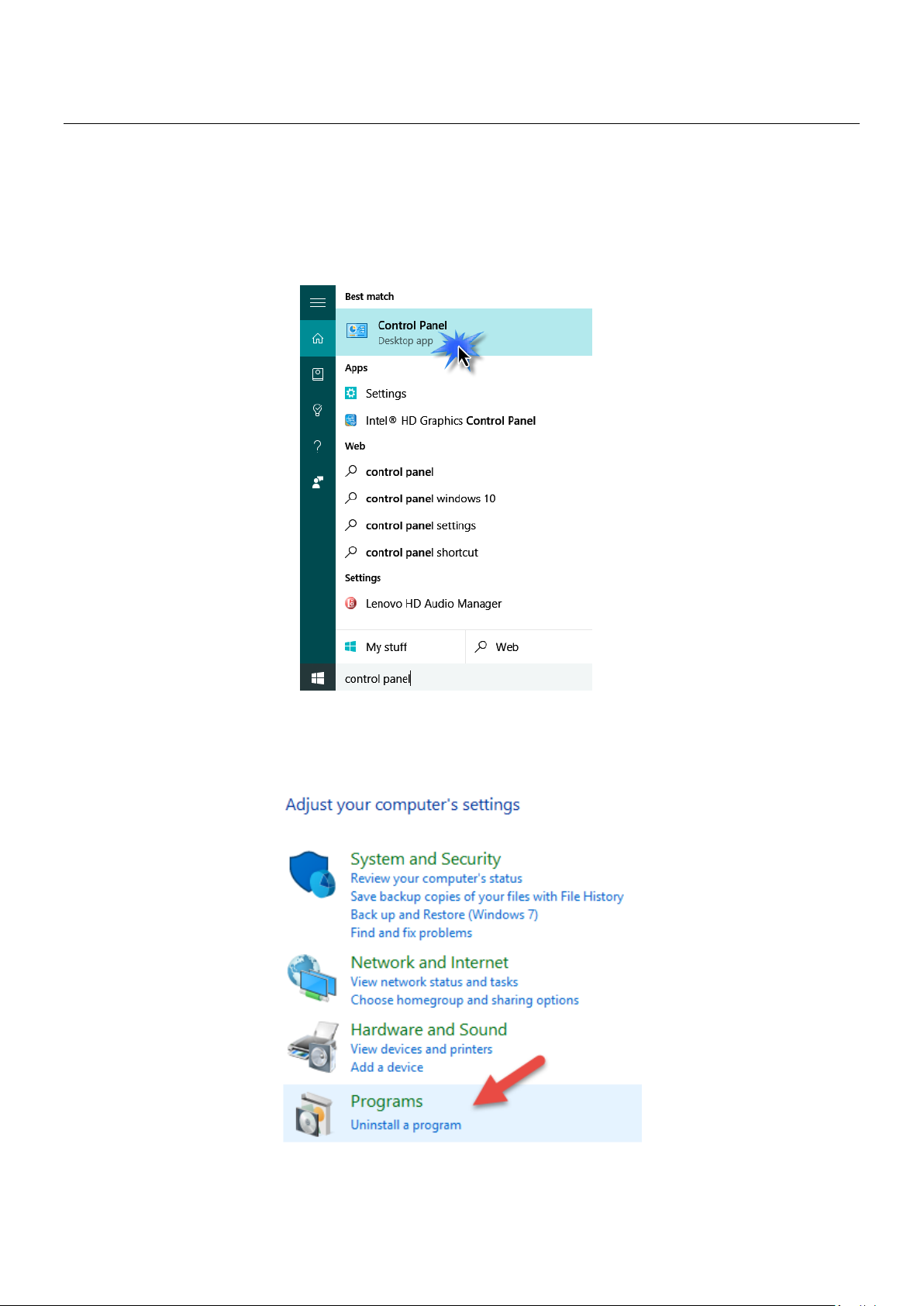
V. Desinstalar un controlador
Siga los pasos indicados a continuación para desinstalar un controlador de su
adaptador USB.
1. Abra el panel de control usando el menú Inicio o la función Buscar.
2. Seleccione Desinstalar un programa en la categoría Programas.
9
Page 12
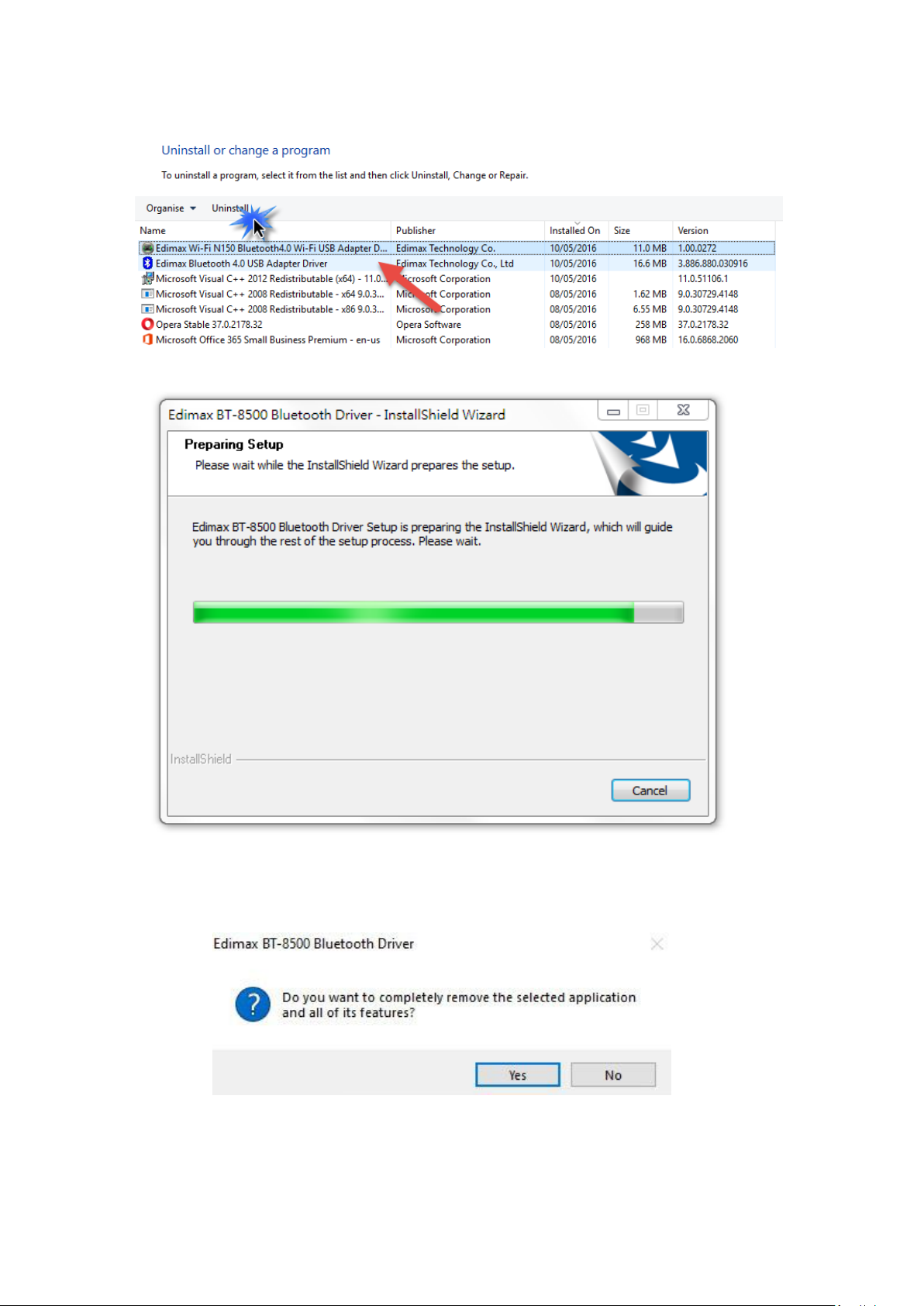
3. Seleccione BT-8500 (o similar) y Edimax Bluetooth 5.0 (o similar) y haga clic
en Desinstalar.
4. Haga clic en Sí para continuar.
10
Page 13
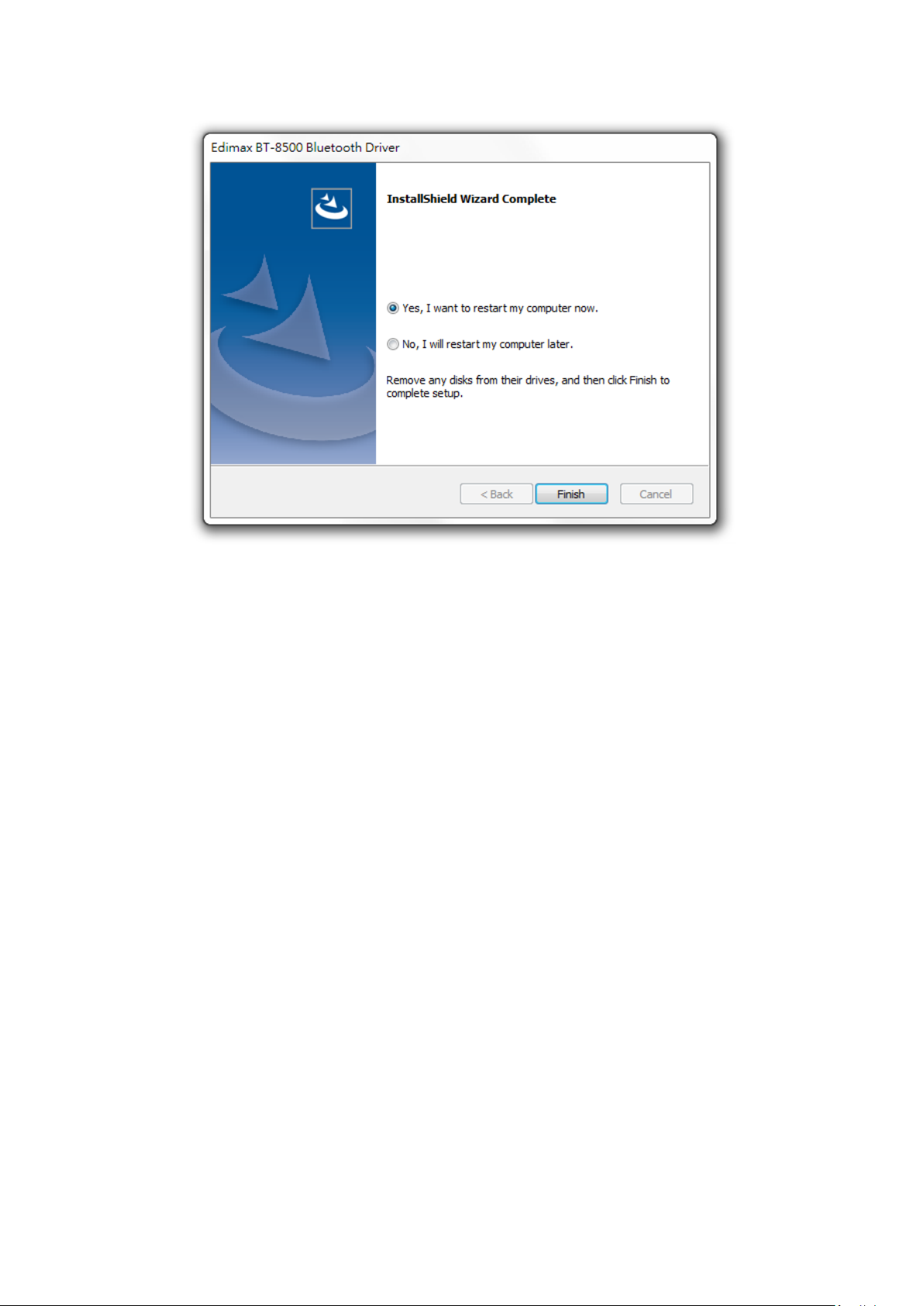
5. Elija si reiniciar el ordenador ahora o más tarde y haga clic en “Finalizar”.
11
Page 14

COPYRIGHT
Copyright Edimax Technology Co., Ltd. all rights reserved. No part of this publication
may be reproduced, transmitted, transcribed, stored in a retrieval system, or translated
into any language or computer language, in any form or by any means, electronic,
mechanical, magnetic, optical, chemical, manual or otherwise, without the prior written
permission from Edimax Technology Co., Ltd.
Edimax Technology Co., Ltd. makes no representations or warranties, either expressed or
implied, with respect to the contents hereof and specifically disclaims any warranties,
merchantability, or fitness for any particular purpose. Any software described in this
manual is sold or licensed as is. Should the programs prove defective following their
purchase, the buyer (and not this company, its distributor, or its dealer) assumes the
entire cost of all necessary servicing, repair, and any incidental or consequential damages
resulting from any defect in the software. Edimax Technology Co., Ltd. reserves the right
to revise this publication and to make changes from time to time in the contents hereof
without the obligation to notify any person of such revision or changes.
The product you have purchased and the setup screen may appear slightly different from
those shown in this QIG. The software and specifications are subject to change without
notice. Please visit our website www.edimax.com for updates. All brand and product
names mentioned in this manual are trademarks and/or registered trademarks of their
respective holders.
12
Page 15

Frequency range (MHz)
Max. Transmit Power (dBm)
2412-2472
9.97
Federal Communication Commission Interference Statement
This equipment has been tested and found to comply with the limits for a Class B digital device, pursuant to Part
15 of FCC Rules. These limits are designed to provide reasonable protection against harmful interference in a
residential installation. This equipment generates, uses, and can radiate radio frequency energy and, if not
installed and used in accordance with the instructions, may cause harmful interference to radio communications.
However, there is no guarantee that interference will not occur in a particular installation. If this equipment does
cause harmful interference to radio or television reception, which can be determined by turning the equipment
off and on, the user is encouraged to try to correct the interference by one or more of the following measures:
1. Reorient or relocate the receiving antenna.
2. Increase the separation between the equipment and receiver.
3. Connect the equipment into an outlet on a circuit different from that to which the receiver is connected.
4. Consult the dealer or an experienced radio technician for help.
FCC Caution
This device and its antenna must not be co-located or operating in conjunction with any other antenna or
transmitter. This device complies with Part 15 of the FCC Rules. Operation is subject to the following two
conditions: (1) this device may not cause harmful interference, and (2) this device must accept any interference
received, including interference that may cause undesired operation. Any changes or modifications not expressly
approved by the party responsible for compliance could void the authority to operate equipment.
Federal Communications Commission (FCC) Radiation Exposure Statement
This equipment complies with FCC radiation exposure set forth for an uncontrolled environment.
Federal Communications Commission (FCC) RF Exposure Requirements
This equipment complies with FCC radiation exposure limits set forth for an uncontrolled environment. End user
must follow the specific operating instructions for satisfying RF exposure compliance.
RED Compliance Statement
Compliance with 2014/53/EU Radio Equipment Directive (RED)
In accordance with Article 10.8(a) and 10.8(b) of the RED, the following table provides information on the
frequency bands used and the maximum RF transmit power of the product for sale in the EU:
A simplified DoC shall be provided as follows: Article 10(9)
Hereby, Edimax Technology Co., Ltd. declares that the radio equipment type Bluetooth 5.0 USB Adapter is in
compliance with Directive 2014/53/EU
The full text of the EU declaration of conformity is available at the following internet
address: http://www.edimax.com/edimax/global/
Safety
This equipment is designed with the utmost care for the safety of those who install and use it. However, special
attention must be paid to the dangers of electric shock and static electricity when working with electrical
equipment. All guidelines of this and of the computer manufacture must therefore be allowed at all times to
ensure the safe use of the equipment.
EU Countries Intended for Use
The ETSI version of this device is intended for home and office use in Austria, Belgium, Bulgaria, Cyprus, Czech,
Denmark, Estonia, Finland, France, Germany, Greece, Hungary, Ireland, Italy, Latvia, Lithuania, Luxembourg, Malta,
Netherlands, Poland, Portugal, Romania, Slovakia, Slovenia, Spain, Sweden, Turkey, and United Kingdom. The ETSI
version of this device is also authorized for use in EFTA member states: Iceland, Liechtenstein, Norway, and
Switzerland.
EU Countries Not Intended for Use
None
13
Page 16
EU Declaration of Conformity
English: This equipment is in compliance with the essential requirements and other relevant
provisions of Directive 2014/53/EU, 2014/35/EU.
Français: Cet équipement est conforme aux exigences essentielles et autres dispositions de la
directive 2014/53/EU, 2014/35/EU.
Čeština: Toto zařízení je v souladu se základními požadavky a ostatními příslušnými ustanoveními
směrnic 2014/53/EU, 2014/35/EU.
Polski: Urządzenie jest zgodne z ogólnymi wymaganiami oraz szczególnymi warunkami
określonymi Dyrektywą UE 2014/53/EU, 2014/35/EU.
Română: Acest echipament este în conformitate cu cerinţele esenţiale şi alte prevederi relevante ale
Directivei 2014/53/UE, 2014/35/UE.
Русский: Это оборудование соответствует основным требованиям и положениям Директивы
2014/53/EU, 2014/35/EU.
Magyar: Ez a berendezés megfelel az alapvető követelményeknek és más vonatkozó irányelveknek
(2014/53/EU, 2014/35/EU).
Türkçe: Bu cihaz 2014/53/EU, 2014/35/EU direktifleri zorunlu istekler ve diğer hükümlerle ile
uyumludur.
Українська: Обладнання відповідає вимогам і умовам директиви 2014/53/EU, 2014/35/EU.
Slovenčina: Toto zariadenie spĺňa základné požiadavky a ďalšie príslušné ustanovenia smerníc
2014/53/EU, 2014/35/EU.
Deutsch: Dieses Gerät erfüllt die Voraussetzungen gemäß den Richtlinien 2014/53/EU, 2014/35/EU.
Español: El presente equipo cumple los requisitos esenciales de la Directiva 2014/53/EU,
2014/35/EU.
Italiano: Questo apparecchio è conforme ai requisiti essenziali e alle altre disposizioni applicabili
della Direttiva 2014/53/EU, 2014/35/UE.
Nederlands: Dit apparaat voldoet aan de essentiële eisen en andere van toepassing zijnde bepalingen
van richtlijn 2014/53/EU, 2014/35/EU.
Português: Este equipamento cumpre os requesitos essênciais da Directiva 2014/53/EU, 2014/35/EU.
Norsk: Dette utstyret er i samsvar med de viktigste kravene og andre relevante regler i Direktiv
2014/53/EU, 2014/35/EU.
Svenska: Denna utrustning är i överensstämmelse med de väsentliga kraven och övriga relevanta
bestämmelser i direktiv 2014/53/EU, 2014/35/EU.
Dansk: Dette udstyr er i overensstemmelse med de væ sentligste krav og andre relevante
forordninger i direktiv 2014/53/EU, 2014/35/EU.
suomen kieli: Tämä laite täyttää direktiivien 2014/53/EU, 2014/35/EU. oleelliset vaatimukset ja muut
asiaankuuluvat määräykset.
-----------------------------------------------------------------------------------------------------------------------
WEEE Directive & Product Disposal
At the end of its serviceable life, this product should not be treated as household or general waste. It
should be handed over to the applicable collection point for the recycling of electrical and electronic
equipment, or returned to the supplier for disposal.
14
Page 17

Declaration of Conformity
We, Edimax Technology Co., Ltd., declare under our sole responsibility, that the
equipment described below complies with the requirements of the European Radio
Equipment directives.
Equipment:
Bluetooth 5.0 USB Adapter
Model No.:
BT-8500
The following European standards for essential requirements have been followed:
Directives 2014/53/EU
Spectrum
:
EN 300 328 V2.2.2 (2019-07)
EMC
:
EN 301 489-1(Class B) V2.2.3 (2019-11)
EN 301 489-17 V3.2.2 (Draft) (2019-12)
EMF
:
EN 62479:2010
Safety (LVD)
:
IEC 62368-1:2014 (2nd Edition) and/or EN 62368-1:2014+A11:2017
Date of Signature:
July, 2020
Signature:
Printed Name:
Albert Chang
Title:
Director
Edimax Technology Co., Ltd.
Edimax Technology Europe B.V.
Fijenhof 2,
5652 AE Eindhoven,
The Netherlands
a company of :
Edimax Technology Co., Ltd.
No. 278, Xinhu 1st Rd.,
Neihu Dist., Taipei City,
Taiwan
Signature:
Printed Name:
David Huang
Title:
Director
Edimax Technology Europe B.V.
15
 Loading...