

Page 1
说明书X3/英法西德意葡日文/V1.0
尺寸:55*75mm,材质:80克书纸,扇形折,封面底面印80%灰+其它页印黑色
·
True Wireless Stereo Earbuds
Please visit EDIFIER website for the full version user manual: www.edif ier.com
Edif ier International Limited
P.O. Box 6264
General Post Office
Hong Kong
www.edif ier.com
© 2020 Edif ier International Limited. All rights reserved.
Printed in China
NOTICE:
For the need of technical improvement and system upgrade,
information contained herein may be subject to change from time
to time without prior notice.
Products of EDIFIER will be customized for different applications.
Pictures and illustrations shown on this manual may be slightly
different from actual product. Images are for illustrative purposes
only and may differ from the actual product.
V1.0 IB-200-X00030-00
@Edif ier_Global @Edif ier_Global@Edif ier_Global
EN
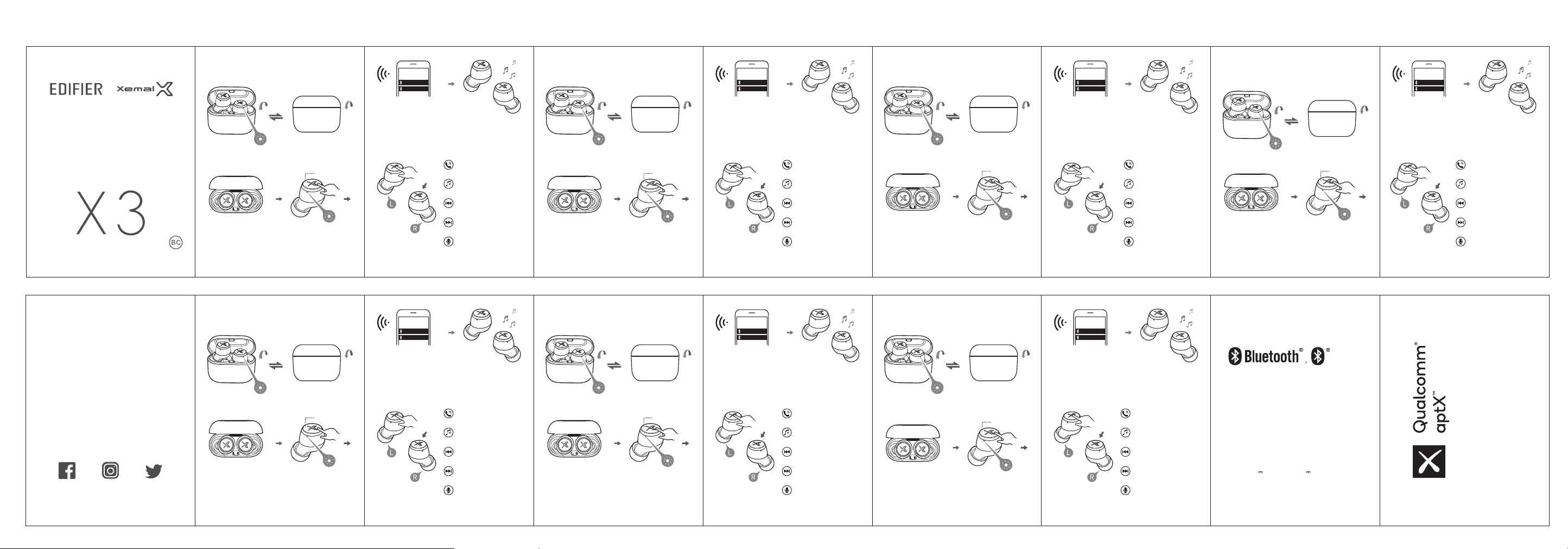
● Power on when taken out
of the charging case.
Blue light steady lit for 1 second
● Pairing
• Bluetooth pairing: press and hold
the touch button for 1-3 seconds
• TWS pairing: double click the touch
button
• Clear pairing records: press and hold
the touch button for 8 seconds
● Power o when the
charging case is closed.
Touch button
• Bluetooth pairing: red and white
lights flashing rapidly
• TWS pairing: blue light flashing
rapidly
• Clear pairing records: blue light
flashing six times rapidly
EDIFIER X3 L
EDIFIER X3 R
For initial use, directly take the earbuds out of the
charging case, and set mobile phone to search
the corresponding Bluetooth pairing name to
connect as shown in the above picture; For
subsequent use, the earbuds will automatically
connect to the mobile phone used before.
● Functional Operation
Note: Images are for illustrative purposes only and may differ from the actual
product.
Accept/end a call:
single click the left or right earbud
Pause/play:
single click the left or right earbud
Previous track:
triple click the left or right earbud
Next track:
double click the left or right earbud
Voice assistant:
press and hold for 2 seconds
IT PT
● Accensione quando vengono
rimossi dalla custodia di ricarica.
Luce blu accesa in modo fisso per 1 secondo
● Connessione
• Connessione Bluetooth: premere e
tenere premuto il pulsante a sfioramento
per 1-3 secondi
• Connessione TWS: fare doppio clic sul
pulsante a sfioramento
• Eliminare i record di abbinamento:
premere e tenere premuto il pulsante
a sfioramento per 8 secondi
● Spegnimento automatico
quando la custodia di
ricarica viene chiusa.
Pulsante a sfioramento
• Connessione Bluetooth: le luci
rossa e blu lampeggiano
rapidamente
• Connessione TWS: la luce blu
lampeggia rapidamente
• Eliminare i record di abbinamento:
la luce blu lampeggia rapidamente
per sei volte
EDIFIER X3 L
EDIFIER X3 R
Per il primo utilizzo, rimuovere direttamente gli auricolari
dalla custodia di ricarica e impostare il telefono cellulare
per la ricerca e la connessione al nome di associazione
Bluetooth, come mostrato nell'immagine sopra; Per l'utilizzo
successivo, gli auricolari si collegheranno automaticamente
all’ultimo telefono cellulare utilizzato.
● Funzionamento
Nota: Le immagini sono solo a scopo illustrativo e possono differire dal
prodotto reale.
Accettare/terminare una chiamata:
fare un clic sull'auricolare sinistro
o destro
Pausa/play:
fare un clic sull'auricolare sinistro
o destro
Brano precedente:
fare tre clic sull'auricolare sinistro
o destro
Brano successivo:
fare due clic sull'auricolare sinistro
o destro
Assistente vocale:
premere e tenere premuto per
circa 2 secondi
FR ES DE
● S’allument lorsqu’ils sont
sortis de l’étui-chargeur.
Voyant bleu allumé pendant 1 seconde
● Appairage
• Appairage Bluetooth: appuyez sur le
bouton tactile pendant 1 à 3 secondes
• Appairage TWS: appuyez deux fois
rapidement sur le bouton tactile
•
Effacer la mémoire d’appairage: appuyez
sur le bouton tactile pendant 8 secondes
● S’éteignent lorsque
l’étui-chargeur est fermé.
Bouton tactile
• Appairage Bluetooth: les voyants
rouge et bleu clignotent rapidement
• Appairage TWS: le voyant bleu
clignote rapidement
• Effacer la mémoire d’appairage: le
voyant bleu clignote 6 fois rapidement
EDIFIER X3 L
EDIFIER X3 R
Pour la première utilisation, sortez les écouteurs de
l’étui-chargeur et initialisez une recherche des
périphériques Bluetooth depuis votre téléphone.
Lorsque le nom illustré ci-dessus apparaît, sélectionnez-le
pour la connexion. Les écouteurs se connecteront
automatiquement par la suite lorsque vous les allumez.
● Mode d’emploi
Remarque: Les images utilisées servent de référence uniquement, et peuvent
ne pas correspondre au produit.
Décrocher/raccrocher un appel:
pression sur l’écouteur de gauche
ou de droite
Pause/lecture:
pression sur l’écouteur de gauche
ou de droite
Piste précédente:
triple pression sur l’écouteur de
gauche ou de droite
Piste suivante:
double pression sur l’écouteur de
gauche ou de droite
Assistant vocal:
maintenir appuyé pendant
environ 2 secondes
● Se enciende cuando se saca
de la funda de carga.
El testigo azul se iluminará fijo durante 1 segundo
● Emparejamiento
• Emparejamiento Bluetooth: mantenga
pulsado el botón táctil 1-3 segundos
• Emparejamiento TWS: pulse dos veces
el botón táctil
• Borrar lista de emparejamiento:
mantenga pulsado el botón táctil
8 segundos
● Se apaga cuando se
cierra la funda de carga.
Botones táctiles
• Emparejamiento Bluetooth: parpadean
rápidamente los testigos rojo y azul
• Emparejamiento TWS: parpadea
rápidamente el testigo azul
• Borrar lista de emparejamiento:
parpadea rápidamente el testigo
azul seis veces
EDIFIER X3 L
EDIFIER X3 R
Para el primer uso, saque directamente los auriculares
de la funda de carga y ponga el teléfono móvil en
búsqueda, conectando con el nombre de emparejamiento
Bluetooth correspondiente como se indica en la imagen
anterior; para usos posteriores los auriculares conectarán
automáticamente con el último teléfono móvil usado.
● Funcionamiento
Nota: Las imágenes aparecen con un fin meramente ilustrativo y pueden
variar del producto final.
Aceptar/finalizar llamada:
pulse una vez el auricular
izquierdo o derecho
Detener/reproducir:
pulse una vez el auricular
izquierdo o derecho
Pista anterior:
pulse tres veces el auricular
izquierdo o derecho
Pista siguiente:
pulse dos veces el auricular
izquierdo o derecho
Asistente de voz:
mantenga pulsado durante
aproximadamente 2 segundos
●
ein, sobald sie aus dem Ladekoer
herausgenommen werden.
● Kopplung
• Bluetooth-Pairing: Halten Sie die
berührungsempfindliche Taste
1-3 Sekunden lang gedrückt
• TWS-Kopplung: Drücken Sie zweimal
auf die berührungsempfindliche Taste
•
Halten Sie die berührungsempfindliche
Taste 8 Sekunden lang gedrückt
JP
● Ligar ao retirar da caixa de
carregamento.
Luz azul acesa e fixa durante 1 segundo
● Emparelhamento
• Emparelhamento Bluetooth:
mantenha o botão tátil premido
durante 1-3 segundos
• Emparelhamento TWS: clique duas
vezes no botão tátil
• Limpar registos de emparelhamento:
Mantenha o botão tátil premido
durante 8 segundos
● Desligar quando a caixa de
carregamento estiver fechada.
Botão de toque
• Emparelhamento Bluetooth: as
luzes vermelha e branca piscam
rapidamente
• Emparelhamento TWS: a luz azul
pisca rapidamente
• Limpar registos de emparelhamento:
a luz azul pisca seis vezes
rapidamente
EDIFIER X3 L
EDIFIER X3 R
Quando usar pela primeira vez, retire diretamente os
auriculares da caixa de carregamento e defina o telemóvel
para procurar e ligar ao nome de emparelhamento
Bluetooth correspondente, conforme ilustrado na imagem
acima; Para as utilizações subsequentes, os auriculares
ligarão automaticamente ao último telemóvel usado.
● Funcionamento Funcional
Nota: As imagens são apenas ilustrativas e podem diferir do produto real.
Atender/terminar uma chamada:
clique único no auricular esquerdo
ou direito
Pausar/reproduzir:
clique único no auricular esquerdo
ou direito
Faixa anterior:
clique triplo no auricular esquerdo
ou direito
Faixa seguinte:
clique duplo no auricular esquerdo
ou direito
Assistente de voz:
Mantenha premido durante cerca
de 2 segundos
●
充電ケースから外すと
電源が入ります。
青色ランプが1秒点灯
●
ペアリング
•Bluetoothペアリング:タッチ
ボタンを1〜3秒押します
•TWSペアリング:タッチボタンを
ダブルクリック
•ペアリングレコードをクリアしま
す:タッチボタンを8秒押します
●
充電ケースを閉じる
と電源オフです。
タッチボタン
•Bluetoothペアリング:赤色・
青色ランプが素早く点滅
•TWSペアリング:青色ランプが
素早く点滅
•ペアリングレコードをクリアしま
す:青色ランプが6回素早く点滅
EDIFIER X3 L
EDIFIER X3 R
初めて使用する時は、上の図のように、充電ケ
ースから直接イヤフォンを取り出し、携帯電話
を対応Bluetoothペアリング名に検索接続するよ
う設定します。その後、イヤフォンは最後に使
用した携帯電話に自動的に接続します。
●
機能の操作
コールを応答/終了する:
左/右イヤフォンを1回クリック
一時停止/再生:
左/右イヤフォンを1回クリック
前の曲:
左/右イヤフォンを3回クリック
次の曲:
左/右イヤフォンを2回クリック
音声アシスタント:
約2秒押します
注記:画像は参照用です。実際の製品が優先されます。
Die Ohrhörer schalten sich automatisch
Die blaue LED-Anzeige bleibt 1 Sekunde lang durchgehend erleuchtet
Datensätze aus den Kopplungen löschen:
The Bluetooth® word mark and logos are registered trademarks
owned by Bluetooth SIG, Inc. and any use of such marks by EDIFIER
is under license. Other trademarks and trade names are those of
their respective owners.
Declaration for EU
Frequency Band: 2.402GHz ~ 2.480GHz
RF Power Output: ≤20 dBm (EIRP)
There is no restriction of use.
● Die Ohrhörer schalten
sich automatisch aus,
sobald der Ladekoer
geschlossen wird.
Drucktaste
• Bluetooth-Pairing: Die rote und
blaue LED-Anzeige beginnt schnell
zu blinken
• TWS-Kopplung: Die blaue LED Anzeige beginnt schnell zu blinken
• Datensätze aus den Kopplungen
löschen: Die blaue LED-Anzeige blinkt
sechsmal schnell hintereinander auf
Rated input: 5V 50mA(Earbuds) 5V 350mA(Charging case)
EDIFIER X3 L
EDIFIER X3 R
Nehmen Sie die Ohrhörer bei der erstmaligen Inbetriebnahme
zunächst einmal aus dem Ladekoffer und richten Sie
anschließend Ihr Mobiltelefon so ein, dass es mit der Suche
nach dem oben abgebildeten Produktmodell beginnt und
eine Bluetooth-Verbindung herstellt. Bei der nächsten
Verwendung stellen die Ohrhörer dann automatisch eine
Verbindung zu dem zuletzt gekoppelten Mobiltelefon her.
● Funktionsweise
Hinweis: Die Abbildungen dienen ausschließlich zur Veranschaulichung und
können vom tatsächlichen Produkt abweichen.
Anruf annehmen/beenden:
Drücken Sie einmal auf den linken
oder rechten Ohrhörer
Pause/Wiedergabe:
Drücken Sie einmal auf den linken
oder rechten Ohrhörer
Vorheriger Titel:
Drücken Sie dreimal auf den linken
oder rechten Ohrhörer
Nächster Titel:
Drücken Sie zweimal auf den
linken oder rechten Ohrhörer
Sprachassistent:
Halten Sie die berührungsempfindliche
Taste etwa 2 Sekunden lang gedrückt
Qualcomm aptX is a product of Qualcomm Technologies, Inc. and/or
its subsidiaries.
Qualcomm is a trademark of Qualcomm Incorporated, registered in the
United States and other countries.
aptX is a trademark of Qualcomm Technologies International, Ltd.,
registered in the United States and other countries.
 Loading...