

Page 1
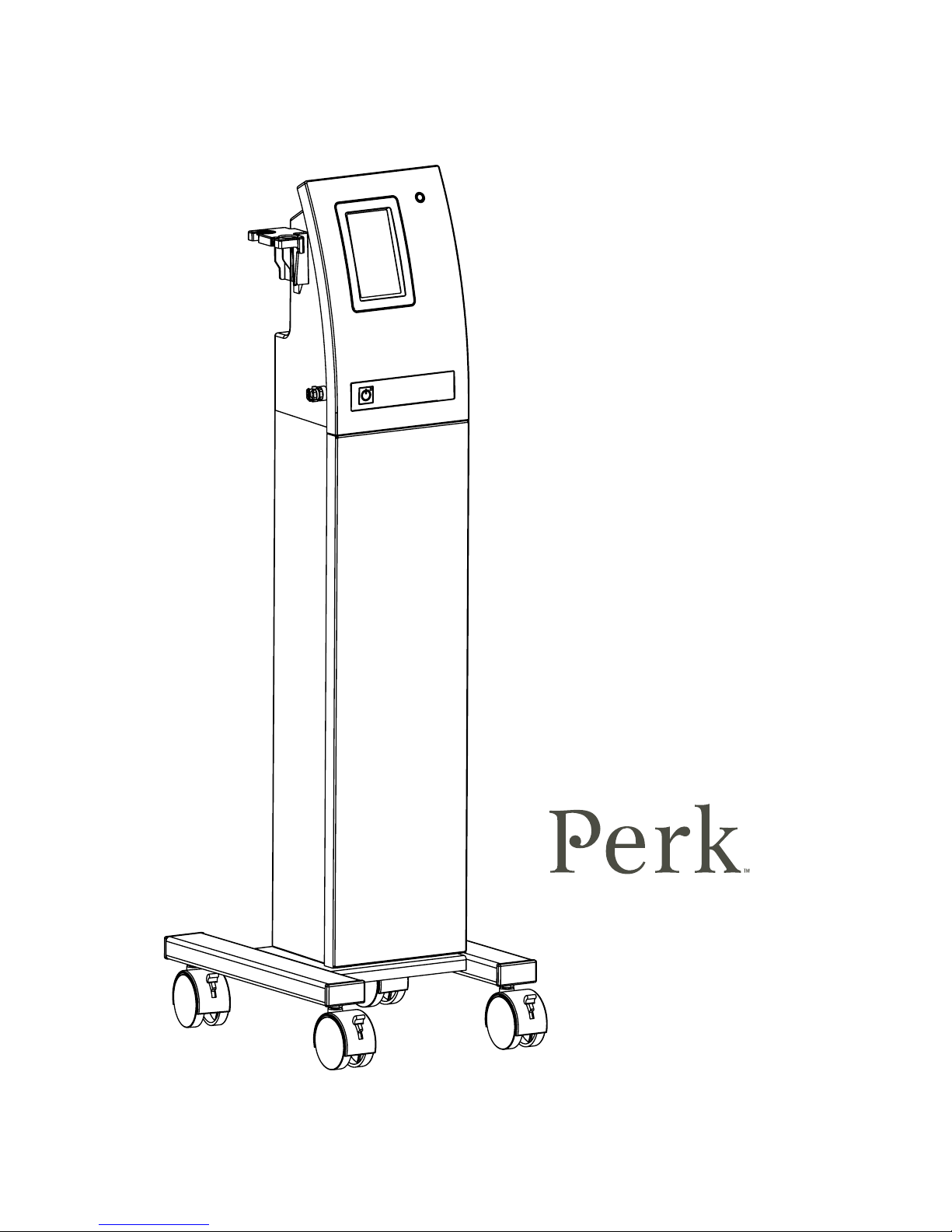
USER MANUAL
P/N 19655-D
Rev. 11/30/16
Page 2

PERK User Manual
Copyright © 2015 Edge Systems LLC.
All rights reserved.
Terms and Conditions of Use:
HydraFacial®, HydraFacial MD®, Nectre®,
Vortex-Fusion®, and HydroPeel® are registered
trademarks. Perk™ is a trademark of Edge
Systems. This product and its use are covered
by one or more U.S. and International patents.
Patent info: www.edgeforlife.com/patents.
These intellectual property rights (IPR’s)
remain the exclusive property of Edge Systems
or its licensors. This product sold is subject to
a license to use the IPRs only in conjunction
with original Edge Systems products. Use of
Edge Systems together with non-original Edge
Systems products, including but not limited
to treatment media, serums and solutions,
is a breach of the license—to only use any
Edge System device together with original
Edge Systems products—and constitutes an
infringement of IPRs.
Contact Info:
Edge Systems LLC
2277 Redondo Avenue
Signal Hill, CA 90755 USA
Ph: 1-562-597-0102 or 800-603-4996
Fax: 1-562-597-0148
Email: [email protected]
http://www.edgeforlife.com
European Representative
M Devices Group / E.C. Rep Ltd
Healthcare Education Centre, The Church
Portland Street, Southport,
PR8 1HU, United Kingdom
Ph: +44 1704 544 944
Fax: +44 1704 644 050
Email: [email protected]
Page 3

PERK User Manual
2 BEFORE YOU START
Introduction
Safety Information
9 GETTING STARTED
Packaging & Unpacking Inspection
Setup
- Waste Canister
- Tubing
11 OPERATING INSTRUCTIONS
Turn on the System
Standby/Sleep Mode
Touchscreen Operation
Skin Solution Vials
13 SYSTEM CLEANING &
PREVENTIVE MAINTENANCE
After Each Service
14 TROUBLESHOOTING
Touchscreen
Wear and Tear Items
Troubleshooting Chart
16 LIMITED WARRANTY
18 APPENDIX: CLIENT CONSULTATION &
RELEASE FORM
Page 4

2 | Before You Start
PERK User Manual
INTRODUCTION
Congratulations on purchasing Perk™, the next generation of skincare. As the world’s rst hybrid
facial, the Perk™ system:
› Loosens dirt, oil and dead skin cells from the surface of skin through operator-controlled
gentle exfoliation.
› Cleanses the skin by ushing and suctioning away those impurities.
› Applies nourishing skin solutions for healthy looking skin
Thanks to the patented roller ball application, the treatment is quick, refreshing, and non-irritating,
leaving beautiful clean skin. You can have the utmost condence in this hybrid skin system
manufactured in the USA by Edge Systems LLC.
This beauty device is intended to be used by trained skincare professionals at a commercial
establishment, such as salon, spa, beauty store, or other aesthetic practices. It is not intended to be
used at a residential setting by untrained consumers.
SYSTEM SPECIFICATIONS:
1. Model P/N 70401
2. Device Type: Beauty Device
3. Unit Size: 12” (H) x 8” (W) x 7” (D)
4. Unit Weight: 20.5 lbs.
5. Electrical: 12 VDC (powered from a universal power supply – included, power supply is
specied as part of this equipment.)
ENVIRONMENTAL CONDITIONS FOR OPERATION, SHIPPING AND STORAGE:
1. Temperature: 10° to 40° C
2. Relative Humidity: 30 to 75% RH
3. Atmospheric Pressure: 700 to 1060 hPa
APPLICABLE COUNCIL DIRECTIVES:
• Electromagnetic Compatibility (EMC) Directive 2014/30/EU
• General Product Safety Directive (GPSD) 2001/95/EC
• RoHS Directive 2011/65/EU
Page 5
3 | Before You Start
PERK User Manual
SAFETY INFORMATION
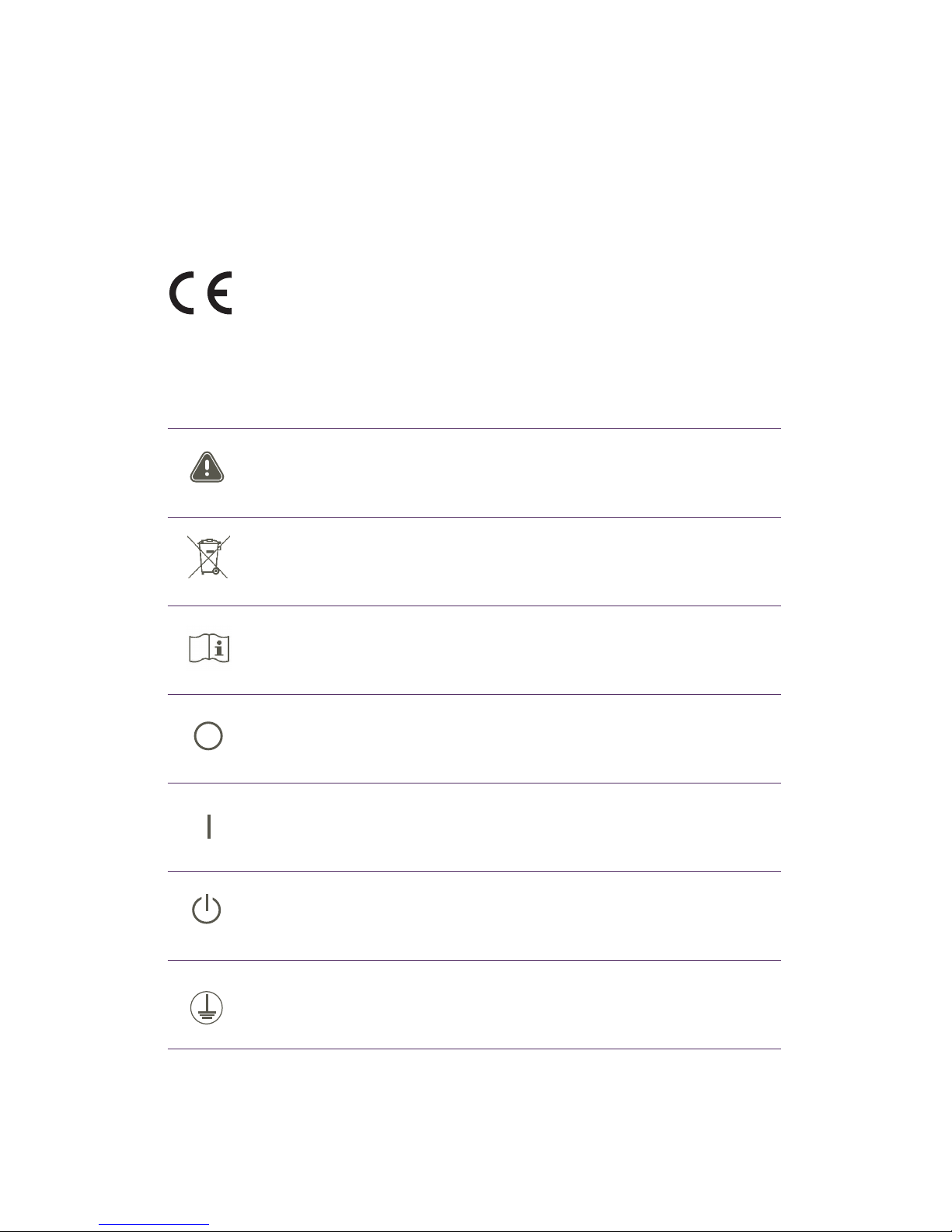
PRODUCT MARKING SYMBOLS
SYMBOL DESCRIPTION
Attention: Refer to accompanying documentation.
Aufmerksamkeit: Beziehen Sie sich begleitend auf Dokumentation.
Attention : Consultez la documentation d’accompagnement
Separate collection for electronic.
Trennen Sie Sammlung für elektronisch.
Collecte sélective pour l’électronique.
Operating Instructions
Bedienungsanleitung
Mode d’emploi
OFF (Power)
AUS (Stromversorgung)
ETEINT (Alimentation)
ON (Power)
EIN (Stromversorgung)
ALLUME (Alimentation)
STANDBY (Power)
STANDBY (Stromversorgung)
PAUSE (Alimentation)
Connect to supply mains with protective earth (ground)
Zum Versorgungsnetz durch eine Schutzerdung anschließen
Connectez au secteur, avec protection mise à la terre
STANDARDS TO WHICH CONFORMITY IS DECLARED:
SAFETY: IEC 60335-2-23:2003 used in conjunction with IEC 60335-1:2001+A1:2004
EN 60335-2-23:2003 used in conjunction with 60335-1:2002
EMC: EN 61000-6-3:2007+A1:2011
EN 61000-6-1:2007
Page 6
4 | Before You Start
PERK User Manual
SAFETY GUIDELINES
1. Ensure that all operators of the Perk
™
System are trained and licensed as required by the state
or country. Do not operate the unit before being trained. For any questions regarding training,
call your salesperson or Edge Systems.
2. Be sure to read the User Guide thoroughly before setting up the system. If you experience
mechanical and/or electrical difculties with your unit, call Edge Systems Service Department
at 1-562-597-0102.
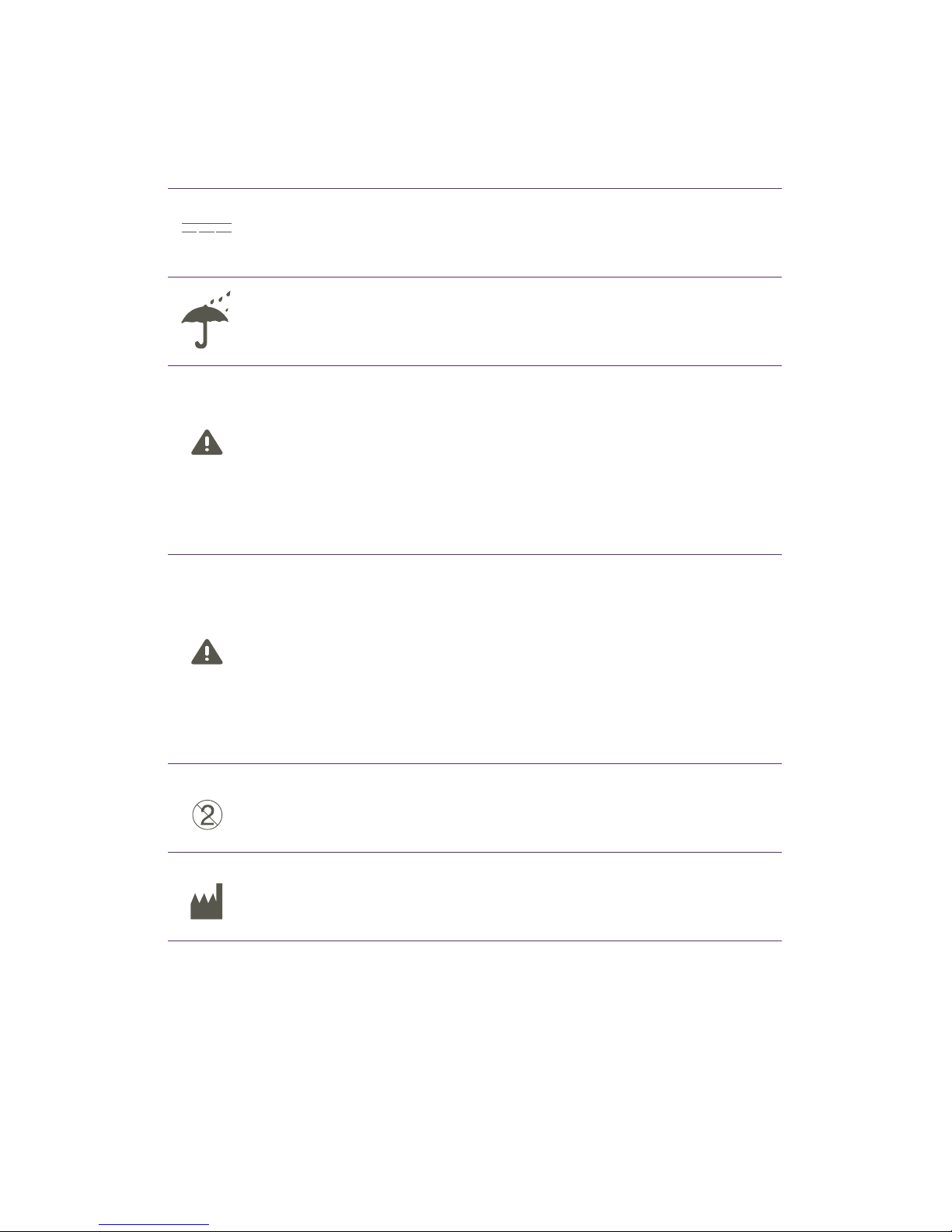
CAUTION AND MARKING SYMBOLS
SYMBOL DESCRIPTION
Direct Current
Gleichstrom
Courant continu
Keep dry
Bleib trocken
Garder au sec
Calls attention to a procedure, practice, or condition that could possibly cause bodily
injury or death.
Ruft Aufmerksamkeit zu einem Verfahren, Praxis, oder Bedingung, die vielleicht körperliche
Verletzung oder Tod verursachenkönnte.
Une attention particulière doit être portée à une procédure, pratique ou condition qui pourrait
causer des blessures corporelles ou la mort.
Calls attention to a procedure, practice, or condition that could possibly cause damage to
equipment or permanent loss of data.
Ruft Aufmerksamkeit zu einem Verfahren, Praxis, oder Bedingung, die vielleicht Schaden an
Ausrüstungen oder permanentem Verlust der Daten verursachen könnte.
Une attention particulière doit être portée à une procédure,
pratique ou condition qui pourrait causer des dommages à l’appareil ou la perte permanente
de données.
Single use only.
Nur zum einmaligen Gebrauch.
Usage unique.
Manufactured by
Hergestellt von
Fabriqué par
CAUT ION
WARNING
Page 7

5 | Before You Start
PERK User Manual
3. Always use a clean vial tip included with each vial kit for each procedure. The Perk
™
tips are
for single use only, per individual. Use for more than one procedure may result in cross
contamination.
4. Reusing contaminated skin solution can cause harm to the client and will void
all warranties.
5. Skin solutions should not exceed the “Use By” date indicated on the vial. Should any products
(skin solutions) settle, please contact your distributor or Edge Systems.
6. In the event that a client experiences irritation, discontinue the treatmnt and rinse skin with
cool water.
7. Always conduct a client consultation (see Appendix I) to determine if the client is a candidate
for the procedure. Follow contraindication list as pre-determination for procedure.
8. Always begin procedure conservatively. Follow recommended protocols and contraindications
for skin type. Each client’s skin condition and sensitivity are different and suggested settings
will vary for each client. Perform a sensitivity test on the neck by the earlobe and increase or
decrease the vacuum level as required. Skin conditions requiring more aggressive vacuum
settings are at operator’s discretion.
9. Do not work on sensitive areas such as the eyelids. Eyelids should be closed at all times during
the procedure and covered with protective eyewear or damp cotton pads. Sterile eye rinse
solution should be available at all times to rinse the eyes. Removing contact lenses prior to
procedure is recommended.
10. Do not work over open lesion/wound; doing so could result in skin infection. The client should
have a minimum sunscreen SPF 30 applied after the procedure and should use sunscreen on
an ongoing basis. Use of Edge Systems’ UV Smart® Daily sunscreen is highly recommended
(available in select countries).
11. Empty the waste container after each service according to your waste handling
protocol. Follow the system cleaning instructions in this guide to clean your machine after each
procedure.
12. Only Edge Systems skin solutions should be used. Use of other, non-approved skin solutions
will void the warranty and clog the machine. Always use solution when performing treatment.
13. It is strongly recommended NOT to use or store the unit in a steamy room. Keep water away
from electrical components.
14. To avoid risk of electric shock, do not disassemble the unit. The unit is not user serviceable.
15. This appliance is not intended for use by persons (including children) with reduced physical,
sensory or mental capabilities, or lack of experience and knowledge, unless they have been
given supervision or instruction concerning use of the appliance by a person responsible for
their safety.
16. Children should be supervised to ensure that they do not play with the appliance.
SAFETY GUIDELINES (CONTINUED)
Page 8

6 | Before You Start
PERK User Manual
WARNING: Do not position the equipment in such a way to make it difcult to operate the
disconnection device when an appliance coupler or separable plug is used as isolation.
WARNING: Unauthorized user modications will void warranty. Edge Systems LLC will not
be responsible for any injuries sustained due to unauthorized equipment modications
or use of parts not specied by Edge Systems LLC. Equipment returned to Edge Systems
LLC with unsafe modications will be returned to their original operating condition at the
customer’s expense.
Verbraucheränderungen Unbefugte Verbraucheränderungen warden Garantie aufheben.
Edge Systems LLC wird verantwortlich für irgendeine Verletzungen nicht sein, die
auf Grund unbefugter Geräteänderungen oder Gebrauchs der Teile gestützt werden,
die nicht von Edge Systems LLC angegeben werden. Ausrüstungen sind schieben
Systemgesellschaft mit nicht sicheren Änderungen wird zurückgekehrt werden zu ihrem
Original zurückgekehrt, das Bedingung an der Ausgabe des Kunden bedient.
Des modications non autorisées effectuées par l’utilisateur annuleront la garantie. Edge
Systems LLC ne sera pas responsable de toute blessure causée à la suite de modications
non autorisées sur l’appareil ou à la suite d’une utilisation de pièces non spéciées par
Edge Systems LLC. L’appareil qui est retourné à Edge Systems LLC avec des modications
non sécuritaires sera ramené à son état de fonctionnement initial aux frais du client.
WARNING: Equipment not suitable for use in the presence of a ammable anesthetics
mixture with air or with oxygen or Nitrous Oxide.
Ausrüstungen die nicht sind passend für Gebrauch in der Anwesenheit von einer
brennbaren Narkosenmischung mit Luft oder mit Sauerstoff oder Stickstoff oxyd.
L’appareil n’est pas destiné à être utilisé en présence d’un mélange anesthésique
inammable avec de l’air, de l’oxygène ou de l’oxyde nitreux.
CAUT ION: Equipment is designed for use in Hospitals, Clinics, Doctor’s ofces and
qualied beauty salons. If there is potential electromagnetic interference with other
equipment or devices, increase distance between them. Also note contraindications of
clients with pacemaker type devices.
Ausrüstung ist für Gebrauch in den Krankenhäusern, in den Büros des Doktors der Klinik
und in quali zierten Schönheit Salons bestimmt. Wenn es mögliche elektromagnetische
Störung mit anderer Ausrüstung oder Vorrichtungen gibt, erhöhen Sie Abstand zwischen
ihnen. Merken Sie auch Kontraindikationen der Klienten mit Friedensstifterarten
Vorrichtungen.
L’équipement est conçu pour l’usage dans les hôpitaux, les bureau du docteur de la
clinique et les salons quali és de beauté. S’il y a interférence électromagnétique
potentielle avec d’autres équipement ou dispositifs, augmentez la distance entre eux.
Notez en outre les contresindication des clients avec des types dispositifs de conciliateur.
Page 9

7 | Before You Start
PERK User Manual
CAUT ION: This equipment has been designed and determined to be compliant with
regulatory agency limits for EMI. However, there is no guarantee that interference will
not occur in a particular installation. If this equipment does cause interference, which can
be determined by turning the equipment off and on, the interference can be possibly
corrected by one or more of the following measures:
› Relocate the equipment with respect to the receiver.
› Move the equipment away from the receiver.
› Plug the equipment into a different electrical outlet so that the equipment and receiver
are on different branch circuits.
Diese Ausrüstungen sind entworfen worden und sind bestimmt worden,
entgegenkommend mit gesetzlichen Agenturengrenzen für EMI zu sein. Jedoch, es gibt
keine Garantie, die jene Störung in einer besonderen Installation nicht statt nden wird.
Wenn diese Ausrüstungen Störung verursachen, die von Drehen den Ausrüstungen ab
und auf bestimmt werden kann, kann die Störung vielleicht von ein oder mehr von den
Folgenden Maßnahme korrigiert werden:
› Repositionieren Sie die Ausrüstungen in Bezug auf den Empfänger.
› Bewegen Sie die Ausrüstungen weg vom Empfänger.
› Stöpseln Sie die Ausrüstungen in eine verschiedene Steckdose zu, damit die
Ausrüstungen und der Empfänger auf verschiedenen Zwei genkreisläufen sind.
Cet appareil a été conçu conformément aux limites de l’organisme de réglementation
en matière d’interférence électromagnétique. Toutefois, rien ne garantit l’absence
d’interférences dans une installation particulière. Si cet appareil provoque des
interférences, détectables en allumant et en éteignant l’appareil, celles-ci pourront
possiblement être corrigées en accomplissant une ou plusieurs des actions suivantes:
› Déplacer l’appareil par rapport au récepteur;
› Éloigner l’appareil du récepteur;
› Brancher l’appareil sur une autre prise de courant pour que l’appareil et le récepteur
soient branchés sur diff érents circuits.
CAUT ION: To prevent electric shock, do not remove the instrument cover. There are no
user serviceable parts inside. Routine maintenance or cleaning of internal parts is not
necessary. Avoid the use of cleaning agents or chemicals on the instrument. Some
chemicals may damage plastic parts or lettering. Any external cleaning should be done
with a clean, dry or slightly damp cloth. Any replacement cables and parts should be
acquired directly from Edge Systems LLC.
Elektroschock zu verhindern, nimmt die Instrumentdecke nicht heraus. Es gibt keine vom
Benutzer haltbaren Teile hinein. Routinewartung oder reinigend von inneren Teilen ist
nicht notwendig. Vermeiden Sie den Gebrauch, um Agenten oder Chemikalien auf dem
Page 10

8 | Before You Start
PERK User Manual
Instrument zu reinigen. Einige Chemikalien dürfen Kunststoff teile oder Beschriftung
beschädigen. Irgendein äußerlicher Reinigen sollte mit einem sauberen gemacht werden,
trocknet oder dämpft etwas Tuch. Irgendeine Ersetzung kabelt und Teile sollten direkt von
Edge Systems LLC erlangt werden.
Pour prévenir les chocs électriques, n’enlevez pas le couvercle de l’instrument. Ce
dernier ne contient aucune pièce pouvant être réparée par l’utilisateur. L’entretien ou
le nettoyage périodique des pièces internes n’est pas nécessaire. Évitez l’utilisation de
produits nettoyants ou chimiques sur l’instrument. Certains produits chimiques peuvent
endommager les pièces de plastique ou le lettrage. Tout nettoyage externe doit être fait
avec un chiff on propre, sec ou légèrement humide. Tout câble et toute pièce de rechange
doivent être achetés directement auprès d’Edge Systems LLC.
CAUT ION: All electronic repairs and computer battery replacements should not be
attempted by user, but referred back to Edge Service Department. Replace burned out
fuses by the exact rating shown on or near fuse box.
Alle elektronischen Reparaturen und Computerbatteriewiedereinbaue sollten nicht vom
Benutzer versucht werden, aber zurück zu Rand Service-Abteilung verwiesen werden.
Ersetzen Sie ausbrennen Sicherungen durch die genaue Bewertung, die an gezeigt wird
oder sich nähern Sicherung Kasten.
Tous les réparations et remplacements électroniques de batterie d’ordinateur ne devraient
pas être essayés par l’utilisateur, mais être renvoyés au service après vente de bord.
Remplacez grillent des fusibles par l’estimation exacte montrée dessus ou s’approchent de
la boîte de fusible.
Page 11
PERK User Manual
9 | Getting Started
PACKAGING & UNPACKING INSPECTION
INSPECT THE SHIPPING CARTON
Your equipment was shipped in a custom foam insulated box that has been tested to UPS
standards. If the shipping carton is damaged, inspect the contents for visible damage such as
dents, scratches or any other obvious signs of damage. If you see visible damage, make a claim
with the carrier immediately. If the equipment is damaged, notify Edge Systems at (800) 6034996 or (562) 597-0102 and we will assist you in the repair or replacement of your equipment.
Do not return your unit without rst contacting Edge Systems and receiving an RMA (Return
Material Authorization) number.
Unpack the unit, accessories and all documents. Retain the original packaging in case you need to
ship the unit for any reason. Verify that all appropriate items have been received.
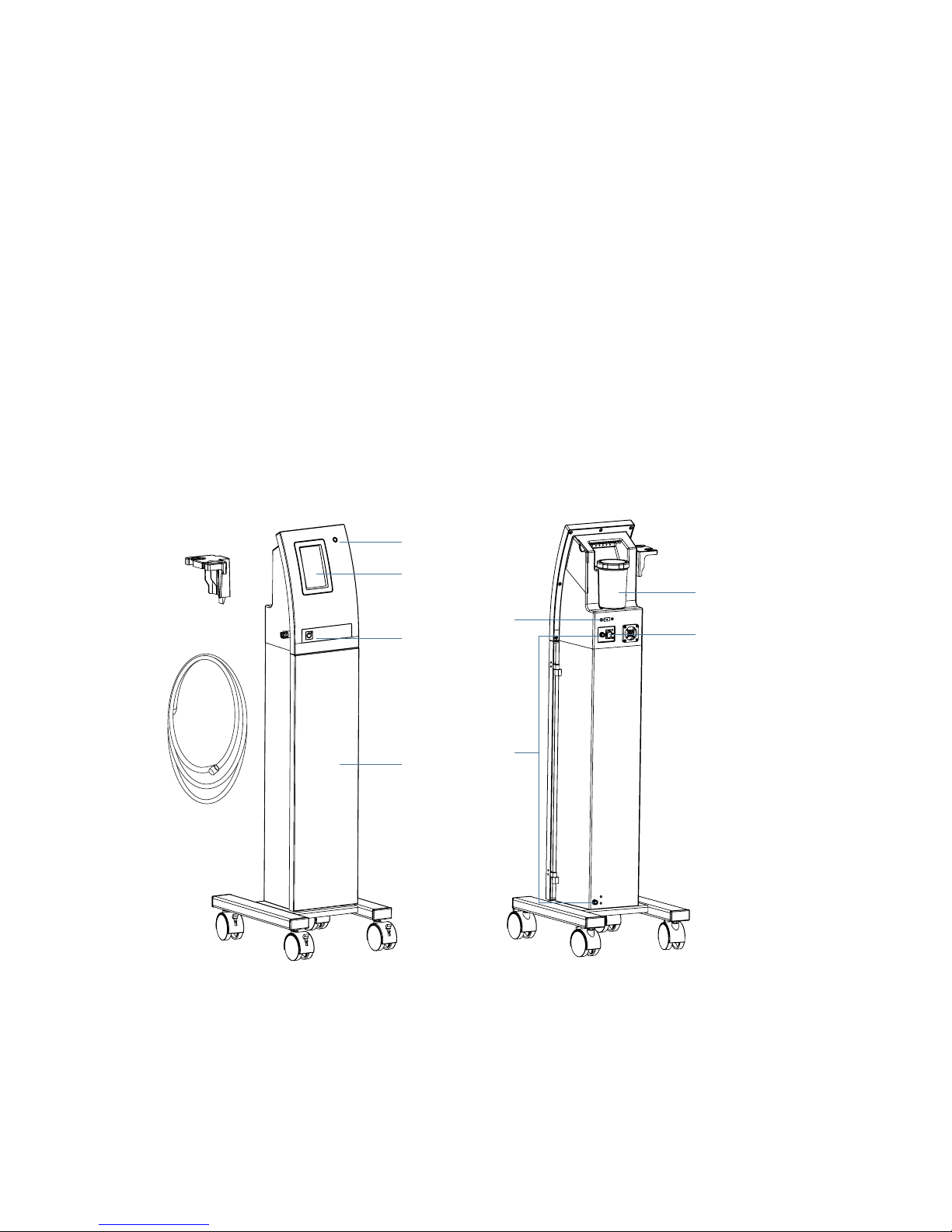
DEVICE COMPONENTS
1. Waste Container Caution Light
2. Touchscreen
3. Standby Button/Power Indicator
4. Tool Holder
5. Tubing
6. Storage Stand
7. Main Power Switch
8. Power Entry Ports
9. USB Port
10. Waste Container
1
10
7
2
3
6
5
4
8
9
Page 12
10 | Getting Started
PERK User Manual
PACKAGE CONTENTS
› Perk
™
Module
› Perk
™
Storage Stand
› Tubing
› Waste Canister
› Power Cord
TREATMENT KITS
› Normal/Dry Skin Kit
› Oily Skin Kit
› Eye Treatment Kit
› Lip Treatment Kit
SETUP
WASTE CONTAINER
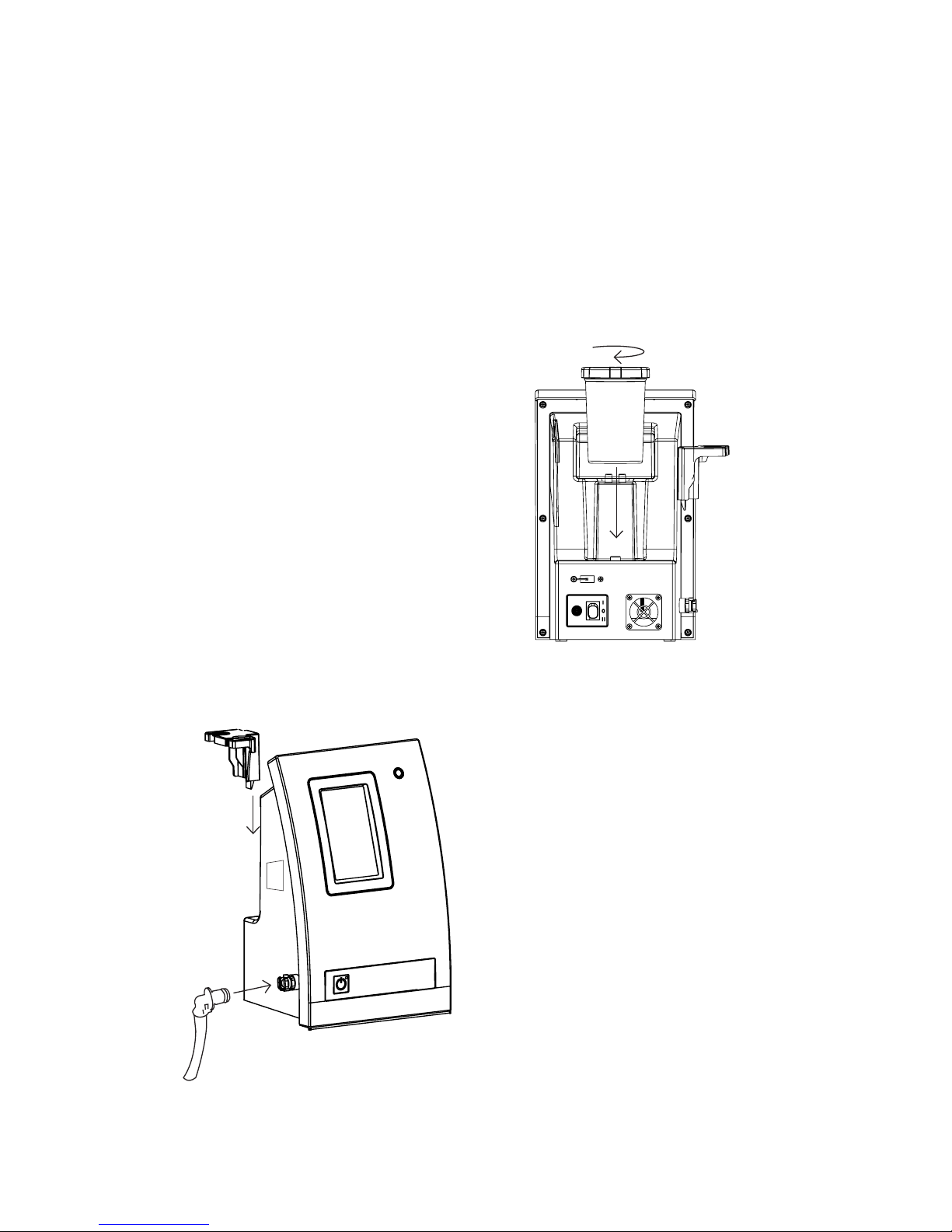
1. Attach the waste container lid to the waste
container and twist ¼ turn to secure and
seal the waste container.
2. Attach the waste container onto the back
of the unit. Ensure the waste container is
securely fastened to the unit.
NOTE: If the waste container is not installed
or installed incorrectly, a CAUTION warning
will be displayed on the screen and the waste
container caution light located in the upper
right hand corner of the unit will blink red.
TOOL HOLDER
1. Install the tool holder by sliding it down
over the metal plate on the side of the unit.
Be sure it is clicked in..
TUBING
2. Install the tubing to the unit. Take the end of
the tubing with the quick-disconnect tting
and securely attach it to the quick coupling
located on the left side of the unit. The
tubing enables you to use the Skin Solution
Vials and to clean the unit system.
Page 13
11 | Operating Instructions
PERK User Manual
TURN ON THE SYSTEM
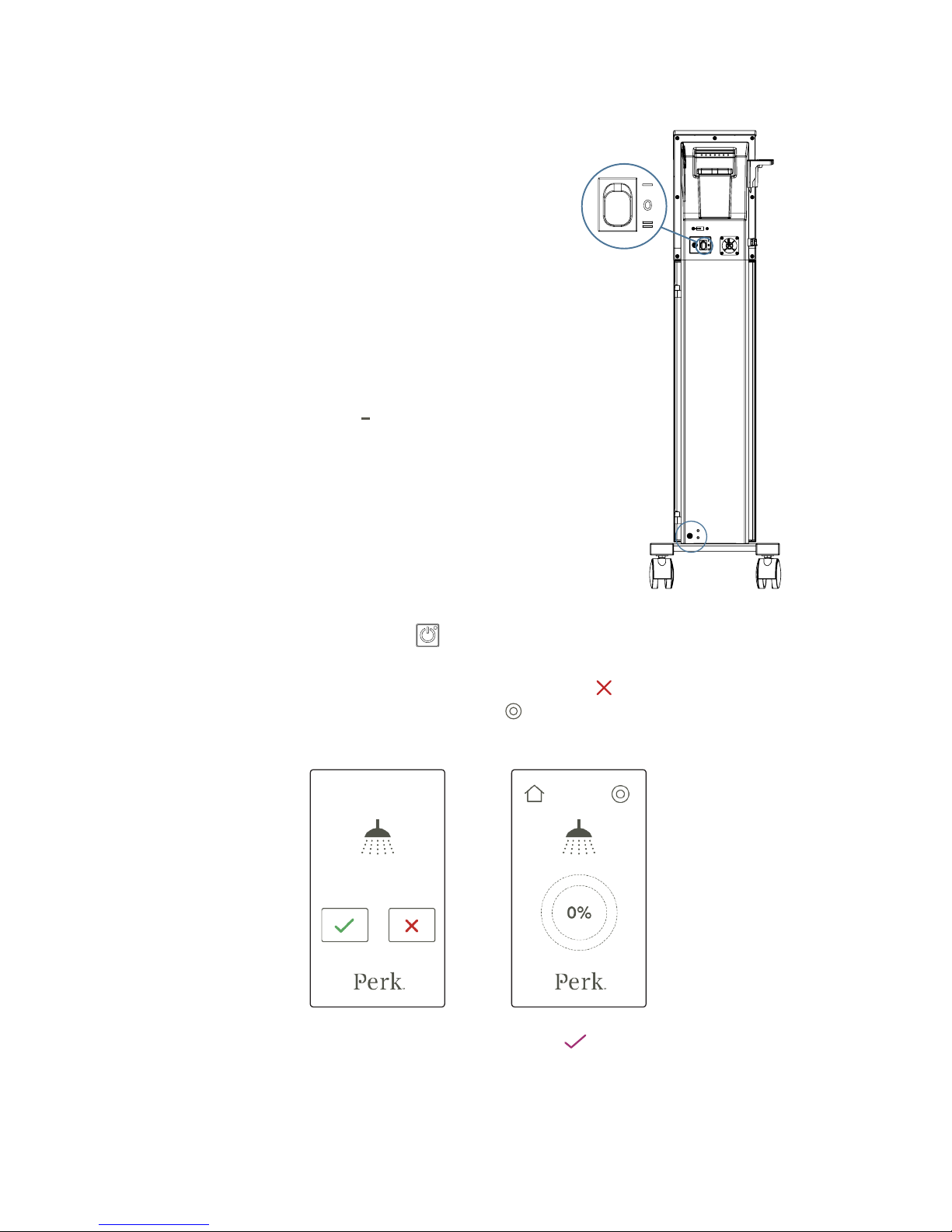
1. Connect the power cord to the power entry port and
connect the plug into a grounded wall outlet.
NOTE: For your convenience, there are two power entry
ports available. Depending on the location of your wall
outlet, you may plug the power cord into either the top
or bottom power entry port.
NOTE: You can only use the power cord supplied with
your unit. Contact Edge Systems Service Department at
1-562-597-0102 if you encounter any issues with the
power supply.
2. If the power cord is plugged into the top power entry
port, press the switch to the ( ) icon to turn on the unit.
3. If the power cord is plugged into the bottom power
entry port, , press the switch to the ( =) icon to turn
on the unit.
STANDBY/SLEEP MODE
1. Press the illuminated Standby Button
located on the front to put the unit into standby/sleep
mode. A system cleaning reminder will appear on the screen.
2. If you have not performed a cleaning of the system, press the red
button on the screen. This
will take you to the Cleaning mode screen. Press the
button on the upper right to begin the
cleaning process.
3. If you have performed the cleaning system, press the green
button and the unit will go
into standby/sleep mode.
NOTE: It is recommended you clean the system before you switch to the standby/sleep mode. Always
switch to the standby/sleep mode at the end of each day.
Page 14
12 | Operating Instructions
PERK User Manual
TOUCHSCREEN OPERATION
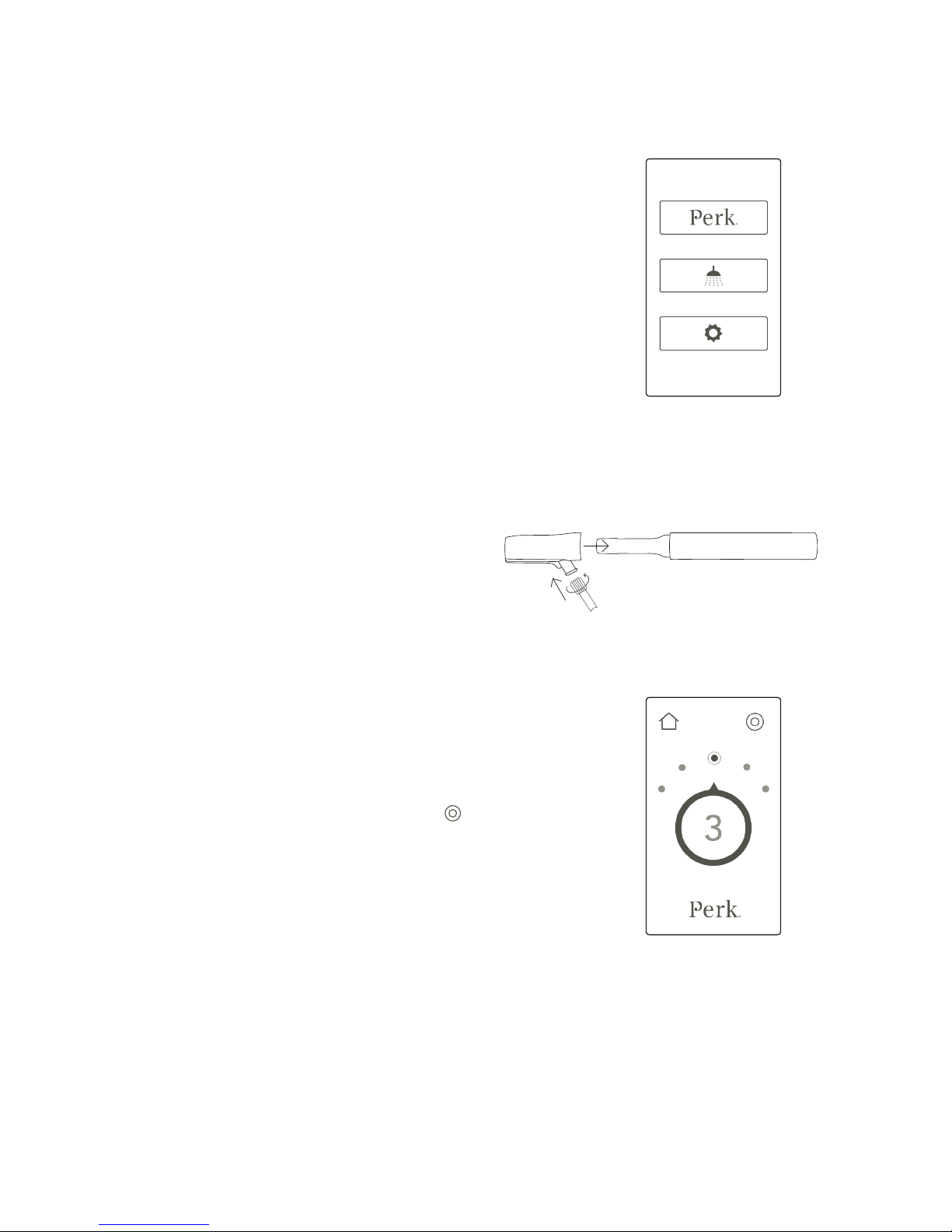
1. When the unit is on, the Perk
™
information screen
will be displayed. To go to the Main Menu, press the
screen with your ngertip.
2. The Main Menu will have three options: the Perk
™
option button, the Cleaning Mode option button, and
the Settings option button. To select an option, press
the button.
› Select the Perk
™
option to perform the
Perk™ procedure.
› Select the Cleaning Mode option to clean
the system.
› Select the Settings option to enter credit codes.
SKIN SOLUTION VIALS
1. To begin a treatment procedure, select a Skin
Solution Vial.
2. Take the vial tip included with each vial and insert the
Skin Solution Vial into the vial tip. Then, attach the
tubing to the vial tip as shown.
NOTE: The vial tip is for single use only. Discard after use.
3. Go to the Main Screen and select Perk
™
. Adjust the
vacuum setting as needed. There are ve (5) vacuum
settings, with setting 1 as the lowest strength and
setting 5 as the highest strength. The default vacuum
setting strength is at 3. To adjust the vacuum setting
lower or higher, press the buttons above the dial to
select the desired strength. Then press the
button
located on the upper right of the screen to begin the
treatment process. Gently glide roller ball tip over
targeted skin areas. Skin solution will be deposited on
the skin and dead skin cells will be suctioned away.
NOTE: Always adjust the vacuum setting while the
vacuum is running.
4. If the Skin Solution Vial is not completely used
during the procedure, the client may take the vial
for home treatment. Place cap on the vial to prevent
spillage.
NOTE: The Skin Solution Vial is for single use only.
Discard Skin Solution vial after use or return to the
client for take-home treatment.
Page 15
13 | System Cleaning & Preventive Maintenance
PERK User Manual
SYSTEM CLEANING AND PREVENTIVE MAINTENANCE
It is recommended you perform a cleaning of the Perk™ system after each procedure.
AFTER EACH PROCEDURE
1. Wearing gloves is recommended to avoid contact with waste material.
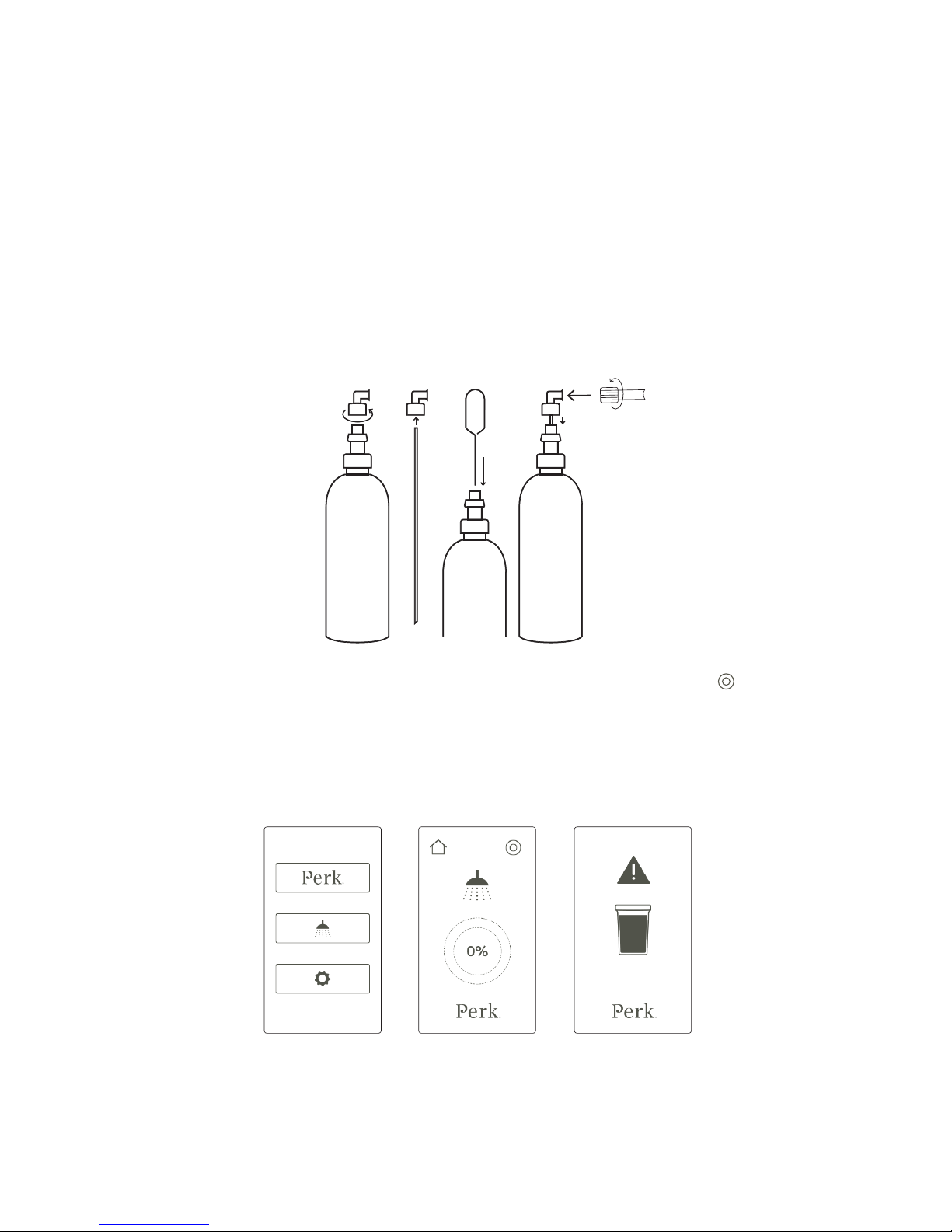
2. After each procedure, run the system cleaning process. To start the process, ensure vial is
removed from the tubing, then take the tubing and attach it securely to the System Cleaning
Solution bottle cap.
Note: Only use Edge Systems Cleaning Solution. It is specifically developed to flush through the
tubing line to remove and prevent any product or impurity build-up.
3. Go to the Main Menu by pressing the Home button. Select Cleaning Mode. Press the
button
located on the upper right of the screen to begin the automatic cleaning process.
4. Empty the waste container after each procedure. If the waste container is full, the system will
beep and the waste container caution light will activate. You will not be able to perform any
procedures until the container is emptied.
5. Wash, dry and wipe/spray with Barbicide (follow manufacturer’s instructions) over waste
container and lid. Leave open overnight to air-dry.
Page 16

14 | Troubleshooting
PERK User Manual
TOUCHSCREEN
Remember to shut down system and unplug it from power outlet before cleaning.
Note: Do not use alcohol (methyl, ethyl, or isopropyl) or any strong dissolvent. Do not use thinner or
benzene, abrasive cleaners or compressed air.
1. To clean the touchscreen, use window or glass cleaner. Put the cleaner on a microber cloth
and wipe the touchscreen.
2. Never apply the cleaner directly on the touchscreen.
Note: Avoid getting liquids inside your touchscreen. Do not wipe the screen with a cloth or sponge
that could scratch the surface.
WEAR AND TEAR ITEMS
The following items are subject to wear and tear through normal to high volume use:
› TUBING: Edge Systems recommends a replacement of the tubing every 6 months.
EXTERIOR
To clean the exterior of the Perk Module, use a clean cloth dampened with water to wipe off stains
or residue.
Note: Do not use any detergent or abrasive media or cleaners as this may remove the exterior paint.
FILTER
To remove dust and debris from the lter located on the back of the Perk Module, unscrew the
lter and blow air through the lter to remove any debris and dust.
Page 17

15 | Troubleshooting
PERK User Manual
TROUBLESHOOTING
PROBLEM POSSIBLE CAUSE SOLUTION
NO POWER Power Cord Make sure power cord is properly connected to rear of
unit and to a working wall outlet.
Switch Ensure that the switch is pressed in the correct
direction
TOUCHSCREEN No image Call your local representative or Edge Systems.
Screen does not respond
to touch
Call your local representative or Edge Systems.
LOW OR NO
VACUUM/
FLUID FLOW
Empty vial Make sure Skin Solution Vial is not empty.
Improper connection Make sure tubing and corresponding attachments
are properly connected.
Vial Tip is improperly
installed
Make sure that vial tip is rmly installed onto the Skin
Solution Vial.
Waste Container is full Do not let the waste container ll above 125mL. If the
container becomes overfull, a built-in oat will occlude
the vacuum opening and skin solution ow will cease.
Empty the waste container after each service.
Kinks or Leaks Check tubing for kinks or leaks. Check that the waste
container is properly installed to the device and the lid
is properly closed.
CLEANING
AUTO-TIMER DOES
NOT WORK
Software Issue User can still run system cleaning by self-timing a
30-second cleaning cycle.
Call your local representative or Edge Systems.
Page 18

16 | Limited Warranty
PERK User Manual
FORM OF PRODUCT WARRANTY
LIMITED WARRANTY
(PERK™ SYSTEM)
WHAT IS COVERED:
The warranty for the Perk™ System (the “System”) covers defects in material or workmanship in the
System.
WHO IS COVERED:
This limited warranty applies and extends only to the original Customer purchasing the System from
Edge Systems in the country where the sale occurred. This limited warranty is non-transferable and nonassignable by the original Customer. Edge Systems shall have no obligations underthis limited warranty
in the event that an original Customer attempts an unpermitted assignment of the original Customer’s
rights under this limited warranty. Notwithstanding the foregoing, Edge Systems agrees to extend the
benets of this limited warranty to a leasing company providing nancing to the original Customer for
the System, provided the System is leased back to and operated by the original Customer and any such
leasing company has no greater rights than the original Customer.
HOW LONG:
The System warranty runs for a period of one (1) year from the date of delivery of the System to the
original Customer. We warrant any replacement part for the balance of the original warranty period.
Extended warranties are available.
WHAT EDGE SYSTEMS WILL DO:
For the System, Edge Systems will, within the applicable warranty period, at Edge Systems‘ sole option,
repair or replace any defects in the System without any costs to the Customer for parts or labor (except
as specically stated below).
WHAT IS NOT COVERED:
THIS WARRANTY DOES NOT COVER ANY EQUIPMENT WHICH HAS BEEN DAMAGED BY ACCIDENT,
MISUSE, ABUSE, MODIFICATION, WHICH HAS BEEN USED IN VIOLATION OF THE SYSTEM INSTRUCTIONS
OR FOR ANY PURPOSE OTHER THAN ONE FOR WHICH IT WAS MANUFACTURED, OR CAUSED BY
UNAUTHORIZED REPAIR OR USE OF UNAUTHORIZED PARTS, INCLUDING, WITHOUT LIMITATION,
DAMAGE TO THE SYSTEM ARISING FROM USE OF SKIN SOLUTIONS OR TIPS PURCHASED OR OTHERWISE
OBTAINED FROM A NON-EDGE SYSTEMS APPROVED SUPPLIER. THIS WARRANTY DOES NOT COVER
FREIGHT DAMANGE; OR ANY DAMAGE CAUSED BY ACTS OF GOD OR THIRD PARTIES NOT WITHIN THE
CONTROL OF EDGE SYSTEMS, SUCH AS DAMAGE CAUSED BY POWER SURGES OR LIGHTNING. THIS
WARRANTY DOES NOT COVER THE COSTS OF INSTALLATION, ADJUSTMENT OF USER CONTROLS, INITIAL
TECHNICAL ADJUSTMENT (SET-UP) AND ROUTINE USER REQUIRED MAINTENANCE. THIS WARRANTY
DOES NOT EXTEND TO ANY MACHINERY, APPLIANCES OR PROPERTY OF THE CUSTOMER USED IN
CONJUNCTION WITH OR CONNECTED TO THE EQUIPMENT. THIS WARRANTY IS THE EXCLUSIVE REMEDY
AGAINST EDGE SYSTEMS AND NO OTHER REMEDY (INCLUDING BUT NOT LIMITED TO INCIDENTAL OR
CONSQUENTIAL DAMAGES FOR INJURY TO PERSON OR PROPERTY, LOST PROFITS, LOST SALES OR ANY
OTHER INCIDENTAL OR CONSEQUENTIAL LOSS) SHALL BE AVAILABLE. THIS WARRANTY IS IN LIEU OF ANY
OTHER WARRANTY, EXPRESS OR IMPLIED, INCLUDING BUT NOT LIMITED TO ANY IMPLIED WARRANTY
OF MERCHANTABILITY OR FITNESS FOR A PARTICULAR PURPOSE. ANY REPRESENTATIONS OR PROMISES
INCONSISTENT WITH OR IN ADDITION TO THIS LIMITED WARRANTY ARE UNAUTHORIZED AND SHALL
NOT BE BINDING UPON EDGE SYSTEMS. PLEASE NOTE THAT SOME STATES DO NOT ALLOW LIMITATIONS
Page 19

17 | Limited Warranty
PERK User Manual
ON HOW LONG AN IMPLIED WARRANTY LASTS OR DO NOT ALLOW THE EXCLUSION OR LIMITATION OF
INCIDENTAL OR CONSEQUENTIAL DAMAGES, SO THE ABOVE LIMITATIONS MAY NOT APPPLY TO YOU.
HOW TO OBTAIN SERVICE
To obtain service under this warranty, the Customer must contact Edge Systems within the warranty
period. Edge Systems can be reached by telephone (toll free) at 1-800-603-4996. The Customer
is responsible for all arrangements and shipping charges (incoming and outgoing) related to the
shipment of a System or parts to an Edge Systems approved and designated repair facility for inspection
and diagnosis for potential coverage under this warranty.
EDGE SYSTEMS LLC
2277 Redondo Avenue
Signal Hill, CA 90755
Ph: 1-562-597-0102 or 800-603-4996
Fax: 1-562-597-0148
Page 20

CLIENT CONSULTATION & RELEASE FORM
Please read carefully, complete, sign and date this form prior to your treatment.
NAME: PHONE ( )
ADDRESS
CITY STATE ZIP
SECTION 1: MEDICAL INFORMATION
DO YOU HAVE ANY OF THE FOLLOWING CONDITIONS?
Shellsh
Aspirin
Sulfur
Preservatives
Other (Please List):
YES NO
Accutane or other similar medication
Autoimmune disease, HIV, lupus, hepatitis, scleroderma
Blood thinners – Heparin, Coumadin, Warfarin, Daily Aspirin/NSAID or Vitamin E, etc.
Breast feeding, pregnancy
Cancer or post-cancer treatments
Cardiovascular problems
Cold sores or fever blisters without pre-medication
Cortisone or steroid injections
Cosmetic injections, llers or implants, (i.e. Botox®, collagen)
Eczema, psoriasis
Enlarged or painful glands
Epilepsy
Facial waxing services w/in 7-14 days
Heart ailment
Hypertension/high blood pressure
Inammatory conditions
Irregular, pigmented moles, warts or growths, unidentied facial growth or mark
Keloids, pigmented scars, icepick scars, new scar tissue
Page 1 of 3
Page 21

YES NO
Laser procedures, chemical peels, dermabrasion, microdermabrasion
Light sensitive medication
Loose, thin, aged skin
Lymphatic disorder, inammation of lymph vessels, lymphedema
Medication, list here:
Open Lesion/Wound
Phlebitis, varicose veins
Recent accident or serious injury
Recent surgical or dental procedure
Rosacea, telangiectasia/couperose
Retin-A, Retinol
Skin abrasions or lesions
Stage III or IV acne
Skin-lightening or bleaching agent
Sunburn
Swollen or infected tonsils
Thyroid conditions
Type I diabetic
Under medical care for an existing or suspected condition or disease
Viral infection, inuenza
Other contraindication at discretion of skincare technician or medical practitioner:
If you answered YES to any of the above questions please explain:
My interest in skincare procedure is primarily for (i.e. skin rejuvenation, acne, hyperpigmentation, scarring, etc.):
Specify your areas of concern (i.e. eyes, forehead, etc.):
DO YOU HAVE ANY OF THE FOLLOWING CONDITIONS? (CONTINUED)
Page 2 of 3
Page 22

SECTION 2: CLIENT CONSENT FORM
(Initial each acknowledgement line below)
1. I acknowledge that I have not used Accutane or any medication for the same purpose during the last 12 months.
_____(initial here)
2. I acknowledge that if I have ever had a cold sore or fever blisters, I should consult with my physician or pharmacist for a pre-use
medication to help avoid a possible breakout. That medication should be used each day for two days before, same day, and two
days after any aggressive facial exfoliation treatment.___(initial here)
3. I acknowledge that there is no guarantee that dark discoloration of skin will be reduced or fade. The appearance of
pigmentation may improve or darken with successive treatments. I acknowledge the need for proper skin care home
regimen. _____(initial here)
4. I acknowledge that my skin might experience temporary irritation, tightness, or redness which usually dissipates within
72 hours depending on skin sensitivity. _____(initial here)
5. I have disclosed my history of allergies above. _____(initial here)
6. I acknowledge that if I am allergic to one or more of the ingredients in the products used, I may experience allergic
reactions._____(initial here)
7. I acknowledge that if I fail to use a minimal sunscreen (SPF 30) and follow the direction for use, I am more susceptible
to sunburn, sun damage & hyperpigmentation. I should avoid excessive sun exposure, especially between 10am - 2pm.
_____(initial here)
8. I acknowledge that this treatment is strictly an elective cosmetic procedure and that no medical claims have been
expressed or implied. _____(initial here)
9. I acknowledge that I should avoid use of aggressive exfoliation, waxing, and products containing acids that are not part of
the recommended take-home regimen for 2-4 weeks following the treatment. _____(initial here)
10. I acknowledge that I should avoid use of Retin-A type products for a period of time recommended by my physician and/or
skincare practitioner during and following the treatment. _____(initial here)
11. I acknowledge that I am not pregnant/lactating. _____(initial here)
12. I hereby agree to have the treatment performed and agree to follow all pre and post treatment instructions. _____(initial
here)
13. I acknowledge that I have answered all questions truthfully and completely. _____(initial here)
14. I release Edge Systems, the ______________ (Aesthetician/Doctor), management and staff of _______________
(Clinic/Ofce) from any and all liability associated with any injuries and/or current or future conditions resulting from the
skincare procedures or products._____(initial here)
15. I consent to the use of my before, during and after facial procedure photographs for education, promotion or advertising
purposes. My name will not be used to identify these photographs without my written approval. _____(initial here)
By signing below, I certify that I have read and fully understood the contents of this consent form, and that the
information I provided above are complete, accurate, and up-to-date to my knowledge.
CLIENT SIGNATURE: DATE:
OPERATOR SIGNATURE: DATE:
Page 3 of 3
Page 23

21 | Appendix I: Client Questionnaire & Consent Form
PERK User Manual
This page is intentionally left blank
Page 24

EDGE SYSTEMS LLC 2277 Redondo Avenue, Signal Hill, CA 90755 USA
Tel. (800) 603-4996 (562) 597-0102 | Fax. (562) 597-0148
 Loading...