

Page 1
Did you forget to register your Refresh!™?
By registering, you’ll activate your warranty, and your privacy is guaranteed. Just fill out
your warranty card and drop it in the mail.
WARRANTY INFORMATION
This product is of solid state construction and is warrantied by
EcoQuest International
310 T. Elmer Cox Drive
Greeneville, TN 37743
to the original purchaser, depending on model, to be free from defect in materials and
workmanship for a limited time. Length of warranty will vary depending on model. See
warranty card for specific details. If you have any questions concerning your Refresh!
™
please see your local EcoQuest Dealer.
For help, visit www.EcoQuest.com
.
OWNER’S MANUAL
,
EcoQuest International
310 T. Elmer Cox Drive
Greeneville, TN 37743
(423) 638-7246
65-00150-001
Refresh OM 1204
• Specifications
• Installation
• Operation
• Features
• Maintenance
CAUTION: Read manual carefully for
proper procedures and operation.
Page 2
CONGRATULATIONS . . .
on your purchase of your new Refresh!™. This unit is designed to be installed into
a residential refrigerator, and used virtually maintenance-free for up to two years.
Please read and follow all procedures outlined in this manual.
If you have any questions concerning this or any EcoQuest product, contact your
EcoQuest Dealer.
Please record the name and phone of your EcoQuest Dealer:
Name _________________________________________________________
Phone _________________________________________________________
™
Please record the serial number of your Refresh!
:
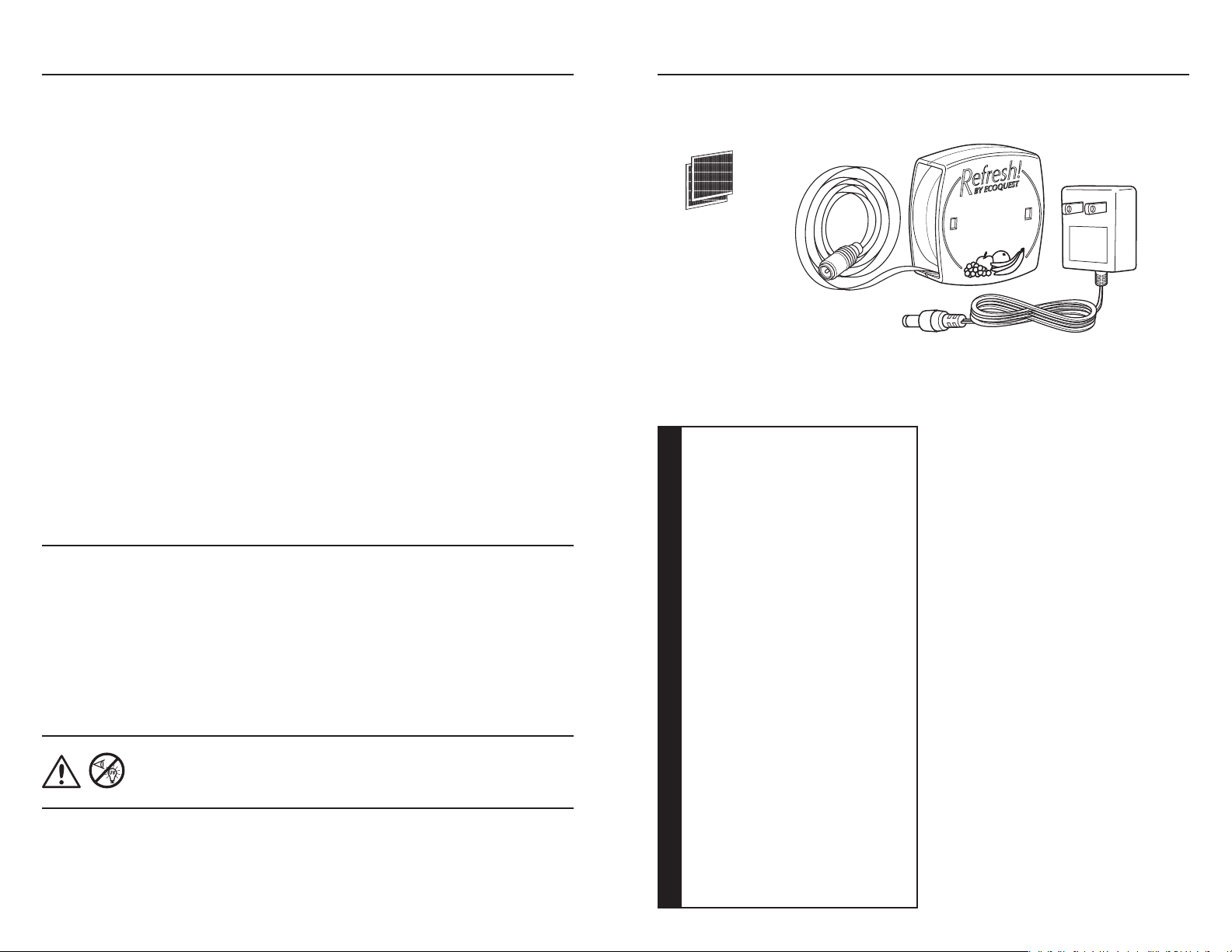
PACKING LIST
(1) Self-Adhesive
Hook&Loop
™
) fastener
(Velcro
Self-Adhesive Flat Cord with
molded plug (attached to unit)
(1) Refresh!™unit with RCI™ Technology
(1) 110VAC ~ 12VDC Adapter
Serial # ________________________________________________________
CONTENTS
Packing list . . . . . . . . . . . . . . . . . . . . . . . . . . . . . . . . . . . . . . . . . . . . . . . . . . . . . . . . . . . . . . . . .2
Specifications . . . . . . . . . . . . . . . . . . . . . . . . . . . . . . . . . . . . . . . . . . . . . . . . . . . . . . . . . . . . . . .
™
Before You Install Your Refresh!
™
Installing Your Refresh!
Disposal
. . . . . . . . . . . . . . . . . . . . . . . . . . . . . . . . . . . . . . . . . . . . . . . . . . . . . . . . . . . . . . . . . . . .8
. . . . . . . . . . . . . . . . . . . . . . . . . . . . . . . . . . . . . . . . . . . . . . . . . . . . .4
. . . . . . . . . . . . . . . . . . . . . . . . . . . . . . . . . . . . . . . . . . . . . .4
2
Features:
• Low level O
production
3
• Non-serviceable RCI
Electrical:
• 12 VDC
•
400 mA
Size:
• Dimensions: 3.5” x
(9 cm x 9 cm x 3 cm)
™
Cell
3.5” x 1.25”
Your new Refresh!™ is designed to
operate maintenance-free inside
a standard, residential refrigerator
for up to two years. For maximum
effectiveness, mount the unit above
the top shelf, or as high as is practical
inside your refrigerator (see Installing
™
Your Refresh!
).
Refresh!™ puts state-of-the-art RCI™
technology in your refrigerator,
producing safe oxidizers and super
oxide ions. When used in conjunction
Weight:
• 3 ounces (85 grams)
with normal, safe food handling
practices, Refresh!
™
works to effectively
keep your food fresher by eliminating
WARNING! - UV Light in operation. Do not open case. No user
serviceable parts inside.
This owner’s manual is also available online at: http://www.ecoquest.com/ownersmanuals
2 3
Warranty:
• Length of warranty will vary
depending on model
See warranty card for specific
details
S P E C I F I C A T I O N S
All specifications are subject to change
without notice
odors that can affect taste, and by
reducing bacteria and mold.
To operate, simply plug in the included
™
adapter. The RCI
cell will create a
slight blue glow in the open vents
when the unit is working properly.
Page 3
BEFORE YOU INSTALL YOUR REFRESH!
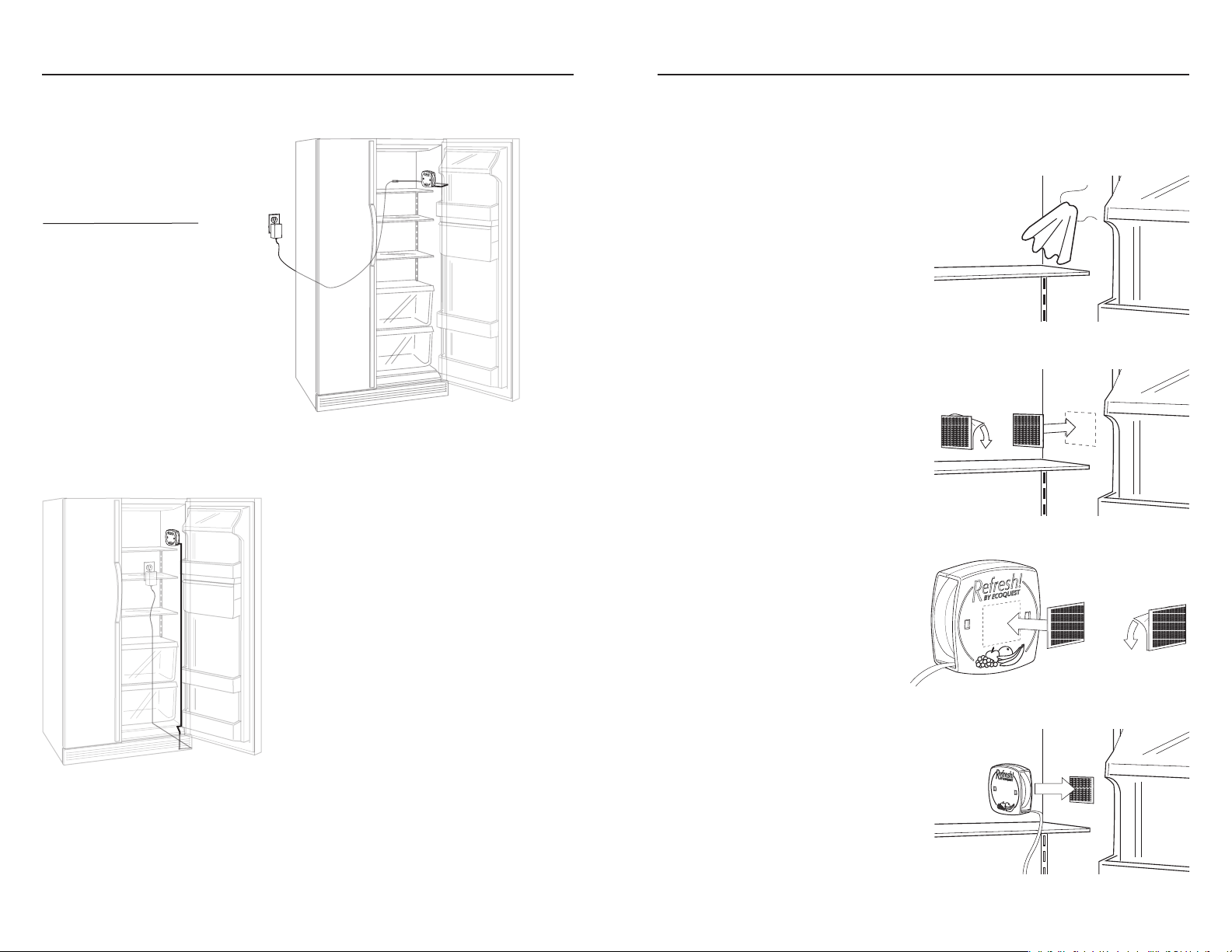
Set your Refresh!™ on the top
shelf of your refrigerator. Check to
be sure the unit cord and adapter
cord will reach an available outlet.
™
INSTALLING YOUR REFRESH!™
1. Determine installation location and check cord lengths (see BEFORE YOU INSTALL
YOUR REFRESH!
™
, previous page).
PLEASE NOTE: If you have a
side-by-side refrigerator,
™
Refresh!
on the inside of the
install
outer wall. Installation next to the
freezer will be difficult and may
not perform properly.
Option 1: Refresh!™ cord routing outside and
behind refrigerator. For example only, your
application may be different than pictured.
When deciding where to install your Refresh!™
keep in mind:
1. To accommodate various types of
refrigerators, the flat cord may be routed in
many different ways, depending on where
you locate the unit.
2. Your Refresh!
™
will be most effective if
placed above the top shelf.
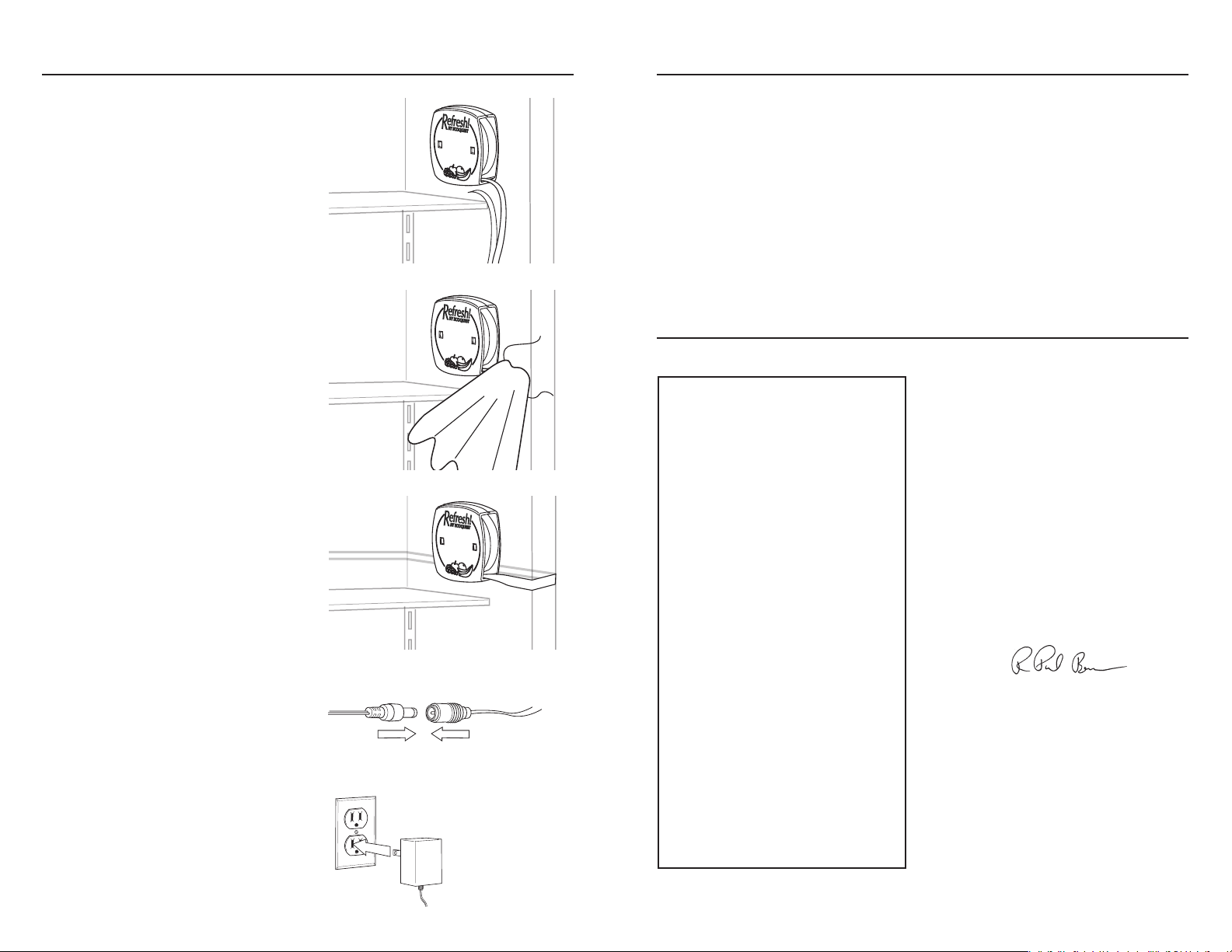
2. Make sure the installation area is
CLEAN and DRY.
3. Apply one part of the self-adhesive
™
Velcro
pad to the inside of your
refrigerator, above the top shelf.
4. Apply the other part of the selfadhesive Velcro
™
to Refresh!™.
3. The flat cord must pass under the door
gasket.
Option 2: Refresh!™ cord routing inside and
along bottom of refrigerator. For example
only, your application may be different than
pictured.
5. Press Refresh!™ onto the Velcro™
pad inside the refrigerator.
Continues on next page >
4 5
Page 4
INSTALLING YOUR REFRESH!
™
DISPOSAL
Please do not throw a used Refresh!™ into the garbage. The special germicidal UVX bulb
used in the Refresh!™ contains a very small amount of mercury. You may return your
used Refresh!™ to EcoQuest for proper disposal. Send the used unit post paid to:
4. Remove the backing from the flat cord.
5. Be sure the area is CLEAN and DRY.
5. Apply the cord to the inside wall,
under the door gasket, and along the
outside of the refrigerator.
6. Connect the flat Refresh!
™
cord to the
AC adapter cord. Be sure the plugs are
pressed together completely.
7. Plug in the AC Adapter. You should
see a slight blue glow coming from
the Refresh!
™
unit. Your Refresh!™ is
now installed.
EcoQuest International
sposal
RCI Di
55 Marley Drive
Greeneville, TN 37743
This equipment has been tested and found to
comply with the limits for Industrial, Scientific
and Medical Equipment (ISM), pursuant to
Part 18 of the FCC Rules. These limits are
designed to provide reasonable protection
against harmful interference in a residential
installation. This equipment generates, uses
and can radiate radio frequency energy and, if
not installed and used in accordance with the
instructions, may cause harmful interference
to radio communications. However there is
no guarantee that interference will not occur
in a particular installation. If this equipment
does cause harmful interference to radio
or television, which can be determined by
turning the equipment off and on, the user is
encouraged to try to correct the interference
by one or more of the following measures:
Reorient or relocate the receiving antenna.
Increase the separation between the
equipment and receiver.
Connect the equipment into an outlet on a
circuit different from that to which the receiver
is connected.
Consult the dealer or an experienced radio/TV
technician for help.
FCC DECLARATION OF CONFORMITY
Name: EcoQuest
Model: Refresh! 2
Manufacturer: EcoQuest Manufacturing
This device complies with Part 18 of the
FCC Rules.
RESPONSIBLE PARTY
EcoQuest International
310 T. Elmer Cox Dr.
Greeneville, TN 37743
Ph: (800) 989-2299
Signature:
___________________________
Printed Name: R. Paul Beam
Title: Engineering Manager
12/15/04
Date:
6 7
 Loading...