

Page 1
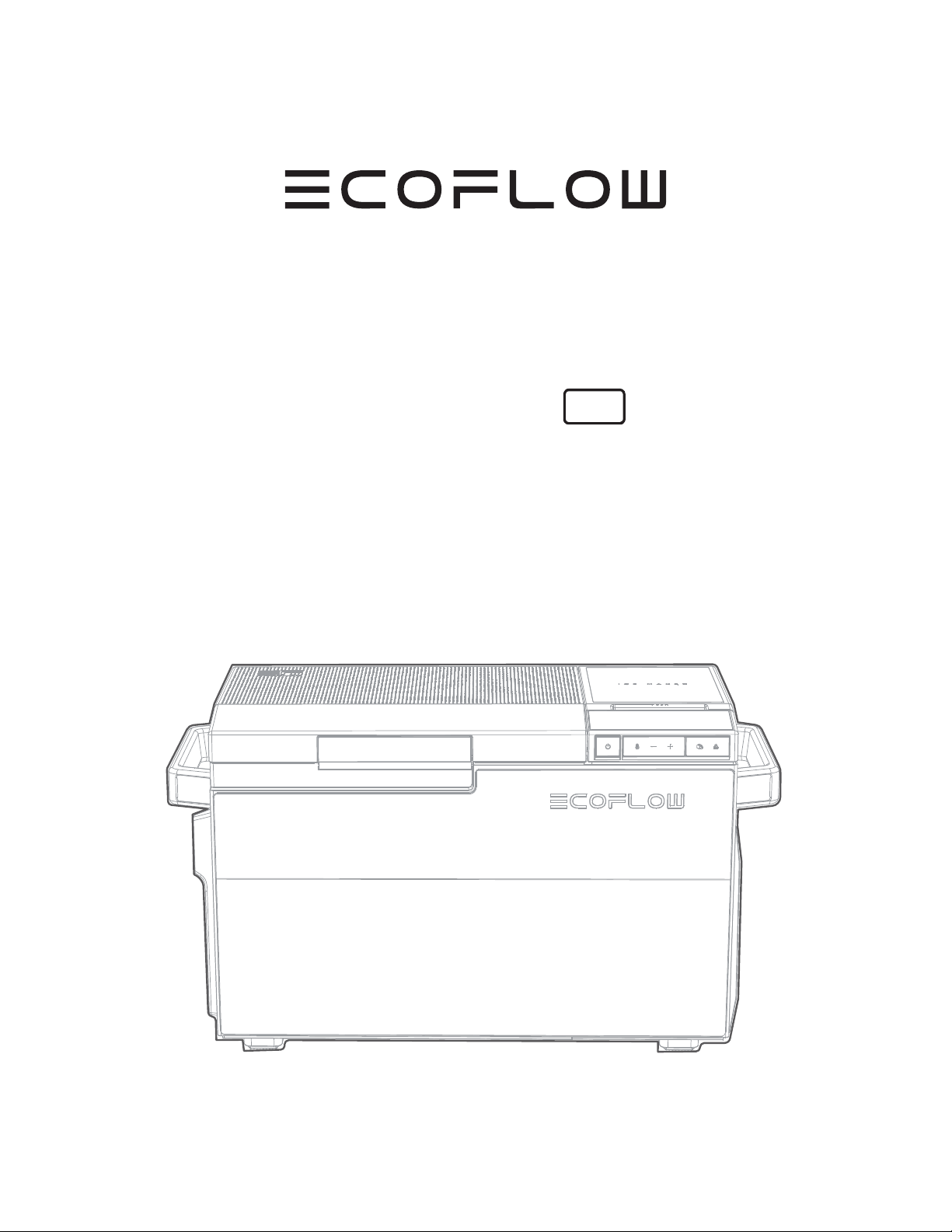
EcoFlow Glacier
Portable Fridge
User Manual
V1.0
Page 2
Disclaimer
EN
Read this user manual carefully before using the product to ensure that you completely
understand the product and can correctly use it. After reading this user manual, keep it
properly for future reference. Improper use of this product may cause serious injury to
yourself or others, or cause product damage and property loss. Once you use this product,
it is deemed that you understand, approve and accept all the terms and content in this
document. EcoFlow is not liable for any loss caused by the user's failure to use this product
in compliance with this user manual.
of this document and all documents related to this product. This document is subject to
changes (updates, revisions, or termination) without prior notice. Please visit EcoFlow's
Page 3
EN
Contents
1
Safety Instructions
EcoFlow App
Installation Instructions
Select an ideal installation place
Set the refrigerator steady
Clean and install accessories
Connect to the power supply
How to Use the Product
Refrigerator parts and food storage suggestions
LCD indicators
Power-on/off
Temperature settings and functional operations
2
5
6
6
6
6
8
11
11
13
14
14
Precautions
Care and maintenance
How to Remove and Clean Internal Parts
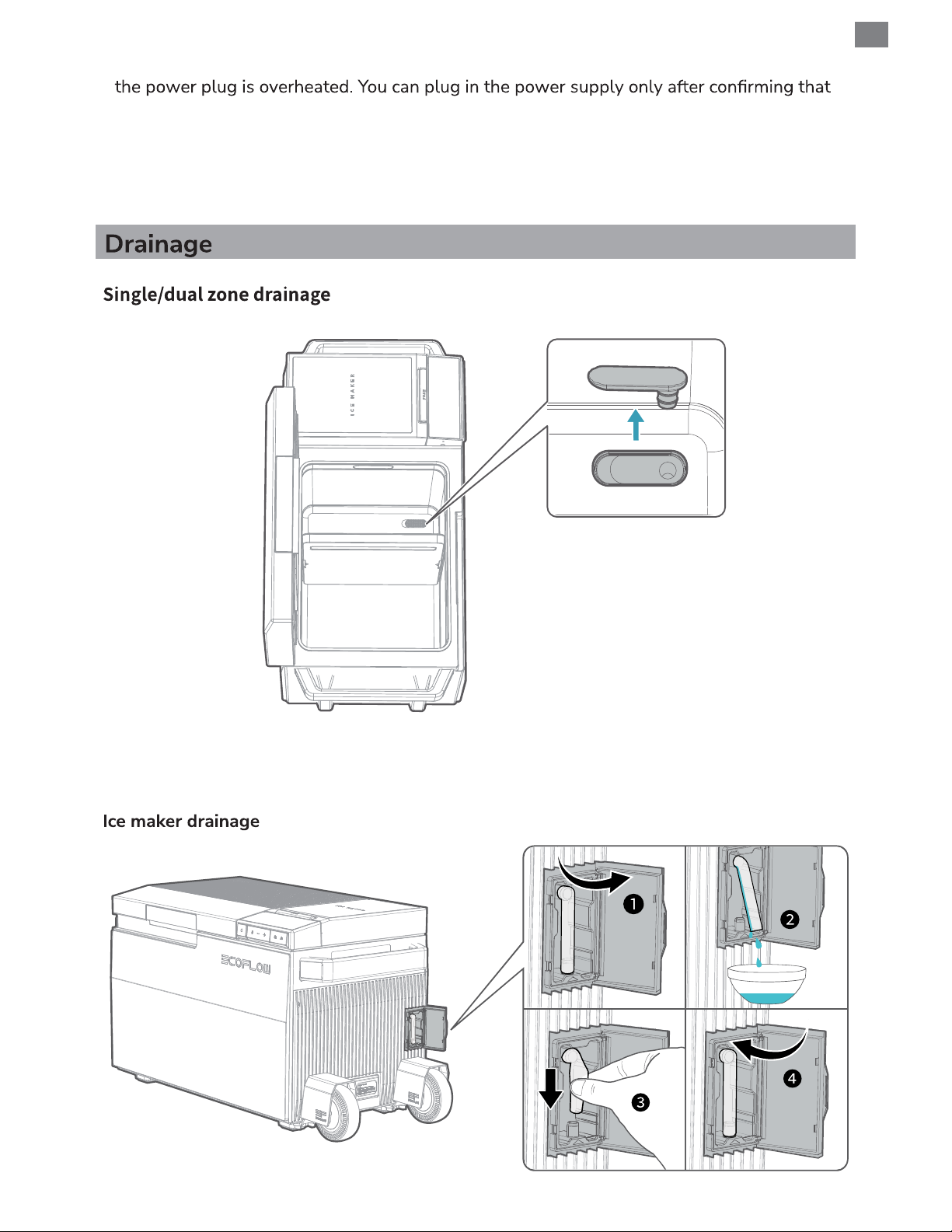
Drainage
Defrosting
Error display and Troubleshooting
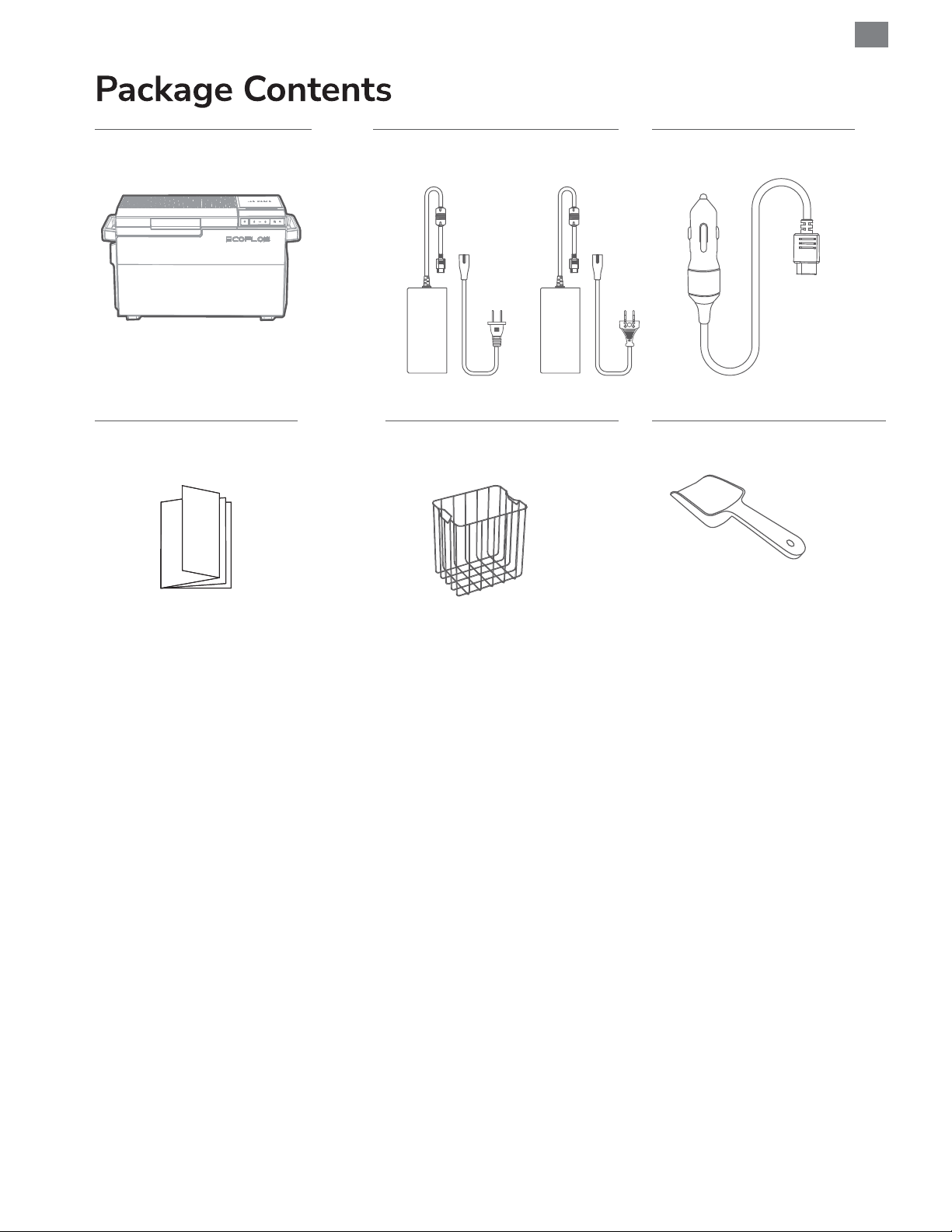
Package contents
18
18
18
19
20
20
21
Page 4
Basic Information
Model EFBX100
Climate class SN/N/ST/T
Type of protection against electric shock Class II
EN
Operational volume
Dimensions (L × W × H)
IP rating IPX4
Working mode Common mode (quick freezing mode) and Eco mode
Quick freezing mode (30°C to 0°C) 15 minutes
Compressor power rating 120 W
Power consumption
Refrigerant type and amount R600a, 32 g
Foaming agent Cyclopentane
Average noise (Noise Pressure Level)
Single zone: 38 L
Dual zone: 36 L
776 mm × 385 mm × 445 mm (wheels and
telescopic handle not included) (30.6 in × 15.2 in
× 17.5 in)
845 mm × 385 mm × 445 mm (wheels and
telescopic handle included) (33.3 in × 15.2 in ×
17.5 in)
Fridge: 0.18 kWh/24 h (ambient temperature at
25°C (77°F) and set temperature at 4°C (39°F),
Eco mode)
Freezer: 0.38 kWh/24 h (ambient temperature at
25°C (77°F) and set temperature at –18°C (0°F),
Eco mode)
Ice making: <52 dB(A);
Temperature Maintaining: <42 dB(A)
Wi-Fi This product supports 2.4G Wi-Fi only.
Bluetooth Supported
Net weight 23.3 kg (51.4 lbs)
Input parameters
AC input voltage/frequency 100-240 V, 50/60 Hz
AC input power 180 W
Battery pack power 100 W (USB-C)
Solar charging input 240 W (11-60 V, 13 A MAX)
Car charging input 192 W (12/24 V, 10 A MAX)
Operation environment
-20°C - +50°C (-4°F - +122°F)
Operating temperature
Storage temperature -20°C - +60°C (-4°F - 140°F)
(When powered by 12V car charger only: -20 +43°C)
1
Page 5
EN
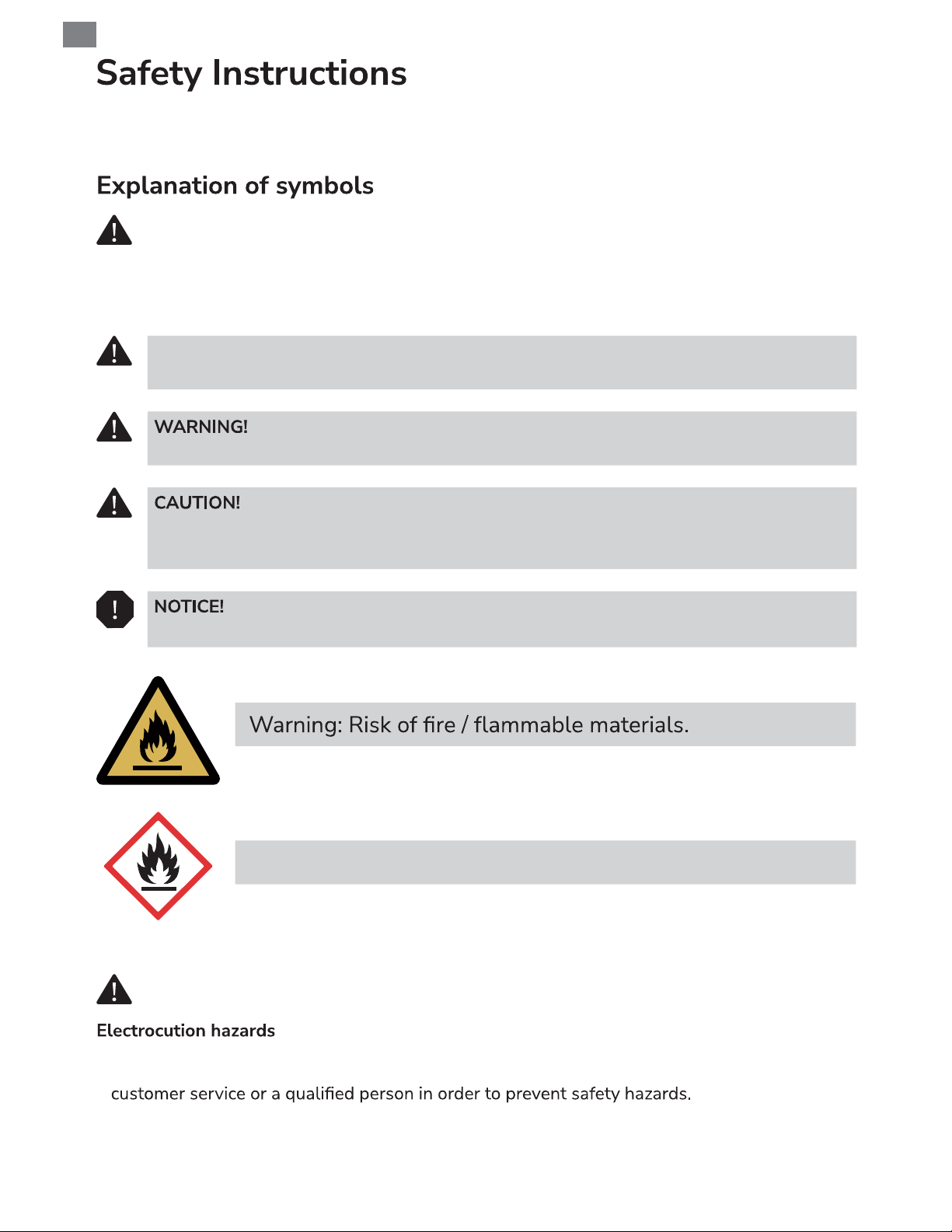
This user manual contains a lot of important safety information. Please be sure to read and
follow all safety information.
This is a safety warning symbol. Such safety information alerts you to hazards that
can be lethal to you and others, and that can cause damages to the product. All safety
information is preceded by safety warning symbols and hazard words, including:
DANGER, WARNING, and CAUTION.
DANGER!
Indicates a hazardous situation that, if not avoided, will result in death or serious injury.
Indicates a hazardous situation that, if not avoided, could result in death or serious injury.
Indicates a hazardous situation that, if not avoided, could result in minor or moderate
injury.
Indicates a situation that, if not avoided, can result in property damage.
United Nations Global Harmonized System (GHS) symbol
DANGER!
• If this cooling device's power cable is damaged, it must be replaced by the manufacturer,
• Do not touch exposed cables with your bare hands. This applies especially when operating
the device from the AC mains.
2
Page 6
• Before starting the device, ensure that the power supply line and the plug are dry. Ensure
that the power cable and the plug are securely connected.
• Do not operate the cooling device if it is visibly damaged. Immediately stop the device and
switch off all power supplies.
• If this cooling device's power cable is damaged, it must be replaced to prevent safety hazards.
considerable hazards.
• When installing or positioning the device, ensure the supply cord is not trapped or damaged.
• Do not locate multiple portable socket-outlets or portable power supplies at the rear of the
device.
• Keep the ventilation openings on the device housing or in installations free of obstructions.
• Do not use any mechanical objects or other means to speed up the defrosting process, unless
they have been recommended by the manufacturer for this purpose.
• Do not use mechanical devices or other means to accelerate the defrosting process, other
than those recommended by the manufacturer.
• Do not use electrical appliances inside the food storage compartments of the device, unless
they are of the type recommended by the manufacturer.
EN
light, gas ovens etc.).
• Do not damage the refrigerant circuit.
• This device can be used by children aged from 8 years and above and persons with reduced
physical, sensory or mental capabilities or lack of experience and knowledge if they have
been given supervision or instruction concerning use of the device in a safe way and
understand the hazards involved.
• Children should not play with the device.
• Cleaning and user maintenance should not be made by children without supervision.
• Children aged from 3 to 8 years are allowed to load and unload cooling devices.
• Fill with potable water only.
• Risk of child entrapment. Before you throw away your old refrigerator or freezer:
– Take off the doors.
– Leave the shelves in place so that children may not easily climb inside.
suffocation.
3
Page 7
EN
cooling device.
instructions.
• Before starting the cooling device, ensure that the power supply line and the plug are dry.
• Disconnect the cooling device from the power supply
– before each cleaning and maintenance
– after every use
To avoid contamination of food, please respect the following instructions:
• Please check if the cooling capacity of the device is suitable for storing the food or medicine
you wish to cool.
• Food should only be stored in its original packaging or in suitable containers.
compartments of the device.
• Regularly clean surfaces that can come in contact with food and accessible drainage systems.
• If the device is left empty for long periods:
– Switch off the device.
– Defrost the device.
– Clean and dry the device.
– Leave the door open to prevent mold developing within the device.
• When handling the refrigerator, hold the handles on both sides of the refrigerator or use
detachable telescopic handle (optional) and detachable wheels (optional).
supply.
• Only connect the cooling device as follows:
– With a car charging cable providing a DC power supply in the vehicle
– With the AC adaptor +cable providing an AC power supply
• Never pull the plug out of the socket by the cable.
• Please wait for more than 10 seconds when unplugging and reconnecting the power plug.
Otherwise, the refrigerator may malfunction.
• Do not place heavy objects or objects harmful to the refrigerator (containers containing
when opening and closing the refrigerator doors.
• Never put your hands or metal rods into the cold air outlet, lid, bottom of the refrigerator, and
the heat shields (vents) on the sides.
• Never put your hands into the ice-making compartment.
4
Page 8
• The cooling device is not suitable for transporting caustic materials or materials containing
solvents.
disposal procedures. Deliver the cooling device at the end of its life-cycle to an appropriate
recycling center.
•
Ensure at all times that there is a minimum of 2 in 50 mm) ventilation on all four sides of
the cooling device. Keep ventilation openings, in the appliance enclosure or in the built-in
structure, clear of obstructions. Do not place the cooling device in closed compartments or
• Ensure that the ventilation openings are not cov-ered.
• Never immerse the cooling device in water.
• Protect the cooling device and cables against heat and moisture.
• The device shall not to be exposed to rain.
The refrigeration device is intended to be used in household, outdoor, vehicle, boat and similar
applications such as:
EN
• Farmhouses
• By clients in hotels, motels and other residential type environments
• Bed and breakfast type environments
• Catering and similar non-retail applications
• Camping use:
– suitable for camping use;
– the appliance shall not be exposed to rain (not applicable to appliances with a degree of
protection against harmful ingress of water of at least IPX4).
EcoFlow App
Control, monitor and customize your EcoFlow devices from afar with
the EcoFlow App. Download at:
Privacy Policy
By using EcoFlow Products, Applications and Services, you consent to the EcoFlow Term
of Use and Privacy Policy, which you can access via the “About” section of the “User” page
terms-of-use and
This product ONLY SUPPORTS 2.4GHz WiFi.
5
Page 9
EN
Ensure that the refrigerator is disconnected from the mains before installing
and adjusting accessories.
Keep an appropriate distance between the refrigerator and surrounding objects.
Ensure at all times that there is a minimum of 2 in (50 mm) ventilation gap on all four sides
of the refrigerator. If the gap with the surrounding is too small, it will inhibit the refrigerator
from dissipating heat energy, resulting in a decrease in refrigeration capacity and an increase in
power consumption.
Install the refrigerator in a dry and well-ventilated place. Try to avoid direct sunlight on the
refrigerator.
• If the ambient temperature is too high, the refrigeration capacity of the refrigerator may
decrease and the power consumption may increase.
• If the refrigerator is installed in a place with excessive gas or smoke, the surface of the
refrigerator will have a color change.
to prevent discoloration. Please do not directly use the bottom tray that is placed under the
refrigerator upon factory delivery.
• Unstable installation will cause vibration and noise.
• The anti-tilt angle of this product is 30°. When the tilt angle is greater than 30°, the anti-fall
protection will be activated.
• Clean any dust accumulated during transportation of the refrigerator.
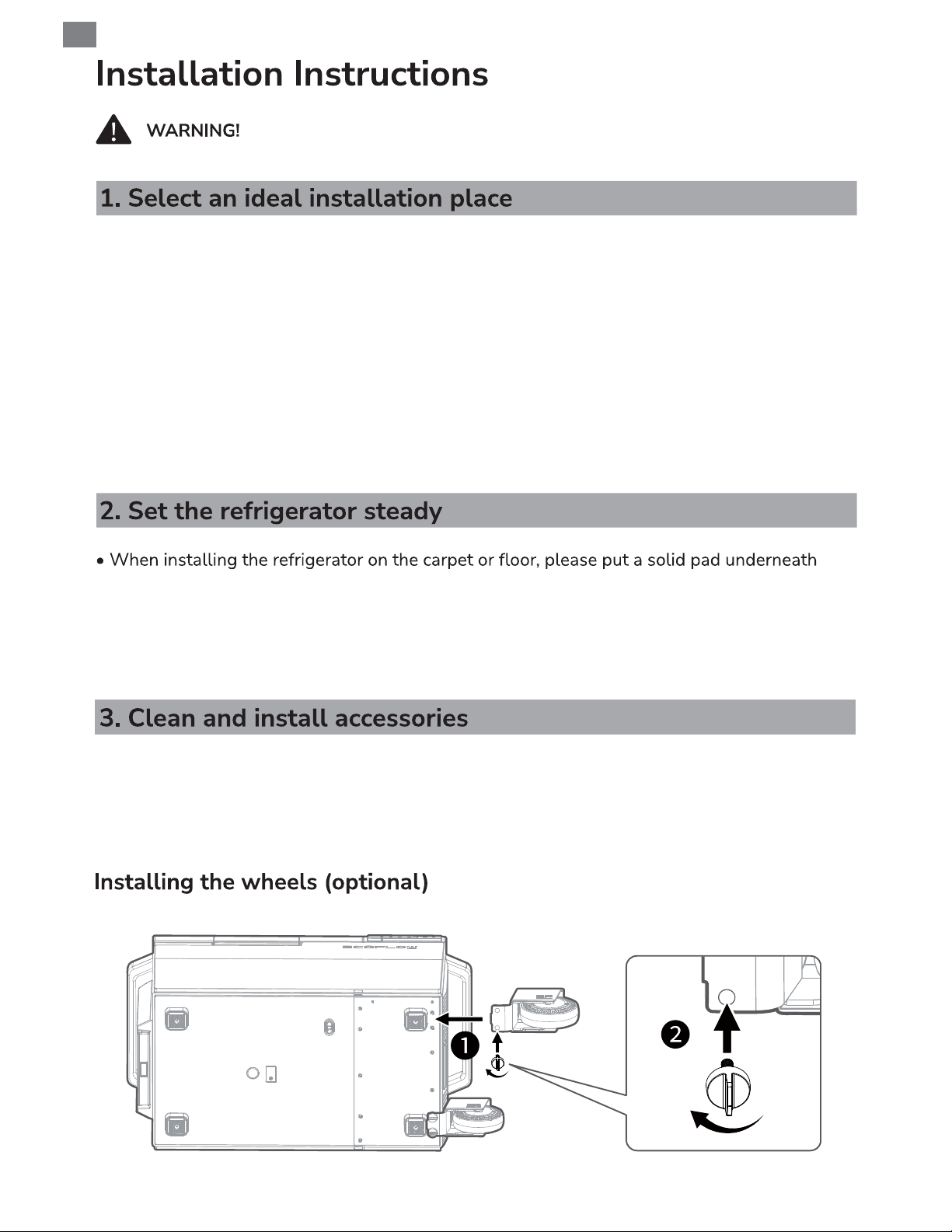
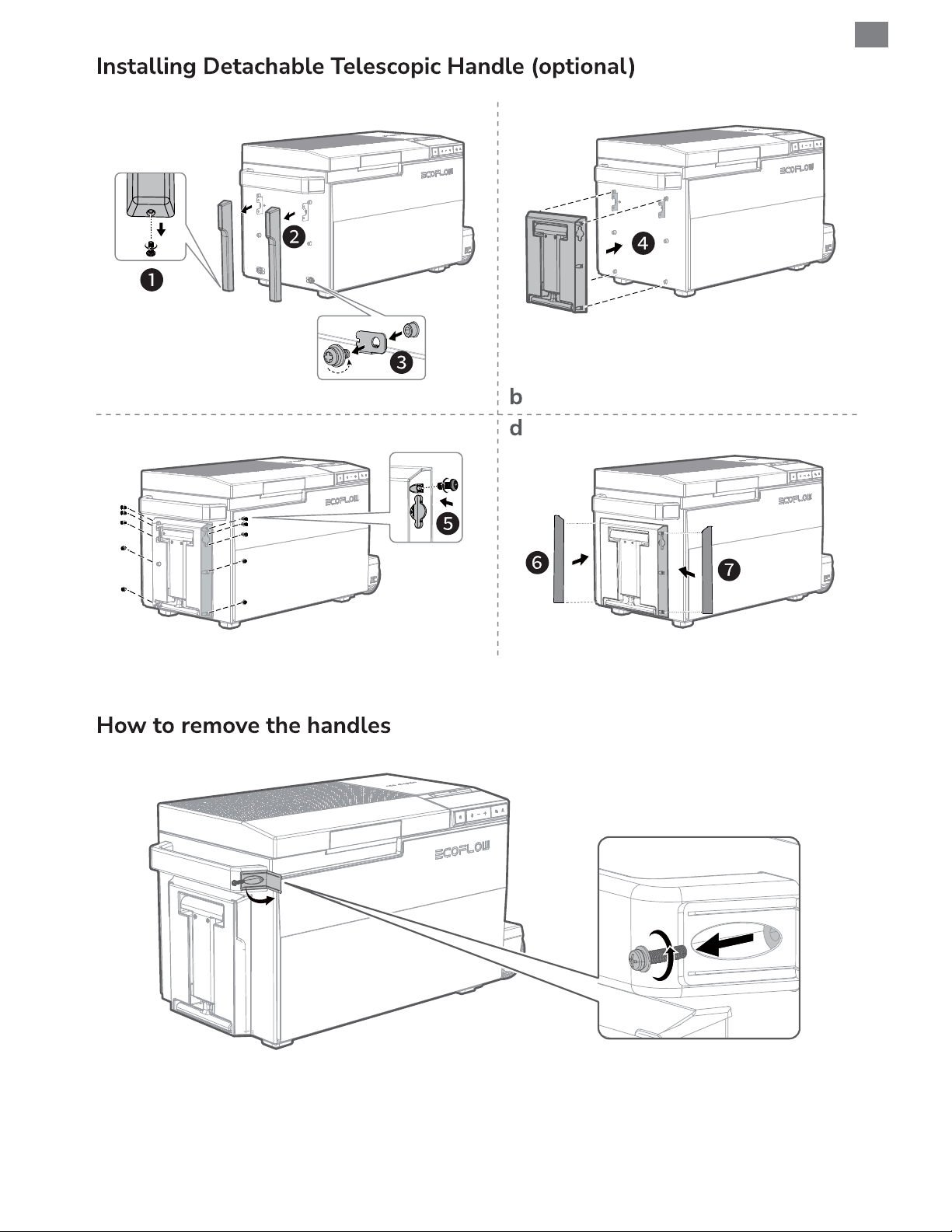
• Install accessories at the appropriate positions in the refrigerator, such as telescopic handle
(optional), wheels (optional), EFBX100-EB battery pack (optional), basket, temperature zone
divider.
6
Page 10
a
EN
c
7
Page 11
EN
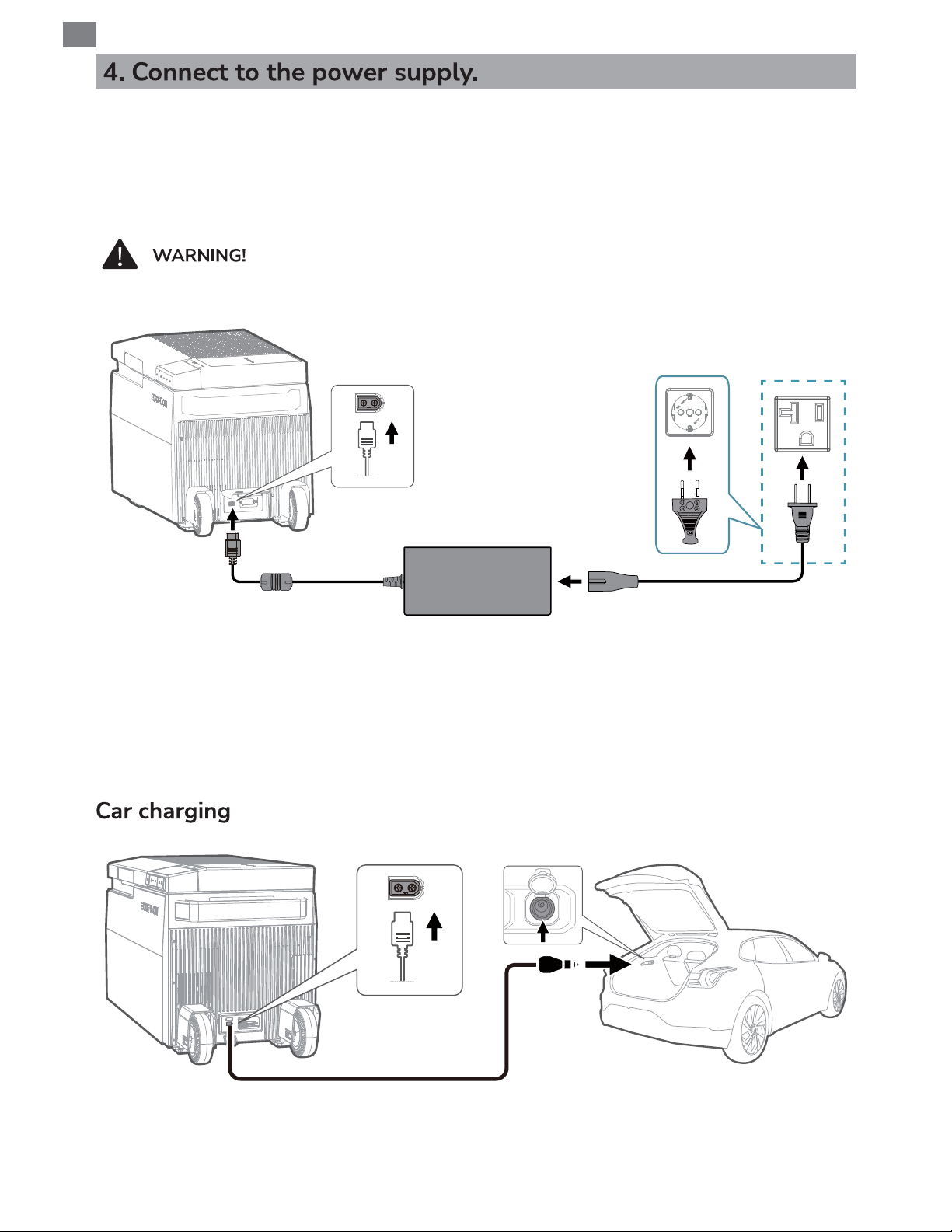
This product supports AC mains, car charging (12V/24V), and solar charging (EFBX100-EB
battery pack (optional) must be connected).
AC mains
Please use a dedicated power outlet, which should not be shared
with other electrical appliances.
AC (wall socket)
AC power adapter
(29 V, 180 W)
EU
US
This product supports AC mains.
When connected to the AC mains, short press the power button to turn on the product, and
the product will operate normally. At this time, if the EFBX100-EB battery pack (optional) is
connected, the product will give prioritize the refrigeration power of the refrigerator through the
built-in intelligent charging algorithm, and charge the battery pack at the optimal power.
Car charging cable
This product supports car charging through the 12 V/24 V car charging port and charges the
connected EFBX100-EB battery pack (optional) with a maximum current of 10 A.
8
Page 12
When this product is connected to the 12 V car charging port for power, keep the
EFBX100-EB battery pack (optional) connected. Otherwise, the ice making function
cannot be used normally.
When this product is connected to the 24 V car charging port for power, you can
disconnect the EFBX100-EB battery pack. This does not affect the functioning of
the product.
more than 5%.
EN
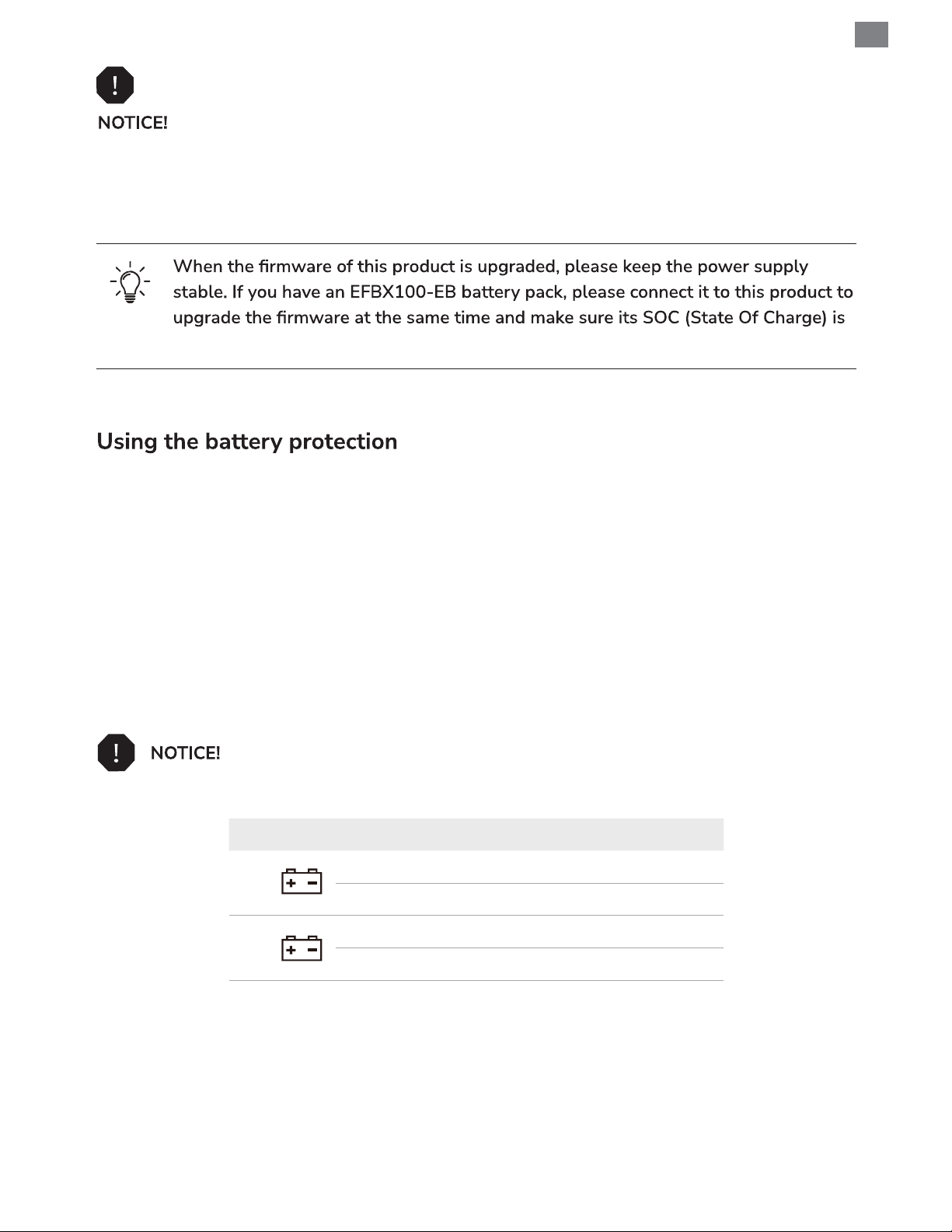
This device is equipped with 3-stage battery protection, which can be turned on/off through
EcoFlow APP. The battery protection prevents excessive discharging when the device is
connected to a vehicle starter battery (lead-acid battery).
When not connected to EFBX100-EB battery pack (optional), the device switches off
automatically as soon as the supply voltage falls below a set level. The device will switch back
on once the battery has been recharged to the restart voltage level.
When connected to EFBX100-EB battery pack (optional) and the power supply voltage falls
below the set value, the device will automatically switch to EFBX100-EB battery pack power
supply and will not automatically shut down.
When connecting to portable power station for power supply,
please turn off the battery protection function.
Low Medium High
Power off 8.5V 10.1V 11.1V
12V
Power on 10.9V 11.4V 12.4V
Power off 21.3V 22.3V 24.3V
24V
Power on 22.7V 23.7V 25.7V
9
Page 13
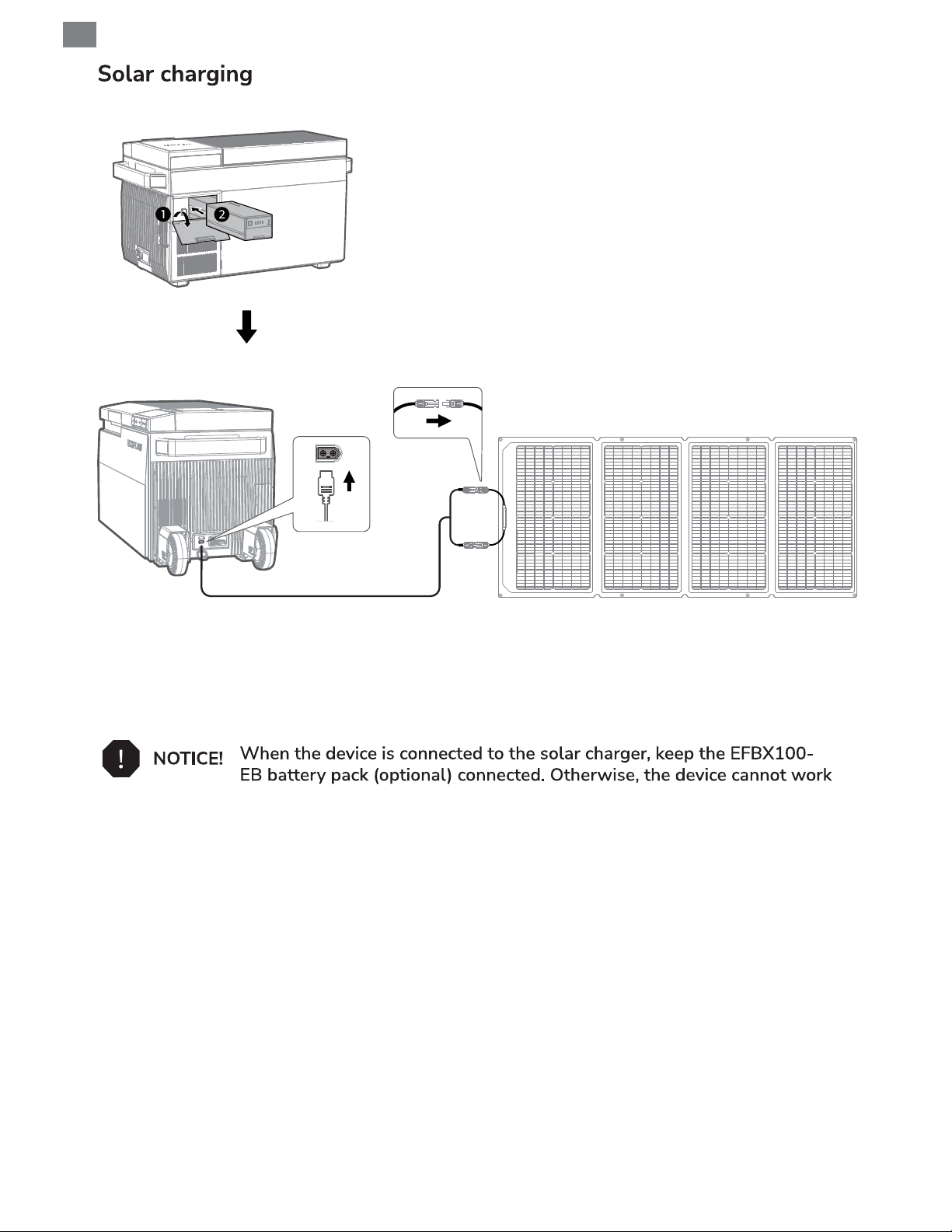
EN
EFBX100-EB battery pack
(optional)
Solar charging port
Solar charging cable (not included)
This product supports solar charging and supports charging the EFBX100-EB battery pack
(optional) with a maximum power of 180 W.
properly.
10
Page 14
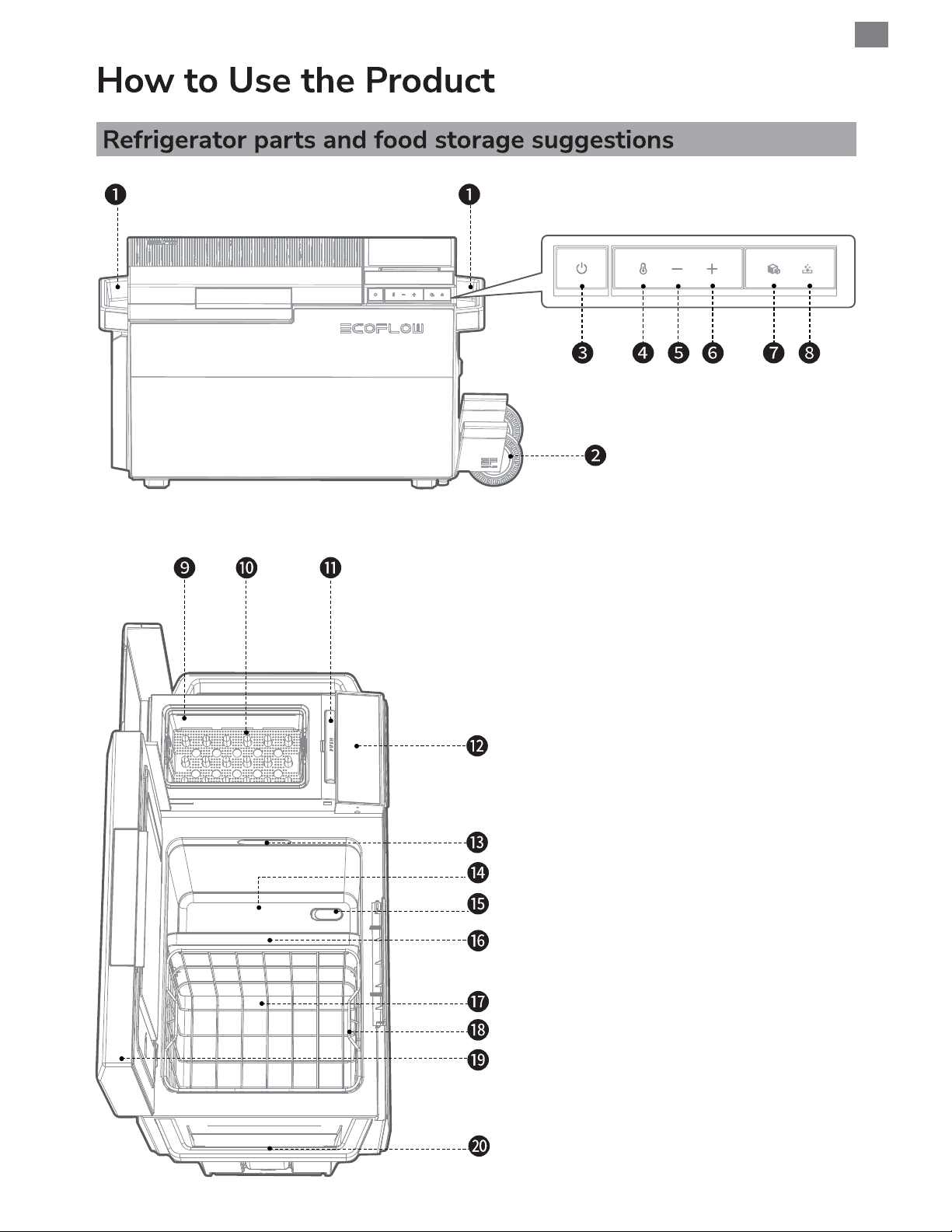
EN
1. Detachable handle
2. Detachable wheels (optional)
3. Power button
4. Temperature zone switching button
5. Temperature increase/Next button
6. Temperature decrease/Previous
button
7. Ice making button
8. Ice detaching button (You can press
the button to cancel ice-making
operation or manually detach ice
from bullet-head-shaped component
of the ice maker for access to ice
cubes.)
9. Ice container
10. Ice making compartment
11. Ice making compartment button
12. LCD
13. Light
14. Right zone
15. Drain plug
16. Temperature zone divider
(removable to store oversized food)
17. Left zone
18. Basket
19. Refrigerator door
20. Detachable Telescopic Handle
(optional)
11
Page 15
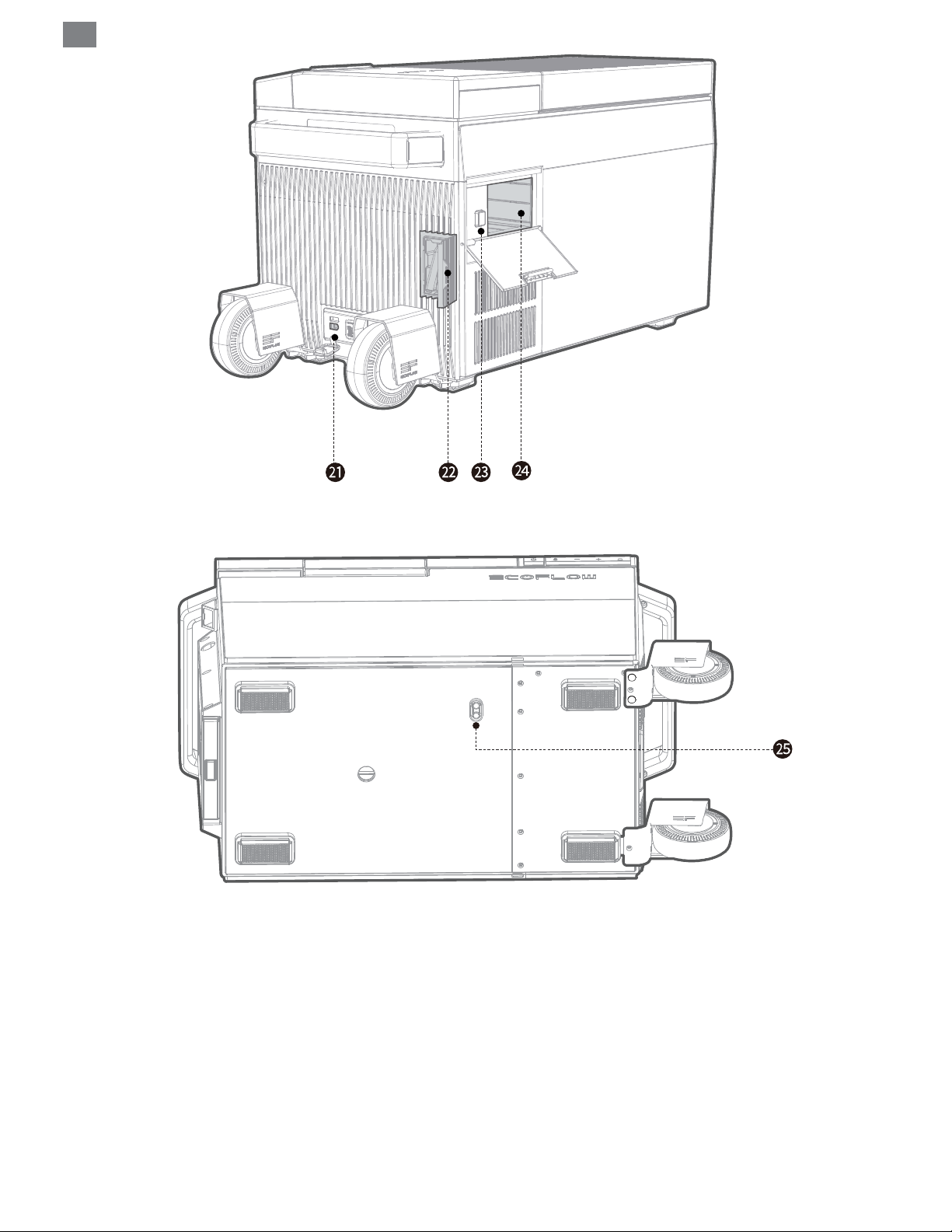
EN
12
21. Power connector
22. Ice maker drain pipe
23. Battery removal button
24. Battery compartment
25. Drainage hole
Page 16
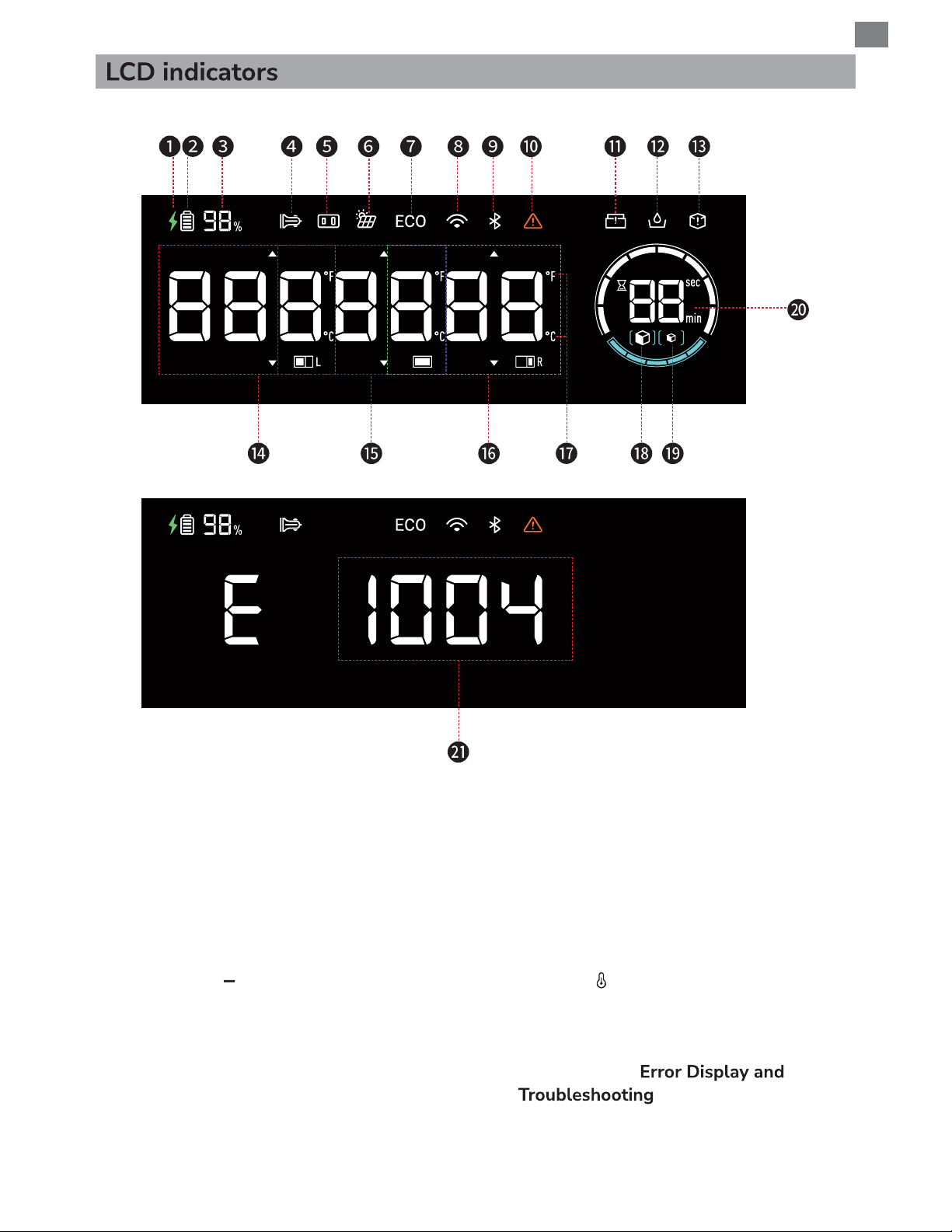
EN
1. Charging
2. Battery level estimator
3. Remaining battery percentage
4. Car charging connection
5. Adapter connection
6. Solar input
7. ECO mode (switchable by long
pressing "
" or via App)
8. Wi-Fi connection
9. Bluetooth connection
10. Failure warning
11. Ice container missing
12. Ice-making water shortage
13. Cannot make ice indicator
14. Left zone temperature
15. Single zone temperature (after removing
the zone divider)
16. Right zone temperature
17. Temperature units (switchable by long
pressing "
" or via App)
18. Large ice cubes
19. Small ice cubes
20. Ice making / manually ice detaching time
21. Error code (see
)
13
Page 17
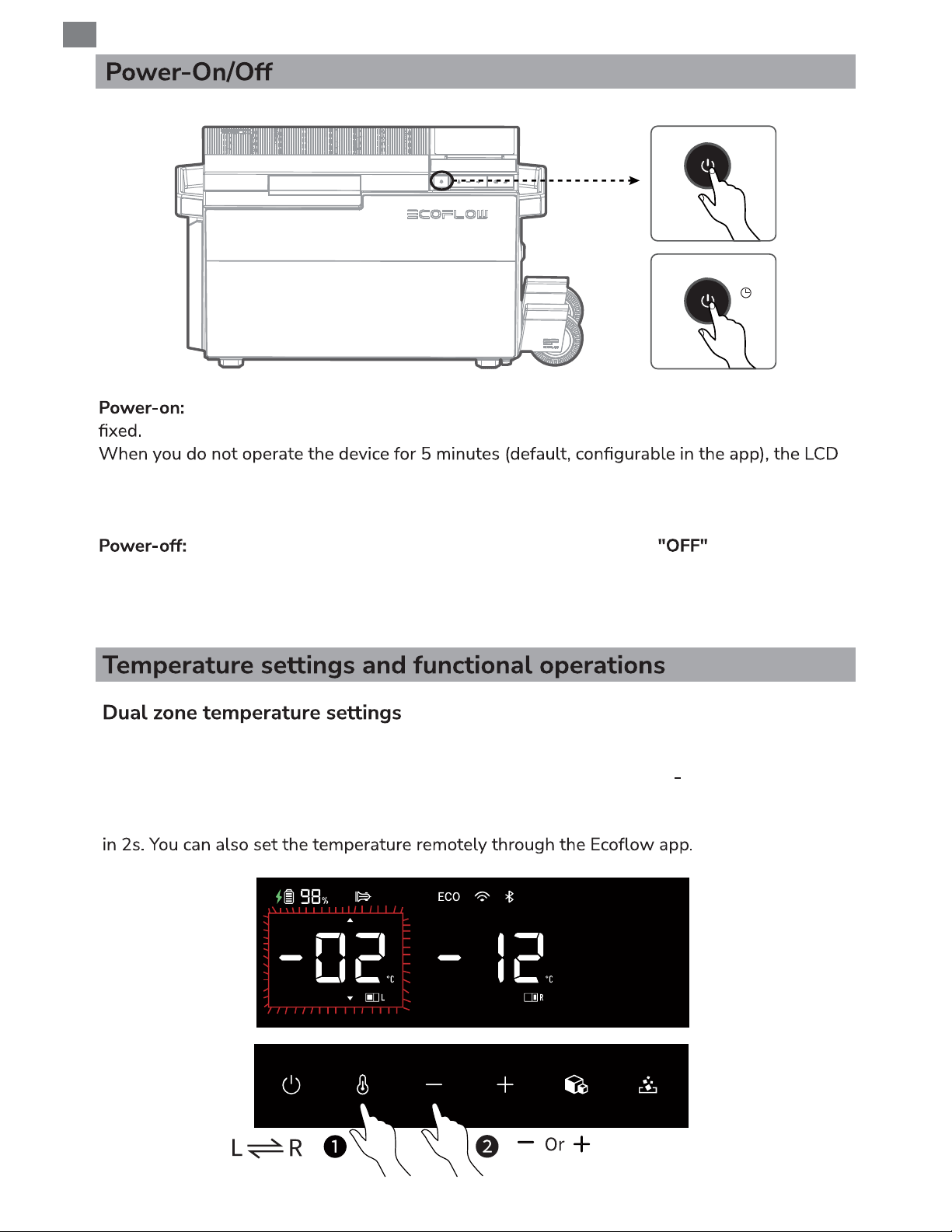
EN
Power-on
Power-off
Press
3s
Press the power button to turn on the device. The general power indicator becomes
will automatically turn off. When you operate the product, the LCD will be automatically lit.
To manually turn off the LCD, press the power button. To manually turn on the LCD, press any
button.
Press and hold the power button for 3s. The LCD displays for 3s. Then, the
refrigerator is turned off. You can also turn off the refrigerator remotely through the app.
When this product is connected to a power source, it can charge the connected EFBX100-EB
battery pack regardless of whether it is powered on or not.
After powering on the refrigerator, short press the temperature zone switching button
to select the desired zone, then the temperature digits blink. Press + or
to adjust the
temperature or long press to quickly reach the desired temperature value: ±5°C; set another
zone temperature value in the same way. The setting is completed after there is no operation
14
Page 18
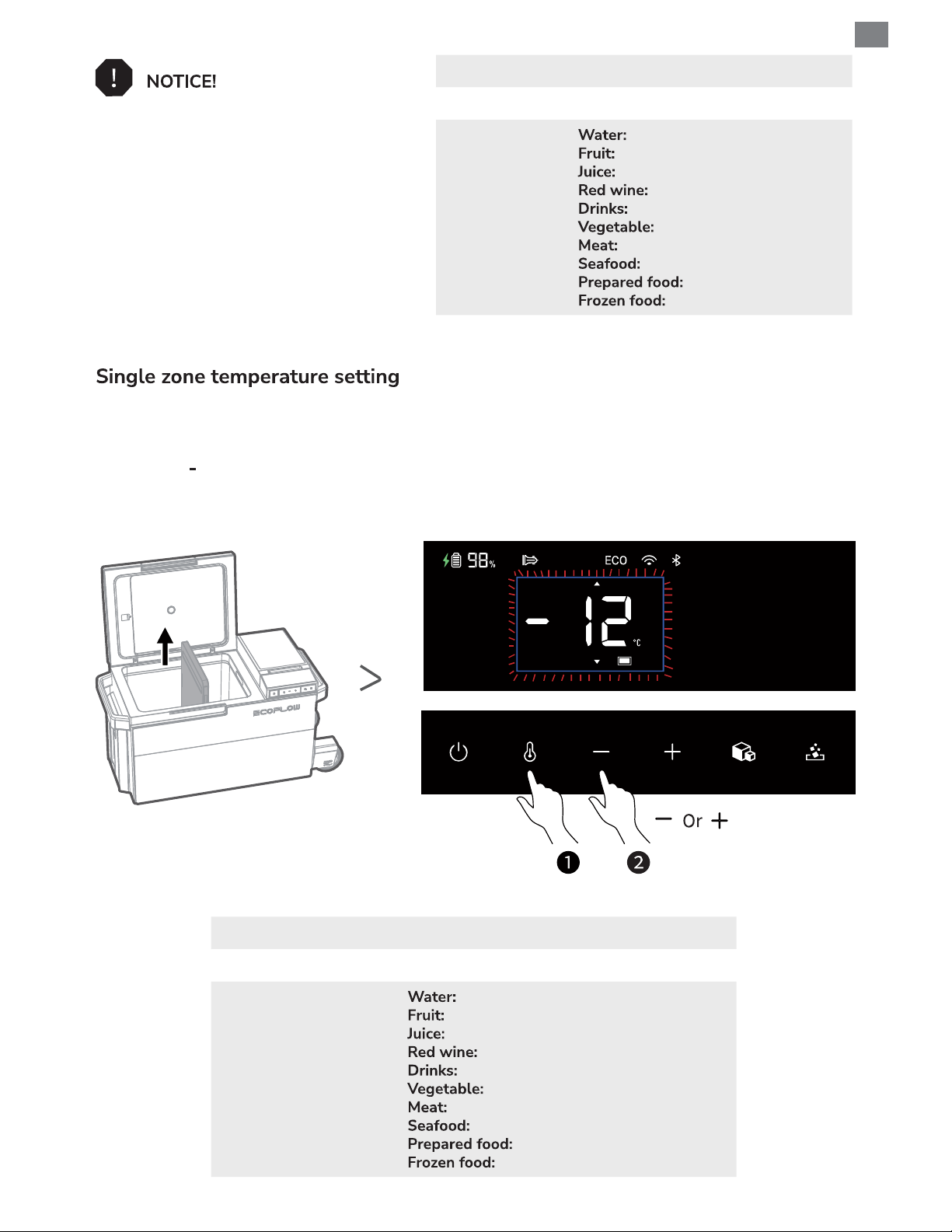
Fridge mode 0°C to 10°C (32°F to 50°F)
Freezer mode -25°C to 0°C (-13°F to 32°F)
1. The left zone is up to 25°C
higher than the right zone, or the right
zone is up to 15°C
(59°F)
left zone.
2. It is recommended that the left zone
be set as fridge mode and the right
zone be set as freezer mode.
(77°F)
higher than the
Recommended
temperatures
5°C (41°F)
5°C to 8°C(41°F to 46°F)
8°C to 10°C(46°F to 50°F)
13°C (55°F)
5°C to 7°C (41°F to 45°F)
3°C to 10°C (37°F to 50°F)
–20°C to –18°C(-4°F to 0°F)
-3°C (27°F)
4°C(39°F)
-18°C (0°F)
After removing the temperature zone divider, short press the temperature zone switching
button to enter the single temperature zone setting mode, then the temperature digits blink.
Press + or
to adjust the temperature. The setting is completed after there is no operation in
2s. You can also set the temperature remotely through the app.
EN
Fridge mode 0°C to 10°C (32°F to 50°F)
Freezer mode -25°C to 0°C (-13°F to 32°F)
5°C (41°F)
5°C to 8°C(41°F to 46°F)
8°C to 10°C(46°F to 50°F)
13°C (55°F)
Recommended
temperatures
5°C to 7°C (41°F to 45°F)
3°C to 10°C (37°F to 50°F)
–20°C to –18°C(-4°F to 0°F)
-3°C (27°F)
4°C(39°F)
-18°C (0°F)
15
Page 19
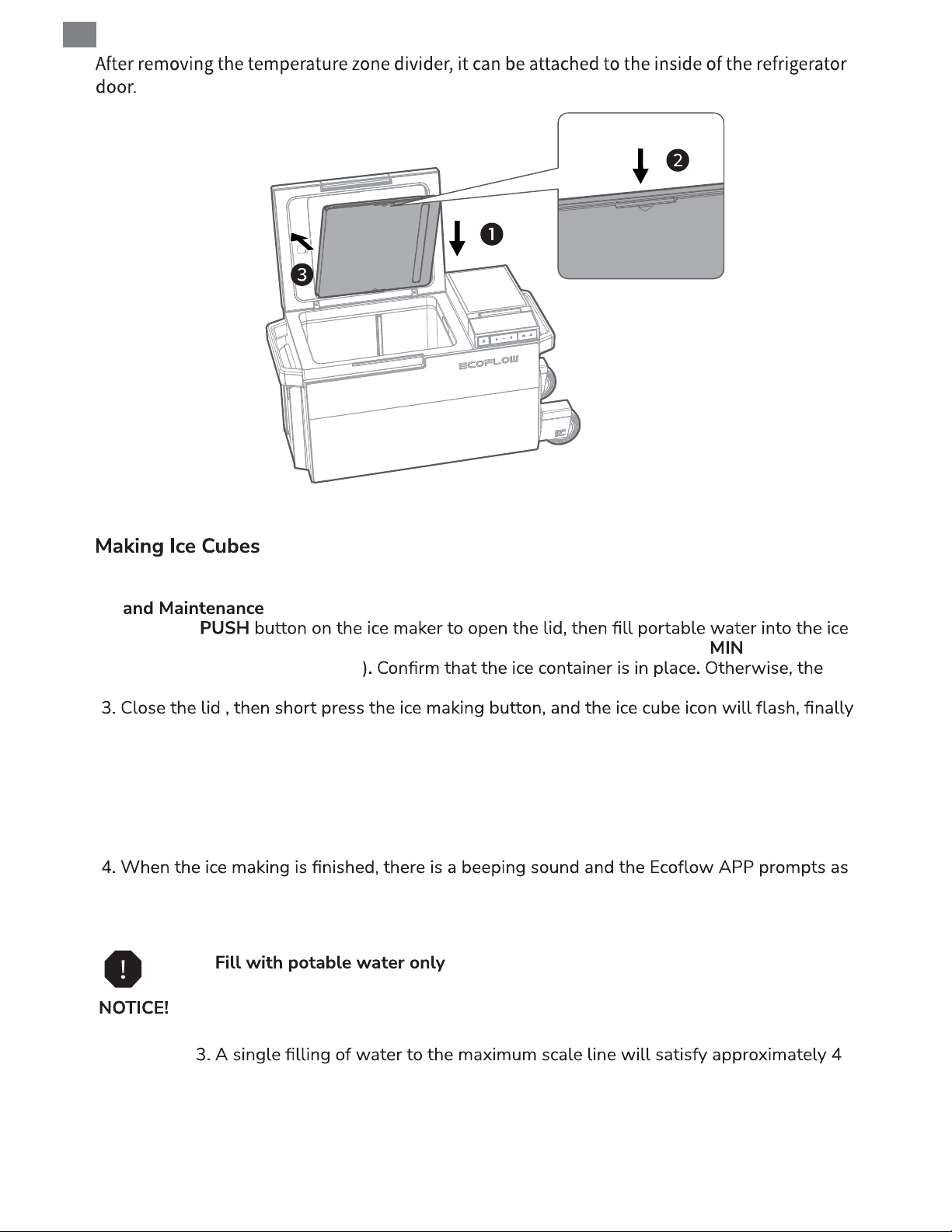
EN
1. It is recommended to clean the ice maker and ice container every time ice is made. (see Care
part)
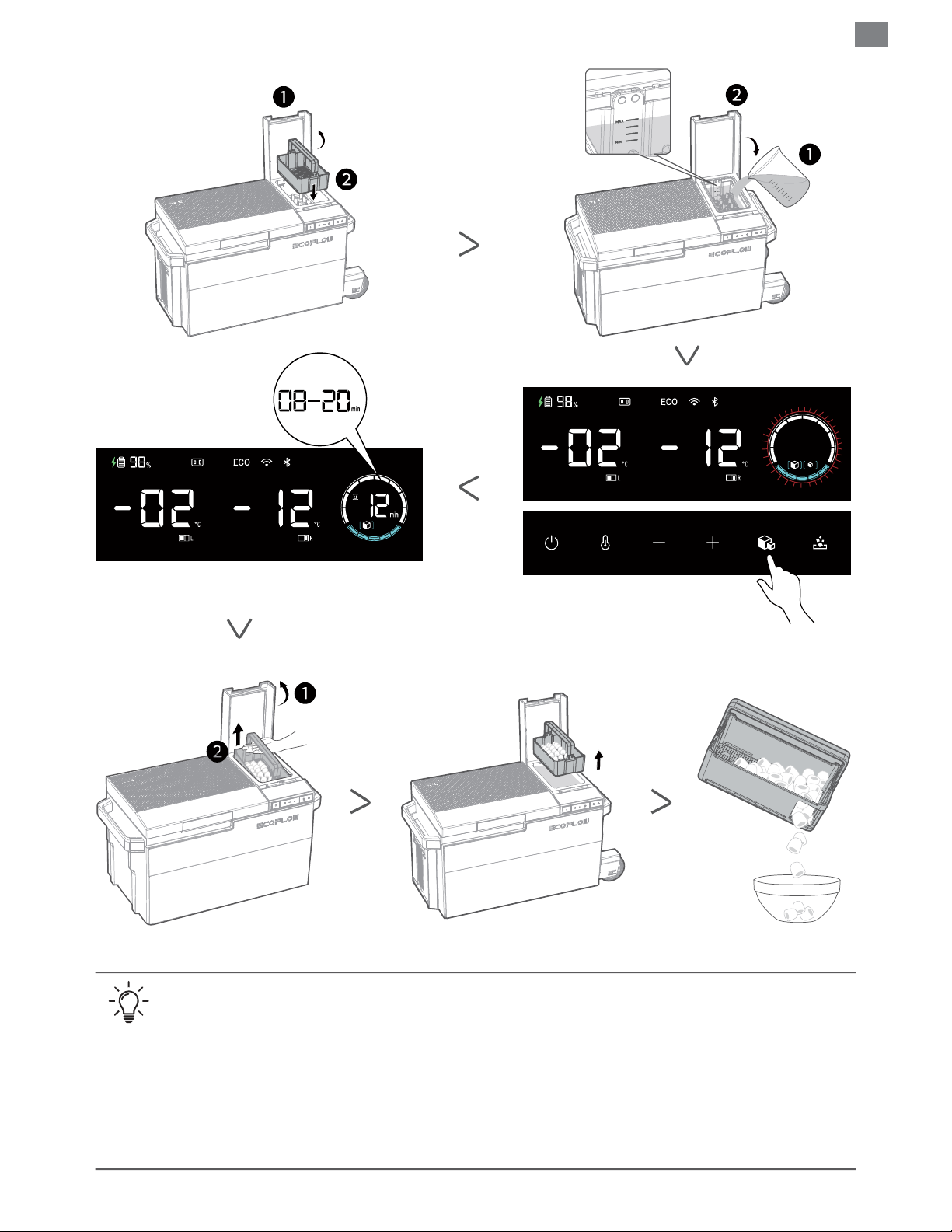
2. Press the
maker. The water level should not be lower than the minimum scale line ( ) or exceed
the maximum scale line (MAX
LCD will prompt that the ice container is missing and the ice maker cannot work.
short press the ice making button again to select large ice/small ice, after 5 seconds with no
operation, ice making will start: the ring icon will start to rotate and the screen will show
the current time needed for ice making, a single ice making time is 8-20 minutes at room
temperature (water temperature <30°C (86°F)). Before starting ice making, you can press
the ice detaching button to cancel ice making operation, or press it to manually detach ice
from bullet-head-shaped component of the ice maker for access to ice cubes after starting
ice making.
well, then open the lid, lift one end of the ice container and then the other end, now enjoy
the ice.
1. . It is recommended to use cold water instead of hot
water. Otherwise, it will increase power consumption. If the water temperature
exceeds 50°C, the ice maker cannot work.
2. It is recommended to clean the ice maker regularly to prevent odor.
16
ice making sessions.
4. When making ice multiple times in a row, there will be a certain degree of
temperature increase in single/dual zones.
5. When connecting to the 12V car charging supply, the refrigerator must be
connected to the EFBX100-EB battery pack for ice making.
Page 20
EN
• It is recommended you store the ice cubes in the single/dual zone.
• During the ice making process, you can still select large/small ice cubes by short
pressing the ice making button.
• Ice making will increase power consumption. Do not turn on ice making if you do not
need it.
• When the ice maker is not in use for a long period, clean and dry the internal
components of the ice maker to prevent mildew.
• The ice maker is disabled in factory settings.
17
Page 21
EN
1. The fridge mode is used to store food that should not be frozen and have a short storage
period. It is suitable for storing fresh food rather than food that is perishable at low
temperatures.
2. Hot food should be cooled before putting into the refrigerator. Otherwise, the temperature
in the refrigerator will rise, affecting the freshness of other food and increasing the power
consumption.
3. Do not open the refrigerator door frequently. Otherwise, the temperature inside the
refrigerator will rise. Do not store too much food in the refrigerator. Otherwise, the
refrigerator door cannot close.
4. Please use plastic wrap or plastic bag to seal the container or use a covered container
nutrition of food, and reduce the odor inside the refrigerator.
1. The freezer mode is used to store frozen food with a long storage period. It is suitable for
2. Do not put bottles into the freezer to prevent the contents of the bottles from freezing and
causing the bottle body to rupture and cause injuries.
3. Do not put thawed food into the freezer, which may make the food lose the taste and
nutrition.
4. Do not directly touch the interior of the freezer or metal containers with wet hands.
Otherwise, it may cause frostbite.
1. Please disconnect all power before cleaning to ensure safety.
2. After cleaning the refrigerator, install the disassembled parts back in reverse order. Do not
use excessive force when disassembling the parts to prevent damage.
3. Wipe with a soft cloth dampened with a neutral detergent. Do not use cleaning powder,
benzene, hydrochloric acid, hot water, rough brushes, abrasive cleaning agents or hard
objects to clean the refrigerator. Otherwise, it will damage or corrode the refrigerator.
4. Regularly clean the inside and outside of the refrigerator with a damp cloth.
5. Never clean the device under running water or immerse it in water.
6. Ensure that the air inlets and outlets on the refrigerator are free of any dust and dirt for good
ventilation.
18
Page 22
7. After cleaning, please check whether the power cable is damaged or wet, and whether
everything is normal.
8. Before plugging in the power supply, please use a soft dry cloth or sponge to dry any
moisture to avoid water or other liquids remaining in the electrical components, to avoid
electric shock or short circuit.
EN
19
Page 23
EN
Moisture can form frost inside the refrigerator or on the evaporator. This will reduce
refrigeration capacity. Please defrost the refrigerator to avoid such situations.
• Do not use hard or sharp tools to remove ice or loosen frozen items.
• Do not use mechanical devices or other methods not recommended by the
manufacturer to speed up the defrosting process.
1. Take out all items from the refrigerator.
2. Chill them in another refrigerator if necessary.
3. Turn off the refrigerator.
4. Leave the refrigerator door open.
5. Use a clean rag to wipe off any water stains.
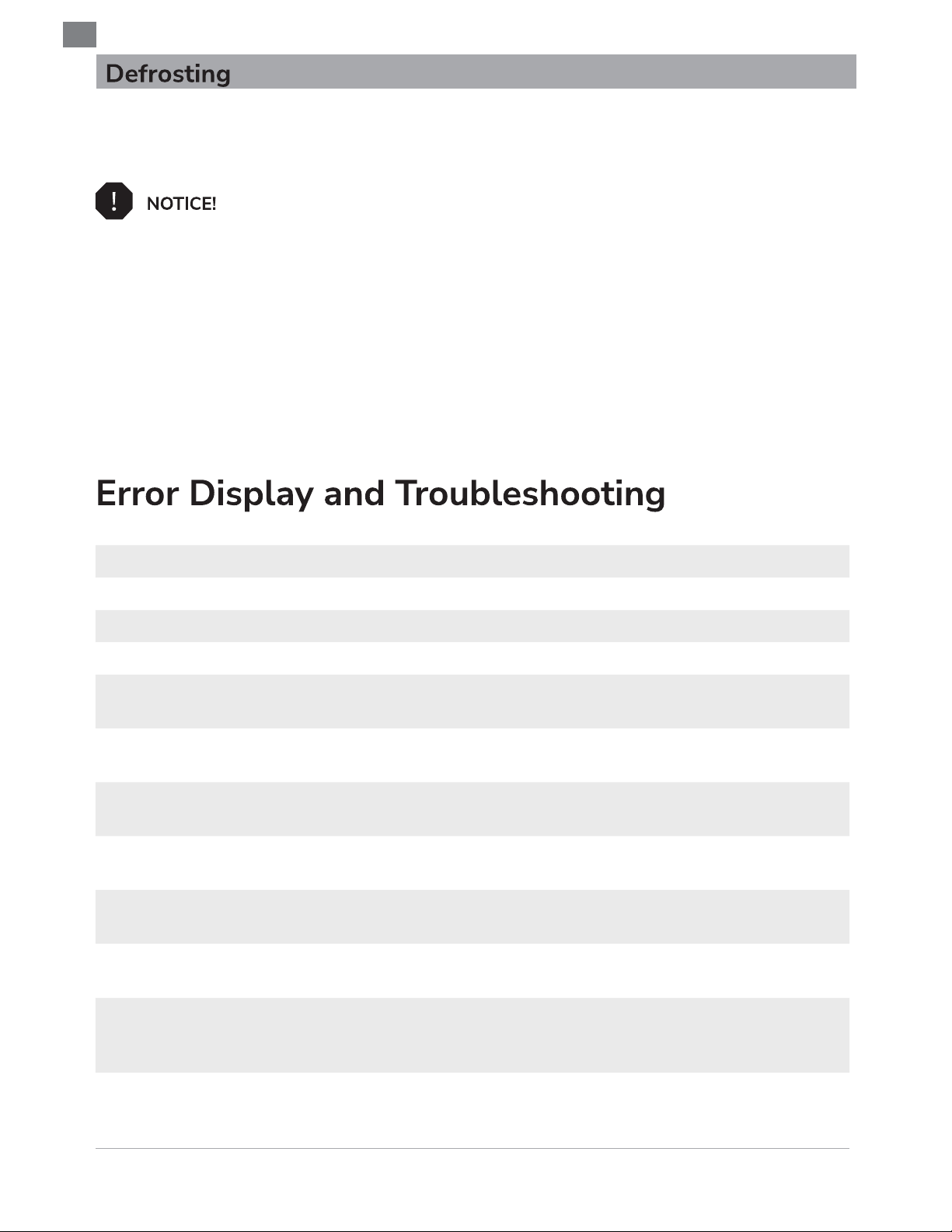
Fault Code Fault Name Suggested Solution
1004 Tilt angle is too large Place the device horizontally.
2004 Input is overvoltage Replace the input source.
2005 Input is undervoltage Replace the input source.
3021
3023
4009
4010
4011
4012
Ambient temperature is
too high
Water temperature is too
high
Battery pack discharging
overtemperature
Battery pack discharging
undertemperature
Battery pack charging
overtemperature
Battery pack charging
undertemperature
Please use within the temperature range allowed
by the device.
Please use within the temperature range allowed
by the device.
Please use within the temperature range allowed
by the device.
Please use within the temperature range allowed
by the device.
Please use within the temperature range allowed
by the device.
Please use within the temperature range allowed
by the device.
4020
Others -
20
Battery pack MOS
undertemperature
Please use within the temperature range allowed
by the device.
Unplug the device all power (including the
battery pack), re-power, if the issue persists,
please contact the after-sales.
Page 24
EN
EFBX100 × 1 AC power adapter + cable × 1
US EU
Quick Start Guide × 1
Warranty Card × 1
Left zone basket
× 1
Car charging cable × 1
Ice shovel
× 1
21
Page 25

 Loading...