

Page 1
What’s
B
A
H×1I
1
D1×4D2
C
F×1G
E
B
D1
D2
2
B
C
A
H
B
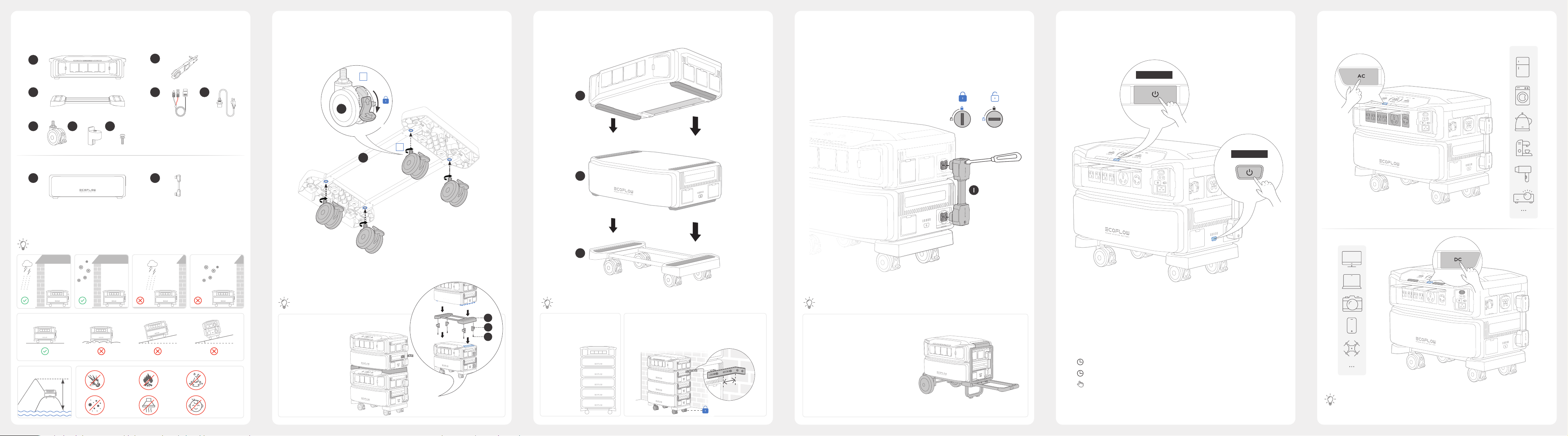
In The Box
EcoFlow DELTA Pro Ultra Inver ter
×1
Contenu de la boîte |
包裝清單
How To
Install
×1
Comment procéder à l’installation |
安裝方式
2 Options to
Power On/Off
Il existe deux options pour allumer ou éteindre l’appareil |
2 個用於開啟 / 關閉電源的選項
Charging Your
Appliances
Alimentation des appareils |
為您的電器充電
OPTION 1
×1
×4
EcoFlow DELTA Pro Ultra Battery
×1
Installation
Environment
×4
Environnement d’installation |
安裝環境
×1
×4
OPTION 2
OPTION 2
2 SETS : Purchase and
install the EcoFlow Fixing
Metal Tab.
2 ENSEMBLES:
Achetez et montez la
patte métallique de
xation EcoFlow.
Explosion
Explosion
爆炸
Dust
Poussière
粉塵
Fire
Feu
火源
Fumes
Fumées
烟霧
Liquid
Liquide
液體
Children
Enfants
儿童
Max. number of Batteries is 5
Le nombre max des batteries
est 5
≥ 3 BATTERIES: Purchase and install the EcoFlow Fixing
Metal Tab.
≥ 3 BATTERIES : Achetez et montez la patte métallique
de xation EcoFlow.
≤50 mm
To move the product more easily, you
can also mount the product on EcoFlow
Trolley (sold on the EcoFlow ofcial
website).
Pour déplacer le produit plus facilement,
vous pouvez également le monter sur le
chariot à plateau EcoFlow (vendu sur le
site ofciel d'EcoFlow).
×1s On | Allumé |
×3s Off | Désactivé |
×1 LCD Screen On/Off | L’écran LCD est allumé/éteint |
Make sure the product is turned on before enabling AC or DC.
Assurez-vous que le produit est allumé avant d’activer le courant alternatif ou continu.
Page 2
How to
1
2
G
F
1
2
E
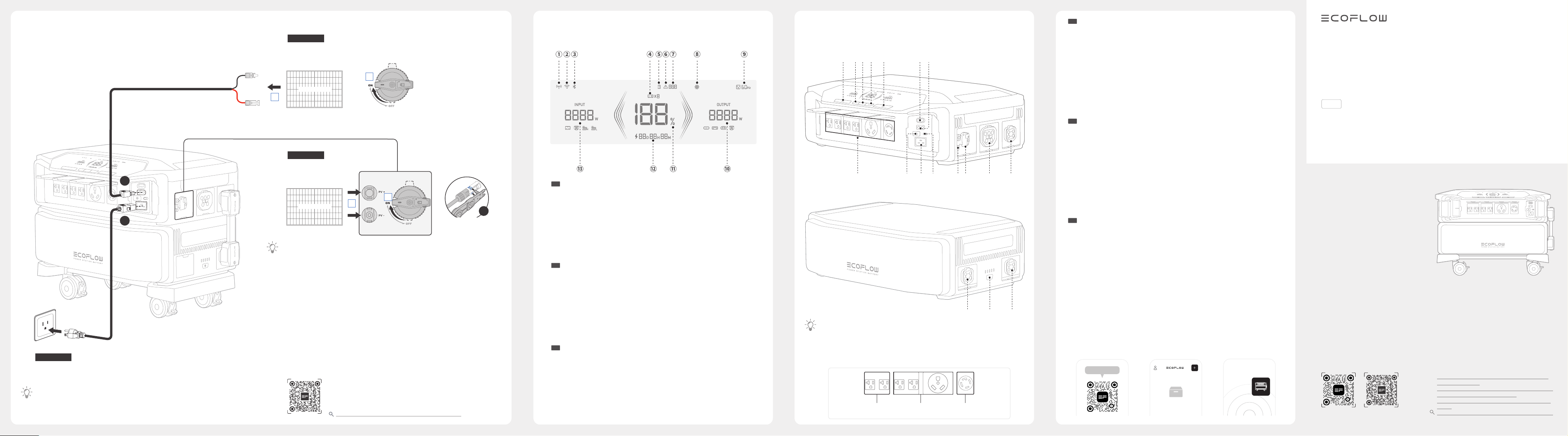
Recharge
1. 100-120V~15A,
50/60Hz
2. 200-240V~12.5A,
50/60Hz
Guide de recharge |
充電方式
OPTION 1
AC charging
Charge CA
交流充電
OPTION 2
Low PV charging
Charge PV à basse tension
低壓光伏充電
30~150V, 15A
OPTION 3
High PV charging
Charge PV à haute tension
高壓光伏充電
80~450V, 15A
Unplug
Procédure de déconnexion
Turn off the PV switch before connecting or disconnecting PV modules.
1.
Éteignez l’interrupteur PV avant de connecter ou de déconnecter des modules PV.
To safely connect the EcoFlow DELTA Pro Ultra to PV system circuits, a rapid shutdown
function is required according to NEC regulations, and a qualied electrician or installer
must be involved for installation.
Pour garantir une connexion sécurisée du EcoFlow DELTA Pro Ultra aux circuits du
2.
système photovoltaïque, il est impératif de disposer d’une fonction d’arrêt rapide,
en conformité avec la directive NEC. Il est également recommandé de faire appel à
un électricien ou à un installateur qualié pour assurer une installation conforme et
sécurisée.
To check more recharging options, please refer to the latest user
manuals or related documents.
Pour consulter d'autres options de recharge, veuillez vous référer
aux derniers manuels d'utilisation ou documents associés.
如需了解更多充电方式,請查看最新的使用者手冊或相關文件。
https://manuals.ecoflow.com/product/delta-pro-ultra
拔除
LCD
Screen
EN
FR
CHT
L’écran LCD afche les informations suivantes |
液晶螢幕
4G connection
Wi-Fi connection
Bluetooth connection
Number of batteries
Battery failure warning
Error report
Error code
Connexion 4G
Connexion Wi-Fi
Connexion Bluetooth
Nombre de batteries
Avertissement en cas de défaillance
de la batterie
Rapport d’erreur
Ventilation fan
AC output
Total output power
Remaining battery percentage
Remaining charging/discharging time
Total input power
Code d’erreur
Fonctionnement du ventilateur
Sortie CA
Puissance de sortie totale
Pourcentage de batterie restant
Temps de charge/décharge restant
Puissance d’entrée totale
Product
Overview
EcoFlow DELTA Pro Ultra Inver ter
EcoFlow DELTA Pro Ultra Battery
EN
1. When the product is turned off, press & hold the power button (13) or (16)
for 5s to unbind and reset Bluetooth. (the bolded sentence is newly added)
Lorsque le produit est éteint, maintenez enfoncé le bouton d'alimentation (13)
ou (16) pendant 5 secondes pour dissocier et réinitialiser le Bluetooth.
2. UPS | Fonctionnement UPS | UPS
Présentation du produit |
產品外觀
Backup UPS
20ms
Online UPS
0ms
Backup UPS
20ms
EN
AC output sockets
Ground screw
AC charging input port
AC charging speed switch
High-PV input port
PV switch
Power input/output port
Battery port
FR
Prises de sortie CA
Vis de terre
Port d’entrée de charge rapide
Commutateur de vitesse de charge CA
Port d’entrée PV à haute tension
Interrupteur PV
Port d’entrée/sortie d’alimentation
Port de la batterie
CHT
.
Download
EcoFlow APP
EcoFlow APP
Téléchargez l’application Ecoow |
Ecoow App
下載
Low-PV input port
DC output port
USB-A output port
DC power button
Power button
AC power button
USB-C 100W output port
Power button
Port d’entrée PV à basse tension
Port de sortie CC
Port de sortie USB-A
Bouton d’alimentation CC
Bouton d’alimentation
Bouton d’alimentation CA
Port de sortie USB-C 100 W
Bouton d’alimentation
Searching For Units
QUICK START GUIDE
GUIDE DE DÉMARRAGE RAPIDE
快速指南
V2.0
EcoFlow DELTA Pro Ultra
For more details, check the latest user manuals or
related documents.
Pour plus de détails, consultez les derniers manuels
d'utilisation ou documents associés.
如需更多詳細資訊,請查看最新的使用者手冊或相關
文件。
DocumentsEcoFlow App
https://manuals.ecoflow.com/product/delta-pro-ultra
 Loading...