

Page 1
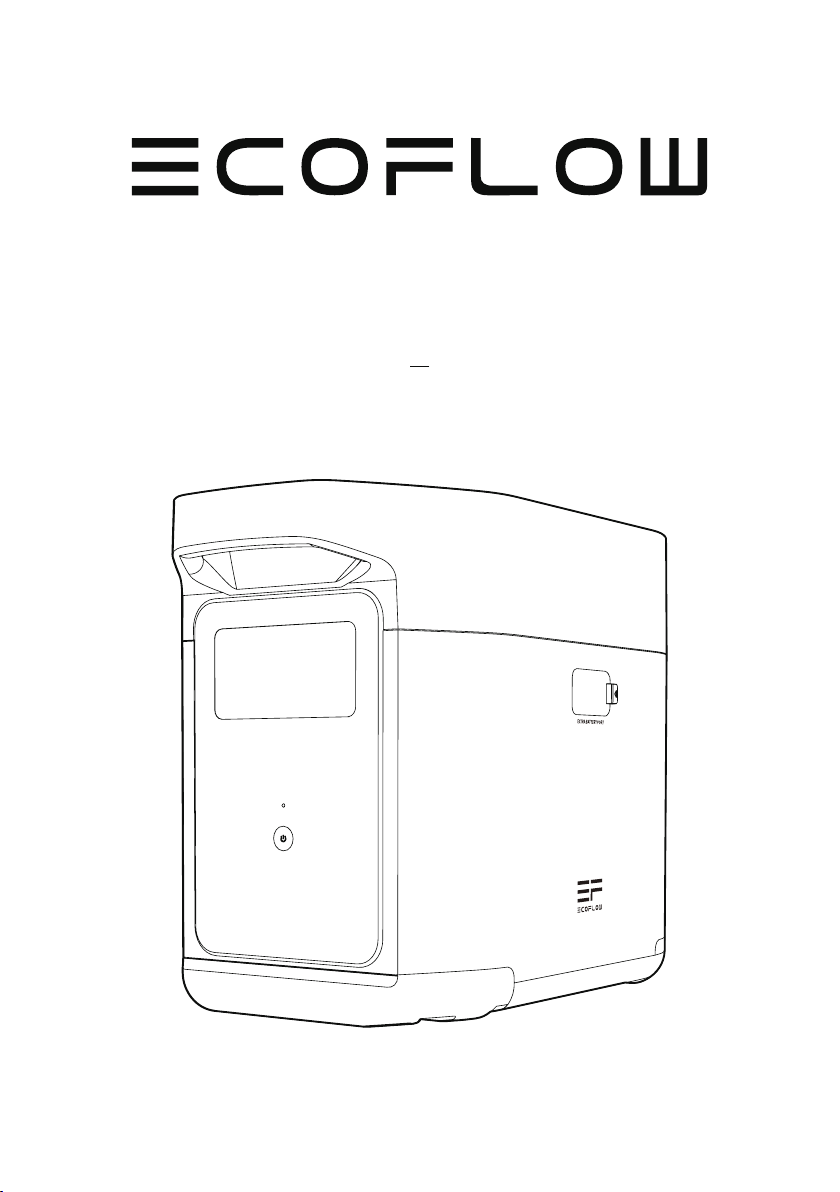
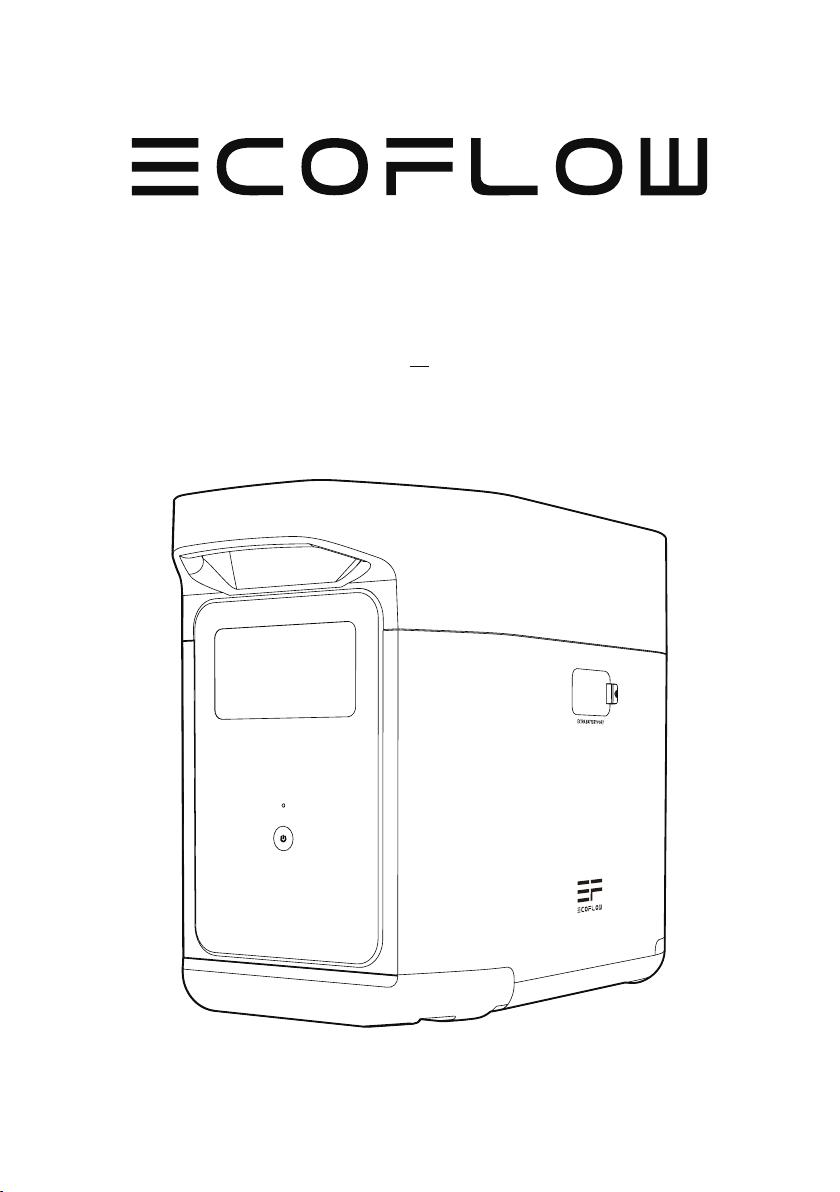
EcoFlow DELTA 2 Smart Extra Battery
User Manual
Page 2

Page 3

DISCLAIMER
Read all safety tips, warning messages, terms of use, and disclaimers carefully. Refer to
the terms of use and disclaimer at https://ecoflow.com/pages/terms-of-use and stickers
on the product before use. Users take full responsibility for all usage and operations.
Familiarize yourself with the related regulations in your area. You are solely responsible
for being aware of all relevant regulations and using EcoFlow products in a way that is
compliant.
EcoFlow DELTA 2 Smart Extra Battery (Hereinafter referred to as DELTA 2 Extra Battery)
Page 4

CONTENTS
1.
Specifications
2. Safety Instructions
2.1 Usage
2.2 Disposal Guide
3. Getting Started
3.1 Product Details
3.2 LCD Screen
3.3 General Product Usage
4. FAQS
5. Troubleshooting
6. What’s In the Box
7. Storage & Maintenance
1
2
2
3
4
4
6
7
7
8
8.Fcc Statement
8
Page 5
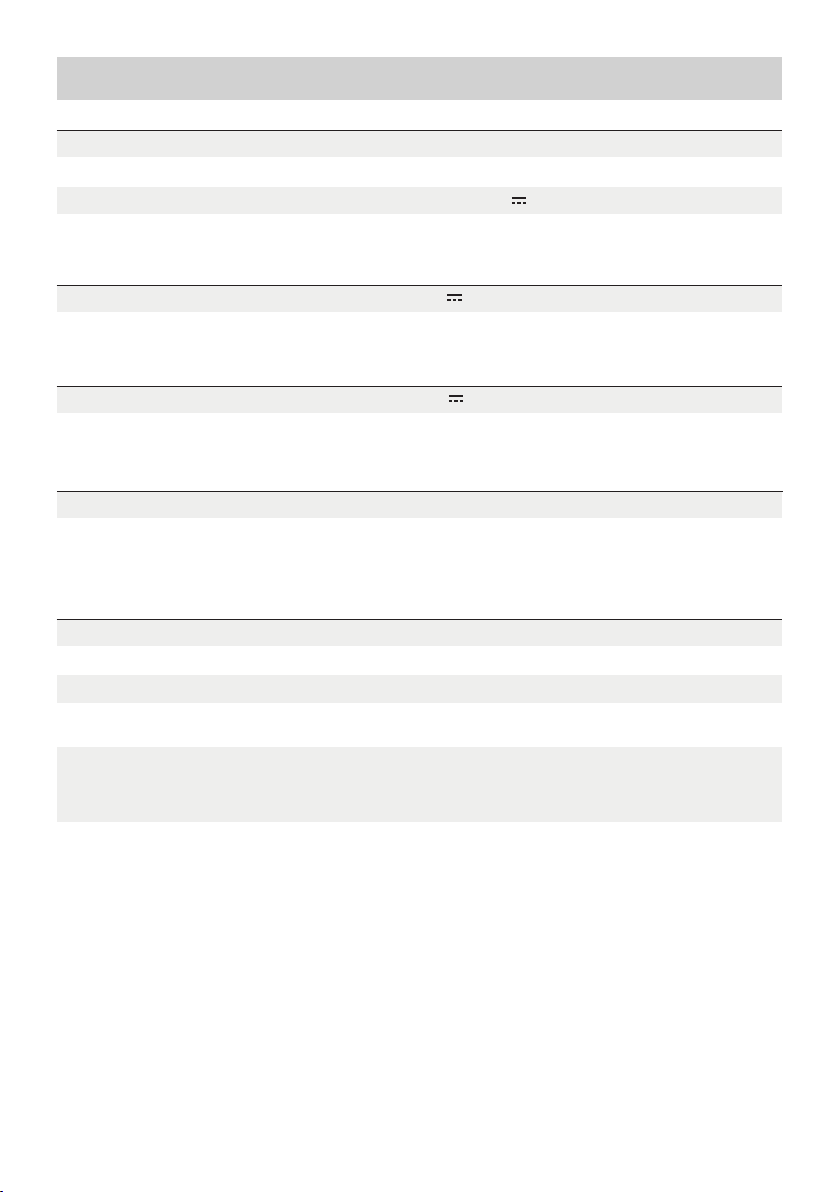
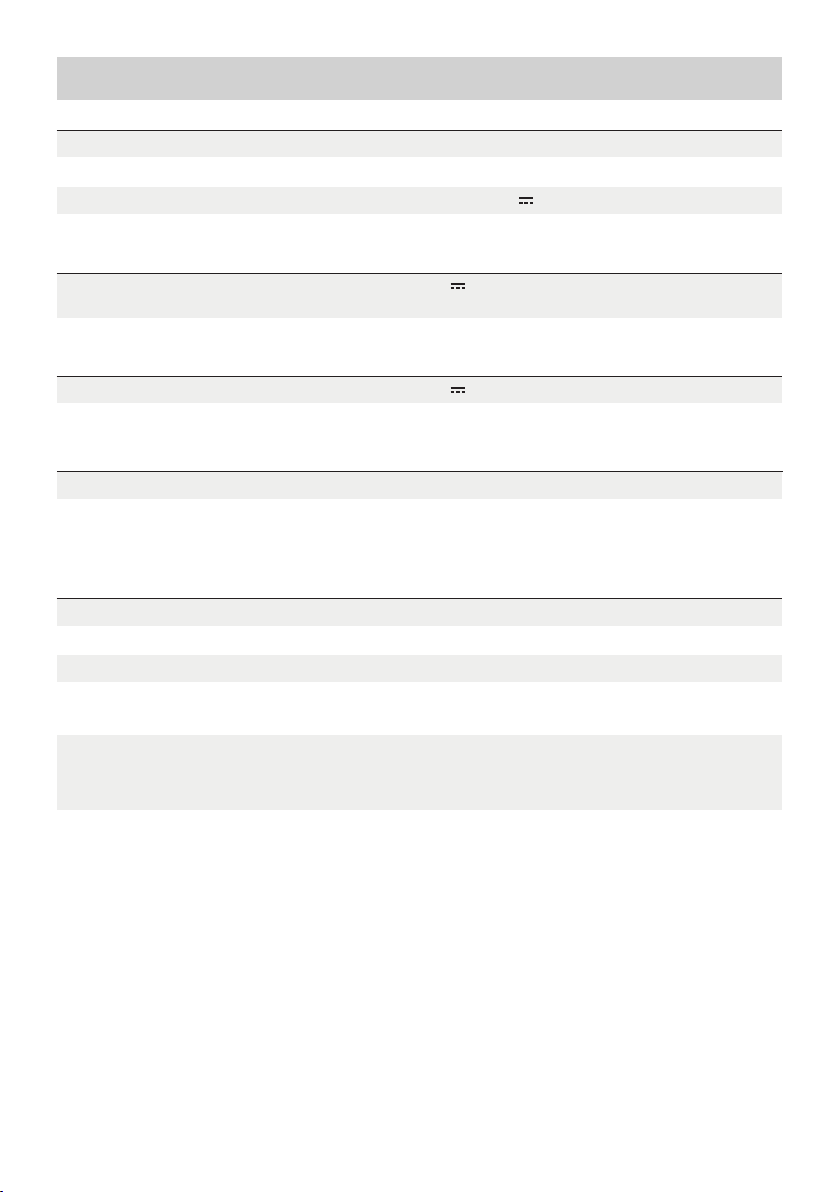
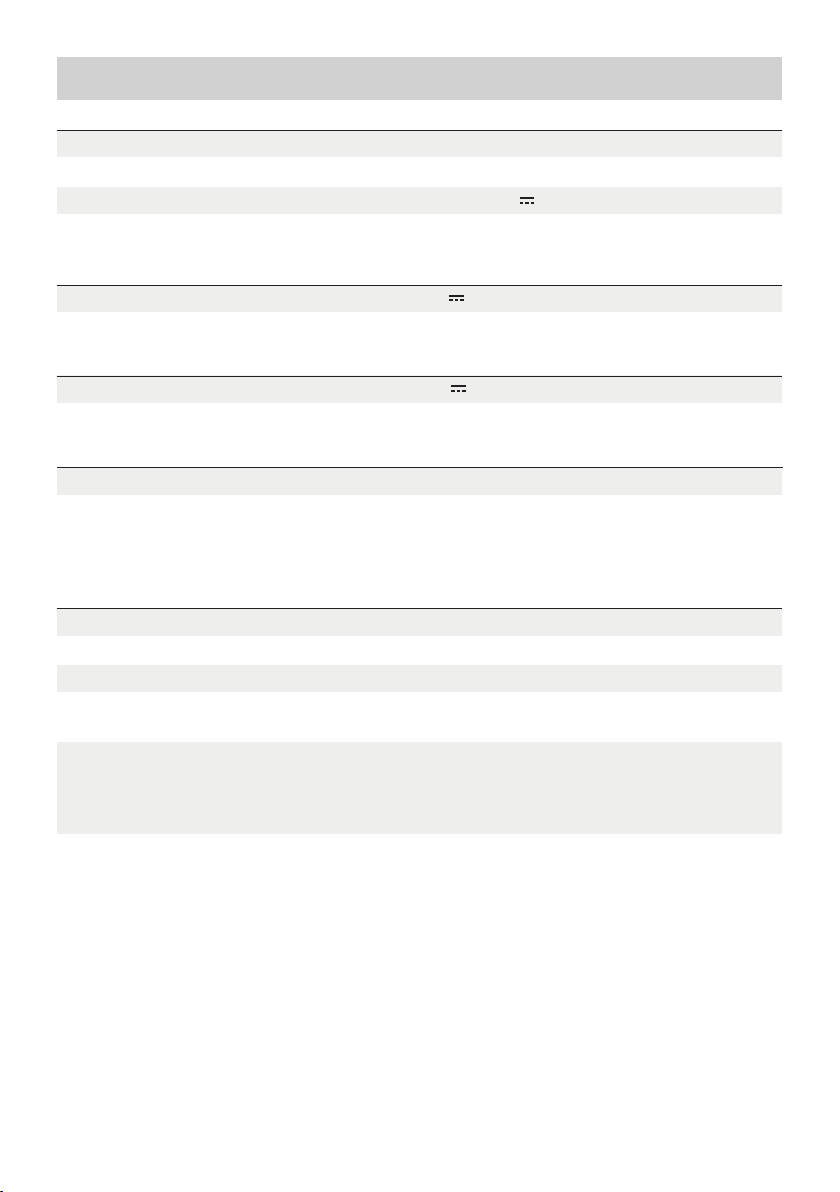
1. Specifications
General Info
Net Weight
Dimensions
Capacity
Input Port
Extra Battery Port Input 51.2V
Output Port
Battery Info
Cell Chemistry
Approximately 9.5kg(21lbs)
400 x 211 x 281mm(15.7x8.3x11.1in)
1024Wh 51.2V
51.2V 2048W MaxExtra Battery Port Output
LFP
1024W Max (X-Stream and solar dual charging)
Cycle Life
3000 cycles to 80%+ capacity
Environmental Operating Temperature
Optimal Operating Temperature
Discharge Temperature
Charge Temperature
Storage Temperature
Protection
* Whethe r the product can be ch arged or discharged d epends on the actual temperature of the
battery pack.
68°F to 86°F(20°C to 30°C)
14°F to 113°F (-1 0 °C to 45°C)
32°F to 113°F(0°C to 45°C)
14°F to 113°F (-1 0 °C to 45°C) (optimal: 68°F to
86°F [20°C to 30°C])
Over Voltage Protection, Overload Protection,
Over Temperature Protection, Short Circuit
Protection, Low Temperature Protection, Low
Voltage Protection, Overcurrent Protection
1
Page 6

2. Safety Instructions
2.1 Usage
1. Do not use the product near a heat source, such as a fire source or a heating furnace.
2. Avoid contact with any liquid. Do not immerse the product in water or get it wet. Do not use the
product in rain or humid environments.
3. Do not use the product in an environment with strong static electricity/magnetic fields.
4. Do not disassemble the product in any way or pierce the product with sharp objects.
5. Avoid using wires or other metal objects that may result in a short circuit.
6. Do not use unofficial components or accessories. If you need to replace any components or
accessories, please visit official EcoFlow channels to check relevant information.
7. When using the product, please strictly follow the operating environment temperature specified in
this user manual. If the temperature is too high, it may result in a fire or explosion; if the temperature
is too low, the product performance may be severely reduced, or the product may cease to work.
8. Do not stack any heavy objects on the product.
9. Do not lock the fan forcibly during use or place the product in an unventilated or dusty area.
10. Please avoid impact, falls, or severe vibrations when using the product. In case of a severe external
impact, turn off the power supply immediately and stop using the product. Ensure the product is
well fastened during transportation to avoid vibrations and impacts.
11. If you accidentally drop the product into water during use, please place it in a safe open area, and
stay away from it until it is completely dry. The dried product should not be used again, and should
be properly disposed of according to Section 2.2 below. If the product catches fire, we recommend
that you use the fire extinguishers in the following order: water or water mist, sand, fire blanket, dry
powder, and finally a carbon dioxide fire extinguisher.
12. Use a dry cloth to clean off dirt on the product ports.
13. Rest the product on a flat surface to avoid damages caused by the product falling over. If the
product is overturned and severely damaged, turn it off immediately, place the battery in an open
area, keep it away from combustible matter and people, and dispose of it in accordance with local
laws and regulations.
14. Ensure that the product is kept out of reach of children and pets.
2.2 Disposal Guide
1. If conditions permit, make sure that the battery is fully discharged before disposing it in a
designated battery recycling bin. The product contains batteries with potentially dangerous
chemicals, so it is strictly prohibited to dispose of it in ordinary trash cans. For more details, please
follow the local laws and regulations on battery recycling and disposal.
2. If the battery cannot be fully discharged due to a product failure, please do not dispose of the
battery directly in the battery recycling box. In such case, you should contact a professional battery
recycling company for further processing.
3. Please dispose of over-discharged batteries that cannot be recharged.
2
Page 7
3. Getting Started
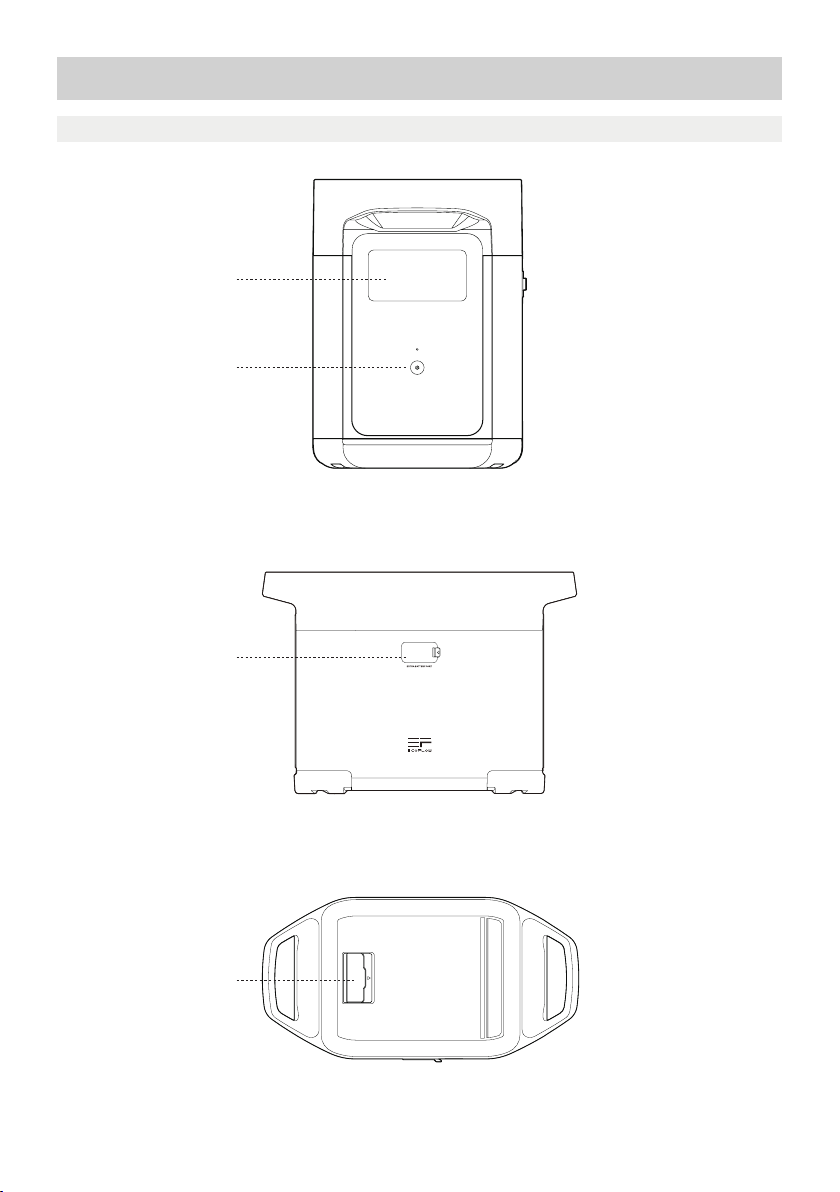
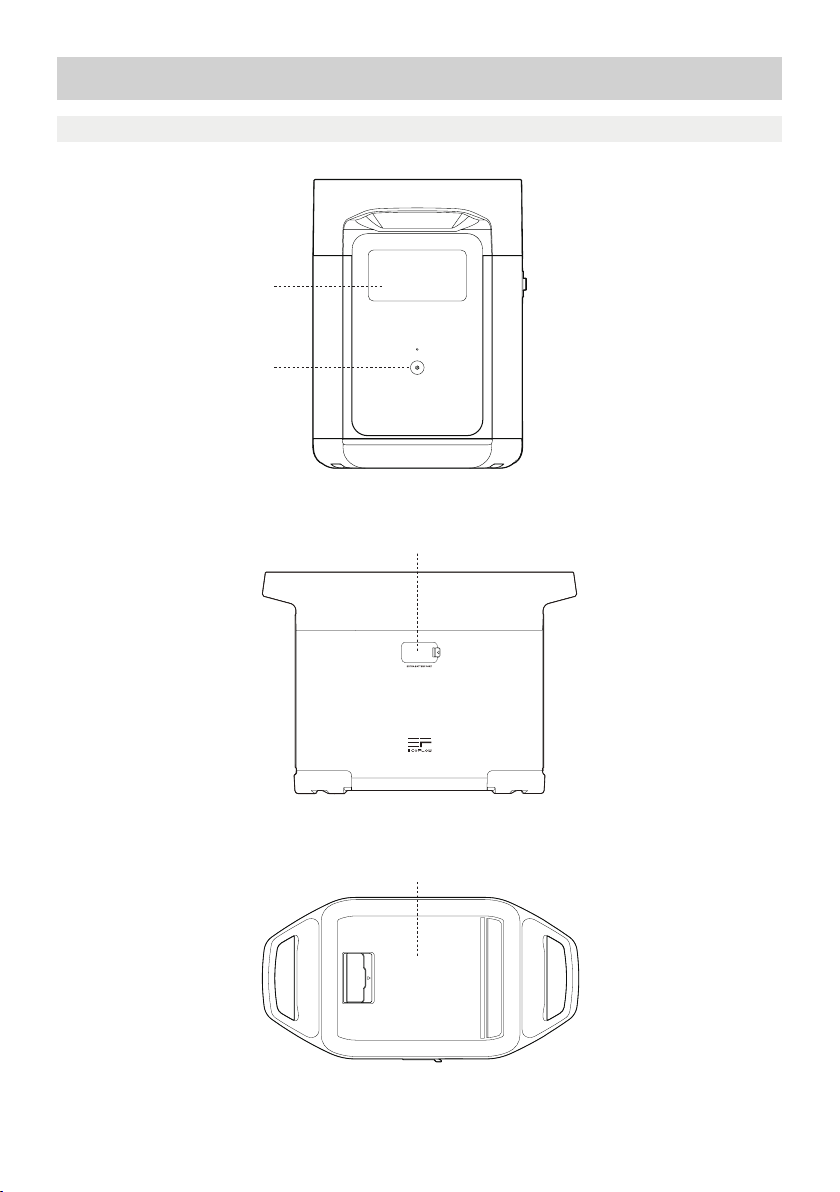
3.1 Product Details
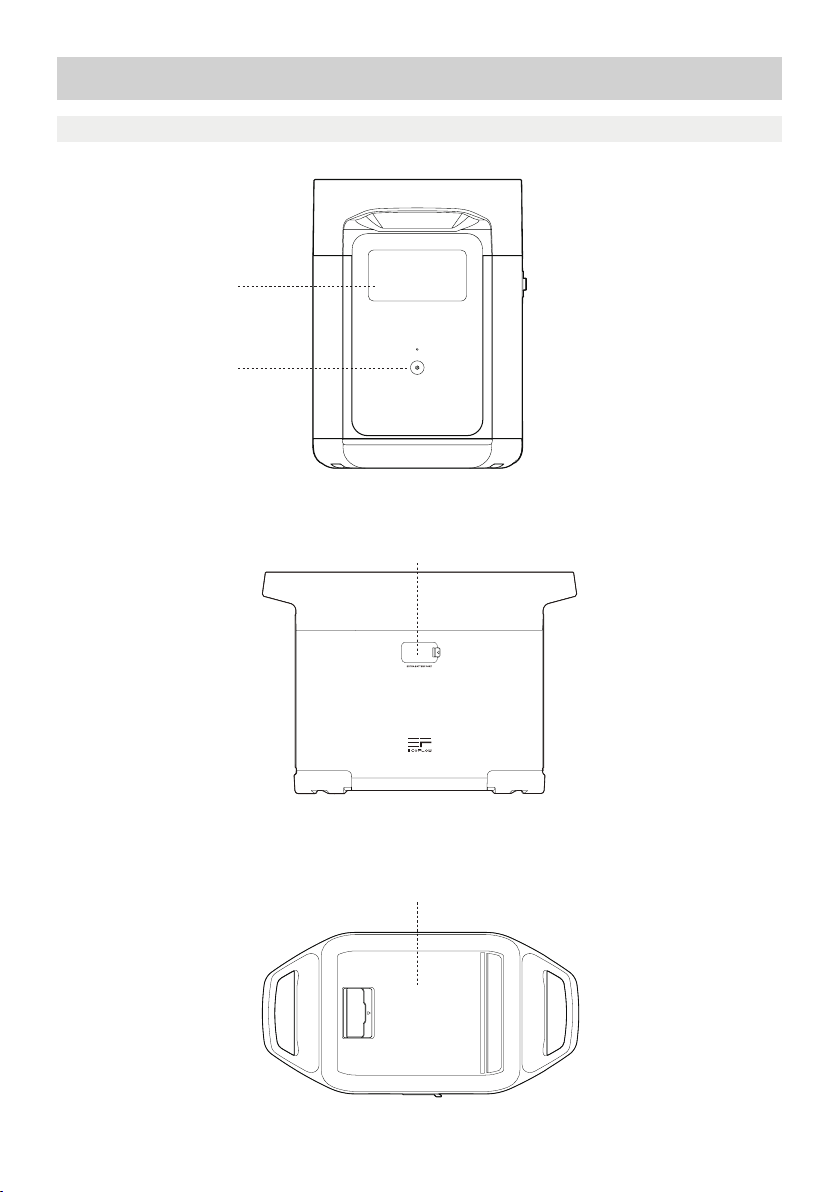
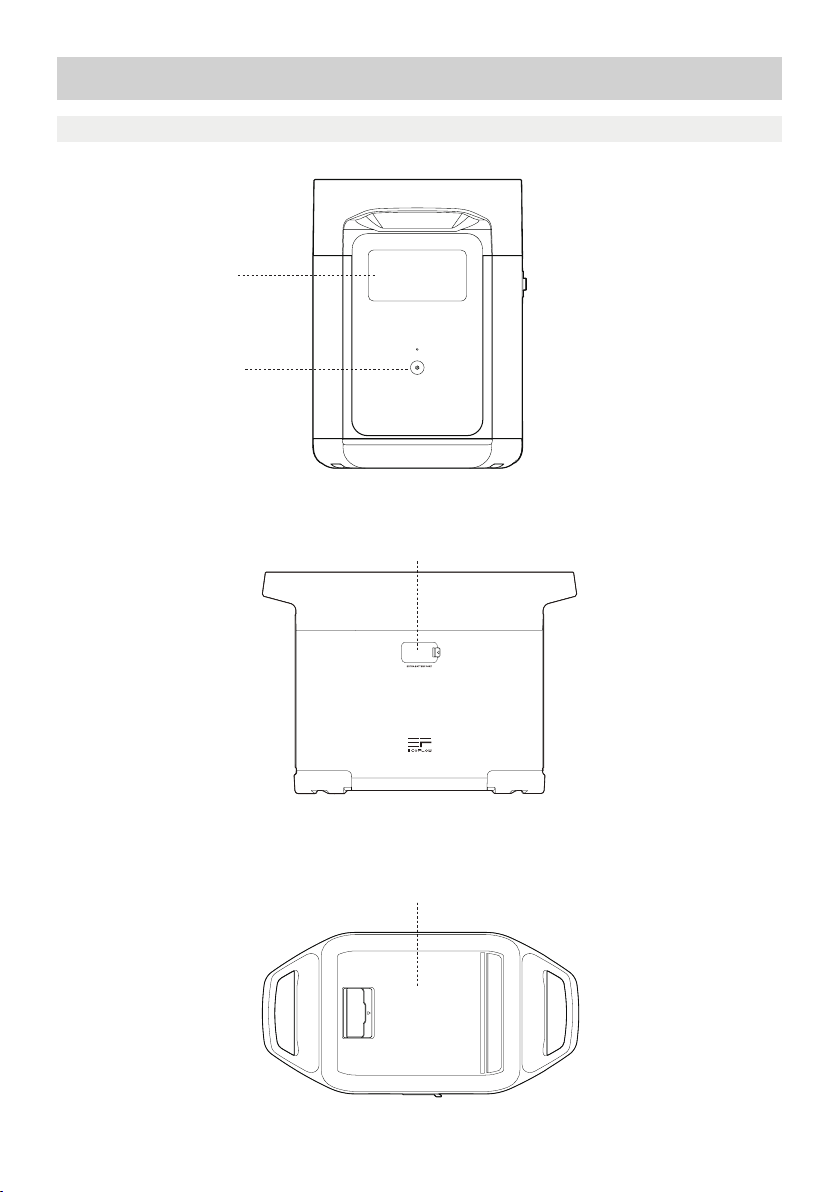
LCD Screen
Main Power Button
Extra Battery Port
Storage Compartment
3
Page 8
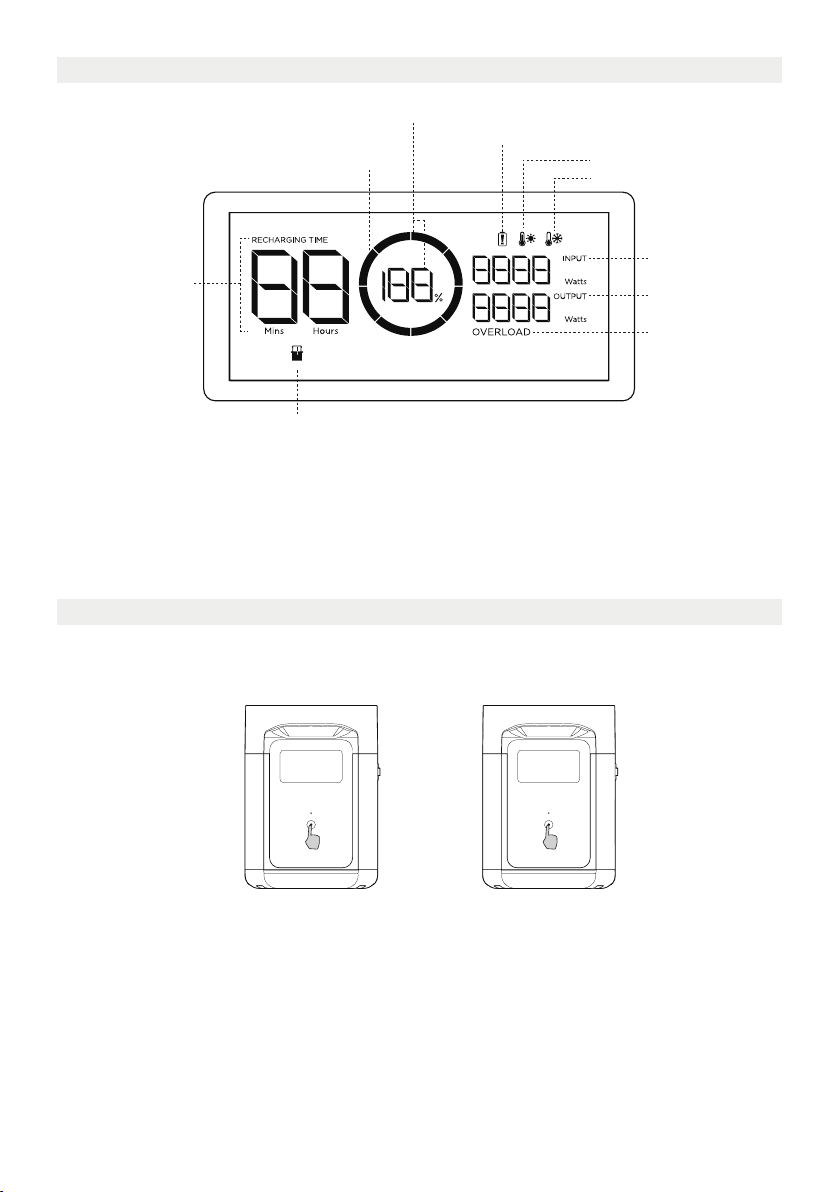
3.2 LCD Screen
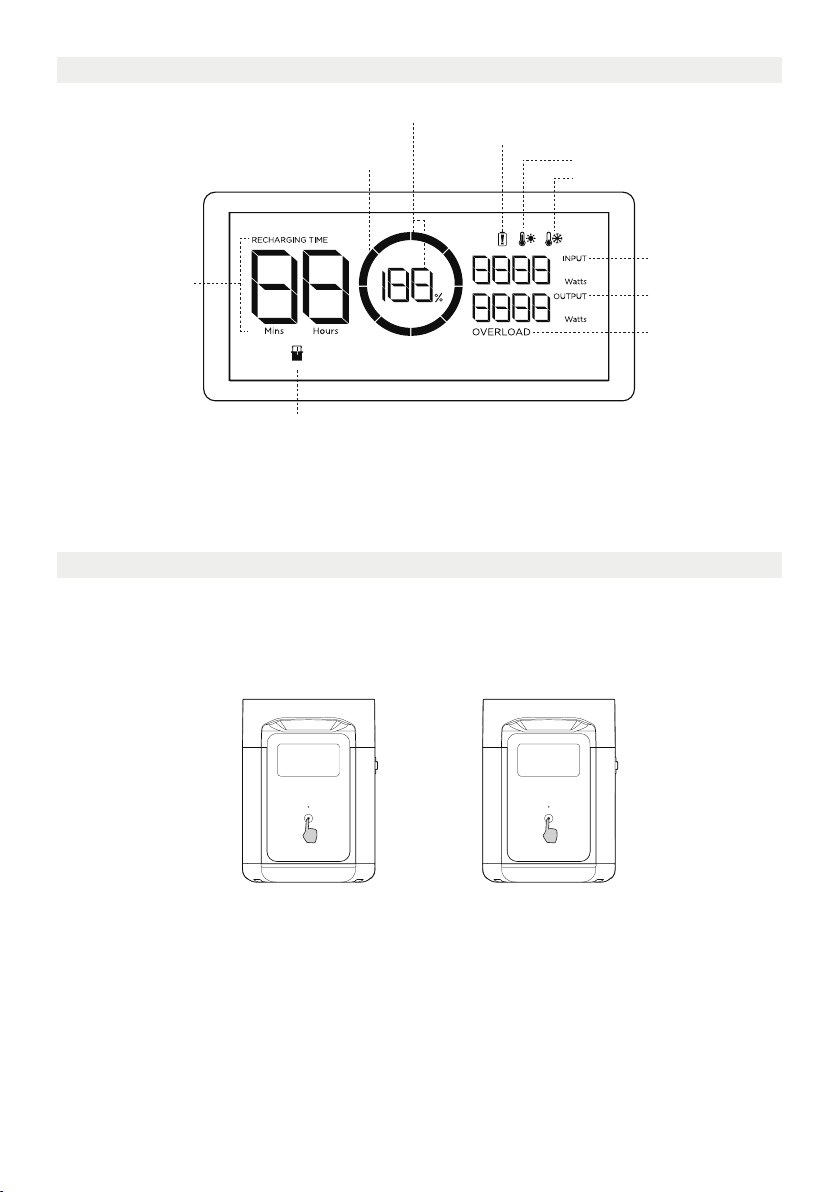
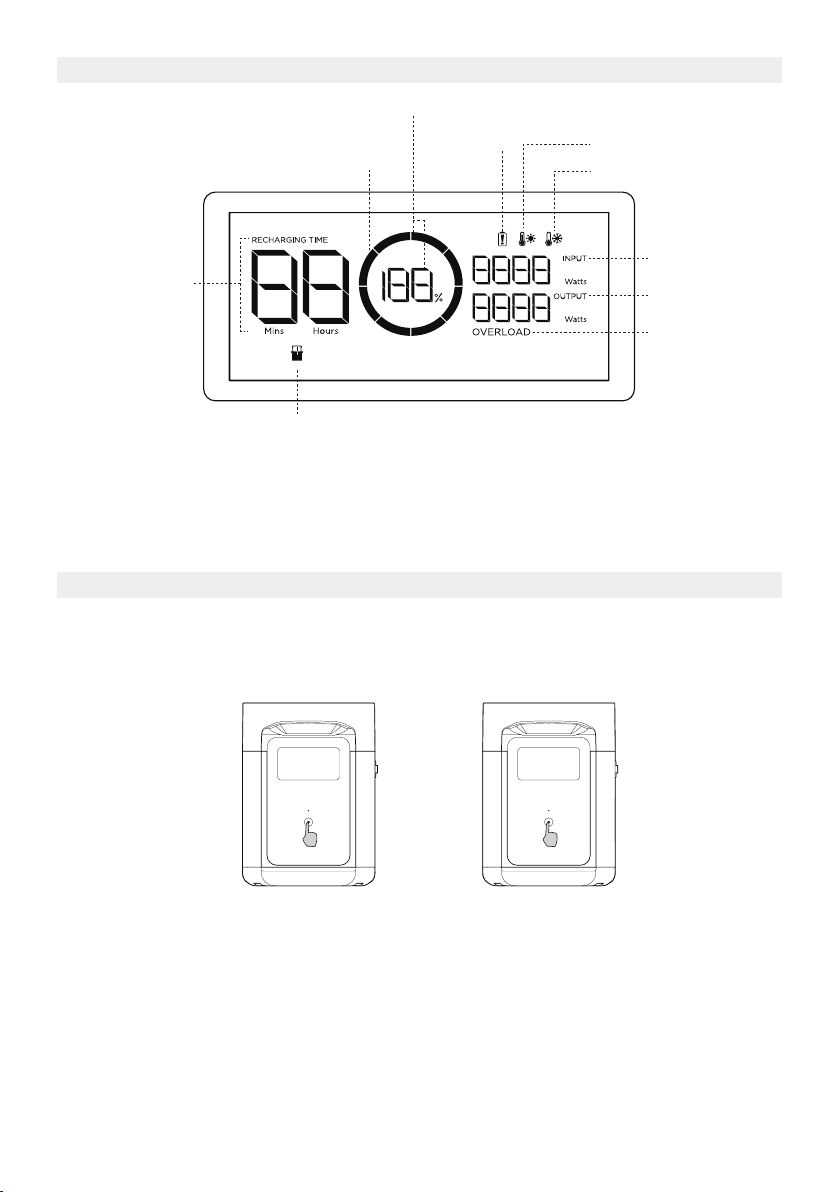
Remaining Battery Percentage
Battery Level Indicator
Remaining Charge/
Discharge Time
Extra Battery Indicator
Battery Level Indicator: The indicator will repeatedly fill while charging. If product is at 0% charge, the
indicator will flash to warn you.
* See Section 5 for more troubleshooting steps.
Battery Failure Warning
High Temperature Warning
Low Temperature Warning
Input Power
Output Power
Overload Warning
3.3 General Product Usage
DELTA 2 Extra Battery should be used with DELTA 2, it cannot be used separately.
DELTA 2 Extra Battery can be only recharged when connected to DELTA 2 or Smart Generator.
Short Press to Turn On Long Press to Turn Off
Product On, Product Off, LCD Screen On
Short press the Main Power Button to turn on the product; the LCD Screen will light up and the
battery level indicator icon will display.
The product enters sleep mode after 5 minutes of idle operation; the LCD Screen will automatically
turn off. When the product senses any load change or operations, the LCD Screen will automatically
light up. To turn the LCD Screen on or off, please short press the Main Power Button.
To power off the product, press and hold the Main Power Button.
The default product standby time is 2 hours. With other Power Buttons turned off and no other load
access for 2 hours, the product will automatically shut down. The standby time can be set on the app.
4
Page 9
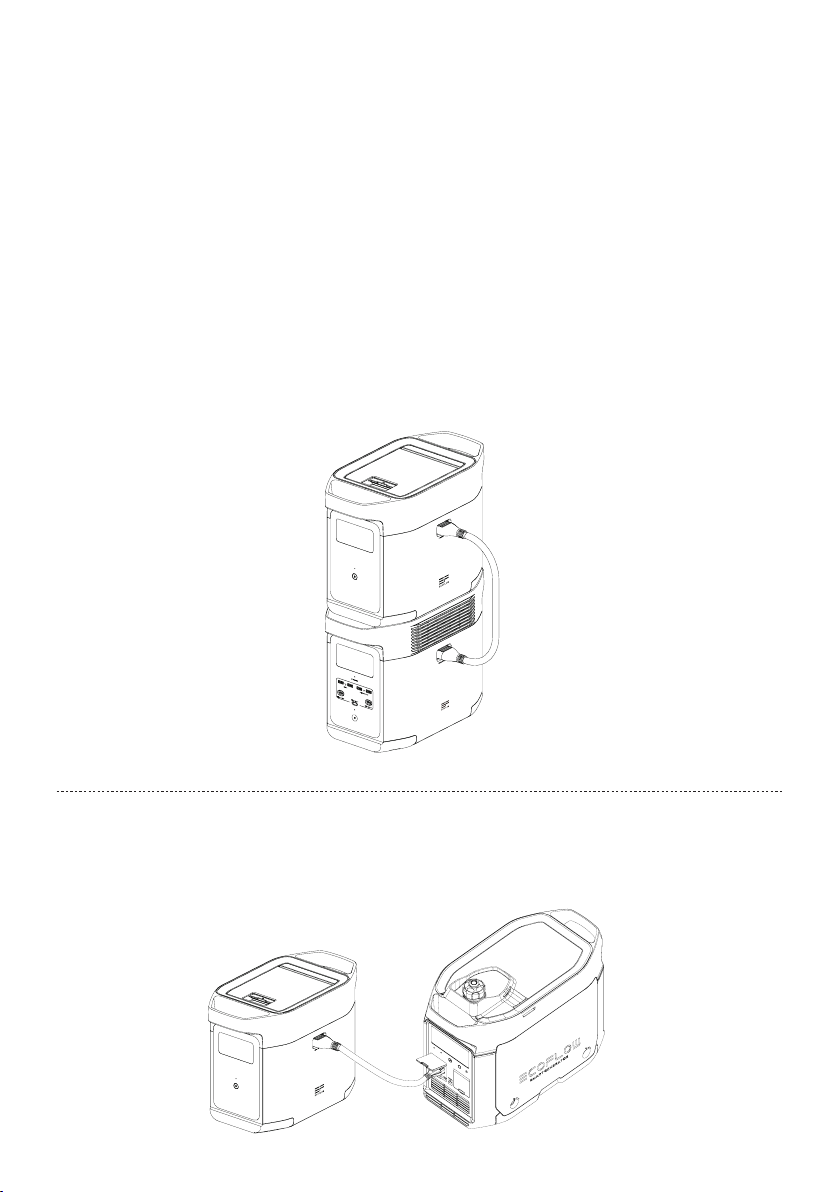
For use along with DELTA 2
DELTA 2 Extra Battery can be uesd with DELTA 2. A DELTA 2 can support up to one DELTA 2 Extra
Battery to meet more extensive capacity requirements.
Please carefully read the following notes before using:
1. Before connecting the Extra Battery to the DELTA 2, please make sure to power off the DELTA 2
and Extra Battery.
2. After connecting the DELTA 2 Extra Battery to DELTA 2, you need to make sure that the Extra
Battery icons appear on both the DELTA 2 Extra Battery and the Extra Battery LCD screen. Charge
or discharge the DELTA 2 Extra Battery after you have seen both icons.
3. DO NOT connect the DELTA 2 Extra Battery to DELTA 2 while discharging or charging; if you need
to remove the Extra Battery Cable, please make sure that the DELTA 2 Extra Battery and DELTA 2
are both powered off.
4. DO NOT touch the metal Extra Battery Port with your hands or other objects. Gently wipe it clean
with a dry cloth when unrelated materials are attached to the metal port.
5. Tightly connect the Extra Battery Cable with DELTA 2 and the Extra Battery. Failing to comply may
heat the connection and af fect the device's performance or lead to a fire.
Recharge With Smart Generator
You may recharge DELTA 2 Extra Battery with the smart generator. Please refer to the Smart Generator
user manual for more details.
5
Page 10

4. FAQS
1. What battery does the product use?
It uses high-quality LFP battery.
2. How long can the product charge my devices?
The charging time is shown on the product’s LCD Screen, which can be used to estimate the
charging time of most appliances with stable power usage.
3. How can I know if the product is charging?
When it ’s charging, the remaining charging time will be shown on the LCD Screen. Meanwhile,
the charging indicator icon begins to rotate with the remaining battery percentage and the input
power shown on the right of the circle.
4. How to clean the product?
Please gently wipe it with a dry, soft, clean cloth or paper towel.
5. How to store the product?
Before storing, please turn off the product first, and then store it in a dry, ventilated place at room
temperature. Do not place it near water sources. For long-term storage, please discharge the
battery to 30% and recharge it to 60% every three months to extend its battery life.
6. Can I bring the product on a plane?
No.
6
Page 11
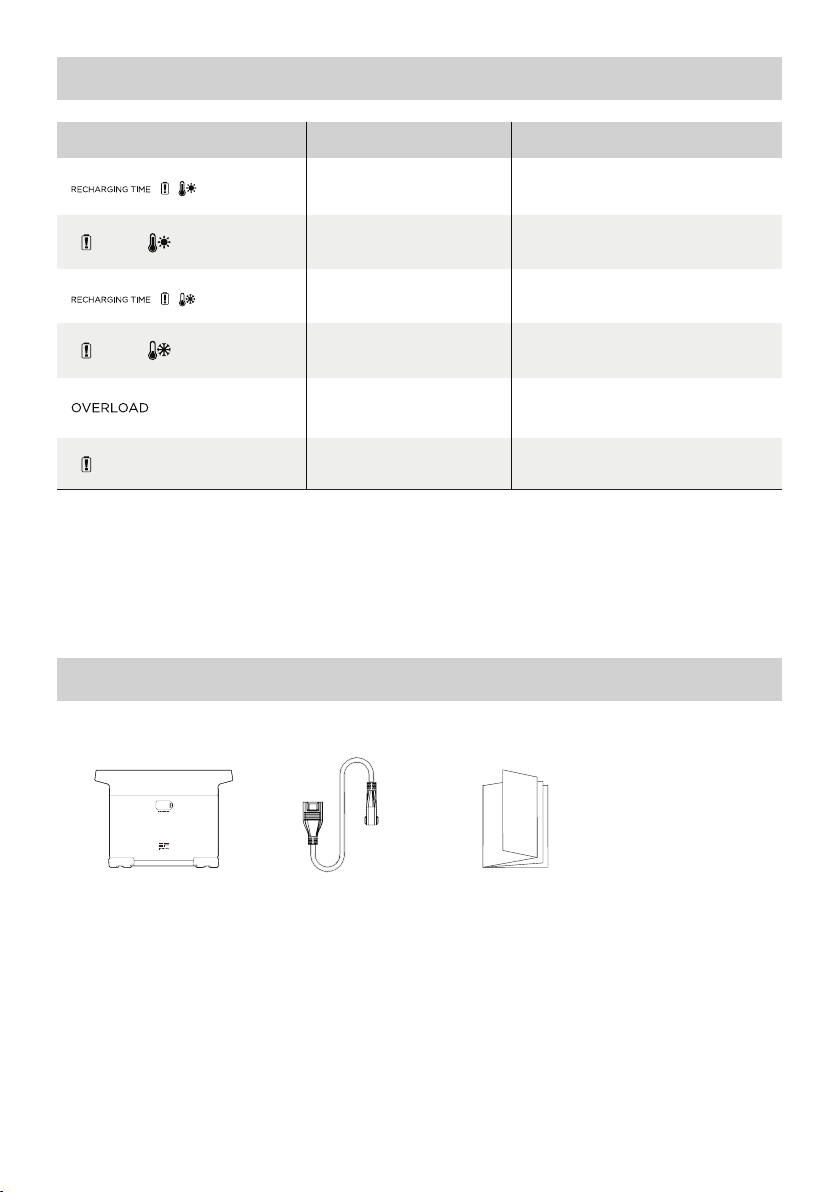
5. Troubleshooting
Indicator Problem
Icons Flash
together
Icons Flash
together
Icons Flash
together
Icons Flash
together
Icon Flashes
Icon Stays On
If the Alarm Prompt shows on the product LCD screen during use and does not disappear after a
restart, please stop using it immediately (do not try to charge or discharge).
If you require any other assitance, please contact EcoFlow Customer Service.
High Temperature
Charge Protection
High Temperature
Discharge Protection
Low Temperature
Charge Protection
Low Temperature
Discharge Protection
Battery Overload Protection
Short circuit protection
during discharging
Battery Failure
Charging can be resumed
automatically after the battery cools
The power supply can be resumed
automatically after the battery cools
Charging can be resumed
automatically after battery
temperature rises above 41°F.
The power supply can be resumed
automatically after the battery
temperature rises above 10°F.
Remove high-power electrical
Contact EcoFlow Customer Service
Solution
down.
down.
appliances
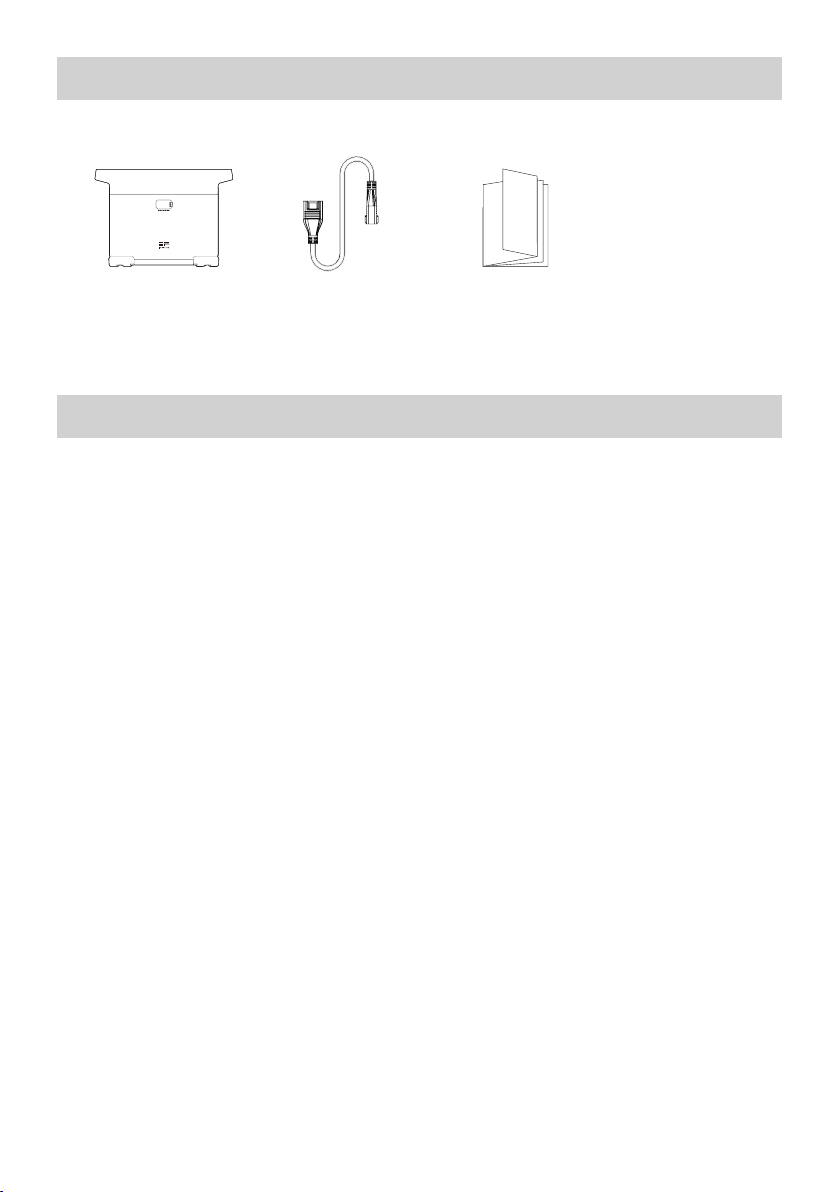
6. What’s In the Box
EcoFlow DELTA 2
Smart Extra Battery
DELTA 2 Extra
Battery Cable
User Manual &
Warranty Card
7
Page 12

7. Storage & Maintenance
1. Please use or store the product in an environment temperature between 68°F to 86°F, away from
water, heat, and other metal objects.
2. For long-term storage, please discharge the battery to 30% and recharge it to 60% every three months.
3. For safety, please do not store the product in an environment temperature higher than 113°F or
lower than 14°F for a long time.
4. If the remaining battery is less than 1% after you finish using the product, please recharge it to
60% before storing. If the product is left idle for a long time with severely low battery, irreversible
damages may be caused to the battery cell and the product service life will be shortened.
5. If the product has been idle for too long and the battery is severely low, it will enter a deep sleep
protection mode. In such case, please charge the product before using it again.
8. Fcc Statement
This device complies with Part 15 of the FCC Rules. Operation is subject to the following
two conditions:
(1) This device may not cause harmful interference, and
(2) This device must accept any interference received, including interference that may cause
undesired operation.
Warning: Changes or modifications not expressly approved by the party responsible for compliance
could void the user's authority to operate the equipment.
NOTE: This equipment has been tested and found to comply with the limits for a Class A digital
device, pursuant to part 15 of the FCC Rules. These limits are designed to provide reasonable
protection against harmful interference when the equipment is operated in a commercial
environment. This equipment generates, uses, and can radiate radio frequency energy and, if not
installed and used in accordance with the instruction manual, may cause harmful interference to
radio communications. Operation of this equipment in a residential area is likely to cause harmful
interference in which case the user will be required to correct the interference at his own expense.
FCC Radiation Exposure Statement:
This equipment complies with FCC radiation exposure limits set forth for an uncontrolled
environment. This equipment should be installed and operated with minimum distance 20cm
between the radiator & your body.
8
Page 13
EcoFlow DELTA 2 Intelligenter Ersatzakku
Benutzerhandbuch
Page 14

Page 15

HAFTUNGSAUSSCHLUSS
Lesen Sie alle Sicherheits- und Warnhinweise, Nutzungsbedingungen und Haftungsausschlüsse
sorgfältig durch. Lesen Sie vor der Verwendung die Nutzungsbedingungen und den
Haftungsausschluss unter https://ecoflow.com/pages/terms-of-use sowie die Aufkleber auf
dem Produkt. Benutzer übernehmen die volle Verantwortung für Verwendung und Betrieb des
Produkts. Machen Sie sich mit den entsprechenden Vorschriften in Ihrem Land vertraut. Sie sind
allein dafür verantwortlich, alle relevanten Vorschriften zu kennen und EcoFlow-Produkte gemäß
dieser Vorschriften zu verwenden.
EcoFlow DELTA 2 Intelligenter Ersatzakku (im Folgenden als DELTA 2 Ersatzakku bezeichnet)
Page 16

INHALT
1.
Spezifikationen
2. Sicherheitshinweise
2.1 Verwendung
2.2 Sachgemäße Entsorgung
3. Erste Schritte
3.1 Produktdetails
3.2 LCD-Anzeige
3.3 Allgemeine Betriebsanweisungen
4. FAQ-Bereich
5. Fehlerbehebung
6. Lieferumfang
7. Lagerung und Wartung
1
2
2
3
4
4
6
7
8
8
Page 17
1. Spezifikationen
Allgemeine Informationen
Nettogewicht
Abmessungen
Kapazität
Eingang
Ersatzakku-Eingang
Ausgang
Informationen zum Akku
Zellenchemie
Etwa 9,5kg(21 lbs)
400 x 211 x 281 mm(15,7x8,3x11,1 in)
1024Wh, 51,2V
51,2V max. 1024W (X-Stream- und SolarDoppelaufladung)
51,2V max. 2048WErsatzakku-Ausgang
LFP
Lebensdauer
3000 Zyklen bis 80%+ Kapazität
Umgebungsbetriebstemperatur
Optimale Betriebstemperatur
Entladetemperatur
Ladetemperatur
Lagertemperatur
Schutz
* Ob das Produkt geladen oder entladen werden kann, hängt von der tatsächlichen Temperatur des
Akkus ab.
20°C bis 30°C(68°F bis 86°F)
-10°C bis 45°C(14°F bis 113°F)
0°C bis 45°C(32°F bis 113°F)
-10°C bis 45°C(14°F bis 113°F) (optimal: 20°C bis
30°C [68°F bis 86°F])
Überspannungsschutz, Überlastschutz,
Übertemperaturschutz, Kurzschlussschutz,
Niedertemperaturschutz, Niederspannungsschutz,
Überstromschutz
1
Page 18

2. Sicherheitshinweise
2.1 Verwendung
1. Verwenden Sie das Produkt nicht in der Nähe einer Wärmequelle, z.B. eines offenen Feuers oder
Heizofens.
2. Kontakt mit Flüssigkeiten vermeiden. Tauchen Sie das Produkt nicht in Wasser und lassen Sie es
nicht nass werden. Verwenden Sie das Gerät nicht im Regen oder in feuchten Umgebungen.
3. Verwenden Sie das Produkt nicht in einer Umgebung mit starker statischer Elektrizität/Magnetfeldern.
4. Bauen Sie das Produkt nicht auseinander und durchstechen Sie es nicht mit spitzen Gegenständen.
5. Vermeiden Sie die Verwendung von Drähten oder anderen Metallobjekten, die zu einem Kurzschluss
führen können.
6. Verwenden Sie nur Originalkomponenten oder -zubehörteile. Wenn Sie Komponenten oder
Zubehöraustauschen müssen, besuchen Sie bitte für alle relevanten Informationen die offiziellen
EcoFlow-Kanäle.
7. Beachten Sie bei der Verwendung des Produkts unbedingt die in dieser Bedienungsanleitung
angegebene Umgebungstemperatur. Wenn die Temperatur zu hoch ist, kann dies zu einem Brand
oder einer Explosion führen. Wenn die Temperatur zu niedrig ist, kann das die Leistung des Produkts
stark beeinträchtigen oder zu Ausfällen führen.
8. Stellen Sie keine schweren Gegenstände auf das Gerät.
9. Verriegeln Sie den Lüfter während des Gebrauchs nicht mit Gewalt und stellen Sie das Gerät nicht an
unbelüfteten oder staubigen Orten ab.
10. Vermeiden Sie Schläge, Stürze und starke Vibrationen bei der Verwendung des Produkts. Schalten
Sie im Fall eines schweren Schlags auf das Produkt sofort die Stromversorgung aus und verwenden
Sie das Gerät nicht weiter. Stellen Sie sicher, dass das Produkt während des Transports gut gesichert
ist, um Vibrationen und Stöße zu vermeiden.
11. Wenn Sie das Produkt während des Gebrauchs versehentlich in Wasser fallen lassen, legen Sie
es an einen sicheren, offenen Ort und lassen Sie es vollständig trocknen, ohne erneut damit in
Kontakt zu kommen. Das getrocknete Produkt darf nicht mehr verwendet werden und muss gemäß
Abschnitt 2.2 ordnungsgemäß entsorgt werden. Wenn das Produkt Feuer fängt, empfehlen wir,
die Feuerlöscher in der folgenden Reihenfolge zu verwenden: Wasser oder Wassernebel, Sand,
Feuerdecke, Trockenpulver und schließlich einen Kohlendioxid-Feuerlöscher.
12. Entfernen Sie Schmutz an den Anschlüssen des Produkts mit einem trockenen Tuch.
13. Stellen Sie das Gerät auf eine ebene Oberfläche, um Schäden durch etwaiges Umstürzen zu
vermeiden. Wenn das Produkt gestürzt ist und stark beschädigt wurde, schalten Sie es sofort aus,
stellen Sie den Akku in einen offenen Bereich, halten Sie ihn von brennbaren Materialien sowie
Personen fern und entsorgen Sie ihn gemäß den örtlichen Gesetzen und Vorschriften.
14. Stellen Sie sicher, dass das Produkt außerhalb der Reichweite von Kindern und Haustieren
aufbewahrt wird.
2.2 Sachgemäße Entsorgung
1. Wenn die Bedingungen es zulassen, stellen Sie sicher, dass der Akku vollständig entladen ist,
bevorSie ihn der dafür vorgesehenen Batterie-Recyclingmöglichkeit zuführen. Das Produkt enthält
Akkus mit potenziell gefährlichen Chemikalien, daher ist es strengstens untersagt, diese in normalen
Abfallbehältern zu entsorgen. Für weitere Informationen befolgen Sie bitte die lokalen Gesetze und
Vorschriften zum Recycling und zur Entsorgung von Akkus.
2. Wenn der Akku aufgrund eines Produktfehlers nicht vollständig entladen werden kann, entsorgen
Sie ihn nicht direkt im Batterie-Recycling. In diesem Fall sollten Sie sich zum weiteren Vorgehen an
ein professionelles Recycling-Unternehmen wenden.
3. Bitte entsorgen Sie Akkus, die eine Tiefenentladung aufweisen und nicht wieder aufgeladen werden
können.
2
Page 19
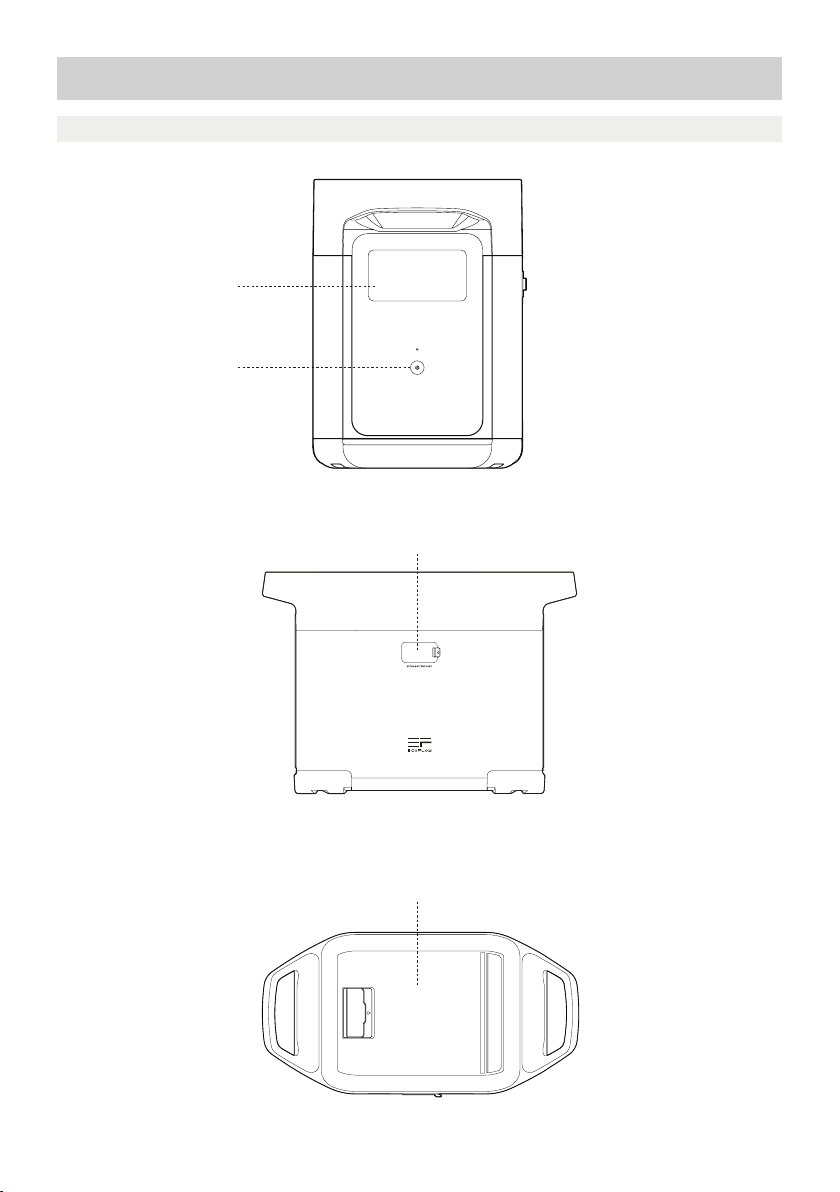
3. Erste Schritte
3.1 Produktdetails
LCD-Anzeige
Netzschalter
Ersatzakku-Anschluss
Staufach
3
Page 20
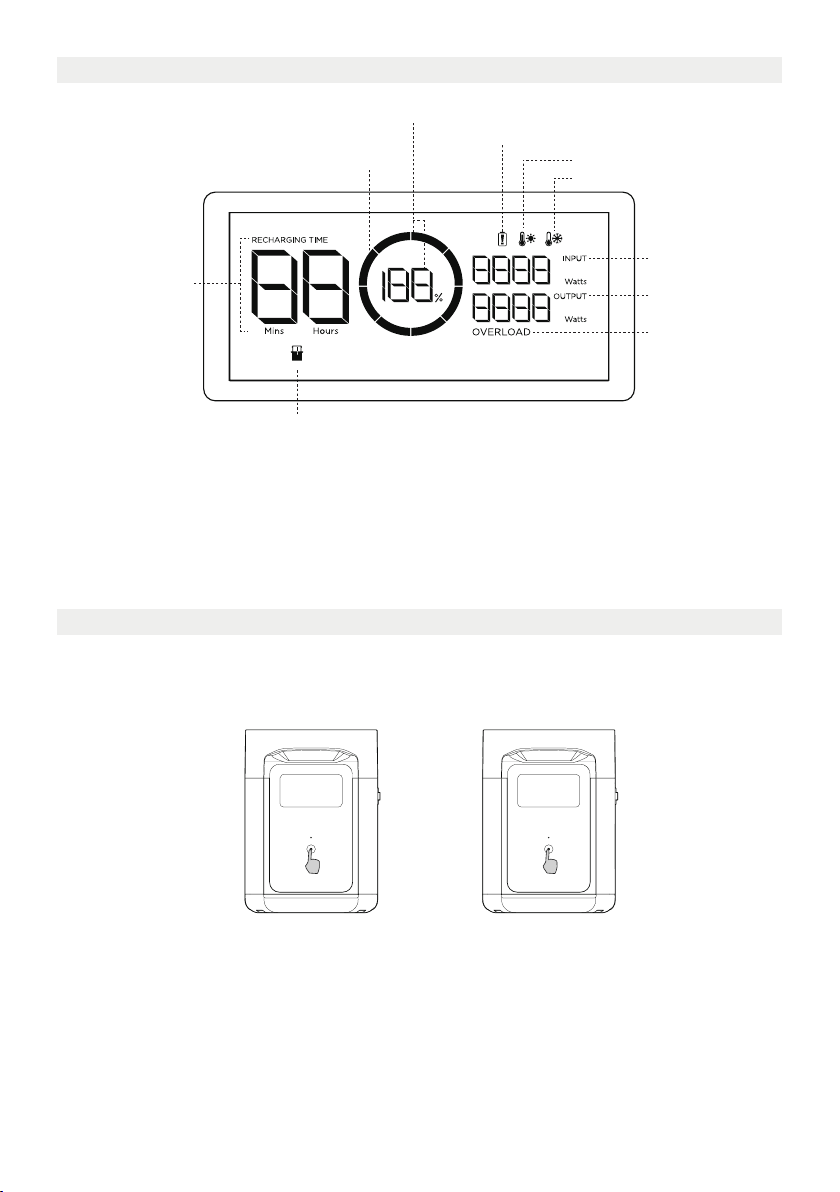
3.2 LCD-Anzeige
Verbleibender Akkuladestand in Prozent
Warnung bei Akkuausfall
Ladezustandsanzeige
Warnung Hohe Temperatur
Warnung Niedrige Temperatur
Verbleibende
Lade-/Entladezeit
Ersatzakku Anzeige
Ladezustandsanzeige: Die Ladezustandsanzeige füllt sich während des Ladevorgangs wiederholt.
Wenndas Produkt über einen Ladestand von 0% verfügt, blinkt die Anzeige, um Sie zu warnen.
* Weitere Schritte zur Fehlerbehebung finden Sie in Abschnitt 5.
Eingangsleistung
Ausgangsleistung
Überlastwarnung
3.3 Allgemeine Betriebsanweisungen
Der intelligente Ersatzakku kann nicht separat verwendet werden. Verwendbar mit DELTA 2.
Der DELTA 2 Ersatzakku kann nur aufgeladen werden, wenn sie an DELTA 2 oder einen Smart
Generator angeschlossen ist.
Zum Einschalten kurz drücken Zum Ausschalten lange drücken
Produkt ein, Produkt aus, LCD-Anzeige ein
Drücken Sie kurz die Netztaste, um das Gerät einzuschalten. Die LCD-Anzeige leuchtet auf, und das
Symbol für die Ladezustandsanzeige wird angezeigt.
Das Gerät wechselt nach 5 Minuten Inaktivität in den Ruhemodus. Die LCD-Anzeige schaltet sich
automatisch aus. Wenn das Gerät eine Änderung des Ladestands oder Benutzung registriert, leuchtet die
LCD-Anzeige automatisch auf. Um die LCD-Anzeige ein- oder auszuschalten, drücken Sie kurz die Netztaste.
Um das Gerät auszuschalten, halten Sie die Netztaste gedrückt.
Die standardmäßige Standby-Zeit des Produkts beträgt zwei Stunden. Wenn andere Netzschalter
ausgeschaltet sind und zwei Stunden lang keine Aufladung erfolgt, schaltet sich das Gerät automatisch
ab. Die Standby-Zeit kann in der App eingestellt werden.
4
Page 21
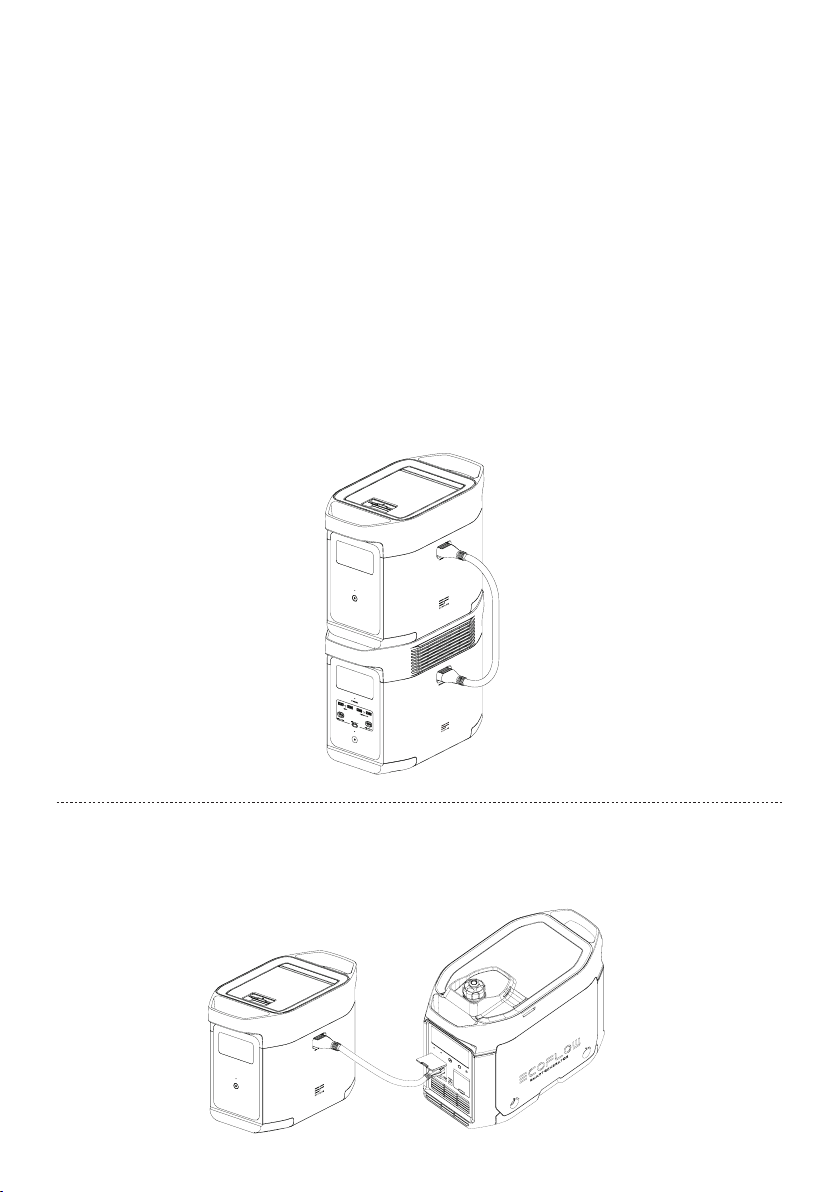
Zur Verwendung mit DELTA 2
Der DELTA 2 Ersatzakku kann mit DELTA 2 verwendet werden. Ein DELTA 2 kann bis zu einem DELTA 2
Zusatzakku unterstützen, um umfangreichere Kapazitätsanforderungen zu erfüllen.
Bitte lesen Sie vor der Verwendung die folgenden Hinweise sorgfältig durch:
1. Stellen Sie vor dem Anschließen des DELTA 2 und des DELTA 2 Ersatzakkus sicher, dass der DELTA 2
und der DELTA 2 Ersatzakku nicht mit dem Strom verbunden sind.
2. Stellen Sie nach dem Anschließen des DELTA 2 Ersatzakkus an DELTA 2 sicher, dass die Symbole für den
Ersatzakku sowohl auf dem DELTA 2 Ersatzakku als auch auf der LCD-Anzeige angezeigt werden. Sie
können den DELTA 2 Ersatzakku laden oder entladen, wenn beide Symbole angezeigt wurden.
3. Verbinden Sie den DELTA 2 Ersatzakku beim Entladen oder Laden NICHT mit DELTA 2. WennSie das
Kabel des Ersatzakkus entfernen müssen, stellen Sie sicher, dass sowohl der DELTA 2 Ersatzakku als
auch der DELTA 2 ausgeschaltet sind.
4. Berühren Sie den metallischen Anschluss des Ersatzakkus NICHT mit den Händen oder anderen
Gegenständen. Wischen Sie den Port vorsichtig mit einem trockenen Tuch ab, wenn sich daran
Fremdkörper befinden.
5. Schließen Sie das Kabel des Ersatzakkus fest an den DELTA 2 und den Ersatzakku an. Andernfalls
kann im Bereich des Anschlusses Hitze entstehen, was die Leistung des Geräts beeinträchtigen oder
zu einem Brand führen kann.
Aufladen mit Smart Generator
Sie können den DELTA 2 Ersatzakku mit einem Smart Generator aufladen. Weitere Informationen finden
Sie im Benutzerhandbuch des Smart Generators.
5
Page 22

4. FAQ-Bereich
1. Welcher Akku wird für das Produkt verwendet?
Das Produkt verfügt über einen hochwertigen LFP-Akku.
2. Wie lange kann das Produkt meine Geräte laden?
Die Ladezeit wird auf der LCD-Anzeige des Produkts angezeigt, die verwendet werden kann, um die
Ladezeit der meisten Geräte mit stabilem Stromverbrauch einzuschätzen.
3. Wie kann ich feststellen, ob das Produkt aufgeladen wird?
Während des Ladevorgangs wird die verbleibende Ladezeit auf der LCD-Anzeige angezeigt.
Zwischenzeitlich rotiert das Ladeanzeigesymbol und zeigt den verbleibenden Akkuladestand und die
Eingangsleistung auf der rechten Seite des Kreises an.
4. Wie reinige ich das Produkt?
Wischen Sie es vorsichtig mit einem trockenen, weichen, sauberen Tuch oder einem Papiertuch ab.
5. Wie wird das Produkt gelagert?
Schalten Sie das Produkt vor der Lagerung aus und lagern Sie es an einem trockenen, belüfteten Ort
mit Zimmertemperatur. Stellen Sie es nicht in die Nähe von Wasserquellen. Entladen Sie den Akku bei
langfristiger Lagerung auf 30% und laden Sie ihn alle drei Monate auf 60% auf, um die Lebensdauer
des Produkts zu verlängern.
6. Kann ich das Produkt mit ins Flugzeug nehmen?
Nein.
6
Page 23
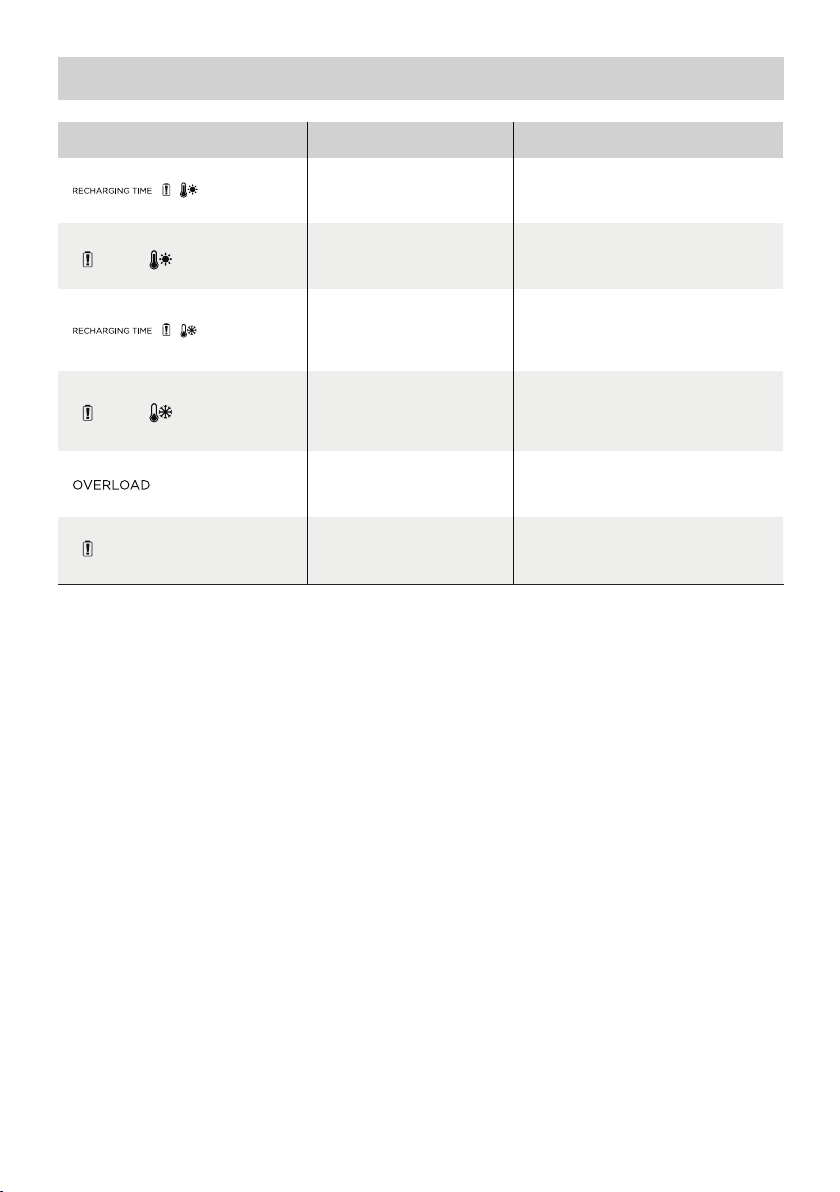
5. Fehlerbehebung
Anzeige Problem
Symbole
blinken
zusammen
Symbole
blinken
zusammen
Symbole
blinken
zusammen
Symbole
blinken
zusammen
Symbol
blinkt
Symbol
bleibt
eingeschaltet
Stoppen Sie die Verwendung des Produkts, wenn die Alarmmeldung während des Betriebs auf der
LCD-Anzeige angezeigt wird und nach einem Neustart nicht verschwindet (versuchen Sie nicht, es zu
laden oder zu entladen).
Wenn Sie weitere Unterstützung benötigen, wenden Sie sich bitte an den EcoFlow-Kundendienst.
Hochtemperatur-
Ladungsschutz
Hochtemperatur-
Entladungsschutz
Niedertemperatur-
Ladungsschutz
Niedertemperatur-
Entladungsschutz
Akku-Überlastschutz
Kurzschlussschutz beim
Entladen
Akkuausfall
Der Ladevorgang kann automatisch
fortgesetzt werden, nachdem der
Die Stromversorgung kann
automatisch fortgesetzt werden,
nachdem der Akku abgekühlt ist.
Der Ladevorgang kann automatisch
wieder aufgenommen werden,
wenndie Temperatur des Akkus über
Die Stromversorgung kann
automatisch fortgesetzt werden,
wenn die Temperatur des Akkus über
Entfernen Sie Hochleistungs-
Lösung
Akku abgekühlt ist.
41°F (5°C) steigt.
10°F (-12°C) steigt.
Elektrogeräte
Wenden Sie sich an den
EcoFlow-Kundendienst
7
Page 24
6. Lieferumfang
EcoFlow DELTA 2
Intelligenter Ersatzakku
DELTA 2 Ersatzakku-
Kabel
Benutzerhandbuch
undGarantiekarte
7. Lagerung und Wartung
1. Verwenden oder lagern Sie das Produkt bei einer Umgebungstemperatur zwischen 68°F (20°C) und
86°F (30°C) und halten Sie es fern von Wasser, Hitze und anderen Metallgegenständen.
2. Für eine langfristige Lagerung entladen Sie den Akku bitte auf 30% und laden ihn alle drei Monate
auf 60% auf.
3. Aus Sicherheitsgründen sollten Sie das Produkt nicht längere Zeit in einer Umgebung lagern, in der
es Temperaturen über 113°F (45°C) oder weniger als 14°F (-10°C) ausgesetzt ist.
4. Wenn der verbleibende Akkuladestand weniger als 1% beträgt, nachdem Sie das Produkt verwendet
haben, laden Sie es vor der Lagerung auf 60% auf. Wenn sich das Produkt für längere Zeit mit sehr
niedrigem Akkustand im Ruhemodus befindet, kann es zu dauerhaften Schäden an der Batteriezelle
kommen und die Lebensdauer des Produkts wird verkürzt.
5. Wenn das Produkt zu lange nicht verwendet wurde und der Akkustand sehr niedrig ist, wechselt es in
den Tiefschlaf-Schutzmodus. Laden Sie in diesem Fall das Produkt vor der erneuten Verwendung auf.
8
Page 25
Batterie supplémentaire intelligente
EcoFlowDELTA 2
Manuel d'utilisation
Page 26

Page 27

CLAUSE DE NON-RESPONSABILITÉ
Lisez attentivement l'ensemble des conseils de sécurité, messages d'avertissement,
conditions d'utilisation et clauses de non-responsabilité. Reportez-vous aux
conditionsd'utilisation et à la clause de non-responsabilité disponibles sur le site
https://ecoflow.com/pages/terms-of-use ainsi qu'aux autocollants apposés sur le
produit avant l'utilisation. L'utilisateur assume l'entière responsabilité de l'utilisation et
du fonctionnement. Familiarisez-vous avec les réglementations en vigueur dans votre
région. Il vous incombe de connaître toutes les réglementations pertinentes et d'utiliser
les produits EcoFlow de manière conforme.
Batterie supplémentaire intelligente EcoFlow DELTA 2 (ci-après désignée la «batterie supplémentaire
DELTA 2»)
Page 28

TABLE DES MATIÈRES
1.
Spécifications
2. Instructions de sécurité
2.1 Utilisation
2.2 Guide de mise au rebut
3. Pour commencer
3.1 Détails du produit
3.2 ÉcranLCD
3.3 Utilisation générale du produit
4. Foire aux questions
5. Dépannage
6. Contenu de la boîte
7. Stockage et entretien
1
2
2
3
4
4
6
7
8
8
Page 29
1. Spécifications
Informations générales
Poids net
Dimensions
Capacité
Port d'entrée
Entrée de port de batterie supplémentaire
Port de sortie
Informations relatives à la batterie
Chimie cellulaire
Environ 9,5kg(21 lbs)
400 x 211 x 281 mm(15,7x8,3x11,1 in)
1024Wh, 51,2V
51,2V 1024W maximum (charge double,
solaire et X-Stream)
51,2V 2048W maximumSortie de port de batterie supplémentaire
LFP
Cycle de vie
3000cycles à 80% ou plus de capacité
Température ambiante de fonctionnement
Température optimale de fonctionnement
Température de décharge
Température de charge
Température de stockage
Protection
* Le fait que le produit puisse être chargé ou déchargé dépend de la température réelle de la batterie.
20°C à 30°C (68°F à 86°F)
-10°C à 45°C (14°F à 113°F)
0°C à 45°C (32°F à 113°F)
-10°C à 45°C (14°F à 113°F) (optimale: 20°C à
30°C [68°F bis 86°F])
Protection contre les surtensions, protection contre
les surcharges, protection contre les surchauffes,
protection contre les courts-circuits, protection
contre les basses températures, protection contre les
basses tensions, protection contre les surintensités
1
Page 30

2. Instructions de sécurité
2.1 Utilisation
1. N'utilisez pas le produit à proximité d'une source de chaleur telle qu'un foyer d'incendie ou un four
de réchauffage.
2. Évitez tout contact avec des liquides. N'immergez pas le produit dans l'eau et ne le mouillez pas.
N'utilisez pas le produit sous la pluie ou dans un environnement humide.
3. N'utilisez pas le produit dans un environnement présentant une électricité statique/des champs
magnétiques importants.
4. Ne démontez pas le produit de quelque manière que ce soit et ne le percez pas avec des objets
tranchants.
5. Évitez d'utiliser des fils ou d'autres objets métalliques susceptibles de provoquer un court-circuit.
6. N'utilisez pas de composants ou d'accessoires non agréés. Si vous devez remplacer des composants ou
des accessoires, consultez les ressources EcoFlow officielles pour vérifier les informations pertinentes.
7. Lorsque vous utilisez le produit, respectez scrupuleusement la température ambiante de
fonctionnement spécifiée dans le présent manuel d'utilisation. Si la température est trop élevée,
celapeut provoquer un incendie ou une explosion. Si elle est trop basse, les performances du
produitpeuvent être considérablement réduites ou le produit peut cesser de fonctionner.
8. N'empilez pas d'objets lourds sur le produit.
9. Ne verrouillez pas le ventilateur de force pendant l'utilisation et ne placez pas le produit dans un
endroit non aéré ou poussiéreux.
10. Lorsque vous utilisez le produit, veillez à éviter les chocs, les chutes ou les vibrations importantes.
En cas de choc externe grave, coupez immédiatement l'alimentation électrique et cessez d'utiliser
le produit. Dans le cadre du transport, assurez-vous que le produit est bien fixé pour éviter les
vibrations et les chocs.
11. Pendant l'utilisation, si vous faites tomber accidentellement le produit dans l'eau, placez-le dans un
endroit sûr et dégagé et restez à l'écart jusqu'à ce qu'il soit complètement sec. Une fois sec, le produit
ne doit pas être réutilisé et doit être mis au rebut conformément à la section2.2 ci-dessous. Si le
produit prend feu, nous vous recommandons d'utiliser les extincteurs dans l'ordre suivant: eau ou eau
atomisée, sable, couverture pare-flammes, poudre sèche et enfin extincteur à dioxyde de carbone.
12. Utilisez un chiffon sec pour nettoyer la saleté au niveau des ports du produit.
13. Posez le produit sur une surface plane pour éviter les chutes et les dommages associés. Si le produit
est renversé et gravement endommagé, éteignez-le immédiatement, placez-le dans un endroit
dégagé, tenez-le éloigné des matières combustibles et de toute personne, puis mettez-le au rebut
conformément aux lois et réglementations locales.
14. Veillez à maintenir le produit hors de portée des enfants et des animaux domestiques.
2.2 Guide de mise au rebut
1. Si les conditions le permettent, assurez-vous que la batterie est complètement déchargée avant de
la mettre au rebut dans un bac de recyclage de batteries approprié. Ce produit contient des produits
chimiques potentiellement dangereux. Il est donc strictement interdit de le jeter dans des poubelles
ordinaires. Pour plus de détails, reportez-vous aux lois et réglementations locales en matière de
recyclage et de mise au rebut des batteries.
2. Si la batterie ne peut pas être entièrement déchargée en raison d'une défaillance, ne la jetez pas
directement dans un bac de recyclage de batteries. Dans un tel cas, vous devez contacter une
société spécialisée dans le recyclage des batteries en vue d'un traitement supplémentaire.
3. Les batteries trop déchargées qui ne peuvent plus être rechargées doivent être mises au rebut.
2
Page 31
3. Pour commencer
3.1 Détails du produit
Écran LCD
Bouton d'alimentation principal
Port de batterie supplémentaire
Compartiment de rangement
3
Page 32
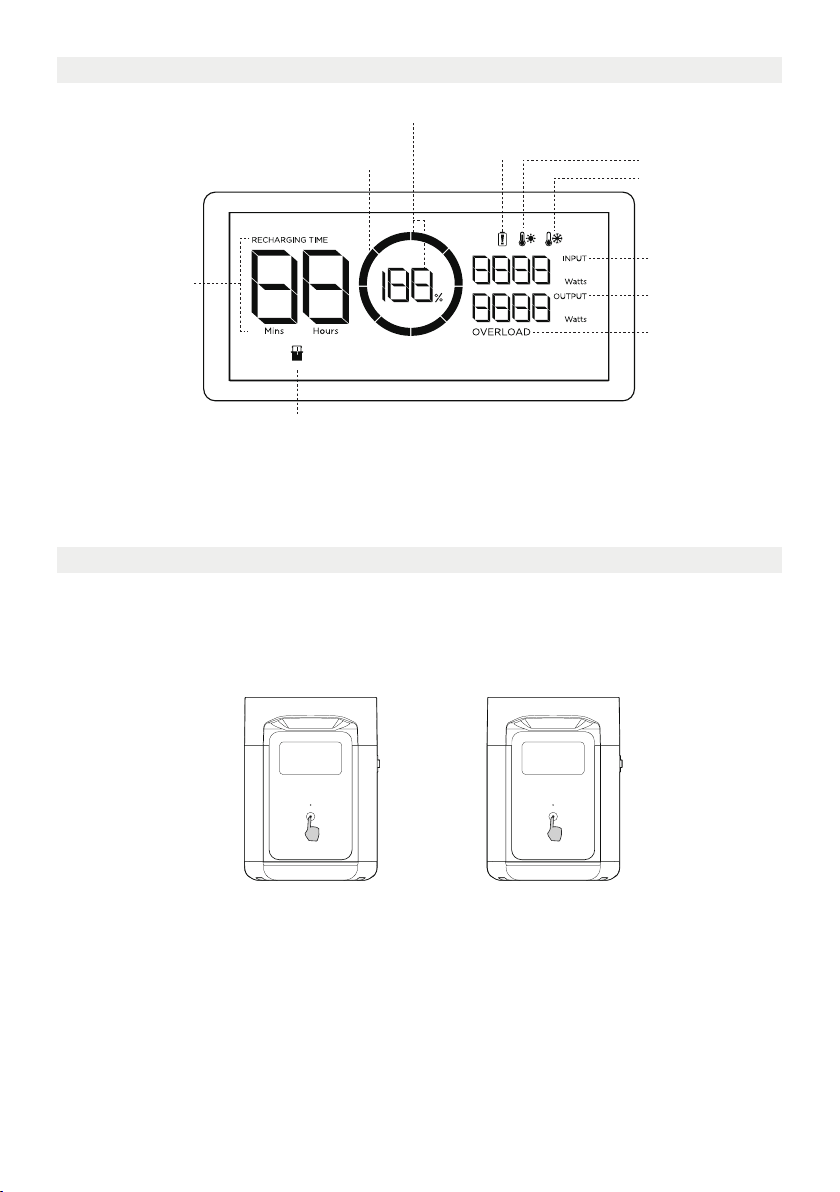
3.2 Écran LCD
Pourcentage de batterie restant
Avertissement de défaillance
Indicateur de niveau de la batterie
Temps de charge/
décharge restant
Indicateur de batterie supplémentaire
Indicateur de niveau de la batterie: il se remplit de façon répétée pendant la charge. Si le produit est
chargé à 0%, l'indicateur clignote pour vous avertir.
* Reportez-vous à la section5 pour en savoir plus sur les étapes de dépannage.
de la batterie
Avertissement de
température élevée
Avertissement de
basse température
Puissance d'entrée
Puissance de sortie
Avertissement de
surcharge
3.3 Utilisation générale du produit
La batterie supplémentaire intelligente ne peut pas être utilisée séparément. Elle peut être utilisée
avec DELTA 2.
La batterie supplémentaire DELTA 2 ne peut être rechargée que lorsqu'elle est raccordée au modèle
DELTA 2 ou Smart Generator.
Pression brève sur ce bouton
pour allumer le produit
Pression appuyée sur ce bouton
pour éteindre le produit
Produit allumé, produit éteint, écranLCD allumé
Appuyez brièvement sur le bouton d'alimentation principal pour mettre le produit sous tension;
l'écranLCD s'allume et l'icône d'indicateur de niveau de la batterie s'affiche.
Le produit passe en mode veille au bout de 5minutes d'inactivité; l'écranLCD s'éteint
automatiquement. Lorsque le produit détecte un changement de charge ou une opération, l'écranLCD
s'allume automatiquement. Pour allumer ou éteindre l'écranLCD, appuyez brièvement sur le bouton
d'alimentation principal.
Pour mettre le produit hors tension, appuyez longuement sur le bouton d'alimentation principal.
La durée de veille par défaut est de 2heures. Si les autres boutons d'alimentation sont désactivés et si
aucune autre source de charge n'est accessible pendant 2heures, le produit s'arrête automatiquement.
La durée de veille peut être réglée via l'application.
4
Page 33
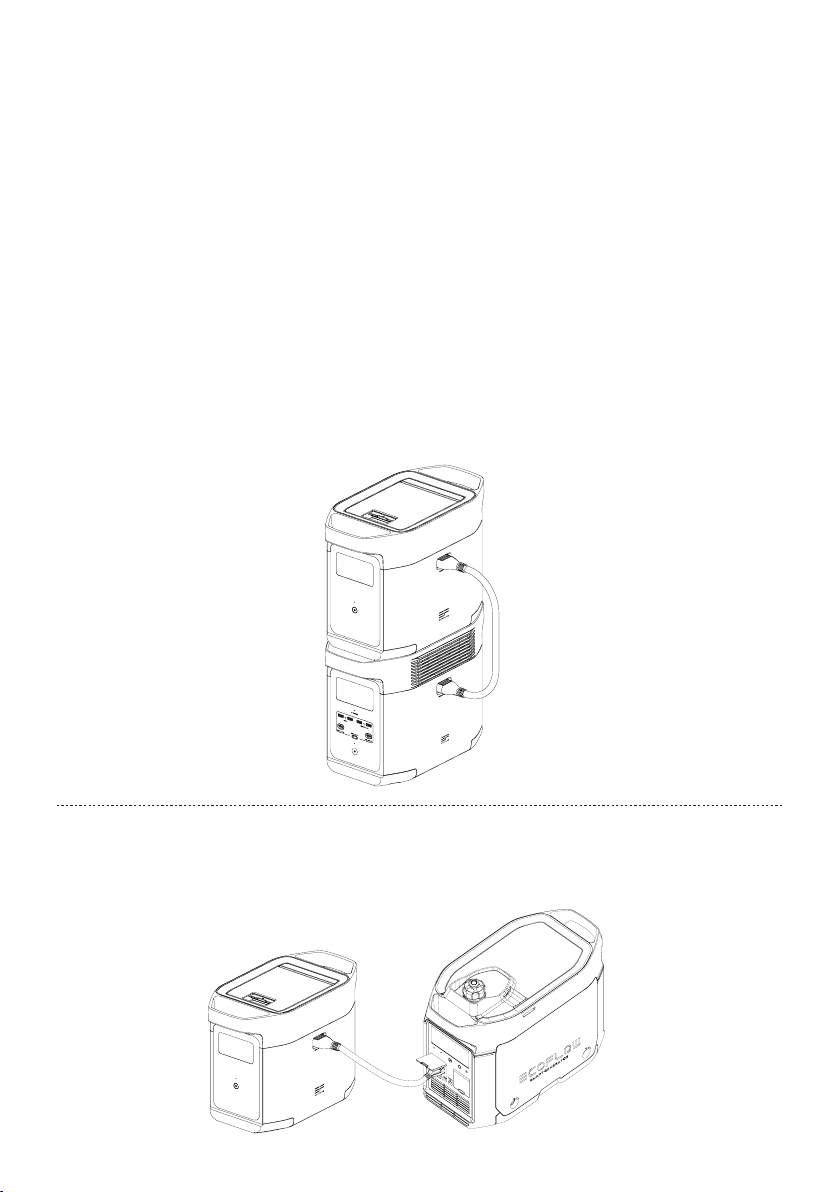
À utiliser conjointement avec le modèleDELTA 2
La batterie supplémentaire DELTA 2 peut être utilisée avec le modèleDELTA 2. Un DELTA 2 peut
prendre en charge jusqu’à une batterie DELTA 2 Extra pour répondre à des exigences de capacité plus
étendues.
Veuillez lire attentivement les remarques suivantes avant l'utilisation:
1. Avant de raccorder le modèleDELTA 2 et la batterie supplémentaire, assurez-vous d'éteindre le
modèleDELTA 2 et la batterie supplémentaire DELTA 2.
2. Après avoir raccordé la batterie supplémentaire DELTA 2 et le modèleDELTA 2, vous devez vous
assurer que les icônes de batterie supplémentaire apparaissent sur l'écranLCD de la batterie
supplémentaire DELTA 2 et du modèleDELTA 2. Une fois ces deux icônes affichées, chargez ou
déchargez la batterie supplémentaire DELTA2.
3. NE raccordez PAS la batterie supplémentaire DELTA 2 au modèleDELTA 2 pendant la décharge ou
la charge. Si vous devez retirer le câble de la batterie supplémentaire, assurez-vous que la batterie
supplémentaire DELTA 2 et le modèleDELTA 2 sont tous deux hors tension.
4. NE touchez PAS le port métallique de la batterie supplémentaire avec vos mains ou d'autres objets.
Sides corps étrangers sont fixés au port métallique, essuyez-le délicatement à l'aide d'un chiffon sec.
5. Raccordez fermement le câble de la batterie supplémentaire au modèleDELTA 2 et à la batterie
supplémentaire. Le non-respect de cette consigne peut entraîner la surchauffe du raccordement,
affecter les performances de l'appareil ou provoquer un incendie.
Recharge à l'aide du Smart Generator
Il est possible de recharger la batterie supplémentaire DELTA 2 à l'aide du Smart Generator. Pour en
savoir plus, reportez-vous au manuel d'utilisation du Smart Generator.
5
Page 34

4. Foire aux questions
1. Quelle batterie le produit utilise-t-il?
Il utilise une batterie au lithium-fer-phosphate de haute qualité.
2. Pendant combien de temps le produit me permet-il de charger mes appareils?
Le temps de charge est indiqué sur l'écran LCD du produit. Cette information peut être utilisée pour
estimer le temps de charge de la plupart des appareils présentant une consommation d'énergie
stable.
3. Comment savoir si le produit est en cours de charge?
Lorsque le produit est en charge, le temps de charge restant s'affiche sur l'écran LCD. Pendant ce
temps, l'icône de l'indicateur de charge commence à tourner avec le pourcentage de batterie restant
et la puissance d'entrée s'affiche sur la droite du cercle.
4. Comment nettoyer le produit?
Essuyez-le délicatement à l'aide d'un chiffon sec, doux et propre ou d'une serviette en papier.
5. Comment stocker le produit?
Avant de stocker le produit, commencez par l'éteindre. Stockez-le ensuite dans un endroit sec, aéré
et à température ambiante. Ne le placez pas à proximité de sources d'eau. En cas de stockage à long
terme, déchargez la batterie à 30% et rechargez-la à 60% tous les trois mois afin de prolonger sa
durée de vie.
6. Puis-je emporter le produit en avion?
Non.
6
Page 35
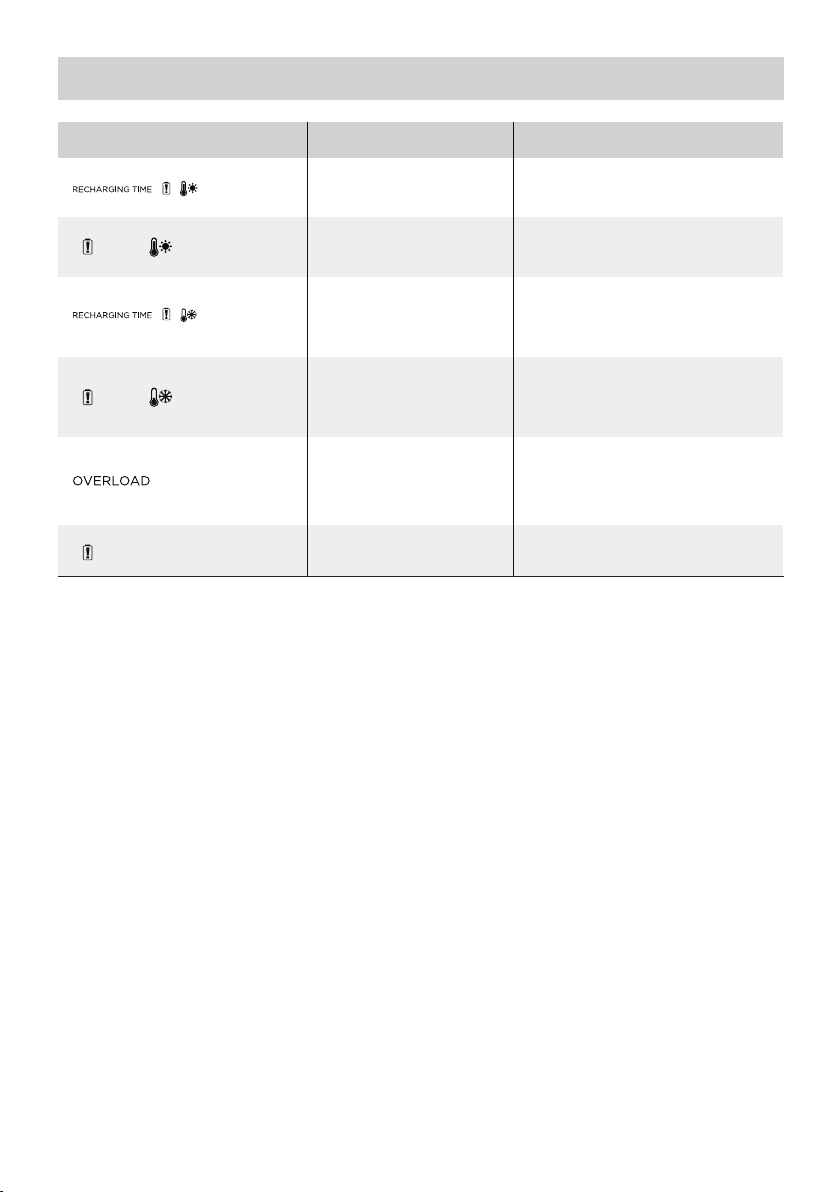
5. Dépannage
Témoin Problème
Les icônes
clignotent
conjointement
Les icônes
clignotent
conjointement
Les icônes
clignotent
conjointement
Les icônes
clignotent
conjointement
L'icône
clignote
L'icône reste
allumée
Si l'invite d'alarme s'affiche sur l'écran LCD du produit pendant l'utilisation et ne disparaît pas suite
au redémarrage, cessez immédiatement de l'utiliser (n'essayez pas de le charger ou de le décharger).
Si vous avez besoin d'aide, veuillez contacter le service client EcoFlow.
Protection contre la charge
à température élevée
Protection contre la
décharge à température
élevée
Basse température
Protection contre la charge
Protection contre
la décharge à basse
température
Protection contre les
surcharges de la batterie,
protection contre les courts-
circuits pendant la décharge
Défaillance de la batterie
automatiquement une fois que la
L'alimentation peut être rétablie
automatiquement une fois que la
automatiquement lorsque la
température de la batterie dépasse
L'alimentation peut être rétablie
automatiquement lorsque la
température de la batterie dépasse
Retirez les appareils électriques
Contactez le service client EcoFlow
Solution
La charge peut reprendre
batterie a refroidi.
batterie a refroidi.
La charge peut reprendre
41°F (5°C).
10°F (-12°C).
haute puissance
7
Page 36
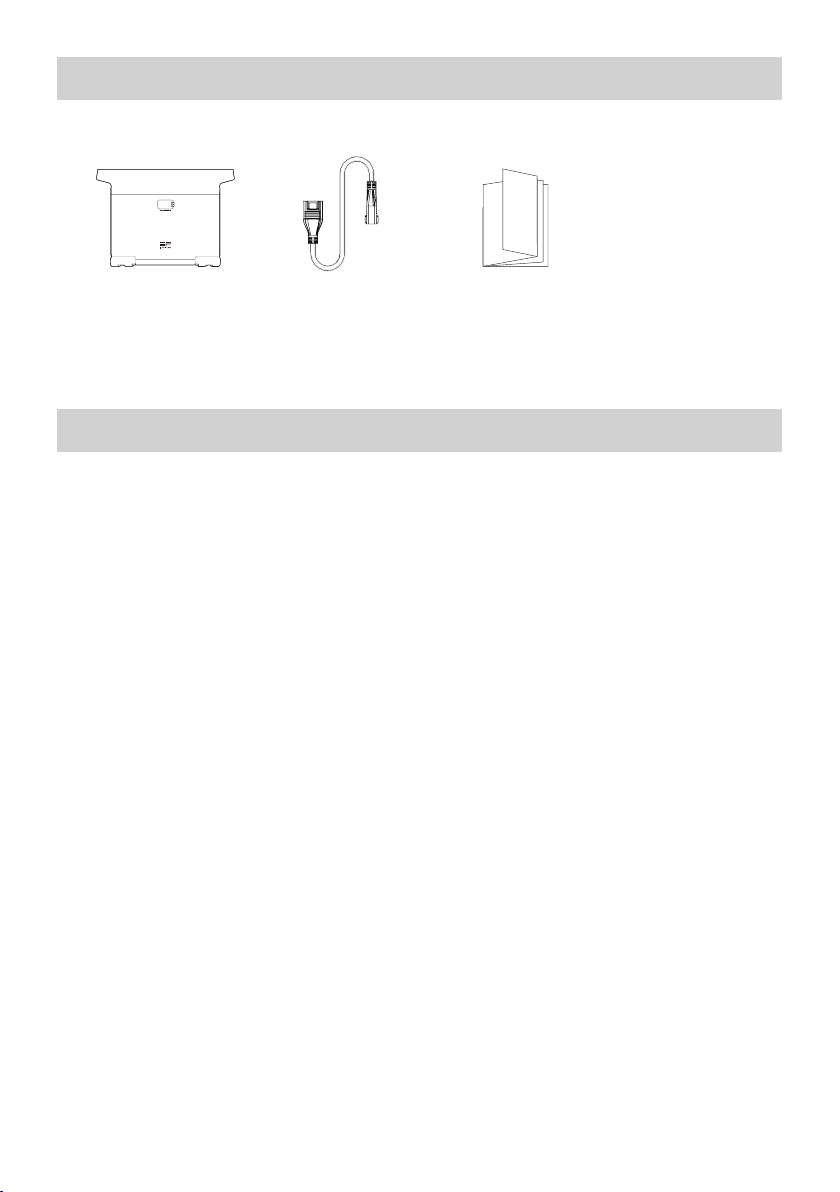
6. Contenu de la boîte
Batterie intelligente
supplémentaire
EcoFlow DELTA 2
Câble de la batterie
supplémentaire
DELTA 2
Manuel d'utilisation
et carte de garantie
7. Stockage et entretien
1. Utilisez ou stockez le produit à une température comprise entre 68°F et 86°F (20°C à 30°C),
àl'écart de toute source d'eau, de toute source de chaleur et de tout objet métallique.
2. En cas de stockage à long terme, déchargez la batterie à 30% et rechargez-la à 60% tous les
troismois.
3. Pour des raisons de sécurité, ne stockez pas le produit à une température supérieure à 113°F (45°C)
ou inférieure à 14°F (-10°C) pendant une longue période.
4. Lorsque vous avez terminé d'utiliser le produit, si le pourcentage de batterie restant est inférieur
à1%, rechargez la batterie à 60% avant de stocker le produit. Si le produit n'est pas utilisé pendant
une longue période et si le niveau de batterie est très faible, l'élément de batterie peut être
endommagé de manière irrémédiable et la durée de vie du produit peut être réduite.
5. Si le produit n'a pas été utilisé pendant trop longtemps et si le niveau de batterie est très faible,
ilpasse en mode veille profonde. Dans un tel cas, chargez le produit avant de l'utiliser à nouveau.
8
Page 37
Batteria supplementare dedicata
EcoFlowDELTA 2
Manuale dell'utente
Page 38

Page 39

DICHIARAZIONE DI NON RESPONSABILITÀ
Leggere attentamente tutti i suggerimenti sulla sicurezza, i messaggi di avviso,
iterminidi utilizzo e le dichiarazioni di non responsabilità. Prima dell'uso,
consultareitermini di utilizzo e la dichiarazione di non responsabilità all'indirizzo
https://ecoflow.com/pages/terms-of-use e leggere gli adesivi sul prodotto. Gli utenti
si assumono la piena responsabilità di tutti gli usi e le operazioni. Familiarizzare con le
normative in vigore nella propria zona. L'utente è l'unico responsabile della conoscenza
di tutte le normative pertinenti e dell'uso conforme dei prodotti EcoFlow.
Batteria supplementare dedicata EcoFlow DELTA 2 (da qui in poi batteria supplementare DELTA 2)
Page 40

CONTENUTO
1.
Specifiche
2. Istruzioni per la sicurezza
2.1 Uso
2.2 Guida allo smaltimento
3. Guida introduttiva
3.1 Dettagli sul prodotto
3.2 Schermo LCD
3.3 Uso generale del prodotto
4. DOMANDE FREQUENTI
5. Risoluzione dei problemi
6. Contenuto della confezione
7. Conservazione e manutenzione
1
2
2
3
4
4
6
7
8
8
Page 41
1. Specifiche
Informazioni generali
Peso netto
Dimensioni
Capacità
Porta di ingresso
Ingresso porta batteria supplementare 51,2 V 1024 W max (doppia carica solare e X-Stream)
Porta di uscita
Informazioni sulla batteria
Chimica cella
Circa 9.5 libbre 21kg
400 x 211 x 281mm(15,7x8,3x11,1in)
1024Wh, 51,2V
51,2 V 2048 W MaxUscita porta batteria supplementare
LFP
Ciclo di vita
3000 cicli con una capacità superiore all'80%
Temperatura ambiente di esercizio
Temperatura di esercizio ottimale
Temperatura di scarica
Temperatura di carica
Temperatura di conservazione
Protezione
* La possibilità di caricare o scaricare il prodotto dipende dalla temperatura effettiva della batteria.
Da 20°C a 30°C(da 68°F a 86°F)
Da -10°C a 45°C (da 14°F a 113°F)
Da 0°C a 45°C (da 32°F a 113°F)
Da -10°C a 45°C (da 14°F a 113°F) (ottimale:
da20°C a 30°C (da 68°F a 86°F)
Protezione da sovratensione, protezione dai
sovraccarichi, protezione dalle sovratemperature,
protezione dai cortocircuiti, protezione da basse
temperature, protezione da bassa tensione,
protezione da sovracorrente
1
Page 42

2. Istruzioni per la sicurezza
2.1 Uso
1. Non utilizzare il prodotto in prossimità di fonti di calore, ad esempio fonti di incendio o forni di
riscaldamento.
2. Evitare il contatto con i liquidi. Non immergere il prodotto in acqua o bagnarlo. Non utilizzare il
prodotto in ambienti umidi o in presenza di pioggia.
3. Non utilizzare il prodotto in ambienti con forti campi elettromagnetici statici.
4. Non smontare il prodotto in alcun modo né perforarlo con oggetti appuntiti.
5. Evitare di utilizzare fili o altri oggetti metallici che potrebbero causare un cortocircuito.
6. Non utilizzare componenti o accessori non autorizzati. In caso sia necessario sostituire un
componente o un accessorio, verificare le istruzioni pertinenti sui canali ufficiali di EcoFlow.
7. Quando si utilizza il prodotto, attenersi rigorosamente alla temperatura dell'ambiente di esercizio
specificata nel presente manuale dell'utente. Se la temperatura è troppo alta, può provocare incendi
o esplosioni; se la temperatura è troppo bassa, le prestazioni del prodotto potrebbero essere
notevolmente ridotte o il prodotto potrebbe smettere di funzionare.
8. Non impilare oggetti pesanti sul prodotto.
9. Non bloccare forzatamente la ventola durante l'uso né collocare il prodotto in un'area non ventilata
o polverosa.
10. Evitare urti, cadute o forti vibrazioni durante l'uso del prodotto. In caso di impatto esterno grave,
spegnere immediatamente l'alimentatore e interrompere l'uso del prodotto. Assicurarsi che il
prodotto sia ben fissato durante il trasporto per evitare vibrazioni e impatti.
11. In caso di caduta accidentale del prodotto in acqua durante l'uso, collocarlo in un'area all'aperto
e sicura e tenersi a debita distanza finché non è completamente asciutto. Una volta asciutto,
ilprodotto non deve essere riutilizzato e deve essere adeguatamente smaltito secondo quanto
riportato più avanti nella Sezione 2.2. Se il prodotto dovesse prendere fuoco, si consiglia di utilizzare
gli estintori nel seguente ordine: acqua o acqua nebulizzata, sabbia, coperta antincendio, polvere
secca e infine un estintore ad anidride carbonica.
12. Utilizzare un panno asciutto per rimuovere lo sporco dalle porte del prodotto.
13. Appoggiare il prodotto su una superficie piana per evitare che si danneggi in seguito a ribaltamento.
Se il prodotto si capovolge e viene gravemente danneggiato, spegnerlo immediatamente, collocare
la batteria in un'area aperta, tenerla lontana da materiali combustibili e persone e smaltirla in
conformità alle leggi e alle normative locali.
14. Assicurarsi che il prodotto sia tenuto fuori dalla portata di bambini e animali domestici.
2.2 Guida allo smaltimento
1. Se le condizioni lo consentono, assicurarsi che la batteria sia completamente scarica prima di
smaltirla negli appositi contenitori per riciclaggio. Il prodotto contiene batterie con sostanze
chimiche potenzialmente pericolose, pertanto è severamente vietato lo smaltimento nei normali
cassonetti dei rifiuti. Per ulteriori informazioni, attenersi alle leggi e alle normative locali in materia
di riciclaggio e smaltimento delle batterie.
2. Se la batteria non può essere completamente scaricata a causa di un guasto del prodotto,
nonsmaltirla direttamente nel contenitore per riciclaggio. In tal caso, è necessario contattare
un'azienda specializzata nel riciclaggio delle batterie per ulteriore trattamento.
3. Smaltire le batterie eccessivamente scariche che non possono essere ricaricate.
2
Page 43
3. Guida introduttiva
3.1 Dettagli sul prodotto
Schermo LCD
Pulsante di alimentazione
principale
Porta batteria supplementare
Vano contenitore
3
Page 44
3.2 Schermo LCD
Percentuale rimanente della batteria
Avviso di guasto della batteria
Indicatore del livello della batteria
Tempo di carica/
scarica rimanente
Indicatore batteria supplementare
Indicatore del livello della batteria: l'indicatore si riempie ripetutamente durante la carica. Se il prodotto è
allo 0% di carica, l'indicatore lampeggia per avvisare l'utente.
* Consultare la Sezione 5 per ulteriori procedure di risoluzione dei problemi.
Avviso di temperatura elevata
Avviso di bassa temperatura
Alimentazione in
ingresso
Alimentazione in
uscita
Avviso di
sovraccarico
3.3 Uso generale del prodotto
La batteria supplementare dedicata non può essere utilizzata separatamente. Può essere utilizzata
con il DELTA 2.
La batteria supplementare DELTA 2 può essere ricaricata solo se collegata al DELTA 2 o allo Smart
Generator.
Premere brevemente per
accendere
Premere a lungo per
spegnere
Prodotto acceso, prodotto spento, schermo LCD acceso
Premere brevemente il pulsante di alimentazione principale per attivare il prodotto; lo schermo LCD si
accende e viene visualizzata l'icona dell'indicatore di livello della batteria.
Il prodotto entra in modalità di sospensione dopo 5 minuti di inattività; lo schermo LCD si spegne
automaticamente. Quando il prodotto rileva un cambiamento di carico o di operazione, lo schermo
LCD si accende automaticamente. Per accendere o spegnere lo schermo LCD, premere brevemente il
pulsante di alimentazione principale.
Per spegnere il prodotto, tenere premuto il pulsante di alimentazione principale.
Il tempo di stand-by predefinito del prodotto è 2 ore. Con gli altri pulsanti di alimentazione spenti e
senza altri accessi al carico per 2 ore, il prodotto si spegne automaticamente. Il tempo di stand-by può
essere impostato sull'app.
4
Page 45
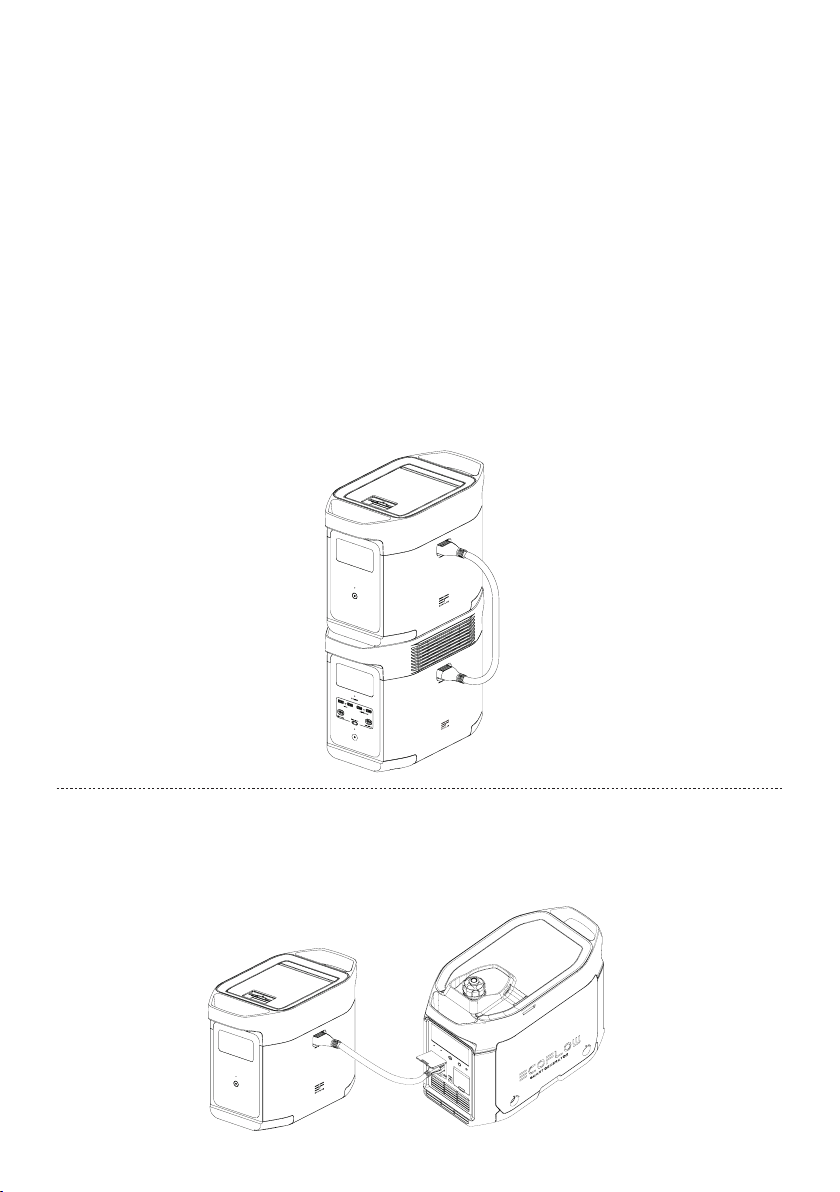
Per l'uso con il DELTA 2
La batteria supplementare DELTA 2 può essere utilizzata con il DELTA 2. Un DELTA 2 può supportare
fino a una batteria delta 2 extra per soddisfare requisiti di capacità più estesi.
Leggere attentamente le seguenti note prima dell'uso:
1. Prima di effettuare il collegamento al DELTA 2 e alla batteria supplementare, accertarsi di spegnere il
DELTA 2 e la batteria supplementare DELTA 2.
2. Dopo aver collegato la batteria supplementare DELTA 2 al DELTA 2, accertarsi che le icone relative
alla batteria supplementare vengano visualizzate sia sullo schermo LCD della batteria supplementare
DELTA 2 sia su quello della batteria supplementare. Caricare o scaricare la batteria supplementare
DELTA 2 dopo aver visualizzato entrambe le icone.
3. NON collegare la batteria supplementare DELTA 2 al DELTA 2 durante la scarica o la carica; se è
necessario rimuovere il cavo della batteria supplementare, accertarsi che la batteria supplementare
DELTA 2 e il DELTA 2 siano entrambi spenti.
4. NON toccare la porta della batteria supplementare in metallo con le mani o altri oggetti. Pulire
delicatamente con un panno asciutto quando altri materiali sono collegati alla porta metallica.
5. Collegare saldamente il cavo della batteria supplementare al DELTA 2 e alla batteria supplementare.
La mancata osservanza di tali norme può riscaldare il collegamento e compromettere le prestazioni
del dispositivo o provocare incendi.
Ricarica con Smart Generator
È possibile ricaricare la batteria supplementare DELTA 2 con lo Smart Generator. Per ulteriori dettagli,
fare riferimento al manuale dell'utente dello Smart Generator.
5
Page 46

4. DOMANDE FREQUENTI
1. Quale batteria utilizza il prodotto?
Utilizza una batteria LFP di alta qualità.
2. Per quanto tempo il prodotto può caricare i dispositivi?
Il tempo di carica viene visualizzato sullo schermo LCD del prodotto e può essere utilizzato per
stimare il tempo di carica della maggior parte degli apparecchi con un consumo energetico costante.
3. Come è possibile sapere se il prodotto è in carica?
Durante la carica, il tempo rimanente viene visualizzato sullo schermo LCD. Nel frattempo, l'icona
dell'indicatore di carica inizia a ruotare con la percentuale di batteria rimanente e l'alimentazione in
ingresso viene visualizzata a destra del cerchio.
4. Come pulire il prodotto?
Strofinare delicatamente con un panno asciutto, morbido e pulito o con un panno di carta.
5. Come conservare il prodotto?
Prima di riporre il prodotto, spegnerlo e collocarlo quindi in un luogo asciutto e ventilato a
temperatura ambiente. Non posizionarlo vicino a fonti d'acqua. Per lunghi periodi di stoccaggio,
scaricare la batteria al 30% e ricaricarla al 60% ogni tre mesi per prolungarne la durata.
6. Posso portare il prodotto su un aereo?
No.
6
Page 47
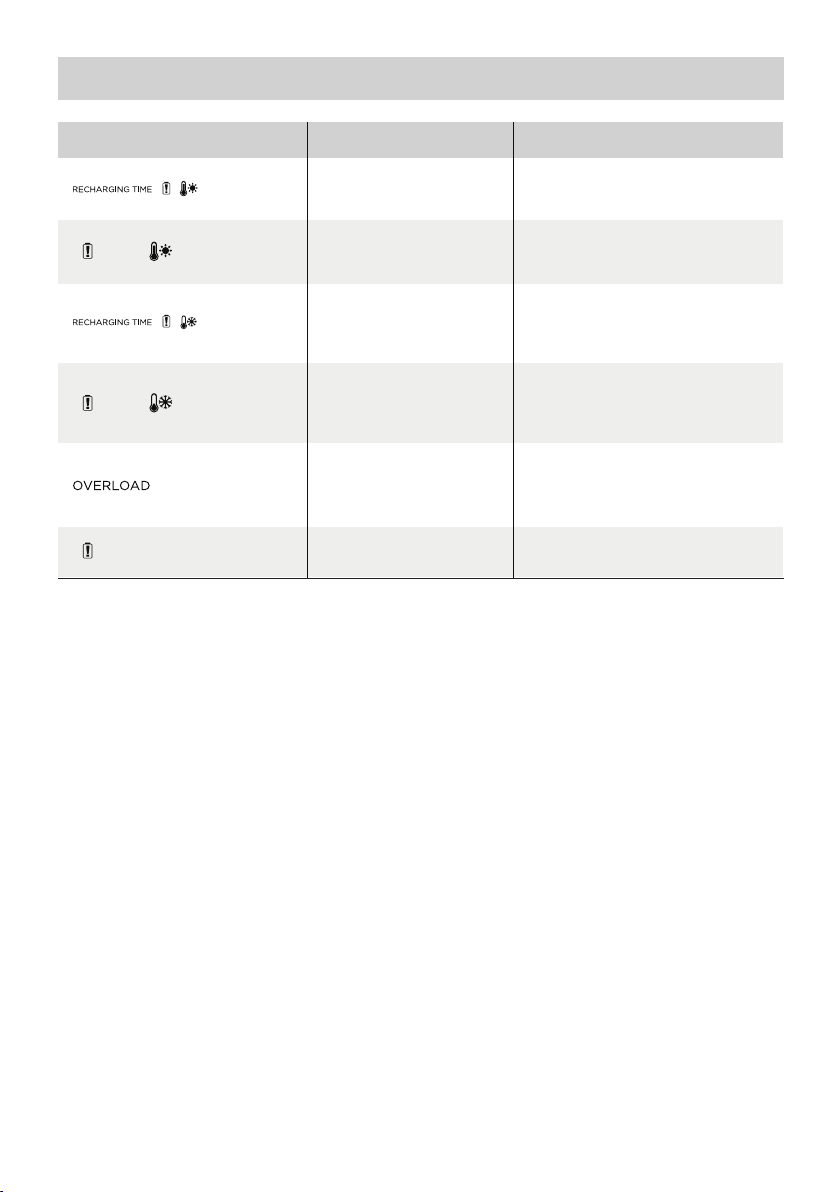
5. Risoluzione dei problemi
Indicatore Problema
Le icone
lampeggiano
insieme
Le icone
lampeggiano
insieme
Le icone
lampeggiano
insieme
Le icone
lampeggiano
insieme
L'icona
lampeggia
L'icona rimane
accesa
Se la richiesta di allarme viene visualizzata sullo schermo LCD del prodotto durante l'uso e non
scompare dopo un riavvio, interromperne immediatamente l'utilizzo (non tentare di caricarlo o
scaricarlo).
Se è necessaria ulteriore assistenza, contattare il servizio clienti EcoFlow.
Protezione carica ad alta
temperatura
Protezione scarica ad alta
temperatura
Protezione carica a bassa
temperatura
Protezione scarica a bassa
temperatura
Protezione dal sovraccarico
della batteria Protezione
dai cortocircuiti durante
lascarica
Guasto della batteria
La carica può essere ripresa
raffreddamento della batteria.
L'alimentazione può essere
ripristinata automaticamente dopo il
raffreddamento della batteria.
La carica può essere ripresa
automaticamente quando la
temperatura della batteria supera
L'alimentazione può essere
ripristinata automaticamente
quandola temperatura della batteria
Rimuovere gli apparecchi elettrici
Contattare il servizio clienti EcoFlow
Soluzione
automaticamente dopo il
i41°F (5°C).
supera i 10°F (-12,2°C).
ad alta potenza
7
Page 48
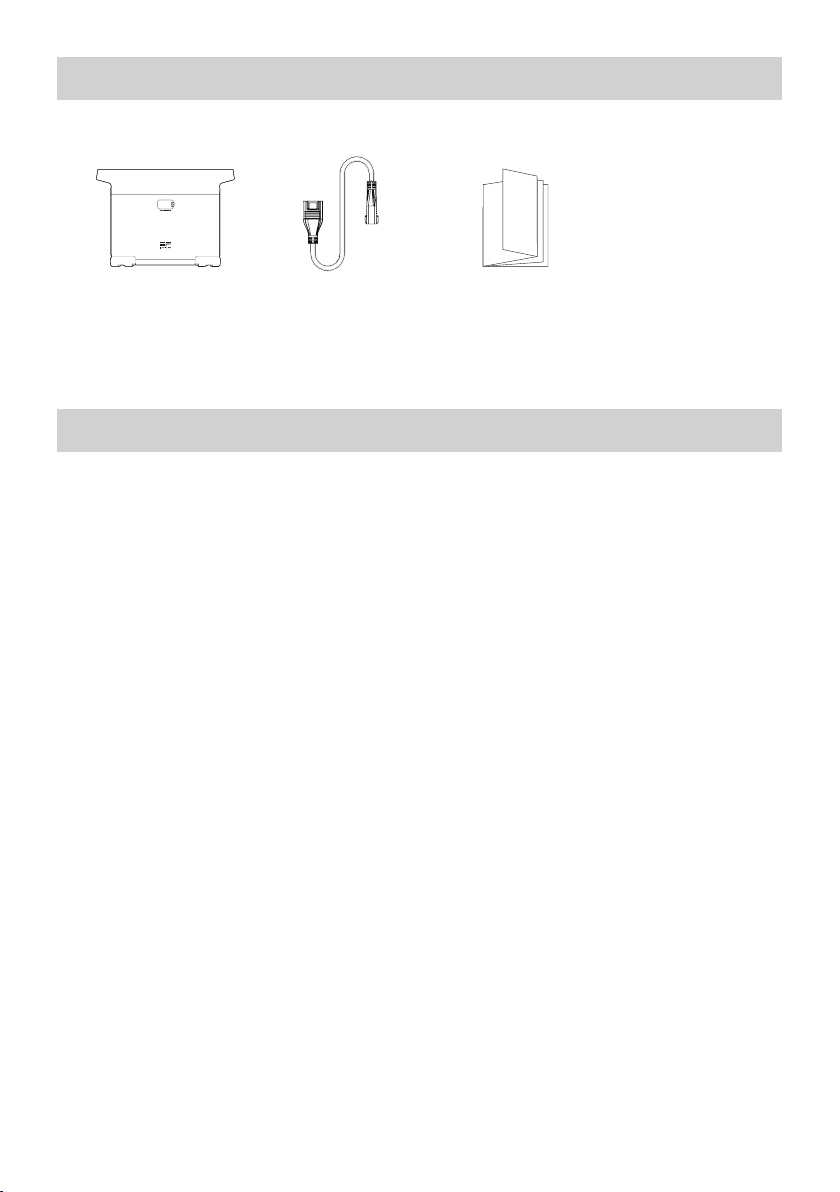
6. Contenuto della confezione
Batteria supplementare
dedicata EcoFlow
DELTA 2
Cavo batteria
supplementare
DELTA2
Manuale utente e
scheda di garanzia
7. Conservazione e manutenzione
1. Utilizzare o conservare il prodotto a una temperatura ambiente compresa tra 68°F (20°C) e
86°F(30°C), lontano da acqua, calore, e altri oggetti metallici.
2. Per una conservazione a lungo termine, scaricare la batteria al 30% e ricaricarla al 60% ogni tre mesi.
3. Per motivi di sicurezza, non conservare il prodotto a una temperatura ambiente superiore a
113°F(45°C) o inferiore a 14°F (-10°C) per un lungo periodo di tempo.
4. Se la batteria rimanente è inferiore all'1% dopo aver terminato di utilizzare il prodotto, ricaricarla al
60% prima di riporla. Se il prodotto viene lasciato inattivo per un lungo periodo di tempo con una
batteria molto scarica, è possibile che la cella della batteria subisca danni irreversibili e la durata del
prodotto venga ridotta.
5. Se il prodotto è rimasto inattivo per troppo tempo e la batteria è molto scarica, entra in modalità
"deep sleep". In tal caso, caricare il prodotto prima di riutilizzarlo.
8
Page 49
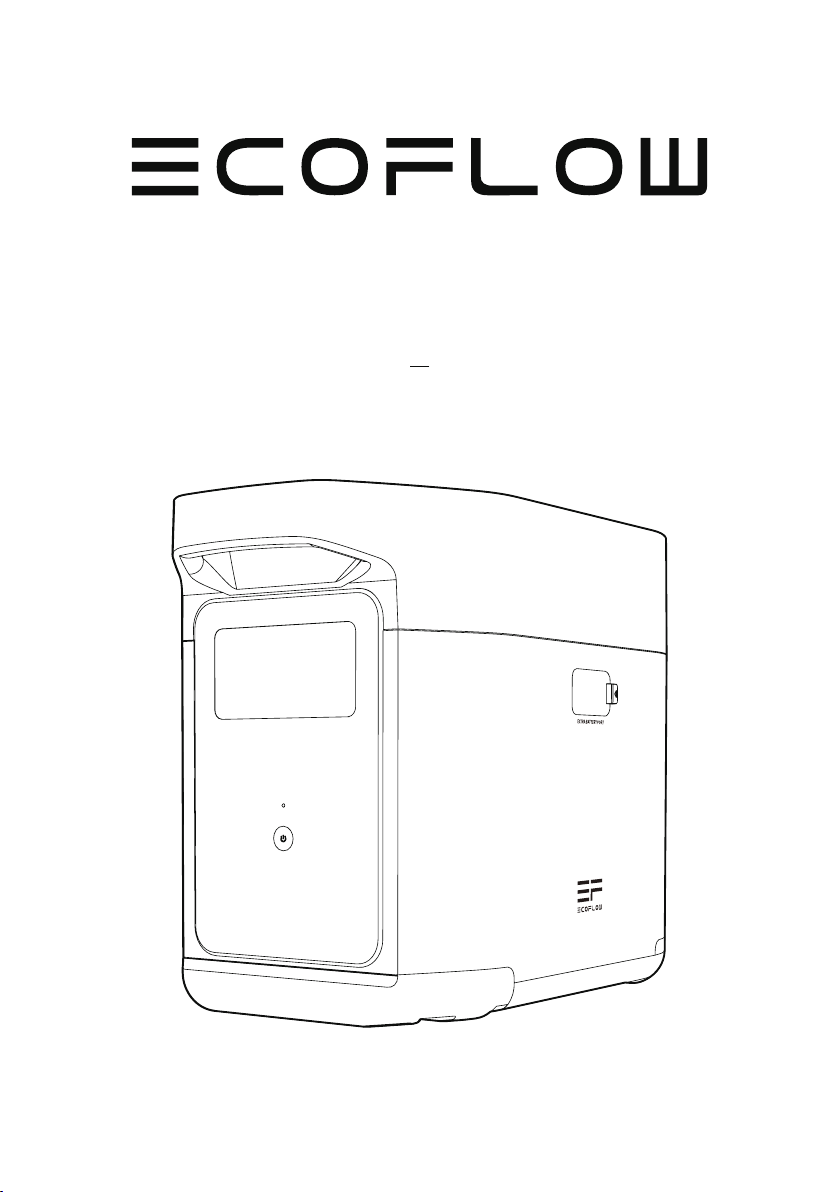
Batería adicional inteligente
EcoFlowDELTA2
Manual de usuario
Page 50

Page 51

EXENCIÓN DE RESPONSABILIDAD
Lea atentamente todas las recomendaciones de seguridad, los mensajes de advertencia,
las condiciones de uso y las exenciones de responsabilidad. Consulte las condiciones
deuso y la exención de responsabilidad en https://ecoflow.com/pages/terms-of-use
(eninglés) y las etiquetas adhesivas del producto antes de usar el producto.
Losusuarios son totalmente responsables del uso y las operaciones. Familiarícese
conlas normativas vigentes en su área. Usted es el único responsable de conocer todas
las normativas vigentes y de usar los productos EcoFlow de una manera que cumpla
conellas.
Batería adicional inteligente EcoFlow DELTA 2 (en adelante, la batería adicional DELTA 2)
Page 52

ÍNDICE
1.
Especificaciones
2. Instrucciones de seguridad
2.1 Uso
2.2 Guía de eliminación
3. Primeros pasos
3.1 Detalles del producto
3.2 Pantalla LCD
3.3 Uso general del producto
4. Preguntas frecuentes
5. Solución de problemas
6. Contenido de la caja
7. Almacenamiento y mantenimiento
1
2
2
3
4
4
6
7
8
8
Page 53
1. Especificaciones
Información general
Peso neto
Dimensiones
Capacidad
Puerto de entrada
Entrada de la batería adicional 51,2V 1024W máx. (X-Stream y carga doble solar)
Puerto de salida
Información de la batería
Química de las celdas
Aproximadamente 9.5kg
400 x 211 x 281mm(15,7x8,3x11,1in)
1024Wh, 51,2V
51,2V 2048W máx.Salida de la batería adicional
LFP
Ciclos de vida útil
3000ciclos a más del 80% de la capacidad
Temperatura ambiental de funcionamiento
Temperatura de funcionamiento óptima
Temperatura de descarga
Temperatura de carga
Temperatura de almacenamiento
Protección
* La posibilidad de que el producto se cargue o descargue depende de la temperatura real del grupo
de baterías.
20°C a 30°C(68°F a 86°F)
-10°C a 45°C (14°F a 113°F)
0°C a 45°C (32°F a 113°F)
-10°C a 45°C (14°F a 113°F) (óptimo: 20°C a 30°C
[68°F a 86°F])
Protección contra sobretensión, protección
contra sobrecarga, protección contra exceso de
temperatura, protección contra cortocircuito,
protección por baja temperatura, protección contra
tensión baja, protección contra sobrecorriente
1
Page 54

2. Instrucciones de seguridad
2.1 Uso
1. No utilice el producto cerca de una fuente de calor, como una fuente de fuego o una caldera.
2. Evite el contacto con cualquier líquido. No sumerja el producto en agua ni lo moje. No utilice el
producto en ambientes húmedos o lluviosos.
3. No utilice el producto en un entorno con electricidad estática o campos magnéticos fuertes.
4. No desarme el producto de ninguna manera ni lo perfore con objetos afilados.
5. Evite el uso de cables u otros objetos metálicos que puedan provocar un cortocircuito.
6. No utilice componentes ni accesorios no oficiales. Si necesita sustituir algún componente o
accesorio, visite los canales oficiales de EcoFlow para comprobar la información pertinente.
7. Cuando utilice el producto, respete estrictamente la temperatura ambiente de funcionamiento que
se indica en este manual de usuario. Si la temperatura es demasiado alta, se podría provocar un
incendio o una explosión; si la temperatura es demasiado baja, es posible que el rendimiento del
producto se reduzca de forma importante o que el producto deje de funcionar.
8. No coloque objetos pesados encima del producto.
9. No bloquee el ventilador por la fuerza durante su uso ni coloque el producto en un lugar sin
ventilación o con mucho polvo.
10. Evite que se produzcan golpes, caídas o demasiadas vibraciones cuando utilice el producto.
Encaso de un golpe externo grave, apague inmediatamente la fuente de alimentación y deje de
usar el producto. Asegúrese de que el producto esté bien sujeto durante el transporte para evitar
vibraciones y golpes.
11. Si el producto se cae accidentalmente al agua durante su uso, colóquelo en un espacio abierto que
sea seguro y manténgase alejado de él hasta que esté completamente seco. El producto seco no
debe volver a utilizarse y debe desecharse de manera adecuada de acuerdo con la sección 2.2 que
se describe a continuación. Si el producto se incendia, le recomendamos que utilice extintores de
incendios en el siguiente orden: agua o agua nebulizada, arena, manta, polvo seco y, por último,
unextintor de incendios de dióxido de carbono.
12. Utilice un paño seco para limpiar la suciedad de los orificios del producto.
13. Apoye el producto en una superficie plana para evitar que se caiga y sufra daños. Si el producto se
vuelca en exceso y se daña gravemente, apáguelo inmediatamente, colóquelo en un espacio abierto,
manténgalo alejado de materiales combustibles y personas, y deséchelo conforme a las leyes y
normativas locales.
14. Asegúrese de que el producto esté fuera del alcance de niños y mascotas.
2.2 Guía de eliminación
1. Si las condiciones lo permiten, asegúrese de que la batería esté completamente descargada antes de
desecharla en el contenedor de reciclaje de baterías designado. El producto contiene baterías con
productos químicos potencialmente peligrosos, por lo que está estrictamente prohibido desecharlo
en cubos de basura comunes. Para obtener más información, siga las leyes y normativas locales en
materia de reciclaje y eliminación de baterías.
2. Si la batería no se puede descargar por completo debido a un fallo del producto, no la deseche
directamente en el contenedor de reciclaje de baterías. En ese caso, póngase en contacto con una
empresa de reciclaje de baterías profesional para que ellos se encarguen.
3. Deseche las baterías descargadas que no puedan recargarse.
2
Page 55
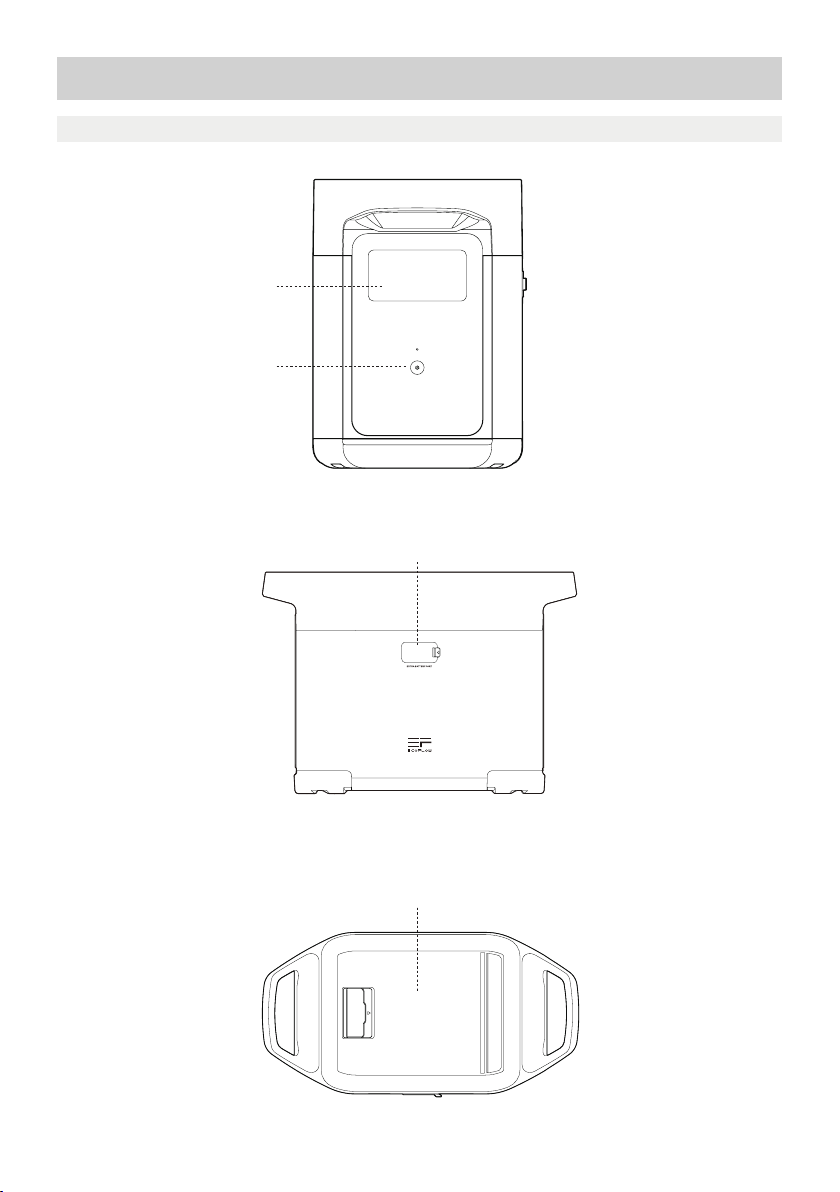
3. Primeros pasos
3.1 Detalles del producto
Pantalla LCD
Botón de encendido principal
Puerto de batería adicional
Compartimiento de almacenamiento
3
Page 56
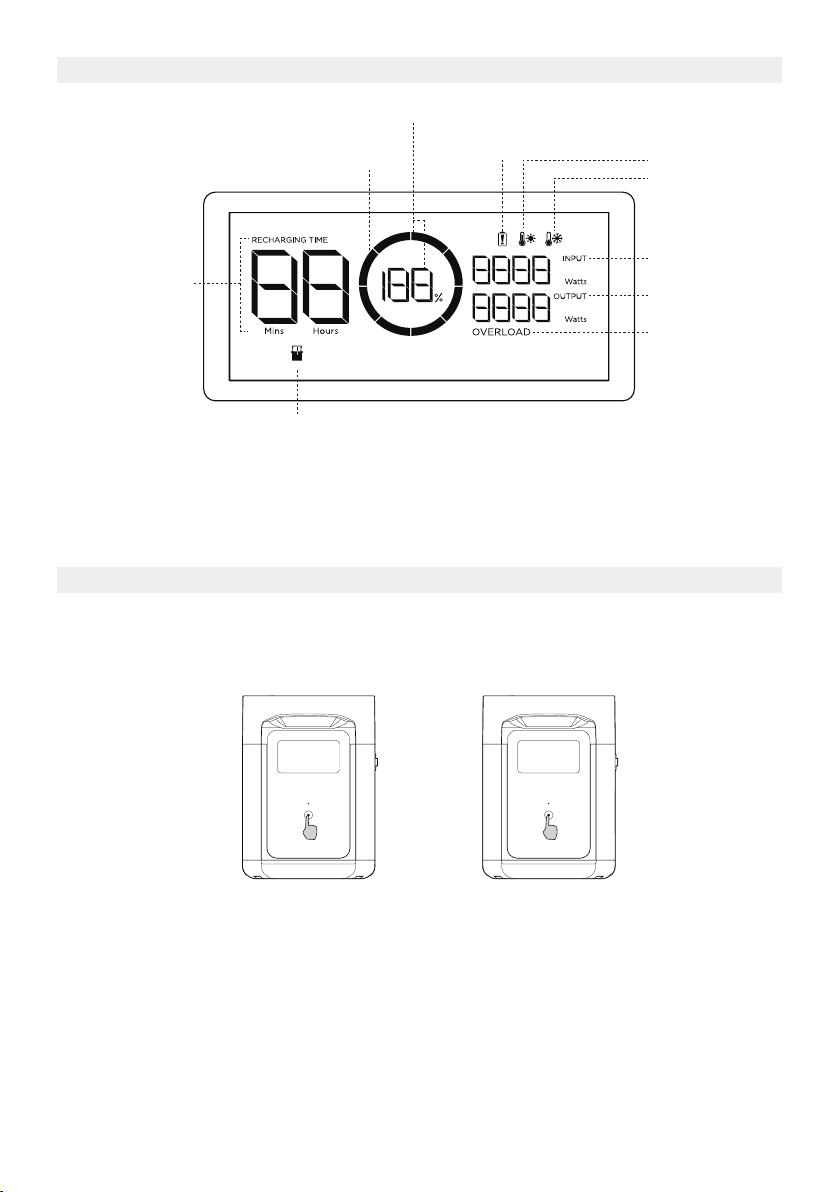
3.2 Pantalla LCD
Porcentaje de batería restante
Indicador de nivel de la batería
Tiempo de carga/
descarga restante
Indicador de batería adicional
Indicador de nivel de la batería: el indicador se llena repetidamente durante la carga. Si el producto tiene
una carga del 0%, el indicador parpadeará para avisarle.
* Consulte la sección 5 para ver más soluciones de problemas.
Advertencia de
fallo de la batería
Advertencia de
alta temperatura
Advertencia de
baja temperatura
Alimentación de
entrada
Alimentación de
salida
Advertencia de
sobrecarga
3.3 Uso general del producto
La batería adicional inteligente no se puede utilizar por separado, sino junto con el dispositivo DELTA 2.
La batería adicional DELTA 2 solo se puede recargar al conectarla al dispositivo DELTA 2 o a un
generador inteligente.
Pulsación corta para
encender
Pulsación larga
paraapagar
Encendido/apagado del producto y encendido de la pantalla
Pulse brevemente el botón de encendido principal para encender el producto. La pantalla LCD se
encenderá y aparecerá el icono del indicador de nivel de la batería.
El producto entra en modo de reposo si pasan 5minutos de inactividad. La pantalla LCD se apagará
automáticamente. Cuando el producto detecta cualquier cambio de carga u operaciones, la pantalla
LCD se ilumina automáticamente. Para encender o apagar la pantalla LCD, pulse brevemente el botón
de encendido principal.
Para apagar el producto, mantenga pulsado el botón de encendido principal.
El tiempo de espera predeterminado del producto es de 2horas. Con los otros botones de encendido
apagados y sin acceso a la carga durante 2horas, el producto se apagará automáticamente. El tiempo
de espera se puede configurar en la aplicación.
4
Page 57
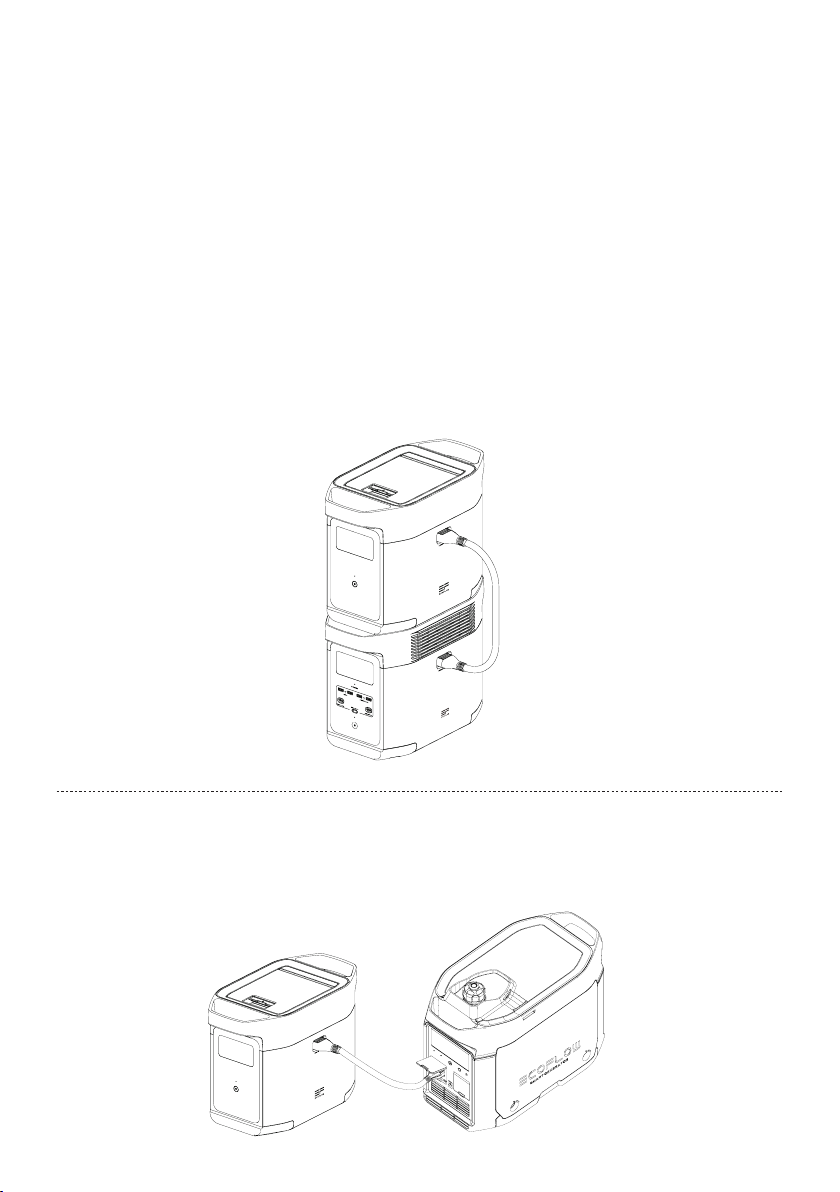
Para su uso junto con DELTA 2
La batería adicional DELTA 2 se puede utilizar con el dispositivo DELTA 2. Un DELTA 2 puede admitir
hasta una batería adicional DELTA 2 para cumplir con los requisitos de capacidad más extensos.
Lea atentamente las siguientes notas antes de usar el producto:
1. Antes de conectar DELTA 2 y la batería adicional, asegúrese de que ambos dispositivos estén
apagados.
2. Después de conectar la batería adicional DELTA 2 al dispositivo DELTA 2, debe asegurarse de que los
iconos de la batería adicional aparezcan en la pantalla LCD de la batería adicional DELTA 2 y la batería
adicional. Cargue o descargue la batería adicional DELTA 2 después de ver ambos iconos.
3. NO conecte la batería adicional DELTA 2 al dispositivo DELTA 2 mientras se descarga o se carga. Si
necesita retirar el cable de la batería adicional, asegúrese de que tanto la batería adicional DELTA 2
como el dispositivo DELTA 2 estén apagados.
4. NO toque el puerto metálico de la batería adicional con las manos u otros objetos. Límpielo
suavemente con un paño seco si hay objetos extraños en el puerto metálico.
5. Conecte firmemente el cable de la batería adicional al dispositivo DELTA 2 y la batería adicional.
Sino se sigue esta instrucción, se puede calentar la conexión y afectar al rendimiento del dispositivo
o provocar un incendio.
Recarga con el generador inteligente
Puede recargar la batería adicional DELTA 2 con el generador inteligente. Consulte el manual de usuario
del generador inteligente para obtener más información.
5
Page 58

4. Preguntas frecuentes
1. ¿Qué batería utiliza el producto?
Utiliza una batería LFP de alta calidad.
2. ¿Durante cuánto tiempo el producto puede cargar mis dispositivos?
El tiempo de carga se muestra en la pantalla LCD del producto, que se puede utilizar para calcular el
tiempo de carga de la mayoría de aparatos con un consumo estable de energía.
3. ¿Cómo puedo saber si el producto se está cargando?
Cuando se está cargando, el tiempo de carga restante se muestra en la pantalla LCD. Mientras
tanto, el icono del indicador de carga comienza a girar con el porcentaje de batería restante y la
alimentación de entrada se muestra a la derecha del círculo.
4. ¿Cómo debo limpiar el producto?
Límpielo cuidadosamente con un paño seco, suave y limpio o con papel absorbente.
5. ¿Cómo debo almacenar el producto?
Antes de almacenar el producto, primero apáguelo y, a continuación, guárdelo en un lugar seco y
ventilado a temperatura ambiente. No lo coloque cerca de fuentes de agua. Para almacenarlo durante
periodos prolongados, descargue la batería al 30% y recárguela al 60% cada tres meses para
ampliar su vida útil.
6. ¿Puedo llevar el producto en un avión?
No.
6
Page 59
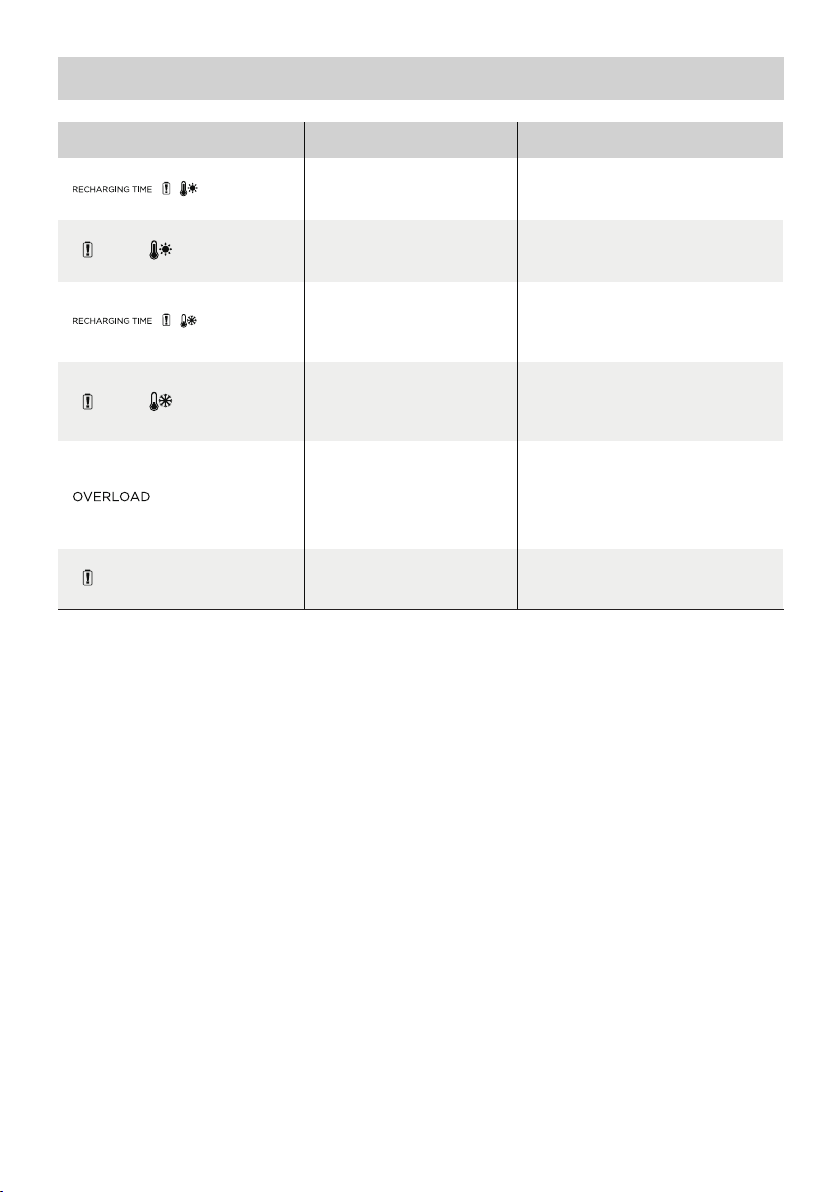
5. Solución de problemas
Indicador Problema
Los iconos
parpadean a
la vez
Los iconos
parpadean a
la vez
Los iconos
parpadean a
la vez
Los iconos
parpadean a
la vez
El icono
parpadea
El icono
permanece
encendido
Si el indicador de alarma aparece en la pantalla LCD del producto durante su uso y no desaparece
después de reiniciarlo, deje de usarlo inmediatamente (no intente cargarlo ni descargarlo).
Si necesita más ayuda, póngase en contacto con el servicio de atención al cliente de EcoFlow.
Protección de carga por
alta temperatura
Protección de descarga por
alta temperatura
Protección de carga por
baja temperatura
Protección de descarga por
baja temperatura
Protección contra
sobrecargade la batería
Protección contra
cortocircuito durante la
descarga
Fallo de la batería
automáticamente una vez que la
La fuente de alimentación se
reanudará automáticamente una vez
automáticamente una vez que la
temperatura de la batería supere
La fuente de alimentación se
reanudará automáticamente una
vez que la temperatura de la batería
Póngase en contacto con el
servicio de atención al cliente de
Solución
La carga se reanudará
batería se enfríe.
que la batería se enfríe.
La carga se reanudará
los41°F (5°C).
supere los 10°F (-12°C).
Retire los aparatos de alta
potencia.
EcoFlow.
7
Page 60
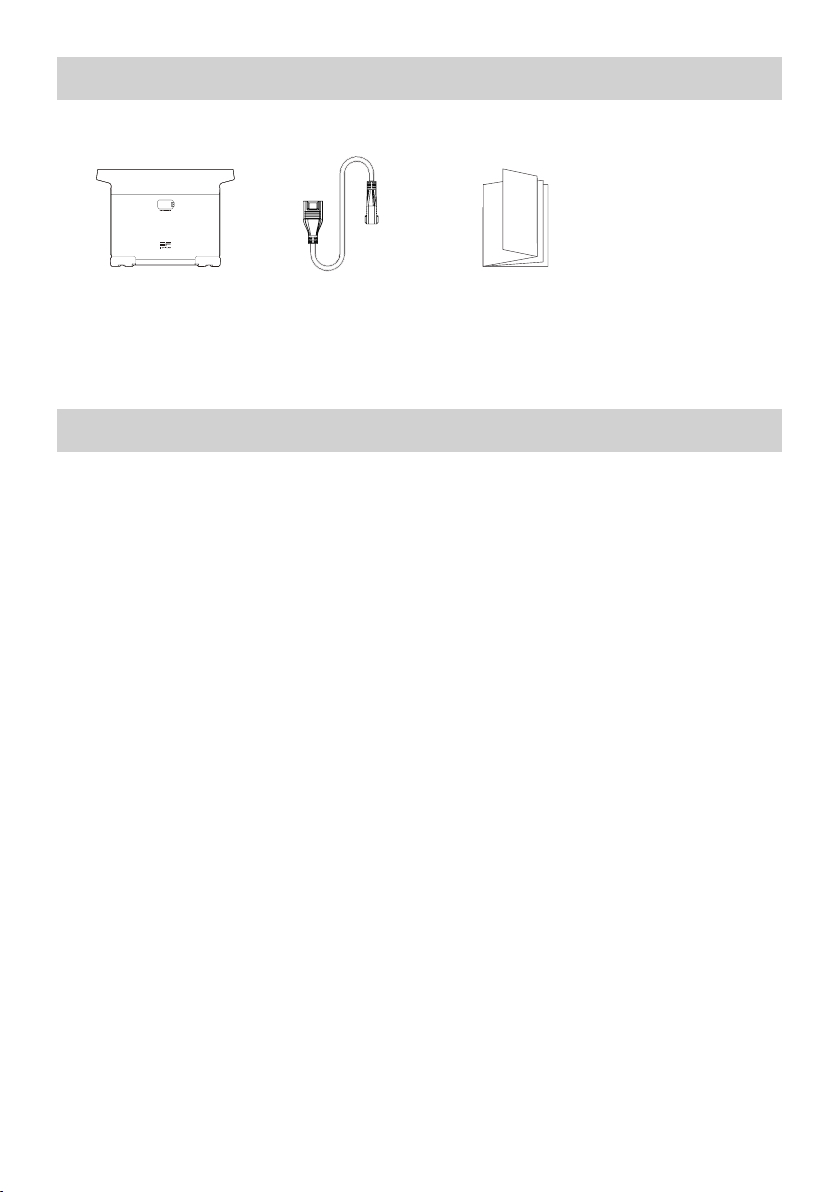
6. Contenido de la caja
Batería adicional
inteligente EcoFlow
DELTA 2
Cable de la batería
adicional DELTA 2
Manual de usuario y
tarjeta de garantía
7. Almacenamiento y mantenimiento
1. Utilice o almacene el producto a una temperatura ambiente de 68°F a 86°F (20°C a 30°C) y en
unlugar alejado del agua, calor y otros objetos metálicos.
2. Para almacenarlo durante periodos prolongados, descargue la batería al 30% y recárguela al
60%cada tres meses.
3. Por motivos de seguridad, no guarde el producto a una temperatura ambiente superior a 113°F
(45°C) o inferior a 14°F (-10°C) durante mucho tiempo.
4. Si la batería restante es inferior al 1% al terminar de usar el producto, recárguela al 60% antes
de guardarla. Si el producto se deja inactivo durante mucho tiempo con la batería muy baja, es
posible que se produzcan daños irreversibles en la celda de la batería y que se acorte la vida útil
delproducto.
5. Si el producto está inactivo durante demasiado tiempo con la batería muy baja, entrará en modo de
protección de reposo profundo. En ese caso, cargue el producto antes de usarlo nuevamente.
8
Page 61
EcoFlow DELTA 2 Smart Extra Batterij
Gebruikershandleiding
Page 62

Page 63

DISCLAIMER
Lees alle veiligheidstips, waarschuwingen, gebruiksvoorwaarden en disclaimers
zorgvuldig door. Raadpleeg de gebruiksvoorwaarden en disclaimer op
https://ecoflow.com/pages/terms-of-use en de stickers op het product vóór
gebruik. Gebruikers nemen de volledige verantwoordelijkheid voor het gebruik en
alle bedrijfsactiviteiten. Maak uzelf vertrouwd met de gerelateerde voorschriften in
uw regio. U bent er als enige verantwoordelijk voor dat u op de hoogte bent van alle
relevante voorschriften en dat u EcoFlow-producten gebruikt op een manier die aan de
voorschriften voldoet.
Ecoflow DELTA 2 Smart extra batterij (hierna genoemd DELTA 2 extra batterij)
Page 64

INHOUD
1.
Specificaties
2. Veiligheidsinstructies
2.1 Gebruik
2.2 Verwijderingsgids
3. Aan de slag
3.1 Productgegevens
3.2 LCD-scherm
3.3 Algemeen gebruik product
4. Veelgestelde vragen
5. Problemen oplossen
6. Inhoud van de doos
7. Opslag en onderhoud
1
2
2
3
4
4
6
7
8
8
Page 65
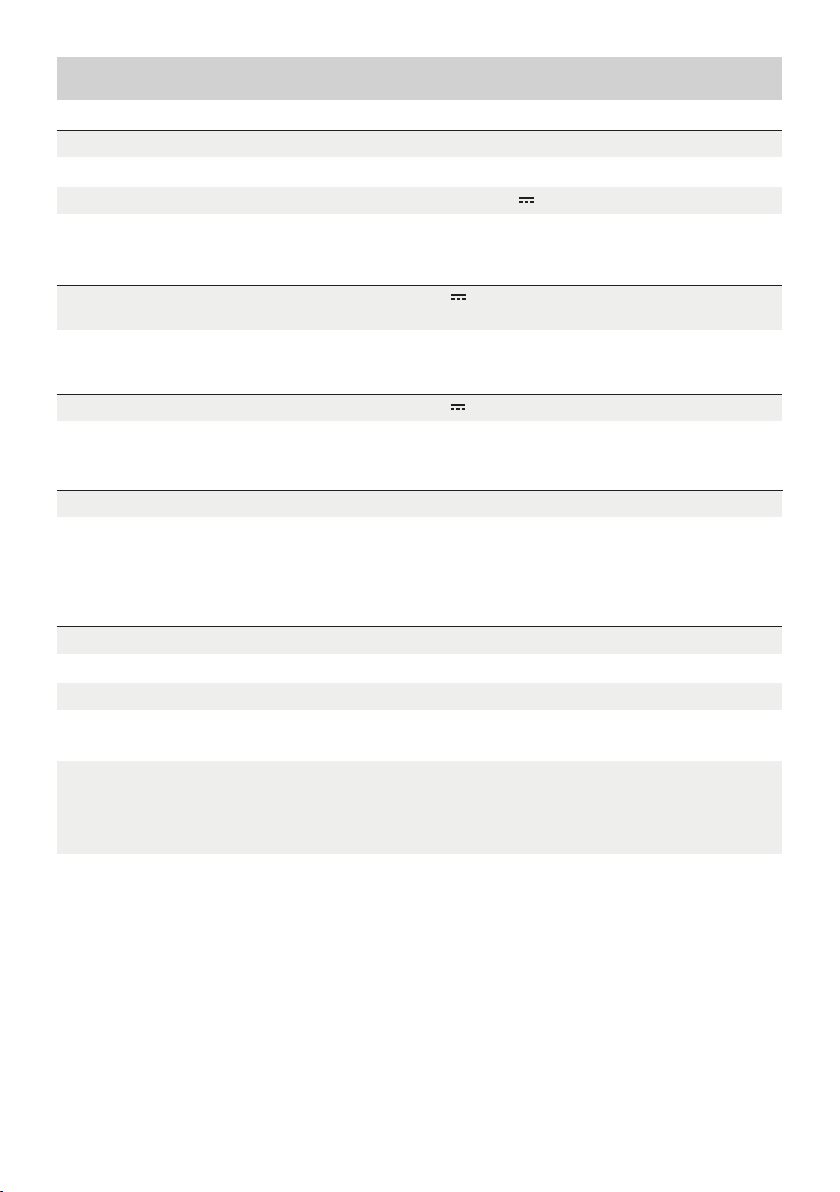
1. Specificaties
Algemene info
Nettogewicht
Afmetingen
Capaciteit
Invoerpoort
Invoer van poort extra batterij
Uitvoerpoort
Batterij-info
Celchemie
Ongeveer 9,5kg
400 x 211 x 281mm(15,7x8,3x11,1in)
1024Wh, 51,2V
51,2 V max. 1024 W (X-Stream en dubbel opladen
op zonne-energie)
51,2 V max. 2048 WUitvoer van poort extra batterij
LFP
Levensduur
3000 cycli tot 80%+ capaciteit
Omgeving/bedieningstemperatuur
Optimale bedrijfstemperatuur
Uitblaastemperatuur
Laadtemperatuur
Opslagtemperatuur
Bescherming
* Of het product kan worden opgeladen of ontladen, is afhankelijk van de werkelijke temperatuur van de
batterypack.
20 °C tot 30 °C (68°F tot 86°F)
-10 °C tot 45 °C (14°F tot 113°F)
0 °C tot 45 °C (32°F tot 113°F)
-10 °C tot 45 °C (14°F tot 113°F)
(optimaal: 20 °C tot 30 °C (68°F tot 86°F))
Overspanningsbeveiliging, overbelastingsbeveiliging,
beveiliging tegen oververhitting,
kortsluitingsbeveiliging, bescherming tegen
lage temperaturen, laagspanningsbeveiliging,
overstroombeveiliging
1
Page 66

2. Veiligheidsinstructies
2.1 Gebruik
1. Gebruik het product niet in de buurt van een warmtebron, zoals vuur of een verwarmingsoven.
2. Vermijd contact met vloeistoffen. Dompel het product niet onder in water en laat het niet nat
worden. Gebruik het product niet bij regen of in vochtige omgevingen.
3. Gebruik het product niet in een omgeving met sterke statische elektriciteit/magnetische velden.
4. Haal het product niet uit elkaar en doorboor het niet met scherpe voorwerpen.
5. Gebruik geen draden of andere metalen voorwerpen die kortsluiting kunnen veroorzaken.
6. Gebruik geen onderdelen of accessoires van derden. Als u onderdelen of accessoires moet
vervangen, ga dan naar de officiële EcoFlow-kanalen voor relevante informatie.
7. Houd u bij het gebruik van het product strikt aan de omgevingstemperatuur voor gebruik dat
in deze gebruiksaanwijzing wordt vermeld. Als de temperatuur te hoog is, kan dit brand of een
explosie veroorzaken. Als de temperatuur te laag is, kunnen de prestaties van het product sterk
afnemen of werkt het product niet meer.
8. Stapel geen zware voorwerpen op het product.
9. Vergrendel de ventilator niet met kracht tijdens gebruik en plaats het product niet in een niet-
geventileerde of stoffige omgeving.
10. Voorkom stoten, vallen of ernstige trillingen tijdens het gebruik van het product. Schakel in geval van
een ernstige externe botsing de voeding onmiddellijk uit en gebruik het product niet meer. Zorg ervoor
dat het product tijdens het transport goed is bevestigd om trillingen en schokken te voorkomen.
11. Als u het product per ongeluk in water laat vallen tijdens het gebruik, plaats het dan op een veilige,
open plek en blijf uit de buurt tot het volledig droog is. Het gedroogde product mag niet opnieuw
worden gebruikt en moet op de juiste wijze worden afgevoerd volgens Sectie 2.2 hieronder. Als het
product vlam vat, raden wij u aan de brandblussers in de volgende volgorde te gebruiken: water of
waternevel, zand, branddeken, droogpoeder en ten slotte een brandblusser met kooldioxide.
12. Gebruik een droge doek om vuil van de productpoorten te verwijderen.
13. Plaats het product op een vlakke ondergrond om schade te voorkomen die wordt veroorzaakt door
omvallen. Als het product is omgevallen en ernstig beschadigd is geraakt, schakelt u het onmiddellijk
uit, plaatst u de batterij in een open ruimte, houdt u deze uit de buurt van personen en brandbare
materialen en voert u de batterij af in overeenstemming met de plaatselijke wet- en regelgeving.
14. Houd het product buiten het bereik van kinderen en huisdieren.
2.2 Verwijderingsgids
1. Als de omstandigheden dit toelaten, moet u ervoor zorgen dat de batterij volledig is ontladen
voordat u deze weggooit in een daarvoor aangewezen recyclingbak voor batterijen. Het product
bevat batterijen met potentieel gevaarlijke chemicaliën, dus het is ten strengste verboden het
product af te voeren in gewone vuilnisbakken. Volg voor meer informatie de lokale wetten en
voorschriften voor het recyclen en afvoeren van batterijen.
2. Als de batterij niet volledig kan worden ontladen als gevolg van een defect product, dient u de
batterij niet rechtstreeks in de recyclingbak voor batterijen te doen. Neem in dat geval contact op
met een professioneel recyclingbedrijf voor batterijen voor verdere verwerking.
3. Gooi overmatig ontladen batterijen die niet kunnen worden opgeladen weg.
2
Page 67
3. Aan de slag
3.1 Productgegevens
LCD-scherm
Aan/uit-knop
Extra batterijpoort
Opbergruimte
3
Page 68
3.2 LCD-scherm
Resterend batterijpercentage
Batterijniveau-indicator
Waarschuwing
batterijstoring
Waarschuwing hoge
temperatuur
Waarschuwing lage
temperatuur
Resterende
oplaad-/ontlaadtijd
Indicator extra batterij
Indicator batterijniveau: De indicator wordt herhaaldelijk gevuld tijdens het opladen. Als het product 0% is
opgeladen, knippert het lampje om u te waarschuwen.
* Zie Sectie 5 voor meer stappen voor probleemoplossing.
Ingangsvermogen
Uitgangsvermogen
Waarschuwing
overbelasting
3.3 Algemeen gebruik product
De Smart extra batterij kan niet afzonderlijk worden gebruikt. Kan worden gebruikt met DELTA 2.
DELTA 2 Extra batterij kan alleen worden opgeladen wanneer deze is aangesloten op DELTA 2 of
Smart Generator.
Kort indrukken om in te
schakelen
Lang indrukken om uit
te schakelen
Product aan, product uit, LCD-scherm aan
Druk kort op de Aan/uit-knop om het product in te schakelen. Het LCD-scherm gaat branden en het
pictogram van de batterijniveau-indicator wordt weergegeven.
Het product schakelt over naar de slaapstand na 5 minuten inactiviteit; het LCD-scherm wordt automatisch
uitgeschakeld. Wanneer het product een verandering in de lading of bediening detecteert, gaat het LCDscherm automatisch branden. Druk kort op de Aan/uit-knop om het LCD-scherm in of uit te schakelen.
Houd de Aan/uit-knop ingedrukt om het product uit te schakelen.
De standaard stand-bytijd van het product is 2 uur. Als andere Aan/uit-knoppen zijn uitgeschakeld en er
gedurende 2 uur geen andere laadtoegang is, wordt het product automatisch uitgeschakeld. De standbytijd kan worden ingesteld in de app.
4
Page 69
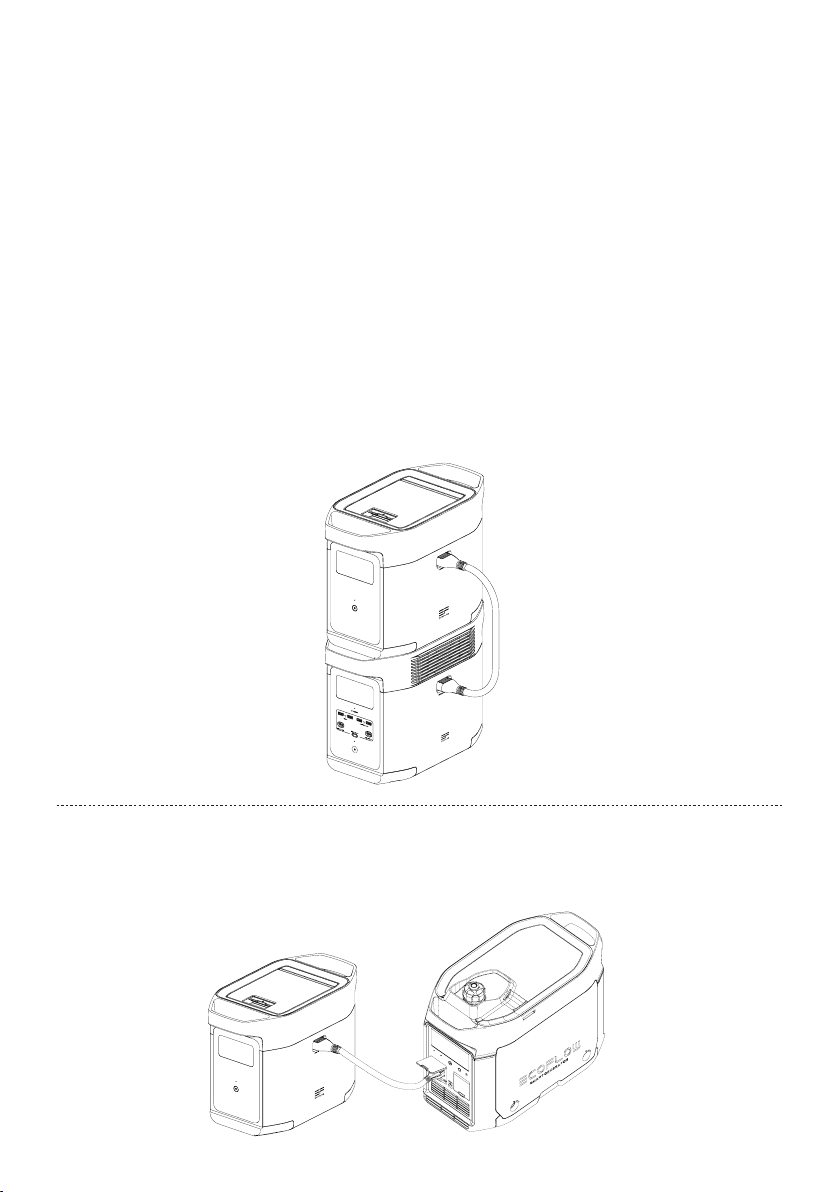
Voor gebruik in combinatie met DELTA 2
DELTA 2 Extra Batterij kan worden gebruikt met DELTA 2. Een DELTA 2 kan maximaal één DELTA 2
Extra Batterij ondersteunen om aan uitgebreidere capaciteitseisen te voldoen.
Lees de volgende punten zorgvuldig door voordat u het apparaat gebruikt:
1. Voordat u verbinding maakt met de DELTA 2 en de Extra Batterij, moet u de DELTA 2 en de DELTA 2
Extra batterij uitschakelen.
2. Nadat u de DELTA 2 Extra Batterij hebt aangesloten op DELTA 2, moet u ervoor zorgen dat de
pictogrammen Extra Batterij worden weergegeven op zowel de DELTA 2 Extra Batterij als het LCDscherm van Extra Batterij. Laad of ontlaad de DELTA 2 Extra Batterij nadat u beide pictogrammen
hebt gezien.
3. Sluit de DELTA 2 Extra Batterij NIET aan op DELTA 2 tijdens het ontladen of opladen. Als u de kabel
van Extra Batterij moet verwijderen, zorg er dan voor dat de DELTA 2 Extra Batterij en DELTA 2
beide zijn uitgeschakeld.
4. Raak de metalen Extra Batterij-poort NIET aan met uw handen of andere voorwerpen. Veeg hem
voorzichtig schoon met een droge doek wanneer er niet-gerelateerde materialen aan de metalen
poort zijn bevestigd.
5. Verbind de Extra Batterij-kabel stevig met DELTA 2 en de Extra Batterij. Als u zich niet aan
bovenstaande houdt, kan de verbinding oververhit raken. Dit heeft nadelige invloed op de prestaties
van het apparaat of kan leiden tot brand.
Opladen met Smart Generator
U kunt de DELTA 2 Extra Batterij opladen met de Smart Generator. Raadpleeg de
gebruikershandleiding van de Smart Generator voor meer informatie.
5
Page 70

4. Veelgestelde vragen
1. Welke batterij gebruikt het product?
Het gebruikt een LFP-batterij van hoge kwaliteit.
2. Hoe lang kan het product mijn apparaten opladen?
De oplaadtijd wordt weergegeven op het LCD-scherm van het product, dat kan worden gebruikt om
de oplaadtijd van de meeste apparaten met een stabiel energieverbruik te schatten.
3. Hoe weet ik of het product wordt opgeladen?
Tijdens het opladen wordt de resterende oplaadtijd weergegeven op het LCD-scherm. Ondertussen
begint het pictogram van de oplaadindicator te draaien met het resterende batterijpercentage en het
ingangsvermogen rechts van de cirkel.
4. Hoe moet ik het product schoonmaken?
Veeg het voorzichtig schoon met een droge, zachte, schone doek of keukenpapier.
5. Hoe moet ik het product opbergen?
Schakel het product uit voordat u het opbergt en bewaar het op een droge, geventileerde plaats op
kamertemperatuur. Plaats het apparaat niet in de buurt van waterbronnen. Voor langdurige opslag
dient u de batterij te ontladen tot 30% en hem elke drie maanden op te laden tot 60%. Zo kunt u de
levensduur van de batterij verlengen.
6. Kan ik het product meenemen in een vliegtuig?
Nee.
6
Page 71
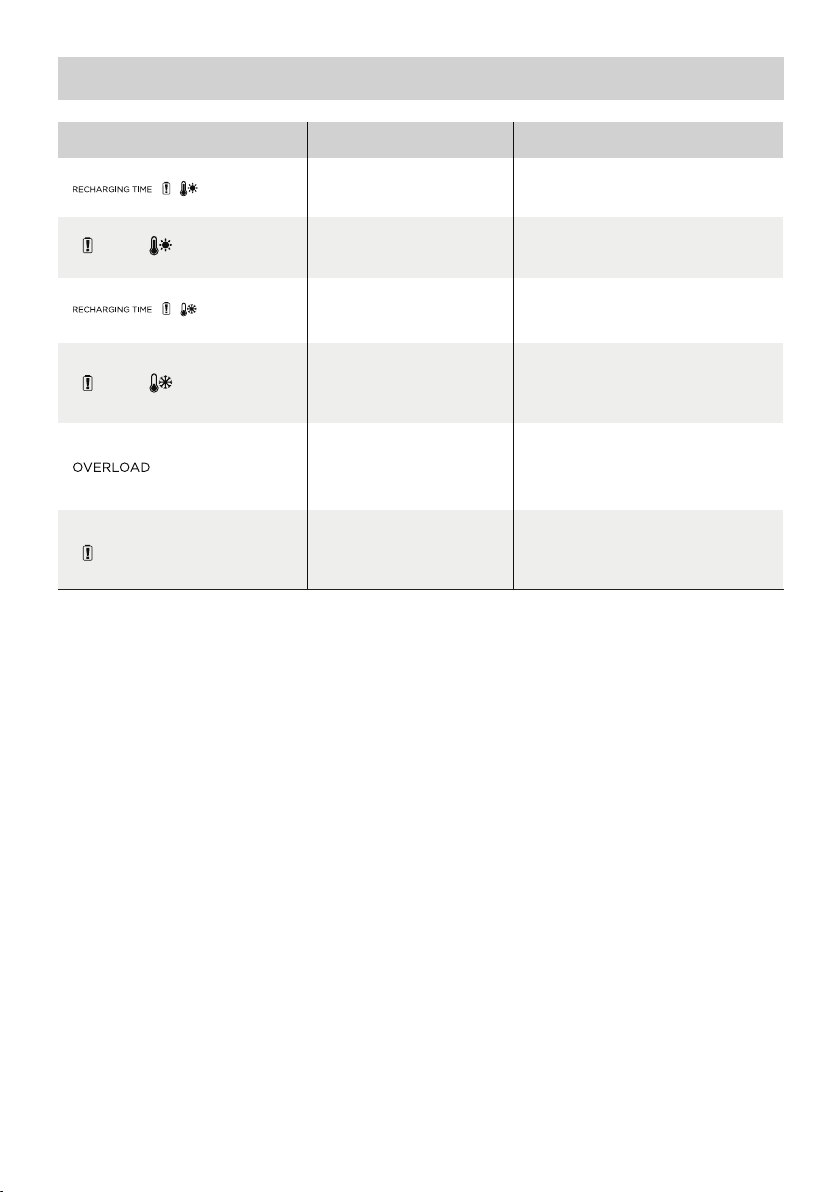
5. Problemen oplossen
Indicator Probleem
Pictogrammen
knipperen
samen
Pictogrammen
knipperen
tegelijkertijd
Pictogrammen
knipperen
tegelijkertijd
Pictogrammen
knipperen
tegelijkertijd
Pictogram
knippert
Pictogram
blijft aan
Als de Alarmmelding tijdens het gebruik op het LCD-scherm van het product wordt weergegeven en
niet verdwijnt na het opnieuw opstarten, stop dan onmiddellijk met het gebruik (probeer niet op te
laden of te ontladen).
Neem contact op met de klantenservice van EcoFlow als u andere ondersteuning nodig hebt.
Bescherming tegen hoge
temperatuur
Bescherming tegen
ontlading bij hoge
temperaturen
Lage temperatuur
Laadbeveiliging
Bescherming tegen
ontlading bij lage
temperaturen
Bescherming tegen
overbelasting van de batterij,
kortsluitingsbeveiliging
tijdens ontladen
Batterijstoring
Het opladen kan automatisch worden
hervat nadat de batterij is afgekoeld.
automatisch worden hervat nadat
Het opladen kan automatisch
wordenhervat zodra de temperatuur
van de batterij boven 5°C komt.
automatisch worden hervat nadat
debatterijtemperatuur boven
Verwijder elektrische apparaten
klantenservice van EcoFlow
Oplossing
De stroomvoorziening kan
debatterij is afgekoeld.
De stroomvoorziening kan
-12,2°Ckomt.
met een hoog vermogen
Neem contact op met de
7
Page 72
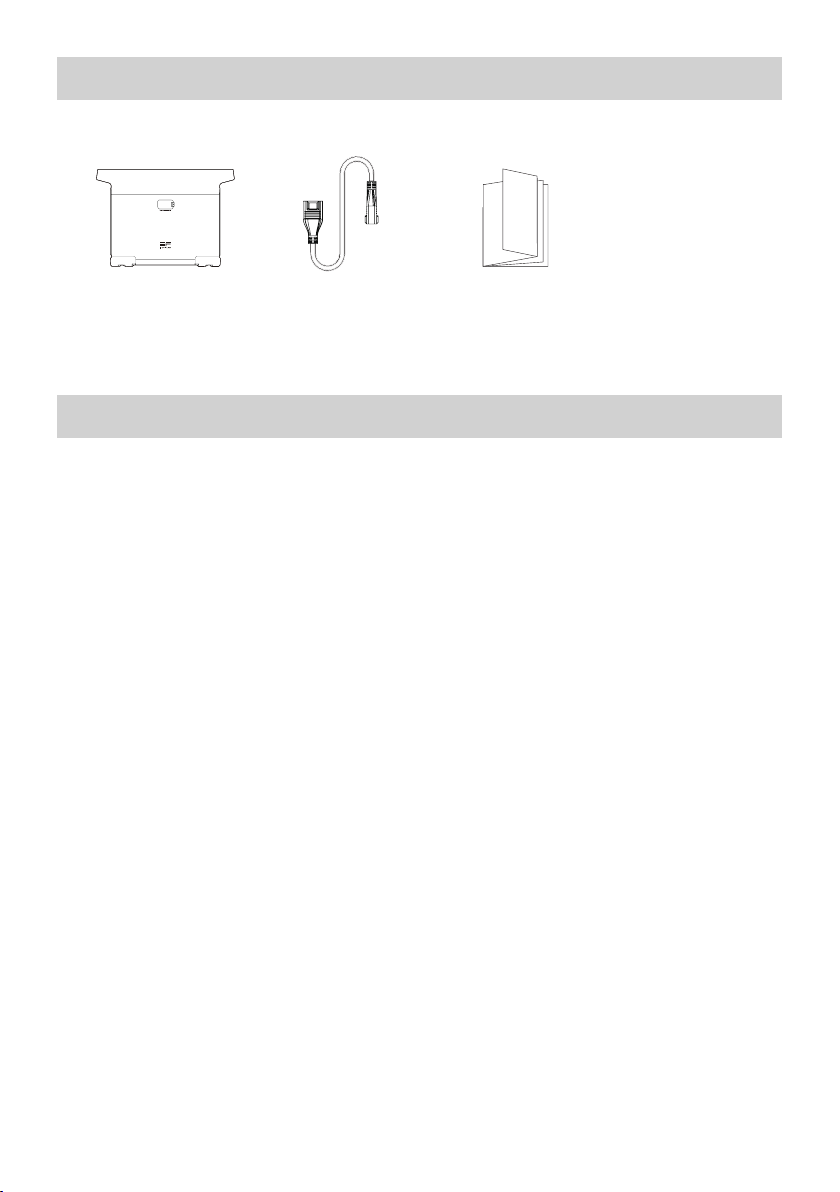
6. Inhoud van de doos
EcoFlow DELTA 2
Smart Extra Batterij
DELTA 2 Extra
Batterij-kabel
Gebruikershandleiding
engarantiekaart
7. Opslag en onderhoud
1. Gebruik of bewaar het product bij een omgevingstemperatuur tussen 20 °C en 30 °C, uit de buurt
van water, hitte en andere metalen voorwerpen.
2. Voor langdurige opslag dient u de batterij te ontladen tot 30% en hem elke drie maanden op te
ladentot 60%.
3. Bewaar het product uit veiligheidsoverwegingen niet gedurende lange tijd in een omgeving met een
temperatuur hoger dan 45 °C of lager dan -10 °C.
4. Als de resterende batterij minder dan 1% is nadat u het product hebt gebruikt, moet u deze tot 60%
opladen voordat u het product opbergt. Als het product lange tijd niet wordt gebruikt en de batterij
bijna leeg is, kan de batterijcel onherstelbaar beschadigd raken en wordt de levensduur van het
product verkort.
5. Als het product te lang inactief is geweest en de batterij bijna leeg is, wordt de slaapstand
geactiveerd. Laad in dat geval het product op voordat u het opnieuw gebruikt.
8
Page 73
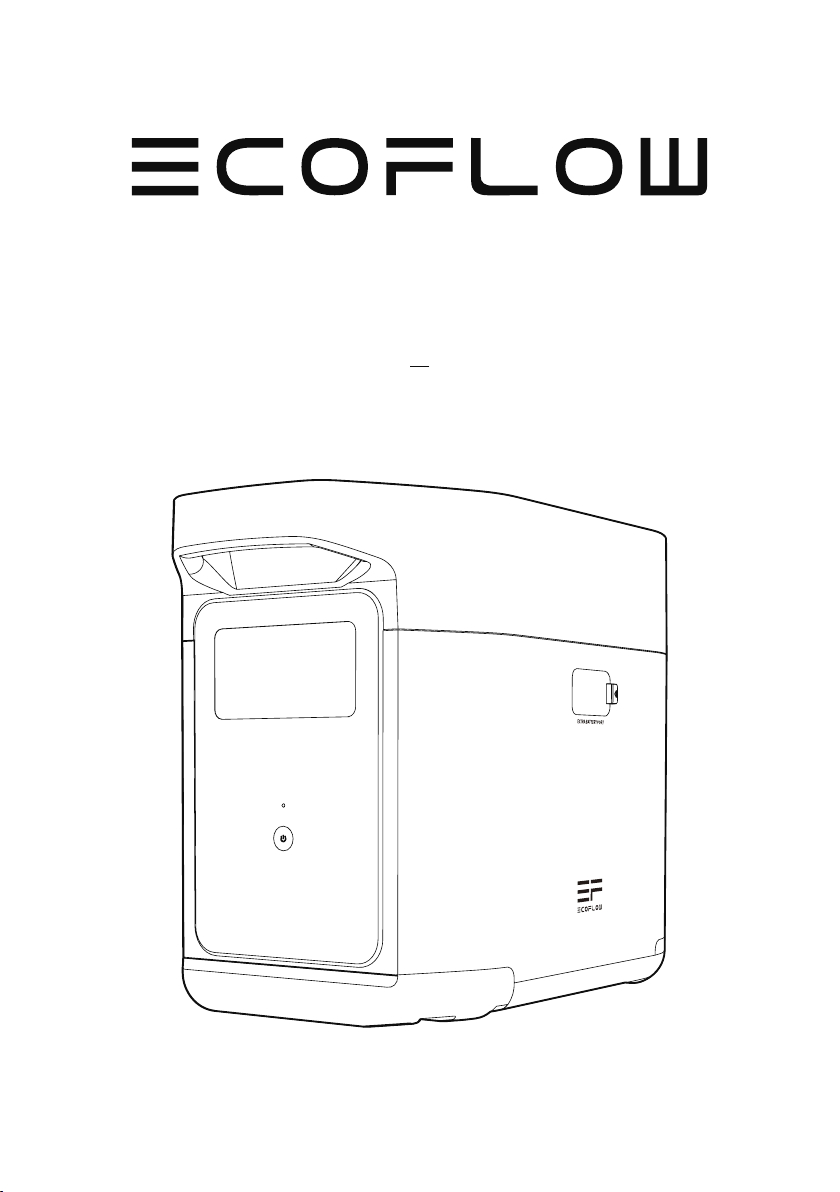
Дополнительный интеллектуальный
аккумулятор EcoFlow DELTA 2
Руководство пользователя
Page 74

Page 75

ЗАЯВЛЕНИЕ ОБ ОГРАНИЧЕНИИ
ОТВЕТСТВЕННОСТИ
Внимательно прочтите все рекомендации по технике безопасности, предупреждения,
условия применения и заявления об ограничении ответственности. См.
условия использования и заявление об ограничении ответственности на сайте
https://ecoflow.com/pages/terms-of-use, а также обратите внимание на наклейки
на изделии до начала использования. Пользователи несут полную ответственность
за эксплуатацию и выполняемые операции. Ознакомьтесь с применимыми нормами
законодательства, действующими в вашем регионе. Пользователь несет единоличную
ответственность за ознакомление со всеми соответствующими нормами и их
соблюдение при использовании продукции EcoFlow.
Дополнительный интеллектуальный аккумулятор EcoFlow DELTA 2 (далее именуемый «дополнительный
аккумулятор DELTA 2»)
Page 76

СОДЕРЖАНИЕ
1.
Технические характеристики
2. Техника безопасности
2.1 Эксплуатация
2.2 Инструкции по утилизации
3. Начало работы
3.1 Описание устройства
3.2 ЖК-экран
3.3 Общие правила эксплуатации
4. ЧАСТО ЗАДАВАЕМЫЕ ВОПРОСЫ
5. Поиск и устранение неисправностей
6. Комплект поставки
7. Хранение и обслуживание
1
2
2
3
4
4
6
7
8
8
Page 77
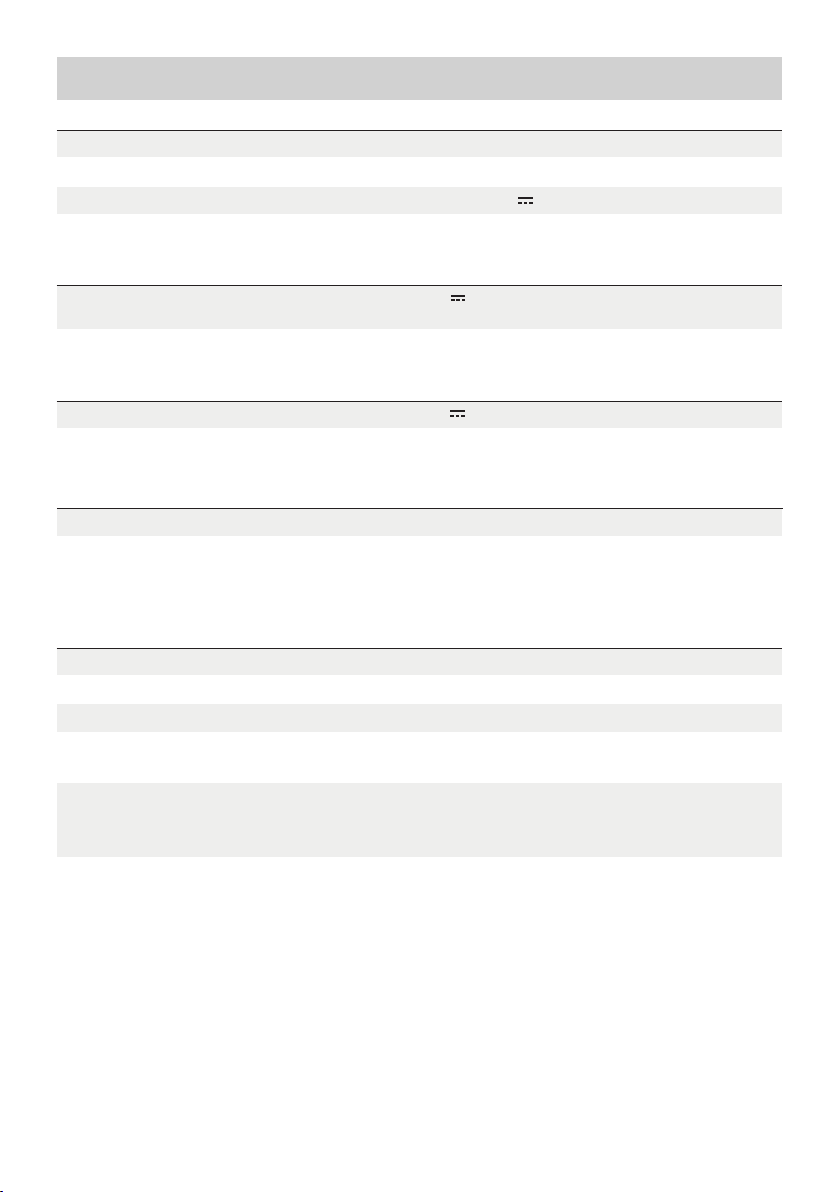
1. Технические характеристики
Общие сведения
Масса нетто
Размеры
Емкость
Входной порт
Входной порт дополнительного аккумулятора
Выходной порт
Информация об аккумуляторе
Химический состав элемента питания
Приблизительно 9.5 kg
400 x 211 x 281mm(15,7x8,3x11,1in)
1024 Вт-ч 51,2 В
51,2 В 1024 Вт макс. (двойная зарядка от
X-Stream и солнца)
51,2 В 2048 Вт макс.Выходной порт дополнительного аккумулятора
LFP
Циклический ресурс
3000 циклов на емкость 80%+.
Рабочая температура окружающей среды
Оптимальная рабочая температура
Температура разрядки
Температура зарядки
Температура хранения
Защита
* Возможность зарядки и разрядки аккумулятора зависит от фактической температуры
аккумуляторного блока.
20 – 30 °C (68 °F – 86 °F)
-10 – 45 °C (14°F – 113°F)
0 – 45 °C (32°F – 113°F)
-10 – 45 °C (14°F – 113°F) (оптимально: 20 – 30 °C
[
68°F – 86°F])
Защита от перенапряжения, защита от перегрузки,
защита от перегрева, защита от короткого замыкания,
защита от переохлаждения, защита от понижения
напряжения, защита от избыточного тока
1
Page 78

2. Техника безопасности
2.1 Эксплуатация
1. Не используйте устройство вблизи источников тепла, например источников огня или печей.
2. Не допускайте контакта с жидкостями. Не погружайте устройство в воду, не допускайте намокания.
Не используйте устройство под дождем или в условиях повышенной влажности.
3. Не используйте устройство в условиях сильного электростатического/магнитного поля.
4. Не разбирайте устройство и не допускайте проколов острыми предметами.
5. Не используйте проволоку или другие металлические предметы, которые могут привести к
короткому замыканию.
6. Не используйте компоненты или принадлежности от неофициальных производителей. Если
необходимо заменить компонент или принадлежность, уточните информацию по официальным
каналам EcoFlow.
7. При работе с устройством строго соблюдайте требования по температуре рабочей среды,
указанные в настоящем руководстве. При слишком высокой температуре среды возникает риск
пожара или взрыва; при слишком низкой температуре производительность аккумулятора может
значительно снизиться, или он может прекратить функционировать.
8. Не помещайте тяжелые предметы на устройство.
9. Не блокируйте вентилятор в ходе работы и не размещайте устройство на запыленных
непроветриваемых участках.
10. Защищайте устройство от ударов, падений или сильных вибраций в процессе эксплуатации. При
сильном внешнем ударном воздействии сразу же выключите питание и прекратите работу. Обеспечьте
надежное крепление аккумулятора при транспортировке для защиты от вибраций и ударов.
11. При случайном падении аккумулятора в воду в процессе работы разместите его на открытом
безопасном участке и не приближайтесь, пока он полностью не высохнет. Просохший аккумулятор
использовать запрещается; его необходимо должным образом утилизировать, см. раздел 2.2 ниже.
В случае возгорания аккумулятора мы рекомендуем использовать следующие средства
пожаротушения в указанном порядке: вода или распыленная вода, песок, пожарное покрывало,
порошковые огнетушащие вещества и, наконец, углекислотный огнетушитель.
12. Для очистки отверстий аккумулятора используйте сухую тряпочку.
13. Размещайте аккумулятор на ровной поверхности, чтобы не допустить опрокидывания и
повреждения. Если аккумулятор перевернулся и значительно повредился, незамедлительно
выключите его, разместите на открытом участке на расстоянии от горючих веществ и людей и
утилизируйте согласно местному законодательству и нормам.
14. Держите аккумулятор вне зоны доступа детей и домашних животных.
2.2 Инструкции по утилизации
1. Если возможно, обеспечьте полную разрядку аккумулятора перед утилизацией и утилизируйте в
специальный бак для сбора аккумуляторных батарей на вторичную переработку. Аккумуляторы
содержат потенциально опасные химические вещества, поэтому строго запрещается утилизировать
их в баки для обычного мусора. Дополнительную информацию см. в местном законодательстве и
нормах по вторичной переработке и утилизации аккумуляторов.
2. Если нет возможности полностью разрядить аккумулятор по причине отказа устройства, не
утилизируйте его в бак для сбора аккумуляторов на вторичную переработку. В таком случае
свяжитесь со специализированной компанией для отправки на дальнейшую переработку.
3. Утилизируйте чрезмерно разряженные аккумуляторы, которые невозможно перезарядить.
2
Page 79
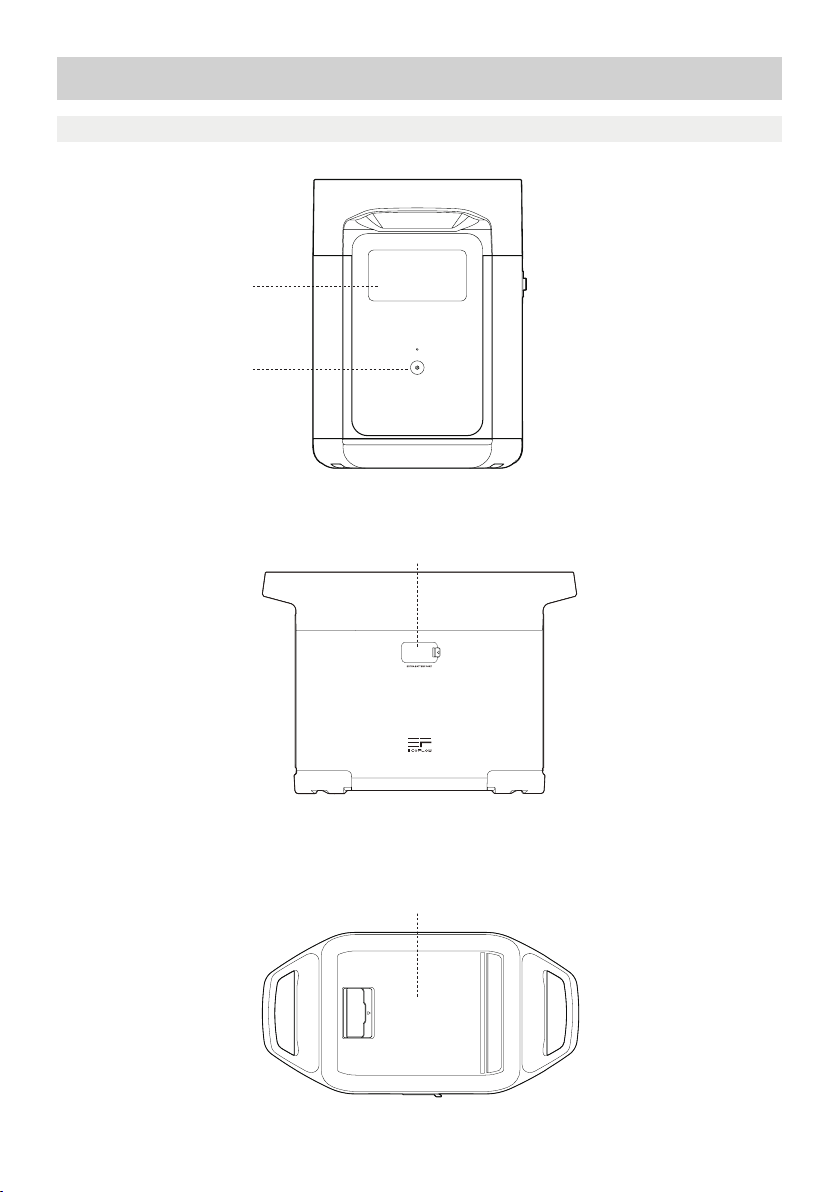
3. Начало работы
3.1 Описание устройства
ЖК-экран
Кнопка включения питания
Порт дополнительного аккумулятора
Отделение для хранения
3
Page 80
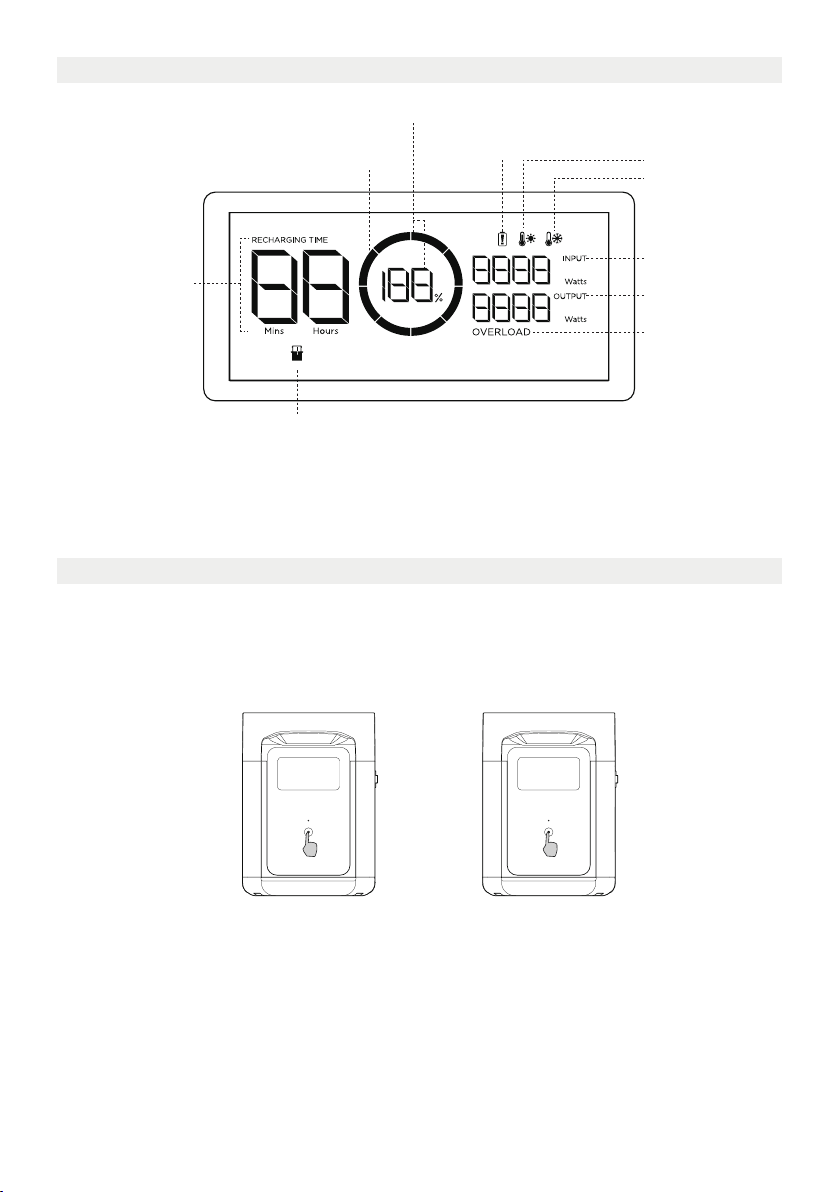
3.2 ЖК-экран
Оставшийся заряд в процентах
Предупреждение об
Индикатор уровня заряда
Оставшийся заряд/
Время разрядки
Индикатор дополнительного аккумулятора
Индикатор уровня заряда: Во время зарядки индикатор будет постоянно «заполняться». Если заряд
аккумулятора 0%, индикатор замигает для предупреждения.
* Действия по поиску и устранению неисправностей см. в разделе 5.
отказе аккумулятора
Предупреждение о
перегреве
Предупреждение о
переохлаждении
Энергопотребление
Выходная
мощность
Предупреждение
о перегрузке
3.3 Общие правила эксплуатации
Дополнительный интеллектуальный аккумулятор не может использоваться отдельно. Он может
использоваться с DELTA 2.
Подзарядка дополнительного аккумулятора DELTA 2 возможна только при подключении к DELTA 2 или
Smart Generator.
Короткое нажатие для
включения
Долгое нажатие для
выключения
Включение аккумулятора, выключение аккумулятора, включение ЖК-экрана
Коротким нажатием на кнопку включения питания включите устройство. ЖК-экран загорится, на нем
будет отображаться индикатор уровня заряда.
Аккумулятор переходит в спящий режим через 5 минут в неактивном состоянии. ЖК-экран автоматически
выключается. При изменении нагрузки или выполнении операций ЖК-экран автоматически загорается.
Для включения или выключения ЖК-экрана нажмите кнопку включения питания.
Для выключения аккумулятора нажмите и удерживайте кнопку включения питания.
Время в режиме ожидания по умолчанию составляет 2 часа. В отсутствие нагрузки в течение 2 часов
при остальных кнопках питания в выключенном положении аккумулятор автоматически выключается.
Можно настроить время ожидания в приложении.
4
Page 81
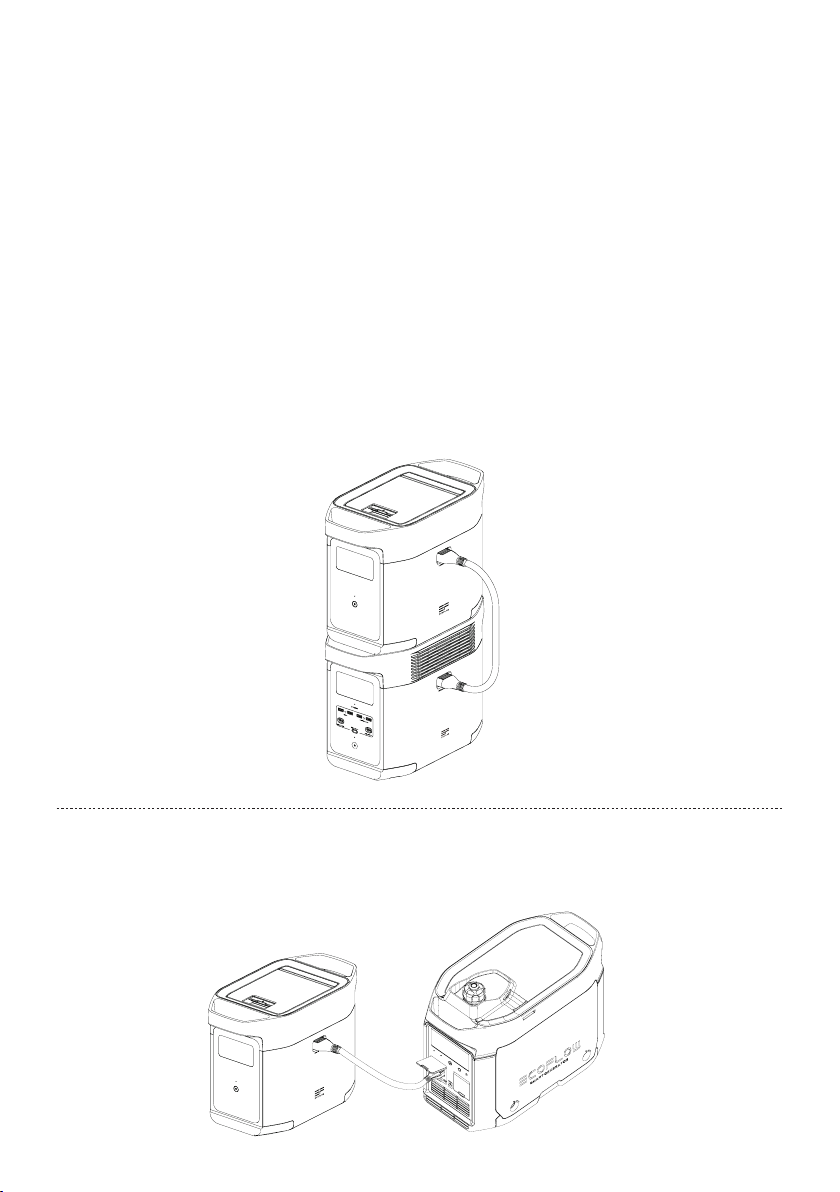
Для использования вместе с DELTA 2
Дополнительный аккумулятор DELTA 2 может использоваться вместе с зарядной системой DELTA 2.
DELTA 2 может поддерживать до одной дополнительной батареи DELTA 2 для удовлетворения более
широких требований к емкости.
Перед использованием внимательно прочтите следующие инструкции:
1. Перед подключением DELTA 2 и дополнительного аккумулятора убедитесь, что DELTA 2 и
дополнительный аккумулятор выключены.
2. После подключения дополнительного аккумулятора DELTA 2 к DELTA 2 убедитесь, что значки
дополнительного аккумулятора появляются наЖК-экранахдополнительного аккумулятора DELTA
2 и дополнительного аккумулятора. Начинайте зарядку или разрядку DELTA 2 с дополнительным
аккумулятором после того, как увидите оба значка.
3. НЕ ПОДКЛЮЧАЙТЕ дополнительный аккумулятор DELTA 2 к DELTA 2 в процессе разрядки или зарядки.
Если необходимо извлечь кабель дополнительного аккумулятора, убедитесь, что дополнительный
аккумулятор DELTA 2 и DELTA 2 выключены.
4. НЕ ПРИКАСАЙТЕСЬ к металлическому порту дополнительного аккумулятора руками или другими
предметами. Чтобы удалить загрязнения, осторожно протрите его сухой тряпочкой.
5. Надежно подсоедините кабель дополнительного аккумулятора к DELTA 2 и дополнительному
аккумулятору. При несоблюдении этой рекомендации возможно нагревание соединения, которое
может повлиять на работу устройства и привести к пожару.
Зарядка с помощью Smart Generator
Дополнительный аккумулятор DELTA 2 можно заряжать с помощью Smart Generator. См. подробную
информацию в руководстве для Smart Generator.
5
Page 82

4. ЧАСТО ЗАДАВАЕМЫЕ ВОПРОСЫ
1. Какая аккумуляторная батарея используется в устройстве?
В нем используется высококачественный аккумулятор LFP.
2. Как долго я смогу заряжать свои приборы с помощью устройства?
На ЖК-экране отображается примерное время зарядки для большинства устройств со стабильным
потреблением мощности.
3. Как понять, что аккумулятор выполняет зарядку?
В процессе зарядки на ЖК-экране отображается оставшееся время зарядки. Значок зарядки
вращается вместе со значением оставшегося заряда в процентах, мощность поступающего питания
отображается в правой части круга.
4. Как правильно чистить аккумулятор?
Осторожно протрите его сухой мягкой чистой тряпочкой или бумажным полотенцем.
5. Как правильно хранить аккумулятор?
Перед размещением на хранение выключите аккумулятор. После этого храните в сухом
проветриваемом помещении при комнатной температуре. Не храните рядом с источниками воды.
При размещении на долгосрочное хранение разрядите аккумулятор до 30% и подзаряжайте до 60%
каждые три месяца, чтобы обеспечить максимальный срок службы.
6. Я могу брать аккумулятор с собой в самолет?
Нет.
6
Page 83
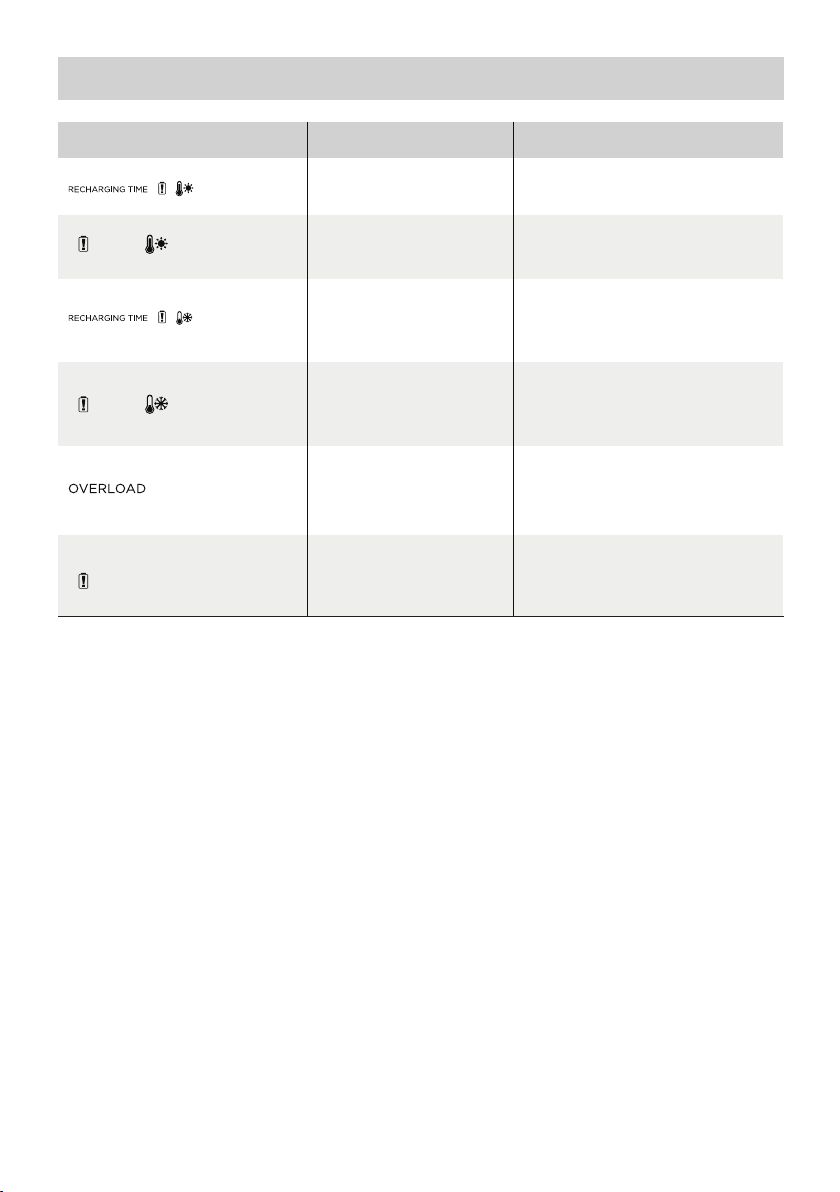
5. Поиск и устранение неисправностей
Индикатор Проблема
Значки мигают
вместе
Значки мигают
вместе
Значки мигают
вместе
Значки мигают
вместе
Значок мигает
Значок
продолжает
гореть
Если в процессе использования на ЖК-экране аккумулятора отображается аварийное сообщение,
которое не исчезает после перезагрузки, немедленно прекратите использование (не пытайтесь
зарядить или разрядить устройство).
За консультациями обращайтесь в службу поддержки EcoFlow.
Защита от перегрева при
зарядке
Защита от перегрева при
разрядке
Низкая температура
Защита при зарядке
Защита от переохлаждения
при разрядке
Защита от перегрузки
аккумулятора Защита от
короткого замыкания при
разрядке
Отказ аккумулятора
Зарядка может возобновиться после
того, как аккумулятор охладится.
возобновиться после того,
как аккумулятор охладится.
Зарядка может возобновиться
автоматически, когда температура
аккумулятора поднимется выше
возобновиться после того, как
температура аккумулятора
поднимется выше 10 °F (-12 °C).
Отсоедините электрические
приборы высокой мощности
Свяжитесь со службой поддержки
Решение
Подача питания может
41 °F (5 °C).
Подача питания может
EcoFlow
7
Page 84
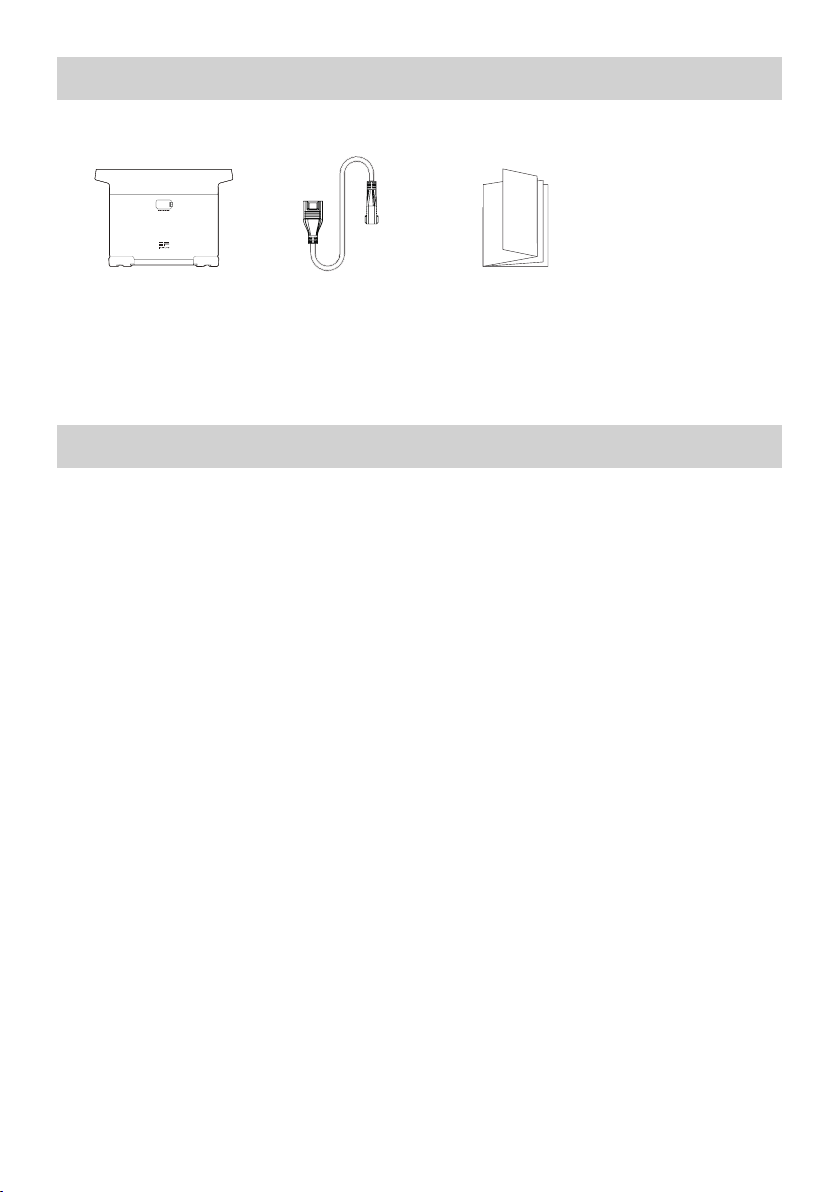
6. Комплект поставки
Дополнительный
интеллектуальный
аккумулятор
EcoFlow DELTA 2
Кабель
дополнительного
аккумулятора DELTA 2
Руководство
пользователя и
гарантийный талон
7. Хранение и обслуживание
1. Условия использования и хранения устройства: температура окружающей среды от 68°F (20 °С) до
86°F (30 °С), на расстоянии от источников воды, тепла и других металлических предметов.
2. При размещении на долгосрочное хранение разрядите аккумулятор до 30% и подзаряжайте до
60% каждые три месяца.
3. Из соображений безопасности не храните устройство при температуре выше 113°F (45 °С) или ниже
14°F (-10 °С) в течение длительного времени.
4. Если оставшийся заряд аккумулятора меньше 1% после завершения работы, зарядите его до 60%
перед размещением на хранение. Если аккумулятор остается в неактивном состоянии в течение
долгого времени с очень низким зарядом, возможно необратимое повреждение элементов питания
и сокращение срока службы устройства.
5. Если аккумулятор остается в неактивном состоянии в течение долгого времени с очень низким
зарядом, он переходит в защитный режим глубокого сна. В таком случае перед следующим
использованием зарядите аккумулятор.
8
Page 85
사용자 매뉴얼
Page 86

Page 87

Page 88

Page 89
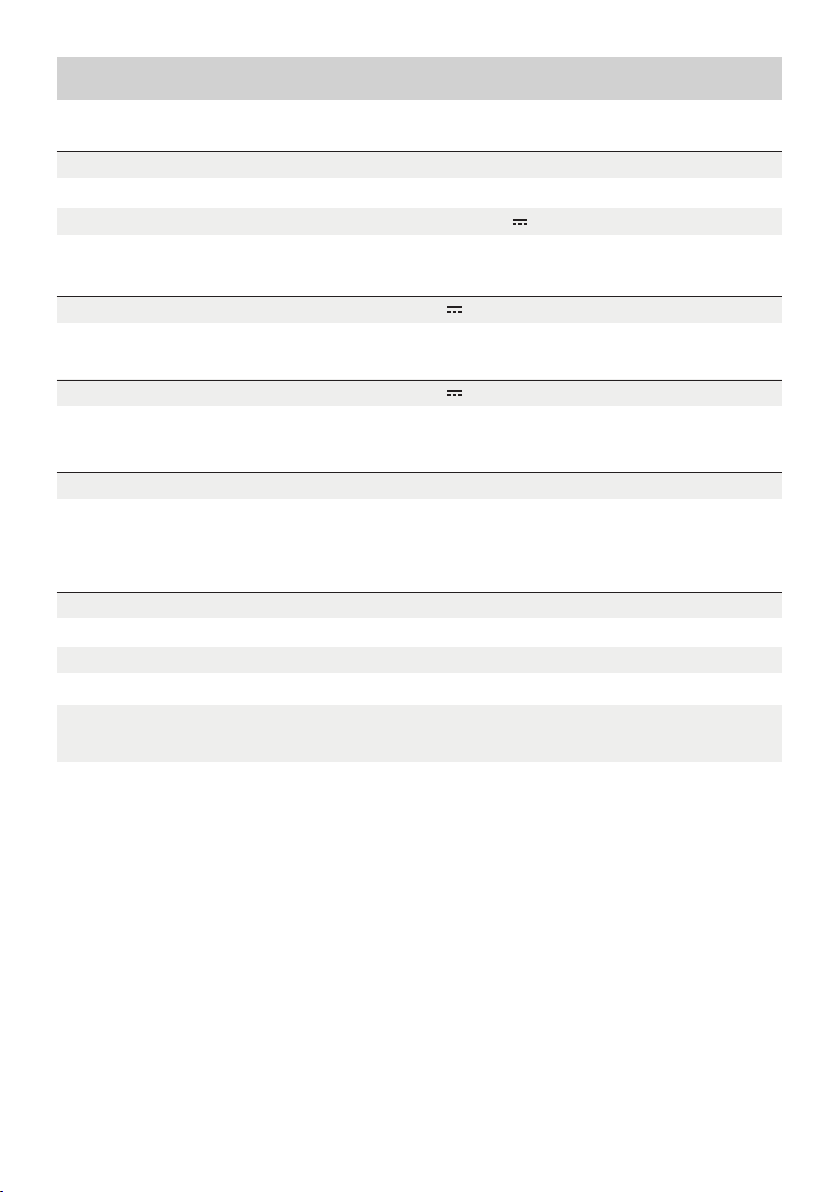
Page 90

Page 91
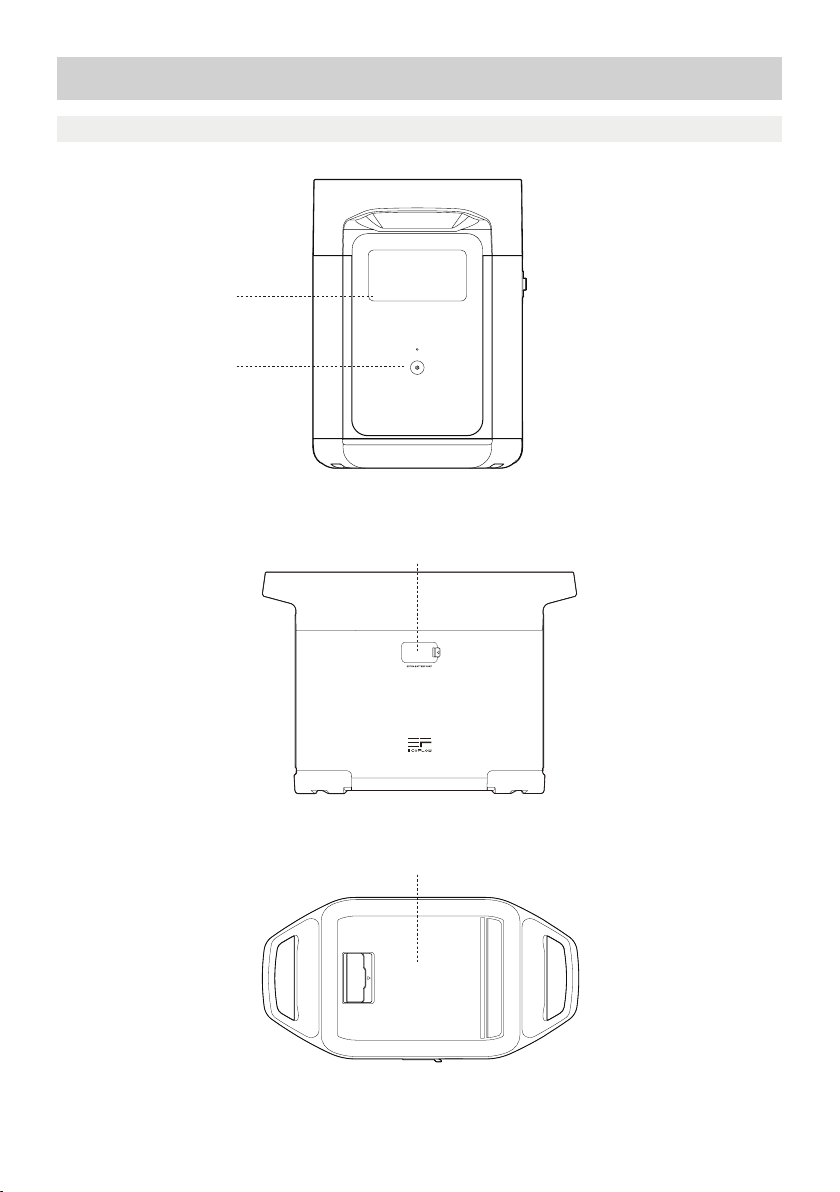
Page 92
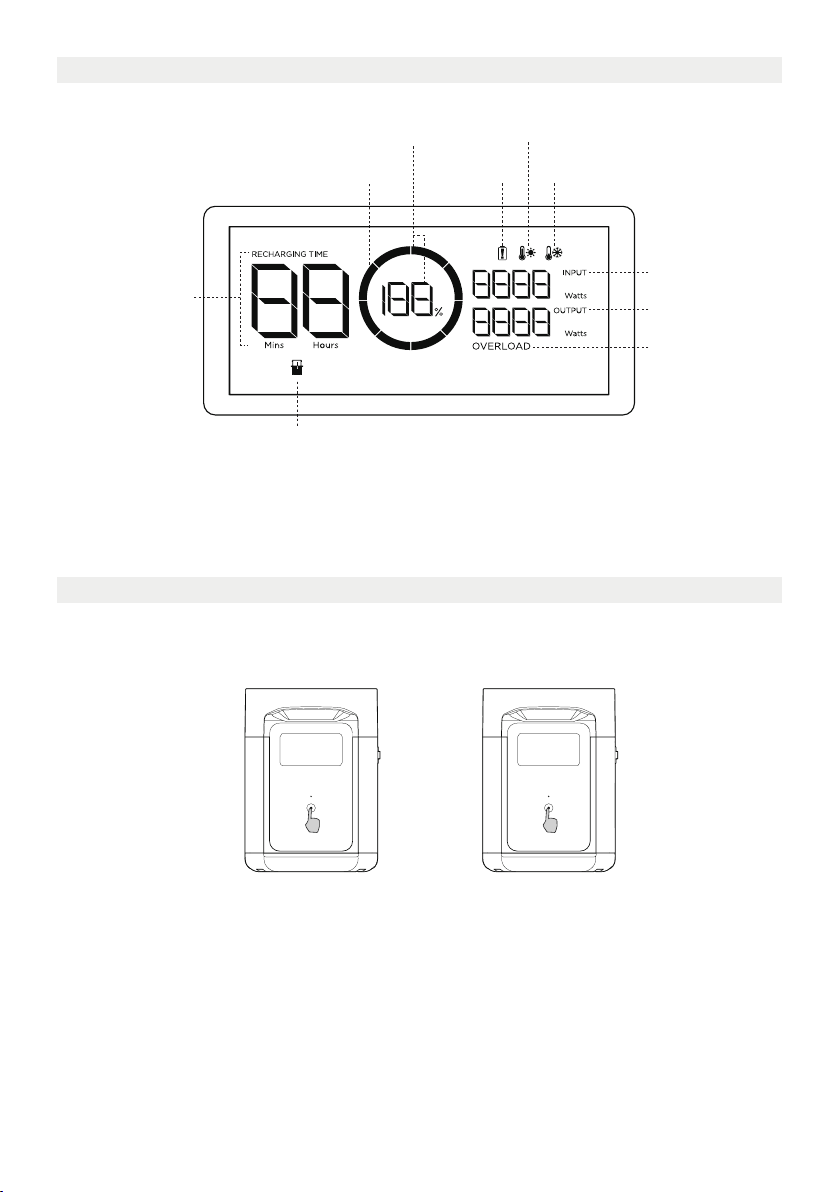
Page 93
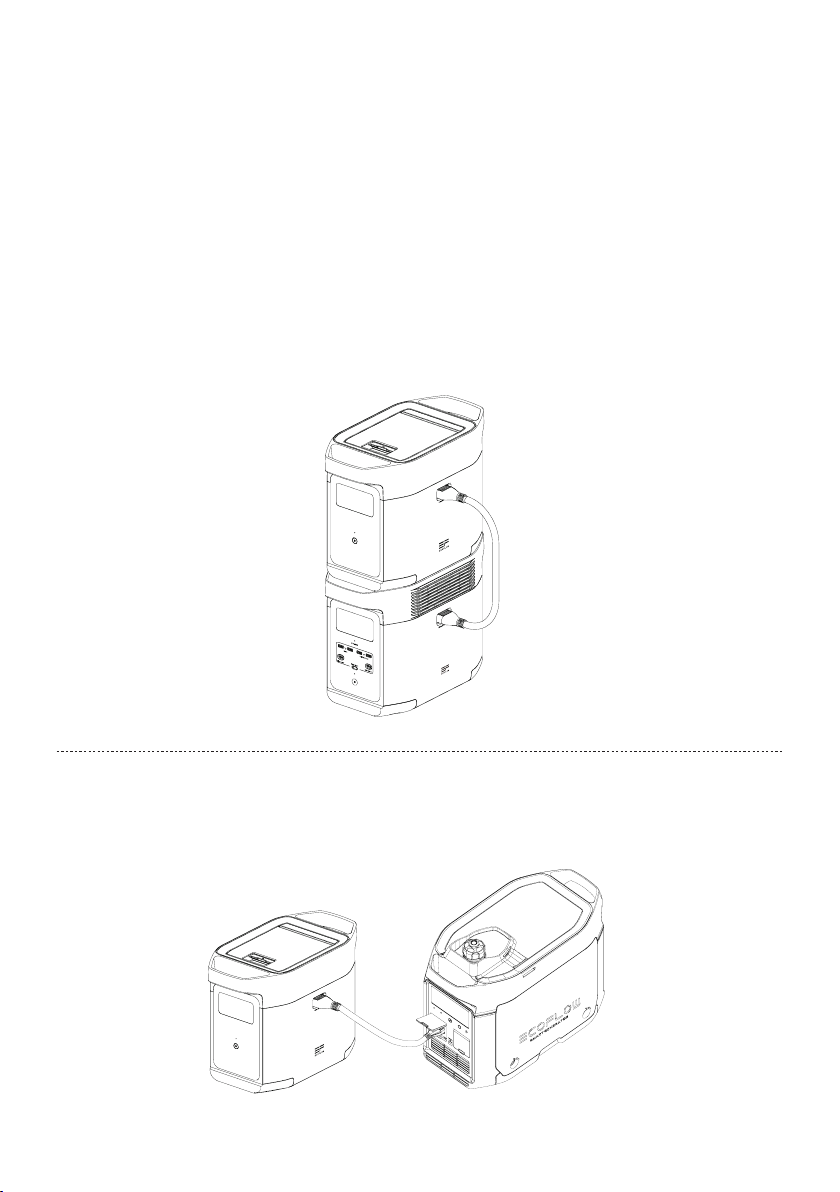
Page 94

Page 95
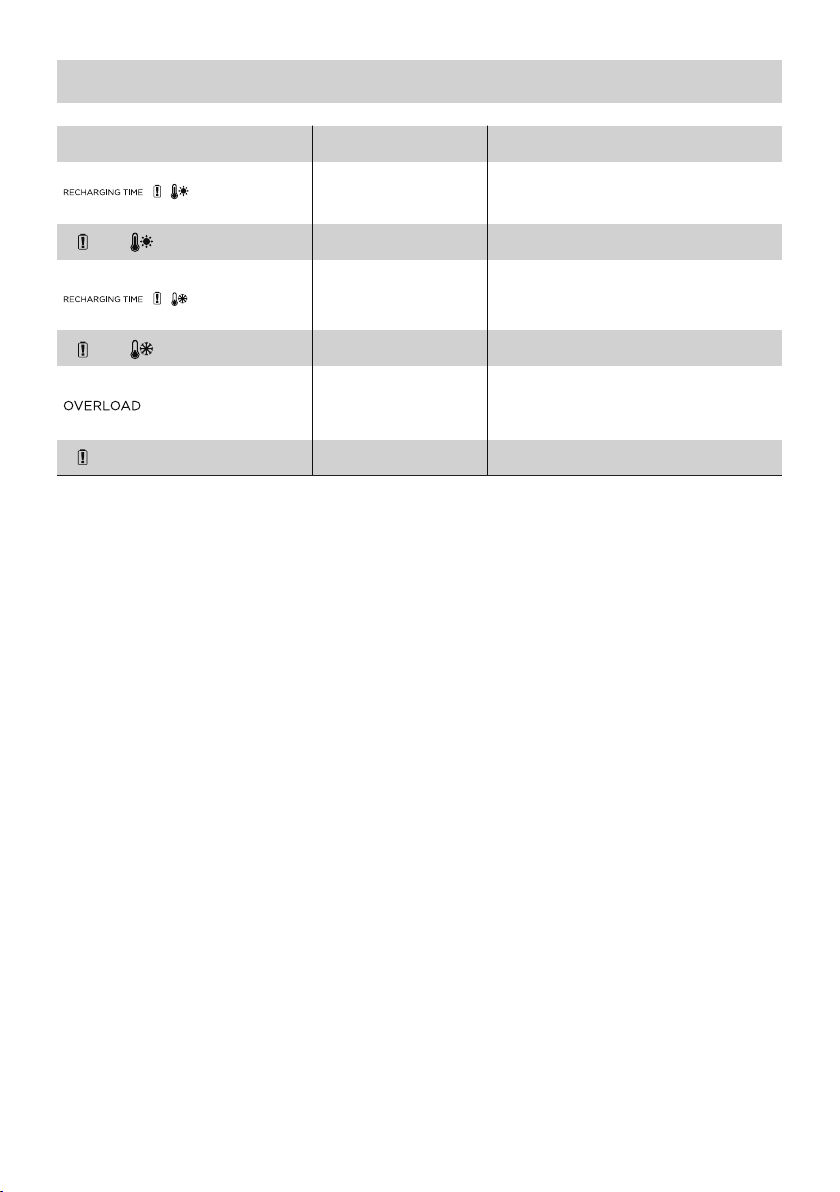
Page 96
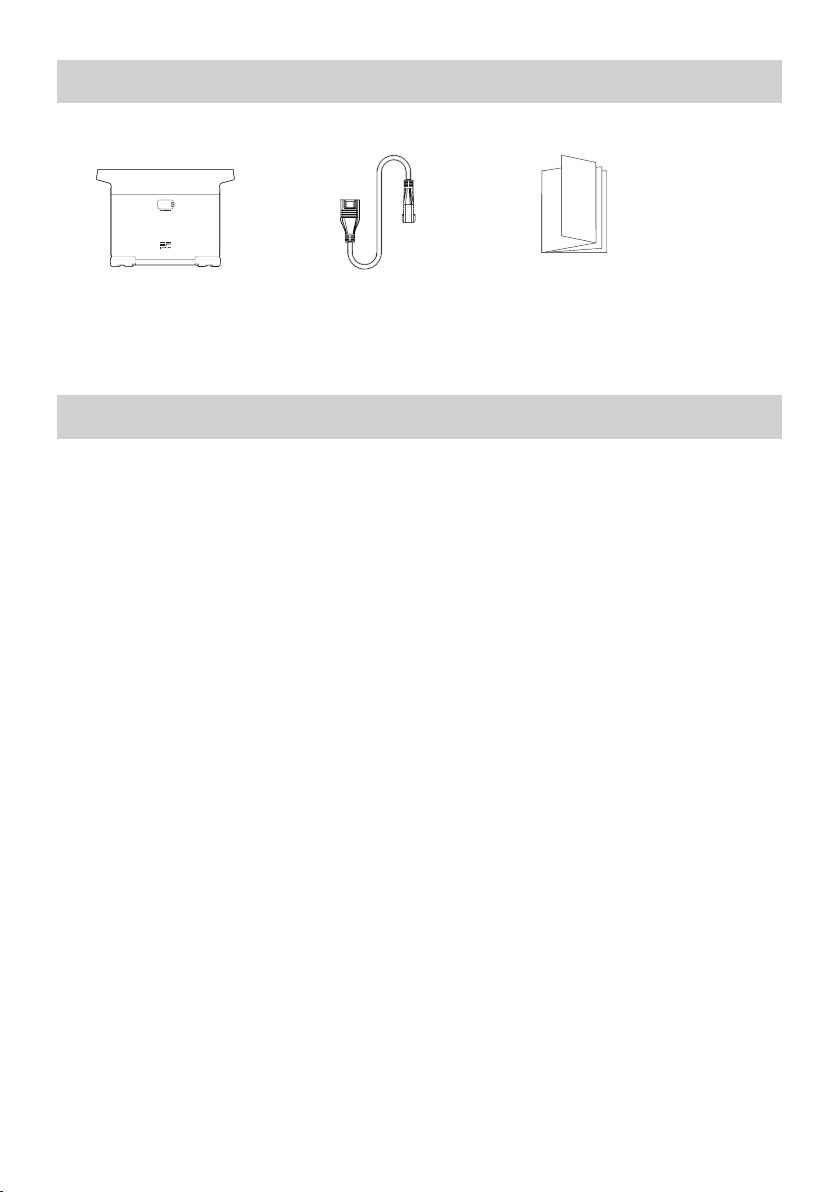
Page 97
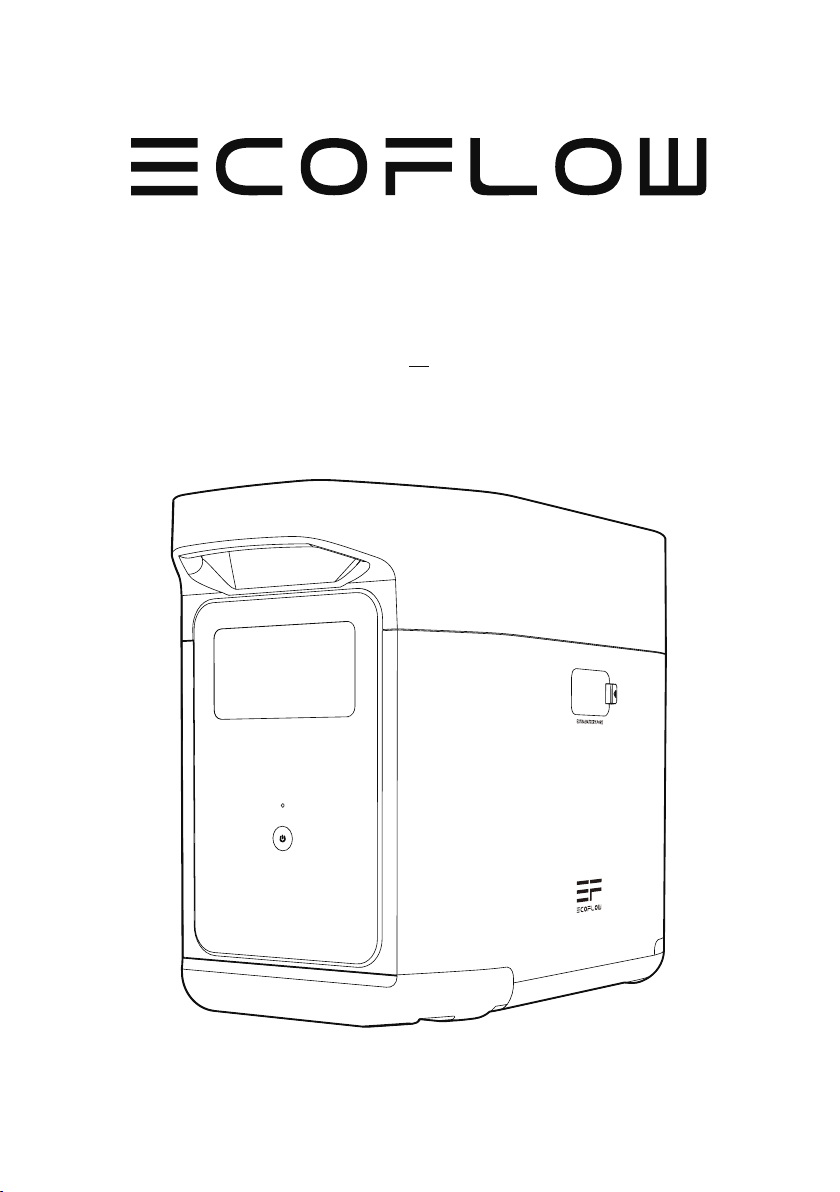
EcoFlow DELTA 2 専用エクストラ
バッテリー
ユーザーマニュアル
Page 98

Page 99

免責事項
製品使用前に本ユーザーマニュアルをよくお読みいただき、正しくお使いください。また、お
読みになった後は大切に保管してください。誤った取り扱いをすると、お客様ご自身または
他者へ重度の傷害を与える可能性や、製品破損故障または財産損失等を引き起こす場合が
あります。製品を使用した時点で、本ユーザーマニュアル内のすべての条項および内容を理
解したうえで同意したものとします。
お客様自身の行為およびそれにより生じるすべての結果に対して、EcoFlowは、一切の責任
を負わないものとします。
法規制に従い、EcoFlowは本ユーザーマニュアルおよび本製品に関連するすべての資料の最
終的な解釈の権利を有します。資料の更新、バージョン変更、サービス終了が生じる場合に
おいても、お客様に対して通達を行いませんので、EcoFlow公式Webサイトにアクセスして
最新版の製品情報をご確認ください。
EcoFlow DELTA 2 専用エクストラバッテリー(以下、「DELTA 2 エクストラバッテリー」)
Page 100

目次
1.スペック
2.安全ガイド
2.1 使用について
2.2 廃棄について
3.スタートガイド
3.1 各部の名称
3.2 ディスプレイアイコン説明
3.3 製品の使用方法
4.FAQ
5.異常表示と対応方法
6.同梱物
7.メンテナンスとケア
1
2
2
3
4
4
6
7
8
8
 Loading...