

Page 1
Instruction Manual 924-2
4/24/07
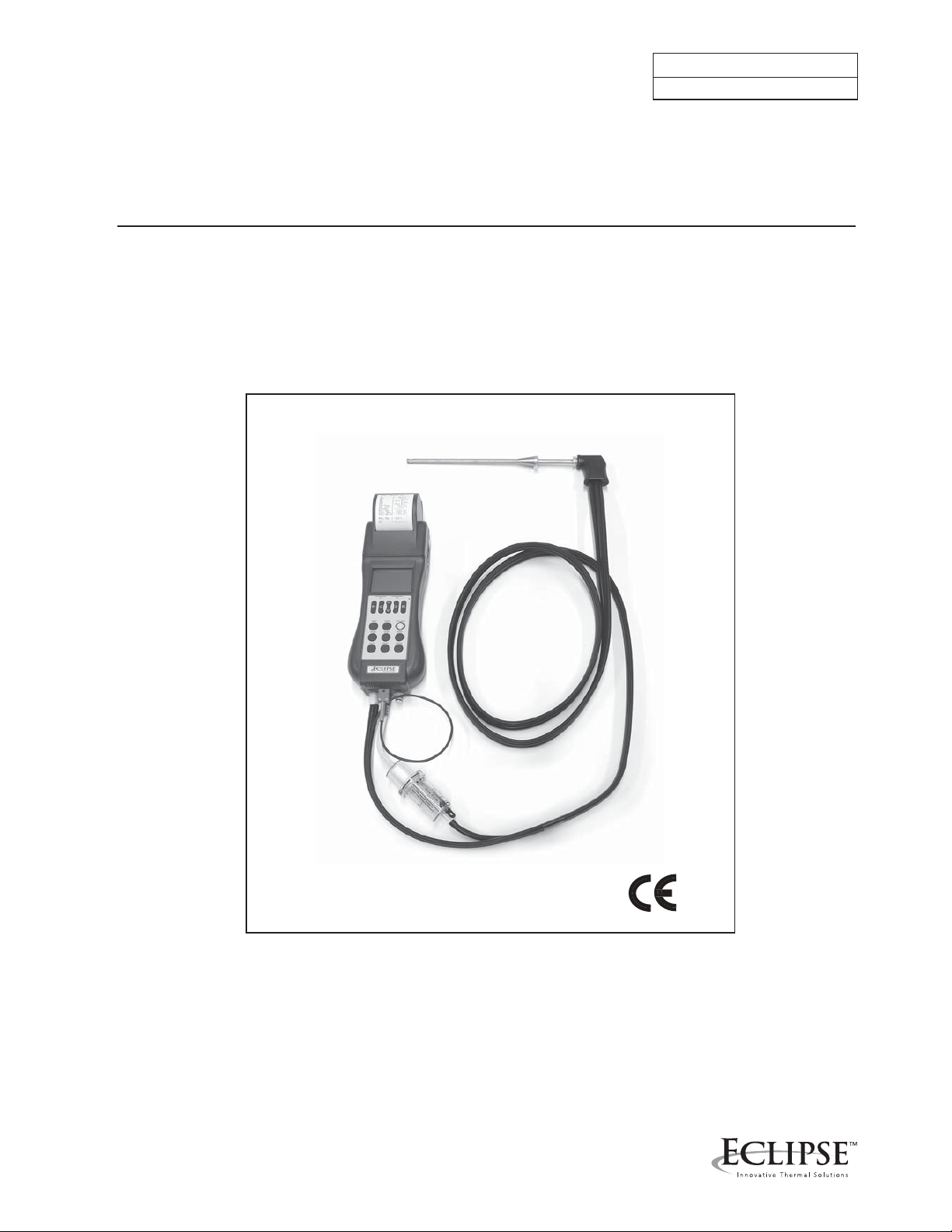
Eclipse EGA4 Combustion
Analyzer
Page 2

Instruction Manual MM850481 ed. 03a
INTRODUCTORY NOTE
N
OTE:THIS MANUAL IS VALID FOR INSTRUMENTS WITH SERIAL NUMBER 124012 AND FIRMWARE REV.1.XX2 OR HIGHER
This manual has all the information you need to install, operate and maintain the flue gas analyzers EGA4 and
its accessories.
Eclipse has used the best care and efforts in preparing this book and believes the information in this publication
are accurate. The Eclipse products are subjected to continuous improvements, in order to pursue the
technological leadership; these improvements could require changes to the information of this book.
Eclipse reserves the right to change such information without notice.
The EGA4 gas analyzers uses sophisticated analog and digital technologies. Any maintenance operation must
be carried out by qualified personnel
operation on the instrument. We recommend to contact our technicians for any support requirements.
The instrument is supplied by a Ni-MH rechargeable battery pack or by 100, 115, 230V
supply using the special power supply module provided with the instrument.
Eclipse shall not be liable in any event, technical and publishing error or omissions, for any incidental and
consequential damages, in connection with, or arising out of the use of this book.
The operator must not use this equipment for any other purpose than that stated.
This document is the property of Eclipse and may not be copied or otherwise reproduced, communicated in
anyway to third parties, not stored in any Data Processing System without the express written authority of
Eclipse.
ONLY. Eclipse supplies instructions and operative procedures for any
r
10% 50/60Hz line
2
Page 3

Instruction Manual MM850481 ed. 03a
TABLE OF CONTENTS
1 GENERAL DESCRIPTION .........................................................................................................................5
1.1 Ordering code ..............................................................................................................................................................6
1.2 Specifications...............................................................................................................................................................7
1.3 Accuracies and ranges ................................................................................................................................................8
2 GENERAL ...................................................................................................................................................9
2.1 Keypad & Display.........................................................................................................................................................9
2.2 Built-in printer...............................................................................................................................................................9
2.3 Gas sampling probe.....................................................................................................................................................9
2.4 Measuring sensors.......................................................................................................................................................9
2.5 Temperature probes ....................................................................................................................................................9
2.6 Pressure sensor...........................................................................................................................................................9
2.7 Fuel technical data.......................................................................................................................................................9
2.8 Smoke measurement.................................................................................................................................................10
2.9 Remote temperature probe........................................................................................................................................10
2.10 Ambient CO probe ................................................................................................................................................10
2.11 Natural gas probe..................................................................................................................................................10
2.12 Leak test procedure ..............................................................................................................................................10
2.13 Burner pressure probe ..........................................................................................................................................10
2.14 Pitot tube...............................................................................................................................................................10
2.15 CO Dilution............................................................................................................................................................10
2.16 Calibration certificate.............................................................................................................................................10
3 PHYSICAL DESCRIPTION.......................................................................................................................11
4 PRINCIPLE OF OPERATION ...................................................................................................................12
4.1 Measurement principle...............................................................................................................................................12
4.1.1 Gas sampling probe ..............................................................................................................................................13
4.1.2 Water trap & line filter............................................................................................................................................13
4.1.3 Gas sensors..........................................................................................................................................................13
4.2 Auxiliary measurements.............................................................................................................................................14
4.2.1 Temperature measurements.................................................................................................................................14
4.2.2 Pressure and Draft ................................................................................................................................................14
4.2.3 Smoke index measurement ..................................................................................................................................15
4.2.3.1 Measuring instruments (option)........................................................................................................................15
4.2.4 Other measurements ............................................................................................................................................15
5 RECOMMENDATIONS .............................................................................................................................16
5.1 Power supply .............................................................................................................................................................16
6 CONNECTIONS ........................................................................................................................................17
6.1 Electro-pneumatic connections..................................................................................................................................17
6.2 Gas probe positioning................................................................................................................................................17
6.3 Connecting to a PC....................................................................................................................................................18
6.3.1 USB installation.....................................................................................................................................................18
6.3.1.1 Installing the USB driver...................................................................................................................................19
7 OPERATIONS ...........................................................................................................................................21
7.1 Basic operation ..........................................................................................................................................................21
7.1.1 Keyboard...............................................................................................................................................................21
7.1.2 Display ..................................................................................................................................................................21
7.1.3 Display adjustment................................................................................................................................................22
7.1.4 Numerical input .....................................................................................................................................................22
7.1.4 Text input ..............................................................................................................................................................23
7.1.5 Select by a list .......................................................................................................................................................23
7.2 Flue gas analysis .......................................................................................................................................................24
7.3 Pressure/Draft measurement.....................................................................................................................................26
7.3.1 Burner pressure measurement..............................................................................................................................27
3
Page 4

Instruction Manual MM850481 ed. 03a
7.4 Smoke measurement.................................................................................................................................................27
7.4.1 Smoke index data input.........................................................................................................................................27
7.5 Combustion air temperature (option) .........................................................................................................................27
7.6 Flow/Return temperature measurement ....................................................................................................................28
7.7 Gas velocity measurement ........................................................................................................................................28
7.8 Analysis data print......................................................................................................................................................30
7.8.1 Paper and Ribbon change ....................................................................................................................................30
7.9 Pressure decay procedure (option)............................................................................................................................31
7.9.1 Test A (1 minute)...................................................................................................................................................31
7.9.2 Test B (programmable) .........................................................................................................................................33
7.10 Ambient CO probe (option) ...................................................................................................................................35
7.10.1 CO probe operations.............................................................................................................................................35
7.11 Natural gas leak external probe (option) ...............................................................................................................36
8 MEMORY MANAGEMENT .......................................................................................................................38
8.1 Store data analysis ....................................................................................................................................................38
8.2 Tag selection .............................................................................................................................................................38
8.3 Delete memory...........................................................................................................................................................39
8.4 Recall memory...........................................................................................................................................................39
8.5 DBGas 2004 ..............................................................................................................................................................40
8.5.1 Installing DbGas 2004...........................................................................................................................................40
8.5.2 Registering the Software.......................................................................................................................................41
8.5 GasConfig..................................................................................................................................................................41
8.5.1 GasConfig Installation ...........................................................................................................................................42
8.5.2 How to operate using GasConfig ..........................................................................................................................42
8.5.3 Transfer configuration to PC .................................................................................................................................44
8.5.4 Transfer configuration to the Analyzer ..................................................................................................................44
9 CONFIGURATION ....................................................................................................................................45
9.1 Engineering Units.......................................................................................................................................................45
9.2 Alarms........................................................................................................................................................................46
9.3 HELP key...................................................................................................................................................................46
9.3.1 Header setting.......................................................................................................................................................46
9.3.2 Sensor Diagnostic .................................................................................................................................................47
9.3.3 Service Data..........................................................................................................................................................47
10 MAINTENANCE ........................................................................................................................................48
10.1 Water trap .............................................................................................................................................................48
10.2 Error messages.....................................................................................................................................................49
10.3 Set-up menu..........................................................................................................................................................49
10.3.1 Clock.....................................................................................................................................................................50
10.3.2 Serial Port .............................................................................................................................................................51
10.3.3 Analysis parameters..............................................................................................................................................51
10.3.4 P decay time .........................................................................................................................................................51
10.4 Firmware Upgrade ................................................................................................................................................52
10.5 Smoke pump maintenance ...................................................................................................................................52
11 CERTIFICATES.........................................................................................................................................53
11.1 Warranty terms......................................................................................................................................................53
11.2 Letter of conformity ...............................................................................................................................................53
APPENDIX .............................................................................................................................................................54
A1 Example.....................................................................................................................................................................54
4
Page 5
Instruction Manual MM850481 ed. 03a
1 GENERAL DESCRIPTION
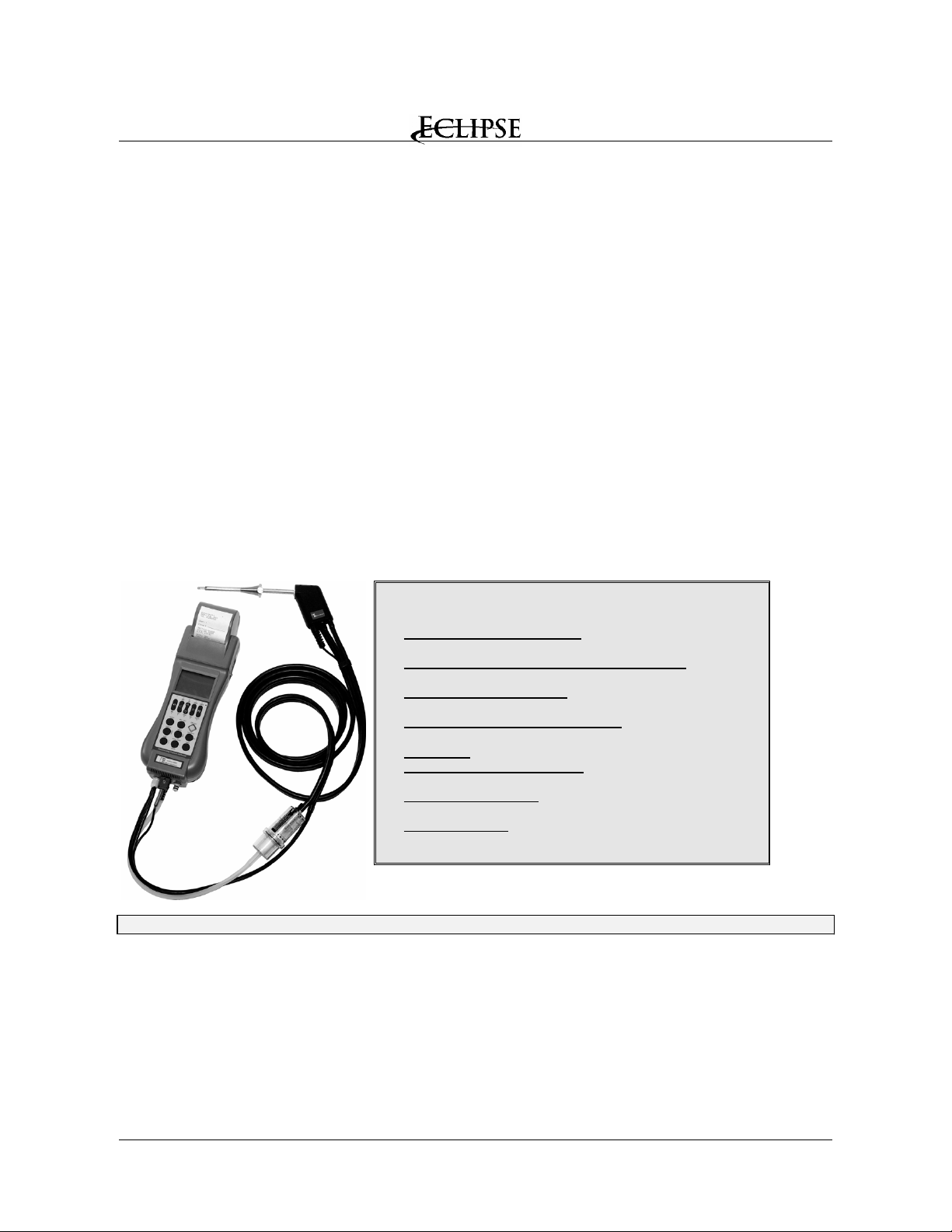
EGA4 is designed to satisfy the market needs; but they are the result of the advanced research and experience of Eclipse.
EGA4 is a multigas compact palm-top multifunction instrument. The micro-processor based instrument includes a flue gas
analyzer, an emissions monitor and an ambient parameters indicator. Two internal electrochemical sensors read the Oxygen
) and carbonic monoxide (CO) gas concentration. The gas temperature and air temperature are used in connection with
(O
2
the gas analysis to calculate the efficiency, excess air, and CO
used for calculations approved in accordance with DIN33962.
A third cell (NO or SO
) enables the pollution measurement. The NO concentration can be expressed in terms of NOx as
2
required by ambient laws.
External sensors are available for ambient parameters measurement: ambient CO, to check and evaluate gas network
leakage and natural gas leakage detector.
concentration. A 10 gas parameters programmable table is
2
EGA4 can install a forth electrochemical sensor to monitor pollution. In this way you can measure simultaneously and using a
single unit, NO/NOx and SO
gas concentration.
2
The instruments are completed with a pressure (draught) sensor, an internal printer, an internal memory for storing data and
a RS232 serial interface for configuration and data transfer from and to a PC.
i Draft measurement is possible using the internal pressure sensor and the special gas sample probe.
i The optional internal printer is impact type and the generated document is very legible and has a long time duration.
i The internal standard memory may store up to 250 complete gas analysis divided by Tag.
i The instruments have a standard USB serial interface and a configuration PC software are available to configure the
analyzer.
Features & Benefits
New user friendly interface: very intuitive and in English
language to use the instrument without instruction manual.
Large dimensions and lighting LCD display: very legible
using the “Zoom” function and the automatic back-light device.
Easy and quick upgrading hardware and software are made
using modular design to upgrade the system yourself.
Differential pressure measurement: gas velocity, pressure,
draft, 'P, etc.
Averaging between three gas analysis.
Internal impact type printer: more legible and long time
duration for you documents.
Single battery pack: rechargeable to power both the
instrument and the printer.
Internal memory: up to 250 complete data analysis and USB
port
THE INSTRUMENT IS FULLY EN 50379 PART 2 AND PART 3 COMPLIANT
5
Page 6

Instruction Manual MM850481 ed. 03a
1.1 Ordering code
7826 – A – B – CC – D – EEE – F – GGG – H
Each EGA4 is equipped with a O2 sensor, internal 250 memory, realtime clock capabilities, USB serial cable, electrovalve for autozero quick
start-up, magnetic rubber holster, rechargeable battery pack, battery charger and supplied with a Report of Calibration and an instruction
manual.
Table A Sensor n.1
1 O2 (0-25%)
Table B Sensor n.2
0 none
2 CO (0-8000 ppm) H
2L CO (0-500 ppm)
2X CO (0-20000 ppm) + CO sensor exclusion
2Y CO (0-10.00 %)
Table C Sensor n.3 & 4
0 none
4 NO/NOx (0-4000 ppm)
4LO NO/NOx (0-500 ppm)
5 NO
5LO NO
6 SO
8 CxHy (0-5.00%)
(0-1000 ppm)
2
(0-500 ppm)
2
(0-4000 ppm)
2
Table D Gas sampling probe (air filter and water trap included)
0 none
2 Standard (l=300 mm) max 800°C + Draft (dual hose) (cat. BB610046) max 500°C
5D Standard (l=750 mm) max 800°C + Draft (dual hose) (cat. BB610080) max 500°C
5X Standard (l=750 mm) max 800°C + Draft (single hose) (cat. BB610050) max 1000°C
8 Standard (l=750 mm) max 800°C + Draft (single hose) (cat. BB610082) max 1200°C without TC
F Sinterized filter (max.800°C)
compensated + CO sensor exclusion
2
Table E Options
0 none
1 Internal impact printer
2H Draft and differential pressure measurements capability + dual hoses with connector
4 Graphic display capability
6 Electrovalve for autozero quick start-up
8 Internal sensor for gas leak detector
Table F Battery charger
1 115 Vac with USA plug
2 230 Vac with Schuko plug
3 230 Vac with UK plug
4 230 Vac with European plug
5 100 Vac with USA/Japan plug
Table G Accessories
0 None
1 Data Manager Software Package DBGas 2004 standard (cat. EE260166)
3V Vinyl Carrying case with shoulder strap (instrument + gas probe + accessories) (cat. BB830043)
3 ABS Carrying case (instrument + gas probe + accessories) (cat. BB830028)
4 Aluminium carrying case (instrument + gas probe + accessories) (cat. BB830033)
5 Remote air sensor with 2 meters cable length (cat. BB830018)
8 External Ambient CO probe (cat. BB830009)
9 External probe for gas leak test (sniffer)
B External Manual pump for smoke measurement with filters and comparing table
D External probe for ionization current measurements (cat. BB830019)
E Pitot tube BB610032 (only with option E=2H)
G 12 Vdc auto battery charger (cat. BB290032)
Table H Calibration certificate
1 Eurotron report
6
Page 7
Instruction Manual MM850481 ed. 03a
1.2 Specifications
Type: 2, 3 or 4 cells palm-top flue gas analyzer/Boiler tuning unit.
Calibration: automatic 60 seconds calibration procedure at instrument switching-on. Optional autozero electrovalve for
quick start-up.
Self-diagnosis: Sensors efficiency test with anomalous status announcement.
Fuel types: Up to 10 totally programmable.
Pump: rate of flow 0.8 lit / head –230mbar
All data measured using 3 meters long probe and line filter connected. Load loss = 10 mbar using a 3 meters probe
extension
Power supply: High capacity Li-Ion rechargeable battery pack / external battery charger.
Charging time : 3h at 90% with instrument off.
Battery life: 10h continuous operation (without printer and back-light).
Printer: Impact type 24 columns with 58 mm large and 18 meters long paper roll
Printer power supply: using the analyzer battery pack.
Automatic CO(ppm) dilution: Automatic sensor protection from high CO concentration
Internal data memory: up to 250 complete analysis data structured by Tags.
Service and user data: 3 programmable lines for each programmed customer using a PC and DBGas Software.
Report Herder: 4 rows x 16 characters programmable from keyboard
Display: Large (40x56 mm) graphic LCD display with automatic back-light device. Bargraph and trend capability as
option.
Serial interface: USB standard interface
Smoke measurement: Using the optional external manual pump. Bacharach index memory store and printout capability
as standard.
Optional probes: ambient CO, explosive gas leakage sniffer.
Working temperature: from –5°C to +45 °C (up to 50°C for short time)
Storage temperature: from –20 to +50°C (3 months maximum at temperatures exceeding the operational limits).
Dimensions: 115x90x330 mm
Weight: 1.1 kg battery and printer included
External Probes
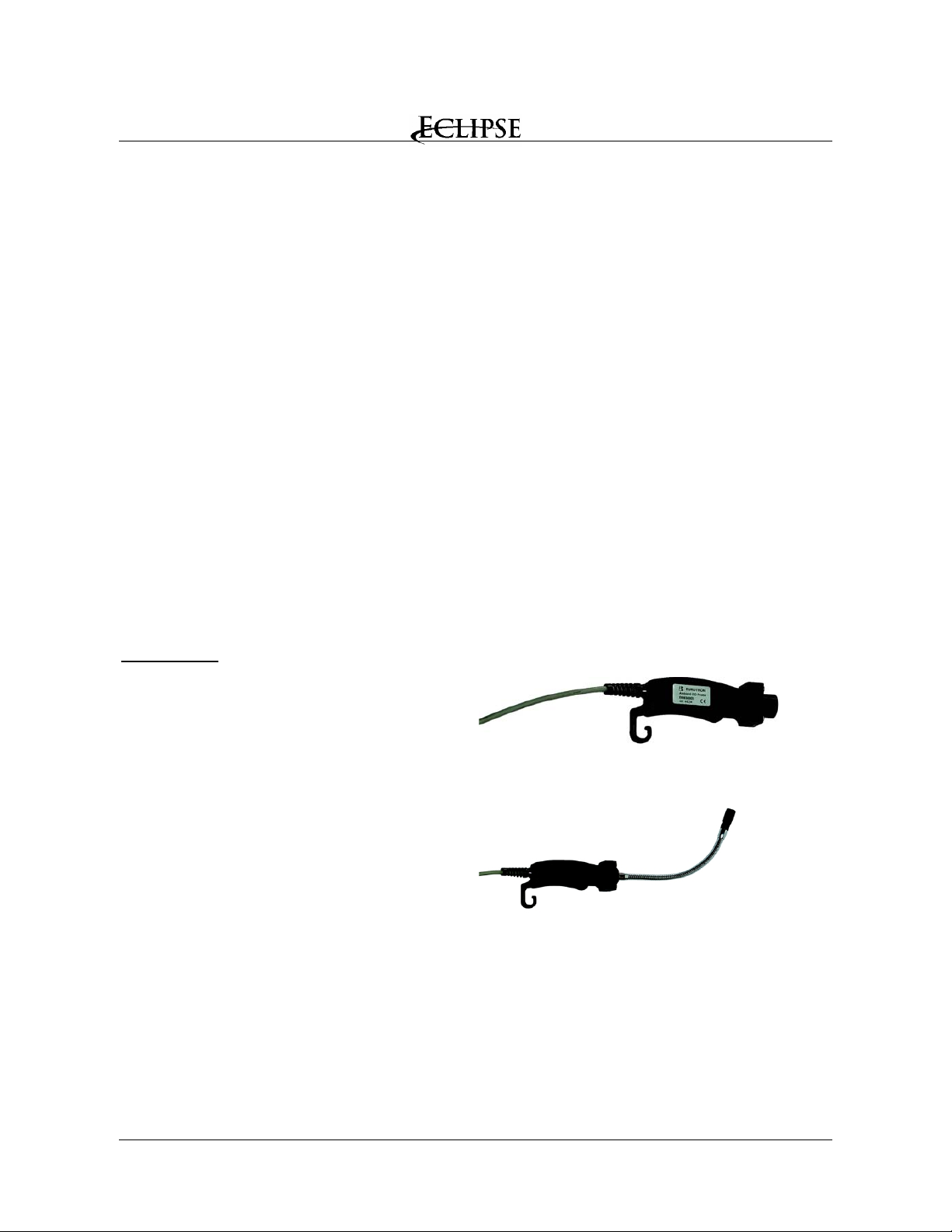
Ambient CO probe
Range: from 0 to 500ppm
Accuracy: r5ppm up to 100ppm; r5% up to 500ppm
Resolution: 1ppm
Response time: 30s (t90)
Waiting starting time: 30s
Working temperature: from –5°C to +45 °C
Natural gas leak detection probe
Pre-heating time: 30s minimum
Alarms indication: visual with 5 steps
5 alarms levels: 100, 200, 300, 400, 500 ppm
Acoustic Alarm indication: respectively 1, 2, 3, 5 bip/s,
continuous
Response time: 5s (t90)
Alarm levels Accuracy: r10% at 90 days
7
Page 8
Instruction Manual MM850481 ed. 03a
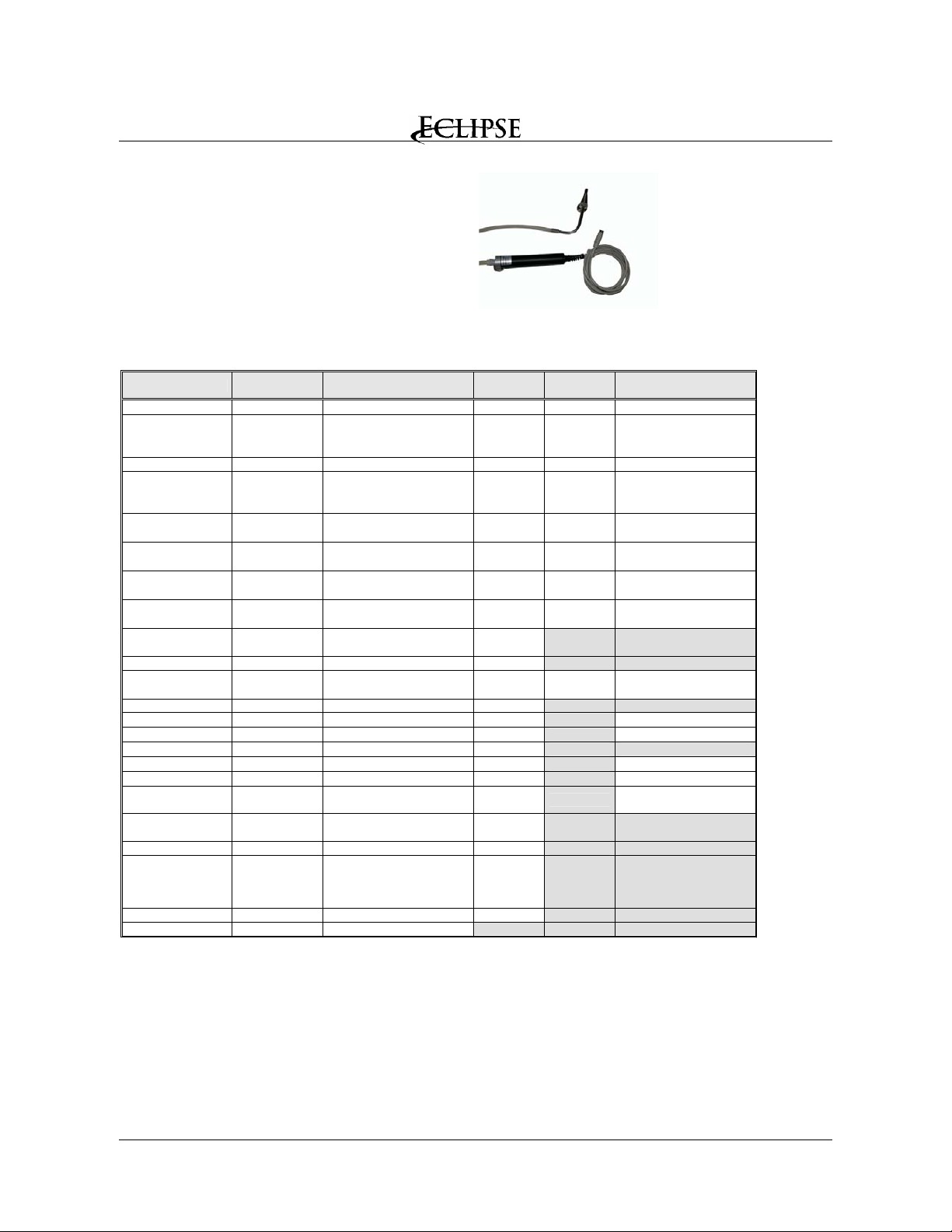
Low Draft Probe
x Range: r200Pa
x Resolution: 0.1Pa
x Operative temperature range: from +5 to +45 °C
x Accuracy
From +10 Pa to -10 Pa: r0.5 Pa
Elsewere: r3 Pa
1.3 Accuracies and ranges
Parameter Sensor type Range Resol.
O
2
Electrochemical from 0 to 25.0% 0.1% 20 sec.
CO
H
compensated Electrochemical from 0 to 8000 ppm 1 ppm 50 sec.
2
CO diluted
Electrochemical from 0.8 to 10% 0.05%
Max
response
Accuracy
r0.1% vol.
r10 ppm <300 ppm
r4% rdg up to 2000 ppm
r10% rdg elsewere
r10 ppm <300 ppm
CO
CO%
NO
NO LOW
NO
2
NO2LOW
NO
x
SO
2
CO
2
Tair
Tgas
'T
Tflow
Treturn
Pressure 'P
Draft
Excess air
Electrochemical from 0 to 20000 ppm 1 ppm 40 sec.
Electrochemical From 0 to 10.00% 0.01% 50 sec.
Electrochemical from 0 to 4000 ppm 1 ppm 40 sec.
Electrochemical From 0 to 500 ppm 0.1 ppm 40 sec.
Electrochemical from 0 to 1000 ppm 1 ppm 50 sec.
Electrochemical from 0 to 500 ppm 0.1 ppm
40 sec.
Calculated from 0 to 5000 ppm 1 ppm
Electrochemical from 0 to 4000 ppm 1 ppm 40 sec.
Calculated from 0 to 99.9% 0.1 %
Pt100 from -10 to 100 °C 0.1 °C
Tc K from -10 to 1000 °C 0.1 °C
Calculated from 0 to 1000 °C 0.1 °C
Tc K from -10 to 100 °C 0.1 °C
Tc K from -10 to 100 °C 0.1 °C
Piezo from 0 to 200 hPa 0.1 hPa
Piezo ±40 Pa 0.01 hPa
Calculated from 1.00 to infinity 0.01
r4% rdg up to 2000 ppm
r10% rdg elsewere
r0.01% up to 0.2%
r4% rdg elsewere
r5 ppm <125 ppm
r4% rdg elsewere
r2 ppm <40 ppm
r5% rdg elsewere
r5 ppm <125 ppm
r4% rdg elsewere
r2 ppm <40 ppm
r5% rdg elsewere
r5 ppm <125 ppm
r4% rdg elsewere
r(0.2% rdg+0.15°C)
r(0.3% rdg+0.3°C)
r(0.3%rdg+0.3°C)
r(0.3% rdg+0.3°C)
r0.5 Pa up to 50 Pa
±1% rdg elsewere
r0.03 Pa up to 300 Pa
±1% rdg elsewere
from 0 to 99.9%
Efficiency
Calculated
(also for condensating
boilers with automatic
0.1 %
detection)
Gas speed
Smoke index
Pitot tube From 0 to 100.0 m/s
External pump from 0 to 9
0.1 m/s
Technical units and ranges can be converted directly from ppm to mg/Nm3 , mg/kwh and from hPa to mmH2O, mbar or inH2O.
The relative accuracy shown are expressed as absolute or % of rdg errors at -5°C to +40°C ambient temperature.
The maximum response time shown is referred to 90% signal changes.
The pressure relative accuracy shown is valid only after the auto-zero procedure.
Specifications may change without notice.
8
Page 9

Instruction Manual MM850481 ed. 03a
2 GENERAL
2.1 Keypad & Display
The tactile keyboard allows the operator to enter the main operative mode and all other complementary or auxiliary modes
following the menu driven instructions.
The high contrast graphic LCD (40x56 mm), equipped with an automatic back-light device, displays the measured and/or
calculated parameters in the preferred format (Zoom function). The above parameters can be also displayed in a graphic
mode.
2.2 Built-in printer
EGA4 can be equipped with a built-in, rugged, impact type printer. It uses a low cost common roll of paper (58 mm large, 18
meters long) , more readable, long time and heat resistant better than the thermal printout on chemical paper. One key
instruction is enough to obtain one, two or more copies of the analysis report with header and company reference data.
2.3 Gas sampling probe
Flue gas sampling probes with different length, shape and max. operating are available to match the requirement of different
applications. The sampling probe is connected to the instrument with a rubber hose through a combined module of water trap
and suspended particle filter.
2.4 Measuring sensors
EGA4 uses long life sensors for O2, CO (H2 compensated), NO, NO2 and SO2. An automatic internal device diluted the CO
concentration when a high level of CO is identified by the instrument. Dilution system allows to extend the measuring range
of the CO sensor up to 10%.
The optional Autozero valve for quick start-up allows the operator to switch the instrument with the gas probe in the stack.
Four acoustic and visual alarms can be set on four programmable parameters.
2.5 Temperature probes
A thermocouple type K is incorporated on the tip of the gas sampling probe to measure the flue gas temperature. This
thermocouple is suitable for measurements up to 800°C (max 1000°C for few seconds). Temperature measurement and gas
sampling from the flue gas pipe are thus always performed in the same site.
The probe is connected to the instrument with the appropriate compensated cable and connector. A Pt100 resistance
thermometer (local jig or remote sensor) is used for the air temperature measurement and best efficiency calculation.
2.6 Pressure sensor
The instrument is equipped with an internal sensor for pressure and stack draught. One key instruction move the operative
mode to and from this function to gas analysis and viceversa. The instrument has, as standard feature, a differential pressure
sensor.
2.7 Fuel technical data
The instrument includes as standard the technical data for 4 of the most common fuels.
Using the optional GasConfig software, it is possible to modify or add data of up to 10 different fuels.
9
Page 10

Instruction Manual MM850481 ed. 03a
2.8 Smoke measurement
Smoke index measurement is done by using a hand pump (supplied as an accessory), the results cam be memory stored
and printed in the report.
2.9 Remote temperature probe
A remote Pt100 probe is available for combustion air temperature measurement from –10°C to 100°C. This probe is strongly
recommended mainly in forced air boiler to obtain an accurate calculation of the efficiency.
2.10 Ambient CO probe
Optional probe to monitor CO concentration and therefore safety condition in the boiler room. The instrument gives acoustic
and visual alarm if the set limit (according to the OSHA recommendation) are exceeded.
2.11 Natural gas probe
Optional probe to monitor CH4 and natural gas concentration and detect and locate the position of a gas leak into the
domestic pipe network.
2.12 Leak test procedure
To check gas network tightness using a pressure decay method at programmable interval time. It uses the internal pressure
sensor and a Eclipse leakage procedure.
2.13 Burner pressure probe
A 1 meter 8x4mm silicon hose (cat. EE300088) is used to check the pressure inside the burner when you are installing the
heating system.
2.14 Pitot tube
The EGA4 analyzer can be connected to a Pitot tube for gas speed measurements.
2.15 CO Dilution
This feature helps you to measuring high concentrations of the CO gas and to protect the CO sensor, even for highly polluted
environmental. The process dilute the CO concentration that goes on the CO sensor with fresh air, breathed in by a little
built-in pump. (see par. 7.2)
2.16 Calibration certificate
Each EGA4 portable gas analyzer, is factory calibrated and certified against Eclipse Standards, that are periodically certified
by an International recognized Laboratory, and shipped with a Report of Calibration stating the nominal and actual values
and the deviation errors.
10
Page 11
Instruction Manual MM850481 ed. 03a
y
3 PHYSICAL DESCRIPTION
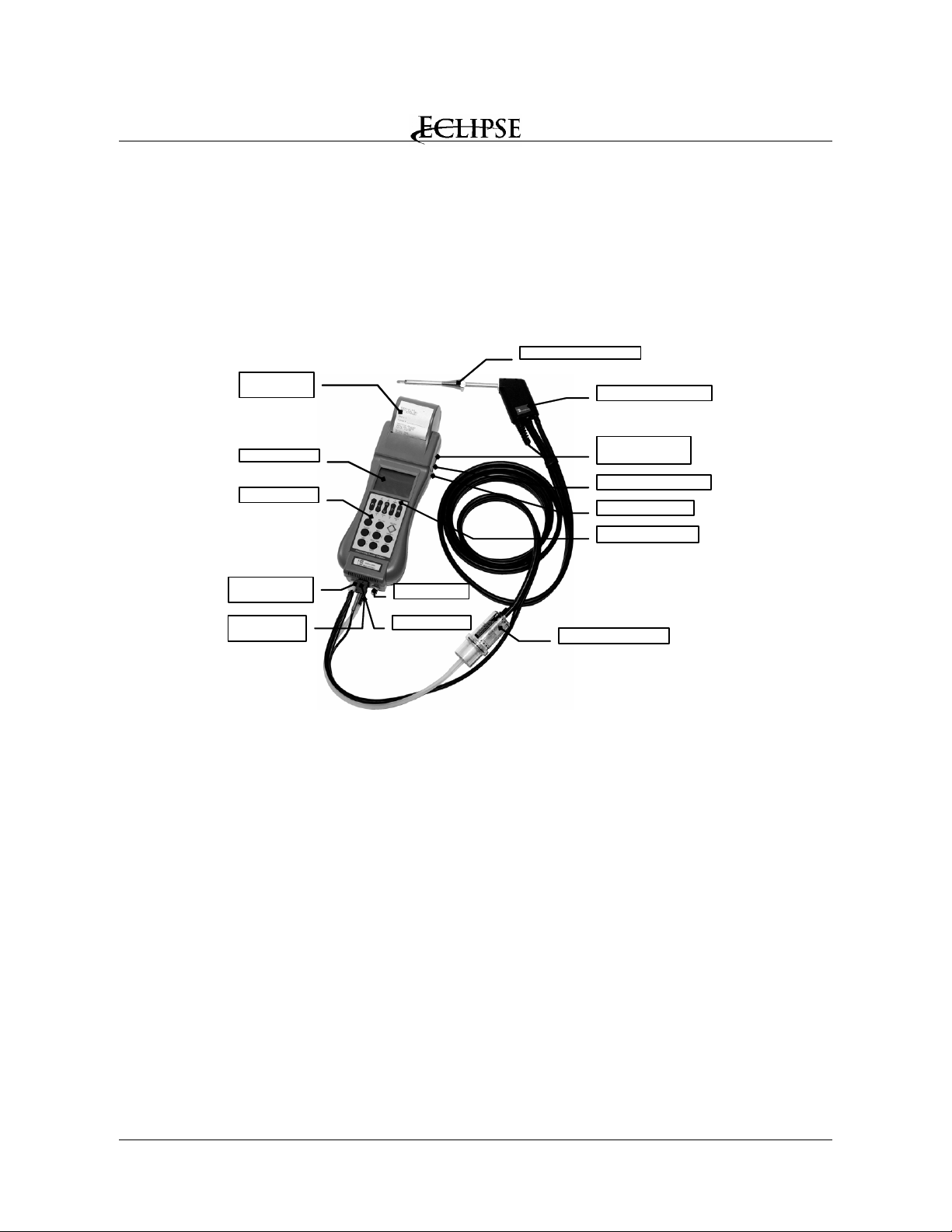
The EGA4 portable analyzer consists of a rugged and compact case, a mother board with all base function circuits, 2, 3 or 4
electrochemical cells, a gas pump, a keyboard, an LCD backlighted display, a Li-Ion rechargeable battery pack and,
optionally an impact printer.
The 2 pieces of the case are jointed by 8 screws. The batteries, the pneumatic circuit and the cells are positioned in the rear
of the analyzer and 2 screws locked the lid.
A pressure lid allows to remove the paper roll.
Positioning cone
Impact printer
(opt.)
Graphic Displa
Keyboard
Flue gas probe
External probe and
Pt100 Tair probe input
Battery charger
USB port
Back-light sensor
P1 – Draft/Pressure
INLET – Flue Gas
At the bottom of EGA4 you can see all sampling probe connectors: gas inlet, pressure and draught input, thermocouple input
for gas measurement and the 2
input
input
nd
pressure inlet connector.
P2 - 'P Input
Tgas Input
Water trap + Line filter
On the right side are the connectors for: USB port, line power charger and the input for the auxiliary probes.
The operator interface is on the front of the instrument and it consists of: a high contrast LCD display and a 14 button
keypad. An automatic back-light device and a “zoom” function, make easier the data reading on the display. The most used
operation (analysis, draught, printing and smoke index) can be accessed by operator pressing a single key.
11
Page 12
Instruction Manual MM850481 ed. 03a
t
t
4 PRINCIPLE OF OPERATION
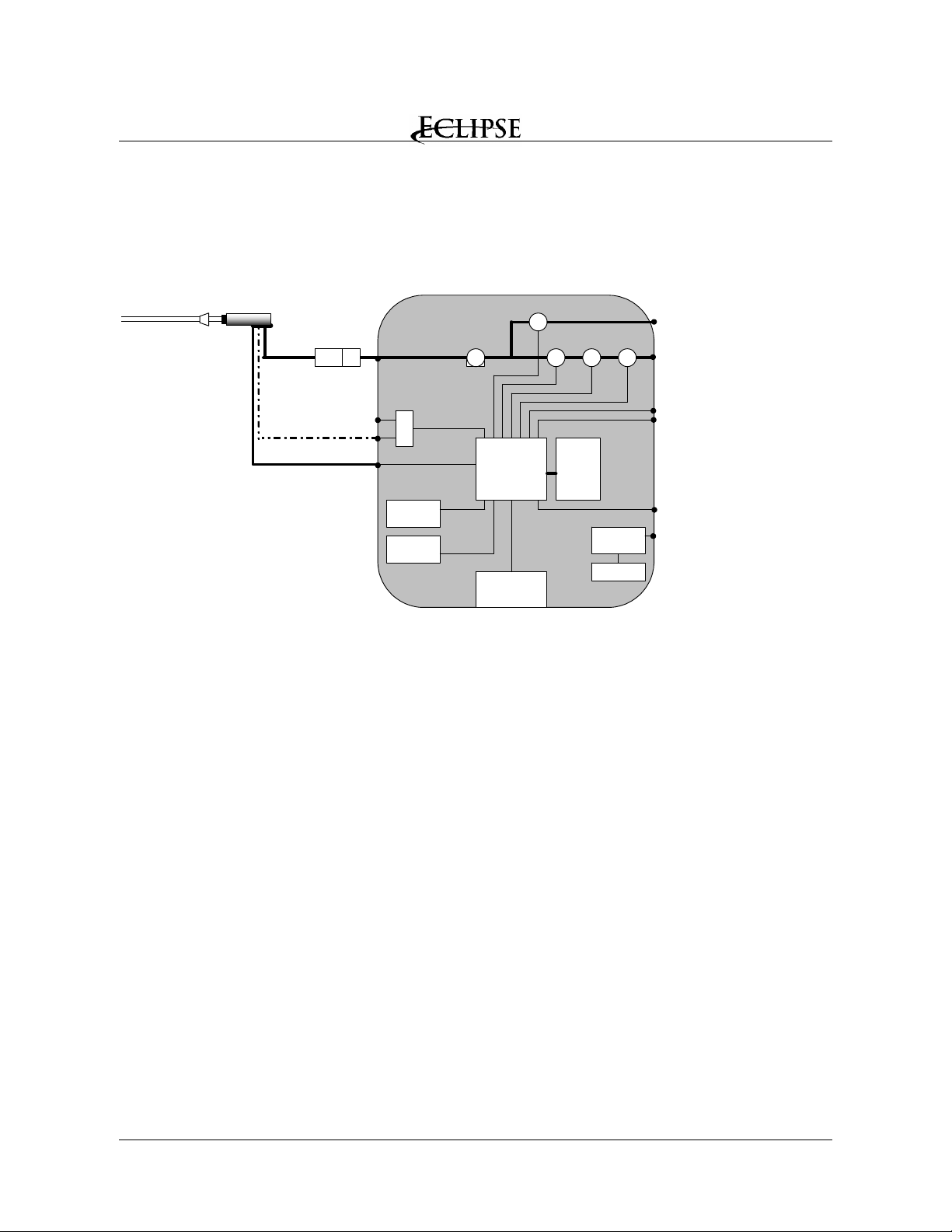
The EGA4 analyzer is based on the following functional blocks:
2° Sensor CO
Water trap
Line filter
Gas inpu
INLET
P2 - 'P
P1 – Draft/Pressure
TcK Tgas inpu
Differential
pressure
sensor
Display
Keyboard
Pump 1° Sensoe O2
MicroController
Impact printer
250
memory
4° Sensor
3° Sensor
Power supply
Li-Ion battery
Gas outlet
Pt100 Tair input
External probe inp ut
IR serial port
Battery charger input
4.1 Measurement principle
The gas is sampled and aspirated through the probe with a primary pump powered at constant voltage.
To position the sampling probe in the exhaust gas pathway a hole of 11mm, up to 16mm, should be drilled and the retaining
cone of the sampling probe firmly screwed in it.
The retaining screw in the cone enables the probe to be easily moved to locate the core flow, normally correspondent to the
center of the section of the smoke tube. The flue gas and exhaust gas pathway, should be checked for gas-tightness before
carrying out a measurement and, if necessary, non gas-tight points should be sealed.
sensor is essentially an electrochemical cell, with two electrodes and electrolyte solution. The behavior is similar to a
The O
2
normal battery and therefore the sensitivity decreases with time. The expected life does not relate to the operative time and is
lost after approximately 24 months.
The toxic gas measurements (CO, SO
The electrochemical cell grants accurate results for time intervals of approximately 60 minutes. The zero drift is automatically
corrected by the instrument every time the instrument is switched-on, using fresh ambient air as reference. This operation
should be made with the sampling probe not inserted in the chimney or with the sampling probe pneumatic connector
disconnected from the analyzer gas inlet.
When a long time analysis has to be made, a new autozero procedure should be performed.
The pressure/draught sensor is based on the principle of the extension metric measuring bridge. When the instrument is
switched-on, a zero calibration of the draught/pressure circuit is also executed. Leave open the “'P” connector during this
phase.
Measured and calculated parameters are indicated on a LCD alphanumeric display (40x56 mm), equipped with a automatic
back light device for easy readings, also in poor light conditions.
, NO and NO2) use electrochemical cells, with an expected operative life of 3 years.
2
12
Page 13
Instruction Manual MM850481 ed. 03a
4.1.1 Gas sampling probe
The sampling probe consists of a steel tube and a handle of thermoinsulating material. A positioning cone allows to place the
probe in holes with a diameter from 11 to 16 mm.
The gas temperature is acquired using a thermocouple type K with the junction placed on the top of the tip.
4.1.2 Water trap & line filter
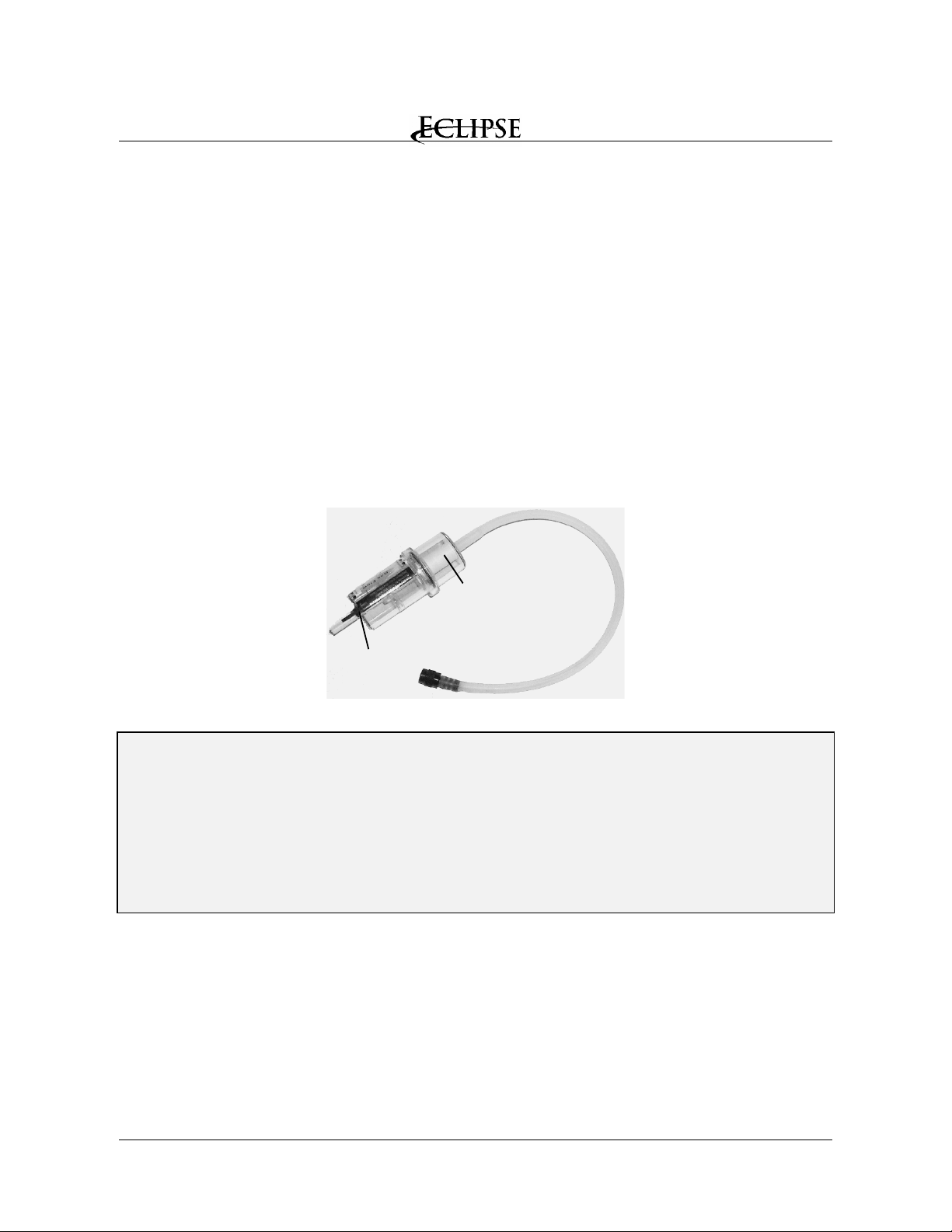
The gas flows through an external combined water trap and line filter to avoid the presence of condensation and suspended
solid particles in the analysis section of the instrument. A cylinder is positioned at 15 cm from the instrument gas inlet it is
divided into two parts: the water trap and the line filter.
The water trap works using the expansion principle: the gas flow decreases its speed inside the cylinder and it will cool; the
humidity will condense and the solid particles fall down. The section of the water trap must be periodically drained off to avoid
water from entering the analysis section. Pull the rubber plug and shake slowly the trap to drain the water. Push the rubber
plug to close the trap hole.
The line filter is positioned after the water trap and before the electrochemical cell. Its function is to stop the smallest solid
particles before the analysis. Remember to change the filter every time it is dirty.
Line filter
cat. EE650074
Rubber plug
cat. EE650081
WARNING
THE WATER TRAP MUST BE KEPT IN VERTICAL POSITION DURING GAS SAMPLING.AN INCORRECT POSITIONING OF THE TRAP CAN ALLOW
THE WATER TO ENTER INSIDE THE ANALIZER AND DAMAGE THE ELECTROCHEMICAL SENSORS.
NEVER MAKE ANY ANALYSIS WITHOUT THE DRAINING RUBBER PLUG. THE MEASUREMENTS WILL BE INCORRECT.
WHEN YOU FINISH THE ANALYSIS, REMEMBER TO DRAIN THE WATER TRAP.BEFORE PUTING THE GAS PROBE IN THE CARRYING CASE,
REMUVE THE CONDENSATE WATER FROM THE PROBE HOSE.
THE LINE FILTER SHOULD BE REPLACED WHEN DIRTY.NEVER MAKE ANY ANALYSIS WITHOUT LINE FILTER AND/OR WATER TRAP, AS IT
CAUSES AN IRREVERSIBLE DAMAGE TO THE ELECTROCHEMICAL SENSOR.
4.1.3 Gas sensors
The analyzer uses long life sensors for O2, CO (H2 compensated), NO, NO2 and SO2. The sensor do not need special
maintenance but must be replaced after the expected lifetime.
However a full maintenance and certification of the instrument is recommended at one year interval.
The gas sensors are electrochemical cells composed by two electrodes (anode and cathode) and an electrolyte solution. The
sampled gas goes trough a selective diffusion membrane.
13
Page 14

Instruction Manual MM850481 ed. 03a
The oxidation process produces an output electrical signal proportional to the gas concentration. The signal is evaluated by
the electronics, converted to digital, processed by the microprocessor, displayed and printed with a 0.1% volume resolution.
The flue gas must not be at a pressure that could damage or destroy the sensor. Measurements are always carried out under
"pressureless" conditions. The maximum permissible excess/reduced pressure is ±100 mbar.
Each sensor has a different response time:
O
2
=
CO (H
comp.) = 50s to 90% of reading
2
20s to 90% of reading
CO = 50s to 90% of reading
NO = 40s to 90% of reading
NO
2
=
SO
2
OTE:TO OBTAIN AN ACCURATE MEASURE IT IS RECOMMENDED TO WAIT 3/5 MINUTES.
N
50s to 90% of reading
= 40s to 90% of reading
Toxic gas sensor can be present a ±2% drift and a long resuming time it an excessive (>150% of F.S.) gas concentration is
applied. In that case it is recommended to wait for a measured value lower than 20ppm, by sucking fresh air before switch
the analyzer off.
An optional Electro-valve can be installed inside the instrument to exclude/include manually or automatically the CO cell
when the CO concentration is too high (e.g. when the burner is starting)
Four acoustic and visual alarm levels can be set on four programmable parameters.
4.2 Auxiliary measurements
4.2.1 Temperature measurements
The instrument is equipped with two temperature inputs to measure exhaust gas and the burner air input temperatures
(combustion gas).
i A thermocouple type K (nickel-nickel chromium) is included in the tip of the gas sampling probe to measure the flue
gas/exhaust gas temperature. This thermocouple is suitable for permanent measurements at temperatures up to 800°C
and for short-term measurements up to 1000°C. Temperature measurement and gas sampling from the flue gas
pathway are thus always performed at the same site. The probe is connected to the apparatus with compensated cable
and connector. An internal Pt100 resistance thermometer is used for cold junction compensation.
i The same Tc K input can be used to measure the flow and return temperature
in water circuit. If you have to measure
the water temperature measuring the pipe temperature, use an arch-model thermocouple with an appropriate diameter.
i A remote Pt100 sensor, can be supplied on request with a 2 or 5 meter cable to measure the air inlet temperature
in
forced air boiler. This option is very important for an accurate efficiency calculation.
4.2.2 Pressure and Draft
The analyzer can be equipped with a temperature compensated pressure sensor to measure the chimney draft or pressure.
The pressure range is from -40 hPa to +200.0 hPa)
The sensor is factory calibrated and does not require manual adjustment.
The zero drift, caused by ambient air temperature variation, is automatically cancelled at each instrument start-up. In
addition, for more accurate readings the operator can reset, using the pertinent key, the zero if required. The instrument
sensor is differential type and, if connected to a Pitot tube, it can be used to measure gas speed.
OTE: WE SUGGEST TO EXECUTE THE AUTOZERO PROCEDURE FOR MORE ACCURACY BEFORE PERFORM THE MEASUREMENT.
N
14
Page 15
Instruction Manual MM850481 ed. 03a
CAUTION
IF A SINGLE TUBE GAS SAMPLING PROBE IS USED FOR PRESSURE/DRAFT M EAS URE MEN TS, BE SURE THAT IT IS CLE AN AND DRY BEFORE
A+300HPA (OR –300HPA) OVER-PRESSURE CAN PERMANENTLY DAMAGE THE PRESSURE SENSOR.
CONNECTION TO THE PRESSURE INPUT.
CAUTION
4.2.3 Smoke index measurement
This method consists of taking a gas sample from the center of the gas pipe behind the heat exchanger and crossing it
through a special filter paper.
The color of the spot on the filter is compared with a graduated (from 0 to 9) reference scale and it is called “smoke index”.
You can type in the instrument up to 3 smoke index values; the analyzer calculate the average value and can print these
values on the report.
Normative and laws about the air pollution, describe the procedure: DIN51402, 2116, 2117 and 2297 VDI directives, ASTM D
2156-63 T, etc.
4.2.3.1 Measuring instruments (option)
1. Smoke pump: it should suck 5.75 litres r0.25 l (normalized to 0°C, 760mmHg) through a 1 cm2 filter.
2. Smoke index reference table: it is a grey scale sheet with 10 different areas numbered from 0 to 9. The number 0
corresponds to a 85% r2.5% reflection. Every area reflects 10% less than the previous one. The scale is used to
compare the scale with the paper filter and to calculate the smoke index.
3. Paper filter: When it is clean it has a reflection corresponding to the 0 scale index. It also has 3 litres per cm
(normalized to 0°C, 760mmHg) with a 200/800 mmwc resistance to the air flux.
2
a minute
4.2.4 Other measurements
The analyzer has an auxiliary input for special probes connections. Available probes are: ambient CO monitoring, and natural
gas monitoring probes.
An optional operative mode is the leakage pipe test to check gas network tightness using pressure decay method at
programmable interval time.
15
Page 16
Instruction Manual MM850481 ed. 03a
5 RECOMMENDATIONS
The analyzer should be used in environments where the temperature is between -5°C and +45°C.
When the analysis are completed, before switch the instrument off, remove the probe from the gas pathway and wait
about 30 seconds cleaning the pneumatic circuit from gas.
Do not use the analyzer with clogged filters or filled with humidity.
Before placing the probe in the case, be sure that the probe, the water trap and the hose are clean and cold.
If you have ordered a double hose sampling probe, insert both connectors to the instrument during the gas analysis (pay
attention to color correspondence).
To empty the water trap from the condensate water, remove the draining plug. DO NOT OPEN the water trap. DO NOT
leave the water trap without the draining rubber plug.
For the best efficiency and accuracy, we suggest to calibrate the instrument every year.
WARNING
IF THE EGA4 IS STORED AT TEMPERATURE EXCEEDING THE OPERATIVE LIMITS, THE ANALYZER NEEDS SOME MINUTES TO WARM-UP TO
THE ACTUAL AMBIENT TEMPERATURE, BEFORE STARTING THE OPERATION.
5.1 Power supply
The instrument can be powered from:
Internal rechargeable Li-Ion battery.
External battery charger, supplied as a standard accessory (the batteries must be installed).
Optional external DC auto battery charger (the batteries must be installed).
The Ni-MH rechargeable batteries allows a long time operation and do not need maintenance. The same batteries power
both the instrument and the internal printer. The internal battery will grant 5 hours continuous operation (without printing and
display back light off).
OTE:90% BATTERY CHARGING CAN BE OBTEINED IN 3 HOURS WITH THE INSTRUMENT SWITCHED OFF.
N
During operation a fully battery symbol “i” will be displayed on the display. This symbol means that the batteries are
completely full. When the batteries will be discharged the symbol “–” will appear and the instrument still has about 20
minutes operation capability to end the running analysis.
The battery symbol indicates that a full charge is required. Use only the dedicated battery charger supplied by Eclipse
together the instrument.
CAUTION: O
THE INSTRUMENT IS SHIPPED WITH AN AVERAGE LEVEL OF BATTERY CHARGE.AFTER UNPACKING, A FULL CHARGE OF THE BATTERY IS
RECOMMENDED, BY CONNECTING THE INSTRUMENT TO THE MAIN LINE THROUGH THE BATTERY CHARGER (OFF CONDITION) FOR 8/10
LD BATTERIES CAN LEAK AND CAUSE CORROSION.NEVER LEAVE RUN DOWN BATTERIES IN THE INSTRUMENT
WARNING
HOURS.
16
Page 17
Instruction Manual MM850481 ed. 03a
p
6 CONNECTIONS
6.1 Electro-pneumatic connections
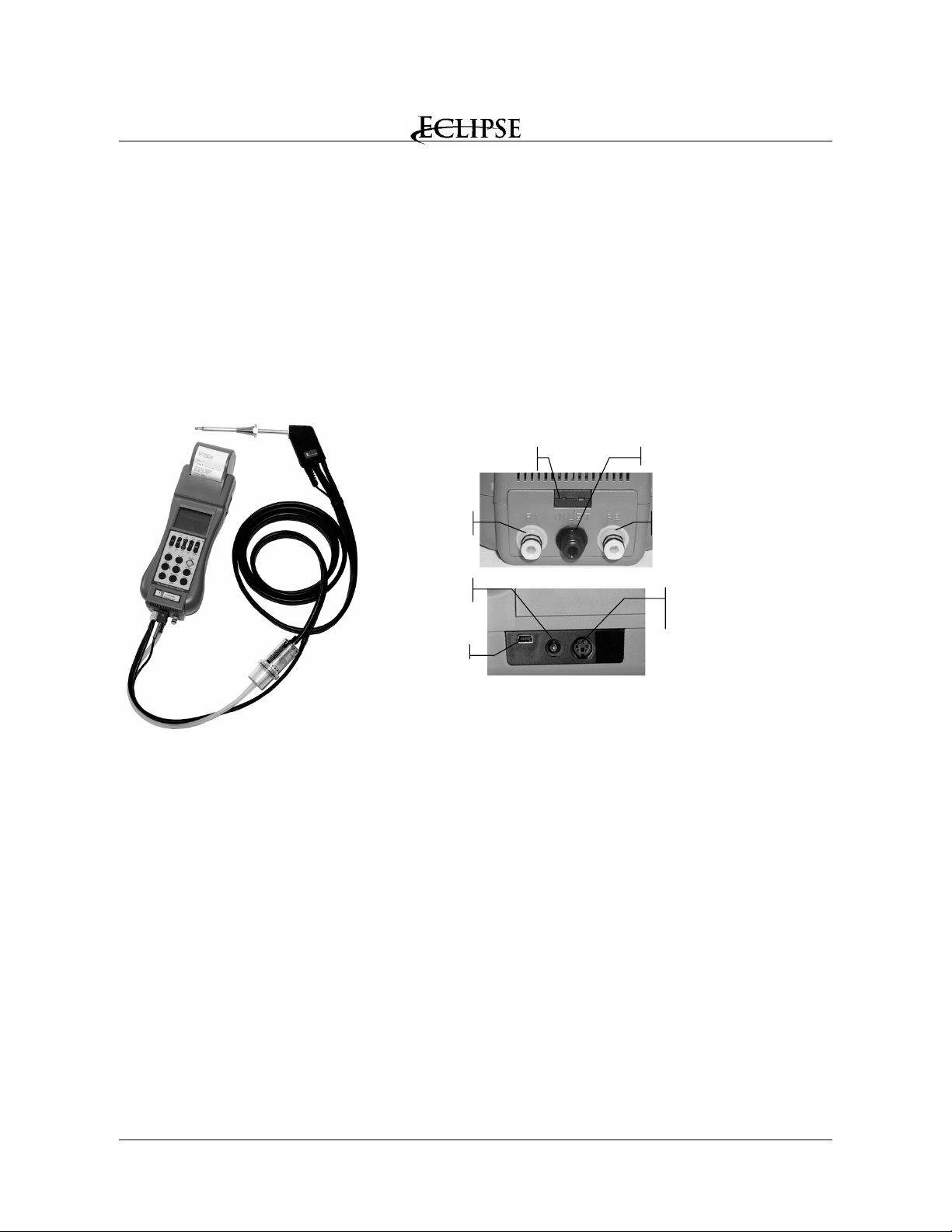
To prepare the instrument for operation connect the sampling probe to the instrument:
x Plug the pneumatic connector of the probe to the GAS INLET connector. If you are using the gas sampling probe with
Draft option, connect also its connector to the instrument Pressure/Draft inlet.
x Plug the probe temperature sensor plug to the pertinent connector.
x For more accurate readings and efficiency calculations, plug the remote air temperature Pt100 sensor to the
connector on the right side of the instrument.
INLET – gas input
P2 – differential
ressure input
External probes
and Pt100 Ta ir
input
P1 – Draft/Pressure
Battery charger
input
USB port
Tgas input
pneumatic ports
Right side
6.2 Gas probe positioning
The measurement site should be arranged at a distance of 2xD behind the exhaust gas connection pipe, where D = diameter
of the exhaust gas connection pipe.
To position the sampling probe in the exhaust gas pathway a hole of 11/16mm should be drilled and the retaining cone of the
sampling probe firmly screwed in it.
The retaining screw in the cone enables the probe to be easily moved in order to locate the core flow, normally
correspondent to the center of the section of the stack.
The flue gas and exhaust gas pathways, must be checked for gas-tightness before carrying out a measurement and, if
necessary, non gas-tight points should be sealed.
To locate the gas core flow, insert progressively the sampling probe and read the maximum value of temperature.
17
Page 18
Instruction Manual MM850481 ed. 03a
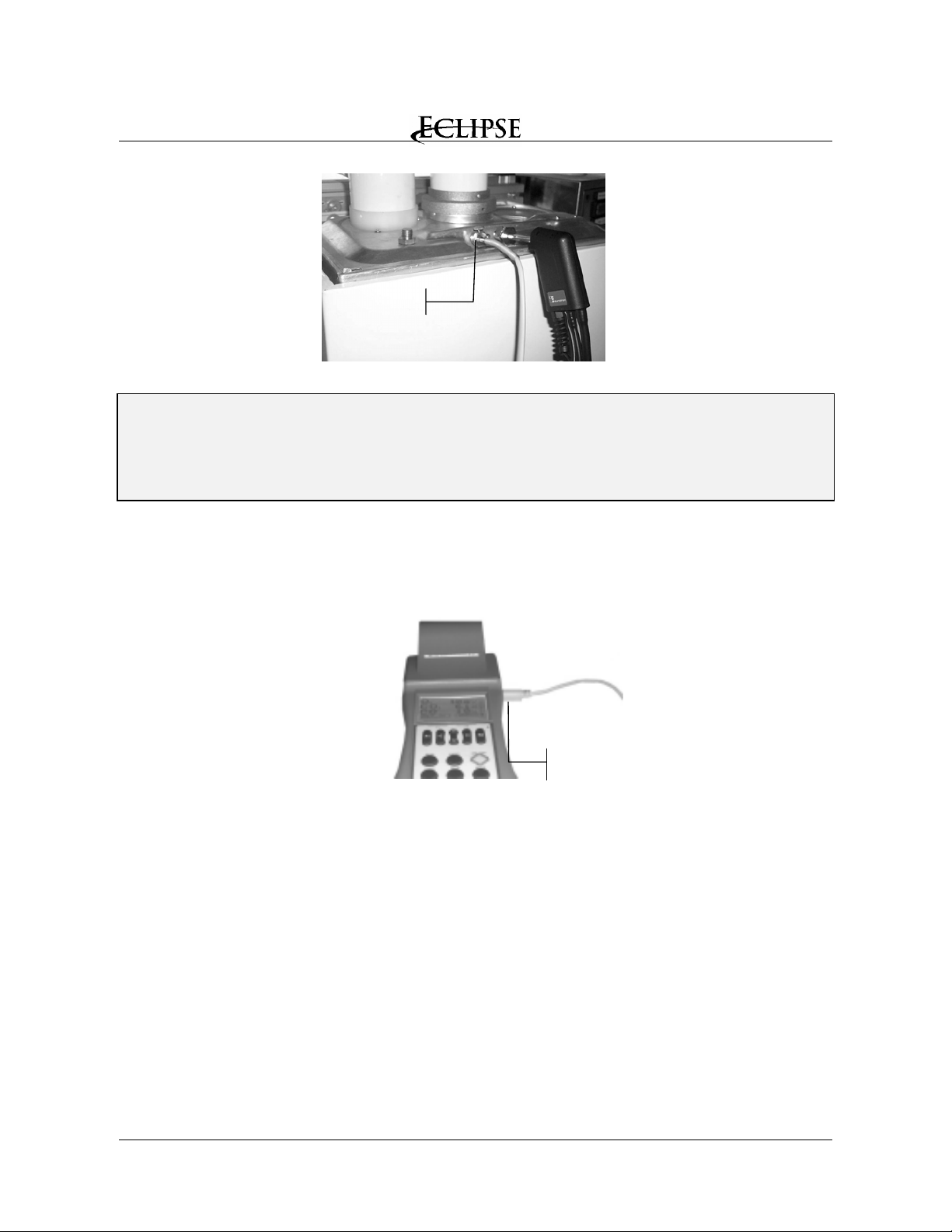
Tair probe
CAUTION
FOR A CORRECT GAS ANALYSIS, NO AIR MUST REACH THE FLUE GAS AS A RESULT OF NON-GAS-TIGHT CONNECTION POINTS BETWEEN THE
THE FLUE GAS AND EXHAUST GAS PATHWAYS MUST BE CHECKED FOR GAS-TIGHTNESS BEFORE CARRYING OUT A MEASUREMENT, AND IF
HEAT PRODUCER AND THE MEASUREMENT SITE (PROBE).
NECESSARY NON-GAS-TIGHT POINTS SHOULD BE SEALED.
6.3 Connecting to a PC
The instrument can operate with a personal computer through the USB serial port.
USB Cable EE700476
6.3.1 USB installation
The instrument can be used to directly connect the instrument to a USB computer port using the Windows™XP and
Windows™ 95/98 operative system. Depending on the configuration of the computer, the adaptor could be automatically
identified or not. If the adaptor isn’t properly identified you’ll need to manually install its driver, that you can find on the
instrument’s software CD.
You need to follow the driver installation below only at first connection of the instrument. Then, every time you connect the
adaptor to your USB port, it will be automatically identified and it will be ready to operate.
x If you have previously installed a similar driver on your pc and the drivers that are about to install are different from those
already installed, please uninstall the already installed drivers FIRST. Please refer to the Driver’s Uninstall procedure of
your Operating System.
18
Page 19

Instruction Manual MM850481 ed. 03a
6.3.1.1 Installing the USB driver
x Close all the active windows and/or applications.
x If you computer runs in Windows™XP or Windows™ XP SP1, temporally disconnect the PC from the web. To do this,
temporally remove the network cable from your pc, if connected, or by disabling your network card going to the “Control
Panel \ Network and Dial-Up Connections”, right-clicking on the appropriate connection and selecting “Disable” from the
menu. The connection can be re-enabled after the correct driver installation. This it’s not necessary if your computer runs
Window™ XP SP2 if configured to ask before connecting to Windows Update. Windows™ XP SP2 can have this
parameter already set, and to verify this open the Control Panel, select “System”, select the Hardware tab and click
“Windows Update”. Please verify that this option is DISABLED.
x Connect the instrument to a USB port of your computer. This will automatically run the “Windows Found New Hardware
Wizard”, if the adaptor is not automatically identified and installed on your system.
x The following page will be displayed:
x Select “No, not this time” to avoid the driver search in internet, then click “Next” to proceed with the installation
19
Page 20

Instruction Manual MM850481 ed. 03a
x Select the second option: “Install from a list or a specific location (Advanced)”, then click “Next”
x Select the option referring to the following page, flagging “Search for the best driver in these locations”. Press “Browse” to
select the file path.
x Select the folder where the driver is present on the CD:
x D:\\EE26032-SW-DRIVER USB-Serial FTDI, then select the folder referred to your operative system and click “OK”. The
driver will be automatically installed on your system.
NOTE: I
F WINDOWS XP IS CONFIGURED TO WARN WHEN UNSIGNED (NON-WHQL CERTIFIED) DRIVERS ARE ABOUT TO BE INSTALLED,
YOUR COMPUTER WILL BE DISPLAY THE
CONTINUE WITH THE INSTALLATION
APPE AR
.
“HARDWARE INSTALLATION” WARNING PAGE.CLICK ON “CONTINUE ANYWAY” TO
.IF WINDOWS XP IS CONFIGURED TO IGNORE FILE SIGNATURE WARNINGS, NO MESSAGE WILL
At the end Windows will show a message indicating that the installation was successful. Click “Finish” to complete the
installation.
WARNING
THE INSTRUMENT WILL BE CONFIGURED ON YOUR SYSTEM AS A COMMUNICATION “COM” USB SERIAL PORT, NOT AS A C LAS SIC USB
PORT.INTO THE DEVICE MANAGER OF YOUR PC THE PORT WILL APPEAR IN THE “COM AND LPT PORT” CATEGORY.
REMEMBER TO SET BOTH THE CORRECT COM PORT NUMBER AND THE PORT SPEED IN BAUD ON THE SOFTWARE SETTINGS THAT YOU
ARE RUNNING, OTHERWISE YOU WILL HAVE NO ONE COMMUNICATION BETWEEN THE INSTRUMENT AND THE COMPUTER.
20
Page 21

Instruction Manual MM850481 ed. 03a
7 OPERATIONS
7.1 Basic operation
All the procedures and programming operations on the EGA4, can be made using the keyboard and the display.
OTE: ALL NUMERIC VALUES SHOWN IN THE FIGURES OF THIS MANUAL ARE INDICATIVE AND LISTED AS AN EXAMPLE.
N
The analyzer should be used in environments where the temperature does not exceed the specified limits (from -5°C to
+45°C) and where the relative humidity is lower than 95% non-condensing.
7.1.1 Keyboard
The front panel keys functions are the following:
[F1] and [F2] This keys are multifunction. The instrument
F1 F2
S
W X
F1 F2
T
[S], [T], [W] and [X] They move the cursor symbol or to increase or
change the assigned function during the
operations. All displayed pages have, in the
bottom, 2 boxes each containing the assigned
function (e.g. ANALYSIS ). If no word is
displayed inside the box, no function is assigned
to that function key.
decrease numerical values.
[ENTER] Accept and memory store the modified
PRINT
ENTER
ON/OFF
[PRINT] Print the report of the analysis.
parameter or variable.
[ON/OFF] Switch the analyzer on or off.
[STORE] Read or store the analysis data from or in the
STORE
SETUP
MENU
[SETUP] Go to the configuring page of the instrument.
memory.
[MENU] Go to the auxiliary function (Ambient
measurements, Flow and return Temperature,
HELP DRAFT S MOKE
etc.) menu.
[DRAUGHT] Go to the Pressure/ Draught measurement.
[SMOKE] Allows the data input for smoke index
measurements. You need an external pump for
the gas sampling.
[HELP] Display the most important information for the
service: the battery charging level, the status of
the gas sensors, the free memory, etc.
7.1.2 Display
The EGA4 is designed with a large (40x56 mm) graphical display using an automatic back light system for the best reading in
poor light conditions also. The instrument is able to visualize simultaneously on the display 3, 6 or 12 parameters.
Three different area can be identified on the display: Menu and Measure area, Status bar and Function boxes.
21
Page 22

Instruction Manual MM850481 ed. 03a
O2
9%
SO2
1000
RefO
GRAPH
RefO2
GRAPH
O2
9%
RefO2
GRAPH
O2
9%
SO2
1000
RefO2
GRAPH
Status barMenu&Measure area
: 20.
CO : 2000ppm CxHy: 5.00
Ta : 20 °C Lam : 0.99
Tg : 400 °C NO2 : 100
: 95.7 % CO2 : 10.2
K
NOx: 500ppm Per : 10.5
:
–
2
Function box
The Menu and Measure area displays the analysis data, the menu and all messages for the operator. The measured and
calculated parameters are displayed in different pages of 6 parameters each.
Using the [S] and [T] keys you can change page, changing the displayed parameters.
Pressing the [W] and [X] keys it is possible to increase or decrease the number of the displayed parameters (ZOOM
function).
O2 20.9%
CO 2000ppm
Ta 20.0°C
–
: 20.
CO : 2000 ppm
Tamb : 20 °C
Tgas : 400 °C
Eff : 95.7 %
NOx : 500 ppm
–
: 20.
CO : 2000p CxHy: 5.00
Ta : 20.2°C Lam : 0.99
Tg : 400.3°C NO2 : 100p
: 95.7% CO2 : 10.2p
K
NOx: 500p Per : 10.5
:
p
–
Two boxes are positioned on the bottom of the display. They contains the name of the function assigned to the [F1] and [F2]
function keys.
The status bar uses graphical symbols to describe the actual operation mode of the instrument.
– / i
Max/Min/
Med/Mem
O2
Battery status: i=charged, –=discharged
The Max, Med, Min, Actual values are displayed in memory recalling mode.
The displayed measure are referred to oxygen
Memory Card (PCMCIA) inserted.
Line operations
7.1.3 Display adjustment
In autozero procedure, you can press the [W] and [X] keys to adjust the LCD contrast.
When the instrument is in measuring mode you should press the [HELP] key and press the [W] and [X] keys to adjust the
LCD contrast.
7.1.4 Numerical input
If you have to set a numerical parameter (e.g. O2 reference, etc.) use the following procedure:
Select the parameter to be changed (e.g. O
Press [ENTER] to enter in modify page as follows:
reference) with the [S] and [T] key from the configuring menu.
2
22
Page 23

Instruction Manual MM850481 ed. 03a
ESCAPE
!"#$%&'()
0123
CONFIRM
ESCAPE
C
ESCAPE
CO Reference
0.0
–
The “S” symbol below the first digit is the cursor.
You can move the cursor between the digit using the [W] and [X] keys.
You can change the selected digit using [S] and [T]. If “9” or “0” values are exceeded, the left digit is increased or decrease.
Press [ENTER] to memory store the value and return to the previous page.
Press [ESCAPE] (F1) to return to the previous page without save the changes.
7.1.4 Text input
If you have to set a text parameter (e.g. customer name, etc.) use the following procedure:
Select the parameter to be changed (e.g. customer name) with the [S] and [T] key from the configuring menu.
Press [ENTER] to enter in modify page as follows:
*+,-./
456789:;<=>?@ABCDEFG
HIJKLMNOPQRSTUVWXYZ
–
A “S” symbol below the “ “ (blank) character in figure, represent the cursor. It is used to identify the selected character; you
can move it using the [W], [X], [S] and [T] keys. The box below the characters table shows the currently inserted text. The
symbol “W” is the end of line symbol.
Press [CONFIRM] to write in the line box the selected char. The reversed char “C”, when selected, delete the last inserted
char.
Press [ENTER] to memory store the text and return to the previous page.
Press [ESCAPE] to return to the previous page without save the changes.
7.1.5 Select by a list
If you have to set a text parameter (e.g. Tag name, fuel type, etc.) use the following procedure:
Select the parameter to be changed (e.g. fuel type) with the [S] and [T] key from the configuring menu.
Press [ENTER] to enter in modify page as follows:
-- Fuel --
Natural Gas
LPG
Gasoil
Combustible oil
–
The “X” symbol on the left is the cursor.
You can move the cursor between the digit using the [S] and [T] keys.
Press [ENTER] to memory store the selection and return to the previous page.
Press [ESCAPE] (F1) to return to the previous page without save the changes.
23
Page 24

Instruction Manual MM850481 ed. 03a
EGA 4
MENU
MEASURE
MENU
MEASURE
ANALYS
7.2 Flue gas analysis
Connect the gas probe to the analyzer as shown in chapter 7. DO NOT INSERT THE PROBE IN THE CHIMNEY.
Switch the analyzer on pressing the [ON] key. The display will show the following page:
Serial no: 91257
Version: 10.0.9
If you press a key, or after a few seconds, this page changes automatically as follows:
if the optional Autozero valve option is NOT installed, the display will show the page below:
! Don t insert !
! probe in chimney !
Op.:
Bat: 5.2V (23.5°C)
Autozero: 60 sec
if the optional Autozero valve option is installed, the display will show the page below:
!wait for autozero !
!wait for autozero !
Op.:
Bat: 5.2V (23.5°C)
Autozero: 60 sec
–
–
This page displays the following information: operator name, battery charge level, instrument internal temperature and the
seconds to end the autozero procedure.
OTE: THE ANALYZER MUST DRAW CLEAN AIR FROM THE AMBIENT DURING THE AUTOZERO PROCEDURE.OTHERWISE THE
N
MEASUREMENTS CANNOT BE ACCURATE
.
It is possible to enter in “MENU” page (pressing [F1]) or in “MEASURE” page (pressing [F2]). See the appropriate paragraphs
for operations.
When autozero procedure finished, an intermittent sound advise the operator. Press the [ENTER] key to mute the unit. The
following page will be displayed:
! Now insert !
! probe in chimney !
--- FUEL --
Natural Gas
TAG SELECTION
.
–
This page allows the operator to change the fuel used and to select the Tag between the available.
x Fuel selection. Move the cursor symbol “X” on the desired row using the [S] and [T] keys. Press [ENTER] to change the
value.
x Tag selection. Move the cursor symbol “X” on the desired row using the [S] and [T] keys. Press [ENTER] to change the
value. A new page will be shown. The Tag name, the description and the progressive number will be displayed. When in
measuring mode, you can select another Tag pressing the [MEMORY] key.
24
Page 25

Instruction Manual MM850481 ed. 03a
O2
9%
RefO2
GRAPHIC
RefO
GRAPHIC
O2 20.9%
2000
RefO
GRAPHIC
RefO
GRAPHIC
Ref.O
NUMERIC
x Insert the probe in chimney. Stop it using the retaining cone and adjust the immersion depth for a gas sampling in the
middle of the exhaust gas connection pipe.
x Press the [ANALYSIS] (F1) key to begin the measurements. The following page will be shown:
20.
CO2 0.0 %
CO 1 ppm
NO 1 ppm
Tf Tc Error
Eff --------
–
Pressing the [W] and [X] keys, it is possible to zoom-in and zoom-out increasing or decreasing the number of displayed
parameters.
O2 20.9%
CO
0.0%
2
CO 1
2
ppm
Ta 20.2C : Eff 0.99
Tf 400.3C : NO2 100p
95.7% :
K
CO2 10.2p :
–
NOx 500p :
:CO
2
p
–
Pressing the [S] and [T] you can change page for others parameters.
Pressing the [REF. O
mode, the symbol “O
] key the measured parameters will be referred to the programmed oxygen value. When selected this
2
2” will be displayed on the status bar.
O2 20.9%
CO
0.0%
2
CO 1
2
If the graphical option (Table E=4 on ordering code) is installed, the instrument can display the measured values as bargraph. Press the [GRAPHIC] (F2) key to change mode.
O2
CO
K
2
ppm
–
–
Using GasConfig Software, you can program the graph page: Assign up to 6 different parameter, range and increment
direction. See chapter 9 for software instructions.
Press the [NUMERIC] (F2) key to return to the normal display mode.
The integrated CO sensor dilution system, is an automatic device to protect the CO sensor from high concentration of CO.
The device automatically switch to dilution when Automatic dilution procedure is activated (see ch. 9) and the high range
(8000 ppm) value is exceeded.
When dilution is active, the CO value is displayed in reverse and the measuring unit change from ppm to % v/v.
25
Page 26

Instruction Manual MM850481 ed. 03a
O2
9%
REF.O2
GRAPHIC
F1=Int
EXT
INT
DRA
UGHT
ESCAPE
ZERO
10.
CO2 8.1 %
CO 5.3 %
Tg 123.0°C
EffN -------EffG --------
–
Dilution system can be used to extend the sensor measuring range up to 10%.
7.3 Pressure/Draft measurement
If the internal pressure sensor is installed (Table E=2 on ordering code), you can execute the pressure/draft measurements
using or the standard probe or the special probe.
Standard probe (TG models):
The standard probe has a single gas collector for gas sampling. Usually you have the hose terminal connected to the
instrument gas inlet; when you have to do the draft measurements you have to move the connector to pressure inlet (P IN)
connector.
CAUTION
IF A SINGLE TUBE GAS SAMPLING PROBE (TG MODEL) IS USED FOR PRESSURE/DRAFT MEASUREMENTS, BE SURE THAT PROBE AND HOSE
ARE CLEAN AND DRY BEFORE CONNECTION TO THE PRESSURE INPUT.
Special draft probe (TGD models):
This special probe model has a double gas collector: one for the flue gas analysis and one for the draft measurement. When
you connect the probe to the analyzer you have to insert both gas inlet and pressure inlet connectors. Connect the hose with
line filter to gas inlet connector.
The pressure measurement requires the instrument in normal operating conditions indicating one of the measured or
calculated parameters. Press [DRAFT] on the keyboard. DO NOT INSERT THE PROBE IN THE CHIMNEY. The internal
pump will stop and the following page will be shown:
ernal sensor
F2=External sensor
`TaE 23.00
–
Press [MEASURE] (F1) to show the following page:
Measure
1.0 mbar
Press [ENTER]
To save measure
–
Press the [ZERO] key before
insert the probe in the chimney to zeroing the measured value.
Insert the probe in the chimney. Check for mechanical positioning and flue gas intercepting. Wait for measurement
stabilization.
Press [ENTER] to memory store the pressure and draft values.
26
Page 27

Instruction Manual MM850481 ed. 03a
SMOKE
ESCAPE
Press [ESCAPE] (F1) to return to the previous page.
Now you can proceed with the Smoke index measurement and/or the gas analysis. The memory stored value will be printed
together the analysis.
7.3.1 Burner pressure measurement
Using the burner pressure probe, it is possible to measure the pressure on the burner. Connect the probe to the instrument
pressure input and connect to the burner plug. Follow the procedure described in paragraph 8.4 to read the pressure.
7.4 Smoke measurement
To avoid condensation inside the smoke pump, it should aspirate ambient air before the gas sample. This can be obtained
aspirating the air by the fireside (not in the exhaust gas connection pipe) without using the paper filter.
Introduce now the filter in the pump. The gas sample should be drawn to the center of the combustion gas flux. The correct
gas volume is sampled with 10 uniform shoots by the pump.
Compare the darkening of the filter with the smoke index table. The smoke index found does not exceed the ones defined by
the current normative.
We suggested to use a retaining cone during gas sampling.
OTE: IF YOU WONT TO PRINT THE SMOKE INDEX WITH THE ANALYSIS DATA, YOU SHOULD DO THE MEASUREMENT BEFORE THE FLUE
N
GAS ANALYSIS
.
7.4.1 Smoke index data input
Before input the data, you have to execute the smoke index measurements. You can input up to 3 values; the analyzer will
do the average calculus.
The smoke measurement requires the instrument in normal operating conditions indicating one of the measured or
calculated parameters. Press [SMOKE] on the keyboard. The following page will be shown:
Meas. 1: Meas. 2: - AVG
Meas. 3: - -
Oil.Der.: NO
–
Press [S]and/or [T] to move the cursor symbol to the “Measure 1” input field.
Press [ENTER] to input the value. See instruction on paragraph 8.1.4.
If necessary, input the “Measure 2” and “Measure 3” smoke index. The instrument will compute the average.
Press [S] and/or [T] to move the cursor symbol to the “Oil derivative”.
Press [ENTER] to change the value for the correct fuel type.
Press [ESCAPE] (F1) to return to the previous page without save the changes.
Press [ENTER] to memory store the selection and return to the previous page.
7.5 Combustion air temperature (option)
27
Page 28

Instruction Manual MM850481 ed. 03a
MENU
ESCAPE
NEXT
FLOW/RETURN TEMP
ESCAPE
COPY
It is important to measure the true combustion air temperature to have a correct boiler efficiency computation. The EGA4 has
a auxiliary Rtd input to measure simultaneously the air temperature. A Pt100 with a 6 meters long cable can be connected on
the right side of the analyzer.
Insert the Rtd inside the air combustion aspiration tube and near the boiler.
Follow the standard procedure to make measurements. The instrument will show the temperature on the display and the
efficiency will be calculated using this value. If no external Rtd is connected, the analyzer will measure the instrument
temperature (ambient) using the internal sensor.
7.6 Flow/Return temperature measurement
Connect the thermocouple type K on the bottom of the instrument (the same connector used for gas temperature). If the
temperature measurement is made using the contact method on the external side of the flow and return water pipe. In this
case, we suggest to use an arch type thermocouple.
Press [MENU] to display the following page:
MEASURE
ION. CORR
FLOW/RETURN TEMP
GAS VELOCITY
–
Use [S] and [T] to move the cursor symbol to “T. Flow/Return” option
Press the [ENTER] key to display the following page:
Temper.: 40.0 °C
Flow...: 40.0 °C
Return.: --.- °C
Differ.: --.- °C
–
On the “Measure” field, the instrument will display the current temperature value measured using the connected
thermocouple. The error message “Tc open” will be displayed if the thermocouple is not connected or broken. Positioning the
thermocouple on the flow pipe.
Use the [S] and [T] to move the cursor symbol to “T. Flow” field.
Press [COPY] to copy the current temperature as T. Flow value.
Press [ENTER] to manually change the temperature value
Positioning the thermocouple on the return pipe.
Use the [S] and [T] to move the cursor symbol to “T. Return” field.
Press [COPY] to copy the current temperature as T. Return value.
Press [ENTER] to manually change the temperature value
The instrument will show the difference between the two values.
Press [ESCAPE] (F1) to return to the previous page. The temperature values will be printed on the ticket report.
7.7 Gas velocity measurement
The EGA4, is arranged for chimney speed measuring. For this measurement you need a Pitot tube to be connected to the
differential pressure inputs.
Connect the “+” terminal of the tube to “P1” connector and the “-“ terminal the “P2” the instrument connector.
28
Page 29

Instruction Manual MM850481 ed. 03a
MENU
ESCAPE
GAS VELOCITY
ESC
APE
NEXT
KVel
ESC
APE
D
ESC
APE
GAS VELOCITY
ESCAPE
COPY
Press [MENU] to display the following page:
MEASURE
ION. CURR
TEMPERATURE
GAS VELOCITY
–
Use the [S] and [T] keys to move the cursor symbol to “GAS VELOCITY” Option. Press the [ENTER] key.
fK Vel: 1.000
Dens.: 1.000 Kg/m3
–
x In this page you can manually enter, if known, two settings: the constant (K) of the used tube type as indicated on its
user's manual, and the gas density, after its analysis. These two settings are set on "1" by default. Use the [S] and [T]
keys to move the cursor symbol to the setting you want to modify and press [ENTER]. One of the following pages will be
displayed:
.
1.000
c
1.000
c
–
ens.:
–
or
x To enter your value, use the [S] and [T] keys change the digit indicated by the arrow, and use the [Ź] and [Ż] keys to
move the arrow symbol on another digit.
x Press [ESCAPE] to return to the previous "GAS VELOCITY" page.
x Press [NEXT] to display the following page:
Tf : 0.0 °C
'P : 0.0 mmH2O
Vel. : 0.0 m/s
–
x Insert the gas probe in the chimney. Set the probe tip to the centre of the pathway. The display will show the current gas
temperature. An error message “Tc open” will be displayed if the thermocouple is not connected or broken.
x Use the [S] and [T] keys to move the cursor symbol to “Tg” parameter. Wait for a stable temperature reading.
x Press [COPY] to copy the current temperature as Tgas value
x Press [ENTER] to manually change the gas temperature value
Extract the gas probe from the chimney. Insert the Pitot tube inside the chimney. Be careful that the probe is parellel to
chimney axis and facing the burner.
x Use the [S] and [T] keys to move the cursor symbol to “'P” parameter.
x Press [COPY] to copy the current 'P value.
29
Page 30

Instruction Manual MM850481 ed. 03a
PRINT
ESCAPE
FEED
x Press [ENTER] to manually change the 'P value.
The instrument will display the gas speed.
Press [ESCAPE] to the previous page menu.
NOTE: F
OR THE BEST SPEED CALCULATION, DO NOT CHANGE THE BURNER RATE BETWEEN THE TWO MEASUREMENTS.THE OPTIMUM
CONDITIONS WILL BE ACHIEVED USING
2 HOTELS IN CHIMNEY AND THE SIMULTANEOUS MEASUREMENTS
7.8 Analysis data print
An internal impact printer can be installed as an option in the instrument. Read paragraph 8.10 for header report changing.
To print the report (ticket) of the analysis use the following procedure:
Before make all measurements you need: Smoke index, pressure and draught, T. flow, etc. After make the gas analysis
measurements and wait same seconds for measurement stabilizing. Press the [PRINT] key. The following page will be
displayed:
ANALYSIS SAVED
PRESS [PRINT]
NUM. COPY 1
MODEL Standard
–
Use the [S] and [T] keys to move the cursor symbol to “NO. copy” or “Model” field.
Press the [ENTER] key to change the number of the reports you have to print and/or the print model for the report.
Press the [PRINT] key again to print the report. You can abort the printing in progress by pressing the [ESCAPE] key.
Press [ESCAPE] (F1) to abort the operation.
Press [FEED] for paper advance. You can stop the paper advance by pressing the [ESCAPE] key.
7.8.1 Paper and Ribbon change
Open the cover pressing as in figure.
Extract the exhausted paper roll. You can use standard paper roll but you have to check before for its dimensions (max.
57mm ±1mm large and 48mm ±1mm roll diameter).
If necessary substitute the ribbon cartridge.
Approach the end of the new paper roll to the slot under the printer.
30
Page 31

Instruction Manual MM850481 ed. 03a
MENU
ESCAPE
MEASURE
ESCAPE
NEXT
Switch the analyzer on.
Keeping the [HELP] key down; press the [X] key to bypass the autozero procedure.
Press [PRINT] then press the [FEED] key for paper feed. Press the [ESCAPE] key when the paper will came out for same
centimeters.
Close the cover inserting the paper end in its slot.
7.9 Pressure decay procedure (option)
This is an additional feature that allows you to verify the condition of part or the entire plant. The system works with the
pressure decay principle. Be sure to isolate and empty the plant section you want to verify at first !
THE USAGE OF A PRESSURE HIGHER THEN ±300 HPA WILL DAMAGE THE THE PRESSURE SENSOR OF THE INSTRUMENT IN IRREVERSIBLE
ATTENTION
WAY, CAUSING A PERMANENT DEFORMATION OF THE MEMBRANE.
7.9.1 Test A (1 minute)
This optional operative mode allows operator to find pipe leakage. To set and run leak test, press the [MENU] key from
measuring page. The following page will be displayed:
MEASURE
ION. CURR
TEMPERATURE
GAS VELOCITY
–
x Use the [S] and [T] keys to move the cursor symbol to “MEASURE” option.
x Press the [ENTER] key to select the option. Press [ESCAPE] (F2) to return to the previous menu.
TIGHTNESS TEST
GAS LEAK PROBE
AMBIENT CO
T+RH% PROBE
–
31
Page 32

Instruction Manual MM850481 ed. 03a
SELECT TEST
ESCAPE
ZERO
ESCAPE
NEXT
P1:228.6
hP
ESCAPE
NEXT
ESCAPE
x Use the [S] and [T] keys to move the cursor symbol to “TIGHTNESS TEST” option.
x Press the [ENTER] key to select the option. Press [ESCAPE] (F2) to return to the previous menu.
0.3 hPa
Parameters
Test Type : A
START TEST
–
x Select “Parameters” option
PREFERENCES
Gas types : City
Net. Vol. 0.0
Tot. Vol. 0.0
Test Gas: Air
–
x Set the follow parameters: Gas type (“City” or “Natural”) , Net. Vol.: (Total volume for Gas Network), Tot. Vol. (Internal
volume for Gas Flow Totalizer), Test Gas (“Air” or “Gas”).
x Press Next to set Bar Press (Barometric Pressure).
x Press [ESCAPE] to return to the "SELECT TEST" page
x Use the [S] and [T] keys to move symbol on the Test Types A
x Select START TEST to start the procedure
P 2: 228.7 hPa
ǻP: 0.1 hPa
Test A: 40s
a
–
The instrument will display the initial pressure to the P1 input and the final pressure P2 , as third parameter
There is the ǻP, this is a result test that will come shows after the countdown (60 seconds) will ends.
Press [NEXT] to display the following page
Suitability
Test Type: A
Disp. Found: 0.000
Disp. Corr: 0.000
Suitability: Yes
–
Press the [PRINT] button to print the report
32
Page 33

MENU
ESCAPE
ECLIPSE
EGA4
Serial Number 000
Date: 00/00/0000
Time: 00:00
P DECAY LEAK TEST
TEST A
Gas Type: City
Barom.Press.1013
mbar
P1: 0.0 mmH
P2: 0.0 mmH
System vol: 0.0 dm
Counter vol: 0.0 dm
Test[Air] 0.0 mmH
Diff of pr.0.0 mmH
Dispersion correct
NaN dm
O
2
O
2
3
/h
3
3
O
2
O
2
Suitability: Yes(*)
PLANT TAG
Plant 1
BOILER TAG
Boiler 1
CUSTOMER
Name: Customer 1
Addr.:
City :
Tel.: :
Note : -------------
--------------
--------------
Instruction Manual MM850481 ed. 03a
LEGEND
Time of the test
Gas Type: City or Natural
Barometric Pressure
P1: The Pressure initial
P2 : The Pressure end
System vol. Total Plant Volume
Counter vol. Gas Meter
Test[Air]
Diff of pr. ǻP difference of pressure between P1 and P2
Dispersion found Capacity of Gas Dispersed
Dispersion correct Capacity of Gas correct
Suitability Conformity of Plant
7.9.2 Test B (programmable)
This optional operative mode allows operator to find pipe leakage. The difference from Test A is the possibility for the use of
programmable the time, to see ( the next paragraph).To set and run leak test, press the [MENU] key from measuring page.
The following page will be displayed:
MEASURE
ION. CURR
TEMPERATURE
GAS VELOCITY
–
Use the [S] and [T] keys to move the cursor symbol to “MEASURE” option.
Press the [ENTER] key to select the option. Press [ESCAPE] (F2) to return to the previous menu.
33
Page 34

Instruction Manual MM850481 ed. 03a
MEASURE
ESCAPE
NEXT
SELECT TEST
ESCAPE
ZERO
P1
235.5
hP
ESCAPE
NEXT
TIGHTNESS TEST
GAS LEAK PROBE
AMBIENT CO
T+RH% PROBE
–
Use the [S] and [T] keys to move the cursor symbol to “TIGHTNESS TEST” option.
Press the [ENTER] key to select the option. Press [ESCAPE] (F2) to return to the previous menu.
0.3 mmH2O
Parameters
Test Type : A
START TEST
–
Select "Test type" and select test type "B"
Select "START TEST" to begin the test
:
P 2: 235.7 hPa
P 3: 235.8 hPa
P 4: 235.0 hPa
ǻP: 0.5 hPa
Test B: 160s
a
–
In this test there are four Pressures with times various. This times can be set like described in the paragraph 10.3.4 in this
manual.
Press the button Print for the test result
34
Page 35

MENU
ESCAPE
ECLIPSE
EGA4
Serial Number 000
Date: 00/00/0000
Time: 00:00
P DECAY LEAK
TEST B
P1: 0.0 mmH
P2: 0.0 mmH
P3: 0.0 mmH
P4: 0.0 mmH
ǻP :0.0 mmH
O
2
O
2
O
2
O
2
O
2
ǻt :310 s
PLANT TAG
Plant 1
BOILER TAG
Boiler 1
CUSTOMER
Name: Customer 1
Addr.:
City :
Tel.: :
Note : -------------
-------------
-------------
Instruction Manual MM850481 ed. 03a
LEGEND
P1-P2-P3-P4 mmH2O measures of pressure
ǻP : Difference of pressure
ǻT : Difference of Time
7.10 Ambient CO probe (option)
This optional external probe allows ambient CO monitoring for personnel safety. When connected to the analyzer, it monitor
continuously CO concentration and it signal when the Long-term Exposure (TWA) limits are reached. An acoustic and visible
signals are emitted by unit.
The following page show the current exposure limits for CO gas. This table is a guidance only, and figures must be checked
before being used. Sensors used in safety applications should be fully calibrated at least every six months.
TWA (8h)
STEL (10’)
U.K.
HSE
50 30 35
300 60 (30) 200
GERMANY
DFG
USA
OSHA
7.10.1 CO probe operations
To enable CO monitoring press the [MENU] key from measuring page. The following page will be displayed:
MEASURE
ION. CURR
TEMPERATURE
GAS VELOCITY
–
35
Page 36

Instruction Manual MM850481 ed. 03a
MEASURE
ESCAPE
NEXT
AMBIENT CO
ESCAPE
ZERO
MENU
ESCAPE
Use the [S] and [T] keys to move the cursor symbol to “MEASURE” option.
Press the [ENTER] key to select the option. Press [ESCAPE] (F2) to return to the previous menu.
TIGHTNESS TEST
GAS LEAK PROBE
AMBIENT CO
T+RH% PROBE
–
Use the [S] and [T] keys to move the cursor symbol to “AMBIENT CO” option.
Press the [ENTER] key to select the option. Press [ESCAPE] (F2) to return to the previous menu.
Connect the probe to the unit and wait for the following page:
Amb. CO: 7 ppm
Internal Probe
–
NOTE: W
HEN PROBE IS CONNECTED THE INSTRUMENT BEGIN A 40 SECONDS WAITING TIME.IF PROBE IS CONNECTED IN AMBIENT CO
MENU
, A WAITING MESSAGE WILL BE DISPLAYED.
Before insert the probe in working area, agitate it for same seconds in fresh and uncontaminated air. Press the [ZERO] key to
reset the measure and start CO monitoring.
From this moment the unit will compare the monitored value with the CO limit (default OSHA limit: 35ppm). It is possible to
change the CO limit using the GasConfig software for PC.
Press [ESCAPE] (F2) to return to the previous menu.
NOTE: I
F THE PROCEDURE ABOVE IS EXECUTED AND THE CO PROBE REMAIN CONNECTED, THE INSTRUMENT WILL MONITOR AMBIENT CO
ALSO DURING OTHER OPERATIVE MODE.
If alarm condition is marked, press the [ENTER] key to silence it.
7.11 Natural gas leak external probe (option)
To enable natural gas monitoring press the [MENU] key from measuring page. The following page will be displayed:
MEASURE
ION. CURR
TEMPERATURE
GAS VELOCITY
–
Use the [S] and [T] keys to move the cursor symbol to “MEASURE” option.
Press the [ENTER] key to select the option. Press [ESCAPE] (F2) to return to the previous menu.
36
Page 37

Instruction Manual MM850481 ed. 03a
MEASURE
ESCAPE
NEXT
ESCAPE
ZERO
TIGHTNESS TEST
GAS LEAK PROBE
AMBIENT CO
T+RH% PROBE
–
Use the [S] and [T] keys to move the cursor symbol to “GAS LEAK PROBE” option.
Press the [ENTER] key to select the option. Press [ESCAPE] (F2) to return to the previous menu.
Connect the probe to the unit and wait for the following page:
GAS LEAK TEST
CH4:
[1 box= 100ppm]
Agitate the probe in
Fresh air and press
[ZERO]
–
NOTE: W
HEN PROBE IS CONNECTED THE INSTRUMENT BEGIN A 60 SECONDS HEATING TIME.IF PROBE IS CONNECTED IN “GAS LEAK
TEST
” PAGE, A WAITING MESSAGE WILL BE DISPLAYED.
Refer to paragraph 10.3.3 to change the 60 sec. heating time.
Before insert the probe in working area, agitate it for same seconds in fresh and uncontaminated air. Press the [ZERO] key to
reset the measure and start CH
From this moment the unit will compare the correct CH
monitoring.
4
reading. Pressing the [X] key you can change the probe range to
4
500ppm/box. Pressing the [W] key you can return to 100ppm/box range.
Eclipse suggest to use 100ppm/box for ambient gas checking and 500ppm/box for pipe gas leak testing.
After zeroing, the boxes will fill proportionally with the reading and an intermittent sound advise the operator for gas
concentration as shown in the following table:
1 box = 1 beep/sec
2 box = 2 beeps /sec
3 box = 3 beeps /sec
4 box = 5 beeps /sec
5 box = continuous beep
Press [ESCAPE] (F2) to return to the previous menu.
37
Page 38

Instruction Manual MM850481 ed. 03a
MEMORY
ESCAPE
ID TAG
ESCAPE
N
MEMORY
ESCAPE
ID TAG
8 MEMORY MANAGEMENT
The standard configuration include an internal memory to store up to 250 complete gas analysis divided by Tags (max. 40
tags). Each analysis includes 10 gas concentration values, data and time. Each Tag includes one or more analysis data, 16
characters ID, 3 rows for the Customer data, Draught and smoke index values, Water temperatures, etc.
An optional PC compatible PCMCIA internal adapter can be installed for memory extension.
Press the [STORE] key to store, delete and assign the Tag for the current analysis. The following page will be displayed:
STORE
TAG SELECTION
DELETE MEMORY
RECALL MEMORY
–
Use the [S] and [T] keys to move the cursor symbol to the desired option.
Press the [ENTER] key to select the option.
OTE: BEFORE STORE OR DELETE THE MEMORY YOU MUST SELECT THE TAG IF IT IS DIFFERENT FROM THE CURRENT.
N
8.1 Store data analysis
If you had pressed the [ENTER] key with the cursor on the “STORE” option, the analyzer will display the following message:
WAIT … storing in process
The analysis data will be memory stored in the current Tag and you can display or print all data when you need it.
8.2 Tag selection
If you had pressed the [ENTER] key with the cursor on the “Tag selection” option, the analyzer will display the following page:
TAG SELECTION
PLANT 1
BOILER 1
CUSTOMER 1
x Use the [S] and [T] keys to select the Tag number desired
x Press [ENTER] to select it. The displayed page will return to the following:
STORE
TAG SELECTION
DELETE MEMORY
RECALL MEMORY
r
01
–
38
Page 39

Instruction Manual MM850481 ed. 03a
ID TAG
ESCAPE
RECALL MEMORY
ESCAPE
VIEW MEM
x You can set 3 rows of personal data of the selected tag by pressing [ID TAG] (F1). In this case the following page will be
displayed:
R1 Plant 1
R2 Boiler 1
R3 Customer 1
–
x Select the row you wan to modify and press [ENTER].
x Type in your text or edit the current one.
x At the end press [ESCAPE] to return.
8.3 Delete memory
If you had pressed the [ENTER] key with the cursor on the “DELETE MEMORY” option, the analyzer will display the following
message:
!! ATTENTION !! The memory will be deleted when you press [DELETE]
If you press the [DELETE] key (F1), The analysis data will be deleted.
8.4 Recall memory
When you have stored the analysis data, you can recall the measured values by pressing the [MENU] key. The following
page will be displayed:
TAG SELECTION
SELECT MEMORY
MODE
–
OTE: BEFORE RECALLING THE MEMORY YOU MUST SELECT THE TAG IF IT IS DIFFERENT FROM THE CURRENT ONE DIPLAYED SELECT
N
THE READING
MODE:SINGLE OR AVERAGE AND SELECT THE STORED DATA.
Press [VIS.MEM] (F1) to visualize the analysis data: the selected memory data or the average values of the selected Tag.
Press [PRINT] (F2) to print the report for the displayed data.
To change the recalling mode follow the procedure below:
Use the [S] and [T] keys to move the cursor symbol to “MODE” option.
Press the [ENTER] key to select the option.
Use the [S] and [T] keys to move the cursor symbol to “Single” or “Average” mode.
Press the [ENTER] key to select the option.
Press [ESCAPE] (F1) to return to the previous menu without save the selection.
To change the memory date follow the procedure below:
Use the [S] and [T] keys to move the cursor symbol to “MEMORY DATE” option.
Press the [ENTER] key to select the option.
Use the [W] and [X] keys to display the date/time for all current Tag memory.
39
Page 40

Instruction Manual MM850481 ed. 03a
Press the [ENTER] key to select the option.
Press [ESCAPE] (F1) to return to the previous menu without save the selection.
8.5 DBGas 2004
DBGas 2004 is a PC Windows compatible software to manage all checks and measures activities on boilers and to transfer
data from and to Eurotron Gas analyzers. The software is designed for a complete and efficient managing and recording of
the boilers analysis data of your clients. DBGas 2004 allows you to have a no limits database on your PC with all customer
and boiler’s information, to select up to 40 boilers (each one is associated to a Tag) to be checked, to assign an operator
name and transfer the data to the analyzer. The operator can store the analysis data and print the report; after the analysis
he can transfer the data to the PC. The software will assign the analysis to the correct boiler in the database. Operator can
view and print the data. Therefore, it is possible to maintain an historical archive for several years.
The main menu is made by 4 buttons: Plants/Clients, Analysis, Fuels and Exit from program.
Activate the cursor and snap cursor to the desired parameter. Using the mouse you can move the cursor amongst the
measurements.
8.5.1 Installing DbGas 2004
Before starting installation, close all the programs active on your PC.
40
Page 41

Instruction Manual MM850481 ed. 03a
To install the software:
If the DBGas 2004 setup program does not start automatically, follow these steps:
The software is installed. You can run the DBGas 2004 from the program menu.
on your Windows screen and it will be possible to boot it by clicking on the icon as usual.
Insert the DBGas 2004 CD-ROM in your drive;
Follow the instructions on the screen to install the software.
Click the Start button
Point to RUN
Write D:SETUP.EXE (if “D” is the drive letter for your CD player).
Click OK.
Follow the instructions on the screen to install the software.
8.5.2 Registering the Software
When installed the DBGas 2004 will run in Light Mode.
You should insert the registration key code included in your DBGas 2004 package.
This code should be entered to activate the program and to run in the different edition.
To register the software:
Run DBGas 2004
Click Help
Click Info …
Click the “Enter Registration Code” button and write the registration code.
Demo Mode: DBGas 2004 includes all options but the database is limited to max 5 Plants.
Lite edition: DBGas 2004 do not allows the data download from the Flue gas analyser.
Standard edition: DBGas 2004 includes all options without database limits
8.5 GasConfig
GasConfig software is a PC windows compatible program for configuring the Eurotron flue gas analyzers. You can change
all memory settings: displayed measurements pages, printed measurements layout, alarms, fuels coefficients, technical
units, etc.
41
Page 42

Instruction Manual MM850481 ed. 03a
8.5.1 GasConfig Installation
GasConfig has been designed to work with operating systems Windows 9x/ME/XP/NT. Minimum requirements are:
Pentium CPU with 16Mbyte Ram
20 Mbytes free space on hard disk
Color monitor 800x600
CD-ROM drive
Microsoft mouse or a compatible one
In order to install GasConfig for Windows, follow the procedure below:
Place the GasConfig disk in a CD-ROM drive;
From the Windows Start Menu, select <RUN>;
Enter the filename D:SETUP.EXE (eventually, substitute the letter “D” for the disk drive that contains GasConfig disk)
Follow the on screen instructions making sure to provide the correct path to your GasConfig directory when prompted.
Once installed, the program’s icon will appear on your Windows program list and it will be possible to boot it by clicking on
the icon as usual.
8.5.2 How to operate using GasConfig
When you run GasConfig a 2 independent windows will be displayed:
The window on the left is an icon list. This list shows all possible parameters that are possible to visualize on the analyzer
, CO, T
(O
2
NOTE: T
YOUR INSTRUMENT
, Draught, etc.).
gas
HE PROGRAM CAN BE USED WITH DIFFERENT TYPE OF ANALYZERS, SO THE LIST CAN CONTAIN PARAMETERS NOT AVAILABLE IN
.
A main menu bar allows you loading and saving configuration data on PC, in order to have different configurations for
different applications, changing data rate setting, transferring data from and to the analyzer.
“Serial” sets the communication port RS232: you should exactly know which port you are connected to, choosing among 4
available ones. Usually, on the back of PC, COM1 and COM2 are visible.
42
Page 43

Instruction Manual MM850481 ed. 03a
After selecting which port to operate on, set the data transfer rate (expressed in baud) and the right address.
SET THE SAME DATA TRANSFER RATE AND THE SAME ADDRESS BOTH ON PC AND ON THE INSTRUMENT, OTHERWISE NO DATA TRANSFER
ATTENTION
WILL HAPPEN
NOTE: S
AND
THE PROGRAM
HOULD ARISE COMMUNICATION’S PROBLEMS, COMMUNICATION INTERRUPTED OR INEXISTENT: FOLLOW THE ERROR’S MESSAGES
, IN ANY CASE, BE SURE THAT THE SETTINGS OF THE SERIAL PORT ARE CORRECT.TO AVOID ANY PROBLEM, WE SUGGEST QUITTING
, RUN IT NEWLY AND TRANSFER DATA AS FIRST OPERATION.
“Language” set the language used by the program
“Set instrument clock” allows setting the internal clock of the instrument by PC
The window in the right side is the main owner’s interface. It is organized in several folders, which contain all those
parameters that are possible to modify. You have just to select, with the mouse, the right folder in order to show and modify
the related parameters.
WARNING
BEFORE CONFIGURATION DATA TRANSFERRING FROM AND TO YOUR PC, BE SURE TO HAVE SELECTED THE RIGHT INSTRUMENT MODEL
USING THE “INSTRUMENT” OPTION ON THE MAIN MENU BAR.
MANY PARAMETERS ARE ALSO CONFIGURABLE FROM THE INSTRUMENT ITSELF, WITHOUT PC
NOTE:
The available function folders are:
General This page allows you setting the general parameters like: engineering units, O
% reference values, etc.
2
Pages You can set up to 6 different pages on your instrument to display up to 36 different measured and
calculated values. To select a parameter, it is enough to drag&drop the icon related to the proper
parameter from the parameter’s window to the desired page.
Printer You can program the complete layout for report printing: header, measured parameters, etc.
Alarms You can enable, disable, and program up to 6 different acoustic and visible alarms for critical
measurements.
Aux Inputs It allows managing the auxiliary inputs available on the instrument, usually 4-20mA
Analog Output It allows managing analogic output available on the instrument
Timer You can change the autozero time, leak decay time and other programmable time for the operation of
the instrument
Fuels Up to 10 different fuels coefficient tables can be programmed and it is possible to select the calculation
formula on the basis of the desired law.
Bar graphs You can set up to 6 different bar graphs, when there is the graphic option.
43
Page 44

Instruction Manual MM850481 ed. 03a
Service 3 services information lines can be programmed for factory co-ordinates. (We suggest having Eurotron
phone and fax numbers).
8.5.3 Transfer configuration to PC
Before any configuration changes, we suggest transferring the gas analyzer configuration to the PC.
Switch on the instrument and connect it to PC
x Select from the menu “Profile” the option “Receive” to read the data from the unit
8.5.4 Transfer configuration to the Analyzer
When the data transfer occurs from PC to instrument, you have to connect PC to it and
x Select from the menu “Profile” the option “Send” to write data to the instrument
44
Page 45

Instruction Manual MM850481 ed. 03a
CONFIGURATION P1
ESCAPE
NEXT
CONFIGURATION PAG2
ESCAPE
NEXT
MEASURING UNITS
ESCAPE
9 CONFIGURATION
Many parameters can be modified using the instrument keyboard. Pressing the [SETUP] key, you can change the current
fuel, include or exclude the CO cell, change the technical unit, set the alarms, etc. The
--- FUEL ---
> LPG
CO SENS. Includ.
FUEL PARAMETER
–
press [NEXT] to change menu page
ENGENEER UNITS
ALARMS
O
2 REFERENCES
Dilution AUTO
–
Use the [S] and [T] keys to move the cursor symbol to the desired option.
Press the [ENTER] key to select the option.
Press [ESCAPE] (F1) to return to the previous menu.
Fuel You can select between the pre-set fuel table (LPG, Diesel oil, Oil, Natural gas) or, if
programmed using the configuration PC software, 6 customizable.
CO cell If the CO electro-valve option is installed, you can Include, exclude or automatically select (using
the PC configuration software, you can program the CO level for automatic exclusion) the CO
cell.
Fuel Parameters You can display only all the constant table for the selected fuel. To change the values, you
should use the configuration PC software.
Engineering Unit You can change the technical units for gas, temperature and pressure measurements.
Alarms You can set the alarms levels, Min/Max operation and enable/disable all the 4 possible acoustic
and visible alarms.
%O2 references You can set the %O2 for CO measurements and %O2 for other gas.
CO Dilution Toggle from the AUTO, ON, and OFF dilution status pressing the [ENTER] key
9.1 Engineering Units
When you select the Engineering unit option, the following page will be displayed:
> CO ppm
Other ppm
Temp. °C
Press. mmH2O
–
Use the [S] and [T] keys to move the cursor symbol to the desired option.
Press the [ENTER] key to change the value.
45
Page 46

Instruction Manual MM850481 ed. 03a
ALARMS
ESCAPE
NEXT
HELP
ESCAPE
SERVICE
Press [ESCAPE] (F1) to return to the previous menu.
The measuring units selectable for gas are: ppm, mg/m3, mg/kWh, g/GJ.
The measuring units selectable for temperature are: °C, °F.
The measuring units selectable for pressure are: hPa, mbar, mmH2O, inH2O.
9.2 Alarms
When you select the Alarms option, the following page will be displayed:
Alarm 1: O2
Enabled : Yes
Thresh. : 5.00
Type : Min
–
Use the [S] and [T] keys to move the cursor symbol to the desired option.
Press the [ENTER] key to change the value.
Press [ESCAPE] (F1) to return to the previous menu.
Press [NEXT] (F1) to display the next alarm page. Up to 4 alarms can be set for different gas type and levels.
OTE: THE REFERENCE GAS FOR ALARMS ARE PROGRAMMED IN FACTORY.THE GAS TYPE CAN BE CHANGED ONLY USING THE OPTIONAL
N
When the measured value became in alarm band, a continuous sound (beep) inform you the condition. Simultaneously, the
parameter will be displayed in the measuring page in reverse mode. You can acknowledge the alarms pressing the [ENTER]
key. In this case the beep will stop but the reverse mode remain.
PC CONFIGURATION SOFTWARE.
9.3 HELP key
Help menu inform of the instrument status (electrochemical cells status and battery level), Service information and allows you
to change the header printer text.
When you select this option, the following page will be displayed:
HEADER PRINTER
SENSOR DIAGNOSTIC
Batt. 100%
–
Press [ESCAPE] (F2) to return to the previous page.
9.3.1 Header setting
The “HEADER PRINTER” option, allows you to set 4 rows of 16 characters for report header printing.
Press the [ENTER] key when the cursor symbol is positioned near the menu option. The following page will be displayed:
46
Page 47

Instruction Manual MM850481 ed. 03a
HEADER PRINTER
ESCAPE
SENSOR DIAGNOSTIC
ESCAPE
R1
R2
R3
R4
–
Select the R1, R2, R3, and R4 rows and press [ENTER] to insert or change the text.
Press [ESCAPE] (F2) to return to the previous page.
9.3.2 Sensor Diagnostic
The “SENSOR DIAGNOSTIC” option, allows you to read the actual status for the inserted cells.
Press the [ENTER] key when the cursor symbol is positioned near the menu option. The following page will be displayed:
O2 428. 46 uA
CO 0. 34 uA
NO 1. 09 uA
–
Press [ESCAPE] (F2) to return to the previous page.
9.3.3 Service Data
The “SERVICE” option, allows you to read the information to contact us for service assistance and the information that we
wont to know for identify your instrument configurations: instrument configuration code and serial number, firmware version,
etc.
Press the [SERVICE] (F1) to read the company information
Press [ESCAPE] (F2) to return to the previous page.
47
Page 48

Instruction Manual MM850481 ed. 03a
10 MAINTENANCE
The EGA4 analyzer has been developed and manufactured using high quality components. A correct, systematic
maintenance will prevent damage and will increase substantially the life of the instrument, giving excellent results.
Anomalous conditions that require extraordinary maintenance interventions are promptly displayed, either clearly or with an
information code.
10.1 Water trap
Always keep in vertical position the water trap to avoid that the water condensation inside the trap could flow to the
measuring sensors. For the same reason remember to periodically empty the trap and always at the end of the
measurement. To empty the expansion vase remove the cap (code EE650081) and gently shake it. Please be sure to
reinsert the cap before the measurements.
Just after the trap you can find a replaceable low porosity line filter (code EE650074). It hold le solid particles of the gas. We
recommend you to replace this filter is it's dirty. To replace the paper filter open the trap gently rotating the two trap
parts.
Line Filter cat.
EE650074
Cap cat.
EE650081
!! ATTENTION !!
DON'T MAKE MEASUREMENTS WITHOUT THE TRAP CAP.IF THE CAP IS NOT MOUNTED ON THE TRAP YOU WILL HAVE AN AMBIENT AIR INPUT
INTO THE PNEUMATIC CIRCUIT THAT WILL GIVE YOU WRONG MEASUREMENT VALUES,
CONTROL AND EMPTY, AT EACH MEASUREMENT, THE WATER IN THE TRAP IF PRESENT.PUT THE TRAP IN HIS CASE AFTER EMPTYING THE
CONDENSATION FROM BOTH THE TUBE AND THE EXPANSION VASE ONLY.
TO OPEN THE TRAP GENTLY ROTATE THE TWO PARTS. DON'T PULL. DON'T TWIST.
REPLACE THE FILTER IF IT'S DIRTY OR HUMID. DON'T MAKE MEASUREMENTS WITHOUT THE FILTER OR WITH A DIRTY FILTER: THIS WILL
DAMAGE THE SENSORS IN A IRREVERSIBLE WAY.
CLOSE WITH CAUTION THE WATER TRAP TO AVOID THE FILTER DAMAGING.
48
Page 49

Instruction Manual MM850481 ed. 03a
10.2 Error messages
The instrument performs the autodiagnostic procedure when switched on. When measuring it checks also for anomalous
conditions. If analyzer founds trouble, it display a message on LCD. Sometime these messages corresponds to a
unrecoverable problem and it is necessary to return the instrument to Eclipse for maintenance. Frequently these message
are referred to a recoverable trouble and can be solved by yourself.
The following table show the possible instrument error messages:
Error message Problem Solutions
Calc Err
Probe Er
RJ Err
Over
Under
--------
Excluded
Tc Error
Tsens Er
Zero Err
Sens. Er
No meas.
No sens.
No probe
Parameter calculus error. The instrument cannot perform the
The external Rtd probe is
unconnected or damaged.
Internal temperature reference
damaged.
Overrange condition The problem is solved automatically when
Underrange condition The problem is solved automatically when
No calculus available The instrument cannot perform the
CO sensor excluded by electro-valve Automatic CO sensor protection is active.
The thermocouple is unconnected or
damaged.
Cell compensation error Return the instrument to Eclipse for
The autozero procedure is failed
Broken cell Return the instrument to Eclipse for
Empty Memory
The cell is non installed
No external probe connected on
mini-din connector.
calculus. Check and solve the others error
conditions.
Connect or replace the external
temperature probe.
Return the instrument to Eclipse for
maintenance
measure return inside the range
measure return inside the range
calculus. Check and solve the others error
conditions. (e.g. O
Perform one or more autozero cycle in
fresh air.
Connect or replace the temperature probe.
maintenance.
Perform one or more autozero cycle in
fresh air. If the problem remain, Return the
instrument to Eclipse for maintenance.
maintenance.
Connect or replace the temperature probe.
>18%).
2
10.3 Set-up menu
Configuration menu is protected by a password. This procedure menu allows the operator to change some internal
parameters values: Date and time internal clock, communication baud rate, autozero time and leak test timing.
Follow the procedure below to activate the procedure:
Switch the instrument off
Press and maintain the [SETUP] key down; press the [ON/OFF] key.
The analyzer will switch on. A password input page will displayed. Insert the password code “0011” and press the
[ENTER] key. The following page will displayed:
49
Page 50

Instruction Manual MM850481 ed. 03a
SET-UP P
1
NEXT
SET-UP P
2
NEXT
CLOCK
ESCAPE
DATE
DATE
ESCAPE
TIME
ag.
Clock
Serial Port
Analysis par.
P decay Time
–
Press the [NEXT] (F1) key to change menu page.
ag.
PRINTER TEST
CLOCK TEST
TEST OUTPUT
TEST KEYBOARD
–
Use the [S] and [T] keys to move the cursor symbol to the desired option.
Press the [ENTER] key to enter in the option set-up page.
Switch the instrument off to exit from the configuration procedure
10.3.1 Clock
Select this option for date and time set-up. Verify that the current values are corrects because the analyzer use these data for
analysis storing.
Hour : 10
Minutes : 22
–
Use the [S] and [T] keys to move the cursor symbol to the desired option.
Press the [ENTER] key to enter in the option set-up page.
Press [ESCAPE] (F2) to return to the previous menu.
Press [DATE] (F1) to change date.
Day : 10
Month : 22
Year : 1999
Type : EURO
–
Use the [S] and [T] keys to move the cursor symbol to the desired option.
Press the [ENTER] key to set a new date or date format (European or USA).
Press [ESCAPE] (F2) to return to the previous menu.
Press [TIME] (F1) to change time.
50
Page 51

Instruction Manual MM850481 ed. 03a
SERIAL
ESCAPE
ANALYSIS
ESCAPE
Pd
ESCAPE
10.3.2 Serial Port
Selecting this option, you can set the baud rate and the ID number for instrument in infrared serial communication.
Address : 0
Baud-rate : 9600
–
Use the [S] and [T] keys to move the cursor symbol to the desired option.
Press the [ENTER] key to set a new ID number or baud rate.
Press [ESCAPE] (F2) to return to the previous menu.
10.3.3 Analysis parameters
Selecting this option you can change the analyzer auto-zeroing time and CH4 & Natural gas heating probe time (we suggest
to use the pre-set values of 180 sec for autozero time and 60 sec for CH
AutoZ. Time : 180
CH4 Heat. Time: 60
–
heating time).
4
Use the [S] and [T] keys to move the cursor symbol to the desired option.
Press the [ENTER] key to set a new Auto-zero time.
Press [ESCAPE] (F2) to return to the previous menu.
10.3.4 P decay time
Selecting this option, you can change the timing for leak test using the decay method. The test has a total period of 310
seconds and the programmable time represent the interval between the measurements.
ecayTime
P1 Time 10
P2 Time 60
P3 Time 120
P4 Time 120
–
Use the [S] and [T] keys to move the cursor symbol to the desired interval.
Press the [ENTER] key to set new acquisition intervals.
Press [ESCAPE] (F2) to return to the previous menu.
51
Page 52

Instruction Manual MM850481 ed. 03a
10.4 Firmware Upgrade
In order to upgrade the firmware of the instrument proceed as follows:
1 - Install the ST167Flash program from the CD.
2 - Connect the infrared interface adapter to the serial port of the PC with the supplied cable (note back the serial port used:
COM1 , COM2 or other).
3 - Position the interface near the right side of the instrument.
4 - Run the ST167Flash program you have installed.
5 - Select the same serial port that you noted back.
6 - Select the Baud rate to 115200 Baud (if the PC owns an UART 16550 type), otherwise select a lower Baud rate.
7 - Press the three dotted button in order to load the firmware file (.HFW extension) normally located on a 3 1/2" diskette. A
version number of the firmware being discarded is shown in the dedicated field.
8 - From instrument OFF press and continue to press the F1 key while pressing the ON/OFF key in order to set the
instrument in firmware upgrade status.
9 - Click on the 'Program' button to start the upgrading phase and wait until a termination message appears.
F DATA TRANSFER FAILS, PLEASE TURN OFF THE INSTRUMENT AND REPEAT THE PROCEDURE FROM STEP 8.
I
NOTE:
10.5 Smoke pump maintenance
Gas-tight checking
To have a correct measurement the pump should be gas-tight. Turn the screw and close the probe with your finger. Pull the
plunger for 3 cm and verify that the gasket does not leak the vacuum. If a leak is found the gasket needs to be lubricated.
When you push the plunger the valve must close immediately to have a 1.9/2.0 litres of air with 10 shoots. The correct smoke
index can be obtained only if the pump works correctly.
Service
1. Clean and lubricate the cylinder, the stem and the gasket every 30 measurements.
2. Wash using alcohol if the valve is not gas-tight
3. Clean the probe and the paper support
4. Check the pump for gas-tight
5. Use only clean paper filters and a readable scale index table
52
Page 53

Instruction Manual MM850481 ed. 03a
11 CERTIFICATES
11.1 Warranty terms
Eclipse warrants its products against defects in materials and workmanship for the period declared from the date of the
original retail purchase.
This warranty applies to the original purchaser only.
If the unit should malfunction, it must be returned during the warranty period, transportation prepaid, to Eclipse for
evaluation. Upon examination, if the unit is found to be defective it will be repaired or replaced at no charge.
Direct all warranty and repair requests/inquiries to the Eclipse Customer Service Department. BEFORE RETURNING ANY
PRODUCT(S) TO ECLIPSE, PURCHASER MUST OBTAIN AN AUTHORIZED RETURN (AR) NUMBER FROM ECLIPSE‘S
CUSTOMER SERVICE DEPARTMENT (IN ORDER TO AVOID PROCESSING DELAYS).
Please include a copy of the original invoice or a small service charge may be applied.
The purchaser is responsible for shipping charges, freight, insurance and proper packaging to prevent breakage in transit.
Eclipse‘s WARRANTY does not apply to defects resulting from any action of the purchaser, including but not limited to
mishandling, improper interfacing, operation outside of design limits, improper repair, or unauthorized modification. This
WARRANTY is VOID if the unit shows evidence of having been tampered with or shows evidence of being damaged as a
result of excessive corrosion; or current, heat, moisture or vibration; improper specification; misapplication; misuse or other
operating conditions outside of Eclipse‘s control.
11.2 Letter of conformity
This is to certify that the instrument has been manufactured and inspected to document procedures and where applicable,
calibrated against standards which are traceable to National and International Standards.
The Instrument has been found to conform in all respects to specifications, drawings, workmanship standards and work order
requirements.
53
Page 54

Instruction Manual MM850481 ed. 03a
MENU
MEASURE
ANALYS
RefO2
O2 20.9%
2000
RefO2
PRINT
ESCAPE
FEED
APPENDIX
A1 Example
The following steps show how you can make a quick measurement using the EGA4 portable analyzer.
1. Switch EGA4 on. It will begin the autozero and the autodiagnostic procedure. System error and trouble will be displayed
if encountered.
EGA 4
Serial Num: 1257
Version : 1.001
! Don t insert !
! probe in chimney !
Op.: Antonio
Bat: 5.2V (23.5°C)
Autozero: 180 sec
–
2. Select the combustible used by burner. It is possible choosing between 4 preset and other 6 customizable types.
! Now insert !
! probe in chimney !
--- FUEL --
Natural Gas
TAG SELECTION
.
–
3. Connect the sampling probe electrical and pneumatic terminals to the EGA4.
4. Insert the sampling probe in chimney. Be sure for mechanical positioning and flue gas intercepting.
5. Press [ANALYSIS] (F1) key to start the measurements. Select the desired data page using [V] and [W] keys. Zoom in or
out to enlarge or reduce the visualized characters using the [X] and [W] keys.
O2 20.9%
CO
0.0%
2
CO 1
ppm
Ta 20.2C : Eff 0.99
Tf 400.3C : NO2 100p
95.7% :
K
CO2 10.2p :
–
NOx 500p :
:CO
p
–
6. Finishing measurement procedure, press the [PRINT] key to print one or more reports.
MEASURE HOLD
PRESS [PRINT]
NO. COPY 1
MODEL Standard
–
7. Dismount the system and switch it off. All system can be put back in a rugged and practical case.
54
Page 55

Instruction Manual MM850481 ed. 03a
A
Accuracies and ranges; 8
Alarms; 46
Ambient CO probe; 35
Ambient CO probe; 7; 10
Ambient T+RH probe; 7
Analysis data print; 30
Analysis parameters; 51
APPENDIX; 54
Autozero valve option; 24
Auxiliary measurements; 14
B
Barcode pen reader; 10
Basic operation; 21
Built-in printer; 9
Burner pressure measurement; 27
Burner pressure probe; 10
C
Calibration certificate; 10
CERTIFICATES; 53
change page; 22
Clock; 50
CO dilution; 10
CO Dilution; 45
CO probe operations; 35
CO sensor Dilution; 25
Combustion air temperature; 27
CONFIGURATION; 45
Configuration Software; 41
Connecting to a PC; 18
CONNECTIONS; 17
D
DBGas 2004; 40
Delete memory; 39
Dilution CO sensor; 25
Display; 9; 21
Display adjustment; 22
Display contrast; 22
E
Electro-pneumatic connections; 17
Engineering Units; 45
Error messages; 49
Esempio di misura; 54
Firmware Upgrade; 52
INDEX
Flow/Return temperature measurement; 28
Fuel technical data; 9
G
Gas analysis; 24
Gas leak external probe; 36
Gas probe positioning; 17; 18
Gas sampling probe; 9; 13
Gas sensors; 13
Gas velocity measurement; 28
GasConfig Installation; 42
GENERAL; 9
GENERAL DESCRIPTION; 5
H
Header setting; 46
HELP key; 46
How operate using GasConfig; 42
I
Installing the DBGas 2004; 40
Installing the USB driver; 19
K
Keyboard; 21
Keypad; 9
L
Leak test procedure; 10
Leak test time; 34
Letter of conformity; 53
line filter; 13
M
Maintenance; 52
MAINTENANCE; 48
Measurement principle; 12
Measuring instruments; 15
Measuring sensors; 9
MEMORY MANAGEMENT; 38
N
Natural gas probe; 10
Numerical input; 22
Features and Benefits; 5
F
OPERATIONS; 21
55
O
Page 56

Instruction Manual MM850481 ed. 03a
Other measurements; 15
P
P decay time; 51
Paper and Ribbon change; 30
PHYSICAL DESCRIPTION; 11
Power supply; 16
Pressure and Draft; 14
Pressure decay procedure; 31
Pressure sensor; 9
Pressure/Draft measurement; 26
PRINCIPLE OF OPERATION; 12
R
Recall memory; 39
RECOMMENDATIONS; 16
Registering the software; 41
Remote temperature probe; 10
S
Select by a list; 23
Sensor Diagnostic; 47
Serial Port; 51
Service Data; 47
Set-up menu; 49
Smoke index data input; 27
Smoke index measurement; 15
Smoke measurement; 10; 27
Sonda esterna Pa pressione; 8
Specifications; 7
status bar; 22
Store data analysis; 38
T
Tag selection; 38
Temperature measurements; 14
Temperature probes; 9
Test A (1 minute); 31
Test B (programmable); 33
Text input; 23
Transfer configuration to PC; 44
Transfer configuration to the Analyser; 44
U
USB installation; 18
W
Warranty terms; 53
Water trap; 48
Water trap; 13
Z
ZOOM function; 22
56
Page 57

Offered By:
Power Equipment Company
2011 Williamsburg Road
Richmond, Virginia 23231
Phone (804) 236-3800
Fax (804) 236-3882
www.peconet.com
 Loading...