

Page 1
Turn your phone into a keypad …
to unlock your car, house, garage door, office, alarm system,
or access control system using.
Walk up with any discoverable Bluetooth phone, you will be
asked for a PIN. Enter the correct PIN and the door will
open.
EK2 Virtual Keypad
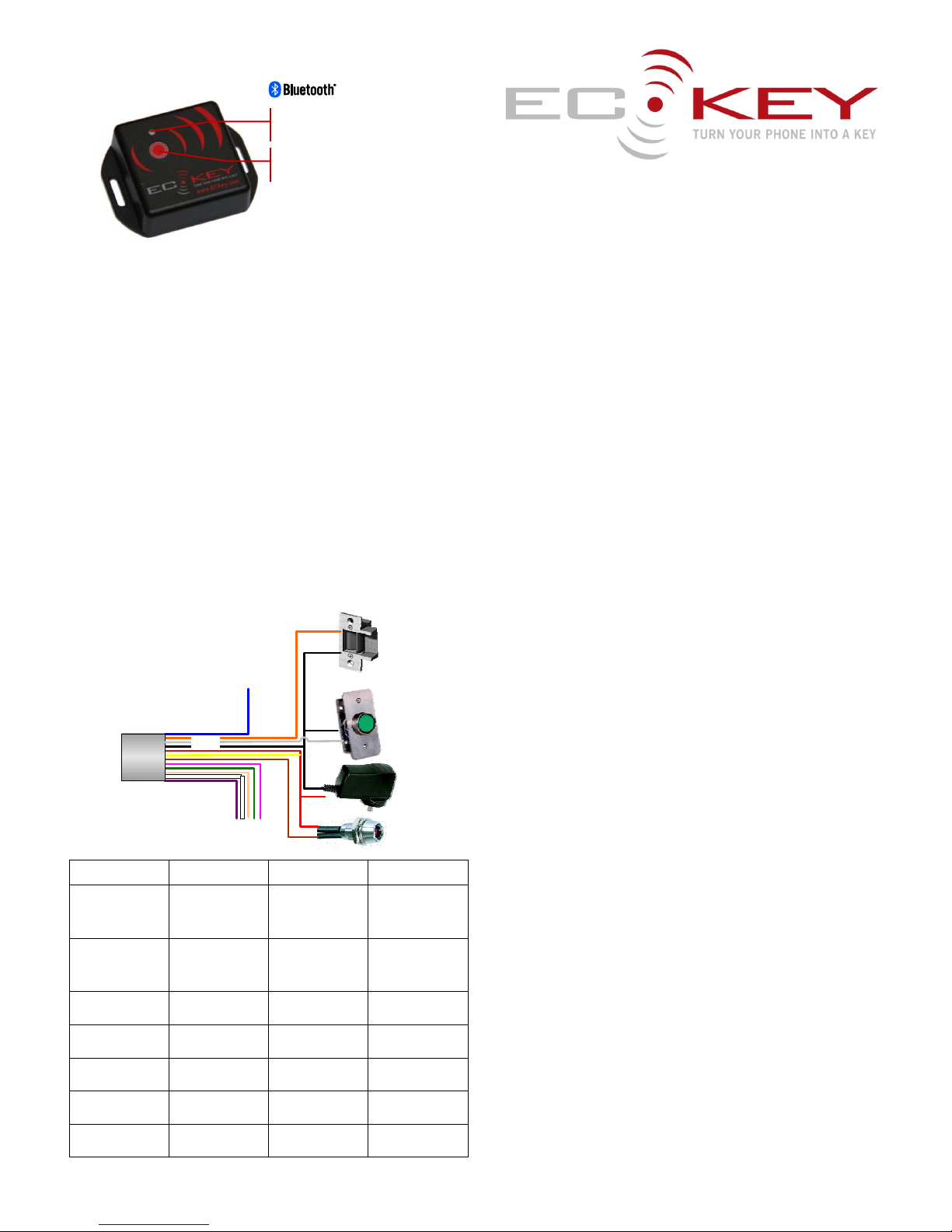
How do I Install ECKey?
1) You will need a lock or opener, regulated 12 to 24VDC power
supply, flat head screw driver, Philips screw driver, connection
wire and wire cutters.
2) Unscrew the back of ECKey EK2 to identify the connections in
the diagram below.
3) Wire the positive power supply to the Voltage (V+) terminal
and the negative power supply to Ground (G) terminal.
4) Turn the power on and the Status Light should flash four
times and then once every 5 seconds after that.
5) Unplug the power supply.
6) Wire the lock, door opener to ECKey and optionally an
external request to exit button and status light.
7) Plug in the power supply and ECKey is now fully installed.
Fail Secure Wiring
Wire/Application Fail Secure Fail Safe Request to Exit
Black (Ground) Ground
(-) Strike
Optional Button
Ground
(-) Strike
Optional Button
Ground
Optional Button
Red (Voltage V+) 12VDC
Yellow (Relay)
(+) Optional Light
12VDC
Yellow (Relay)
(+) Optional Light
12VDC
(+) Optional Light
Yellow
Relay Common
Red (Voltage) Red (Voltage) Request to Exit
lock input
Brown
Normally Open
(+) Strike None Request to Exit
lock input
Blue
NormallyClosed
None (+) Strike None
Brown
Optional Button
Optional Button Optional Button Optional Button
Orange
Optional Light
(-)Optional Light (-) Optional Light (-) Optional Light
How do I unlock the door?
1) Make phone discoverable (visible) by consulting your phone
documentation (usually in Setting -> Connectivity->
Bluetooth-> Find Me or Setup). We recommend creating a
shortcut to managing Bluetooth on your phone. See your
phone documentation on how to do this.
2) Wait for the phone to be prompted for the PIN. The default
PIN is printed on the label in this user guide.
3) Once the PIN is successfully entered, the relay will trigger and
the Status Light will turn on for 3 seconds to unlock a door,
open a gate or disable an alarm.
Passage mode
In Passage mode ECKey will not monitor phones and the gate or
lock will remain unchanged. To enter Passage mode press and hold
the Administration Button for three seconds until the blue Status
Light comes on. The ECKey relay will remain frozen in its current
state and stop monitoring for phones.
To leave the relay on (for example to leave a strike unlocked)
unlock the door with the PIN on the phone and while the door is
unlocked press and hold the Administration Button for 3 seconds
until the blue Status Light turns off then on again.
To leave the relay off (for example no pulse on an request to exit
button) press and hold the Administration Button for 3 seconds until
the blue Status Light comes on.
To exit Passage mode press and release the Administration Button.
Register for Support
1) You will need an internet connection, ECKey Serial Number,
email address for registration.
2) Go to www.ECKey.com and register with the ECKey Serial
Number printed on your unit in this form EK2-XX-XXXXXXX.
3) Logon into the Support Site and select Knowledge Base->
EK2-Virtual Keypad.
Change the PIN and other settings
1) You will need to be registered for support and have a
Bluetooth device that supports file transfer all Bluetooth PCs
and most phones.
2) Logon into the Support Site and select Knowledge Base->
EK2-Virtual Keypad->Configuration.
3) Select the configuration settings and download the text file on
to your computer.
4) Put ECKey in to Administration Mode by pressing and releasing
the Administration Button three times and press and holding
for three seconds until the Status Light repeatedly flashes
three times.
Status Light
Administration Button
Ground
Voltage
Light
Normally
Open
Not Used
Normally
Closed
Button
Page 2

Frequently asked questions
Is it secure?
Yes - Both the ECKey and your phone are hidden from everyone
else behind billions of rolling codes.
Can I still use my phone?
Yes - You can still use your phone as a phone (including Bluetooth
Headset) at the same time as locking and unlocking the door.
Can I still use a key?
Yes - You can still use a key or other secure devices as an
alternative unlocking mechanism
5) Right click on the configuration settings txt file and send to
Bluetooth devices.
6) Search for ECKey and enter the Master PIN
7) The file will be transferred to ECKey and the settings updated.
8) ECKey may respond by sending the updated settings back.
Troubleshooting
My ECKey is not working
Check power
The Status Light should flash four times when powered on.
After power on the Status Light should flash once every 5
seconds.
Check the wiring
Press and hold Administration Button to unlock to enter passage
mode.
Press and release Administration Button to lock and return to
normal.
Check the phone
Check that Bluetooth is on, on the phone
Check that the phone has Bluetooth set to be discoverable.
EK2 – Functions
Feature Sequence Confirmation
Power on Connect Four flashes and then return to Normal Operation
Normal Operation None Slow flashing once every 5 seconds.
Passage Mode Press and hold Administration Button or external button for 3
seconds.
Status Light on continuously and relay held in curre nt
position.
Exit Passage Mode Press and release Administration Button or external button Four flashes and then return to Normal Operation
Administration Mode Unlock door with phone and within three seconds press and release
Administration Button three times and press and hold for 3 seconds.
Repeated triple flashing
Exit Administration
Mode
Press and release Administration Button Unit restarts with four flashes before returning to norm al
operation
Factory Reset Unlock door with phone and within three seconds press and release
Administration Button four times and press and hold for 8 seco nd s.
Press and hold Administration Button for 3 seconds to confirm.
Repeated eight flashing
Status Light on for 5 seconds
Exit Factory Reset Press and release Administration Button Normal Operation
Factory Reset Turn the power off to ECKey
Connect the Pink, Grey and Black wires together
Turn the power on to ECKey
Turn the power off and rewire
Status Light on
Status Light off
Normal Operation
For more information please contact
www.ECKey.com
ECKey Serial Number:
PIN:
Master PIN:
 Loading...