

Page 1
Page 2
2
Installation Guide
email - [email protected] (US)
tel - 1-800-477-2267 (East Coast) - 1-888-883-2790 (West Coast)
email - [email protected] (Europe)
Page 3
3
email - [email protected] (US)
tel - 1-800-477-2267 (East Coast) - 1-888-883-2790 (West Coast)
email - [email protected] (Europe)
Installation Guide
Page 4
4
Installation Guide
email - [email protected] (US)
tel - 1-800-477-2267 (East Coast) - 1-888-883-2790 (West Coast)
email - [email protected] (Europe)
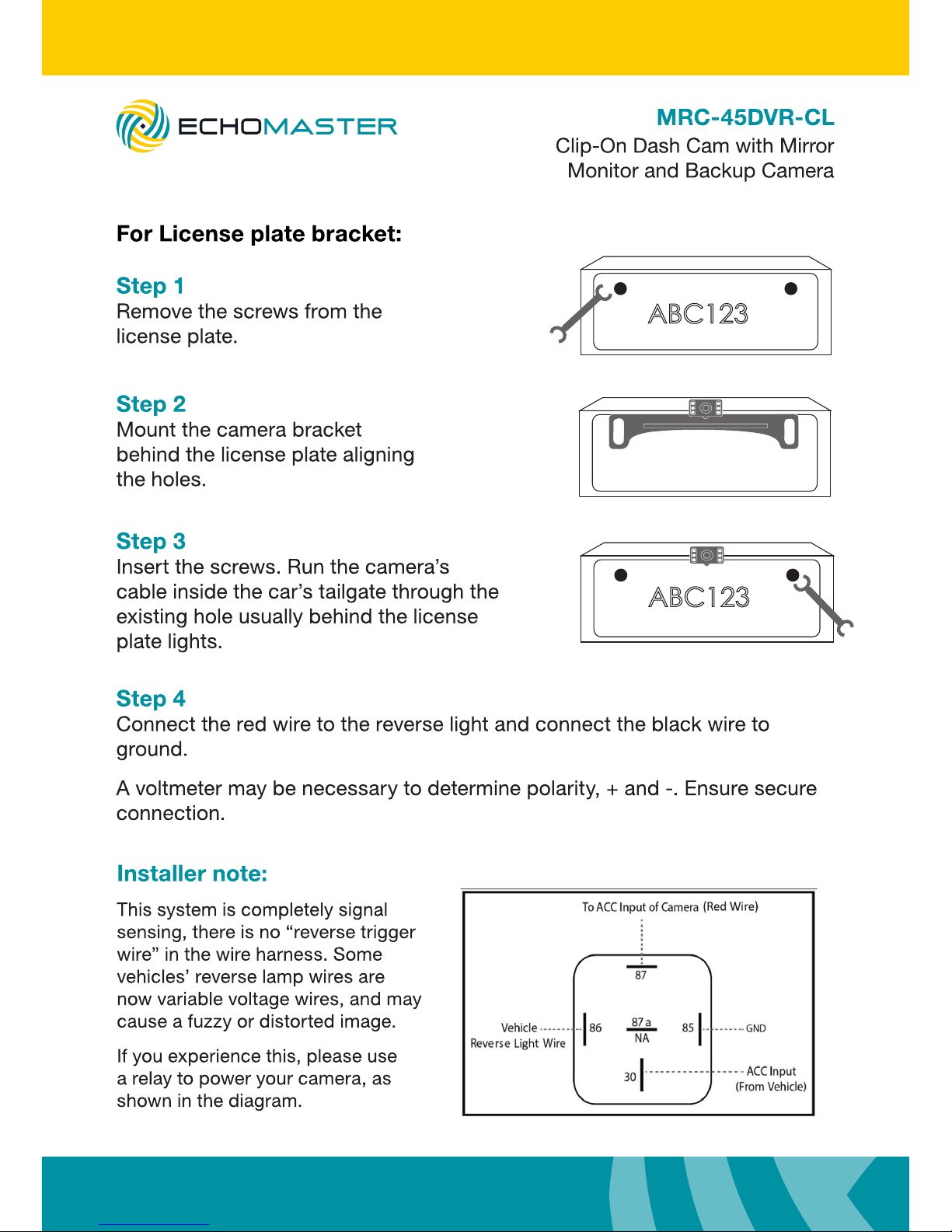
ABC123
ABC123
Page 5
5
email - [email protected] (US)
tel - 1-800-477-2267 (East Coast) - 1-888-883-2790 (West Coast)
email - [email protected] (Europe)
Installation Guide
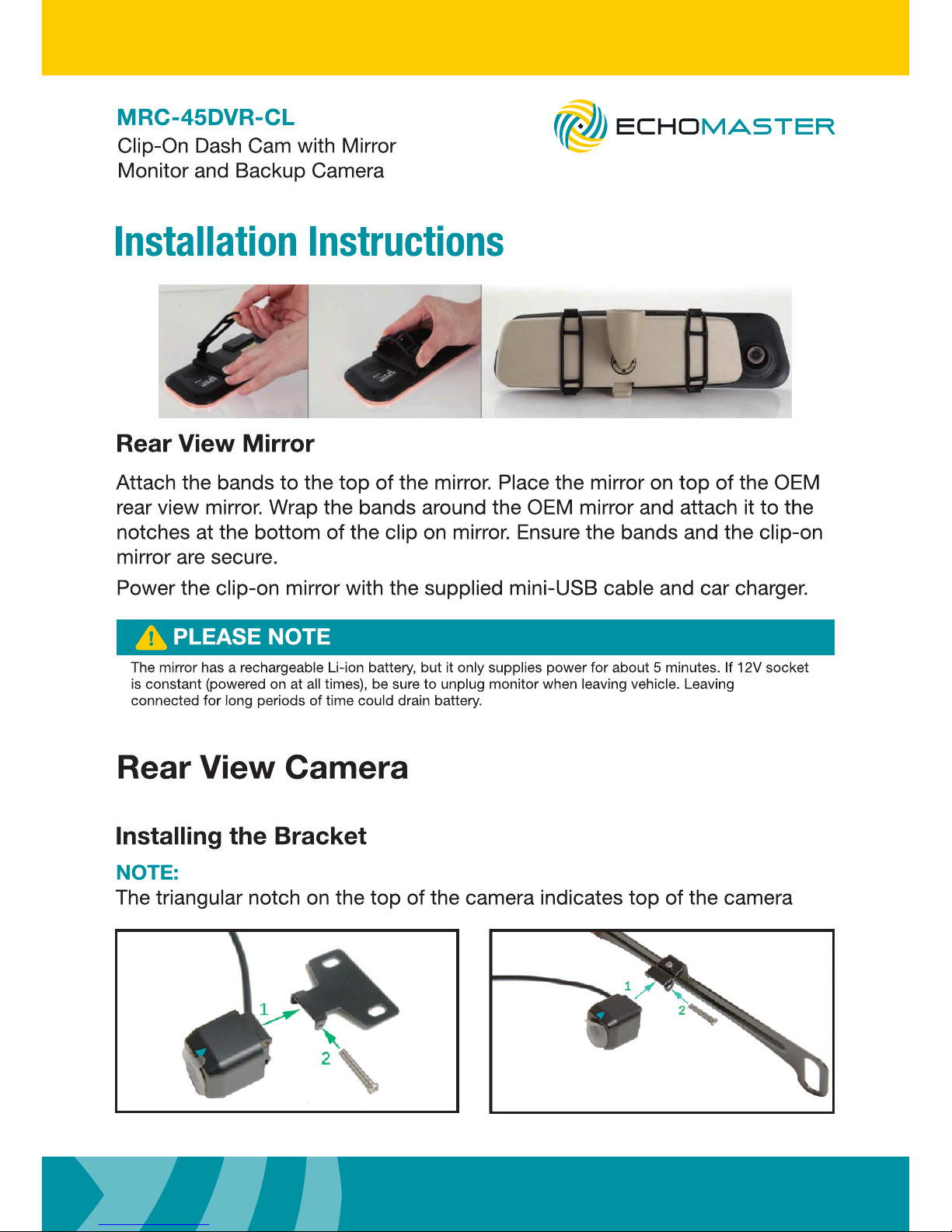
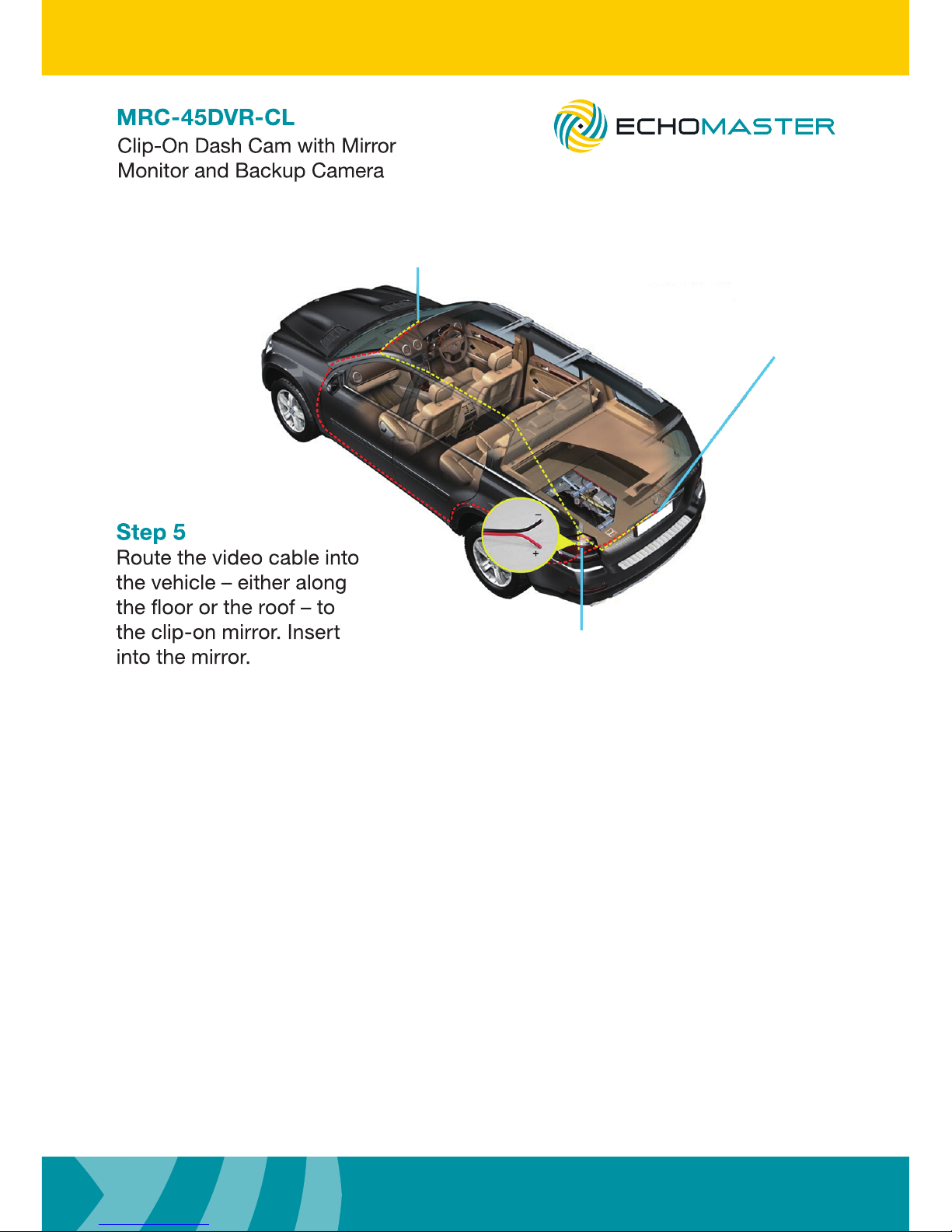
Attach rearview mirror
Install rearview
camera
Connect reversing light
Page 6
6
Installation Guide
email - [email protected] (US)
tel - 1-800-477-2267 (East Coast) - 1-888-883-2790 (West Coast)
email - [email protected] (Europe)
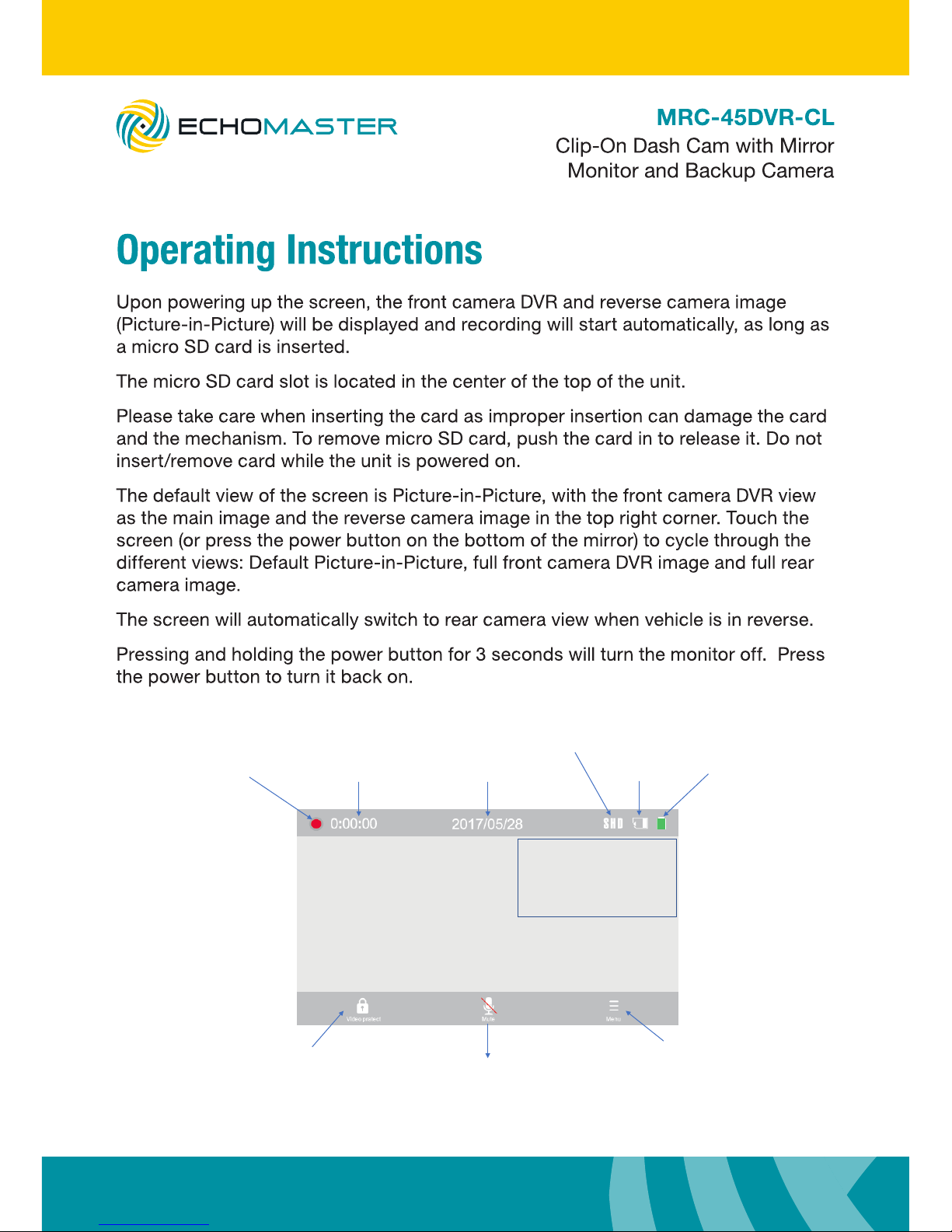
Recordingindicator
Elapsed1me
Dateand1mestamp
Recordingmode
MicroSDcard
status
Ba8erystatus
Presstolock
currentvideofile
Presstomute/unmute
Presstogoto
MainMenu
RearCameraimage
FrontCameraDVRimage
*Defaultscreenimageshown.
Page 7
7
email - [email protected] (US)
tel - 1-800-477-2267 (East Coast) - 1-888-883-2790 (West Coast)
email - [email protected] (Europe)
Installation Guide
Page 8
8
Installation Guide
email - [email protected] (US)
tel - 1-800-477-2267 (East Coast) - 1-888-883-2790 (West Coast)
email - [email protected] (Europe)
Page 9
9
email - [email protected] (US)
tel - 1-800-477-2267 (East Coast) - 1-888-883-2790 (West Coast)
email - [email protected] (Europe)
Installation Guide
Page 10
10
Installation Guide
email - [email protected] (US)
tel - 1-800-477-2267 (East Coast) - 1-888-883-2790 (West Coast)
email - [email protected] (Europe)
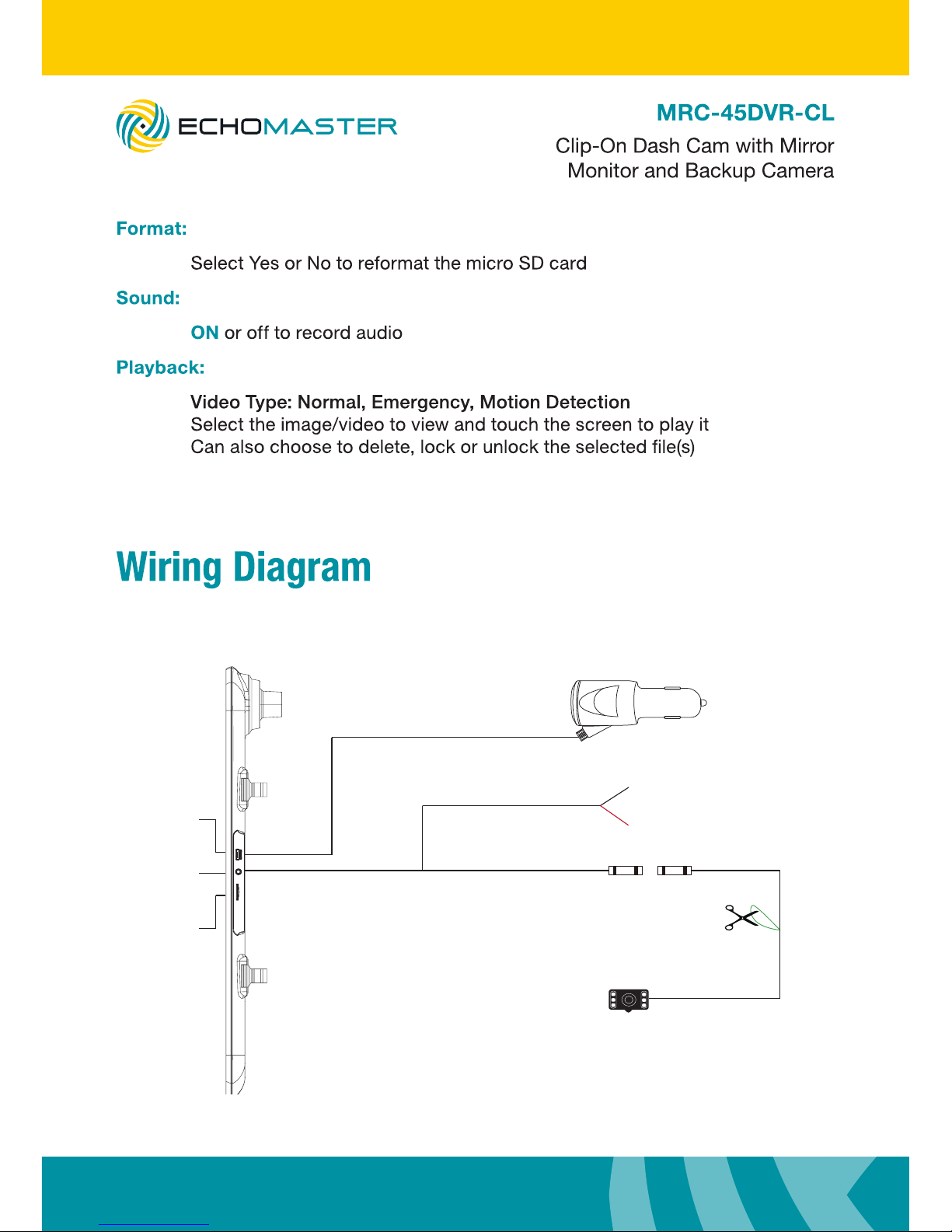
USB
To ground (iron part)
To reversing light +12V
Parking Guideline Selection
Default setting is with parking guide line.
Cut off the green cable, parking guide
line is canceled.
12V Car Charger
Micro-SD
AV-IN
3.5mm / 11ft
1.2m / 4ft
7m / 23ft
1.5m / 5ft
Page 11
11
email - [email protected] (US)
tel - 1-800-477-2267 (East Coast) - 1-888-883-2790 (West Coast)
email - [email protected] (Europe)
Installation Guide
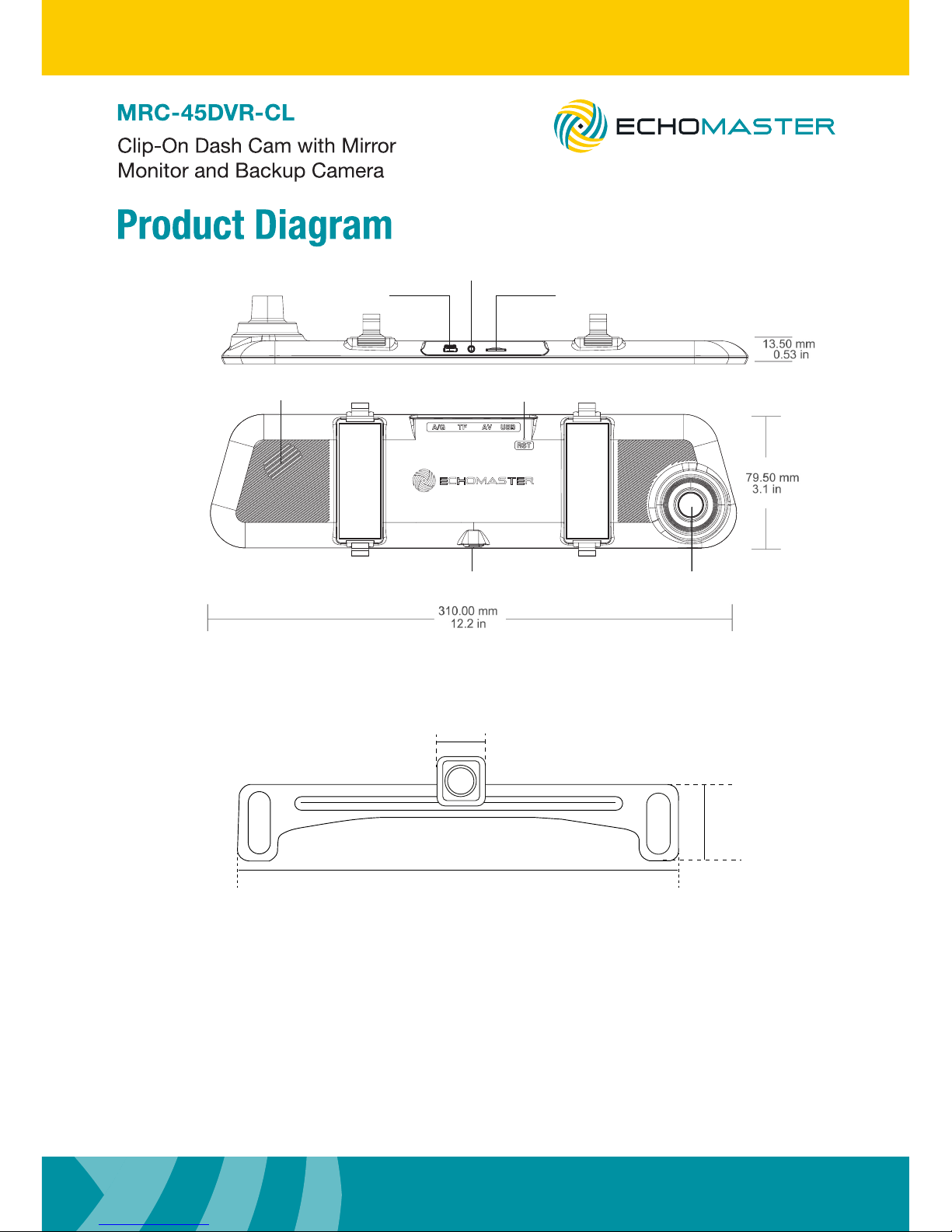
AV-IN(to connect
rear view camera)
MINI USB Port Micro-SD Slot
Reset
Power Button Lens
Speaker
200.3mm / 7.89in
21mm / 0.83in
25.8mm / 1.01in
Page 12
12
Installation Guide
email - [email protected] (US)
tel - 1-800-477-2267 (East Coast) - 1-888-883-2790 (West Coast)
email - [email protected] (Europe)
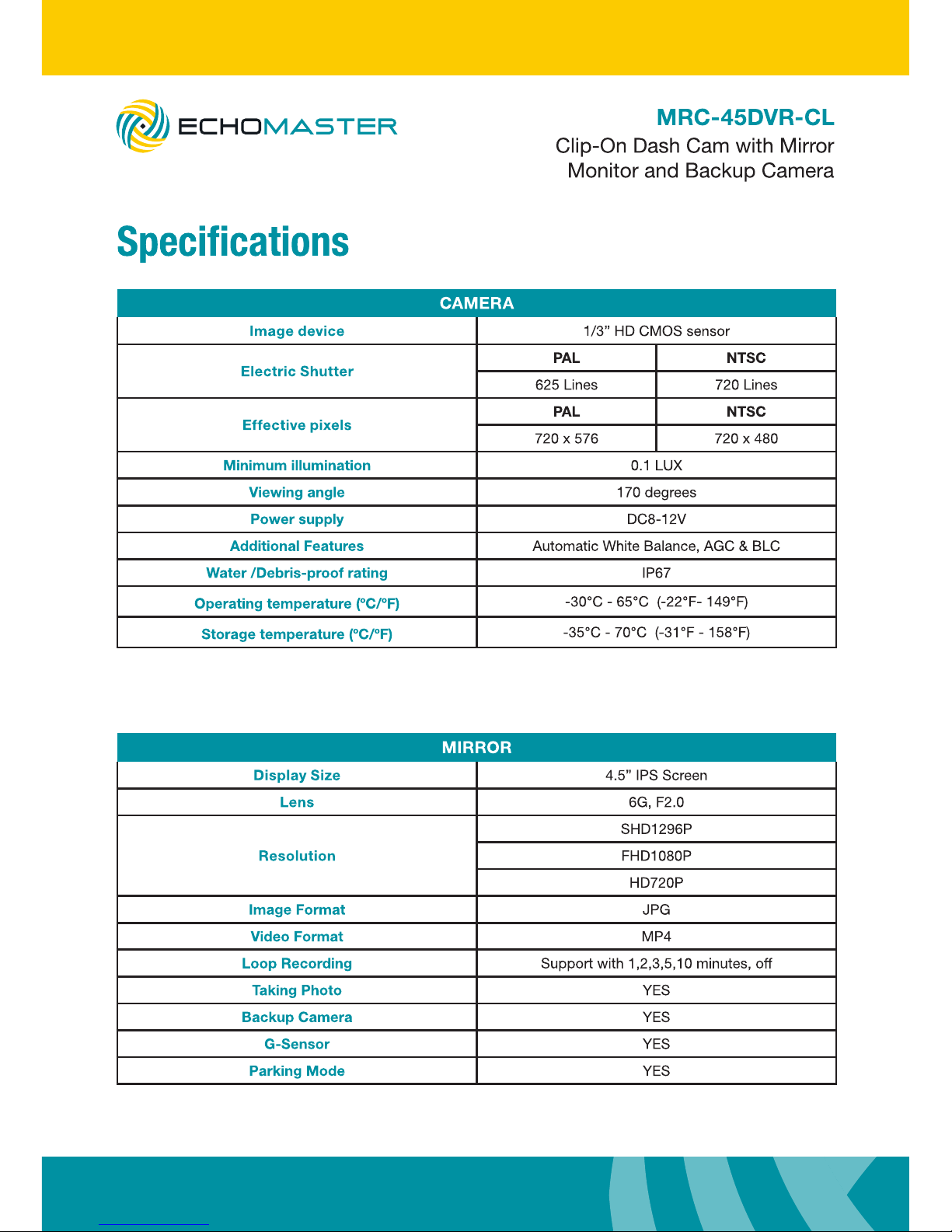
CAMERA
Image device 1/3” HD CMOS sensor
Electric Shutter
PAL NTSC
625 Lines 720 Lines
Effective pixels
PAL NTSC
720 x 576 720 x 480
Minimum illumination 0.1 LUX
Viewing angle 170 degrees
Power supply DC8-12V
Additional Features Automatic White Balance, AGC & BLC
Water /Debris-proof rating IP67
Operating temperature (ºC/ºF)
-30°C - 65°C (-22°F- 149°F)
Storage temperature (ºC/ºF)
-35°C - 70°C (-31°F - 158°F)
MIRROR
Display Size 4.5” IPS Screen
Lens 6G, F2.0
Resolution
SHD1296P
FHD1080P
HD720P
Image Format JPG
Video Format MP4
Loop Recording Support with 1,2,3,5,10 minutes, off
Taking Photo YES
Backup Camera YES
G-Sensor YES
Parking Mode YES
Page 13
13
email - [email protected] (US)
tel - 1-800-477-2267 (East Coast) - 1-888-883-2790 (West Coast)
email - [email protected] (Europe)
Installation Guide
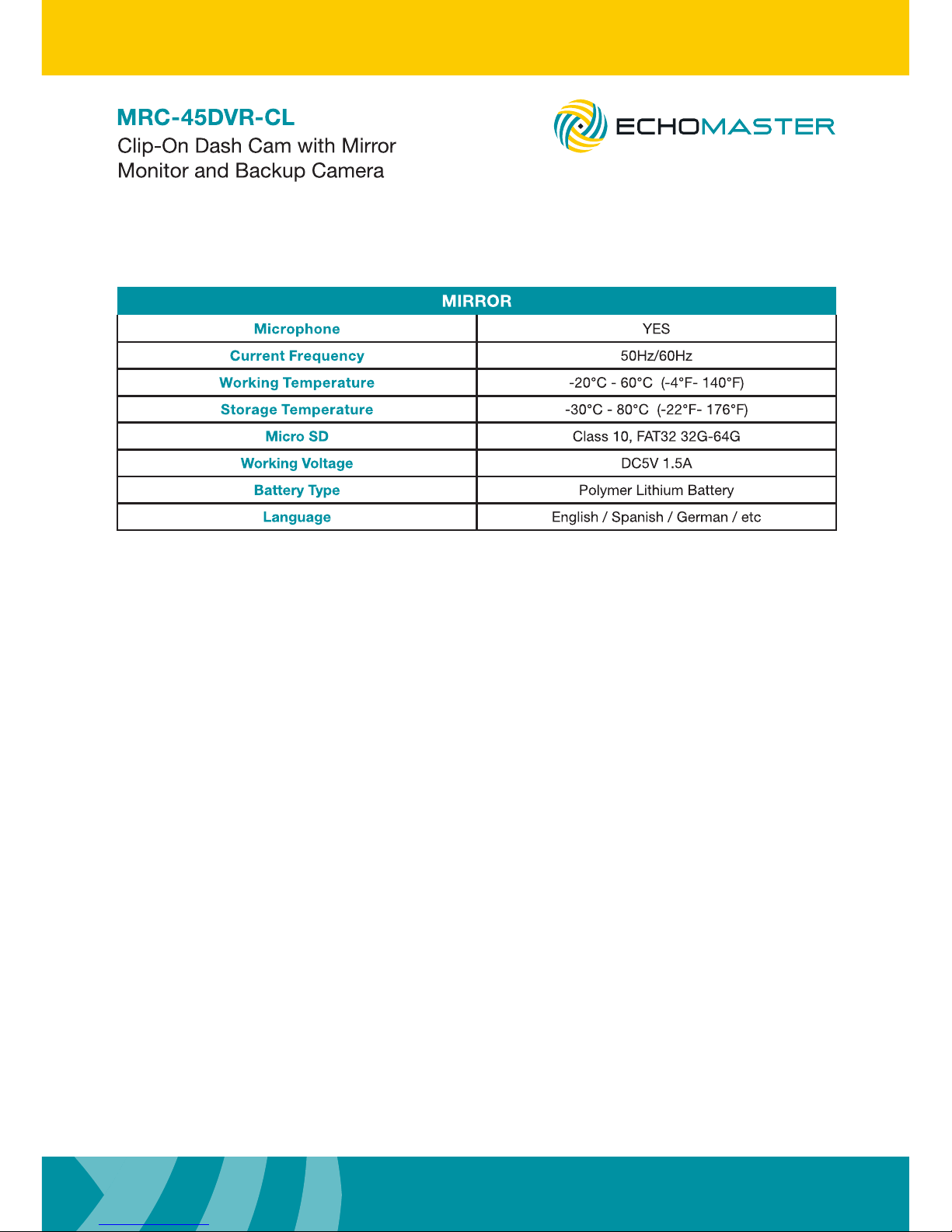
MIRROR
Microphone YES
Current Frequency 50Hz/60Hz
Working Temperature -20°C - 60°C (-4°F- 140°F)
Storage Temperature -30°C - 80°C (-22°F- 176°F)
Micro SD Class 10, FAT32 32G-64G
Working Voltage DC5V 1.5A
Battery Type Polymer Lithium Battery
Language English / Spanish / German / etc
Page 14
14
Installation Guide
email - [email protected] (US)
tel - 1-800-477-2267 (East Coast) - 1-888-883-2790 (West Coast)
email - [email protected] (Europe)
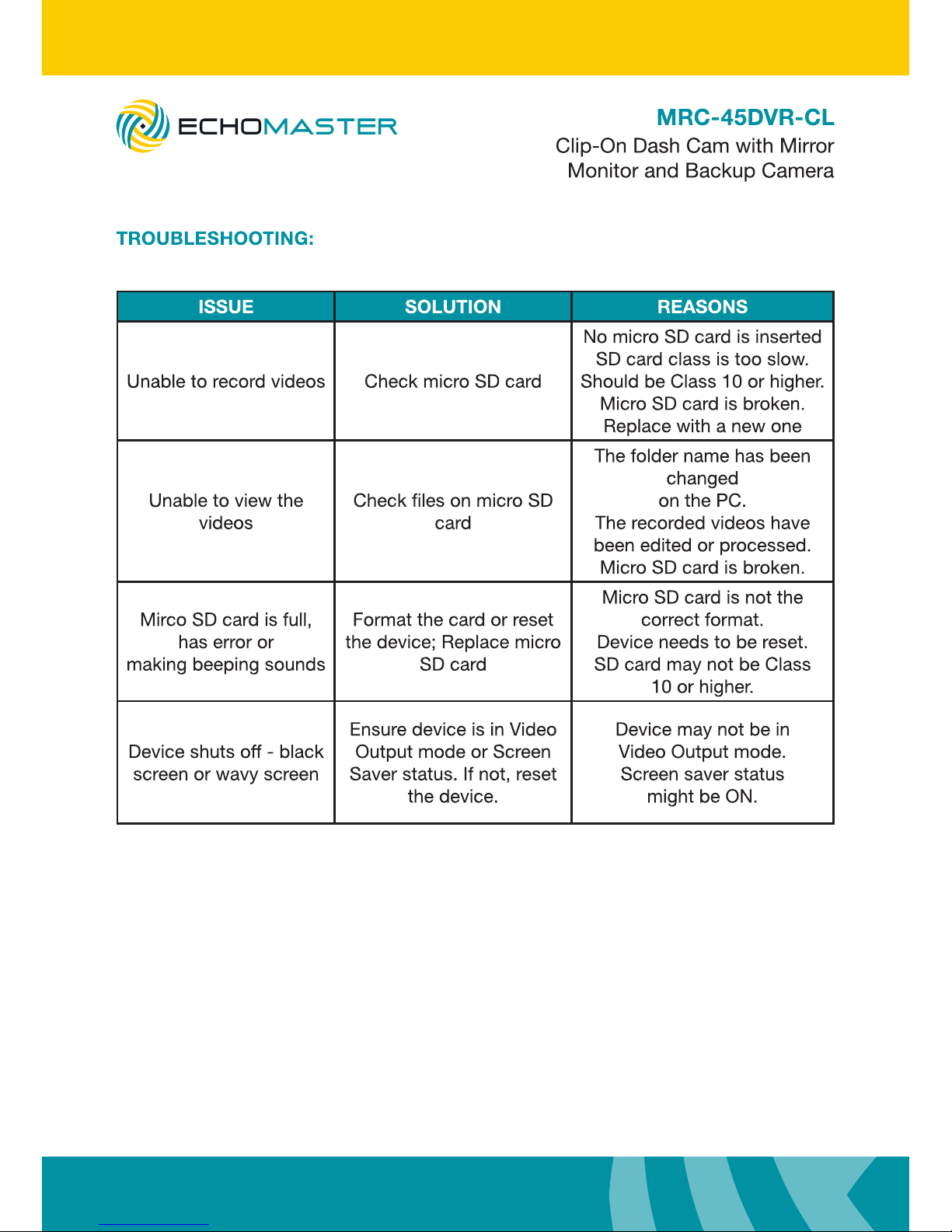
ISSUE SOLUTION REASONS
Unable to record videos Check micro SD card
No micro SD card is inserted
SD card class is too slow.
Should be Class 10 or higher.
Micro SD card is broken.
Replace with a new one
Unable to view the
videos
Check les on micro SD
card
The folder name has been
changed
on the PC.
The recorded videos have
been edited or processed.
Micro SD card is broken.
Mirco SD card is full,
has error or
making beeping sounds
Format the card or reset
the device; Replace micro
SD card
Micro SD card is not the
correct format.
Device needs to be reset.
SD card may not be Class
10 or higher.
Device shuts off - black
screen or wavy screen
Ensure device is in Video
Output mode or Screen
Saver status. If not, reset
the device.
Device may not be in
Video Output mode.
Screen saver status
might be ON.
Page 15

15
email - [email protected] (US)
tel - 1-800-477-2267 (East Coast) - 1-888-883-2790 (West Coast)
email - [email protected] (Europe)
Installation Guide
Page 16
 Loading...