

Page 1
User Instructions
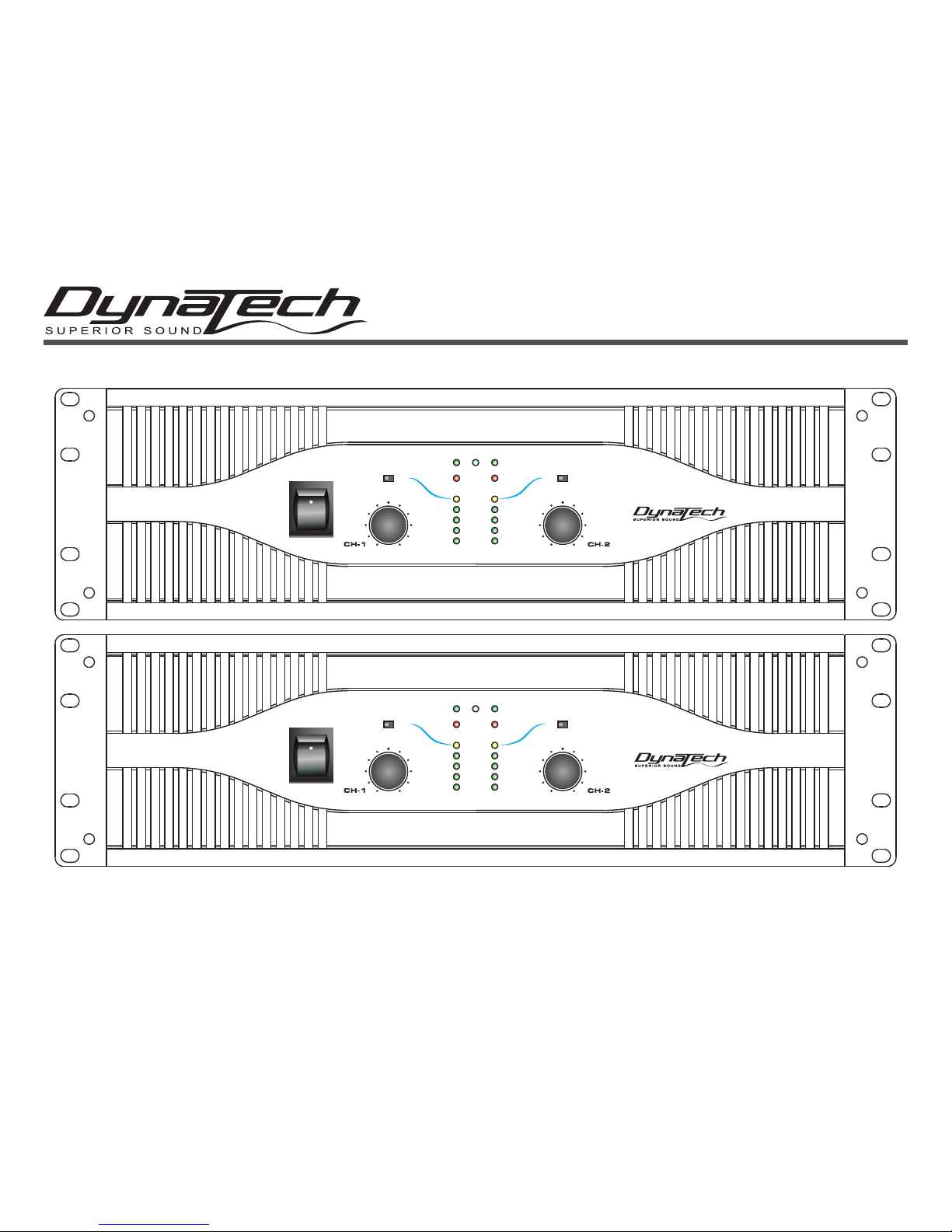
Professional Power Amplif iers
POW ER
ON
OFF
LIMI TER
ON
PROFESSIONAL POWER AMPLIFIER
LIMI TER
ON
PARALLE L STER EO BRIDG E
-20dB
SIGNA L
-10dB
-5dB
CLIP
PROTE CT
0
10
0
10
POW ER
ON
OFF
LIMI TER
ON
PROFESSIONAL POWER AMPLIFIER
LIMI TER
ON
PARALLE L STER EO BRIDG E
-20dB
SIGNA L
-10dB
-5dB
CLIP
PROTE CT
0
10
0
10
V-5000
V-7000
Page 2
This symbol is intended to alert the user to the presence of non insulated "dangerous voltage" within the product's enclosure that may be of sufficient magnitude to
constitute a risk of electric shock to persons.
This symbol is intended to alert the user of the presence of important operating and maintenance (servicing) instructions in the literature accompanying the product.
CAUTION: Risk of the electrical shock - DO NOT OPEN!
CAUTION: To reduce the risk of electrical shock, do not remove cover. No user serviceable parts inside. Refer all servicing to qualified s ervice personnel.
WARNING: To prevent electrical shock or f re hazard, do not expose this amplifier to rain or moisture. Before using this amplifier r ead the user manual for further warnings.
Ce symbole est utilisé pur indiquer à l’utilisateur la présence à l'intérieur de ce produit de tension non-isolée dangereuse pouvant être d'intensité suff sante pour
constituer un risque de choc électrique.
Ce symbole est utilisé pour indiquer à l’utilisateur qu'il trouvera d'importantes instructions importantes sur l'utilisation et l'entretien de l'appareil dans la littérature
accompagnant le produit.
ATTENTION: Risque de choc électrique - NE PAS OUVRIR!
ATTENTION: Afin de réduire le risque de choc électrique, ne pas enlever le couvercle. Il ne se trouve à l’intérieur aucune piéce pouvant être réparée par l'utilisateur. Confier
l'entretien à un personnel qualif é.
AVERTISSEMENT: Afin de prévenir les risque de décharge ou de feu, n’exposez pas cet appareil à la pluie ou à l’humidité. Avant d’utiliser cet amplificateur, lisez les avertissements supplémentaries situés dans le guide.
ATTENTION:
ATTENTION:
AVERTISSEMENT:
Este símbolo tiene el propósito de alertar al usuario de la presencia de “voltaje peligroso“ que no tiene aislamiento dentro de la caja del producto que puede tener
una magnitud suf ciente como para constituir riesgo de corrientazo.
Este símbolo tiene el propósito de alertar al usuario de la presencia de instrucciones importantes sobre la operación y mantenimiento en la literatura que vienc con
el producto.
PRECAUCIÓN: Riesgo del choque eléctrico - NO SE ABRA
PRECAUCIÓN: Para disminuir el riesgo de choque eléctrico, no quite la cubierta. No hay piezas adentro que el usario puede reparar. Deje todo mantenimiento al los téc-
nicos cualif cados.
ADVERTENCIA: Para prevenir choque eléctrico o riesgo de incendios, no deja expuesto a la lluvia o a la humedad este amplif cador. Antes de usar este amplif cador, lea
mas advertencias en la guia de operacion.
PRECAUCIÓN:
ADVERTENCIA:
mas advertencias en la guia de operacion.
Dieses Symobl soll den Anwender vor unisollierten gefährlichen Spannungen innerhalb des Gehäuses warnen, die von Ausreichender Stärke sind, um einen elektrischen Schlag verursachen zu können.
Dieses Symobl soll den Benutzer auf wichtige Instruktionen in der Bedienungsanleitung aufmerksam machen, die Handhabung und Wartung des Produkts betreffen.
VORSICHT: Risiko - Elektrischer Schlag! Nicht öffnen!
VORSICHT: Um ddas Risiko eines elektrischen Schlages zu vermeiden, nicht die Abdeckung enfernen. Es bef nden sich keine Teile darin, die vom Anwender repariert
werden könnten. Reparaturen nur von qualif zierte Fachpersonal durchführen lassen.
ACHTUNG: Um einen elektrischen Schlag oder Feuergefahr zu vermeiden, sollte diesen Gerät nicht dem Regen oder Feuchtigkeit ausgesetz werden. Vor Inbetriebnahme
unbedingt die Bedienungsanleitung lesen.
ACHTUNG:
page 2
Page 3
FOR OPTIMUM PERFORMANCE AND
RELIABILITY DO NOT PRESENT THE
AMPLIFIER WITH A SPEAKER LOAD
OF LESS T HAN 2 OHMS OR ANY
COMBINATION OF SPEAKERS THAT
TOGETHER ARE LESS THAN 2 OHMS!
USING ONE SPEAKER, IT MUST BE
RATED AT 4 OR MORE OHMS.
USING TWO SPEAKERS, THEY MUST
RATED EACH AT 4 OR MORE OHMS.
USING THREE SPEAKERS, THEY
MUST BE RATED EACH AT 8 OR MORE
OHMS.
POUR ASSURER LA FIABILE TE ET
OBTENIT UNE PERFORMANCE OPTIMALE,
NESOUMETTE JAM AIS L’AMPLIFICATEUR
A UNE CHARGE D’IMPEDAN CE TOTALE
INFERIEURE A 2 OHMS, NI AVEC UN H.P. NI
EN COMBINAISON DES H.P.
AVEC UN H.P., IL FAUT UNE CHARGE
D’IMPEDANCE MINIMUM DE 2 OHMS.
AVEC DEUX H.P., FAUT POUR CHAOUN UNE
CHARG E D’IMPEDANCE MINIMUM DE 4
OHMS.
AVEC TROIS H.P., FAUT POUR CHAOUN UNE
CHURGE D’IMPEDANCE MINIMUM D E 8
OHMS.
CONTENTS:
Safety Precautions.......................................................................................................................................................................................4
Introduction...............................................................................................................................................................................................4
Front Panel..................................................................................................................................................................................................5
Rear Panels.................................................................................................................................................................................................6
Inputs...........................................................................................................................................................................................................7
Outputs............................................................................................................................................................................................................7
Speakon Output Connector Assembly........................................................................................................................................................9
Operating Modes........................................................................................................................................................................................10
Protection Circuitry
Limiter..................................................................................................................................................................................................11
Short Circuit Protection....................................................................................................................................................................11
Thermal Protection..........................................................................................................................................................................12
Amplifier Features.......................................................................................................................................................................................12
Subwoofer and Speaker Setup..............................................................................................................................................................13-14
Specifications................................................................................................................................................................................................15
CAUTION: TO REDUCE THE RISK OF ELECTRIC
SHOCK, DO NOT REMOVE THE COVER.
THERE ARE NO USER SERVICEABLE PARTS
INSIDE. REFER ALL SERVICE TO YOUR
AUTHORIZED AMERICAN AMX DEALER.
CAUTION
Do not open -
risk of electric shock
The lightning flash with an arrow triangular
symbol is intended to alert the user to the
presence of non insulated “dangerous voltage” within the prod ucts enclosure, and
may be of sufficient magnitude to constitute a risk of electric shock.
The exclamation point triangular symbol is
intended to alert the user to the presence
of important operating and maintenan ce
(servicing) instructions in the user manual
accompanying the amplifier.
page 3
Page 4

Important Precautions
• To reduce the risk of electrical shock or fire, do not expose this
unit to rain or moisture.
• Do not spill water or other liquids into or on to your unit.
• Do not attempt to operate this unit if the power cord has been
frayed or broken.
• Do not attempt to remove or break off the ground prong from
the electrical cord. This prong is used to reduce the risk of elec-
trical shock and fire in case of an internal short.
• Disconnect main power before making any type of connection
• Do not remove the cover under any conditions. There are no
user serviceable parts inside.
• Never plug this unit in to a dimmer pack.
• Always be sure to mount this unit in an area that will allow
proper ventilation. Allow about 6” (15cm) between this device
and a wall.
• Do not attempt to operate this unit, if it becomes damaged.
• This unit is intended for indoor use only, use of this product out doors voids all warranties.
• During long periods of non-use, disconnect the unit’s main
power.
• Always mount this unit in a safe and stable manner.
• Power cords should be routed so they are not likely to be
walked on, pinched by items placed upon or against them.
• Cleaning -The outside of the unit should be wipe down with a
soft cloth and mild cleaner when needed.
• Heat -The appliance should be situated away from heat sources
such as radiators, heat registers, stoves, or other appliances
(including amplifiers) that produce heat.
• The fixture should be serviced by qualified service personnel
when:
A. The power-supply cord or the plug has been damaged.
B. Objects have fallen on, or liquid has been spilled into the unit.
C. The appliance has been exposed to rain or water.
D. The fixture does not appear to operate normally or exhibits a
marked change in performance.
Introduction
Installation: This amplifier is designed to mount into a standard
19” rack. The front panel provides four holes used to screw the
unit into a rack. The unit also provides a way to rear mount the
unit into a rack for added security. Rear mounting the unit is espe cially recommended for this amplifier if the unit is to mounted into
a mobile rack.
page 4
Introduction: Congratulations and thank you for purchasing
the DynaTech V-5000/V-7000 amplifier. This amplifier is a representation of DynaTech's continuing commitment to produce the best
and highest quality products all at an affordable price. Please
read and understand this manual completely before attempting to
operate your new amplifier. This booklet contains important information concerning the proper and safe operation of your new
amplifier.
Unpa c k i ng:Eve r y amplif i e r has be e n
thoroughly tested and has been shipped in perfect operating
condition. Carefully check the shipping carton for damage that
may have occurred during shipping. If the carton appears to be
damaged, carefully inspect your unit for any damage and be
sure all accessories necessary to operate the unit has arrived
intact. In the event damage has been found or parts are missing,
please contact your dealer for further instructions.
V-5000/V-700 0
Page 5
V-5000
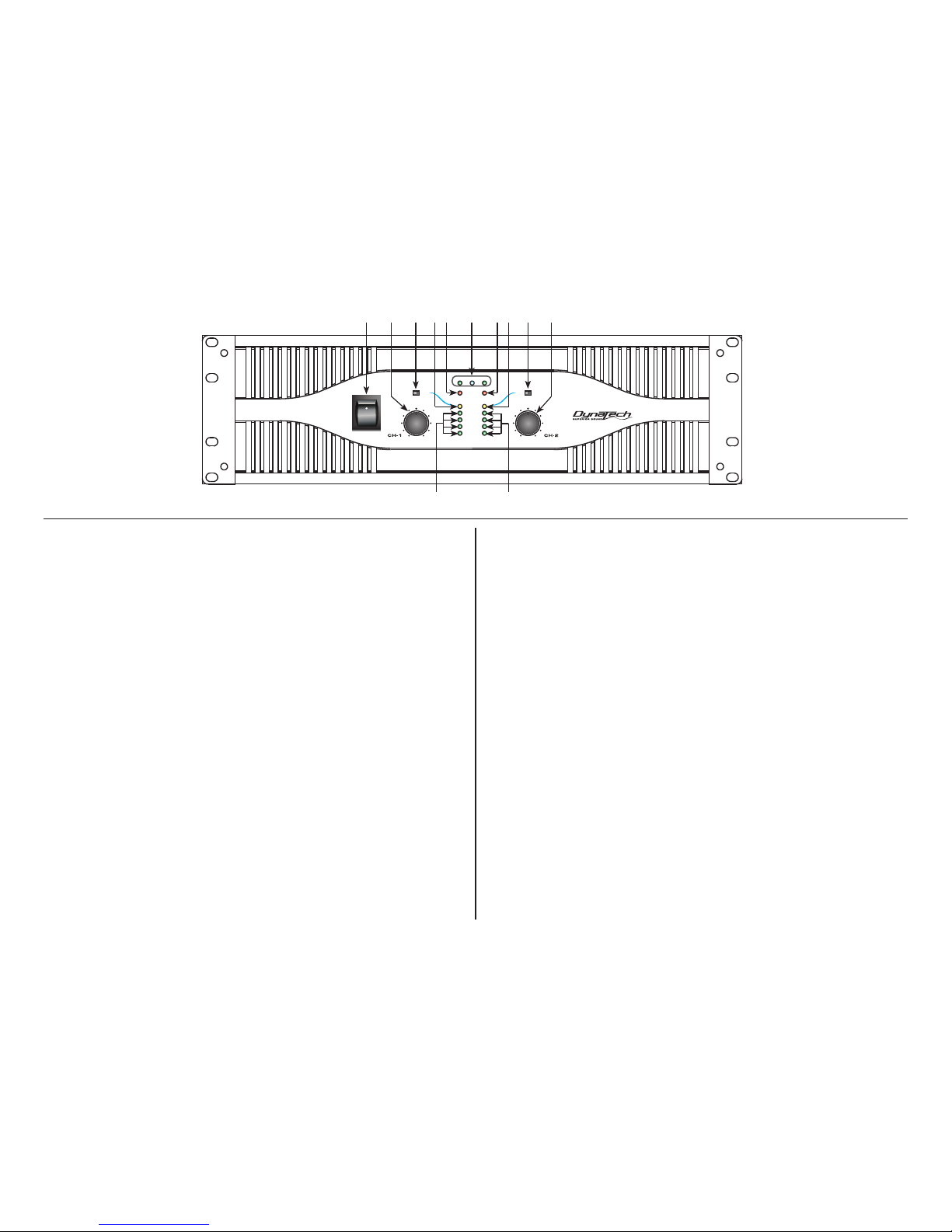
1. Power Switch - This switch is used to control the units main power.
2. Channel 1 Gain Control - This rotary knob is used to control the out -
put signal of channel one. Turning the knob in a clockwise direction will
increase signal output.
3. Channel 1 Limiter Switch - This is used to activate the channels
built-in limiter. The limiter reduces the average input level when the sig nal begins to distort, this process is designed to reduce distortion and
protect the speakers. See limiter page 11.
4. Channel 1 Clip Indicator - This red LED will begin to flash when
channel one begins to overload (clip). At this point channel one will be gin to distort. Under heavy clipping activity lower the channel one gain
control to reduce the risk of damage to your speakers and amplifier. This
LED may glow when the unit has been turned off, this is normal.
5. Channel 1 Protect Indicator - The red Protect LED will begin to glow
when the channel goes into protect mode. When the channel goes into
protect mode all output for that channel will turn off. This is to protect any
speakers connected to the channel.
6. Function Indicators - These indicators detail the operating mode of
the amplifier. These LEDs will also function as a power indicator.
7. Channel 2 Protect Indicator - The red Protect LED will begin to glow
when the channel goes into protect mode. When the channel goes into
protect mode all output for that channel will turn off. This is to protect any
Front Panel Control
speakers connected to the channel.
8. Channel 2 Clip Indicator - This red LED will begin to flash when
channel one begins to overload (clip). At this point channel one will be gin to distort. Under heavy clipping activity lower the channel one gain
control to reduce the risk of damage to your speakers and amplifier. This
LED may glow when the unit has been turned off, this is normal.
9. Channel 2 Limiter Switch - This is used to activate the channels
built-in limiter. The limiter reduces the average input level when the sig nal begins to distort, this process is designed to reduce distortion and
protect the speakers. See limiter page 11.
10. Channel 2 Gain Control - This rotary knob is used to control the
output signal of channel two. Turning the knob in a clockwise direction
will increase signal output.
11. Channel 2 Signal Indicators - These green and yellow LED’s will
glow according to the average signal output.
12. Channel 1 Signal Indicators - These green and yellow LED’s will
glow according to the average signal output.
Diagram 1
1
1112
109875432 6
POWER
ON
OFF
LIMITE R
ON
PROFESSIONAL POWER AMPLIFIER
LIMITE R
ON
PARALLEL ST EREO BRIDG E
-20dB
SIGNAL
-10dB
-5dB
CLIP
PROTECT
0
10
0
10
page 5
Page 6

13. Cooling Fans - Dual high speed cooling fans
14. Channel 2 Subwoofer Mode On/Off Switch - Turns the subwoofer
mode for channel two on and off.
15. Channel 2 Frequency Adjustment - This knob is used to adjust the
frequency level sent to your speaker on channel two when running the
channel in subwoofer mode.
16. Channel 1 Frequency Adjustment - This knob is used to adjust the
frequency level sent to your speaker on channel one when running the
channel in subwoofer mode.
17. Channel 1 Subwoofer Mode On/Off Switch - Turns the subwoofer
mode for channel one on and off.
18. Channel 2 XLR THRU Jack - This jack is used to send a parallel
signal from the channel two input jacks to another device or amplifier.
19. Mode Switch - This switch controls the amplifier’s operating mode.
The amplifier can operate in three different modes; Mono Bridge, Parallel
Mono, or Stereo. The amplifier is shipped in stereo mode.
20. Channel 1 XLR THRU Jack - This jack is used to send a parallel
signal from the channel one input jacks to another device or amplifier.
21. Reset Button - This button is used to reset the breaker.
22. AC Cord - Plug this cable into a standard 230 V wall outlet.
Check that the voltage in your area matches the amplifiers required volt age. To get optimum power out of this particular amplifier, switch the
standard Edison plug to a 30 amp. plug.
23. Channel 1 TRS Input - Channel one 1/4” female jack. Excepts either
a balanced or unbalanced plug. See page 7 for more details.
24. Channel 1 Output Jack/5 way Binding Post - Connect to your
speaker’s input jack. Red is positive signal and Black is negative signal.
25. Channel 2 Output Jack/5 way Binding Post - Connect to your
speaker’s input jack. Red is positive signal and Black is negative signal.
26. Channel 1 XLR input - Channel one 3-pin XLR balanced input jack.
See page 7 for more details.
27. Channel 1 Speakon Output - Optional speaker output connections.
Use pins 1+ and 1- of this 4-pole Speakon connector to connect to your
speaker’s Speakon input jack.
28. Channel 2 XLR Input - Channel two 3-pin XLR balanced input jack.
See page 7 for more details.
29. Channel 2 Speakon Output - Optional speaker output connections.
Use pins 1+ and 1- of this 4-pole Speakon connector to connect to your
speaker’s Speakon input jack.
30. Channel 2 TRS Input - Channel two 1/4” female jack. Excepts either
a balanced or unbalanced plug. See page 7 for more details.
Diagram 2
13 1320191817161514
23 22
21
29 28 27 26 25 2430
page 6
~220V 5 0Hz
5800 WAT TS
PUSH TO R ESET
O
T
R
S
E
S
S
E
E
R
T
P
Page 7

OUTPUTS:
Binding Post/Banana Plug - Connect your speakers to the binding post outputs on the rear of the amplifier. The
speaker wire may be connect by bare wire (directly connected, usually for permanent connections), banana plug,
or spade connector. Connections are made to Channels 1 and 2 output’s for stereo mode or across the red terminals of Channels 1 and 2 for Mono Bridge Mode.
Important Notice: Although a speaker will operate with the positive and negative leads plugged into either terminal on the amplifier binding post, be sure to plug the negative lead into the black terminal and positive lead into
the red terminal. Ensuring proper polarity will avoid speakers being out of phase, that can cause a loss of bass
response.
Important Notice: Banana Plugs - When connecting your speakers to the amplifier using banana jacks; Be sure that the red and black
caps on the binding post are completely screwed in. Insert the banana jacks into the caps of the binding post, be sure that the banana
jack is inserted securely to avoid the risk of it popping out.
Diagram 6
M a le X LR Pin Con f gura t ion:
2
1
3
US ITT Standard
Diagram 3
Ba la nc e d T RS 1/4 ” Plug
Diagram 4
Hot (+)
Ground/Shield
Negative (-)
Unba la nce d T S 1 /4 ” Plu g
Diagram 5
Hot (+)
Negative (-)
Set Up
page 7
INPUTS- The V-5000/V-7000 ampl if ier allows you to use two types of input connector per channel, a XLR jack for balanced
connections and a 1/4" female jack that will accept balanced and unbalanced connectors. Use these connections to co nn ect
the ou tp ut signal from a mixer, cross-over o r EQ to your V-5000/V-7000 amplifier. A balanced conn ection is recommended for
cable runs longer that 20ft. When constructing your o wn XLR cables follow the pin configuration describe below for prop er
connections. For cable runs shorter than 2 0ft. you may choose the 1/4" unbalanced input option. The 1/4" unbalanced input
option may be more convenient for most users due to the abundant supply of prefabricated cables available at yo ur loca l
audio dealer. You may use the two XLR "Input Thru" jac ks to jump a parallel connection to another amplifier or other device.
For Example: Connect a XLR cable to the input of channel one. You may now connect a XLR ca ble from the channel one "Input
-Thru" jack to the input jack of another amplifier's cha nn el one input. This will reduce the use of "Y" cables.
3.Negative (- data)
2.Hot(+data)
1. Ground/Return/0v)
Page 8

Spade Connector: (Diagram 8)
When connecting your speakers to the amplifier using spade connector; Unscrew the red and black caps on
the binding post, be sure not to completely remove or unscrew the red and black caps. Insert the spade connector in to the binding post and tighten the caps down on the spade connector. To reduce the risk of shock
or damage to your amplifier, be sure that the wire connected to one binding post does not come in contact
with that of another.
When connecting your speakers to the amplifier using banana jacks; Be sure that the red and black caps on
the binding post are tighten down completely. Insert the banana jacks into the caps of the binding post, be
sure that the banana jack is inserted securely to avoid the risk of it popping out.
Mono Bridge Connections:
Mono bridge operation connections will follow the above descriptions however, when operating in mono
bridge operation the speaker connections will run between the two positive (red) leads. Use channel two positive output terminal for the negative connection and the channel one positive output terminal for the positive
connection.
Typical speaker output using
spade connectors. Insert
bare wire into the binding
post and tighten.
Diagram 8
Stereo Connections Using the Neutrik Speakon output connectors:
Recent regulatory
requirements
in Europe have outlawed the use of
the dual banana plug and force amp users to terminate
their speaker
cables
with spade
lugs or bare wire ends. This
is not advantageous to
most users that want to reconfigur
e their systems or quickly
change
out an amp. The Neutrik
Speakon
®
connector provides the most convenient
solution
to this problem,
eliminating the need
for
spade
plugs or bare wire end cables. Major speaker manufacturers have been using Speakon
connectors
on
their products for years,
so chances
are you are ready
to use the
Speakon
connection. With Speakon
connectors,
you can connect straight from the amplifier
to the speaker
. The
Speakon
connector used
on this amplifer
meets
all known
safety
regulations. Once wired
correctly, the
connector
cannot
be plugged in backwards, causing the type of inverted
polarity
situations
that have
become
common with banana hookups.
This
connection will pr
ovide a safe,
secure and reliable
method
of connecting
your speakers to your
new amplifier. You can purchase
the
Speakon
® NL4FC connectors fr
om your local audio dealer
.
Bar
e Wire Connections: (Diagram 7)
When
connecting
your speakers
to the amplifier using bare
wire; Unscrew
the red and
black caps on the binding
post, be sure not
to completely remove or unscrew the red
and black caps. Strip back the wire insulation 1/2”
(13mm).
Insert
the bare wire into the
hole that was reveled
by unscr
ewing
the binding post cap.
After inserting
the wire into
the binding post hole, scr
ew the binding
post cap down on the
wire. To reduce
the risk of
shock
or damage
to
your amplifier, be sure that
the wire connected
to one binding
post
does not come in contact with that of another.
Typical speaker output using bar
e wire. Insert
bare wire into the binding post and tighten.
Diagram 7
page 8
Page 9

SPEAKON ASSEMBLY: You will need a pair of Neutrik Speakon ® NL4FC
connectors. You will also need high-quality two or four conductor speaker
cable, a pair of needle-nosed pliers and a 1.5-mm Allen key to assemble the
Speakon connectors to your speaker wire. To assemble the Neutrik Speakon
NL4FC connector, complete the following steps:
1. Strip back 3/4-inch of the cable casing. Strip off 1/4-inch from the end of
each of the conductors down to bare wire, and insert the brass fittings. See
diagram 9.
2. Slide the cable tension clip (D) and the speakon coupler (E) through the
cable end. See diagram 10.
3. Insert each wire with the brass fittings into the top of appropriate slot of the
connector insert (B) as shown in diagrams 10 and 11. Use a 1.5-mm Allen key
to tighten the connection. See diagram 11.
4. Be sure to properly match the positive (+) and negative (–) leads of each
wire. See diagram 12.
5. Slide the connector insert (B) into the connector housing (A), making sure
that the large notch on the outer edge of the insert lines up with the large
groove on the inside of the connector housing. The insert should slide easily
through the housing and out the other side until it extends approximately 3
/4-inch from the end of the housing.
6. Slide the cable tension clip (D) along the cable and insert into the housing
(A), making sure that the large notch lines up with the large groove on the
inside of the connector housing (A). The cable tension clip (D) should slide
easily into the housing until only 3 /8-inch of the cable tension clip (D) extends
from the back end of the connector.
7. Slide the coupler (E) along the cable and screw it onto the end of the
housing (A). Before tightening, you may want to test the connector to make
sure it has been assembled properly.
Diagram 9
�� ��
������
CAUTION
MINIMUMLOADIMPEDANCE 2 OHM PERCHANNEL 4 OHM BRIDGE
������������������
SPEAKON 1+HOT
1 COLD
�����
�� ��
���� ����
� �
� �
�
������
�
+
+1
-1
+2
+2
+
+1
-1
+2
+2
Diagram 12
Diagram 11
4-Conductor Speaker CableBrass Inserts
Diagram 10
D EBA C
page 9
Page 10

OPERATING MODES: Always configure your amplifier operating mode before beginning operation. If you want to change it dur-
ing performance. You must decrease the gain controls to their lowest levels to protect the speakers from any popping noise.
Stereo Operation - Page 14/Diagram 15 details an example of a typical stereo set-up. Connect your inputs into channels one and
two of the amplifier. Connect your speakers to the outputs on the rear of the amplifier. Be sure that your front gain controls are turned
down to their lowest level (full counter-clockwise). Turn your amp on. Turn your input source level up. Use your front gain controls to
regulate the output volume. Be sure not to raise the volume to the clip level, however an intermittent clip signal is acceptable.
Mono Bridge Operation - Page 14/Diagram 16 details a mono bridge set-up. Be sure your amplifier and all other audio equip-
ment is powered down. Flip the Stereo/Mono Bridge switch to the Mono Bridge position. Connect an input signal to channel one.
Connect your speaker across the red output binding post on the rear of your amplifier. Turn your equipment on (your amplifier should
always be the last item you turn on). Apply an input source signal to your amplifier. Turn channel two gain up. Use the channel one
gain to regulate your amplifier output.
Bridged-Mono Mode Caution - The voltage across the output terminals of a bridged V-5000/7000 amplifier may equal or exceed
100 volts RMS and may be as high as 130 volts. Use fully insulated CLASS ONE wiring, and the load must be rated for up to 2500 watts
(@4 ohms)
Parallel Mono - “Parallel ” ties the two channel line inputs together so that they will both be driven by the same signal, without the
need for external jumpers or wiring. Both amplifier channels will operate independently. Though they carry the same signal, their gain
controls affect only their respective channels, and they both must use their respected speaker outputs. Never attempt to parallel the
speaker outputs, this may cause serious damage to your amplifier! This mode is recommended when using the
V-5000/7000
to run bass
speakers, to achieve better low end. To run in parallel mono mode connect your system as you would if you were going to run in stereo
mode. Then flip the mode switch to “MONO.” Be sure the amp is off or the power is disconnected before making any changes.
Subwoofer Mode - This mode sends low frequencies to your speakers without the use of an external cross-over. The subwoofer
operation can be operated in stereo, mono, or bridge mono modes. Change the different operating modes by flipping the mode switch
on the rear of the unit to your desired operating mode. Also, set the subwoofer mode switch to the subwoofer position. Use the frequency
selector to adjust the subwoofer output frequency from 20Hz to 200Hz. The different subwoofer modes are listed as follows;
Bridge Subwoofer - This operation allows you to get the most possible power out of your amplifier for the sole purpose of running a
high powered subwoofer loudspeaker in mono. To avoid amplifier overheating, never run the amplifier below 4 ohms in this mode. In
this mode you may use the frequency adjustment on the rear of the amp, to control the frequency output level. Frequencies may be
adjusted from 20Hz to 200Hz. Page 13/ Diagram 13 details a typical Bridge Subwoofer set up.
Stereo Subwoofer - This operation is similar to the Bridge Subwoofer operation but in stereo. This operation allows you to run several
subwoofers down to a minimum of 2 ohms. To avoid amplifier overheating, never run the amplifier below 2 ohms in this mode. Set up
this mode as you would a standard stereo set up. Be sure both channels are set to “SUBWOOF.” In this mode you may use the frequency
adjustment on the rear of the amp, to control the bass frequency output level. Frequencies may be adjusted from 20Hz to 200Hz. Page
13/ Diagram 14 details a typical Stereo Subwoofer set up.
page 10
Page 11

Mono Subwoofer - This operation is similar to the Stereo Subwoofer operation but in mono. When running subwoofers it is usually
recommended to run them in mono mode to achieve a cleaner tighter low end. This operation allows you to run several subwoofers
down to a minimum of 2 ohms. To avoid amplifier overheating, never run the amplifier below 2 ohms in this mode. Set up this mode
as you would a standard stereo set up. Be sure both channels are set to “SUBWOOF” and the mode switch is set to “MONO.” In this
mode you may use the frequency adjustment on the rear of the amp, to control the bass frequency output level. Frequencies may be
adjusted from 20Hz to 200Hz.
One Channel Normal/One Channel Subwoofer (BI-AMP) - You may also use your amp to bi-amp your system. You may use one
side of the amp to power a subwoofer and the other side to power a full range speaker. Follow the set up guides listed above to mix
and match your operations.
PROTECTION:
Limiter - The V-5000/7000 series comes with a built in limiter. When the input signal overloads, the “CLIP LED’s” indicate a signal
overload, at this time, the master volume should be lowered to reduce distortion. If the input gain level is not reduced the built-in limiter will activate. During signal overload, the limiter will reduce the input audio signal enough to minimize the amount of clipping. A
limiter takes the gain of an overloading signal and reduces it, the reduction in gain reduces distortion that can cause damage to your
speakers and amplifier. During normal operation below clipping, and momentary clips on peaks, the limiter does not affect the audio
signal and is inaudible. It will allow brief clipping of peaks and will only activate when continuous, hard clipping occurs. During excessive clipping the limiter will reduce the audio signal enough to minimize the amount of clipping. When the input signal decreases
enough that clipping ends, the limiter will deactivate and cease its gain reduction. The limiter has a fixed threshold and can not be
adjusted.
Safe Power Levels at Different Output Loads:
8-Ohm Loads: The amplifier can operate at practically any power level without risk of overheating. However, if it is pushed hard
enough to continually light the “CLIP ” indicator, the amplifier’s average output power can reach 150 watts.
4-Ohm Loads: If the “CLIP” indicator flashes occasionally, the amplifier is approaching its maximum long-term power capacity. If it is
lit about half the time, the amplifier channel will probably go into thermal protection within a few minutes.
2-Ohm Loads: Except for an occasional flash, keep the “CLIP” indicator dark to avoid overheating the amplifier channel. Clipping
should be kept to a reasonable minimum. An amplifier’s peak current draw at full output power into 2 ohms is several times what the
“normal ” draw is, but its various protection circuits will prevent this condition lasting more than a minute or two.
Short Circuit Protection - The V-5000/7000 series amplifiers all come with built-in Output Short
Circuit Protects. The Output Short Circuit Protection protects the output devices of the amplifier
from short circuits and stressful loads. If your speaker lines short, the amplifier automatically detects
this problem and discontinues operation for that channel. If one side of your amplifier becomes
shorted and goes into protect mode, the other side will continue to operate normally. During short
circuit protection, the "Clip" LED and “Protect" LED will light simultaneously indicating amplifier
fault. All channel output during the “Short Circuit Protection" will be interrupted (i.e. no sound out
page 11
Page 12

put). Short Circuit Protection can usually be traced back to the signal output line (i.e. speaker line). Check the line from the output terminal of the amplifier to the speaker. If this line good, check the internal speaker connections and components. A short circuit will usually be traced to a bad cable or a bad speaker component and is rarely traced to the amplifier itself.
Input/Output Protection - The input circuits are isolated by 10k resistors. An ultrasonic network uncouples RF from the output and
helps keep the amplifier stable with reactive loads.
Operating Voltage (AC Mains) - The serial number label indicates the correct AC main voltage. Connecting to the wrong voltage is
dangerous and may damage the amplifier. Always be sure the source voltage for your areas matches the required voltage for your
amplifier.
Gain Controls - The gain controls are located on the front panel and are calibrated in 2dB of attenuation from full gain. It is best to
adjust the amplifier so no “hissing” is heard from speakers with no music being played, this will ensure the lowest possible distortion
during normal operation.
AMPLIFIER FEATURES:
THRU - Thru will allow the user to daisy-chain one amplifiers signal input into another amplifier. Plug the signal source outputs into the
first amplifier’s input, patch from the amplifier’s THRU jacks to the next amplifier’s input, and so on, daisy-chaining as many amplifiers
as there is no excessive level loss. Is not affected by crossover setting.
GROUND LIFT SWITCH - Applying or lifting the ground switch will change the level for background noise and hum, if the noise level
remains the same in either position, it is better to keep the ground lift switch in the ground position. This will eliminate 60Hz cycle hum
that is sometimes induced when mounting several units in the same rack.
OPERATING VOLTAGE (AC MAINS) - The serial number label indicates the correct AC main voltage. Connecting to the wrong voltage
is dangerous and may damage the amplifier.
GAIN CONTROLS - The gain controls are located on the front panel and are calibrated in 2dB of attenuation from full gain. It is best to
adjust the amplifier so no “hissing” is heard from speakers with no music being played, this will ensure the lowest possible distortion
during normal operation.
LED INDICATORS - Each channel has six LEDS. Four LEDs indicate signal level activity; two green LED and two yellow LED. One red
LED indicates signal clipping. One red LED indicates protections mode for shorts/ overload. Both channels will also share the center
green LED that indicate the amplifier operating mode.
FUNCTION INDICATORS - These green LED indicators detail the amplifiers current operating mode (Stereo, Mono, or Bridge).
page 12
Thermal Protection -Dual vari able speed fans on the T he am plifi er pr ovide adeq uate cooli ng. During low le ve
output the fans run at normal speeds. During high output and as heat raises, (exceeding 90°C.), the fans will run at higher sp eeds to ai d th e cooling p roces s. I f the heatsink tempe ratur e exceeds 91°C., the amp lifie r will mute unt il the amplifier coo ls
down. Whe n the ampl ifier cools below 90°C ., th e amplifier will return to norma l operations. Be sure not to operate your am plifier below the minimum load ratings to reduce the risk of overheating problems.
V-5000/7000
Page 13

Positive (+) Lead
Negative (-) Lead
Use Ch1 Inputs
Do Not Use Ch2 Inputs
Set to Bridge
Set to Subwoof
Use Ch1 Inputs
Use Ch2 Inputs
Set to Stereo
Set to Subwoof
Set to Subwoof
Diagram 13
Diagram 14
Use either the Speakon or the banana jacksUse the two red terminal from the banana jacks to
power a subwoofer speaker in mono-bridge mode.
Stereo Subwoofer Mode Speaker Set-Up
Bridge Subwoofer Mode Speaker Set-Up
page 13
~220V 50H z
5800 WATTS
PUSH TO RES ET
~220V 50H z
5800 WATTS
PUSH TO RES ET
O
T
R
S
E
S
S
E
E
R
T
P
O
T
R
S
E
S
S
E
E
R
T
P
Page 14

TYPICAL MONO BRIDGE SET-UP
SPEAKERS
4 OHM MINIMUM
TYPICAL STEREO OUTPUT CONNECTIONS
SPEAKERS
2 OHM MINIMUM
SPEAKERS
2 OHM MINIMUM
Use Channel 1 Inputs Only (XLR or 1/4” Jacks)
X
Use Speakon or Banana Jacks
Use the two positive binding post
termainals (red) for speaker output.
Diagram 16
Diagram 15
page 14
~220V 5 0Hz
5800 WAT TS
PUSH TO R ESET
~220V 5 0Hz
5800 WAT TS
PUSH TO R ESET
~220V 5 0Hz
5800 WAT TS
PUSH TO R ESET
O
T
R
S
E
S
S
E
E
R
T
P
O
T
R
S
E
S
S
E
E
R
T
P
Page 15

page 15
MODEL NO: V-4000 V-5000 V-7000
Output Power:
2 ohm s, 1 Khz 1% THD
4 ohm s, 1 Khz 1% THD
8 ohm s, 1 Khz 1% THD
(Bridge Mode, mono)
4 ohm s, 1 Khz 1% THD
8 ohm s, 1 Khz 1% THD
1400w RMS Stereo.
1200w RMS Stereo.
700w RMS Stereo.
2900w RMS
2400w RMS
1900w RMS Stereo.
1700w RMS Stereo.
1000w RMS Stereo.
3800w RMS
3400w RMS
2900w RMS Stereo.
2400w RMS Stereo.
1400w RMS Stereo.
5800w RMS
4800w RMS
Total Harm onic Distortion
20Hz-20kHz, @ rated
output power, 8 ohms
Input Sens itivity and
Impedance: @ rated
output power, 8 ohms
1.0v RMS (0 dBv) 1.1v RMS (0 dBv) 1v RMS (0 dBv)
Dim ens ions & Weight:
Height x Width x Depth
Weight
5.25" (13.3cm ) x 19" (48.3cm) x 15.9" (40.7cm)
61.7 lbs . (28kg)
5.25" (13.3cm ) x 19" (48.3cm) x 15.9" (40.7cm)
55 lbs . (25kg)
5.25" (13.3cm ) x 19" (48.3cm) x 18.2" (46.2cm)
72.8 lbs . (33kg)
Frequency Res ponse :
+/- 1db, 1w RMS. 8 ohm s
+/- 0.2 db, @ rated output,
8 ohm s
Hum & Nois e:
Below rated output,8 ohm s
Power Consumption: @
rated output power, 8 ohms
10A @ 230v 9A @ 230v 10.5A @ 230v
Cooling System :
2 Dual Speed Fans and Heatsinks
V-SERIES AMPLIFIER SPECIFICATIONS
Les s than 0.02%
10 Hz - 40 kHz
20 Hz - 20 kHz
100 dB, unweighted
Page 16

Son otone E lectr onics
Tel :+91- 22-26 61349 9 Fax:+ 91-22 -2661 4600
 Loading...