

Page 1

PARALYSER 485
USER INSTRUCTIONS
CYCL PS
SECURITY SYSTEMS
PROUDLY
AUSTRALIAN
Proudly designed and
engineered in Australia by
Page 2

Dynamco Pty Ltd.
Your emergency override PIN is
Keep this number in a safe place for future
reference
(DO NOT keep it in the vehicle).
Ensure this page is completed by the installer at time of purchase.
- Page 2 -
Page 3

Factory Immobiliser Upgrade
CYCL PS
SECURITY SYSTEMS
Security System
CYCLOPS PARALYSER 485
User Instructions
Congratulations on having one of the world's most
advanced and unique Australian designed and
engineered vehicle security systems, installed in
your vehicle!
The Cyclops Paralyser 485 has been tested to and
meets Australian Standards AS/NZS 3749.1.1997 &
AS/NZS 3749.1:2003.
Ensure the warranty details on the back page is completed by your installer.
- Page 3 -
Page 4

ARMING AND DISARMING
To arm the P485, press the lock button on the remote control supplied by the
vehicle manufacturer. Arming the system is accompanied by two flashes
from the indicators and two chirps from the siren. The status LED (red light
on the dash) will glow, then begin flashing after 5 seconds.
To disarm the P485, press the unlock button on the remote control.
Disarming the P485 is accompanied by one flash from the indicators and one
chirp from the siren. The siren and indicator confirmation order can be
reversed and/or disabled (see option settings). The status LED will also
extinguish.
AUTO RE-ARMING
The P485 will auto re-arm only in vehicles that feature an auto re-lock
function as part of the original system. Some vehicles re-lock doors if the
vehicle is not entered within a given time after unlocking by remote control.
INTRUSION DETECTION
The P485 is equipped with four zones of protection doors, boot, bonnet &
glass breakage. The combined zones can be triggered a maximum of three
times after arming. When a zone is triggered, the siren and indicators will
sound and flash for 30 seconds. Both indicators and siren will reset for five
seconds after each 30-second trigger period before sounding due to
subsequent triggers.
- Page 4 -
Page 5

ENGINE IMMOBILISATION
Engine immobilisation is usually provided by the vehicle's original equipment
system. The P485 does provide another two independent circuits of
immobilisation, however they are only connected at special request (extra cost).
GLASS BREAKAGE PROTECTION
The P485 is equipped with a sophisticated glass breakage detection unit. The
system will only respond to the breaking of glass in the vehicle (sound can be
muffled by heavy window tinting). To test the unit simply wind up all the windows
and arm the P485. Wait 30 seconds before tapping the driver's side window with a
metal object such as a coin. The siren and indicators will sound and flash. Dull
thumping of the windows should note produce a trigger. Be careful not to smash
any windows.
PROGRAMMABLE OPTIONS
The P485 has a number of options that can be set or reset by means of the
ignition switch. To change these options you need to do the following:
Open the bonnet and driver's door, these must remain open during the entire
!
procedure.
Turn the ignition switch from ACC position to the ON position the required number
!
of times (see table on next page). Leave the switch in the ON position when the
required number is reached.
The vehicle indicators will flash approximately two seconds after last turn. Three
!
flashes shows that the option is set and one flash shows it has been reset.
- Page 5 -
Page 6
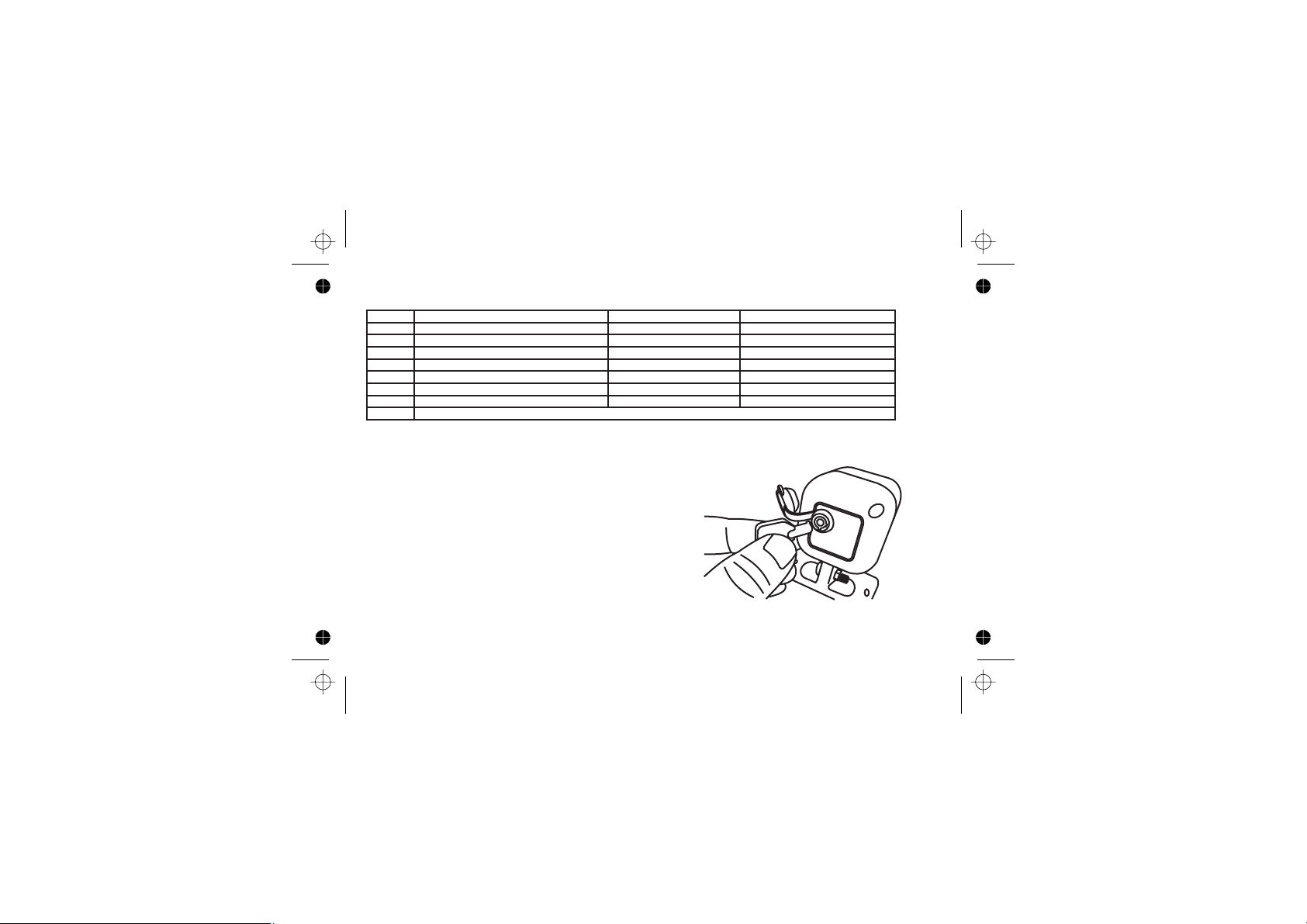
PROGRAMMABLE OPTIONS cont’
TURNS DESCRIPTION 1 FLASH RESPONSE 3 FLASHES RESPONSE
5 Siren chirp order Reversed Standard
7 Immobilisation dropout time* When armed After 30 seconds
9 Arm/disarm flash confirmation** Enabled Disabled
11 Siren/horn output type Pulsed for 30 sec Constant for 30 sec
13 Arm/disarm confirmation Disabled Enabled
15 Voltage drop sensing* Disabled Enabled
17 Door sensing delay 5 seconds 30 seconds
19 Change PIN Code - refer to page 7
* Changing these options may drain vehicle battery or reduce alarm effectiveness -
installer option only.
** Disabling option #9 means diagnostics is only visible
through status LED.
OVERRIDE
The P485 is overridden in two parts; a high security
lock/switch mounted on the back of the siren and by a
four digit PIN entered through the ignition switch.
Security Switch
!
Locate the siren under the bonnet.
!
Remove the protective black plastic dust cap and
insert the key into the lock. Turn 90 degrees to over-
ride the P485.
This will instantly stop the siren sounding. The P485 is
still armed. The next step shows how to disarm the
P485.
- Page 6 -
Page 7

OVER-RIDE cont’
PIN Code
!
If the P485 is triggered, allow siren to reset automatically (after 30 seconds) by sitting inside car
with doors shut. If the siren is switched off, wait for indicators to stop flashing.
!
Turn the ignition switch to the “ON” position; the status LED will glow constantly.
!
Turn ignition switch back to the “ACC” position; the status LED will begin to flash slowly.
!
Switch ignition switch to the “ON” position when the number of flashes match the 1st digit of the
PIN.
!
Repeat previous two steps for the remainder of the PIN.
NB: over-riding the P485 in no way over-rides the vehicle's onboard immobiliser. The factory fitted
immobiliser system is totally separate, refer to manufacturers over-ride instructions.
*** Any digit marked “0” indicates ten flashes.
CHANGING PIN
The emergency over-ride pin can be changed at any time while the P485 is disarmed. To enter a new
“pin”, carry out the following procedure: -
!
Disarm system by pressing the unlock button on the remote control or using the existing PIN.
Ensure the bonnet and door driver’s door are open throughout the entire procedure.
!
Turn the ignition switch from the ACC position to the “ON” position 19 times; count each time key is in
ON position. Leave the ignition switch in the “ON” position when the 19th count is reached.
!
The red status LED will light up and glow constant.
!
Enter the 1st digit (thousands) by turning the ignition switch back to the “ACC” position then count
the flashes.
!
Turn the ignition switch to the “ON” position when the correct number of flashes is counted for the
new PIN.
!
Repeat the previous two steps for the remaining digits of the new PIN.
When the final digit has been entered the red status LED flashes quickly to confirm a new “PIN” has
been entered.
- Page 7 -
Page 8
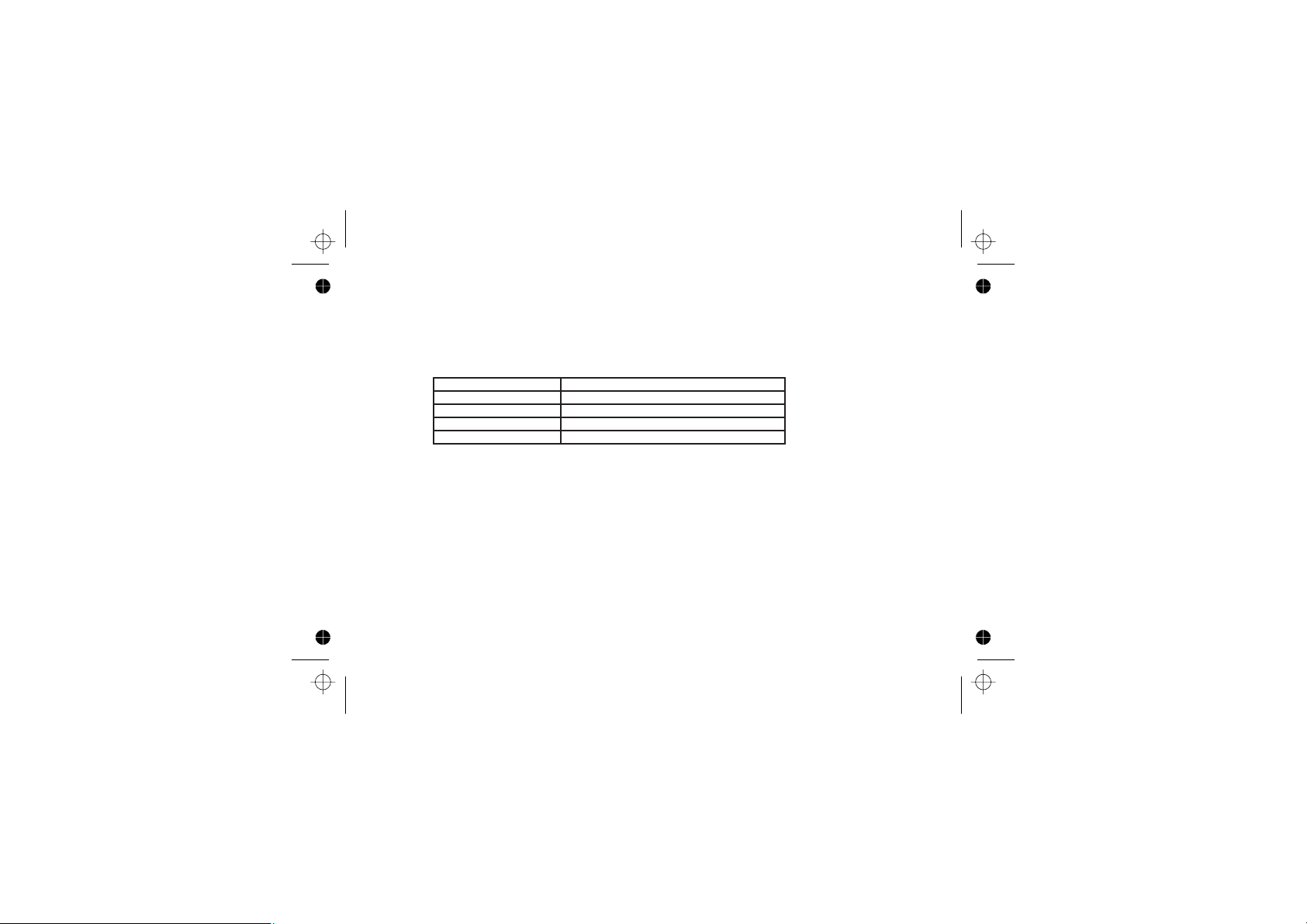
DIAGNOSTICS
For your convenience and peace of mind the P485 features a user friendly diagnostic
facility, that reports the source of the last trigger. The report is produced by disarming
the P485 during or after a siren trigger. The report consists of the normal indicator
disarm flash, followed by 1, 2, 3 or 4 flashes. Each number of flashes denotes a
different trigger source. See the table below for number definitions.
FLASHES TRIGGER SOURCE
1 Bonnet
2 Millivolt Sensing
3 Doors
4 Glass Breakage
NB: The diagnostic is best viewed through the status LED as the vehicle may also flash
indicators when unlocking. The reporting feature is disabled if the installer has disabled
arm/disarm confirmation indicator flash (see programmable option #9, page 6).
PROBLEM SOLVING
System won't trigger
!
Ensure that you have allowed at least 40 seconds after arming, before testing.
!
If testing boot, ensure boot light comes on only when boot switch is operated; it must
not remain on constantly.
!
Should the problem you are experiencing persist, consult your Cyclops dealer.
The remote control fails to operate
!
Try your spare remote control as supplied by the vehicle manufacturer.
!
Contact the dealer from which the vehicle was purchased or vehicle manufacturer
helpline.
- Page 8 -
Page 9
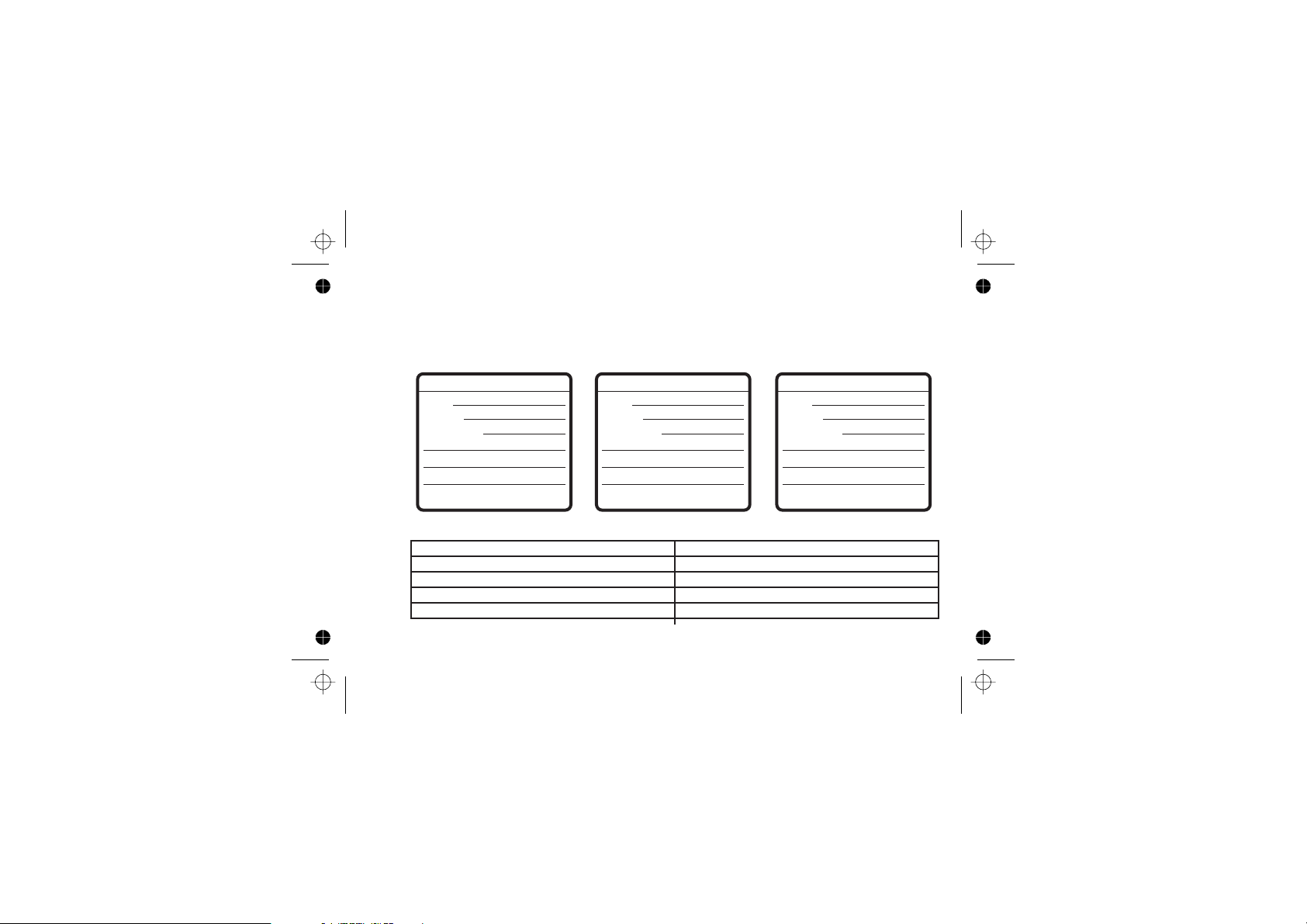
ANNUAL INSPECTION
Dynamco prides itself on the durability and integrity of its car security
systems. We welcome users to contact your installer every twelve
months for an annual inspection. (Please note a charge may be levied for
this inspection)
1st Inspection
Date:
Venue:
Comment:
2nd Inspection
Date:
Venue:
Comment:
3rd Inspection
Date:
Venue:
Comment:
Signed:
Signed:
Signed:
MODEL SPECIFICATIONS
Manufacturer Dynamco Pty Ltd
Model Paralyser 485 (P485)
Supply voltage +9Vdc to +18Vdc
Australian Standards compliance AS/NZS3749:2003 Class A
Current draw (when armed) < 10mA
- Page 9 -
Page 10

WARRANTY
Subject to the conditions stated below, to be free from manufacturing defects and faulty material within the
warranty period stated below.
CONDITIONS
!
That the warranty registration has been completed in full at the time of purchase and / or
installation and is produced when warranty service is sought.
!
The warranty does not cover general maintenance such as cleaning of bonnet switches, door
switches, light switches etc, nor replacement of consumable items such as pilot lamps or
transmitter batteries.
This warranty shall be null and void if: -
!
The product has been repaired by any other person other than by an authorised Cyclops service
centre.
!
Should a defect become apparent within the warranty period Dynamco Pty Ltd will repair the
product free of charge for parts and labour. Should a mobile service be required, a call-out charge
may apply.
!
The product has been altered or tampered with in any way or the serial number altered, defaced or
removed.
!
The defect has been caused by negligence by the owner or their agent.
!
The product has not been operated correctly, installed by an authorised Cyclops installer or has
been subjected to misuse or undue wear and tear.
!
Siren, control module or any system part is damaged by water.
THE WARRANTY DOES NOT COVER THE FOLLOWING COSTS: -
!
Transport of the product to and from Cyclops service centres.
!
Insurance of the produce in transit to or from the Cyclops service centres.
!
Cost of any service call where the product is found by Cyclops to be in good working order.
The benefits conferred by this warranty are in addition to all other rights and remedies, which the consumer
has conferred by law.
No liability is accepted for any loss, loss from, damage to or inability to use the vehicle to which the system is
installed
- Page 10 -
Page 11
OPTIONAL ACCESSORIES
The P485 has special inputs and outputs to interface with many optional
accessories, please consult your installer before installation is complete
(additional cost may apply). These accessories include:
Electric Window Closer
When the P485 is armed, a command is sent to a module (WIN-
004) that will power electric windows until each inturn is fully
closed. This feature is most useful in vehicles where electric
windows only operate when the ignition switch is in
the ON position. The WIN-004 operates at all times.
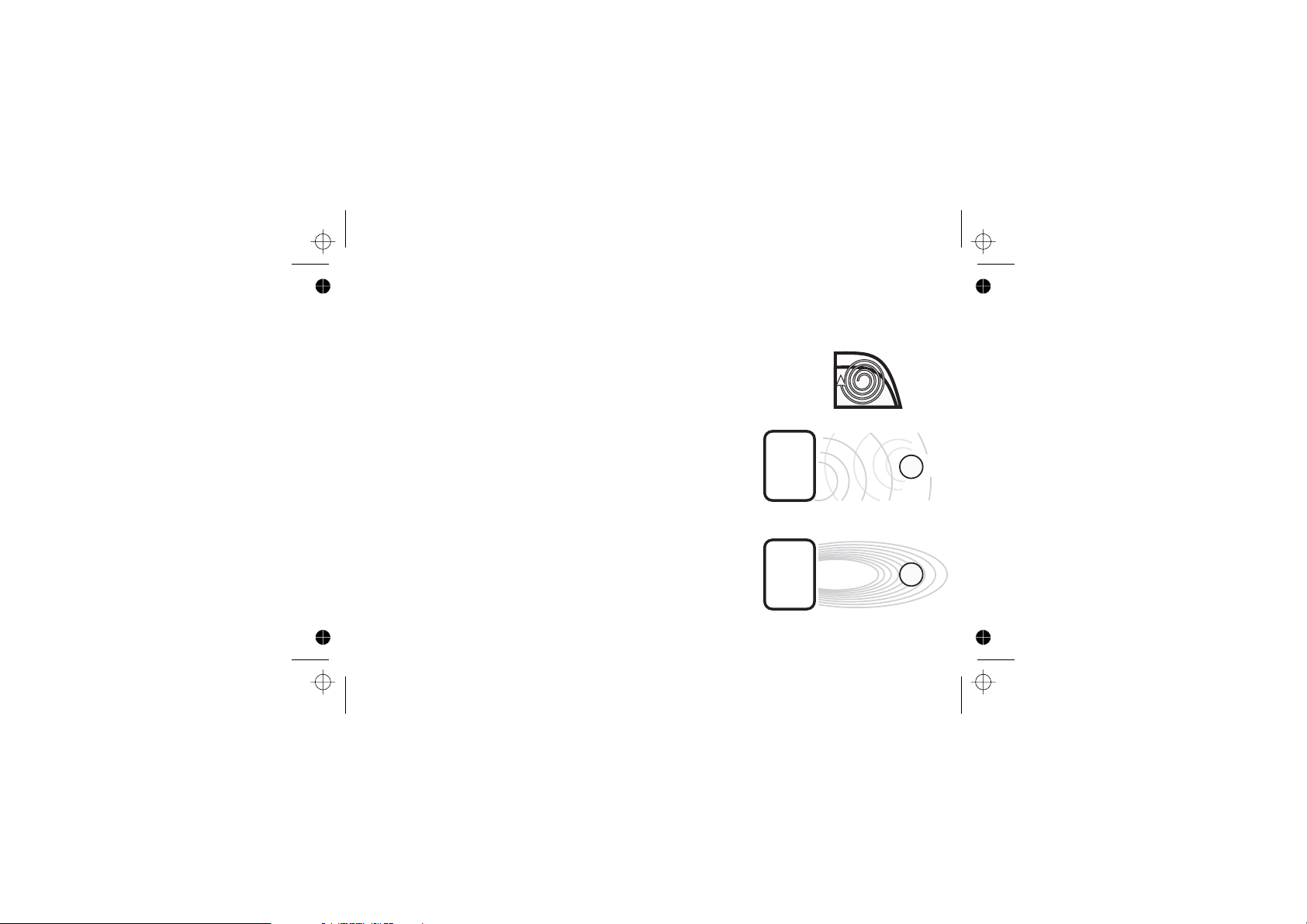
Ultrasonic Sensor
The P485 has a special input to accept signals from
an ultrasonic sensor. This type of sensor bounces
high frequency sound waves off the interior of the
vehicle. The echoes received are changed as objects
are added or removed from the vehicle. Ultrasonic sensors are suitable for
vehicles with hard roof, as soft-top rooves will
vibrate in wind.
Microwave Sensor
The P485 has a special input to accept signals from the
two types of microwave ( single and dual zone) sensors.
This type of sensor fills the cabin of the vehicle with a
microwave field to measure the contents. As the
- Page 11 -
Page 12
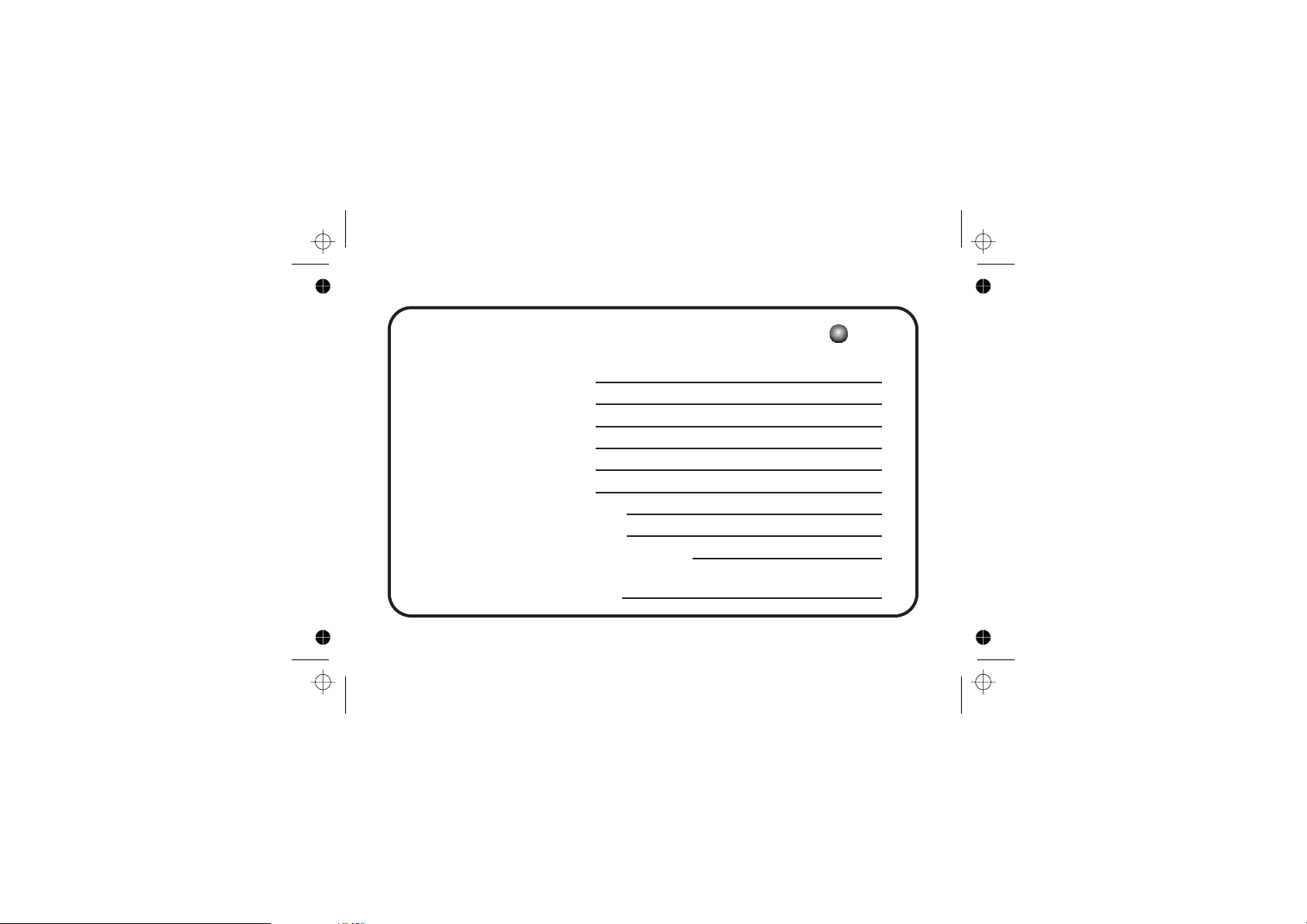
WARRANTY REGISTRATION
PURCHASED FROM
OWNER’S NAME
TYPE OF VEHICLE
VEHICLE REGO
MODEL OF UNIT
DATE OF INSTAL’
WARRANTY PERIOD :
AFTER HOURS EMERGENCY PHONE
CONTROL MODULE
SIREN
EMERGENCY PIN
- Page 12 -
CYCL PS
SECURITY SYSTEMS
 Loading...