

Page 1
Hereby
DECLARATION OF CONFORMITY
,
TE-GROUP N.V.
Kapelsestraat 61, 2950 Kapellen, BELGIUM
CK02
User’s Manual
NL
D
GB
CUSTOMER SUPPORT
Voor meer informatie, technische vragen of retouraanvragen met betrekking tot dit product dient u rechtstreeks
contact op te nemen met:
Für weitere Informationen, technische Fragen oder Rücksendungen zu diesem Produkt wenden Sie sich bitte an:
For more information, technical questions and return requests concerning this product, you should contact:
Pour plus d’informations, des questions techniques ou des
demandes de retour concernant ce produit, il faut contacter:
support@dymond.nl
F
Dymond CK02
Bluetooth® Carkit
Complies with the essential requirements, which are specified in the Directive 2004/108/EC,
2006/95/EC and 1995/5/EC on the approximation of the laws on the Member States relating to
electromagnetic compatibility.
This product has been tested against following standards and specifications, applying versions valid
on January 09, 2013:
ETSI EN 301489-1 V1.9.2 (2011-09)
ETSI EN 301489-17 V2.2.1 (2012-09)
ETSI EN 300328 V1.7.1 (2006-10)
EN 60950-1: 2006+A11: 2009+A1: 2010
Joseph van Oosterum, CEO TE-Group NV
March 2014
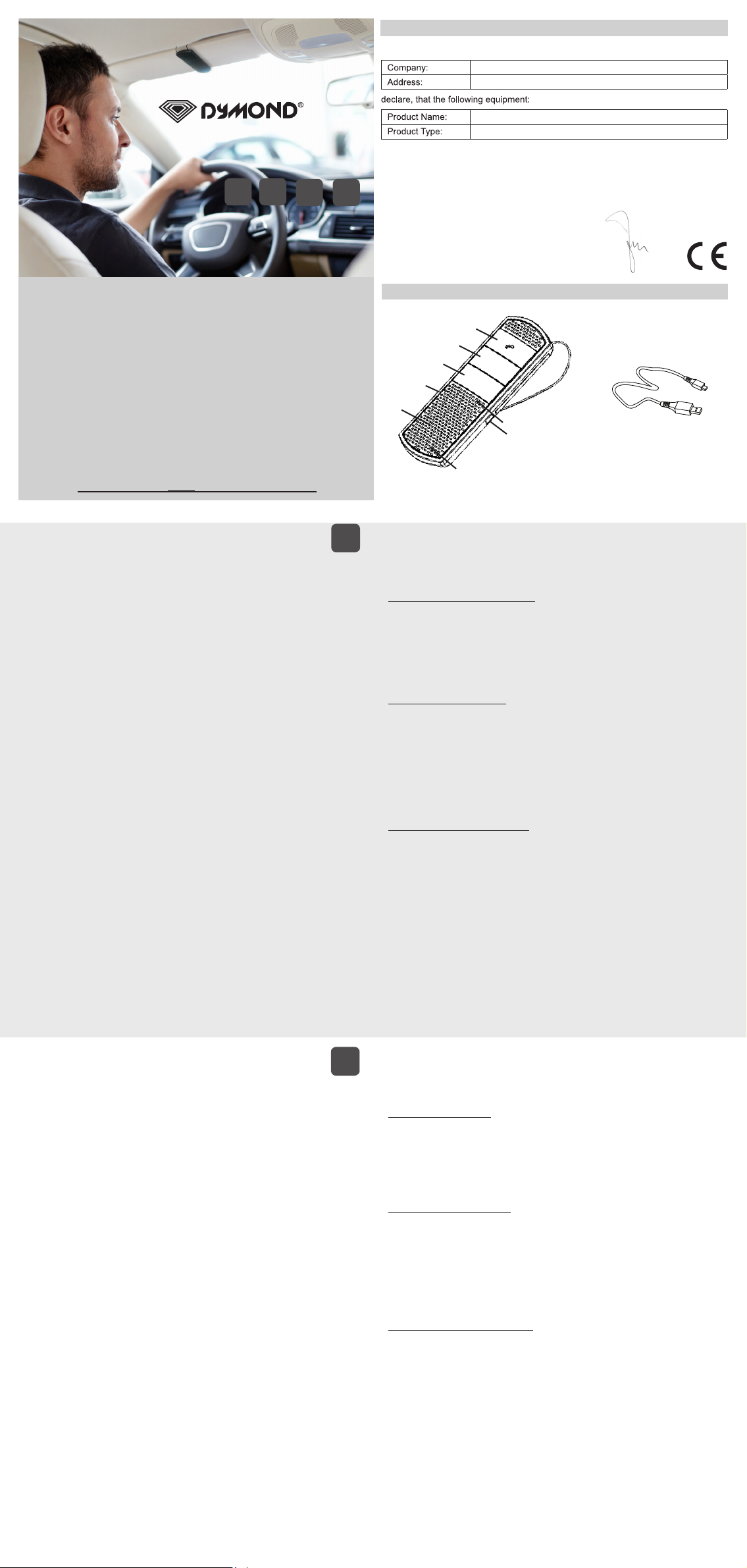
ILLUSTRATION I
1
2
3
4
-
9
+
7
5
8
6
------------------------------------- Manual/Dymond CK02/03-14/V01---------------------------- Copyright © Dymond
INHOUD DOOS & ONDERDELEN
Zie illustratie I
1. MF-toets 4. MUTE Toets 7. Luidspreker
2. Volume (-) Toets 5. LED indicatielampje 8. USB-laadpoort
3. Volume (+) Toets 6. Microfoon 9. USB-kabel (om te laden)
DE BATTERIJ LADEN
1. Verbind de USB-kabel (9) met de USB-laadpoort (8) van de Dymond CK02.
2. Verbind het andere einde van de USB-kabel (9) met uw computer of USB lader.
3. Het rode LED indicatielampje (5) van de Dymond CK02 zal oplichten en uw Dymond CK02 zal
beginnen laden. Zodra volledig opgeladen, zal het rode indicatielampje (5) uitgaan.
Let op!
Zorg ervoor dat de Dymond CK02 volledig opgeladen is alvorens deze te gebruiken.
AAN / UIT SCHAKELEN
- Aanschakelen:
Houd de MF-toets (1) ingedrukt tot u een melodie hoort en het blauwe indicatielampje (5) begint
te knipperen.
- Uitschakelen:
Houd de MF-toets (1) ingedrukt tot u een melodie hoort en het rode LED indicatielampje (5)
kortelings oplicht alvorens uit te gaan.
Let op!
De Dymond CK02 wordt automatisch uitgeschakeld indien er langer dan 10 minuten geen
Bluetooth® verbinding is tussen de Dymond CK02 en een ander mobiel toestel.
PAIRING (KOPPELING) BIJ EERSTE GEBRUIK
! U dient de Dymond CK02 éénmalig met uw mobiele tefoon te pairen alvorens gebruik!
Zorg ervoor dat de Dymond CK02 uitgeschakeld is. → Houd de MF-toets (1) ingedrukt tot het
indicatielampje (5) afwisselend blauw en rood gaat knipperen. → Laat uw telefoon naar Bluetooth
apparaten zoeken. → Selecteer de Dymond CK02 op uw mobiele telefoon en breng de PIN code
0000(*) in om beide apparaten te pairen. U hoort een lange bieptoon. → Het blauwe indicatielampje
(5) zal oplichten.
(*)Meestal niet vereist voor Bluetooth® 2.1 telefoons
Let op!
• Zorg ervoor dat uw mobiele telefoon de Bluetooth® functie heeft aangeschakeld en zich in de
nabijheid van de Dymond CK02 bevindt.
• Om een automatisch herstel van de verbinding tussen de telefoon en de Dymond CK02
te verzekeren, raden wij u aan de verbinding tussen uw telefoon en de Dymond CK02 te
“autoriseren” in Bluetooth® menu van uw mobiele telefoon! Raadpleeg de handleiding van uw
mobiele telefoon voor meer informatie.
• Als de Bluetooth® verbinding niet automatisch hersteld wordt nadat deze verbroken werd, druk
dan 1 x op de MF-toets (1) om de verbinding manueel te herstellen.
TELEFONEREN
- Bij binnenkomende oproep: Druk 1x op MF-toets (1) om de oproep te beantwoorden.
- Bij binnenkomende oproep: Houd de MF-toets (1) ingedrukt ( 2 sec.) om de oproep te weigeren.
- Tijdens gesprek: Druk 1x op de MF-toets (1) om de oproep te beëindigen.
- In standby mode: Houd de Volume (+) toets (3) ingedrukt om hetlaatst gevormde nr. terug te
bellen.
- In standby mode: Druk 1x op MF-toets (1) om voice dialing te activeren (*)
(*) De voice dialing functie is enkel beschikbaar als deze ondersteund wordt door uw mobiele telefoon!
VOLUME / MUTE
- Het volume aanpassen:
Druk Volume (+) Toets (3) om het volume te verhogen. U hoort een beep zodra max. volume bereikt is.
Druk Volume (-) Toets (2) om het volume te verlagen. U hoort een beep zodra min. volume bereikt is.
- MUTE mode aanzetten:
Tijdens gesprek 3 sec. de Mute Toets (4) indrukken om de microfoon tijdelijk uit te schakelen.
- MUTE mode uitzetten:
Tijdens gesprek 3 sec. de Mute Toets (4) indrukken om de microfoon weer aan te schakelen.
PACKUNGSINHALT UND EINZELTEILE
Siehe Abbildung I
1. MF-Taste 4. MUTE-Taste 7. Lautsprecher
2. Volume (-) Taste 5. LED-Anzeige 8. USB-Ladebuchse
3. Volume (+) Taste 6. Mikrofon 9. USB-Kabel (zum Aufladen)
AUFLADEN DER BATTERIE
1. Stecken Sie das USB-Kabel (9) in die USB-Ladebuchse (8) des Dymond CK02.
2. Stecken Sie das andere Ende des USB-Kabels (9) in ihrem Computer oder ihr USB-Ladegerät.
3. Die rote LED-Anzeige (5) am Dymond CK02 leuchtet auf und ihr Dymond CK02 wird geladen.
Sobald der Akku vollständig geladen ist, schaltet sich die rote LED-Anzeige (5) aus.
Achtung!
Laden Sie den Dymond CK02 immer komplett auf, bevor Sie ihn verwenden.
EIN- / AUSSCHALTEN
- Einschalten:
Drücken Sie die MF-Taste (1) bis Sie eine Melodie hören und die blaue LED-Anzeige (5) anfängt
zu blinken.
- Ausschalten:
Drücken Sie die MF-Taste (1) bis Sie eine Melodie hören und die rote LED-Anzeige (5) kurz
aufleuchtet and anschliessend wieder erlischt.
Achtung!
Der Dymond CK02 schaltet sich auch automatisch aus wenn länger als 10 Minuten keine Bluetooth®
Verbindung zwischen dem Dymond CK02 und einem anderen Mobilgerät vorhanden ist.
KOPPELN BEIM ERSTEN GEBRAUCH
! Sie müssen den Dymond CK02 einmalig mit ihrem Telefon verbinden, bevor Sie es nutzen !
Schalten Sie den Dymond CK02 aus. → Drücken Sie die MF-Taste (1) bis die LED-Anzeige (5)
abwechselnd blau und rot blinkt. → Lassen Sie Ihr Telefon nach Bluetooth®- Geräten suchen. →
Wählen Sie nun auf Ihrem Mobiltelefon den Dymond CK02 und geben Sie den PIN-Code 0000(*) ein,
um die zwei Geräte definitiv zu koppeln (= Pairing). Sie hören einen langen Piepton. → Abschließend
blinkt die blaue LED-Anzeige (5) erneut.
(*) Nicht für Bluetooth® 2.1 Telefone.
Achtung!
• Vergewissern Sie sich zuerst, dass Bluetooth® auf Ihrem Mobiltelefon aktiviert ist und dass
Dymond CK02 sich in der Nähe befindet.
• Um die automatische Neuverbindung zwischen der Telefon und Dymond CK02 zu gewährleisten,
empfehlen wir, Dymond CK02 als „Authorized“ im Bluetooth®-Menü Ihres Telefons einzustellen.
Weitere Informationen hierzu finden Sie in der Anleitung Ihres Mobiltelefons.
• Sollte die Bluetooth®-Verbindung nicht automatisch wiederhergestellt werden, drücken Sie die
MF-Taste (1) 1x, um die Verbindung manuell wieder herzustellen.
TELEFONIEREN
- Bei eingehenden Gesprächen: 1 x die MF-Taste (1) drücken, um den Anruf anzunehmen.
- Bei eingehenden Gesprächen: Die MF-Taste (1) drücken und halten (2 sek.), um abzulehnen.
- Während des Gesprächs: 1x die MF-Taste (1) drücken um den Anruf zu beenden.
- Im Stand-by-Modus: Die Volume “+” Taste (3) drücken und halten um die zuletzt angerufene
Nummer erneut anzurufen.
- Im Stand-by-Modus: 1x die MF-Taste (1) drücken, um das Voice Dialing zu aktivieren (*).
(*) Voice dialing ist nur verfügbar, wenn diese von Ihrem Gerät unterstützt wird!
LAUTSTÄRKE / MUTE MODUS
- Lautstärke regeln:
„+„ (3) drücken, um Lautstärke zu erhöhen. Sie hören einen Ton → höchste Lautstärke ist erreicht.
„-„ (2) drücken, um Lautstärke zu reduzieren. Sie hören einen Ton → niedrigste Lautstärke ist erreicht.
- Mute Modus aktivieren:
Während des Gesprächs 3 Sek. auf die MUTE-Taste (4) drücken, um das Mikrofon vorübergehend
auszuschalten.
- Mute Modus deaktivieren:
Drücken Sie die MF-Taste erneut 3 Sek. um das Mikfrofon wieder anzuschalten.
NL
D
MULTIPOINT BLUETOOTH®
Dymond CK02 ondersteunt MULTIPOINT BLUETOOTH®, waardoor u GELIJKTIJDIG 2 verschillende
Bluetooth® telefoons met uw carkit kunt verbinden en gebruiken.
Wanneer 2 telefoons verbonden zijn met de Dymond CK02 is er altijd:
• Een primaire telefoon (1ste telefoon verbonden met de carkit)
• Een secundaire telefoon (2de telefoon verbonden met de carkit)
Let op!
GEEN Voice dialing, GEEN redial mogelijk voor 2de telefoon.
Multipoint koppelingsprocedure (pairing)
► KOPPELING TELEFOON 1
Koppel de 1ste telefoon met de Dymond CK02 zoals beschreven in het hoofdstuk “PAIRING
(KOPPELING) BIJ EERSTE GEBRUIK”. → Verbind de telefoon met de carkit.
► KOPPELING TELEFOON 2
Zorg ervoor dat de Dymond CK02 aangeschakeld is en verbonden met de 1ste telefoon. → Houd
de Volume (-) Toets (2) ingedrukt om de koppelingsprocedure opnieuw te starten. De blauwe en
rode indicatielampjes zullen afwisselend knipperen. → Pair (koppel) en maak de verbinding met
de 2de telefoon.
Let op!
Nadat de 2de telefoon gekoppeld en verbonden werd, zal de verbinding met de 1ste telefoon
VERBROKEN worden. → Schakel de Dymond CK02 uit en weer aan door de MF-toets (1) in te
drukken. → Dymond CK02 zal automatisch herverbinden met beide telefoons.
Multipoint Verbindingsprocedure
Zodra de Dymond CK02 aangeschakeld wordt, zal deze automatisch zoeken en een verbinding
maken met de 2 telefoons die laatst verbonden werden.
- Als slechts 1 telefoon beschikbaar is: enkel deze telefoon zal verbonden worden met de Dymond
CK02. Deze telefoon wordt de primaire telefoon.
- Als de verbinding met een of beide telefoons kort verbroken werd: de carkit zal de verbinding
automatisch herstellen.
Let op!
Om een automatisch herstel van de verbinding tussen de telefoons en de Dymond CK02 te
®
verzekeren, raden wij u aan om de verbinding tussen uw telefoons en de Dymond CK02 te
“autoriseren” in het Bluetooth® menu van uw telefoon! Raadpleeg de handleiding van uw mobiele
telefoon voor meer informatie.
Indien beide telefoons, of een van de telefoons, de Bluetooth® verbinding met de Dymond CK02
spontaan verliezen, zal de Dymond CK02 automatisch de verbinding herstellen. Indien de
verbinding niet automatisch wordt hersteld, kunt u de Bluetooth® verbinding manueel herstellen
door gedurende 3 seconden op de Volume (+) toets (3) te drukken.
Oproepen ontvangen op beide telefoons
Wanneer u tijdens een gesprek met de 1ste telefoon een 2de oproep ontvangt op de 2de telefoon,
hoort u een BIEP.
Nu kunt u:
► De inkomende oproep op de 2de telefoon beantwoorden: Houd de Volume (+) Toets (3) kort
ingedrukt om het gesprek op de 1ste telefoon in wacht te zetten en de oproep op de 2de telefoon
te beantwoorden.
Wanneer u de 2de oproep beantwoord heeft, kunt u:
► Wisselen tussen de 2 oproepen: Houd de Volume (+) Toets (3) kort ingedrukt om te wisselen
tussen beide telefoons.
► Een van de oproepen beëindigen: Druk op de MF-toets (1) om het huidige gesprek te beëindigen
en het 2de gesprek verder te zetten.
LED INDICATIELAMPJE (5)
Rode lampje:
- Knippert in Standby mode: batterijcapaciteit is laag.
- Brandt constant tijdens het laden van de batterij.
- Brandt constant in mute mode.
Blauwe lampje:
- Knippert in Standby mode & gespreksmodus.
Rode & blauwe lampje:
- Knipperen afwisselend in pairing mode.
MICROFOON (6)
Richt de microfoon (6) steeds naar uw mond. Voor een perfecte werking dient de microfoon zich op
min. 30-50 cm van de bestuurder te bevinden. Zorg ervoor dat er zich geen objecten bevinden voor
de microfoon van de Dymond CK02.
MULTIPOINT BLUETOOTH®
Dymond CK02 unterstützt MULTIPOINT BLUETOOTH®, wodurch Sie GLEICHZEITIG zwei
verschiedene Bluetooth®-Telefone mit Ihrer Freisprecheinrichtung verbinden und nutzen können.
Wenn zwei Telefone mit Dymond CK02 verbunden sind, haben Sie immer ein:
• Primärtelefon (erstes mit der Freisprecheinrichtung verbundene Telefon)
• Sekundärtelefon (zweites mit der Freisprecheinrichtung verbundene Telefon)
Achtung!
KEIN Voice Dialing, KEINE Wahlwiederholung für das zweite Telefon möglich.
Multipoint pairing-Verfahren
► PAIRING Telefon 1
Koppeln Sie das erste Telefon mit Dymond CK02 wie in Kapitel „KOPPELN BEIM ERSTEN
GEBRAUCH“ beschrieben. → Verbinden Sie das Telefon mit der CK02.
► PAIRING Telefon 2
Stellen Sie sicher dass den Dymond CK02 eingeschaltet und verbunden ist mit das erste Telefon.
→ Drücken Sie die Volume “-” Taste (2) um wieder in den Pairing-Modus zu gelangen. Die LED-
Anzeige (5) blinken abwechselnd blau und rot. → Verbinden Sie das zweite Telefon.
Achtung !
Nachdem der zweiten Telefon verbunden ist, wird die Verbindung mit das erste Telefon GETRENNT.
→ Schalten Sie Dymond CK02 mit der MF-Taste (1) AUS und anschließend wieder EIN. → Dymond
CK02 verbindet sich wieder automatisch mit beiden Telefonen.
Multipoint Verbindungs-Verfahren
Wenn Dymond CK02 eingeschaltet wird, sucht und verbindet es sich automatisch mit den beiden
letzten Telefonen, die über Bluetooth® mit der Freisprecheinrichtung verbunden waren.
- Ist nur 1 Telefon verfügbar: Es wird nur ein Telefon mit Dymond CK02 verbunden. Dieses Telefon
ist das Primärtelefon.
- Ein oder beide Telefone werden kurz abgeschaltet: Die Freisprecheinrichtung stellt automatisch
wieder eine Verbindung her.
Achtung!
Um die automatische Neuverbindung zwischen den Telefonen und Dymond CK02 zu gewährleisten,
empfehlen wir, Dymond CK02 als „Authorized“ im Bluetooth®-Menü Ihres Telefons einzustellen.
Weitere Informationen hierzu finden Sie in der Anleitung Ihres Mobiltelefons.
Sollten die beiden Telefone, oder nur ein Telefon, aus irgendeinem Grund plötzlich die Bluetooth®Verbindung mit Dymond CK02 verlieren, wird automatisch wieder eine Verbindung hergestellt.
Falls diese Neuverbindung fehlschlägt, können Sie die Bluetooth®-Verbindung manuell wieder
herstellen, indem Sie 3 Sekunden lang die „+“ Taste (3) drücken.
Anrufe auf beiden Telefonen empfangen
Sollten Sie während eines Gesprächs einen weiteren Anruf auf dem zweiten Telefon erhalten,
hören Sie einen PIEPTON.
Jetzt können Sie:
►Eingehenden Anruf auf dem zweiten Telefon annehmen: Drücken und halten Sie die Volume
“+” Taste (3) kurz um den Anruf auf dem ersten Telefon zu HALTEN und den Anruf auf dem zweiten
Telefon anzunehmen.
Wenn Sie den zweiten Anruf entgegengenommen haben, können Sie:
► Zwischen 2 Anrufen wechseln: Drücken und halten Sie die Volume “+” Taste (3) kurz um
zwischen den beiden Anrufen zu wechseln.
► Eines der Gespräche beenden: Drücken Sie 1 x die MF-Taste (1) um das aktuelle Gespräch zu
beenden und mit dem anderen Gespräch fortzufahren.
LED-ANZEIGE (5)
Rote Anzeige:
- Blinkt im Stand-by-Modus: Niedrige Batteriekapazität.
- Leuchtet fortwährend während des Aufladens der Batterie.
- Leuchtet fortwährend im Mute Modus.
Blaue Anzeige:
- Blinkt im Stand-by-Modus und Sprechmodus.
Rote und blaue Anzeige:
- Blinken abwechselnd im Pairing Modus.
MICROFON (6)
Richten Sie das Mikrofon auf Ihren Mund. Um tadellos funktionieren zu können, sollte das Mikrofon
mindestens 30-50 cm vom Mund des Fahrers entfernt sein. Beachten Sie, dass sich keine Objekte
vor dem Mikrofon des Dymond CK02 befinden.
Page 2

PACKAGE CONTENTS & PARTS
See illustration I
1. MF-button 4. MUTE Button 7. Speaker
2. Volume (-) Button 5. LED indicator 8. USB charging socket
3. Volume (+) Button 6. Microphone 9. USB cable (for charging)
CHARGING THE BATTERY
1. Plug the USB cable (9) into the USB charging socket (8) of the Dymond CK02.
2. Plug the other end of the USB cable (9) into your computer or USB charger.
3. The red LED indicator (5) on the Dymond CK02 will light up and your Dymond CK02 will start
charging. When fully charged, the red LED indicator (5) will turn off.
Attention!
Make sure that the Dymond CK02 is fully charged before using the device.
TURNING ON / OFF
- Turning ON:
Press and hold the MF-button (1) until you hear a melody and the blue LED indicator (5) starts
flashing.
- Turning OFF:
Press and hold the MF-button (1) until you hear a melody and the red LED indicator (5) lights up
briefly before turning off again.
Attention!
The Dymond CK02 will also turn off automatically if there has been no Bluetooth® connection
between the Dymond CK02 and another mobile device for more than 10 minutes.
FIRST USE PAIRING
! You are required to pair the Dymond CK02 with your mobile phone once before using it!
Make sure that the Dymond CK02 is turned OFF. → Press and hold the MF-button (1) until the LED
indicator (5) starts flashing by blue and red colors alternately. → Let your phone search for
Bluetooth® devices. → Select the Dymond CK02 in your mobile phone and enter the PIN code
0000(*) to pair both devices. You will hear a long beep. → The blue LED indicator (5) will light.
(*)Usually not required for Bluetooth® 2.1 mobile phones
Attention!
• Make sure that the Bluetooth® function of your mobile phone is ON and that it is in close
proximity to the Dymond CK02 carkit.
• To ensure automatic reconnection between the phone and the Dymond CK02, we recommend
setting the Dymond CK02 as “Authorized” in the Bluetooth® menu of your phone! Please refer to
the manual of your mobile phone for more detailed information.
• If the Bluetooth® connection is not restored automatically after disconnection, press the MFbutton (1) once to restore the connection manually.
MAKING CALLS
- Incoming call: Press 1x MF-button (1) to ANSWER a call.
- Incoming call: Press and hold MF-button (1) ( 2 sec.) to REJECT a call.
- During a conversation: Press 1x MF-button (1) to END a call.
- During standby mode: Press and HOLD Volume (+) button (3) to REDIAL the last dialed number.
- During Standby mode: Press 1x MF-button (1) to activate voice dialing (*)
(*) The voice dialing function is only available if it is supported by your mobile phone!
VOLUME / MUTE
- Adjusting the volume:
Press “+” (3) to increase the volume level. You will hear a beep when max. volume is reached.
Press “-” (2) to decrease the volume level. You will hear a beep when lowest volume is reached.
- Turn ON MUTE mode:
During a conversation, press and hold the MUTE- button (4) for 3 sec. to temporarily turn off the
microphone of the Dymond CK 01.
- Turn OFF MUTE mode:
Press and hold the MUTE Button (4) for 3 sec. to turn the microphone back ON.
MULTIPOINT BLUETOOTH®
Dymond CK02 supports MULTIPOINT BLUETOOTH®, which allows you to connect and use 2 different
Bluetooth® telephones AT THE SAME TIME with your carkit.
GB
When 2 phones are connected to the Dymond CK02 you always have:
• Primary phone (1st phone connected to the carkit)
• Secondary phone (2nd phone connected to the carkit)
Attention!
NO Voice dial, NO redial possible for 2nd phone.
Multipoint pairing procedure
► PAIRING phone 1
Pair the 1st phone with the Dymond CK02 as described under “FIRST USE PAIRING”. → Connect
the phone to the carkit.
► PAIRING phone 2
Make sure Dymond CK02 is ON and connected to the 1st phone.→ Press and hold the Volume (-)
button (2) of the Dymond CK02 to enter pairing mode again. The blue & red indicators will flash
alternately. → Pair and connect with the 2nd phone.
Attention !
After the 2nd phone is paired and connected, the 1st phone will be DISCONNECTED from the carkit.
→ Turn OFF the Dymond CK02 and then turn ON again, by using the MF-button (1). → Dymond
CK02 will reconnect with both phones automatically.
Multipoint Connection Procedure
When the Dymond CK02 is switched on, it will automatically search and connect with the 2 last
mobile phones that had Bluetooth® connection with the carkit.
- If only 1 phone is available: only one phone will be connected to the Dymond CK02. This phone
will be the primary phone.
- One or both phones are shortly disconnected: the carkit will automatically reconnect.
Attention!
To ensure automatic reconnection between the phones and the Dymond CK02, we recommend
setting the Dymond CK02 as “Authorized” in the Bluetooth® menu of your phone! Please refer to
the manual of your mobile phone for more detailed information.
If for any reason one of the 2 phones, or both phones, will spontaneously lose the Bluetooth®
connection with the Dymond CK02, it will automatically make a reconnection. If this automatic
reconnection fails, you can always restore the Bluetooth® connection manually by pressing the
Volume (+) button (3) for 3 seconds.
Receiving calls on the 2 phones
If during a telephone conversation another incoming call is received on the 2nd phone, you will
hear a BEEP.
Now you can:
►Answer the incoming call on 2nd phone: Press and hold the Volume (+) Button (3) shortly to
HOLD the call on the 1st phone and answer the call on the 2nd phone.
When you have accepted the 2nd call, you can:
► Switch between 2 phones: Press and hold the Volume (+) Button (3) briefly to switch between
the 2 phones.
► End one of the calls: Press the MF-button (1) once to end the current call and continue with
the other call.
LED INDICATOR (5)
Red indicator:
- Flashes in Standby mode: low battery capacity.
- Lights continuously while charging the battery.
- Lights continuously in mute mode.
Blue indicator:
- Flashes in Standby mode & talking mode.
Red & Blue indicators:
- Flash alternately in pairing mode.
MICROPHONE (6)
Make sure that the microphone (6) is directed towards your mouth. For optimum performance, the
microphone (6) should be located at a distance of 30-50 cm from the driver’s mouth. Make sure that
there are no obstacles in front of the microphone (6) of the Dymond CK02.
ACCESSOIRES & ÉLÉMENTS
Voir illustration I
1. Touche MF 4. Touche MUTE 7. Haut-parleur
2. Touche de volume (-) 5. Indicateur lumineux 8. Port de recharge USB
3. Touche de volume (+) 6. Microphone 9. Câble USB (pour chargement)
CHARGER LA BATTERIE
1. Branchez la petite extrémité du câble USB (9) sur le port USB (8) du Dymond CK02.
2. L’autre extrémité du câble USB (9) se branche sur l’ordinateur ou un autre chargeur USB.
3. L’indicateur lumineux rouge (5) s’allumera et votre Dymond CK02 commencera à charger.
Lorsque la batterie est complètement chargée, l’indicateur lumineux rouge (5) s’éteindra.
Attention!
Veillez à ce que le Dymond CK02 soit intégralement chargé avant de le mettre en service.
ALLUMER / ÉTEINDRE
- Allumer:
Appuyez sur la touche MF (1) jusqu’à ce que vous entendiez une mélodie et le témoin lumineux
bleu (5) commence à clignoter.
- Éteindre:
Appuyez sur la touche MF (1) jusqu’à ce que vous entendiez une mélodie et le témoin lumineux
rouge s’allume brièvement avant d’éteindre.
Attention!
Pour une meilleure autonomie, le Dymond CK02 s’éteint automatiquement en cas d’absence de
liaison Bluetooth® entre le Dymond CK02 et un autre appareil mobile pendant plus de 10 minutes.
ASSOCIATION À LA PREMIÈRE UTILISATION
! Il faut associer le Dymond CK02 une seule fois avec votre téléphone mobile avant de l’utiliser!
Veillez à ce que le Dymond CK02 soit éteint. → Appuyez sur la touche MF (1) jusqu’à ce que le témoin
lumineux (5) clignote alternativement en bleu et rouge. → Lancez une recherche de périphériques
Bluetooth® sur votre téléphone mobile et sélectionnez le Dymond CK02. → Terminez l’association
en tapant le code PIN 0000*. Vous entendrez un long bip et le témoin lumineux bleu (5) s’allume.
*Souvent pas nécessaire pour téléphones mobiles munis de Bluetooth® 2.1
Attention!
• Vérifiez que la fonction Bluetooth® est activée sur votre téléphone mobile et que celui-ci se
trouve près du Dymond CK02.
• Afin d’assurer la connexion automatique entre le téléphone et le Dymond CK02, nous vous
conseillons de définir comme « Autorisé » la connexion avec le Dymond CK02 dans le menu
Bluetooth® de votre téléphone mobile ! Consultez le manuel de votre téléphone mobile pour des
informations supplémentaires.
• Si la connexion Bluetooth® n’est pas rétablie automatiquement après une déconnexion, il faut
appuyer la touche MF (1) 1x pour rétablir la connexion manuellement.
FAIRE DES APPELS
- En cas d’appel entrant: Appuyez la touche MF (1) 1x pour prendre l’appel.
- En cas d’appel entrant: Appuyez la touche MF (1) plus longtemps (2 sec.) pour refuser l’appel.
- En cours d’appel: Appuyez la touche MF (1) 1x pour raccrocher.
- En veille: Maintenez enfoncée la touche Volume (+) (3) pour rappeler le dernier numéro
composé.
- En veille: Appuyez la touche MF (1) 1x pour activer la fonction de numérotation vocale. (*)
(*) La fonction de numérotation vocale est disponible uniquement si votre téléphone supporte cette
fonction!
VOLUME / MODE DISCRET
- Régler le volume:
Appuyez sur « + » (3) pour augmenter le volume. Vous entendrez un bip lorsque le volume max. est
atteint.
Appuyez sur « - » (2) pour réduire le volume. Vous entendrez un bip lorsque le volume min. est atteint.
- Activer le mode discret:
Appuyez la touche MUTE (4) pendant 3 sec. en cours de conversation pour désactiver temporairement
le microphone du
- Désactiver le mode discret:
Appuyez la touche MUTE (4) pendant 3 sec. pour activer le microphone.
Dymond CK02
.
F
MULTIPOINT BLUETOOTH®
Dymond CK02 supporte MULTIPOINT BLUETOOTH®, ce qui vous permet de connecter et d’utiliser
SIMULTANÉMENT 2 téléphones Bluetooth® avec votre kit mains libres.
Lorsque 2 téléphones sont connectés au Dymond CK02 il y a toujours:
• Un téléphone primaire (le 1er téléphone connecté au kit mains libres)
• Un téléphone secondaire (le 2ième téléphone connecté au kit mains libres)
Attention!
PAS possible avec le téléphone secondaire: Numérotation vocale & Rappel du dernier numéro
composé
PROCEDURE D’ASSOCIATION EN MULTIPOINT
► ASSOCIATION téléphone 1
Associez le 1er téléphone avec le Dymond CK02 comme décrit dans le chapitre « ASSOCIATION À
LA PREMIÈRE UTILISATION ». → Connectez le téléphone au kit mains libres.
► ASSOCIATION téléphone 2
Assurez-vous que le Dymond CK02 est allumé et associé avec le 1er téléphone. → Appuyez
sur la touche Volume « - » (2) du Dymond CK02 et maintenez-la enfoncée pour activer le mode
«association». Le témoin lumineux (5) clignote alternativement en bleu et rouge. → Associez et
connectez le 2ième téléphone.
Attention !
Après l’association et la connexion du 2ième téléphone, le 1er téléphone sera DÉCONNECTÉ.
→Eteignez le Dymond CK02. Ensuite rallumez-le en utilisant la touche MF (1). → Dymond CK02
rétablira automatiquement la connexion avec les 2 téléphones.
PROCEDURE DE CONNEXION EN MULTIPOINT
Lorsque le Dymond CK02 est allumé, le kit établira automatiquement une connexion avec les 2
derniers téléphones auxquels il était connecté.
- Si seulement 1 téléphone est disponible : seulement ce téléphone sera connecté au Dymond
CK02. Ce téléphone sera le téléphone primaire.
- Si l’un des téléphones, ou les 2 téléphones, ont été déconnectés brièvement : le kit rétablira la
connexion automatiquement.
Attention!
Afin d’assurer la connexion automatique entre les téléphones et le Dymond CK02, nous vous
conseillons de définir comme « Autorisé » la connexion avec le Dymond CK02 dans le menu
Bluetooth® de votre téléphone mobile ! Consultez le manuel de votre téléphone mobile pour des
informations supplémentaires.
Si la connexion Bluetooth® entre le Dymond CK02 et les 2 téléphones, ou un des 2 téléphones,
est rompue spontanément, le kit rétablira automatiquement la connexion. Si cette connexion
automatique ne réussit pas, vous pouvez rétablir la connexion Bluetooth® manuellement en
appuyant sur la touche « + » (3) pendant 3 secondes.
RECEVOIR DES APPELS SUR LES 2 TELEPHONES
Lorsqu’un appel arrive sur le 2ième téléphone pendant une conversation sur le 1er téléphone,
vous entendrez un BIP. Maintenant vous pouvez:
► Répondre à l’appel entrant sur le 2ième téléphone: Appuyez brièvement sur la touche Volume
“+” (3) pour mettre en ATTENTE l’appel du 1er téléphone et pour répondre à l’appel du 2ième
téléphone.
Après avoir accepté le 2ième appel, vous pouvez :
► Changer entre 2 appels: Appuyez sur la touche Volume « + » (3) et maintenez-la enfoncée
brièvement pour changer entre les 2 appels.
► Mettre fin à un des 2 appels: Appuyez 1x sur la touche MF (1) pour terminer la conversation en
cours et pour continuer l’autre appel.
TÉMOIN LUMINEUX (5)
S’il est rouge:
- Clignote alors que le kit est en veille: l’autonomie restante est faible.
- S’allume pendant le chargement de la batterie.
- S’allume en mode « discret » (mute).
S’il est bleu:
- Clignote lorsque le kit est en mode veille et en mode d’appel.
Clignote alternativement en rouge et bleu:
- Le kit est en mode d’association (pairage).
MICROPHONE (6)
Orientez toujours le microphone vers votre bouche. Pour un fonctionnement parfait, le microphone
doit se trouver à moins de 30-50 cm de la bouche du conducteur. Veillez à ce qu’il n’y ait pas
d’objets devant le microphone du Dymond CK02.
NL
GARANTIE
Dymond is een gedeponeerd handelsmerk van TE-Group NV. Het merk Dymond staat voor producten van superieure kwaliteit en een uitstekende klantenservice. Daarom garandeert Dymond dat dit product vrij is van
materiaal- en fabricagefouten gedurende een periode van twee (2) jaar na de oorspronkelijke aankoopdatum
van het product. De voorwaarden van deze beperkte garantie en de omvang van de verantwoordelijkheid van
Dymond onder deze garantie zijn als volgt:
• De garantie geldt alleen voor de originele (eerste) eigenaar en is niet overdraagbaar aan een volgende koper.
• De enige verplichting van Dymond onder deze garantie beperkt zich tot het repareren of vervangen, naar
eigen keuze, van defecte onderdelen van het product, indien dit vereist is omwille van gebreken die voorkomen
bij normaal gebruik onder normale omstandigheden. De klant dient niet te betalen voor onderdelen en/of
arbeidskosten.
• Het defecte product moet verzonden worden naar een geautoriseerd service center in de originele en vol-
ledige verpakking. Transportkosten zijn voor rekening van de klant. Dymond is niet aansprakelijk voor verlies
of schade tijdens het transport.
• Om recht te hebben op reparatie of vervanging van het product binnen de garantieperiode dient de klant het
volgende te verstrekken: (a) een aankoopbewijs met vermelding van de aankoopdatum; (b) een duidelijke
omschrijving van de gebreken; (c) een adres en telefoonnummer.
• Deze beperkte garantie geldt niet voor: (a) Producten die blootgesteld werden aan verkeerde installatie, on-
rechtmatige herstellingen, slecht onderhoud, onrechtmatige aanpassingen of andere daden die niet de fout
zijn van Dymond; (b) Producten die blootgesteld werden aan misbruik, verwaarlozing, onzorgvuldige behandeling en opslag, een ongeval of materiële schade; (c) Producten die blootgesteld werden aan brand, water,
extreme vochtigheid, zand, stof, extreme temperatuur-schommelingen of andere omstandigheden buiten de
controle van Dymond; (d) Producten die gebruikt werden met accessoires die niet door Dymond goedgekeurd
werden; (e) Producten waarvan het serienummer gewijzigd, onleesbaar of verwijderd is; (f) Producten die
geopend, gewijzigd of gerepareerd werden door een niet door Dymond geautoriseerd service center.
• Uitgesloten van elke vorm van garantie zijn gebruiks-onderdelen die vervangen moeten worden door normale
slijtage, zoals batterijen, oorkussentjes, decoratieve onderdelen en andere accessoires.
• Deze beperkte garantie geeft u specifieke wettelijke rechten, en mogelijk heeft u nog andere rechten die van
land tot land kunnen verschillen.
D
GARANTIE
Dymond ist ein eingetragenes Warenzeichen der TE-Group NV. Der Markenname Dymond steht für ausgezeichnete Produktqualität und ausgezeichneten Kundendienst. Darum bietet Dymond eine Garantie für alle Material
und Herstellungsmängel für einen Zeitraum von zwei (2) Jahren ab dem Kaufdatum des Produkts. Die Bedingungen für diese zeitlich begrenzte Garantie und den Haftungsumfang von Dymond im Rahmen dieser Garantie
sind wie folgt:
• Diese Garantie ist auf den ersten Käufer des Produkts beschränkt und nicht auf nachfolgende Käufer/End-
verbraucher übertragbar.
• Während der Garantiezeit ist die Haftung von Dymond nach eigenem Ermessen auf Reparatur oder Aus-
tausch defekter Teile des Produkts beschränkt, wenn diese auf Fehlfunktionen oder Mängel unter normalen
Nutzungsbedingungen zurückzuführen sind. Dem Kunden werden keine Teile und/oder Arbeitsleistungen in
Rechnung gestellt.
• Das Produkt muss in vollständiger Originalverpackung an einen autorisierten Kundendienst geschickt wer-
den, die Versandkosten müssen bezahlt sein. Dymond haftet nicht für Verluste oder Beschädigungen beim
Transport.
• Für Garantieleistungen im Rahmen dieser Garantiebestimmungen (Reparatur oder Austausch) muss der
Kunde (a) einen Kaufbeweis (z.B. datierter Kaufbeleg); (b) eine schriftliche Beschreibung des/der Mangels
/Mängel; (c) eine Rücksendeadresse und Telefonnummer beilegen.
• Diese Garantie deckt nicht und wird nichtig bei: (a) Produkten, die falsch installiert, unbefugt repariert, falsch
gewartet, unbefugt geändert oder anderweitig manipuliert wurden, ohne dass ein Fehler von Dymond vorliegt;
(b) Produkten, die unsachgemäß verwendet, missbraucht, vernachlässigt, fehlerhaft behandelt und gelagert
wurden, an einem Unfall oder physischem Schaden beteiligt waren; (c) Produkten, die Feuer, Wasser, hoher
Feuchtigkeit, Sand, Schmutz, extremen Temperaturschwankungen und anderen Umständen, die außerhalb
der Macht von Dymond liegen, ausgesetzt waren; (d) Produkten, die mit Zubehör betrieben wurden, das nicht
von Dymond genehmigt wurde; (e) Produkten, deren Seriennummer geändert, entstellt oder entfernt wurde;
(f) Produkte, die von einem unbefugten Kundendienst geöffnet, geändert, repariert oder verändert wurden.
• Von Garantieleistungen ausgeschlossen sind Verschleißteile, die aufgrund normaler Abnutzung ersetzt wer-
den müssen, wie Batterien, Ohrpolster, Dekorteile und anderes Zubehör.
• Diese beschränkte Garantie bietet Ihnen spezielle Rechte. Es könnte sein, dass Sie auch andere Rechte ha-
ben, die von Land zu Land unterschiedlich sind.
GB
GUARANTEE
Dymond is a registered trademark of TE-Group NV. The Dymond brand stands for superior product quality
and outstanding customer service. That is why Dymond warrants this product against all defects in material and workmanship for a period of two (2) years from the date of original purchase of the product. The
conditions of this limited guarantee and the extent of responsibility of Dymond under this limited guarantee
are as follows:
• This guarantee is limited to the original purchaser of the product and is not transferable to any subsequent purchaser/end user.
• During the limited guarantee period, the sole responsibility of Dymond will be limited to repair or replace,
at its option, any defective parts of the product if this is needed because of malfunction or failure under
normal use and conditions. No charge shall be made to the customer for parts and/or repair labor.
• The product must be shipped to an authorized service center in its original and complete packaging,
with transportation charges prepaid. Dymond will not assume responsibility for any losses or damages
during transportation.
• To obtain repair or replacement within the terms of this guarantee, the customer must provide (a) a proof
of purchase (e.g. dated bill of sale); (b) a written specification of the defect(s); (c) a return address and
phone number.
• This limited guarantee does not cover and is void with respect to the following: (a) Products which have
been subjected to improper installation, unauthorized repair, improper maintenance, unauthorized modifications or other acts which are not the fault of Dymond; (b) Products which have been subjected to
misuse, abuse, neglect, improper handling and storage, an accident or physical damage; (c) Products
which have been subjected to fire, water, excessive humidity, sand, dirt, extreme changes in temperature
or other conditions which are beyond the control of Dymond; (d) Products which have been used with nonDymond approved accessories; (e) Products which have the serial number altered, defaced or removed;
(f) Products which have been opened, altered, repaired or modified by any unauthorized service center.
• Excluded from any guarantee are consumable items which may need replacing due to normal wear and
tear, such as batteries, ear cushions, decorative parts and other accessories.
• This limited guarantee gives you specific legal rights, and you may also have other rights which vary from
country to country.
F
GARANTIE
Dymond est une marque déposée de TE-Group NV. La marque de Dymond est synonyme de produits de
qualité supérieure et d’un service après-vente excellent. C’est la raison pour laquelle Dymond garantit ce
produit contre tout défaut de matériel ou de fabrication pour une période de deux (2) ans à compter de la
date d’achat initiale. Les conditions de cette garantie et l’étendue de la responsabilité de Dymond en vertu
de cette garantie sont les suivantes:
• Cette garantie ne s’applique qu’à l’acheteur original du produit et n’est pas transférable à aucun autre
acheteur subséquent.
• Pendant la période de la garantie, la seule responsabilité de Dymond sera de réparer ou de remplacer, à
son choix, toute pièce défectueux du produit si ce sera nécessaire à cause d’un mauvais fonctionnement
ou d’une panne quelconque, malgré un usage normal et des conditions normales. Les frais de la réparation et/ou des pièces ne seront pas à la charge du client.
• Il vous faut envoyer le produit à un centre de service autorisé dans son emballage original et complet,
transport prépayé. Dymond n’assumera aucune responsabilité pour des pertes ou des dommages pendant le transport.
• Si ce produit doit être réparé ou remplacé durant la période de la garantie, il doit être accompagné de (a)
un preuve d’achat (p.e. contrat de vente daté); (b) une spécification écrite du (des) défaut(s); (c) l’adresse
de l’expéditeur et un numéro de téléphone.
• Cette garantie ne s’applique pas et est annulée dans les cas suivants: (a) Produits qui ont été soumis à
réparation non autorisée, installation incorrecte, entretien inadéquat, modifications non autorisées ou
tous autres actes qui ne sont pas la faute de Dymond ; (b) Produits qui ont été soumis à mauvaise utilisation, abus, négligence, mauvais traitement et stockage, accident ou dommages physiques; (c) Produits
qui ont été exposés à feu, eau, humidité excessive, sable, saleté, changements de température extrêmes
ou toutes autres conditions indépendantes du contrôle de Dymond ; (d) Produits qui ont été utilisés avec
des accessoires non approuvés par Dymond ; (e) Produits dont le numéro de série a été modifié, rendu
illisible ou enlevé; (f) Produits qui ont été ouverts, changés, réparés ou modifiés par un centre de service
non autorisé.
• Exclus de toute garantie sont des produits consommables nécessitant un remplacement résultant d’une
usure ou d’un bris normal, tels que des batteries, des oreillettes, des couvertures décoratives et d’autres
accessoires.
• Cette garantie vous procure des droits spécifiques, et vous pourriez avoir d’autres droits qui varient d’un
pays à l’autre.
 Loading...