

Page 1
iPhone 6 Power Case.indd 1 1/5/15 11:29 AM
1
Page 2

iPhone 6 Power Case.indd 2 1/5/15 11:29 AM
Page 3
Table of contents
Table of Contents:
Product Introduction ............................................................................................... 4
Product Description ........................................................................................... 4
Product Features ............................................................................................... 4
Package Contents ............................................................................................. 4
Product Specications............................................................................................ 5
Care and Maintenance ...................................................................................... 5
Product Introduction ............................................................................................... 6
i6 Power Case Diagram..................................................................................... 6
Product Assembly Instructions ............................................................................. 7
Assembling and Disassembling the i6 Power Case ..........................................7
Charging the i6 Power Case ................................................................................... 8
Charging the i6 Power Case with PC and AC Power Source ............................ 8
Charging the iPhone 6 ............................................................................................ 9
Checking the iPhone 6 Battery Level ................................................................ 9
Wirelessly Charging the iPhone 6 ........................................................................ 10
Dyconn Limited Warranty ..................................................................................... 11
Technical Support ............................................................................................ 11
iPhone 6 Power Case.indd 3 1/5/15 11:29 AM
3
Page 4
PRODUCT Introduction
Product Description
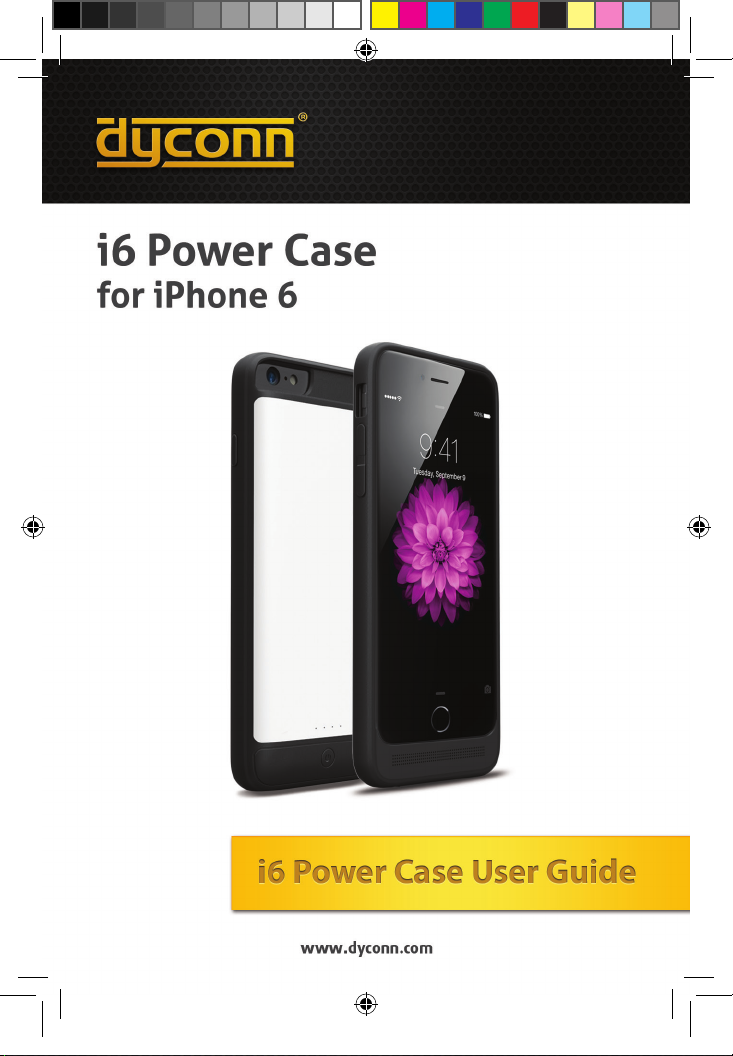
The Dyconn i6 Power Case is a durable and powerful 3200 mAh battery case that
extends the battery life of your iPhone 6 by 130%, affording extra time to browse the
web, take photographs, listen to music or enjoy your favorite app. The Dyconn i6
Power Case provides full-phone protection with a strong polycarbonate construction
design, while built-In LED status indicators illuminate to show the amount of charge
left within the I6 Power Case. More impressively, it can be charged wirelessly with
the i6 Power Case Charging Dock (sold separately). Simply place the i6 Power
Case within the charging dock cradle and remove after the charge is complete. It’s
that easy.
Product Features:
• Standard USB Output
• Built-In 2 pins for wireless charging for convenience
• Constructed and designed with PC (Polycarbonate) and TPU
(Thermoplastic Polyurethane)
• Built-In Status LED Indicator
• Protective IC Circuit (Protects against short-circuits, over-charging,
over-discharging)
Package Contents:
• iPhone 6 Power Case (IP6BCW - i6 Power Case - White)
(IP6BCB - i6 Power Case - Black)
(IP6BCW-D - i6 Power Case/Dock - White)
(IP6BCB-D - i6 Power Case/Dock - Black)
• User Manual
• Micro USB Cable
• Charging Dock (IP6BCW-D, IP6BCB-D)*
iPhone 6 Power Case.indd 4 1/5/15 11:29 AM
*The Power Case Charging Dock is sold seperately at authorized Dyconn resellers.
4
Page 5
PRODUCT SPECIFICATIONS/Maintenance
Specications:
Battery Type: Li-Polymer
Capacity: 3.7V/3200mAh
Input: DC 5V/1A (Max)
Output: DC 5V/1A (Max)
Dimensions: 6” x 2.75” x .5” (153 x 70 x 14mm)
Weight: 3.1 oz.(88g)
Charging Time: 3.5 Hours
Output Interface: Lightning
Input Interface: Micro
Charging Cable: Micro USB
Care and Maintenance:
The Dyconn i6 Power Case should be treated with care during use and
storage. As such, please follow the suggested maintenance advice below:
1. Keep the device away from rain, humidity and all forms of liquid and
condensation that contain minerals that may corrode electronic circuitry.
2. Do not use or store the device in environments of extreme heat or low
temperature. High temperature can shorten the life span of electronic devices.
3. Do not use or store the device in dusty and wet environments that will
destroy its moving parts and electronic components.
4. Do not drop, knock or shake the device. Improper handling can break or
adversly effect the structural and working integrity of the device.
5. Do not use harsh chemicals, cleaning solvents or strong detergents to
clean the device. To clean, simply use a damp cloth on the external housing.
iPhone 6 Power Case.indd 5 1/5/15 11:29 AM
5
Page 6
PRODUCT Introduction
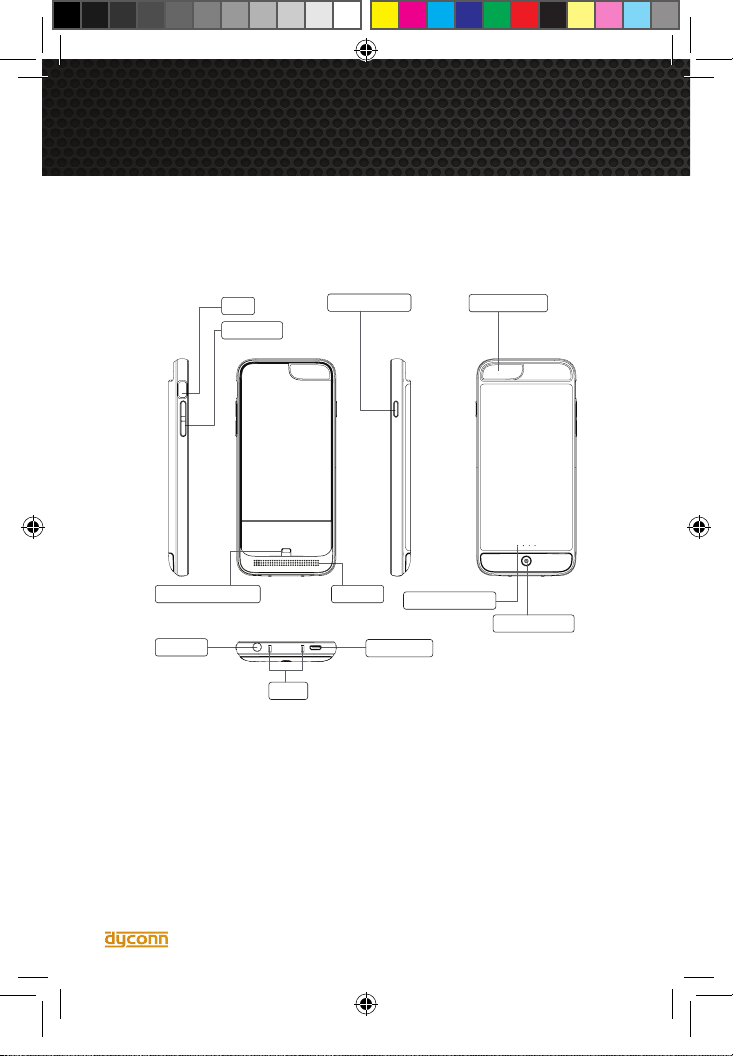
Headset
Camera Hole
Power Indicator
Power Switch
iPhone Connector
Speaker
iPhone Power
Mute
Volume+/-
Micro Input
Touch
i6 Power Case Diagram
The diagram below shows the various features and functional parts of the Dyconn
i6 Power Case.
i6 Power Case FAQ
1. I cannot charge iPhone and power case together.
Solution: Make sure the data line is connected properly.
2. I cannot charge after pressed power switch.
Solution: Check carefully if the iPhone and Power Case are connected or if the
Power Case has power.
3. I cannot Sync my iPhone.
Solution: Please check if the micro cable is connected with power case.
4. My iPhone shows “ does not support charge”.
Solution: Output of charger is not supported, please use 5V/1A provided charger.
6
iPhone 6 Power Case.indd 6 1/5/15 11:29 AM
Page 7
PRODUCT assembly Instructions
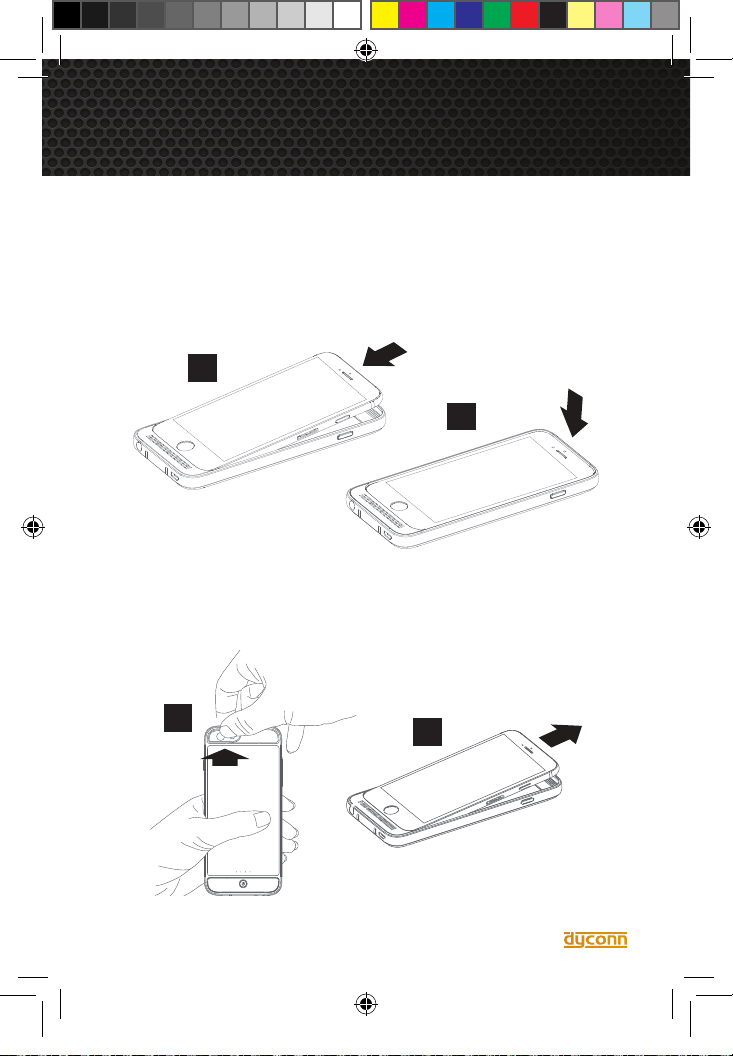
Assembling and Dissembling the i6 Power Case
Assembling:
1. Place the Dyconn i6 Power Case on a hard and even surface. Proceed to slide
the iPhone into the case, starting with the lower portion of the phone (Diagram 1).
Next, Push the phone downward while working the case’s rubber liner around the
top-edge of the iPhone (Diagram 2).
1
2
Disassembling:
2. With the Power Case in hand, push the iPhone forward through the camera
opening, releasing the top of the phone from the case (Diagram 3). At this point,
remove the iPhone by grabbing and pushing the iPhone upward (Diagram 4).
iPhone 6 Power Case.indd 7 1/5/15 11:29 AM
3
4
7
Page 8
charging the i6 power case
Charging the Power Case with PC and AC Power Source
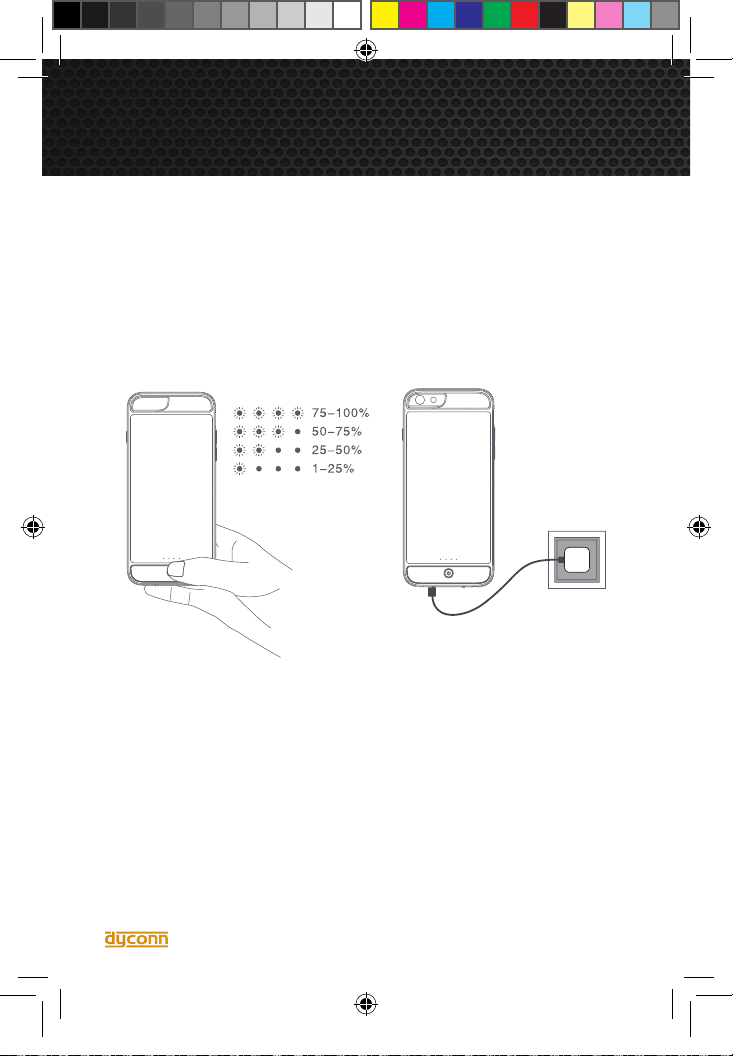
1. Connect the iPhone 6 Power Case to the AC Power Adapter using the Micro USB
Cable. LED power indicators will commence to ash during the charging process.
When the Power Case is fully charged, all LED power indicators will illuminate.
2. Concurrently charging the iPhone 6 and i6 Power Case can be achieved by
installing the iPhone 6 into the i6 Power Case and connecting the Power Case to
either the AC Power Adapter or PC with the provided Micro USB.
IMPORTANT:
• Please use original branded 5V/1A Power Adapter. Please do not use unbranded
power adapter which may cause damage to devices.
• Disconnect the charging cable after charging.
• Do not use any defective power adapters.
• Do not put the i6 Power Case into or near heat or re so to avoid an explosion.
iPhone 6 Power Case.indd 8 1/5/15 11:29 AM
8
Page 9
charging the iphone 6
Charging the iPhone 6
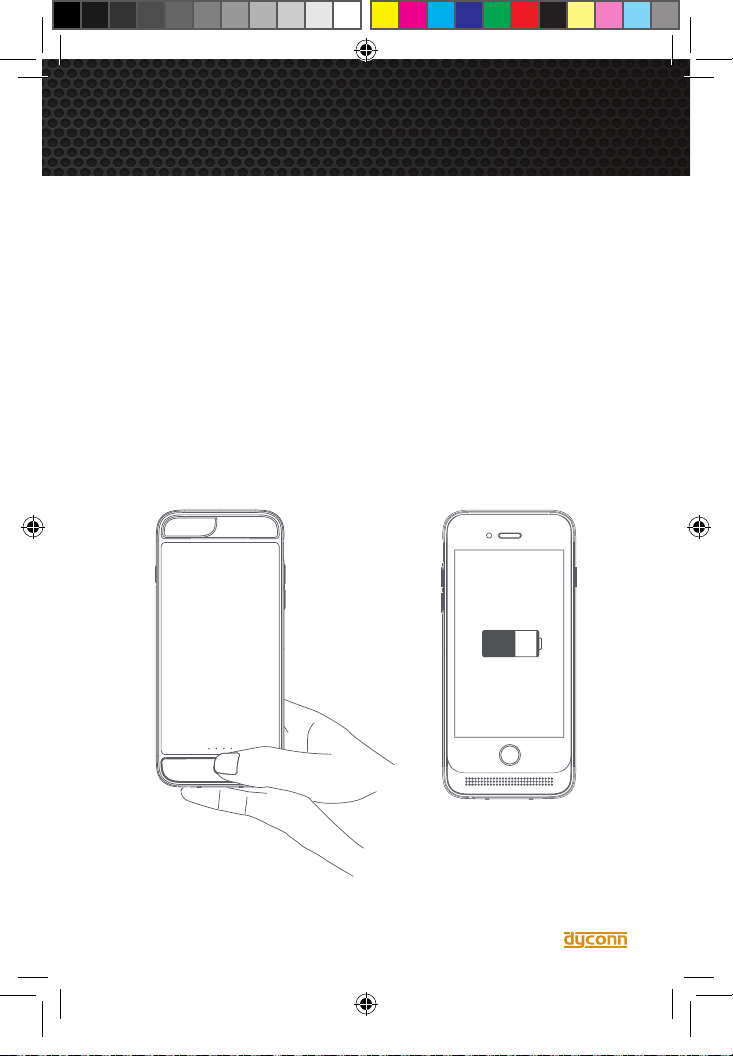
1. After the iPhone is installed into the Power Case. Proceed to press the Power
Button for 2 seconds. The Power Case will automatically charge and the LED
power indicators will turn off after 5-seconds.
To cancel the charging process, press the Power Button for 2 seconds.
Note: Please make sure there is enough power inside the Power Case before
charging the iPhone.
Checking the iPhone 6 Battery Level
1. Gently press the Power Switch to turn on the power indicator screen, each LED
light represents 25% of battery power (4 LED lights represent full power charge). To
save power, the indicator screen will automatically turn Off within 5-seconds.
iPhone 6 Power Case.indd 9 1/5/15 11:29 AM
9
Page 10
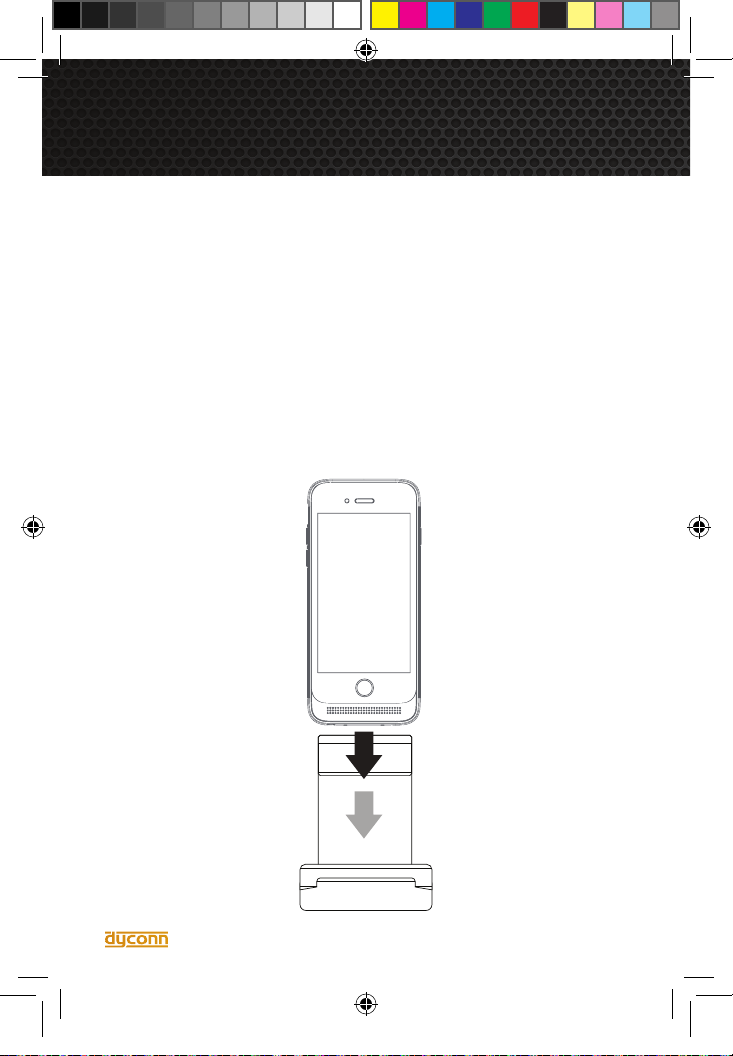
wirelessly charging the i6 Power Case
Wireless Charging the i6 Power Case
Charging the Dyconn i6 Power Case can also be achieved with use of the Power
Case Charging Dock (Sold Separately).
1. Please note the Dyconn i6 Power Case can be wirelessly charged while the
phone is On or Off. You can either turn the phone Off or keep the phone On.
2. To charge the Dyconn i6 Power Case, connect the Charging Dock to an AC
power adapter or PC/MAC USB port using the provided Micro USB Cable. Place
the Dyconn i6 Power Case within the Charging Dock. It will take approximately 3.5
hours to charge.
Note: When using the Charging Dock, make sure the charging pins on the Power
Case make contact with the Charging Dock’s receptors.
iPhone 6 Power Case.indd 10 1/5/15 11:29 AM
10
Page 11
dyconn limited warranty
DYCONN warrants only to the original purchaser of this product from a Dyconn-authorized
reseller or distributor that this product will be free from defects in material and workmanship under normal use and service for (1) one-year after date of purchase. Purchaser
must present acceptable proof of original ownership (such as original receipt, warranty
card registration, on-line registration, or other documentation Dyconn deems acceptable)
for the product. DYCONN, at its option, shall repair or replace the defective unit covered
by this warranty. In order to keep this limited warranty in effect, the product must have
been handled and used as prescribed in the instructions accompanying this warranty.
This limited warranty does not cover any damage due to accident, misuse, abuse or negligence. This limited warranty is non-transferable and does not apply to any purchaser who
bought the product from a reseller or distributor not authorized by Dyconn, including but
not limited to purchases from internet auction sites. This warranty does not affect any other
legal rights you may have by operation of law. Contact DYCONN at 1-(855) 839-2666 for
warranty service procedures.
DISCLAIMER OF WARRANTYEXCEPT FOR THE LIMITED WARRANTY PROVIDED
HEREIN, TO THE EXTENT PERMITTED BY LAW, DYCONN DISCLAIMS ALL WARRANTIES, EXPRESS OR IMPLIED, INCLUDING ALL WARRANTIES OF MERCHANTABILITY AND/OR FITNESS FOR A PARTICULAR PURPOSE. TO THE EXTENT THAT ANY
IMPLIED WARRANTIES MAY NONETHELESS EXIST BY OPERATION OF LAW, ANY
SUCH WARRANTIES ARE LIMITED TO THE DURATION OF THIS WARRANTY. SOME
STATES/PROVINCES DO NOT ALLOW LIMITATIONS ON HOW LONG AN IMPLIED
WARRANTY LASTS, SO THE ABOVE LIMITATIONS MAY NOT APPLY TO YOU. LIMITA-
TION OF LIABILITY REPAIR OR REPLACEMENT OF THIS PRODUCT, AS PROVIDED
HEREIN, IS YOUR EXCLUSIVE REMEDY. DYCONN SHALL NOT BE LIABLE FOR ANY
SPECIAL, INCIDENTAL OR CONSEQUENTIAL DAMAGES, INCLUDING, BUT NOT LIMITED TO, LOST REVENUES, LOST PROFITS, LOSS OF USE OF SOFTWARELOSS OR
RECOVERY OF DATA, RENTAL OF REPLACEMENT EQUIPMENT, DOWNTIME,
DAMAGE TO PROPERTY, AND THIRD-PARTY CLAIMS, ARISING OUT OF ANY THEORY OF RECOVERY, INCLUDING WARRANTY, CONTRACT, STATUTORY OR TORT.
NOTWITHSTANDING THE TERM OF ANY LIMITED WARRANTY OR ANY WARRANTY
IMPLIED BY LAW, OR IN THE EVENT THAT ANY LIMITED WARRANTY FAILS OF ITS
ESSENTIAL PURPOSE, IN NO EVENT WILL DYCONN’S ENTIRE LIABILITY EXCEED
THE PURCHASE PRICE OF THIS PRODUCT. SOME STATES/PROVINCES DO NOT
ALLOW THE EXCLUSION OR LIMITATION OF INCIDENTAL OR CONSEQUENTIAL
DAMAGES, SO THE ABOVE LIMITATION OR EXCLUSION MAY NOT APPLY TO YOU.
THIS WARRANTY GIVES YOU SPECIFIC LEGAL RIGHTS AND YOU MAY ALSO HAVE
OTHER RIGHTS THAT VARY FROM STATE TO STATE AND PROVINCE TO PROVINCE.
Technical Support
For technical support, call 1-(855) 839-2666. You may also reach Dyconn technical
support at [email protected].
iPhone 6 Power Case.indd 11 1/5/15 11:29 AM
Page 12
iPhone 6 Power Case.indd 12 1/5/15 11:29 AM
 Loading...