

Page 1

Page 2
HWATCH L1/W1
HWATCH L1/W1
Material List
Welcome to use HWATCH L1/W1 smart watch.
HWATCH L1/W1 is the first fashionable and smart
watch for female made by DXY Technology. Like other
models under HWATCH L1/W1 series, it is a transboundary product combining traditional watch process
and technical intelligence.
HWATCH L1/W1 has soft curve, reliable material and
stable performance. It is L1 embedded with VS-grade real
diamond, W1 embedded with colorful crystal. which makes
HWATCH L1/W1 shine. Like you, it looks so beautiful,
tender and strong.
The pointer on dial plate follows the rotation of Ronda
quartz movement. HWATCH L1/W1 is quietly recording
and analyzing your exercise and sleep. It can also conduct
UV inspection if needed. By this, you know well about
your daily routine.
To select HWATCH L1/W1 means the selection of longterm high-quality and smart watch from HWatch as well
as the selection of H health mobile phone applications
under the cooperation of many professional institutions.
While monitoring daily parameters, daily health diary can
be formed, making health a part of your fashion.
From now on, you can open up a new life chapter which is
healthy, beautiful and fashionable with HWATCH L1/W1.
01
The devices in HWATCH L1/W1 standard package
include:
1. HWATCH L1/W1 fashionable female smart watch.
2. Specification
3. Warranty card and warranty policies
4. Certificate of quality
Note: If the watch battery has no power, please replace
CR2330 standard button battery.
02
Page 3
HWATCH L1/W1
Buttons and operating instructions
HWATCH L1/W1
Wearing instructions:
Physical buttons
Long press:Activate watch (sleep)/display exercise
progress (after activation)
Short press:Review UV
Double click: Startup and shutdown in sleep mode
Crown
Adjust the time of HWATCH L1/W1
HWATCH L1/W1 operation gestures
After opening the package, HWATCH L1/W1 is in exfactory mode. You need to long press the physical
button to activate smart functions. After three lights
at 11, 12 and 1 o’clock directions flicker, it indicates
that the smart part of HWATCH L1/W1 begins to operate.
03
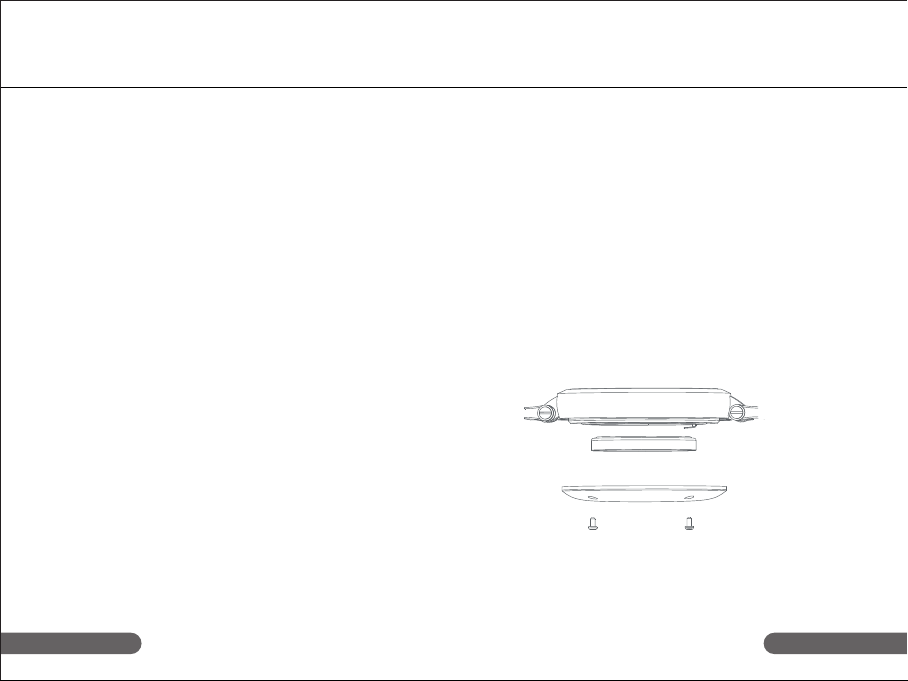
How to replace the battery?
1. Place the watch flat reversely, use a screwdriver to
unscrew 4 screws in the back cover.
2. Open the back cover and slightly take out the
consumed button battery.
3. Place the new battery into the watch body. Pay
attention to the directions of positive and negative
poles.
4. Close the back cover and fasten the screw.
5. Long press physical button to active the smart
functions.
6. Open app, and reconnect your HWATCH L1/W1 to
finish battery replacement.
Prompt: When the battery power is less than 20%,
H health App will remind you of replacing the
battery. The battery for Ronda 751 quartz
movement is advisably replaced in professional
watch repair institution.
04
Page 4
HWATCH L1/W1
Mobile sync instruction
HWATCH L1/W1
Mobile sync instruction
Adaptive devices
HWATCH L1/W1 is compatible with mobile phone
based on Bluetooth 4.0 hardware device. Before
connecting your device, please ensure that your
device has downloaded App: H health
Adaptive operating system
iOS7.0 and above version
Android4.3 and above version
Adaptive device model
iOS platform: iPhone 4s/5/5S/6/6 Plus
Android platform: MEIZU MX3/4, Samsung S4/S5,
MI M3/M4, Hammer mobile phone T1, one plus
mobile phone
Installation of H health
H health is a smart watch under HWATCH L1/W1
After dedicated mobile phone administration software
is used to connect H Health and HWATCH L1/W1, it
can help you administer watch, have a real-time review
on exercise health data report, analyze and conduct
UVI detection, and record daily routine on the timeline
of H Health.
Note: For more device support, please keep concerning
about our website: http://www.hwatch.cn
05
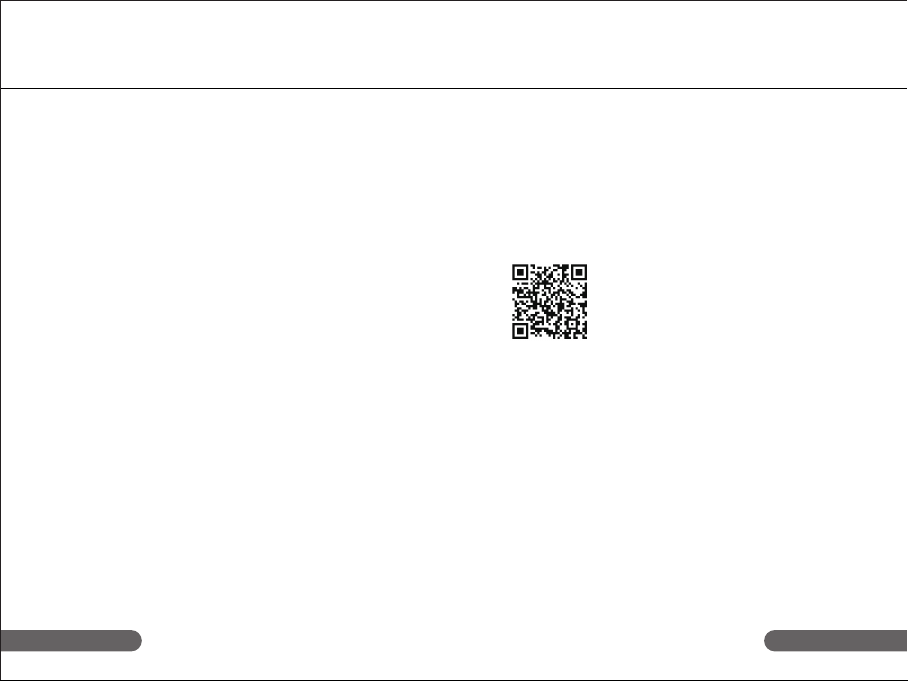
You can search “H health” by accessing App
Store, Google Play Store or other application
markets, download and install H health App for
free. You can also scan QR code in the following
diagram to download and install it.
H health use and synchronization
Connect to watch
Operate H health on mobile phone. Please register
and bind your HWATCH L1/W1 according to the
prompt. If you have an account, please login it directly.
After logging in, you can synchronize and update the
data by pull-down manner.
Prompt: If App is installed in iPad, please search and
download it in iPhone item.
06
Page 5
HWATCH L1/W1
Combination function
HWATCH L1/W1
Combination function
By collecting data and analyzing settings, HWATCH L1/W1,
new H health and its background can directly present the
following data:
Exercise step counting
Smartly identify your exercise state: walking, running,
recording steps, mileage and calorie.
Exercise completeness
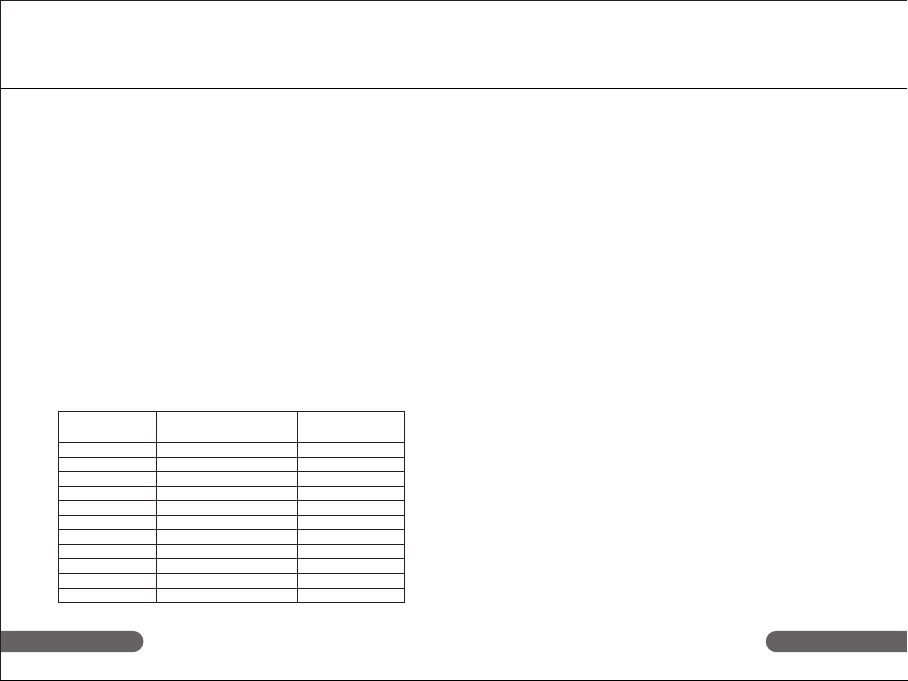
HWATCH L1/W1 can display your exercise completeness
of the day through 11 LED lights on the dial plate according to relevant settings of H health. When the physical
button is long pressed, the indicator light on the dial plate
will be on according to exercise completeness. Their
relations are as follows:
Completeness Long-lighting clock Single-point
percentage (in marquee form) flickering clo
10% below 1 4 points
10%-20% 4,5 points 5 points
20%-30% 4,5,6 points 6 points
30%-40% 4,5,6,7 points 7 points
40%-50% 4,5,6,7,8 points 8 points
50%-60% 4,5,6,7,8,9 points 9 points
60%-70% 4,5,6,7,8,9,10 points 10 points
70%-80% 4,5,6,7,8,9,10,11 points 11 points
80%-90% 4,5,6,7,8,9,10,11,12 points 12 points
90%-100% 4,5,6,7,8,9,10,11,12,1 points 1 point
Over 100& 4,5,6,7,8,9,10,11,12,1,2 points 2 points
ck
Sleep monitoring
If you don’t like wearing the watch during sleep, you
can double click the physical button to make the watch
exit the sleep mode and record the sleep time.
If you wear the watch during sleep, HWATCH L1/W1 will
automatically record the time for deep sleep and light
sleep.
When the watch enters the sleep mode, the color light
will flicker in blue for 1 time.
When the watch is in sleep mode, the color light
maintains flickering in blue.
When the watch exits the sleep mode, the color light will
flicker in white for 1 time.
0807
Page 6
HWATCH L1/W1
Combination function
HWATCH L1/W1
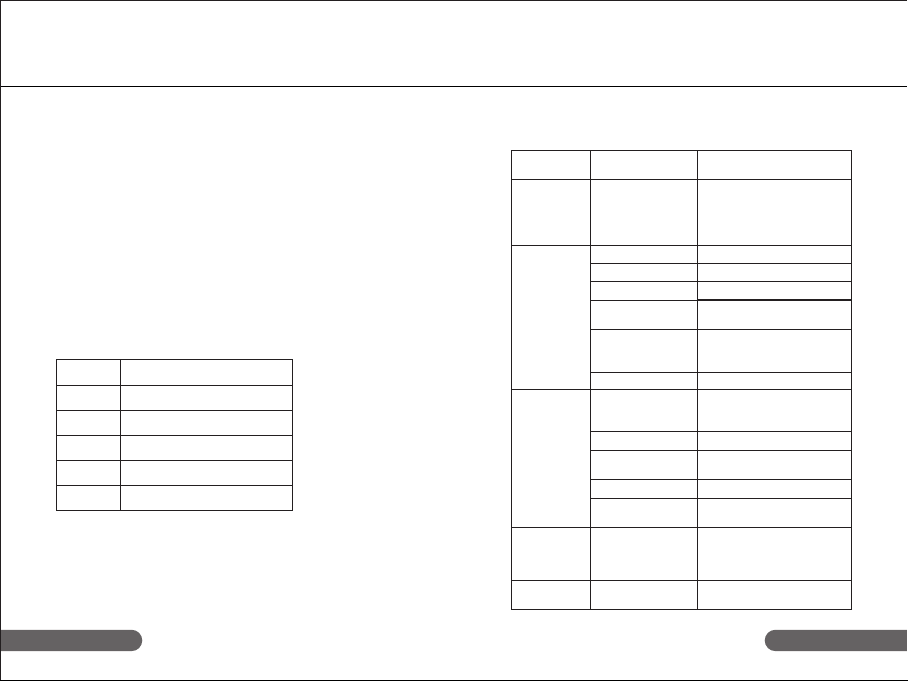
Product parameters
UVI review
HWATCH L1/W1 is equipped with UV sensor which can
help female learn about UV intensity in the environment
and provide them with UV protective measures in timely
and effective manner.
Short press the physical button, the color LED light at
2 o’clock direction will flicker in different colors according
to the current UVI.
The relations are as follows:
UVI Prompt
UVI 1-2 Flicker in green for 3 times
UVI 3-5 Flicker in yellow for 3 times
UVI 6-7 Flicker in orange for 3 times
UVI 8-10 Flicker in red for 3 times
Above 11 Flicker in violet for 3 times
Type
Data
uploading
System
configuration
Hardware
configuration
Software
configuration
Accessory
setting
Item
Share synchronous
data withthe app
of smart phone
Lens
Display screen
Bluetooth 4.0
Watchband
Shell
CPU
G-sensor
UV-sensor
Indicator light
Charging interface
Movement
Health data
synchronization
Battery
Product configuration
parameters
Connect the app of
smart phone via
Bluetooth to upload
or issue a connecting
order.
Sapphire glass.
None
Supported
Leather watchband
is replaceable.
18K platinum (L1)
316 medical stainless
steel (W1)
Nordic nRF 51822
Supported (step recording,
calorie, kilometer, sleep
monitoring and etc.)
Supported
10 LED white lights,
1 LED color light
Not supported
Swiss Ronda 751
movement
Connect the app of smart
phone via Bluetooth to
upload or issue a connecting order.
Type: Button battery
CR 2330
1009
Page 7

 Loading...