

Dutec BaudMaster BMUSB, BaudMaster BMUSB Series, BaudMaster BMUSB-R9N, BaudMaster BMUSB-R5I, BaudMaster BMUSB-R5IS User Manual
Page 1

BaudMast e r ™
BMUSB
USB to RS-232 Converter
User’s Manual
Rev. uc1 10/17/06
Innovative I/O Since 1977
6979 Wales Road
Northwood, Ohio 43619
Phone: 800-248-1632 or 419-666-4700
Fax: 419-666-4702
website: www.baudmaster.com
email: [email protected]
email: [email protected]
Page 2

Page 3

BaudMaster
TM
BMUSB
USB to RS-232 Converter
User’s Manual
5 Year Warranty
Interface converter products, sold by duTec, Inc., are warranted against defects in materials and workmanship for
five years from the date of purchase. There are no other express or implied warranties and no warranty of
merchantability or fitness for a particular purpose.
During the warranty period, duTec will repair or, at its option, replace components that prove to be defective,
provided the unit is shipped prepaid to the manufacturer directly or via and authorized distributor. Not covered by
this warranty are defects caused by modification, misuse or accidents and any further damage caused by inadequate
packing for service return.
duTec’s obligation is restricted to the repair or replacement of defective parts and under no circumstances will
duTec be liable for any other damage, either direct or consequential.
Trademarks
The duTec logo, BaudMasterTM, ADFCTM, Omni-isolationTM and I/O PLEXER are trademarks of duTec, Inc.
Notice to the User
The information contained in this manual is believed to be correct. However, duTec, Inc. assumes no responsibility
for any inaccuracies.
Information in this document is subject to change without notice. No part of this document may be reproduced or
transmitted in any form or by any means, electronic or mechanical, for any purpose, without the express written
permission of duTec, Inc.
Copyright © 2004 duTec, Inc. All rights reserved.
Page 4

Page 5

Table of Contents
Introduction ........................................... 7
Features .................................................7
System Requirements ........................... 8
Driver Installation ............................. 8-9
Specifications ...................................... 10
Dimensions ........................................... 11
Description ...................................... 12-15
Cable .................................................... 16
DIN Rail Adapter ................................ 17
Ordering Information ......................... 18
Page 6

Page 7
BaudMaster
TM
BMUSB RS232 User’s Manual
Copyright © 2006 duTec 1–800-248-1632 7
Introduction
The BaudMasterTM BMUSB family of converters are
designed to allow the connection of RS-232 devices to
any USB equipped PC. Each converter functions as an
USB-to-UART bridge with an isolated or non-isolated
RS-232 interface. The isolated BaudMasterTM
converters provide protection from voltage spikes and
ground loops that may hamper communications or harm
computer ports.
Features
USB-to-UART Bridge USB Specification 2.0
compliant; backward compatible with USB 1.0 and 1.1
Virtual COM Port Windows will install the
converter as an additional COM port that is compatible
with existing COM Port PC applications. Drivers are
supplied for Microsoft Windows ® XP, Windows ®
2000 and Windows ® 98SE.
Direct USB Device Support Alternative drivers are available that provide an alternative
interface solution that does not implement a COM port. A simple, high-level application program
interface (API) is used to provide simpler USB-UART connectivity and functionality.
Status LEDs Status LEDs are provided for USB Suspend, Transmit, and Receive signals. Selfpowered models also have a Power LED. These are handy for verifying operation and
troubleshooting network problems.
Electrical Isolation Isolated converter models use optical and transformer isolation technology
to provide up to 2000 volts of signal and ground isolation between the computer and equipment.
Eliminates ground loops that destroy computer ports and reduce serial communications
reliability.
Transient Voltage Protection All signal and power lines are protected against transient
voltages.
Versatile Power Supply The unit can be powered by a wide range of AC or DC voltages.
Wall-plug adapters are available from duTec or others. A pluggable screw terminal is also
provided for use with other power supplies.
Pluggable Terminal Blocks Industrial rated pluggable terminal blocks for ease of installation
or removal. Accepts up to 16 AWG wire.
DIN Rail Mounting DIN Rail mounting accessories available for easy wiring.
Page 8

BaudMaster
TM
BMUSB RS232 User’s Manual
8 Copyright © 2006 duTec 1–800-248-1632
8
System Requirements
o PC 486DX4-100MHz or higher or compatible system
o Available USB port
o CD-ROM or Internet access
o Windows ® XP , Windows ® 2000 or Windows ® 98SE
Driver Installation
The CD-ROM included with the converter contains the following files:
• Virtual COM Port Drivers
• Version information (Readme.txt)
• BaudMaster manual
Virtual COM Port Driver Installation for Windows XP
Follow these steps in install the Windows XP VCOM driver:
1. Insert the installation CD in your computers CD-ROM drive.
2. Connect the USB cable between the host computer and the converter. If using a self-
powered converter turn on the input power source.
3. Windows will open a “Found New Hardware Wizard” window.
• If Windows XP Service Pack 2 is installed the wizard will ask to connect to Windows
Update to search for drivers. Select “No, not this time”
4. Select “Install from a list or specific location (Advanced)” and click Next.
5. Select “Search for the best driver in these locations” and select “Search removable media
(floppy, CD-ROM…)”. Click Next.
6. Windows will locate the drivers on the installation CD and may warn you that the driver
is not verified. Click Continue Anyway.
7. Click Finish to finish installing the “BaudMaster USB Composite Device”.
8. Windows will open a second “Found New Hardware Wizard” window.
• If Windows XP Service Pack 2 is installed the wizard will ask to connect to Windows
Update to search for drivers. Select “No, not this time”
9. Select “Install from a list or specific location (Advanced)” and click Next.
10. Select “Search for the best driver in these locations” and select “Search removable media
(floppy, CD-ROM…)”. Click Next.
11. Windows will locate the drivers on the installation CD and may warn you that the driver
is not verified. Click Continue Anyway.
12. Click Finish to finish installing the “BaudMaster USB to UART Bridge Controller”.
Page 9

BaudMaster
TM
BMUSB RS232 User’s Manual
Copyright © 2006 duTec 1–800-248-1632 9
Virtual COM Port Driver Installation for Windows 2000
Follow these steps in install the Windows 2000 VCOM driver:
1. Connect the USB cable between the host computer and the converter. If using a self-
powered converter turn on the input power source.
2. Windows will open a “Found New Hardware Wizard” window. Click Next to continue.
3. Select “Search for a suitable driver for my device (recommended)” and click Next.
4. Select “Specify a location” and click Next.
5. Click Browse to locate the “bdmrbus.inf” driver installation file. The default location is
the “C:\BaudMaster\BMUSB” directory. Once this file is selected click OK.
6. Verify that the correct path and filename are shown and click Next.
7. Click Finish to finish installing the “BaudMaster USB Composite Device”.
8. Windows will open a second “Found New Hardware Wizard” window. Click Next to
continue.
9. Select “Search for a suitable driver for my device (recommended)” and click Next.
10. Select “Specify a location” and click Next.
11. Click Browse to locate the “bdmrw2k.inf” driver installation file. The default location is
the “C:\BaudMaster\BMUSB” directory. Once this file is selected click OK.
12. Verify that the correct path and filename are shown and click Next.
13. Click Finish to finish installing the “BaudMaster USB to UART Bridge Controller”.
Virtual COM Port Driver Installation for Windows 98 SE
Follow these steps in install the Windows 98 VCOM driver:
1. Connect the USB cable between the host computer and the converter. If using a self-
powered converter turn on the input power source.
2. Windows will open a “Found New Hardware Wizard” window. Click Next to continue.
3. Select “Search for the best driver for your device (Recommended)” and click Next.
4. Select “Specify a location”.
5. Click Browse to locate the “C:\BaudMaster\BMUSB” directory. Once this directory is
selected click OK.
6. Verify that the correct path and filename are shown and click Next.
7. Click Finish to finish installing the “BaudMaster USB Composite Device”.
8. Windows will open a second “Found New Hardware Wizard” window.
9. Select “Search for the best driver for your device (Recommended)” and click Next.
10. Select “Specify a location”.
11. Click Browse to locate the “C:\BaudMaster\BMUSB” directory. Once this directory is
selected click OK.
12. Verify that the correct path and filename are shown and click Next.
13. Click Finish to finish installing the “BaudMaster USB to UART Bridge Controller”.
Page 10

BaudMaster
TM
BMUSB RS232 User’s Manual
10 Copyright © 2006 duTec 1–800-248-1632
10
Specifications BMUSB USB-to-RS232 Interface Converters
UART
Silicon Labs CP2102 (www.silabs.com)
• Data Bits: 5,6,7 and 8
• Stop Bits: 1,1.5 and 2
• Parity: odd, even, mark, space, no parity
• 576 Byte receive buffer, 640 byte transmit buffer
Baud Rate
300 to 115.2K bps
RS-232
Supports TxD, RxD, CTS, RTS, DTR, DSR, DCD, RI (non-isolated)
TxD, RxD, CTS, RTS (isolated)
Connector: 9 pin D-Sub Male, DTE pin-out
Indicators
Bus Powered: USB Suspend, RxD, TxD, CTS, RTS LEDs
Self Powered: USB Suspend, RxD, TxD, CTS, RTS, Power LEDs
Isolation
(BMUSB-R5I
and
BMUSB-R5IS)
RS232-to-USB and RS232-to-Power isolation
Hi-Pot: 2000 V
RMS
for 1 minute, 5500 VDC for 1 second
Leakage Current: Less than 50uA @ 2000 VAC / 60 Hz; 5500 VDC
Surge Protection
ESD Protection to IEC1000-4-2 (801.2):
+/- 8kV: Contact Discharge
+/-15kV: Air-Gap Discharge
+/-15kV: Human Body Model
Fast Transient Burst (EFT) Immunity (IEC1000-4-4): Class 2, Severity Level 4
Compliance
Pending (CE, FCC Class A, CUL, UL Safety Class II)
Power
BMUSB-R9N: USB Low-Power Bus Powered Device (100ma)
BMUSB-R5I: USB High-Power Bus Powered Device (180mA)
BMUSB-R5IS: USB Self (External) Powered Device
External Supply: 7 to 24 volts AC/9 to 36 volts DC, 1.5W max.
Operating Temperature
-25ΕC to +70ΕC
Storage Temperature
-45ΕC to +100ΕC
Humidity
5% to 95% RH
Enclosure
18 gage Stainless Steel
Dimensions
Height: 4.60 inches (117mm)
Depth: 4.16 inches (106mm)
Width: 1.00 inch ( 25mm)
Weight
12.8 oz. (363 grams)
Accessories
DIN Rail Mounting Kit: Part No DA-01
AC Power Adapter: North American: 120 VAC Input
AC Power Adapter: European: Universal Input: 90-264 VAC Input
Page 11
BaudMaster
TM
BMUSB RS232 User’s Manual
Copyright © 2006 duTec 1–800-248-1632 11
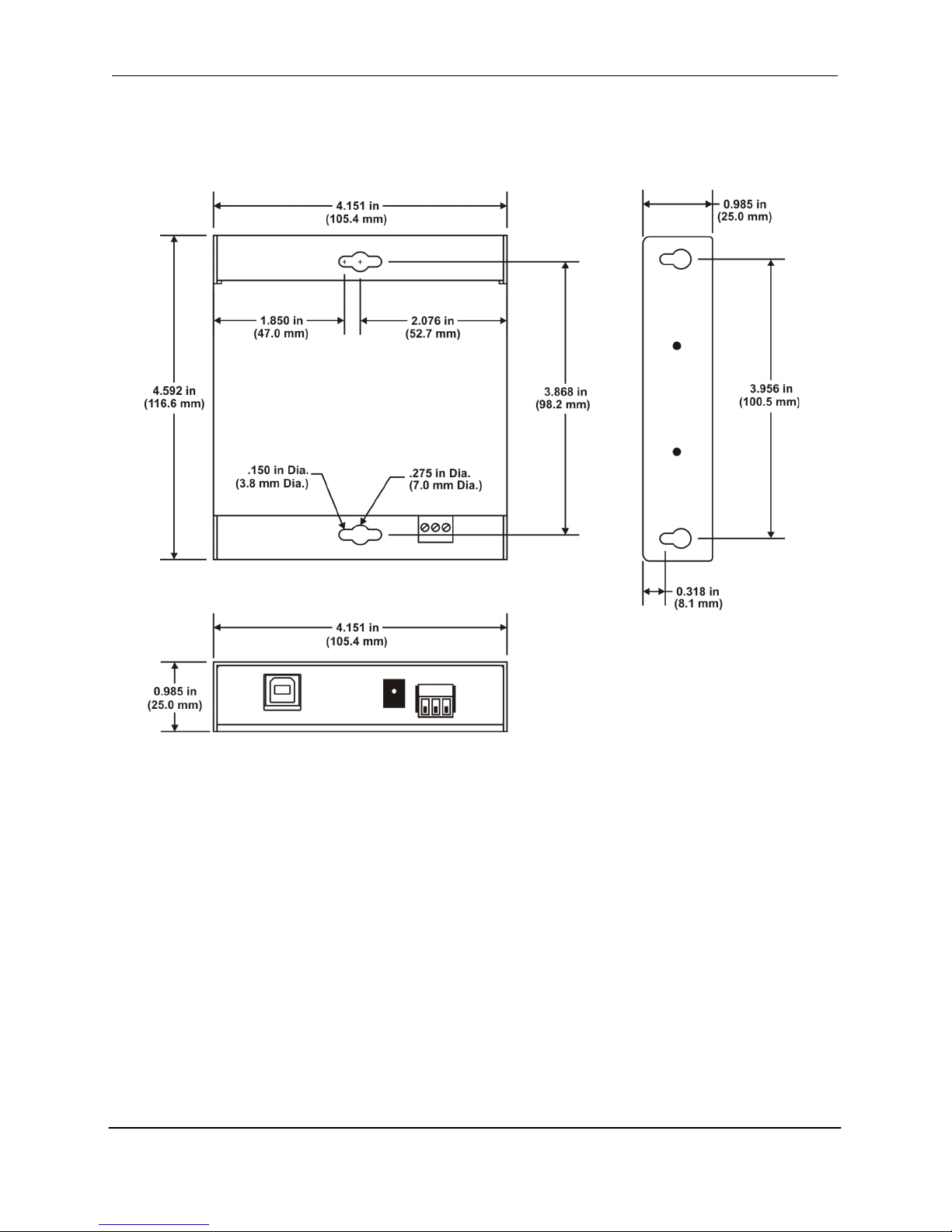
Dimensions
Page 12
BaudMaster
TM
BMUSB RS232 User’s Manual
12 Copyright © 2006 duTec 1–800-248-1632
12
Description
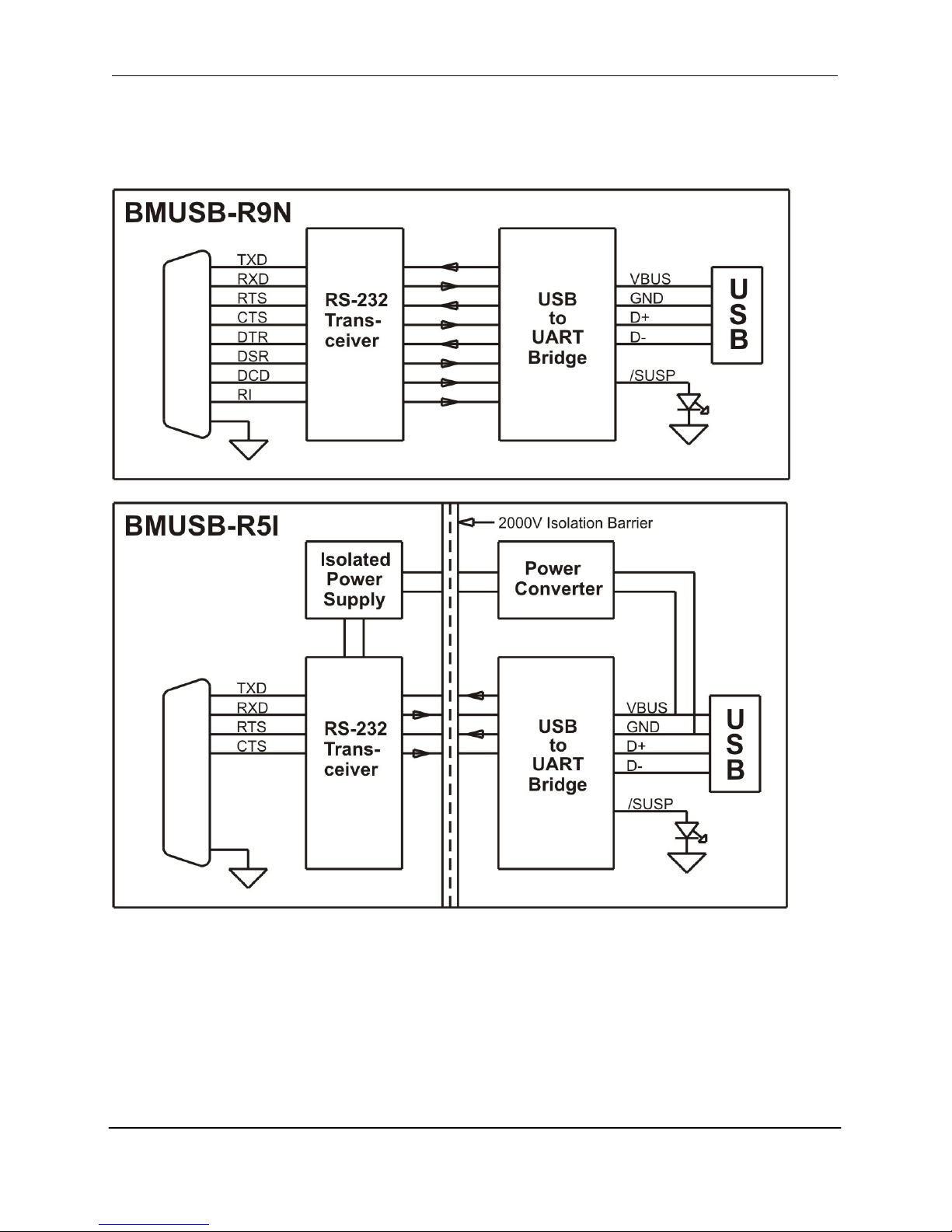
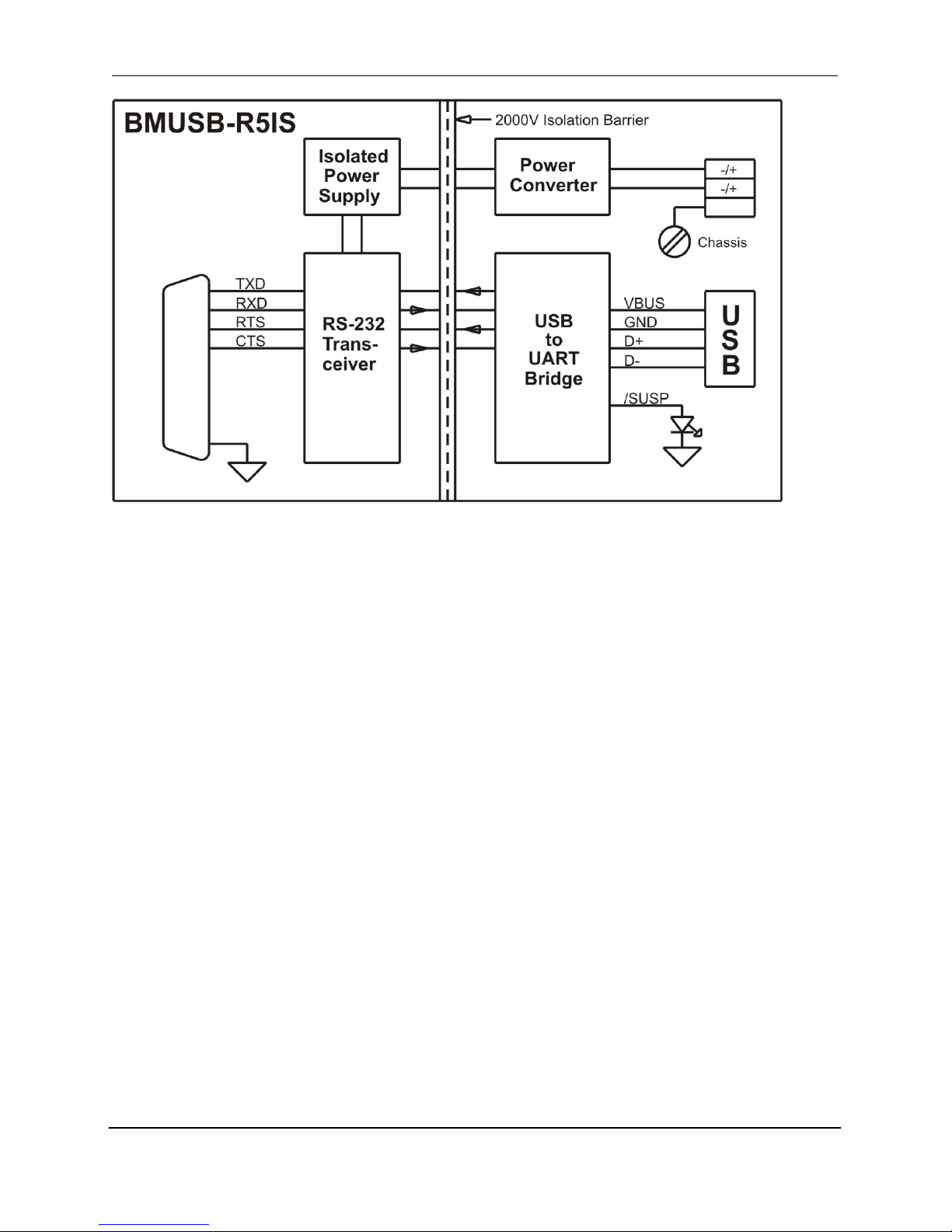
The diagrams below show the function blocks, signal paths and isolation of the BaudMasterTM
USB-to-RS232 converters.
Page 13
BaudMaster
TM
BMUSB RS232 User’s Manual
Copyright © 2006 duTec 1–800-248-1632 13
Isolated BaudMasterTM BMUSB converters provide full galvanic isolation from RS232-to-USB
and RS232-to-Power using optical and transformer technology. Galvanic isolation breaks the
signal, power and ground paths using transformer and optical technology. Data is allowed to
flow between systems but not electrical current, eliminating grounding problems. All
communication and power lines are transient protected.
Page 14
BaudMaster
TM
BMUSB RS232 User’s Manual
14 Copyright © 2006 duTec 1–800-248-1632
14
LED Indicators
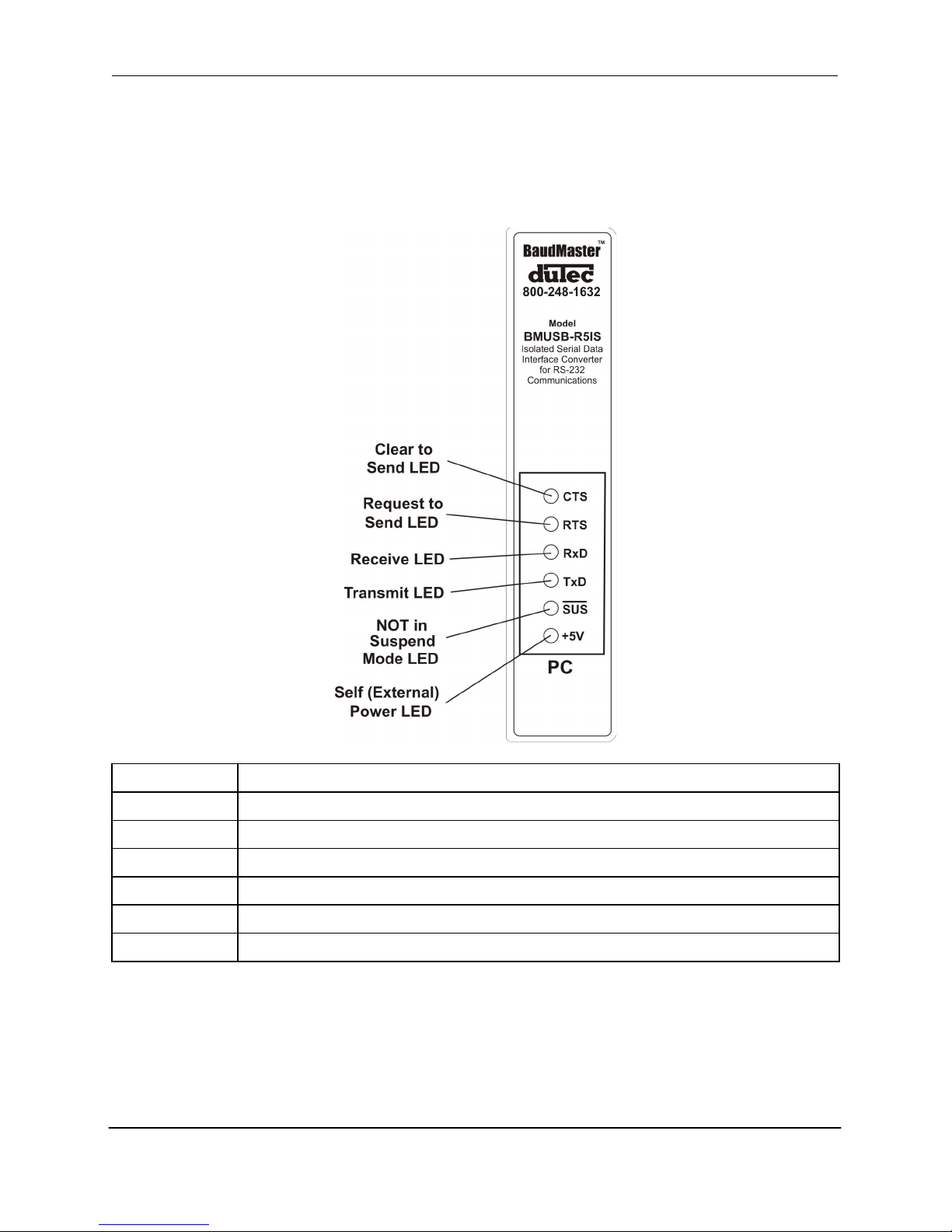
Depending on the model, the BaudMasterTM has up to six status LED indicators. These
indicators show the status of data communications and power and are handy for verifying
operation and troubleshooting network problems.
LED Name
LED Function
+5V
Red indicates the external (self) power is on.
/SUS
/Suspend – Red indicates that the converter is NOT in Suspend (low power) Mode.
TxD
Transmit - Red indicates that the BaudMaster is sending data.
RxD
Receive - Red indicates that the BaudMaster is receiving data.
RTS
Request to Send - Red indicates the RTS control output is active.
CTS
Clear to Send - Red indicates the CTS control input is active.
Page 15
BaudMaster
TM
BMUSB RS232 User’s Manual
Copyright © 2006 duTec 1–800-248-1632 15
RS-232 Connection
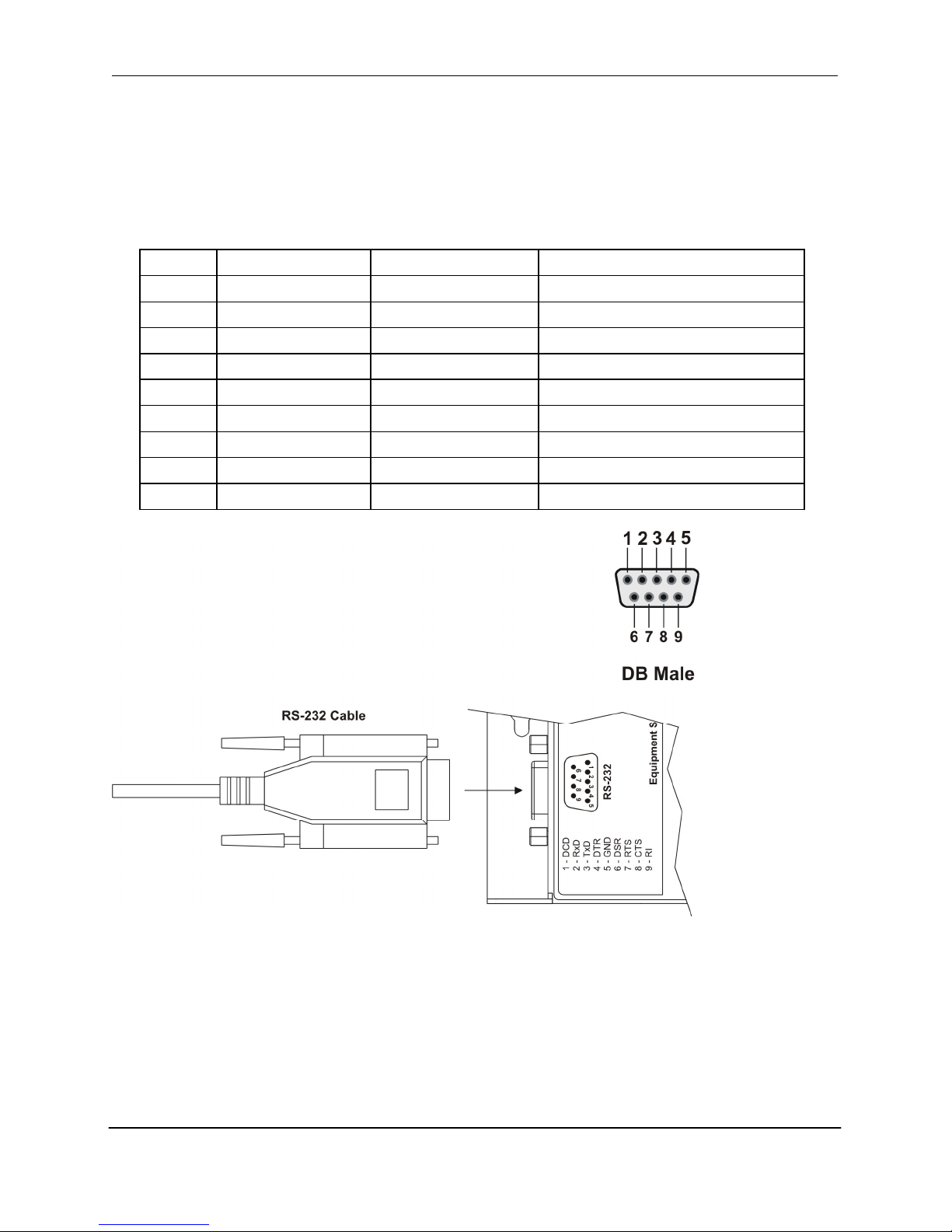
The RS-232 connection uses a standard male 9-pin D-Sub connector.
RS-232 Pinout
Pin #
BMUSB-R9N
BMUSB-R5I, -R5IS
Direction relative to BMUSB
1
DCD
not supported
input
2
RxD
RxD
input
3
TxD
TxD
output
4
DTR
+9 Volts
output
5
Circuit Ground
Circuit Ground
-
6
DSR
not supported
input
7
RTS
RTS
output
8
CTS
CTS
input
9
RI
not supported
input
Page 16
BaudMaster
TM
BMUSB RS232 User’s Manual
16 Copyright © 2006 duTec 1–800-248-1632
16
Power Supply Wiring
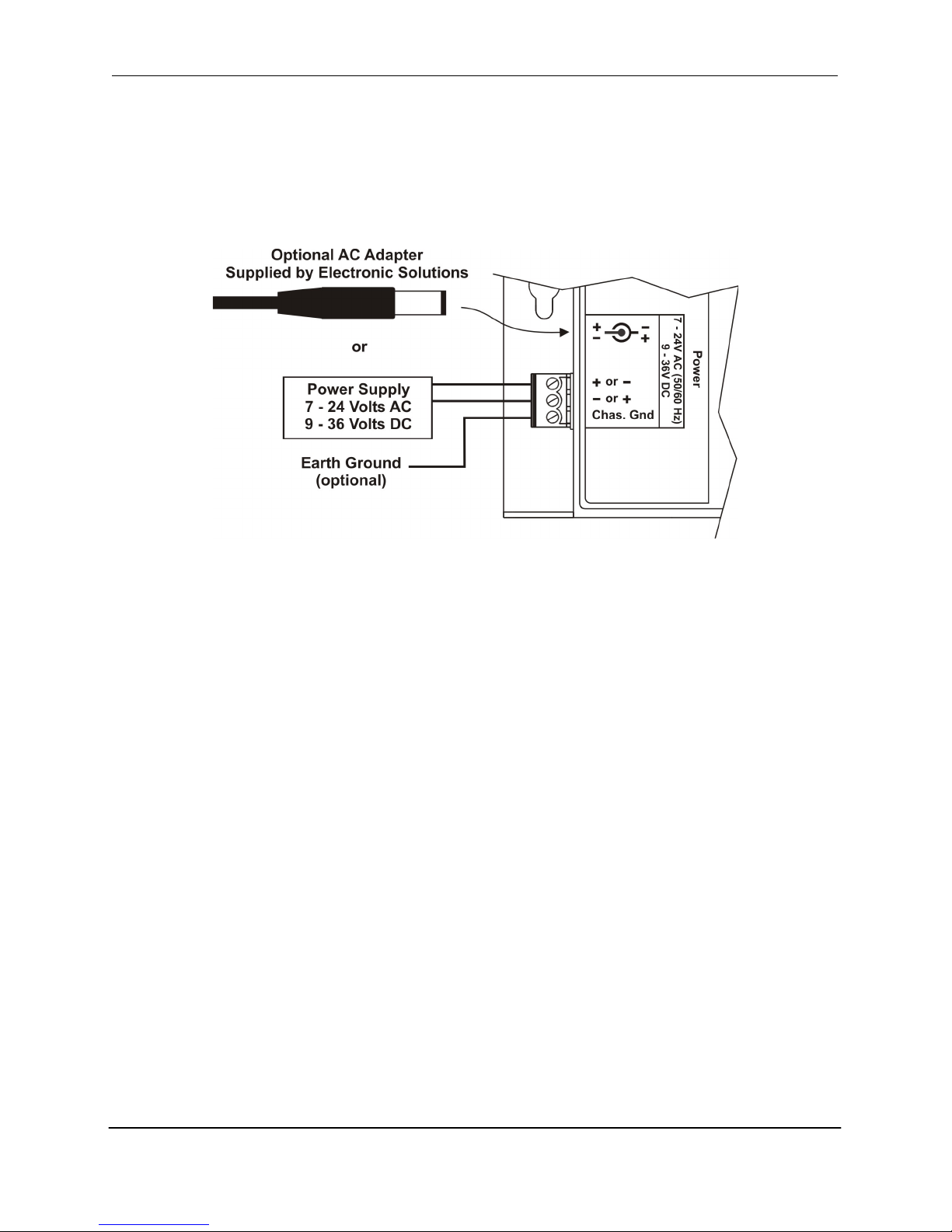
The BaudMasterTM incorporates special power converter circuitry that allows it to be powered by
a wide range of AC or DC power. The maximum current draw is 180 milliamps. Power can be
supplied to the unit with an AC adapter available from duTec. The unit can also be powered by
any power supply that meets the specifications as shown below.
The Earth Ground terminal is connected to the stainless steel chassis and is provided as a
convenient way to secure the chassis to earth ground. This may be desirable or required for some
applications.
Page 17
BaudMaster
TM
BMUSB RS232 User’s Manual
Copyright © 2006 duTec 1–800-248-1632 17
DIN Rail Adapter (DA-01)
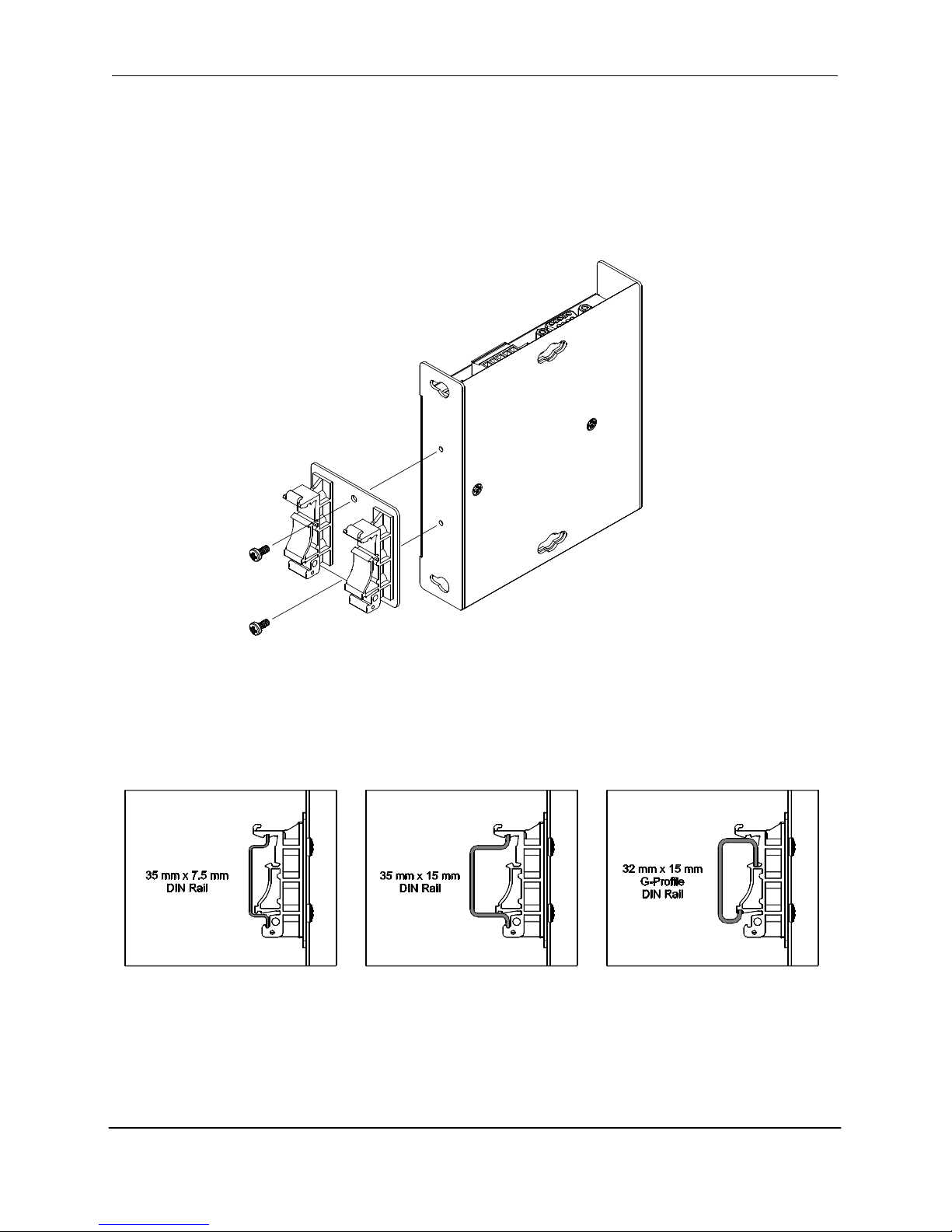
Fasten the optional DA-01 DIN Rail Adapter to the BaudMasterTM with the mounting screws
provided.
Mounts to standard DIN rail profiles: 35 mm x 7.5 mm, 35 mm x 15 mm and 32 mm x 15 mm Gprofile DIN Rail.
Page 18

BaudMaster
TM
BMUSB RS232 User’s Manual
18 Copyright © 2006 duTec 1–800-248-1632
18
Ordering Information
The BaudMasterTM is available in 3 different configurations. Choose the model that best fits your
application needs. See the website at www.baudmaster.com or call 800-248-1632 for current
pricing.
Model
Description
Isolated
Power
BMUSB-R9N-M
USB to RS-232 9-Wire
No
Bus – 100mA max.
BMUSB-R5I-M
USB to RS-232 5-Wire
Yes
Bus – 180mA max.
BMUSB-R5IS-M
USB to RS-232 5-Wire
Yes
Self – Ext. Supply
Optional Equipment
Model
Description
DA-01
DIN Rail Adapter (Includes adapter and mounting screws)
BM-PS120
Wall-Plug Adapter, 120VAC @ 3W
BM-PS220
Wall-Plug Adapter, 220VAC @ 3W
BM-PSU
Wall-Plug Adapter, Universal 90-264VAC @ 3W
 Loading...