

Page 1
!
!
!
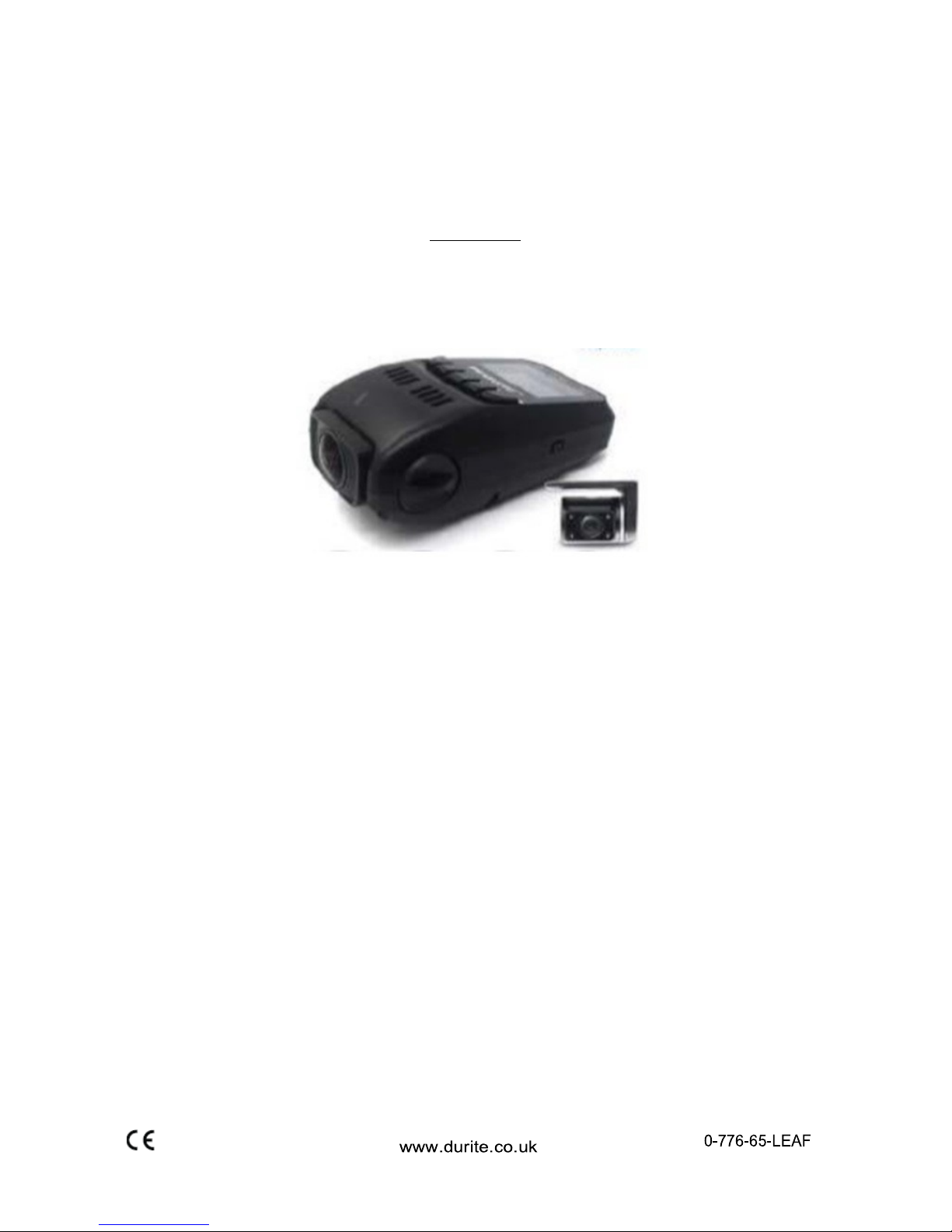
Mini Dash Mount DVR with GPS & 2nd Camera with 7m cable
12/24VDC
VID-511 (0-776-65)
WARNINGS
Before!using!this!unit!please!read!these!instructions!carefully.!Take!special!care!to!follow!the!warnings!
indicat e d!on!the ! u nit!itself!as ! well!as!th e!safety !s ugges tio ns!listed !b elow.!K eep!the s e!instruc t io ns!for!
future!refe r e n ce .!
!
!
!
*!
Please!ensure!you!are!familiar!and!comply!with!local!traffic!and!driving!regulations.
!
!
!
*!
Power Source >!The!Mini!DVR!should!be!connected!to!a!12>24!volt!dc!power!supply!only.!
!
*!
Water and Moisture
>!Do!not!use!the!Mini!DVR!where!it!may!be!subject!to!water!ingress!or!excessive!
moisture.!Do!not!use!outside!the!vehicle!unprotected.
!
!
*!
Heat >!Do!not!install!the!Mini!DVR!near!a!direct!heat!sources.!
!
*!
Ventilation >!The!Mini!DVR!should!be!situated!to!allow!free!circulation!of!air.!
!
*!
Foreign Material >!Care!should!be!taken!so!that!objects!do!not!fall!onto!or!into,!and!that!liquids!are!not!
spilled!on!the!Mini!DVR.!
!
*!
Mounting Surface >!The!Mini!DVR!should!be!mounted!to!a!strong!secure!surface.!
!
*!
Replacement Parts >!Use!only!manufacturers!replacement!specified!parts.!Unauthorised!substitutions!
may!result!in!fire!risk,!electric!shock!or!other!hazards!and!will!void!the!warranty
!
!
*!
Service >!The!user!should!not!attempt!to!service!this!units!beyond!that!described!in!the!operating!
instruc tions.!There!are!no!user>serviceable!parts!within!the!unit.!
!
*Screen Protective Film >!Remove!the!LCD!screen!protective!plastic!cover!before!use.!
Page 2
!
!
!
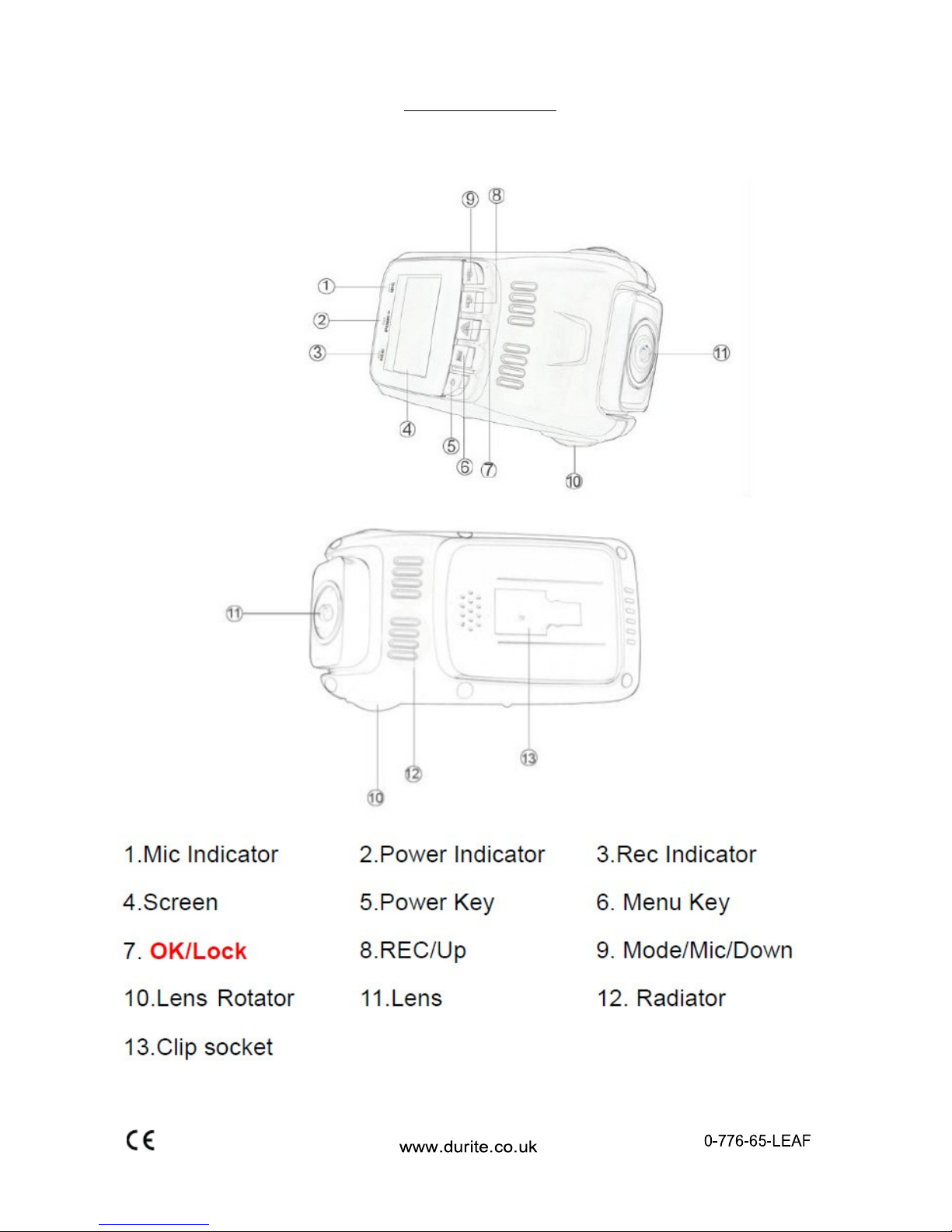
BUTTON LAYOUT
Page 3

!
!
!
OVERVIEW
This!is!a!vehicle!digital!HD!video!camera!recorder!with!advanced!technology.
!
Besides!the!general!function!it!has:
!
!
(1)!
Two!cameras:!Front!cam!is!1920*1080P!30FPS!and!Back!cam!is!VGA!640*480P!
(2)!
Super!capacitor!to!provide!back>up!power
!
(3)!
1FPS!as!a!choice,!it!supports!a!longer!time!recording
!
(4)!
Built>in!G>sensor.!When!it!detects!a!collision!it!will!send!a!signal!to!CPU!to!lock!current
!
video.
!
(5)!
AV!Out!port!to!connect!with!TV!
!
FEATURES
>!Two!cameras:!1080P!+!480P.!
>!
1.5!inch!high!resolu tio n!LCD!Screen
!
>!
Advanced!H.264!video!compression!techno log y .!
>170!degree!ultra!wide!angle!3!mega!pixels!lens!
>!
Advanced!Wide!Dynamic!technolog y!
>!
Support!AV!Out!transmissio n .!
>!
With!holder!with!3M!sticker,!onveniently!fix!and!use.
!
>!
G>sensor!to!lock!video!in!collision.
!
>!
Seamless!loop!recording.
!
>!
Automaticly!start!to!record!while!driving.
!
>!
1FPS!recording!for!longer!recording
!
>!
Maximum!32GB!TF!card
!
!
KEY FUNCTION
Power
>!
Press!‘Power’!button!to!start!device!and!press!and!hold!for!3!seconds!to!power!off.
!
!
Mode
>!
In!the!standby!mode!press!it!shortly!to!shift!between!Video/Photo/Replay
!
>!
In!the!video!mode!press!it!to!turn!the!MIC!on!and!off.
!
!
Menu
>!
Press!it!to!enter!menu!in!each!mode:
!
>!
Photo!Menu,!press!‘Menu’!to!enter!photo!mode!setting.!press!it!again!to!quit.
!
>!
Video!Menu:!In!mode!of!recording!or!standby!mode!press!it!to!choose!setting.!Press!it!again!to!quit.
!
>!
Replay!Menu:!In!the!mode!of!replay,!press!it!to!replay!setting!menu.!Press!it!again!to!quit.
!
!
Lock
>!
During!recording!videos,!press!this!key!to!lock!current!video!to!avoid!it!be!deleted!in!loop!recording.!
it!cannot!be!deleted!in!replay!mode.!But!it!can!be!deleted!when!connecting!to!PC!or!format!TF!card.!In!
menu!setting,!it!is!‘OK’!to!confirm!function!setting.
!
!
Rec/Up
>!
When!recording!video!press!this!key!to!stop!recording.!In!standby!mode!press!it!to!start!record.!(TF
!
card!should!be!insdie).!
>!
In!replay!mode!and!Menu!setting!it!is!the!Up!key.
!
!
Mic/Down
>!
In!Video/Photo!mode,!turn!the!Mic!on/off.
!
>!
In!replay!mode !a n d !Menu!setting!It!is!the !D o wn!key.
!
!
TF Card Slot
>!
Supports!2GB!>!32GBTF!Card!Class!10!(or!above).!
Page 4

!
!
!
Reset
>!
If!the!dev ice !fre e z e s !p re s s !R e s e t!to !restart.!
!
AV OUT / GPS
>!
AVOUT!function:!By!this!port!and!a!line,!its!video!and!photo!can!be!played!on!player.
!
>!
GPS:!Included!is!a!GPS!antenna!to!record!the!driving!path!and!speed.!
!
USB Port
>!
For!charging!input.!Connect!it!with!car!charger!toi!supply!power!to!this!device.
!
>!
Connect!USB!cable!to!PC.!The!data!on!the!TF!card!can!be!extracted.!
!
MIC
>!
When!it!is!on.!Audio!will!be!recorded.
!
!
Speaker
>!
When!replaying!the!video,!audio!recorded!by!this!device!will!be!played!back!via!the!speaker.
!
!
Lens
>!
Image !is!c a p tu re d !v ia !th e !C MOS!S e n s o r.!Its !a n g le !c a n !b e !ad ju s te d .!
!
INSTALLING AND OPERATION
Turn!off!the!DVR.!Insert!the!TF!card!only!while!DVR!is!off.!
Install!suction!mo u n t!b ra c k e t!o r!s tic k!o n !a d h e s iv e !co n n e c to r!to !th e !windscreen.
!
Plug!the!car!charger!into!the!car!cigarette!lighter!and!the!other!end!into!the!DVR!USB!interface.!
Adjust!the!lens!position!to!ensure!the!lens!is!paralleled!with!the!ground.
!
Start!the!engine!and!check!if!the!machine!has!been!installed!successfully.!
*Be!sure!the!TF!card !is!inserted.!
*Be!sure!the!protected!film!is!removed!from!the!lens.
!
!
Operation
Turning!ON!/!OFF!
When!the!vehicle!engine!starts!the!device!will!be!powered!ON!automatically!and!start!to!record!the!video.
!
*Precondition
!
1.!
TF!card!is!inserted.!
2.!
Charger!has!been!connected!to!the!cigarette!lig hter.!
*When!the!vehicle!starts!electric!current!will!be!increased!suddenly.!In !order!to!avoid!damage!to!this!device
!
it!is!better!to!star t!y our!engine!an d!then!c onnec t!c ar!charger.!
The!DVR!can!be!manually!turned!ON/OFF!>!press!power!button!once!to!power!on!and!press!it!again!to!
power!off.!
!
Charging
12/24VDC!to!USB!5V!1A!Output!
!
Taking Photo’s
Press!OK!key!to!take!photo!
Photo!shooting!setup!option
!
Press!MENU!key,!enter!photo!shooting!setup!option.
!
!
Manage Files
Press!MODE!key!to!enter!file!management!mode.!There!are!2!types!of!files:!Video!Playback,!Image!Playback.!
The!most!recent!file!will!be!displayed!on!the!LCD.!
!
Video Playback
Press!Up/Down!key!to!select!the!desired!file!for!playback.!
Pres!OK!key!to!start/stop!the!video!playback,!adjust!volume!by!UP!or!DOWN!button!while!playing!the!video.!
Hold!DOWN!to!rewind,!UP!to!fast!forward!and!OK!to!stop!video.
!
Page 5

!
!
!
Image Playback
Press!Up/Down!key!to!select!file.!
While!playing!the!file!back!press!MENU!to!bring!up!settings.
!
1.!
Delete:!press!OK!key!to!select!action!Single/All/!Select!Delete!File.!
2.!
Protect!File:!select!locking!or!unlocking!of!the!file.
!
3.!
Slide!play:!select!2sec/5ec/8sec!to!play!the!video.
!
!
Connect to PC
After!the!USB!cable!is!connected!to!computer,!LCD!display!appear!starts!picture.!Computer!will!automatical>
!
ly!dete c t! th e!Micro !SD!car d ! d rive!
*System!requ irem ents:!W ind ow s20 00 /XP /Vista/7,!M A C!O S !*10.3.6 !or!abov e!
Browse!or!manage!files!through!computer!
Unplug!the!USB!cable!turn!the!device!off.
!
!
*Remarks:!If!device!cra she s!du ring!usa ge,!pre ss!the!R E SE T!b utton!an d!resta rt.!
!
!
INSTALLING AND OPERATION
Loop Recording
Firstly,!the!recorded!video!should!be!in!different!clips:
!
e.g.:!3min/5min/10min!
Loop!recording!is!the!process!of!recording!video!continuously!to!an!endless!memory!card.!This!process!is!a!
never>ending!one:!at!the!end!of!the!memory!card,!the!latest!video!clip!will!replace!the!earliest!video!clip!to!
save!to!the!memory!card.!This!guarantees!that!the!recorder!will!never!miss!an!action!in!some!live!events.!
!
How to use it?
In!standby!mo d e ,!e n te rin g !menu,!using!‘dow n ’!k e y !to !se le c t!L o o p !re c o rd in g !fu n c tio n ,!w h e n !c u rs o r!move!to
!
loop!recordin g , !p ress!OK!key!to! s e t!d if fe rent!clips!time.!
‘3Minutes/5Minutes/10Minutes’!by!UP/Down!key.
!
If!select!‘Off’,!loop!rec o rd in g !fu n c tio n !will!be!off.
!
!
Motion Detection
Motion!detection!is!the!process!of!detecting!movement!in!the!lens.
!
In!the!stan d b y!s ta tus ,!w h e n !it!de te c ts!movem e n t!in!th e !len s ,!it!will!star t!to!re cord!until!the!image!is!still!for! five!
seconds.!It!helps!to!save!memory!space.!It!also!assists!in!the!event!of!a!hit!and!run!with!an!unattended!vehicle.!
!
How to use it?
In!standby!mo d e ,!e n te rin g !menu,!set!Motion !D e te c tio n !b e !ON.!If!it’s!‘Off’,!motion!de te c tion!will!not!work.
!
*!Please!set!it!to!“Off”,!when!you!do n’t!need !it.!If!not,!autamatic!start!may!not!reco rd.
!
!
G Sensor Function
What!is!a!G!Sensor!Function?!
During!loop!recording,!once!the!g>sensor!detect!collision/shaking,!the!device!will!lock!current!video!to!
avoid!deleting!in!the!loop!recordin g.
!
!
How to use it?
In!standby!mode,!entering!menu,!using!‘down’!key!to!select!Gravity!sensing!function,!when!cursor!move!to!
the!Gravity!sen sin g ,!p re s s in g !‘O K!key!to!set!different!s e n s itivity !‘L o w!sensitivity/Medium!Sensitivity/High!
sensitivity’!by!UP/Down!key.
!
If!select!‘Off’,!Protec t!fu n ctio n !will!be!off.
!
Page 6

!
!
!
Low Beam function
The!Dash!cam!will!check!the!light!intensity.!It!will!then!send!a!signal!to!the!CPU
!
in!return!to!ind ic a te ! th e !luminous!bea m!is!low.!The!screen!will!then!display!the!icon!below:
!
!
!
Fatigue Warning function
This!depends!on!boot!up!times!to!analyze!the!situation.!The!DVR!will!indicate!the!user!after!it!has!oper >!
ate!for!more!than!4!hours.!The!screen!will!display!an!icon!(drink!coffee!indicator)!please!see!below:
!
!
PACKAGE CONTENTS
1!x!1080P!FHD!DVR!
1!x!480P!additional!camera!480P!VGA!with!7m!lead!
1!x!In!car!charging!cable
!
1!x!Suction!mount!bracket
!
1!x!Adhesive!mount!
1!x!USB!cable!
1!x!User!Manual!
1!x!GPS!Aerial!
SPECIFICATIONS
Built>In!Ima g in g !S e n s o r............................3 !Mega p ixe l!
View!Angle.................................................170!Degrees!
Shooting!Resolution!!Rate.........................FHD1920x1080!!and!!HD1280x720!
Frame!Rate.................................................30FPS@HD1080P!and!60FPS@ HD720P!
2nd!Camera!Resolution!Rate....................VGA!480P!
Video!Compression!Format......................H.264!
Video!Output!Mode...................................NTSC/PAL!
Screen!Size.................................................1.5>Inch!
Storage!Temperature.................................>20°C!!to!+70°C!
Operating!Temperature.............................>10°C!!to!+60°C!
Operating!Humidity...................................15%!to!65%!(RH)!
Max!Memory!Card!Capacity.....................32GB!(TF!Card)!
Standard!Voltage........................................DC5V/12V!
Night!Viewing!Distance..............................5Metres!(with!headlights)!
GPS..............................................................YES!
G!Sensor......................................................YES!
USB!!Cable!Included....................................YES!
12/24V!Cigarette!Cable/Plug!Included.......YES!
Certificate....................................................CE!
Page 7
GPS SOFTWARE IMAGE
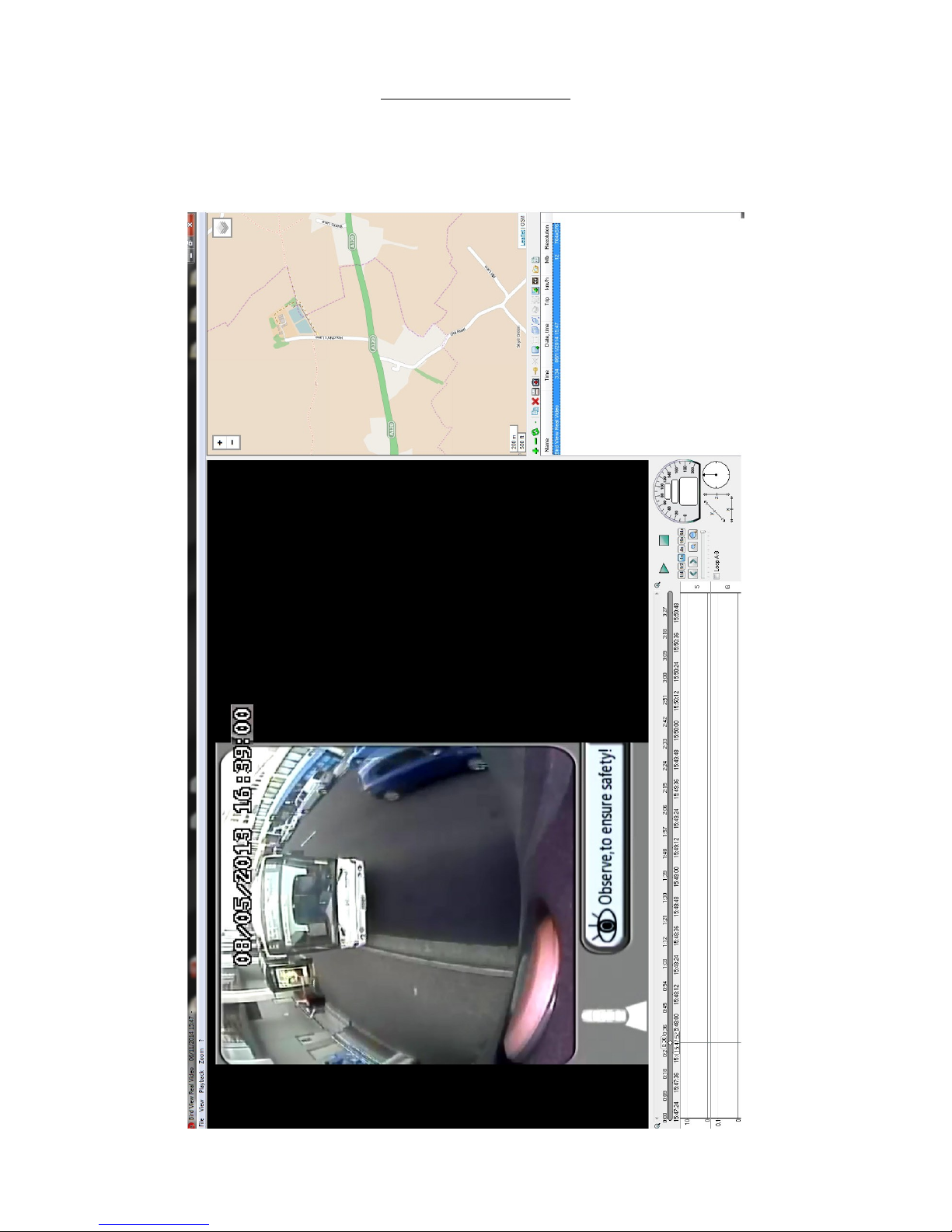
The!image!below!is!to!show!an!example!of!the!features!available!in!the!software!provided!with!this!
mini!dash!mount!DVR.!The!software!shows!the!location!of!the!vehicle!via!GPS.!It!also!shows!the!
speed!and!the!G!Force!upon!the!vehicle!as!it!travels.!There!are!many!features!within!this!software!!!
to!help!analyse!any!jo u r n ey!reco rde d !by!the!DVR!and!could!be!used!as!evidence!in!the !event!of!an!
accident.!
 Loading...