

Page 1
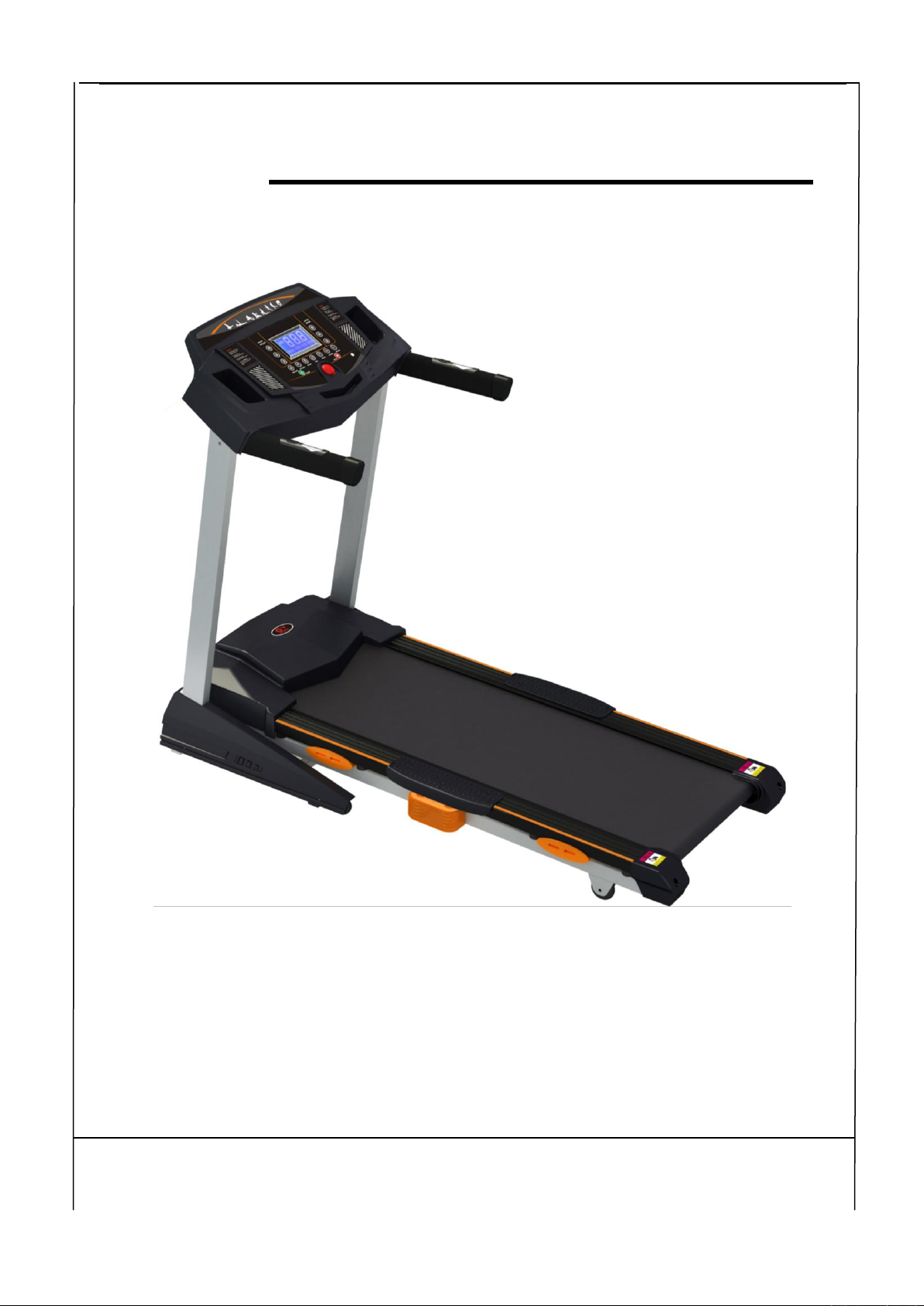
DFISA001 Motorized Treadmill
Operating Instructions Manual
Special tips:
1. Before installation and operation, please read this operation manual carefully.
2. Please save this manual for future reference.
Table of Contents
1 Brief Description…………………………………………………………………2
Page 2

- 1 -
2 Main Technical Features……………………………………………………………2
3 Tips for safety……………………………………………………………………3-4
4 Installation…………………………………………………………………………4
5 Use and Operation……………………………………………………………… 4-6
6 Maintenance…………………………………………………………………… 6-8
7 Guides for malfunction………………………………………………………… 8-9
8 Warranty………………………………………………………………………… 9
9 Error and self-inspection………………………………………………………… 9-10
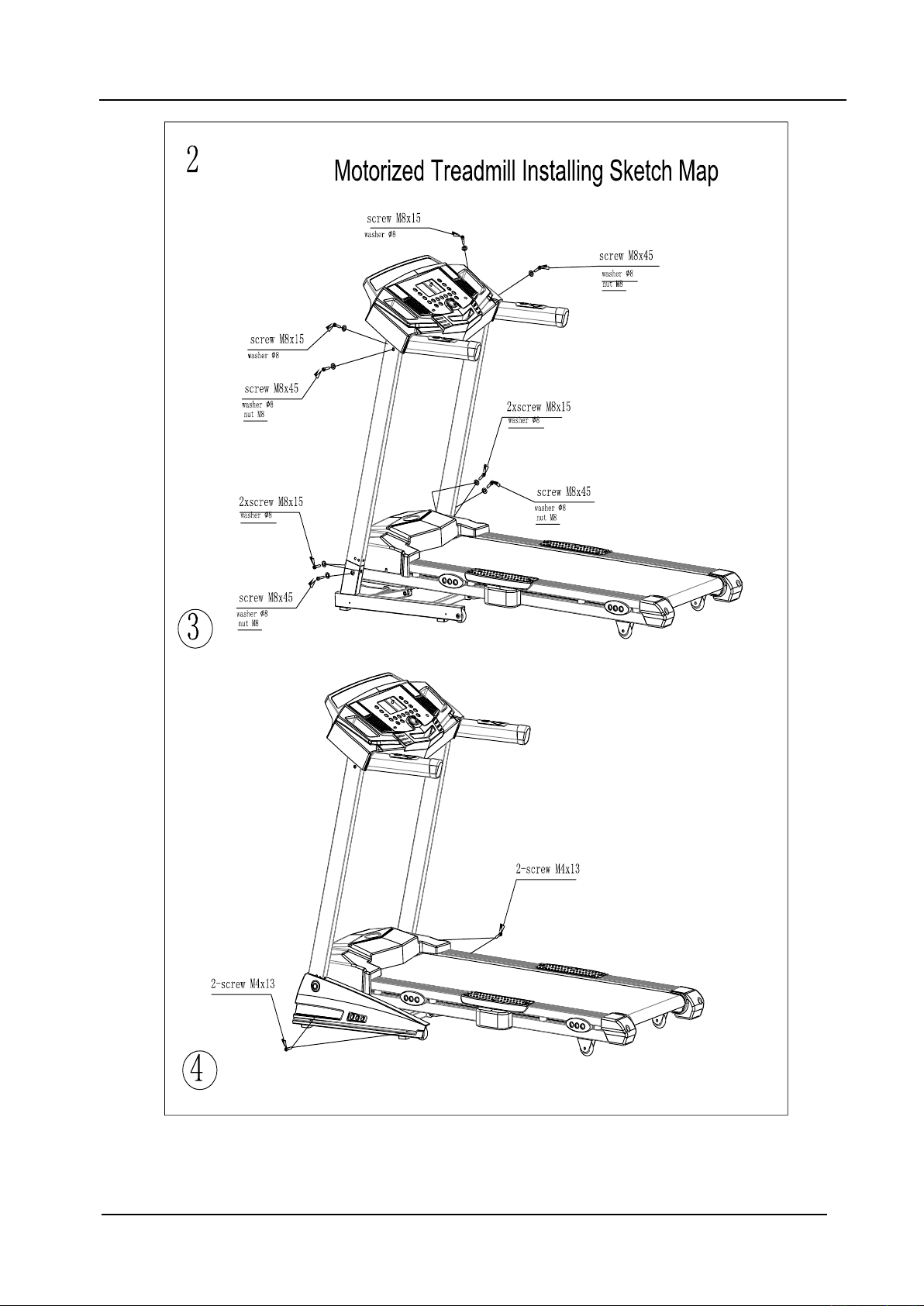
10 Installation Sketch……………………………………………………………11-12
1. Brief Description
DFISA001 motorized treadmill (diagram 1) can help complete your goal of keeping fit
Page 3
- 2 -
together with unique and elegant appearance. Easily read panel parameter。Easily operated
folding system realizes space-saving. Auto speed range 1-16km/h and auto incline range 0-16. All
makes it a hot home use fitness equipment.
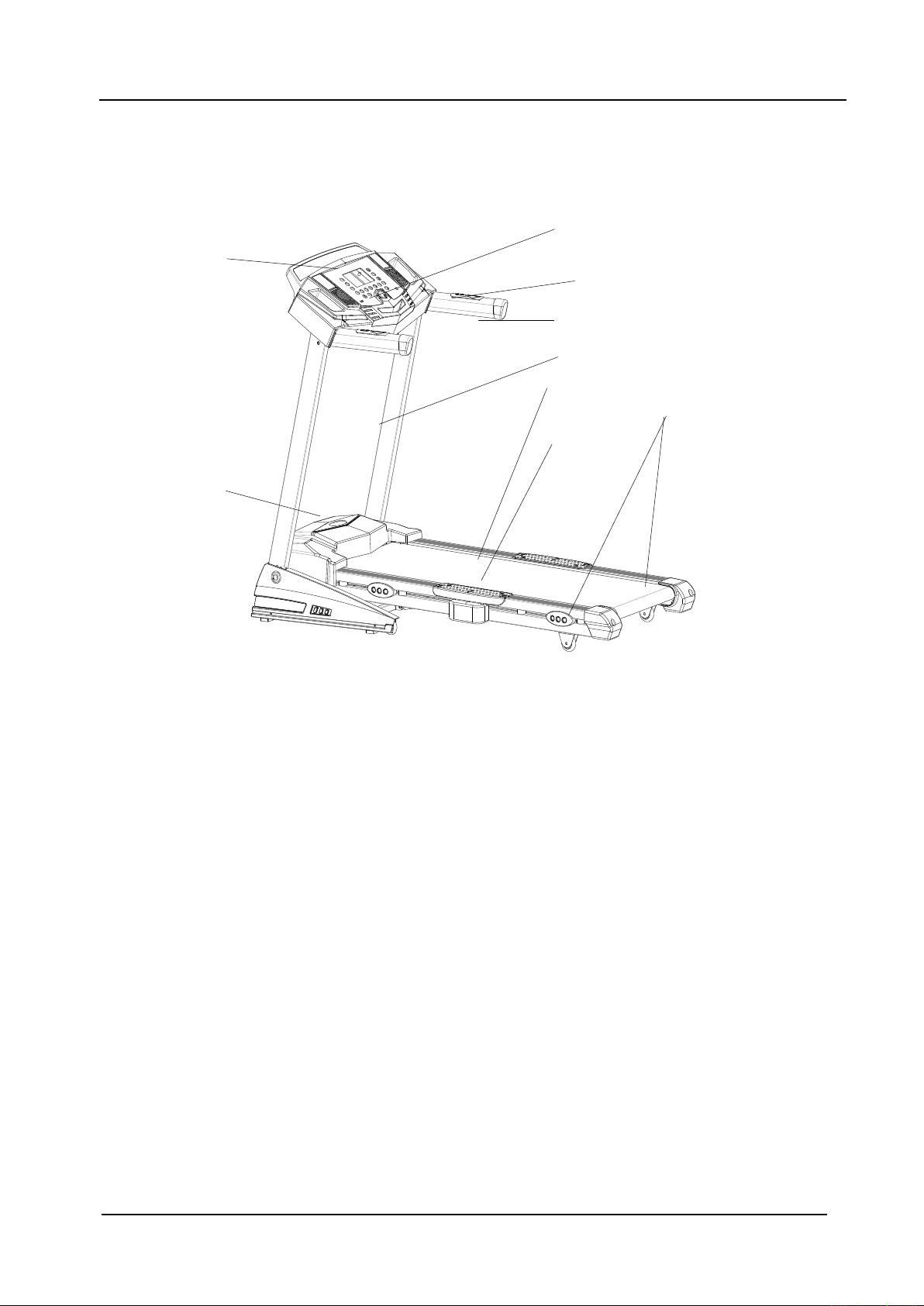
Diagram 1: DFISA001 Motorized Treadmill
2. Main Technical Features
Main use: Body and beauty building
This treadmill is for home use
Panel displays speed, time, distance, heart rate, calorie etc.
Display Mode:LCD
Input voltage: 220V±10%
Frequency: 50HZ
Input current: ≤8A
Temperature for working: 0∽40℃
Speed range: 1∽16km/h
Auto incline: 0-16
Program: Time display range:0:00∽99:59(minute : second);
Distance display range:0.1~99.99kms
Machine size (L*W*H)::1545x725x1210(mm)
N/W: 68KG/76KG;
3. Tips for Safety
3.1 Insert the power plug into the socket directly. Current load should be less than 10A.
Safety key
Heart rate sensor
Meter accessories
Handle
Power switch
Pillar accessories
Running belt
Footplate
Running belt adjustor
Page 4

- 3 -
3.2 The constant running time is less than 2 hours, max weight is less than 120kgs.
3.3 Place your treadmill on the clean floor,not on the thick carpet, otherwise it will not
convenient for ventilation. Also please don’t put the treadmill in the moist place or outdoors; If
there is something wrong with the electrical wire, please replace it with the electrical wire
provided by our company. For the replacement, please contact with the local distributor.
3.4 The treadmill should be placed in the convenient position for electric socket.
3.5 The freshman should grip the handrails when jogging and running until familiarly. Please
don’t stand on the running belt, after the machine is power on (the safe key is at the appointed
position).Please stand on the footplates besides the treadmill, press the “start” button, it runs at
the lowest speed, at this time you can run on the belt.
3.6 While running, you should dress properly. Don’t dress too loosely in case your clothes are
entangled by the machine .And please wear sport shoes with soft sole.
3.7 Before taking down the protecting cover of the treadmill, please keep the machine is power
off.
3.8 Don’t let children and non-sporters get close to the running treadmill to avoid unnecessary
injury.
3.9 Please make sure one end of the safe key has been placed in the appointed position and the
other one has been nipped to your clothes when you are running on the machine. In this way, you
can pull the safe key for the machine’s sudden stop under the dangerous condition. Then you will
not be injured.
3.10 If you are enjoying other entertainment while running such as watching TV, reading. Please
be particularly careful. These activities will distract your attention, which may make you lose your
balance and get hurt.
3.11 Please pull the plug off from socket and keep the safe key, when the treadmill is unused.
3.12 Please don’t put anything under treadmill and don’t let your children play near it after
folding.
3.13 Please consult your doctor at first before running, if you have one of the following diseases.
a) Cardiopathy, hypertension, sugar diabetes, respiratory disease, smoking, and other
chronic diseases, complication disease.
b) If you are over 35 years old and heavier than common weight.
c) Women in pregnant or in breasting period.
3.14 Please stop exercising immediately and consult your doctor if you’re feel giddy, surfeit,
Page 5
- 4 -
thorax ache or other symptoms.
3.15 Please drink adequate water after taking exercises on our treadmill for more than 20
minutes.
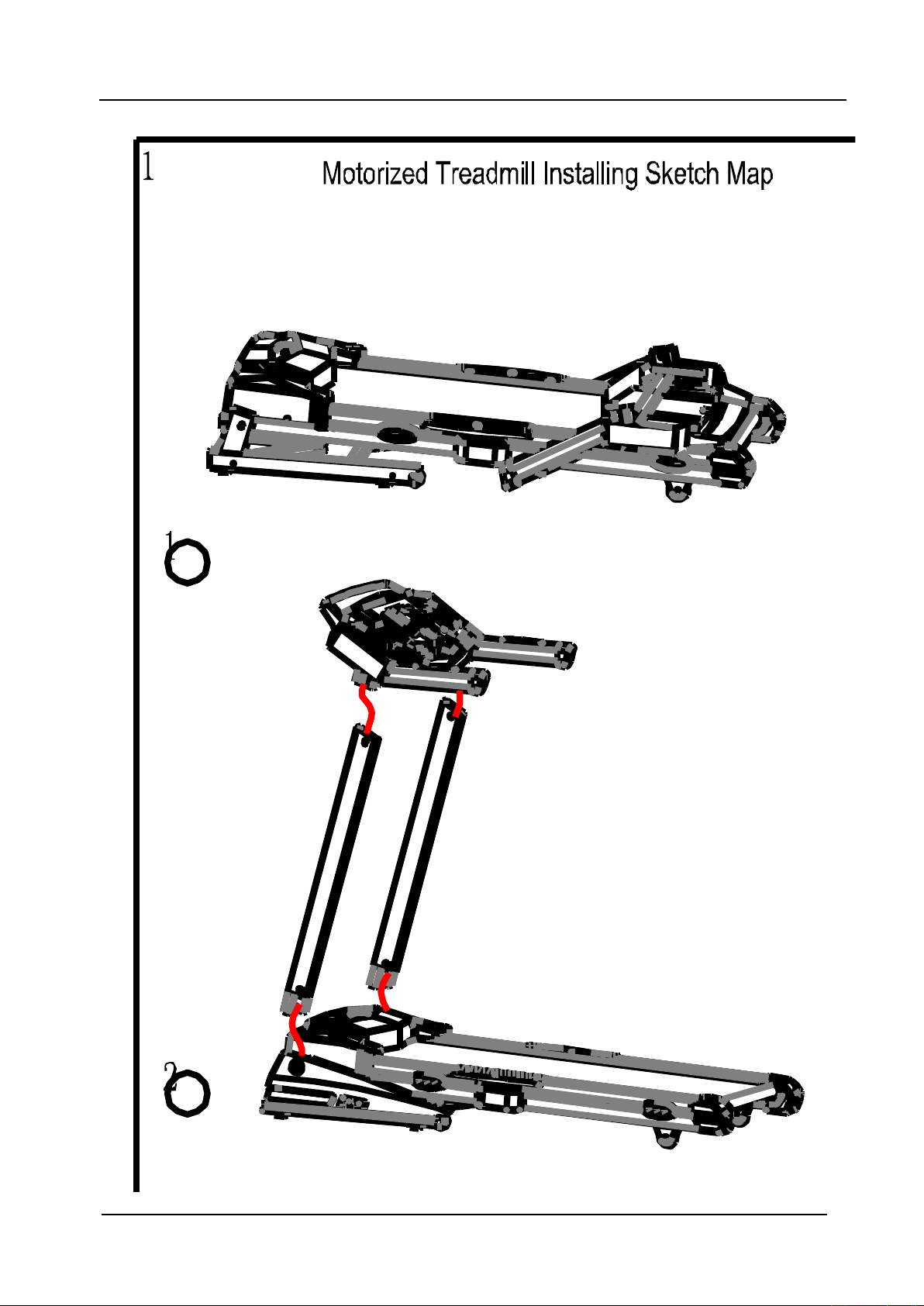
4. Installation: See “Installation sketch”
5. Use and Operation
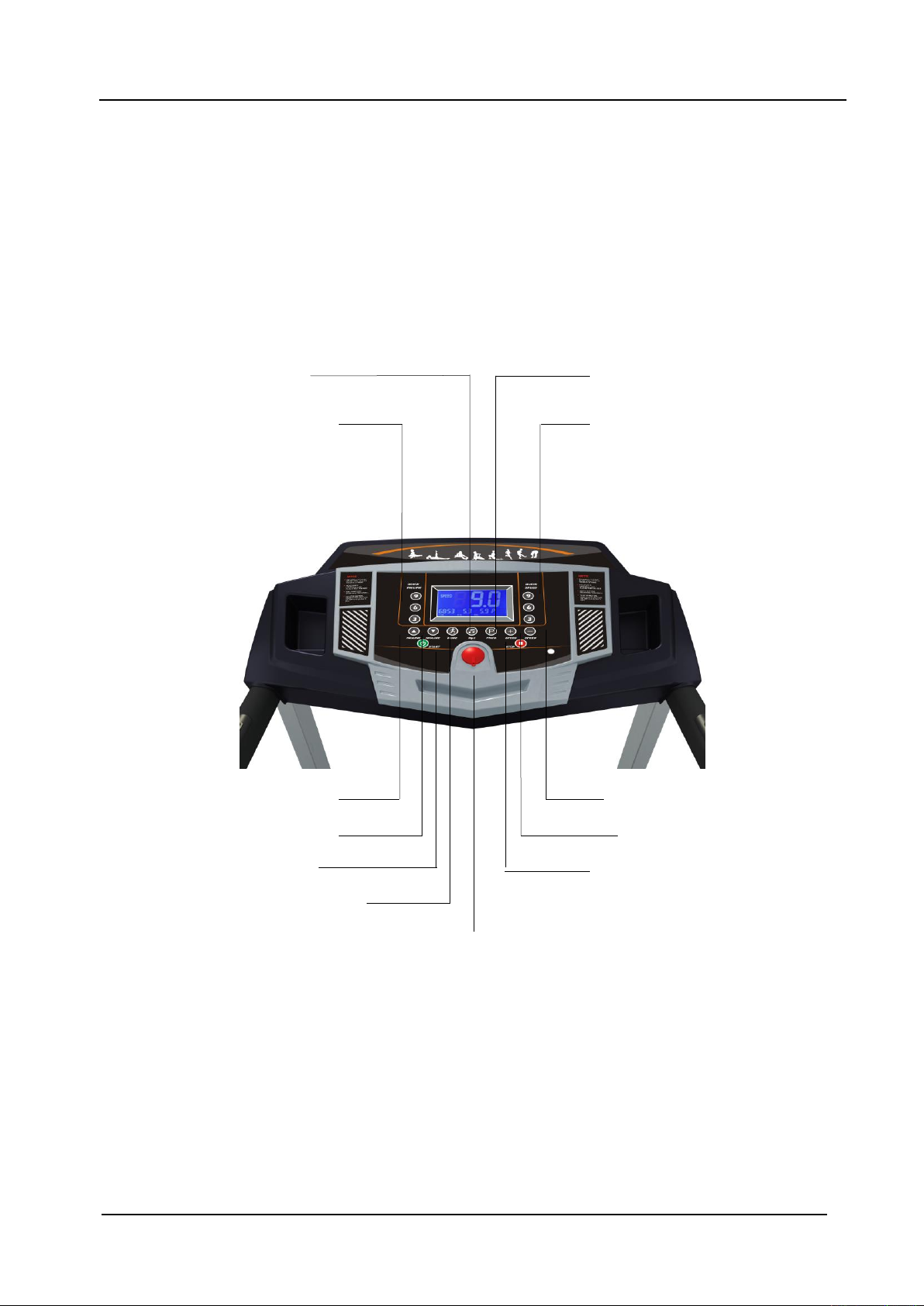
5.1 Panel Keys and Function
(1)“ MP3”
Press this key to open or shut the speaker amplify.
(2)Prog
(1)MP3
(5)incline-up
(7)START
(3)incline shortcut key
(6)speed-down
(8)speed-up
(4)speed shortcut key
(11)safety key
(9)Mode
(12)STOP
(10)incline-down
Page 6

- 5 -
(2)“PROG”(could be pressed continuously to your expected mode)
Press the “PROG” key once again to enter “48 direct selected programs” there are 48
programs, “P1-P48” the first 24 programs without incline, the last 24 programs including incline.
So please choose carefully.
(3)“incline short cut key”
Press this key, the incline goes directly to the chosen height.
(4)“speed short cut key”
Under running condition, press this key, speed can be set to the value directly.
(5)“incline up”
Press this key, you can choose the incline you need, except for the alarm condition.
(6)“speed down”
Under running condition, press this key, speed can be speeded down to the one you need.
(7)Start: Under ready condition, press this key, it runs at the speed of 1.0km/h.
(8)“speed up”
Under running condition, press this key, speed can be speeded up to the one you need.
(9)“Mode”
Under ready condition, press this key to set time, distance and calorie accordingly. Press “set
-up” or “set-down” keys to set the value of time, distance and calorie. Then press “start” key,
the machine will run at 1.0km/h. And the set figures will be counted down, when it comes t
o “0”, machine stops.
(10)“incline down”
Press this key, you can choose the incline you need, except for the alarm condition.
(11)“safety key”
Under urgent condition, pull this key, machine stops immediately.
(12)Stop: Under running condition, press this key, if it runs at speed more than 3.5km/h, it will
slow down then stop. During this stopping process, other keys are not available. If it runs at
speed less than 3km/h, then it stops immediately.
5.2 Unload operating
1. Insert power plug into the socket with earth wire, turn the switch to “1” position which is on
the frame
2. Put the safe key in the right position, then circuit is on, press “on/off”, keep it run in unload
condition. Test the condition of running belt (testing from low speed to high ones), after testing,
press “on/off”.
3. If everything is ok, then start to run.
Page 7

- 6 -
5.3 Meter operating instruction
5.3.1
1. Insert power plug into the socket with earth wire, turn the switch to “1” position which is on
the frame. Place the safe key to the appointed position. After a few seconds, panel will show that
the machine is ready.
2. Nip another end of safe key to your clothes, and stand on the footplate on both sides.
3. Press “on/off” key, running belt moves at the lowest speed (1.0km/h). Speed windows will
display your running speed.
4. Start to run.
5 . Press speed key or incline key to adjust speed and incline, speed window and incline window
will display your speed and incline .
6. To end your exercise in a safe way, please first press “on/off” key to close the treadmill. Please
leave the running belt until it stops slowly. Turn off the power.
5.3.2 Heart Rate Testing
Our treadmill can test your heart rate via the heart rate sensor. The data is only for reference.
5.4 Folding and Opening Treadmill
5.4.1 Folding
Firstly lift and fold the back part of the frame board by hand till you hear a light sound,
which means the folding system has been locked. At this time running board can’t be turned to
the opposite direction
5.4.2 Opening
Put the folded treadmill in a capacious position when you want to run. Then pull the
adjusting parts by hand to keep it is unlocked. Press the back part by your hands down to about
10%, release it, then it will open automatically.
6. Maintenance
6.1 Identification ways for the degree of tightness of running belt and poly V-belt.
When the running belt skips, please follow the steps as follows to make sure which belt
needs to be adjusted, running belt or poly V-belt.
a) Cut off power, screw off the bolt on cover of protection. Then take down the protecting cover
from the treadmill
b) Turn the speed to be around 3km/h, step on the running belt by pressure and try your best to
make the running belt stop. If running belt stops, together with the front roll, but the motor still
runs, under this condition, it means the poly V-belt needs to be adjusted.
c) Turn the speed to be around 3km/h, step on the running belt by pressure and try your best to
make the running belt stop. If running belt stops, but front roll still runs, under this condition, it
means the running belt needs to be adjusted.
6.2 The adjustment steps for poly V-belt
Page 8
- 7 -
Cut off power firstly and take down the cover of protection.
a) Loosen the four screws for the motor, adjust them in a circuit clockwise, then screw down the
loose screws.
b) Keep the power on, and adjust the poly V-belt is loose or not following the point 3.1 above, if
yes, please repeat the action same to point a) above.
6.3 Adjustment steps for running belt
a) Turn the speed to be 5.6km/h. for running
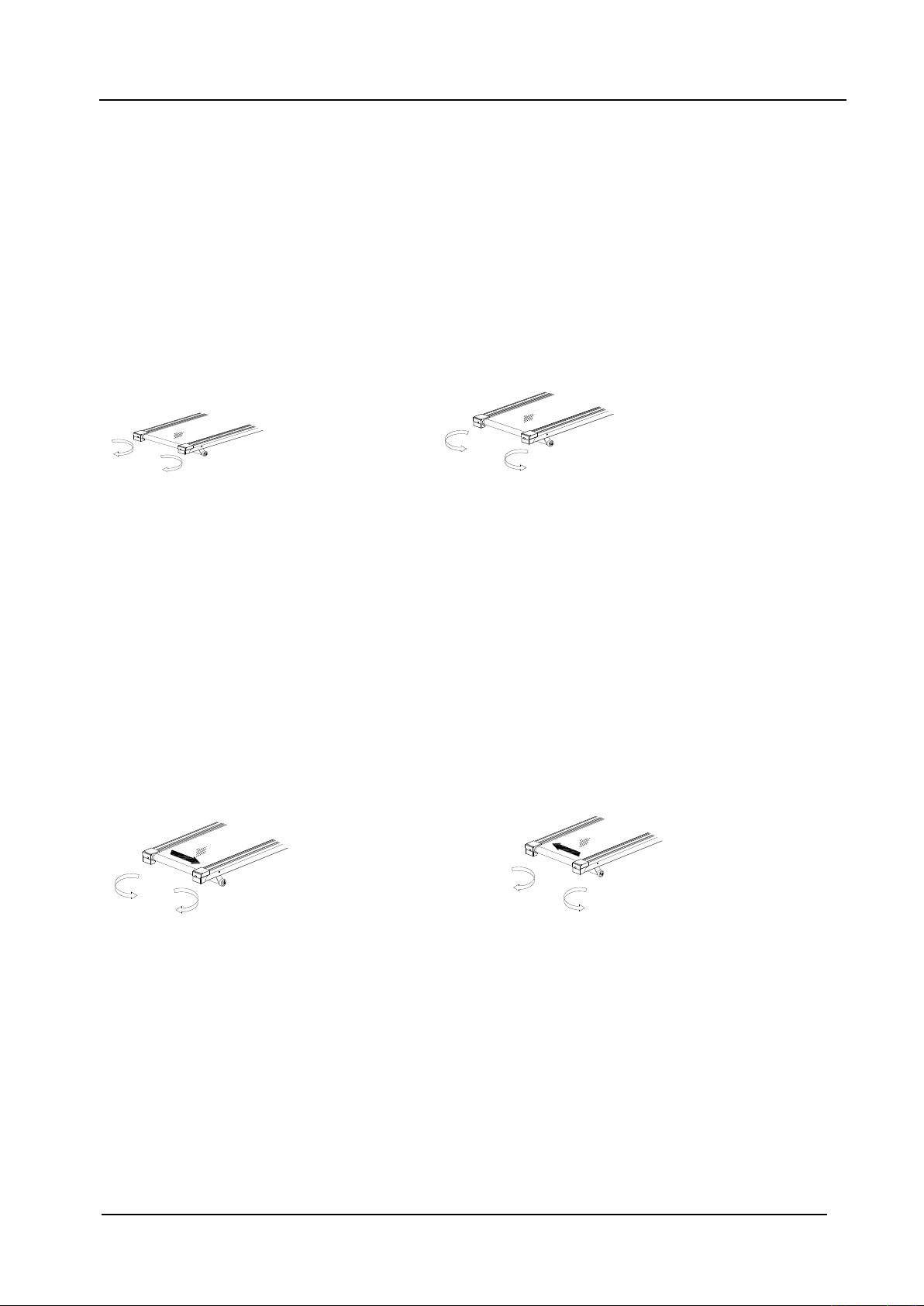
b) Turn the bolts at both right and left sides to be half a circuit or a circuit by the 8mm spanner.
( diagram1 and diagram 2)
c) After adjustment, running belt still skips, please repeat the steps above.
Tighten the running belt(diagram 1) loosen the running belt(diagram 2)
6.4 The adjustment steps for running belt deflection
The running belt will be deflected more or less under using. Then it needs to be adjusted. The
steps are as follows:
a) Place the treadmill on a horizontal floor, turn the speed to be 5.6km/h.for running.
b) If the running belt is deflected to the right, adjust the bolt on the right by turning it for half an
circle clockwise, then adjust the bolt on the left by turning it for half an circle.(see diagram 3)
c) If the running belt is deflected to the left, adjust the bolt on the left by turning it for half an
circle clockwise, then adjust the bolt on the right by turning it for half an circle.(see diagram 4
d) After the adjustment, the running belt still keeps deflecting , please repeat the steps above.
running belt deflected to right running belt deflected to left
The adjustment for right deflection ( diagram 3) The adjustment for left deflection
( diagram 4)
6.5 Running board lubrication
The treadmill is equipped with lubricated running board, which needs constant maintenance.
The friction between running board and running belt has a great effect on the treadmills’ e life. So
please lubricate your machine termly. The steps are as follows:
a) Cut off the power
b) Wipe out the dust between running board and running belt with a clean cloth.
c) Daubing the Silicon oil on the running board and running belt equably.
Page 9
- 8 -
d) While adding lubrication oil, please keep your clothes away from the machine for avoiding the
injury.
6.6 Cleaning
a) Please power off and pull the plug cap out before cleaning.
b) Wipe out the dust stuck on the surface and running board frequently.
c) Please clean the surface of frame and running belt with a soft cloth dipped with suds, don’t use
things like eradicator and naphtha.(After cleaning, please dry it for use)
d) Please take the protecting cover off every two month, use vacuum dust-collector to suck the
dust remaining inside of the protecting cover.(The dust will make the components of circuitry
board short circuit )
6.7 Cautions, folding, depositing
6.7.1 Cautions
Please make sure that the plug cap has been pulled out before cleaning or maintenance.
6.7.2 Depositng
The treadmill should be deposited indoor in case of being damp. Water can’t be spattered
and nothing can be laid and inserted on the treadmill.
Please keep the air a little humid in winter. And please void the big static electricity, it may
disturb the operation of meters or even damage them.
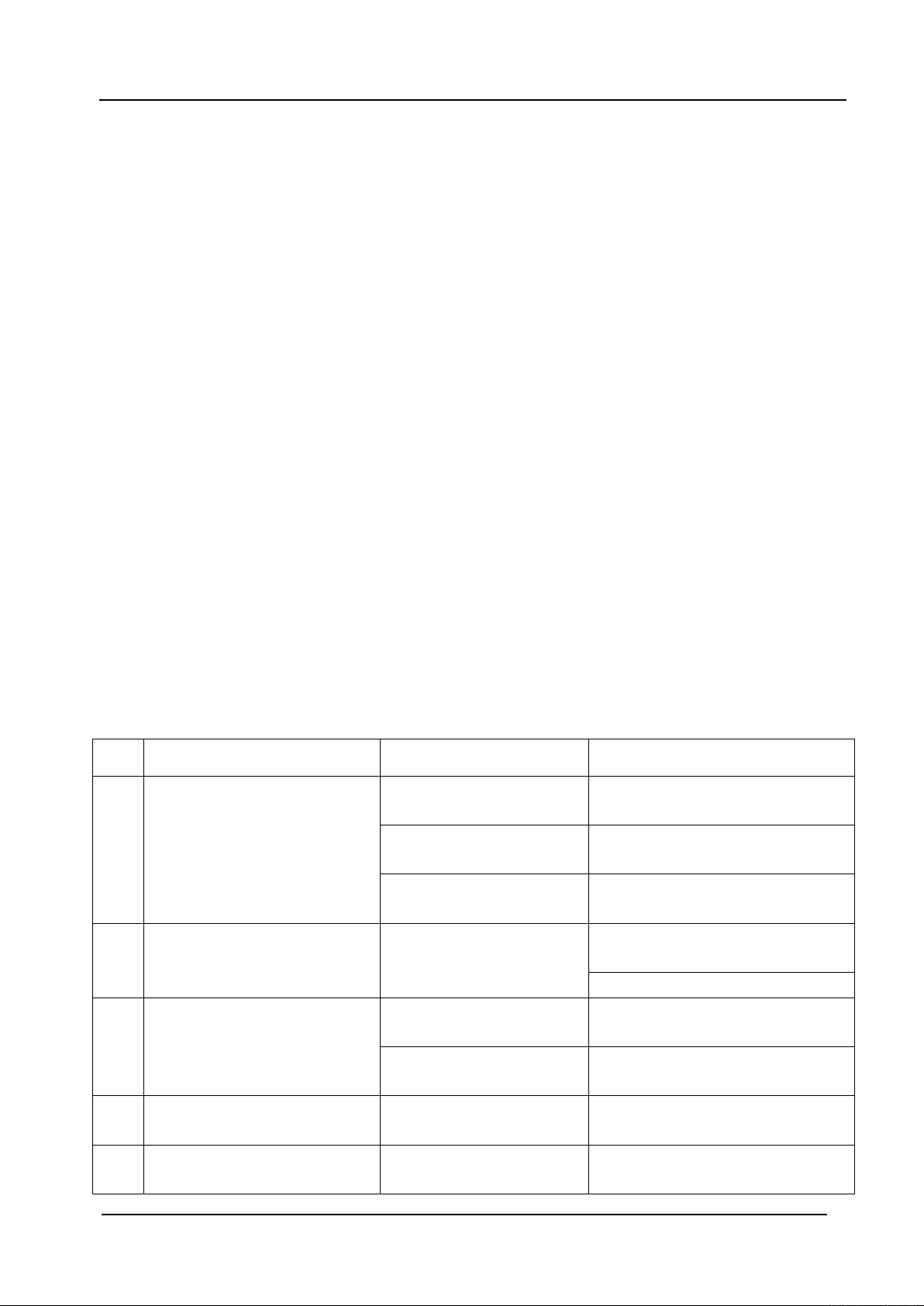
7. Guides for malfunction
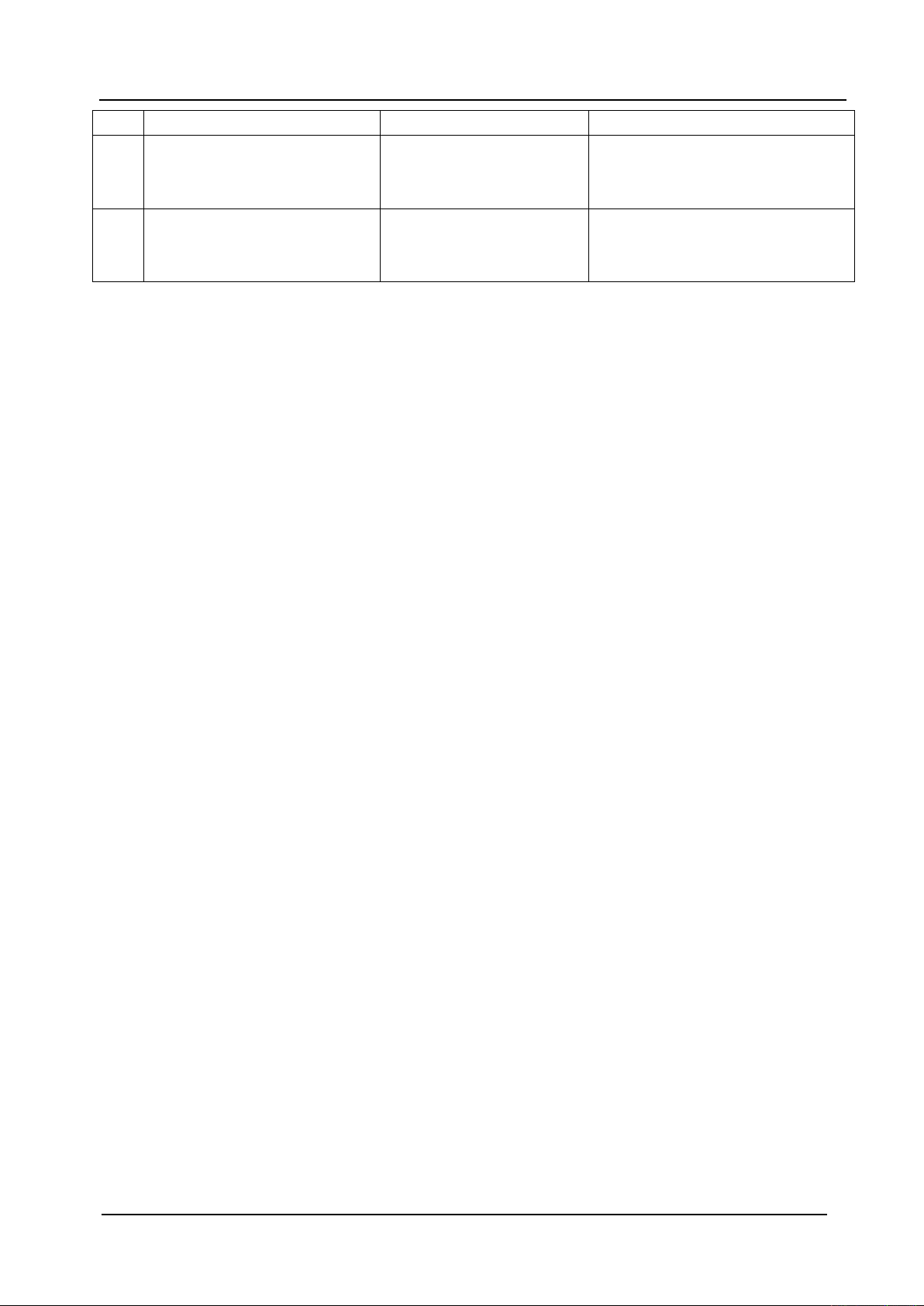
7.1 Analyzing and eliminating malfunction
Item.
Malfunction
Reasons
Solution
1
Treadmill can’t be started
The safe key isn’t in the
right position
Put the safe key in the right
position
The electrical switch is
placed to “0”
Turn the electrical switch to “1”
creepage switch is not
right
Replace creepage switch
2
Meter can’t display
The meter control line
and control panel are
unconnected
Pull the bolt out and open the
motor cover and reconnect it
Turn on the meter and reconnect
3
Heart rate can’t be displayed
The pole of heart rate
sensor is not wet enough
Wet the pole with water or liquor
for hard contact lenses
Disturbed by
electromagnetism
Stay away from
electromagnetism
4
Incline doesn’t work
The motor wire is not
well connected
Open the motor cover and
reconnect it
5
Running belt runs faster or
slower than what has been
Unadjusted
Readjust it
Page 10
- 9 -
displayed
6
Running belt slips
Running belt is not tight
enough
Please read point 3.3 Adjustment
steps for tightening running belt
for reference
7
Running belt is deflected
The running belt is
unadjusted.
Please read point 3.4 The steps
for adjusting the deflected
running belt for reference
7.2 If you still can’t solve the problems after taking the solutions above, we hope that you can
contact our dealer or company as soon as possible.
8. Warranty
8.1 We have assigned well-trained professionals at the dealers’. They are ready to serve for you at
any time. You can purchase any spare parts you need.
8.2 Within the warranty time, and under your correct operations, our technicians will replace or
repair the defective accessories in free.. But you will have to pay our technicians for the cost of
broken parts if the warranty is expired or you use them in an incorrect way.
8.3 The warranty for spare parts under the correct operation.
a) Frame: lifetime
b) control board: 2 years
c) Motor: 3 years
d) Other parts: 1 year
8.4 Condition beyond Manufacturer’s warranty:
If the product you purchase has the problems as follows, the manufacturer’s warranty is not
effective:
a) Improper operating, negligence, accident
b) Wrong adjustment of running belt and poly V-belt
c) Unauthorized take-down
d) Improper maintenance
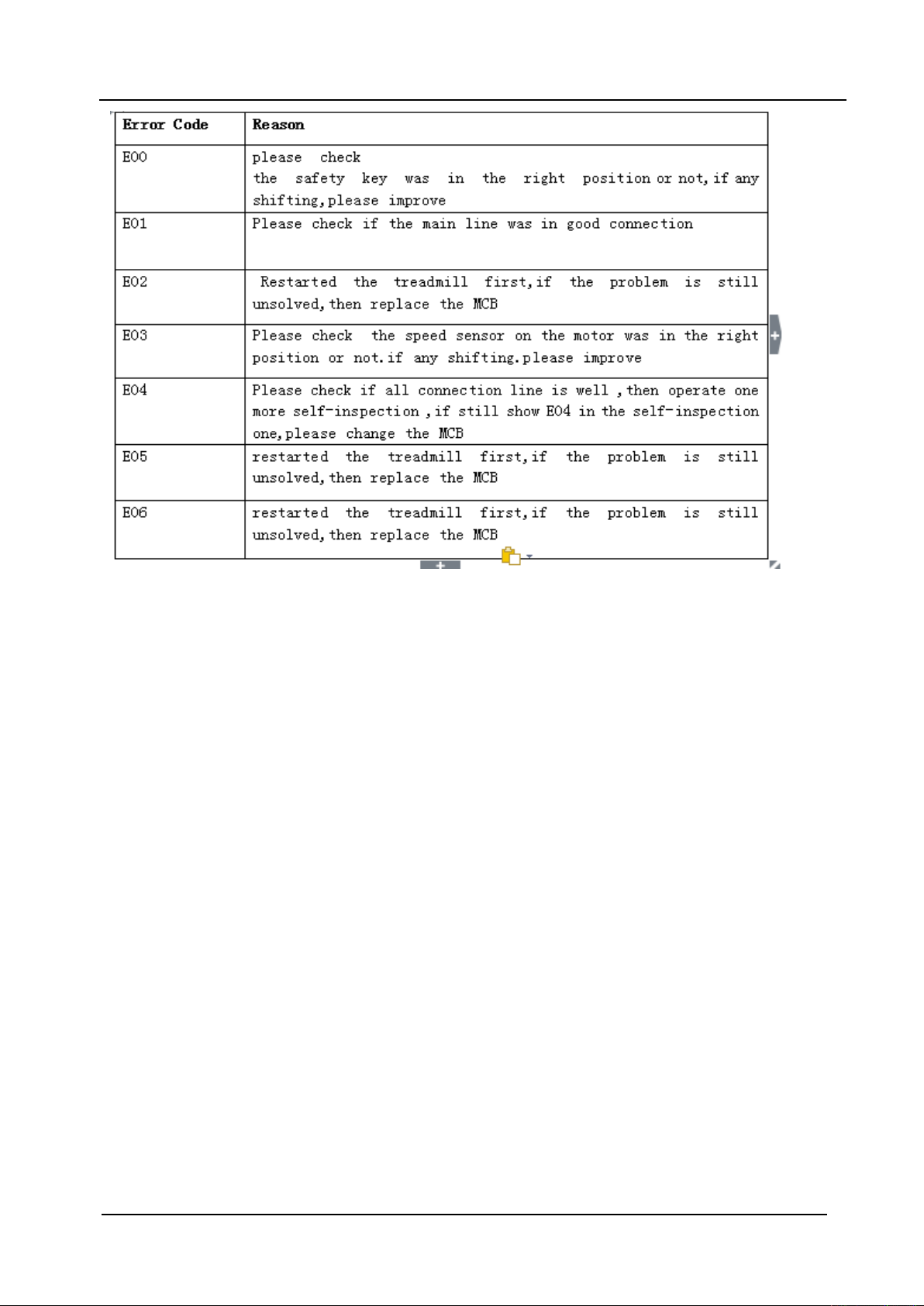
9 Error and self-inspection
9.1 Error:Treadmill gives the following error code if anything wrong,please contact the
professional service people soon if it happens.
Page 11
- 10 -
9.2 Self-inspection
No need to self-inspect unless special situation. If necessary, please do it under the
instruction of professional technical people or sales because of the high voltage.
a,open the red power switch, pull out the safe key
b,Press the “start” and ”speed +” key at the same time and keep it,meanwhile,use another hand
to put on the safe key ,then release the button.of “start”and “speed+” and press the “mode”
key,then the LCD start to show all the datas inside
c,after the LCD display finished, then press the “mode” key again.
d,the treadmill runs from the lowest speed to highest speed , meanwhile, the incline is also from
lowest to highest. Then treadmill stopped.
. The whole self-inspection process takes about 2 minutes
Page 12
- 11 -
Page 13
- 12 -
Proofreading has been carefully done to the manual, if there are printing mistakes, please kindly
Page 14

- 13 -
understand. If pictures and the real product doesn’t match, please take the product as the final and
correct one.
If any improvement on function and specification, please kindly understand if you are not
informed.
 Loading...