

Page 1

K03 萌宠系列蓝牙音箱
谢谢您的购买;
在使用产品前,请详细阅读本说明书,正确操作,以更好地发挥产品的优越性能;
请保管好此说明书。
产品组件:
1.K03 蓝牙音箱………………………………………………………… 1 台
2.USB 充电线…………………………………………………………… 1 条
3.产品说明书…………………………………………………………… 1 份
产品特点:
多款卡通萌宠造型
硅胶外套,舒适掌握
挂绳设计,小巧便携
支持蓝牙、TF 连接方式
优质内次喇叭
蓝牙 5.0 低功耗设计
产品参数:
产品名称:萌宠系列蓝牙音箱
产品型号:K03
输出功率:3W
电池容量:400mAh 3.7V
充电电流:5V/500mA
产品尺寸:78x60.5x75.5mm(内胆)
产品重量:135g(内胆)
音乐播放时间:4~5 小时(最大音量)
通话时间:6~8 小时
支持模式:蓝牙/TF 卡连接
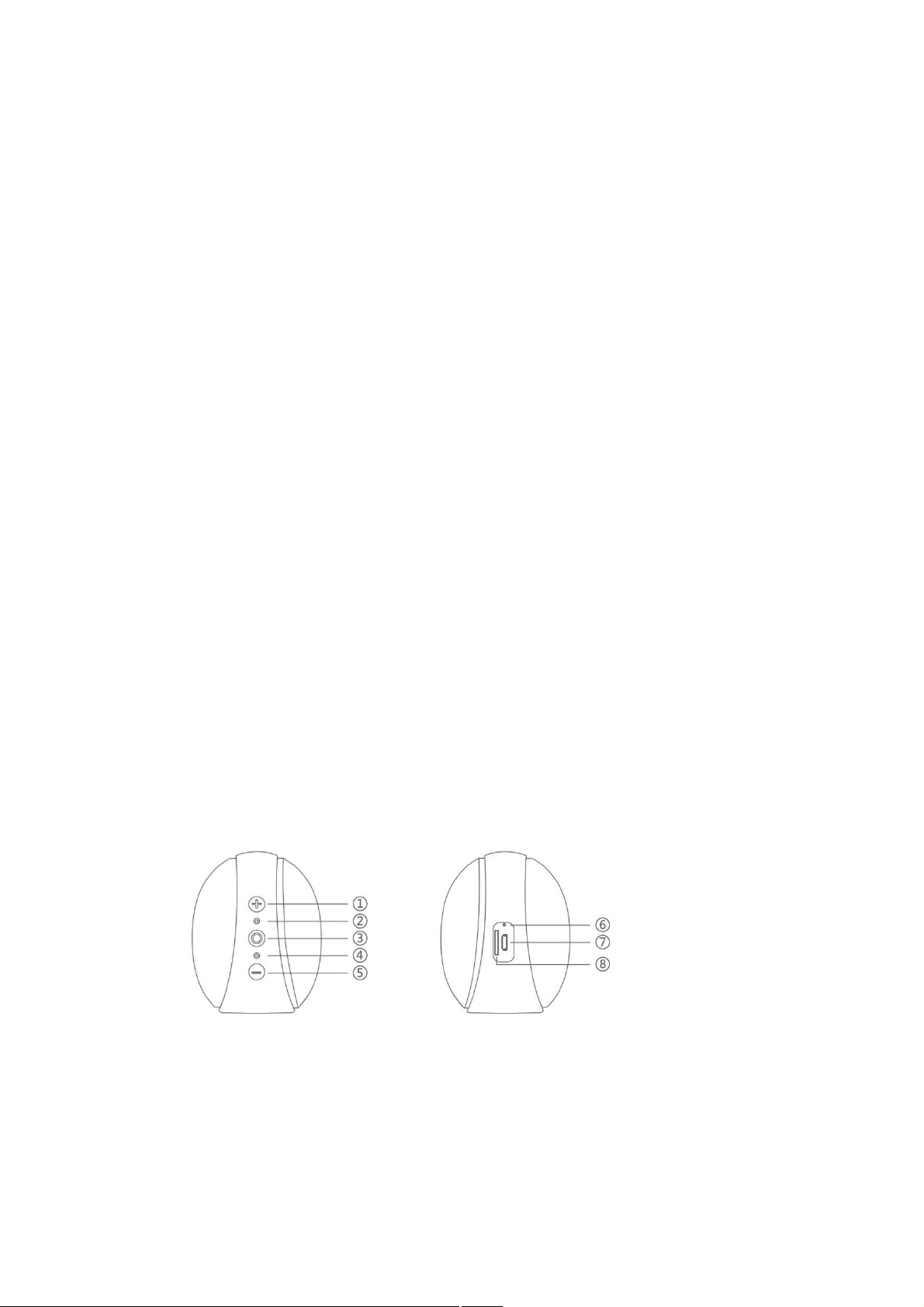
功能指示:
1. 加号键(音量加/下一曲)
2. 咪口
3. 开关机键(开关机/播放/暂停/接听/拒接电话/模式切换)
4. LED 指示灯
5. 减号键(音量减/上一曲)
6. 复位键
7. USB 充电口
8. TF 卡槽
开机/关机
长按开关机键 2S,开机,有开机提示音
Page 2

长按开关机键 2S,关机,有关机提示音
蓝牙/TF 卡模式切换
1. 开机后,音箱无 TF 卡时,默认进入蓝牙搜索状态;
2. 有 TF 卡插入时,音箱自动切换到 TF卡模式,双击开关机键可切换到蓝牙模式(仅支持 32G
以内 TF 卡);
蓝牙连接
开机后,音箱进入蓝牙配对状态(白色 LED 指示灯快闪),用手机或电脑等蓝牙设备搜索名
为“K03”的蓝牙音箱,点击连接,蓝牙连接成功后,音箱会“嘀”声提示(白色 LED 指示
灯处于长亮状态)。
注意
1. 在手机配对的配置项中,有手机音频以及媒体音频两个选项;
(1)当关闭手机音频时,蓝牙音箱只播放手机音乐,无法接听或者拒接电话;
(2)当关闭媒体音频时,蓝牙音箱只接听或者拒接电话,无法进行手机音乐播放;
2. 蓝牙音箱开机后,在 满足蓝牙连接条件下,音箱会默认连接到最后一次连接的蓝牙设备。
想要把音箱连接到另外一台蓝牙设备时,需从上台蓝牙设备中断开连接。
TF 卡连接
插入 TF 卡后,音箱自动识别到 TF 卡(提示音“嘀”声提示进入 TF 卡模式)并自动播放 TF
卡内 MP3 格式的音乐(TF 卡最大支持 32G)。
音乐播放
1. 在播放音乐时,单击开关机键,音乐会暂停,再单击恢复播放;
2. 在播放音乐时,长按“+”键,播放器会播放下一首歌曲;
3. 在播放音乐时,长按“-”键,播放器会播放上一首歌曲;
4. 在播放音乐时,单击“+”键,播放音量会逐渐增加;
5. 在播放音乐时,单击“-”键,播放音量会逐渐减小;
通话状态
1. 在蓝牙状态下,来电时,单击开关机键接听电话,长按开关机键拒接电话;
2. 在蓝牙状态下,通话时,单击开关机键挂断电话。
备注
开机后,音箱进入蓝牙搜索状态,20 分钟内无蓝牙连接且无任何操作,20 分钟后音箱会自
动关机。
充电说明
1. 当蓝牙音箱电量较少时,会相隔一段时间便发出提示音,提示充电;
2. 充电电压输入规格为 5V/500mA;
3. 音箱充电时,红灯长亮,充满电后红灯熄灭;
4. 请选择通过正规厂家安全认证的充电器充电;
5. 重复对音箱进行充电和放电将会随时间的推移而导致电池性能下降,这对于所有可以重
复充电电池来说均属于正常现象。
Page 3

注意事项
1. 请遵循本说明书的使用说明;
2. 避免严重撞击主机,连接符合安规的电源;
3. 请勿使用不符合安规的充电器给本产品充电;
4. 切勿以较大的音量收听,以免对听力造成不良影响;
5. 请在常温环境中使用和存放本产品;
6. 请勿堵塞本产品的开口处,如充电口、指示灯和麦克风等;
7. 废弃包装、电池、旧电子产品,请分类妥善处理,切勿自行拆卸,修理、改造;
8. 请勿在近水处使用本产品,勿将本产品浸入任何液体中或将液体泼溅到本产品上;
9. 请避开直接光线或发热器皿,切勿接触苯、稀释剂等化学药品;
10. 请不要靠近强磁场、电场。
谢谢使用本产品!
Page 4

K03 Beautiful Series Bluetooth Speaker
Thank you for your purchase;
Before using the product, please read this manual in detail and operate correctly in order to give
full play to the superior performance of the product.
Please keep the instructions.
Product components:
1.K03 Bluetooth speakers. 1 unit
2.USB rechargeable. Article 1
3. Product instructions. 1 copy
Product features:
Many cartoon cute models
Silicone jacket, comfortable
Rope design, small and portable
Bluetooth support, TF connection mode
High quality internal horn
Bluetooth 5.0 Low Power Design
Product parameters:
Product name: Pendant series Bluetooth sound box
Product Model: K03
Output Power: 3W
Battery capacity: 400mAh 3.7V
Charging current: 5V/500mA
Page 5
Product size: 78x60.5x75.5mm (Inner Bath)
Product weight: 135g (inner bile)
Music playback time: 4 to 5 hours (maximum volume)
Talk time: 6 to 8 hours
Support mode: Bluetooth / TF card connection
Feature indication:
1. Plus key (Volume plus / next)
2. Mi mouth
3. On/ off key (on/ off/ play/ pause/ answer/ reject call/ mode switch)
4. LED indicator lamp
5. Minus key (Volume Down / previous)
6. Compound key
7. USB charging port
8. TF card slot
Power on / off
Long press switch key 2S, power on, boot prompt tone
Page 6

Long press switch key 2S, shut down, relevant machine cue tone
Bluetooth / TF Card Mode switch
1. After boot, the speaker does not have a TF card, default to enter the Bluetooth search state;
2. When the TF card is inserted, the speaker automatically switches to TF card mode, and
double-click the switch key to switch to Bluetooth mode (only support for TF card within 32G);
Bluetooth connection
After power on, the speaker enters the Bluetooth pairing state (white LED flash), searches for the
Bluetooth speaker named "K03" with a Bluetooth device such as a mobile phone or computer,
clicks on the connection, and after the Bluetooth connection is successful, The speaker will beep
(the white LED is in a long state).
pay attention to
1. in the configuration item matched with the mobile phone, there are two options of the mobile
phone audio and the media audio;
(1) when the audio of the mobile phone is turned off, the Bluetooth speaker only plays the music
of the mobile phone and cannot answer or refuse to answer the phone;
(2) when the media audio is turned off, the Bluetooth sound box can only answer or reject the
telephone, and the mobile phone music can not be played;
2. After the Bluetooth speaker is turned on, the speakers will be connected to the last connected
Bluetooth device by default when the Bluetooth connection conditions are met. To connect a
speaker to another Bluetooth device, disconnect from the upstage Bluetooth device.
TF card connection
After inserting the TF card, the speaker automatically recognizes the TF card (prompt tone "tick"
to enter TF card mode) and automatically plays music in the TF card in MP3 format (TF card
supports up to 32G).
Music play
1. When playing music, click the switch key, the concert is suspended, and then click to resume
playing;
2. When playing music, long press the "key", the player will play the next song;
Page 7

3. When playing music, long press the "-" key, the player will play the last song;
4. When playing music, click the "key", the playback volume will gradually increase;
5. When playing music, click the "-" key, the playback volume will gradually decrease;
Call statu
1. In the Bluetooth state, when the incoming call, click the switch button to answer the phone,
long press the switch key to refuse to answer the phone;
2. In the Bluetooth state, when you call, click the on/ off key to hang up the phone.
remarks
After boot, the speaker enters Bluetooth search state, no Bluetooth connection and no operation
within 20 minutes, and the speaker will shut down automatically after 20 minutes.
Charging instruction
1. When the power supply of Bluetooth speakers is low, it will send out a prompt tone and
prompt charging for a certain period of time.
2. Charging voltage input specification is 5V / 500mA;
3. When the speaker is charged, the red light is long and full of electricity, and the red light is
extinguished after it is full of electricity.
4. Please choose to pass the formal manufacturer safety certification charger charging;
5. Repeated charging and discharging of the speaker will lead to the degradation of battery
performance over time, which is normal for all rechargeable batteries.
matters need attention
1. Please follow the instructions for the use of this instruction sheet;
2. Avoid serious impact on the main engine and connect to a power supply that complies with
the safety regulations;
3. Do not use non-compliant charger to charge the product;
4. Do not listen at a higher volume, so as not to cause adverse effects on hearing;
Page 8

5. Please use and store the product in normal temperature environment;
6. Do not block the opening of this product, such as charging port, LED and microphone, etc.
7. The waste package, battery and the old electronic product should be classified and disposed
properly. Do not disassemble, repair and transform itself.
8. Do not use the product at the near water, do not immerse the product in any liquid or spill the
liquid onto the product;
9. Avoid direct light or heating vessels, and do not contact chemicals such as benzene and
diluent;
10. Please stay away from the strong magnetic field, the electric field.
Thank you for using this product!
Page 9

FCC Caution:
This device complies with part 15 of the FCC Rules. Operation is subject to the
following two conditions: (1) This device may not cause harmful interference, and (2)
this device must accept any interference received, including interference that may
cause undesired operation.
Any Changes or modifications not expressly approved by the party responsible for
compliance could void the user's authority to operate the equipment.
Note: This equipment has been tested and found to comply with the limits for a Class
B digital device, pursuant to part 15 of the FCC Rules. These limits are designed to
provide reasonable protection against harmful interference in a residential installation.
This equipment generates uses and can radiate radio frequency energy and, if not
installed and used in accordance with the instructions, may cause harmful interference
to radio communications. However, there is no guarantee that interference will not
occur in a particular installation. If this equipment does cause harmful interference to
radio or television reception, which can be determined by turning the equipment off
and on, the user is encouraged to try to correct the interference by one or more of the
following measures:
-Reorient or relocate the receiving antenna.
-Increase the separation between the equipment and receiver.
-Connect the equipment into an outlet on a circuit different from that to which the
receiver is connected.
-Consult the dealer or an experienced radio/TV technician for help.
The device has been evaluated to meet general RF exposure requirement. The device
can be used in portable exposure condition without restriction.
 Loading...