

Page 1

DS-210
Handheld Short Range CCD Scanner
User’s Manual
Page 2

Contents
2
System Information----------------------------------------------------------------3
Interface Selection-------------------------------------------------------------------3
Keepboard Terminal-----------------------------------------------------------------3
Language------------------------------------------------------------------------------4
Keyboard Wedge Function-----------------------------------------------------4
Keyboard Speed---------------------------------------------------------------------5
Message Terminator----------------------------------------------------------------6
RS-232 Parameters----------------------------------------------------------------7
Baud Rate-----------------------------------------------------------------------------7
RS-232 Function Installation---------------------------------------------------8
Handshaking Protocol--------------------------------------------------------------9
Scan Mode---------------------------------------------------------------------------10
Buzzer set-up-----------------------------------------------------------------------11
Frequency-----------------------------------------------------------------------------11
Adjust Buzzer Tone-----------------------------------------------------------------11
Codabar------------------------------------------------------------------------------26
Code 93------------------------------------------------------------------------------28
Code 128----------------------------------------------------------------------------30
Interleaved 2of 5-------------------------------------------------------------------33
Industrial 2 of 5---------------------------------------------------------------------35
Matrix 2 of 5-------------------------------------------------------------------------37
China Post Code-------------------------------------------------------------------39
MSI / Plessey-----------------------------------------------------------------------41
Code 32------------------------------------------------------------------------------43
Code 11------------------------------------------------------------------------------44
APPENDIX A -- ASCII------------------------------------------------------------46
ASCII Table-------------------------------------------------------------------------47
APPENDIX B – Function Key Table----------------------------------------48
Function Key Code--------------------------------------------------------------49
Power On Tone----------------------------------------------------------------------11
Good Read Beep-------------------------------------------------------------------11
Character Installation------------------------------------------------------------12
Other Installation------------------------------------------------------------------15
Scanning Verify----------------------------------------------------------------------15
Bar / Space Seting------------------------------------------------------------------15
Laser Data Speed Up--------------------------------------------------------------15
BAR-CODE-INSTALLATION----------------------------------------------------16
UPC-A---------------------------------------------------------------------------------16
UPC-E---------------------------------------------------------------------------------18
EAN-13--------------------------------------------------------------------------------20
EAN-8----------------------------------------------------------------------------------22
Code 39-------------------------------------------------------------------------------24
1
Page 3
Enter
Enter
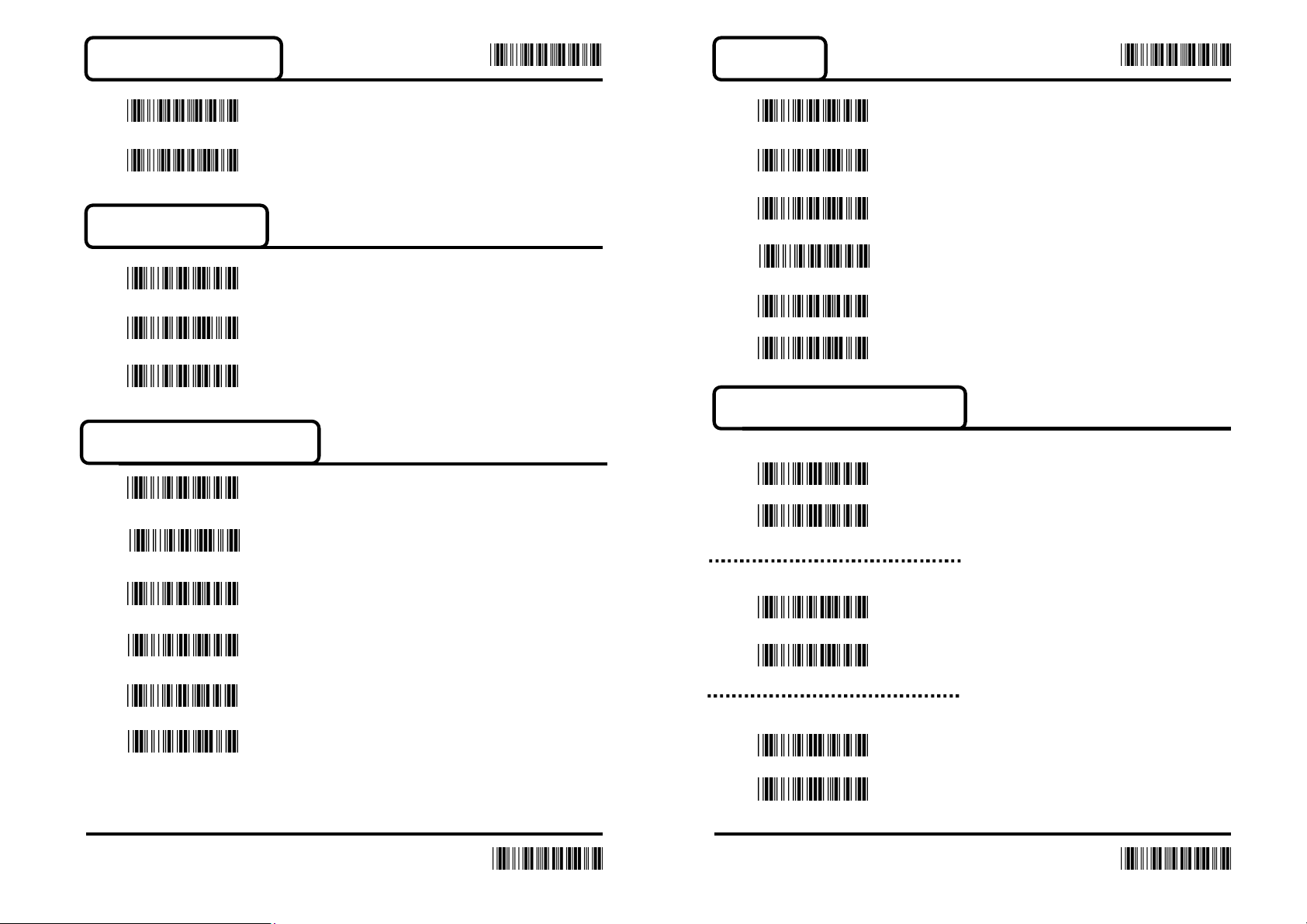
System Information
Set All default
SW Version
Interface Selection
*Keyboard
USB
RS-232
Keyboard Terminal Type
*PC/AT/,PS/2
Language
*USA
Spanish
Germany
Italian
French
Japan
Keyboard Wedge function
Function Key Emulation
ON
*OFF
IBM PS/2 30-80
PS/2 25,30
IBM XT
IBM 5550
NEC 9801
3 4
End
KB Emulation(For NB)
ON
*OFF
ALT Mode
ON
*OFF
End
Page 4
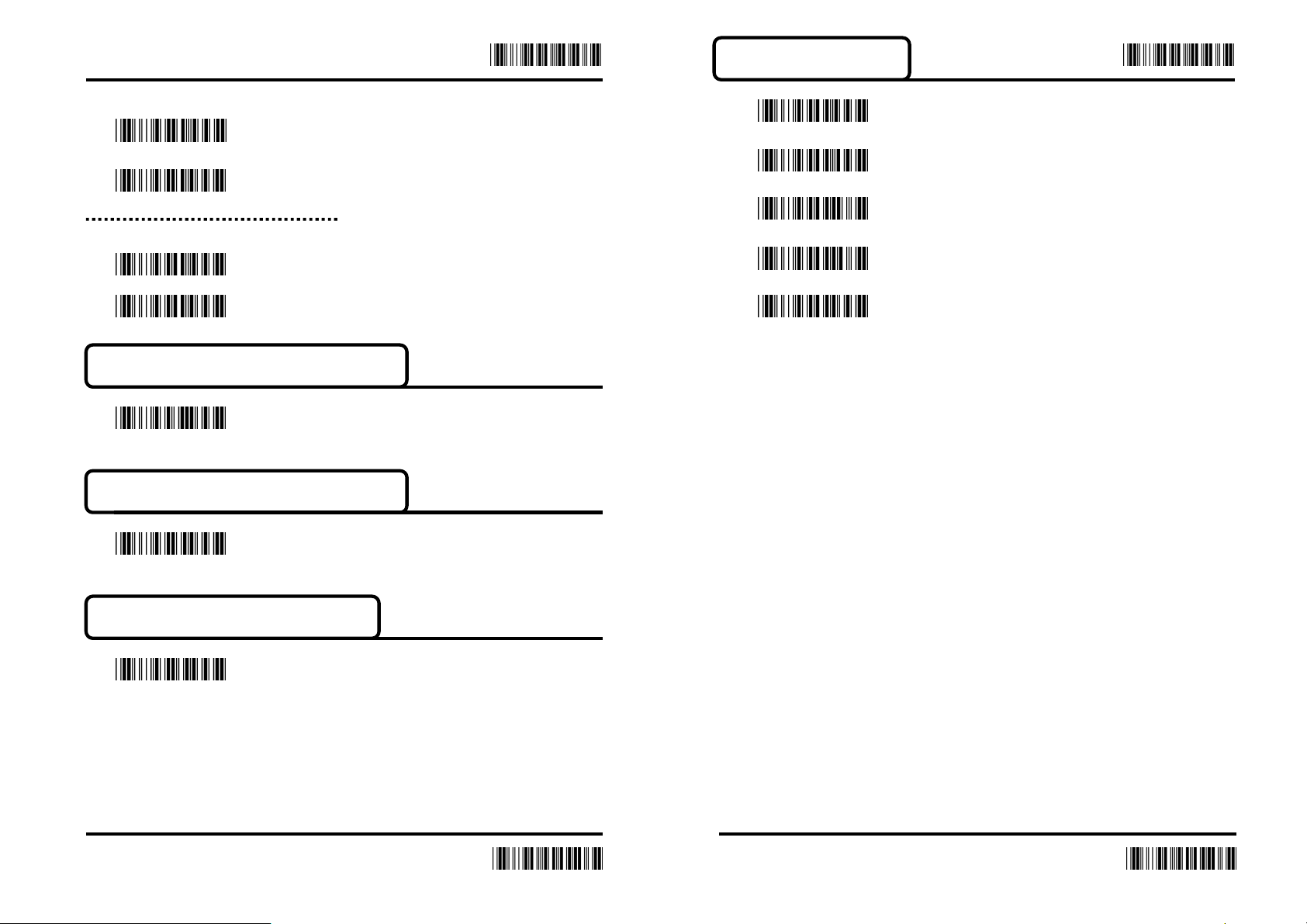
Caps Lock
ON
*OFF
Enter
Enter
Message Terminator
*CR
ESC
Num Lock
ON
*OFF
Inter-character Delay (Default:00)
Appendix A (00H-64H)
Inter-message Delay (Default:00)
Delay time=set up data*100(ms)
Appendix A (00H-0AH)
Keyboard Speed (Default:00 )
Tab
CR + LF
None
Appendix A (00H-08H)
5 6
End
End
Page 5
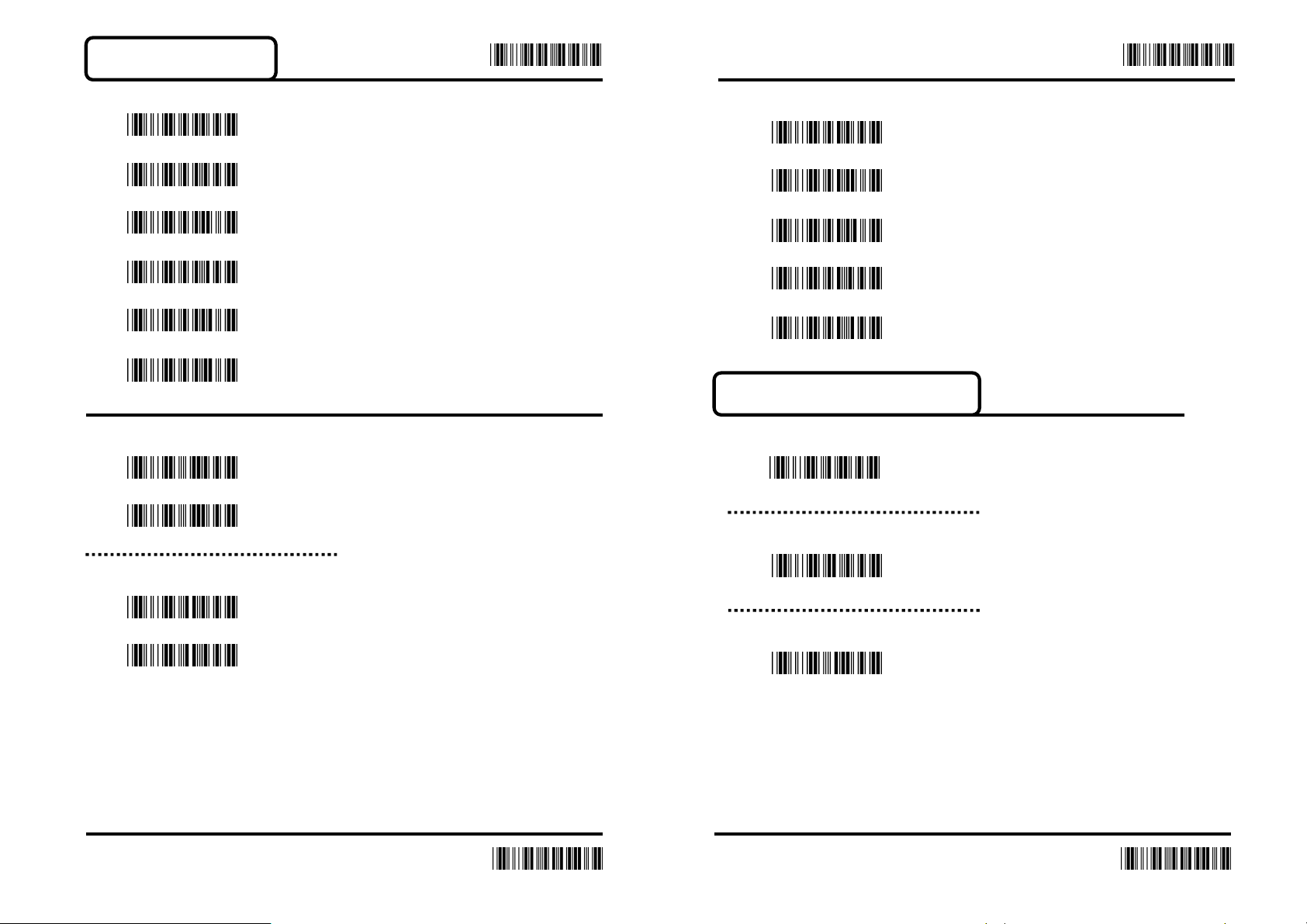
RS-232 Parameters
Enter Enter
BAUD Rate
1200
2400
4800
*9600
19200
38400
Data Bits
7
*8
Stop Bits
Parity
*None
Even
Space
Odd
Mark
RS-232 Function Installation
Inter-character Delay (Default:00)
Appendix A (00H-64H)
Inter-message Delay (Default:00)
Delay time=set up da-ta*1(ms)
Appendix A (00H-0AH)
*1
2
Handshaking Protocol Delay (Default:00)
Delay time=set up da-ta*100(ms)
Appendix A (00H-0AH)
8
7
End
End
Page 6
Enter Enter
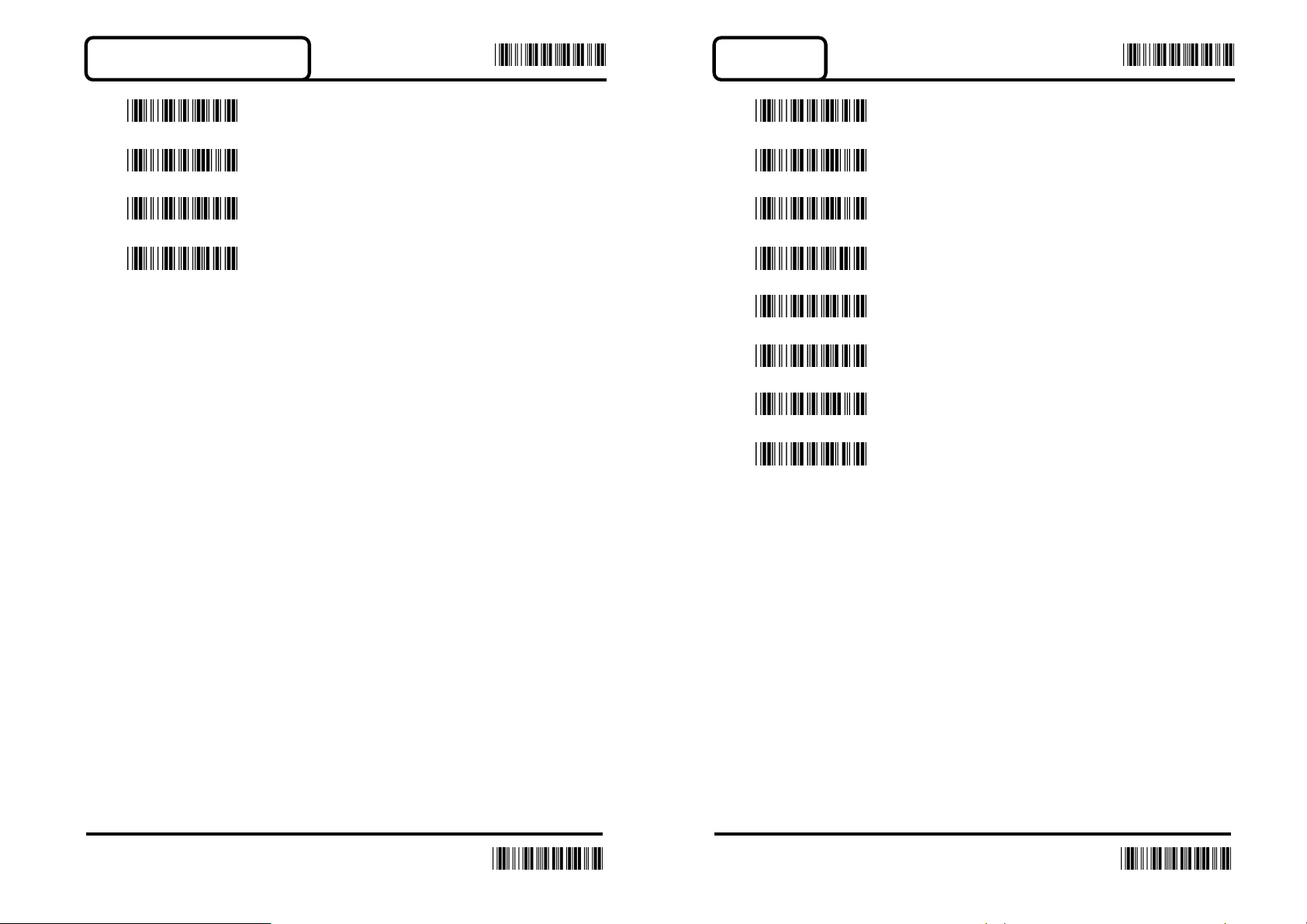
Handshaking Protocol
*None
ACK/NAK
RTS/CTS
Xon/Xoff
Scan Mode
Tigger On/Off
Continuous/Tigger Off
Continuous/LED always On
Flash On
*Tigger On/Good read off
Testing
Continuous/Timeout Off
Continuous/No Tigger
9 10
End
End
Page 7
Enter Enter
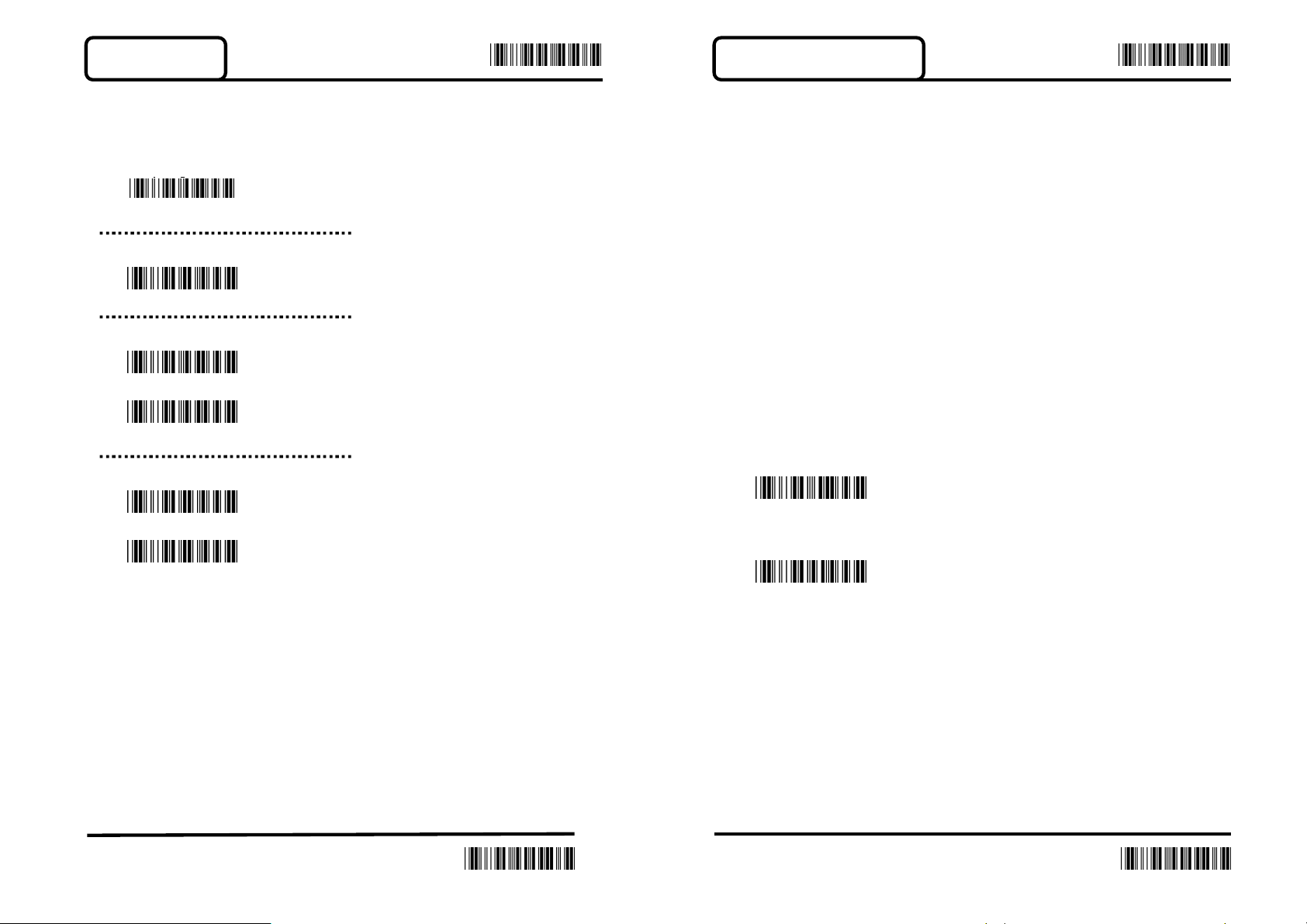
Buzzer set-up
You can pitch the buzzer tone and adjust the buzzer time
Besides, you can the voice of boot and decoding
Frequency (Default:0AH)
Appendix A (00-10H)
Adjust Buzzer Tone (Default:05H)
Appendix A (00-10H)
Power On Tone
ON
OFF
Good read Beep
Character Installation
The preamble and postamble character: You can put 10 ASCII
at most in front of the barcode data.
“0” that means you don’t need to add the first and last character.
Please find the format as below
The process for adding the first and last character to the bar- code:
1. Scan the barcode of “Start Configuration” and “The
Preamble Character Installation”.
2. Check the ASCII table to get the ASCII code of the first and
last character.
3. Scan the barcode of ASCII in the Appendix.
4. Scan the “End Configuration”.
The Preamble Installation (Default:00)
When the installation is
*ON
OFF
Appendix A
The Postamble Installation (Default:00)
Appendix A
11 12
End
End
Page 8
Enter Enter
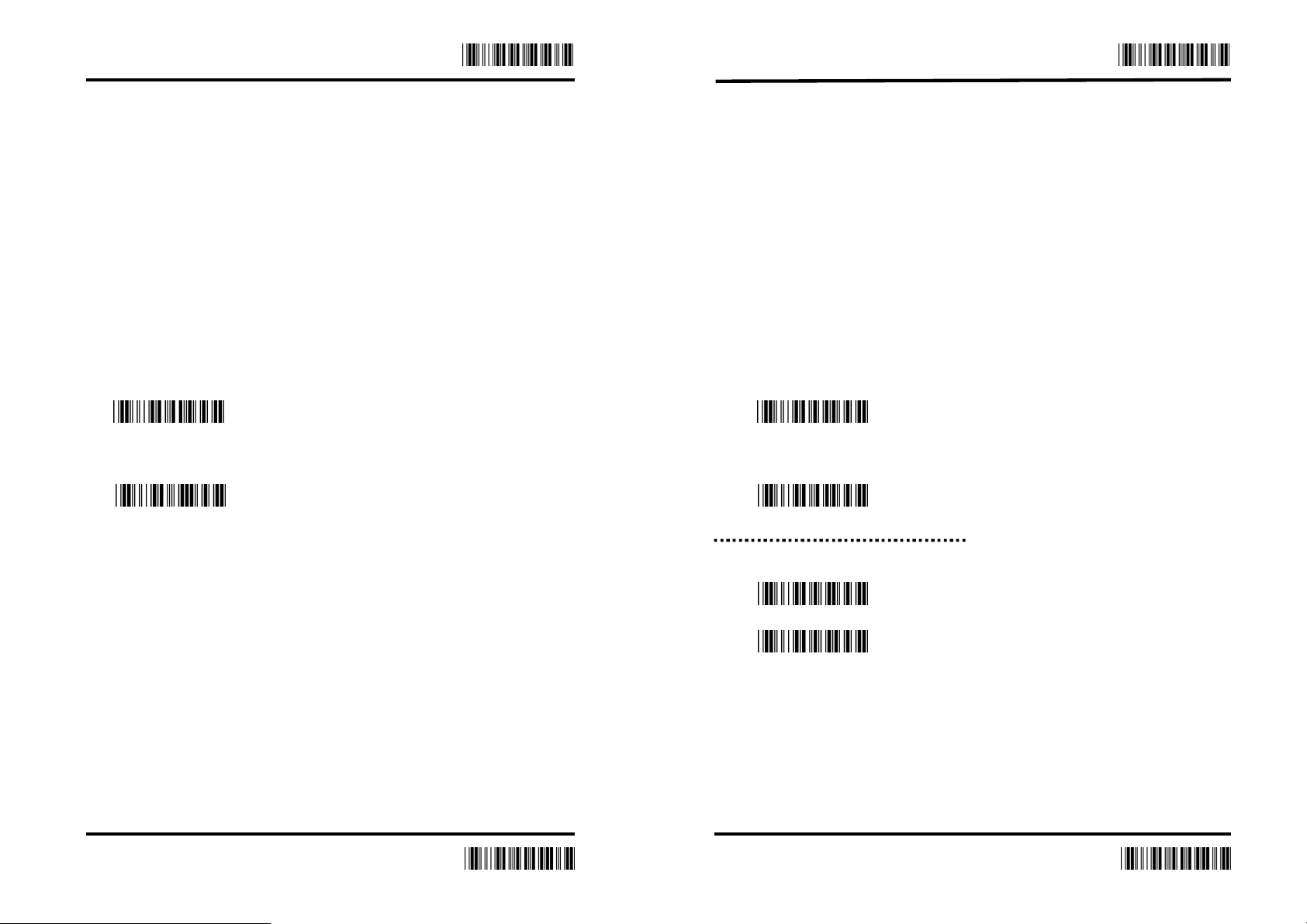
1. Scan the barcode of the “Start Configuration” and “G1
Insert Character”.
2. Check the ASCII table to get the ASCII code of the first and
last character.
3. Scan the barcode of ASCII in the Appendix.
4. Scan the “End Configuration”.
5. Repeat the same process to the G2 insertion.
6. Scan the “End Configuration”.
G1 Character Insertion (
Appendix A
G2
Character Insertion (
Appendix A
Default:00)
Default:00)
1. Scan the barcode of the “Start Configuration” and “G1
character insertion position”
2. Check the ASCII table to get the corresponding ASCII
code of the insertion position.
3. Scan the “End Configuration”.
4. Repeat the same process to the G2 character insertion
position.
5. Scan the “End Configuration”.
G1 Character Insertion Position(Default:00)
Appendix A
G2
Character Insertion Position(Default:00)
Appendix A
Code ID Transmission
ON
*OFF
13 14
End
End
Page 9
Enter Enter
Other Installation
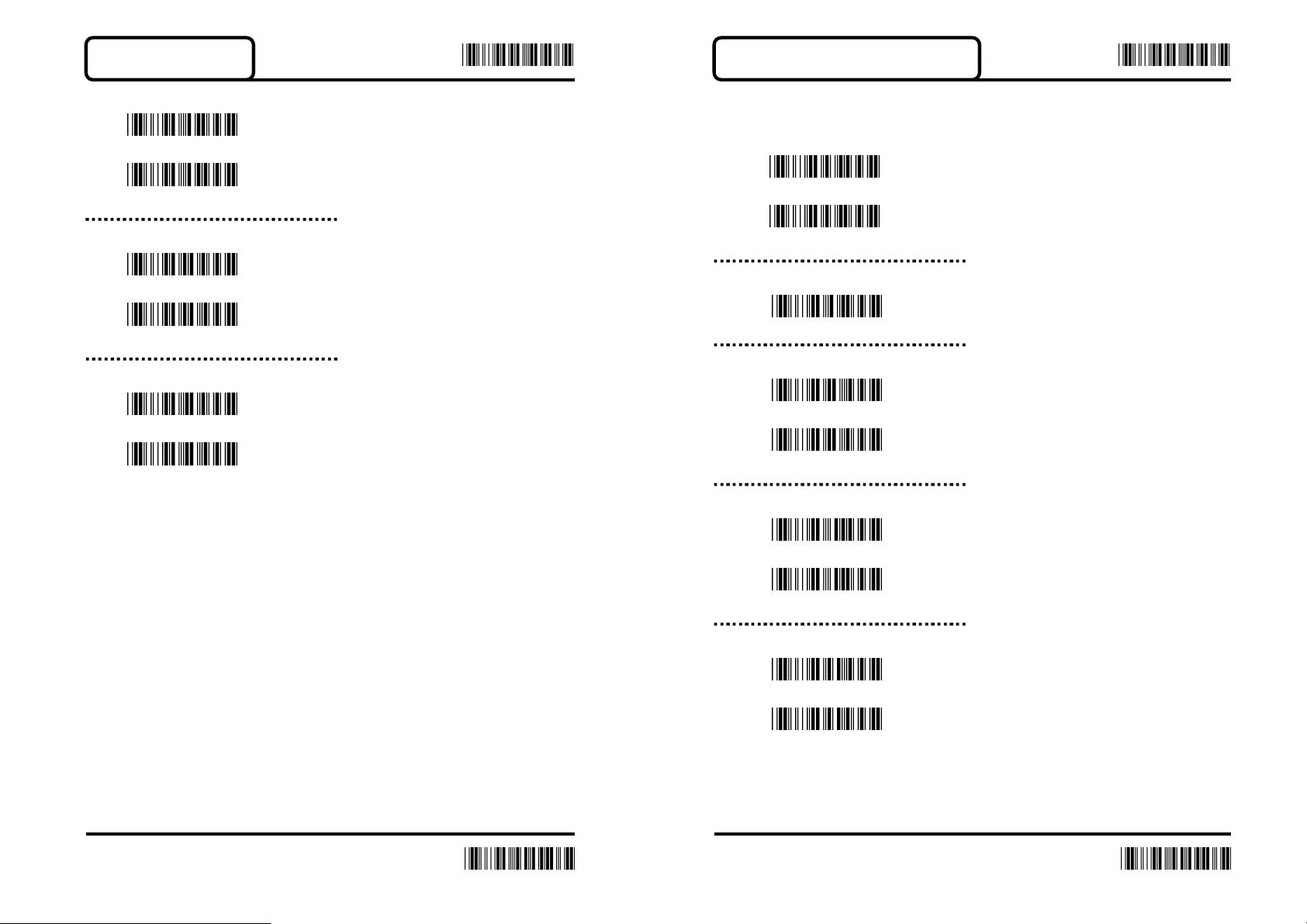
Scanning Verify
*Single
Double
Bar / Space Setting
*Bar = High
*Bar = Low
Laser Data Speed Up
*On
Off
BAR-CODE INSTALLATION
UPC-A
Reading
*On
Off
Code ID (Default:F)
20H-7EH
UPC-A convert to EAN-13
On
*Off
Transmit Check Character
*On
Off
Truncate Leading Zero
On
*Off
15 16
End
End
Page 10

Enter Enter
UPC-E
Truncate Leading Digit (Default:00)
00H-0DH
Truncate Last Digit (Default:00)
00H-0DH
Select Insertion (Default:00)
00H-02H
Add-On 2/5
2 digit
5 digit
2 or 5 digit
*None
Reading
*On
Off
Code ID (Default:G)
20H-7EH
UPC-E convert to UPC-A
On
*Off
Transmit Check Character
*On
Off
Truncate Leading Zero
*On
Off
17 18
End
End
Page 11
Enter
Enter
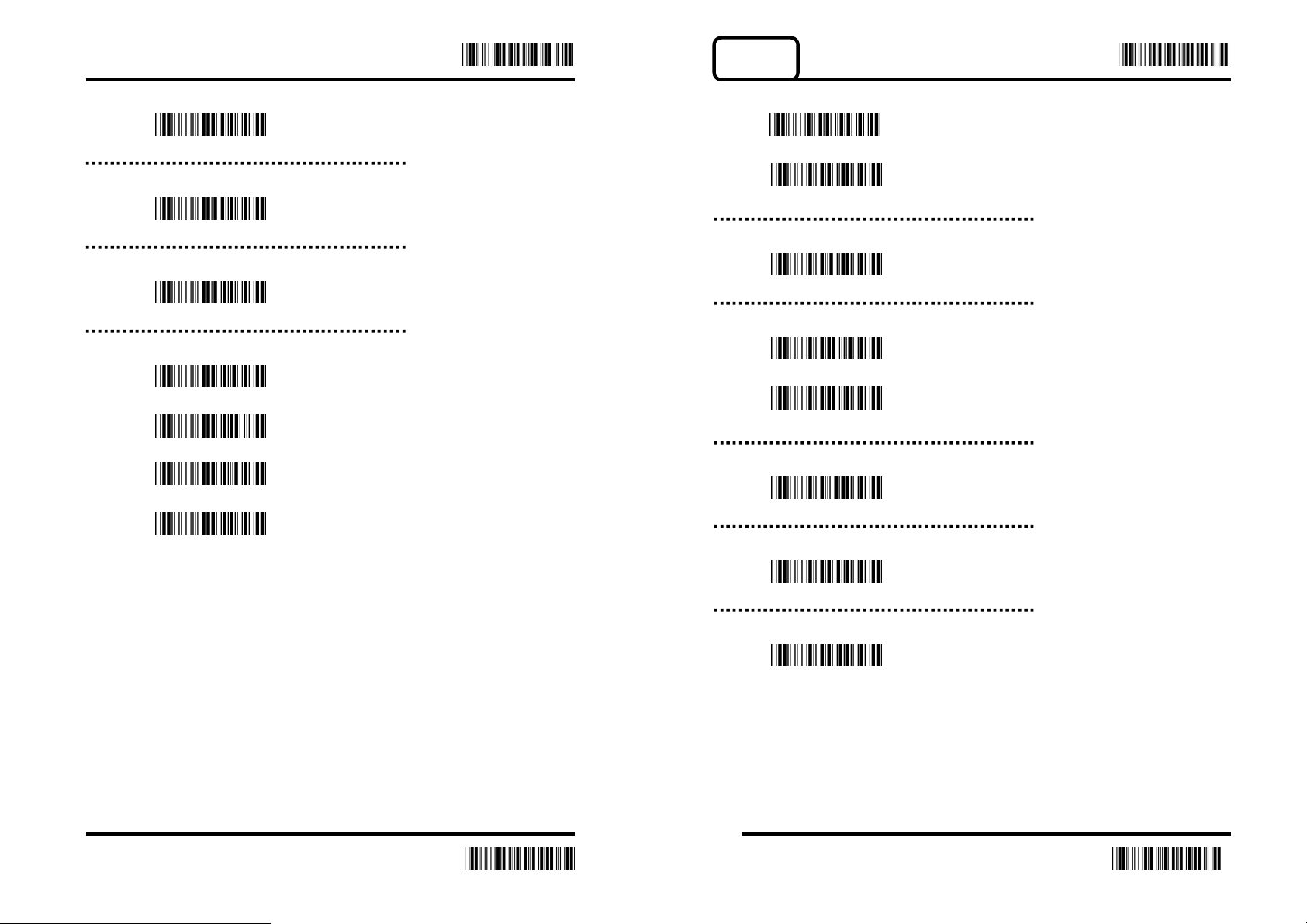
EAN-13
Truncate Leading Digit (Default:00)
Reading
00H-08H
Truncate Last Digit (Default:00)
00H-08H
Select Insertion (Default:00)
00H-02H
Add-On 2/5
2 digit
5 digit
2 or 5 digit
*None
*On
Off
Code ID (Default:H)
20H-7EH
Transmit Check Character
*On
Off
Truncate Leading Digit (Default:00)
00H-0DH
Truncate Last Digit (Default:00)
00H-0DH
Select Insertion (Default:00)
00H-02H
19 20
End
End
Page 12
Enter Enter
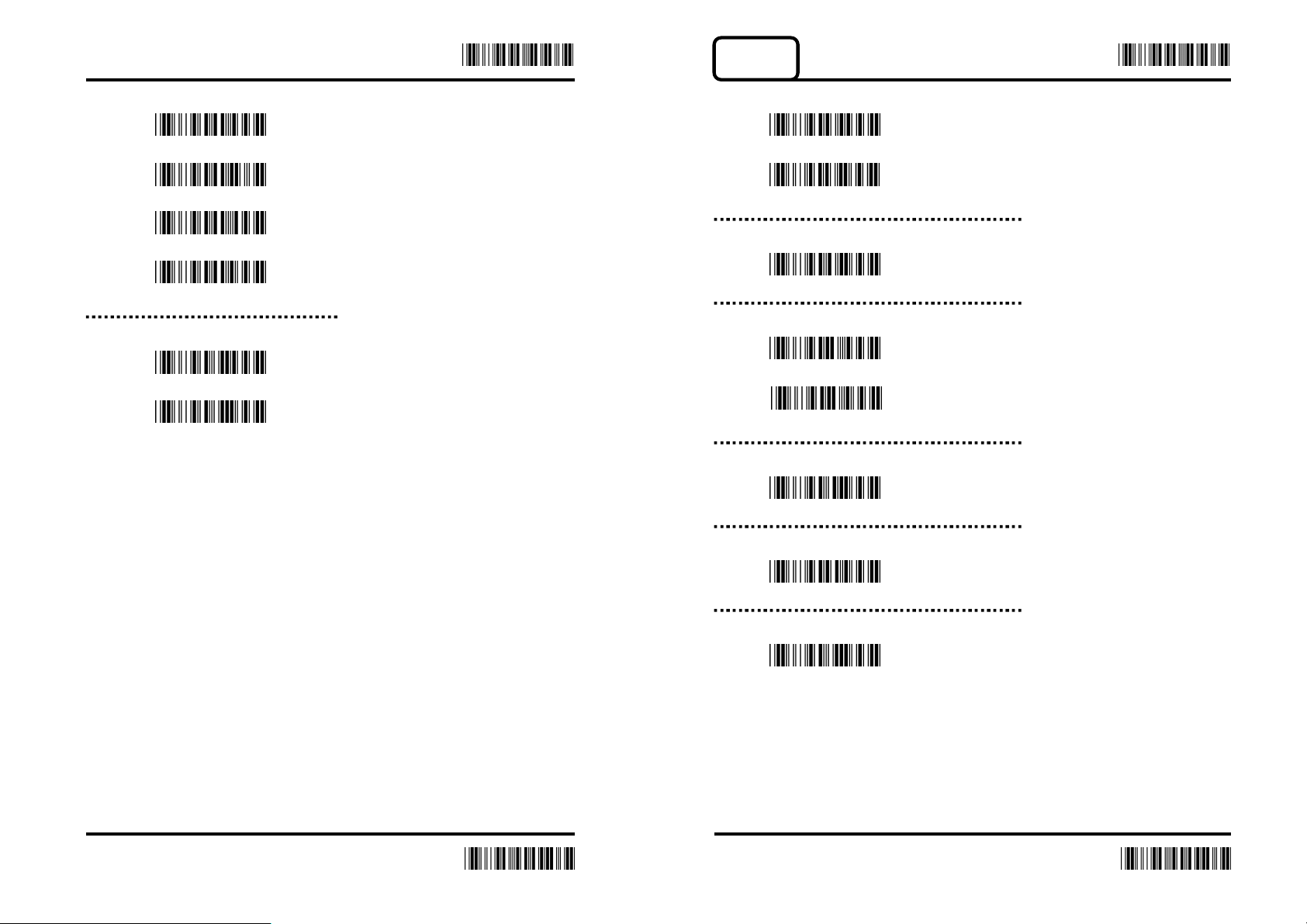
EAN-8
Add-On 2/5
2 digit
5 digit
2 or 5 digit
*None
ISBN/ISSN Convert
On
*Off
Reading
*On
Off
Code ID (Default:I)
20H-7EH
Transmit Check Character
*On
Off
Truncate Leading Digit (Default:00)
00H-08H
Truncate Last Digit (Default:00)
00H-08H
Select Insertion (Default:00)
00H-02H
21 22
End
End
Page 13
Enter Enter
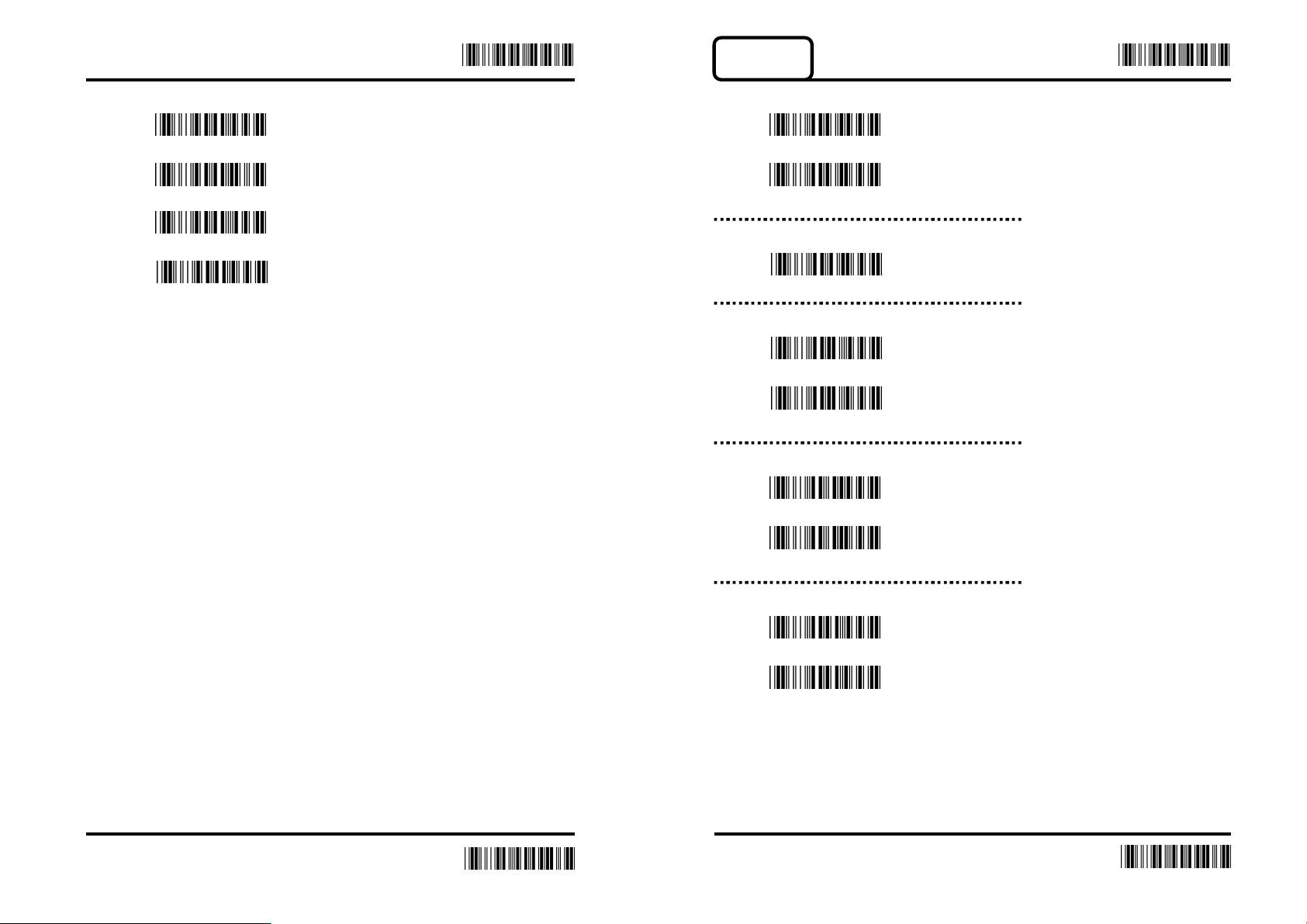
Code-39
Add-On 2/5
Reading
2 digit
*On
5 digit
Off
2 or 5 digit
*None
Code ID (Default:J)
20H-7EH
Verification
On
*Off
Transmit Check Character
*On
Off
Checksum
On
*Off
23 24
End
End
Page 14
Enter Enter
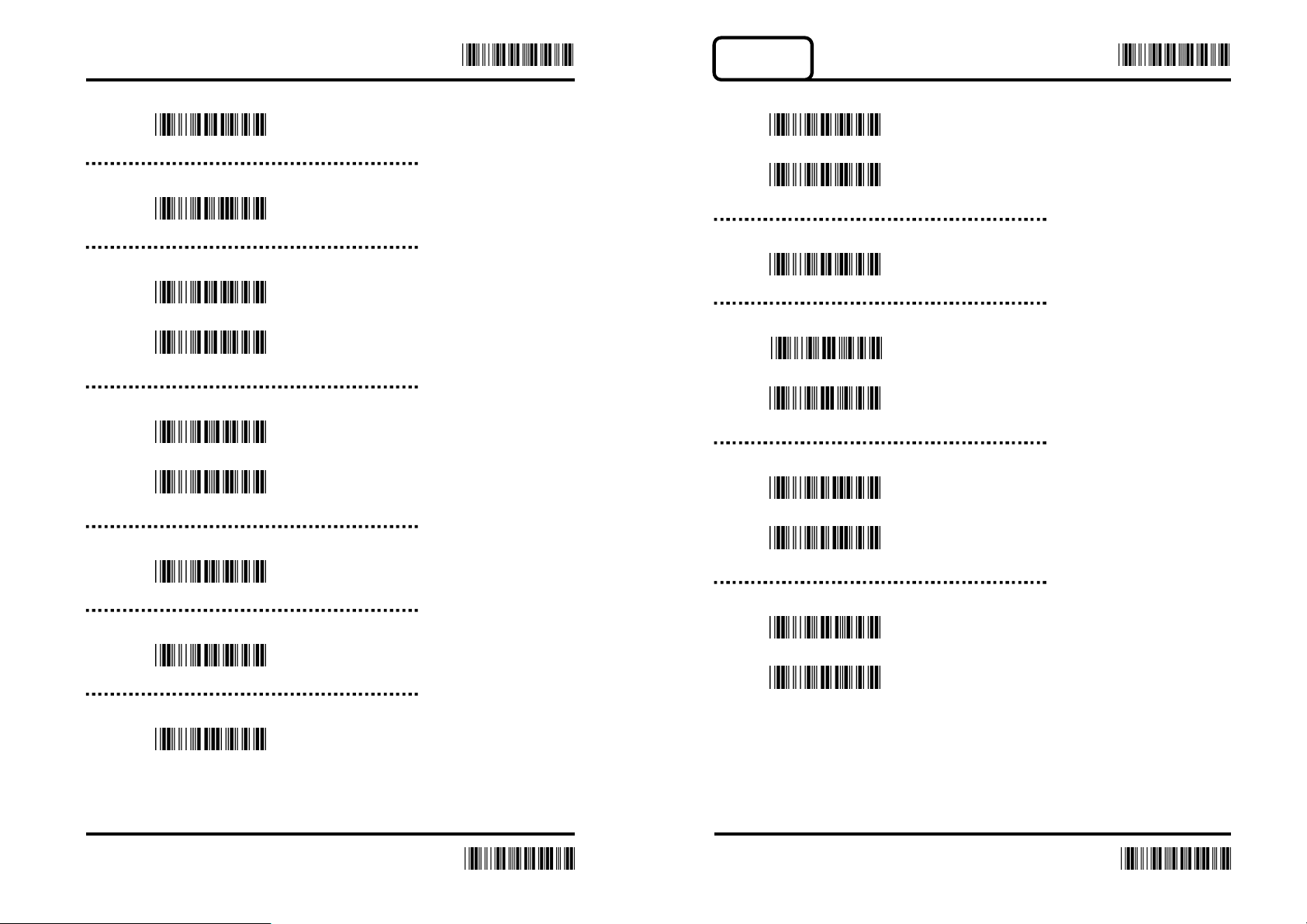
Codabar
Min. Length (Default:00)
00H-32H
Max. Length (Default:32H)
00H-32H
Format
Standard Code39
Full-featured Code39
Transfer Start / End Character
On
*Off
Truncate Leading Digit (Default:00)
Reading
*On
Off
Code ID (Default:K)
20H-7EH
Verification
*On
Off
Transmit Check Character
On
*Off
00H-32H
Truncate Last Digit (Default:00)
00H-32H
Select Insertion (Default:00)
00H-02H
Checksum
On
*Off
25 26
End
End
Page 15
Enter
Enter
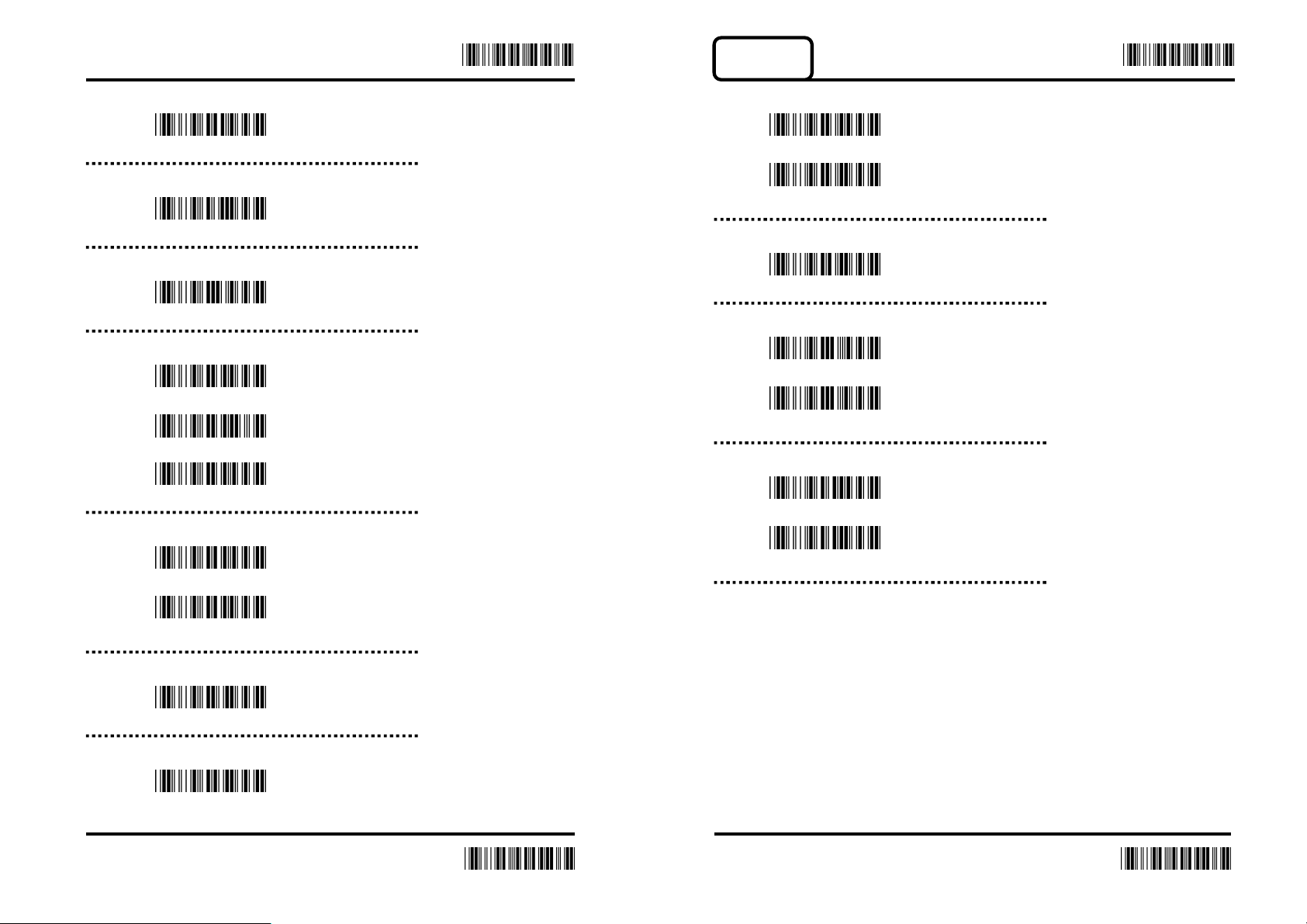
Code93
Truncate Leading Digit (Default:00)
00H-7EH
Truncate Last Digit (Default:00)
00H-7EH
Select Insertion (Default:00)
00H-02H
Start / End Character Type
*ABCD/ABCD
abcd/to*e
abcd/abcd
Transmit Start / End Character
Reading
*On
Off
Code ID (Default:L)
20H-7EH
Verification
*On
Off
Transmit Check Character
On
*Off
On
*Off
Min. Length (Default:00)
00H-3CH
Max. Length
00H-3CH
27 28
End
End
Page 16
Enter Enter
Code 128
Select Insertion (Default:00)
00H-02H
Truncate Leading Digit (Default:00)
00H-7EH
Truncate Last Digit (Default:00)
00H-7EH
Min. Length (Default:00)
00H-50H
Max. Length (Default:00)
00H-50H
Reading
*On
Off
Code ID (Default:M)
20H-7EH
Verification
*On
Off
Transmit Check Character
On
*Off
29 30
End
End
Page 17
Enter Enter
Truncate Leading Digit (Default:00)
00H-7FH
Truncate Last Digit (Default:00)
00H-7FH
Select Insertion (Default:00)
00H-02H
Min. Length (Default:00)
00H-7FH
Max. Length (Default:00)
00H-7FH
UCC/EAN128
On
*Off
FNC1 Transmit
On
*Off
FNC2 Checksum
On
*Off
31 32
End
End
Page 18
Interleaved 2 of 5
Enter Enter
Reading
*On
Off
Code ID (Default:N)
20H-7EH
Verification
On
*Off
Transmit Check Character
*On
Truncate Leading Digit (Default:00)
00H-7FH
Truncate Last Digit (Default:00)
00H-7FH
Select Insertion (Default:00)
00H-02H
Min. Length (Default:00)
00H-7FH
Max. Length (Default:00)
00H-7FH
Off
33 34
End
End
Page 19
Industrial 2 of 5
Enter Enter
Reading
On
*Off
Code ID (Default:O)
00H-7EH
Verification
On
*Off
Transmit Check Character
On
Truncate Leading Digit (Default:00)
00H-32H
Truncate Last Digit (Default:00)
00H-32H
Select Insertion (Default:00)
00H-02H
Min. Length (Default:00)
00H-32H
Max. Length (Default:00)
00H-32H
*Off
35 36
End
End
Page 20
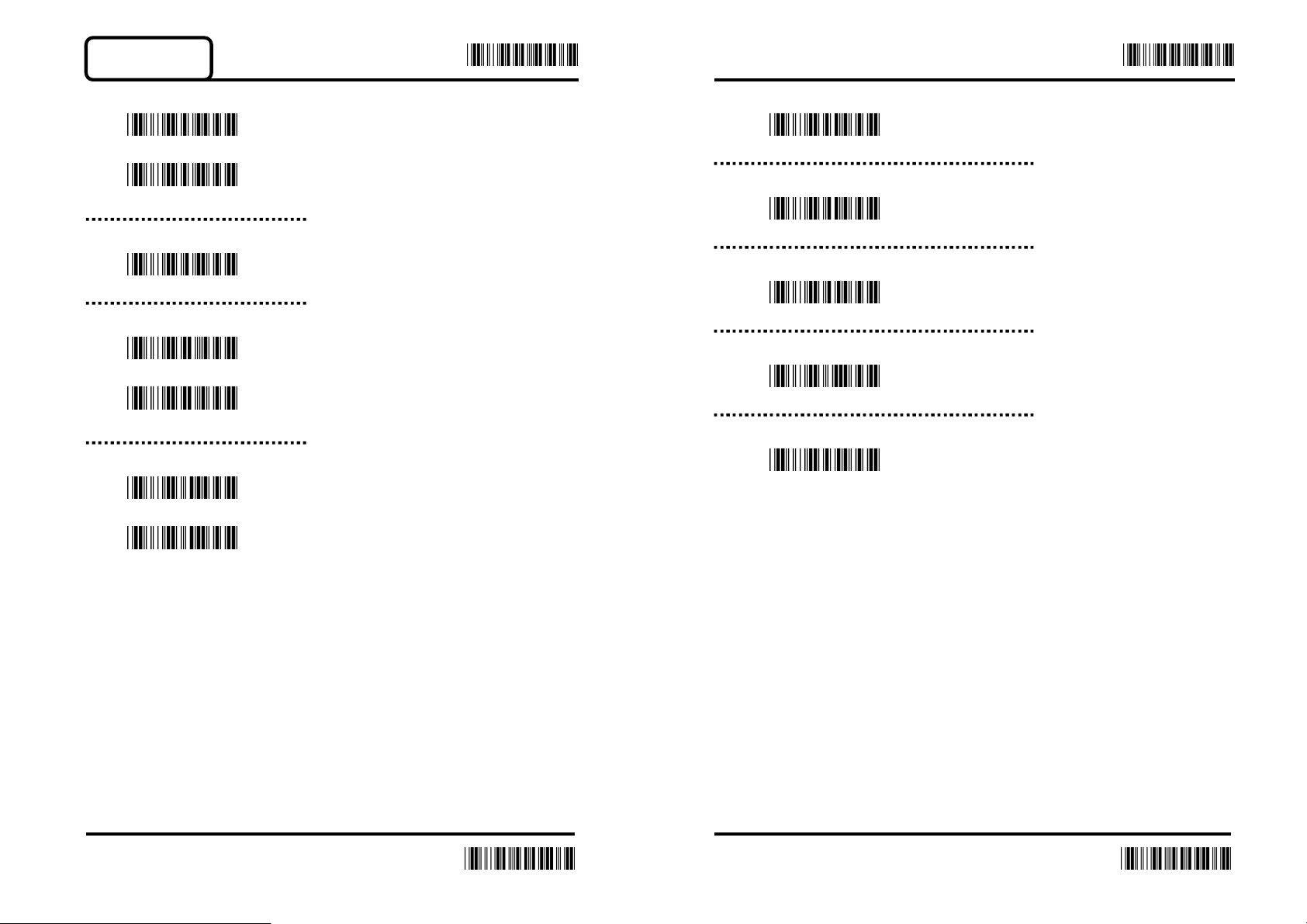
Matrix 2 of 5
Enter Enter
Reading
On
*Off
Code ID (Default:P)
20H-7EH
Verification
On
*Off
Transmit Check Character
*On
Truncate Leading Digit (Default:00)
00H-50H
Truncate Last Digit (Default:00)
00H-50H
Select Insertion
00H-02H
Min. Length (Default:00)
00H-50H
Max. Length (Default:50H)
00H-50H
Off
37 38
End
End
Page 21
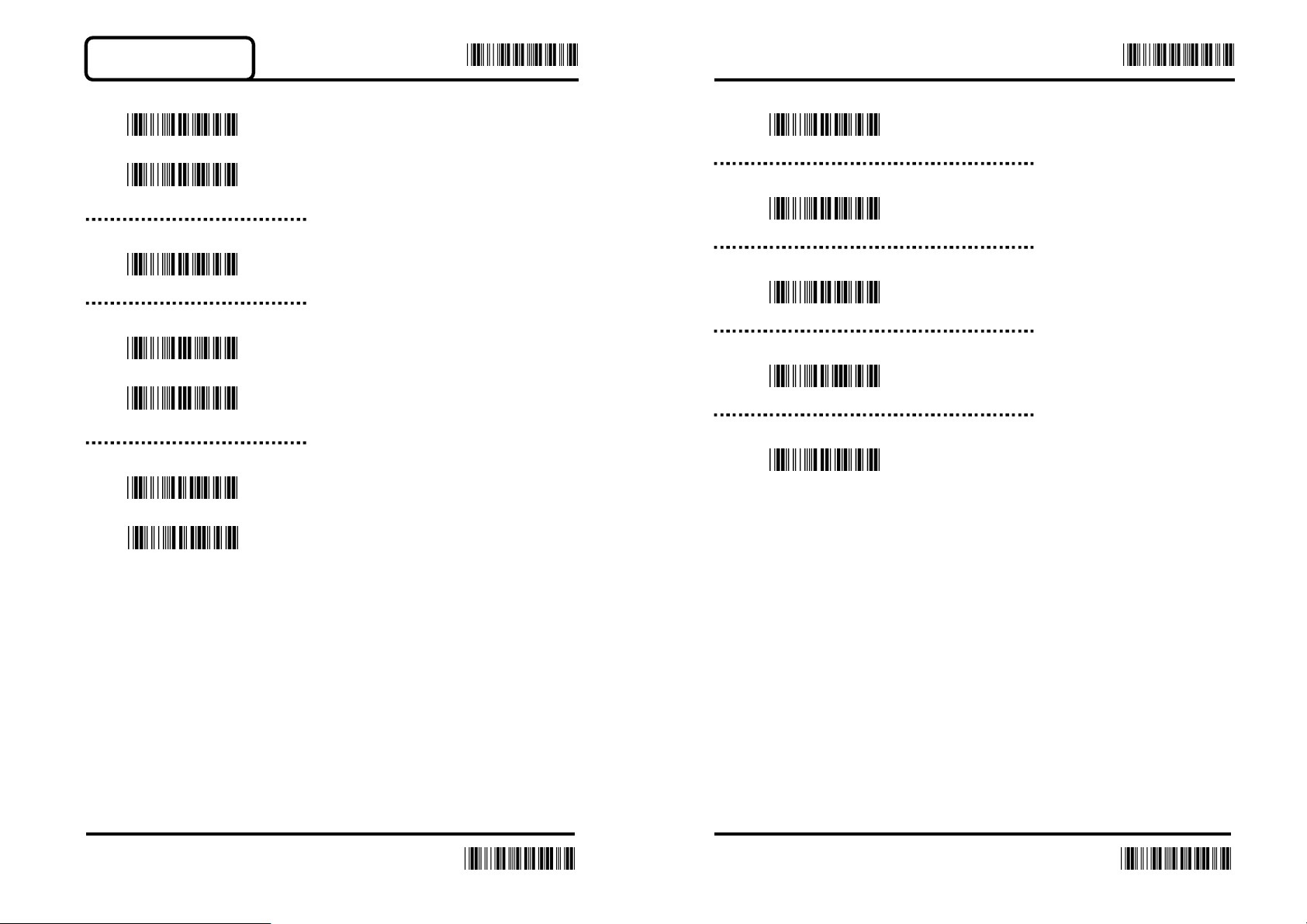
China Post Code
Enter Enter
Reading
On
*Off
Code ID (Default:Q)
20H-7EH
Verification
On
*Off
Transmit Check Character
On
Truncate Leading Digit (Default:00)
00H-50H
Truncate Last Digit (Default:00)
00H-50H
Select Insertion (Default:00)
00H-02H
Min. Length (Default:00)
00H-50H
Max. Length (Default:50H)
00H-50H
*Off
39 40
End
End
Page 22
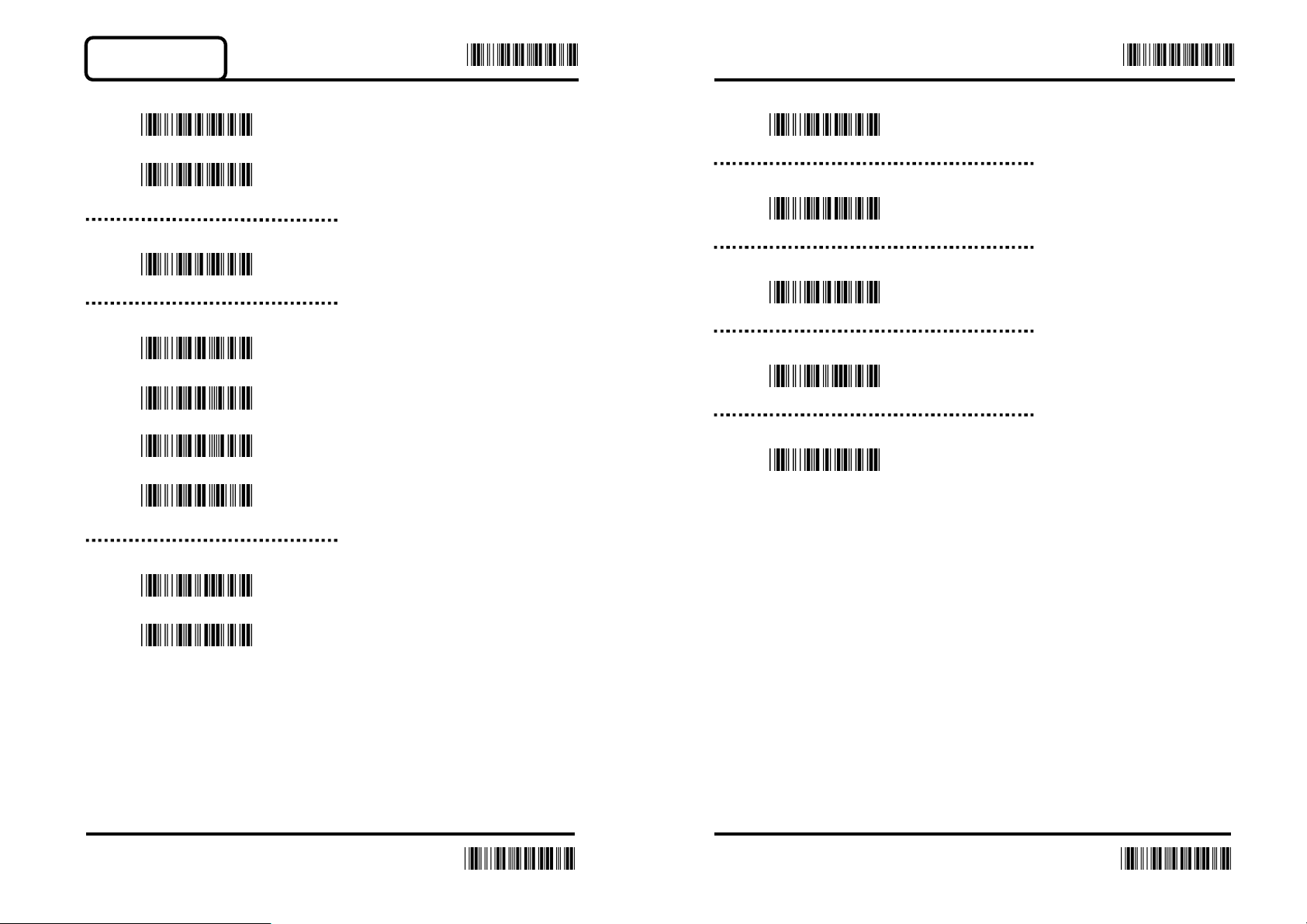
MSI / Plessey
Enter Enter
Reading
On
*Off
Code ID (Default:R)
20H-7EH
Verification
*Off
MOD 10
MOD 11/10
MOD 10/10
Truncate Leading Digit (Default:00)
00H-3CH
Truncate Last Digit (Default:00)
00H-3CH
Select Insertion (Default:00)
00H-02H
Min. Length (Default:00)
00H-3CH
Max. Length (Default:3CH)
00H-3CH
Transmit Check Character
*On
Off
41 42
End
End
Page 23
Enter
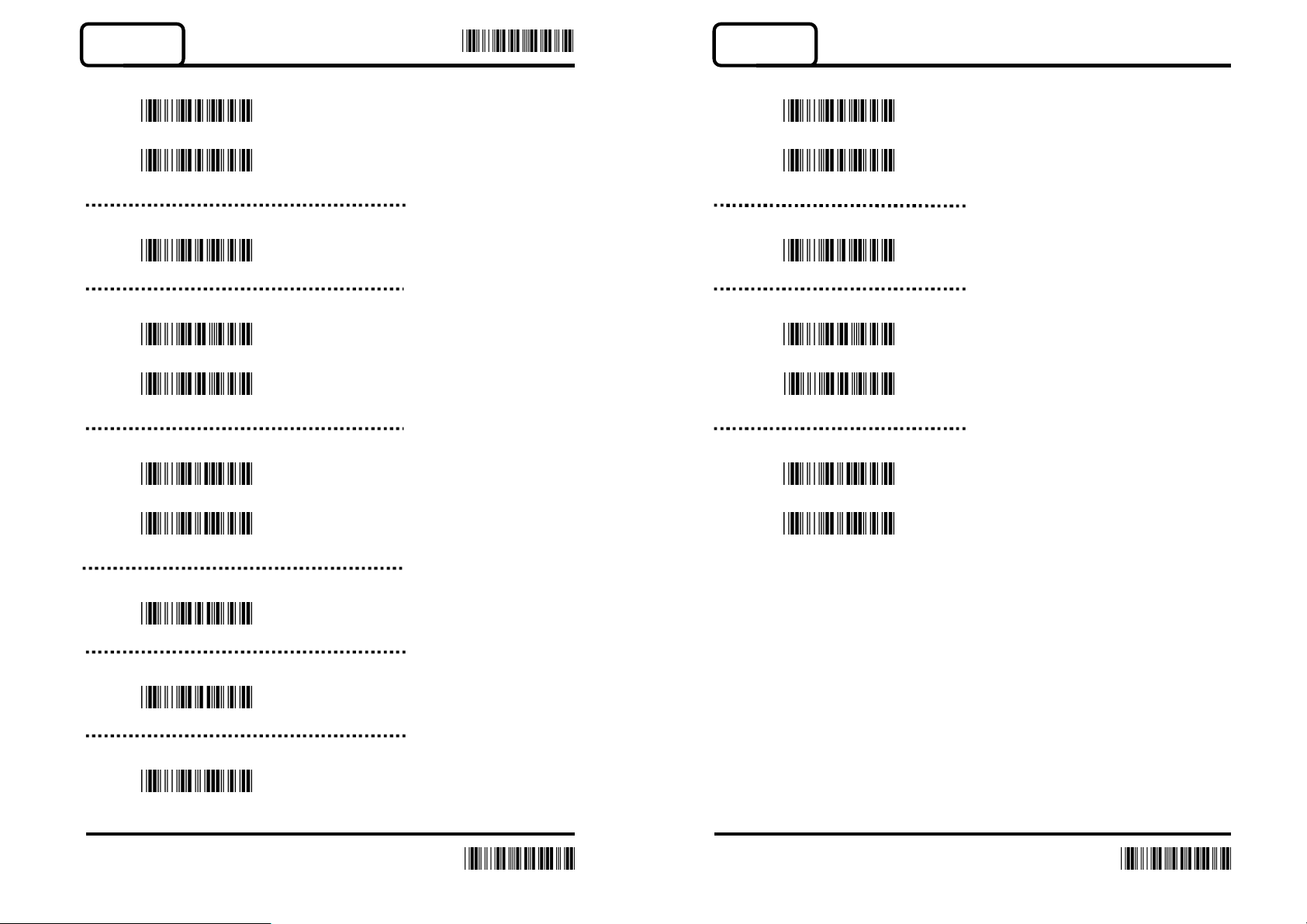
Code 32
Reading
On
*Off
Code ID (Default:S)
20H-7FH
Verification
On
*Off
Transmit Check Character
Code 11
Reading
On
*Off
Code ID (Default:T)
20H-7EH
Verification
On
*Off
Transmit Check Character
On
*Off
Truncate Leading Digit (Default:00)
00H-0AH
Truncate Last Digit (Default:00)
00H-0AH
Select Insertion (Default:00)
00H-02H
On
*Off
43 44
End
End
Page 24
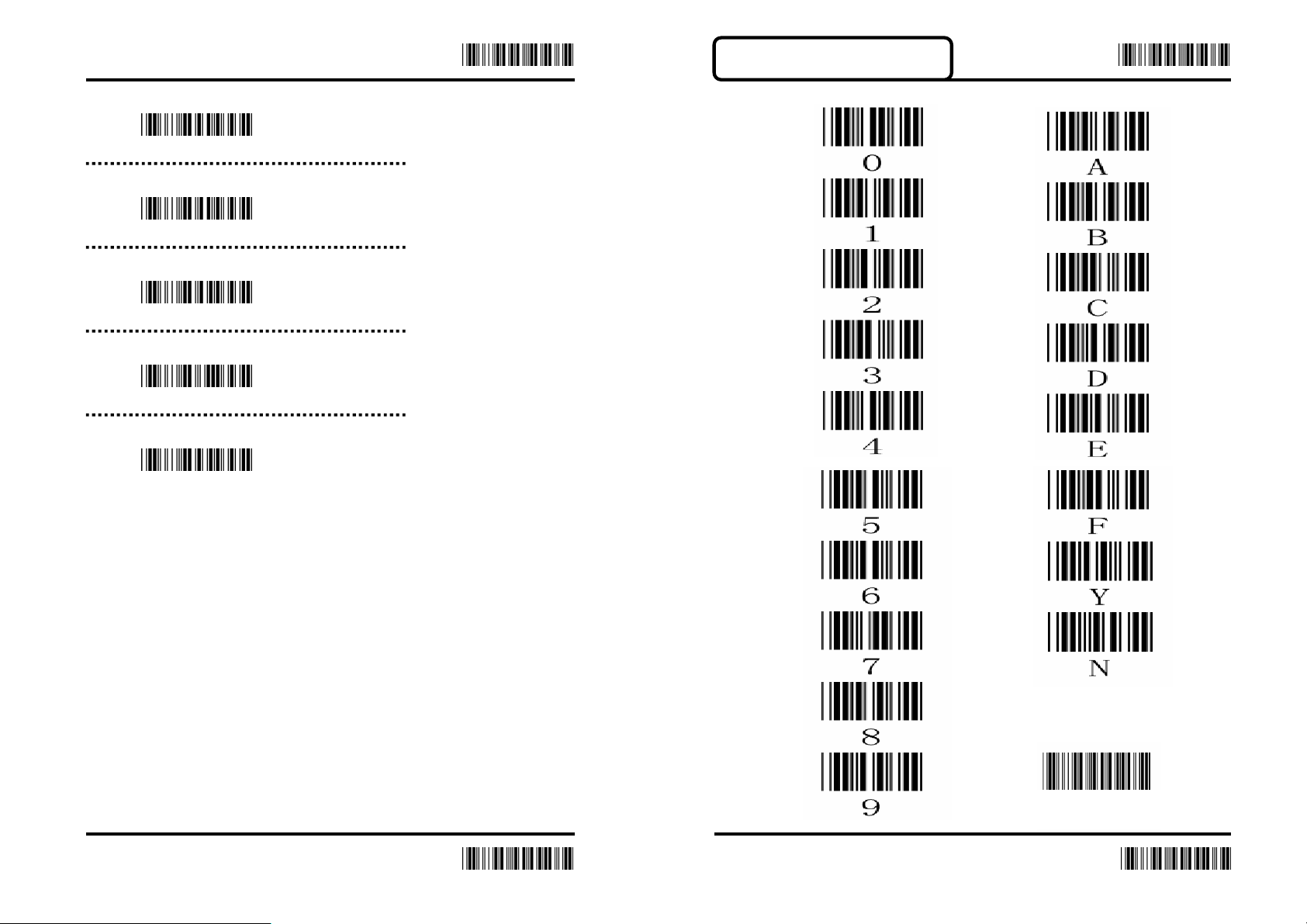
Truncate Leading Digit (Default:00)
00H-50H
Truncate Last Digit (Default:00)
00H-50H
Select Insertion
00H-02H
Min. Length (Default:00)
00H-50H
Max. Length (Default:50H)
Enter Enter
APPENDIX A -- ASCII
00H-50H
Confirm
45 46
End
End
Page 25
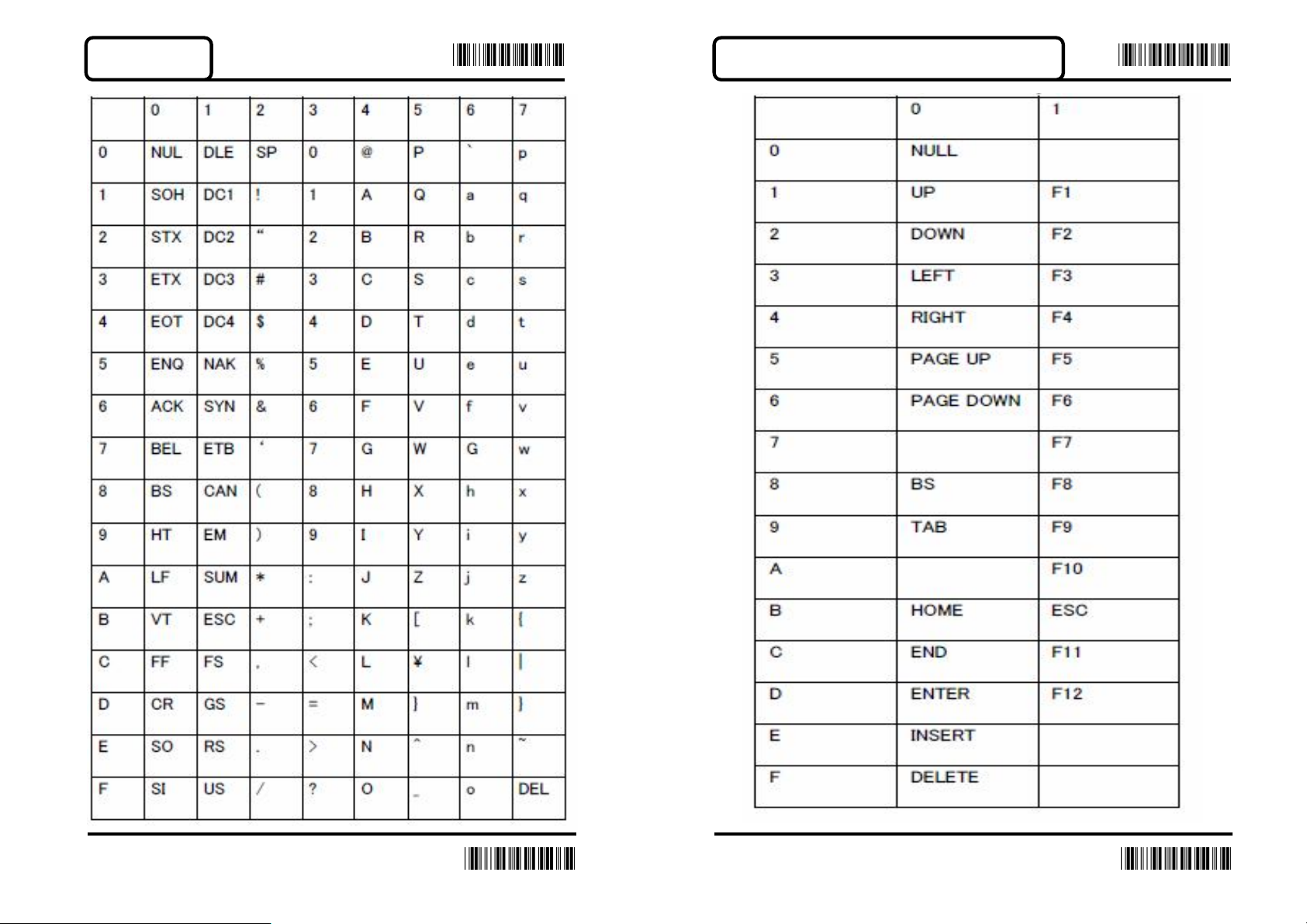
Enter Enter
ASCII Table
APPENDIX B -- Function Key Table
47 48
End
End
Page 26
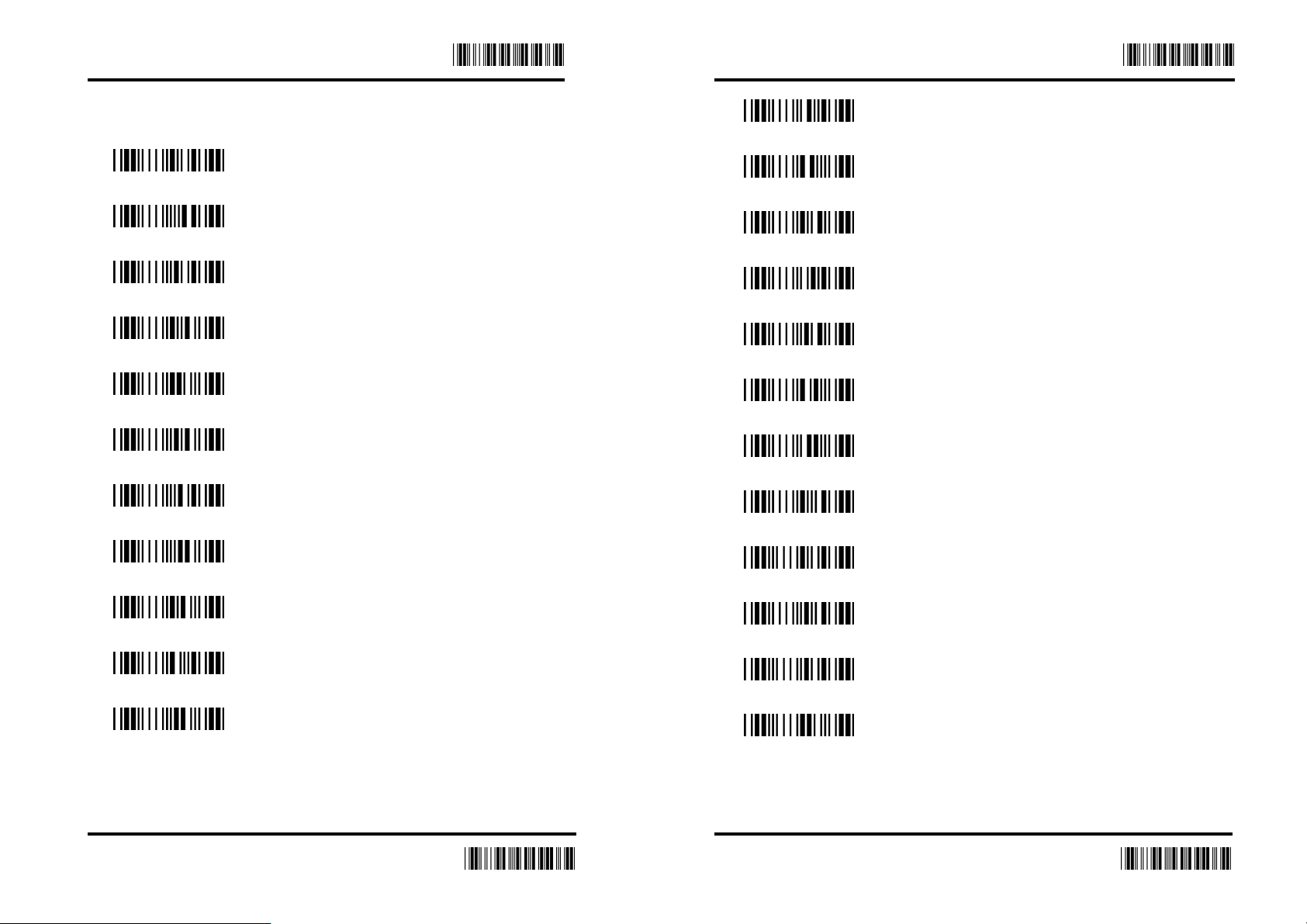
Function Key Code
Enter
Enter
Before Scanning, Please Turn on the CODE 39
UP($A)
F1($Q)
DOWN($B)
F2($R)
LEFT($C)
F3($S)
RIGHT($D)
F4($T)
F6($V)
F7($W)
BS($H)
F8($X)
TAB($I)
F9($Y)
F10($Z)
HOME($K)
ESC(%A)
PAGE UP($E)
F5($U)
PAGE DOWN($F)
END($L)
F11(%B)
F12(%C)
49 50
End
End
Page 27
Enter
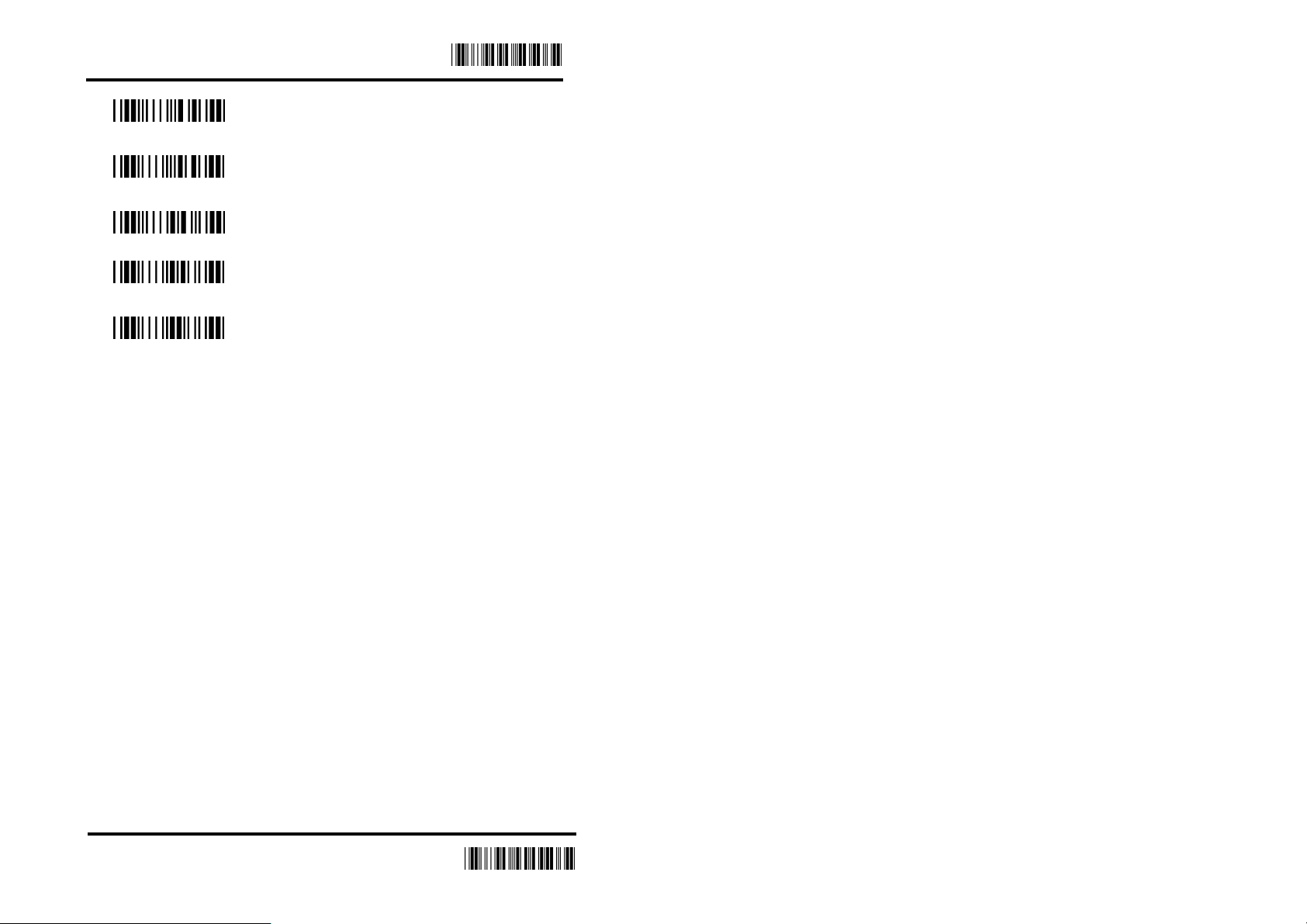
F13(%D)
INSERT($N)
F14(%E)
DELETE($O)
ENTER($M)
51
End
Page 28

Page 29

Page 30

Page 31

 Loading...