

Page 1
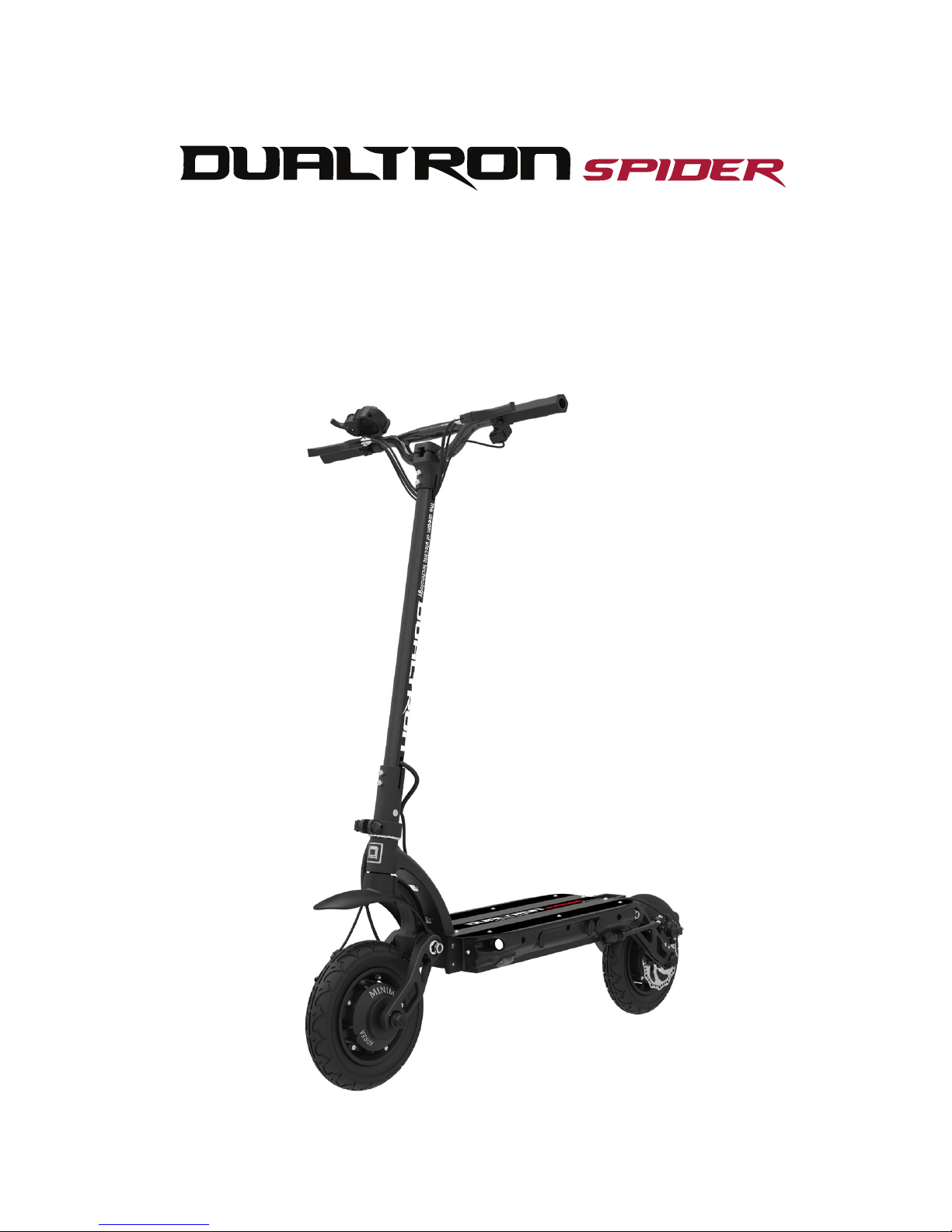
PERSONAL MOBILITY
User Manual
The dream of electric technology
Page 2
Company Introduction
Brand Introduction
'DUALTRON' is a breakthrough product that combines the world's first dual drive system
and the new rubber suspension technology (patent application). It is a proud Korean
luxury brand that has won the world electric scooter market exported to more than 20
countries.
®
‘DUALTRON’ brand is a worldwide electric scooter brand name that Electier
Co. LTD., designed.
Do not use the product until you understand its functions.
Do not rent the product to anyone who can’t operate the product.
*For the first time, the user should use it with a slow speed’ for safety.
Please read the user manual carefully.
MINIMOTORS
Co.,Ltd.
Minimotors Co. LTD., has been making the electric mobility brand <DUALTRON> to
meet the world people with the aim of making more innovative, more sensuous, and more
convenient personal mobility from 1999 to the present and making a product that is loved
by people in the world. Minimotors Co. LTD., Is doing its best to become the world best
electric mobility company.
Minimotors Co. LTD., is a company who manufacture and distributepersonal
mobility with a professional production system since 1999.
Page 3

Dualtron Ultra user manual contents
This manual contains important information to help you to use your product more
safely. For safe use, it is marked as 'Danger', ‘Caution’and 'Warning' depending
on the degree of danger and the meaning is as below.
Danger: Indicates a hazardous situation that could be a result of serious injury.
Before Reading Manual
Warning: Indicates a potentially hazardous situation that could be a result in light injury.
Caution: Indicates a potentially hazardous situation that could be a result in serious injury.
Danger
Warning
Caution
01. Safety guidelines and restrictions ·······································································
04
02. Product structure ··································································································
06
03. Name of each part ·································································································
07
04. Product components ····························································································
08
05. How to use the product·························································································
09
06. How to use the instrument panel ··········································································
12
07. LED BAR funtions····································································································
15
08. How to use the charger correctly ··········································································
16
09. Safety precautions for Lithium-ion battery ···························································
17
10. Safety guidelines before driving ·············································································
18
11. Maintenance ············································································································
19
12. Important checklist ································································································
20
13. Product specifications ···························································································
22
Page 4
04
Dualtron spider User Manual
Before Reading Manual
Please read this manual carefully
before using this product
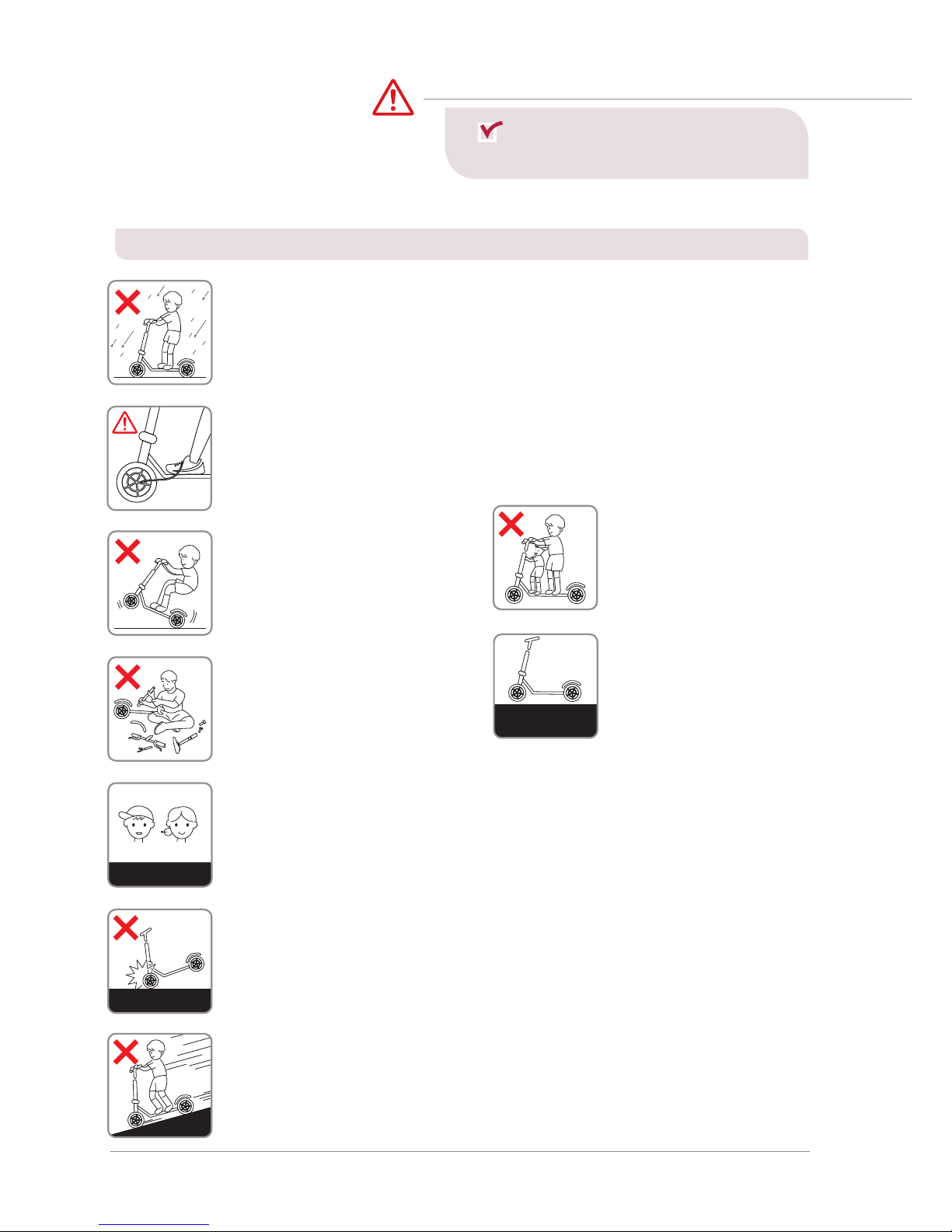
1. Be careful of water!
This product and componentsare not waterproof. Don’t let the water get into
the product and components.
*Never use it, if the road is wet due to the rain, snow, hailstone.
*If you wash or spread water to electric devices, it can result in malfunction or fire.
2. Beware of folding and spinning parts!
If parts of the body, as a finger or hair, get caught in the spinning or folding
parts of the product, this may lead to severe injuries. Please be careful.
5. Don’t tune by yourself
Do not open or tune the electric
parts (battery, controller or
motor system).
관계법 준수
Slow mode is recommended
ElderlyNovice
7.
Beginners and seniors are
encouraged to use at low speed
Beginners who are not accustomed to use the product, seniors and others
should avoid high speed mode driving and recommend low speed driving.
In addition, please use after practice how to ride safely in a wide place.
Comply with
the related laws
3. No acrobatics
Stunts and jumps such as jumping
and dropping are prohibited as
they can cause a great impact
on the product and can cause of
malfunction and accidents.
4. No companion boarding
This product is intended for
one adult only, so children,
infants, or two people are
prohibited from boarding.
Comply with
the related laws
* Even if the it is within the warranty period, you may be liable for any accident caused by any of the following causes.
Comply with
the related laws
Slow mode is recommended
ElderlyNovice
Do not sudden brake
8. Do not sudden brake with front brake
If there is a risk of overturning, sudden deceleration should be done safely.
Do not apply any unusual behaviors or artificial forces, such as stopping with
your feet.
Comply with
the related laws
Slow mode is recommended
ElderlyNovice
9. Do not accelerate downhill
Slow down at downhill. When reducing the speed, to prevent brake
overheat, use the brakes properly to reduce the heat on the disk with
proper brake use.
Comply with
the related laws
Slow mode is recommended
ElderlyNovice
Caution
6.
Comply with the related laws
Unlicensed, driving after
drinking, loading cargo on
the scooter is prohibited.
(More than bike or bicycle
license is required)
Please comply with the Road Traffic
Act and related laws and regulations
according to the place of use.
1) Safety guidelines and restrictions
Page 5
Dualtron spider User Manual 05
Comply with
the related laws
Slow mode is recommended
ElderlyNovice
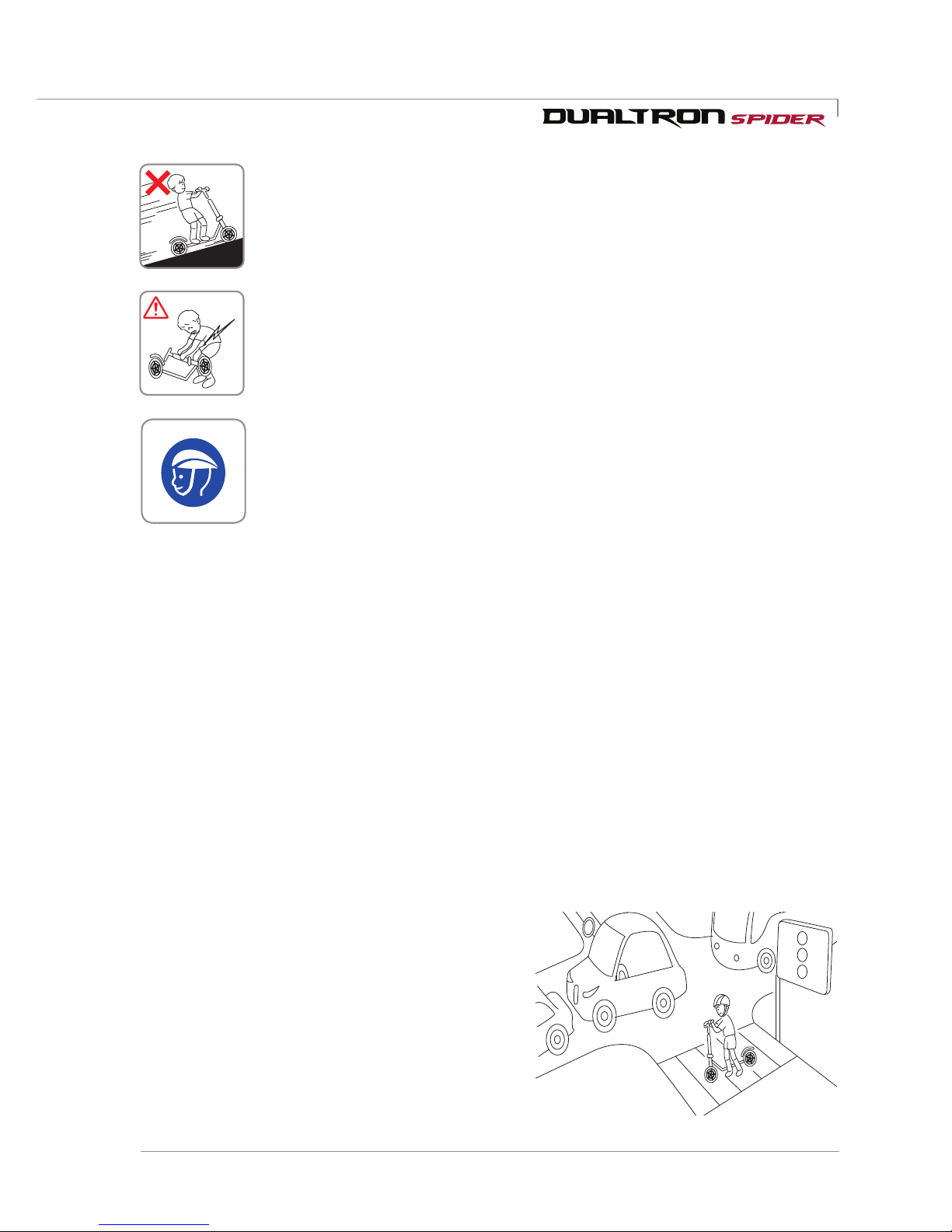
11. Safety warning when lifting the product
If the product is lifted by holding only the handle, there is a possibility that
the product may be damaged due to deformation of the folding part due to
load or movement of the product. When lifting the product, be sure to hold
the product's body (footrest) with one hand and hold the handle with the
other hand so that you do not get hurt in your back or knees.
2) Precaution before driving
Comply with
the related laws
Slow mode is recommended
ElderlyNovice
10. Do not drive on steep slopes
Acceptable gradeabilityis different for each product. Excessive hill roads
exceeding the specification may cause damage to the product(parts) due
to temperature cut, overcurrent or low voltage cut, which may cause the
product to malfunction.
Comply with
the related laws
12. Be sure to wear safety equipment
For the safety of passengers, be sure to wear a full face helmet and the
other protective gear(knee, elbow, hand, upper body) and do not wear shoes
such as slippers, high hills that interfere with driving.
1. Night driving should be avoided in any case, be sure to wear helmets and other guards (knees,
elbows, hands, upper body, etc.) and drive safely.
2. Select the mode that suits you and drive. In order to cope with the sudden situation, exercise
to slow down to hold the brake at all times.
3. When turning left / right, slow down to avoid danger of overturning or slipping., And then
slowly turn safely.
4. To go to backward, it is safe if you getting off from the product after stopping before moving.
5. It is prohibited to use in a slippery place, a crowded place, a steep slope, roads with a risk of
accident, uneven road.
6. When crossing a pedestrian crossing, get off from the product for pedestrian safety.
7. Do not drive in a threat any other means of transport, such as animals, pedestrians, bicycles,
motorcycles, cars, etc.
8. If you pass the speed bumps and obstacles, be
sure to slow down.
9. When decelerating or braking, do not stop with
using foot, but stop with using brake appropriately.
10. Be careful that there is a risk of burns due to heat
from motor and brake (especially disk rotor) after
driving.
11. It is prohibited to drive with all the way by holding
the handle with one hand.
12. Do not ride or drive when the kick stand is down.
Page 6
06
Dualtron spider User Manual
Product structure
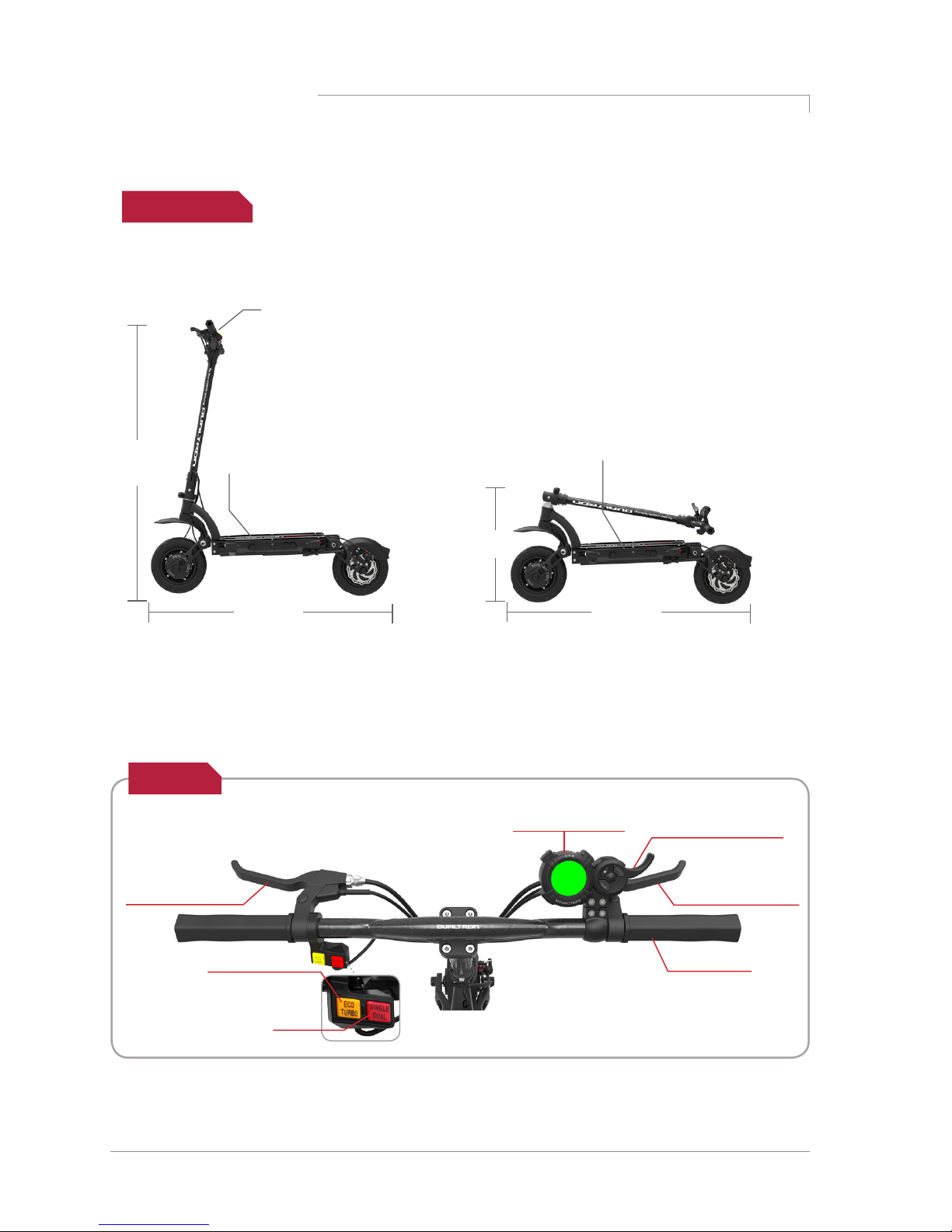
Product size
1180mm
480mm
1130mm
Footrest width 243mm
* Errors may occur depending on the measurement method.
1130mm
Standard
handle width
605mm
* Taller edition
1230mm
Footrest width 243mm
Unfolded Folded
EYE throttle LCD
instrument panel
Index finder
throttle(Accellerator)
Handle grip
Brake lever
(+Electronic brake)
Brake lever
(+Electronic brake)
Motor system
selection button
Driving mode
selection button
Handle
Page 7
Dualtron spider User Manual 07
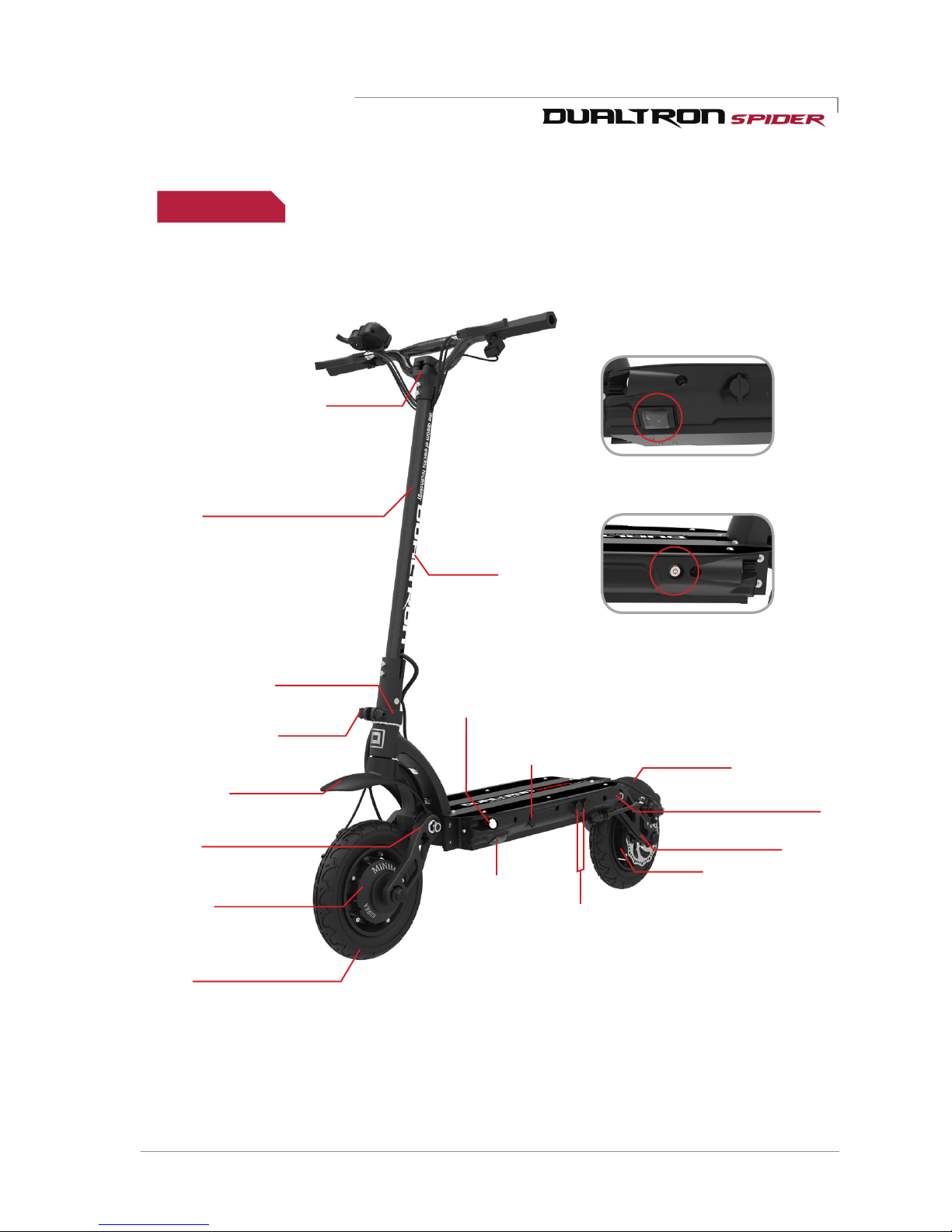
Auxiliary battery
connecting port
Main power
switch
Rear suspension
Rear fender
QR lever
Rear light(Brake light)
Charging port
Front lamp
locking slide
LED bar
Front suspension
Front fender
Front&Rear 10”
tube tire
Front motor
Rear motor
Handle stem
Handle post(Steering tube)
Name of each part
Body frame
Main power switch
LED lamp button
Page 8
08
Dualtron spider User Manual
Product components
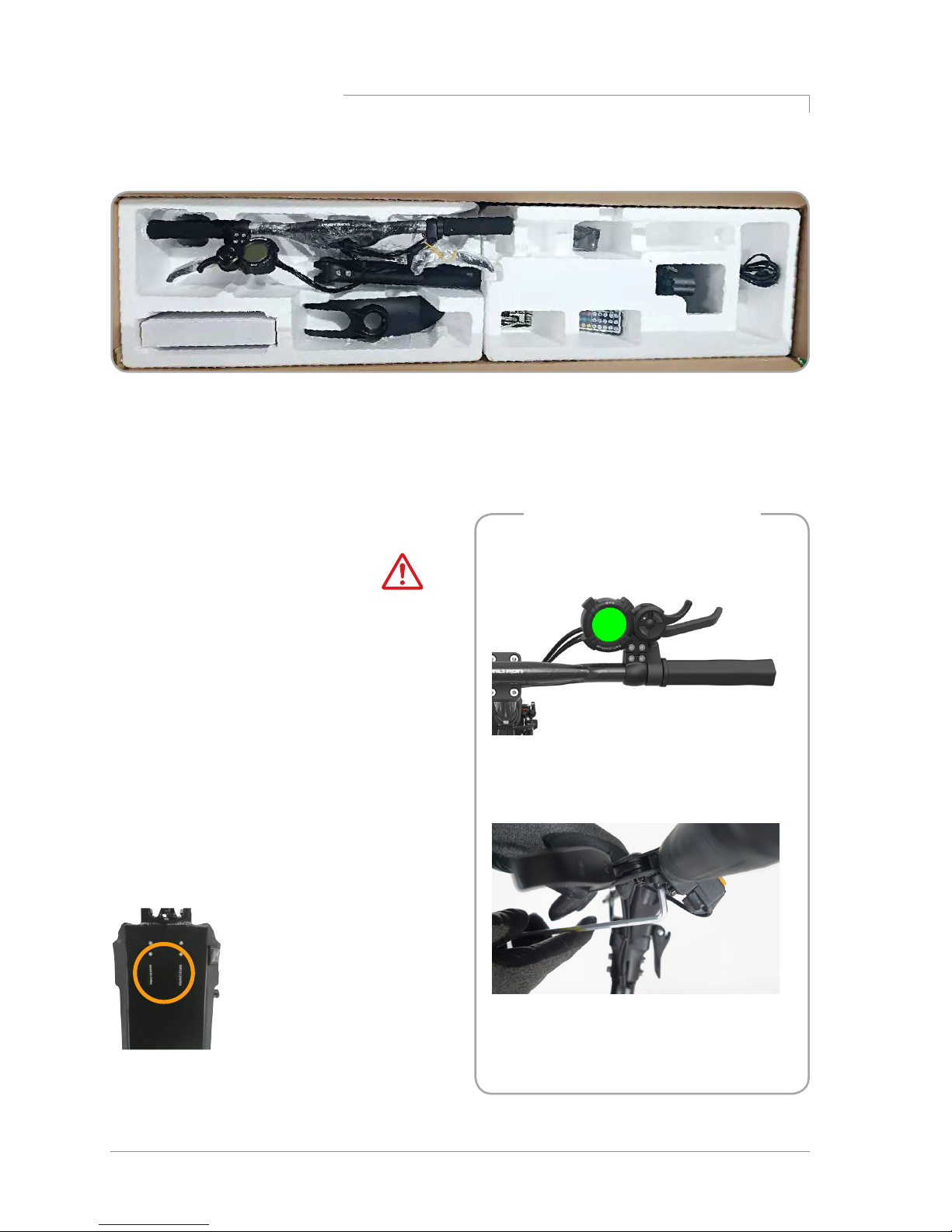
Checking the components inside of the box
Top : Default battery charger(2A), Default tool, User manual, Remote control
Bottom : Body(Lithum battery included)
Charger
Basic tool
Main body
LED Remote
control
User manual
Assembling of the instrument
panel, brake
-Locate the instrument panel and tighten
the fixing bolts.
-Adjust the position of the brake and
tighten the fixing bolts with a 5mm hexagon
wrench.
Make a note of the serial number.
The serial number can be used
to check information such as
date of purchase, warranty
period, etc., and product
information can be checked
even if the product is lost or
stolen.
(May vary depending on branch
office situation.)
Ejecting the productnumber.
Do not hold the handlebar only when lifting the
product from the box.
Please be careful that the fixing slide of the
folding part may be damaged, and a safety
accident such as a part of the body may be
caught.
Therefore, when lifting the product, it is
necessary to raise the handle bar first, and then
slowly lift the body (footrest) of the product with
both hands and do not damage the folding part
Caution
Page 9
Dualtron spider User Manual 09
How to use the product
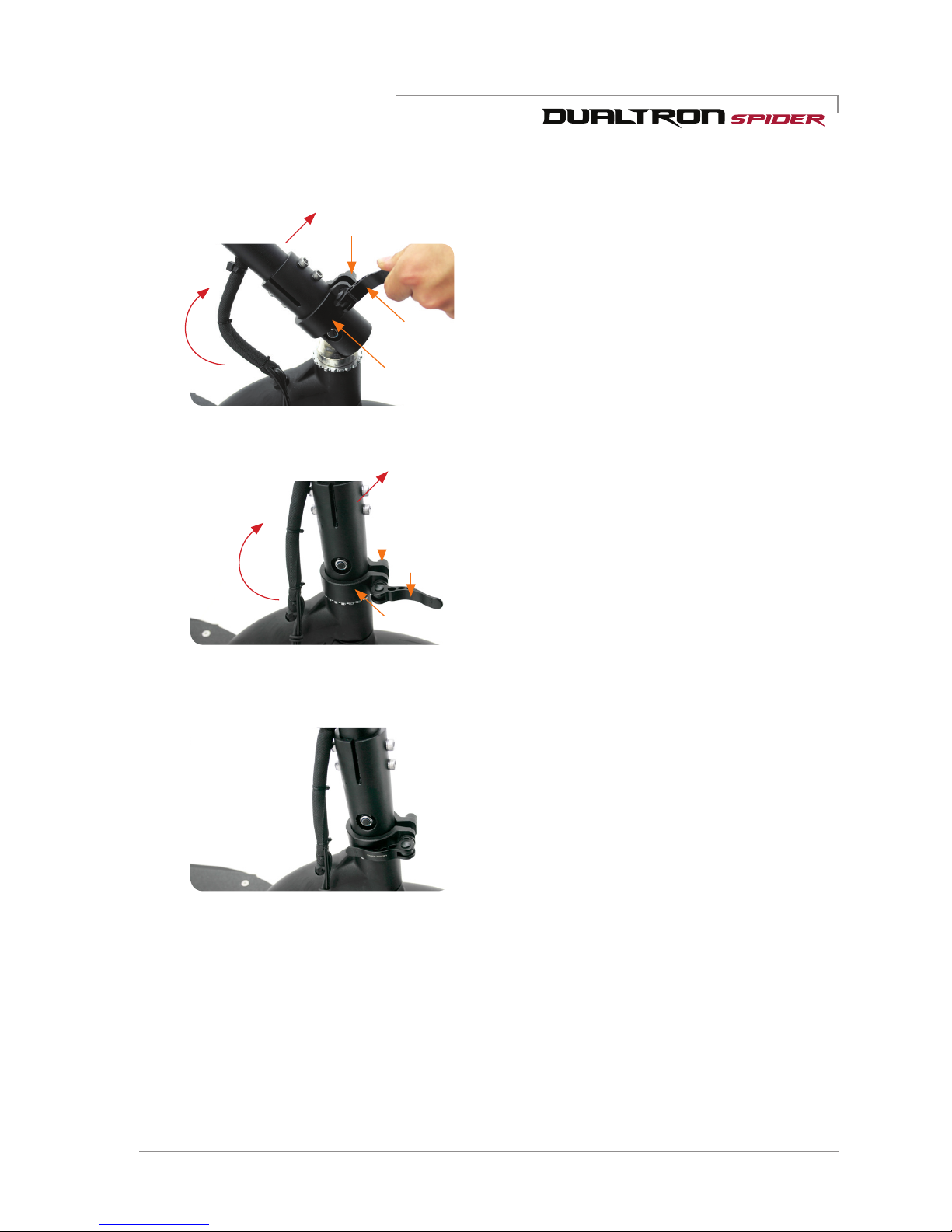
1) Productun folding
QR lever
QR lever
Finishing screw
Finishing screw
Locking slide
Locking slide
2. Raising handle post(Steering tube)
When unfolding the steering tube, raise
the handlebar while pushing the deck with
foot, and then lower the loking slide down
completely and tighten the right finishing
screws.
3. Fixing the folding part
When the QR lever is locked inward as
shown in the picture, the handle unfolding
is completed. If the folding lever is not
completely locked, a safety accident while
driving can be occurred. Before and after
running, always check if there is a play
in the folding part, and a folding part or
handle part, the bolt&nuts of all the fixing
parts of the product are properly tightened
and the fastened parts are not loosened.
1. Raise the handle post(Steering tube)
Release the QR lever, raise the locking
slide upwards, raise the steering tube,
then lower the locking slide downward.
Page 10
10
Dualtron spider User Manual
Tip
How to use a product
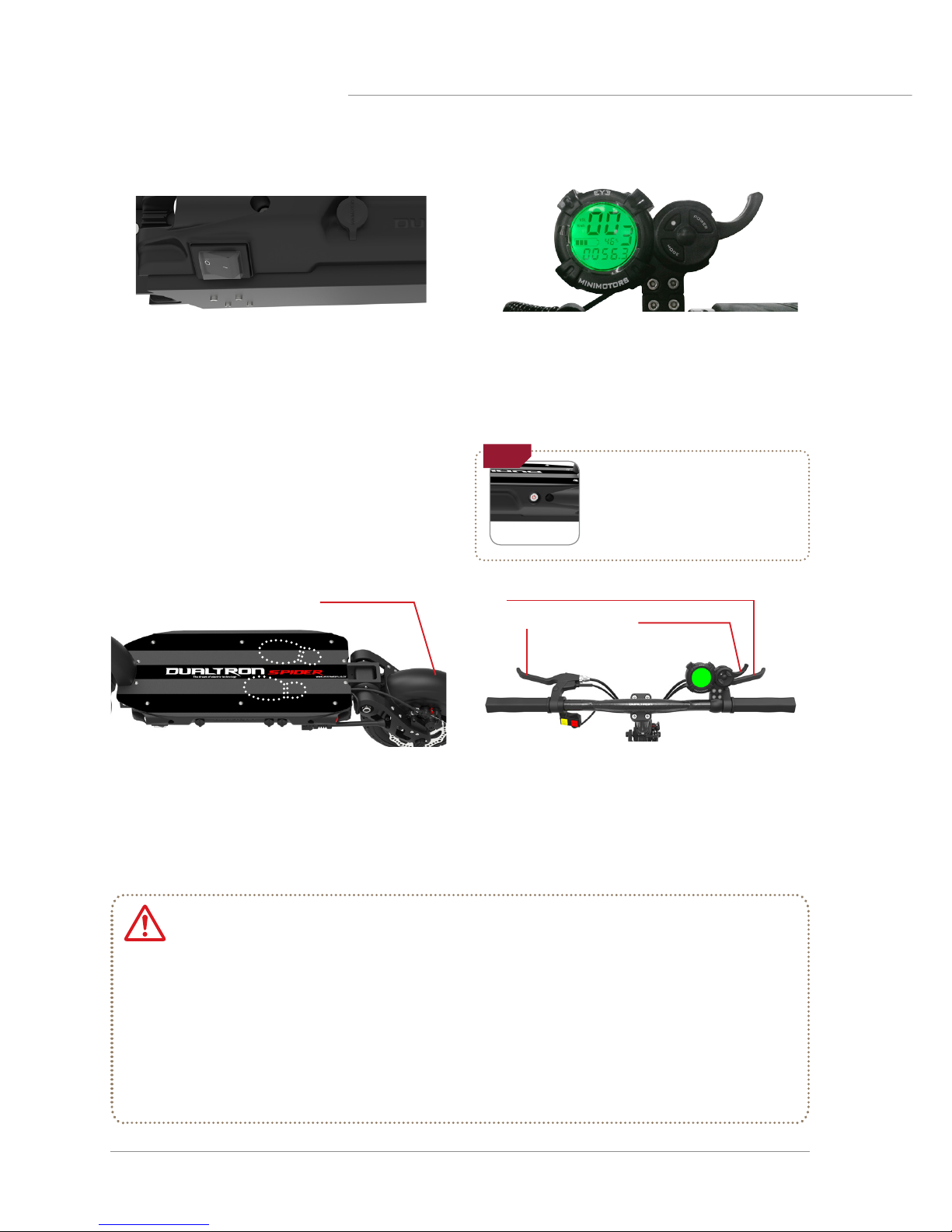
2) How to start
After tilting the kickstand, find a stable
position on the footrest and then hold the
handle grip comfortably. Be careful not to
raise your foot on the rear fender.
Step3. Stance for driving
Acceleration can be performed by using
the throttle of the instrument panel while
driving, and the deceleration or stop can
be performed by holding the brakes on the
handle.
Step4. Acceleration and deceleration
Rear fender
Brake
When turning on the product, you can start
driving by turning on the main power switch
first (when using the built-in battery) and
turning on the power of the LCD panel. When
driving is finished, turn off the LCD panel and
turn off the main power.
* The power of the instrument panel will turn off
automatically after a few minutes of inactivity.
At this time, the LED lamp is also turned off, so
turn it off with the LED lamp button when you
turn it on again, and turn off the main power
switch after use.
Step1. Turning on the main switch
Press the POWER button on the instrument
panel for 2 seconds to turn on the instrument
panel. You can set the start mode, cruise
mode, electronic brake, and ABS function.
Step2. Turning on the instrument panel
Before driving, be sure to check the folding part, the handle part, the part where the
main fixing part of the product
is fastened well. And check the position of the fixing slide,
the QR lever locking status and the folding part fixing status.
Throttle malfunction caution
Regardless of whether the throttle is operated or not, the motor sensor may continue to
operate, causing malfunctions such as sudden acceleration. In this case, holding the brake
lever to cancel the operation. This phenomenon may be caused by corrosion of the throttling,
immersion of the throttle, disconnection of the magnet, broken off levers, and breakage of
the spring. Do not bounce the throttle lever strongly.
Caution
Checklist before turning on
the product
Before turning on the product, turn on
the power with the LED lamp turned off.
Index throttle
LED L amp button
Index finger
throttle
Page 11
Dualtron spider User Manual 11
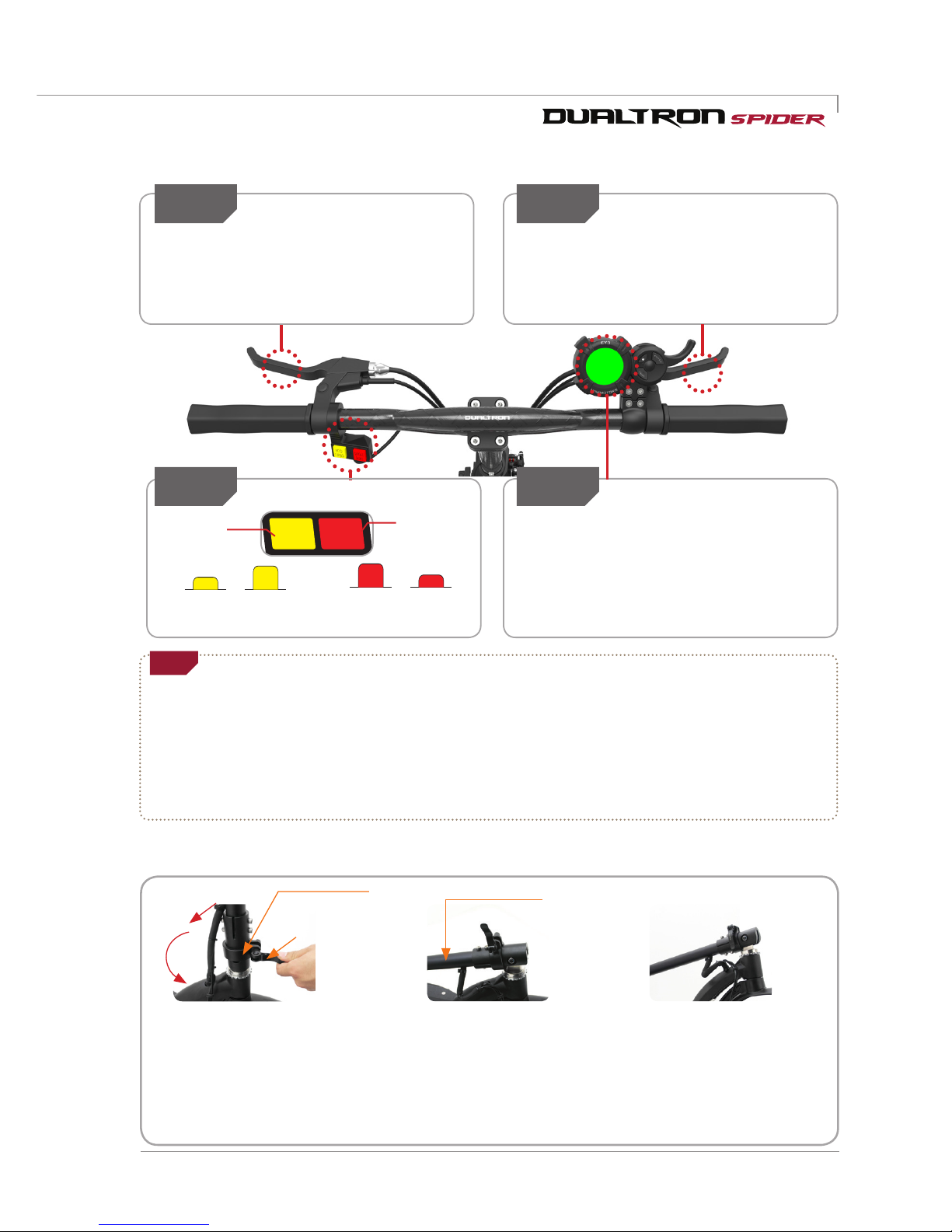
3) How to stop
Step1 Step2
Be sure to use the rear brake first for
decelerating when stopping while driving.
For safe stop, it is necessary to practice slow
down after deceleration with rear brake.
Always use the front and rear brake
levers together to stop smoothly and
safely after decelerating with the rear
brake.
Rear brake use Front brake use
Step4
Set the use and strength of the electronic
brake among the detailed functions of the
instrument panel before driving. When the
brake lever works, the electronic brake works
together to increase the braking force.
Deceleration and braking using
electric brake
ECO
TURBO
SINGLE
DUAL
Step3
•For safe braking, check whether the brake lever and disc caliper connection (wire damage, external breakage, etc.) are
damaged before and after driving, and check brake wear and looseness of brake inner core(Inner wire). In the case of
hydraulic brakes, it is also necessary to check the oil leakage or deficiency and always check that the braking force is sufficient.
•Due to various factors such as road surface condition and speed, it may not be possible to stop when brake is operated as
expected. The electronic brake and ABS functions are auxiliary functions to further increase the braking force and used. The
user should understand the function and expect the operation timing when use this function.
Check for safe braking
Tip
4) Product folding
1. Releasing fixing folding part 2. Folding handle post 3. Fixing folding part
Unfold the QR lever
outwards and pull the
locking slide up, and then
lay the steering tube in the
direction of the arrow.
When folding the steering
tube, hold the post and lower
it toward the deck. Raise the
locking slide up and tighten
the right finishing screws.
Fold the QR lever inward
as shown in the picture
and fix it to complete the
product folding.
QR lever
Locking slide
Steering tube
Driving mode and motor system selection
Driving
mode
Motor
system
Pressed
(Low speed)
Not pressed
(High speed)
ECO
TURBO
Not pressed
(Rear wheel
driving)
Pressed
(Front&rear two-
wheel driving)
SINGLE
DUAL
Page 12
12
Dualtron spider User Manual
P
O
W
E
R
E
Y
E
M
O
D
E
00
00 : 00
Km/h
3
TIME
98
%
PAS
Speed
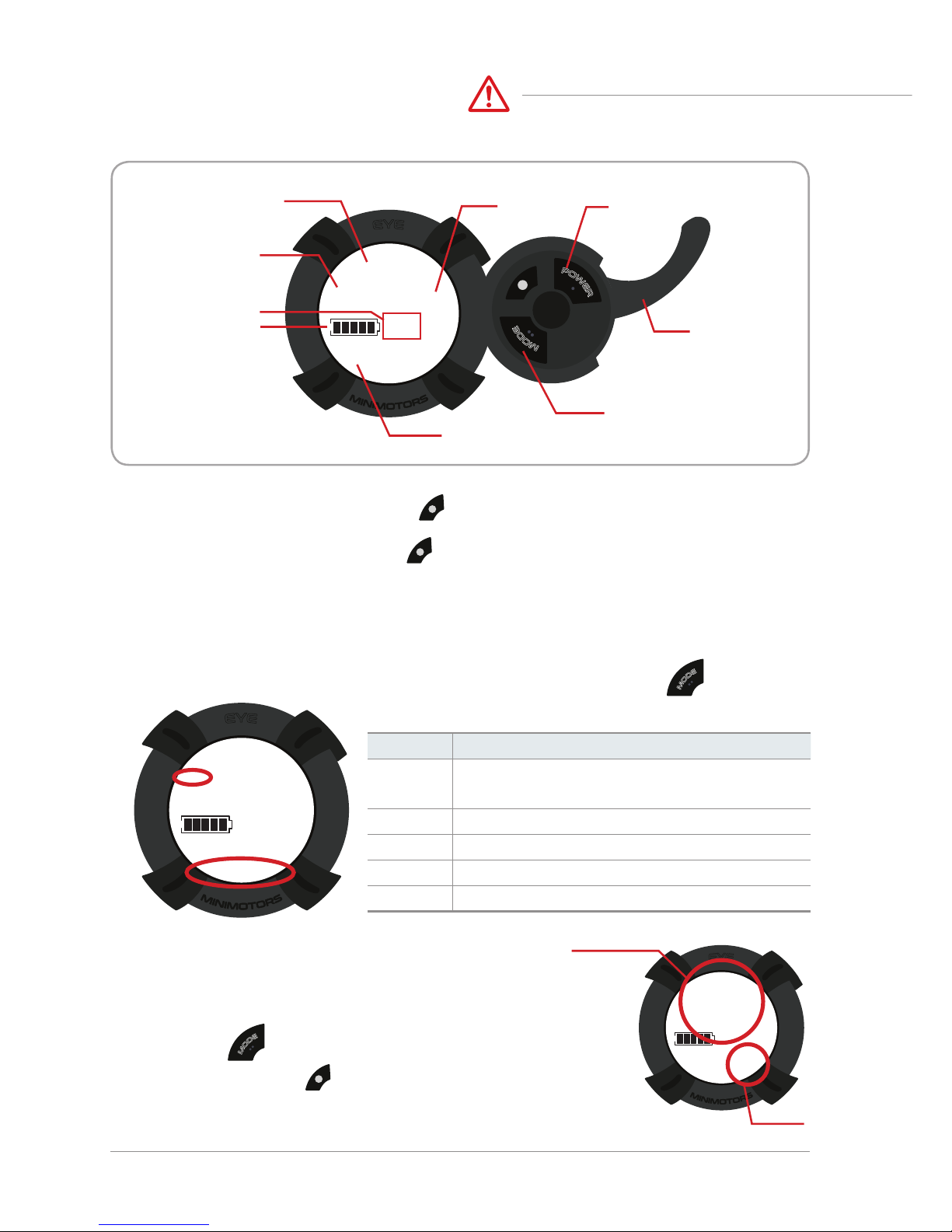
Speed step Power button
Accelerator
index finger
throttle
Speed unit
Battery balance
Driving time
Mode button
P
O
W
E
R
E
Y
E
M
O
D
E
00
00 : 00
Km/h
3
TIME
98
%
PAS
E
Y
E
00
00 : 00
Km/h
VOL
3
TRIP ODO DST TIME CHA
98
%
PAS
P
O
W
E
R
M
O
D
E
P
O
W
E
R
E
Y
E
M
O
D
E
00
00 : 00
Km/h
3
TIME
98
%
PAS
E
Y
E
00
00 : 00
Km/h
VOL
3
TRIP ODO DST TIME CHA
98
%
PAS
E
Y
E
P3
0
Km/h
3
SET
98
%
PAS
E
Y
E
88
98
%
00 : 0088888
Km/h
VOL
TRIP ODO DST TIME CHA
SET RPM OFF
PAS
Mp/h
8
[ M ]
⑥
⑦
⑨
①
②③④ ⑤
⑧
P
O
W
E
R
M
O
D
E
While the instrument panel is on, press to set the speed step. The setting is completed when the
selected speed step value is selected.
1) Speed step setting
Can adjust with button.
P
O
W
E
R
P
O
W
E
R
2) Functions and settings for each main screen
P
O
W
E
R
E
Y
E
M
O
D
E
00
00 : 00
Km/h
3
TIME
98
%
PAS
E
Y
E
00
Km/h
VOL
PAS
M
O
D
E
mode Can adjust with button.
* Blinks 3 times per 10 seconds when the remaining battery power is 10%.
It blinks continuously when the remaining battery power is 0%.
You can change the setting mode by turning on the power of the dashboard and
pressing for 2~3 seconds.
In the setting mode, press once to change the internal setting value
P
O
W
E
R
P
O
W
E
R
E
Y
E
M
O
D
E
00
00 : 00
Km/h
3
TIME
98
%
PAS
E
Y
E
00
Km/h
VOL
PAS
M
O
D
E
3) Instrument panel detailed function
Mode
Discription
TRIP
Current mileage(Press and hold mode
button to reset to '0')
ODO
Accumulated mileage
CHA
Not use
VOL
Current voltage
TIME
Drived time
* If you change the default setting values P0 (10), P1 (60), P2 (10), P3 (0),
correct information will not be displayed.
Setting mode
Setting value
How to use the instrument panel
Caution
Page 13
Dualtron spider User Manual 13
00
00 : 00
Km/h
VOL
3
TRIP ODO DST TIME CHA
Km/h
MINIMOTORS
P3
0
Km/h
SINCE 1999
MINIMOTORS
98
%
TRIP ODO DST TIME CHA
SET RPM OFF
SINCE 1999
MINIMOTORS
98
%
Battery save
1(MAX SAVE)
2(MID SAVE)
3(NO SAVE)
ABS setting
0(OFF), 1(ON)
0(Fixed)
Speed unit
0(Km/h), 1(mp/h)
(1) The start of the cruise function
Select the Cruise function section of the dashboard as 'Settings' and
set the throttle to the same Acceleration.The cruise functionwill start.
(2) End of cruise function
When you hold and release the brake while cruise mode is in effect, the cruise mode is automatically released
Precautions when using the cruise function
* In case of cruise function, please ride in a position where brake can be used immediately so that
cruise function is canceled and braking is possible in preparation for safety situation while driving.
* When switching from dual drive mode to single mode in cruise mode, it is not possible to cancel
cruise mode by using throttle and it is only possible to release by braking.
4) Features of cruise mode (automatic driving)
The cruise control function allows you to maintain the driving speed automatically. Take
advantage of cruise features
The advantage of being able to reduce fatigue when traveling long distances and to increase
mileage of driving due to constant speed driving.
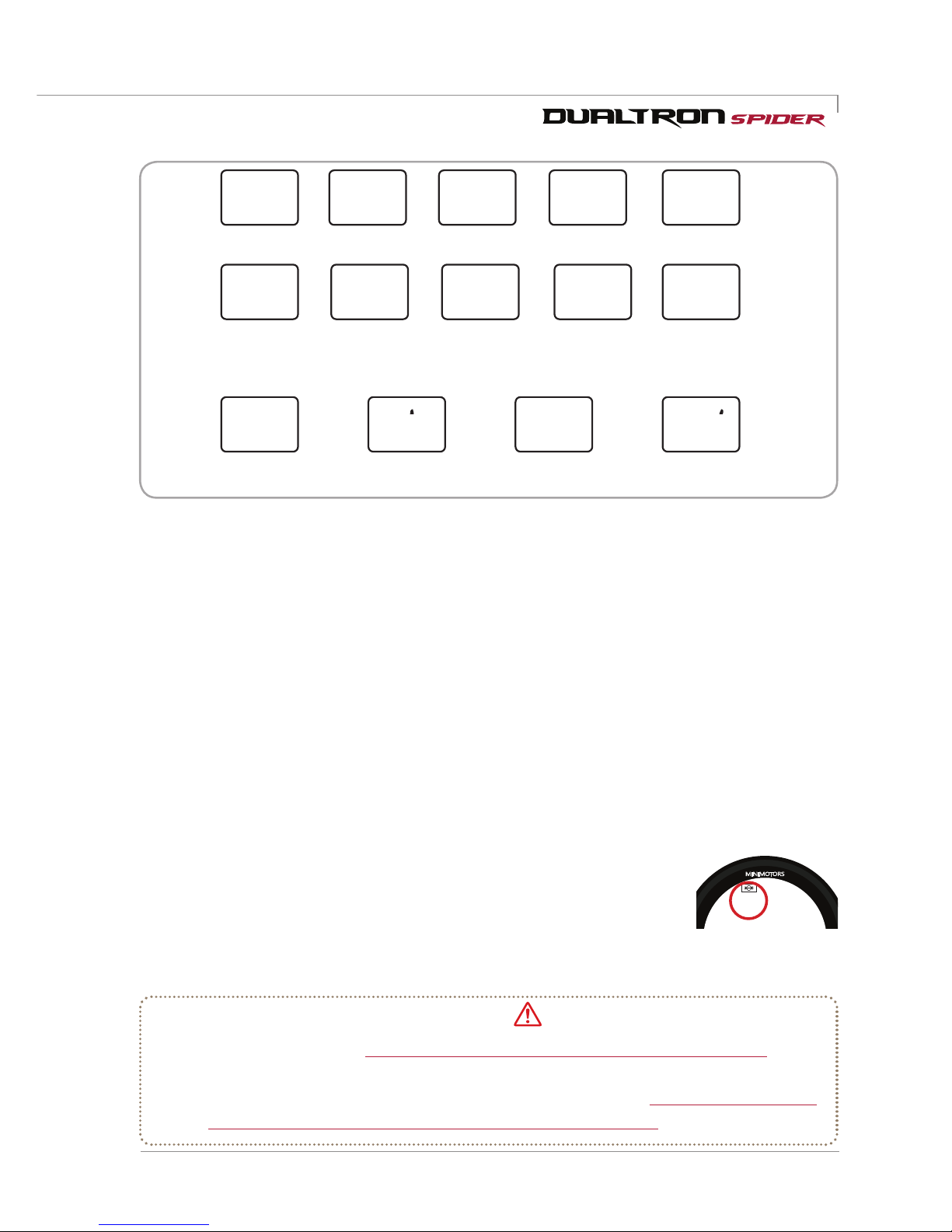
P0 P 1 P2 P3
P4
P5
P9 PAP5 P6 P8
P7
Pa
P7
P9
P8
Pb
P0 P 1 P2 P3
P4
P9P5 P6 P8
P7
PA PCPb
Pb
P0
10(Fixed)
Start method
0(Acceleration start),
1(Kick start)
Slow start
0(Off:Power
start~5(Slow start)
Max output
5~100%
(User adjust)
Electronic brake power
0(Off)~5(Powerful)
LCD brightness control
0(Back light off)~5(Brightest)
Auto off time setting
1~30 minutes
Cruise mode
0(OFF)
1(ON)
60(Fixed) 10(Fixed)
Caution
1. Displayng speed unit selection - P4: 0 (Km/h), 1 (mp/h)
2.Start method selection - P5: 0( Acceleration start), 1 (Kick start)
3.Cruise mode selection - P6: 0(Off), 1(On)
4. Slow start - P7: 0 (Slow start off: Power start) ~ 5 (Slow start)
5. Battery save mode - P9: 1 (MAX SAVE), 2 (MID SAVE), 3 (NO SAVE)
6. Electronic brake setting mode - PA: 0 (Electronic brake off) ~ 5 (Strongest)
7. LCD brigntness adjustment - Pb: 0 (Backlight off) ~ 5 (Highest illumination)
8. Auto off time setting - PC: 1 ~ 30 minutes
9. ABS setting - Pd: 0 (OFF), 1 (ON)
Page 14
14
Dualtron spider User Manual
How to use the instrument panel
ABS OFF
E
Y
E
0
Km/h
SET
98
%
E
Y
E
1
Km/h
SET
98
%
Pb
P0
Pb
P0
E
Y
E
1
Km/h
SET
98
%
Pb
P0
ABS ON
P
O
W
E
R
E
Y
E
M
O
D
E
00
00 : 00
Km/h
3
TIME
98
%
PAS
E
Y
E
00
00 : 00
Km/h
VOL
3
TRIP ODO DST TIME CHA
98
%
PAS
E
Y
E
PA
0
Km/h
SET
98
%
E
Y
E
PA
3
Km/h
SET
98
%
E
Y
E
PA
5
Km/h
SET
98
%
E
Y
E
P3
0
Km/h
3
SET
98
%
PAS
E
Y
E
88
98
%
00 : 0088888
Km/h
VOL
TRIP ODO DST TIME CHA
SET RPM OFF
PAS
Mp/h
8
[ M ]
⑥
⑦
⑨
①
②③④ ⑤
⑧
P
O
W
E
R
M
O
D
E
P
O
W
E
R
M
O
E
Y
E
PA
3
Km/h
SET
98
%
E
Y
E
PA
5
Km/h
SET
98
%
E
Y
E
88
98
%
00 : 0088888
Km/h
VOL
TRIP ODO DST TIME CHA
SET RPM OFF
PAS
Mp/h
8
[ M ]
⑥
⑦
⑨
①
②③④ ⑤
⑧
P
O
W
E
R
M
O
D
E
E
Y
E
PA
5
Km/h
SET
98
%
E
Y
E
88
98
%
00 : 0088888
Km/h
VOL
TRIP ODO DST TIME CHA
SET RPM OFF
PAS
Mp/h
8
[ M ]
⑥
⑦
⑨
①
②③④ ⑤
⑧
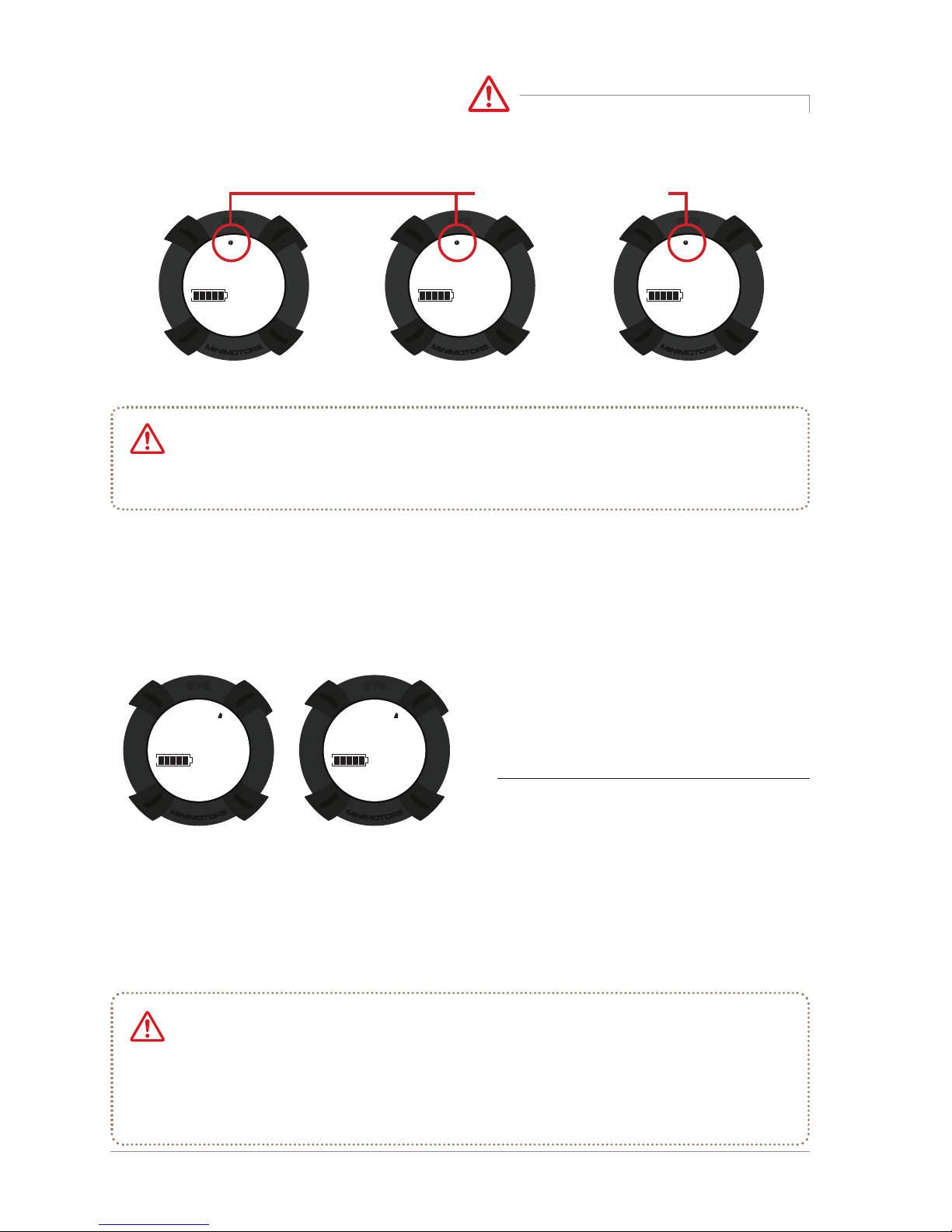
Displayed when the brake
lever is operated
5) Setting of Electronic brake
6) ABS function setting guide
* Precautions when using electronic brake immediately after full battery charge
The electronic brakes do not operate when the battery is fully charged, so be sure to
check and operate this device. When the battery runs out, the electronic brake will operate
normally.
* Precautions when using the ABS function
ABS has the advantage of being able to stop at the shortest braking distance that can be
obtained from the tires and road conditions. However, due to the principle of repeatedly
holding and releasing the brake several times in a second, a lot of vibration occurs in the
motor and the body. Repetitive vibration caused by this may cause frequent loosening of
the motor, rim, fixing part and body fixing bolt.
* ABS brake is an abbreviation of Anti-Lock Brake System. It uses the principle that maximum static
friction force is larger than kinetic friction, so that braking distance (distance from breaking to
stopping) is shorter than that of normal brake. It has the advantage that the vehicle does not slip
well when wheel is rotating.andit is a brake assist system that can stop more safely without wheel
lock and slip.
(1) ABS function ON
Set the ABS function part Pd of the dashboard to 1.
(2) ABS function OFF
Set the ABS function part Pd of the dashboard to 0.
* Pd - When the ABS function is ON, the PA electronic brake function is canceled.
All electric motorcycles are subject to sudden braking, causing the wheels to stop spinning. As a result,
the slip of tire causes the driver to fall down, which can cause accidents. This product is equipped with ABS
brake function to hold the tire lock, enabling more secure braking.
Electronic brake off Moderate intensity
Maximum intensity
Caution
Caution
Caution
Page 15
Dualtron spider User Manual 15
LED BAR funtions
E
Y
E
88
98
%
00 : 0088888
Km/h
VOL
TRIP ODO DST TIME CHA
SET RPM OFF
PAS
Mp/h
8
[ M ]
⑥
⑦
⑨
①
②③④ ⑤
⑧
R
QUICK
FLASH
FADE7FADE3JUMP7JUMP3
SLOW
AUTODIY3DIY2DIY1
DIY6DIY5DIY4
G B W
R
QUICK
FLASH
FADE7FADE3JUMP7JUMP3
SLOW
AUTODIY3DIY2DIY1
DIY6DIY5DIY4
G B W
Maximum intensity
Power button
Automatic conversion mode
Speed control button
Mode change button
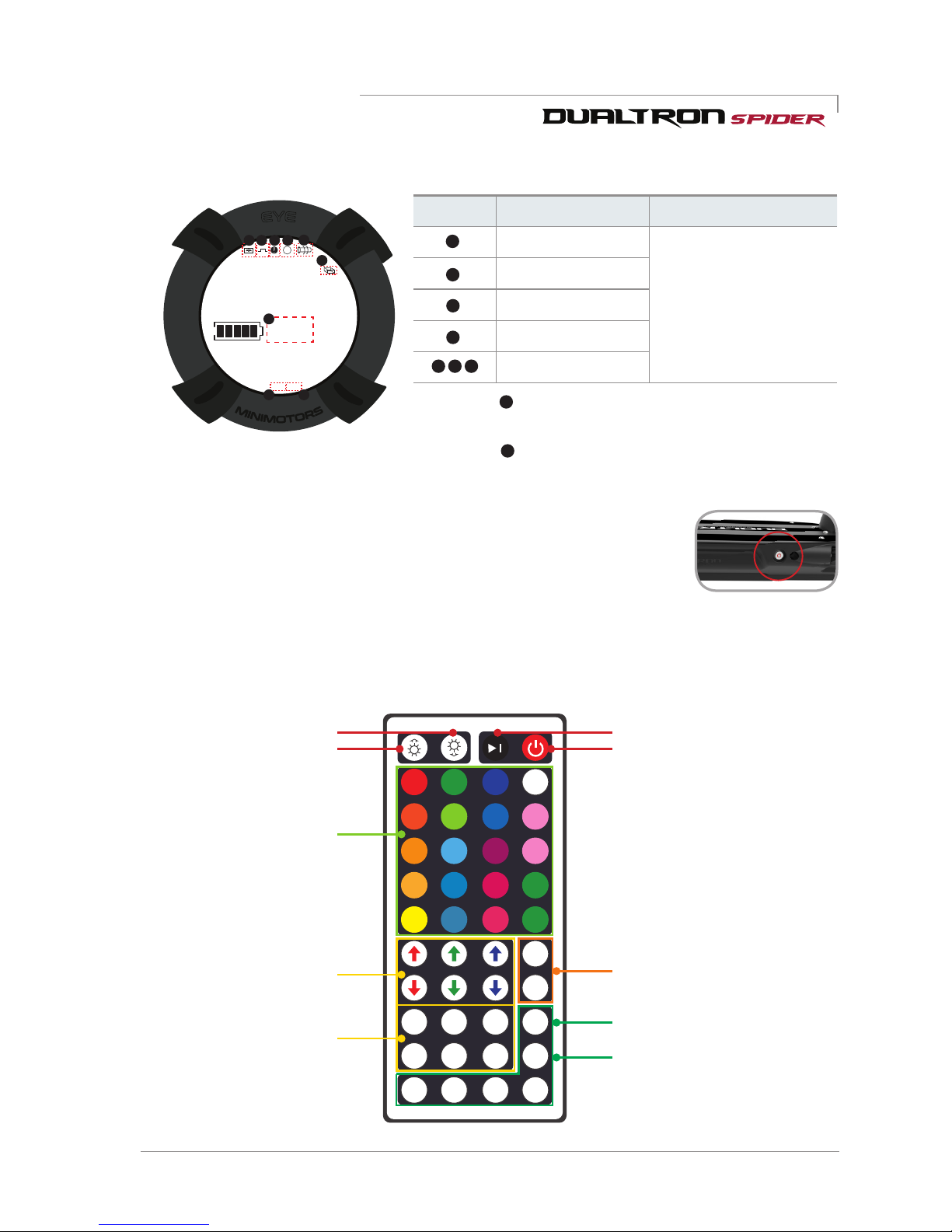
1) LED function guide
When the LED is turned on, the main power is turned on and the LED bar is lit
when the throttle power is turned on. Make sure that the LED lamp button on the
right side of the deck is turned on.
The LED remote control is infrared. Please use the remote control on the right side cover.
Right Side Cover Side
2) Remote control functions and settings
Brigntness adjust button
Color selection button
(20 buttons)
Arrow: Adjust the density
of the color
DIY color selection button
(6 buttons)
After pressing DIY>After
adjusting the color with the
above arrow button>Press
DIY key to save
You can make your own
color by adjusting the arrows.
①
②
①
②
③
④
①
②
③
④
⑤
⑥
①
②
③
④
⑤
⑥
⑦ ⑨
①
②
③
④
⑤
⑧
7) Self-diagnosis through dashboard
Fault type Diagnosis Solution
System error
* If the error information
appears, immediately stop
using the product and take
the scooter to the service
center before use. Excessive
use can result in damage
to the product and safety
accidents.
Motor error
Accelerator error
Controller error
None
* The number is displayed when the cruise function is executed at a
constant speed.
* The number is displayed when the brake lever is operated. (When
the indicator lights, the accelerator does not operate.)
①
①
②
③
LED Lamp button
Page 16
16
Dualtron spider User Manual
2) Basic charging method
*
Failure of the charger and abnormal conditions can cause
electric shock and fire. Learn the correct usage and prevent safety accidents in advance.
5. If the charger lamp does not light,
charger fall, strong external
shock, long time charge, or cable
cover damage, discontinue use
immediately and contact the service
center.
6. Unplug the charger when you are away from
the home for long periods of time.
1.Manufacturers and sellers are not
responsible for any problems
arising from any disassembly,
modification, or mixing with other
chargers.
2. The charger is forbidden to be used
in places subject to high humidity,
heat, flammable materials,
confined spaces, or where there
is no ventilation such as in a car.
3. The charger is not waterproof. It is
thoroughly controlled to prevent
moisture from entering the
charger.
4.Children and pets should not be
allowed to approach the charger
when they come into contact
with them, as they may cause an
electric shock.
7. Use only genuine charger.
8.Do not insert conductors into the charging port.
9. Do not touch the plug for about 10 seconds after unplugging the charger. There is a risk of
electric shock from instantaneous discharge.
10. Do not remove the terminal during charging. Charge the internal circuit of the charger and
cause malfunction.
11. Do not operate the product during charging.
12. Charging terminals should be firmly contacted during charging and should not be used if
terminals are corroded or damaged.
13. When disconnecting the charger from the product, it is safe to hold the terminal without holding the wire.
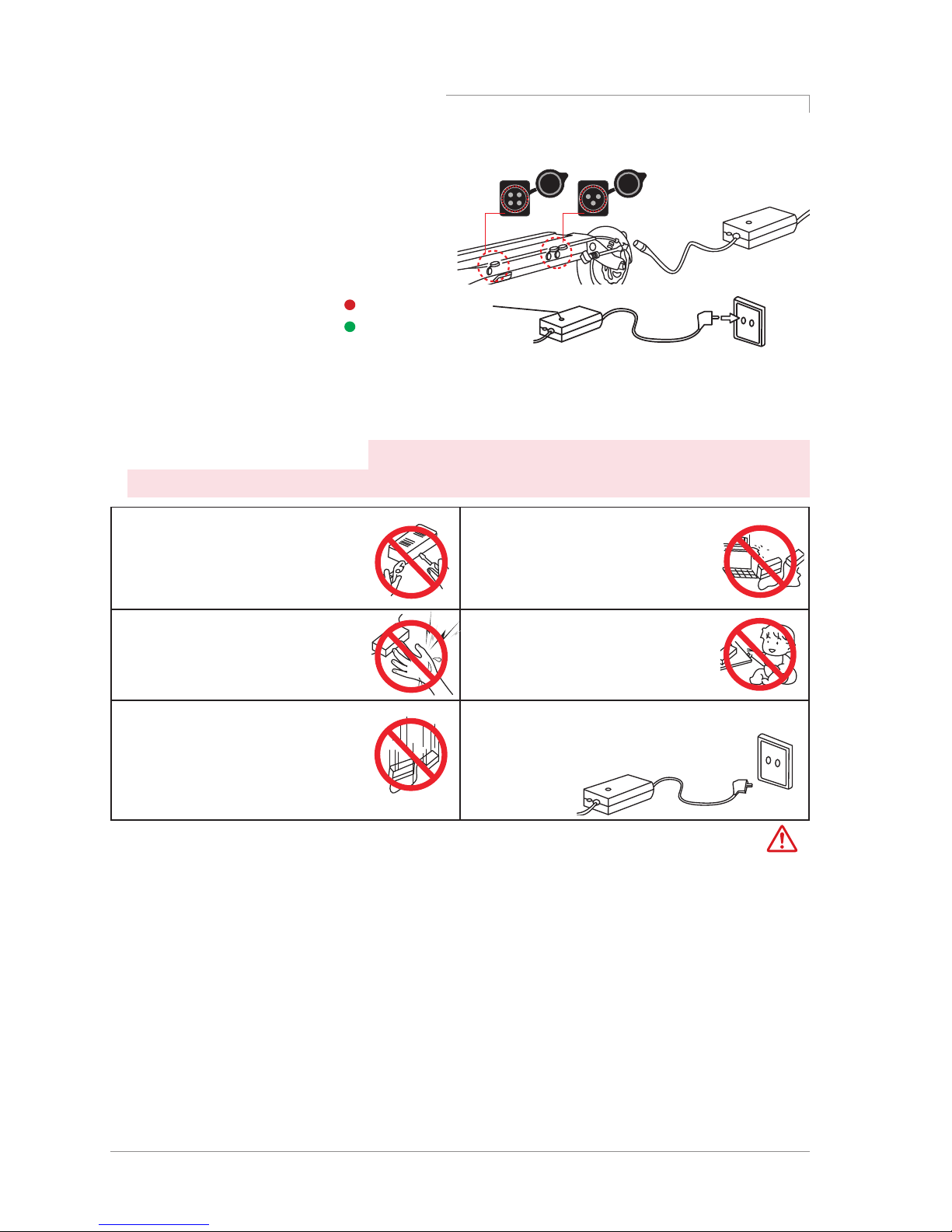
1) Basic charging method
1. Open the chargingport cap and connect
it to the connector of the charger and
connect it to the household outlet.
3. Be sure to close the chargingport cap when driving or storing except when charging.
4. When connecting the connector to the charging port, metallic sparks due to voltage
difference may be splashed, but this is normal
How to use a charger correctly
2. Ch arging status indicator
Charging port
Auxiliary battery
connection port
(Red) Charging
(Green) Charging complete
Warning
Page 17
Dualtron spider User Manual 17
Safety precautions for Lithium battery
Lithium
Battery disassembly prohibited
Battery disassembly, modification and repair are not covered under warranty.
Danger
1. Care
Lithium batteries should be protected from direct exposure to children and pets.
2. Performance
①
Lithium battery is affected by external temperature. In winter, when
the temperature is low, the performance of the battery is temporarily deteriorated and
the mileage and power output is reduced.
② Lithium battery has a characteristic that discharge performance is reduced by more
than 15% when charging / discharging 300 times or more. If usage time is shortened
due to long usage, it should be replaced with a genuine one through the nearest point.
3. Charging
①
Lithium battery should be used only with genuine battery and charger
supplied from the manufacturer. Any problems caused by use of battery made by the manufacturer,
mixed use, or using the charger are not covered by the manufacturer.
②
Charging the lithium battery with a non-genuine charger may cause malfunction or fire.
③
The lithium battery should be charged in a well-ventilated, dry place and around the charger in a
place where there is no inflammable material.
④
Lithium battery should be charged at 0 ~ 45 ℃ and discharged within -10 ~ 60 ℃. Charging or
discharging at a temperature outside this range may cause malfunction, fire or explosion.
⑤
In case of moving from cold outside to warm indoor, please charge it after 1 ~ 2 hours. This is to
prevent condensation from occurring inside the product due to temperature difference.
4. Storage
①
Lithium batteries should be kept away from snow, rain and direct sunlight. Do not store or
charge them in a trunk or hot room. Select a dry place and store at room temperature (10 ~ 20
℃
).
②
When storing for more than 3 months, charge the remaining battery level to 70 ~ 80% (do not
store full charge).
5. Trouble symptom, safety
①
Lithium battery should be discontinued immediately if it is damaged
or leakage of battery, sour odor, appearance deformation, etc., and contact the place of purchase to
get technical support and service.
②
If overheat, smoke or ignition is detected in a product with lithium battery, immediately stop
charging and use, move the product outdoors as soon as possible, and then use a fire extinguisher
to evolve. Do not spray water or immerse the product in order to evolve, which is more dangerous.
③
Lithium battery pack has very high energy density, so if you charge the battery for a long time
in case of short-circuit, leakage, bad battery, etc., there is a possibility of ignition. Therefore, you
should avoid charging for a long time without a person, and charging must be done while the person
is aware that the risk of unexpected fire can be avoided.
6. Misuse
If
the lithium battery is short-circuited or the polarity is changed, or if the battery is
impacted, malfunction or fire may result. If you think that the battery has been impacted, you should
stop charging and using it and visit the nearest point for inspection.
7. Water inflow
It should be controlled to prevent water inflow into the lithium battery. There is a risk
of fire or electric shock if the charger is connected while moisture is present.
8. Caution
Disconnect the battery from the main unit and prohibit recharging, reinstalling, or using
other applications.
9. Disposal
DisposalWhen disposing of the lithium battery, the battery should be separated from the
product at the point of purchase or near the point so that the charge and discharge terminals are not
short-circuited. Dispose of it as industrial waste when disposing of it.
Page 18
18
Dualtron spider User Manual
1) Required checking before use
Safety guidelines before driving
Danger
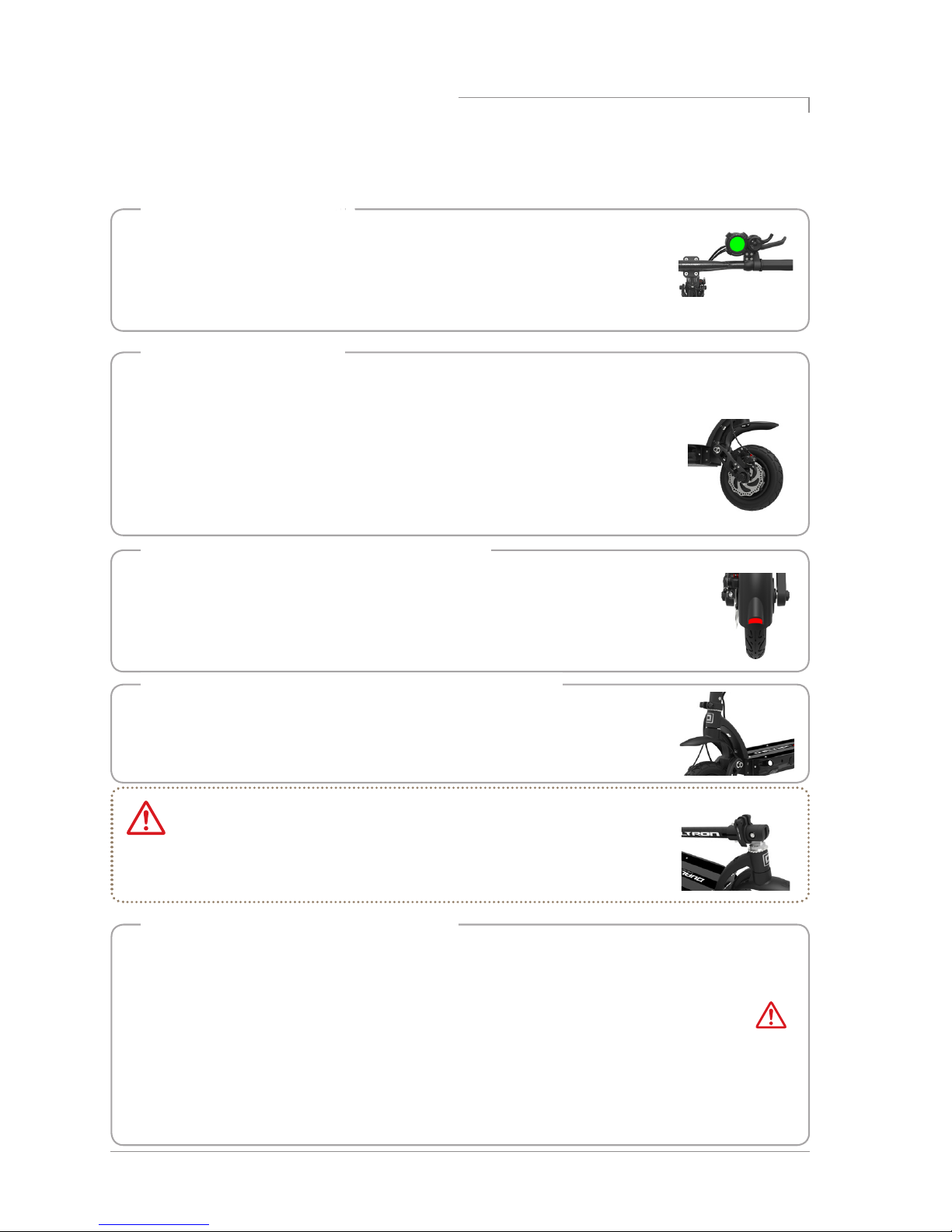
• Check the front and rear tires for wear and punctures and check the proper air pressure
(45 to 50 psi) for the tire. When the shortage of air is shortened, the possibility of
puncture increases, so check always.
• It is necessary to judge the replacement time by observing the appearance of the tire
such as tire damage, uneven wear.
3. Check tire pressure and uniaxial condition
• The brake braking force is sufficient to check the operating condition. If the braking force is significantly
lowered, use it immediately after inspection and action.
• Check that the brake pad is not worn, that the cable is not loose, that the cable is not
damaged, or that there is no leakage in the case of hydraulic brakes.
• If there is an unusual feeling or noise during operation, check for breakage, wear and
deformation of the inner wire of the brake cable.
• Check that the bolts and nuts of the brake fixing parts are not loose, and that the disc
is not deformed or damaged.
2. Check brake and cable
1. Check throttle and handle
• Operate the accelerator throttle lever about 2 ~ 3 times to check whether it returns
to the home position.
• Be careful that excessive throttle leaning and manipulation of the throttle can cause
malfunction due to internal parts damage.
• Check the fastening condition and clearance of the QR lever on the handle.
• Make sure that the bolts and nuts of all parts of the product are tight and free from
loosening. Check the fastening condition and clearance of the folding and fixing
parts of the handle (QR lever, fixed slide, hinge center bolt, headset nut, swing
arm, etc.).
4.Tightening check such as folding part and handle part
*
If there is a folding clearance,
If there is a folding clearance, it can be adjusted with a tongue bolt. However, if
you pull it too hard, it will become stiff without a gap, but it may sound 'crackling'.
In this case, if you adjust the tune bolt properly, the noise disappears and the
clearance is also adjusted.
If you encounter any of the following situations while driving, stop driving immediately and
contact your nearest branch or service center for proper measures. If you provide pictures and
videos to get accurate diagnosis, professional counseling is available..
●
Unusual heating of the motor
●
Brake braking status error
●
Error messages on the instrument cluster
●
When the throttle is returned to its original position
●
When the throttle is returned to its original position
* In this case, stop driving immediately.
Danger
●
abnormal noise is generated
●
Product smoke, ignition, sour odor
●
When rain or wet with water or in a similar situation
●
When other driving is judged to be unreasonable
Page 19
Dualtron spider User Manual 19
Maintenance
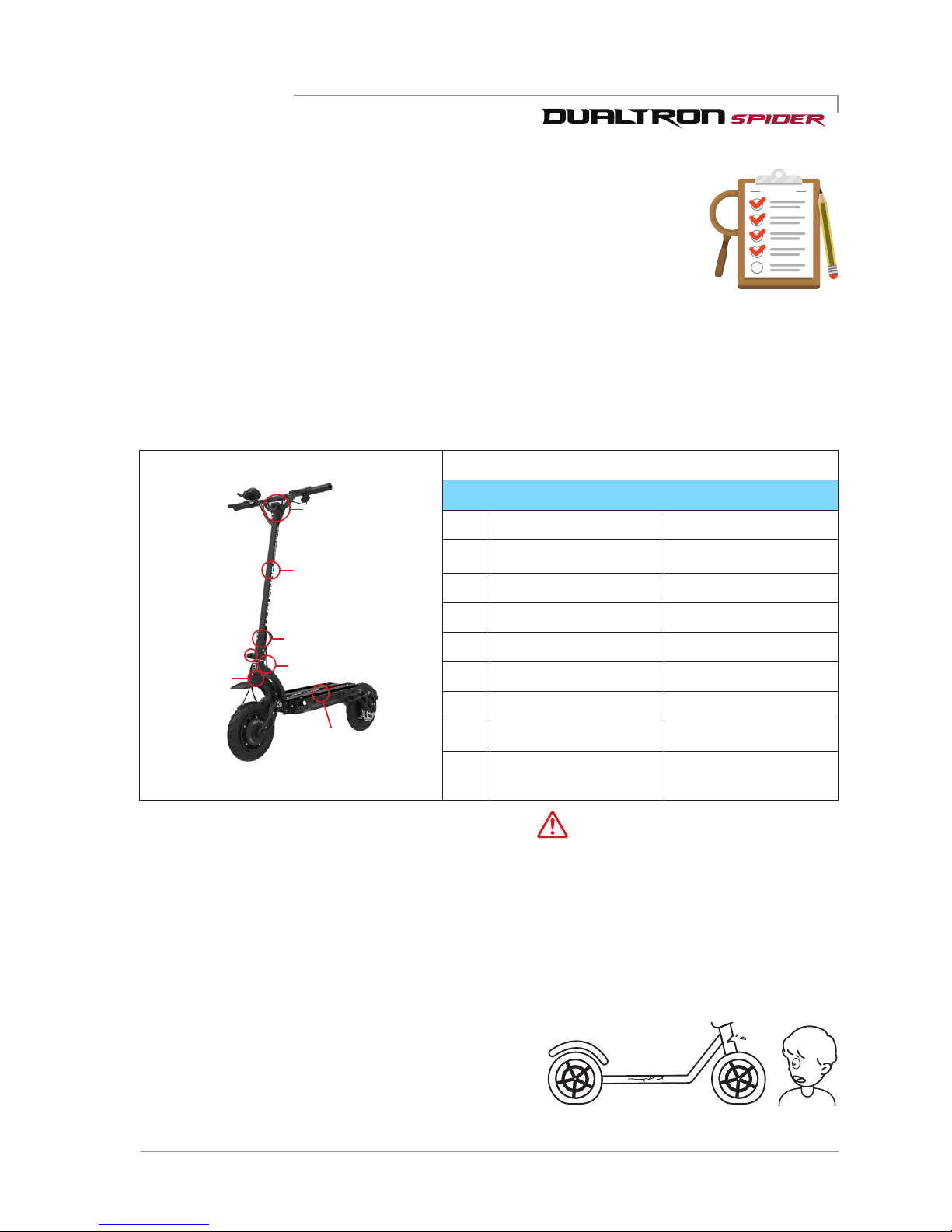
1. Check the replacement timing of consumable parts
CHECK LIST
2) Maintenance and self-maintenance
Electric products can be damaged by various factors. The life span of each part
varies depending on driving habits and driving environment. Parts that exceed the
service life may cause accidents. Let's manage various parts and prevent safety
accidents in advance.
※
The rubber inside the rubber suspension is cured as the consumable parts are used, and the
performance of the suspension is slightly reduced because of the reduced elasticity.
2. External damage inspection by driving environment
①
Replace parts that may be damaged by external driving environment, such as deformation of
parts, cracks due to compression, and signs of exceeding fine gold or life expectancy.
②
If the product is exposed to strong sunlight for a long time, discoloration may occur.
③
In case of heavy driving such as normal jumps, slight impacts such as turning, collision, etc.,
when driving frequently or for a long time in a poor road condition or driving for thousands
of kilometers or more, fatigue breakdown phenomena Please check and replace the parts
replacement schedule for each product for safety.
④
Fatigue breakdown and maintenance parts may
differ from the example conditions depending
on the driving environment and the operating
conditions. Also check parts other than the
replacement cycle (maintenance parts) at all times to check for any signs of abnormality.
Fatigue failure parts and maintenance parts replacement cycle
DUALTRON SPIDER
No. Parts name Replacement cycle / km
1 LOWER HINGE 2YEARS / 7,000
2 HIGHER HINGE 3YEARS / 20,000
3 HINGE BOLT 1YEAR / 5,000
4 STEERING TUBE 3YEARS/ 20,000
5 HANDLE STEM 3YEARS / 20,000
6 LOCKING SLIDE 2YEARS/ 10,000
7 BATTERY 2YEARS / 20,000
8 Other chassis
components
If the exterior is
damaged or deformed
⑥
① inside
⑦ inside
③
②
④
⑤
Caution
①
The components and suspension parts of the car swing arm, tires, tubes, wheels, bearings,
headset bearings, discs, brake pads, cables and folding parts, various brackets and other
consumable parts requiring periodic inspection and always check.
Page 20
20
Dualtron spider User Manual
1. Brake adjustment method
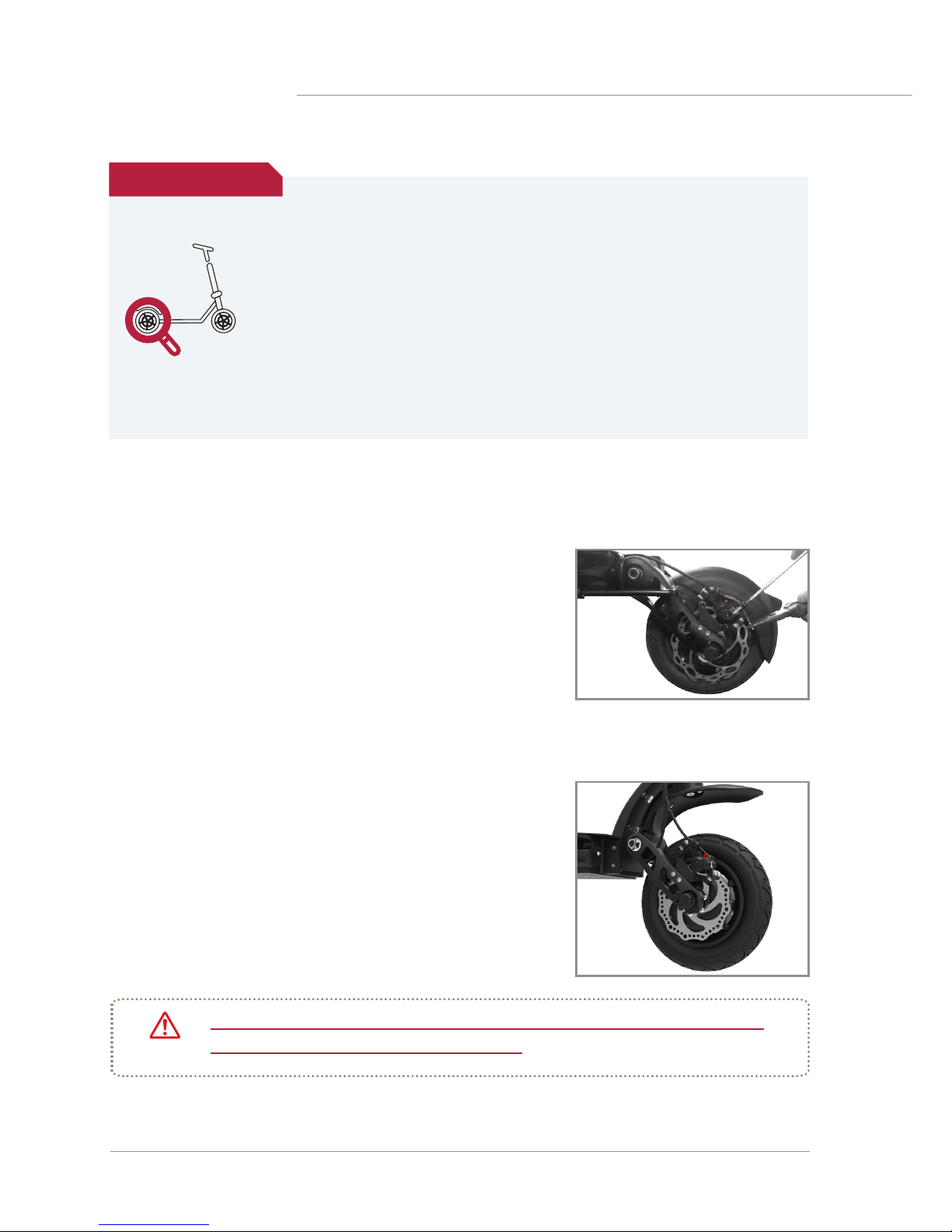
As you continue to use the brakes, the brake pads become
worn out and the gap between the pads and the brake disc
becomes wider. If the braking force drops, use a 5mm
hexagon wrench to loosen the brake arm wire bolt, then lift
the brake arm upwards to adjust the braking force.
Important notice
3) Maintenance by self-maintenance
* Metal vibration may occur due to motor vibration, vibration of the brake disc and pad
during the load section that accelerates during driving. (About 15 ~ 30Km, different for
each product)
This is a phenomenon in which all revolutions (fans, automobiles, ships, etc.) are
vibrating at a specific rotational frequency (rpm) rather than the product. However, if
the continuous noise or metal noise is large, there is a possibility that the disk is bent
and deformed.
* Please note that after running, there is a risk of burns due to the heat on the motor
and brake (especially disk rotor) side.
* Be careful that the bolts of the motor, rim and motor shaft due to the ABS function
may be loosened.
Important notice
2. Causes and countermeasures of disc brake noise
The disc braking method uses a disc brake method with many
electric kickboards because braking power is good. However,
if you get a sharp hissing sound when you hold the disc brake,
dust or sand particles on the ground will spill out on the surface
of the disc, causing foreign substances to be on the brake pads
or disc surface, or bending due to heat or external impact. At
this time, clean the inner surface of the disc by turning the
wheels with a clean, dry cloth, or straightening the bent discs.
If the above measures are not taken, please visit the nearest branch and take a
safety check. There may be another problem.
Caution
Page 21
Dualtron spider User Manual 21
3. Variable rear rubber suspension system (patent pending) adjustment
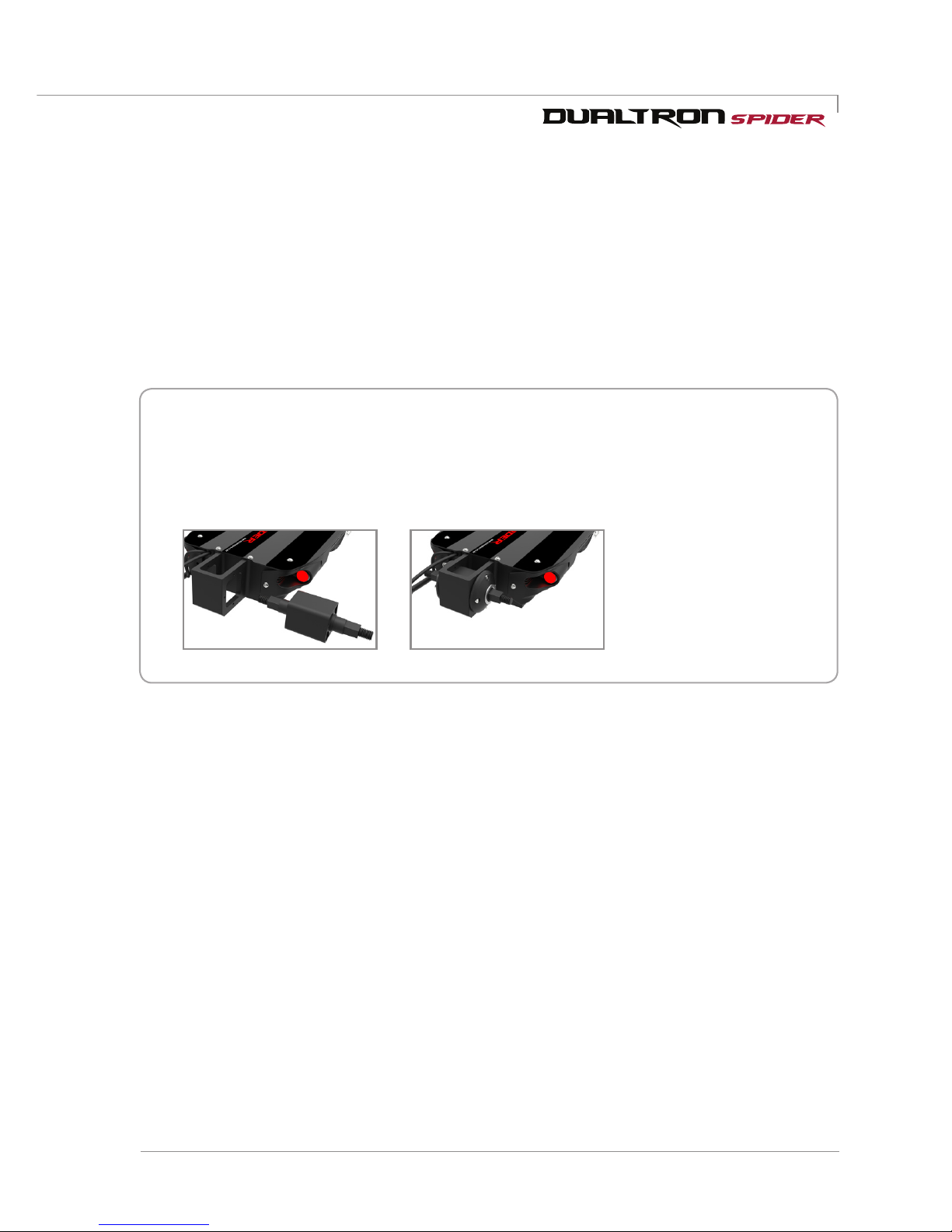
Designed by MINI Motors, 5-step adjustable rubber suspension system allows you to adjust the
suspension strength with rubber cartridge replacement (5 steps).
1. Remove the rear fender with a 3mm hex wrench,loosen the 12mm(motor sider),12mm(swing arm
side) nut, and then loosen the nut to remove the suspension arm.
2. Adjust the rubber cartridge replacement, and desired suspension strength.
■
Rubber Replacement (5th Stage): Replace Cartridge (Adjust height by weight)
Loosen both nuts with a wrench, loosen 3mm bolts and remove. Replace the cartridge
when it is missing.
(It can be changed depending on weight and taste)
3. Align both suspension arms to the desired angle and reassemble using Loctite (screw lock).
Page 22

22
Dualtron spider User Manual
Product Specication
Product Name
DUALTRON SPIDER Note
Motor
MAX 3000W BLDC DUAL HUB MOTOR
Battery type
Li-Ion battery pack
Battery capacity
67. 2V 17.5A h 1050Wh
Charging time (2A)
8.7hr+
When using standard charger(2A)
Charging time (4A)
4.3hr+ When using 2EA of standard charger(2A)
Charging time (6.5A)
2.6hr+
When using quick charger(6.5A, Optional)
Charging time (8.4A)
2hr+
When using quick charger(6.5A)+Standard
charger(2A)
Max mileage
60km
75±5kg load, 25km/h flat road continuous riding
Max Speed
60km/h
Speed adjustment function on the throt-
tle display. Single, Dual mode seletion
on the handlebar.(Single, Dual motor
selection function)
Folding
Handle post two touch double folding Patent pending
Gradeability
Around 47% (25°)
Weight, road condition, battery status, tem-
perature can affect to the gradeability
Max load
80kg
Product weight
Around 19.9kg
Unfolding size
1130 x 605 x 1180mm Length x Width x Height
Folding size
1130 x 243 x 480mm Length x Width x Height
Dashboard
EYE throttle
(Bettery level, TRIP, ODO, Time,
Speed display and mode change.)
Cruise / Electric brake / Auto save
function(3minutes)
Light
Dual LED lamp&taillight,
brake light is built in
DC to DC converter is built in(12V 3A output)
Brake
Disk brake(Front&Rear) +ABS Common use for front and rear wheel
Suspension
Front -Rubber Suspension
Rear-5 kinds of rubber cartridge
replaceable design
Rubber cartridge normal is applied
basically(Soft, Medium soft, Hard, Medium
hard cartridge is optional/Patent pending)
Tire
10inch(10x2) tube tire
(Proper air pressure 45~50psi)
Product material
Frame and handle: Aviavion aluminum forging alloy, 6082-T6, Ultralight Carbon Fibre,
Shaft: SCM440, Covers: Polypropylene
*The specification can be changed by manufacturer without notice to improve the quality and safety for users.
*The distance can be affected by loaded weight, wind direct (wind speed), road condition, slope
and tire condition.
Page 23
Dualtron spider User Manual 23
MEMO
Page 24

DUALTRON SPIDER
Electric Scooter
User Manual
www.dual-tron.com
Zhejiang Minimotors Bike Co., Ltd.
No.1, Baolong road, Lanjiang Street,
Lanxi Economic development zone,
Jinhua city, Zhejiang province, China
Tel : +86-177-0657-4477
Since 1999
 Loading...