

Page 1

DQ-MINI
User Manual
DUALi Inc.
Document Version: 1.00
Last Revised Date: 16
Copyright ⓒ 2016 DUALi Inc. All rights reserved. You are strictly prohibited to
copy, disclose, distribute, or use this document in part or as a whole for any
purposes other than those for which this document is disclosed. This document is
copyrighted and contains confidential information and other intellectual property
rights of DUALi Inc. Any unauthorized use, copy, disclosure or distribution
constitutes infringement of DUALi’s intellectual property rights.
th
. Oct 2018
Page 2

DQ-MINI User Manual, Version: 1.00
Revision History
2018.10.16 (Ver. 1.00) : First Release
www.duali.com 2
Page 3

DQ-MINI User Manual, Version: 1.00
DUALi Inc. reserves the right to make changes to its applications or services or to
discontinue any application or service at any time without notice. DUALi provides customer
assistance in various technical areas, but does not have full access to data concerning the
use and applications of customer's products.
Therefore, DUALi assumes no liability and is not responsible for customer applications or
software design or performance relating to systems or applications incorporating DUALi
products. In addition, DUALi assumes no liability and is not responsible for infringement of
patents and/or any other intellectual or industrial property rights of third parties, which may
result from assistance provided by DUALi.
Composition of the information in this manual has been done to the best of our knowledge.
DUALi does not guarantee the correctness and completeness of the details given in this
manual and may not be held liable for damages ensuing from incorrect or incomplete
information. Since, despite all our efforts, errors may not be completely avoided, we are
always grateful for your useful tips.
We have our development center in South Korea to provide technical support. For any
technical assistance can contact our technical support team as below;
Tel: +82 31 213 0074
e-mail : [email protected]
FeliCa™ is registered trademark of SONY Corporation.
®
Mifare
is registered trademarks of NXP Semiconductors
www.duali.com 3
Page 4

DQ-MINI User Manual, Version: 1.00
CONTENTS
01. Introduction ................................................................................................................................................. 5
02. Specification ............................................................................................................................................... 5
03. Contents Confirmation .......................................................................................................................... 6
04. Appearance & Installation .................................................................................................................... 7
04.1 DQ MINI Feature & Dimension ....................................................................................................... 7
04.2 Mounting DQ Mini on the wall ........................................................................................................ 7
05. Connection Diagram ............................................................................................................................... 9
06. Operation & Usage ................................................................................................................................ 10
07. Output Format ......................................................................................................................................... 11
08. Function configuration (Communication setting) ................................................................ 12
08.1 QR Mode option set .......................................................................................................................... 13
08.2 QR Reading timeout ......................................................................................................................... 14
08.3 QR scan interval set ......................................................................................................................... 15
08.4 QR Maximum length set ................................................................................................................. 16
08.5 QR data send channel set ............................................................................................................. 17
08.6 RF Scan option set ........................................................................................................................... 18
09. Certifications ............................................................................................................................................ 19
10. Warranty & Service ............................................................................................................................... 20
www.duali.com 4
Page 5
DQ-MINI User Manual, Version: 1.00
01. Introduction
DQ-MINI is a wiegand access control reader based on 13.56 Mhz contactless card
communication technology with stylish and rugged design. And it also can read QR code and
1D/2D barcode.It can be installed stably both indoor and outdoor. The ideal combination of NFC
& QR reader could upgrade your application into another level. The reader is designed for wall
mounting type of Access / Time attendance & parking management systems, and etc.
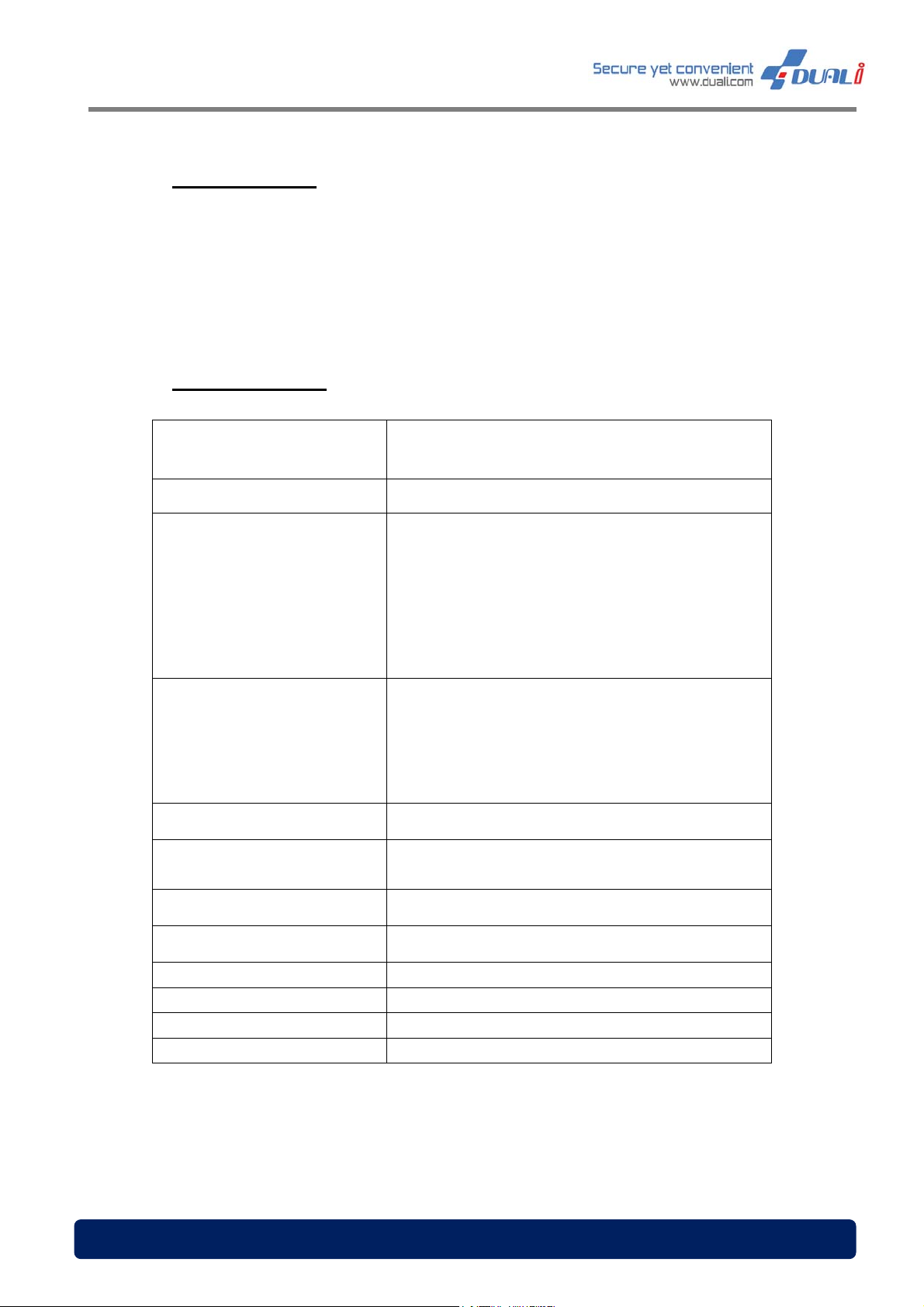
02. Specification
Communication Interface
Operating Frequency
RS-232 – 115200bps
13.56MHz
Credential Type
1D/2D QR
Recognizable spec
Indicator
Power Supply
Operating Condition
Storage Condition
Housing Material
Dimensions
Cable length
Certifications
Contactless
> ISO 14443 TYPE A and B
UPC/EAN, UPC/EAn with Supplementals, Bookland
EAN, ISSN, UCC Coupon Extended Code, Code128,
GS1-128, ISBT 128, Code 39, PDF417,
MicroPDF417, Composite Codes, Data Matrix,
Maxicode, Qr Code, micro QR, Aztec
LED (RED /BLUE)
Magnetic Buzzer
12VDC
Linear supply recommended, 200 mA @ 12 VDC
> -4º to 158ºF (-20º to 55ºC guaranteed)
> 5% to 90% relative humidity
> -4º to 158ºF (-20º to 80ºC) >
> 5% to 90% relative humidity
PC (polycarbonate)
99.3(mm) x 91.9(mm) x 88.4(mm)
1000(mm)
FCC Certification (US), CE(EU)
www.duali.com 5
Page 6
DQ-MI
a
M
n
o
b
<
r
NI User
anual, Ve
rsion: 1.0
0
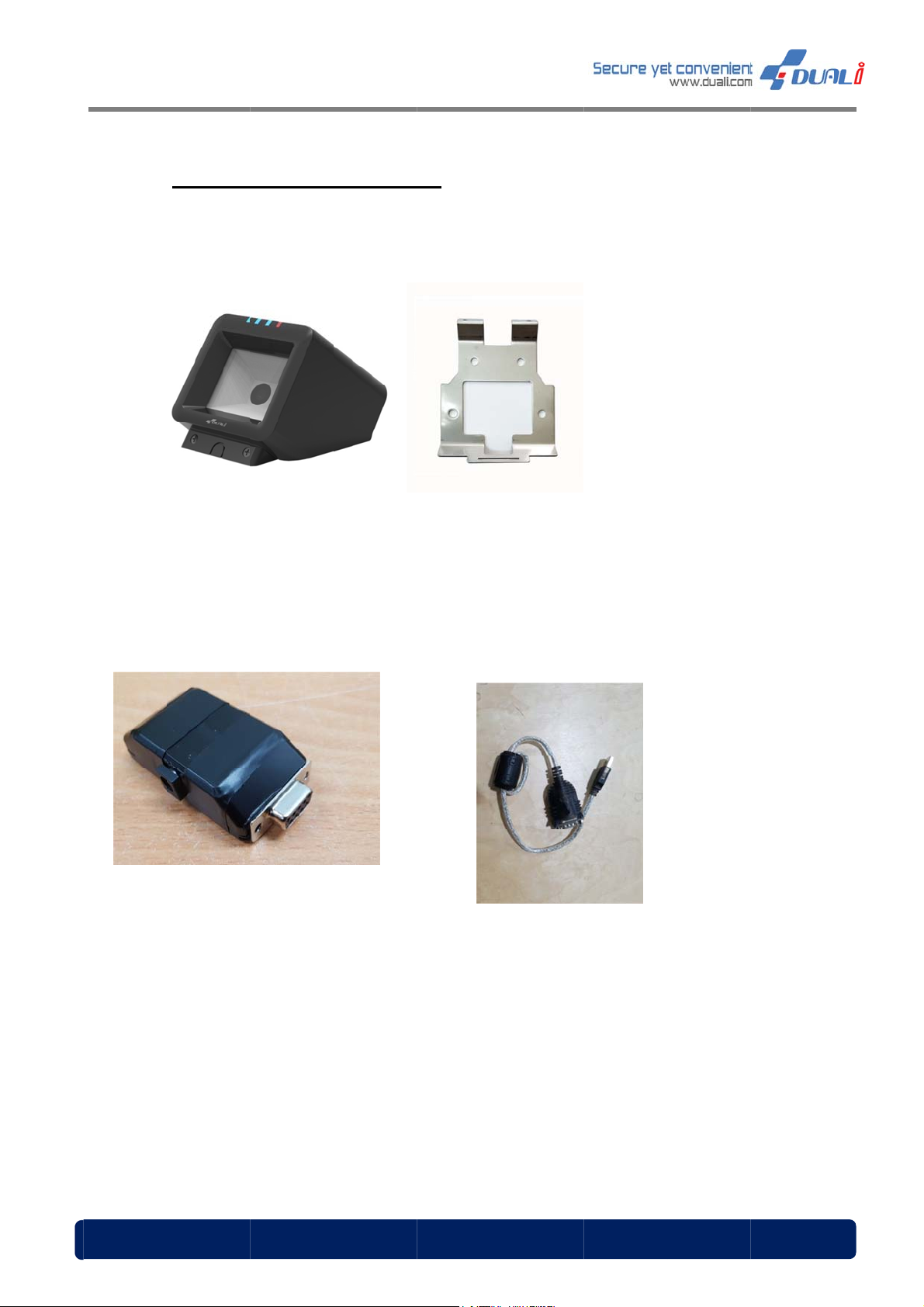
03.
Conte
< DQ
ts Con
Mini >
firmati
n
< Wall
racket >
www.du
< Zi
li.com
g Board >
USB to Se
ial cable>
6
Page 7
DQ-MI
a
1
2
M
r
&
&
i
e
i
w
CcIst
y
u
n
c
n
d
e
d
e
t
h
NI User
anual, Ve
rsion: 1.0
0
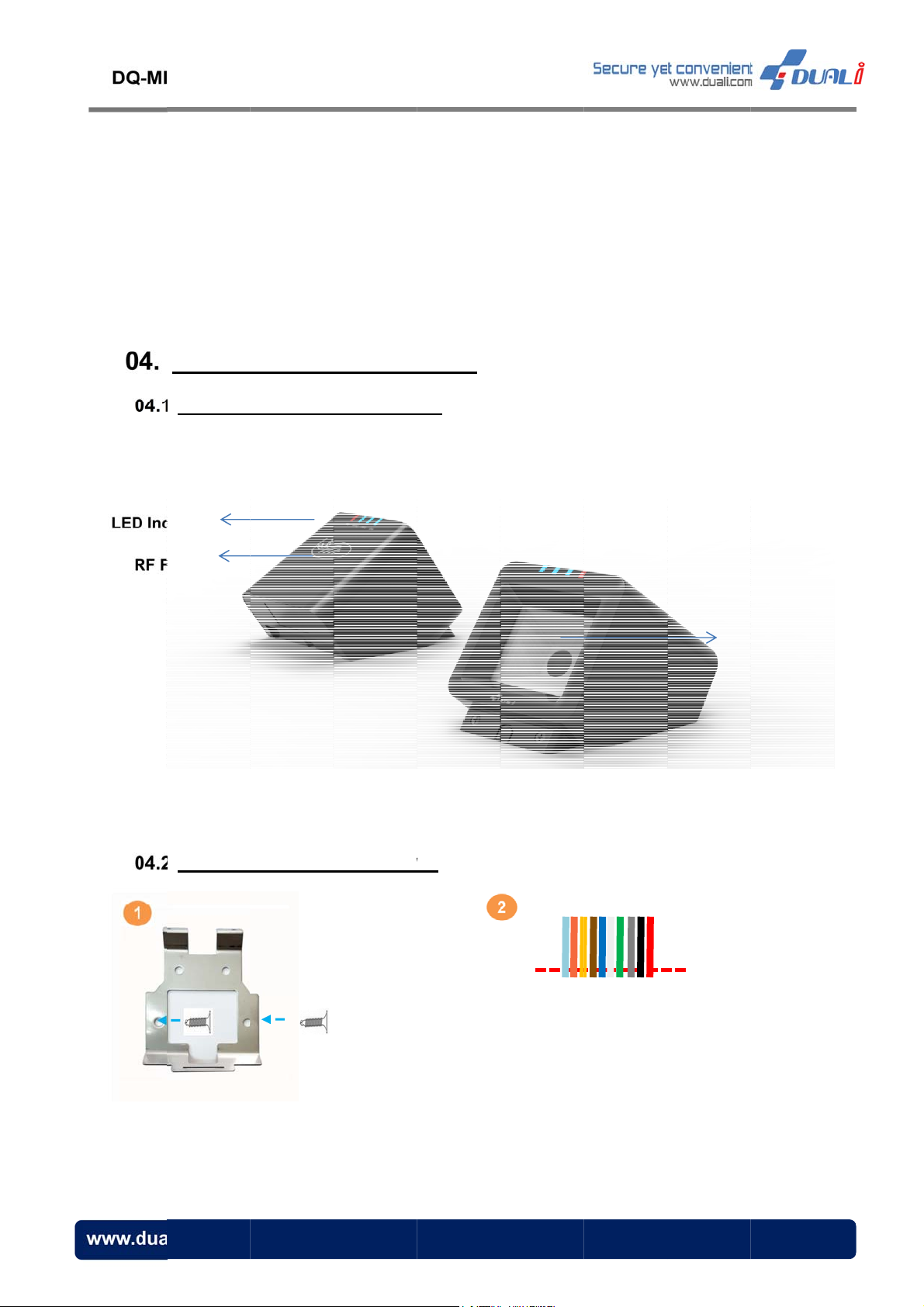
04.
04.
Appea
DQ MINI
icator
ield
ance
Feature
Install
Dimens
ation
on
04.
Mountin
g DQ Min
on the
all
onnect the
able to DQ
power and
MINI’s termi
ommunicati
nal block.
1/2
D barcode
etector
on
<Bracket >
www.du
li.com
Φ4mm Flat h
ad screw
n case you
hipped, yo
he cable a
ou need for
on’t use th
could cut
d use only
connection.
cable as i
off the end
the wire t
is
of
at
7
Page 8
DQ-MI
a
M
d
a
s
f
c
e
f
o
c
u
y
s
c
h
g
e
o
e
e
h
m
u
b
f
a
e
n
h
n
f
m
n
e
NI User
anual, Ve
rsion: 1.0
0
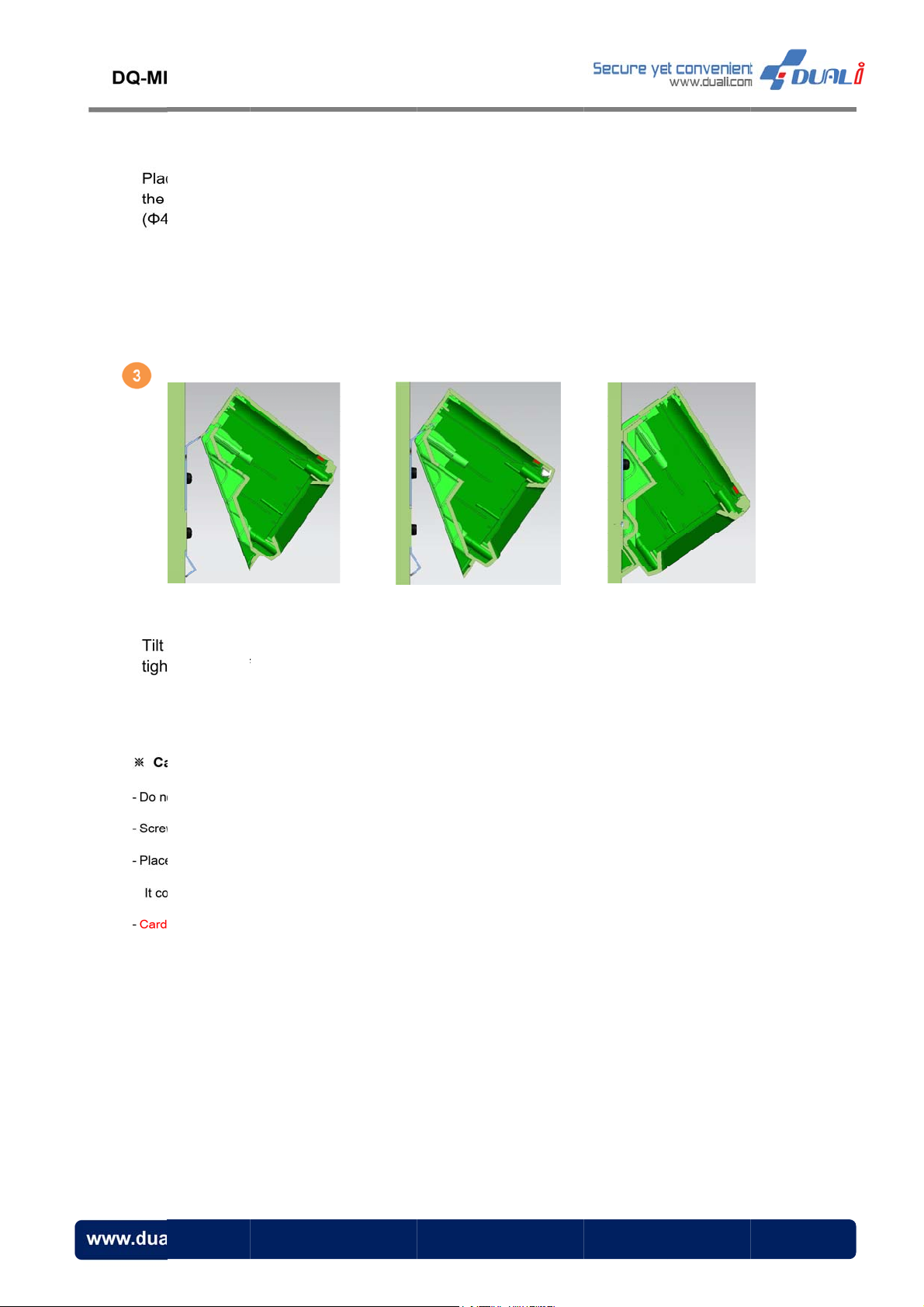
e the provi
wall and
mm Flat he
ed wall mo
fix it tightl
d)
nt bracket
with scr
n
w
the device
tly with 3*4
ution
t push the bra
has to be sel
the reader to
uld cause a pr
reading distan
lightly and
lat head ma
ket too hard w
cted dependin
lat panel betw
blem to assem
e can be short
insert to th
hine screw.
en fixing it to t
on the wall’s
en the wall mo
le the device i
if the wall is m
<Side Vi
wall mou
e wall.
aterial and co
nt bracket and
the bracket is
de of steel or
w>
t from the t
dition
the wall.
bent.
etal.
p as abov
step. Fix i
t
www.du
li.com
8
Page 9
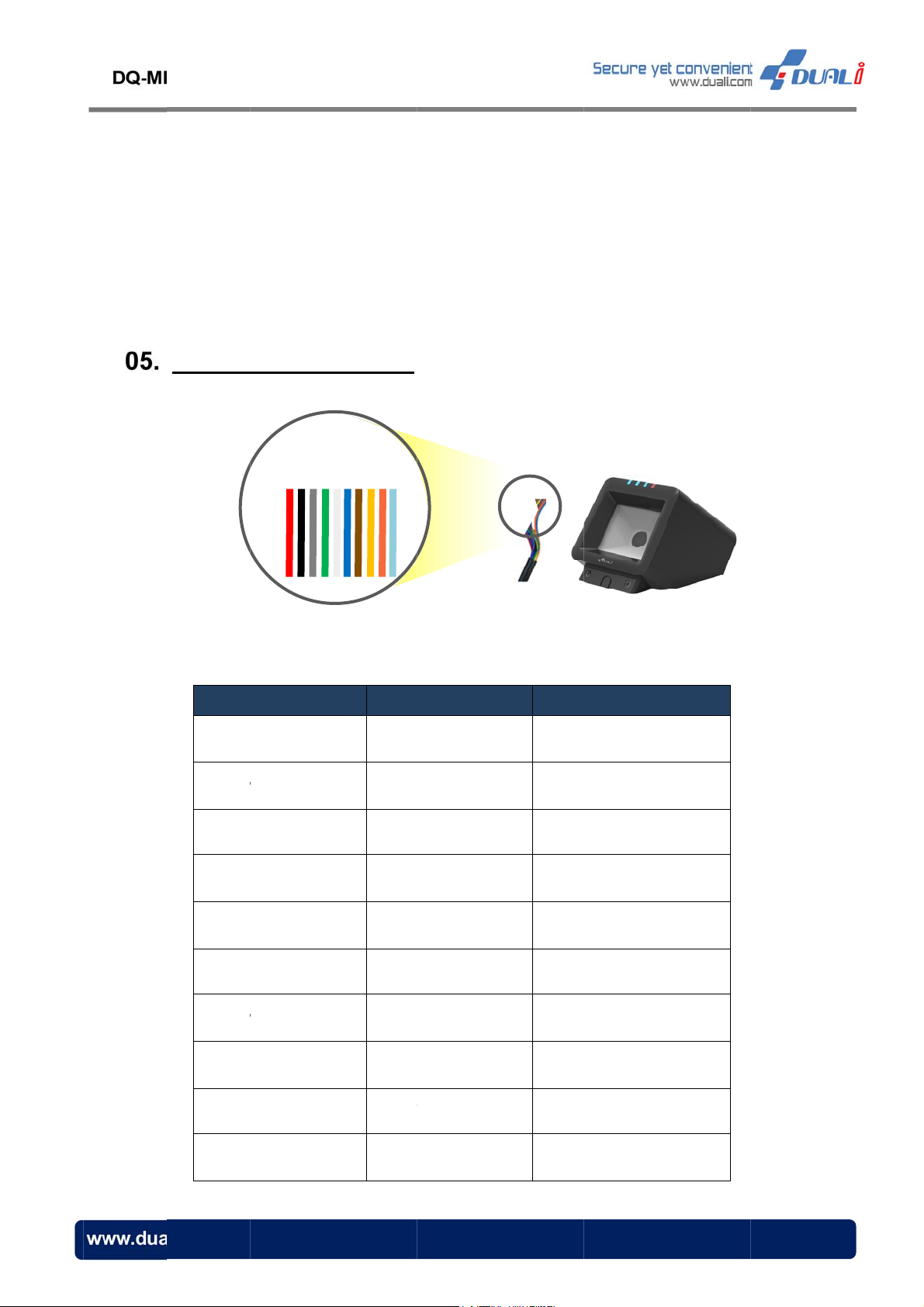
NI User
M
P
P
R
R
WWP
T
X
X
N
Y
anual, Ve
rsion: 1.0
0
Conne
ction D
IN NAME
PWR_IN
WR_GND
iagram
COLOR
RED
BLACK
NUMBER
1
2
li.com
S232_R
S232_T
GD_D0
GD_D1
WR_GND
LED
BEEP
AMPER
GRAY
PI
K or JADE
GREEN
WHITE
BLUE
BROWN
YELLOW
VIOLET
3
4
5
6
7
8
9
10
9
Page 10
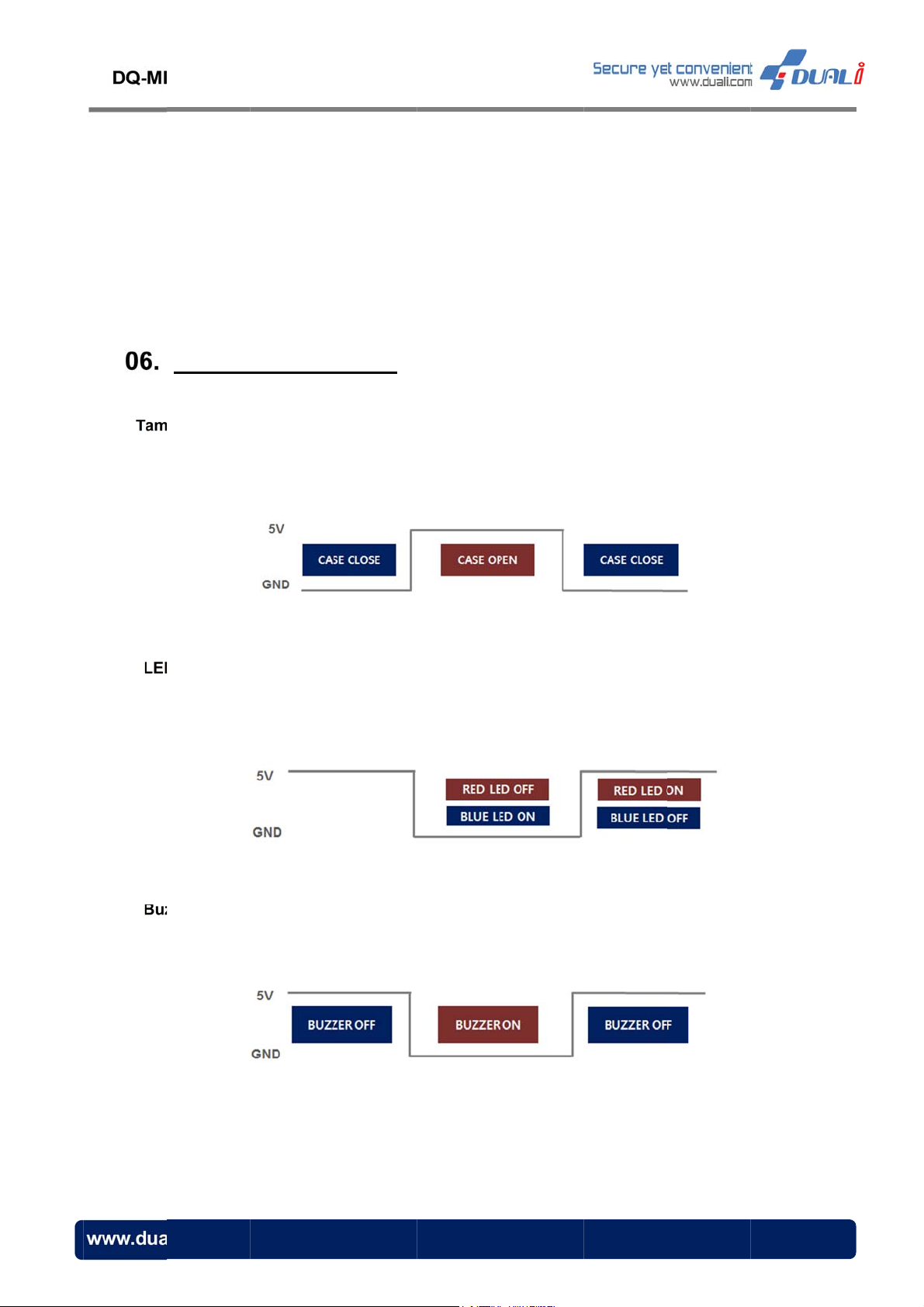
NI User
M
t
c
w
w
l
U
a
e
s
R
e
h
h
r
S
n
R
N
O
e
E
n
V
R
0
anual, Ve
rsion: 1.0
0
Opera
per (TAMP)
Read
to ac
other
Control:
Read
LED
ion &
:
er makes al
ess controll
ise (open)
er turns on
ill be on.
sage
rm when its
r. In case o
hows 5V.
ED LED w
CASE is fo
f closed CA
en LED Sig
ced to open
E, TAMPE
al (BROW
. It also mak
line (VIOL
) with 0V. I
es TAMPE
T) shows 0
case of 5V,
signal
V and
BLUE
zer Contro
li.com
Read
:
er makes b
ep sound w
en BEEP S
ignal (YELL
W) with 0
.
1
Page 11
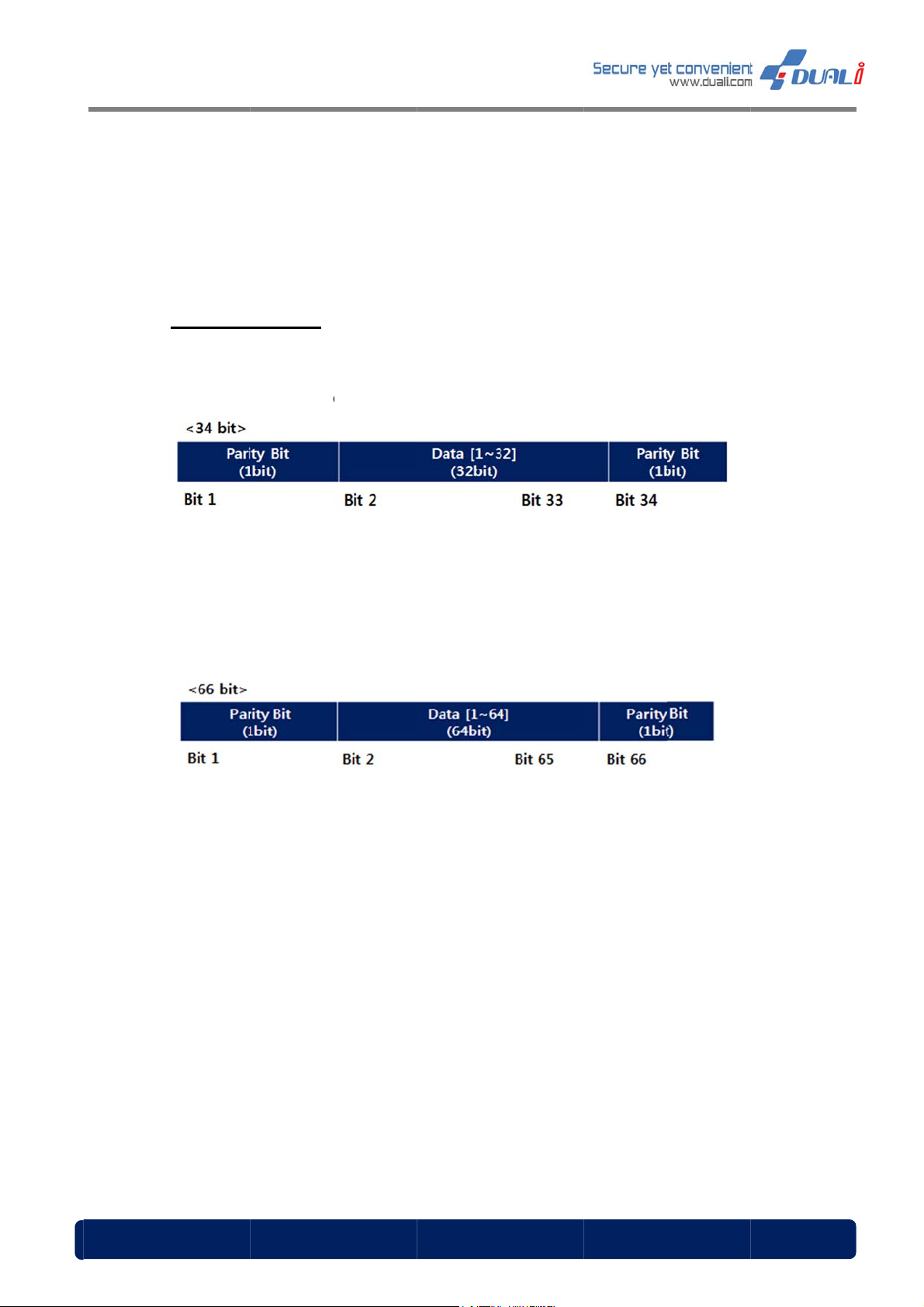
DQ-MI
a
a
M
F
a
r
a
a
r
a
a
>
a
>
a
c
y
y
y
D
e
y
p
e
p
t
D
a
a
r
r
2
1
b
a
y
o
r
s
t
1
NI User
anual, Ve
rsion: 1.0
0
07.
[Dat
-
-
Output
format]
Data form
ormat
t can be de
Fi
st Bit (Parit
ided by se
) : Even
tting. (Refe
arity of bit
to chapte
~ bit 17
10)
D
L
ta [1-32]
st Bit (Parit
: ID numb
) : Odd
r (transmiss
arity of bit
ion data)
8 ~ bit 33
Fi
D
st Bit (Parit
ta[1-64] : I
st Bit (Parit
L
FeliC
Mifar
): Even pari
number(tra
a™ card – I
card – C
) : Odd p
ty of bit 2 ~
nsmission d
M data(8b
rd serial nu
rity of bit 34
it 33
ta)
tes)
mber(4byte
~ bit 65
)+0x00(4by
es)
www.du
<32bit
D
<64bit
D
li.com
ta[1-32]
ta[1-64] :
: ID numbe
(transmissi
n data)
1
Page 12
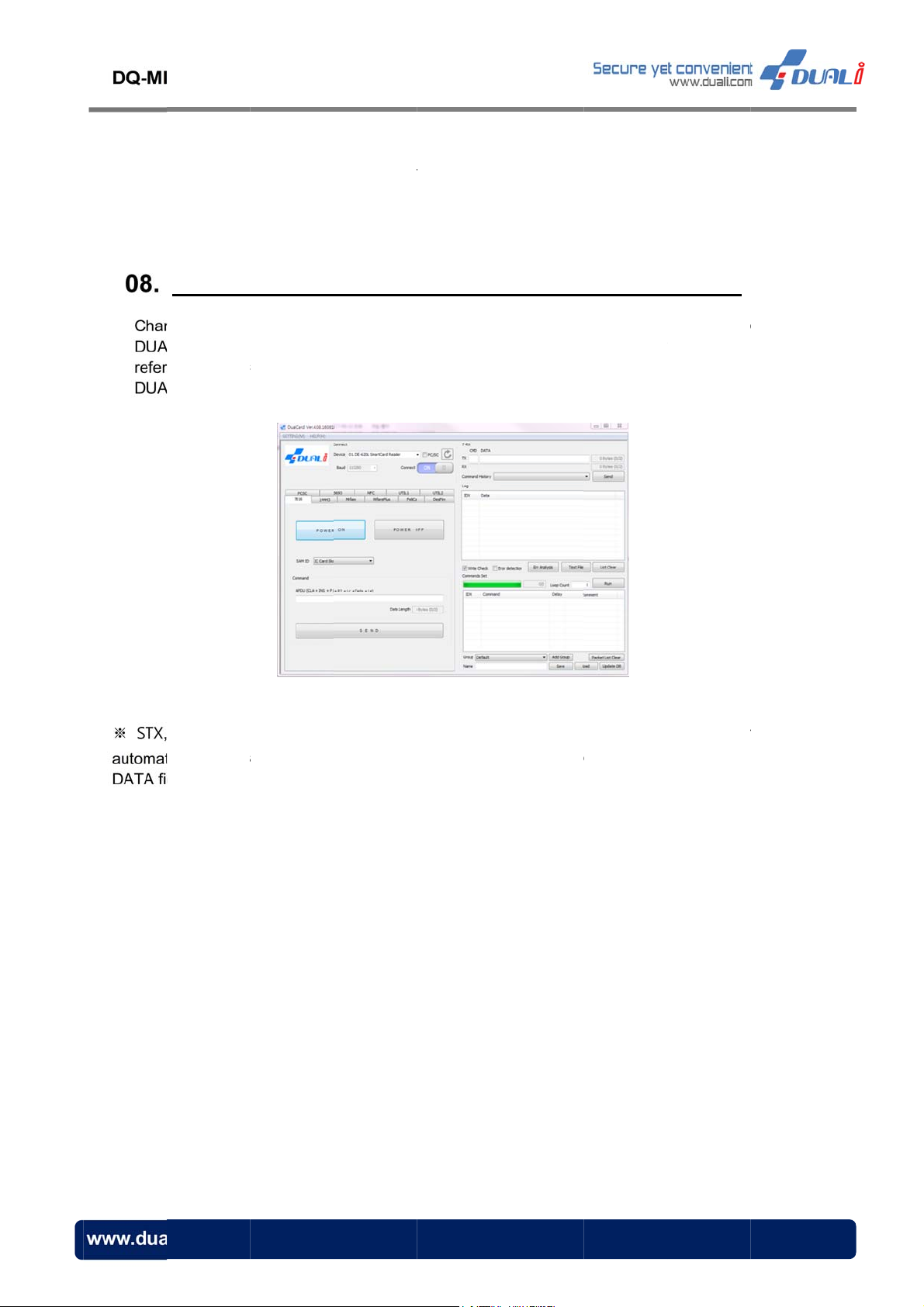
NI User
M
o
c
n
a
e
f
g
o
a
a
o
o
n
(
p
b
m
g
N
o
w
s
s
c
(
t
o
e
t
e
e
c
m
v
o
c
e
r
c
2
anual, Ve
rsion: 1.0
0
Functi
ging the re
Li. You can
ing to the
Li SDK Man
FeliC
Mifar
n con
ader setting
easily chan
ommunicati
ual.)
a™ card –
card – C
igurati
s is also p
e the setti
n frame bel
IDM data(8
rd serial nu
n (Co
ssible usin
g of DQ-MI
ow. (For m
ytes)
mber(4byte
muni
the SDK
I by execu
re informati
)+0x00(4by
ation s
DualCard p
ing the corr
n on dual
es)
tting)
rogram) pr
esponding
ards, pleas
vided by
ommand
refer to
LENH (Le
ically calcul
lds.
gth High)
ted in the
nd LENL
dual card
Length Lo
rogram. Ju
) value of
t input corr
each com
sponding
unication f
alue on ea
ame are
h CMD/
li.com
1
Page 13
DQ-MINI User Manual, Version: 1.00
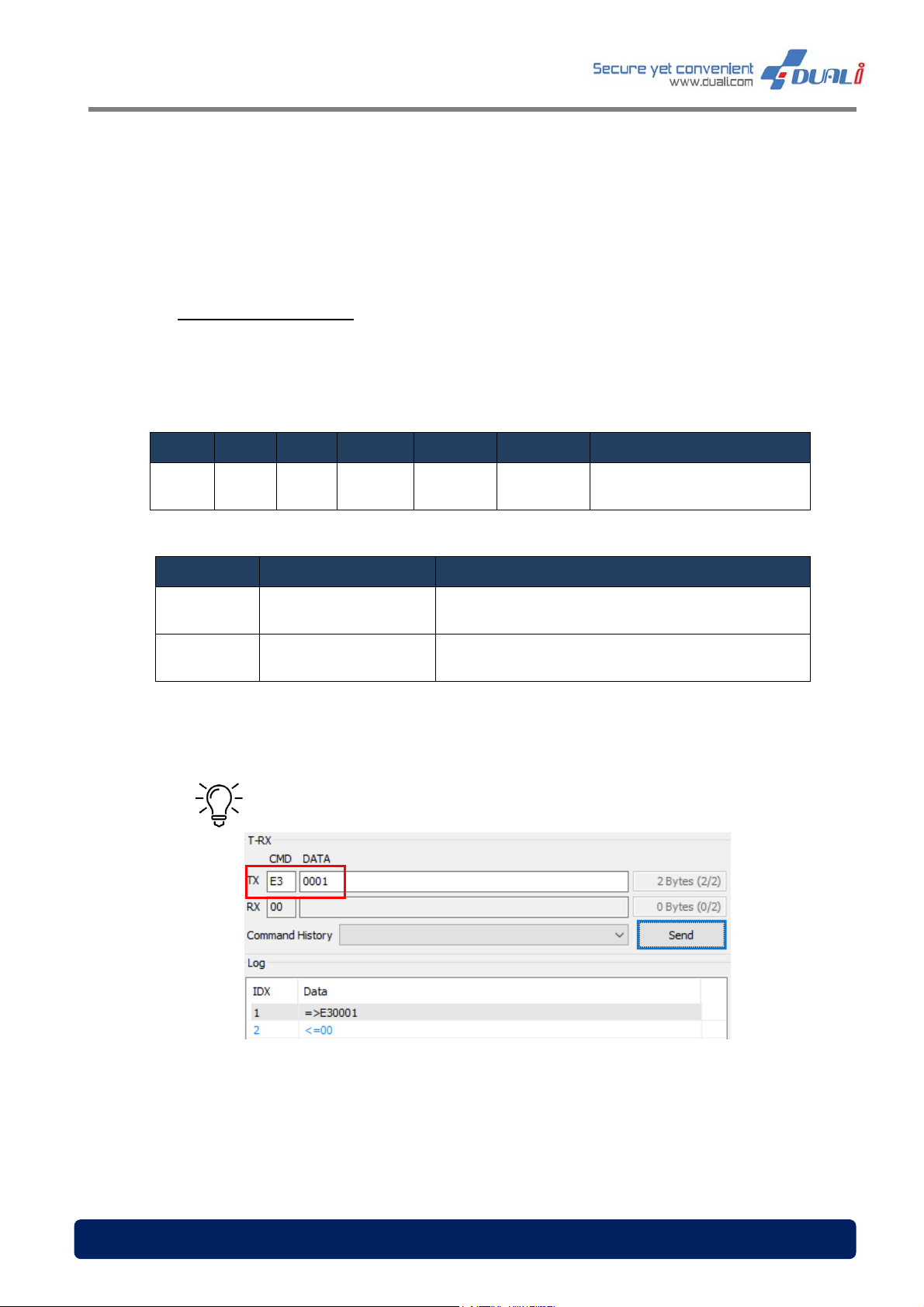
08.1 QR Mode option set
Following is the communication frame for QR mode setting. Since it is saved in flash memory
after the first setting, the reader does not need to be set again.
(115,200bps, 8 data, no parity, 1 stop bit)
STX LENH LENL CMD DA TA[0] DATA[1] LRC
0x02 0x00 0x02 0xE3 0x00 DATA[1]
DA TA[1] State Description
0x00 Presentation mode QR scan mode change to Presentation mode
0x01 Manual Trigger mode QR scan mode change to Manual trigger mode
Tip – To change the QR Mode to Presentation mode
(^: exclusive oring)
LENH^LENL ^ CMD ^
DATA[0]^DATA[1]
www.duali.com 13
Page 14
DQ-MINI User Manual, Version: 1.00
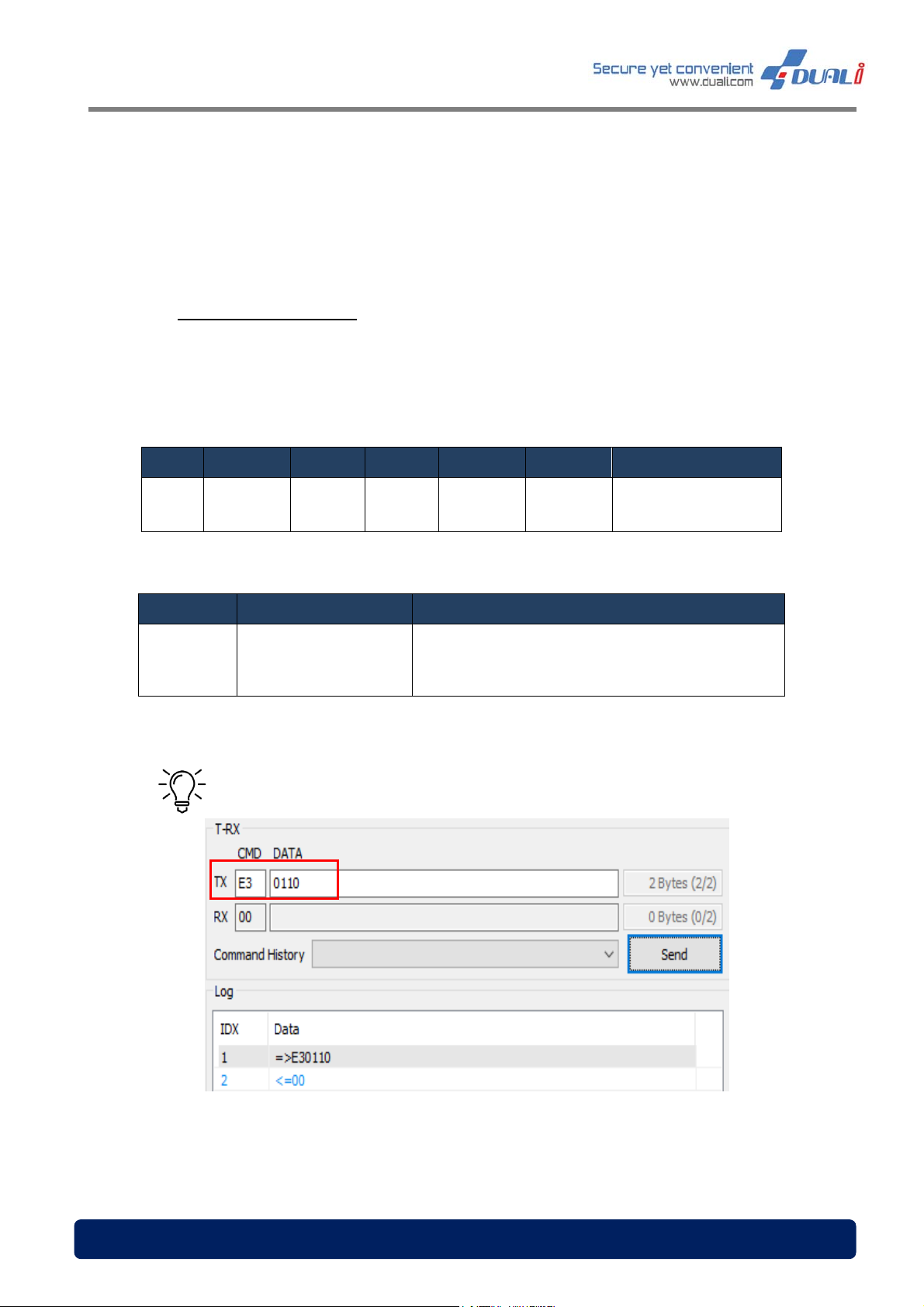
08.2 QR Reading timeout
Following is the communication frame for same QR reading timeout setting. Since it is saved
in flash memory after the first setting, the reader does not need to be set again.
(115,200bps, 8 data, no parity, 1 stop bit)
STX LENH LENL CMD DATA[0] DATA[1] LRC
LENH^LENL ^ CMD ^
0x02 0x00 0x02 0xE3 0x01 DATA[1]
(^: exclusive oring)
DATA[0]^DATA[1]^DA
TA[2]
DA TA[1] State Description
Set same QR reading timeout
(Range: 05~0x32(=50))
0x05~0x32
Timeout Parameter
Tip – To set the same QR read timeout for 1.6s(1600ms)
Each numbers are automatically multiplied by DQ-
MINI
www.duali.com 14
Page 15
DQ-MINI User Manual, Version: 1.00
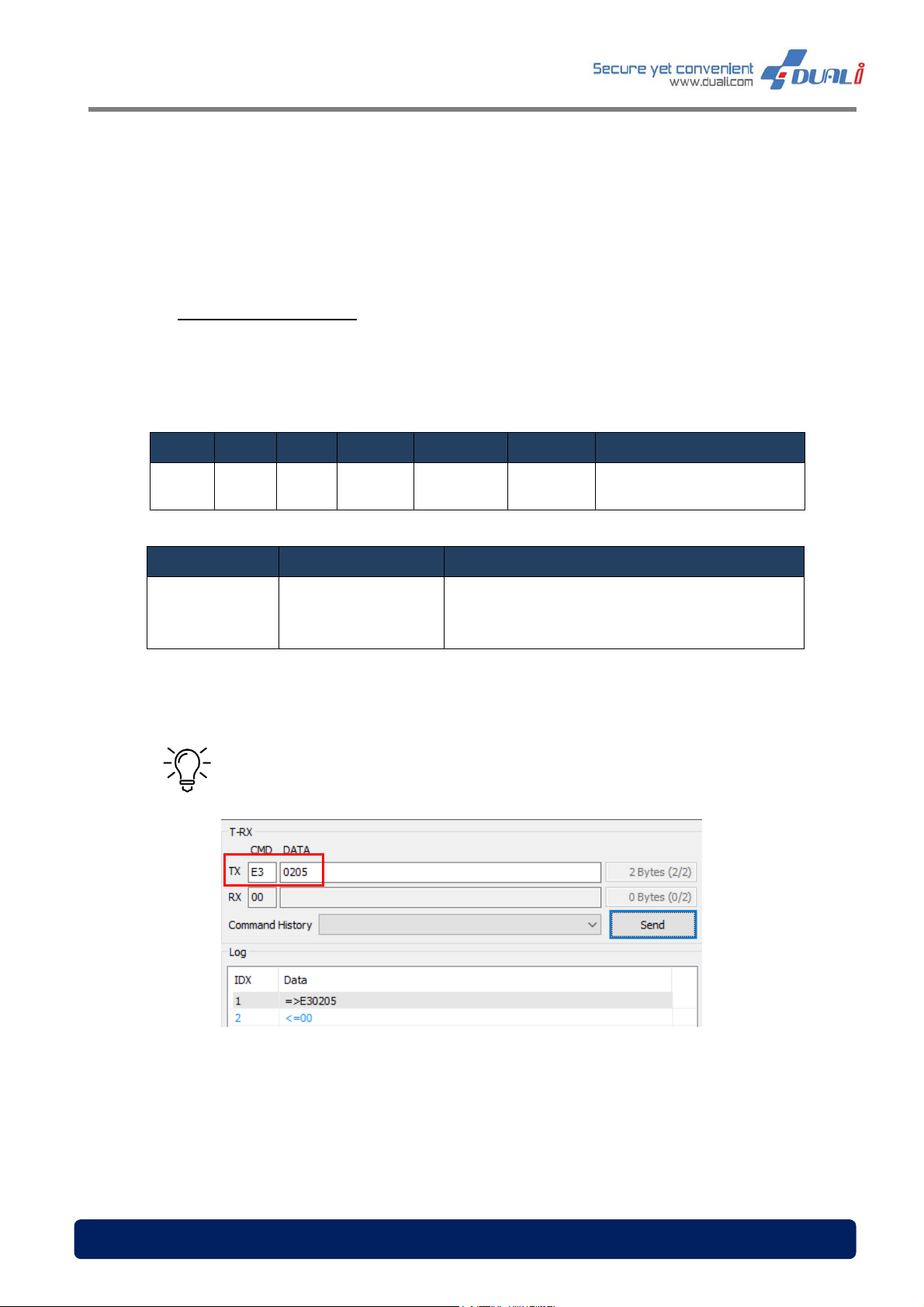
08.3 QR scan interval set
Following is the communication frame for QR Scan interval option setting. Since it is saved in
flash memory after the first setting, the reader does not need to be set again.
(115,200bps, 8 data, no parity, 1 stop bit)
STX LENH LENL CMD DATA[0] DATA[1] LRC
0x02 0x00 0x02 0xE3 0x02 DATA[1]
( ^ : exclusive oring)
DA TA[1] State Description
QR Scan Interval setting(Range:
0x02~0x1E QR Scan interval
Each numbers are automatically multiplied by
0x02~0x1E(=30))
DQ-MINI
* THIS MODE IS ONLY WORK ON QR MANUAL TRIGGER MODE
Tip – To set the QR scan interval to 0.5s(500ms)
LENH^LENL^CMD^
DATA[0]^DATA[1]
www.duali.com 15
Page 16
DQ-MI
a
4
0
M
i
e
h
N
0
0
g
a
g
r
a
m
f
r
g
u
Q
m
e
t
D
0
c
^
A
t
6
d
M
6
NI User
anual, Ve
rsion: 1.0
0
08.
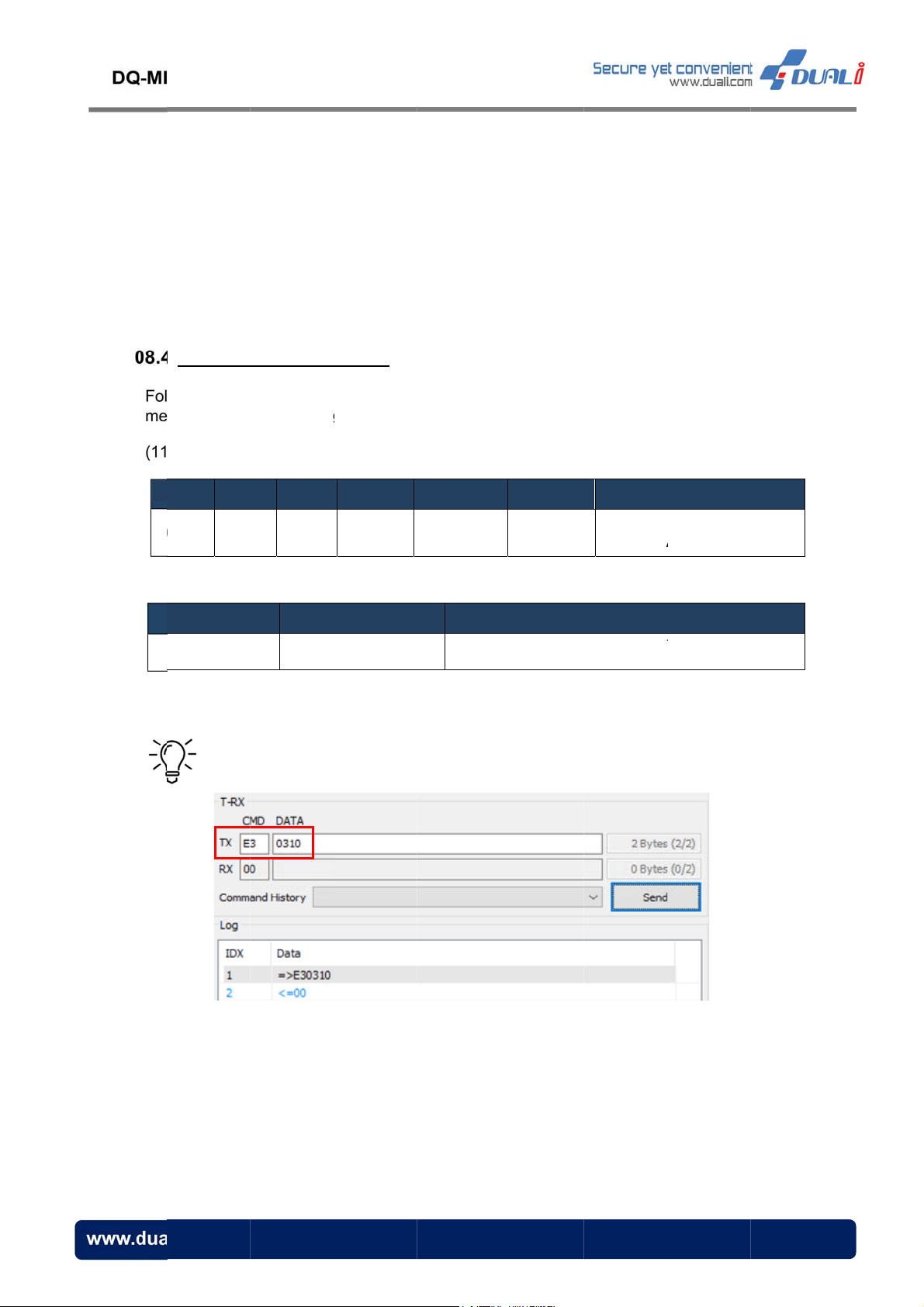
QR Max
Fol
lowing is th
mory after t
me
5,200bps, 8
(11
STX LE
x02 0x
mum len
communic
e first settin
data, no pa
H LENL
0 0x02
th set
tion frame
, the reade
ity, 1 stop bi
CMD
0xE3
(^: excl
or QR maxi
does not n
t)
DA TA[0]
0x03
usive oring)
um length
ed to be se
DA TA[1]
DATA[1]
setting. Sin
again.
LENH
DAT
e it is save
LRC
LENL ^ C
A[0] ^DATA[
in flash
D ^
1]
DATA[1]
0x01~0x1
Tip –
QR M
To set the
State
ximum len
aximum
th
R length to
QR Maximu
0x
16
escription
length set
1~0x10(=1
ting(Range:
))I
www.du
li.com
1
Page 17
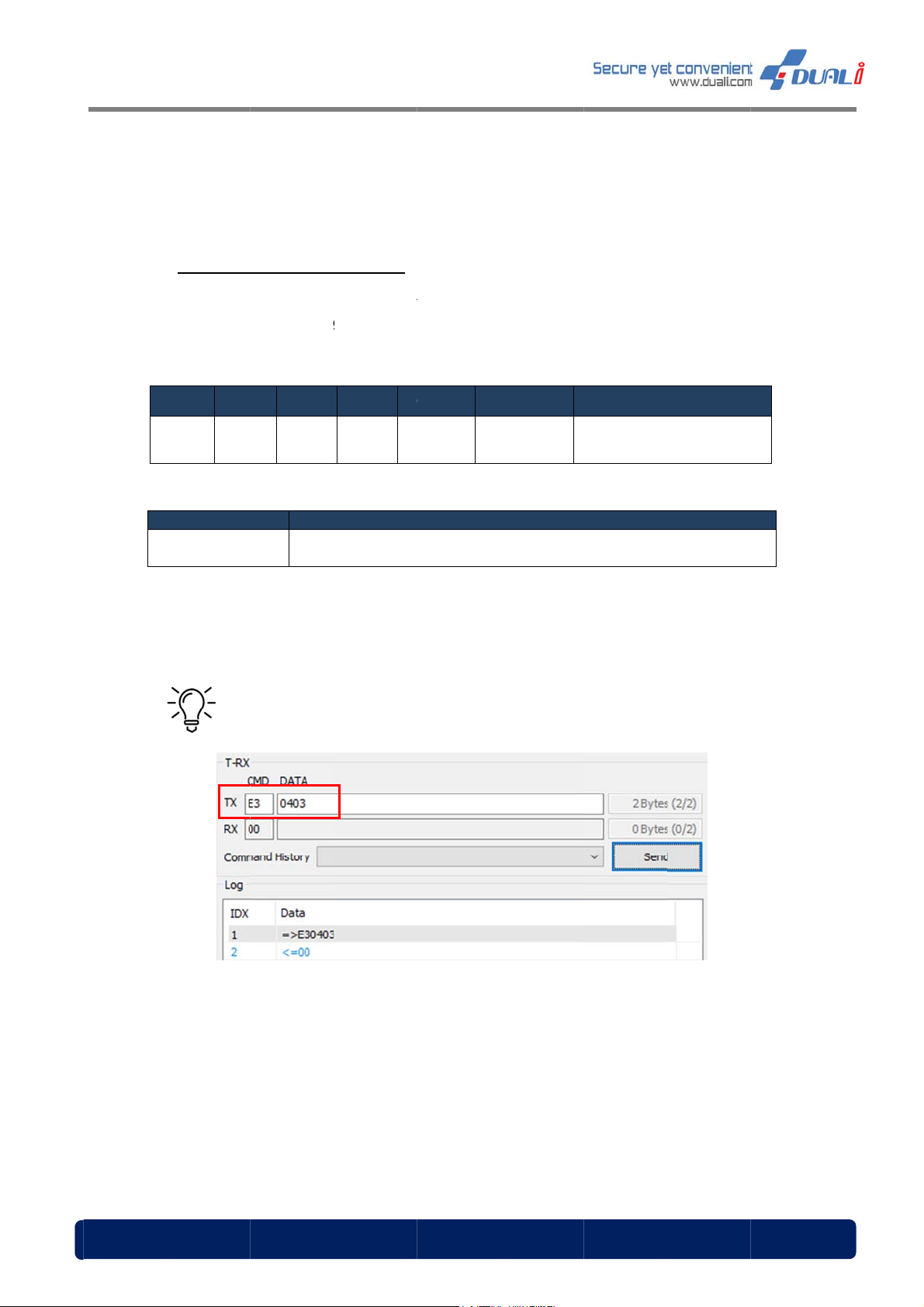
DQ-MI
a
5
0
※
M
e
h
N
0
e
p
a
a
g
r
2
h
f
r
N
s
e
D
D
2
e
n
t
N
R
R
d
7
NI User
anual, Ve
rsion: 1.0
0
08.
QR data
Fol
lowing is th
mory after t
me
5,200bps, 8
(11
STX LE
x02 0x
DATA[1]
0x02
send ch
communic
e first settin
data, no pa
H LENL
0 0x02
nnel set
tion frame
, the reade
ity, 1 stop bi
CMD D
0xE3
(^:
for QR data
does not n
t)
ATA[0]
0x04
exclusive or
RS-
send chan
ed to be se
ATA[1]
DATA[1]
ing)
escription
32 Send O
el set. Sinc
again
LENH^ LE
DATA[0]
e it is save
L
RC
NL ^ CMD ^
^DATA[1]
in flash
Default s
Ti
tting is RS-
– To set t
32 send O
e QR data
end via Wi
gand and
S-232
www.du
li.com
1
Page 18
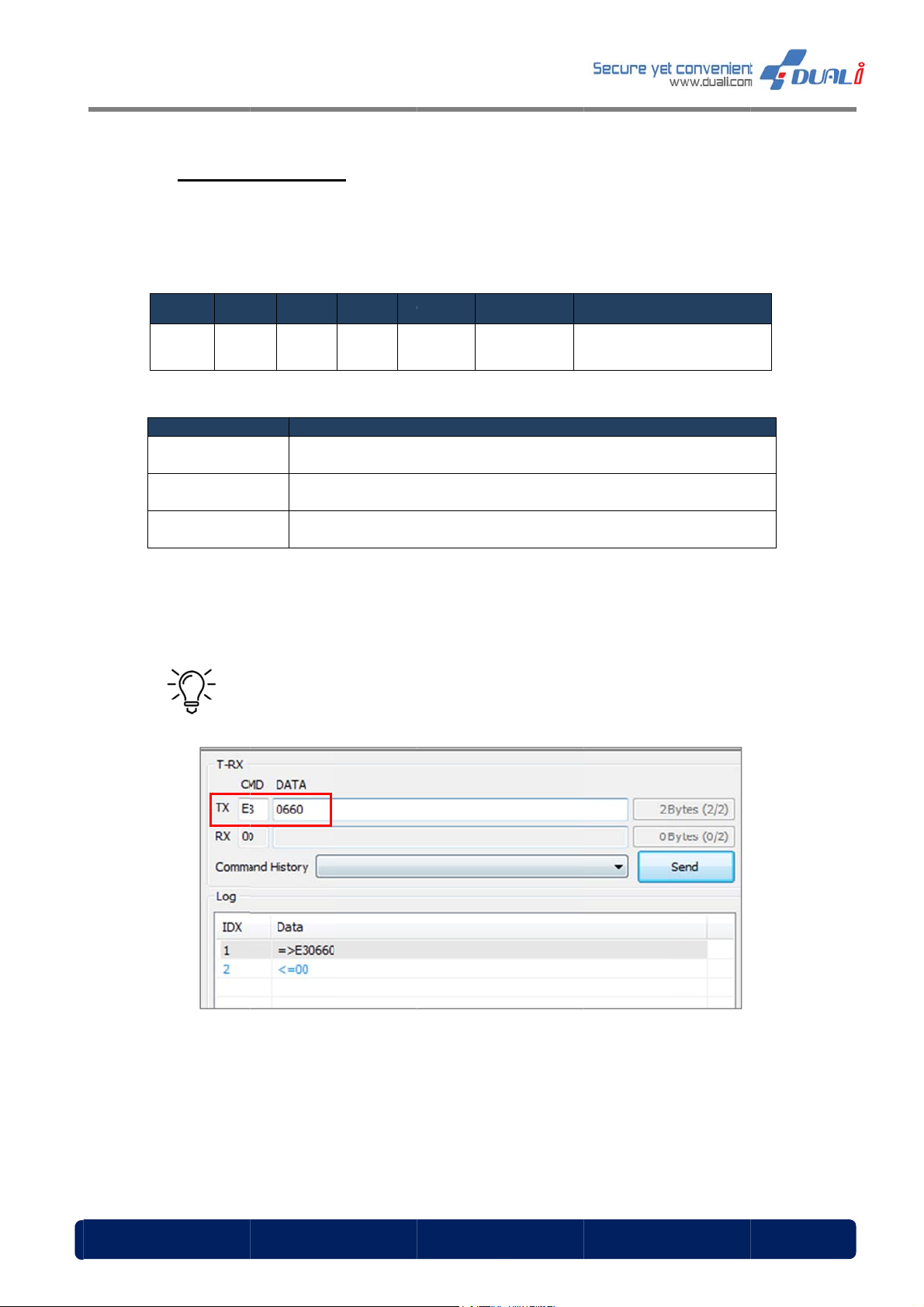
DQ-MI
a
6
0
※
M
n
e
N
0
M
p
e
a
d
r
A
h
o
e
e
s
a
D
D
P
6
e
e
N
N
e
R
T
m
8
NI User
anual, Ve
rsion: 1.0
0
08.
RF Sca
Fol
lowing is th
first setting,
the
5,200bps, 8
(11
STX LE
x02 0x
DATA[1]
0x40
0x20
0x08
Reading
option s
communic
the reader
data, no pa
H LENL
0 0x02
ifare Type
t
tion frame f
oes not ne
ity, 1 stop bi
CMD D
0xE3
(^:
can not b
r RF Scan
d to be set
t)
ATA[0]
0x06
exclusive or
TY
Fel
15
turned off
etting. Sinc
gain
ATA[1]
DATA[1]
ing)
escription
E-B Scan O
ica Scan O
93 Scan O
it is saved
LENH^ LE
DATA[0]
in flash me
L
RC
NL ^ CMD ^
^DATA[1]
ory after
Ti
– To set t
e reader to
read Mifar
type A , F
liCa™ and
ypeB
www.du
li.com
1
Page 19
DQ-MI
a
b
M
c
d
T
:
e
t
g
o
s
n
r
e
n
t
r
h
o
u
t
o
n
e
d
s
u
w
r
e
t
c
e
n
e
m
t
d
n
t
p
p
a
i
e
e
n
e
e
m
g
a
m
x
s
d
o
a
e
s
e
n
a
e
t
p
o
c
p
r
R
m
o
e
n
e
r
e
c
e
h
a
s
r
d
h
r
a
p
e
h
p
o
e
v
n
f
9
NI User
anual, Ve
rsion: 1.0
0
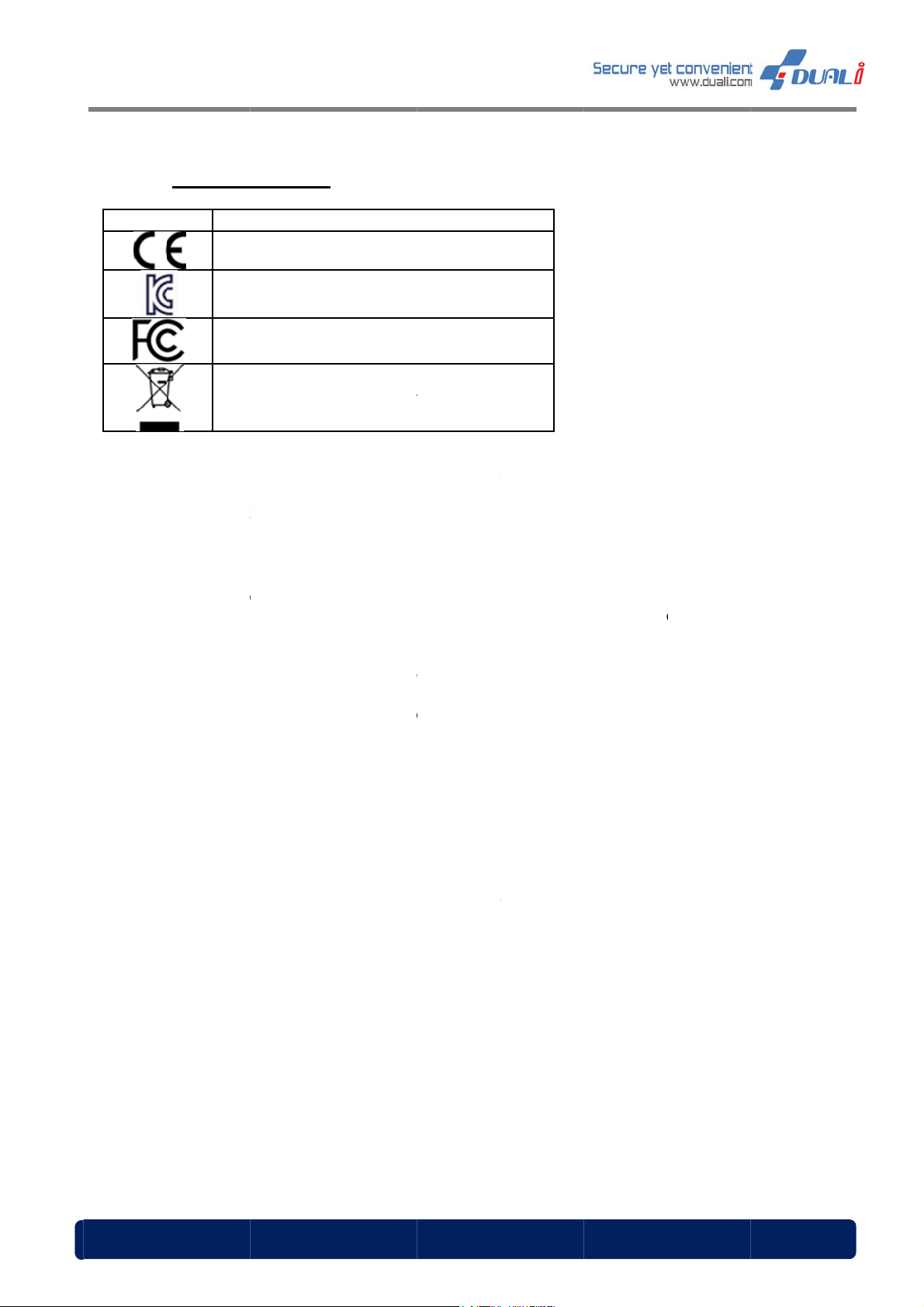
09.
Sym
-
-
-
-
Certifi
ol
Fe
El
FCC STA
CAUTION
responsibl
equipmen
NOTE: Thi
Class B di
designed t
residential
frequency
instruction
there is no
installatio
television
on, the us
the followi
- Reorient
- Increase
- Connect
which the
- Consult t
*Please c
ations
Communa
Korea
eral Comm
ectrical was
EMENT
Changes
for compl
.
s equipme
ital device
provide r
installation
energy an
, may cau
guarantee
. If this eq
eception,
r is encou
g measur
or relocate
the separa
he equipm
eceiver is
e dealer o
ntact our s
Descriptio
ute Europe
Certification
nication Co
e and electr
r modifica
iance coul
t has bee
, pursuant
asonable
. This equi
, if not inst
e harmful
that interfe
ipment do
hich can b
aged to try
s:
the receivi
ion betwe
ent into an
onnected.
r an experi
rvice tea
n
nne Markin
Marking
mission M
onics equip
ions not e
void the u
tested an
o Part 15
rotection
ment gen
lled and u
nterferenc
rence will
s cause h
e determin
to correct
g antenna
n the equi
outlet on a
nced radi
for the te
rking
ent
pressly ap
er's autho
found to c
f the FCC
gainst har
rates uses
ed in acco
to radio c
ot occur in
rmful interf
d by turni
he interfer
.
ment and
circuit diff
/TV techni
hnical/ sal
roved by t
ity to oper
mply with
ules. The
ful interfe
and can ra
rdance wit
mmunicati
a particula
rence to r
g the equi
nce by on
eceiver.
rent from t
ian for hel
s supports
e party
te the
the limits f
e limits ar
ence in a
diate radio
the
ons. Howe
dio or
ment off a
or more o
at to
.
r a
er,
d
www.du
li.com
1
Page 20

DQ-MINI User Manual, Version: 1.00
10. Warranty & Service
Warranty and Repair service
- DUALi Inc. warrants to the original consumer or other end user that this product, DQ
MINI, is free from defects in materials and workmanship for a period of 1 year from the
date of purchase.
※ Note Warranty/non-warranty repair fees do not include shipping charges.
‣ The damages(defaults) prescribed below are NOT to be covered by warranty.
- User’s misuse of part/component against the provided manual.
- Fault by the unqualified user’s own intention of repairs.
- Adding certain functions or extension of system.
PRECAUTIONS
Do not drop the device.
Do not modify, repair, or disassemble.
Do not expose directly to water, alcohol, benzene, etc for cleaning.
Do not expose directly to flammables.
Do not place or keep the device near flammables.
Keep the device away from excessive humidity and dust.
Do not place heavy objects on the device.
Changes or modifications not expressly approved by the party responsible
for compliance could void the user’s authority to operate the equipment.
www.duali.com 20
Page 21

DQ-MINI User Manual, Version: 1.00
*Please contact our service team for the technical/ sales supports.
DUALi Inc.
1-309 Innoplex, 552 Woncheon-dong, Youngtong-gu, Suwon, Gyeonggi-do, South Korea
443-824
Tel : +82 31-213-0074
Fax : +82 31-213-0078
E-mail : [email protected]
Web-site : http://www.duali.com
www.duali.com 21
 Loading...